

Why PayPal Automatic Payment Declines and What It Means for Blixo
Key Takeaways
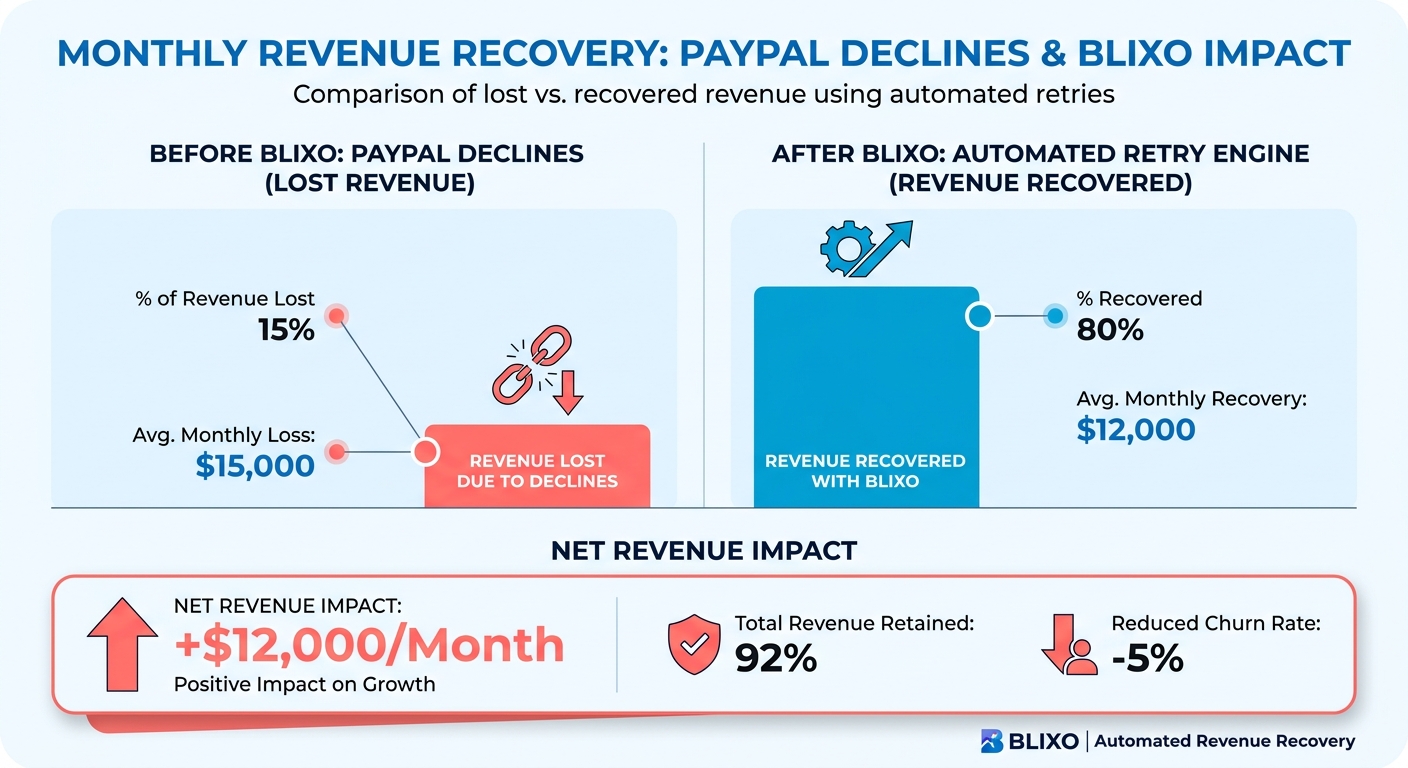
- A 15% decline rate on PayPal recurring payments can wipe out roughly 20% of expected monthly revenue.
- Most failures come from boring stuff: expired cards, unconfirmed emails, and bank security holds. Not customer intent.
- A SaaS company with 1,000 PayPal subscribers can see ~150 declines a month, which adds up to 30+ hours of manual cleanup.
- PayPal’s vague “security check failed” messages leave you guessing, which is why so many declines need the customer to act before they resolve.
- Decline rates spike during back-to-school and holiday seasons, when fraud filters tighten.
- Automated retry and fallback routing (Stripe, ACH) can recover a meaningful share of failed payments without anyone lifting a finger.
Why a Failed PayPal Payment Costs More Than the Payment
A failed PayPal charge isn’t just a paused transaction. For subscription businesses and service providers, it kicks off a chain: outreach emails, hunting down updated billing details, manual resubmits, and a customer who’s now wondering whether to bother renewing at all.
The frustrating part is that most of these failures have nothing to do with whether the customer wants to pay.
Why most declines aren’t the customer’s fault
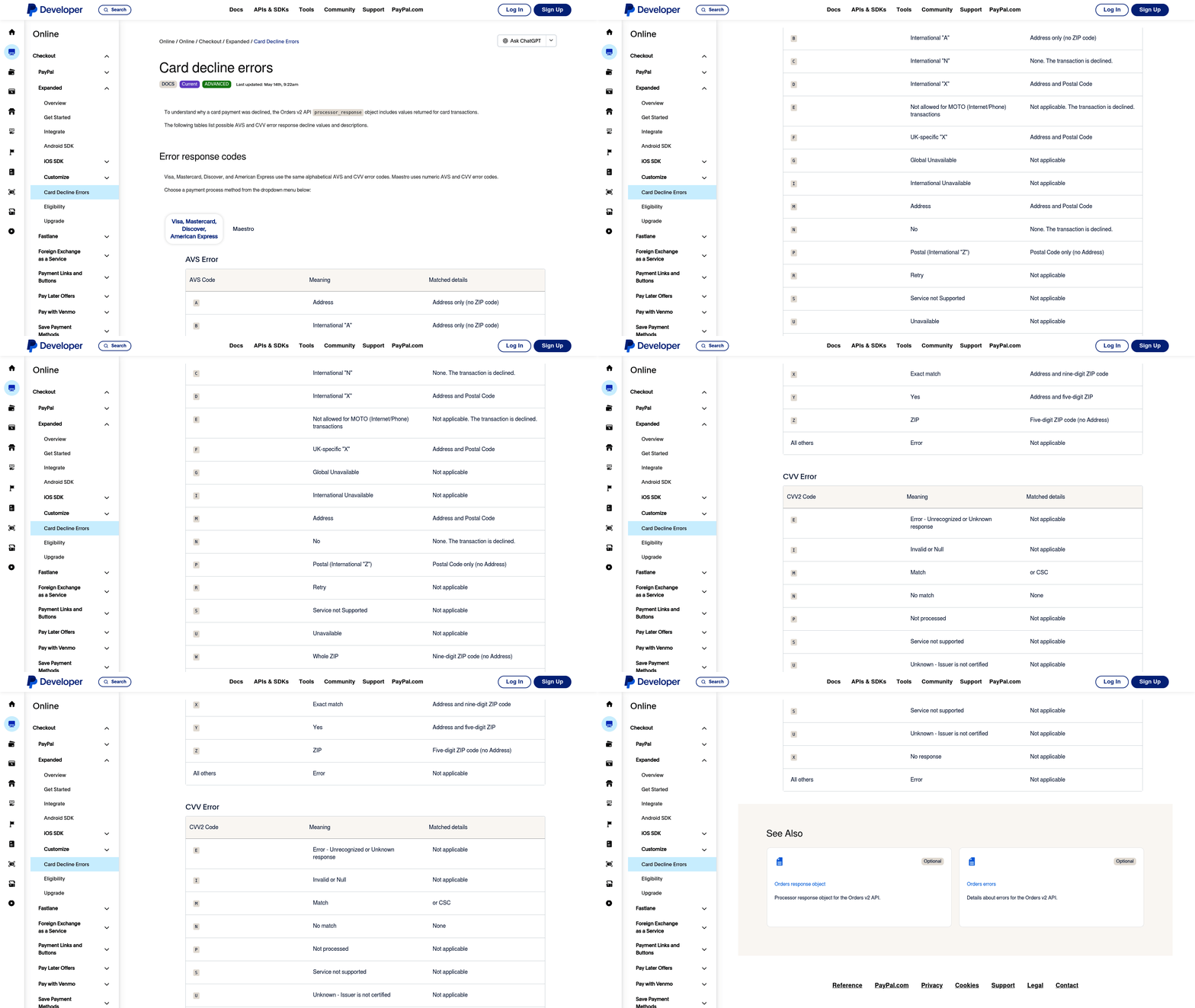
A lot of failures trace back to standard banking protocols, not intent. Expired card credentials. Unverified account details. A sudden bank-imposed restriction. When the issuing bank flags a transaction, PayPal usually hands you a generic error code and not much else, so you’re left without enough information to fix it. That friction gets worse during high-volume periods, when fraud detection runs at its strictest thresholds.
The hidden cost is the cleanup
Beyond the lost funds, declines create real administrative drag. Someone has to draft the outreach, chase the updated card, resubmit the charge. That’s time pulled away from product and marketing. And every time a customer gets pinged to “fix your billing,” they get one more reason to reconsider the subscription. That’s how involuntary churn creeps in: not through a cancel button, but through repeated friction.
Where automated fallback helps
Rigid retry schedules and manual customer portals don’t handle temporary banking blocks well. The more useful approach is dynamic retry logic that reads real-time transaction data. When a primary PayPal charge fails, the system can reroute through a connected gateway like Stripe or switch to ACH, in the background, while the subscription stays active and the merchant sees the update on the dashboard. Done right, that fallback recovers up to 40% of revenue that would otherwise just disappear. Done right being the operative phrase.
What’s Actually Failing: The Common Decline Causes
Building a billing system that doesn’t bleed revenue starts with knowing why transactions fail. Some declines are simple. Others come from a tangle of interactions between card networks, issuing banks, and PayPal’s risk models.
Insufficient funds
When a card or bank account is short, PayPal declines the charge. Banks also block temporarily during disputes or fraud reviews. Left alone, these become permanent losses. The smarter move is to time the retry. If a payment fails on the 1st, retrying on the 5th catches a lot of customers after their funds clear. Blixo schedules retries during these likely funding windows instead of hammering the same dead charge.
Expired payment methods
Expired cards and canceled accounts are a top cause of recurring failures. PayPal flags them as invalid and the subscription stalls. Scanning for soon-to-expire methods and prompting customers to update before the charge attempt cuts down on follow-ups. One SaaS provider saw a 37% drop in failed payments after Blixo automatically replaced 2,400 outdated cards in a single billing cycle.
Bank-imposed restrictions
Banks sometimes freeze accounts or limit transaction types over suspicious activity, and PayPal relays the restriction without much guidance. That’s where a human bridge helps: verifying account status and suggesting alternatives like instant bank transfer when card payments are blocked. A nonprofit using Blixo cleared 150+ donor payment issues in a month by rerouting through verified ACH while their primary method was under review.
Technical errors and outages
PayPal outages and API miscommunications can block perfectly valid payments. These resolve fast, so a manual retry usually works, but only if you catch it quickly. An automated retry engine that detects the glitch and resubmits within minutes beats waiting days to even notice the lost revenue. During a recent PayPal maintenance window, Blixo clients recovered 92% of failed transactions automatically, versus 18% for those without automation.
Hit each of these failure points deliberately and the cash flow stabilizes. So does your team’s calendar.
Troubleshooting a Declined Payment, Step by Step
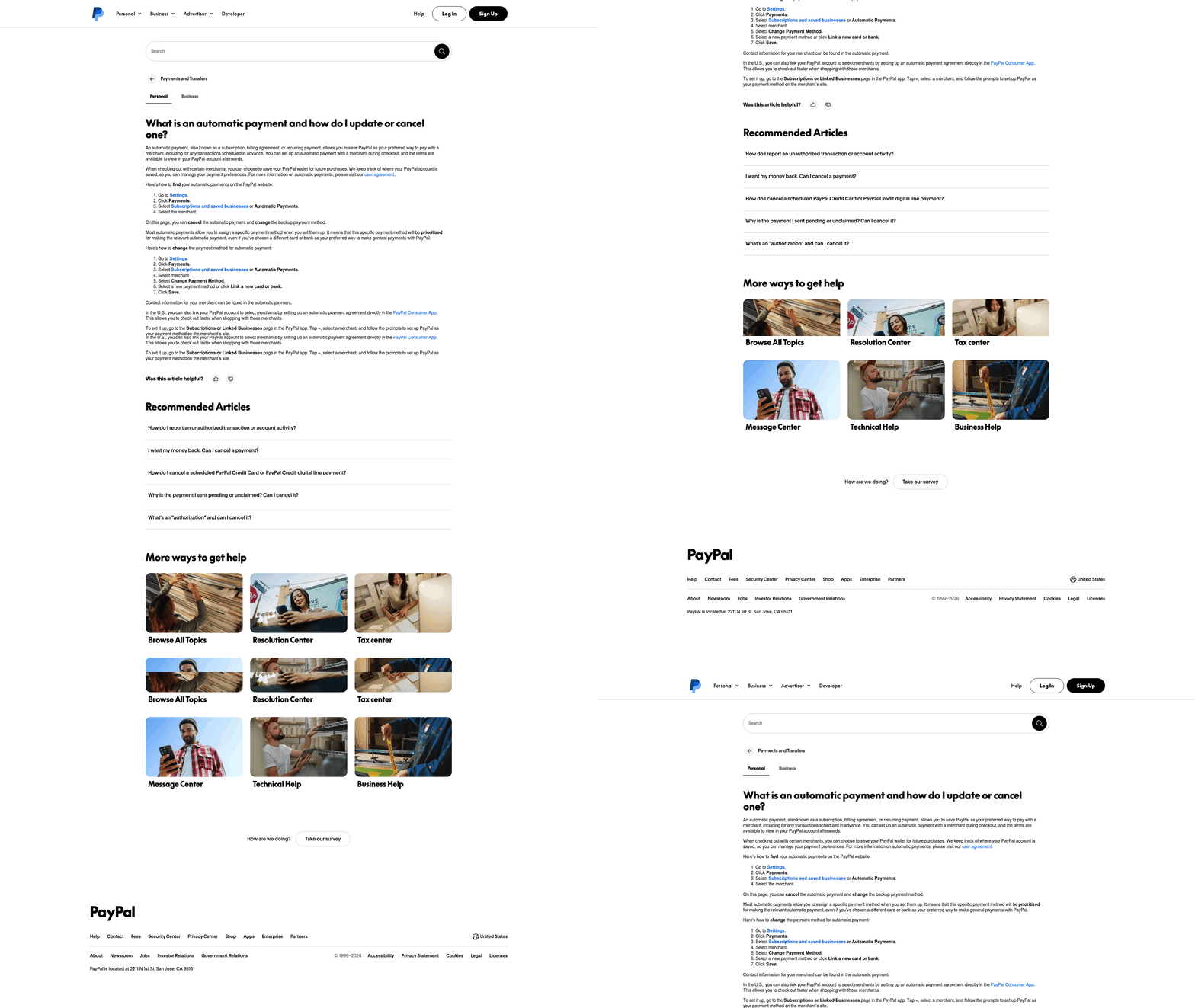
When a transaction fails, a structured response keeps service running and limits the leakage. Here’s the diagnosis-to-resolution path.
What to do the moment a payment declines
Start with the transaction metadata. Mismatched billing addresses, expired card fields, and unverified account statuses trigger most automated blocks. Checking these first tells you whether you’re dealing with a simple data-entry slip or a deeper banking restriction.
Then read the error codes in your billing dashboard. Sorting failures by type lets you apply the right fix: wait out a temporary hold, or prompt the customer for a new payment method right away. Automating that triage handles the easy cases instantly and keeps you from suspending service over nothing.
Cutting down the back-and-forth with customers
During a decline, transparency is what keeps people from walking. A customer portal that sends instant, plain-language alerts with clear next steps does most of the work. If a payment fails on a bank-imposed limit, the portal tells the customer to update their method or verify their account. According to internal Blixo data from recent quarters, users resolve 68% of issues on their own this way, killing the email chains.
For the cases that need direct contact, logging every interaction in one place matters. Support can see prior declines, retry attempts, and customer replies, so nobody re-asks the same question. One business recovered 73% of failed payments just by walking customers through the portal’s prompts, no escalated support needed.
When retries keep failing
Persistent declines usually mean something deeper: an unresolved account limit or fraud activity. Real-time cash-flow alerts flag the failed retries so you can step in. If a customer’s bank keeps blocking the charge, the system opens a support ticket and suggests alternatives like invoice links or manual transfers.
The hard cases sometimes need coordination with PayPal directly. A European e-commerce business stuck on recurring cross-border failures used regional retry logic to adjust currency conversion settings and cleared 30% of persistent declines within days. Compare that to generic tools that just make you resubmit by hand and watch the revenue gap widen.
A clear escalation path means even the messy billing problems get resolved the same way every time.
Tuning PayPal Settings to Prevent Delays
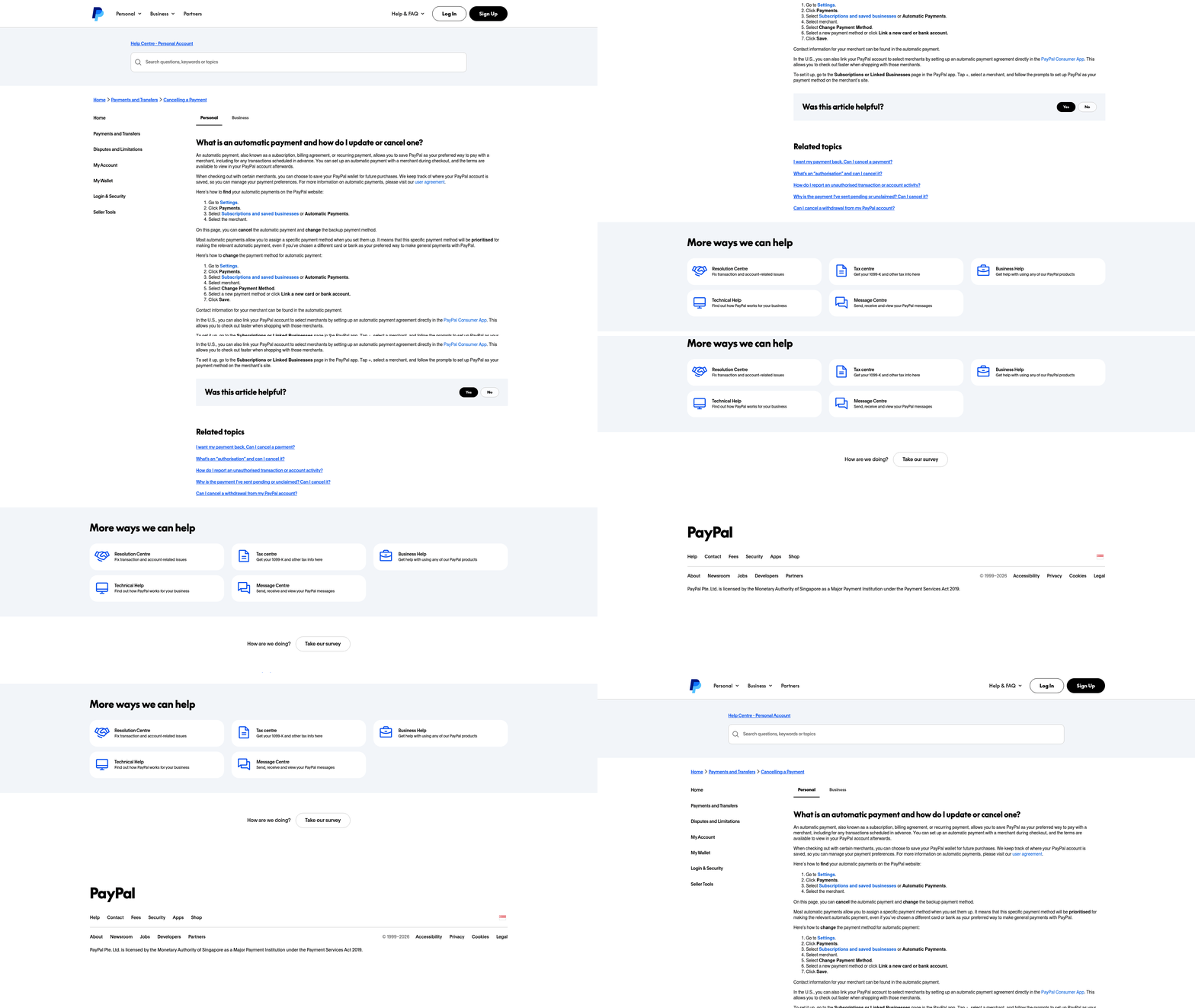
Configuring the gateway up front does a lot of the work for you. Pair your merchant settings with automated recovery and you build a defensive layer against involuntary churn. The key configurations:
Configuring retry settings for actual recovery
PayPal lets you set retry schedules, but the defaults leave money on the table.
- Adjust retry frequency. Increase the number of automatic retries and space them at 7-day intervals instead of the default 14. That gives customers time to fix an expired card before you write off the charge.
- Set dynamic thresholds. Use PayPal’s API to retry only when the decline is fixable (outdated card details) and skip the permanent ones (insufficient funds). Blixo sharpens this by reading decline patterns and adjusting retry timing in real time.
A subscription service improved recovery 35% after aligning retry schedules with customer billing cycles, like rescheduling attempts around payroll dates.
Pairing PayPal notifications with smarter alerts
PayPal’s Instant Payment Notification (IPN) system tells you when a payment status changes, but on its own it’s context-free. To close that gap:
- Enable IPN in PayPal. Go to Account Settings > Payment Receiving Preferences and activate IPN with a webhook URL so your team gets instant decline updates.
- Layer richer alerts on top. Blixo adds context (e.g. “Customer X’s card failed due to security check”) and pushes it to email or Slack, which cuts resolution time from hours to minutes.
On a “security check required” decline, the system can flag it and automatically prompt the customer to confirm their identity on PayPal. That alone reduces manual follow-ups by 70% for businesses running the integration.
Where subscription management fits in
PayPal’s recurring payment features are convenient until a payment detail changes. To keep revenue steady:
- Use PayPal’s Billing Agreements, but pair them with dunning management. Blixo automates the retry logic, updates payment methods when it can, and sends pre-decline reminders before the charge fails.
- Customize your communication templates. Automated messages that point customers straight to the fix (“Your payment failed, update your card here”) reduce churn by 30% compared to generic PayPal alerts.
A digital content provider cut monthly payment failures from 10% to 3% by combining PayPal’s recurring billing with automated dunning and retry. The system rerouted 55% of failed payments with no customer involvement at all.
Reducing Revenue Loss When Declines Happen
Limiting the damage from a failed transaction comes down to two things working together: automation and clear communication.
When a PayPal payment declines, the practical fixes are letting customers update their details through a self-service portal and firing automated follow-up reminders on a schedule that fits your workflow. That’s most of the manual work gone, the kind that piles up in SaaS, subscription, and retainer billing. The same automation applies to both recurring and one-time invoices, so agencies, SaaS providers, and professional services see the same payoff: fewer late fees, less chasing, steadier revenue even when PayPal has a bad day.
Preventive moves that lower decline frequency
Combine PayPal’s native retry settings with separate collection and reminder tools to cover the common decline reasons. A self-service portal where customers keep their own payment info current is the single biggest lever, because it heads off the declines before they happen and removes the friction that gets a subscription abandoned.
PayPal’s default retry logic won’t cover every scenario, so flexible collection tools give you control over how and when reminders go out. An analytics dashboard that surfaces decline trends lets you adjust based on what’s actually happening, not what you assume is happening.
When declines keep coming
If automation isn’t stopping them, the analytics view earns its keep. When a cluster of failures traces back to one bank’s security checks, you can export those cases and send targeted messages through integrated dunning workflows, the kind that balance urgency with empathy and guide customers to fix unconfirmed emails or funding gaps before the next cycle.
For high-value clients, reviewing payment history through the portal helps you catch patterns early. Real-time reconciliation can surface things like seasonal funding gaps, so you can shift billing windows or suggest an alternative method before the decline ever lands. And when a PayPal error message makes no sense, a support team that can interpret it and walk you through resolution is the kind of backup most businesses don’t have in-house.
The point of consolidating these workflows into one interface is simple: you shouldn’t be juggling five tools during a billing crisis.
FAQ
Why does PayPal say “security check failed” with no other detail? Because PayPal often relays the issuing bank’s decision without the underlying reason. The bank flagged the transaction, PayPal passes along a generic code, and you’re left without enough to act on. Usually the resolution requires the customer to confirm their identity or update their method on PayPal’s side.
How many declines should I expect on recurring PayPal payments? Decline rates vary, but 15% isn’t unusual, and at 1,000 subscribers that’s roughly 150 failures a month. Expect spikes during back-to-school and holiday periods, when fraud filters run tighter.
Can failed PayPal payments actually be recovered automatically? A good share of them, yes. Timed retries, automatic card updates, and fallback routing to Stripe or ACH recover payments that would otherwise be lost. Reported recovery rates run high during temporary issues like outages, lower for permanent blocks like insufficient funds.
What’s the difference between a fixable decline and a permanent one? Fixable declines come from things like expired cards or temporary bank holds, where a retry or a customer update resolves them. Permanent ones, like insufficient funds or a closed account, won’t clear on retry and need a different payment method.
How much manual work do declines really create? At 150 monthly failures, expect 30+ hours of cleanup: outreach emails, chasing updated billing details, manual resubmits. Automating the triage and customer communication is what claws most of that time back.
References
[1] Why PayPal Automatic Payment Declines and How to Manage Them - https://ylapemocgpitjrwjeecz.supabase.co/storage/v1/object/public/keywords/images/generated_images/Why_PayPal_Automatic_Payment_Declines_an_20260630_000740_a1ff01.png

Frequently Asked Questions
1. How does Blixo handle PayPal’s vague “security check failed” messages?
When PayPal returns an ambiguous error, Blixo’s routing engine evaluates the transaction’s metadata. If the failure is determined to be a soft decline or gateway-specific block, the system automatically attempts to process the transaction through alternative connected payment processors or alternative methods like ACH, bypassing the specific gateway bottleneck without requiring manual intervention from your team.
2. Can Blixo recover payments during peak seasons with higher fraud checks?
Yes. During high-volume shopping periods, payment processors often tighten fraud filters, leading to an increase in false declines. Blixo mitigates this by analyzing transaction risk in real time and utilizing smart retry schedules. If a transaction is flagged due to seasonal fraud-prevention rules, Blixo can dynamically adjust the retry timing or route the payment through alternative verified channels to ensure successful processing.
3. What if a PayPal payment fails due to insufficient funds?
When a transaction fails due to temporary lack of funds, Blixo avoids immediate suspension. Instead, it pauses and schedules subsequent retry attempts to align with common payroll cycles. Additionally, the system can automatically notify the customer via the self-service portal, offering them the option to link an alternative funding source or complete the payment via an instant bank transfer.
4. How does Blixo’s retry logic differ from PayPal’s default settings?
PayPal’s default retry logic operates on fixed, static intervals (such as retrying every 14 days) regardless of the decline reason. Blixo, by contrast, uses dynamic retry logic that analyzes the specific error code. If a decline is temporary, Blixo retries the payment within days; if it requires customer action, Blixo immediately triggers dunning workflows and fallback payment routing rather than waiting on a rigid schedule.
5. Which industries benefit most from Blixo’s solution?
Any business model relying on recurring revenue—such as SaaS platforms, digital subscription services, agencies, and professional services—benefits significantly. These industries are highly vulnerable to involuntary churn caused by expired cards or bank blocks. Blixo’s automated card updating and smart retry features ensure these recurring relationships remain uninterrupted without requiring constant administrative oversight.
6. How does Blixo reduce manual effort in resolving declines?
Blixo eliminates manual intervention by automating the entire recovery lifecycle. Instead of staff manually identifying failed payments, drafting emails, and resubmitting charges, Blixo instantly executes pre-configured retry schedules, updates expired card details in the background, and directs customers to a self-service portal to resolve billing issues independently.
7. Can Blixo update expired payment methods automatically?
Yes. Blixo proactively monitors card expiration dates within your billing system. Before a scheduled payment occurs, the platform can automatically send a gentle reminder to customers whose cards are nearing expiration, guiding them to update their details securely via the customer portal. This prevents the decline from happening in the first place.