

What ERP Reconciliation Reports Omit About Unapplied Cash

In short:
- Unapplied cash is money you’ve received and recorded but haven’t matched to the right invoice or customer account.
- Standard ERP reconciliation proves cash hit the bank and the GL — it doesn’t confirm that you’ve allocated it correctly at the invoice level.
- The problem starts when payment data and remittance detail arrive separately.
- Suspense balances distort aging, collections, credit decisions, and revenue recognition.
- The cleanup process needs better data capture, structured exception routing, documented approvals, and automation that shows its work.
Related Video
Watch: How to cleanup Unapplied Cash Payment Income & Expenses in QuickBooks Online by Veronica Wasek
Why Unapplied Cash Creates Real Operational Drag
Unapplied cash is money sitting in your bank account that you haven’t tied to a specific invoice or customer record. The funds are yours. You’ve recorded the deposit. You just haven’t assigned it to the right place in your ledger. That gap between receipt and allocation creates friction standard ERP reconciliation wasn’t built to catch.
What happens when payment matching breaks at scale
Manual payment matching becomes a capacity problem when you’re processing hundreds of thousands of deposits and millions of payment postings each month. Even a 95% match rate leaves thousands of exceptions. Some teams still see write-offs when manual processes break under volume. Others build internal tools but still miss reconciliation deadlines.
The operational cost shows up in distorted aging reports. Invoices appear open even though the customer already paid. Collections chases accounts that don’t owe anything. Credit limits stay frozen while payments sit in suspense. Your GL may show the cash was received, but the customer account can’t tell you which invoices are settled or which performance obligations under ASC 606 you’ve satisfied.
Where automation helps and where it doesn’t
Autonomous cash application can match payments using historical behavior and customer context instead of invoice references alone. That improves outcomes when remittance detail doesn’t travel with the payment — a common problem with ACH and wire transfers, which don’t require formal remittance advice.
Standard reconciliation compares bank feed, subledger, and GL. That confirms whether cash was captured and posted. It doesn’t prove you applied the payment to the correct invoice. Structured remittance helps. Incomplete references, separate portal downloads, and email attachments keep creating exceptions.
Unapplied cash also complicates revenue recognition. Funds in suspense create uncertainty about which invoices are closed, delaying recognition even though you’ve collected the cash. Until the payment is applied, you can’t use that cash for credit decisions, new orders, or liquidity planning. The operational impact goes beyond DSO into working capital availability and forecast reliability.
How Standard Reconciliation Reports Miss the Problem
Most ERP reconciliation reports answer one question: does the cash that hit our bank account match what we recorded in the GL? That question gets answered. A second question often doesn’t: has that recorded cash been matched to the correct customer invoices?
The gap matters because standard three-way reconciliation, bank statement, payment posting, and GL account, can show perfect balance while thousands of dollars sit in unapplied suspense accounts. Organizations processing large volumes can run reconciliations that clear financially but leave customer-level allocation unresolved.

The five stages where allocation breaks down
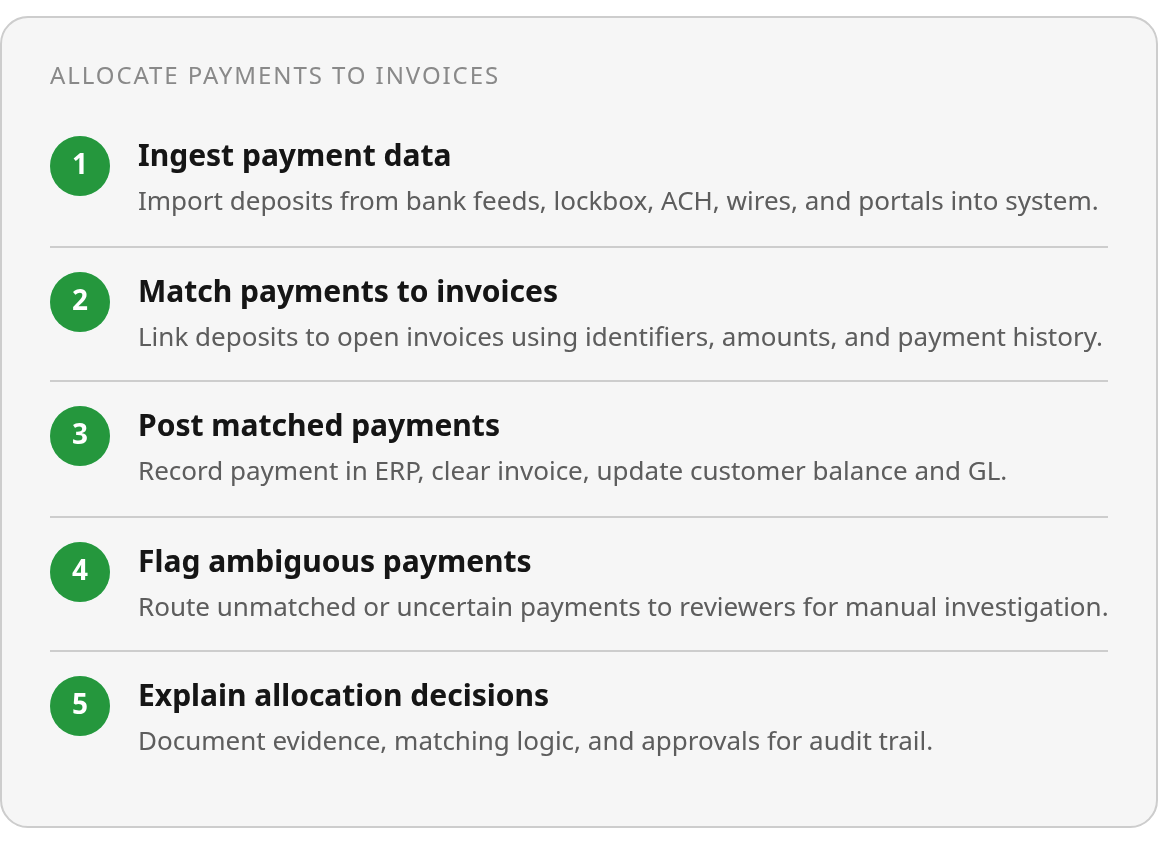
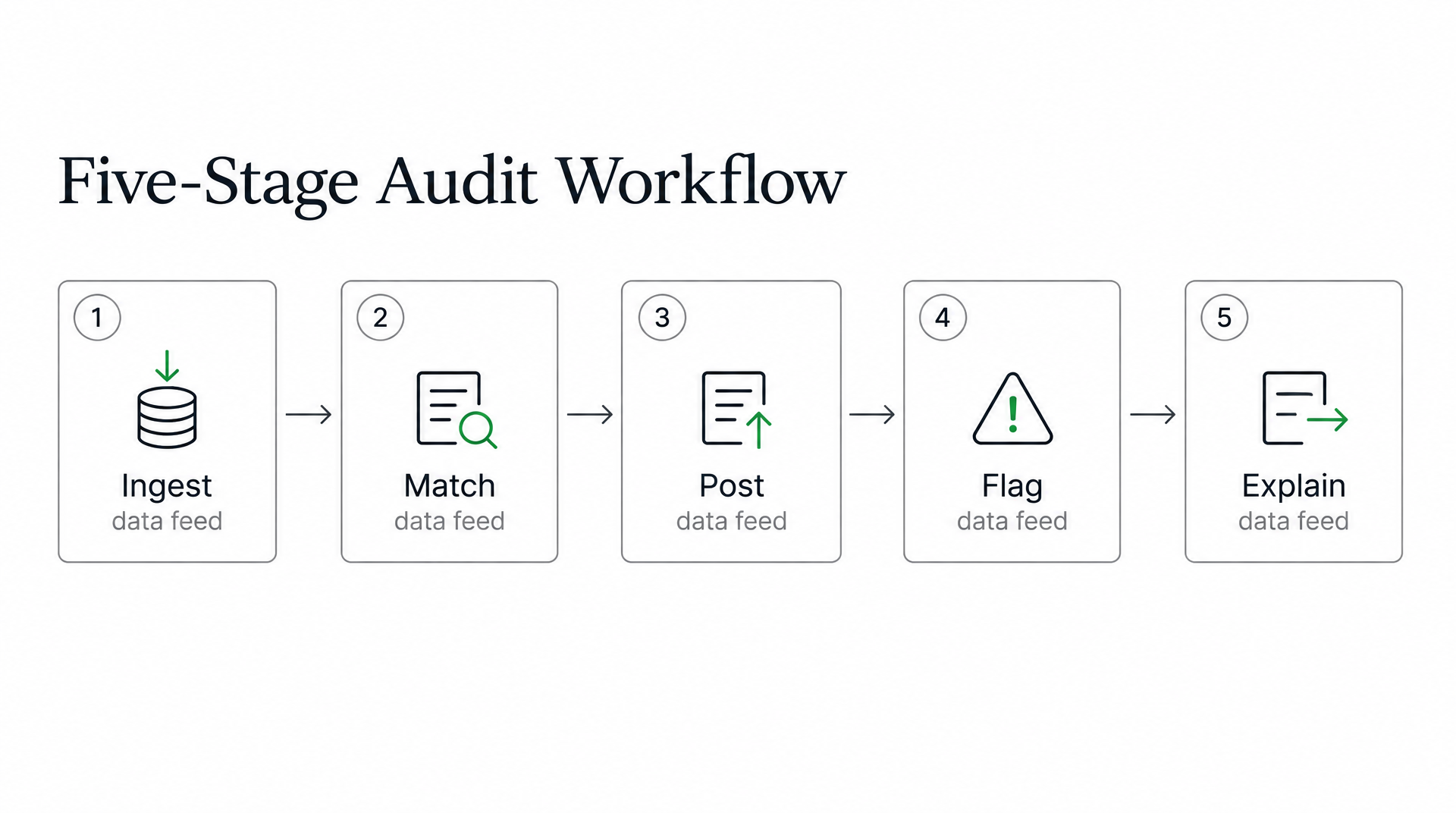
AR automation workflows typically move through five stages: ingestion, matching, posting, flagging, and explanation. Traditional ERP reports focus on the first and third: did we capture the payment, and did we post it? They provide limited visibility into the second and fourth stages, where most unapplied cash accumulates.
Ingestion brings payment data in from ACH, wires, checks, lockbox services, and portals. A payment clears this stage once it appears in the bank feed. Complexity begins when remittance arrives later, in an email attachment or portal. Electronic payment adoption has made this worse because many ACH and wire payments arrive with incomplete or missing invoice references.
Matching attempts to link the bank deposit to specific open invoices using customer identifiers, invoice numbers, amounts, and payment history. A strong automatic match rate still leaves many payments for manual review. A $12,500 wire transfer arrives without an invoice reference, but the customer has three open invoices totaling exactly $12,500 — the cash sits in suspense until someone confirms the allocation.
Posting writes the matched payment to the ERP, clearing the invoice and updating the customer balance. Most standard reports declare success here: the cash is recorded, the GL balances, and the bank feed reconciles. If posting happened without a confirmed invoice match, you’ve created what cash-basis accounting calls an “unapplied cash payment income” entry — revenue recognized at deposit time that will need a negative offset when the invoice is finally identified.
Flagging routes ambiguous payments to a reviewer when the system can’t confidently match to an invoice. Traditional ERPs flag exceptions based on narrow rules, amount mismatches, duplicate references, and missing customer IDs, but they lack context to recognize subtler problems. A consolidated wire covering partial payments across multiple entities, a customer using a portal ID that differs from their ERP customer number, or a payment arriving before the invoice posts can all slip through as “matched” when they should be flagged.
Explanation captures the evidence behind each allocation: which remittance document was used, what matching logic was applied, who approved the exception. This determines whether your team can reconstruct a decision three months later during audit season. Organizations struggle here because the explanation lives in email threads, spreadsheet notes, and individual memory rather than a structured audit trail connected to the payment record.
Why timing creates phantom balances
Cash-basis reporting introduces complexity that standard accrual-focused reconciliation reports miss. A customer makes a $500 overpayment on December 15 and you issue a $700 invoice on January 15 — cash-basis rules require recognizing the $500 as revenue on December 15 even though no invoice existed yet. The system creates an "unapplied cash payment income" credit to balance the entry. When the January 15 invoice is finally applied, the system records a $500 debit to that same account, netting to zero across both periods.
This creates two problems. Your December statements show $500 in revenue from an invoice that didn’t exist yet, distorting month-over-month comparisons. Standard reconciliation reports see the December credit and January debit as separate line items rather than recognizing them as a timing correction. Rent payments made on December 31, applied to bills dated January 1, generate these phantom entries every month-end.
The same dynamic occurs on the expense side. A bill payment dated and paid on December 31 for a January 1 bill creates an “unapplied cash payment expense” that offsets when the bill is recorded. These accounts appear only on cash-basis reports, making them invisible to teams that primarily review accrual statements. QuickBooks Desktop to Online migrations frequently trigger these accounts when journal entries adjust receivables or payables without corresponding cash transactions.
What modern cash application improves
AI-powered cash application tools can analyze historical customer behavior and payment patterns to reconcile payments when remittance data is missing. Blixo’s intelligent matching engine automatically matches payments to invoices through machine learning that improves as you use it, working from multiple data sources to find the correct allocation.
The difference between these results and typical ERP performance comes down to context. Modern platforms ingest remittance from Excel files, EDI feeds, credit card files, PDFs, web portals, images, and email attachments, then connect that data to customer master records, open invoices, credit memos, and contract terms. When a payment arrives without an invoice reference, the system suggests likely matches based on the customer’s typical payment timing, their current open balance, and any recent credits — evidence a standard ERP can’t access because it treats each module as a separate data silo.
Higher automation rates alone don’t establish accuracy. Reviewers still define matching rules, authorize workflow changes, monitor outcomes, and confirm exceptions under policy. Intelligent matching doesn’t make an ambiguous payment certain — it surfaces the evidence so the reviewer can make an informed decision within documented controls. This distinction matters for revenue recognition under ASC 606, which requires identifying satisfied performance obligations, not just deposited funds. Until a payment is matched to a specific invoice, the cash sits in suspense and monthly close remains vulnerable to unexplained balances.
Real Scenarios That Expose the Gap
A customer sends a $15,000 wire. The bank feed shows the deposit, but remittance detail, which invoices that payment covers, sits in a separate email or portal. Your ERP reconciliation report confirms the $15,000 hit the bank and posted to the correct GL account. The control passes. The cash remains unapplied because no one has matched it to the open invoices. Reports show clean bank-to-GL alignment while AR still lists those invoices as outstanding.
This gap surfaces constantly in high-volume environments. Payments without remittance references, timing mismatches where cash arrives before invoices post, and overpayments that exceed open balances can leave reconciliation validating the deposit while the allocation remains unresolved. Blixo’s intelligent matching engine can reduce these matching exceptions, but the remaining cases still require explicit invoice assignment.
When payments arrive without invoice context
A lockbox deposit may contain enough information to clear the bank but not enough to resolve the customer account. The file confirms the payer and total amount, but the supporting detail may reference a shortened customer name, a legacy account number, or a portal identifier that doesn’t match the ERP record. Finance can see that money arrived. Operations can’t safely release credit, stop collections, or close open items until the allocation is verified.
Migration from legacy systems or switching between cash and accrual reporting can expose these accounts. Cash-basis reports in some accounting platforms create system-generated unapplied cash accounts that balance cash-basis entries automatically. These accounts are invisible on accrual-basis statements, so finance teams running standard P&Ls never see them. They directly affect cash-basis DSO and can trigger credit holds, creating a scenario where your financials look clean while operations block renewals due to hidden unapplied balances.
The exception volume automation reduces
Payment matching tools can handle a substantial portion of routine cases, but exceptions remain. Partial payments with deductions, bundled receipts covering multiple invoices, or payments with missing invoice references need review before posting. Blixo’s cash application automation flags these exceptions and routes them to a reviewer with candidate invoices and the reason the allocation is uncertain.
Reconciliation reports may surface an unapplied cash line item, confirming that unresolved value exists. Closing that line requires applying the payment to the correct transaction, not journal entries alone. Automated workflows can reduce the backlog and speed resolution, but policy exceptions, ambiguous matches, and payments lacking sufficient identifying information still need explicit approval before they post to customer accounts.
How to Actually Fix This
Build the audit around the five-stage workflow.
Treat unapplied cash cleanup as a controlled operating process, not a one-time spreadsheet exercise. Public materials from cash-application vendors show that each step in the workflow needs its own data feed, review threshold, and exception owner.
Start by exporting four datasets from your ERP and bank: open AR balances, all bank deposits from the last 90 days, payment postings during the same window, and any line items tagged as unapplied or sitting in suspense accounts. Filter the payment file for entries with zero or partial application. Cross-reference those entries against your bank deposit log. When a deposit has no matching posting, or when a posting references an invoice that doesn’t exist in AR, flag both the payment and the suspected invoice in a tracker.
Your tracker should capture payment date, payer name or ID, amount, bank reference number, the invoice you think it belongs to, the reason you couldn’t auto-match it, the person responsible for resolving it, the next action required, and the date it was cleared. Use controlled reason codes, missing remittance, partial payment with deduction, wrong customer account, so the cleanup produces useful trend data instead of a list of one-off mysteries. Without that discipline, reconciliation backlogs compound faster than teams can clear them.
Evaluate automation on evidence, not sales decks
When you pilot AR automation, test it on bank-format coverage, ERP integration depth, deposit match rate, straight-through processing percentage, exception-handling transparency, and how clearly it surfaces unapplied cash. Industry implementations documented in research materials show measurable improvement in match accuracy and processing speed when automation handles routine transactions and flags exceptions for human review.
Set pilot success metrics instead of fixed timelines. Track the share of payments posted without human review, how much manual allocation work disappeared, how fast your unapplied balance fell, whether DSO moved, and how quickly exceptions get resolved. If your pilot processes a representative payment file and still needs human review, study what breaks the match and whether the system learns from corrections.
Isolate one payment stream or bank format first. Compare automation output against your current ERP process on a representative set: a clean remittance, a bundled receipt covering multiple invoices, a partial payment with a deduction, and a payment whose invoice reference is missing. Review exceptions daily during the pilot. Document which match rules work and which create false positives before expanding to other formats or entities.
Ask any vendor, Blixo included, to demonstrate live bank-feed ingestion, remittance capture from PDFs and portals, the matching logic it applies, how exception queues route to reviewers, audit trails for posted transactions, and how unapplied cash appears in reporting. Verify what happens when payment support arrives through a different channel, when one receipt covers several invoices, or when the system encounters a bank format it hasn’t seen before. Absence of a demo feature isn’t proof the feature doesn’t exist, but you should confirm capabilities in a live environment rather than relying on feature lists.
FAQ
If my ERP reconciliation shows a clean three-way match, how can I still have an unapplied cash problem?
Because that control confirms cash movement and accounting entry alignment, not final invoice allocation. You still need a customer-level review that proves each receipt was applied to the transaction it was meant to settle.
What happens to revenue recognition when a payment sits in unapplied cash for weeks or months?
The close process becomes harder to support because the company has cash without a clear link to the related deliverable or invoice. That uncertainty can delay approvals, create audit questions, and keep teams from treating the customer balance as resolved.
Why has electronic payment adoption made unapplied cash worse instead of better?
Electronic payments move money efficiently, but they do not automatically carry clean accounting instructions. When reference data is incomplete, stored in another portal, or sent to a different inbox, the payment reaches finance before the evidence needed to apply it.