

Upflow vs Gaviti for AR CSV Integration: Which One Cuts Dunning Work for Mid-Market Teams

In short:
Upflow documents semicolon, comma, and vertical-bar CSV imports for contacts, but native integrations lock you out of updating main contact info—only API setups let you change email, name, or primary-contact flags. Gaviti is positioned as a rule-driven dunning engine; Upflow as scheduled reminders with collaboration features. The evidence table in the decision section separates documented contact-import facts from vendor claims and the CSV, cash-application, and implementation items you still need to test. Verify everything in a live demo with your own data before you commit.
When Native Integrations Overwrite Your Contact Changes
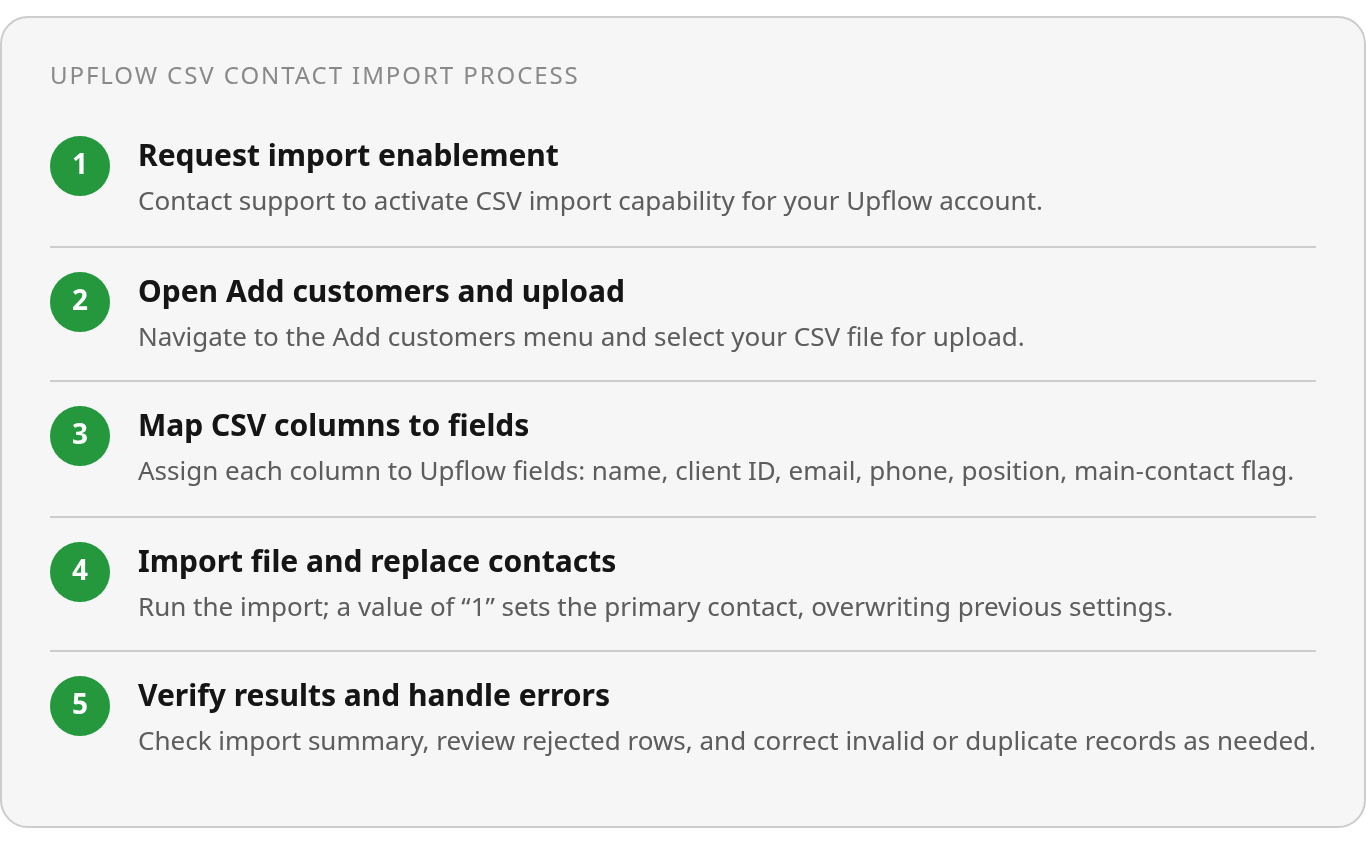
Upflow accepts three delimiter formats for contact CSVs—semicolon, comma, and vertical bar—but whether those changes stick depends on your integration type. Native integrations block updates to main contact information entirely. API setups let you update contact data, positions, and the main-contact flag. If you run a native Salesforce sync that overwrites records nightly, your CSV uploads get erased an hour later. The escalating reminder fires to someone who left the company six months ago, and the customer never sees it.
This creates a hidden failure mode When contact updates don’t propagate, static dunning sequences interpret silence as indifference rather than a sync problem. Public materials suggest this hits teams running Salesforce plus a native integration hardest—positions update but main contact information remains locked. During your demo, verify whether your integration type permits the contact-level changes your playbook requires. Invoice line-item schemas, aging-bucket logic, and payment-term fields aren’t documented in the materials I reviewed and should be tested directly with each vendor.
Scheduled Reminders vs Policy-Driven Dunning
Upflow is described in reviewed materials as organizing scheduled reminder workflows with payment portals—humans do the chasing. Gaviti is characterized as a rule-driven dunning and collections policy engine, where branching logic covers scenarios you configure in advance. Neither vendor’s public positioning establishes adaptive, AI-driven decision-making that pauses outreach mid-sequence when a customer disputes an invoice or promises payment. Scheduled sequences act on elapsed time; policy engines execute the branches you mapped during setup. Real accounts rarely follow fixed timelines, and predefined logic can address only the cases you anticipated.
Implementation speed and scalability need to be evaluated together. Upflow’s documented path starts with support enablement, then column mapping and import. Gaviti’s positioning implies configuration work across customer segments, aging tiers, and escalation paths. The available material doesn’t establish either vendor’s end-to-end rollout duration, so a team facing mid-market growth pressure should request a week-by-week plan showing when usable collections coverage actually begins.
Why a Successful Upload Isn’t Enough
The meaningful distinction isn’t whether a platform can ingest a file. You need to know which system owns each customer field after import, how rejected records surface, and whether changes reach campaigns already in progress. A successful upload is of limited value if a later sync restores older information or an accepted row can’t be matched to the correct account.
Data quality remains the common dependency. Missing customer IDs, duplicate invoice rows, invalid due dates, incorrect contact mappings—these are recurring CSV failure patterns that break automated dunning. Null or malformed date fields can prevent aging-based rules from running, including a rule intended to escalate an account 15 days past due. A useful evaluation should test exceptions, not just demonstrate a clean sample upload.
Why CSV Integration Matters for Mid-Market AR
AR CSV integration sits at the foundation of reliable dunning because collection rules need accurate invoice identifiers, customer mappings, balances, and recipient information to decide who gets reminded, when, and about what. When those fields arrive incomplete or misaligned, automated sequences either stall or act on the wrong account. The result is additional work for your AR team and avoidable friction with customers.
For mid-market organizations, the practical issue is ownership across systems. Your ERP may remain authoritative for invoices, another platform may hold CRM contacts, and the collections product may manage outreach. A CSV transfer has to preserve the relationships among those records. Otherwise, finance teams spend time diagnosing an automation problem that actually began with source data.
Common CSV Failure Modes
A feed without a stable account identifier may create an unmatched record or attach an invoice to the wrong customer. An incorrect amount produces a notice that immediately invites a dispute. A missing recipient allows the workflow to appear active even though no useful outreach reaches the customer.
Contact governance deserves particular attention. Before importing a file, determine whether the receiving platform, the accounting integration, or an API is authoritative for each field. Then change a test contact and observe what remains after the next sync.
Date handling requires a similar test. Rather than checking only that a date column maps successfully, include blank values, text-formatted values, and inconsistent records in a controlled sample. The evaluation should show whether those rows are rejected, quarantined, or silently accepted.
Repeated invoice records create a different problem. They can distort the balance presented to the collector or cause multiple notices to be associated with the same obligation. Inspect both the import result and the customer-facing output rather than relying solely on a “completed” status.
The Data Feed a Rules-Based Workflow Needs
A usable AR feed supplies invoice status, due date, outstanding balance, and mapped contact fields before each reminder is evaluated. Cleaner inputs reduce avoidable exceptions, while broader integration can connect invoice delivery, payment portals, cash application, and collections. The evidence doesn’t isolate CSV reconciliation as the cause of better dunning performance; broader automation benefits may reflect several workflow components working together.
Account state can change after an import. A customer may raise a dispute, ask for supporting documentation, or send payment while an outreach sequence is active. If the platform continues to rely on the earlier snapshot, even sophisticated routing logic can make the wrong decision. Ask when records refresh, which events update campaign status, and what users must do when the source and collections system disagree.
The burden of poor data is distributed across AR managers, finance-operations staff, and collections agents. That burden is not quantified by role, but it shows why import testing should include the downstream resolution process.
Upflow: CSV Workflow & Documented Dunning Automation
Upflow’s documented workflow requires first-time users to request enablement through support, then access the import from the Add customers menu. You map file columns to Upflow fields—customer name, client ID, contact email, optional phone and position. A value of “1” in the main-contact column marks the primary recipient, and the latest import replaces the previous primary-contact configuration.
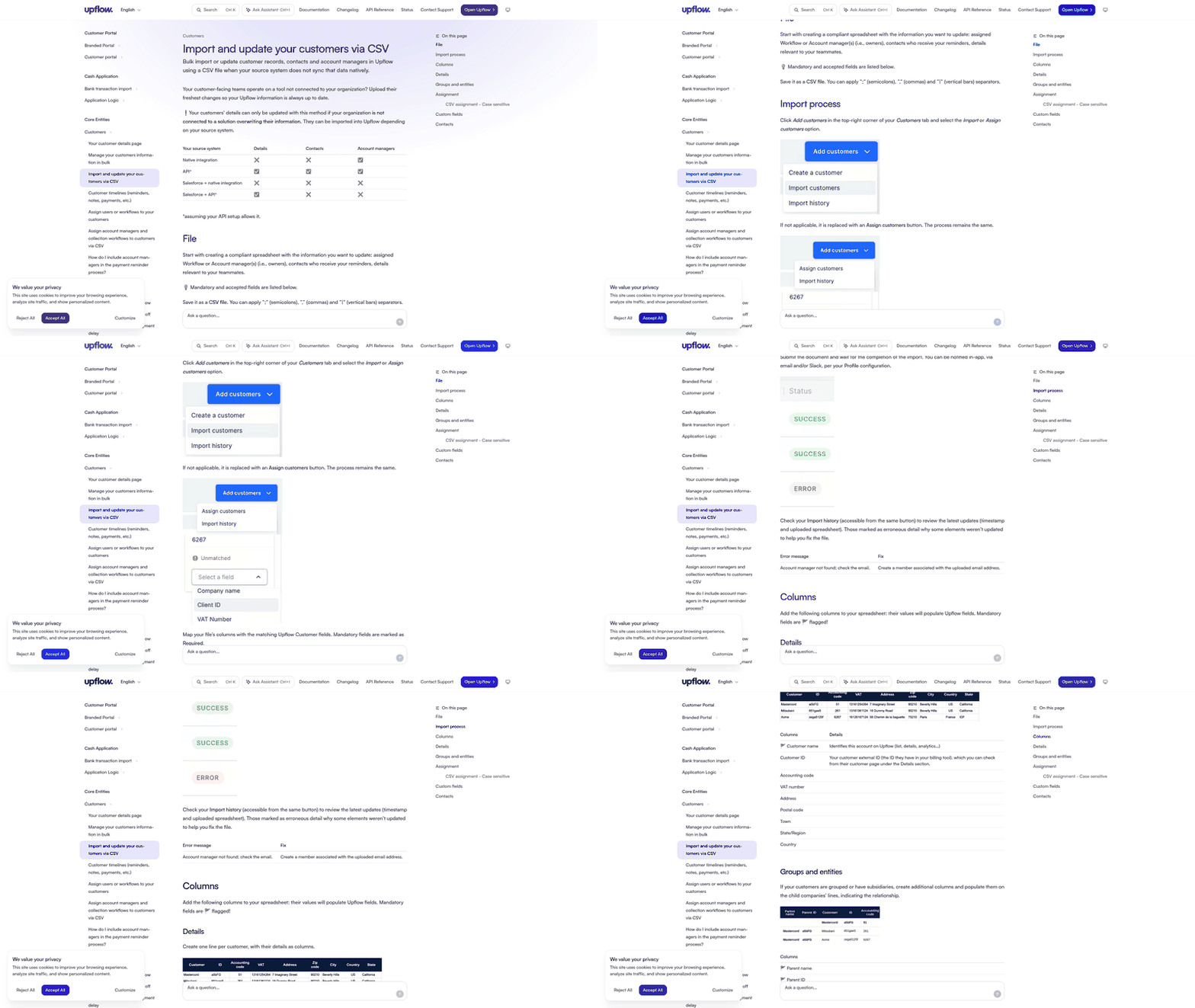
Permissions differ depending on how the source is connected. The table below converts the documented behavior into an implementation checklist rather than treating import access as a universal update right.
| Source System | Main Contact Info | Positions | Main Designation |
|---|---|---|---|
| Native integration | ❌ Blocked | ✅ Allowed | ✅ Allowed |
| API | ✅ Allowed* | ✅ Allowed | ✅ Allowed |
| Salesforce + native | ❌ Blocked | ✅ Allowed | ✅ Allowed |
*Assumes your API setup doesn’t overrule it.
Several operational details remain open. The supplied documentation doesn’t establish file-size limits, invoice-level endpoints, or how quickly errors are reported. A proof of concept should include a realistic batch, intentionally invalid rows, and a record that already exists.
When CSV Update Restrictions Break Dunning
The key distinction is between message delivery and data correctness, and between an upstream contact-data failure and a dunning-engine failure. A stale or misrouted contact can produce an apparently successful send even though no useful outreach reaches the customer. That looks like deliverability success while it creates avoidable friction with customers, weakens the payment information you receive, and ultimately reduces cash-application accuracy. Delivery reporting alone won’t expose that upstream failure.
Trace a changed contact through the complete workflow: edit the source record, import or sync it, inspect the resulting customer profile, and review the recipient selected for the next notice. That sequence makes ownership visible and prevents a false assumption that a mapped CSV column necessarily governs live outreach.
Upflow’s collaborative model may help you review and work replies, but that doesn’t remove the need for sync controls. Assign responsibility for checking failed imports, unmatched customers, and recently changed primary contacts. Without that ownership, collectors may interpret a lack of engagement as a collection issue when it’s actually a record-management issue.
Gaviti: CSV Workflow & Dunning Automation
Public comparisons present Gaviti as a configurable collections product. The table in this section separates that positioning from the upload interface, schema requirements, validation behavior, trigger mechanics, and staffing details you still need to verify.
A serious review should separate product positioning from verified behavior. Ask Gaviti to process a representative export, explain every required field, and show what you see when part of a batch fails. The demonstration should also establish whether correcting a source record updates an active policy or requires a manual campaign action.
What “Highly Configurable” Actually Covers
Configurability is most useful when your AR team has already defined how different account groups should be treated. It can encode alternative paths based on payment history, chronic lateness, or invoice value. The operational work lies in translating an existing collections policy into maintainable conditions and deciding who may change those conditions.
That model may fit a mid-market team whose reminder cadence varies by customer segment or balance size. It can also create governance work: you need consistent definitions, clear escalation ownership, and a way to test policy changes before applying them broadly. These are practical implications of a configurable rules model, not documented proof of any particular Gaviti feature.
| What We Know | What’s Missing |
|---|---|
| Positioned as a configurable collections policy engine | CSV schema, delimiter support, validation behavior |
| Aimed at mid-market teams wanting tailored playbooks | Specific trigger mechanics, reply handling, dispute controls |
| Collections analytics are part of its positioning | Onboarding stages, dedicated support model, verified labor-hour reduction |
The CSV Integration Gap
Because the available research doesn’t show how Gaviti ingests or validates files, don’t assume that policy depth guarantees reliable source-data handling. A collections rule can evaluate only the records made available to it, and an unmatched identifier can prevent an otherwise valid policy from reaching the intended account.
Testing should include more than a polished vendor template. Provide a sample with a changed customer record, an unmatched account, an incomplete mapping, and a corrected re-upload. Ask the vendor to show the audit trail for each case and explain whether you can isolate failed rows without rerunning the entire batch.
Scalability should be evaluated alongside implementation effort. Teams often seek a more capable platform after simpler invoicing processes become difficult to manage at higher volume. If rollout requires substantial reconciliation or policy design at that point, your organization may temporarily add work before realizing any benefit. The implementation plan should acknowledge that transition rather than assuming clean data and unlimited staff availability.
Blixo vs. Upflow & Gaviti: The All-in-One Angle
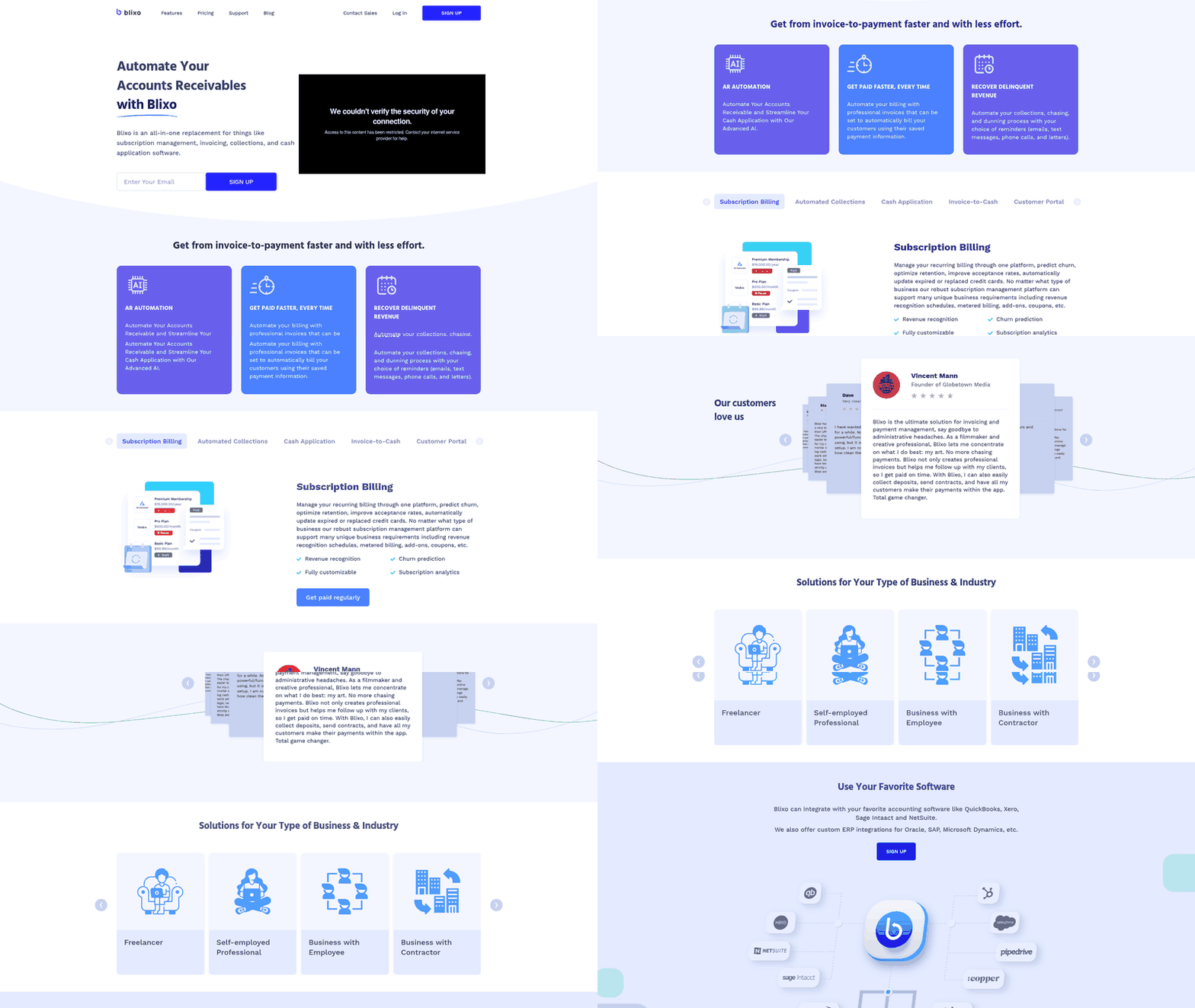
Blixo appears in the business context as an all-in-one platform for invoicing, collections, cash application, and subscription management. The remaining technical facts—AR CSV schema, native data model, file-import requirement, and exact dunning workflow—require verification through current documentation and a live demo.
What We Know and What Remains Unverified
The clearest documented fact is Upflow’s contact-import process; it should not be mistaken for a complete invoice-import specification. Required demo validation includes how your accounting setup affects authority, sync, and campaign recipients.
For Gaviti, the evidence supports market positioning rather than file-processing capability. Required demo validation includes verifying required fields, row-level feedback, correction procedures, and the relationship between imported records and configured policies.
Blixo’s broader scope changes the evaluation question. Instead of asking only how a standalone collections application receives AR data, examine how invoicing, payment status, collections, and cash application share records inside the platform. The business context mentions accounting integrations and custom ERP connections, but it doesn’t show whether those connections eliminate manual mapping or move it to another integration layer.
| Capability | Upflow | Gaviti | Blixo |
|---|---|---|---|
| CSV contact import evidence | A documented contact-import process is available | Not documented in supplied research | Not documented in supplied research |
| Source-system update behavior | Varies by connection method | Not documented | Not documented |
| Dunning model | Collaborative outreach and scheduled reminders | Configurable policy branching | Positioned as automated collections |
| Accounting-software context | Accounting integrations are mentioned in comparisons | Accounting integrations are mentioned in comparisons | Accounting integrations are mentioned in comparisons |
Across all three products, the most useful demo uses your own records. It should follow a customer and invoice from source creation through mapping, outreach, payment-status change, and exception resolution. Request visibility into rejected data, sync precedence, audit history, and the user action required to correct a mistake.
This approach also clarifies product fit. Some teams primarily need a workspace for collectors, others need policy configuration, and others want invoicing and collections in one environment. The demo, not the category, determines which platform will handle your source data with the least manual effort.
What Your AR CSV Integration Decision Depends On
The choice depends on the operating model your team wants and the evidence each vendor can produce using your data. Upflow has the strongest supplied documentation for contact imports. Gaviti’s case rests on configurable collection policies. We offer a broader invoicing-through-collections platform, but the research provided here isn’t enough to verify our import schema, rule design, or rollout duration.
The matrix below separates documented facts from vendor claims and required demo validation; it does not assign scores.
| Vendor | CSV Documentation | Dunning Positioning | Implementation Evidence | Pricing Evidence | All-in-One Evidence |
|---|---|---|---|---|---|
| Upflow | Contact import is documented, with permissions determined by the source connection | Scheduled outreach with collaborative follow-up | Initial access involves support enablement | Not documented in supplied sources | Single-purpose collections tool |
| Gaviti | Interface, required schema, and validation results are not documented | Configurable, rule-based collections policies | Not documented in supplied sources | Not documented in supplied sources | Dedicated collections policy engine |
| Blixo | File format, mapping, invoice schema, and error handling are not documented | Trigger logic and measured labor savings are not documented | Timeline and resource requirements are not documented | Not documented in supplied sources | Described as all-in-one for invoicing, collections, cash application, and subscriptions |
Don’t award a vendor credit merely for accepting an upload. Score the full exception cycle: identifying bad records, correcting them, preserving the change after sync, and confirming that the right outreach follows. A product that handles clean files quickly may still create substantial manual work when normal source-system conflicts appear.
Don’t treat an elaborate collections tree as inherently adaptive. Predefined paths can provide consistency, but test separately what happens when an account changes state while the workflow is running. That distinction is central to estimating how much monitoring collectors will still perform.
The Defensible Use-Case Fit
Upflow may suit organizations that want a documented contact-loading process and a collaborative collections workspace, provided its field-authority model fits their source systems. Gaviti may suit organizations prepared to define and maintain differentiated collection policies. Neither conclusion establishes how the product will behave with your actual invoice export.
Our fit also can’t be established from the supplied evidence. Blixo’s business context covers a wider part of the receivables lifecycle, but the research doesn’t show the technical path from an external record to an active collection action.
Use a live proof of concept to verify validation, error handling, workflow behavior, bundled functions, implementation effort, and commercial terms. After the first notice, introduce a dispute, payment promise, or request for a copy invoice. Observe whether the next action changes automatically, requires collector intervention, or continues as originally scheduled. That exercise is more informative than a presentation built around perfect sample data.
Frequently Asked Questions
If my ERP overwrites contact records every night, will CSV-imported dunning contacts stay current in Upflow?
Do not assume they will. The deciding factor is which connection remains authoritative after synchronization. Test an edited recipient through a complete overnight cycle and inspect the contact selected for subsequent outreach.
Can Gaviti’s branching dunning rules adapt mid-sequence if a customer disputes an invoice or promises payment?
The supplied research does not answer that question. Ask Gaviti to demonstrate a live policy receiving a customer response and show whether the next action is paused, rerouted, or left for a collector to change.
What happens when my AR CSV feed contains duplicate invoice rows or null due dates?
The outcome depends on the platform’s validation and exception handling. Require the vendor to show whether each affected row is rejected, flagged for correction, or accepted without a warning, then inspect the resulting account record and outreach queue.
Does Blixo require CSV imports for AR data, or does it pull invoice and contact information directly from connected ERPs?
That workflow is not established by the supplied material. Request a demonstration using your actual source structure and have Blixo trace one customer update from the connected accounting system through invoicing, payment status, and collections.