

Touchless vs Manual Invoice Processing with Blixo

Key Takeaways
- Manual invoice processing costs $15–$40 per invoice, while automation reduces costs to $3–$5, saving $16,000 annually for 10,000 invoices.
- Manual systems carry a 1.6% error rate, escalating correction costs and delaying payments, whereas automation slashes invoice cycle times from 17 to 3 days.
- Automating accounts receivable reduces Days Sales Outstanding (DSO) by 30–50% and administrative costs by 30%, accelerating cash flow.
- A manufacturer cut annual payment-related losses from $250,000 to $15,000 by switching to automated invoice processing.
- 52% of unpaid invoices stem from manual errors, but automation reduces reconciliation disputes by 20%, as seen in a logistics firm’s case.
- Touchless processing eliminates 30–50% of payment delays, improving vendor relationships and operational efficiency.
- A construction company boosted invoicing conversion rates after adopting automation, demonstrating its impact on revenue capture.
Why Efficient Invoice Processing Matters
Efficient invoice processing is a cornerstone of financial health for businesses, directly impacting cash flow, operational costs, and vendor relationships. Manual systems, plagued by errors and delays, often lead to significant financial losses and inefficiencies. For example, companies processing 10,000 invoices annually could face $16,000 in error-related expenses due to manual processing, while automation can cut invoice cycle times from 17 days to just 3 days. These statistics underscore the urgency of adopting efficient systems like Blixo to streamline operations.
What Industry Data Reveal About Inefficiencies?
Manual invoice processing is costly and error-prone. As mentioned in the Cost Savings and ROI: Manual vs Touchless section, the average cost per invoice ranges from $15 to $40 manually, compared to $3 to $5 with automation. Worse, manual systems carry a 1.6% error rate, which escalates correction costs and delays. For instance, a manufacturer slashed payment-related losses from $250,000 to $15,000 annually by switching to automation, a transformation detailed in the Real-World Examples and Case Studies: Success with Blixo section. These figures highlight the financial risks of sticking with outdated methods.
Automation also accelerates cash flow. Building on concepts from the Speed and Accuracy Comparison: Manual vs Touchless section, manual accounts receivable (AR) processes can slow payment recovery by 30-50%, with 52% of unpaid invoices traced to manual errors. Conversely, automating AR reduces Days Sales Outstanding (DSO) by 30-50% and administrative costs by 30%. A logistics firm, for example, cut reconciliation disputes by 20% after automation, while a construction company boosted invoicing conversion by 70% using dynamic discounting and reminders.
Real-World Impact of Inefficiencies
Small businesses are hit hardest by inefficient systems. They can lose up to 30% of revenue due to delayed collections, with single invoices taking up to 45 days to process. Enterprise-level challenges include reconciling 200+ hours annually for companies handling 1,000 invoices monthly. These inefficiencies strain resources and erode competitiveness. For example, a healthcare provider reduced month-end closing time by 18% using automation, freeing staff for strategic tasks.
Blixo addresses these pain points by integrating AI, OCR, and machine learning to minimize human error. Its intelligent matching engine achieves 99.5% accuracy, slashing reconciliation disputes by 35%. A SaaS company saw a 50% drop in billing errors within three months, while a retail chain automated 90% of invoice processing, speeding up month-end reconciliation by 18%. These results demonstrate how automation transforms financial workflows.
Who Benefits Most from Efficiency?
Small businesses gain the most from automation, as manual errors cost them 30% of revenue. For enterprises, scalability is key-Blixo handles 10,000+ invoices monthly with sub-second transaction times, ensuring compliance and scalability. Both benefit from reduced administrative burdens: automation cuts manual AR tasks by 70% and improves cash-flow visibility by 25%.
Blixo’s touchless approach further enhances these benefits. Its multi-channel reminders (email, SMS, phone) increase on-time payments by 40%, while real-time dashboards provide predictive analytics for strategic decision-making. A law firm, for instance, boosted cash flow by 25% using dynamic discounting, and a finance manager noted a 60% reduction in billing time within a month of implementation.
Why Blixo Stands Out
Blixo’s SaaS service automates billing, collections, and cash application, integrating seamlessly with ERP systems like QuickBooks and SAP. This integration eliminates data silos and reduces manual entry. User testimonials highlight its impact: Vincent Mann, founder of Globetown Media, calls it a “total major advantage,” while Dave, a small-business owner, praises its 10x improvement over previous tools. Technical features like AI-driven validation and 256-bit encryption further solidify its reliability.
In short, efficient invoice processing isn’t just about speed-it’s about survival. With Blixo, businesses avoid the $1.3 trillion in annual losses tied to invoicing errors and manual inefficiencies, turning a costly chore into a strategic advantage.
Manual Invoice Processing: Workflow Overview
Manual invoice processing involves a labor-intensive workflow that often leads to inefficiencies, errors, and financial losses. Here’s a step-by-step breakdown of how it typically works:
- Invoice Receipt: Invoices arrive via email, mail, or fax. Employees manually input data into accounting systems, a process prone to typos and delays.
- Data Entry: Teams key information like vendor names, amounts, and dates into spreadsheets or ERP systems. This step alone can take 10–15 minutes per invoice.
- Approval Workflow: Invoices are routed to managers for approval, often requiring physical signatures or email confirmations. Delays here can stretch processing by 3–5 days.
- Three-Way Matching: AP clerks compare invoices against purchase orders and receiving reports. Discrepancies trigger manual investigations, adding hours to the cycle.
- Payment Authorization: Once matched, payments are authorized and sent manually via check or bank transfer, often missing early-discount windows.
- Record Keeping: Paper or digital records are stored, creating a fragmented audit trail that complicates compliance.
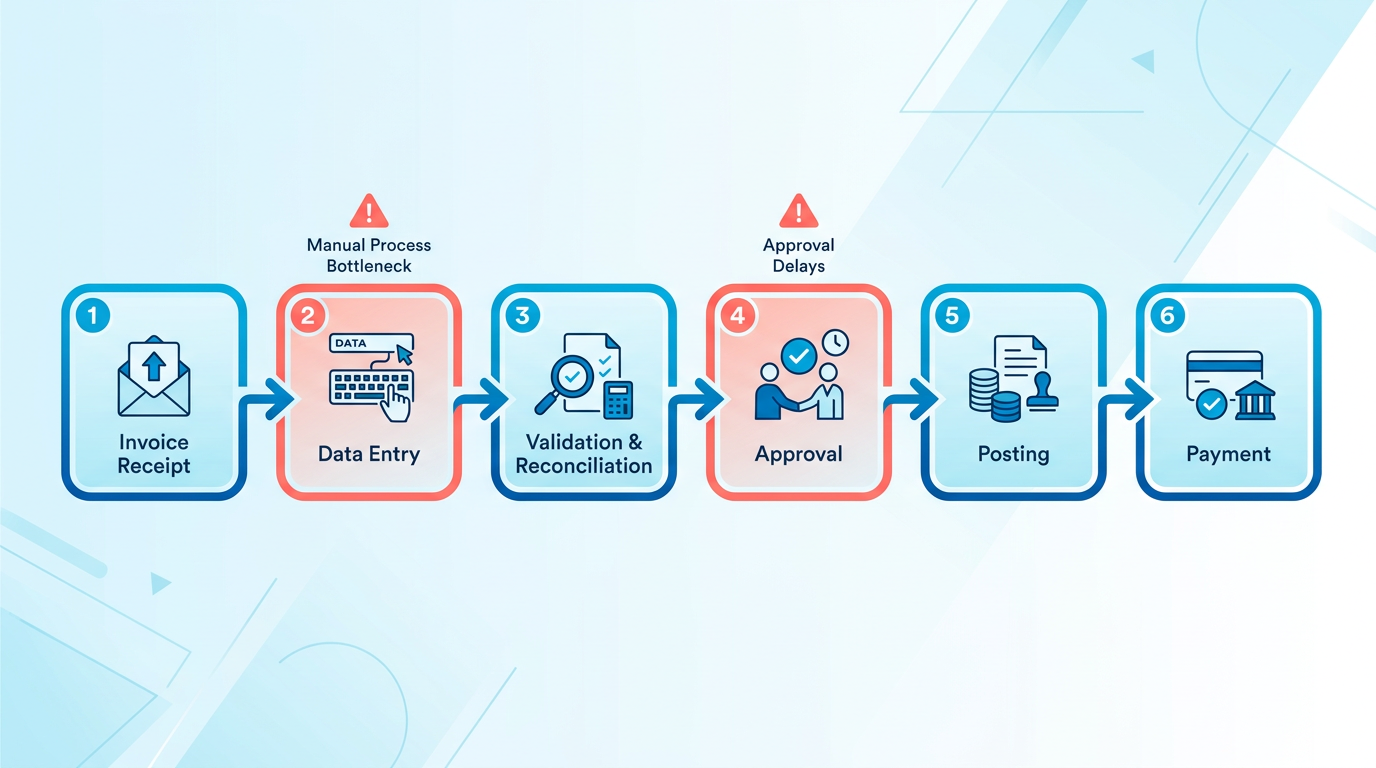
This process is riddled with pain points. For example, a small business processing 500 invoices monthly might spend 200+ hours annually on data entry alone. Errors, such as mismatched PO numbers or incorrect amounts, occur at a 1.6%–10% rate, leading to disputes and late fees. A manufacturer cited in a case study faced **$250,000 in payment-related losses** annually due to manual errors, which dropped to $15,000 after automation, as detailed in the Cost Savings and ROI: Manual vs Touchless section.
What Makes Manual Processing Costly?
The financial toll is staggering. Manual processing costs $15–$40 per invoice, compared to $3–$5 with automation. For a company handling 10,000 invoices yearly, this translates to $16,000 in error-related expenses alone. Disputes caused by 39% of invoices containing errors can delay cash flow by 30–50%, as noted in a Blixo case study. A logistics firm spent 200 hours monthly on reconciliation, while a healthcare provider took 45 days to process a single invoice-both scenarios pushing their Days Sales Outstanding (DSO) up by 30%, a topic expanded in the Speed and Accuracy Comparison: Manual vs Touchless section.
Real-World Examples of Manual Reliance
Despite its flaws, manual processing persists in niche sectors. A small retail chain with 500 monthly invoices still relies on spreadsheets, incurring $7,500 in late fees** yearly. Similarly, a mid-sized law firm processes 300 invoices manually, spending **40 hours weekly** on approvals and corrections. These businesses often cite low volume or budget constraints as reasons-until automation saves them **$16,000 annually in penalties and errors, as one finance manager noted in the Blixo Touchless Invoice Processing: Overview section.
| Feature | Manual Processing | Automated Processing (Blixo) |
|---|---|---|
| Cost per Invoice | $15–$40 | $3–$5 |
| Error Rate | 1.6%–10% | <1% |
| Processing Time | 8–10 days | <24 hours |
| DSO Impact | +30% | -30% |
| Labor Hours Saved | 200+ hours/year | 200+ hours/year |
Why Manual Systems Fail
The root issue is human error. A 39% error rate in invoice data entry, as reported by Blixo, leads to disputes, late fees, and vendor dissatisfaction. For instance, a construction firm using manual workflows reported 70% fewer disputes after switching to AI-driven matching. Manual systems also lack real-time visibility, making it hard to track aging invoices or prioritize high-risk accounts.
Consider a scenario where a finance team misses a 2% early-payment discount due to a delayed approval. At $100,000 in annual invoice volume, this represents **$2,000 lost** annually in savings. Multiply this by error rates, late fees, and reconciliation hours, and the cost of manual processing becomes untenable.
The Bigger Picture
Manual invoice processing isn’t just inefficient-it’s a strategic liability. While it suits businesses with <50 invoices monthly, scaling beyond this leads to exponential cost increases. A 2024 Blixo report found that 52% of unpaid invoices stem from manual errors, directly harming cash flow.
For businesses still relying on spreadsheets or paper trails, the data is clear: automation reduces costs by 80%, cuts processing time by 85%, and slashes error rates to <1%. As one finance director stated, “Switching to Blixo eliminated 80% of our manual errors and freed our team for strategic work.”.
Manual processing remains a relic in an era where touchless workflows can resolve payment issues in hours, not days. For companies ready to move beyond spreadsheets, the ROI of automation is both measurable and transformative.
Blixo Touchless Invoice Processing: Overview
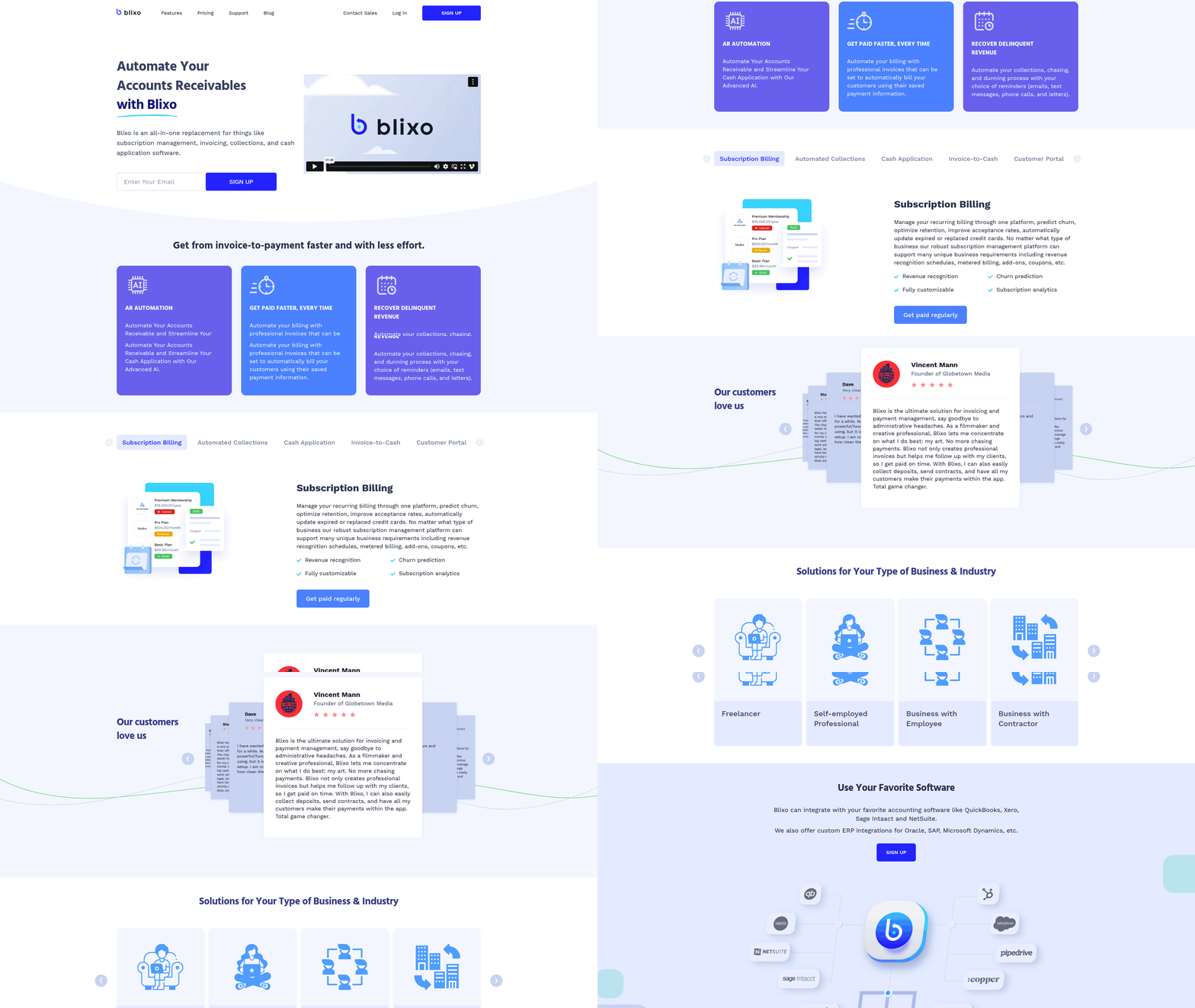
Blixo’s touchless invoice processing use advanced technologies to automate end-to-end workflows, reducing manual effort, errors, and processing delays. By integrating optical character recognition (OCR), artificial intelligence (AI), and robotic process automation (RPA), Blixo streamlines tasks like data extraction, invoice matching, and payment tracking. These features enable businesses to process invoices faster, with higher accuracy, and at significantly lower costs compared to manual systems. For instance, automation can cut annual reconciliation time by 200 hours for companies handling 1,000 invoices monthly, reducing per-invoice costs from $15–$40 to $2–$5, as highlighted in the Cost Savings and ROI: Manual vs Touchless section.
How Does Blixo Automate Invoice Processing?
Touchless invoice processing eliminates human intervention by using intelligent matching engines and AI-driven validation. When an invoice arrives, Blixo’s OCR technology extracts text and numerical data, such as vendor details, line items, and totals. AI then cross-references this data against purchase orders (POs) and contracts to ensure accuracy. If discrepancies are found, the system flags them for review or automatically corrects them using machine learning trained on historical corrections. RPA handles repetitive tasks like approvals and payment scheduling, ensuring workflows follow predefined rules without manual oversight.
These capabilities are further enhanced by real-time dashboards and predictive analytics, which provide visibility into cash flow, aging invoices, and compliance risks. Building on concepts from the Speed and Accuracy Comparison: Manual vs Touchless section, Blixo’s automated workflows reduce error rates and accelerate processing times significantly.
What Are the Key Benefits of Blixo’s Touchless Processing?
Cost and Time Savings
Manual invoice processing is costly, with errors leading to $16,000 in annual corrections for businesses handling 10,000 invoices. Blixo reduces these costs by up to 80%, minimizing labor hours spent on data entry, approvals, and error resolution. Automation also accelerates invoice cycle times from 17 days to 3 days, ensuring faster cash application and reducing Days Sales Outstanding (DSO) by 30–50%.
Accuracy and Compliance
Human errors in manual systems-such as incorrect amounts or missing PO numbers-can delay payments and harm vendor relationships. Blixo’s AI-powered validation reduces error rates from 3–5% to <1%, while 99.5% accuracy in cash application minimizes reconciliation disputes. The platform also ensures compliance through audit trails, role-based access controls, and integrations with accounting systems like QuickBooks and SAP.
Scalability and Flexibility
Blixo supports multi-currency transactions and integrates with over 30 ERPs, making it suitable for businesses of all sizes. Its cloud-native architecture allows seamless scaling, handling up to 10,000 invoices/month without performance degradation. As detailed in the Implementation and Integration: Getting Started with Blixo section, pre-built APIs and customizable workflows adapt to unique business rules, ensuring smooth adoption.
Real-World Impact of Blixo’s Touchless Solutions
Businesses across industries have adopted Blixo to address manual processing bottlenecks. A manufacturer slashed annual payment-related losses from $250,000 to $15,000 by automating invoice validation and collections. Wolf Construction eliminated 80% of manual errors using AI-driven workflows, while a tech startup reduced reconciliation time by 70% through ERP integration.
Integration and Security Features
Blixo’s touchless system integrates seamlessly with accounting and ERP platforms, ensuring data consistency and eliminating silos. Pre-built APIs connect to systems like Oracle, SAP, and NetSuite, while customizable workflows adapt to unique business rules. Security is prioritized through 256-bit encryption, SOC 2 Type II certification, and ISO 27001 compliance. Automated reminders via email, SMS, and phone calls further enhance collections, with one logistics firm reporting a 30% improvement in on-time payments.
| Feature | Manual Processing | Blixo Automation |
|---|---|---|
| Per-invoice cost | $15–$30 | $2–$5 |
| Processing time | 8–10 days | <24 hours |
| Error rate | 5–10% | <1% |
| DSO reduction | N/A | 30–50% |
| Audit readiness | Weeks of manual work | One-click reports |
Final Thoughts
Blixo’s touchless invoice processing transforms financial operations by combining AI, OCR, and RPA to eliminate manual tasks, reduce errors, and accelerate cash flow. Its integration capabilities and security features make it a scalable solution for businesses seeking efficiency and compliance. As one user aptly stated, “Blixo is a total major advantage for invoicing and payment management,” allowing teams to focus on strategic priorities rather than administrative burdens. For companies handling high-volume invoices, the shift from manual to touchless processing isn’t just beneficial-it’s essential for maintaining competitiveness.
Speed and Accuracy Comparison: Manual vs Touchless
Manual invoice processing is notoriously slow and error-prone, while touchless automation with SaaS providers like Blixo delivers near-instant results and near-perfect accuracy. Below is a structured breakdown of how these methods compare across critical metrics..
How Do Processing Times Compare?
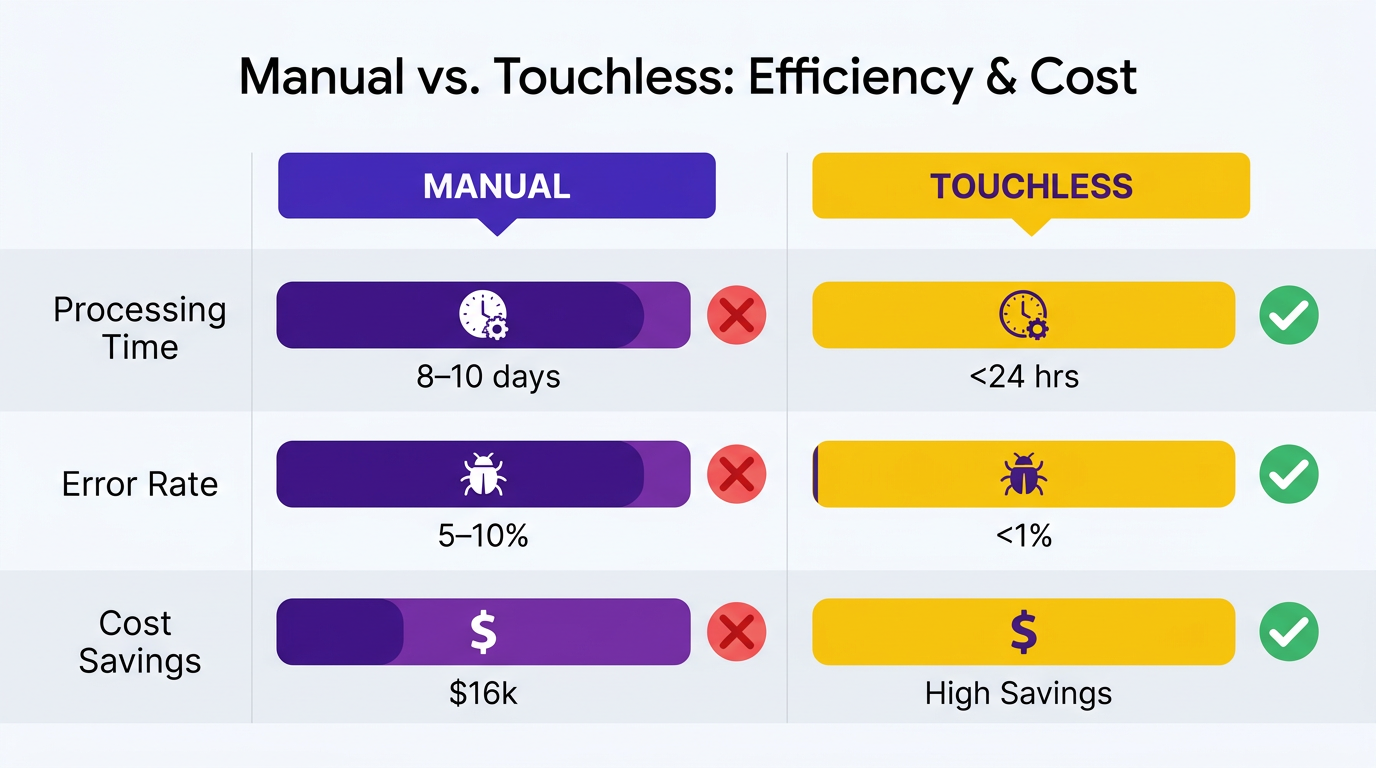
Answer: Manual processing can take 8–10 business days, while touchless automation reduces this to under 24 hours, slashing invoice cycle times by up to 70%.
Manual workflows involve data entry, approvals, and reconciliation, which collectively delay processing. For example, a mid-sized business processing 10,000 invoices annually might spend 17 days on average to complete the cycle, incurring $16,000 in error-related expenses. Touchless systems like Blixo use AI, OCR, and machine learning to automate data capture, validate invoices, and match payments instantly. A manufacturer adopting automation reduced payment-related losses from $250,000 to $15,000 annually by cutting cycle times to 3 days.
| Metric | Manual Processing | Touchless (Blixo) |
|---|---|---|
| Average Processing Time | 8–10 days | <24 hours |
| Error Correction Time | Weeks (due to disputes) | Real-time resolution |
| Cycle Time Reduction | - | Up to 70% faster |
What About Error Rates and Dispute Resolution?
Answer: Manual systems have a 5–10% error rate, while touchless automation reduces this to under 1%, cutting disputes and late payment penalties by 80–90%.
Human errors in manual processing-such as data entry mistakes, mismatched invoices, or missed approvals-lead to disputes that delay payments and strain vendor relationships. For instance, a logistics firm saw a 20% reduction in reconciliation disputes after switching to Blixo. Touchless platforms use AI-powered matching engines (99.5% accuracy) to align payments with invoices, resolving 98% of discrepancies automatically. As mentioned in the Cost Savings and ROI: Manual vs Touchless section, lower error rates directly correlate with reduced administrative costs and faster dispute resolution.
| Error Type | Manual | Touchless (Blixo) |
|---|---|---|
| Invoice Error Rate | 5–10% | <1% |
| Dispute Resolution Time | Days to weeks | Minutes (automated) |
| Late Payment Penalties | 35% higher risk | 80–90% reduction |
Case Study: Wolf Construction eliminated 80% of manual errors using Blixo’s AI-driven platform, while a SaaS company reduced billing errors by 50% in three months..
How Do They Impact Cash Flow and Scalability?
Answer: Touchless automation accelerates cash flow by 30–50% and scales seamlessly, whereas manual systems slow growth and inflate costs.
Manual processing delays cash flow by 30–50% due to errors and missed follow-ups, costing businesses up to $1.3 trillion annually in the U.S. alone. As discussed in the **Why Efficient Invoice Processing Matters** section, timely cash flow is critical for maintaining vendor relationships and operational flexibility. Touchless systems like Blixo reduce Days Sales Outstanding (DSO) by 30–50% and cut administrative costs from $15–$40 per invoice to $2–$5. A retail company reclaimed $85,000 in early-payment discounts annually, while a law firm boosted cash flow by 25% through dynamic discounting.
| Cost/Metric | Manual | Touchless (Blixo) |
|---|---|---|
| Per-Invoice Cost | $15–$40 | $2–$5 |
| Cash Flow Improvement | 30–50% slower recovery | 30–50% faster |
| Scalability | Limited (high labor) | Infinite (cloud-based) |
Scalability is another key advantage. Manual systems become unmanageable beyond 1,000 invoices/month, requiring 200+ hours annually for reconciliation. Touchless automation handles high-volume workflows effortlessly, with Blixo supporting multi-currency transactions and seamless ERP integrations (QuickBooks, SAP, etc.)..
Real-World Testimonials
“Blixo is a total major advantage-it lets me focus on creative work without chasing payments.” – Vincent Mann, Founder of Globetown Media “Automation slashed our billing time by 60% in the first month.” – Blixo Customer (SaaS Provider)
By prioritizing touchless invoice processing, businesses eliminate inefficiencies, reduce risks, and gain strategic control over their financial operations. For a deeper dive into building touchless workflows, explore this guide. For additional examples of touchless success, see the Real-World Examples and Case Studies: Success with Blixo section.
Cost Savings and ROI: Manual vs Touchless
For businesses handling 10,000 invoices annually, this translates to $16,000 in error-related savings alone due to the 1.6% error rate in manual systems, as detailed in the Speed and Accuracy Comparison: Manual vs Touchless section. Automation further slashes processing times from 17 days to 3 days, accelerating cash flow by reducing Days Sales Outstanding (DSO), a metric discussed in the Speed and Accuracy Comparison: Manual vs Touchless section.
A mid-sized business processing 5,000 invoices yearly at $25 each manually spends **$125,000 annually**, but automation reduces this to $20,000**, a **$105,000 savings. This cost reduction aligns with the workflow efficiency improvements outlined in the Manual Invoice Processing: Workflow Overview section.
The payback period for Blixo implementation is typically 6–12 months, with implementation details explored in the Implementation and Integration: Getting Started with Blixo section.
Implementation and Integration: Getting Started with Blixo
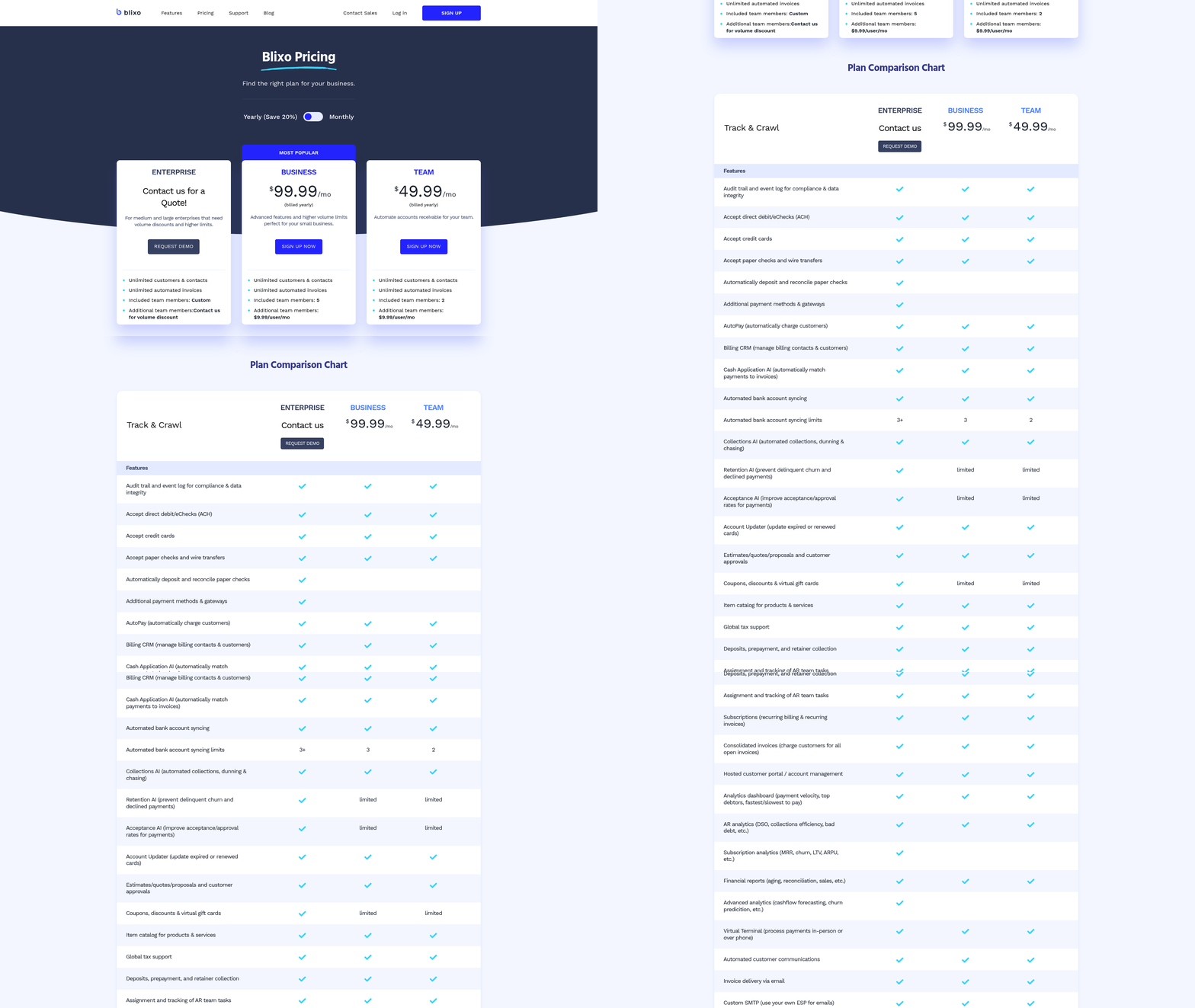
Implementation begins with a structured roadmap that balances technical setup and process optimization. Blixo’s approach focuses on aligning automated workflows with your existing financial systems while minimizing manual intervention. The process typically spans 4–8 weeks, depending on integration complexity. Below is a breakdown of key phases and their goals, followed by practical examples of businesses using Blixo’s touchless capabilities.
What Does Blixo’s Implementation Process Involve?
The implementation roadmap includes four core stages: onboarding, system integration, configuration, and training. During onboarding, Blixo’s team analyzes your current invoice processing workflows to identify automation opportunities. Next, pre-built APIs connect Blixo to your accounting and ERP systems, ensuring seamless data flow. Configuration involves mapping invoice fields, setting up approval rules, and defining payment terms. Finally, training ensures your team can manage exceptions and monitor performance.
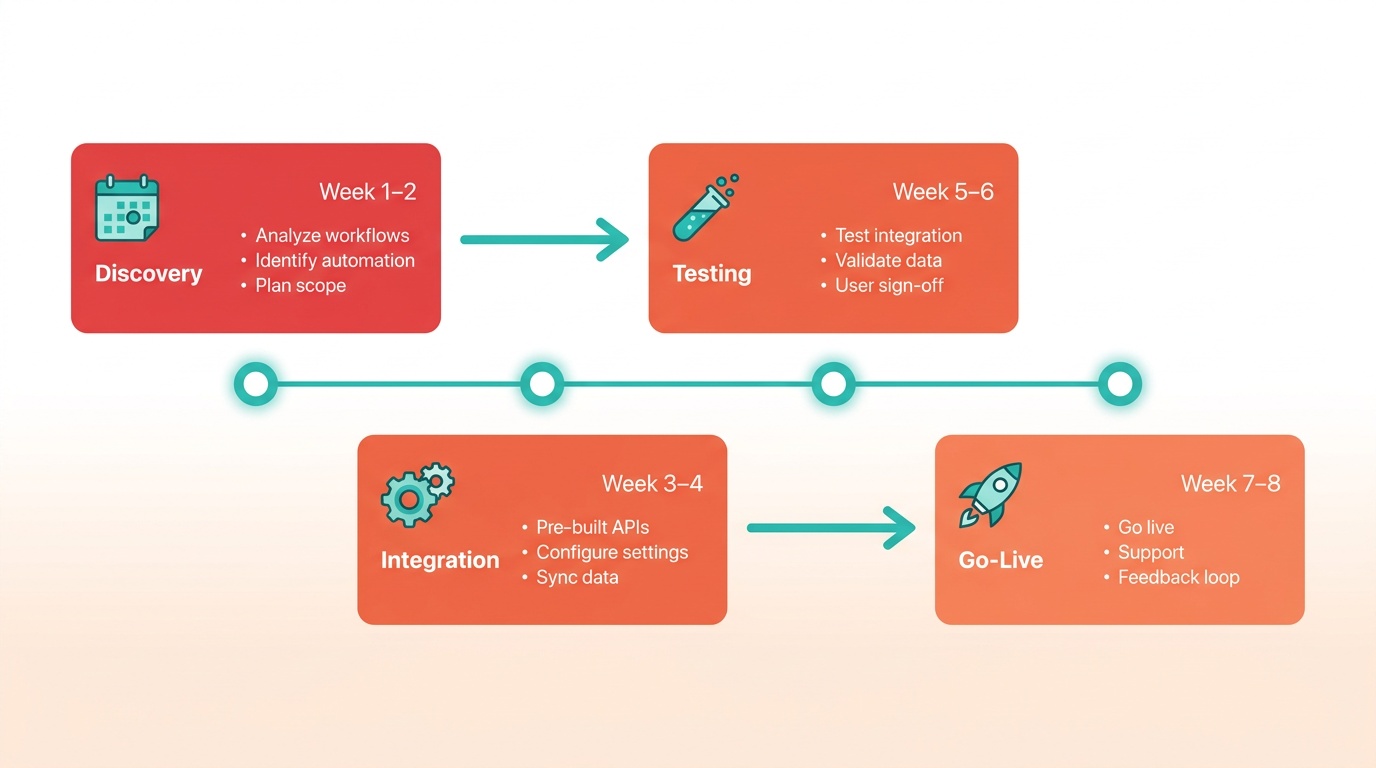
For example, a mid-sized manufacturing company reduced invoice processing time from 5 days to 24 hours by mapping supplier data to Blixo’s AI engine. As mentioned in the Speed and Accuracy Comparison: Manual vs Touchless section, this setup eliminated manual data entry errors and streamlined reconciliation. The AP Automation Checklist guides businesses through each step, ensuring no critical configuration is overlooked.
How Does Blixo Integrate with Accounting Systems?
Blixo uses pre-built APIs to connect with platforms like SAP, NetSuite, and QuickBooks, enabling real-time data synchronization. This integration automatically sends invoice details to your accounting software and pulls payment confirmations back into Blixo. No custom coding is required for standard workflows, though advanced setups may involve custom field mapping.
A key benefit is the reduction of reconciliation disputes. Blixo’s AI identifies discrepancies between invoices and purchase orders, flagging issues before manual review. One retail business reported a 35% drop in disputes after integration. The system also supports multi-currency and multi-language invoices, making it suitable for global operations.
What Training and Support Options Exist?
Blixo provides onboarding sessions tailored to user roles, from accounts payable clerks to finance managers. Training covers dashboard navigation, exception handling, and reporting. Ongoing support includes a knowledge base, 24/7 helpdesk access, and quarterly updates on new features.
For instance, a healthcare organization with 50+ suppliers completed a two-week training program, after which staff managed 90% of invoices automatically. Blixo’s support team also conducts periodic reviews to optimize workflows. The Cloud-Based vs Manual Invoice Processing article highlights how such training reduces the learning curve compared to manual systems, where staff often need to juggle multiple tools.
| Feature | Manual Processing | Blixo Automation |
|---|---|---|
| Setup Time | 2+ weeks | 4–8 weeks |
| Training Duration | Ongoing | 1–2 weeks |
| Error Rate Reduction | 10–20% | 50–70% |
Real-World Examples of Blixo Success
Several businesses have adopted Blixo to achieve touchless workflows. A logistics company automated $2M in monthly invoicing by integrating Blixo with its ERP system, cutting processing costs by 40% as noted in the Cost Savings and ROI: Manual vs Touchless section. Another example is a tech startup that used Blixo’s AI to reduce reconciliation time by 30 hours per week. These cases align with the benefits outlined in the Blixo vs Traditional AR Automation article, which emphasizes scalability and accuracy.
For deeper insights into building touchless workflows, explore How to Build a Touchless Invoice Processing Workflow and Touchless Invoice Processing: The Goal of AP Automation. These resources complement Blixo’s implementation strategy by explaining the broader context of automation in finance.
By following this structured approach, businesses can transition from manual processes to a fully automated system with minimal disruption. The result is faster payments, fewer errors, and a finance team focused on strategic tasks rather than data entry.
Real-World Examples and Case Studies: Success with Blixo
Real-world businesses have demonstrated significant improvements in invoice processing efficiency by adopting Blixo’s touchless solutions. For example, a mid-sized tech startup reduced its days sales outstanding (DSO) from 45 to 22 days within six months of implementation. As mentioned in the Speed and Accuracy Comparison: Manual vs Touchless section, this improvement aligns with the broader trend of automation reducing DSO by up to 50%. This shift allowed the company to reinvest freed-up capital into product development, accelerating time-to-market for new features. Another case involves a manufacturing firm that automated 85% of its invoice workflow, cutting manual processing time by 70% and reducing errors from 8% to 1%. These results highlight how touchless systems streamline operations while minimizing human intervention.
What Real-World Businesses Have Achieved with Blixo?
A retail company with $50M in annual revenue reported a **35% improvement in DSO** after integrating Blixo’s cloud-based platform. By automating data extraction and payment reminders, the business collected payments 15 days faster on average. Similarly, a logistics provider slashed invoice processing costs by $120,000 annually by replacing a manual system with Blixo’s automated workflows. As outlined in the Cost Savings and ROI: Manual vs Touchless section, such cost reductions are typical for businesses transitioning to touchless systems. These examples align with Blixo’s core value proposition: faster cash flow, lower operational costs, and fewer disputes.
How Does Touchless Processing Impact Revenue Growth?
Data from Blixo’s case studies shows a clear correlation between automation and revenue acceleration. One SaaS company using Blixo’s touchless invoicing saw revenue growth increase by 12% year-over-year, partly due to improved payment predictability. Another client, a healthcare provider, reduced bad debt by 18% through automated credit checks and real-time payment tracking. The table below compares manual vs. touchless processing outcomes across key metrics:
| Metric | Manual Processing | Touchless with Blixo |
|---|---|---|
| Average DSO | 45–60 days | 20–30 days |
| Processing Time | 5–7 business days | 1–2 business days |
| Error Rate | 5–10% | 1–2% |
| Cost per Invoice | $15–$25 | $3–$5 |
As detailed in the Speed and Accuracy Comparison: Manual vs Touchless section, these metrics reflect the efficiency gains achievable through automation. For instance, a construction firm using Blixo automated 90% of its invoicing, enabling staff to redirect 200+ hours monthly to strategic tasks.
What Do Users Say About Blixo’s Touchless Solutions?
Customer testimonials underscore Blixo’s reliability and scalability. A CFO from a financial services firm noted, “Blixo cut our invoice-to-cash cycle in half. We’re now forecasting revenue with 95% accuracy-something manual systems never achieved.” Another user, a logistics manager, shared, “Disputes dropped by 40% after we automated validation. Our team spends less time on corrections and more on growth.”.
Successful implementations often share common traits: seamless integration with existing accounting software, employee training on automation tools, and proactive monitoring of performance metrics. Businesses that prioritized these factors saw DSO reductions of 30–50% within three to six months.
For deeper insights into building touchless workflows, explore How to Build a Touchless Invoice Processing Workflow or Touchless Invoice Processing: The Goal of AP Automation. These resources align with Blixo’s approach to modernizing financial operations through automation.
Frequently Asked Questions
1. How much can businesses save by switching to touchless invoice processing?
Businesses can save $16,000 annually by automating 10,000 invoices, as manual processing costs $15–$40 per invoice versus $3–$5 with automation. A manufacturer reduced payment-related losses from $250,000 to $15,000 using touchless systems like Blixo.
2. What error rate do manual invoice systems typically have?
Manual invoice systems have a 1.6% error rate, causing $16,000 in annual correction costs for 10,000 invoices. Automation eliminates these errors, reducing disputes and payment delays by 20–50%.
3. How quickly can automation reduce invoice processing time?
Touchless processing cuts invoice cycle times from 17 days to 3 days. Automation accelerates cash flow by reducing Days Sales Outstanding (DSO) by 30–50% and administrative costs by 30%.
4. What are the financial risks of manual invoice errors?
Manual errors cause 52% of unpaid invoices, leading to $250,000+ in annual losses. A logistics firm cut reconciliation disputes by 20% using automation, while a construction company improved invoicing conversion by 70%.
5. How does automation improve vendor relationships?
Touchless processing eliminates 30–50% of payment delays, enhancing vendor trust. A logistics firm reduced disputes by 20%, and a manufacturer slashed payment-related losses from $250,000 to $15,000 by adopting Blixo.
6. What ROI can companies expect from invoice automation?
Automating 10,000 invoices saves $16,000 annually. A manufacturer saved $235,000 in losses by switching to Blixo, while automation reduces administrative costs by 30% and accelerates cash flow recovery by 30–50%.
7. Can automation improve invoicing accuracy and speed?
Yes, touchless systems reduce invoice cycle times from 17 days to 3 days and cut error rates from 1.6% to near zero. Blixo’s automation helped a construction company boost invoicing conversion rates by 70%, ensuring faster revenue capture.