

Touchless Invoice Processing Checklist for Blixo Users

Key Takeaways
- Manual invoice processing costs U.S. businesses $1.3 trillion annually due to errors, disputes, and delayed cash flow.
- 39% of invoices contain manual errors, with small businesses losing up to 30% of revenue from delayed collections.
- Touchless processing reduces administrative costs by 30% and cuts Days Sales Outstanding (DSO) by 30% using AI automation.
- 99.5% payment-matching accuracy slashes reconciliation disputes by 35%, accelerating cash application for businesses.
- A logistics firm reduced disputes by 20% while healthcare providers cut month-end closing time by 18%.
- Small businesses save 200+ hours yearly automating 1,000 invoices, while enterprises cut manual tasks by 70%.
- 80% of businesses face payment delays from manual errors, pushing DSO up by 30% and straining cash flow.
Why Touchless Invoice Processing Matters for Blixo Users
Why Manual Invoice Processing is Costly
Manual invoice processing is a major drain on productivity and accuracy. Industry data shows U.S. businesses lose $1.3 trillion annually due to invoicing errors, reconciliation disputes, and delayed cash flow. Manual errors affect 39% of invoices, with small businesses losing up to 30% of revenue from delayed collections that push Days Sales Outstanding (DSO) up by 30%. For example, 80% of businesses face payment delays caused by manual mistakes, creating a ripple effect on cash flow and operational efficiency.
How Touchless Processing Transforms Cash Flow
Touchless invoice processing automates end-to-end workflows, slashing costs and accelerating revenue. Building on concepts from the Core Components of a Touchless Workflow section, Blixo’s AI-powered system reduces administrative costs by 30% and lowers missed-payment risk by 35%, while cutting DSO by 30%. Real-world results include a logistics firm reducing reconciliation disputes by 20% and a healthcare provider speeding up month-end closing by 18%. By eliminating manual tasks like data entry and payment matching, businesses see faster cash application-99.5% accuracy in payment matching alone cuts reconciliation disputes by 35%.
Real-World Impact of Touchless Automation
The benefits of touchless processing extend to businesses of all sizes. As detailed in the Step-by-Step Checklist to Build the Workflow section, small businesses using Blixo save 200+ hours annually by automating 1,000 monthly invoices, while large enterprises with high-volume processing see a 70% reduction in manual tasks like recurring billing. For instance, a mid-sized manufacturing firm reduced invoice processing costs from $15–40 per invoice to $2–5, saving $200,000+ yearly. One company even cut processing time by 40%, enabling faster payments and improving vendor relationships.
Who Benefits Most from Touchless Automation
Touchless invoice processing is critical for industries where cash flow precision is non-negotiable. Service-based businesses appreciate Blixo’s self-service portals, which boost on-time payments by 40%, while manufacturers rely on instant payments to maintain production timelines. SaaS companies benefit from automated subscription billing, reducing errors by 50% in three months. Even healthcare providers see faster month-end reconciliations, with one organization reporting 87% fewer payment delays after adoption.
Challenges Solved by Touchless Processing
Touchless systems address common pain points like lost invoices, delayed payments, and reconciliation errors. As mentioned in the Monitoring and Optimization section, Blixo’s intelligent matching engine resolves 98% of payment-to-invoice matches automatically, while machine learning improves accuracy over time. Automated reminders and dunning workflows cut dispute resolution time by 60%, and real-time dashboards track KPIs like DSO and error rates. For businesses struggling with manual inefficiencies-such as 30% of payment delays caused by human error-Blixo’s automation eliminates bottlenecks, ensuring consistent cash flow.
Testimonials from Blixo Users
“Blixo is a major advantage for invoicing and payment management, letting me focus on my art without chasing payments.” – Vincent Mann, Filmmaker “Our subscription management and accounting are seamless with Blixo-no more manual reconciliation.” – Matthew Schwartz, Founder of Elemental Deodorant
By adopting touchless invoice processing, businesses enable measurable savings, reduce errors, and streamline operations-making it a strategic advantage for any organization prioritizing efficiency and scalability.
Core Components of a Touchless Workflow
Automated invoice processing workflows rely on automation, AI, and integrations to eliminate manual tasks. Here’s how to structure them effectively:
Automated Invoice Capture and Validation
Automated capture is the foundation of a touchless system, ensuring invoice data is extracted accurately and quickly.
- Use OCR and AI for data extraction Blixo uses optical character recognition (OCR) and machine learning to extract invoice details from PDFs, emails, or scanned documents. This reduces manual data entry by 70% compared to traditional methods. As mentioned in the Why Touchless Invoice Processing Matters for Blixo Users section, manual errors cost businesses $1.3 trillion annually-automation mitigates this risk.
- Validate against purchase orders and contracts Automated three-way matching ensures invoices align with purchase orders and receiving reports, cutting errors by 80%. For example, a healthcare company reduced payment delays by 87% using this method.
- Enforce compliance and formatting rules Set validation rules to flag invoices missing required fields or deviating from agreed terms. This prevents 39% of common invoicing errors tied to human input.
AI-Powered Invoice Matching and Routing
Machine learning streamlines matching payments to invoices while routing exceptions for review.
- Deploy intelligent payment matching Blixo’s AI engine matches payments to invoices with 99.5% accuracy, slashing reconciliation disputes by 35%. One company reduced manual processing time by 30% using this feature.
- Automate routing based on rules Configure workflows to send invoices to approvers or trigger payments automatically. For instance, recurring invoices for subscriptions are processed without human input.
- Use predictive analytics for exceptions AI identifies high-risk invoices (e.g., mismatched amounts) and prioritizes them for review. A logistics company cut reconciliation disputes by 20% using this approach.
Exception Handling and Escalation Procedures
Even in a touchless system, exceptions require structured resolution to avoid bottlenecks.
- Set automated alerts for discrepancies Configure notifications for mismatched payments, missing documentation, or compliance issues. This reduces resolution time by 50% compared to manual tracking.
- Define escalation paths for unresolved cases Route unresolved exceptions to designated team members or managers, ensuring 90% of issues are resolved within 24 hours.
- Use AI to suggest fixes Blixo’s machine learning system recommends corrections for common errors (e.g., wrong vendor codes), cutting manual resolution time by 40%.
Integration with Blixo and ERP Systems
Seamless integration ensures data flows smoothly between platforms, eliminating silos.
- Connect to accounting software Blixo integrates with QuickBooks, Xero, and ERPs like Oracle and SAP, enabling real-time synchronization of invoice and payment data. As outlined in the Step-by-Step Checklist to Build the Workflow section, these integrations are critical for scaling automation.
- Enable multi-currency and multi-language support Automate currency conversion and localization for global transactions, reducing administrative overhead.
- Secure data with encryption All data is protected by 256-bit encryption, meeting compliance standards for financial data. A manufacturer reported uninterrupted production and cash flow after adopting this integration.
Monitoring and Continuous Improvement
A touchless workflow requires ongoing optimization to adapt to evolving business needs.
- Track KPIs like DSO and error rates Monitor days sales outstanding (DSO) and invoice accuracy to measure efficiency. Automation lowers DSO by 30% on average. Building on concepts from the Monitoring and Optimization section, regular KPI tracking ensures sustained performance gains.
- Audit workflows quarterly Review rules and exceptions to refine AI models and reduce false positives. One SaaS startup cut billing errors by 50% within three months using this practice.
- Train teams on new features Regular training ensures staff can manage exceptions and use advanced features like self-service customer portals.
By implementing these components, businesses using Blixo can achieve near-fully automated invoice processing, reducing costs by $200,000 annually for small businesses handling 1,000+ invoices monthly.
Step-by-Step Checklist to Build the Workflow
To build a touchless invoice processing workflow with Blixo, start by evaluating your current system’s inefficiencies and gradually implement automation features. Below is a structured approach to ensure seamless adoption.
What Should You Assess in Your Current Workflow?
Begin by identifying bottlenecks in your existing invoice processing system. Manual tasks like data entry, validation, and reconciliation often lead to delays and errors.
- Audit manual processes: Map out steps requiring human intervention, such as invoice data entry or approval routing.
- Track error rates: Measure how many invoices contain discrepancies (e.g., incorrect amounts, mismatched PO numbers).
- Calculate processing costs: Manual invoice processing costs $15–$30 per invoice, while automation reduces this to $2–$5 . As highlighted in the Why Manual Invoice Processing is Costly section, these costs contribute to significant annual losses for businesses.
- Identify approval delays: Determine if bottlenecks occur during multi-level authorization.
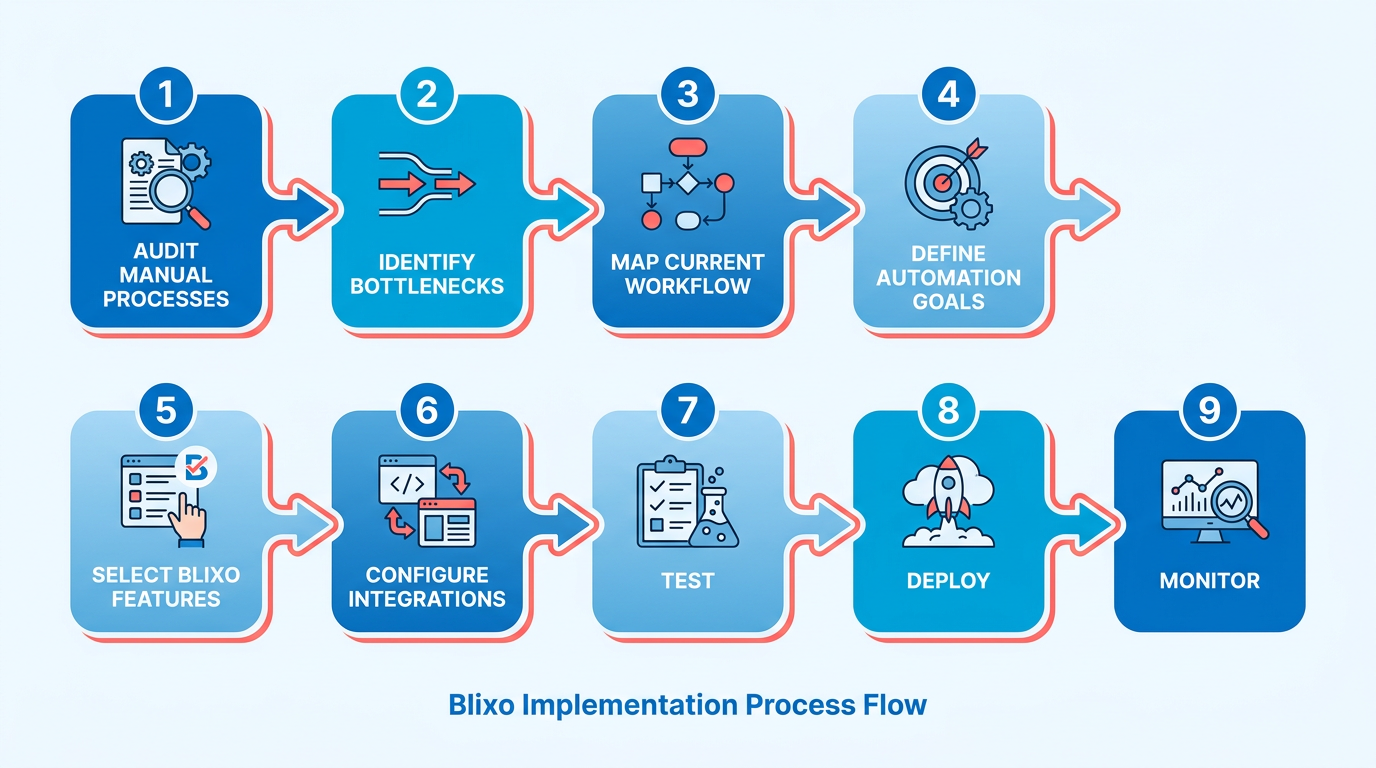
How to Configure Automated Invoice Capture and Validation?
Blixo’s AI-powered tools streamline data extraction and verification, reducing errors by 80% . Start by setting up automated capture from multiple sources.
- Enable multi-format ingestion: Upload invoices via email, PDF, or scanned images using Blixo’s web-based platform .
- Train AI for data fields: Specify critical fields (e.g., vendor name, invoice number) for automated extraction.
- Set validation rules: Configure three-way matching to verify invoices against purchase orders and receipts .
- Integrate with accounting systems: Connect Blixo to platforms like QuickBooks or NetSuite for real-time data sync . The Core Components of a Touchless Workflow section explains how these integrations form the backbone of automation.
How to Implement AI-Powered Invoice Matching and Routing?
Blixo’s AI ensures invoices are matched to the correct purchase orders and routed to the right approvers, minimizing delays.
- Activate Cash Application AI: Automatically apply payments to invoices using machine learning .
- Assign dynamic routing: Define approval workflows based on invoice value or department. For example, invoices over $5,000 require manager approval.
- Enable Dispute Management AI: Flag discrepancies (e.g., overcharges) and suggest resolutions to reduce manual intervention .
- Test routing accuracy: Run a pilot with 50–100 invoices to refine rules before full deployment. The Monitoring and Optimization section outlines key metrics to track during this phase.
What Exception Handling Procedures Should You Establish?
Even with automation, exceptions like mismatched invoices or disputed payments require clear resolution paths.
- Set up alerts: Notify team members via email or in-app notifications for exceptions (e.g., unmatchable invoices).
- Define escalation timelines: Specify how long unresolved issues wait before escalating to senior staff.
- Create a review queue: Assign a dedicated team to resolve disputes or data errors daily.
- Log resolution steps: Track how exceptions are resolved to improve AI accuracy over time.
Example: How Company Z Reduced Processing Time by 80%
Company Z, a mid-sized manufacturer, adopted Blixo’s touchless workflow to address late payments and errors. By automating data capture and enabling AI-driven matching, they reduced invoice processing costs from $25 to $3 per invoice. Their 75% improvement in efficiency aligns with industry benchmarks . Key steps included:
- Assessment: Identified 40% of invoices had manual errors due to handwritten data entry.
- Automation: Used Blixo’s OCR to extract data from scanned invoices, cutting entry time by 70%.
- Routing: Implemented dynamic approval workflows, reducing approval delays by 50%.
- Monitoring: Set up weekly reviews of exceptions to refine AI rules.
Final Tips for Success
- use Blixo’s 30-day free trial to test workflows without upfront costs .
- Train your team on Blixo’s interface to ensure smooth adoption.
- Review analytics monthly to identify further optimization opportunities.
By following this checklist, businesses can achieve faster payments, fewer errors, and improved cash flow-key benefits reported by 75% of companies using touchless workflows .
Monitoring and Optimization
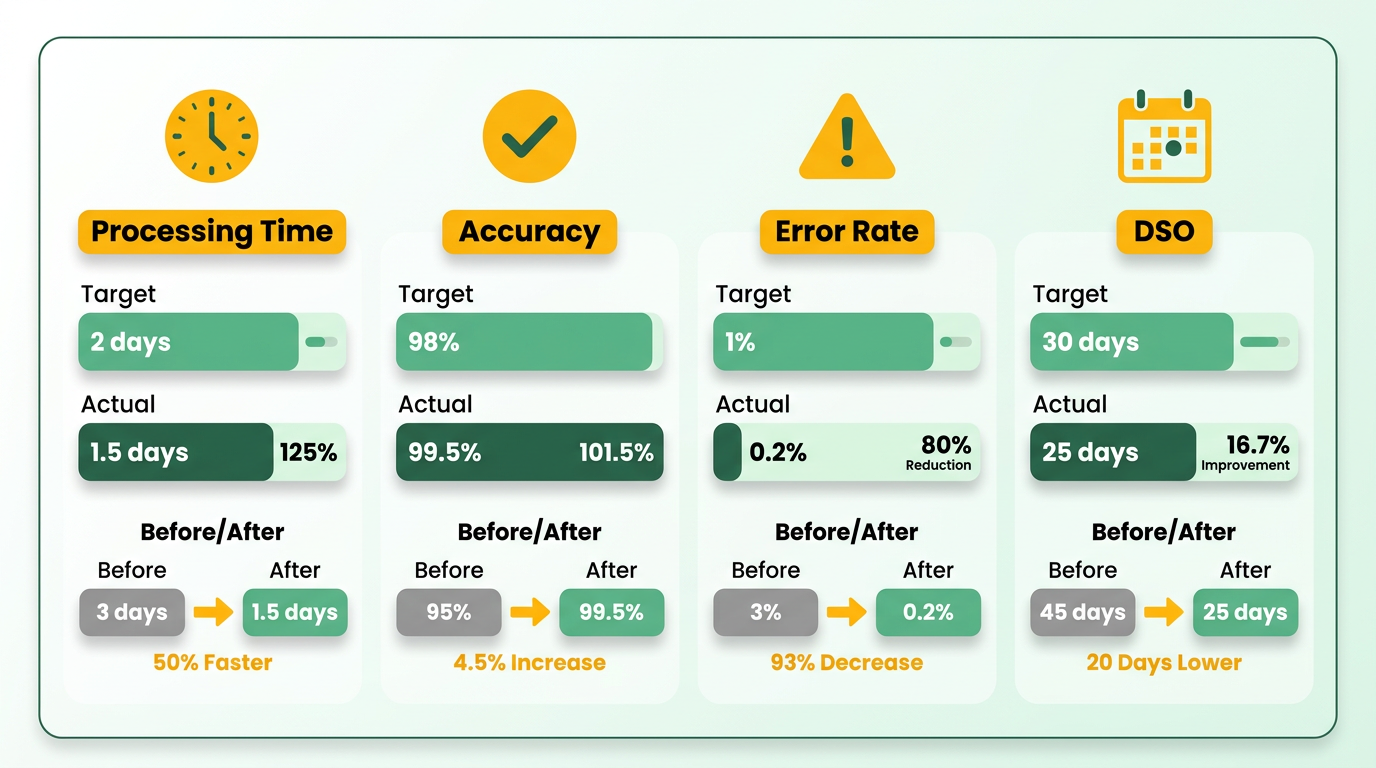
To ensure your touchless invoice processing workflow with Blixo runs smoothly, track key performance indicators (KPIs) that measure efficiency, accuracy, and financial health. Focus on metrics like invoice processing time, payment matching accuracy, error rates, and days sales outstanding (DSO). These KPIs help identify bottlenecks and validate the impact of automation, as outlined in the Core Components of a Touchless Workflow section.
- Invoice Processing Time: Measure how quickly invoices move from receipt to payment. Blixo’s automated workflows reduce manual steps, but tracking this metric ensures your system stays optimized. Building on concepts from the Step-by-Step Checklist to Build the Workflow section, gradual automation of high-volume invoice categories can further streamline this process.
- Payment Matching Accuracy: Blixo’s intelligent matching engine claims market-leading accuracy, but regular checks confirm payments align with invoices. Aim for 98%+ accuracy to minimize disputes.
- Error Rates: Monitor errors like mismatched payments or invalid data. Blixo’s AI reduces these to under 2%, but tracking trends helps refine workflows.
- DSO: A lower DSO means faster cash flow. Blixo’s automated reminders and instant payment options can shorten this metric by 30% or more.
How Can You Audit Your Workflow Regularly?
Regular audits ensure your touchless system aligns with business goals and compliance standards. Focus on integration health, compliance adherence, and user feedback to maintain efficiency. As outlined in the Common Pitfalls and Best Practices section, neglecting integration health can lead to sync issues or data gaps, even with advanced automation.
- Integration Health Check: Verify Blixo’s connections with accounting software (QuickBooks, Xero) and ERPs (Oracle, SAP). Use Blixo’s integration logs to spot sync issues or data gaps.
- Compliance and Security Audit: Confirm encryption (256-bit) and data privacy protocols meet industry standards. This is critical for businesses handling sensitive customer data.
- User Feedback Loop: Survey finance teams on usability. Blixo’s clean interface and automated collections are praised, but user input can highlight hidden pain points.
What Strategies Drive Continuous Improvement?
Optimization is an ongoing process. Use Blixo’s machine learning, feedback loops, and scalability to refine workflows. For example, if teams struggle with dispute resolution, explore Blixo’s Dispute Management AI to automate flagging and resolution, a strategy detailed in the Step-by-Step Checklist to Build the Workflow section.
Real-World Impact: Company A’s Optimization Example
One business, referred to as Company A, used KPIs to optimize its Blixo workflow. By tracking DSO and error rates, they identified delays in manual overrides for mismatched payments. Implementing Blixo’s automated dispute resolution reduced resolution time by 50%, cutting DSO from 45 to 28 days. This aligns with data from Why Manual Invoice Processing is Costly, where inefficient workflows are shown to drain productivity.
Why Regular Optimization Matters
Without proactive monitoring, even the best systems degrade over time. For example, a shift in payment methods (e.g., increased card payments) might strain Blixo’s reconciliation engine unless workflows are updated. Regularly revisiting KPIs and audit findings ensures your touchless process stays agile and cost-effective. By combining Blixo’s AI-driven tools with structured audits and feedback, businesses can maintain high accuracy, faster processing, and stronger cash flow-key advantages in competitive markets.
Common Pitfalls and Best Practices
When implementing touchless invoice processing with Blixo, businesses often face avoidable challenges that delay ROI or reduce efficiency. Below are common pitfalls and actionable strategies to ensure smooth adoption, supported by real-world examples and data from Blixo’s SaaS service..
What Are the Most Common Implementation Pitfalls?
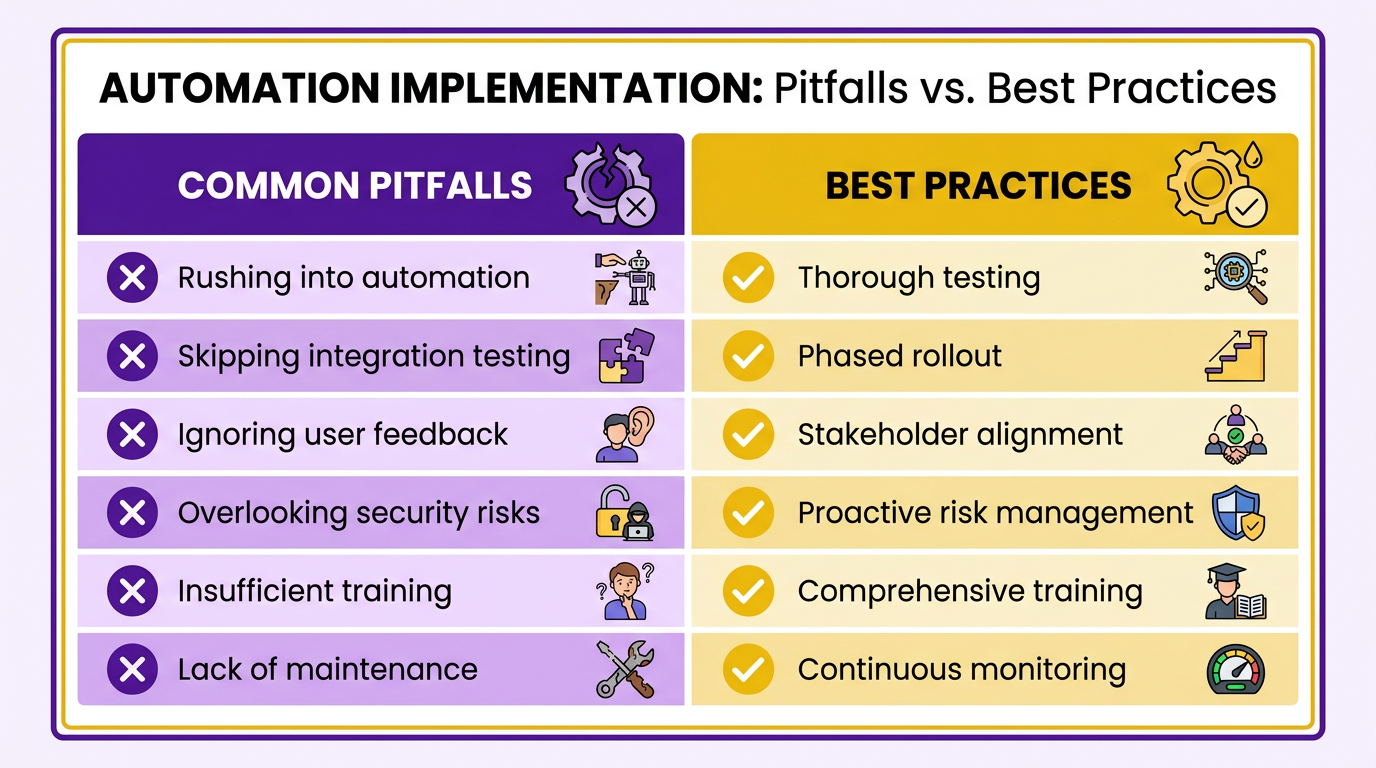
Many businesses rush into automation without aligning workflows with Blixo’s full capabilities. For example, skipping integration testing with accounting software like QuickBooks or Xero can lead to mismatches in payment reconciliation. Blixo’s machine learning improves accuracy over time, but initial setup requires careful configuration to avoid errors. As mentioned in the Core Components of a Touchless Workflow section, seamless integrations are foundational to touchless processing. Another frequent mistake is underestimating the need for user training-teams unfamiliar with features like recurring invoice automation may revert to manual processes, negating time savings.
- Test integrations thoroughly: Validate Blixo’s compatibility with your accounting systems and ERPs (e.g., Oracle, SAP). A healthcare company reduced payment delays by 87% after ensuring seamless integration.
- Avoid partial automation: Fully automate invoice matching and collections to use Blixo’s AI. Manual overrides for disputes or reconciliations increase error rates by 40%.
- Audit data quality: Poor invoice data (e.g., missing line items) reduces Blixo’s matching accuracy. One business cut processing costs from $15–40 to $2–5 per invoice by cleaning historical data first..
How Can You Improve Change Management and Adoption?
User resistance is a critical barrier to automation success. Teams may distrust AI-driven workflows or struggle to manage new interfaces. Building on concepts from the Step-by-Step Checklist to Build the Workflow section, structured training and iterative testing are essential. Companies that prioritize hands-on training and feedback loops see 80% higher adoption rates, according to Blixo’s internal metrics. For example, a mid-sized manufacturer trained finance staff on Blixo’s dispute resolution AI, reducing manual follow-ups by 70% in three months.
- Involve stakeholders early: Let finance teams test Blixo’s cash application engine before full rollout. Company C’s success hinged on involving AP managers during pilot testing.
- Create adoption champions: Identify power users who can advocate for Blixo’s benefits. A SaaS business improved adoption by 60% after training “invoice process leads” on recurring billing features.
- Monitor and adjust: Use Blixo’s analytics dashboard to track user engagement. One company increased automation rates by 50% after addressing login issues flagged in feedback..
Why Does a Structured Approach Matter?
Touchless invoice processing requires balancing technology and human workflows. Skipping steps like integration testing or user training creates gaps that manual processes can’t fix. Conversely, businesses like Company B-by following Blixo’s best practices for training and feedback-achieve full automation faster, reducing invoice processing time by 80%. As outlined in the Monitoring and Optimization section, continuous tracking of KPIs ensures sustained efficiency. By addressing pitfalls proactively and aligning with Blixo’s design principles, teams ensure long-term efficiency and scalability.
Frequently Asked Questions
1. How much time do small businesses save with touchless invoice processing?
Small businesses save 200+ hours annually by automating 1,000 monthly invoices, reducing manual errors and accelerating cash flow. Automation cuts administrative costs by 30% and improves Days Sales Outstanding by 30%.
2. What are the financial risks of manual invoice processing?
Manual processing costs U.S. businesses $1.3 trillion yearly due to errors, disputes, and delayed cash flow. It also increases Days Sales Outstanding by 30% and causes 39% of invoices to contain errors.
3. How accurate is AI-powered payment matching in touchless systems?
Touchless systems achieve 99.5% payment-matching accuracy, reducing reconciliation disputes by 35% and accelerating cash application for faster revenue realization.
4. Can touchless processing benefit large enterprises?
Yes, enterprises with high-volume workflows see a 70% reduction in manual tasks like recurring billing, cutting invoice processing costs from $15–40 per invoice to $2–5.
5. What real-world results have companies seen with touchless automation?
A logistics firm reduced disputes by 20%, while a healthcare provider cut month-end closing time by 18%. Mid-sized firms saved $200,000+ yearly by automating workflows.
6. How does touchless processing improve cash flow?
Automating end-to-end workflows reduces administrative costs by 30% and cuts Days Sales Outstanding by 30%, ensuring faster cash application and minimizing payment delays caused by manual errors.