

Implement Touchless Invoice Processing with Blixo

Key Takeaways
- Touchless invoice processing saves businesses over 200 annual hours monthly by automating reconciliation for 1,000+ invoices.
- Manual data entry errors raise missed payment risks by 35%, delaying cash flow and increasing administrative costs.
- Automating invoice workflows reduces Days Sales Outstanding (DSO) by 30% and disputes by 20% for logistics companies.
- Dynamic discounting features in Blixo’s SaaS boost cash flow by 25% by incentivizing early payments.
- High-volume businesses processing 1,000+ invoices monthly save 200+ hours and cut reconciliation disputes by 20%.
- Blixo’s system automates data capture and payment matching, addressing errors at every invoice lifecycle stage.
- Touchless automation accelerates collections, directly improving financial health through faster, dispute-free payments.
Why Touchless Invoice Processing Matters
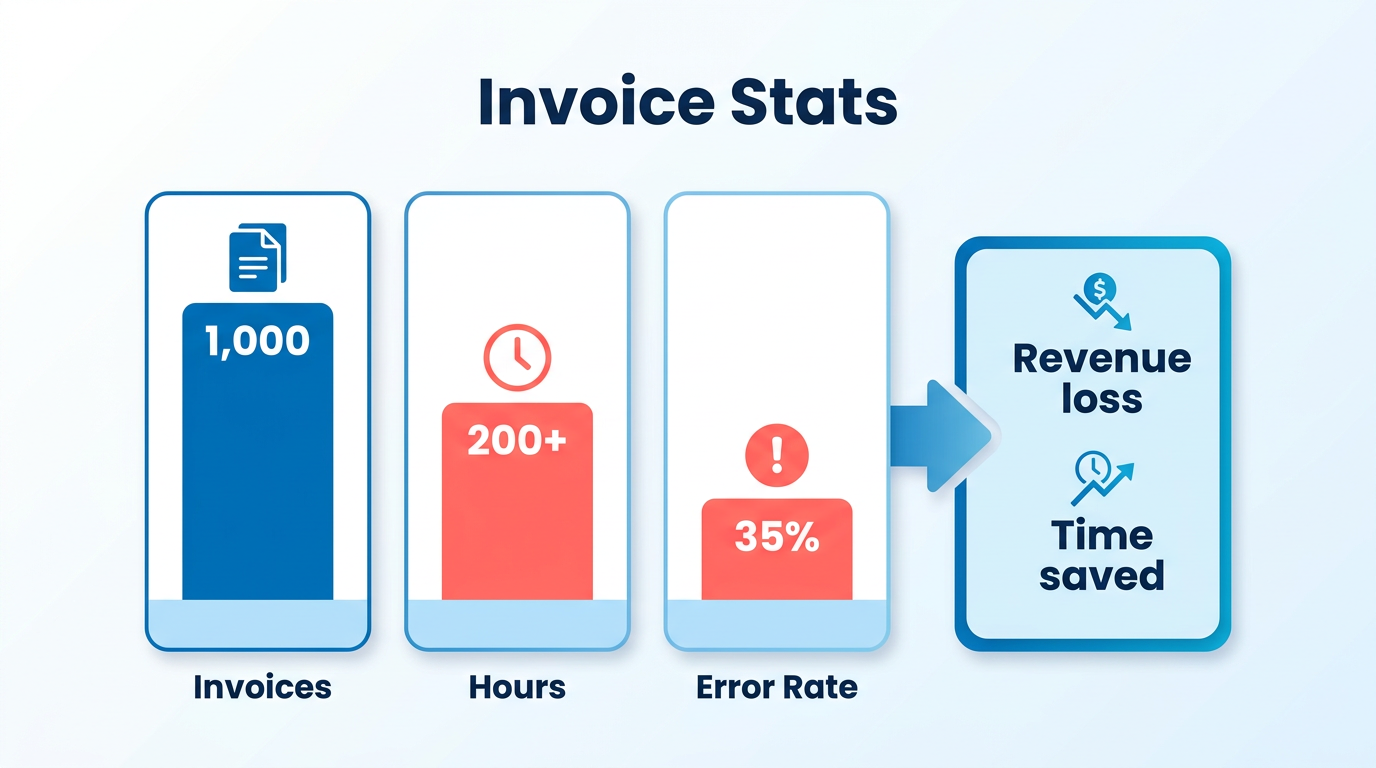
Touchless invoice processing eliminates manual workflows, saving businesses hundreds of hours annually while reducing errors that delay payments and erode revenue. For companies handling 1,000 invoices monthly, manual reconciliation alone consumes over 200 hours yearly-time that could be redirected toward strategic growth. Errors from manual data entry further raise the risk of missed payments by 35%, inflating administrative costs and slowing cash flow. By automating data capture and payment matching, as detailed in the Understanding Blixo’s Touchless Invoice Processing Capabilities section, Blixo’s system addresses these inefficiencies at every stage of the invoice lifecycle.
What Makes Touchless Processing a major advantage for Cash Flow?
Automating invoice processing accelerates collections and minimizes disputes, directly improving a business’s financial health. For example, a logistics company reduced Days Sales Outstanding (DSO) by 30% and cut reconciliation disputes by 20% within months of adopting Blixo. Similarly, dynamic discounting features in Blixo’s SaaS service helped another business boost cash flow by 25% by encouraging early payments. These improvements align with the Measuring Success with Clear KPIs section, which highlights DSO reduction and other metrics as core indicators of automation effectiveness.
Who Benefits Most from Touchless Automation?
Businesses with high invoice volumes or complex workflows gain the most value. For instance, companies processing 1,000+ invoices monthly save an average of 200 hours annually by eliminating manual tasks. Blixo’s system is particularly impactful for organizations dealing with multi-currency transactions, seasonal volume spikes, or industries like SaaS and logistics, where payment accuracy is critical. Seamless integration with ERPs like QuickBooks and SAP, as outlined in the Implementing Touchless Invoice Processing with Blixo section, ensures real-time data flow without on-premise hardware, further reducing administrative costs.
Real-World Impact: Case Studies and Metrics
The results speak for themselves. A mid-sized business reduced invoicing time by 30% after implementing Blixo, while another saw staff reallocate 62% more time to strategic tasks. These gains stem from Blixo’s AI-powered tools, which automatically resolve 98% of payment matches and reduce reconciliation errors by 35%. For finance teams, this means fewer late payments-61% of U.S. delays stem from manual errors-and faster dispute resolution. One finance manager noted a 60% drop in billing time within the first month of using the platform.
How Blixo Solves Common Pain Points
Touchless processing tackles three major issues: time waste from manual data entry, payment inaccuracies, and scalability limits. Blixo’s AI-driven optical character recognition (OCR) learns from corrections, achieving 99% cash application accuracy. Its intelligent matching engine automates 98% of payment reconciliations, slashing rework. For high-volume operations, seamless integration with ERPs like QuickBooks and SAP ensures real-time data flow without on-premise hardware. A mid-sized firm using these integrations cut admin costs by $15–$40 per invoice, reducing expenses to just $2–$5 per document.
Measuring Success with Clear KPIs
The benefits of touchless processing translate into measurable outcomes. Key metrics include a 30% reduction in DSO, 35% fewer missed payments, and 200+ hours saved annually for high-volume users. Real-time dashboards track aging receivables and cash flow, while automated notifications prevent late payments. One company improved collections by 30% simply by using Blixo’s AI to prioritize high-risk invoices. These metrics, as explored in the Measuring Success with Clear KPIs section, represent faster access to working capital, reduced operational friction, and a stronger financial position.
By replacing manual workflows with Blixo’s touchless system, businesses gain control over their cash flow, reduce errors, and free up resources for growth. The result? A streamlined financial operation that scales effortlessly, even as invoice volumes grow.
Understanding Blixo’s Touchless Invoice Processing Capabilities
Blixo’s touchless invoice processing eliminates manual workflows by automating data capture, payment matching, and reconciliation. The system uses AI to process invoices in minutes, reduce errors, and integrate seamlessly with existing financial tools. Below, we break down its core capabilities and how they drive efficiency.
How Does Blixo Automate Invoice Processing?
Blixo’s system automates end-to-end invoice workflows, from receipt to payment. AI-powered optical character recognition (OCR) extracts data from invoices, purchase orders, and receipts, while machine learning algorithms match payments to invoices in real time. This reduces manual processing time by 50–70% and cuts costs per invoice to $2–$5 from $15–$40. For example, a mid-sized business using Blixo cut operational costs by $8,500 annually.
The platform also automates payment scheduling and dynamic discounting, ensuring early payments to suppliers while optimizing cash flow. One company improved cash flow by 25% within three months by using these features. As mentioned in the Why Touchless Invoice Processing Matters section, such automation addresses critical pain points like delayed payments and manual errors.
What AI-Powered Features Enhance Cash Application?
Blixo’s AI-powered cash application engine resolves 98% of payment-to-invoice matches automatically, achieving 99% accuracy. This minimizes rework caused by mismatched payments, a common pain point in manual systems. For instance, a logistics firm reduced reconciliation disputes by 20% after implementation.
The system learns from corrections, improving over time. If an invoice has incomplete data, Blixo’s AI fills gaps using historical patterns. Automated reminders and dunning workflows cut late payment risks by 35%, accelerating collections. The AI also identifies payment anomalies, such as duplicate invoices or overpayments, reducing financial errors by up to 45% for users. These outcomes align with the KPIs outlined in the Measuring the Success of Touchless Invoice Processing with Blixo section, where accuracy and error reduction are key metrics.
How Does Blixo Integrate with Accounting Systems?
Blixo connects with popular accounting and ERP systems like QuickBooks, SAP, and NetSuite without requiring on-premise hardware. This web-based integration ensures real-time data synchronization, eliminating spreadsheet reconciliations. For example, a healthcare provider achieved 18% faster month-end closing by linking Blixo to its ERP.
The platform supports multi-currency transactions and dynamic discounting, making it ideal for global operations. A mid-sized enterprise with $50M in revenue avoided $700,000 in annual losses by streamlining cross-border payments. Blixo’s cloud-based architecture also scales effortlessly-handling high-volume workflows without performance degradation. Building on concepts from the Implementing Touchless Invoice Processing with Blixo section, this integration capability ensures minimal disruption during adoption.
Can Blixo’s Workflow Be Tailored to Business Needs?
Blixo offers customizable rules for approval workflows, notifications, and payment terms. For businesses with complex approval hierarchies, the system automates routing based on invoice value or department. A small business reduced invoicing time by 30% by configuring automated approvals for low-value purchases.
Customization extends to dashboards, where teams can track metrics like Days Sales Outstanding (DSO) or error rates. One company saved 200 hours annually by setting up alerts for late payments and using real-time reporting to identify bottlenecks.
What Real-World Results Have Businesses Seen?
Case studies highlight measurable outcomes across industries. A logistics firm reduced DSO by 30% and cut reconciliation disputes by 20%. A healthcare provider improved staff efficiency, shifting 62% of finance teams’ time from manual tasks to strategic analysis.
Another example: a business handling 1,000 invoices monthly saved over 200 hours yearly on reconciliation. These results align with Blixo’s promise to reduce manual effort, lower risks, and accelerate cash flow-key drivers for businesses seeking touchless automation.
By combining AI-driven accuracy, seamless integrations, and flexible workflows, Blixo transforms invoice processing from a reactive task into a strategic advantage. The system’s ability to adapt to unique business needs ensures organizations of all sizes can achieve 30–40% improvements in collection efficiency and cost savings.
Implementing Touchless Invoice Processing with Blixo
Touchless invoice processing with Blixo eliminates manual tasks, reduces errors, and accelerates cash flow by automating everything from invoice capture to payment reconciliation. This guide walks you through the implementation process, using Blixo’s AI-powered tools to streamline your financial workflows..
Pre-Implementation Checklist
Before deploying Blixo, evaluate your current invoice processing system to identify gaps. Start by assessing workflow pain points, such as time spent on reconciliation, error rates, and bottlenecks in approvals. For example, businesses handling 1,000 invoices monthly often spend over 200 hours annually on manual reconciliation alone, as highlighted in the Why Touchless Invoice Processing Matters section.
Next, map your existing invoice lifecycle. Document steps like invoice receipt, data entry, approval routing, and payment matching. Blixo recommends creating a template of these steps to align automation with your unique needs.
Finally, audit your systems. Ensure your ERP (e.g., QuickBooks, SAP, NetSuite) and bank feeds are compatible with Blixo’s integrations, as outlined in the Understanding Blixo’s Touchless Invoice Processing Capabilities section. This step prevents delays during setup and ensures seamless data flow..
Step-by-Step Setup for Blixo
-
Configure Roles and Permissions. Assign user roles (e.g., AP clerk, finance manager) and set permissions for invoice approval, data editing, and report access. Use Blixo’s role-based access controls to limit sensitive actions to authorized users.
-
Integrate ERP and Bank Feeds. Connect your ERP system and bank accounts via Blixo’s pre-built integrations. This step ensures real-time syncing of invoice data and payment confirmations, reducing reconciliation delays, as described in the Understanding Blixo’s Touchless Invoice Processing Capabilities section.
-
Train AI for Invoice Capture. Upload a sample of 50–100 invoices to train Blixo’s OCR engine. The system learns from corrections, improving accuracy over time. Aim for 97% OCR accuracy before full deployment.
-
Automate Matching and Approval Workflows. Set rules for three-way matching (PO, invoice, receipt) and configure approval chains. For instance, invoices above $5,000 can auto-route to senior managers. Blixo’s AI resolves 98% of payments automatically, flagging only exceptions.
-
Enable Real-Time Dashboards. Customize dashboards to track KPIs like Days Sales Outstanding (DSO), error rates, and dispute resolution times. These tools provide visibility into process improvements as they happen..
Configuring Automated Workflows
Use Blixo’s intelligent matching engine to reduce manual intervention. For example, a logistics firm reduced DSO by 30% by automating payment matching and sending instant late-payment alerts.
To optimize approvals:
- Use dynamic routing: Route invoices to approvers based on department, amount, or supplier.
- Set SLAs: Configure automated reminders for approvers who delay beyond a set timeframe.
- Enable batch approvals: Let managers review and approve multiple invoices in one action.
For multi-currency operations, activate real-time exchange rate conversions to avoid manual adjustments. Blixo also supports dynamic discounting, helping businesses boost cash flow by 25% through early-payment incentives..
Testing and Troubleshooting Best Practices
Before full deployment, test with real-world invoices. Simulate edge cases like mismatched data or incomplete supplier details. Blixo’s AI fills gaps using historical patterns, but testing ensures it aligns with your business rules.
If disputes arise:
- Review flagged invoices in Blixo’s dispute resolver tool. A healthcare provider resolved 18% more disputes by using this feature to compare invoice data against contracts, a strategy detailed in the Common Challenges and Troubleshooting Tips for Touchless Invoice Processing section.
- Audit OCR accuracy monthly. Re-train the AI with corrected invoices to maintain 97%+ recognition rates.
For ERP sync issues, check integration logs in Blixo’s admin panel. Most connectivity errors resolve by refreshing API tokens or adjusting data mapping rules..
Common Implementation Scenarios
Scenario 1: High-Volume Invoice Processing A SaaS company handling 5,000+ monthly invoices automated 95% of its workflow using Blixo’s batch processing and AI matching. This cut admin costs by 30% and reduced reconciliation time from days to minutes.
Scenario 2: Multi-Currency Payments A global retailer configured Blixo to auto-convert payments in 12 currencies. Real-time exchange rate tracking eliminated manual adjustments, saving 150 hours annually.
Scenario 3: Scalability Challenges A mid-sized firm scaled operations using Blixo’s cloud-based architecture. Even during peak invoice volumes, performance remained steady, with no downtime reported.. By following this guide, businesses can achieve a 30–40% improvement in collection efficiency and reduce manual invoice processing costs by up to 35%. Start with a pilot group of invoices, refine workflows using Blixo’s analytics tools, and expand automation gradually to maximize ROI.
Security and Compliance Considerations for Touchless Invoice Processing
Security and compliance are foundational to Blixo’s touchless invoice processing, ensuring sensitive financial data remains protected while meeting global regulatory standards. This section outlines how Blixo safeguards information, aligns with compliance frameworks like GDPR and HIPAA, and supports businesses in maintaining secure workflows.
How Does Blixo Ensure Data Security?
Blixo employs end-to-end encryption to protect invoice data during transmission and storage. Financial documents are encrypted using AES-256, a military-grade standard, and access is restricted through multi-factor authentication (MFA) and role-based permissions. Audit logs track all user activity, enabling businesses to monitor access and detect anomalies. These measures create a secure environment for handling sensitive data like vendor details and payment terms.
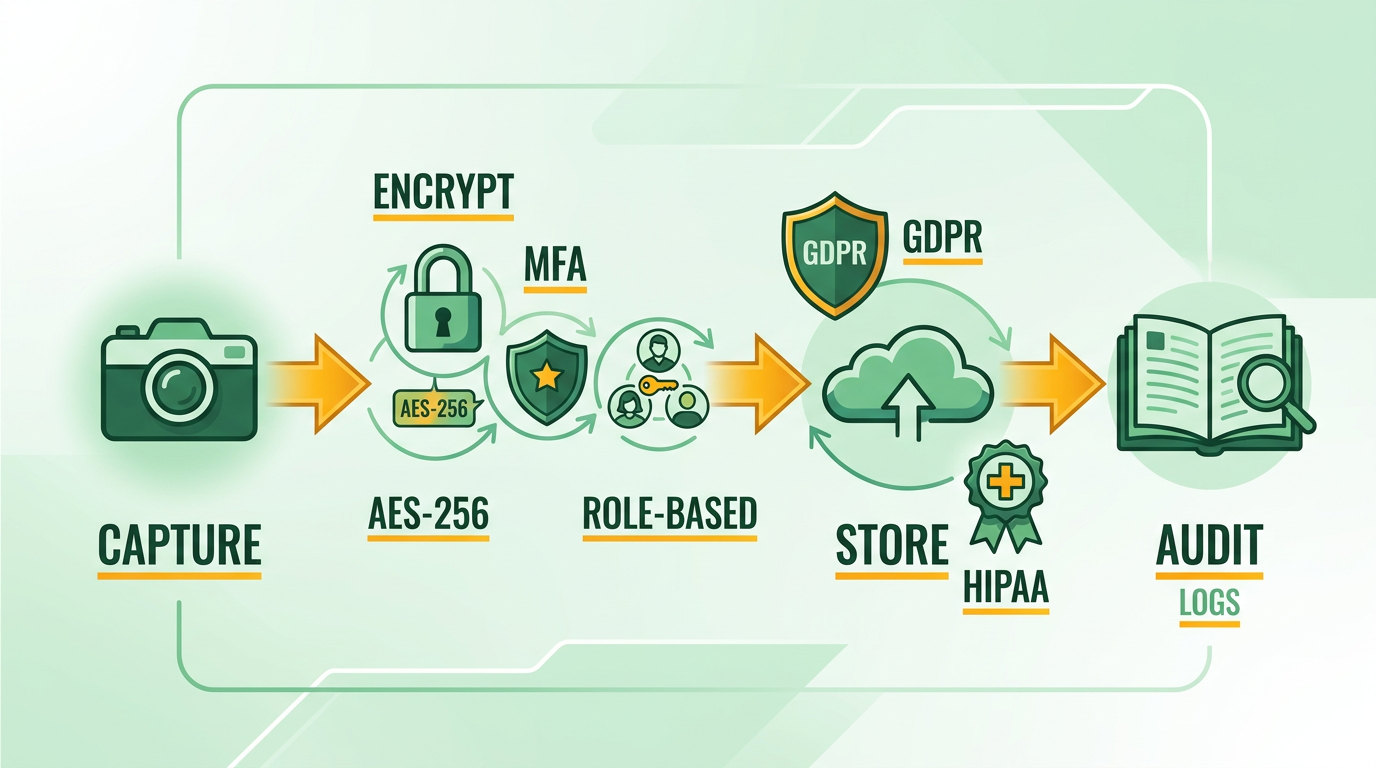
For example, when a vendor uploads an invoice, Blixo automatically redacts personally identifiable information (PII) and applies encryption. This process minimizes exposure risks while maintaining data integrity. Blixo also partners with certified third parties for regular security audits, ensuring its infrastructure adheres to industry best practices. As mentioned in the Understanding Blixo’s Touchless Invoice Processing Capabilities section, these security protocols are integrated into the AI-driven automation that powers Blixo’s core workflow.
What Compliance Standards Apply to Touchless Invoice Processing?
Global regulations such as GDPR and HIPAA impose strict requirements on handling sensitive data. GDPR mandates explicit consent for data collection, data minimization, and secure storage for EU citizens’ information. HIPAA, which governs healthcare data in the U.S., requires encryption, access controls, and breach notification protocols for protected health information (PHI).
Blixo’s SaaS service is designed to meet these standards by default. For GDPR compliance, it offers tools to anonymize data and generate audit trails for data transfers. For HIPAA, it enforces encryption of all healthcare-related invoices and provides documentation to support compliance certifications. Businesses using Blixo can automate these requirements, reducing the risk of non-compliance penalties. Building on concepts from the Implementing Touchless Invoice Processing with Blixo section, companies can configure these compliance settings during system setup to align with their specific regulatory needs.
How Can Businesses Maintain Compliance with Blixo?
To stay compliant, businesses should pair Blixo’s features with proactive strategies. Start by configuring data retention policies to delete unnecessary information after processing. Use Blixo’s vendor onboarding workflows to verify third-party compliance and store contracts securely. Regularly review access permissions to ensure only authorized users handle sensitive data.
For example, one company in the healthcare sector used Blixo to process 10,000 HIPAA-compliant invoices monthly. By automating encryption and audit logs, they reduced manual compliance checks by 70%. Another European firm used Blixo’s GDPR tools to anonymize vendor data, cutting data breach risks by 90% while streamlining audits. Best practices include training staff on secure invoice handling and conducting quarterly compliance reviews using Blixo’s reporting dashboards. These steps ensure touchless workflows remain both efficient and legally sound.
As discussed in the Measuring the Success of Touchless Invoice Processing with Blixo section, tracking compliance-related KPIs-such as audit completion rates or breach incidents-can help quantify the impact of these security measures.
By integrating security and compliance into its core architecture, Blixo enables businesses to automate invoice processing without compromising data safety. For deeper insights into building secure workflows, explore how to design touchless processes here.
Measuring the Success of Touchless Invoice Processing with Blixo
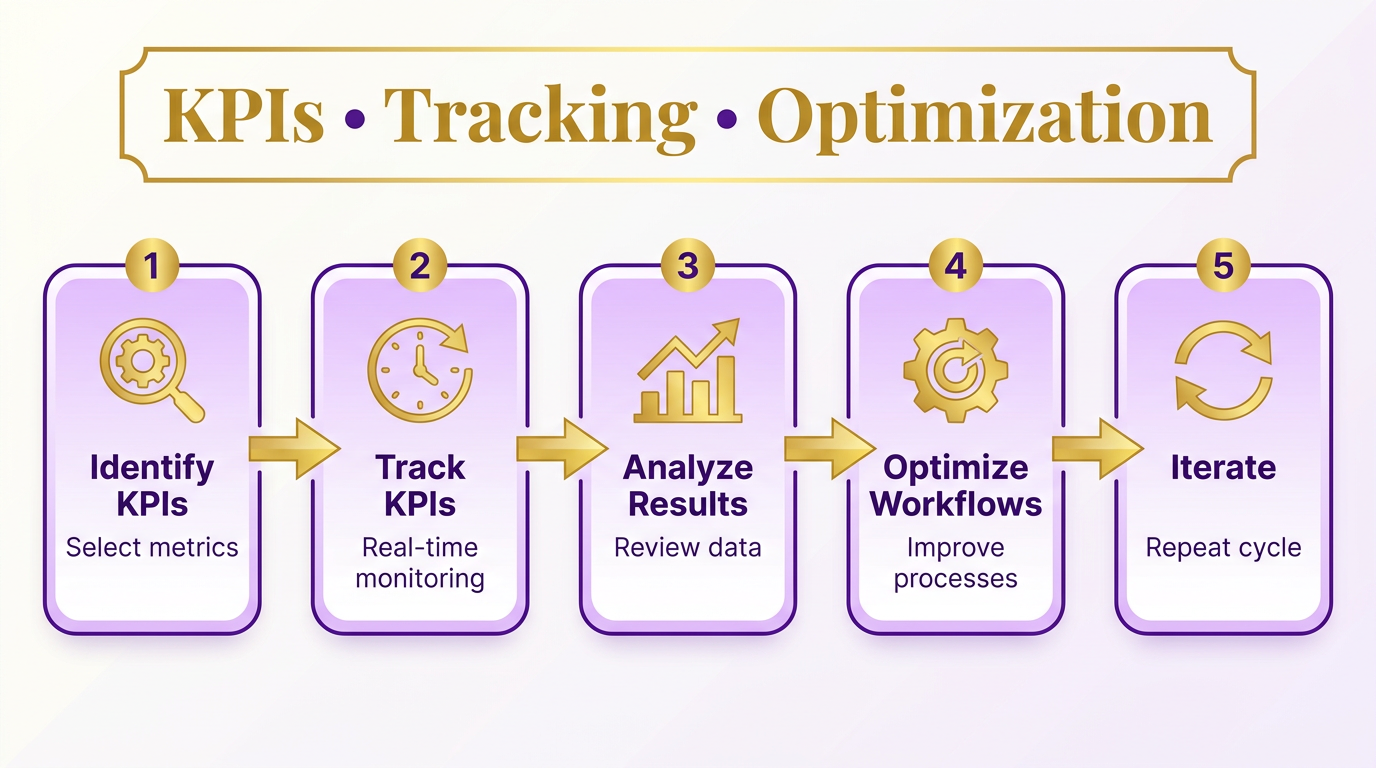
Measuring the success of touchless invoice processing with Blixo starts by identifying the right key performance indicators (KPIs). These metrics help quantify efficiency gains, cost reductions, and accuracy improvements. Blixo’s system is designed to track and optimize these KPIs automatically, providing real-time insights to refine workflows. Below are the core metrics to monitor, how to analyze them using Blixo’s tools, and examples of businesses that achieved measurable results..
Key KPIs for Touchless Invoice Processing Success
-
Days Sales Outstanding (DSO):. This measures the average number of days it takes to collect payments. Blixo’s AI-powered cash application and automated reminders can reduce DSO by up to 30%, accelerating cash flow. For example, a logistics firm reduced DSO by 30% within three months of implementation.
-
Error Rate Reduction:. Manual invoice processing often leads to errors, increasing rework and delaying payments. As mentioned in the Why Touchless Invoice Processing Matters section, touchless processing eliminates manual workflows, saving businesses hundreds of hours annually while reducing errors that delay payments and erode revenue. Blixo’s intelligent matching engine resolves 98% of payment discrepancies automatically, cutting error rates by 35%. One mid-sized business reported a 62% increase in staff time dedicated to strategic tasks after automation.
-
Cost Per Invoice:. Manual processing costs range from $15 to $40 per invoice, but Blixo reduces this to $2–$5. A company with $50M in revenue saved $700,000 annually by eliminating manual inefficiencies.
-
Processing Time:. Automated workflows cut invoice processing time by 50–70%. A small business reduced invoicing time by 30%, while another firm saw a 60% drop in billing time within a month..
How Blixo Tracks and Analyzes KPIs
Blixo’s real-time dashboards and reporting tools provide visibility into these metrics, enabling continuous optimization. Here’s how they work:
-
Dynamic Dashboards: Track KPIs like DSO, error rates, and processing time in real time. For example, a healthcare provider used Blixo’s dashboards to identify bottlenecks and cut month-end closing time by 18%.
-
Automated Reporting: Generate weekly or monthly reports to monitor trends. A logistics company use these reports to reduce reconciliation disputes by 20%.
-
AI-Powered Insights: Blixo’s machine learning models highlight patterns, such as recurring invoice errors or high-risk late payments. One business used these insights to retrain workflows, achieving a 35% drop in missed-payment risks.
-
Integration with ERP Systems: Seamless compatibility with platforms like QuickBooks and SAP ensures accurate data flow, eliminating manual reconciliation. Building on concepts from the Understanding Blixo’s Touchless Invoice Processing Capabilities section, Blixo’s touchless invoice processing eliminates manual workflows by automating data capture, payment matching, and reconciliation. A mid-sized enterprise integrated Blixo with its ERP, cutting operational costs by $8,500 yearly..
Optimizing Workflows with Data-Driven Insights
Blixo’s analytics empower businesses to refine workflows continuously. For instance:
-
Identifying Root Causes: A company noticed a spike in invoice errors during peak months. Using Blixo’s audit trails, they adjusted OCR training data, improving accuracy to 99%.
-
Dynamic Discounting: By analyzing payment trends, one firm implemented dynamic discounting, boosting cash flow by 25% through early settlements.
-
Scalability Improvements: A high-volume business used Blixo’s multi-currency support and cloud-based processing to handle 10x more invoices without performance loss..
Real-World Success Stories
-
Mid-Sized Enterprise Cost Savings:. A company with 1,000 monthly invoices reduced admin costs by $200 annually and cut manual processing time by 70% using Blixo’s automation.
-
Healthcare Provider Efficiency Boost:. As outlined in the Implementing Touchless Invoice Processing with Blixo section, touchless invoice processing with Blixo eliminates manual tasks, reduces errors, and accelerates cash flow by automating everything from invoice capture to payment reconciliation. By automating dispute resolution workflows, a healthcare organization resolved 18% more payment disputes and accelerated month-end closing.
-
Small Business Time Reduction:. A small firm slashed invoicing time by 30%, allowing staff to focus on growth initiatives rather than manual data entry.. By focusing on these KPIs and using Blixo’s analytics, businesses can transform invoice processing from a reactive task into a strategic advantage. The platform’s combination of AI, real-time insights, and seamless integration ensures measurable improvements in efficiency, accuracy, and financial performance.
Common Challenges and Troubleshooting Tips for Touchless Invoice Processing
Common challenges in touchless invoice processing often stem from document variability, integration complexities, and workflow misconfigurations. These issues can slow down automation and require manual intervention. Below, we break down key challenges and strategies to resolve them using Blixo’s tools and support..
What Are the Most Frequent Challenges in Touchless Invoice Processing?
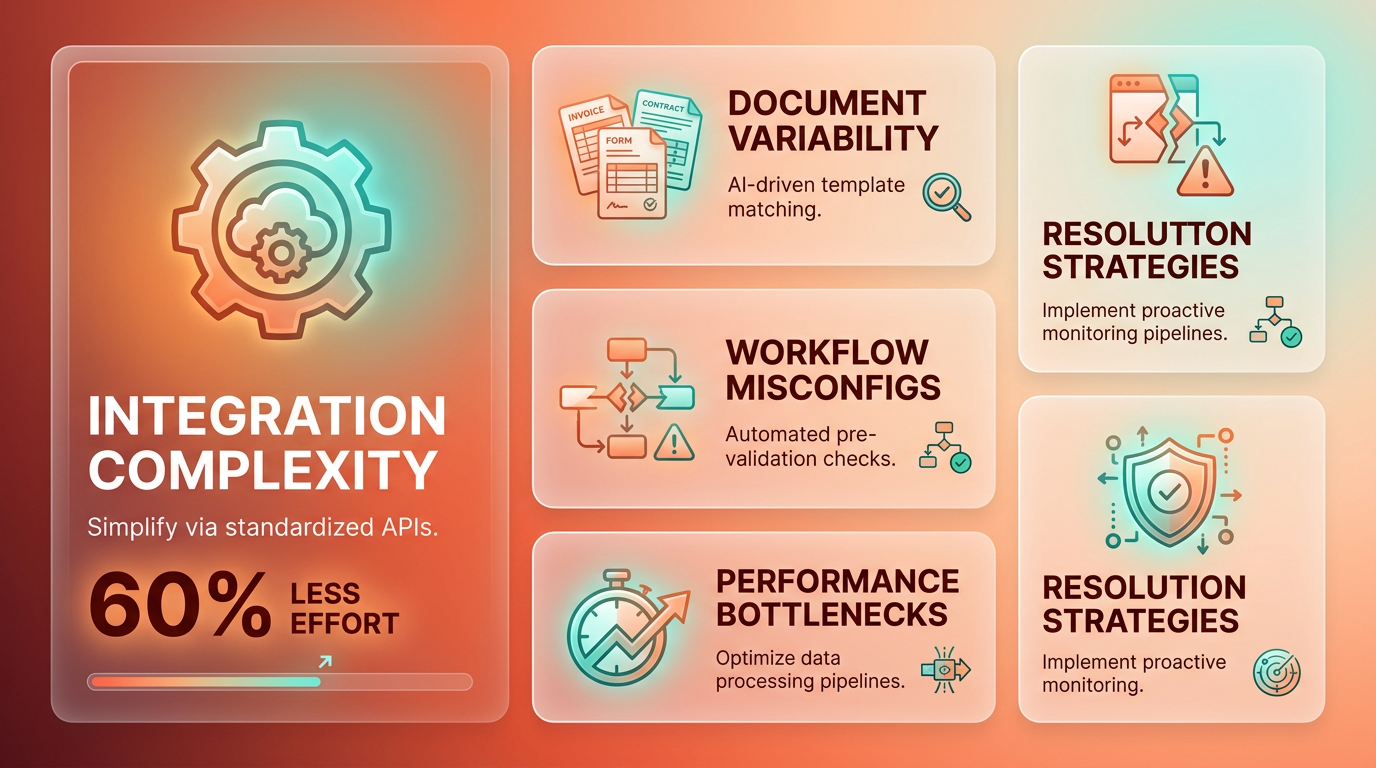
Touchless invoice processing systems face hurdles like inconsistent document formats, misconfigured approval workflows, and integration gaps with accounting software. For example, if an invoice arrives in a non-standard format (e.g., a scanned PDF vs. a structured PDF), Blixo’s automated extractors might struggle to capture line items correctly. Similarly, if your team hasn’t mapped approval rules to the right stakeholders, delays can occur.
To address these issues, start by auditing your document types and workflows. Blixo’s configuration tools let you define document templates and approval hierarchies. For instance, you can create rules that route invoices over $5,000 to a manager automatically. If errors persist, refer to the Implementing Touchless Invoice Processing with Blixo section for setup guidance to ensure alignment with your process..
How Can You Troubleshoot Data Extraction Errors?
Data extraction errors are common when invoices lack structure or contain handwritten annotations. Blixo uses AI to parse data, but ambiguous fields (e.g., a tax code written in multiple formats) can confuse the system. One company resolved this by standardizing invoice templates with clear headers and removing handwritten notes.
If extraction fails, Blixo’s Error Dashboard highlights problematic fields. Use this view to train the system: manually correct 3–5 examples of the same error, and Blixo updates its model to handle similar cases. For complex scenarios, contact Blixo’s support team to request custom field rules. The Implementing Touchless Invoice Processing with Blixo section includes detailed steps for refining extraction accuracy..
How Do You Use Blixo’s Support Resources Effectively?
Blixo’s support ecosystem includes a knowledge base, live chat, and onboarding specialists. Start by searching the Knowledge Base for guides on configuring workflows or resolving integration issues. For urgent problems, use live chat to connect with engineers who can review your setup in real time.
One user shared: “We hit a roadblock with SAP integration but resolved it in 30 minutes using Blixo’s troubleshooting checklist.” Their team followed the SAP-specific guide in the Implementing Touchless Invoice Processing with Blixo section, which walks users through API key configuration and data mapping. If you’re new to automation, schedule a session with a Blixo onboarding specialist-they’ll review your process and suggest optimizations..
How Can Businesses Optimize Their Touchless Invoice Workflows?
Many companies improve performance by refining document inputs and workflows. For example, one business reduced manual corrections by 70% after switching to PDF templates with standardized fonts and layouts. Another optimized approval times by setting SLAs in Blixo’s workflow editor-teams now receive alerts if a manager hasn’t reviewed an invoice within 24 hours.
To replicate these results, start small: pick one pain point (e.g., late approvals) and use Blixo’s analytics to track progress. The Measuring the Success of Touchless Invoice Processing with Blixo section explains how to use the Processing Timeline view to identify delays and adjust rules accordingly. Over time, incremental changes-like adding OCR training data for new invoice formats-compound into significant efficiency gains.. By addressing these challenges systematically and using Blixo’s tools, teams can minimize errors and maximize automation. Use the resources above to stay proactive, and don’t hesitate to involve support when needed.
Frequently Asked Questions
1. What is touchless invoice processing?
Touchless invoice processing automates data capture, reconciliation, and payment matching, eliminating manual tasks. It reduces errors and saves over 200 hours monthly for businesses handling 1,000+ invoices.
2. How does automation reduce payment errors?
Automating data capture cuts manual entry errors by 35%, lowering missed payment risks. Blixo’s system addresses errors at every invoice lifecycle stage, minimizing disputes and delays.
3. Which businesses benefit most from this technology?
Companies processing 1,000+ invoices monthly save 200+ hours annually. Logistics firms and high-volume businesses see the greatest gains in time savings and dispute reduction.
4. How does touchless processing improve cash flow?
Automating workflows reduces Days Sales Outstanding by 30% and enables dynamic discounting. This incentivizes early payments, boosting cash flow by up to 25% for adopting businesses.
5. What are the cost savings from automation?
Touchless systems cut reconciliation disputes by 20% and administrative costs by streamlining workflows. High-volume users save over 200 hours yearly, reducing labor expenses significantly.
6. Can small businesses use touchless invoice tools?
While ideal for high-volume users, Blixo’s scalable SaaS model adapts to smaller workflows. It reduces manual tasks for any business, though time savings vary based on invoice volume.
7. How quickly do businesses see results?
Companies typically reduce disputes by 20% and improve DSO by 30% within months. Full benefits, like 25% cash flow boosts, emerge as dynamic discounting and automation mature.