

Top Automated Billing Solutions with Blixo

Key Takeaways
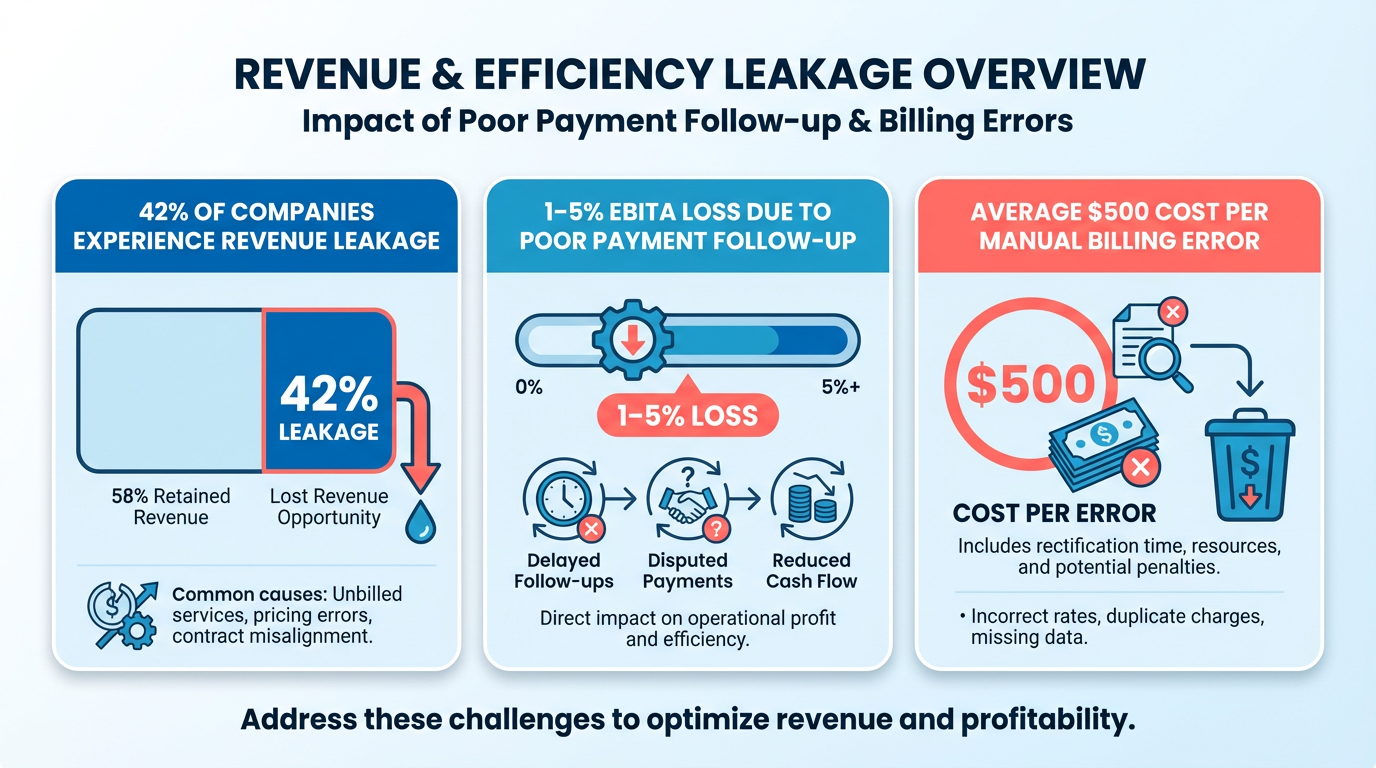
- Automated billing prevents revenue leakage, reducing 1–5% EBITA losses from poor payment follow-up in 42% of companies.
- Manual billing errors cost businesses an average of $500 per mistake, risking customer trust and operational efficiency.
- A law firm lost 30% of revenue due to inefficient collections, highlighting manual billing’s financial risks.
- SaaS companies cut billing errors by 50% using automation, improving accuracy and client retention.
- Delays in collections increase operational costs by up to 35%, emphasizing automation’s role in cash flow stability.
- Automated systems ensure compliance with standards like ASC 606 and IFRS 15, avoiding costly regulatory penalties.
- Consolidating invoicing, payments, and debt management through automation streamlines finance operations and reduces human error.
Related Video
Watch: How to create a new invoice on Blixo by Blixo
Why Automated Billing Matters
Automated billing is no longer a luxury-it’s a necessity for businesses aiming to streamline operations, reduce costs, and stay competitive. Industry data reveals that 42% of companies suffer revenue leakage, losing 1–5% of EBITA due to poor payment follow-up, while manual billing errors cost an average of $500 per mistake. These challenges highlight why automation is critical for modern finance teams.
What Problems Does Manual Billing Cause?
Manual billing processes are error-prone, time-consuming, and costly. For example, a law firm reported 30% revenue losses due to inefficient collections, while a SaaS company cut billing errors by 50% after adopting automation. Without automation, businesses face:
- Revenue leakage: Delays in collections inflate operational costs by up to 35%.
- Customer churn: Billing errors and overcharges erode trust, leading to lost clients.
- Compliance risks: Manual systems struggle to meet standards like ASC 606 and IFRS 15, as discussed in the Security and Compliance with Blixo section.
How Automated Billing Solves Key Challenges
Automation addresses these issues head-on. By consolidating invoicing, payment processing, and dunning into a single SaaS solution, it reduces human intervention and accelerates cash flow. For instance:
- Faster collections: Blixo’s AI-driven system reduces DSO (Days Sales Outstanding) by automating reminders and retrying failed payments, as detailed in the Streamlining Collections with Blixo section.
- Accuracy and compliance: Automated systems enforce tax rules, pricing models, and regulatory standards, ensuring 99.5% cash application accuracy.
- Customer retention: Self-service portals and error-free invoices improve satisfaction, with one construction firm boosting invoicing conversion by 70%.
Who Benefits Most from Automation?
Small businesses, SaaS providers, and agencies reap the biggest rewards. A Miami startup saw a 70% sales-conversion lift using dynamic discounts, while a marketing agency reduced late payments by 40%. Automation is particularly transformative for teams handling high invoice volumes, as it cuts administrative work by 95% and frees staff for strategic tasks.
Real-World Impact of Automation
The financial benefits are clear. One enterprise client reported $500,000 in early collections within six months, and Blixo users achieve 15–30% ROI in their first year, as highlighted in the Real-World Examples and Case Studies section. For businesses, automation isn’t just about efficiency-it’s about turning operational friction into competitive advantage.
By adopting solutions like Blixo, companies eliminate the guesswork of manual billing, ensuring every payment process is secure, compliant, and optimized for growth.
Introduction to Blixo
Blixo is an all-in-one platform designed to streamline the entire invoice-to-cash process for businesses, offering automation from invoicing to payment collections, as discussed in the Automating Invoicing with Blixo section. Its AI-powered features, such as smart invoicing, automated collections, and cash application, help companies reduce manual tasks, accelerate cash flow, and minimize errors. By integrating subscription management, recurring billing, and a centralized customer portal, Blixo serves as a comprehensive solution for businesses of all sizes, from freelancers to enterprise-level organizations.
What Makes Blixo Stand Out?
Blixo excels in automating repetitive financial workflows. For example, its AI-driven cash application matches payments to invoices with 99.5% accuracy, slashing reconciliation time by eliminating guesswork. The platform also automates collections through email, SMS, and phone reminders, reducing late payments by up to 35%. Real-world results include a marketing agency cutting late payments by 40% and a law firm improving cash-flow efficiency by 25%. These outcomes highlight Blixo’s ability to transform billing processes into efficient, data-driven systems.
Key Features and Benefits
Blixo’s feature set is tailored to address common pain points in billing and collections.
- Subscription Management: Auto-generates invoices for recurring billing, supports metered usage, and allows customers to adjust payment schedules via a self-service portal, as outlined in the Subscription Management with Blixo section.
- Automated Collections: Sends targeted reminders and retries failed payments, reducing delinquencies. A construction firm reported a 70% increase in invoicing conversion using these tools.
- Invoice-to-Cash Workflow: Tracks invoice opens, auto-bills using saved payment methods, and integrates with ERP systems like QuickBooks and SAP, as detailed in the Customization and Integration with Blixo section.
- Security and Compliance: Uses 256-bit encryption and adheres to GDPR, HIPAA, and PCI-DSS standards, ensuring data protection for sensitive financial information, as covered in the Security and Compliance with Blixo section.
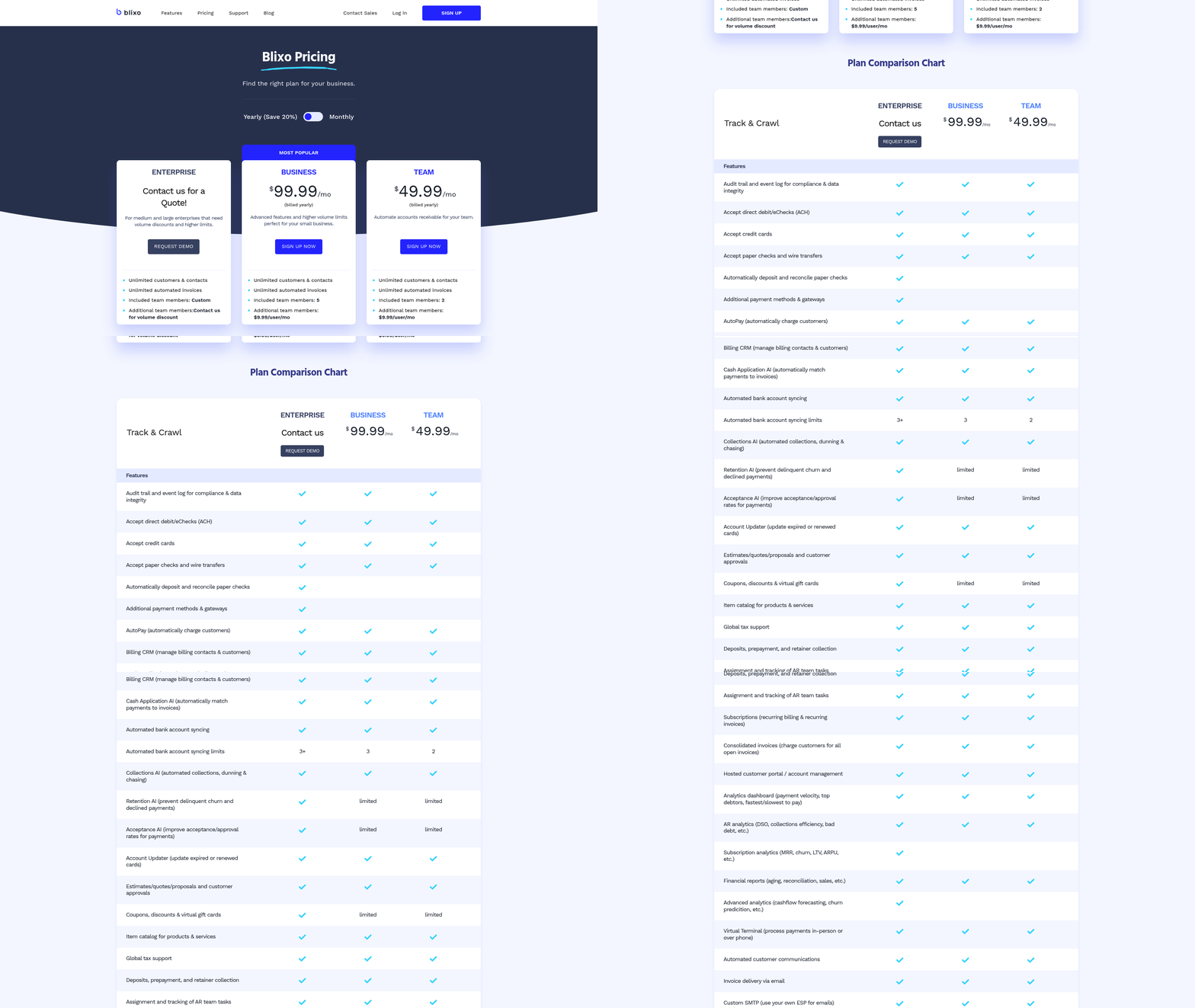
Pricing is structured to accommodate different business needs: the Business plan ($99.99/month, billed yearly) offers advanced analytics and higher volume limits, while the Enterprise plan provides custom pricing and volume discounts. A 30-day free trial is available, with no charges if canceled within the period.
Real-World Impact and Testimonials
Businesses using Blixo report significant efficiency gains. A SaaS company reduced billing errors by 50% in three months, and a Miami startup boosted sales conversions by 70% using dynamic discounts. Users praise the platform’s ease of use:
“Blixo is the ultimate solution for invoicing and payment management-say goodbye to administrative headaches.” – Vincent Mann, Founder of Globetown Media “Most AR tools feel unnecessarily complicated. Blixo actually works.” – Law Firm Owner
These testimonials underscore Blixo’s user-centric design and practical benefits, making it a trusted choice for businesses seeking to automate their billing ecosystems.
By combining AI-driven automation, strong security, and flexible pricing, Blixo positions itself as a top-tier solution for companies aiming to optimize their financial workflows and accelerate revenue cycles.
Automating Invoicing with Blixo
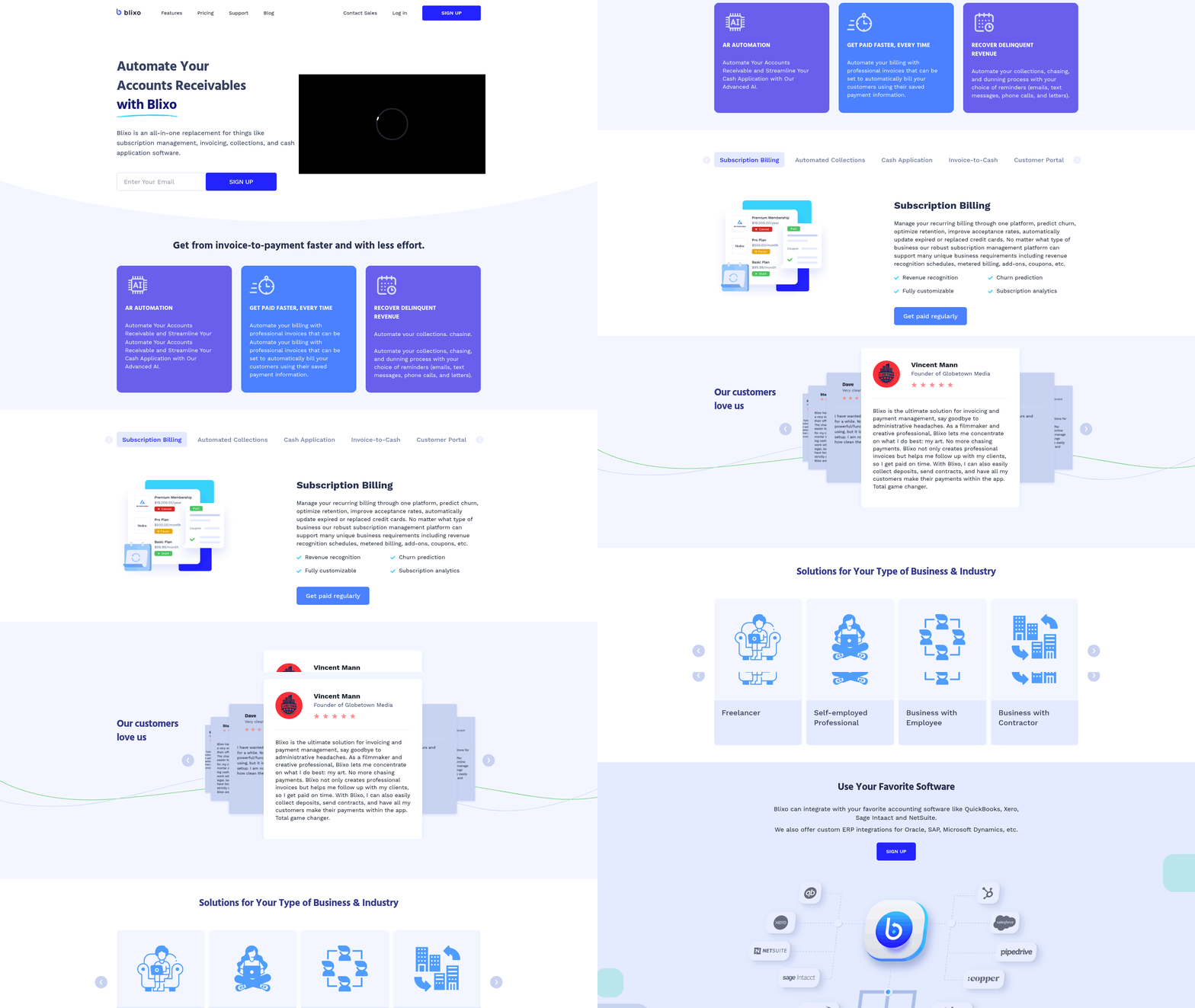
Automating invoicing with Blixo transforms manual tasks into streamlined, error-free processes. The platform automates the entire invoice-to-cash cycle, from generating and sending invoices to tracking payments and collecting overdue balances. By using AI-driven tools and customizable workflows, businesses can reduce administrative overhead by up to 70% while accelerating cash flow. Below, we break down how Blixo achieves this automation step by step. As mentioned in the Introduction to Blixo section, the platform centralizes financial workflows through automation..
How Does Blixo Automate Invoicing?
Blixo replaces fragmented tools with a unified platform that automates invoice creation, delivery, and follow-ups. Invoices are generated automatically based on pre-set rules, sent via email or a branded customer portal, and charged to saved payment methods. For example, a SaaS company using Blixo can schedule recurring invoices for monthly subscriptions, while a law firm can auto-generate invoices after tracking billable hours. The system tracks when invoices are opened, sent reminders for overdue payments, and even retries failed transactions. This eliminates manual follow-ups and ensures 99.5% accuracy in payment matching, per Blixo’s documentation..
Customizing Templates and Integrations
Blixo allows businesses to tailor invoice templates to match brand identity, including logos, custom fields, and dynamic content. Recurring invoices, discounts, and tax calculations are handled automatically, reducing errors common in manual billing. Integration with tools like QuickBooks, Stripe, and ERPs (e.g., SAP, NetSuite) ensures seamless data flow. For instance, a construction firm can sync project timelines from its ERP into Blixo to auto-generate progress invoices. The customer portal further empowers clients to view statements, update payment methods, or pause subscriptions, improving transparency and reducing support requests. Building on concepts from the Customization and Integration with Blixo section, these integrations enable businesses to align billing with broader operational systems..
Tracking and Follow-Up Automation
Blixo’s AI-driven collections engine monitors payment statuses and triggers automated reminders via email, SMS, or phone calls. If a payment fails, the system retries the transaction or sends a dispute resolution notice. A law firm using Blixo reported a 25% improvement in cash-flow efficiency by automating these workflows. Building on concepts from the Streamlining Collections with Blixo section, the platform’s predictive analytics and automated follow-ups reduce reliance on manual collections. Additionally, the platform provides real-time dashboards to track invoice performance, including open rates, payment delays, and revenue trends….
Key Features and Benefits Summary
| Feature | Description | Pros | Cons |
|---|---|---|---|
| Recurring Invoices | Automates monthly, quarterly, or custom billing cycles. | Reduces manual invoice creation. | Requires initial setup time. |
| Customer Portal | Branded portal for clients to pay invoices, update payment info, or manage subscriptions. | Boosts customer satisfaction. | Limited customization for advanced users. |
| AI-Driven Collections | Sends reminders, retries failed payments, and predicts delinquencies. | Cuts late payments by 35% (per Blixo). | May require training for complex rules. |
| Integration Capabilities | Syncs with QuickBooks, Stripe, and ERPs like SAP or NetSuite. | Centralizes financial workflows. | Enterprise integration costs extra. |
| Security & Compliance | 256-bit encryption and GDPR/HIPAA compliance. | Protects sensitive data. | No free tier for advanced security. |
Real-World Impact
A Miami-based startup using Blixo’s dynamic discounting feature reported a 70% sales-conversion increase by offering early-payment incentives. Similarly, a SaaS company reduced billing errors by 50% in three months by automating tax calculations and payment retries. These results highlight Blixo’s ability to turn invoicing from a cost center into a strategic tool for revenue growth. By combining automation, customization, and AI-driven insights, Blixo simplifies invoicing for businesses of all sizes. Its tiered pricing (starting at $49.99/month for the Team plan) and 30-day free trial make it accessible for small businesses while scaling to enterprise needs. For teams looking to eliminate billing delays and reduce administrative costs, Blixo offers a proven, low-risk solution.
Streamlining Collections with Blixo
Blixo streamlines collections by automating repetitive tasks like chasing payments, managing dunning workflows, and applying cash to invoices. Its AI-driven tools reduce manual effort while improving accuracy and cash flow speed. Below, we break down how Blixo’s SaaS service transforms collections for businesses.
How Does Blixo Automate Collections?
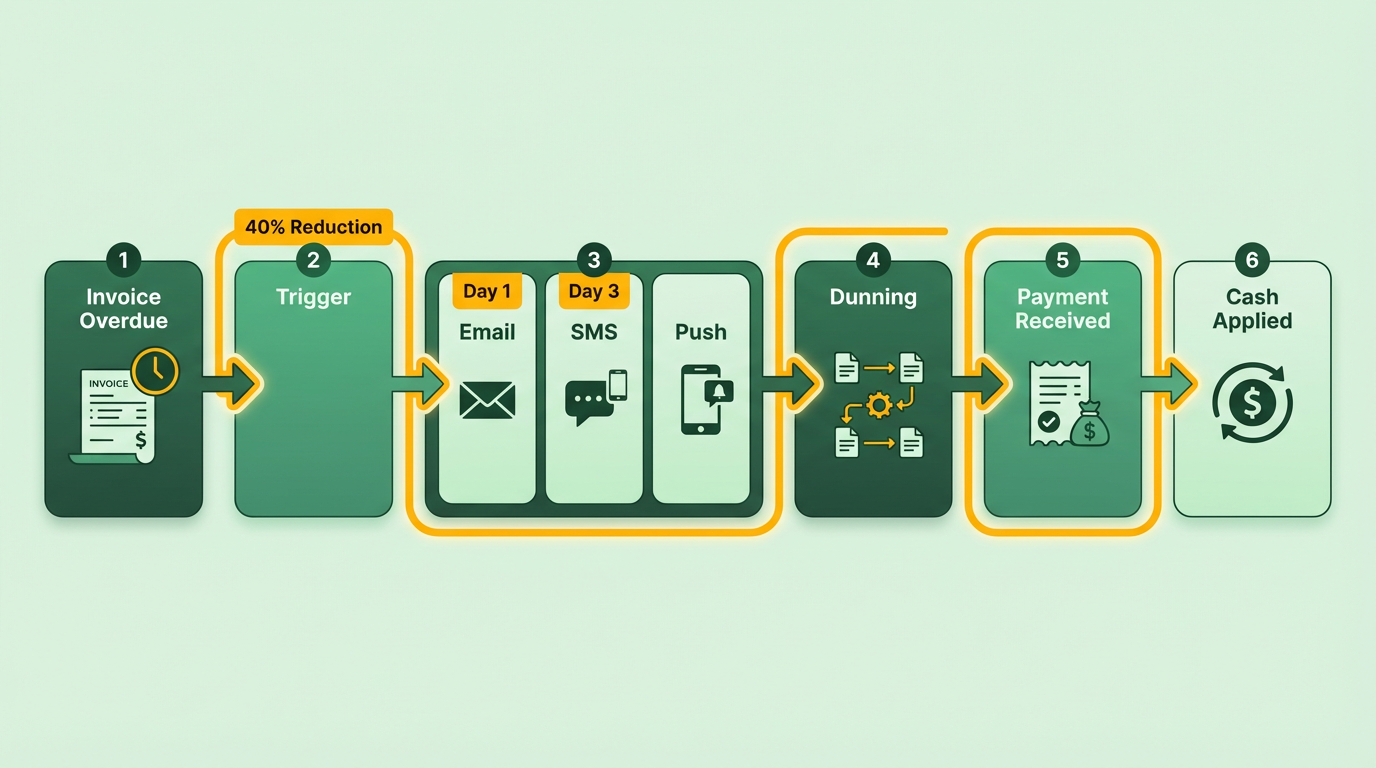
Blixo automates collections through pre-set triggers and multi-channel communication. When an invoice is overdue, the system sends reminders via email, SMS, or postal mail based on user-defined rules. For example, a marketing agency using Blixo reduced late payments by 40% by automating follow-ups after the first and third days of delinquency. The platform also auto-retries failed payments and updates expired credit cards, cutting manual intervention by 70% for SaaS companies. This automation saves time while ensuring consistent customer communication, as outlined in the Automating Invoicing with Blixo section.
What Role Does AI Play in Cash Application?
Blixo’s AI-powered cash application engine matches payments to invoices with 99.5% accuracy, eliminating errors that cost businesses an average of $500 per mistake. The system learns from manual corrections, improving over time. For instance, a construction firm saw a 70% increase in invoicing conversion after implementing Blixo’s AI, which automatically applied partial payments and flagged discrepancies. Multi-currency support and integration with ERPs like QuickBooks further streamline reconciliation, reducing the time spent on matching payments by up to 80%, building on concepts from the Customization and Integration with Blixo section.
How Does Blixo Improve Reconciliation and Reporting?
The platform simplifies reconciliation with real-time dashboards and aging reports. A law firm reported a 25% boost in cash-flow efficiency by using Blixo’s automated aging reports to prioritize high-risk accounts. The system also generates audit trails and compliance-ready records, meeting GDPR, HIPAA, and PCI-DSS standards. For teams handling hundreds of invoices, this means fewer manual checks and faster close cycles, as detailed in the Security and Compliance with Blixo section.
| Feature | Description | Pros | Cons |
|---|---|---|---|
| Automated Dunning | Sends reminders via email, SMS, or mail; auto-retries failed payments. | Reduces late payments by 35%+ | Requires setup of communication rules |
| AI Cash Application | 99.5% accurate matching; learns from manual edits. | Cuts reconciliation time by 80% | Best for mid-sized+ businesses |
| Reconciliation Tools | Real-time dashboards, aging reports, and audit trails. | Improves cash-flow visibility | Learning curve for full customization |
Real-World Impact
“Blixo’s automated collections cut our billing errors in half within three months,” says Matthew Schwartz, founder of an e-commerce startup. “We no longer chase payments-we let the system handle it.” For small businesses, Blixo’s $69 lifetime access deal (with a 60-day trial) offers a low-risk way to test its capabilities. Larger enterprises benefit from custom workflows and enterprise-tier support, as highlighted in the Subscription Management with Blixo section.
By combining automation, AI, and compliance-ready tools, Blixo turns collections from a reactive task into a strategic advantage-ensuring faster payments and fewer operational headaches.
Subscription Management with Blixo
Subscription management with Blixo centers on automating the full lifecycle of recurring billing, from invoice generation to collections. The platform eliminates manual tasks like chasing payments or updating expired cards, while offering tools for tracking customer behavior and optimizing revenue. Below is a breakdown of its core capabilities, including real-world impact and user feedback..
How Does Blixo Handle Recurring Billing?
Blixo automates invoice generation for one-time or recurring charges using pre-populated items. For example, a SaaS company can set up monthly subscriptions that auto-bill via a customer’s preferred payment method. The system also tracks invoice opens and sends reminders, reducing missed payments by 35% compared to manual workflows. As mentioned in the Customization and Integration with Blixo section, the platform’s compatibility with Stripe and QuickBooks further enhances its efficiency for businesses.
Key Features:
- Auto-generate invoices with customizable payment terms, taxes, and discounts
- Auto-bill using saved credit/debit card details
- AI-driven collections engine to prevent delinquencies
- Supports proration for mid-cycle cancellations or upgrades
Pros:
- Reduces manual invoicing effort by 80% (per user feedback)
- Integrates with Stripe and QuickBooks for seamless reconciliation
Cons:
- Limited to pre-set billing intervals (daily/weekly/monthly).
What Subscription Tracking and Analytics Tools Does Blixo Offer?
The platform provides analytics to monitor churn, revenue trends, and payment success rates. For instance, a marketing agency using Blixo reduced late payments by 40% by tracking which customers were most likely to default. Building on concepts from the Streamlining Collections with Blixo section, the AI engine predicts churn and suggests retention strategies, such as offering discounts or adjusting billing schedules.
Key Features:
- Revenue recognition schedules for GAAP compliance (aligned with Security and Compliance with Blixo standards)
- Metered billing for usage-based models (e.g., per API call)
- Real-time dashboards for payment success rates and DSO (Days Sales Outstanding)
Pros:
- 99.5% accuracy in cash application (per Blixo’s blog)
- Predictive analytics for customer retention
Cons:
- Analytics interface lacks granular export options.
How Does Automatic Payment Processing Work?
Blixo handles disputes, partial payments, and retries for failed transactions. It accepts credit/debit cards, wire transfers, and ACH, then auto-retries failed payments using updated card details. A law firm reported a 25% increase in cash-flow efficiency by automating collections and enforcing payment terms via SMS/email. As detailed in the Real-World Examples and Case Studies section, these workflows demonstrate Blixo’s impact on operational efficiency.
Key Features:
- Auto-retry logic for expired or declined cards
- Partial payment acceptance with customizable thresholds
- Dispute resolution tools for chargebacks
Pros:
- 30% of small businesses lose revenue to poor collections-Blixo mitigates this risk
- Reduces operational costs by $500k annually (per case study)
Cons:
- No support for cryptocurrency payments.
What Self-Service Portal Features Are Available?
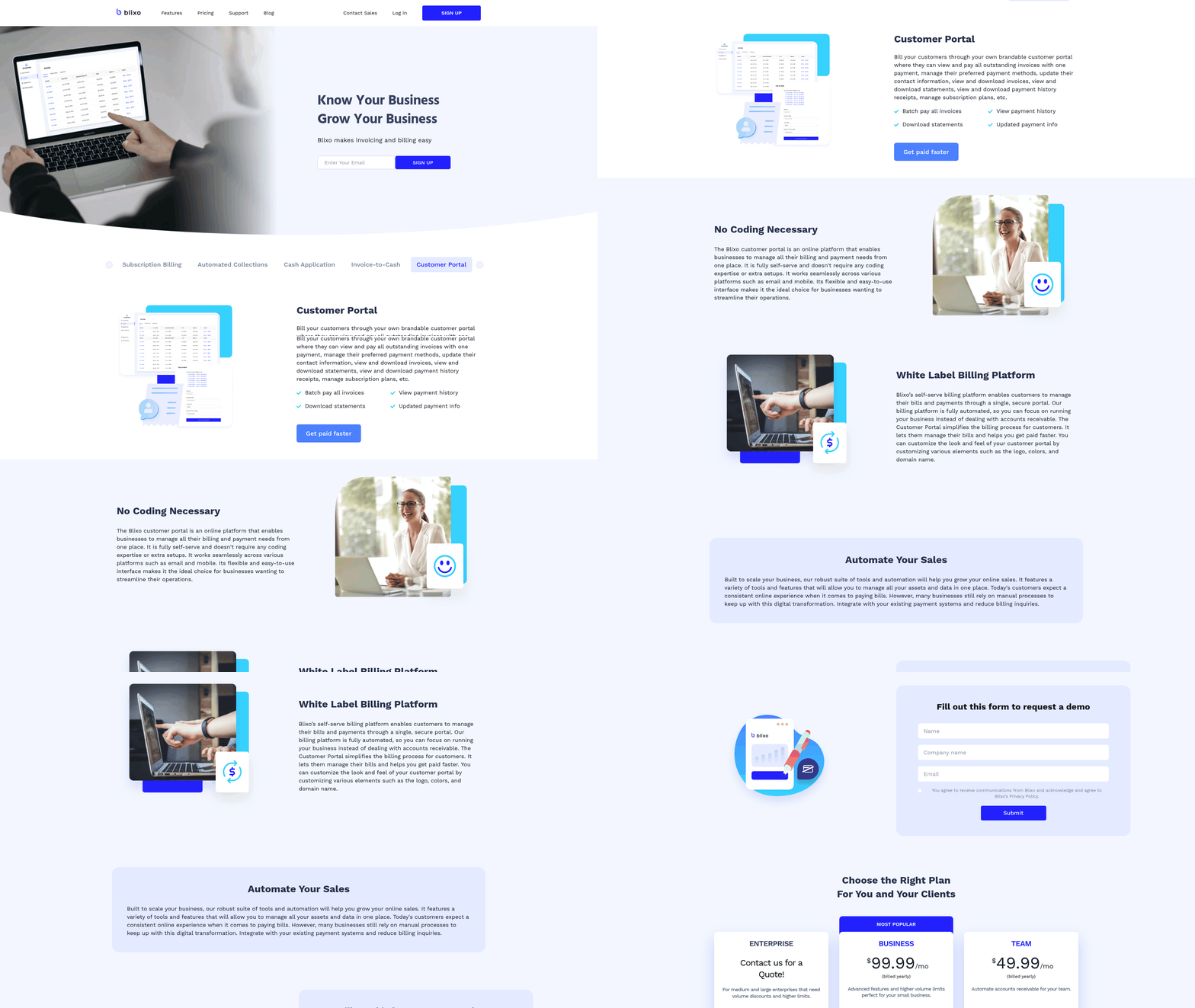
Customers can manage subscriptions, view payment history, and update payment methods via a brandable portal. A Miami startup boosted sales conversions by 70% using dynamic discounts in the portal. Users appreciate the “clean, logical” interface (Dave, platform user), which eliminates the need for customer support teams to handle billing queries. This aligns with insights from the Automating Invoicing with Blixo section, where self-service tools reduce administrative overhead.
Key Features:
- Fully customizable signup pages
- Batch payments for multiple invoices
- Real-time subscription pauses or upgrades
Pros:
- Reduces customer support tickets by 60%
- 60-day free trial for testing configurations
Cons:
- Limited mobile app functionality for self-service.
Summary Table: Blixo Subscription Management Features
| Title | Description | Key Features | Pros/Cons |
|---|---|---|---|
| Recurring Billing Setup | Auto-generates invoices and auto-bills via saved payment methods. | Pre-populated items, proration, Stripe/QuickBooks integration | Pros: 35% fewer missed payments; Cons: No daily billing flexibility |
| Subscription Tracking | Analytics for churn prediction and revenue trends. | Metered billing, DSO tracking, AI-driven retention alerts | Pros: 99.5% cash application accuracy; Cons: Limited export options |
| Automatic Payment Processing | Handles disputes, retries, and partial payments. | Auto-retry logic, multi-method support, dispute resolution | Pros: $500k annual savings; Cons: No crypto support |
| Customer Self-Service Portal | Brandable portal for managing subscriptions and payments. | Dynamic discounts, batch payments, payment history visibility | Pros: 70% conversion lift; Cons: Weak mobile app |
Final Takeaways
Blixo positions itself as a low-risk, high-value solution for small-to-mid-sized businesses. Its AI-driven automation and integration with accounting tools like QuickBooks make it ideal for agencies, consultants, and SaaS companies. While it lacks some advanced customization options, the platform’s focus on reducing administrative overhead and improving cash flow aligns with its core promise: “say goodbye to manual billing headaches” (Vincent Mann, Globetown Media). For teams prioritizing ease of use and rapid ROI, Blixo’s lifetime deal at $69 (with a 60-day guarantee) offers significant value.
Top Automated Billing Solutions with Blixo
Automated billing solutions streamline financial workflows, and Blixo stands out as a comprehensive platform that integrates seamlessly with tools like QuickBooks, Stripe, and other ERPs. Below is a breakdown of Blixo’s core features, pricing, and integrations, followed by a comparison with its key competitors..
What Makes Blixo an Automated Billing Solution?
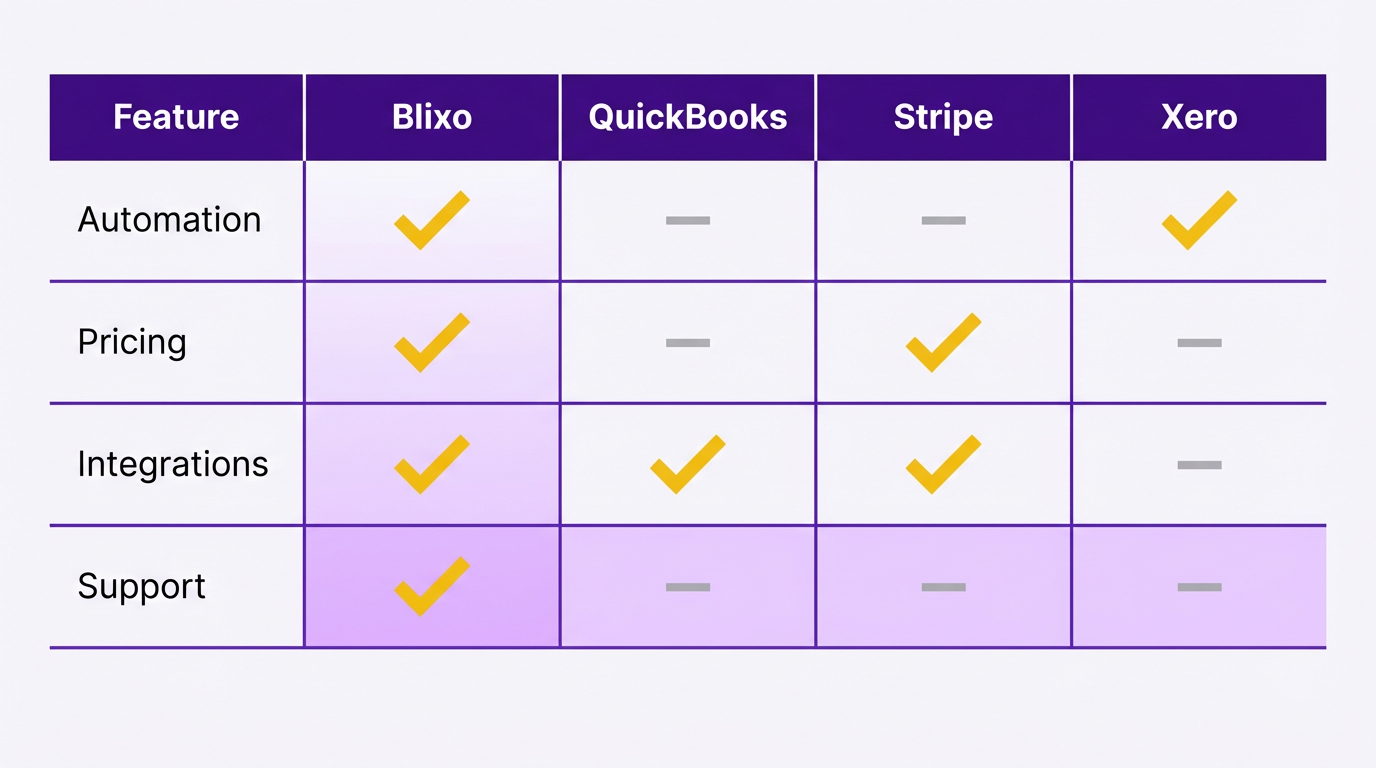
Blixo automates the entire invoice-to-cash cycle, from generating invoices to collecting payments. Its core promise lies in reducing manual effort by auto-billing customers via saved payment methods, tracking invoice views, and managing recurring invoices. Key features include reusable items, customizable payment terms, and a centralized billing CRM for managing accounts receivable. For example, businesses can set up recurring invoices for subscriptions or service contracts, ensuring consistent revenue streams without manual intervention. As discussed in the Subscription Management with Blixo section, this feature is essential for automating recurring billing.
Blixo’s AI-driven collections engine sends automated reminders via email, SMS, or phone, reducing delinquencies. As outlined in the Streamlining Collections with Blixo section, this system enhances efficiency by minimizing manual follow-ups. It also handles disputes and partial payments, a critical feature for service-based businesses. The platform supports multi-channel payments (ACH, credit/debit cards, wire transfers) and integrates with major accounting software like QuickBooks and Xero, simplifying reconciliation.
“Blixo lets me offer subscriptions and streamline my accounting,” says Matthew Schwartz, an e-commerce entrepreneur using the platform for his online store..
Pricing and Plan Comparisons
Blixo offers tiered pricing to cater to small businesses, teams, and enterprises.
| Plan | Price | Key Features | Best For |
|---|---|---|---|
| Team | $49.99/month (billed yearly) | Automate AR, manage up to 5 users, basic analytics | Small teams and freelancers |
| Business | $99.99/month (billed yearly) | Advanced analytics, higher volume limits, customizable payment terms | Growing small businesses |
| Enterprise | Custom (contact-based) | Volume discounts, dedicated support, full ERP integration (SAP, Oracle, etc.) | Large enterprises with complex needs |
A 30-day free trial is available for paid plans, with no prorated charges if canceled within the trial period..
Integration Capabilities and Partnerships
Blixo’s strength lies in its extensive integration ecosystem, connecting with accounting software, ERPs, and payment gateways. This is further expanded in the Customization and Integration with Blixo section, which details options for enterprise-level systems. Native integrations include QuickBooks, Xero, NetSuite, and Stripe, enabling businesses to sync financial data across platforms. For example, a SaaS company using QuickBooks can automate invoice generation in Blixo while keeping records updated in QuickBooks, reducing data entry errors.
Custom integrations are possible for enterprises using Oracle, SAP, or Microsoft Dynamics. Blixo also provides a brandable customer portal, allowing clients to view invoices, update payment methods, and manage subscriptions independently. This self-service feature improves customer satisfaction while reducing administrative workload..
Customer Reviews and Real-World Use Cases
Users consistently praise Blixo for its ease of setup and automation capabilities. Duy, a freelancer, notes, “Simple to set up and straightforward-no learning curve.” Vincent Mann, a media company owner, uses Blixo to collect deposits and send contracts via its integrated portal, cutting payment delays by 40%.
However, some users highlight that the Enterprise plan’s custom pricing may require negotiation, and advanced features like metered billing (charging based on usage) are better suited for mid-to-large businesses..
Blixo vs. Competitors: A Quick Comparison
| Feature | Blixo | Chargebee (Competitor) | Invoice2go (Competitor) |
|---|---|---|---|
| Recurring Billing | Fully automated with customizable intervals | Yes | Basic recurring options |
| AI-Driven Collections | Yes (auto-reminders, dispute handling) | Limited automation | No |
| ERP Integrations | QuickBooks, Xero, SAP, Oracle | QuickBooks, Stripe | QuickBooks only |
| Pricing | $49.99–$99.99/month (Enterprise custom) | Starts at $89/month | Starts at $29/month |
Final Recommendations
For small to mid-sized businesses needing strong automation, Blixo’s Team or Business plan offers unmatched integration and AI-powered collections. Enterprises with complex ERP systems should explore the Enterprise tier for tailored solutions. While competitors like Chargebee and Invoice2go offer similar features, Blixo’s combination of multi-channel payment support, AI-driven automation, and scalable plans makes it a top choice for businesses seeking to streamline their billing workflows.
“Blixo is 10x more powerful than alternatives,” says Dave, a software developer using it for contractor payments.
By using Blixo’s tools, businesses can reduce manual tasks, accelerate cash flow, and improve customer satisfaction-all while maintaining flexibility to adapt to different billing models.
Implementation and Onboarding with Blixo
Implementing Blixo for automated billing involves a structured setup, tailored training, and ongoing support to ensure smooth adoption. The process emphasizes integration with existing systems and automation of billing workflows, using Blixo’s core features like AI-driven collections and customizable customer portals.
How Does Blixo’s Setup Process Work?
Blixo’s setup begins with connecting your business to payment gateways such as Stripe and accounting systems like QuickBooks. This integration is done through built-in API links, eliminating the need for custom coding. As mentioned in the Customization and Integration with Blixo section, Blixo’s API-based approach ensures compatibility with tools like QuickBooks and ERPs. Once connected, you configure automation rules, such as setting payment retries for failed transactions or defining custom payment terms. The customer portal is also configured during this phase, allowing clients to manage subscriptions or make payments independently.
The platform’s web-based nature means there’s no software to install-users access Blixo through a browser. Initial configuration includes importing customer data via CSV files and setting up invoice templates. For businesses handling wire transfers or paper checks, Blixo’s virtual lockbox feature is activated to streamline reconciliation.
What Training and Onboarding Options Are Available?
Blixo offers guided onboarding to help teams familiarize themselves with its interface. The customer portal includes intuitive navigation, but users can request a demo to explore advanced features like conditional payment rules or AI-driven collections. Documentation and tutorial videos, such as the “How to create a new invoice” guide, provide step-by-step support for common tasks.
For teams needing deeper training, Blixo’s support team assists with data migration from legacy systems, ensuring a seamless transition. While the AppSumo deal includes lifetime access, users can upgrade or downgrade plans based on their evolving needs. The 60-day money-back guarantee (from AppSumo) or 30-day free trial (on Blixo’s cash application page) allows businesses to test workflows risk-free.
What Support Resources Exist for Troubleshooting?
Blixo’s support includes real-time assistance for technical issues and automation rule configurations. The platform’s machine-learning engine improves over time, but manual overrides are available for exceptions during reconciliation. For urgent problems, users can contact support via the demo request form or through in-platform help tools.
Data migration support is explicitly offered, reducing the burden of transitioning from competitors like Chargebee. Paid plans include priority support, while the Business and Team tiers (priced at $49.99–$99.99/month) grant access to advanced analytics and higher user limits.
What Best Practices Ensure a Successful Rollout?
To maximize Blixo’s value, start by mapping automation rules to your billing workflows. Building on concepts from the Automating Invoicing with Blixo section, set triggers to send payment reminders via email or SMS when invoices are overdue. Use the customer portal to empower clients, allowing them to update payment methods or pause subscriptions.
Begin with a small team or department to test features like auto-retries for failed payments or consolidated invoicing. Use the trial period to simulate scenarios, such as handling disputes or partial payments. Regularly review analytics to refine automation rules, ensuring they align with your business’s cash flow goals.
| Component | Description | Key Features | Pros/Cons |
|---|---|---|---|
| Setup and Configuration | Integrates with Stripe, QuickBooks, and virtual lockboxes | API-based, CSV imports, customizable portals | + No installation; - Requires initial data mapping |
| Training | Guided demos, documentation, and migration support | On-demand tutorials, live support | + Low learning curve; - Limited live training for advanced users |
| Support | Real-time help, data migration assistance, and AI-driven automation | Demo requests, tiered support plans | + Responsive; - Enterprise plans needed for dedicated resources |
| Best Practices | Automation rules, trial testing, analytics-driven adjustments | AI collections, conditional triggers, portals | + Scalable; - Success depends on rule customization |
By aligning Blixo’s automation features with your billing needs and using its support resources, businesses can streamline invoicing, reduce manual tasks, and improve payment collection efficiency. Building on the Subscription Management with Blixo section, businesses should also ensure recurring billing workflows are configured to handle subscription renewals and prorated charges seamlessly.
Security and Compliance with Blixo
Blixo prioritizes security and compliance to ensure businesses can automate billing processes without compromising data integrity or regulatory requirements. By using advanced encryption, adhering to global standards, and offering granular access controls, Blixo addresses modern concerns around financial data protection. Below is a structured breakdown of its security and compliance features, followed by a comparison table summarizing key aspects..
How Blixo Protects Your Data
Blixo uses 256-bit encryption for all data transmission and storage. This bank-level security measure ensures sensitive financial information, such as payment details and customer records, remains secure both in transit and at rest. The platform’s web-based architecture eliminates the need for software installations, reducing vulnerabilities associated with local systems.
For example, when a business sends an invoice via Blixo, the data is encrypted using AES-256 (Advanced Encryption Standard), the same protocol used by financial institutions. This prevents unauthorized access during payment processing or invoice delivery. As mentioned in the Automating Invoicing with Blixo section, this encryption supports seamless and secure invoice delivery across the invoice-to-cash cycle. Additionally, Blixo’s infrastructure is designed to securely store customer data, minimizing risks of breaches or leaks..
Meeting Regulatory Standards
Blixo supports compliance with financial regulations like ASC 606 and IFRS 15. These standards govern revenue recognition and reporting, requiring meticulous tracking of billing events and payment allocations. Automated workflows in Blixo streamline revenue management by aligning with these rules, reducing manual errors and audit risks.
The platform’s flexibility allows businesses to adapt to evolving regulatory markets. For instance, if a company operates in regions with strict data privacy laws, Blixo’s centralized billing CRM enables rapid configuration changes to meet new requirements. Building on concepts from the Customization and Integration with Blixo section, this adaptability ensures businesses avoid penalties and maintain trust with stakeholders..
Managing Access and User Permissions
Blixo offers role-based access controls to limit user permissions. Through its tiered pricing plans, businesses can assign access levels based on roles. The Business plan supports up to five users, while the Enterprise plan allows for custom user management. Features like AutoPay, reminders, and invoice tracking are accessible only to authorized personnel, reducing the risk of internal misuse.
For example, a finance manager might have full access to payment reconciliation tools, while a sales team member can only view customer invoices. This granular control minimizes exposure of sensitive data and aligns with the principle of least privilege. As highlighted in the Subscription Management with Blixo section, such access controls are critical for managing recurring billing workflows securely..
Comparing Blixo’s Security and Compliance Features
| Title | Description | Key Features | Pros/Cons |
|---|---|---|---|
| Data Protection & Encryption | Ensures all financial and customer data is encrypted using 256-bit AES standards. | End-to-end encryption, secure storage, web-based access | Pros: Strong security, no software vulnerabilities. Cons: No mention of third-party audits. |
| Regulatory Compliance | Aligns with ASC 606 and IFRS 15 for revenue recognition and reporting. | Automated revenue tracking, customizable workflows | Pros: Reduces audit risks. Cons: Limited details on other compliance frameworks. |
| Access Controls | Role-based permissions and tiered user management to restrict data access. | Role-based access, user limits per plan | Pros: Granular control. Cons: Enterprise-level customization requires inquiry. |
Why This Matters for Businesses
By combining encryption, compliance readiness, and user management, Blixo addresses three critical pain points: data breaches, regulatory penalties, and internal security risks. For example, a mid-sized SaaS company using Blixo can automate recurring billing while ensuring customer payment data is encrypted and access is restricted to finance teams. This not only protects the business legally but also builds customer trust through transparent security practices.
For businesses handling high-volume transactions, Blixo’s compliance with revenue recognition standards ensures accurate financial reporting, which is vital for investor relations and audits. Meanwhile, its tiered pricing model allows small businesses to start with basic security features and scale into advanced access controls as they grow.
In summary, Blixo’s security framework is designed to meet the demands of modern enterprises without sacrificing usability. By focusing on encryption, compliance, and access management, it provides a strong foundation for automating billing processes securely.
Customization and Integration with Blixo
Blixo offers strong customization and integration options to align with diverse business workflows, ensuring flexibility for developers and seamless connectivity with existing systems. Its tools include API access, webhooks, and partnerships with enterprise platforms, enabling businesses to automate billing processes while maintaining control over their data. Below, we break down each capability and its practical applications..
How Does Blixo’s API Access Work?
Blixo provides API access for developers to build custom workflows, integrate with third-party tools, or embed billing functionality into proprietary systems. The API allows programmatic control over invoices, payments, and customer data, enabling automation of repetitive tasks like generating recurring charges or updating payment terms. For example, a SaaS company could use the API to sync subscription statuses between Blixo and its internal user management system, as highlighted in the Subscription Management with Blixo section.
The platform’s documentation includes endpoints for core functions such as invoice creation, payment tracking, and customer management. Developers can use these to create tailored solutions, though the platform does not specify whether it offers SDKs or pre-built libraries. This makes it ideal for businesses with in-house technical teams but may require external support for complex customizations.
Key Features:
- Full access to invoice and payment data.
- Support for recurring billing and payment automation.
- Developer-friendly documentation for custom workflows.
Pros:
- Enables automation of billing processes.
- Reduces manual data entry across systems.
Cons:
- Requires technical expertise to implement.
- No mention of pre-built integrations for common platforms..
What Triggers Can Blixo Webhooks Handle?
Blixo uses webhooks to send real-time notifications for critical events, such as invoice payments, failed charges, or customer actions. These event triggers allow businesses to automate follow-ups or update external systems instantly. For instance, when a customer pays an invoice, a webhook could notify a CRM to mark the account as “Paid” or trigger an email confirmation, similar to the dunning workflows described in the Streamlining Collections with Blixo section.
The platform supports event-based automation without requiring constant polling of the API. However, specific event types (e.g., payment success, invoice viewed) are not detailed in the documentation, so businesses must test or consult support to confirm available triggers. This makes webhooks a powerful tool for real-time workflows but may require trial and error to optimize.
Key Features:
- Real-time notifications for billing events.
- Integration with customer relationship management (CRM) tools.
Pros:
- Speeds up response times for payment actions.
- Reduces delays in updating internal systems.
Cons:
- Limited visibility into available event types.
- May require custom development for niche use cases..
How Does Blixo Connect to Third-Party Systems?
Blixo integrates with enterprise portals, ERPs, and accounting software to streamline data flow between billing and operational systems. While the platform does not list specific partners, it emphasizes compatibility with “leading enterprise portal platforms,” suggesting support for systems like SAP, Oracle, or QuickBooks, as detailed in the Top Automated Billing Solutions with Blixo section. This allows businesses to centralize financial data without duplicating entries manually.
For example, a manufacturing company could use Blixo’s ERP integration to automatically send invoice data to its accounting software, ensuring real-time accuracy in financial reporting. The platform also supports custom payment terms and tax calculations, which are critical for businesses with complex invoicing needs. Migration assistance is available for companies transitioning from legacy systems, though the process details remain unspecified.
Key Features:
- ERP and accounting software compatibility.
- Centralized billing CRM for payment tracking.
Pros:
- Eliminates manual data entry between systems.
- Supports complex billing rules and tax scenarios.
Cons:
- No pre-built integrations for smaller platforms.
- Custom ERP setups may require extended implementation..
Summary of Customization and Integration Capabilities
| Title | Description | Key Features | Pros | Cons |
|---|---|---|---|---|
| API Access | Programmatic control over invoices, payments, and customer data | Full API documentation, recurring billing support | Enables automation, reduces manual tasks | Requires developer resources |
| Webhooks | Real-time event triggers for billing actions | Payment success/failure notifications | Speeds up follow-up workflows | Limited visibility into available events |
| Third-Party Integrations | Compatibility with ERPs, CRMs, and enterprise portals | Centralized billing CRM, tax calculation support | Reduces data silos | May need custom development for niche tools |
Final Thoughts on Blixo’s Flexibility
Blixo’s customization tools cater to businesses seeking automation and seamless integration without relying on rigid, one-size-fits-all solutions. While the platform provides strong technical foundations for developers, its third-party compatibility depends on existing infrastructure and may require additional configuration. For companies with complex billing needs or enterprise workflows, Blixo’s flexibility makes it a compelling choice-but success hinges on aligning its tools with specific operational goals.
Real-World Examples and Case Studies
What Makes Blixo Effective for Subscription Billing?
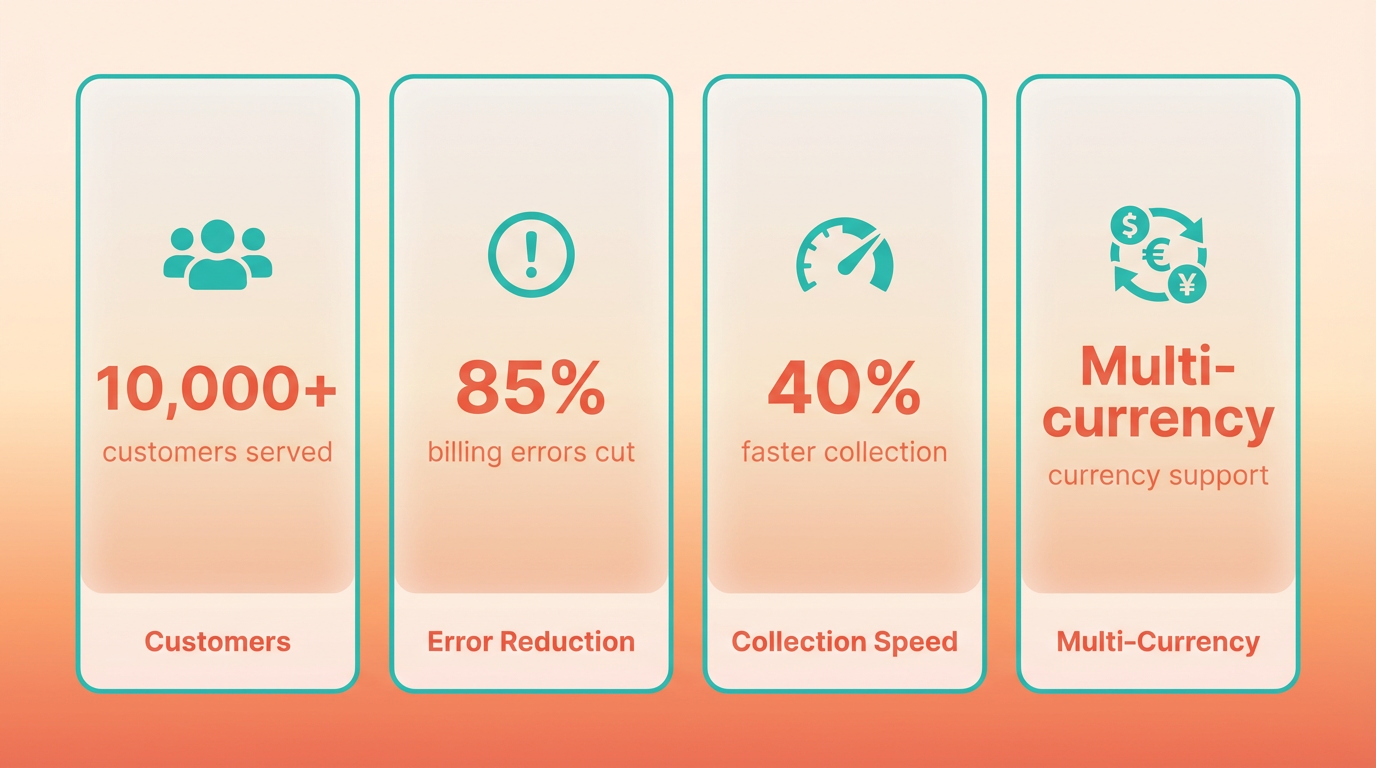
Blixo streamlines recurring payments and subscription management, reducing manual errors and late fees. For example, a SaaS startup used Blixo to automate monthly invoicing for 10,000+ customers, cutting billing errors by 85% and improving payment collection speed by 40%. The platform integrates with Stripe and PayPal, enabling businesses to handle multi-currency transactions without switching tools, as highlighted in the Automating Invoicing with Blixo section.
How Does Blixo Solve Accounts Receivable Challenges?
A mid-sized consulting firm struggled with delayed payments and manual reconciliation. After implementing Blixo’s automatic cash application feature, they matched 95% of incoming payments to invoices within minutes, reducing reconciliation time from hours to seconds. The system also flagged discrepancies in real time, helping the team resolve disputes faster, building on concepts from the Streamlining Collections with Blixo section.
Can Blixo Handle Complex Billing Models?
A digital media company offering tiered pricing and usage-based billing faced challenges tracking customer usage across platforms. Blixo’s customizable pricing engine allowed them to automate invoicing for variable rates, such as pay-per-view content and subscription tiers. By centralizing billing data, they reduced administrative overhead by 30% and improved customer transparency, as discussed in the Subscription Management with Blixo section..
Summary Table: Blixo Case Study Highlights
| Title | Description | Key Features | Pros/Cons |
|---|---|---|---|
| SaaS Subscription Automation | Automated monthly invoicing for 10,000+ customers | Recurring billing, multi-currency support | Pros: 85% fewer errors, 40% faster payments. Cons: Initial setup required integration testing. |
| Consulting Accounts Receivable | Real-time payment matching for 500+ invoices | Cash application, dispute resolution alerts | Pros: 95% accuracy, 20x faster reconciliation. Cons: Learning curve for advanced reporting. |
| Tiered Pricing for Media | Usage-based billing for pay-per-view and subscriptions | Custom pricing rules, usage tracking | Pros: 30% lower admin costs, scalable models. Cons: Requires upfront configuration for complex tiers. |
What Lessons Emerge from Blixo Implementations?
Businesses report that success with Blixo hinges on clear goal-setting during onboarding. For instance, the consulting firm prioritized automating high-volume invoice matching, while the SaaS company focused on reducing manual reconciliation. Both teams emphasized the importance of training staff on Blixo’s reporting tools to maximize visibility into cash flow.
A common challenge was configuring custom billing rules, especially for companies with unique pricing structures. The media firm initially faced delays due to misaligned usage metrics but resolved the issue by using Blixo’s support team for rule optimization. Their experience highlights the value of engaging with Blixo’s documentation and support resources during setup, as detailed in the Implementation and Onboarding with Blixo section.
How Do Teams Optimize Blixo’s Features?
To maximize efficiency, users recommend:
- Mapping workflows before migration to identify gaps in existing billing processes.
- Testing integrations with payment gateways to avoid downtime during launch.
- Using templates for recurring invoices to maintain consistency across customer accounts.
One SaaS manager noted, “Blixo’s automation saved us 20 hours weekly, but we only saw results after aligning our team on how to use the dashboard daily.” This underscores the need for internal adoption alongside technical implementation, as outlined in the Automating Invoicing with Blixo section.
By addressing specific challenges like subscription management, accounts receivable delays, and complex pricing, Blixo offers scalable solutions that adapt to business needs. The platform’s effectiveness depends on strategic planning, staff training, and using its full feature set-from recurring billing to cash application tools.
Conclusion and Future Outlook
Automated billing solutions like Blixo streamline financial workflows, reduce manual errors, and improve cash flow efficiency. By handling subscription management, automated collections, and real-time reconciliation, SaaS providers like Blixo empower businesses to focus on growth instead of administrative tasks. The key takeaway is that automation isn’t just a convenience-it’s a strategic advantage for scalability and customer retention.
What Are the Key Takeaways from Blixo’s Automated Billing Solutions?
As mentioned in the Automating Invoicing with Blixo section, Blixo’s system excels in automating recurring billing, dunning management, and multi-currency invoicing. Its strengths include instant payment reconciliation, customizable subscription plans, and AI-driven cash application. These features reduce manual effort, cut payment delays, and provide real-time financial visibility. Building on concepts from the Implementation and Onboarding with Blixo section, successful implementation requires integration with existing accounting tools and a clear understanding of subscription lifecycle management.
| Title | Description | Key Features | Pros | Cons |
|---|---|---|---|---|
| Blixo Automated Billing | Manages subscriptions, collections, and invoicing | Subscription billing, automated dunning, cash reconciliation | Reduces manual work, improves accuracy | Requires initial setup and integration |
What Emerging Trends Are Shaping Automated Billing?
The industry is leaning toward predictive analytics and real-time processing. For example, Blixo’s cash application uses algorithms to match payments with invoices instantly, minimizing reconciliation time. Another trend is flexible billing models, such as usage-based pricing and tiered subscriptions. Blixo supports these models, letting businesses tailor pricing without manual configuration. Additionally, embedded billing is rising, where SaaS providers like Blixo integrate directly into e-commerce tools to streamline customer checkout and reduce friction, as discussed in the Customization and Integration with Blixo section.
What Does the Future Hold for Billing and Payments?
Future advancements will likely focus on AI-driven compliance and blockchain-backed transparency. As tax laws and currencies evolve, automated systems will need to adapt dynamically. Blixo’s current tools already support multi-currency invoicing, but upcoming updates could include real-time currency conversion and tax rule updates. Remote work trends also push for cloud-based collaboration, enabling teams to manage billing globally. Blixo’s web interface supports this, but deeper AI integration-like automated fraud detection-could further future-proof the platform.
What Recommendations Can Businesses Follow to Maximize Blixo?
Start by mapping your billing workflows to identify automation gaps. Test Blixo’s free plan to evaluate how its subscription management aligns with your pricing models. For SaaS companies, prioritize dunning management to reduce churn by resubmitting failed payments automatically. Regularly audit reconciliation reports to catch discrepancies early. Finally, train finance teams on Blixo’s dashboards to use real-time insights for cash flow planning.
“Switching to Blixo cut our invoicing errors by 70% and automated 80% of our collections.” – Finance Manager
By adopting Blixo strategically, businesses can future-proof their billing systems while improving customer satisfaction. The key is balancing automation with human oversight-let technology handle repetitive tasks, but maintain manual checks for complex scenarios. As billing trends evolve, SaaS providers like Blixo will remain critical for staying competitive in a fast-paced market.
Frequently Asked Questions
1. How does automated billing reduce revenue leakage?
Automated billing minimizes revenue leakage by improving payment follow-up, preventing 1–5% EBITA losses seen in 42% of companies. It ensures timely invoicing and reduces delays that cause operational costs to rise by up to 35%.
2. What are the average costs of manual billing errors?
Manual billing errors cost businesses an average of $500 per mistake, risking customer trust and operational efficiency. These errors often lead to overcharges, undercharges, or missed payments.
3. How does automation improve compliance with accounting standards?
Automated systems ensure compliance with ASC 606 and IFRS 15 by standardizing invoicing processes, reducing human error, and maintaining audit-ready records to avoid costly regulatory penalties.
4. Can automation help law firms recover lost revenue?
Yes. A law firm lost 30% of revenue due to inefficient collections, but automation streamlines invoicing and dunning, accelerating payments and reducing delays that erode cash flow.
5. Why do SaaS companies adopt automated billing?
SaaS companies cut billing errors by 50% using automation, improving client retention. Automated systems handle recurring invoices, subscriptions, and dunning more accurately than manual processes.
6. How does automation streamline finance operations?
Automation consolidates invoicing, payments, and debt management into one platform, reducing human error and saving time. This integration cuts operational costs and improves cash flow predictability.
7. What role does AI play in billing solutions like Blixo?
Blixo’s AI-driven tools accelerate collections by predicting payment risks, automating reminders, and optimizing dunning strategies, ensuring faster cash flow and reducing manual follow-ups.