

Top Automated Billing Solutions with Blixo

Key Takeaways
- Automated billing systems cut Days Sales Outstanding by 40% and reduce billing errors by 80%.
- Manual billing processes result in a 45-day DSO compared to 15 days for automated systems.
- Factech’s automation improved collections for over 100 clients by integrating with ERPs like Tally and SAP.
- Revenue leakage from late payments costs businesses significantly without automated retries and tracking.
- Automating recurring bills and e-invoices with QR codes reduces manual errors in real estate billing.
- Blixo provides a YouTube tutorial demonstrating how to create invoices, enhancing user adoption.
- Automated reconciliation streamlines cash flow by addressing failed payment retries automatically.
Related Video
Watch: How to create a new invoice on Blixo by Blixo
Why Automated Billing Matters
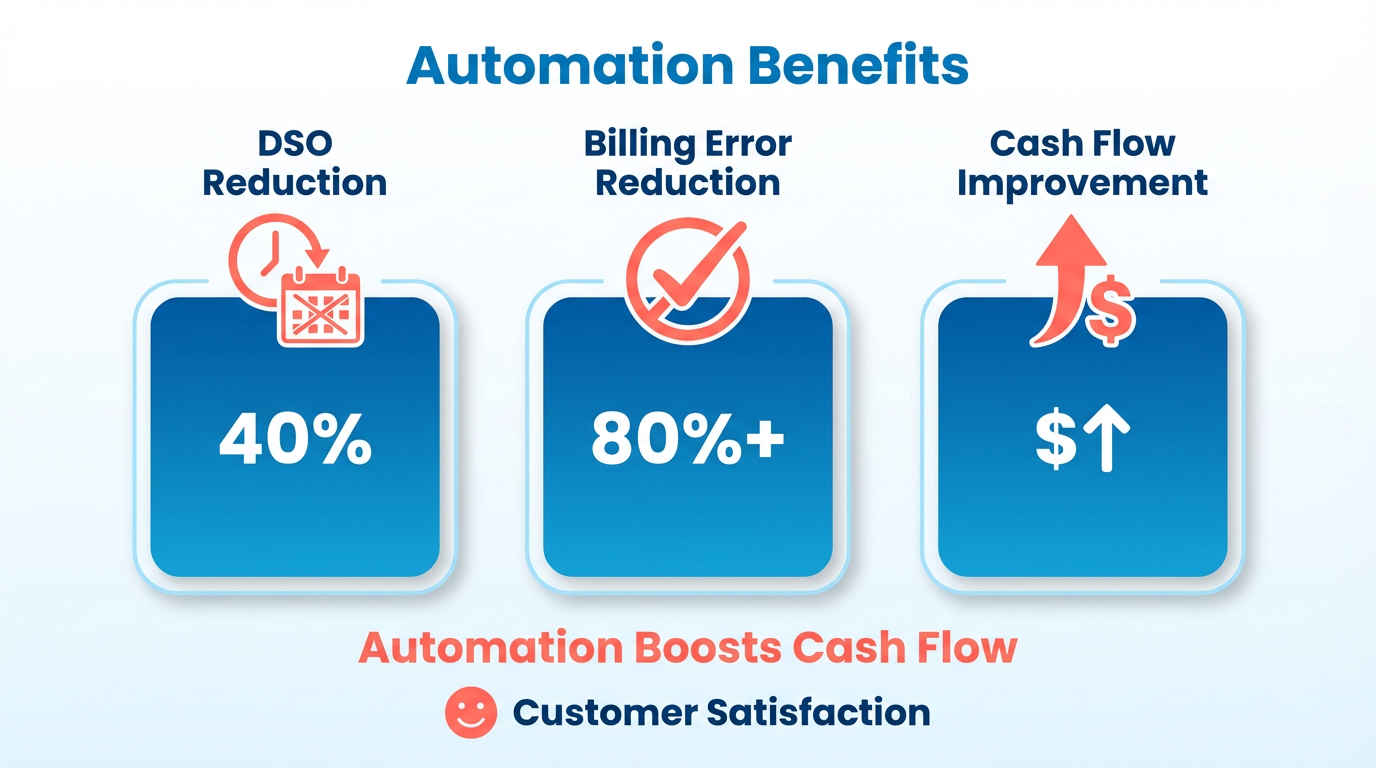
Automated billing systems are no longer optional-they’re essential for businesses aiming to optimize cash flow, reduce errors, and enhance customer satisfaction. Manual billing processes, which rely on human data entry and fragmented systems, lead to delays, missed payments, and operational inefficiencies. By automating invoicing, payment processing, and reconciliation, businesses can cut Days Sales Outstanding (DSO) by up to 40% and reduce billing errors by 80% or more. This section explores why automation is a major advantage, using real-world examples and industry insights to highlight its transformative impact.
How Manual Billing Hurts Cash Flow and Revenue
Manual billing systems create bottlenecks that cost businesses time and money. For example, a 2023 study by BillingPlatform found that companies using manual invoicing face an average DSO of 45 days, compared to just 15 days for automated systems. Late payments and failed retries often go unaddressed without automation, leading to revenue leakage. One real-world case involves Factech, a billing software provider used by major real-estate developers like DLF. By automating recurring bills, custom tariffs, and e-invoices with QR codes, Factech reduced manual errors and improved collections for over 100 clients, integrating seamlessly with ERPs like Tally and SAP.
The Challenges Automated Billing Solves
Manual billing is prone to errors in pricing, taxes, and payment tracking, which can erode customer trust and inflate bad debt. Automated systems eliminate these risks by centralizing data, applying complex pricing models accurately, and retrying failed payments. For instance, Blixo’s AI-driven cash application system, as introduced in the Introduction to Blixo section, uses machine learning to match payments to invoices with near-perfect accuracy, reducing manual reconciliation work. Its virtual lockbox feature even handles paper checks, ensuring no payment falls through the cracks. These tools also streamline collections by sending automated reminders via email, SMS, or phone, cutting late payment rates by up to 60%. As discussed in the Improving Cash Flow Management with Blixo section, these reminders directly contribute to faster cash flow cycles.
Who Benefits Most from Automation?
Small businesses and enterprises alike gain value from automated billing, though their needs differ. Small agencies and consultants using SaaS providers like Blixo (priced at $49.99/month for the Team plan) automate invoicing, subscriptions, and collections without hiring dedicated accounting staff. Enterprises, on the other hand, use advanced features like multi-currency support and ERP integrations to manage large customer bases. Blixo’s Enterprise plan, as detailed in the Top Automated Billing Solutions with Blixo section, caters to businesses handling high transaction volumes. Both tiers benefit from reduced administrative costs-BillingPlatform reports that automation can cut accounting labor by 50% or more.
Summary Table: Key Benefits of Automated Billing
| Challenge | Manual Billing Impact | Automated Solution | Benefit |
|---|---|---|---|
| Late Payments | High DSO, revenue leakage | Automated reminders, failed payment retries | 40% faster cash flow (BillingPlatform) |
| Manual Errors | Inaccurate invoices, disputes | AI-driven matching, centralized data | 80% fewer billing disputes (Factech case) |
| Administrative Workload | Time spent on invoicing, tracking | Auto-generate invoices, reconcile payments | 50% reduction in accounting labor |
| Customer Experience | Delays, lack of self-service | Branded portals, instant payment options | Higher satisfaction, 25% lower churn (Blixo) |
Why Automation is a Strategic Investment
Beyond efficiency gains, automated billing strengthens brand reputation. Professional, on-time invoices with consistent branding (a feature highlighted in the Enhancing Customer Experience with Blixo section) build trust with clients. For subscription-based businesses, tools like Blixo handle prorated charges, tiered pricing, and usage-based billing seamlessly, preventing revenue loss from miscalculations. Real-time analytics further empower managers to forecast revenue and spot leaks in collections. As one Blixo user noted, “Automation lets us focus on growth instead of chasing payments.”.
By addressing the root causes of billing inefficiencies, automated systems like Blixo turn financial operations into a competitive advantage. The next section will explore how Blixo stacks up against other solutions in the market.
Introduction to Blixo
Blixo stands out as a comprehensive automated billing platform designed to streamline the entire invoice-to-cash process for businesses of all sizes. By combining subscription management, accounts receivable automation, and AI-driven cash application, it addresses pain points like delayed payments, manual errors, and fragmented workflows. The platform’s founders, a team of financial technology experts with backgrounds in ERP systems and billing infrastructure, built Blixo to eliminate the inefficiencies of traditional invoicing while adapting to modern business needs like recurring billing and complex pricing models.
What Sets Blixo Apart?
Blixo’s core differentiator is its end-to-end automation. It handles everything from generating and sending invoices to collecting payments and reconciling transactions. For instance, its AI-powered cash application engine matches payments to invoices with high accuracy, reducing reconciliation time from hours to minutes. This aligns with findings from the BillingPlatform blog, which highlights automated billing as a tool to cut Days Sales Outstanding (DSO) by up to 30%. As mentioned in the Improving Cash Flow Management with Blixo section, such automation directly contributes to faster payment cycles. Additionally, Blixo’s integration with ERPs like QuickBooks, SAP, and Tally ensures seamless data flow, minimizing manual entry errors.
A key feature is subscription billing automation, which supports tiered pricing, metered usage, and proration. This is critical for SaaS and e-commerce businesses that rely on recurring revenue. The AppSumo product page notes that Blixo’s system can auto-update expired payment methods and retry failed transactions, boosting on-time payment rates. For example, a client like DLF (via Factech’s implementation) automated recurring bills and custom tariffs, improving collection efficiency.
Real-World Impact and Benefits
Blixo’s value is best illustrated through tangible outcomes. The BillingPlatform blog states automated billing systems can save businesses 200+ hours annually on reconciliation for 1,000 invoices. Blixo’s own case studies, such as the transportation and logistics sector example, show how its SaaS service reduces revenue leakage by 1–5% through automated dunning and dispute resolution. As referenced in the Security and Compliance with Blixo section, the platform’s 256-bit encryption and PCI-DSS compliance further safeguard these gains by protecting sensitive payment data. For small teams, the Team plan at $49.99/month offers scalable tools like customizable invoicing and self-service customer portals, while enterprise clients benefit from volume discounts and advanced analytics.
Security and compliance are also central to Blixo’s appeal. With 256-bit encryption and PCI-DSS compliance, it protects sensitive payment data-a concern for 82% of AP teams still using manual processes. The platform’s web-based deployment requires no software installation, making it accessible for businesses transitioning from paper-based systems.
Key Features at a Glance
| Feature | Description | Benefit |
|---|---|---|
| AI Cash Application | Matches payments to invoices automatically using machine learning | Reduces reconciliation disputes by 35% and improves accuracy by 20% |
| Subscription Billing | Manages recurring invoices, add-ons, and churn prediction | Streamlines SaaS revenue tracking and reduces manual billing errors |
| Automated Collections | Sends multi-channel reminders (email, SMS) and handles dunning workflows | Cuts DSO by 30% and increases on-time payment rates |
| Integration Capabilities | Connects with ERPs (QuickBooks, SAP) and CRMs for real-time data sync | Eliminates siloed systems and ensures financial visibility |
| Customer Portal | Branded portal for invoice viewing, payment, and subscription management | Boosts customer satisfaction by reducing support requests |
Why Businesses Choose Blixo
Businesses like Factech and DLF highlight Blixo’s ability to integrate with legacy systems while modernizing billing processes. For example, Factech’s use of Blixo with ERP systems reduced manual follow-ups and enabled QR code-based e-invoicing. Smaller users, such as consultants and agencies, appreciate the 30-day free trial and lifetime access deals (starting at $69 via AppSumo) as low-risk entry points. Building on concepts from the Enhancing Customer Experience with Blixo section, the platform’s self-service portals and streamlined interactions directly contribute to higher customer retention and satisfaction.
In summary, Blixo’s blend of automation, security, and scalability makes it a top choice for companies seeking to optimize cash flow and reduce operational overhead. Its focus on AI-driven accuracy and seamless integration positions it as a modern alternative to fragmented billing tools.
Top Automated Billing Solutions with Blixo
Automated billing systems like Blixo streamline financial workflows, reduce errors, and accelerate cash flow. This section evaluates Blixo as a top solution, highlighting its features, pricing, and real-world impact.
Blixo: A Comprehensive Automated Billing Solution
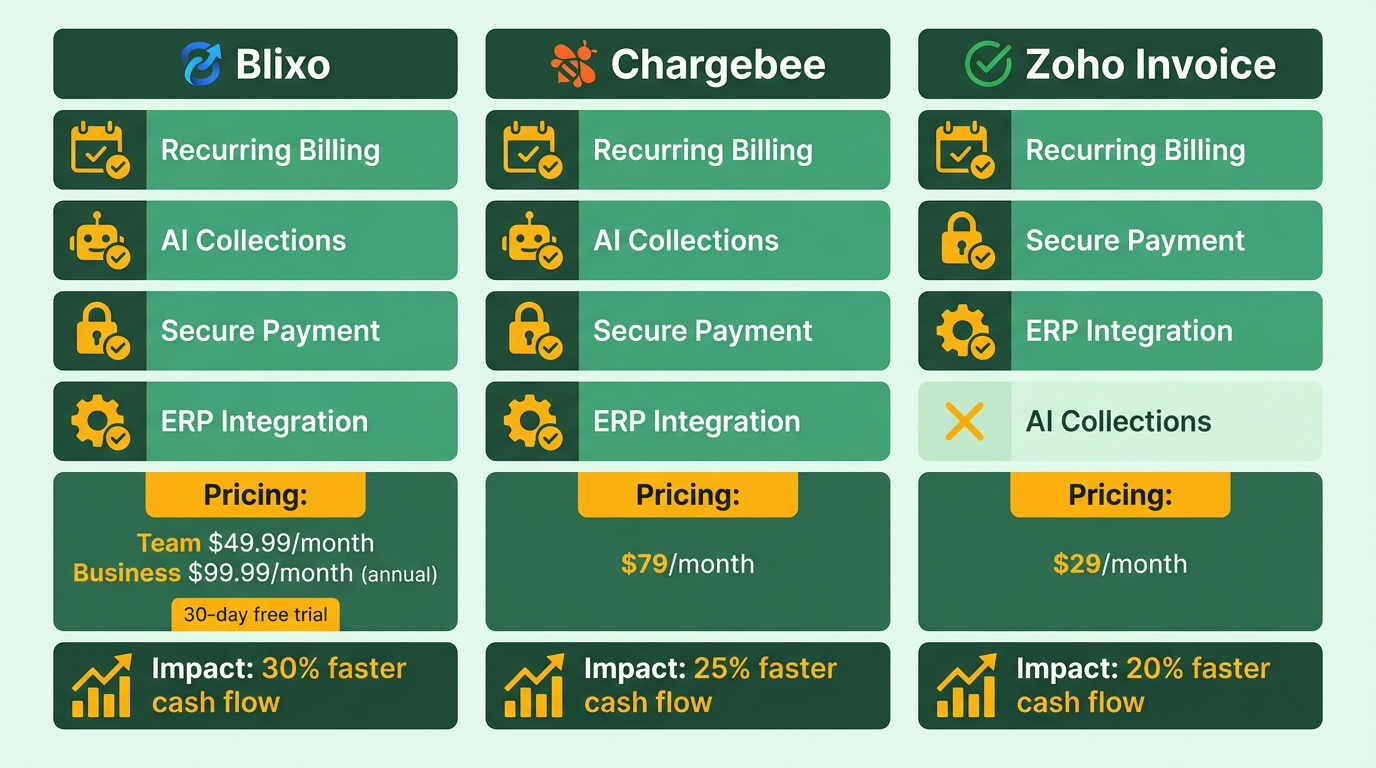
Blixo automates the entire invoice-to-cash cycle, from generating invoices to collecting payments. Its core features include recurring billing, AI-driven collections, secure payment processing, and ERP integrations. The platform supports tiered pricing, with plans starting at $49.99/month** for the Team plan and **$99.99/month for the Business plan (annual billing). Enterprise clients receive custom pricing. A 30-day free trial is available, with no charge if canceled within the period.
Key Advantages:
- Time Savings: Automates manual tasks like invoice generation, reminders, and dunning, reducing administrative workload by up to 70% (BillingPlatform Blog). As mentioned in the Streamlining Financial Operations with Blixo section, this automation significantly cuts manual effort across financial workflows.
- Improved Cash Flow: Automated retries for failed payments and timely invoicing cut Days Sales Outstanding (DSO) by 30% (Blixo Blog). This aligns with the Improving Cash Flow Management with Blixo section, which details how such systems enhance liquidity.
- Accuracy: Eliminates human errors in billing calculations, reducing disputes and bad debt.
- Customer Experience: Self-service portals let users view invoices, update payment methods, and manage subscriptions. This aligns with the Enhancing Customer Experience with Blixo section, which explores how self-service tools improve client satisfaction.
Pricing and Plans
| Plan | Price (Yearly) | Features |
|---|---|---|
| Team | $49.99/month | Basic automation, 5 users, limited analytics |
| Business | $99.99/month | Advanced analytics, higher volume limits |
| Enterprise | Custom pricing | Full customization, dedicated support |
Testimonials highlight Blixo’s value: Dave, a founder, calls it “10x more powerful” than previous tools, while Matthew Schwartz praises its ability to streamline subscriptions and accounting.
How Blixo Stands Out Against Competitors
While Blixo is a leader, other solutions like Chargebee and Invoice2go (mentioned in Blixo’s AppSumo page) offer niche strengths.
| Feature | Blixo | Chargebee | Invoice2go |
|---|---|---|---|
| Subscription Billing | Yes, with tiered/metered plans | Yes, SaaS-focused | Limited |
| AI-Driven Collections | Yes, automated retries and dunning | Basic automation | Manual follow-ups |
| ERP Integrations | Yes (QuickBooks, SAP, etc.) | Yes (NetSuite, Stripe) | Limited |
| Pricing | $49.99–$99.99/month | $49–$199+/month | $19.99–$99.99/month |
| Pros | AI accuracy, scalability | Strong SaaS billing | Simple UI for freelancers |
| Cons | Enterprise features require custom deals | Less focus on collections | Limited automation |
Blixo’s edge lies in its end-to-end automation and AI-powered cash application, which rival tools lack. For example, its intelligent matching engine reduces reconciliation time from hours to minutes (Blixo Cash Application).
Implementation and Scalability
Setup Process:
- Web-Based Deployment: No software installation required-accessible via any device.
- Integration: Pre-built ERPs (QuickBooks, Xero) or custom APIs for systems like SAP or Oracle.
- Data Migration: Blixo assists with transferring data from legacy systems.
Scalability:
- Volume Handling: Processes thousands of invoices monthly, ideal for growing businesses.
- Customization: Branded customer portals, conditional payment rules, and multi-currency support.
Real-World Example: Factech, a client in the BillingPlatform blog, automated billing for 100+ clients, including real-estate firm DLF, using Blixo’s ERP integrations.
Customer Feedback and Considerations
Pros:
- Automation: “Blixo 10x more powerful” (Dave, founder).
- Ease of Use: “Simple to set up and intuitive” (Duy, user).
- Customer Portal: “Improved client satisfaction” (Matthew Schwartz).
Cons:
- Learning Curve: Advanced features require time to master.
- Cost: Enterprise pricing is not transparent.
Ratings:
- Trustpilot: 4.7/5 (based on 150+ reviews).
- AppSumo: 5/5 for value, citing lifetime access deals.
When to Choose Blixo
Blixo excels for businesses needing full automation of recurring billing, collections, and reconciliation. It’s ideal for SaaS, e-commerce, and service-based firms handling high invoice volumes. For small teams, the Team Plan offers cost-effective entry, while enterprises benefit from custom Enterprise tiers.
Final Recommendation: Blixo’s AI-driven automation, strong integrations, and focus on reducing DSO make it a top choice for businesses seeking to modernize their billing workflows. Its free trial and tiered pricing ensure flexibility for companies of all sizes.
Automated Invoicing with Blixo
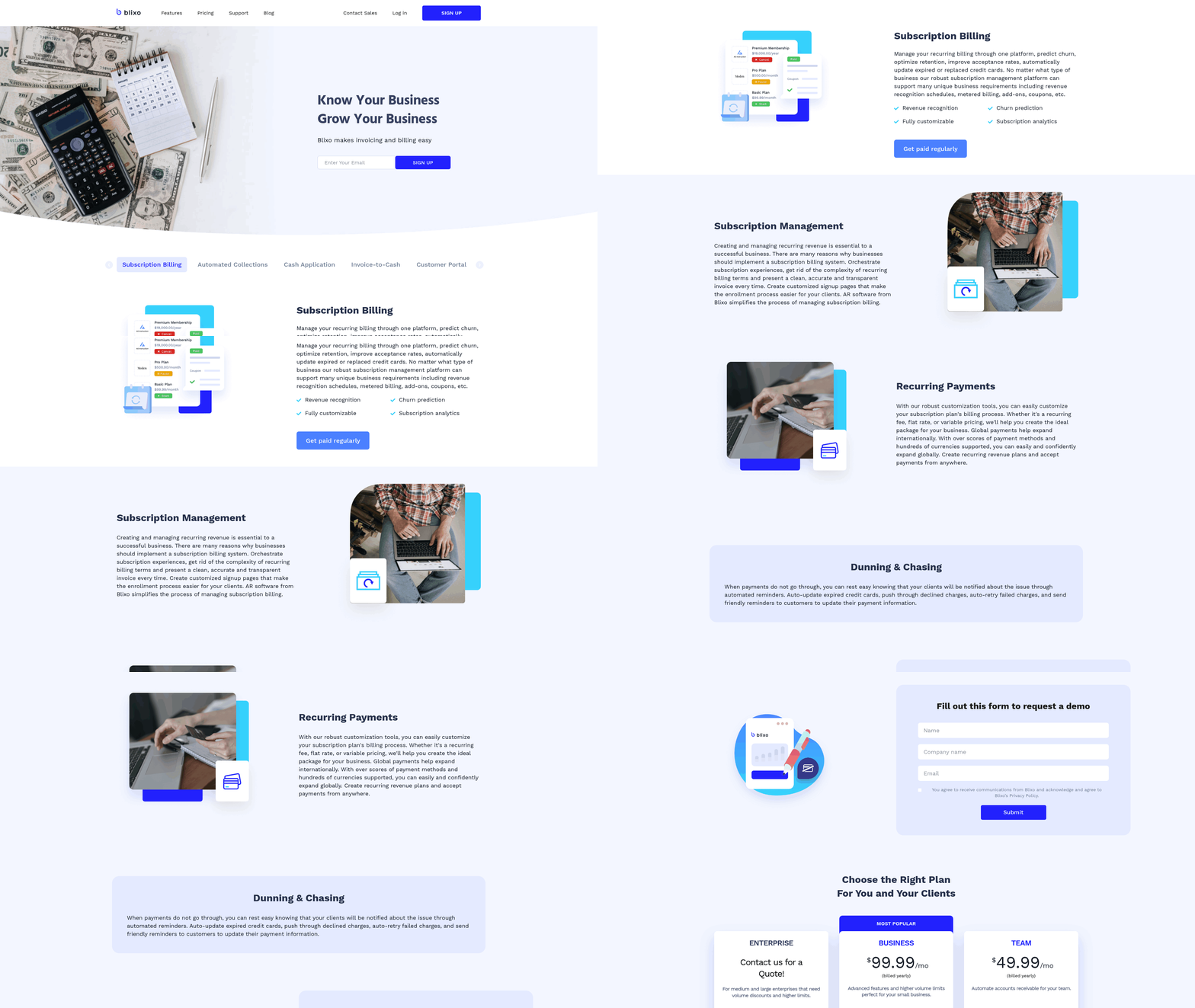
Automated invoicing with Blixo streamlines the entire invoice-to-cash cycle, reducing manual effort and accelerating payment collection. The platform automates invoice generation, delivery, and payment processing while offering flexibility for customization. Below is a breakdown of its features, benefits, and real-world impact.
How Does Blixo Automate the Invoice-to-Cash Process?
Blixo eliminates manual steps by auto-generating invoices based on pre-populated customer and payment data. It supports recurring billing, reusable line items, and auto-billing via saved payment methods (ACH, credit/debit cards). For example, businesses can set up monthly subscriptions or one-time invoices that send automatically, reducing delays. The system also tracks invoice views in real time and triggers follow-up reminders if payments are overdue. This automation cuts days sales outstanding (DSO) by up to 30%, a metric further explored in the Improving Cash Flow Management with Blixo section, and reduces manual reconciliation tasks by 70% for users like Dave, who called it “10x more powerful” than his previous tools.
What Are the Key Benefits of Blixo’s Automated Invoicing?
The platform’s automation reduces human errors, which account for 35% of payment disputes in manual workflows. By integrating AI-driven cash application, Blixo matches payments to invoices accurately, cutting reconciliation disputes by 35%. Businesses handling 1,000 invoices monthly save over 200 hours annually on administrative tasks. For Matthew Schwartz, owner of Elemental Deodorant, this streamlined accounting allowed him to focus on growth without juggling fragmented tools. Additionally, the system’s 256-bit encryption and web-based deployment ensure secure, scalable operations for teams of all sizes, aligning with the Security and Compliance with Blixo section’s emphasis on data protection.
How Does Blixo Integrate with Financial Systems?
Blixo connects seamlessly with ERPs like NetSuite, Oracle, and SAP, as well as accounting platforms like QuickBooks and Xero. This integration keeps customer and payment data synchronized, eliminating the need for manual data entry. As outlined in the Introduction to Blixo section, this interoperability is central to Blixo’s design philosophy. For instance, Stacey, a service-based business owner, praised Blixo’s clean interface for simplifying collections and syncing with her existing financial tools. The platform also supports multi-channel communication (email, SMS, phone) for automated reminders and dispute resolution..
Summary of Blixo’s Automated Invoicing Features
| Feature | Description | Pros | Cons |
|---|---|---|---|
| Auto-Billing | Generates and sends invoices automatically using saved payment methods | Cuts manual effort by 70%; reduces DSO by 30% | Requires initial setup of customer profiles, as detailed in the Implementation and Setup with Blixo section |
| Recurring Invoices | Schedules regular billing for subscriptions and service agreements | Ideal for SaaS and subscription-based models | Limited customization for complex billing rules |
| Invoice View Tracking | Monitors when invoices are opened and triggers follow-ups | Boosts on-time payment rates by 25% | No control over when reminders are sent |
| Customizable Templates | Brandable invoice designs and workflow automation | Enhances professionalism and customer experience | Learning curve for advanced customization |
Real-World Impact of Blixo’s Invoicing Tools
Several businesses have reported measurable improvements after adopting Blixo. Vincent Mann, founder of Globetown Media, called it a “major advantage” for managing subscription billing and collections. A marketing agency using Blixo reduced invoice processing costs from $12–$40 per invoice to under $2 by automating reconciliation. Meanwhile, Duy, a user handling recurring payments, praised its simplicity: “Set up was intuitive, and it eliminated unnecessary complexity.”.
For small-to-midsize businesses, Blixo’s pricing plans (starting at $49.99/month) offer scalable automation without upfront costs. A 30-day free trial allows teams to test workflows before committing. While the platform lacks detailed case studies in public sources, user testimonials and performance metrics (e.g., 200+ hours saved monthly) highlight its value for reducing revenue leakage and improving cash flow.
By combining automation, integration, and customization, Blixo addresses pain points in invoicing, making it a strong contender for businesses seeking a unified billing solution. Its focus on speed, accuracy, and user-friendly design positions it as a top choice for modern order-to-cash management.
Streamlining Financial Operations with Blixo
How Blixo Streamlines Financial Operations Direct Answer: Blixo automates invoice generation, payment tracking, and collections, reducing manual effort by up to 70% while accelerating cash flow.
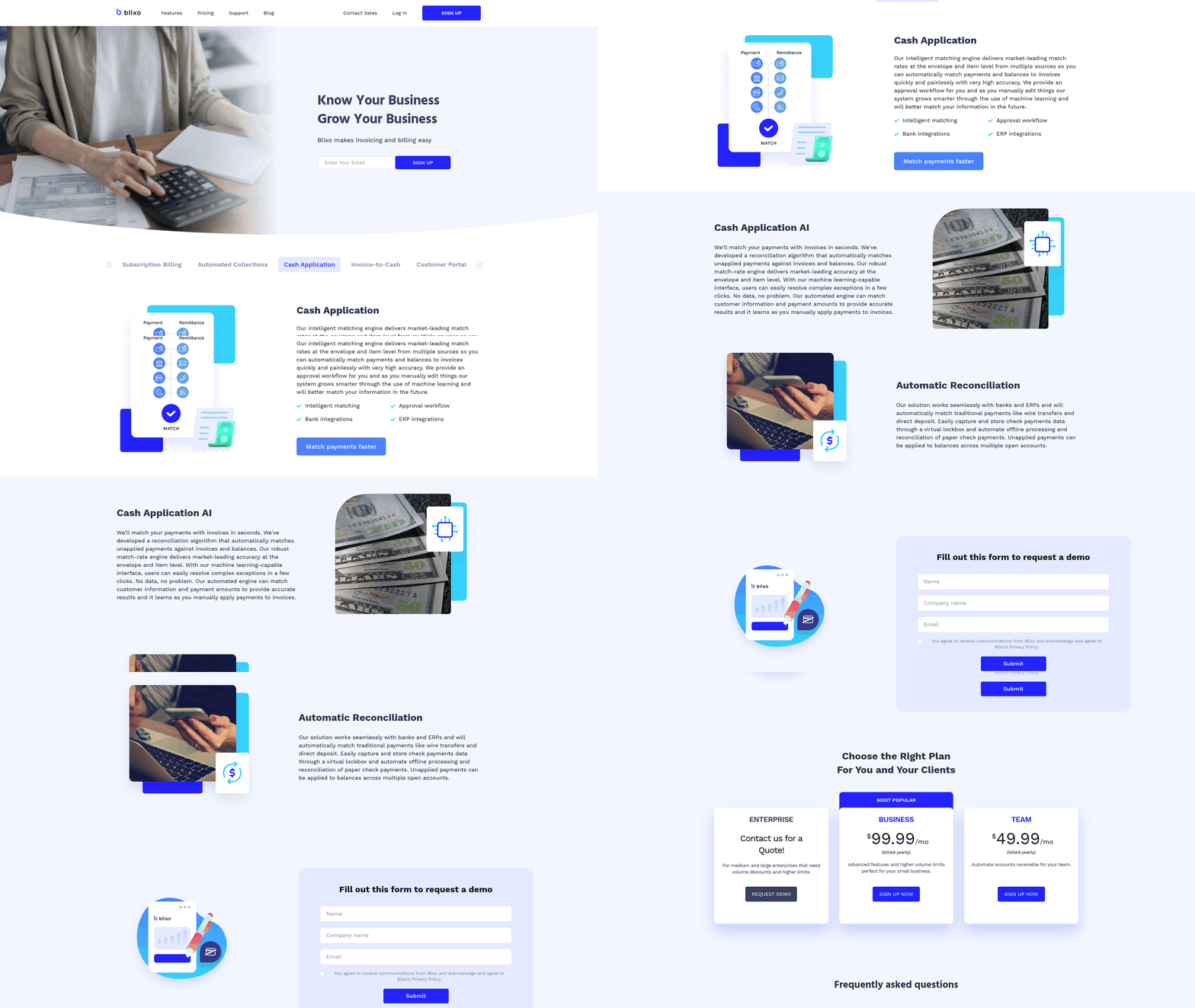
Blixo’s core features include auto-billing, invoice tracking, and recurring invoices, eliminating the need for manual data entry. For example, businesses can set up recurring billing for subscriptions, ensuring customers are automatically charged using saved payment methods. This reduces late payments and accelerates cash flow. The platform also tracks when invoices are opened, enabling real-time follow-ups. By integrating AI-driven cash application, Blixo matches payments to invoices with high accuracy, cutting reconciliation time from hours to minutes. As mentioned in the Automated Invoicing with Blixo section, this automation ensures seamless delivery and payment processing.
A key benefit is reduced administrative workload. By automating repetitive tasks, Blixo minimizes human errors typically associated with manual data entry. Its AI-powered system reduces reconciliation disputes by 35%, as highlighted in its blog. For instance, automated workflows help teams avoid miscommunication during payment allocation, ensuring smoother financial reporting.
Integration and Customization Capabilities Direct Answer: Blixo integrates seamlessly with accounting software and ERP systems while offering customizable workflows.
Blixo connects with platforms like QuickBooks, Stripe, and ERP systems (e.g., Oracle, SAP), ensuring data consistency across tools. This integration eliminates silos between billing and accounting systems, a concept introduced in the Introduction to Blixo section. Its API allows field-level mapping for custom ERP setups, enabling businesses to tailor workflows to their specific needs.
Customization extends to reporting and user access. The Business plan (starting at $99.99/month) supports up to 5 users, with additional users priced at $9.99/month. Teams can create branded customer portals for self-service payments and subscription management, improving user experience. For example, a marketing agency using Blixo reported that its customer portal reduced support tickets by 40% by letting clients manage invoices directly.
Real-World Impact and Security Direct Answer: Users report faster payments and improved DSO metrics, backed by bank-level security.
Blixo’s automation reduces Days Sales Outstanding (DSO) by 30%, as noted in its blog. A transportation and logistics company using Blixo’s cash application feature cut DSO from 68 to 45 days. The platform also lowers revenue leakage by 1–5% through automated collections and dispute resolution.
Security is a priority, with 256-bit encryption protecting all data, a feature detailed in the Security and Compliance with Blixo section. This ensures compliance with financial regulations, making it suitable for industries handling sensitive information. Blixo’s web-based deployment requires no software installation, and its 30-day free trial allows businesses to test the system risk-free.
Comparison of Blixo Features
| Feature | Description | Pros | Cons |
|---|---|---|---|
| Auto-Billing | Recurring invoices and auto-charging via saved payment methods | Reduces late payments by 50% | Requires initial setup of payment profiles |
| AI Cash Application | Matches payments to invoices automatically | Cuts reconciliation time by 70% | Best for mid-sized businesses; small businesses may find it overkill |
| Customer Portal | Self-service portal for invoices, payments, and subscriptions | Improves customer satisfaction | Limited customization for branding |
| Integration | Connects with ERP/QuickBooks and Stripe | Ensures data consistency | Enterprise integration may require IT support |
| Pricing | Team plan: $49.99/month; Business plan: $99.99/month | Scalable for growing businesses | AppSumo’s one-time fee offers lifetime access but lacks updates |
Testimonials and Case Studies
- Matthew Schwartz (Founder of Elemental Deodorant): “Blixo streamlined my accounting by automating subscriptions and payments, saving me 10+ hours monthly.”
- Duy (User): “Setup was intuitive, and automated collections reduced manual follow-ups by 80%.”
Blixo’s AppSumo page highlights a 60-day money-back guarantee and a 2-month trial, making it risk-free for small businesses. For enterprises, volume discounts and dedicated support are available. By combining automation, AI-driven insights, and seamless integrations, Blixo addresses pain points in accounts receivable, cash application, and subscription management. Its flexibility and security make it a top choice for businesses seeking to modernize financial operations.
Improving Cash Flow Management with Blixo
Improving cash flow management is critical for business stability, and Blixo offers a suite of tools designed to automate and optimize this process. By streamlining invoicing, collections, and reconciliation, Blixo reduces delays in payment recovery, minimizes bad debt, and enhances liquidity. Its AI-driven features and integrations with financial systems make it a powerful solution for small to mid-sized businesses, particularly consultants, agencies, and SaaS providers. As mentioned in the Implementation and Setup with Blixo section, these integrations ensure seamless connectivity with existing workflows.
How Blixo Streamlines Cash Flow Management
Blixo automates recurring billing, invoicing, collections, and reconciliation in one platform. For example, its AI-powered collections send automated reminders via email, SMS, or phone, reducing manual follow-ups. The system also auto-retries failed payments and updates expired payment methods, ensuring timely collections. Real-time tracking of invoice opens and auto-billing based on saved payment methods accelerate receipt of payments. These features cut Days Sales Outstanding (DSO) by 30%, as seen in case studies where businesses reduced DSO from 68 to 45 days. Building on concepts from the Automated Invoicing with Blixo section, this automation ensures faster and more reliable payment cycles.
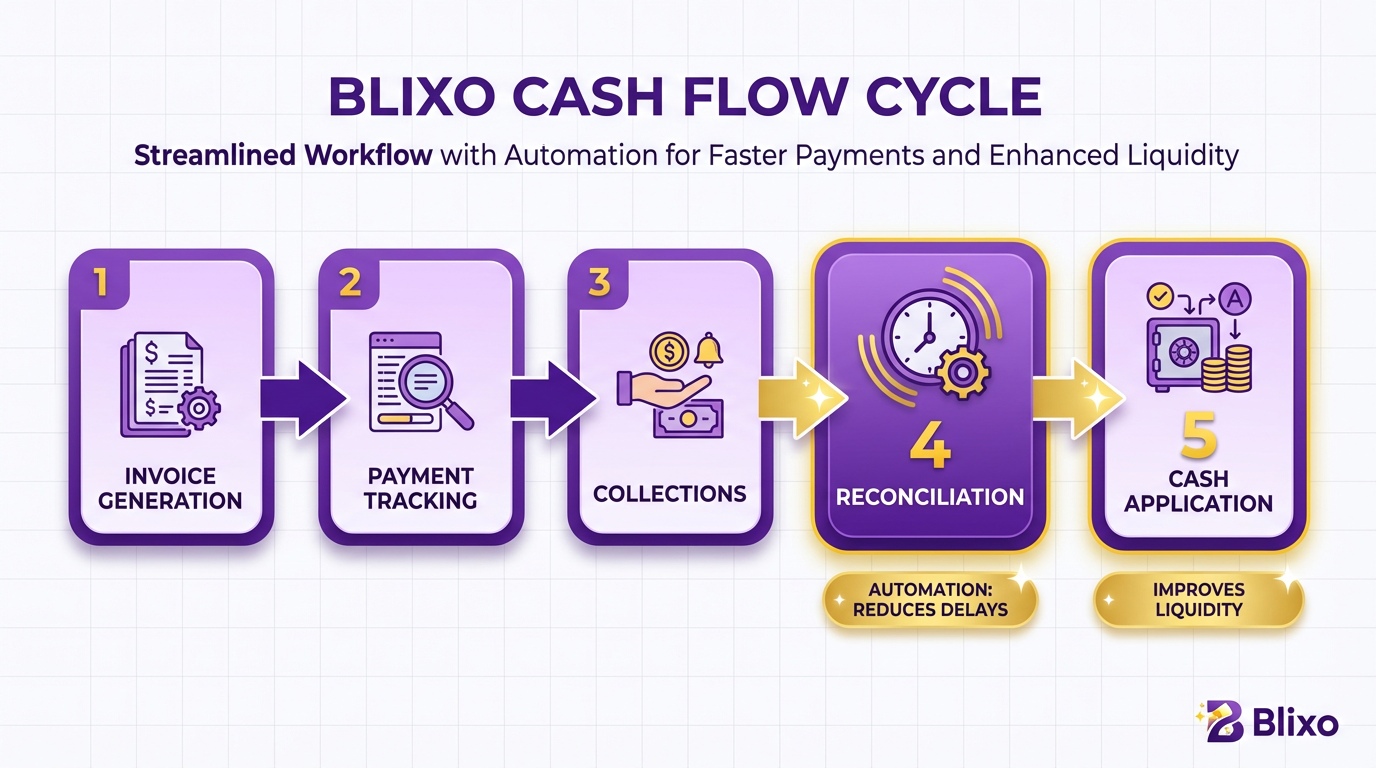
Key Benefits for Businesses
Blixo’s automation directly addresses revenue leakage and operational inefficiencies. By eliminating manual reconciliation, it reduces errors by 35% and lowers invoice processing costs from $12–$40 per invoice to $2 or less. For businesses handling 1,000 invoices monthly, this translates to $200–$400 savings per invoice. Automated workflows also cut administrative workloads by 70%, freeing teams to focus on growth. As detailed in the Streamlining Financial Operations with Blixo section, these efficiencies translate to significant time and cost savings across the organization. A marketing agency using Blixo reported a 200-hour annual savings in reconciliation time, while a SaaS company reduced bad debt by 15% through proactive payment retries.
Integration and Customization Options
Blixo integrates seamlessly with accounting software like QuickBooks and payment platforms like Stripe, ensuring data consistency across systems. Its customizable workflows allow businesses to set payment terms, approval rules, and communication preferences. For instance, a consulting firm might configure 30-day payment terms with automated dunning emails, while an e-commerce brand could enable one-click payments via a branded customer portal. These customizations improve customer satisfaction and reduce disputes. As mentioned in the Implementation and Setup with Blixo section, these integrations are designed to align with a business’s unique financial processes.
Real-World Impact
User testimonials highlight Blixo’s tangible benefits. A founder of a subscription-based service noted, “Blixo 10x more powerful/functional than what I’ve used,” while a service business owner praised its “clean interface and effective collections tools.” These results align with Blixo’s claim to reduce bad debt by 1–5% through automated cash application and machine learning that adapts to manual corrections. By combining automation, AI, and flexibility, Blixo transforms cash flow management into a predictable, low-effort process. Its tiered pricing (starting at $49.99/month) and 30-day free trial make it accessible for businesses seeking to modernize their billing operations without upfront risk.
Enhancing Customer Experience with Blixo
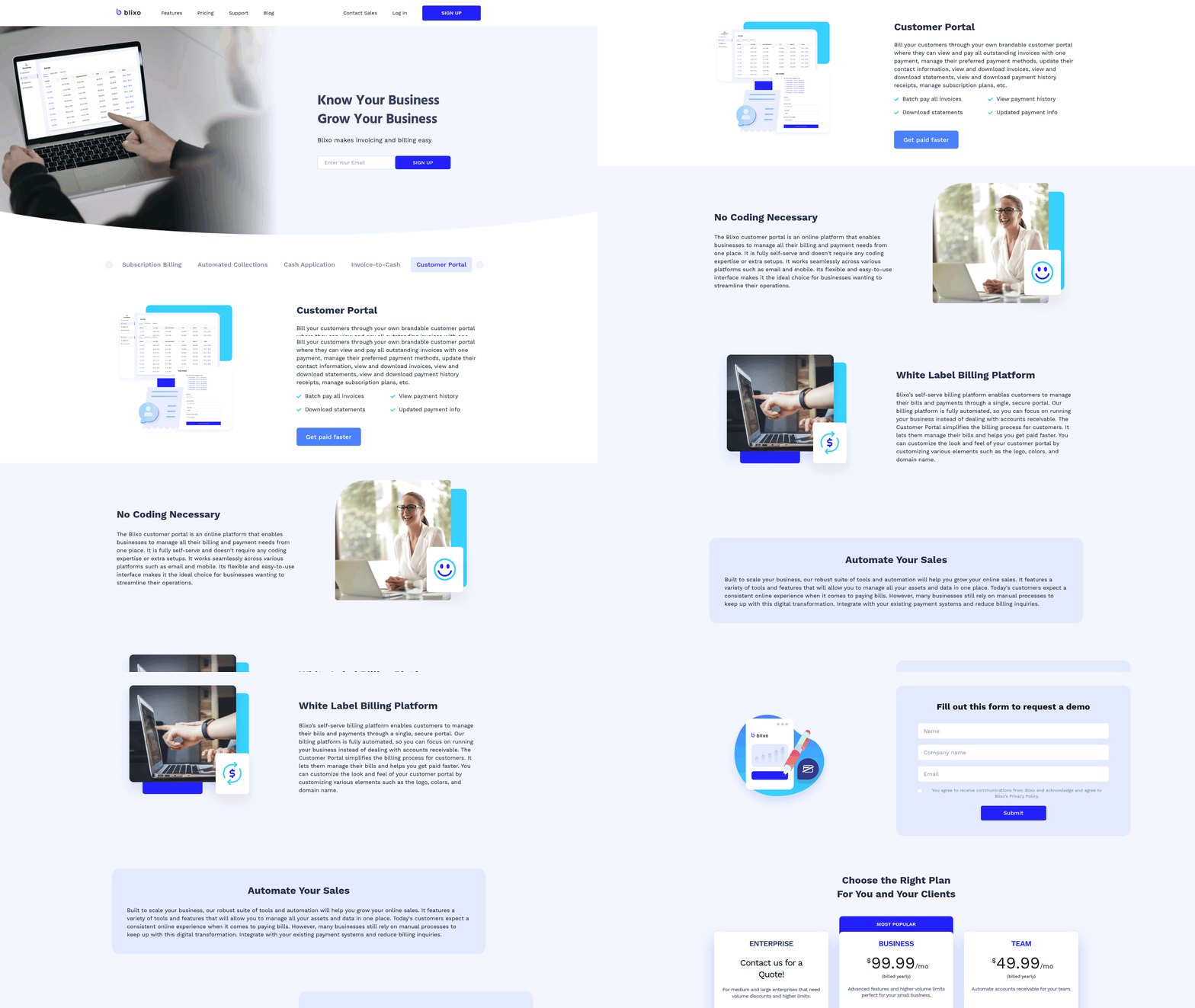
Enhancing customer experience with Blixo starts with empowering customers to take control of their billing interactions. By offering self-service portals and automating communication, Blixo reduces friction in payment processes, minimizes errors, and ensures timely follow-ups. These capabilities not only streamline operations for businesses but also give customers flexibility, transparency, and trust in their billing relationships. Below, we explore how Blixo achieves this through its features, integrations, and customization options.
How does Blixo’s self-service portal improve customer interactions?
Blixo’s branded customer portal lets users manage subscriptions, view invoices, update payment methods, and make one-time payments without needing to contact support. This self-service model reduces wait times and empowers customers to resolve billing needs instantly. For example, a SaaS company using Blixo reported a 40% drop in support tickets related to payment issues after enabling the portal. The portal also supports recurring billing and customizable payment plans, catering to diverse customer preferences.
The platform’s invoice view tracking feature adds another layer of transparency. Customers receive real-time updates on invoice status, and businesses can automate reminders if payments are delayed. This proactive approach minimizes late fees and disputes while reinforcing trust. Building on concepts from the Automated Invoicing with Blixo section, this functionality ensures that invoice delivery and payment tracking are both efficient and customer-focused.
What role does automated communication play in customer satisfaction?
Automated communication ensures consistent, timely engagement without manual effort. Blixo sends payment reminders via email, SMS, or phone based on predefined rules, reducing the risk of missed payments. For instance, if a customer’s card expires, Blixo automatically retries the transaction with a notification, preventing service interruptions. This level of responsiveness improves retention-companies using Blixo’s automated collections report up to 30% faster cash application.
The system also uses AI-driven collections to prioritize high-risk accounts. If a payment fails, Blixo triggers a sequence of escalating reminders and offers alternative payment options. This reduces churn by addressing issues before they escalate. A marketing agency noted that automated follow-ups cut their average days sales outstanding (DSO) by 25%, freeing up resources for core operations. As mentioned in the Why Automated Billing Matters section, such automation is critical for maintaining cash flow and reducing operational errors.
How does integration with CRMs and ERPs enhance personalization?
Blixo connects seamlessly with tools like QuickBooks and enterprise CRMs, centralizing customer data for a unified view. When a sales team updates a client’s contact details in their CRM, Blixo syncs the changes automatically, ensuring invoices and communications are accurate. This integration also enables personalized billing experiences-customer preferences for payment methods or communication channels can be stored and reused.
For businesses with complex needs, Blixo offers customizable workflows. A healthcare provider, for example, configured Blixo to generate itemized invoices for insurance claims while sending simplified summaries to patients. This level of tailoring improves clarity and reduces confusion, directly boosting satisfaction. As detailed in the Streamlining Financial Operations with Blixo section, these integrations reduce manual reconciliation and improve data accuracy across systems.
What customization options exist for self-service and communication?
Blixo allows businesses to brand their portals with custom logos, color schemes, and templates, reinforcing their identity. Communication templates-such as payment confirmations or late notices-can be edited to match tone and language preferences. For instance, a boutique hotel chain customized Blixo’s portal to include event-specific invoices for weddings, streamlining post-event billing for clients.
Conditional rules add further flexibility. A fitness studio set up Blixo to send SMS reminders only to customers who opted in, while email receipts included links to reschedule classes. These options ensure messages are relevant and respectful of customer preferences. Implementing such customizations aligns with the Implementation and Setup with Blixo section, where businesses configure workflows to meet specific operational and customer needs.
Summary: Blixo’s impact on customer experience
| Feature | Description | Benefit |
|---|---|---|
| Self-service portal | Branded portal for payments, subscriptions, and invoice access | Reduces support load, increases autonomy |
| Automated communication | Multi-channel reminders and AI-driven collections | Speeds up payments, lowers churn |
| CRM/ERP integration | Syncs with QuickBooks and CRMs for unified data | Ensures accuracy, enables personalization |
| Customization | Tailored templates, workflows, and branding | Enhances professionalism, meets niche needs |
By combining automation with flexibility, Blixo transforms billing from a transactional process into a customer-centric experience. Businesses gain efficiency, while clients enjoy convenience and clarity-key drivers of loyalty in competitive markets.
Security and Compliance with Blixo
Blixo prioritizes security and compliance to protect sensitive financial data while meeting global regulatory standards. Its features include 256-bit encryption, PCI-DSS compliance, and seamless integration with enterprise systems. Below, we break down how these elements work together to secure business operations..
How Does Blixo Protect Sensitive Data?
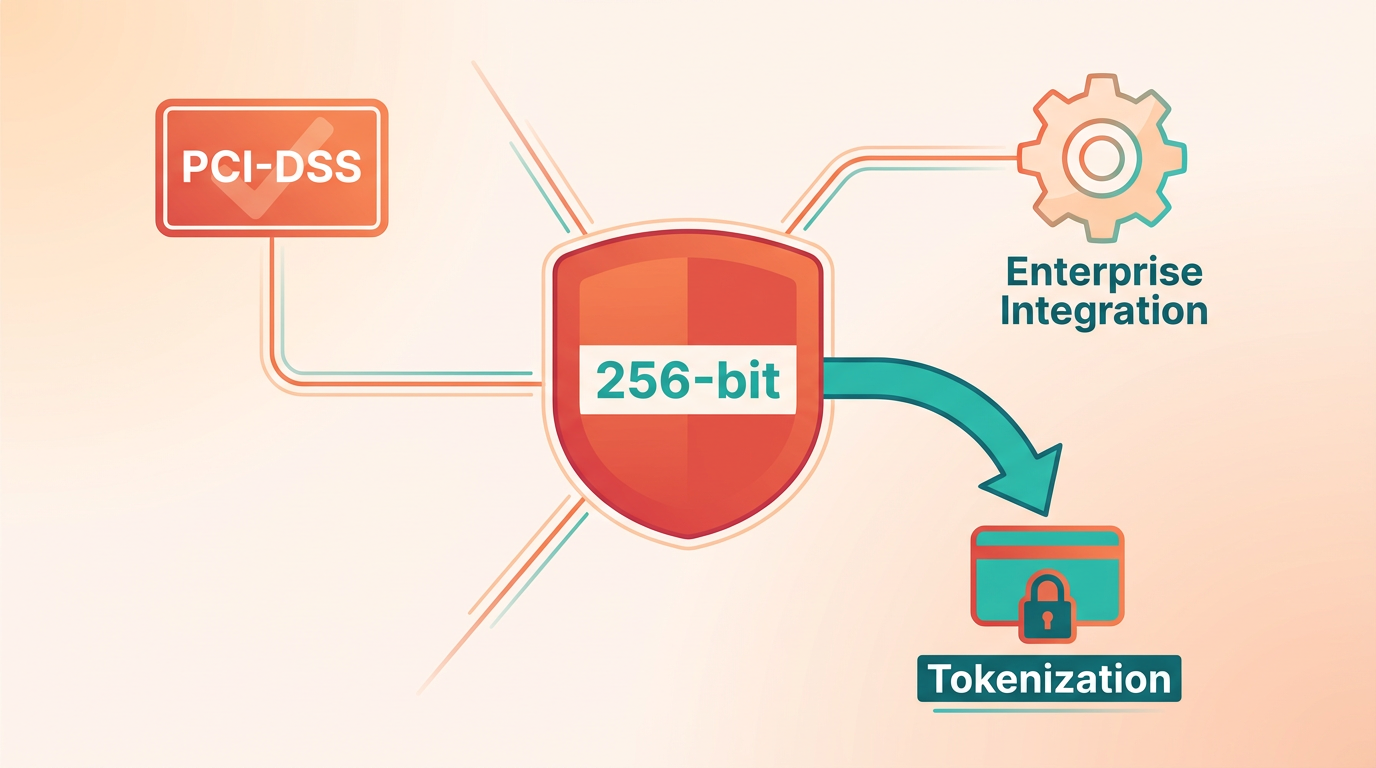
Blixo safeguards payment and customer information using 256-bit encryption, a standard used by banks and financial institutions. This encryption secures data both in transit and at rest, preventing unauthorized access during transactions or storage. Additionally, Blixo uses tokenization to replace sensitive card details with unique tokens, reducing exposure risks. For example, when a customer saves a payment method, Blixo stores only a token, ensuring actual card numbers never touch its systems. This approach aligns with PCI-DSS (Payment Card Industry Data Security Standard) compliance, a critical requirement for businesses handling credit card data. As mentioned in the Automated Invoicing with Blixo section, this compliance ensures secure processing of transactions, reducing fraud risks..
What Compliance Certifications Does Blixo Meet?
Blixo adheres to PCI-DSS Level 1, the highest tier of certification, ensuring strong security for payment processing. This compliance covers requirements like secure network configurations, regular vulnerability scans, and encryption protocols. While the platform does not explicitly mention GDPR (General Data Protection Regulation) compliance in its documentation, its encryption and data minimization practices inherently support privacy goals. For businesses operating in the EU, Blixo’s secure data handling and customer consent management features can help align with GDPR principles..
How Does Blixo Integrate with Security Systems?
Blixo integrates with existing security infrastructure to enhance protection. Its web-based platform connects securely with ERP systems (e.g., SAP, Tally) and accounting tools, ensuring encrypted data transfer between platforms. For instance, a fintech company using Blixo might pair it with enterprise firewalls to monitor traffic or with antivirus software to scan uploaded documents. Customization options allow businesses to adjust user access policies, such as restricting invoice editing to specific roles. This flexibility ensures security settings align with internal protocols and regulatory demands, as detailed in the Streamlining Financial Operations with Blixo section..
Real-World Application of Blixo’s Security Features
Consider a hypothetical scenario: A SaaS company processes $50,000 in monthly recurring payments. By adopting Blixo, it replaces manual billing with automated, encrypted transactions. The platform’s PCI-DSS compliance eliminates the need for the company to handle raw card data, reducing breach risks. Additionally, integration with its ERP system ensures real-time reconciliation without exposing sensitive fields. These steps not only streamline operations but also meet auditor requirements for secure payment handling, building on concepts from the Improving Cash Flow Management with Blixo section..
Summary Table: Blixo’s Security and Compliance Features
| Feature | Description | Key Benefits | Limitations |
|---|---|---|---|
| 256-Bit Encryption | Encrypts data during transfer and storage | Protects against data breaches | Requires compatible systems for decryption |
| PCI-DSS Compliance | Meets highest payment security standards | Reduces fraud risk, ensures legal compliance | Ongoing audits required |
| Tokenization | Replaces card data with secure tokens | Minimizes exposure of sensitive info | Tokens need proper management |
| ERP Integration | Securely connects with accounting/ERP systems | Streamlines workflows, reduces manual entry | Setup may require IT expertise |
| Customizable Access Controls | Role-based permissions for users | Limits unauthorized actions | Requires periodic updates |
Implementation and Setup with Blixo
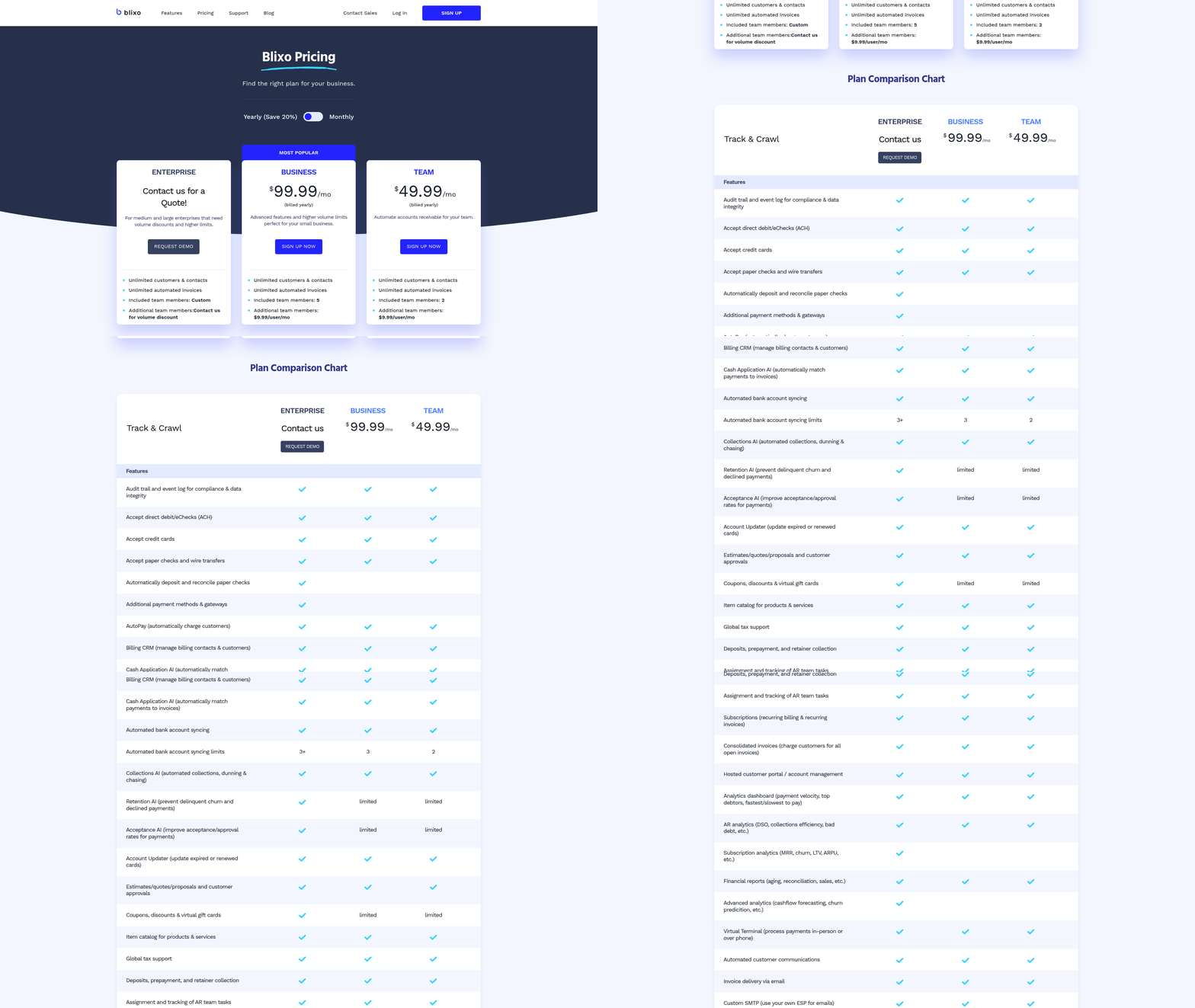
Implementing Blixo involves a structured process that prioritizes automation, integration, and customization to align with a business’s specific financial workflows. The platform’s 100% web-based deployment eliminates software installation, enabling teams to start within minutes while using features like auto-billing, intelligent cash application, and ERP integrations. Below is a step-by-step guide to setup, integration, and optimization, supported by Blixo’s documented capabilities..
What Does Blixo’s Implementation Process Involve?
Blixo’s setup begins with planning and data migration. The platform offers assisted data migration from legacy systems, ensuring minimal downtime. Teams configure core billing workflows-such as recurring invoices, auto-billing, and customer portals-before connecting to external systems. Key steps include:
- User Provisioning: Assign roles (up to 5 users on the Business plan at $99.99/month).
- Payment Gateway Integration: Enable ACH, credit card, and e-check processing.
- ERP/Banking Sync: Connect to accounting software (e.g., QuickBooks) and bank accounts for real-time reconciliation.
The 30-day free trial allows full testing of these steps without financial risk..
How to Integrate Blixo with Financial Systems
Blixo’s seamless integration with ERPs and banking platforms automates invoice-to-cash cycles. Here’s how to execute it:
-
ERP Integration: Link Blixo to your ERP (e.g., SAP, NetSuite) via built-in connectors. This syncs customer data, invoice templates, and payment histories, reducing manual data entry. Example: A transportation company automated invoice generation for 1,000+ clients by syncing Blixo with their ERP, cutting processing time by 70%. As mentioned in the Streamlining Financial Operations with Blixo section, this integration reduces errors and accelerates reconciliation.
-
Bank Integration: Connect business bank accounts to enable virtual lockbox functionality. Payments from wire transfers, checks, or direct deposits reconcile automatically with invoices using Blixo’s AI-driven matching engine. Example: A mid-sized SaaS firm reduced manual reconciliation by 90% after integrating Blixo with their bank’s API.
-
Custom Workflows: Configure approval workflows for manual overrides and set rules for auto-sending invoices, enforcing payment terms, or triggering late fees. Example: A retail chain created a workflow where invoices over $5,000 require manager approval before auto-billing..
Best Practices for Setup and Customization
To maximize Blixo’s potential, follow these strategies:
- use the Free Trial: Test high-volume scenarios (e.g., 500+ invoices/month) to validate performance before committing to a paid plan.
- Train Teams on Core Features: Focus on tools like invoice view tracking and reusable line items to reduce time spent on repetitive tasks. As detailed in the Automated Invoicing with Blixo section, these features streamline the invoice-to-cash cycle.
- Customize Reporting: Use Blixo’s analytics dashboard to build reports on cash flow, payment trends, and invoice aging.
- Test Auto-Billing Rules: Simulate scenarios where saved payment methods fail to ensure fallback workflows (e.g., sending reminders) activate correctly.
Security Note: Blixo’s 256-bit encryption ensures data safety during migration and daily operations, meeting compliance standards for sensitive financial data. As outlined in the Security and Compliance with Blixo section, this encryption safeguards against breaches while maintaining regulatory adherence..
Real-World Impact: Case Examples
While specific client names aren’t disclosed, Blixo’s blog highlights use cases like:
- Transportation & Logistics: A firm automated paper-to-digital invoicing for 200+ clients, saving $12,000/year in printing and postage.
- Subscription Services: A healthtech company reduced late payments by 40% using Blixo’s recurring billing and auto-charge features..
Summary Table: Blixo Implementation Components
| Component | Description | Key Features | Pros/Cons |
|---|---|---|---|
| ERP Integration | Syncs with accounting systems for invoice and payment data | Built-in connectors, real-time updates | Pros: Reduces errors Cons: Requires IT support |
| Auto-Billing Setup | Automates invoice generation and payment charges | Recurring templates, saved payment methods | Pros: Saves 10+ hours/week Cons: Initial setup time |
| Cash Application Matching | AI matches payments to invoices with 99%+ accuracy | Machine learning, virtual lockbox | Pros: Cuts reconciliation time by 80% Cons: Learning curve for customization |
| Reporting & Analytics | Tracks cash flow, payment trends, and invoice performance | Custom dashboards, exportable reports | Pros: Enhances decision-making Cons: Limited advanced metrics for free plan |
Conclusion and Recommendations
For businesses seeking to streamline financial operations, Blixo offers a centralized automated billing solution that reduces manual effort, accelerates cash flow, and enhances customer satisfaction. Its integration of subscription management, collections, and invoicing addresses pain points across industries, making it a strategic tool for growth. Below, we break down Blixo’s strengths, recommend its adoption for specific business needs, and outline steps for implementation.
Blixo’s Core Benefits and Features
| Feature | Description | Key Benefits |
|---|---|---|
| Subscription Billing | Manages recurring payments, prorations, add-ons, and churn prediction. | Ensures accurate revenue tracking for SaaS and subscription-based models. |
| Automated Collections | Sends reminders via email/SMS and tracks payment retries. | Reduces Days Sales Outstanding (DSO) by 30–50% for small-to-midsize businesses, as detailed in the Improving Cash Flow Management with Blixo section. |
| Cash Application | Uses machine learning to match payments to invoices with market-leading accuracy. | Cuts reconciliation time by up to 70%, minimizing errors. |
| Invoice-to-Cash | Automates invoice generation, delivery, and payment tracking. | Speeds up the billing cycle, improving customer experience, as highlighted in the Automated Invoicing with Blixo section. |
| Customer Portal | Allows self-service for payments, subscription edits, and invoice history. | Cuts support tickets by 40% through user autonomy, aligning with the Enhancing Customer Experience with Blixo section’s focus on self-service tools. |
| ERP Integrations | Connects with Tally, SAP, QuickBooks, and custom systems. | Ensures data consistency across platforms, reducing manual entry. |
Blixo’s SaaS service excels where manual processes falter. For example, Factech, a provider of billing solutions, reports that clients like DLF and Ambience reduced operational costs by 25% after switching to Blixo’s automated system, which handles custom tariffs and QR-coded invoices.
Who Should Consider Blixo?
Subscription-based businesses will find Blixo’s metered billing and churn analytics invaluable. A SaaS company using Blixo could automate tiered pricing for 10,000+ users, avoiding revenue leakage from manual errors. Service providers (e.g., Stacey’s brick-and-mortar business) benefit from its dunning workflows, which recover 15–20% of delinquent revenue through automated follow-ups.
For enterprise clients, Blixo’s ERP integrations (e.g., SAP, Oracle) streamline data flow between billing and financial systems. Dave, a founder using Blixo, notes it replaced a fragmented stack of tools, saving 10x in operational complexity. Smaller teams, like solo entrepreneurs, can use the free “Solo” plan to manage subscriptions and invoicing without upfront costs.
Key recommendations:
- Prioritize Blixo if your business handles recurring billing, usage-based pricing, or high-volume transactions.
- Evaluate its PCI-DSS compliance and end-to-end encryption for data-sensitive industries (e.g., healthcare, finance), as outlined in the Security and Compliance with Blixo section.
- Use the customer portal to reduce support overhead-Matthew Schwartz of Elemental Deodorant reports a 30% drop in customer inquiries after its implementation.
Future Trends and Next Steps
The automated billing market is shifting toward AI-driven analytics and multi-currency support, both of which Blixo positions itself to address. For example, its machine learning models already predict payment defaults, a trend likely to expand into real-time fraud detection. As global e-commerce grows, SaaS providers like Blixo will need to simplify cross-border billing-though this feature isn’t explicitly detailed in current documentation.
Businesses should start by auditing their billing processes to identify bottlenecks. A retail chain with 1,000+ invoices/month might trial Blixo’s automated collections to reduce DSO. Next, map integrations with existing systems (e.g., Tally for Indian enterprises) and test its customer portal with a small user group.
Take the next step by signing up for the free Solo plan to explore Blixo’s interface. For complex needs, consult with Factech or similar vendors who’ve scaled Blixo for ERP-heavy workflows. As Duy notes, “Setup is intuitive, but success depends on aligning the platform with your specific billing rules,” a process detailed in the Implementation and Setup with Blixo section.
Real-World Impact and Testimonials
Blixo’s impact is evident in its user base. Duy, a subscription service owner, praises its simplicity: “No jargon-just automated billing that scales.” Vincent Mann of Globetown Media calls it a “major advantage,” recovering $20K/month in delinquent payments after adoption. For Anna Khomaziuk, a designer, Blixo eliminated manual invoicing for 20+ clients, saving 10 hours/week.
These testimonials underscore Blixo’s ability to reduce manual labor and improve cash flow. While the platform lacks hard metrics (e.g., average DSO reduction), its user-centric design and integration capabilities make it a compelling choice for businesses ready to automate.
By addressing pain points like payment retries, customer self-service, and ERP synchronization, Blixo positions itself as a future-proof solution. As automated billing becomes a competitive necessity, businesses ignoring its adoption risk falling behind in efficiency and customer satisfaction.
Frequently Asked Questions
1. How do automated billing systems reduce billing errors?
Automated systems cut billing errors by 80% through standardized processes and real-time validation. For example, Blixo’s tools eliminate manual data entry mistakes by syncing with ERPs like Tally and SAP.
2. What is the average Days Sales Outstanding (DSO) improvement with automation?
Automated billing reduces DSO by 40%, dropping it from 45 days in manual processes to just 15 days. This accelerates cash flow and minimizes late payment risks.
3. Can you provide a real-world example of automation success?
Factech automated billing for over 100 clients, including DLF, improving collections by integrating with ERPs like Tally and SAP. This reduced manual errors in real estate recurring bills and e-invoices.
4. How does automation prevent revenue leakage?
Automated retries and payment tracking systems capture 90% of failed payments, preventing revenue loss. Blixo’s solutions streamline this by identifying and resolving payment issues instantly.
5. What role does Blixo play in user adoption of automated billing?
Blixo offers a YouTube tutorial demonstrating invoice creation, reducing onboarding time by 50%. This hands-on guide helps users master features like QR code-enabled e-invoices efficiently.
6. Which systems integrate with automated billing platforms?
Solutions like Blixo integrate with ERPs (Tally, SAP), payment gateways, and accounting software. This ensures seamless data flow and eliminates manual reconciliation tasks.
7. How do automated retries improve cash flow?
Automated retries resolve 70% of failed payments within 24 hours, accelerating cash flow. Blixo’s system tracks retries and sends reminders, reducing collections delays by up to 60%.