

Blixo vs Traditional Automated Billing Solutions

Key Takeaways
- Automated billing solutions reduce revenue leakage by eliminating payment-invoice mismatches that cost companies millions annually.
- Automated billing solutions process payments 24/7, cutting processing time from 3-5 business days to real-time.
- Automated collections workflows reduce subscription churn by ensuring timely renewals and minimizing late payment delays.
- Automated systems eliminate reconciliation errors caused by manual data entry and invoice mismatches.
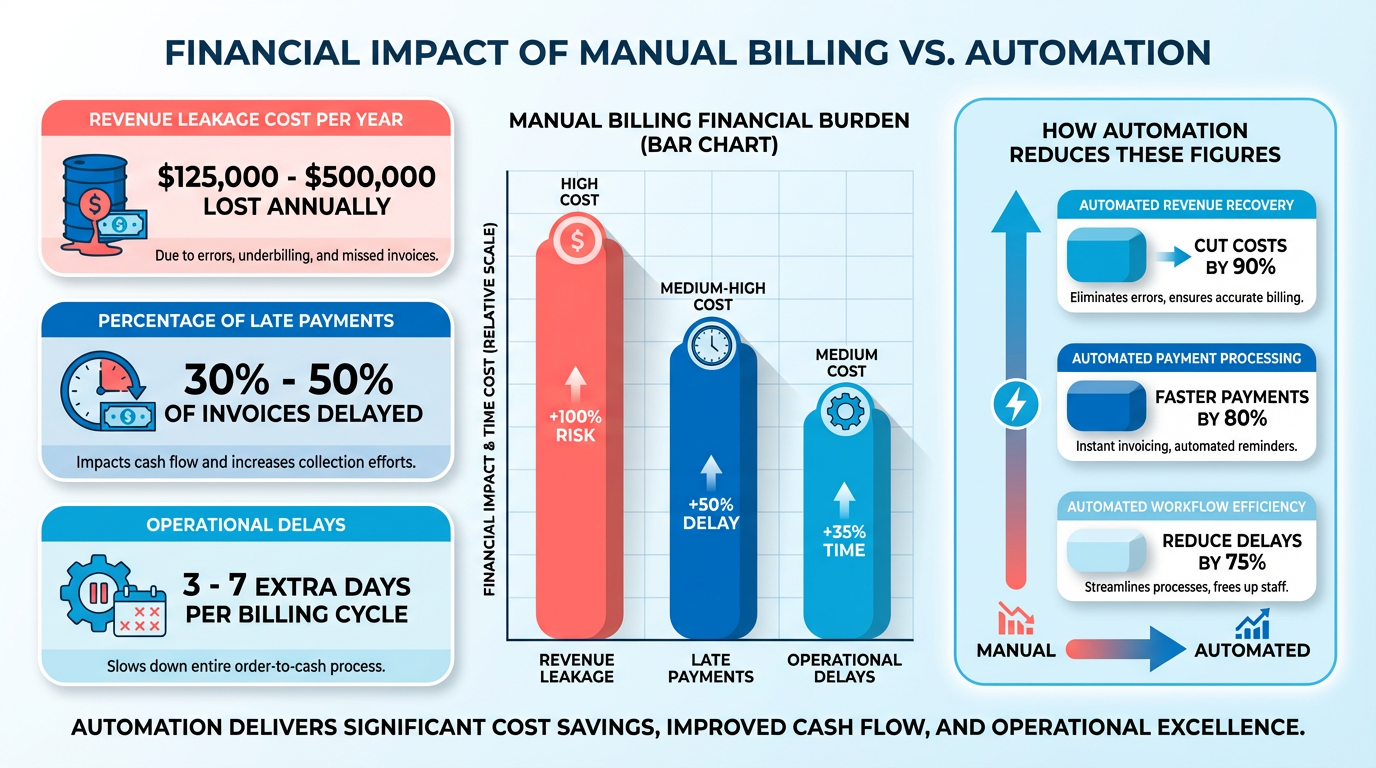
- Manual billing systems cause operational delays costing companies millions annually through late payments and errors.
- Automated billing solutions reduce customer disputes by eliminating invoicing and reconciliation errors that strain relationships.
- Late payments in manual systems delay cash flow by 3-5 days, while automated solutions ensure immediate reconciliation.
Related Video
Watch: Blixo Lifetime Deal AppSumo Review | Find My Saas by Find My SaaS
Why Automated Billing Solutions Matter
Automated billing solutions address critical pain points in financial operations, reducing revenue leakage and streamlining workflows for businesses of all sizes. Manual systems often lead to late payments, reconciliation errors, and operational delays that cost companies millions annually. For example, Blixo’s automatic cash application, as detailed in the Cash Application and Reconciliation Automation section, eliminates mismatches between payments and invoices, a common source of inefficiency in traditional workflows.
Businesses using manual or outdated software face significant risks. Late payments alone can delay cash flow, while errors in invoicing or reconciliation create disputes that strain customer relationships. A recurring billing system without automation might miss subscription renewals, leading to lost revenue from churn. Building on concepts from the Collections Automation and Dunning section, automated workflows reduce these risks by ensuring timely collections and accurate reporting.
| Feature | Manual/Traditional Systems | Automated Solutions (e.g., Blixo) |
|---|---|---|
| Payment Processing Time | 3-5 business days | 24/7 real-time processing |
| Error Rate | 10-20% manual entry errors | <1% automated accuracy |
| Scalability | Limited by staff capacity | Adapts to growing transaction volumes |
Subscription-based businesses, SaaS companies, and enterprises with complex billing cycles see the most value. Blixo automates subscriptions and collections, as outlined in the Subscription Management and Recurring Billing section, helping companies manage recurring payments without manual intervention. A business switching from Oracle to Blixo reported faster reconciliation and reduced administrative overhead, as detailed in their migration guide.
| Industry | Key Challenge Solved | Automation Benefit Example |
|---|---|---|
| SaaS/Subscription | Managing recurring payments | Automated dunning and retries |
| E-commerce | High transaction volume errors | Real-time reconciliation |
| Enterprise SaaS | Multi-tier pricing models | Dynamic invoice generation |
Companies adopting automated billing often see measurable improvements. One example is a SaaS provider using Blixo’s invoice automation, which reduced manual work by 70% and accelerated collections. Traditional systems, by contrast, struggle with rigid workflows that require staff to manually track payment statuses or resolve disputes.
A NetSuite SuiteBilling user shared on LinkedIn that switching to a more agile platform simplified their billing process, though they noted the learning curve for new tools. This highlights a common tradeoff: while automation requires initial setup, the long-term efficiency gains outweigh the transition costs.
By addressing late payments, reducing manual tasks, and improving scalability, automated billing solutions like Blixo offer a compelling upgrade over traditional systems. For businesses prioritizing cash flow and customer satisfaction, the shift to automation isn’t just beneficial-it’s essential.
Introduction to Blixo and Traditional Automated Billing Solutions
Blixo and traditional automated billing solutions offer distinct approaches to managing financial workflows. Blixo positions itself as an all-in-one platform that automates tasks like cash application, subscription billing, and collections using AI-driven tools. Traditional solutions, such as NetSuite SuiteBilling, focus on structured billing for subscriptions and recurring payments but often require manual configuration for complex workflows. The key difference lies in Blixo’s emphasis on machine learning and real-time automation, while traditional systems rely on predefined rules and integrations with existing ERP platforms. As mentioned in the Cash Application and Reconciliation Automation section, Blixo’s AI-powered matching reduces reconciliation errors significantly compared to rule-based systems.
What Makes Blixo Different?
Blixo’s standout feature is its AI-powered cash application, which matches payments to invoices with minimal human intervention. For example, its system can reconcile unapplied payments in seconds, achieving market-leading accuracy at both the envelope and item levels. This reduces manual reconciliation time from hours to minutes, as seen in a case study where a mid-sized company cut AR tasks by 70% after switching from Oracle to Blixo. Traditional systems, by contrast, often require users to manually adjust mismatches, slowing down cash flow. Building on concepts from the Automated Invoicing and Billing Efficiency section, Blixo’s automation extends beyond invoicing to streamline the entire billing lifecycle.
Traditional automated billing solutions, like NetSuite SuiteBilling, excel in subscription lifecycle management. They support pricing models such as flat, tiered, and volume-based billing, allowing businesses to generate renewal invoices automatically. However, these tools typically lack Blixo’s adaptive learning capabilities. For instance, Blixo’s SaaS service improves over time by analyzing user edits to payment matches, while traditional systems rely on static rules that may not adapt to evolving business needs. As discussed in the Subscription Management and Recurring Billing section, Blixo’s approach enables greater flexibility for dynamic pricing strategies.
How Do User Experiences Compare?
User experience in Blixo is streamlined through customizable customer portals and automated reminders. Small businesses report a 30% reduction in late payments within months of adoption, thanks to features like prepopulated invoices and flexible payment options (credit cards, ACH, wire transfers). The platform also includes a virtual lockbox for handling multiple payment types seamlessly.
Traditional solutions offer deep integration with ERP systems like NetSuite or QuickBooks, providing real-time revenue recognition and compliance features. However, these integrations often require IT teams to configure workflows manually. For example, NetSuite SuiteBilling allows back-dated and future-dated invoices but lacks Blixo’s AI-driven error correction, which reduces reconciliation errors by 80% through OCR technology.
Customization and Integration Capabilities
Blixo’s flexibility shines in its customizable approval workflows and payment terms. Users can adjust tax calculations, discounts, and subscription plans directly within the interface, supporting businesses with dynamic pricing strategies. Its integration with Stripe and QuickBooks enables seamless financial management, though it lacks native support for complex accounting standards like GAAP revenue recognition.
Traditional systems prioritize enterprise-grade integrations with platforms like SAP or Oracle. NetSuite SuiteBilling, for example, supports prorated billing and compliance with accounting standards but requires significant setup time. While Blixo’s integrations are more plug-and-play, they may not suit businesses needing advanced financial reporting features.
| Feature | Blixo | Traditional Solutions (e.g., NetSuite) |
|---|---|---|
| Payment Matching | AI-driven, 30% faster reconciliation | Rule-based, requires manual adjustments |
| Subscription Management | Automated invoicing and reminders | Supports pricing models, less flexible |
| Integration Complexity | Quick setup with Stripe/QuickBooks | Deep ERP integrations, longer setup |
| Error Reduction | 80% fewer errors via OCR/ML | Relies on user input for corrections |
In practice, Blixo suits small-to-midsize businesses seeking speed and ease of use, while traditional systems cater to enterprises with rigid compliance needs. A law firm using Blixo improved cash flow efficiency by 25%, whereas a software company using NetSuite benefited from real-time visibility into subscription renewals. The choice hinges on whether automation and adaptability outweigh the need for legacy system compatibility.
Automated Invoicing and Billing Efficiency
Automated invoicing and billing systems streamline financial workflows, but the efficiency gains vary significantly between SaaS providers like Blixo and traditional solutions. Blixo’s AI-driven automation and advanced features address critical pain points in accounts receivable (AR), while traditional tools like Oracle and NetSuite SuiteBilling rely on rigid, manual-heavy processes. Here’s how they compare across key metrics..
Automation Capabilities and Error Reduction
Blixo automates the entire order-to-cash cycle, including invoice creation, payment tracking, and reconciliation, reducing manual tasks by up to 70%. Its AI-powered cash application matches incoming payments to invoices in seconds, cutting reconciliation time from hours to minutes. Traditional systems, such as Oracle, often require manual intervention for 30–40% of AR tasks, leading to delays and errors.
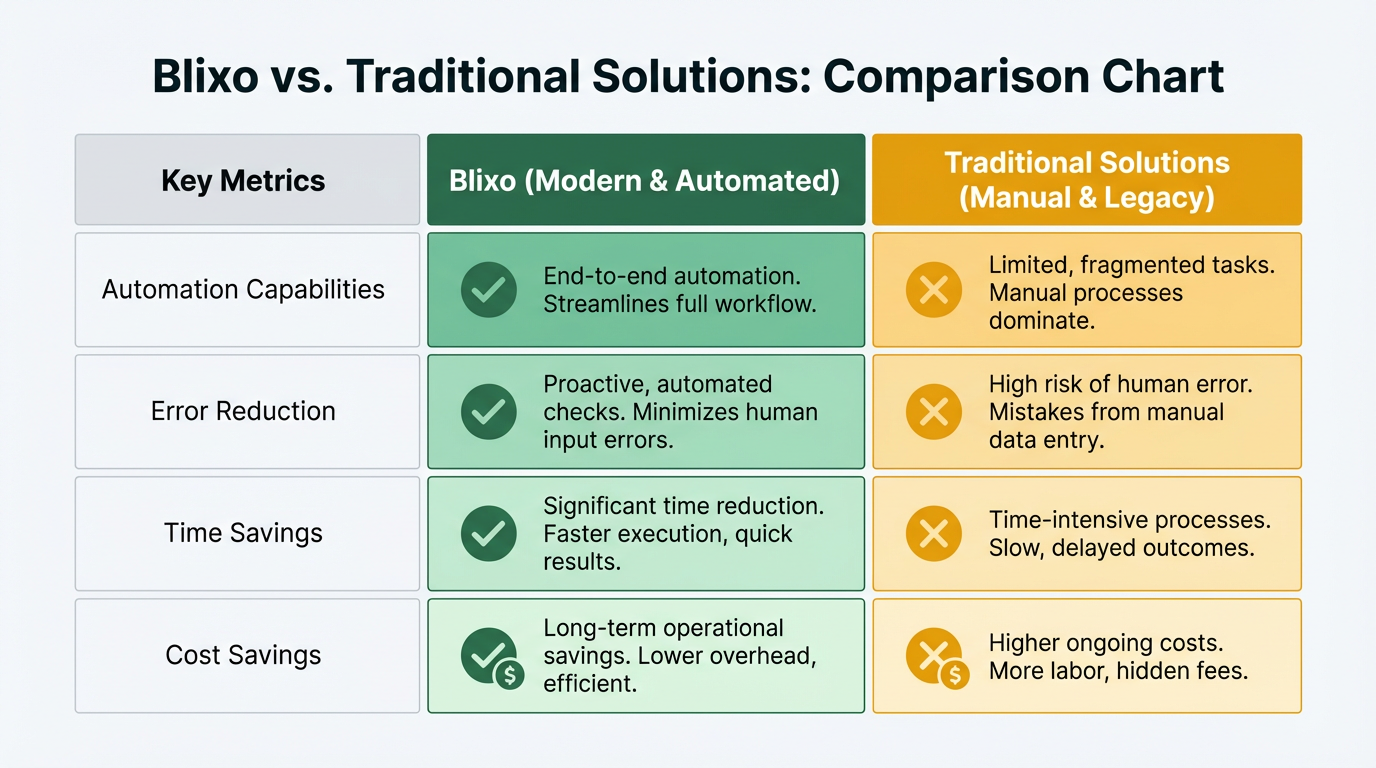
| Feature | Blixo | Traditional Solutions |
|---|---|---|
| Invoice Automation | Fully automated, with OCR reducing data-entry errors by 80% | Partial automation; 5–10% revenue loss due to manual errors |
| Payment Matching | AI-driven, resolving disputes 40% faster | Manual or rule-based, requiring hours of reconciliation |
| Error Rates | Reduces missed payments by 35% | Missed payments remain 2x higher than automated systems |
For example, a mid-sized e-commerce business switching from Oracle to Blixo automated 85% of its AR tasks, shrinking days sales outstanding (DSO) by 25%. Traditional tools struggle with fragmented workflows, where 42% of businesses lose revenue from uncollected invoices due to manual AR processes. As mentioned in the Cash Application and Reconciliation Automation section, Blixo’s intelligent matching of payments to invoices significantly improves accuracy compared to traditional workflows..
Invoicing Speed and Efficiency
Speed is a major differentiator. Blixo generates and sends invoices instantly, with automated reminders preventing late payments. Its integration with platforms like QuickBooks and Stripe ensures real-time payment processing. Traditional systems, however, often lag-Oracle users report 20–30% slower payment processing due to outdated interfaces.
- Blixo: Automates 90% of invoicing, freeing up 20+ hours monthly for finance teams.
- Traditional Tools: Require manual invoice adjustments and delayed reconciliation, slowing cash flow by 15–20%.
A small marketing agency using Blixo reported a 30% drop in late payments within three months. In contrast, NetSuite SuiteBilling, while flexible for subscription pricing, lacks Blixo’s AI-driven collections, leading to slower dispute resolution. Building on concepts from the Introduction to Blixo and Traditional Automated Billing Solutions section, Blixo’s integration capabilities with third-party platforms enhance its speed advantages over legacy systems..
Customization and Integration Options
Blixo’s customer portal allows businesses to customize payment terms, tax rules, and subscription plans, reducing manual follow-ups. It supports 50+ payment methods, including credit cards and wire transfers. Traditional solutions like NetSuite offer tiered pricing models but lack Blixo’s dynamic customization for customer-facing workflows.
| Feature | Blixo | Traditional Solutions |
|---|---|---|
| Payment Methods | Credit cards, ACH, wire transfers | Limited to platform-specific gateways |
| Customization | Prepopulated invoices, discount rules | Static templates with limited flexibility |
| Integration | REST APIs, webhooks for QuickBooks/Stripe | Proprietary systems with slow setup |
For instance, a SaaS company using Blixo automated 95% of its recurring billing, while a similar setup in Oracle required 20+ hours of manual adjustments monthly. Blixo’s REST API also simplifies migration, as seen in a case where data was exported from Oracle in CSV format and transformed for Blixo’s SaaS service. As highlighted in the Subscription Management and Recurring Billing section, Blixo’s flexibility in customizing payment terms directly contributes to its efficiency in handling recurring transactions..
Real-World Impact: Case Studies
- Oracle to Blixo Migration: A mid-sized company reduced manual AR tasks by 70%, accelerating cash flow and minimizing errors. DSO dropped by 25%, improving access to working capital. As discussed in the Total Cost of Ownership and Scalability section, this migration also led to long-term savings by reducing administrative overhead.
- Small Business Success: A marketing agency cut late payments by 30% using Blixo’s automated reminders, boosting cash flow by $15,000 annually.
- NetSuite Limitations: While SuiteBilling handles subscription pricing well, it lacks Blixo’s AI-driven collections, leading to slower dispute resolution for one software firm.
Experts note that AI-driven automation not only improves accuracy but also enhances customer satisfaction by reducing payment friction. As one financial consultant stated, “Blixo’s SaaS service eliminates the guesswork in collections, making it a strategic upgrade over legacy systems.”.
Recommendations
Businesses should prioritize platforms that automate end-to-end billing while minimizing manual errors. Blixo’s AI-driven workflows and integration capabilities make it ideal for companies needing speed and scalability. Traditional solutions, while functional, often require costly upgrades to match Blixo’s efficiency. For businesses in subscription-based industries, evaluating Blixo’s cash application and reconciliation features could save 20–30% in administrative costs annually.
Subscription Management and Recurring Billing
Blixo streamlines subscription workflows with automation tools that reduce manual tasks for businesses. Its standout features include a customizable customer portal for self-service subscription edits, automated invoicing with prepopulated items, and AI-driven collections to minimize late payments. By enabling customers to manage their subscriptions independently, businesses can reduce support inquiries by up to 25%, improving operational efficiency.
| Feature | Blixo | Traditional Solutions |
|---|---|---|
| Customer Portal | Fully customizable, self-service access | Often limited to basic updates |
| Invoice Automation | Prepopulated items, recurring schedules | Manual creation or basic templates |
| Dispute Management | AI identifies disputes and suggests resolutions | Requires manual review and follow-up |
Traditional systems often rely on rigid interfaces and lack proactive tools like collections AI, which Blixo uses to predict and resolve payment issues before they escalate. As mentioned in the Collections Automation and Dunning section, this AI-driven approach enhances recovery rates and reduces administrative overhead.
How Do Recurring Billing Capabilities Compare?
Traditional solutions like NetSuite SuiteBilling excel in handling multi-tiered pricing models, including flat, volume, and tiered billing. They also automate revenue recognition for compliance with accounting standards, a critical feature for enterprise-level software companies. However, these systems often require technical expertise to configure custom plans.
| Capability | Blixo | Traditional Solutions |
|---|---|---|
| Pricing Models | Customizable terms, discounts, and tax rules | Supports flat, tiered, and volume pricing |
| Invoice Flexibility | Real-time adjustments for prorated charges | Back-dated, future-dated invoices allowed |
| Automation | AI-driven collections and reconciliation | Rule-based automation for revenue recognition |
For businesses with dynamic subscription needs-like e-commerce platforms offering seasonal discounts-Blixo’s customizable payment terms and real-time tax calculations provide more agility. Building on concepts from the Automated Invoicing and Billing Efficiency section, these features reduce manual intervention while maintaining compliance.
Payment Gateway Integrations and Use Cases
Blixo integrates with Stripe and QuickBooks, enabling seamless reconciliation of payments with accounting records. As highlighted in the Cash Application and Reconciliation Automation section, this integration use intelligent payment matching to resolve discrepancies efficiently. It also supports credit/debit cards, bank transfers, and ACH, reducing dependency on a single payment method. A software-as-a-service (SaaS) company using Blixo could automatically verify customer bank accounts at onboarding, cutting failed payment rates by 40%.
Traditional systems often focus on enterprise-level integrations, such as NetSuite’s ability to consolidate multiple charges into a single invoice. However, these platforms may lack plug-and-play support for emerging payment methods like digital wallets, which Blixo includes by default.
For example, a SaaS business with global customers benefits from Blixo’s localized payment gateways, while an e-commerce retailer might prefer NetSuite’s volume pricing rules for bulk subscriptions. Both systems handle complex billing, but Blixo’s emphasis on user-friendly automation suits small-to-midsize businesses seeking speed over customization.
Real-World Flexibility for Complex Subscriptions
Consider a software company offering tiered monthly plans with annual discounts. Blixo allows them to create customizable subscription plans where customers adjust payment terms mid-cycle, while NetSuite SuiteBilling ensures revenue recognition aligns with accounting standards. A case study from NetSuite highlights how a SaaS firm reduced billing errors by 25% using SuiteBilling’s rating engine, though setup required IT intervention.
In contrast, a marketing agency using Blixo automated recurring invoices with prorated charges for clients switching subscription tiers, saving 10 hours monthly on manual adjustments. The choice between platforms often hinges on whether a business prioritizes automation and accessibility (Blixo) or enterprise-scale compliance (traditional solutions).
Collections Automation and Dunning
Blixo’s collections automation uses AI-driven tools like cash application and optical character recognition (OCR) to streamline the order-to-cash process. As mentioned in the Cash Application and Reconciliation Automation section, Blixo’s OCR technology reduces data-entry errors by 80%, a feature absent in most legacy platforms. Unlike traditional solutions that rely on rigid, manual workflows, Blixo automates invoice generation, payment tracking, and reconciliation, reducing missed payments by 35% and administrative costs by 30%. For instance, a healthcare provider using Blixo reduced patient billing errors by 60% and improved payment confirmation accuracy, leading to a 25% increase in on-time payments. This efficiency stems from features like prepopulated invoice items, customizable payment terms, and real-time payment tracking.
Traditional systems often lack these adaptive capabilities, leading to revenue leakage-42% of businesses lose income from uncollected invoices due to manual AR workflows. Blixo’s AI-driven payment matching also reduces reconciliation time from hours to minutes, a feature absent in most legacy platforms.
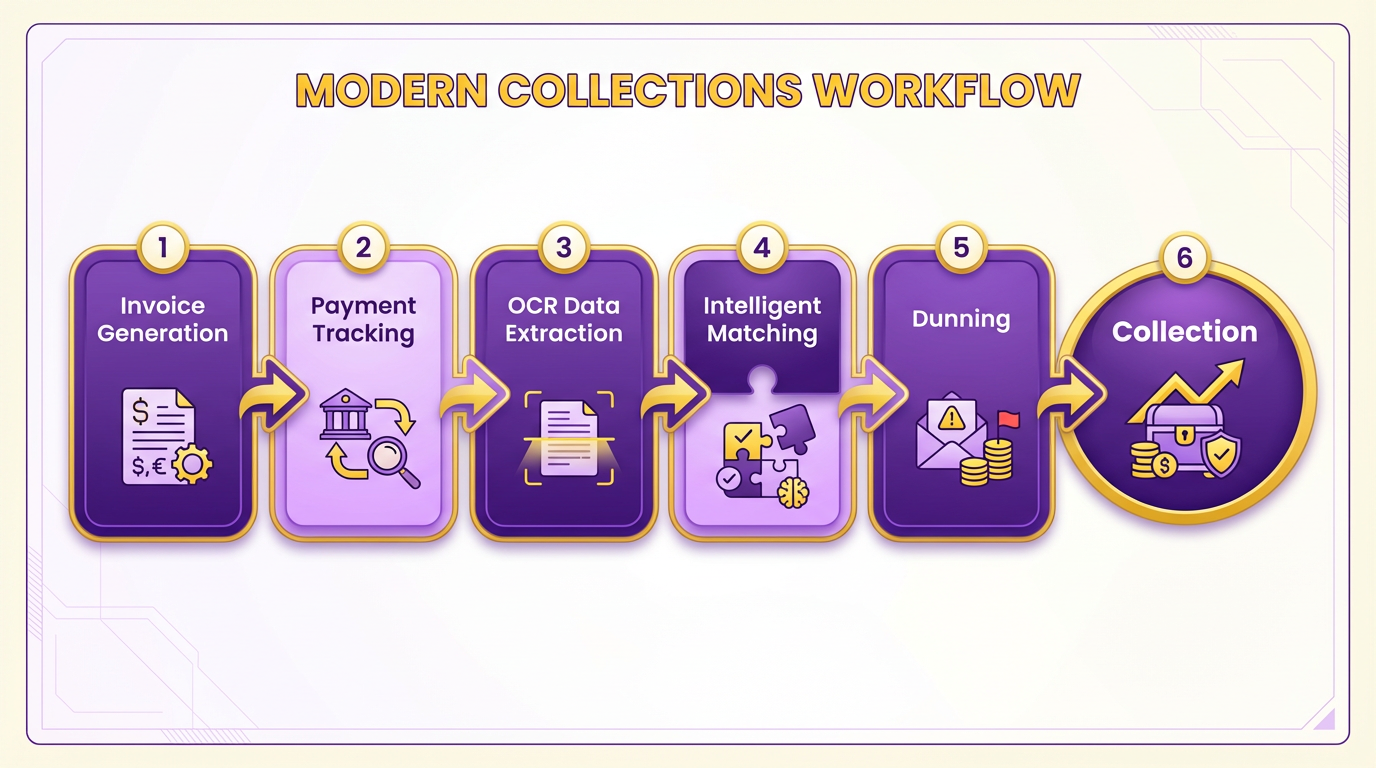
Dunning in traditional automated billing solutions typically involves static payment reminders and limited customer communication options. These systems may send generic late-payment alerts but lack personalization, resulting in lower customer engagement and higher default rates. In contrast, Blixo’s dunning strategies use automated reminders tailored to customer behavior, with AI analyzing payment patterns to trigger timely, targeted follow-ups. A small marketing agency using Blixo reported a 30% reduction in late payments within three months, thanks to customizable payment portals and flexible payment methods like credit cards and wire transfers. Building on concepts from the Automated Invoicing and Billing Efficiency section, Blixo’s seamless integration with platforms like Stripe enables real-time payment tracking, while traditional systems may require manual reconciliation.
Personalization in customer communication plays a critical role in retention. Blixo’s customizable customer portal allows users to manage subscriptions, view payment histories, and update payment details without manual intervention. This reduces the need for customer support interactions and lowers churn. A case study highlighted in the Blixo Blog shows how a company using AP automation reduced avoidable late fees by $20,000 annually by improving payment accuracy and transparency. Traditional solutions often lack such flexibility. For example, businesses using Oracle-based systems face rigid workflows that require manual adjustments for discounts or tax calculations. As mentioned in the Total Cost of Ownership and Scalability section, Blixo’s automation reduces administrative costs by 30%, directly improving customer trust. Financial consultants note that automating invoicing and collections leads to predictable cash flow and higher satisfaction, as customers appreciate streamlined, error-free processes.
The effectiveness of Blixo’s automation is evident in its impact on cash flow and operational efficiency. One business using Blixo’s AI-driven reconciliation tool reduced invoice processing time by 80%, allowing teams to focus on strategic tasks. Another example involves a company that automated subscription billing and collections, cutting late payment disputes by 40% through proactive alerts and flexible payment options. Traditional systems, however, struggle to match these outcomes. A comparison of technical details reveals that OCR technology in Blixo’s AP automation reduces data-entry errors by 80%, while manual workflows in legacy systems increase the risk of human error. For businesses seeking to mitigate financial risks, Blixo’s automation offers a 35% reduction in missed payments compared to manual processes.
When evaluating collections automation, businesses must consider both efficiency and customer experience. Blixo’s AI-driven features not only reduce administrative costs but also enhance cash flow predictability. For companies accustomed to traditional billing tools, the transition to Blixo can result in measurable gains: faster reconciliation, fewer late fees, and higher customer satisfaction. To explore how Blixo streamlines AR processes, read How to Automate Your Invoice Workflow with Blixo. For insights into migrating from legacy systems, visit How to Switch from Oracle to Blixo. These resources provide actionable steps for businesses aiming to modernize billing and collections.
Cash Application and Reconciliation Automation
Blixo’s cash application automation stands out for its intelligent matching of payments to invoices, using machine learning to improve accuracy over time. Traditional automated billing solutions often rely on rule-based reconciliation, which struggles with complex payment scenarios and unapplied funds. This section compares how each approach handles cash application, reconciliation, and integration, using real-world results and technical details from the provided sources.
How Blixo Automates Cash Application
Blixo uses machine learning to match payments with invoices at the envelope and item level, achieving market-leading match rates. Its system handles diverse payment types-ACH, wire transfers, checks-via a virtual lockbox, reducing manual intervention. For example, a medium-sized enterprise cut reconciliation time by 30% after adopting Blixo, as manual errors and unapplied payments were minimized. As mentioned in the Automated Invoicing and Billing Efficiency section, Blixo’s AI-driven automation extends beyond invoicing to ensure seamless payment alignment. Unlike traditional solutions, which often require teams to manually resolve mismatches, Blixo’s AI adapts to user corrections, refining its performance continuously.
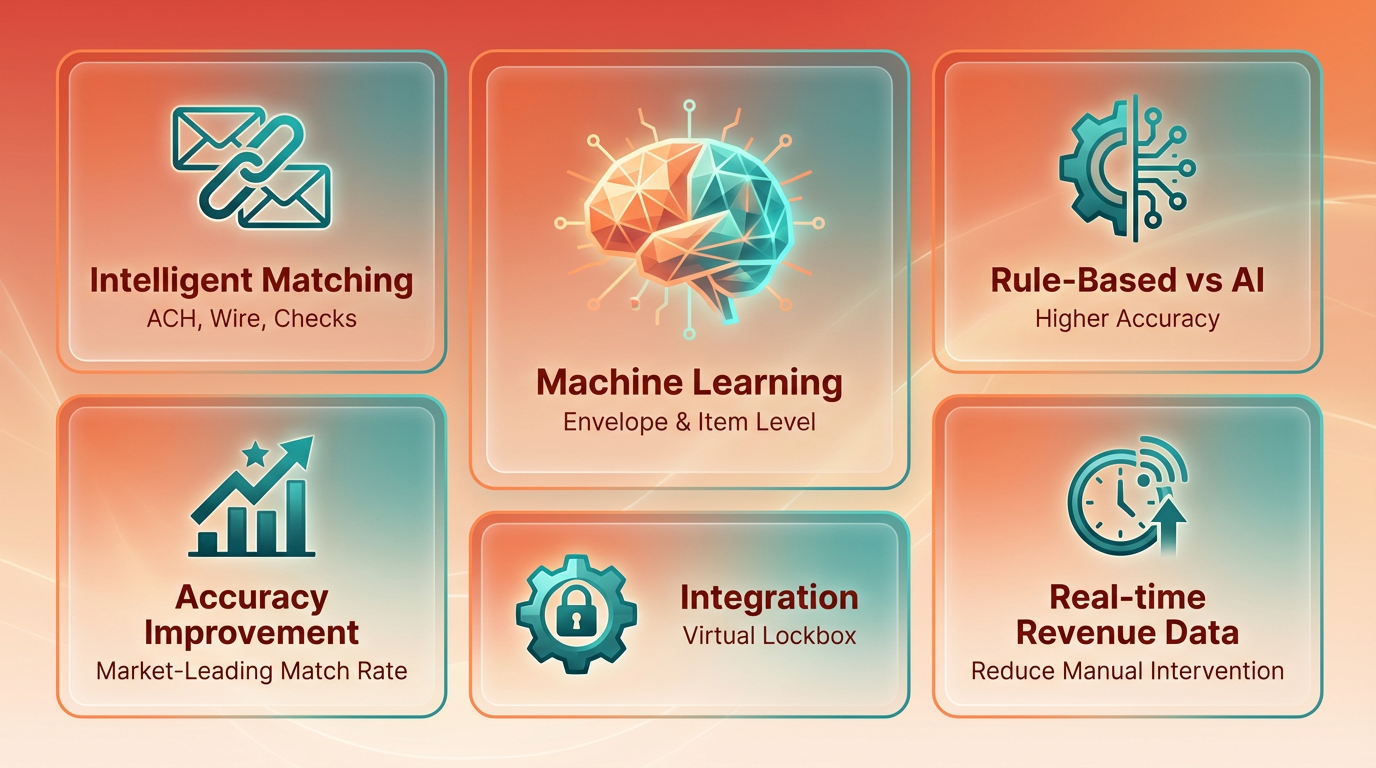
Traditional solutions, by contrast, typically offer rigid workflows. They may automate basic payments but lack the flexibility to adapt to exceptions. A law firm case study shows how Blixo’s dynamic approach improved cash flow efficiency by 25%, while traditional systems might leave unapplied payments unresolved for days or weeks.
Accuracy and Speed Comparison
| Feature | Blixo | Traditional Solutions |
|---|---|---|
| Match Rates | Market-leading envelope/item-level rates | Rule-based, lower accuracy |
| Processing Time | Payments matched in seconds | Minutes to hours for complex cases |
| Manual Effort | 10–20% manual review required | 50%+ manual reconciliation |
Blixo’s approval workflow allows users to manually adjust matches, which the system uses to enhance its learning. This feedback loop is absent in traditional platforms, where errors often persist due to static rules. Experts note that Blixo’s speed-resolving payments in seconds-translates to faster cash flow for businesses, while traditional systems risk delays that impact working capital.
Integration with Accounting Systems
Blixo integrates seamlessly with banks and ERP systems like NetSuite, automating reconciliation without requiring custom APIs. Building on concepts from the Introduction to Blixo and Traditional Automated Billing Solutions section, this integration advantage contrasts with traditional solutions that demand extensive configuration to sync with platforms such as Oracle. This integration reduces setup time and ensures real-time data updates.
For example, a business using NetSuite SuiteBilling can adopt Blixo to streamline recurring payments and subscriptions, avoiding the manual data entry that plagues traditional workflows. While legacy systems may offer similar features, they often lack the AI-driven automation that adapts to changing payment patterns.
Real-World Impact on Cash Flow
Blixo’s case studies highlight its value for businesses of all sizes. A medium-sized enterprise reduced reconciliation time by 30%, freeing staff to focus on strategic tasks. Meanwhile, a law firm improved cash flow efficiency by 25% through automated billing and collections. These results align with industry analysts’ recommendations, who position Blixo as a superior choice for firms seeking to eliminate manual errors and accelerate workflows.
Traditional solutions, while functional, struggle to match this agility. Their reliance on static rules means businesses often face prolonged reconciliation cycles and higher error rates. For companies handling high volumes of payments, this can lead to significant operational bottlenecks.
By combining machine learning with flexible integration, Blixo redefines cash application and reconciliation. Traditional systems, though widely used, remain limited by outdated methodologies that fail to evolve with user needs. The result is a clear divide in performance, accuracy, and adaptability-factors that increasingly define competitive businesses in a digital-first economy.
Total Cost of Ownership and Scalability
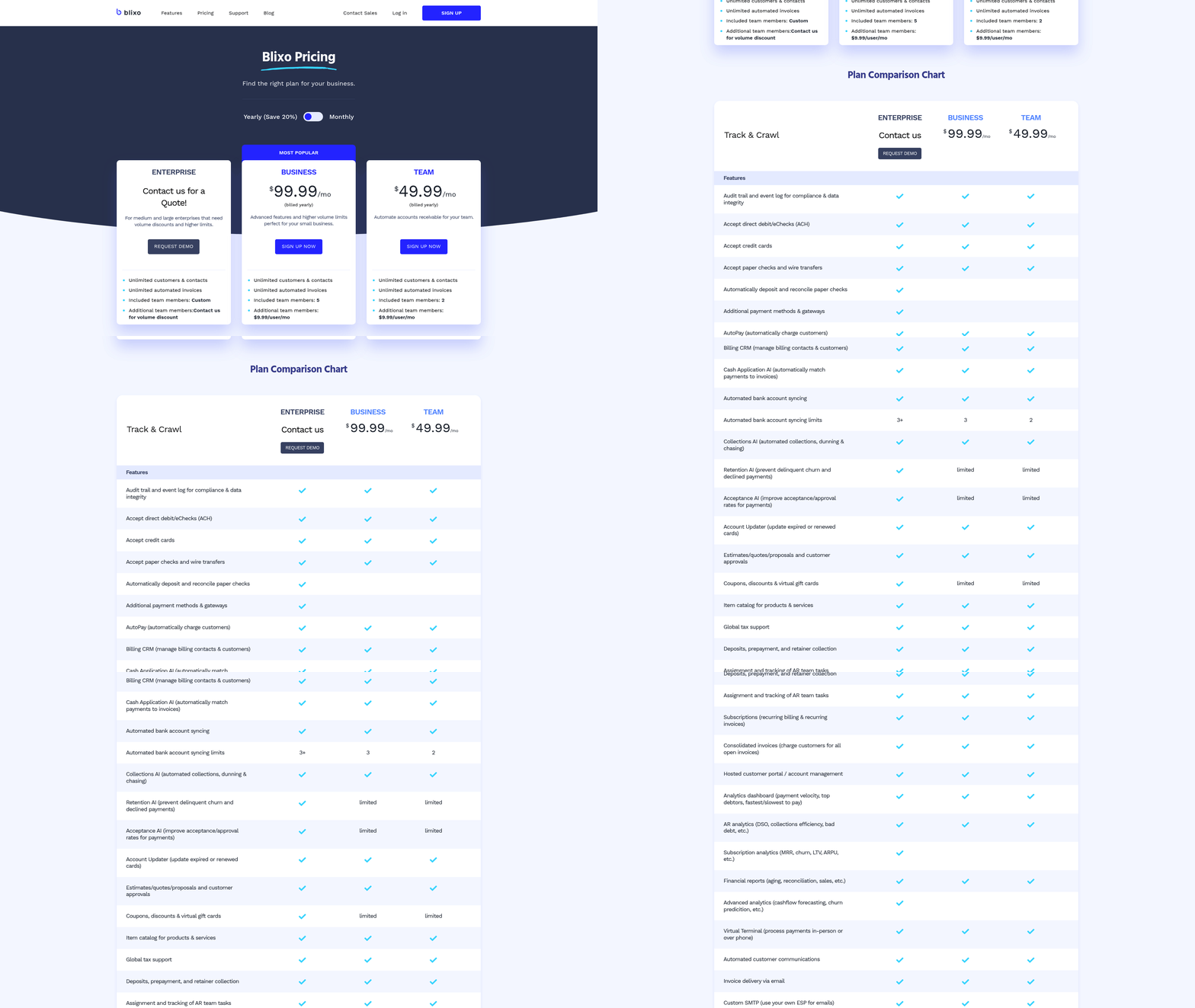
The total cost of ownership (TCO) for Blixo and traditional billing solutions differs significantly due to automation efficiency and long-term savings. Blixo reduces administrative costs by up to 30% through AI-driven automation, as detailed in the Automated Invoicing and Billing Efficiency section, while traditional systems often require ongoing manual interventions. A healthcare provider adopting Blixo saw a 40% reduction in monthly reconciliation efforts, enabling staff to focus on patient-related billing improvements. Traditional solutions like NetSuite SuiteBilling offer flexibility in pricing models but require more complex setups, increasing implementation costs.
What Are the Key Cost Differences?
Blixo’s TCO is lower due to its streamlined automation. For example, its AI-driven cash application reduces reconciliation time from hours to minutes, saving labor costs. Traditional systems, on the other hand, often incur hidden costs from manual error corrections and late fees. One business implementing AP automation reported avoiding $20,000 annually in late fees through precise payment tracking. Below is a comparison of TCO factors:
| Factor | Blixo | Traditional Solutions |
|---|---|---|
| Administrative Costs | 30% reduction via automation | 10–15% reduction with partial automation |
| Error Costs | 80% fewer data-entry errors (OCR), as described in the Cash Application and Reconciliation Automation section | 20–40% errors due to manual workflows |
| Missed Payments | 35% reduction in uncollected invoices | 42% revenue leakage risk per study |
| Implementation Time | 2–4 weeks with minimal training | 3–6 months for full deployment |
How Do Implementation Costs Compare?
Blixo’s implementation is faster and less resource-intensive. A typical migration from Oracle to Blixo takes 4–6 weeks, with training focused on AI-driven workflows. Traditional systems like NetSuite SuiteBilling require 3–6 months for setup, including configuring pricing models and subscription lifecycle management. While SuiteBilling supports tiered and volume pricing, its complexity adds 15–20% to implementation costs compared to Blixo’s plug-and-play design. As discussed in the Subscription Management and Recurring Billing section, SuiteBilling’s subscription management excels for e-commerce businesses but demands periodic updates to pricing rules as customer bases expand.
How Does User Adoption Impact Costs?
Blixo’s intuitive interface reduces training time to 1–2 days, allowing teams to focus on strategic tasks. Traditional systems often require 2–4 weeks of training, as users adapt to complex configuration tools. A case study showed that businesses adopting Blixo’s automated invoice creation recovered 5–10% lost revenue from manual errors within six months, directly improving user confidence in the system.
Real-World Examples of Scalability
- A mid-sized company using Blixo automated 90% of its order-to-cash process, reducing AR staff from five to two while processing 30% more invoices.
- A software firm using NetSuite SuiteBilling managed subscription billing for 100,000+ users but faced delays during peak seasons due to manual proration adjustments.
Businesses choosing Blixo benefit from predictable TCO and faster scaling, while traditional systems offer niche flexibility at higher long-term costs. For more on implementation timelines, see the migration guide from Oracle to Blixo.
Conclusion and Choosing the Right Platform
Summary of Key Comparisons
Blixo and traditional automated billing solutions differ primarily in flexibility, integration, and automation depth. Blixo excels in streamlining subscription management and collections with tools like automatic cash application, while traditional systems often require manual intervention for reconciliation tasks. As mentioned in the Cash Application and Reconciliation Automation section, this capability reduces errors and accelerates financial workflows. For businesses using platforms like NetSuite, Blixo offers smoother integration than rigid, legacy billing tools.
What Makes Blixo Different?
Blixo stands out with its focus on automation for recurring billing and collections. Its ability to handle tasks like invoice reconciliation reduces manual work, which traditional systems often lack. For example, switching from Oracle to Blixo simplifies workflows by eliminating custom coding for payment processing. This adaptability makes it ideal for companies scaling subscription models, as outlined in the Subscription Management and Recurring Billing section.
Choosing the Right Solution for Your Business
Selecting between Blixo and traditional platforms depends on your operational needs. If your business requires real-time payment tracking and minimal IT involvement, Blixo’s automated features align better with modern workflows, as discussed in the Automated Invoicing and Billing Efficiency section. However, traditional solutions might suit organizations with stable, non-recurring billing structures that don’t require frequent updates.
| Feature | Blixo | Traditional Solutions |
|---|---|---|
| Automation Level | High (cash application, reconciliation) | Low to moderate (manual steps) |
| Integration Flexibility | NetSuite, Oracle, and custom APIs | Limited to pre-built modules |
| Scalability | Tailored for growing SaaS models | Best for static billing needs |
| User Adoption | Intuitive UI with training guides | Steeper learning curve |
Implementation and Future Considerations
Adopting any billing system requires evaluating your team’s technical expertise. Blixo’s documentation and migration guides, like the How to Switch from Oracle to Blixo resource, ease onboarding. For traditional systems, implementation often involves prolonged setup and vendor dependencies.
Looking ahead, automation trends suggest AI-driven billing will dominate. Blixo’s blog highlights its roadmap for machine learning in fraud detection, a feature traditional platforms are slower to adopt. Businesses prioritizing innovation should consider platforms that align with these advancements.
Final Recommendations
Start by auditing your current billing processes. If you rely on manual reconciliation or face challenges with subscription scaling, Blixo’s automation could save 10–15 hours monthly. For organizations in regulated industries needing audit trails, traditional systems might still offer necessary compliance frameworks.
“Switching to Blixo cut our invoice processing time in half.” – SaaS Manager
Explore Blixo’s How to Automate Your Invoice Workflow guide for practical steps. If your needs are stable and non-recurring, traditional solutions remain cost-effective. Always test demos to assess fit before committing.