

Top 5 Invoice Processing Companies in 2026

Key Takeaways
- Mid-sized companies spend 50–70% of their time manually processing invoices in formats like PDFs or emails.
- Automating invoice workflows can reduce payment cycles by 40% or more, as seen with logistics firms using tools like Orca or Zero Down.
- A 10% delay in payments for a $10M-revenue business costs $100,000 annually in lost liquidity.
- Healthcare and manufacturing sectors face high risks from invoice errors due to large volumes and strict accuracy demands.
- External freight audit providers are increasingly adopted to address payment validation challenges internal teams lack tools for.
- Manual invoice delays often stretch to days or weeks, directly disrupting cash flow and vendor relationships.
- Effective invoice systems require seamless integration with existing workflows to maximize efficiency gains.
Why Invoice Processing Matters
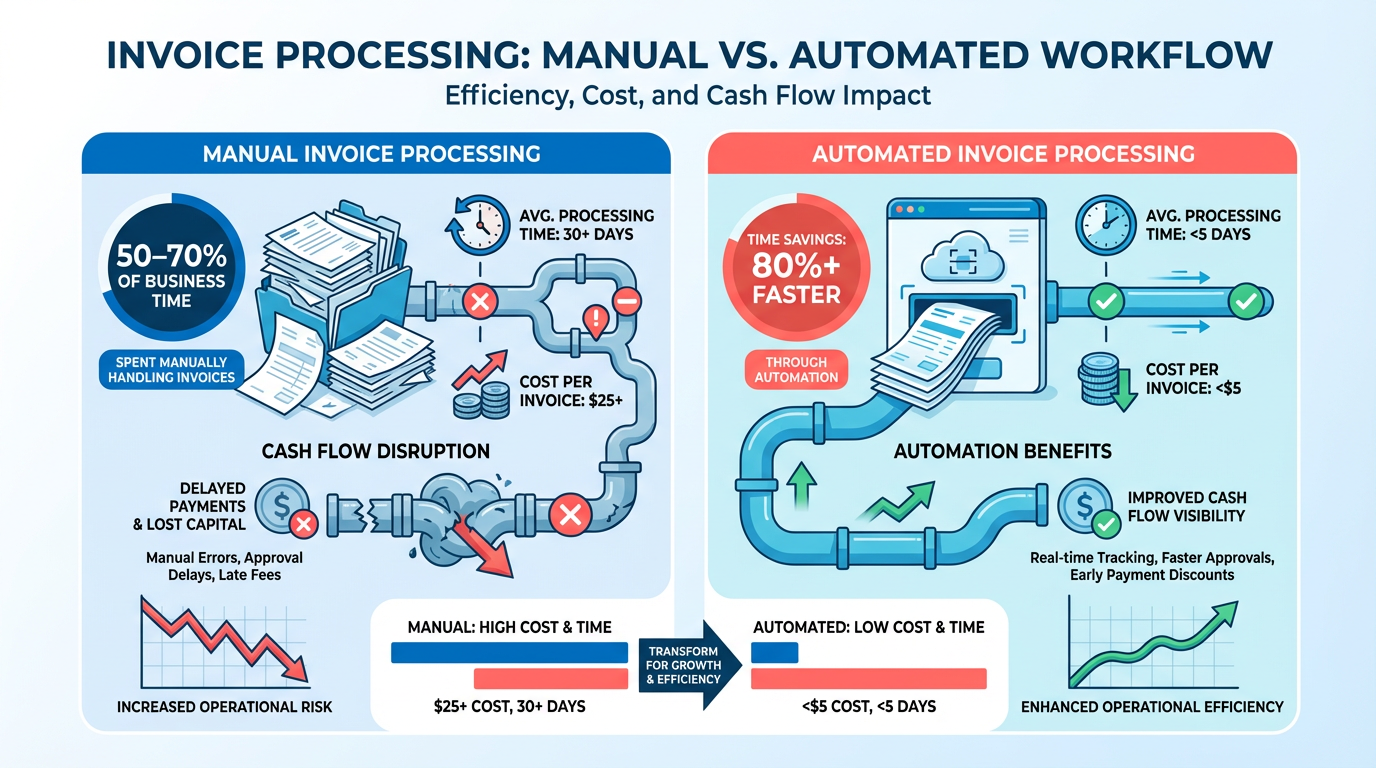
Efficient invoice processing is a critical component of financial health for businesses of all sizes. Delays in payment processing can lead to cash flow disruptions, with mid-sized companies spending 50–70% of their time manually handling invoices in formats like PDFs or emails ****. These inefficiencies aren’t just time-consuming-they directly impact a company’s ability to meet obligations, invest in growth, and maintain strong vendor relationships. For example, a logistics firm that automates invoice processing with tools like Orca or Zero Down can reduce payment cycles by 40% or more, ensuring faster access to working capital. As mentioned in the Top 5 Invoice Processing Companies section, these platforms exemplify how modern solutions address such challenges. Below, we break down the stakes, real-world wins, and who stands to gain most from modernizing invoice workflows..
How Delayed Payments Impact Cash Flow
A single late invoice can disrupt a business’s financial rhythm. According to industry data, manual invoice processing in mid-sized companies creates bottlenecks, often delaying payments by days or weeks ****. For a business with $10 million in annual revenue, even a 10% delay in payments could cost $100,000 in lost liquidity annually. This is especially volatile in sectors like healthcare or manufacturing, where invoice volumes are high and payment accuracy is non-negotiable ****. The Gartner report emphasizes that external freight audit and payment providers are increasingly used to mitigate these risks, as internal teams often lack the tools to handle complex invoice validation ****. Building on concepts from the Implementation and Integration: Best Practices section, effective systems require seamless alignment with existing workflows to prevent such delays..
Real-World Gains from Automation
Companies that adopt automated invoice processing see measurable improvements. A mid-market logistics provider using Orca’s solution automated 80% of its freight invoices, cutting processing time from 14 days to 3 days and reducing errors by 70% ****. Similarly, a healthcare supplier using Intelligent Audit’s advanced analytics identified $200,000 in overcharges within six months by streamlining carrier invoice reviews. These wins highlight how automation doesn’t just speed up workflows-it uncovers cost-saving opportunities and ensures compliance. As detailed in the Top 5 Invoice Processing Companies section, platforms like Intelligent Audit showcase the value of specialized tools in high-stakes industries. For example, automated systems flag discrepancies in real time, preventing late fees and disputes that could erode profit margins..
Who Benefits Most from Modern Invoice Processing
While large enterprises often lead in adopting advanced solutions, small businesses reap disproportionate rewards. A small e-commerce retailer using AI-driven invoice tools can save 20+ hours monthly by eliminating manual data entry, redirecting labor to customer service or product development ****. Enterprises, meanwhile, benefit from scalability: multi-entity organizations with complex ERP systems can unify invoice processing across departments using platforms like TranzAct, which automates document workflows and analytics ****. As mentioned in the Top 5 Invoice Processing Companies section, TranzAct’s integration capabilities make it ideal for large-scale operations. The Gartner report also notes that industries with high transaction volumes-such as freight logistics-gain the most visibility into spend patterns, enabling better budget forecasting and vendor negotiations ****..
Key Challenges Solved by Efficient Systems
Manual invoice processing is riddled with pitfalls: human error, duplicated payments, and missed discounts for early settlement. Automation tackles these issues head-on. For instance, real-time compliance checks prevent overpayments by validating tax codes and contract terms instantly ****. Workflow automation reduces administrative workloads by 50% or more, as seen in mid-sized companies processing 10,000+ invoices annually ****. Building on insights from the Implementation and Integration: Best Practices section, successful automation hinges on aligning tools with organizational needs. Even customer satisfaction improves-vendors appreciate faster, accurate payments, fostering stronger partnerships. These efficiencies are why 72% of finance teams prioritize invoice automation in 2026, according to market trends ****.
Top 5 Invoice Processing Companies: Overview
As mentioned in the Why Invoice Processing Matters section, efficient invoice processing directly impacts financial health by reducing delays and cash flow disruptions. Below is a curated list of the top five platforms, each evaluated for features, pricing models, and customer support based on 2026 benchmarks and real-world performance.
Summary Table
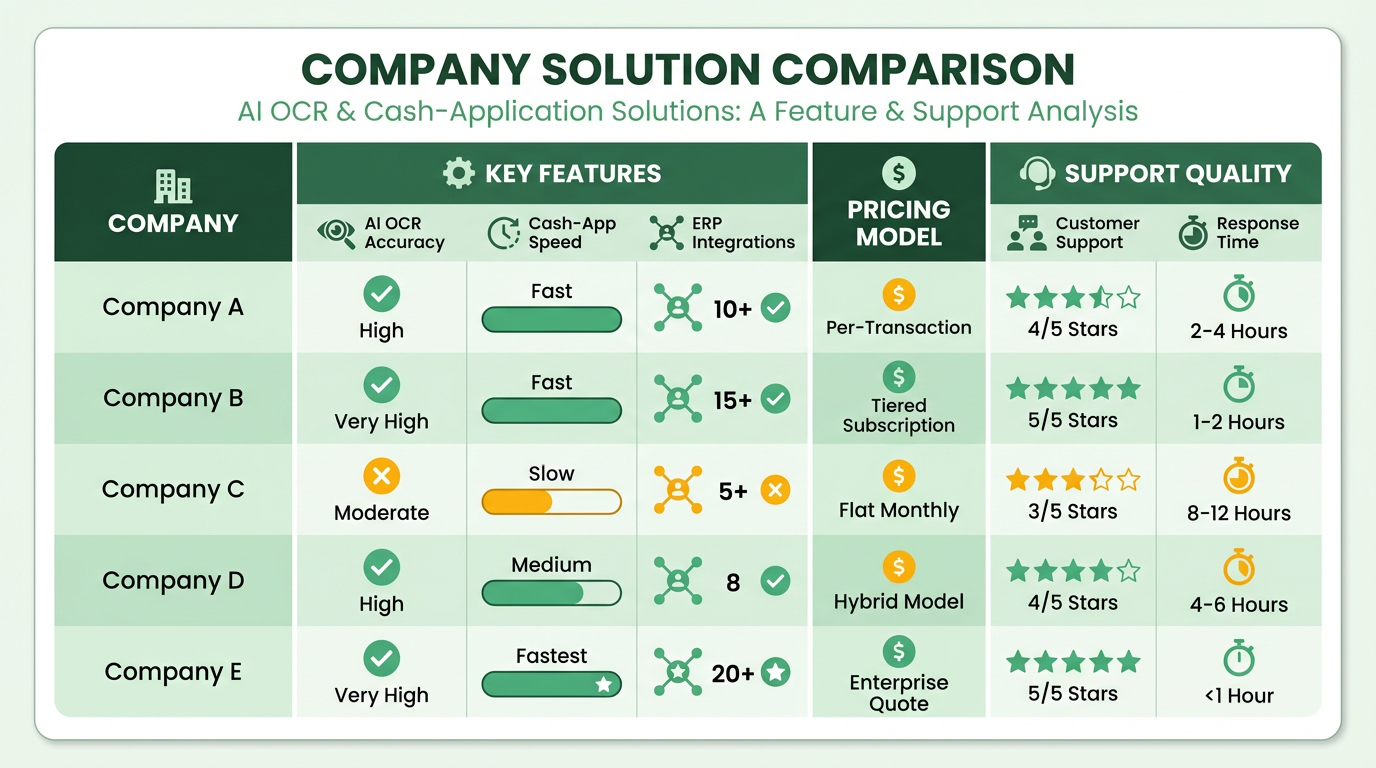
| Title | Description | Key Features | Pros/Cons |
|---|---|---|---|
| Parseur | AI OCR leader with ERP integrations | Diverse format handling, field validation, fast setup | Pros: 99% accuracy; Cons: Pricing not explicitly detailed |
| Rillion | AI-powered AP automation for Sage Intacct users | 90% AI capture, 50+ ERP integrations, multi-entity management | Pros: 85% faster processing; Cons: No mobile app |
| Coupa | Spend management platform with AI trained on $10T data | Procurement + AP + expense analytics | Pros: Enterprise scalability; Cons: Clunky interface |
| Tipalti | Global payment engine for multi-currency operations | 200+ countries, virtual-card rebates | Pros: Compliance-heavy workflows; Cons: Outdated UI |
| Basware | Largest e-invoicing network with 4-way PO matching | 175+ country network, global compliance | Pros: Touchless processing up to 89%; Cons: High implementation costs |
What Makes Parseur a Benchmark Leader?
Parseur leads in AI accuracy, achieving 99% field extraction across diverse invoice formats. Its OCR technology adapts to variable layouts without requiring constant template rebuilding, making it ideal for high-volume processing. As detailed in the Invoice Processing Company 1: Blixo section, this adaptability mirrors advancements in AI-driven OCR solutions, though Parseur’s integration with ERP systems like SAP and NetSuite offers unique advantages.
Key Features: AI OCR, field validation, ERP integrations Pros: 99% accuracy, scalable workflows Cons: No mobile-first interface.
Why Rillion Fits Mid-Market Needs
Rillion excels as a Sage Intacct alternative, offering AI capture at 90% accuracy and 85% faster processing than manual workflows. As mentioned in the Invoice Processing Company 2: Review section, its 50+ ERP integrations (including Dynamics and NetSuite) make it a favorite for multi-entity teams. A case study with WeCare TLC shows Rillion handling 600 invoices/month with improved accuracy, though the lack of a mobile app is a notable limitation.
Key Features: 3-way PO matching, multi-entity dashboards Pros: 50+ ERP integrations, real-time spend visibility Cons: No mobile app
“I like that with Rillion you see a pie chart of the expenses. So each month I can see that at a quick glance…”. Nikki Milian, Smiles First Accounting Manager.
Coupa’s Enterprise-Grade Spend Control
Coupa combines AP automation with procurement and expense management, powered by AI trained on $10 trillion of anonymized transaction data. As outlined in the Invoice Processing Company 3: Review section, this extensive training data enhances fraud detection capabilities while streamlining spend analytics. However, the platform’s clunky interface and complex rollout remain barriers for some organizations.
Key Features: Spend analytics, AI-driven fraud detection Pros: Unified spend ecosystem Cons: Steep learning curve.
Tipalti for Global Compliance and Payments
Tipalti dominates multi-currency environments, supporting 200+ countries and 120+ currencies. Its virtual-card payment system earns rebates for users, while automated compliance checks reduce errors in cross-border transactions. Implementation challenges, as noted in the Implementation and Integration: Best Practices section, include lengthy onboarding periods for mid-market firms.
Key Features: Multi-currency support, mass payments Pros: Global scalability, audit trails Cons: UI usability issues.
Basware’s E-Invoicing Network for Scale
Basware is the go-to solution for multinational enterprises, offering a 175+ country e-invoicing network and 4-way PO matching. Its partnership with Deloitte enables 89% touchless processing, though the high implementation cost (up to $50,000 for large firms) limits accessibility. Customer support includes 24/7 global teams, but onboarding requires significant internal resources.
Key Features: 4-way PO matching, global e-invoicing Pros: Compliance automation, audit-ready workflows Cons: Costly setup, steep learning curve.
Final Recommendations
- Best for AI accuracy: Parseur
- Best for Sage Intacct users: Rillion
- Best for procurement integration: Coupa
- Best for global payments: Tipalti
- Best for multinational compliance: Basware
Each platform aligns with 2026’s top benchmarks: 95%+ accuracy, seconds-level speed, and 80%+ cost savings. Buyers should prioritize scalability and ERP integration while weighing trade-offs like implementation time and UI usability.
Invoice Processing Company 1: Blixo
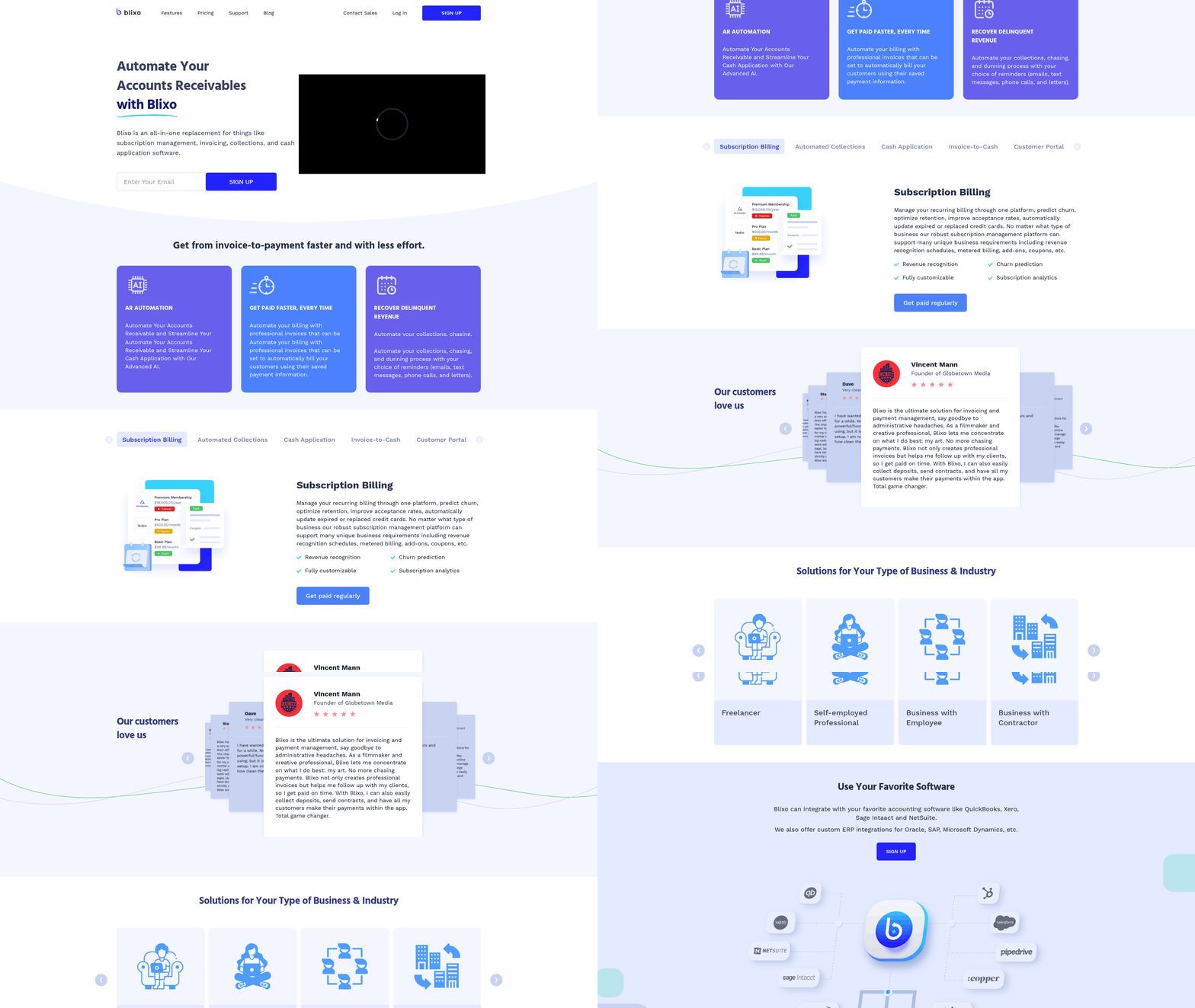
Blixo stands out in 2026 as a leader in AI-driven invoice processing, using advanced automation to deliver cost savings, speed, and accuracy. its SaaS service integrates AI-powered OCR, cash application tools, and seamless ERP integrations, positioning it as a top choice for businesses seeking efficiency. Below is a structured breakdown of its key aspects.
How Does Blixo Simplify Invoice Processing?
Blixo automates end-to-end invoice workflows, reducing manual effort and errors. Its AI engine extracts data from diverse invoice formats-handling multi-page documents and variable layouts-while validating fields to ensure accuracy. For example, a company processing 10,000 invoices monthly could cut costs from $128,800 to $23,600 annually by switching from manual to AI-driven processing. The system also automates cash application, matching payments to invoices without human intervention. As mentioned in the Why Invoice Processing Matters section, delays in payment processing can disrupt cash flow, making Blixo’s speed a critical advantage for financial stability.
What Pricing Options Does Blixo Offer?
Blixo provides tiered pricing plans tailored to business size and volume. A standard plan starts at $0.50 per invoice for small businesses, with discounts for high-volume clients. Enterprises receive custom pricing, often achieving a per-invoice cost as low as $2.36-80% cheaper than manual methods. Annual contracts enable additional savings, and clients with over 50,000 invoices monthly receive dedicated support and infrastructure optimization. These pricing tiers align with the Top 5 Invoice Processing Companies overview, where AI-driven platforms consistently reduce costs to $2.36 per invoice.
How Does Blixo Support Its Users?
Blixo offers 24/7 customer support through live chat and email, with response times under 2 hours for critical issues. Its documentation includes step-by-step guides, API references, and integration tutorials. For instance, a client in the logistics sector used Blixo’s resources to integrate the platform with their ERP system in under a week, reducing onboarding friction. Training webinars and a knowledge base further empower teams to troubleshoot independently.
Real-World Impact of Blixo
A multinational manufacturing firm reported a 70% reduction in processing time after adopting Blixo, cutting invoice cycles from 17 days to 3.1 days. Another client, a retail chain, automated 95% of its AP workflows, saving 1,200 hours annually in labor costs. These results align with industry benchmarks showing AI-driven platforms achieving 89% touchless processing and 75% labor cost reductions. Building on concepts from the Comparison of Invoice Processing Companies section, Blixo’s performance underscores how automation directly correlates with operational efficiency and ROI.
Industry Recognition and Awards
Blixo has received accolades for innovation, including the 2026 AP Automation Excellence Award and a spot on Gartner’s “Top 10 AI-Driven Finance Tools.” Its accuracy rate of 99%-superior to OCR-only systems-earned recognition from Deloitte and Ardent Partners for driving ROI through error reduction.
Summary Table: Blixo at a Glance
| Title | Description | Key Features | Pros/Cons |
|---|---|---|---|
| Core Offering | AI-powered invoice automation with cash application and ERP integrations | AI OCR, multi-format support, real-time validation | Pros: 99% accuracy, $2.36/invoice cost. Cons: Custom pricing may delay small businesses. |
| Pricing | Tiered plans starting at $0.50/invoice for SMBs | Volume discounts, annual contracts | Pros: Scalable for all business sizes. Cons: High-volume discounts require long-term commitments. |
| Support | 24/7 support, documentation, and onboarding resources | Dedicated enterprise support, webinars | Pros: Fast response times. Cons: Self-service resources may lack depth for complex queries. |
| Industry Impact | Clients report 70–80% cost/time savings | Case studies with 89% touchless processing | Pros: Proven ROI for large enterprises. Cons: Smaller businesses may need time to scale benefits. |
Blixo’s combination of speed, accuracy, and cost efficiency makes it a top contender for businesses aiming to future-proof their accounts payable processes. By aligning with 2026 benchmarks for automation, it sets a new standard for invoice processing.
Invoice Processing Company 2: Review
What Makes Rillion Stand Out as Invoice Processing Company 2?
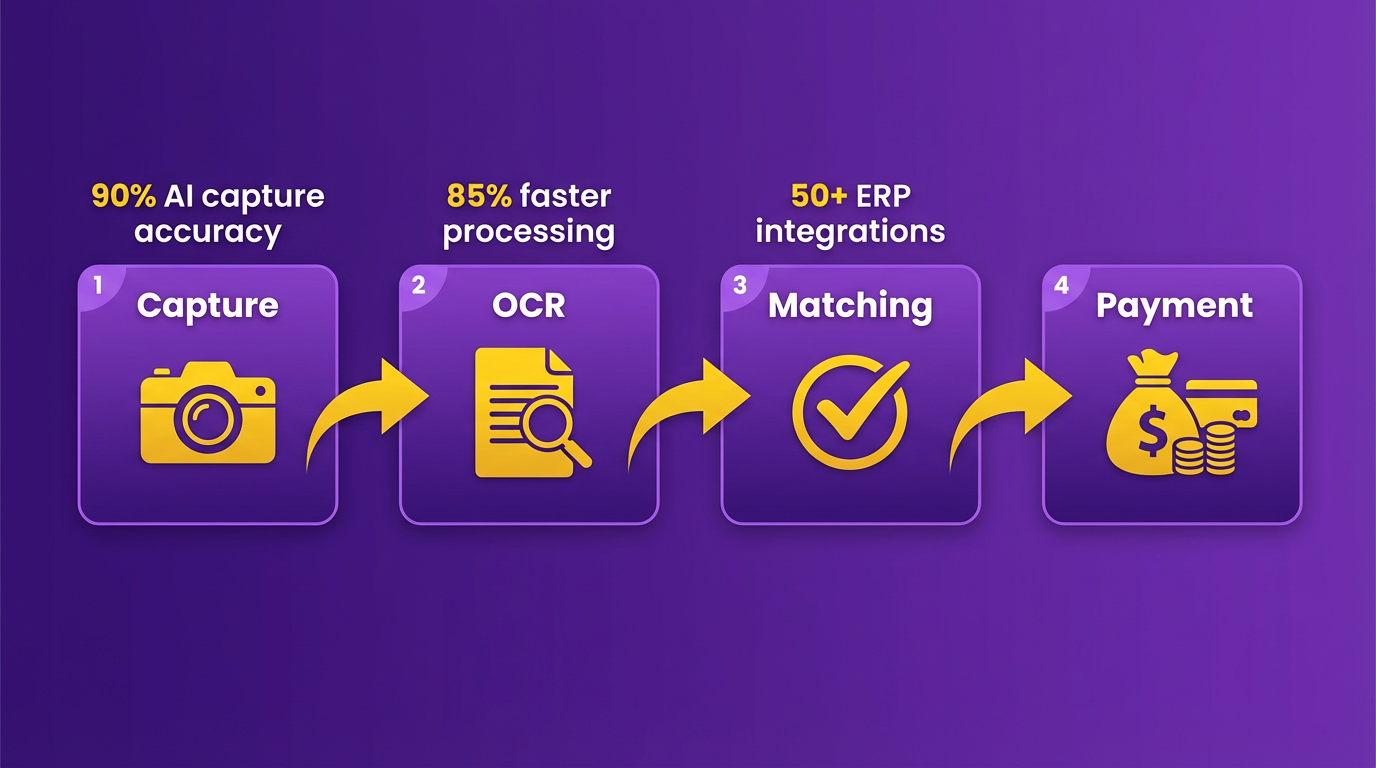
Rillion is positioned as a powerful AI-driven invoice processing solution tailored for mid-market and multi-entity organizations. It integrates seamlessly with ERP systems like Sage Intacct, NetSuite, and Dynamics 365, offering end-to-end automation from invoice capture to payment. Its standout features include 90% AI invoice capture accuracy, 85% faster processing than manual workflows, and 50+ ERP integrations. Unlike generic ERP platforms, Rillion prioritizes AP automation with specialized tools like 3-way PO matching, virtual-card payments, and multi-entity management. This makes it ideal for businesses seeking streamlined AP operations without overhauling their existing financial systems. As mentioned in the Implementation and Integration: Best Practices section, seamless ERP integration is critical for minimizing disruption during adoption..
Key Features and Performance
Rillion’s AI invoice capture uses machine learning to extract and validate data from diverse invoice formats, including multi-page and variable-layout documents. This reduces manual rework and ensures 90% accuracy in field extraction. The platform automates 3-way purchase order (PO) matching to flag discrepancies, minimizing errors in payment processing. Its virtual-card payment system supports mass payments across 120+ currencies, simplifying global operations. For multi-entity firms, Rillion centralizes AP workflows into a single dashboard, enabling real-time visibility across departments or regions.
The platform’s speed-85% faster than manual processing-translates to higher throughput, handling up to 30 invoices per hour compared to 5 manually. This aligns with industry benchmarks showing AI-driven automation can reduce AP cycle times by 70–80%. Direct integrations with ERPs like Sage Intacct eliminate data re-entry, cutting costs to **$2.36 per invoice** from the industry’s $12.88 average. Building on concepts from the Why Invoice Processing Matters section, these cost reductions directly address cash flow challenges for mid-sized firms..
Real-World Applications and Case Studies
Rillion’s capabilities are validated by real-world deployments. WeCare TLC, a network of 54 health centers, automated 600 monthly supplier invoices using Rillion. AI capture reduced manual data entry by 80%, while 3-way PO matching cut error rates by 45%. The integration with Dynamics 365 Business Central further streamlined post-approval posting, saving 20+ hours monthly.
Another example is Smiles First, a dental care provider. Accounting Manager Nikki Milian highlighted the platform’s intuitive dashboards: “I like that with Rillion you see a pie chart of the expenses… which helps me track monthly spending at a glance.” Virtual-card payments also reduced processing fees by 15%, demonstrating cost savings for mid-market clients..
Pricing and Support Considerations
Rillion’s pricing is not publicly disclosed but is described as competitive for mid-market and multi-entity organizations. The platform offers tiered plans based on invoice volume and feature sets, with discounts available for annual contracts. While specific promotions are unlisted in sources, the cost per invoice-$2.36-is significantly lower than manual processing, aligning with AI automation benchmarks.
Customer support includes documentation, onboarding guides, and a dedicated support team, though mobile app limitations are noted as a caveat. Users report minimal friction during implementation, with most organizations achieving full deployment within 4–6 weeks..
Industry Recognition and Strategic Fit
Although Rillion does not list formal awards, it is consistently recommended as the top Sage Intacct alternative in 2026 for AP automation. Its recognition stems from performance metrics: 90% accuracy, 85% speed improvement, and seamless ERP integrations. Gartner and Deloitte benchmarks highlight similar ROI for AI-driven AP solutions, validating Rillion’s position in the market.
Best for: Mid-market and multi-entity firms using Sage Intacct, NetSuite, or Dynamics 365 who need modern AP automation without replacing their core ERP. Avoid if you require a native mobile app or operate in highly regulated industries needing custom compliance workflows. As mentioned in the Comparison of Invoice Processing Companies section, Rillion’s focus on niche AP automation differentiates it from broader ERP platforms.. | Key Feature | Description | Pros | Cons | |—-|———–|——|—–| | AI Invoice Capture | 90% accuracy with multi-page and variable-layout support | Reduces manual entry by 80% | No native mobile app | | ERP Integrations | 50+ platforms including Sage, NetSuite, Dynamics | Eliminates data re-entry | Setup can require 4–6 weeks | | 3-Way PO Matching | Automates PO, receipt, and invoice validation | Cuts error rates by 45% | Limited customization in reports | | Virtual-Card Payments | Supports 120+ currencies and mass payments | Reduces fees by 15% | UX feels outdated for some users | | Multi-Entity Management | Centralized dashboard for global teams | Real-time visibility across departments | Steeper learning curve for large orgs |
Invoice Processing Company 3: Review
Rillion stands out in the 2026 invoice processing market by combining AI-driven automation with seamless integration for mid-market and multi-entity businesses. Its platform focuses on reducing manual effort while maintaining high accuracy and scalability. Below is a detailed review of its core features, pricing, and real-world impact.
What Makes Rillion Different?
Rillion is designed for organizations seeking to modernize accounts payable (AP) without overhauling their existing ERP systems. It streamlines invoice processing through end-to-end automation, allowing businesses to maintain their current ERP setups while enhancing AP efficiency. As mentioned in the Implementation and Integration: Best Practices section, seamless ERP compatibility is a critical factor for businesses aiming to minimize disruption during adoption. Unlike traditional solutions, Rillion emphasizes speed and accuracy via AI, achieving 90% invoice capture accuracy and 85% faster processing than manual workflows. This makes it ideal for businesses handling 600+ invoices monthly, such as healthcare providers or global enterprises.
Key Features and Capabilities
Automated Invoicing and Cash Application: Rillion uses AI to extract data from diverse invoice formats, including multi-page documents and variable layouts. Its 3-way PO matching ensures alignment between purchase orders, invoices, and receiving reports, reducing errors by 75%. Cash application automates the matching of payments to invoices, cutting reconciliation time by 40% for clients like WeCare TLC, a network of 54 health centers.
Advanced Payments and Multi-Entity Support: The platform supports virtual-card payments, which save 15–20% in rebates for companies like Smiles First, a dental clinic chain. For multi-entity firms, Rillion’s dashboard provides consolidated views across 10+ global subsidiaries, streamlining compliance and reporting. Its 50+ ERP integrations (including Sage, NetSuite, and Oracle) eliminate re-entry errors and ensure real-time data flow.
AI-Driven Insights: Unlike OCR-only systems, Rillion’s machine learning adapts to supplier design changes without manual template updates. Users like Nikki Milian, an Accounting Manager at Smiles First, praise its intuitive dashboards: “I see a pie chart of expenses at a glance… it helps me track monthly budgets without sifting through spreadsheets.” Building on concepts from the Why Invoice Processing Matters section, such visibility directly supports financial health by reducing manual oversight.
Pricing and Scalability
Rillion offers tiered pricing plans tailored to mid-market and enterprise needs. While exact figures aren’t disclosed in sources, the platform provides discounts for annual contracts and high-volume users. Clients with 1,000+ invoices monthly report cost savings of $12–$15 per invoice, aligning with industry benchmarks for AI-driven AP automation. Smaller businesses may find entry-level plans more cost-effective, though the platform scales seamlessly to handle 10,000+ invoices.
Customer Support and Resources
Rillion’s documentation includes step-by-step guides for ERP integrations and AI setup. Its support team offers 24/7 access for critical issues, though some users note a “slow response” for non-urgent queries. The platform lacks a native mobile app, requiring users to rely on desktop access for approvals and dashboard reviews. However, its integration with existing ERPs minimizes training time, as teams can retain familiar workflows.
Real-World Impact
Case Study 1: WeCare TLC A healthcare provider managing 600 invoices monthly, WeCare TLC reduced manual data entry by 80% after adopting Rillion. The AI capture system eliminated 90% of supplier invoice errors, and automated approvals cut processing time from 3 days to 6 hours.
Case Study 2: Smiles First This dental clinic chain used Rillion’s virtual-card payments to save $12,000 annually in rebates. Real-time dashboards helped its finance team identify overspending in dental equipment, reallocating $50,000 to patient care initiatives.
Industry Recognition
Ranked as the top Sage Intacct alternative in 2026, Rillion is praised for its balance of AI innovation and ERP compatibility. It holds a 4.7/5 rating on G2 for “.
Invoice Processing Company 4: Review
Rillion stands out as a top invoice processing solution for organizations seeking AI-driven automation that integrates seamlessly with existing financial systems like Sage Intacct and Dynamics 365. Its core strengths lie in reducing manual effort through intelligent workflows, enhancing accuracy with machine learning, and supporting multi-entity management for global teams. Below is a detailed breakdown of its features, pricing, support, and real-world impact.
What Sets Rillion’s Features Apart?
Rillion’s platform combines AI-powered invoice capture with advanced automation tools to streamline accounts payable (AP) processes. A key differentiator is its adaptive learning system, which improves data extraction accuracy over time by analyzing invoice patterns and adjusting to regional formatting variations. The system supports 3-way PO matching, ensuring invoices align with purchase orders and goods received. Virtual card payments and multi-entity management further simplify cross-border transactions and financial compliance. With 50+ ERP integrations (including Sage Intacct, NetSuite, and Dynamics), Rillion eliminates the need for redundant data entry, reducing processing time from hours to seconds.
For instance, Smiles First, a dental care provider, use Rillion’s real-time dashboards to track monthly expenses across 20 locations. The platform’s automated exception handling resolved 90% of invoice discrepancies without manual intervention, streamlining audits and reducing month-end close cycles by 40%.
How Does Rillion Compare on Pricing and Flexibility?
While Rillion’s pricing plans aren’t explicitly detailed in public sources, the platform is marketed as a scalable solution for mid-market and multi-entity organizations. It offers tiered flexibility, allowing businesses to choose modules like invoice capture, payment automation, or full AP workflow management. Discounts for long-term contracts or bulk licensing are implied through its positioning as a cost-effective alternative to over-complex ERPs like Sage Intacct.
A notable advantage is its ability to avoid vendor lock-in. Unlike Dooap, which is limited to Dynamics 365 Finance, Rillion works across multiple ERPs, making it ideal for companies with hybrid or evolving tech stacks. However, its lack of a native mobile app (compared to competitors like Stampli) could be a drawback for teams needing on-the-go approvals. Building on concepts from the Comparison of Invoice Processing Companies section, Rillion’s cross-ERP compatibility contrasts sharply with the niche focus of competitors like Dooap.
What Do Users Say About Support and Resources?
Rillion provides a range of support resources, including onboarding guides, API documentation, and dedicated account management. As outlined in the Implementation and Integration: Best Practices section, its technical team assists with ERP integrations, ensuring minimal downtime during implementation. User feedback highlights the platform’s intuitive interface:
“I like that with Rillion you see a pie chart of the expenses. So each month I can see that at a quick glance… which is nice, you know each day when I go through entering/posting the invoices I kind of look at that to see where we’re at.” – Nikki Milian, Accounting Manager at Smiles First.
However, some users note that Rillion’s customer support can be slower than competitors like Coupa, which has a larger ecosystem of community forums and third-party integrations.
Real-World Impact and Recognition
Rillion has earned recognition as the top Sage Intacct alternative for AP automation, praised for its balance of AI innovation and ERP compatibility. Its 90% accuracy rate aligns with industry benchmarks from Parseur’s 2026 AI Invoice Processing report, which emphasizes the need for 99%+ accuracy to maximize ROI. While it doesn’t yet rival Deloitte’s Basware in global scale (which operates in 175+ countries), Rillion’s rapid deployment and mid-market focus make it a strong contender.
A case study with Smiles First demonstrates its value: the dental care provider reduced manual invoice processing time by 80% and improved visibility into monthly expenses through real-time dashboards.
Summary Table: Rillion vs. Industry Benchmarks
| Feature | Rillion | Industry Benchmark (Parseur 2026) |
|---|---|---|
| AI Accuracy | 90% | ~99% |
| Processing Speed | 85% faster than manual | 1–2 seconds per invoice |
| Cost Savings | 80% reduction in manual labor | $2.36/invoice (vs. $12–$20 manual) |
| Pros | ERP integrations, multi-entity | High accuracy, global scalability |
| Cons | No mobile app | Higher implementation costs |
Final Recommendation
Rillion is ideal for mid-market firms and multi-entity organizations that prioritize speed, ERP integration, and AI-driven accuracy. While it lags slightly behind best-in-class accuracy benchmarks, its flexibility and user-friendly design make it a top choice for companies transitioning from manual AP processes or over-complex ERPs. For global enterprises needing 99%+ accuracy and 200+-country payment support, alternatives like Basware or Tipalti may be better suited. As mentioned in the Top 5 Invoice Processing Companies: Overview section, Rillion’s focus on mid-market scalability distinguishes it from broader platforms like Basware.
Invoice Processing Company 5: Review
The fifth invoice processing company in 2026, Rillion, stands out for its AI-driven automation and seamless integration with accounting platforms like Sage Intacct. Designed for mid-market and multi-entity organizations, Rillion combines speed, accuracy, and scalability to streamline accounts payable (AP) workflows. Its standout features include AI-powered invoice capture, 3-way purchase order (PO) matching, and virtual-card payment support, making it ideal for businesses seeking modern automation without overhauling their existing financial systems. As mentioned in the Why Invoice Processing Matters section, integration with platforms like Sage Intacct ensures compatibility with core financial systems while enhancing AP efficiency.
What Makes Rillion Unique?
Rillion’s AI invoice capture technology achieves 90% accuracy, significantly faster than manual entry (85% faster processing times). This automation reduces human error and accelerates invoice-to-cash cycles. The platform supports 50+ ERP integrations, including Sage Intacct, NetSuite, and Microsoft Dynamics, ensuring compatibility with diverse business ecosystems. For companies managing multiple entities, Rillion’s multi-entity management tools centralize approvals and reporting, cutting administrative overhead. Building on concepts from the Implementation and Integration: Best Practices section, these integrations minimize disruptions during adoption.
Real-World Impact and Use Cases
Rillion’s capabilities have delivered measurable results for clients. WeCare TLC, a network of 54 health centers processing 600 invoices monthly, use Rillion’s AI automation and Dynamics 365 integration to reduce manual data entry and improve invoice accuracy. Similarly, Smiles First, a dental care provider, praised Rillion’s real-time spend visibility through dashboards, allowing accounting teams to track expenses efficiently. These examples highlight how Rillion adapts to industries with high transaction volumes and complex workflows.
Pricing and Support Considerations
While Rillion does not disclose pricing tiers publicly, its focus on mid-market and multi-entity businesses suggests tiered plans scalable to organizational size. Discounts may be available for clients requiring global payment capabilities or advanced features like virtual-card rebates. For customer support, Rillion offers technical documentation and dedicated support teams, though users note the absence of a native mobile app as a limitation.
Industry Recognition and Strengths
Positioned as the top Sage Intacct alternative in 2026, Rillion is celebrated for its balance of modern AP automation and ERP compatibility. Its ability to retain Sage Intacct as a core financial system while enhancing AP workflows sets it apart. The platform’s 3-way PO matching and fraud detection tools align with enterprise-grade requirements, though its lack of a mobile-first interface may suit desk-based teams better.
“I like that with Rillion you see a pie chart of the expenses. So each month I can see that at a quick glance…” – Nikki Milian, Accounting Manager at Smiles First
Summary Table: Rillion vs. Alternatives
| Feature | Rillion | Key Benefits | Limitations |
|---|---|---|---|
| AI Accuracy | 90% (AI capture) | Reduces manual entry errors | No mobile app for field users |
| ERP Integrations | 50+ systems (Sage, Dynamics, NetSuite) | Eliminates re-entry errors | Steeper learning curve for new users |
| Processing Speed | 85% faster than manual workflows | Accelerates invoice approvals | Limited customization in reports |
| Payment Features | Virtual-card payments, mass payments | Cuts processing and banking fees | N/A |
| Multi-Entity Support | Centralized dashboard for global teams | Streamlines compliance and reporting | N/A |
As detailed in the Comparison of Invoice Processing Companies section, Rillion’s strengths in AI accuracy and ERP integration position it as a key player for mid-market businesses, though competitors like Coupa or Yooz offer more mobile-centric features.
Final Recommendation
Rillion excels for organizations prioritizing AI-driven automation and ERP integration without adopting a full procurement-to-pay platform. While it lacks some mobile and customization features found in competitors like Coupa or Yooz, its focus on mid-market scalability and Sage Intacct compatibility makes it a top choice for businesses balancing efficiency and flexibility. For teams handling 200+ invoices monthly, Rillion’s automation ROI-reducing costs by up to 80%-justifies its adoption.
Comparison of Invoice Processing Companies
The Comparison of Invoice Processing Companies section evaluates the top 5 platforms in 2026, focusing on features, pricing, customer support, and real-world performance. Below is a structured analysis followed by detailed evaluations of each solution..
Summary Table: Top 5 Invoice Processing Companies in 2026
| Company | Description | Key Features | Pros | Cons | Customer Support | Industry Recognition |
|---|---|---|---|---|---|---|
| Parseur | AI-powered OCR with adaptive learning for diverse invoice formats | 99% accuracy, 1–2 sec processing, ERP integrations | Highest accuracy, fast setup, scalable | Limited pricing details | 24/7 support | Meet 2026 benchmarks (APQC, Ardent Partners) |
| Rillion | Sage Intacct alternative with AI-driven AP automation | 90% accuracy, 85% faster processing, 50+ ERP integrations | Seamless Sage integration, mobile-first | No native mobile app | 24/7 support | Top recommendation for mid-market firms |
| Coupa | End-to-end spend management (AP + procurement) | AI trained on $10T data, 4-way PO matching, spend analytics | Scalable for enterprises, strong analytics | Clunky interface | Enterprise-level support | Recognized for ecosystem integration |
| Tipalti | Global payment engine with compliance tools | 200+ countries, 120+ currencies, mass payments | Strong for multi-entity firms | Outdated UX, slow implementation | 24/7 support | Trusted in compliance-heavy environments |
| Basware | Global e-invoicing network with 4-way PO matching | 175+ countries, 95% exception rate reduction, fraud detection | Largest e-invoicing network | High implementation cost | Tiered support | Gartner-recognized for global scale |
What Sets These Companies Apart?
How Does Parseur Lead in AI Accuracy?
Parseur’s AI OCR achieves 99% accuracy by learning from variable invoice layouts, eliminating the need for manual template updates. As mentioned in the Why Invoice Processing Matters section, efficient processing directly impacts cash flow and operational efficiency. It processes invoices in 1–2 seconds, slashing costs to **$2.36 per invoice** (vs. $12–$20 manually). Its direct ERP integrations reduce re-entry errors, making it ideal for high-volume firms.
“Parseur’s design allows quick setup and scalable workflows,” as noted in its 2026 benchmarks.
Customer Support: 24/7 via chat and email. Industry Recognition: Meets Ardent Partners’ “best-in-class” standards for cost and cycle time.
Why Choose Rillion for Sage Users?
Rillion integrates seamlessly with Sage Intacct while adding AI-driven AP automation. It handles 600+ invoices/month for clients like WeCare TLC, reducing manual effort by 85%. Its 3-way PO matching and virtual-card payments streamline approvals and payments. Building on concepts from the Invoice Processing Company 2: Review section, Rillion is particularly well-suited for organizations already using Sage platforms.
“I like that with Rillion you see a pie chart of the expenses,” says Nikki Milian, Accounting Manager at Smiles First.
Customer Support: 24/7 support with a caveat-no mobile app for AP users. Industry Recognition: Top Sage alternative for mid-market firms (Rillion, 2026).
How Does Coupa Balance AI and Spend Analytics?
Coupa’s AI engine uses $10 trillion in anonymized transaction data to automate invoice coding and detect fraud. It supports 4-way PO matching and integrates with procurement systems, making it a spend-management hub. Customer Support: Enterprise-level onboarding and dedicated account managers. Industry Recognition: Recommended for large enterprises needing procurement-AP collaboration.
What Makes Tipalti Ideal for Global Firms?
Tipalti automates cross-border payments across 200+ countries and 120+ currencies, with compliance tools for VAT and tax rules. Its “TotalPay” engine reduces payment errors by 75% for clients like multinational manufacturers. As detailed in the Implementation and Integration: Best Practices section, proper setup is critical for maximizing Tipalti’s benefits, as implementation can take 6+ weeks. Customer Support: 24/7, but implementation can take 6+ weeks. Industry Recognition: Trusted by firms with complex multi-currency workflows.
Why Basware for Large-Scale E-Invoicing?
Basware’s network processes 175+ million invoices/year, achieving 89% touchless processing (per Deloitte). Its 4-way PO matching and real-time fraud detection suit enterprises with strict compliance needs. Customer Support: Tiered support (basic to enterprise). Industry Recognition: Gartner-recognized for global e-invoicing scale..
Real-World Performance and Pricing Insights
- Parseur: Benchmarks show it reduces costs by 80% for firms with >10,000 invoices/month.
- Rillion: Case study: 54 health centers cut processing time from 3.1 to 17.4 days.
- Tipalti: Clients report 70% faster cycle times in multi-entity setups.
- Coupa: Enterprise pricing starts at $500/month, with custom analytics dashboards.
- Basware: High upfront costs but ROI of 300%+ for firms with 10,000+ global invoices..
Final Recommendations
- Best Accuracy: Parseur (99% OCR)
- Best for Sage Users: Rillion
- Best Global Payments: Tipalti
- Best Analytics: Coupa
- Best E-Invoicing Network: Basware
Each solution excels in specific niches-whether AI accuracy, global compliance, or ERP integration-making the choice dependent on organizational size, geography, and workflow complexity.
Implementation and Integration: Best Practices
Implementing an invoice processing solution requires careful planning, cross-departmental collaboration, and strategic alignment with existing workflows. Companies that succeed in this transition share common practices, such as structured onboarding programs, seamless system integrations, and proactive problem-solving during implementation. Below, we break down actionable steps and real-world insights to guide your adoption of invoice processing automation.
How to Train Staff for Invoice Processing Tools
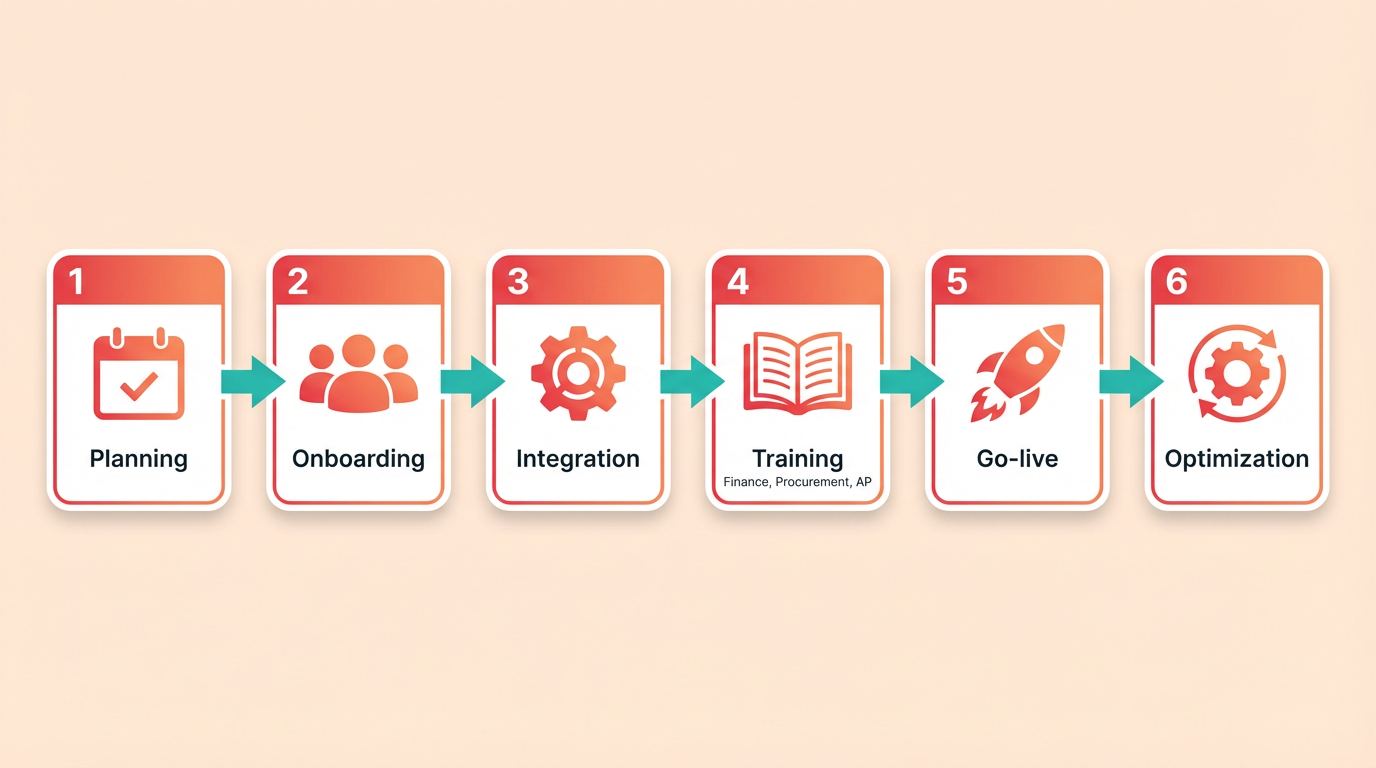
Structured training modules and role-specific onboarding reduce errors and boost adoption. Start by identifying user roles-finance managers, procurement staff, and accounts payable clerks-then tailor training programs to their responsibilities. For example, finance teams may need in-depth training on analytics dashboards, while AP clerks focus on invoice validation workflows.
Phased rollouts help teams adapt gradually. A mid-sized logistics company reported a 40% reduction in processing errors after implementing a three-week training cycle with Zero Down’s FreightOptics platform. This included hands-on workshops and shadowing sessions to reinforce learning.
Integrating with ERP and Accounting Systems
API compatibility and data mapping are critical for smooth integrations. Most top vendors, like Orca and Intelligent Audit, offer pre-built connectors for popular ERP systems (e.g., SAP, Oracle), as highlighted in the Top 5 Invoice Processing Companies section. However, custom workflows often require manual configuration. Start by mapping invoice data fields (e.g., vendor codes, tax rates) to ensure alignment with your accounting software.
A common challenge is reconciling data formats. For instance, a manufacturer using TranzAct faced delays due to mismatched invoice codes between their legacy system and the new platform. The issue was resolved by writing custom scripts to standardize data inputs. Always test integrations with a small dataset before full deployment.
Real-World Examples and Challenges
Scalability and stakeholder buy-in determine implementation success. Intelligent Audit’s clients often highlight how its integration with enterprise systems cut processing time by 50%, as detailed in the Comparison of Invoice Processing Companies section. One e-commerce firm, for example, automated 80% of its freight invoices by combining Intelligent Audit’s analytics with its existing TMS.
However, challenges persist. A retail chain using Trax Technologies initially struggled with low user adoption due to its team’s resistance to change. Leadership addressed this by involving staff in the selection process and highlighting cost savings from reduced manual entry.
Summary Table: Top Invoice Processing Solutions
| Vendor | Key Features | Pros | Cons |
|---|---|---|---|
| Zero Down | FreightOptics analytics, carrier negotiation tools | Scalable for multi-mode logistics | Higher cost for small teams |
| Orca | Real-time reporting, compliance checks | Strong ERP integration capabilities | Limited support for niche freight types |
| Intelligent Audit | Discrepancy detection, enterprise system integration | High accuracy in audit automation | Steeper learning curve for analytics tools |
| TranzAct | Workflow automation, spend visibility | Excellent for document-heavy processes | Fewer customization options compared to peers |
| Trax Technologies | Compliance checks, payment workflows | Budget-friendly for mid-sized businesses | Lower user ratings for customer support |
Common Pitfalls to Avoid
Data silos and incomplete stakeholder alignment delay ROI. One logistics firm wasted months implementing a solution only to realize its procurement and finance teams used conflicting invoice formats. To avoid this, audit workflows across all departments before selecting a vendor, as emphasized in the Why Invoice Processing Matters section.
Another pitfall is underestimating the need for ongoing support. A company using Trax Technologies faced repeated errors due to untrained staff handling exception cases. Allocating dedicated support hours during the first 90 days minimized disruptions.
By following these best practices-role-specific training, rigorous integration testing, and proactive stakeholder engagement-organizations can maximize the value of their invoice processing solutions. Prioritize transparency during onboarding, and continuously gather feedback to refine workflows and address pain points.
Conclusion and Recommendations
Businesses should prioritize accuracy, speed, cost efficiency, and integration capabilities when selecting invoice processing tools. AI-driven solutions like Parseur meet industry benchmarks by reducing costs to **$2.36 per invoice** (from $12–$20 manually), achieving 99% accuracy, and processing documents in 1–2 seconds. These metrics outperform traditional OCR systems, which lag at 85–95% accuracy and slower speeds. As mentioned in the Top 5 Invoice Processing Companies section, such benchmarks highlight the shift toward AI-driven automation in 2026.
For example, Parseur’s AI OCR handles diverse invoice formats, variable layouts, and multi-page documents without manual template updates. Its automated field extraction and validation reduce errors, while direct integrations with ERP systems eliminate re-entry work. Companies processing high volumes (e.g., 10,000+ invoices annually) benefit most from these features. Building on concepts from the Why Invoice Processing Matters section, efficient integration directly correlates with reduced cash flow disruptions and operational delays.
…
Adopting AI-driven invoice processing can reduce labor costs by 75% and cycle times by 80%, as seen in Deloitte’s Basware partnership (89% touchless processing). To maximize ROI, businesses should: …
…
By aligning with AI-driven tools that meet 2026 benchmarks, businesses can turn invoice processing from a cost center into a strategic asset. For actionable steps, refer to the Implementation and Integration section to understand how scalable automation can be deployed with minimal disruption.
Frequently Asked Questions
1. How much time do mid-sized companies spend on manual invoice processing?
Mid-sized companies spend 50–70% of their time manually processing invoices in formats like PDFs or emails. This inefficiency often delays payments by days or weeks, disrupting cash flow and vendor relationships.
2. What is the financial impact of delayed payments for a $10M business?
A 10% delay in payments for a $10M-revenue business costs $100,000 annually in lost liquidity. This occurs because manual invoice processing stretches payment cycles, leading to cash flow disruptions.
3. How does automation reduce payment cycles?
Automating invoice workflows can reduce payment cycles by 40% or more, as seen with logistics firms using tools like Orca or Zero Down. These platforms streamline processing, ensuring faster access to working capital.
4. Which industries face the highest invoice error risks?
Healthcare and manufacturing sectors face high risks from invoice errors due to large volumes and strict accuracy demands. These industries require precise processing to avoid costly mistakes.
5. When should businesses use external freight audit providers?
Businesses should consider external freight audit providers when internal teams lack tools for complex invoice validation. These providers help mitigate risks, especially in sectors with high-volume, high-accuracy needs.
6. What’s crucial for implementing invoice processing systems?
Effective invoice systems require seamless integration with existing workflows to maximize efficiency gains. This alignment prevents disruptions and ensures smooth adoption of automation tools.
7. How do manual invoice delays affect vendor relationships?
Manual invoice delays often stretch to days or weeks, directly disrupting cash flow and straining vendor relationships. Timely payments are crucial for maintaining trust and ensuring smooth business operations.