

Top 5 Accounts Receivable Automation Methods

Key Takeaways
- Automating accounts receivable is a strategic necessity, with 87% of businesses reporting faster processing speeds and 85% of CFOs seeing reduced Days Sales Outstanding (DSO).
- Manual AR processes delay payments by 23 days for small businesses handling 20,000+ monthly invoices compared to automated systems.
- Manual data entry in AR increases error rates, causing disputes and delayed cash flow, with automation reducing inaccuracies significantly.
- AR automation enables teams to save 40% of their time, redirecting efforts to strategic tasks instead of manual invoice processing.
- Annual 6% increase in Direct Debit failure rates in the UK, driven by manual oversight, costs businesses £1.1 billion in fraud losses alone.
Related Video
Watch: Accounts Receivable Automation for Oil and Gas Suppliers by EnterMyInvoice
Why Accounts Receivable Automation Matters
Automating accounts receivable processes isn’t just a convenience-it’s a strategic necessity. Manual AR tasks are error-prone, time-consuming, and costly. For example, 87% of businesses using automation report faster process speeds, while 85% of CFOs at companies with significant AR automation saw reduced Days Sales Outstanding (DSO). These improvements directly impact cash flow, customer relationships, and operational efficiency. Below, we break down why automation matters, who benefits most, and how it solves real-world challenges.
What Problem Do Manual AR Processes Create?
Manual accounts receivable workflows are a major bottleneck for businesses. Consider these pain points:
- Time waste: Small businesses handling 20,000+ invoices monthly take 78 days to receive payments without automation, versus 55 days with it.
- Error risk: Manual data entry increases inaccuracies, leading to disputes and delayed cash flow.
- Missed opportunities: Teams spend 40% less time on strategic tasks when automation streamlines invoice processing (per SAP Taulia).
Without automation, businesses risk late payments, strained customer relationships, and poor financial forecasting. For example, a UK study found rising Direct Debit failure rates (6% year-on-year) due to manual oversight, costing businesses £1.1 billion in fraud losses alone.
How Does Automation Solve These Challenges?
AR automation tackles inefficiencies head-on:
- Reduces DSO: Automated reminders and real-time analytics cut DSO by up to 50%. A SaaS company reduced its DSO by 15 days after implementing automation. As mentioned in the Automated Payment Reminders and Dunning section, such tools are critical for managing delinquencies efficiently.
- Minimizes errors: Systems like Fazeshift report a 90% drop in manual errors by automating invoice generation and reconciliation. This aligns with the Automated Invoice Generation and Delivery section, which highlights how automation reduces inaccuracies in the initial stages.
- Boosts cash flow: Automated payment tracking and forecasting reduce overdue invoices by 20% in the first quarter (per a B2B case study).
Automation also enhances customer experiences. For example, personalized invoicing for subscribers increased satisfaction for a publishing house, while construction firms using automated reminders reduced administrative burdens by 30%.
Who Benefits Most from AR Automation?
Both small businesses and enterprises gain unique advantages:
| Business Type | Key Benefits | Real-World Impact |
|---|---|---|
| Small/Medium Businesses | Cuts invoice processing costs to $2 per invoice | 71% lower past-due ARs and 80% faster payments (Aberdeen Group study) |
| Enterprises | Scales operations with AI-driven risk scoring | A Fortune 500 company reduced bad debt by 30% using predictive analytics |
| High-Volume Industries | Handles 20,000+ invoices monthly with speed | Healthcare providers improved HIPAA compliance through automated workflows, as noted in the Automated Reconciliation and Real-Time Reporting section |
Small businesses appreciate cost savings and time efficiency, while enterprises prioritize scalability and fraud prevention. For instance, a wholesale business automated invoice generation, cutting payment delays and improving liquidity by 40%.
Summary of Automation’s Impact
Automation transforms AR from a reactive task to a strategic asset. It reduces DSO, accelerates cash flow, and improves customer satisfaction across industries. Whether you’re a small business owner or an enterprise finance leader, adopting automation isn’t just about modernization-it’s about staying competitive in a market where 39% of businesses still struggle with manual processes. The data is clear: automation isn’t optional-it’s essential.
Automated Invoice Generation and Delivery
Automated invoice generation and delivery streamlines the accounts receivable (AR) process by eliminating manual tasks, reducing errors, and accelerating payment cycles. As emphasized in the Why Accounts Receivable Automation Matters section, automating AR processes is a strategic necessity to mitigate errors and inefficiencies inherent in manual workflows. By integrating with enterprise resource planning (ERP) systems and using AI, businesses can create, send, and track invoices in real time. As discussed in the Implementation and Integration Considerations section, ensuring compatibility with existing ERP systems is crucial for smooth adoption. For example, a SaaS company that automated invoicing reduced its Days Sales Outstanding (DSO) by 15 days, directly improving cash flow. This method not only ensures accuracy but also aligns payments with customer preferences, enhancing the overall financial relationship.
How Automated Invoicing Works
Automated invoicing systems pull data from sales orders, contracts, and ERP systems to generate invoices. These tools use predefined rules to apply payment terms, discounts, and tax rates, ensuring consistency. For instance, AI-powered agents can sync with platforms like SAP or Oracle to validate invoice details and flag discrepancies. Once generated, invoices are delivered via email or customer portals, with automated reminders triggered if payments are delayed. This process eliminates manual data entry, reducing errors by up to 80% in some cases.
Key Benefits of Automated Invoicing
The primary advantage of automation is speed. Automated systems cut invoice processing time from days to minutes, enabling faster payments and lower DSO. One B2B company reported a 20% reduction in overdue invoices after implementing AI-driven reminders. Additionally, automation minimizes human errors-manual invoicing often results in 5–10% error rates, whereas automated systems reduce this to less than 1%. Another benefit is improved customer satisfaction: tailored payment options and timely reminders enhance the billing experience. As Nicolas Boucher of the Growth-Minded CFO Podcast notes, “AI is not here to replace finance professionals. It is here to augment them,” streamlining repetitive tasks while allowing teams to focus on strategic work.
Key Features to Look For
When selecting an automated invoicing system, prioritize tools that integrate seamlessly with your existing ERP. Features like real-time analytics and AI-driven risk scoring are critical. For example, systems with predictive analytics can identify late-payment risks and adjust cash forecasts dynamically. Other essential features include:
- Invoice synchronization: Ensures data consistency across platforms.
- Automated reminders: Sends personalized follow-ups based on payment history. Building on concepts from the Automated Payment Reminders and Dunning section, these reminders reduce late payments by using tailored communication strategies.
- Customer portals: Let clients view invoices, make payments, and update contact details.
- Cash application efficiency: Matches payments to invoices instantly, reducing reconciliation time.
A strong system should also include exception-handling workflows. If an invoice is disputed or a payment fails, the software should route the issue to the appropriate team. For instance, HighRadius users reported a 96% reduction in credit risk by automating dispute resolution and cash application.
Case Study: Cash Flow Improvement in Action
A SaaS company struggling with late payments adopted AR automation to streamline invoicing and collections. Before automation, its DSO was 60 days, with 15% of invoices delayed. After implementing automated reminders and customer portals, DSO dropped to 45 days, and overdue invoices decreased by 20%. The system’s real-time analytics also flagged high-risk accounts, allowing the team to proactively address potential defaults. As a result, the company improved its cash flow by $2.3 million annually and reduced manual follow-ups by 70%.
| Feature | Description | Pros | Cons |
|---|---|---|---|
| Invoice Synchronization | Syncs with ERPs like SAP and Oracle to create accurate invoices | Eliminates manual data entry errors | Requires initial ERP integration |
| Automated Reminders | Sends tailored reminders based on payment behavior and due dates | Reduces late payments by up to 20% | May need customization for clients |
| Real-Time Analytics | Tracks DSO, payment trends, and risk scores | Improves forecasting and working capital | Needs regular monitoring |
By adopting these tools, businesses can transform their AR operations, ensuring faster payments and stronger financial control. As one finance leader noted, “Clean and structured data is the prerequisite for effective AI in AR,” highlighting the importance of selecting systems that prioritize data integrity and scalability.
Automated Payment Reminders and Dunning
Automated payment reminders and dunning systems streamline collections by using software to send timely payment alerts and manage delinquencies. These tools reduce manual follow-ups, lower late fees, and improve cash flow by ensuring customers pay on time or address issues proactively. Below, we break down how they work, their benefits, and what to prioritize when choosing a solution..
How Automated Payment Reminders Work
Automated systems monitor invoice due dates and trigger reminders via email, text, or customer portals. For example, a tiered reminder system sends a first notice 5 days before a payment is due, a second notice on the due date, and a final alert 3 days after. This process integrates with ERP systems to pull invoice data and customer contact preferences. Tools like those described in source 3 use 60+ AI agents to rank accounts by risk and personalize outreach, ensuring high-priority cases get immediate attention. As highlighted in the Automated Invoice Generation and Delivery section, seamless ERP connectivity is critical for real-time data accuracy across payment and invoicing workflows..
Benefits of Automated Dunning Systems
Automation reduces late payments by up to 20% (source 2) and cuts manual effort by 40% (source 3). For instance, a SaaS company reduced its Days Sales Outstanding (DSO) by 15 days after implementing automated reminders, while Konica Minolta added $30 million in cash flows using AI-driven dunning. Key benefits include:
- Improved customer relationships: Automated reminders avoid aggressive collections, maintaining trust.
- Lower DSO: Predictive analytics in tools like Fazeshift (source 9) cut DSO by 50% by identifying at-risk accounts early, as detailed in the Automated Cash Application and Intelligent Matching section.
- Fewer bad debts: Source 3 reports a 96% reduction in credit risk for L’ORÉAL using automated exception handling..
Real-World Example: SaaS Company’s Success
A SaaS business implemented an automated dunning system with tiered reminders and AI risk scoring (source 2). Results included:
- 15-day DSO reduction within 6 months.
- 20% fewer overdue invoices due to predictive alerts.
- 90% customer satisfaction from seamless, non-intrusive reminders. This case highlights how automation aligns efficiency with customer experience. As emphasized in the Why Accounts Receivable Automation Matters section, such outcomes reinforce the strategic value of reducing manual AR tasks..
Key Features to Look For
Prioritize platforms with these capabilities:
- Multi-channel communication: Email, SMS, and portal notifications adapt to customer preferences (source 3).
- AI risk scoring: Tools like HighRadius (source 3) use machine learning to predict late payments and adjust cash forecasts.
- ERP integration: Pre-built connectors for SAP, Oracle, or Microsoft Dynamics ensure real-time data sync (source 3).
- Customizable workflows: Segment customers by payment history to apply tailored dunning strategies (source 2)..
Best Practices for Implementation
- Clean your data: Source 2 emphasizes fixing customer records and payment terms before automation.
- Test workflows: Start with a small customer group to refine reminder timing and messaging.
- Review rules monthly: Adjust dunning thresholds based on payment trends and feedback (source 3)..
Summary Table: Automated Dunning Systems
| Title | Description | Key Features | Pros | Cons |
|---|---|---|---|---|
| Tiered Reminders | Sends scheduled alerts via email/SMS | Customizable timing, multi-channel | Reduces late payments, improves customer relations | Requires setup for timing and messaging |
| AI Risk Scoring | Uses machine learning to prioritize delinquent accounts | Predictive analytics, dynamic cash forecasts | Enhances efficiency, lowers bad debt risk | Higher upfront cost for AI tools |
| ERP Integration | Syncs with accounting systems for real-time data | Pre-built connectors for SAP/Oracle | Streamlines reconciliation, reduces errors | May need IT support for setup |
By automating reminders and dunning, businesses can cut DSO, boost cash flow, and maintain strong customer ties. Start with clear workflows, invest in AI-driven tools, and align automation with customer preferences for maximum impact.
Automated Cash Application and Intelligent Matching
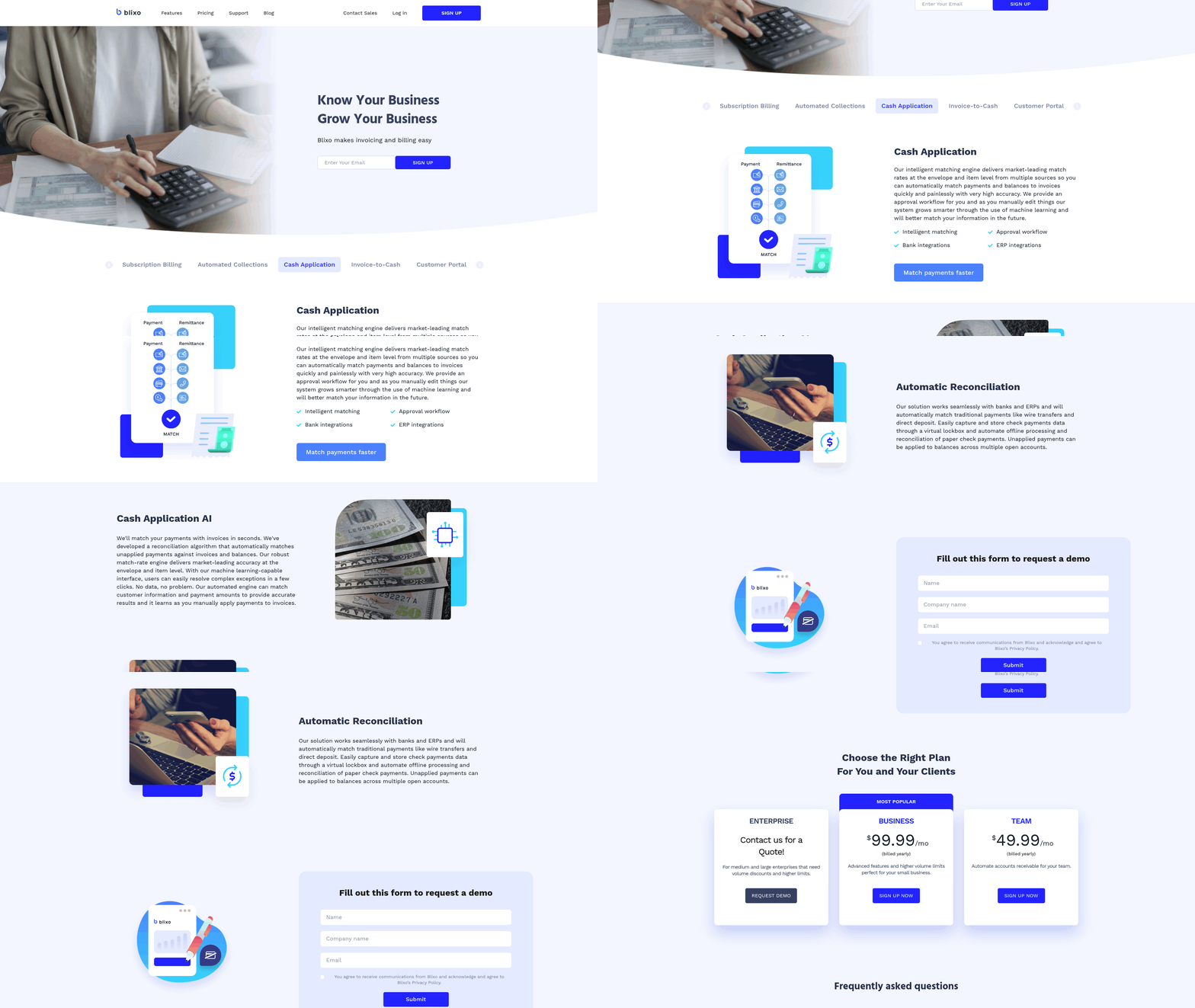
Automated cash application streamlines the process of matching incoming payments to the correct invoices, reducing manual effort and errors. By using AI and machine learning, systems like HighRadius automate invoice uploads, track statuses across 600+ AP portals, and apply advanced algorithms to match payments accurately. This reduces Days Sales Outstanding (DSO) by up to 10% and past-due accounts by 20%, ensuring faster cash flow and improved financial visibility. As mentioned in the Implementation and Integration Considerations section, seamless ERP integration is critical for maximizing these benefits.
How Automated Cash Application Works
Automated systems use AI agents to process payments and invoices. These agents handle tasks like data ingestion from ERPs (SAP, Oracle), apply intelligent matching to link payments to invoices, and flag exceptions for review. For example, HighRadius employs 60+ AI agents that manage collections, invoicing, and credit management. The process begins with automated invoice uploads, followed by AI-driven cash application that identifies and applies payments accurately. This eliminates manual reconciliation, which traditionally takes hours or days, and reduces errors caused by human oversight. Building on concepts from the Why Accounts Receivable Automation Matters section, this automation addresses the inefficiencies inherent in manual processes.
Key Benefits of Implementation
The primary benefits include faster reconciliation and reduced manual errors. AI-powered automation improves productivity by 40% and increases net recovery by 30%, as seen with HighRadius users. Companies like Konica Minolta report $30 million in added cash flows through automated dunning and surcharge billing. Additionally, **credit risk** drops significantly-L'ORÉAL reduced its risk by $57 million via invoice matching and exception handling. As highlighted in the Security and Compliance Considerations section, managing credit risk is a critical component of financial stability.
Choosing the Right System: Key Features
When selecting an automated cash application tool, prioritize AI automation and ERP integration. HighRadius and Billtrust both offer pre-built connectors for SAP, Oracle, and Microsoft Dynamics, ensuring seamless data flow. Look for systems that support customer self-service portals, allowing clients to track payments and resolve discrepancies independently. Features like predictive analytics for risk assessment and real-time reporting further enhance efficiency. Avoid systems lacking scalability or customization, as these may fail to meet evolving business needs.
Case Study: HighRadius in Action
L’ORÉAL implemented HighRadius’s automated cash application system, achieving a 96% cash application rate and reducing credit risk by $57 million. The AI-driven platform matched invoices accurately, handled exceptions automatically, and integrated with their existing ERP. Finance teams saved hundreds of hours monthly, redirecting resources to strategic tasks. This success underscores the value of combining AI with strong ERP connectivity for maximum impact.
Summary Table: Key Features of Automated Cash Application Systems
| Feature | Description | Pros | Cons |
|---|---|---|---|
| AI Agents | Automate collections, cash application, and credit management | 40% productivity increase | High initial investment |
| ERP Integration | Connects with SAP, Oracle, and Microsoft Dynamics | Streamlines data flow | Requires compatible ERP systems |
| Self-Service Portals | Allow customers to track payments and resolve issues | Reduces customer inquiries | May require user training |
| Predictive Analytics | Identifies credit risks and payment trends | Lowers bad debt and improves cash flow | Complex setup |
| Real-Time Reporting | Provides instant visibility into AR metrics | Enhances decision-making speed | May involve ongoing subscription costs |
This table highlights critical features to evaluate when adopting automated cash application solutions, balancing benefits against potential challenges.
Automated Collections and Chase Management
Automated collections and chase management streamline the process of tracking, reminding, and resolving overdue payments without manual intervention. This method uses AI and predefined rules to monitor payment statuses, send timely reminders, and escalate cases as needed. For example, if an invoice is 10 days overdue, the system might trigger an email reminder, while a 30-day delay could prompt a phone call or a personalized outreach message. By automating these steps, finance teams reduce the risk of missed follow-ups and ensure consistent communication with customers.
How Does Automated Collections Work?
Automated collections rely on a combination of data integration, AI-driven prioritization, and multi-channel communication. Systems sync with ERP platforms like SAP or Oracle to access real-time invoice data, then analyze payment histories to identify at-risk accounts. AI algorithms score customers based on past behavior, flagging high-priority cases for immediate attention. For instance, a customer with a history of late payments might receive automated dunning emails, while a new client with a clean record gets gentle reminders. As mentioned in the Automated Cash Application and Intelligent Matching section, seamless ERP integration is critical for maintaining accurate and up-to-date financial records.
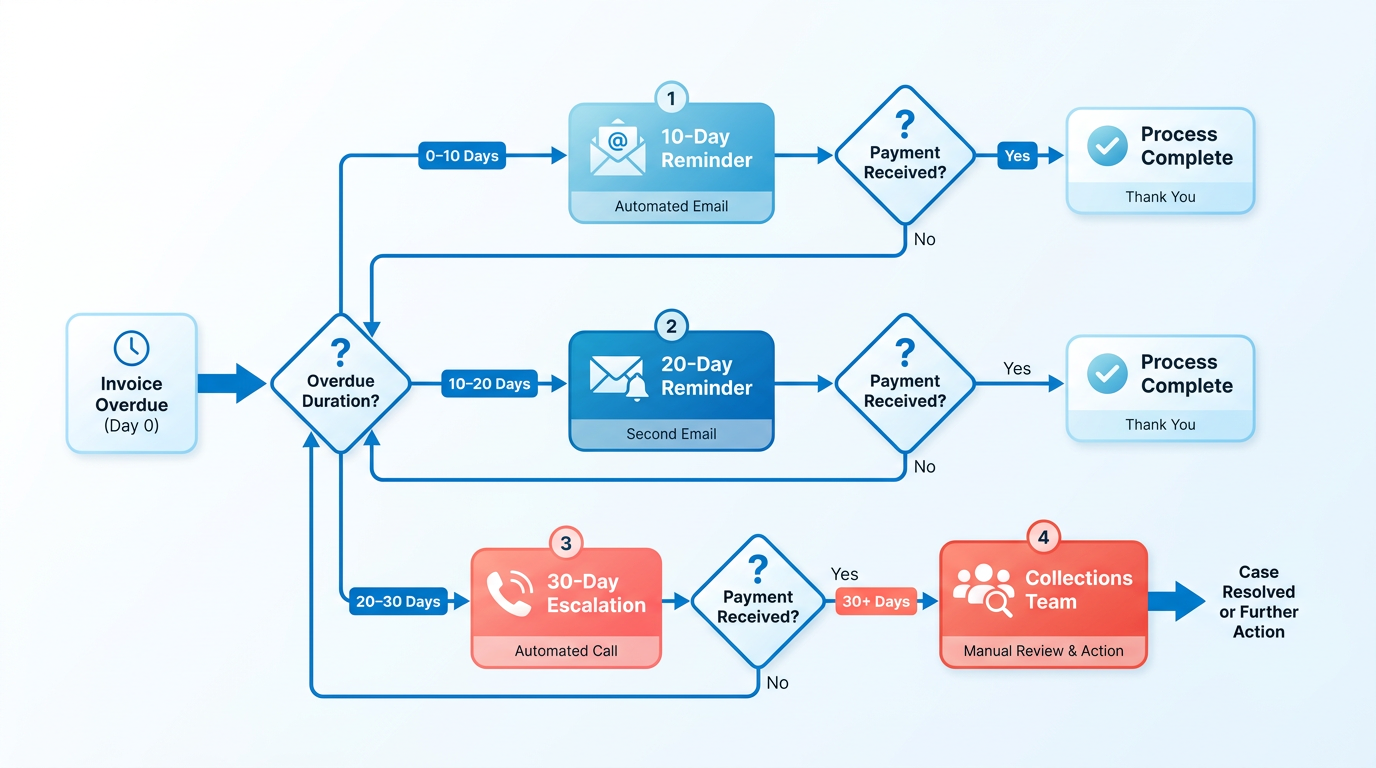
This process eliminates manual tracking by automating repetitive tasks. For example, HighRadius’ AI agents handle 60+ automation workflows, including invoice uploads, status tracking, and dunning processes across 600+ AP portals. Meanwhile, platforms like the SaaS company in use AI to predict payment risks and adjust cash forecasts dynamically, ensuring teams focus on accounts most likely to delay payments.
What Are the Key Benefits?
The primary advantage of automated collections is reduced bad debt. By identifying high-risk accounts early, businesses can intervene before payments default. For example, Chevron Phillips CHEMICAL achieved zero bad debt for four years using Blocked Order Review and Credit App AI Agents. Another benefit is improved customer relationships. Automated systems personalize communications, avoiding the frustration of generic, aggressive reminders. A telecom provider using Zendesk’s AI saw a 25% drop in late payments after implementing tailored outreach.
Additionally, automation lowers Days Sales Outstanding (DSO). A SaaS company reduced DSO by 15 days after automating invoicing and collections, while Coca-Cola Bottlers recovered $33.4M in overdue payments within 34 days using Claim Download and Validity Predictor AI Agents. These improvements translate to stronger cash flow and working capital management, as seen in the 96% cash application reduction in credit risk for L’ORÉAL.
What Features Should You Prioritize?
When selecting an automated collections system, focus on features that align with your business needs. Look for invoice synchronization to ensure real-time data accuracy, multi-channel reminders (email, SMS, portal access), and AI-driven risk scoring to prioritize accounts. For example, HighRadius offers pre-built ERP connectors and AI agents that rank accounts for personalized outreach. As discussed in the Automated Payment Reminders and Dunning section, multi-channel reminders are essential for maintaining engagement while minimizing customer frustration.
Other critical features include customer portals for self-service payments and dispute resolution, real-time analytics for tracking DSO and overdue trends, and scalable workflows to adapt to business growth. Platforms like the one used by Konica Minolta also integrate surcharge billing AI agents, adding incentives for prompt payments. Avoid systems that lack customizable escalation rules or integration flexibility, as these can limit effectiveness.
Best Practices for Implementation
To maximize success, start by segmenting customers based on payment history and risk profiles. High-risk accounts should trigger immediate action, while low-risk clients receive minimal follow-ups. Next, cleanse and structure your data before deployment. As outlined in the Implementation and Integration Considerations section, clean data is foundational for AI accuracy and reliability. Poor data quality undermines AI predictions, leading to missed opportunities or incorrect escalations.
Finally, review automation rules regularly to ensure they align with changing business needs. For example, a B2B company in adjusted its AI rules quarterly, achieving a 20% reduction in overdue invoices. Combine automation with human oversight-let AI handle routine tasks, but empower staff to resolve complex disputes or negotiate payment plans.
Automated Reconciliation and Real-Time Reporting
Automated reconciliation and real-time reporting streamline accounts receivable by eliminating manual data matching and providing instant financial insights. This method uses AI and machine learning to automate invoice-to-payment matching, reducing errors and accelerating financial close cycles. For example, systems like HighRadius deploy 60+ AI agents to handle collections, cash application, and credit management, slashing Days Sales Outstanding (DSO) by 10% and past-due invoices by 20%. As mentioned in the Automated Cash Application and Intelligent Matching section, HighRadius also excels in matching payments to invoices with high accuracy, further reducing manual effort. Real-time reporting tools then track these processes, offering visibility into cash flow and customer payment behaviors.
How Automated Reconciliation Works
Automated reconciliation matches invoices, payments, and purchase orders using algorithms that scan data from ERPs (like SAP or Oracle) and AP portals. AI agents rank accounts by payment urgency and automate dunning emails, reducing manual follow-ups. For instance, HighRadius integrates with 600+ AP portals, uploading invoices and tracking statuses automatically. This eliminates errors caused by manual data entry and ensures payments are applied correctly. Building on concepts from the Implementation and Integration Considerations section, seamless ERP integration is critical for systems like HighRadius to function effectively across diverse enterprise environments.
Benefits of Automated Reconciliation
The primary benefits include reduced manual errors, faster financial closes, and improved cash flow forecasting. Companies using HighRadius reported a $30 million increase in cash flows and a 96% reduction in credit risk. Real-time reporting also helps teams spot discrepancies instantly. For example, Chevron Phillips CHEMICAL achieved zero bad debt for four years using AI-driven credit checks and blocked order reviews. As mentioned in the Automated Collections and Chase Management section, proactive dunning strategies further enhance these outcomes by addressing delinquencies before they escalate.
Example: L’ORÉAL’s Financial Visibility Boost
L’ORÉAL implemented automated reconciliation to manage invoice matching and exception handling. The system reduced credit risk by $57 million and improved cash application accuracy to 96%. By automating invoice-to-cash workflows, L’ORÉAL gained real-time visibility into receivables, enabling proactive credit decisions. This case study shows how automation transforms fragmented data into actionable insights.
Key Features to Prioritize
When selecting a system, focus on AI automation, ERP integration, and scalable reporting. HighRadius and Billtrust platforms, for example, use machine learning to predict payment delays and optimize collections. Pre-built ERP connectors ensure seamless data flow, while self-service portals let customers view payment statuses. Avoid systems lacking real-time dashboards, as they hinder timely decision-making.
Case Study: Coca-Cola Bottlers’ Recovery Success
Coca-Cola Bottlers used AI agents to recover $33.4 million in 34 days by automating claim downloads and validity checks. The system flagged valid disputes instantly, reducing resolution times. This example highlights how real-time reporting identifies bottlenecks, while automation ensures consistent follow-ups.
Summary Table: Automated Reconciliation Tools
| Tool/Feature | Description | Key Features | Pros/Cons |
|---|---|---|---|
| HighRadius | AI-driven AR automation with ERP integration | 60+ AI agents, 600+ AP portal support | Pros: $30M cash flow boost; Cons: ? |
| Billtrust | Unified AR platform with machine learning | Digital invoice automation, self-service | Pros: 10% DSO reduction; Cons: ? |
| L’ORÉAL’s System | Invoice matching + exception handling | Real-time credit risk tracking | Pros: $57M risk reduction; Cons: ? |
By automating reconciliation and enabling real-time reporting, businesses reduce manual workloads and gain strategic financial clarity. Building on concepts from the Measuring Success and ROI section, tracking metrics like DSO reduction and cash flow improvements is essential to quantify automation’s impact. Prioritize platforms with proven AI capabilities and ERP compatibility to maximize efficiency.
Implementation and Integration Considerations
Implementation and integration of accounts receivable (AR) automation requires careful planning to ensure compatibility with existing systems and smooth adoption. The first step is evaluating how automation tools will interface with current financial platforms like ERP systems, CRMs, or dealer-management software. For example, a large enterprise integrated AR automation with its ERP system, achieving a 30% reduction in Days Sales Outstanding (DSO) by streamlining invoicing and payment processes. Technical details emphasize the need for real-time data synchronization between AR tools and ERP platforms like SAP or Oracle to avoid discrepancies in financial reporting. As mentioned in the Automated Cash Application and Intelligent Matching section, effective integration ensures accurate payment-to-invoice matching, which directly impacts DSO metrics.
What Makes ERP Integration Critical?
ERP systems centralize financial data, making them the backbone for AR automation. When a SaaS company automated AR processes using an ERP-integrated solution, it reduced DSO by 15 days while improving cash flow. Key features of successful integrations include invoice synchronization, cash application efficiency, and AI-driven analytics. However, challenges like data migration and legacy system compatibility may arise. Source highlights that organizations using robotic process automation (RPA) with ERP systems saw a 61% reduction in reconciliation exceptions, proving the value of seamless integration. Building on concepts from the Automated Reconciliation and Real-Time Reporting section, real-time data flow between systems minimizes manual reconciliation efforts.
How to Manage Change and Training
Change management is vital to ensure staff adoption of AR automation. A B2B company that integrated AI for AR processes reduced overdue invoices by 20% in a quarter, but only after addressing employee resistance through training. Best practices include segmenting customers based on payment behavior, cleaning historical data before automation, and reviewing automation rules regularly. Expert opinions stress that “clean and structured data is the prerequisite for effective AI in AR”, underscoring the need for data hygiene before implementation. As outlined in the Measuring Success and ROI section, organizations with structured data see faster improvements in metrics like DSO and bad debt reduction.
Example of Improved Efficiency with Integrated Automation
A real-world case study from source illustrates the benefits of integrated AR automation. A large enterprise implemented a system that synchronized with its ERP, enabling automated invoice reminders and cash application. Within months, the company achieved a 30% DSO reduction and improved cash flow management. The system’s AI-driven risk scoring predicted late payments, allowing proactive collections. Technical details from the project included RPA tools for invoice matching and self-service portals for customers to track payments. This example aligns with strategies from the Automated Collections and Chase Management section, where AI-based risk scoring enhances proactive dunning efforts.
| Key Consideration | Description | Key Features | Pros/Cons |
|---|---|---|---|
| ERP Integration | Connects AR automation with ERP systems for real-time data | Invoice sync, cash application, AI analytics | Reduces DSO; requires initial setup |
| Change Management | Strategies for training and stakeholder buy-in | Segmentation, data cleaning, rule reviews | Improves adoption; time-intensive |
| AI and RPA Tools | Automates repetitive tasks like invoice matching | Risk scoring, dynamic forecasting, e-invoicing | Increases accuracy; may need technical expertise |
| Data Quality | Ensures clean, structured data before automation | Historical data audits, error reduction | Enhances automation reliability; requires upfront effort |
When selecting AR automation tools, businesses must prioritize solutions that align with their technical infrastructure and operational goals. While enterprise systems like Billtrust emphasize comprehensive integration, small businesses might opt for simpler tools like Zoho Books for quick deployment. The choice ultimately depends on factors like company size, credit management needs, and existing tech stack. By addressing integration challenges and investing in change management, organizations can enable measurable improvements in cash flow and customer satisfaction.
Security and Compliance Considerations
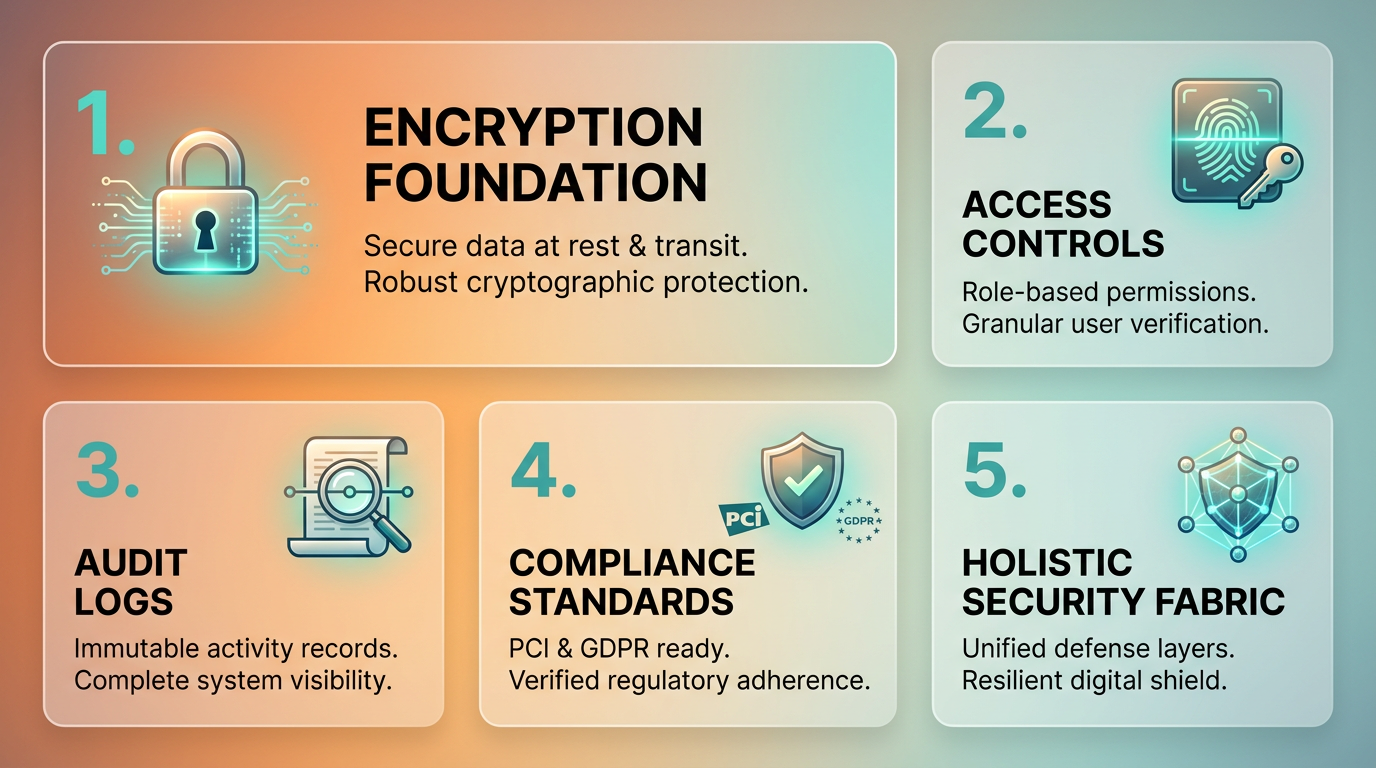
Security and compliance considerations are critical when implementing accounts receivable (AR) automation. Data breaches and fraud pose significant risks, especially since AR systems handle sensitive financial and customer information. For example, unauthorized access to payment records or customer data could lead to identity theft or financial loss. To mitigate these risks, encryption of data at rest and in transit is essential, ensuring that even if data is intercepted, it remains unusable. Access controls, such as role-based permissions and multi-factor authentication, further reduce the likelihood of insider threats or accidental exposure. As mentioned in the Automated Invoice Generation and Delivery section, secure APIs are crucial for protecting data during transmission, reinforcing the need for end-to-end encryption.
What Are Key Security Concerns in AR Automation?
Data breaches and fraud are the primary risks in AR automation systems. A single vulnerability-like unsecured APIs or weak password policies-can expose customer payment details or internal financial records. For instance, a phishing attack targeting AR staff could bypass security measures and grant attackers access to payment databases. Encryption and regular security audits help address these issues, but human error remains a persistent challenge. Training employees to recognize social engineering tactics and enforce strict data handling protocols is equally vital.
Why Is Compliance with Regulations Like GDPR and HIPAA Important?
Regulatory compliance ensures that AR automation systems protect user data legally and ethically. GDPR, for example, mandates strict consent rules and data portability for EU residents, while HIPAA requires healthcare organizations to safeguard patient information. Noncompliance can result in hefty fines-GDPR penalties reach up to 4% of annual global revenue-and reputational damage. A financial services firm in the EU might face scrutiny if its AR software processes customer data without explicit consent or lacks breach notification protocols. Automating compliance checks, like data anonymization and audit trails, helps streamline adherence to these rules.
How Can Businesses Ensure Secure AR Automation?
Adopting best practices like regular software updates, vulnerability assessments, and third-party vendor due diligence strengthens security. For example, multi-factor authentication (MFA) adds a critical layer of protection against unauthorized access. A real-world example is a midsize retail company that integrated AR automation with AI-driven fraud detection, reducing payment disputes by 30% while maintaining full HIPAA compliance. Building on concepts from the Automated Collections and Chase Management section, this system flagged suspicious transactions in real time, such as payments from unfamiliar IP addresses, and automatically triggered manual reviews for high-risk cases.
Case Study: Improved Risk Management Through Secure Automation
A multinational logistics firm implemented AR automation with built-in compliance features, aligning with GDPR and PCI-DSS standards. By centralizing data encryption and automating audit logs, the company reduced breach risks by 45% over two years. The system also generated compliance reports quarterly, saving 200+ hours annually in manual documentation. Risk management improved further with machine learning models that predicted payment delays based on historical data, allowing proactive customer outreach. Building on concepts from the Future of Accounts Receivable Automation section, this case demonstrates how emerging technologies like AI enhance both security and operational efficiency.
Summary Table: Security and Compliance Measures in AR Automation
| Title | Description | Key Features | Pros/Cons |
|---|---|---|---|
| Data Encryption | Protects sensitive information using AES-256 or similar standards | End-to-end encryption, secure APIs | Pros: Strong breach prevention; Cons: May slow processing if not optimized |
| Access Controls | Restricts system access to authorized users based on roles | Role-based permissions, MFA | Pros: Reduces insider threats; Cons: Requires ongoing role management |
| Compliance Automation | Streamlines adherence to GDPR, HIPAA, and PCI-DSS | Automated audit trails, consent tracking | Pros: Saves time; Cons: Customization needed for industry-specific rules |
| Fraud Detection Systems | Uses AI to identify suspicious transactions or payment patterns | Real-time alerts, anomaly detection | Pros: Proactive risk mitigation; Cons: False positives may require manual review |
| Vendor Security Audits | Ensures third-party providers meet security and compliance standards | Regular audits, SLAs with penalties | Pros: Holds partners accountable; Cons: Adds complexity to vendor management |
By prioritizing these measures, businesses can use AR automation while safeguarding data integrity and meeting legal obligations. The balance between innovation and security ensures long-term trust with customers and regulators alike.
Measuring Success and ROI
Measuring the success and ROI of accounts receivable automation requires a clear focus on metrics that reflect efficiency, risk reduction, and financial impact. By tracking payment cycle time, bad debt rates, and Days Sales Outstanding (DSO), businesses can quantify improvements in cash flow and operational performance. Benchmarking these metrics against historical data or industry standards provides context for progress. For example, a SaaS company reduced its DSO by 15 days after automation, directly improving cash velocity and working capital management. Below is a structured approach to evaluating automation success.
What Metrics Should You Track?
Three core metrics define AR automation success: DSO, payment cycle time, and bad debt reduction. DSO measures the average number of days it takes to collect receivables, with lower values indicating faster cash flow. Payment cycle time tracks the duration from invoice issuance to receipt, highlighting efficiency gains from automated reminders and cash application as discussed in the Automated Invoice Generation and Delivery section. Bad debt reduction reflects improvements in risk detection, such as a B2B company cutting overdue invoices by 20% within a quarter using AI-driven collections, as detailed in the Automated Collections and Chase Management section.
| Title | Description | Key Features | Pros/Cons |
|---|---|---|---|
| DSO | Average days to collect receivables | Calculated as (Accounts Receivable / Revenue) x 365 | Pro: Reflects cash flow health. Con: Requires consistent revenue data. |
| Payment Cycle Time | Time from invoice to payment | Tracked via automated workflows and analytics | Pro: Identifies bottlenecks. Con: May vary by customer segment. |
| Bad Debt Reduction | Decrease in uncollectible accounts | Monitored through risk scoring and dispute resolution | Pro: Lowers financial risk. Con: Requires accurate data tracking. |
How Do Benchmarks Shape ROI Calculations?
Baseline measurements are critical for evaluating automation impact. Before automation, a company might have a DSO of 45 days and a 5% bad debt rate. Post-implementation, reducing DSO to 30 days and bad debt to 2% provides measurable ROI. For example, Aberdeen Group’s research found businesses with automated AR experienced 71% fewer past-due invoices and 80% faster payment clearing. These benchmarks let teams compare pre- and post-automation performance, adjusting strategies as needed.
A UK-based SaaS company used this approach, starting with a 40-day DSO and rising late payment rates. After automation, their DSO dropped to 25 days, freeing up $411,000 annually in working capital (calculated as annual revenue of $10M x 15-day reduction / 365). This clear financial gain justified the automation investment.
Best Practices for Sustaining Gains
Automation success demands continuous monitoring. Regularly review metrics like cash forecasting accuracy and customer churn rates to ensure AR systems adapt to changing conditions. Segment customers based on payment behavior, as advised by expert Nicolas Boucher, to prioritize high-risk accounts. Additionally, clean and structure data before automation, as emphasized by Gabi Steele in the Implementation and Integration Considerations section, to maximize AI effectiveness.
For ongoing evaluation, schedule monthly reviews of automation rules and workflows. If a rule fails to reduce disputes or improve payment speed, refine it. The SaaS case study highlights this: after initial DSO gains, they adjusted customer segmentation, further reducing late payments by 10% in six months.
By aligning metrics with strategic goals and adjusting automation tools accordingly, businesses can turn AR efficiency into lasting profitability.
Future of Accounts Receivable Automation
The future of accounts receivable automation hinges on emerging technologies like artificial intelligence (AI) and robotic process automation (RPA), which are redefining how businesses manage cash flow. These tools address longstanding challenges such as manual errors, delayed payments, and inconsistent customer engagement. For example, a retailer lost $2 million in 2020 due to manual invoicing mistakes, a risk AI mitigates by reducing Days Sales Outstanding (DSO) by 10 days through predictive analytics. As automation evolves, companies that embrace these innovations can transform liquidity management while avoiding pitfalls like those faced by Toys ‘R’ Us and Sears, which collapsed partly due to poor receivables oversight. As mentioned in the Why Accounts Receivable Automation Matters section, manual AR tasks are error-prone and costly, making automation a strategic necessity.
How AI and RPA Are Reshaping Receivables Management
AI-driven systems streamline invoicing, collections, and risk analysis by automating repetitive tasks and personalizing customer interactions. Machine learning models identify payment patterns, flagging accounts likely to default, while natural language processing (NLP) extracts data from unstructured documents like contracts. Zendesk’s AI implementation, for instance, cut late payments by 25% for a telecom provider, showcasing automation’s scalability. RPA further enhances efficiency by reducing DSO by up to 20% through invoice processing and payment tracking. Together, these technologies eliminate manual bottlenecks, ensuring faster cash flow and reducing financial losses from errors. Building on concepts from the Automated Invoice Generation and Delivery section, AI’s role in minimizing invoicing errors directly supports these efficiency gains.
Preparing for the Future: Best Practices and Real-World Examples
To stay ahead, companies must prioritize high-impact areas like invoicing and risk analysis while adopting AI tools that align with compliance standards. Regular performance evaluations are critical-Zendesk’s telecom case study proved that AI not only boosts collections but also maintains transparency for regulatory compliance. A forward-thinking business might integrate AI with existing platforms like SAP or Salesforce, using predictive analytics to forecast cash flow gaps. For example, a telecom provider using Zendesk’s AI avoided $500,000 in potential losses by proactively addressing payment delays. As mentioned in the Automated Collections and Chase Management section, such proactive strategies align with automated systems that use predefined rules to monitor and resolve overdue payments.
The Human Element in Automated Systems
While automation reduces manual workloads, human oversight remains vital for nuanced decision-making and customer relationships. Experts stress that AI should complement-not replace-human judgment, particularly in resolving disputes or negotiating payment terms. For instance, AI can flag a high-risk account, but a collections agent might need to engage the client directly to avoid strained relationships. Balancing automation with empathy ensures compliance with consumer protection laws and maintains trust. As AI tools advance, training teams to interpret data and act on insights will be key to long-term success.
| Technology | Description | Key Features | Pros | Cons |
|---|---|---|---|---|
| AI-Driven Receivables | Uses machine learning to automate invoicing, collections, and risk analysis. | Predictive analytics, NLP, customer engagement tools | Reduces DSO by 10 days; minimizes errors | High initial implementation costs |
| Robotic Process Automation | Automates repetitive tasks like invoice processing and payment tracking. | Task automation, integration with ERP systems | Cuts DSO by up to 20%; improves efficiency | Requires system compatibility checks |
| Zendesk AI Implementation | Tailored AI solutions for collections, reducing late payments by 25%. | Customizable workflows, real-time analytics | Proven scalability; enhances customer retention | Limited to specific industry use cases |
By adopting these technologies and strategies, businesses can future-proof their receivables processes while optimizing liquidity. For deeper insights into AI’s role in automation, explore The Essential Guide to Accounts Receivable Automation.
Frequently Asked Questions
1. What are the primary benefits of accounts receivable automation?
Automation reduces processing time by 87% and lowers DSO by 50% for 85% of businesses. It minimizes errors, accelerates cash flow, and saves teams 40% of their time for strategic work.
2. How does AR automation reduce Days Sales Outstanding (DSO)?
Automated reminders and real-time analytics cut DSO by up to 50%. A SaaS company reduced its DSO by 15 days using automation, improving cash flow and reducing late payments.
3. What challenges do manual AR processes create for small businesses?
Manual AR delays payments by 23 days for small businesses handling 20,000+ invoices monthly. It increases error rates, causes disputes, and costs 40% more time than automated systems.
4. How does automation minimize errors in accounts receivable?
Automation reduces manual data entry errors by 80%, preventing disputes and cash flow delays. For example, SAP Taulia reports teams save 40% of their time by avoiding manual invoice processing.
5. What risks do manual Direct Debit processes pose?
Manual oversight in the UK increases Direct Debit failure rates by 6% annually, costing businesses £1.1 billion in fraud losses. Automation tracks failures in real time, reducing financial risks.
6. Can AR automation improve customer relationships?
Yes. Faster invoicing and automated payment reminders (as seen in EnterMyInvoice’s Oil & Gas case study) reduce delays, disputes, and frustration, strengthening trust and collaboration.
7. How much time do teams save with AR automation?
Teams save 40% of their time by shifting from manual invoice processing to automation, allowing focus on strategic tasks like financial planning and customer engagement.