

Automated vs Manual Accounts Receivable Processing

Key Takeaways
- 94% of U.S. businesses use manual AR processing, causing compliance risks, delayed cash flow, and operational inefficiencies.
- Manual AR errors average 20%, leading to a 35-day payment delay and 200 incorrect invoices monthly for a mid-sized company.
- Manual systems scale poorly, requiring staff doubling for 50% more invoices, while automation handles surges with minimal resource growth.
- Automation reduces payment delays by streamlining invoice processing, improving cash flow visibility and collections speed.
- Manual methods incur linear cost increases with invoice volume, unlike automated workflows that maintain efficiency during growth.
- Automated AR minimizes repetitive tasks like spreadsheet tracking, freeing finance teams for strategic work.
- Case studies show automation cuts manual processing time, reducing errors and accelerating payment posting for faster collections.
Related Video
Watch: Accounts Receivable Automation Explained by NetSuite
Why Automated Accounts Receivable Processing Matters
What Challenges Does Manual Accounts Receivable Processing Create?
Manual AR processing is a bottleneck for cash flow and operational efficiency. 94% of U.S. businesses still rely on manual methods, leading to missed follow-ups, slow payment posting, and rising compliance risks. As mentioned in the Manual Accounts Receivable Processing: Common Pain Points section, these inefficiencies delay cash flow visibility, forcing finance teams to spend hours on repetitive tasks like spreadsheet tracking and manual reconciliation. The result? Higher operational costs, delayed collections, and a reactive approach to customer accounts.
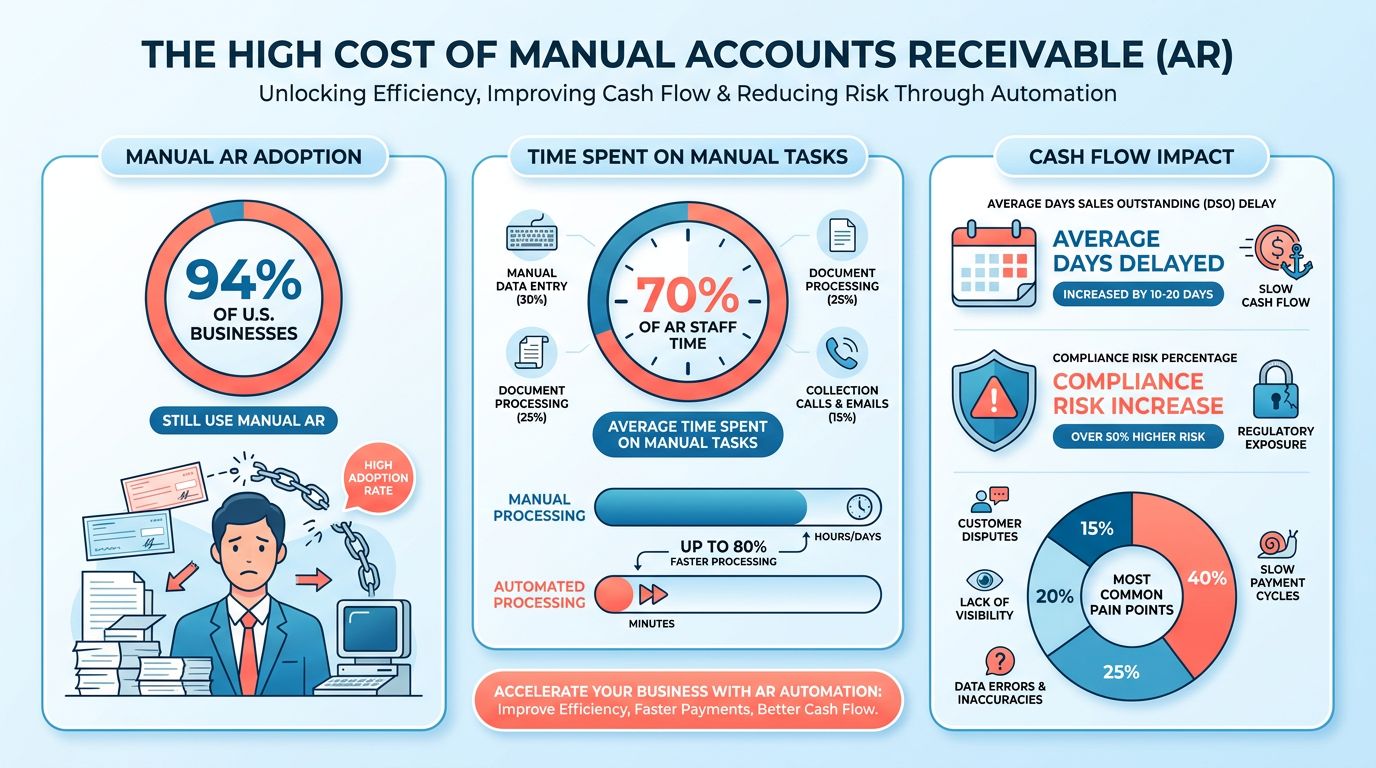
Consider a mid-sized company using manual AR: If it processes 1,000 invoices monthly, 20% errors (or 200 incorrect invoices) could delay payments by weeks. This creates a 35-day average delay between invoicing and payment receipt, according to industry data. Manual systems also scale poorly-adding 50% more invoices might require doubling staff, increasing costs linearly. In contrast, automated workflows handle volume surges with minimal resource growth, as seen in Billtrust’s case studies, where businesses reduced manual processing time by 50%.
How Does Automation Improve Efficiency and Accuracy?
Automation tackles manual errors and accelerates cash flow. 62% of businesses report improved Days Sales Outstanding (DSO) after automating AR, with Paystand users cutting DSO by up to 30%. As detailed in the Automated Accounts Receivable Processing: Core Capabilities section, automated systems use AI and rules-based triggers to send timely payment reminders, reconcile transactions instantly, and flag discrepancies. For instance, HighRadius’s AI-driven platform reduced Coca-Cola Bottlers’ DSO to 34 days, recovering $33.4 million in claims automatically.
Real-time visibility is another win. Automated platforms provide dashboards showing outstanding invoices, payment trends, and aging reports, enabling proactive decision-making. Building on concepts from the Accelerating the Credit-to-Cash Cycle section, a retail chain using Billtrust’s solution, for example, reduced late payments by 30% through predictive analytics and self-service portals. Customers benefit too-24/7 access to payment portals and multiple payment options (ACH, card, etc.) improve satisfaction, as noted in Blixo’s comparison of manual vs. automated systems.
Who Benefits Most from Automated AR?
Both small businesses and enterprises gain value from automation, though priorities differ. Small businesses with limited staff reduce costs by automating tasks like invoicing and follow-ups. A study by NetSuite found that SMBs using AR automation cut processing costs by 40–60%, while HighRadius reported a 383% ROI for clients like Konica Minolta, as highlighted in the Cost Savings and Efficiency Gains section. Enterprises, meanwhile, use automation for scalability and compliance. Pagero highlights that 62% of companies with automated systems improved DSO, critical for managing large portfolios. For example, L’Oréal reduced credit risk by $57 million through automated cash application tools.
Compliance is another universal benefit. Automated systems enforce rules like Fair Debt Collection Practices Act (FDCPA) guidelines, ensuring consistent contact timing and audit trails. This is vital for industries like healthcare or finance, where noncompliance risks penalties. Blixo’s technical details show how automation integrates with ERPs like NetSuite, streamlining data flow and reducing errors from manual entry.
Key Comparison: Manual vs. Automated AR
| Feature | Manual AR | Automated AR |
|---|---|---|
| Processing Time | Hours per invoice, prone to delays | Seconds for invoice creation/reminders |
| Error Rate | 20%+ due to manual input | <2% with AI reconciliation |
| DSO Impact | 35+ days average | 25–30 days with automation |
| Scalability | Linear cost growth with volume | Volume-based scaling, 10–20% staff increase for 50% growth |
| Customer Experience | Limited payment options | 24/7 self-service portals, multichannel support |
| Compliance Risk | High due to manual enforcement | Built-in controls, audit trails |
In practical terms, a 100-employee business switching to automation could reduce its AR team from five to two, redirecting staff to strategic tasks like credit risk analysis. As one CFO noted, “Automation changed how our team works-agents now focus on complex accounts instead of chasing payments.” This shift not only lowers costs but also improves cash flow forecasting, a critical advantage in volatile markets. With 62% of organizations planning to upgrade AR tech in 2024, automation isn’t just efficient-it’s a strategic necessity.
Manual Accounts Receivable Processing: Common Pain Points
Manual accounts receivable (AR) processes create significant hurdles for businesses, from delayed cash flow to strained customer relationships. While automation offers a solution, understanding the limitations of manual systems is critical for evaluating their impact. Below, we break down the core pain points and how they affect financial operations..
How Manual Data Entry Errors Impact Cash Flow?
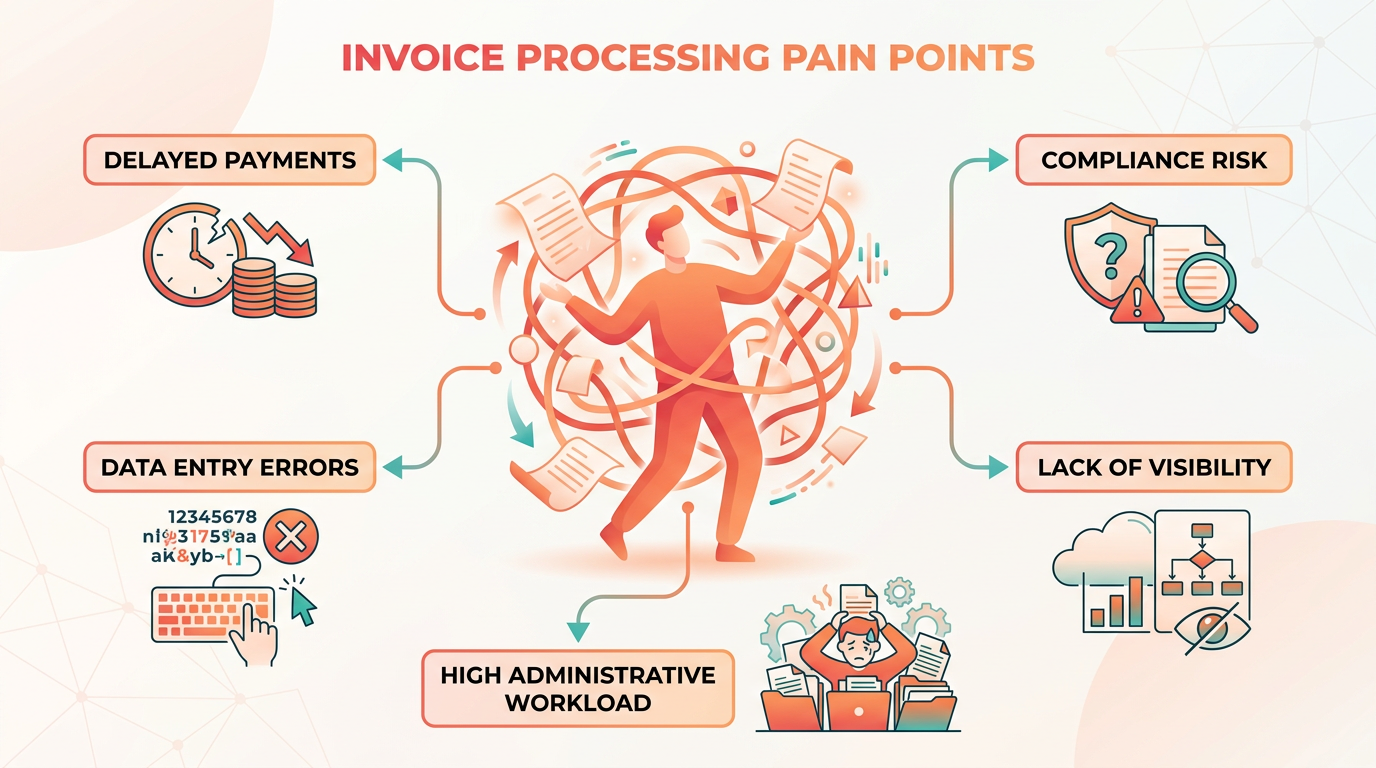
Manual data entry is a major source of inefficiency. Human errors during invoice creation, payment recording, or reconciliation can lead to discrepancies that delay collections. For example, a misplaced decimal in an invoice amount might trigger disputes or late fees, lengthening the Days Sales Outstanding (DSO). According to Pagero, 52% of CFOs at highly automated firms report fewer invoicing errors compared to manual systems. These mistakes not only slow cash flow but also damage customer trust when bills are inconsistent or unclear. As mentioned in the Why Automated Accounts Receivable Processing Matters section, automation directly addresses these inaccuracies by minimizing human intervention..
Why Invoice and Payment Tracking Are Time-Consuming?
Sending invoices and tracking payments manually requires constant administrative effort. Teams often juggle spreadsheets, emails, and physical documents to monitor who owes what and when. Paystand highlights that businesses using automation reduce manual processing time by up to 50%, freeing staff for strategic tasks. Without automation, finance teams risk missing payment deadlines or overlooking late fees, which can compound into larger cash flow gaps. For instance, a business with 100 invoices might spend 20+ hours monthly just reconciling payments-a task prone to oversights when done manually..
What Makes Managing Multiple Payment Channels Difficult?
Customers use diverse payment methods, from credit cards to bank transfers, but manual systems lack the tools to track these seamlessly. Billtrust notes that reconciling payments across channels becomes error-prone as teams must manually match transactions to invoices. A $500 payment sent via ACH might be misallocated if the finance team misses a decimal point or misrecords the method. Automated platforms streamline this by integrating with omnichannel systems, as outlined in the Automated Accounts Receivable Processing: Core Capabilities section, but manual processes force teams into a fragmented, reactive approach..
How Poor Communication Delays Payments?
Following up on overdue invoices often relies on reactive phone calls or emails, which are slow and inconsistent. Manual systems lack automated reminders, so teams might forget to chase late payments or send reminders too late. NetSuite’s video example shows how automation schedules follow-ups immediately after deadlines, whereas manual workflows depend on human memory. This delay increases DSO and risks customer dissatisfaction, as clients may not even realize they’re past due..
Why Visibility Into Cash Flow Is Limited?
Without real-time data, forecasting cash flow becomes a guessing game. Manual AR processes don’t provide up-to-date insights into payment status, making it hard to plan expenses or identify bottlenecks. Paystand emphasizes that automated systems offer real-time visibility, reducing DSO by enabling timely collections. For example, a business using manual tracking might not notice a $10,000 overdue invoice until it’s 60 days late, whereas automation flags it the moment it’s past due..
Real-World Consequences of Manual Limitations
Consider a mid-sized company handling 500 monthly invoices. With manual processes, staff might spend 50 hours a month on data entry alone, with a 5% error rate (25 invoices with mistakes). Resolving these errors adds another 20 hours, while missed payments due to poor tracking could cost $10,000 in delayed cash flow monthly. This scenario highlights how manual systems strain resources and reduce agility-problems automation directly addresses. The Cost Savings and Efficiency Gains section further explores how automation reduces labor costs and accelerates payment cycles, offering a clear contrast to manual inefficiencies.
Automated Accounts Receivable Processing: Core Capabilities
Automated accounts receivable (AR) processing systems streamline financial workflows by replacing manual tasks with intelligent, rule-based operations. These systems reduce errors, accelerate cash flow, and improve customer experiences through features like automated invoicing, real-time tracking, and seamless integrations. Below, we break down the core capabilities that define modern automated AR platforms.

What Makes Automated Invoice Generation Efficient?
Automated systems eliminate the need for manual invoice creation by generating and sending invoices directly from sales orders or contracts. Customized templates allow businesses to apply branding, logos, and unique formatting to align with corporate identity. For example, Paystand’s platform generates invoices in seconds using predefined rules, reducing processing time by up to 50%. Integration with ERP systems like NetSuite or SAP ensures invoices are accurate and consistent with source data. Automated workflows also handle recurring billing, subscription invoicing, and multi-currency transactions, which manual processes struggle to manage efficiently.
Advanced platforms like Billtrust and HighRadius use AI-driven tools to automate complex invoicing scenarios. HighRadius, for instance, use over 60 AI agents to process invoices across channels, including email, EDI, and AP portals. This reduces Days Sales Outstanding (DSO) by 10% on average and cuts past-due accounts by 20%. Example: Coca-Cola Bottlers automated claim downloads and validity predictions with HighRadius, recovering $33.4 million in 34 days. As mentioned in the Manual Accounts Receivable Processing: Common Pain Points section, manual methods often lack the precision and scalability needed for such high-volume operations.
How Does Real-Time Payment Tracking Improve Cash Flow?
Automated AR systems provide real-time visibility into payment statuses, outstanding invoices, and cash flow forecasts. Unlike manual methods, which rely on static spreadsheets and delayed updates, these systems update dynamically as transactions occur. Paystand highlights that real-time tracking reduces DSO by enabling teams to identify bottlenecks and prioritize collections. Blixo’s comparison table shows automated systems offer centralized dashboards with instant performance metrics, while manual processes rely on fragmented data.
Real-time analytics also support predictive forecasting. By analyzing historical payment patterns, platforms like Billtrust generate cash flow projections, helping finance teams allocate resources effectively. Pagero reports that 62% of businesses see improved DSO after automation, with 52% of CFOs noting fewer invoicing errors. Building on concepts from the Cost Savings and Efficiency Gains section, automated systems reduce the labor-intensive nature of tracking and reconciling payments, directly contributing to cost reductions.
Why Are Automated Reminders and Integrations Critical?
Automated reminders ensure timely collections by sending personalized notifications via email, SMS, or phone based on predefined rules. Blixo’s SaaS service, for example, uses rules-based triggers to escalate follow-ups for overdue invoices, reducing missed follow-ups by 94%. Self-service portals further empower customers to view balances, set up payment plans, or make instant payments 24/7-cutting call center volume by up to 40%.
Integration with accounting and ERP systems is another cornerstone. Platforms like Paystand and HighRadius connect seamlessly with NetSuite, Oracle, and SAP, enabling automatic data synchronization. This eliminates duplicate data entry and ensures reconciliation is accurate and instant. UiPath’s implementation in SAP ERP systems reduced reconciliation exceptions by 61%, while matching accuracy improved by 49%. As discussed in the Implementing Automated Accounts Receivable Processing: Best Practices section, successful integration requires careful alignment with existing workflows to maximize efficiency.
What Advanced Reporting Features Do Automated Systems Offer?
Automated AR platforms provide customizable dashboards and data visualizations to track key metrics like DSO, payment trends, and aging reports. Billtrust’s system uses machine learning to identify anomalies in payment patterns, flagging potential fraud or errors. HighRadius’ 60 AI agents analyze data to optimize collections strategies, with clients like L’Oréal achieving a 96% cash application success rate.
For SMBs, automation tools like ExFlow (integrated with Dynamics 365) streamline reporting by consolidating data from multiple sources into a single interface. This reduces processing costs by 40–60% compared to manual methods, according to Aberdeen Group research. The Measuring ROI of Automated Accounts Receivable Processing section provides further insights into how these metrics translate to tangible financial benefits.
Final Considerations
Automated AR systems deliver measurable benefits over manual processes, including faster collections, reduced errors, and enhanced scalability. However, success depends on selecting a platform that aligns with specific business needs-whether it’s AI-driven analytics, ERP integration, or customer-centric self-service tools. By automating repetitive tasks, finance teams can shift focus from transactional work to strategic decision-making, ensuring long-term financial agility.
Accelerating the Credit-to-Cash Cycle
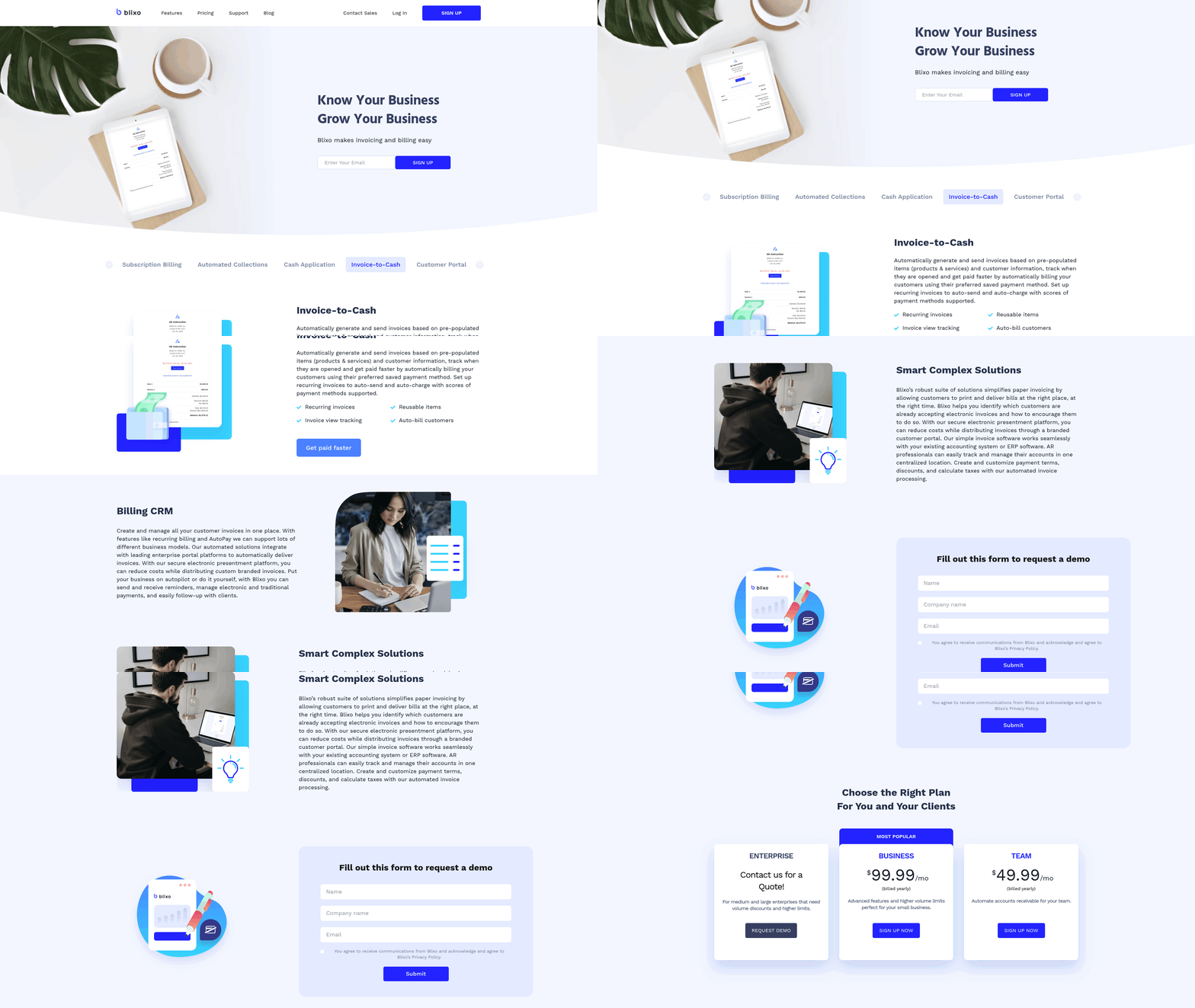
Automated accounts receivable (AR) processing transforms the credit-to-cash cycle by accelerating payment cycles, improving visibility, and reducing operational friction. Unlike manual systems, which rely on disjointed spreadsheets and inconsistent follow-ups, automation streamlines invoicing, payment tracking, and reconciliation. As mentioned in the Why Automated Accounts Receivable Processing Matters section, this shift addresses critical pain points like delayed cash flow and operational inefficiencies. For example, businesses using Paystand’s automation reported a 30% increase in on-time payments, while HighRadius customers saw a 10% reduction in Days Sales Outstanding (DSO). These improvements directly enhance cash flow and reduce the risk of late or failed payments, building on concepts from the Cost Savings and Efficiency Gains section where automation’s impact on processing time and labor costs is detailed.
Cost Savings and Efficiency Gains
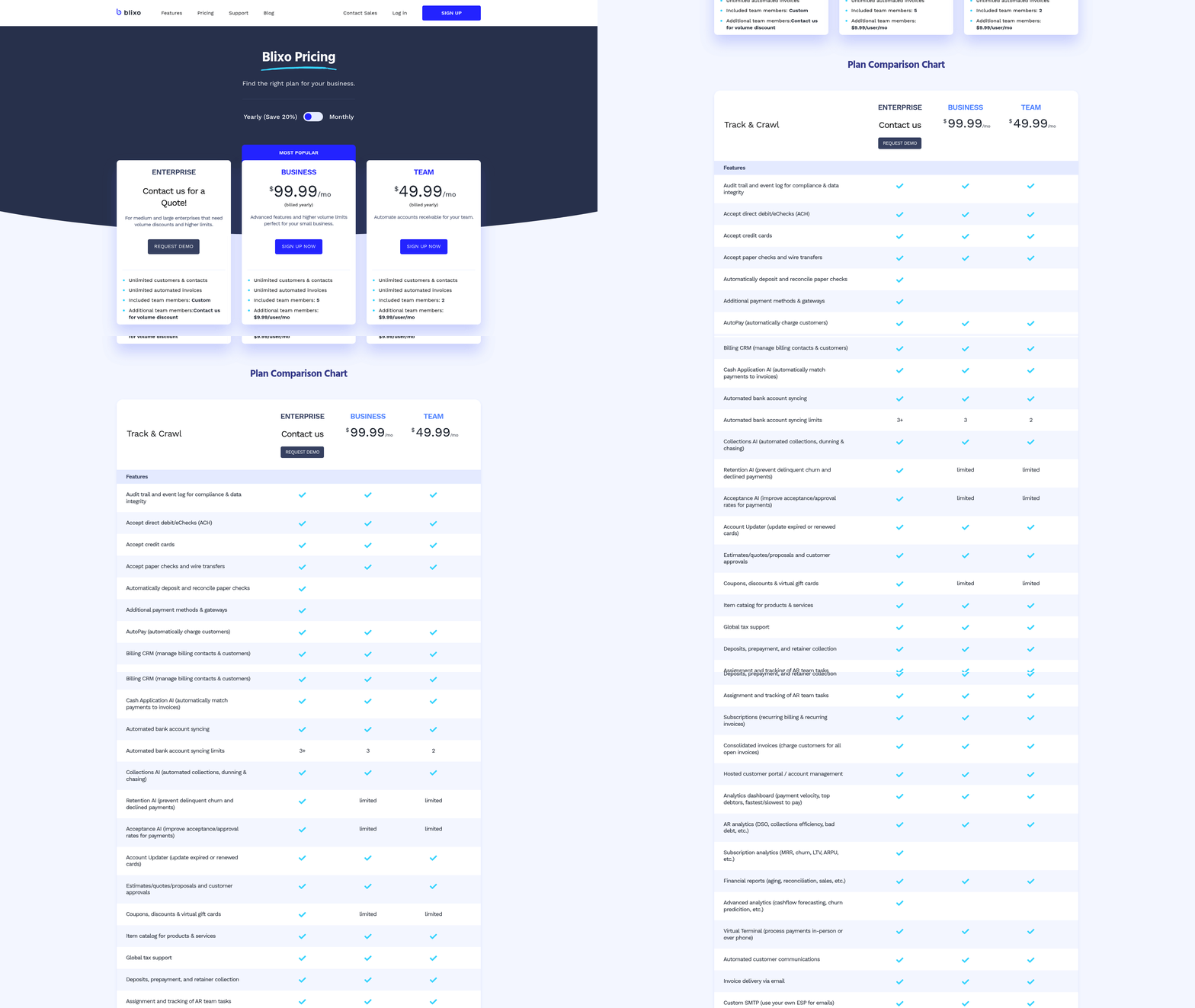
Automated accounts receivable systems reduce manual labor by up to 50% while shortening processing times significantly. Manual AR tasks like data entry, follow-ups, and reconciliation demand hours of repetitive work, but automation replaces these with workflows that run 24/7 without human intervention. As mentioned in the Manual Accounts Receivable Processing: Common Pain Points section, these manual processes create bottlenecks that slow cash flow and strain teams. For example, Paystand’s platform cuts manual processing time in half, allowing finance teams to reallocate resources to higher-value tasks. This shift not only lowers payroll expenses but also accelerates invoice-to-cash cycles, reducing the need for overtime or additional staff during peak periods.
| Task | Manual AR | Automated AR |
|---|---|---|
| Invoice Processing | Hours per invoice due to manual entry | Seconds per invoice with automatic data capture |
| Payment Reconciliation | Days to match payments to invoices | Real-time reconciliation via AI |
| Follow-ups | Disorganized, agent-dependent reminders | Rules-based, scheduled reminders |
Automation slashes errors and disputes by up to 52%, directly reducing rework costs and improving customer trust. Building on concepts from the Automated Accounts Receivable Processing: Core Capabilities section, AI-driven validation ensures invoice accuracy, flagging discrepancies before they escalate. For instance, HighRadius’s platform employs 60 AI agents to catch errors during invoice creation, cutting dispute resolution time by 34 days. Fewer errors mean fewer calls to resolve issues, saving an estimated $29.83 per invoice in processing costs compared to manual methods.
By reducing Days Sales Outstanding (DSO) by 10–30%, automation ensures businesses collect payments faster, boosting liquidity and reducing reliance on costly loans. This aligns with insights from the Accelerating the Credit-to-Cash Cycle section, where streamlined workflows shorten payment cycles. A 30% increase in on-time payments reported by Paystand users directly correlates with shorter DSO metrics. For example, Coca-Cola Bottlers recovered $33.4 million in delayed payments within 34 days using automated workflows. This accelerated cash flow allows companies to avoid interest fees from short-term financing, with some organizations reporting $1.3 million in annual interest savings from streamlined collections.
Manual AR processes contribute to employee burnout and higher turnover, while automation fosters productivity and job satisfaction. As detailed in the Manual Accounts Receivable Processing: Common Pain Points section, repetitive tasks trap finance teams in low-skill work, whereas automation shifts their focus to strategic problem-solving. Blixo’s analysis shows that automated systems enable agents to handle 50% more accounts with the same staff, reducing workload stress. At HighRadius, clients like Konica Minolta reported a 383% ROI within six months, partly driven by improved employee retention and efficiency gains.
Businesses adopting automation see tangible results. Building on the metrics from the Measuring ROI of Automated Accounts Receivable Processing section, case studies like Lyra Communications Group’s six-day reduction in billing time and UiPath’s 3.8-day cut in AR closing times demonstrate scalability. These examples highlight how automation isn’t just a cost-saving tool-it’s a strategic upgrade that aligns with modern financial demands.
Implementing Automated Accounts Receivable Processing: Best Practices
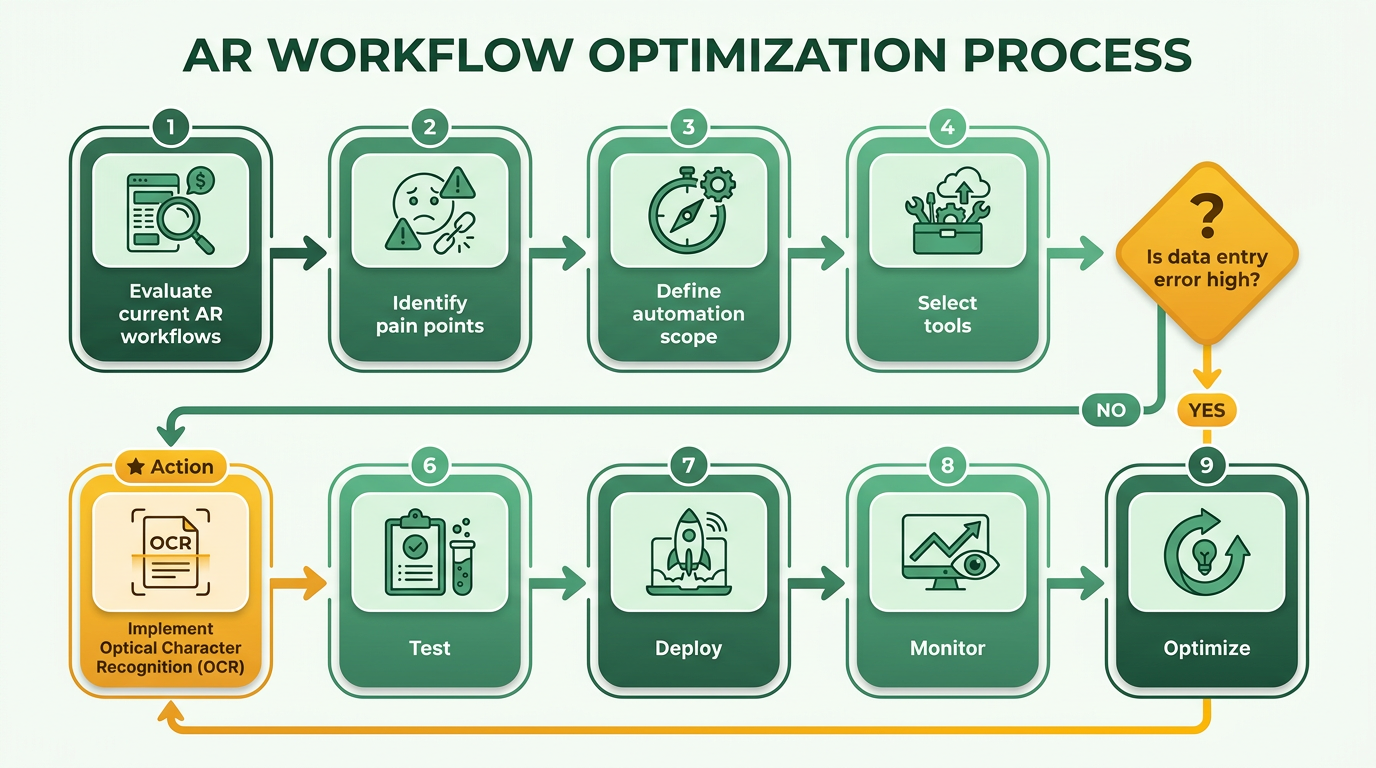
Implementing automated accounts receivable (AR) processing requires a structured approach to maximize efficiency and minimize disruptions. Start by evaluating your current AR workflows to pinpoint pain points like manual data entry, delayed payments, or reconciliation errors. As mentioned in the What Challenges Does Manual Accounts Receivable Processing Create? section, 81% of businesses reported increased delayed payments in 2023, highlighting the urgency of automation. Use tools like process mapping to identify bottlenecks and quantify inefficiencies. A branded payment portal or collections automation can address these gaps, as seen in Paystand’s case study, where processing time dropped by 50% after implementation.
Assessing Current Processes and Identifying Improvements
Begin by documenting every step of your AR cycle, from invoice creation to payment reconciliation. Look for tasks that consume excessive time, such as manual invoice matching or chasing late payments. Paystand’s data shows that automated workflows reduce Days Sales Outstanding (DSO) by accelerating payment timelines. For instance, companies using Paystand’s platform reported a 30% rise in on-time payments. Similarly, UiPath’s integration with SAP ERP reduced AR closing time by 3.8 days per cycle.
A comparison of manual vs. automated metrics reveals stark differences:
| Metric | Manual Processes | Automated Processes |
|---|---|---|
| Invoice Processing Time | 5–7 days | 24–48 hours |
| Error Rate | 15–20% | 2–5% |
| DSO (Days Sales Outstanding) | 45+ days | 25–30 days (avg. 32% improvement) |
Prioritize automation for high-volume tasks. For example, if 70% of your invoices require manual reconciliation, automate this step using AI-driven tools like Billtrust’s platform, which achieves 95%+ match rates.
Selecting and Configuring the Right System
When choosing software, focus on integration capabilities and scalability. Systems like ExFlow, natively embedded in Dynamics 365, ensure real-time data consistency, while Rev.io offers customization for diverse billing needs. Evaluate vendors based on:
- Integration: Compatibility with ERPs like NetSuite, Sage, or SAP.
- Automation Features: Self-service portals, AI for cash application, and dunning management.
- Vendor Support: Training resources and case studies (e.g., Billtrust’s 189.5% higher e-invoicing adoption rate among best-in-class users).
Configuration should align with your workflows. UiPath’s bots, for instance, automate transaction matching and flag credit holds via SAP status reports. Customization options-like tailored payment reminders-address niche requirements, as seen in Lyra Communications’ use of Rev.io.
Training and Performance Monitoring
Employee adoption hinges on clear training programs. Start with role-based workshops: finance teams need deep technical training, while sales teams benefit from customer portal demos. Billtrust’s case studies emphasize phased rollouts to ease transitions, paired with ongoing support.
Post-implementation, track metrics like matching accuracy (UiPath improved this by 49%) and DSO. Compare your performance against benchmarks: 62% of organizations plan to upgrade AR systems in 2024, aiming for the 32% DSO reduction seen in fully automated setups. As discussed in the Measuring ROI of Automated Accounts Receivable Processing section, use dashboards for real-time visibility into payment trends, as Paystand’s experts recommend.
Regular reviews ensure sustained success. SMBs, for example, can use automated e-invoicing to cut AP/AR costs from $29.83 to $2.00 per invoice. Revisit workflows quarterly to adapt to new challenges, like rising delayed payments, and refine automation rules accordingly.
By following these steps, businesses can transform AR from a reactive task to a strategic asset, boosting cash flow and customer satisfaction without overhauling their entire financial framework.
Measuring ROI of Automated Accounts Receivable Processing
Measuring the return on investment (ROI) of automated accounts receivable (AR) processing requires a structured approach that combines key performance indicators (KPIs), industry benchmarks, and real-time analytics. Automated systems streamline workflows, reduce errors, and accelerate cash flow, but quantifying these benefits demands clear metrics and consistent evaluation. Building on concepts from the Why Automated Accounts Receivable Processing Matters section, automation addresses systemic inefficiencies by aligning AR workflows with strategic financial goals.
What KPIs Should You Track for AR Automation?
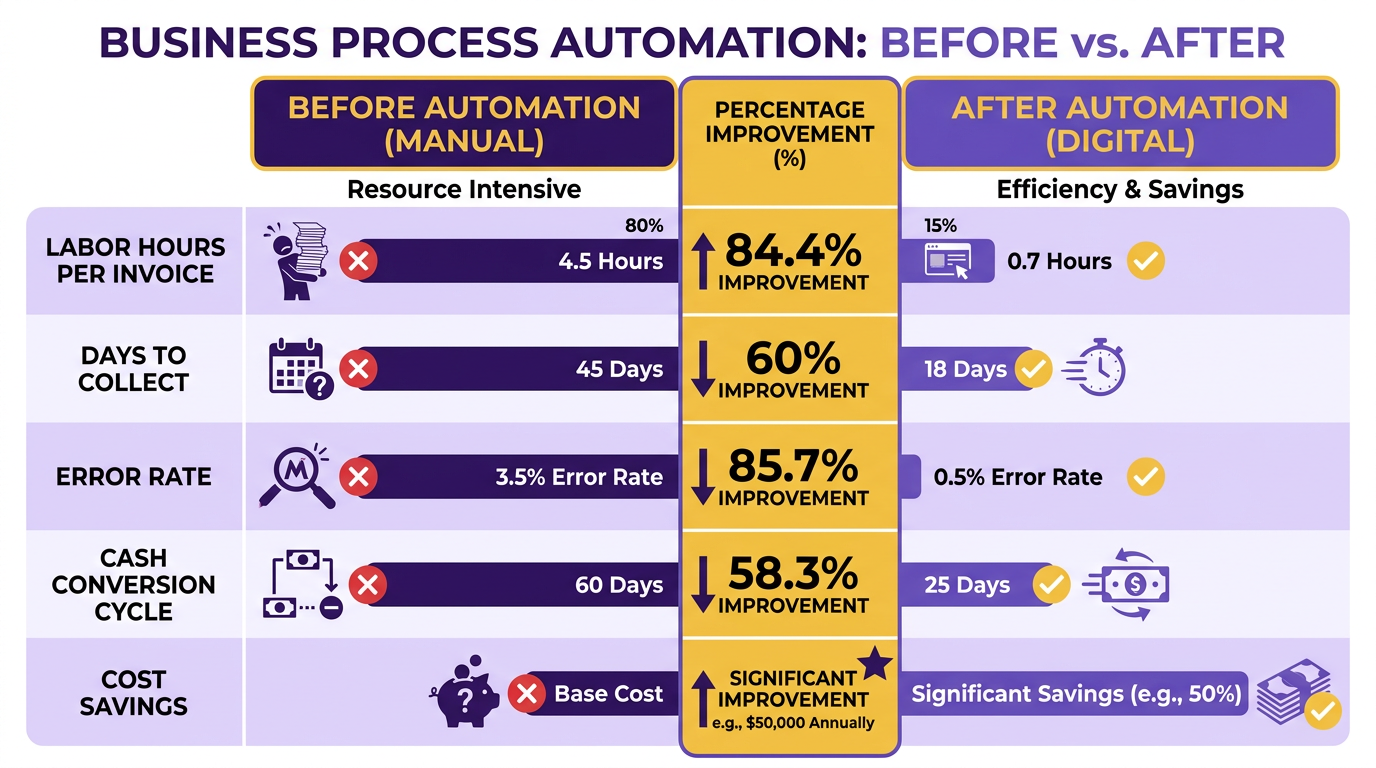
To measure ROI effectively, focus on three core KPIs: Days Sales Outstanding (DSO), cash flow velocity, and error rates. DSO calculates the average number of days it takes to collect receivables. Manual systems often report a DSO of 35 days, while automation can reduce this by up to 32% for businesses automating more than 50% of their AR processes. As mentioned in the Manual Accounts Receivable Processing: Common Pain Points section, such delays directly correlate with operational bottlenecks like delayed cash flow and strained customer relationships. Cash flow improvements stem from faster collections-81% of businesses reported increased delayed payments in 2023, but automation reduces this risk by enabling timely invoicing and reminders. Error rates also drop significantly: 77% of AR teams fell behind on metrics manually, but automation minimizes human errors in data entry and payment tracking.
How Do You Establish Baseline Metrics and Benchmarks?
Before implementing automation, establish a baseline using industry averages. For example, 55% of invoices are typically paid late, and 9% of credit-based sales result in bad debt. SMBs can reference data like $29.83 per invoice for manual processing, which drops to $2.00 with automation. Best practices include comparing your current DSO, payment accuracy, and staffing costs against these benchmarks. Mercury Air Group, for instance, reduced billing time by six days using DocuWare, improving cash flow by aligning with industry efficiency standards.
| Metric | Manual Average | Automated Average |
|---|---|---|
| DSO | 35 days | 24 days (–31%) |
| Invoice Error Rate | 8–12% | 2–3% |
| AP/AR Processing Cost | $29.83/invoice | $2.00/invoice |
How Do You Calculate ROI and Payback Period?
ROI calculations compare cost savings and efficiency gains to implementation expenses. For example, if automation reduces 1,000 invoices’ processing cost from $29.83 to $2.00 per invoice, annual savings would be $27,830. Building on concepts from the **Cost Savings and Efficiency Gains** section, adding efficiency gains like faster collections freeing up capital further enhances ROI. Subtract initial software and training costs. A $50,000 automation tool with $27,830 annual savings yields a payback period of ~1.8 years. SMBs often see 40–60% cost reductions, with payback periods shortening as volume increases.
Why Is Continuous Monitoring Essential?
Automation isn’t a one-time fix. Regularly track metrics like DSO, error rates, and customer satisfaction to ensure sustained performance. For example, Lyra Communications Group continuously monitored its AR workflows post-automation, maintaining a 15% improvement in cash flow. Use dashboards for real-time visibility into payment trends, and benchmark quarterly against updated industry standards. If DSO rises above 30 days, investigate bottlenecks like delayed customer payments or system integration issues. By combining these strategies, businesses can quantify automation’s impact while adapting to evolving financial demands. Regular reviews ensure long-term gains without falling into the 77% of teams that neglect AR metrics manually.
Frequently Asked Questions
1. What are the biggest risks of manual accounts receivable processing?
Manual AR processing causes compliance risks, delayed cash flow, and operational inefficiencies. It results in 20% error rates, 35-day payment delays, and 200 incorrect invoices monthly for mid-sized businesses.
2. How does automation improve cash flow visibility?
Automation streamlines invoice processing, reducing payment delays by accelerating posting and collections. It cuts 35-day delays in half for some businesses, ensuring faster cash flow tracking.
3. What cost differences exist between manual and automated systems?
Manual systems incur linear cost increases with invoice volume. Automation maintains efficiency during growth, handling 50% more invoices with minimal resource growth.
4. How does automation reduce staffing needs during growth?
Manual AR requires doubling staff for 50% more invoices. Automation scales efficiently, handling surges without proportional staff increases, as seen in Billtrust case studies.
5. What error reduction benefits does automation offer?
Automation reduces manual AR errors from 20% to near-zero, eliminating 200 incorrect invoices monthly for mid-sized companies and minimizing payment disputes.
6. How does automation impact finance team productivity?
Automation frees teams from repetitive tasks like spreadsheet tracking, allowing 50% time savings for strategic work, as demonstrated in NetSuite’s case studies.
7. What real-world results have companies achieved with automation?
Businesses using automation report 50% faster manual processing time, 35-day payment delay reductions, and improved collections speed, as highlighted in Billtrust and NetSuite examples.