

The Five Handoffs That Determine Whether AR Automation Actually Cuts DSO

Key Takeaways
- AR automation isn’t one switch. It’s five separate handoffs, and a stall at any one erases the speed you won elsewhere.
- The gap between subscription billing and cash application does the most damage. It piles days onto DSO even when everything else runs clean.
- Automated invoice delivery with open tracking can lead to fewer past-due invoices, and it’s low-effort to set up.
- Self-service payment portals with saved methods speed collection, replacing manual chasing per account.
- AI cash-application matching via bank webhooks removes multi-day reconciliation lag, but it’s the hardest handoff to automate.
- A manual invoice runs 8–12 minutes each. Automated recurring generation from subscription data cuts issue lag to near-zero.
Quick Summary
Most SaaS teams treat accounts receivable automation as one big switch. It isn’t. DSO stays high because the work breaks into five separate handoffs, and a stall at any one of them undoes the speed you gained elsewhere.
The handoff that does the most damage sits between subscription billing and cash application. Your billing engine fires an invoice, payment lands in the bank, and then someone spends their morning matching that deposit back to the right customer. That lag is where days pile onto your DSO even when everything else runs clean.
The goal is keeping your collection cycle well below industry benchmarks. You get there by shaving time off each handoff, not by chasing a single silver bullet.
The five handoffs that actually move DSO
Here’s the one-page view for a mid-size SaaS firm. Each handoff carries a rough manual-effort estimate per invoice, the automation lever, and how hard it is to pull off.
| Handoff | Current manual effort | Automation option | Difficulty | Expected DSO impact |
|---|---|---|---|---|
| 1. Invoice generation | 8–12 min/invoice | Recurring auto-generation from subscription data | Low | Cuts issue lag to near-zero |
| 2. Invoice delivery | 3–5 min/invoice | Auto-send + open tracking | Low | Fewer past-due invoices |
| 3. Payment collection | 15+ min/account chasing | Self-service portal + saved payment methods | Medium | Faster payment speed |
| 4. Cash application | 10–20 min/payment | AI matching via bank webhooks | High | Removes multi-day reconciliation lag |
| 5. Dunning/follow-up | 20+ min/delinquent account | Automated reminders (email, SMS, letters) | Medium | Shrinks aging buckets |
Handoffs 1 and 2 are low difficulty because they run off data you already hold. Handoff 4 is high because matching partial payments and consolidated remittances is where naive automation breaks.
What to track before and after
Set a baseline across three metrics to prove the change is real, not vibes. DSO tells you headline speed. Collection rate shows whether you’re recovering what you bill. Cash-application accuracy confirms the billing-to-cash handoff isn’t creating cleanup work downstream.
Watch accuracy closely. If your match rate drops, the time you saved on application reappears as manual exception handling. This is where an intelligent matching engine earns its keep. Blixo’s cash application AI matches payments and balances to invoices at the envelope and item level from multiple sources, and it gets smarter as you edit matches. A tight handoff chain is what keeps reconciliation from becoming rework.
Quick-win checklist
Start with the low-difficulty handoffs. They pay back fastest and build momentum for the harder cash-application work.
- Enable auto-send invoices straight from your subscription data so issue-to-delivery drops to minutes.
- Turn on invoice open tracking to know who saw the bill before you chase them.
- Set up a self-service portal so customers pay every open invoice in one click.
- Connect payment-gateway webhooks so incoming payments trigger matching automatically.
- Configure automated dunning across email and SMS for past-due accounts.
- Map your own five handoffs in a spreadsheet, logging current minutes-per-invoice at each step.
Skip aggressive automation on handoff 4 if your remittance data is messy. Clean the inputs first, or the matching engine learns the wrong patterns. Build your workflow map before touching any tooling. You can’t fix a lag you haven’t measured.
Why the five handoffs matter for cutting DSO
Every extra day a receivable sits open costs you real money. That’s why we obsess over the five handoffs in accounts receivable automation. DSO isn’t one number you fix once. It’s the sum of friction at five separate transfer points, and the slowest one drags the rest down with it.
For SaaS teams, this matters more than most industries admit. SaaS DSO tends to run lower than manufacturing. Every day above your target ties up cash you could spend on payroll, product, or growth. When each handoff adds its own lag, those days compound fast.
Why fragmented AR inflates DSO
Order-to-cash leakage happens whenever work passes between two systems that don’t talk to each other. Each manual transfer adds delay and error, and both push DSO up.
The worst failure point is the jump from your billing system to the bank ledger. When those live in silos, payments sit unallocated while someone verifies bank statements against open invoices by hand. That administrative delay repeats every billing cycle, quietly inflating your outstanding receivables.
The everyday version: your team updates a payment in one system, then manually updates the customer’s invoice status in another. Two systems, one manual bridge, days lost every cycle. That’s the whole problem in one sentence.
What fixing the handoffs actually delivers
Close these gaps and you get results you can point to on a dashboard. Take dispute handling. Teams that route disputes through a connected system instead of email threads resolve them faster, and every day shaved off a dispute is a day off your DSO. When customers can pay themselves through a portal, speed follows.
The pattern holds across AR teams that connect their handoffs: higher portal adoption and faster payment once customers can view and settle every open invoice in one place. When finance stops rekeying deposits and cash application matches payments automatically, the days you were losing to manual bridges come straight off your DSO.
Here’s what each stakeholder gets when the handoffs connect cleanly:
- Finance teams stop reconciling deposits by hand and close the books faster, since cash application matches payments to invoices automatically.
- Sales and revenue ops get accurate account statuses, so they aren’t selling to a customer who’s quietly past due.
- Customers self-serve through a portal and flag payment delays early, which turns disputes into conversations instead of collections cases.
- Auditors get a clean trail, because automated handoffs record who did what and when without anyone stitching spreadsheets together.
Why a checklist beats a big-bang rollout
Treating AR as five discrete handoffs gives you clear ownership and measurable milestones. Fix one gap, measure the DSO impact, then move to the next. That beats ripping out everything at once and hoping the number drops.
It also lets you skip what you don’t need. If your invoice delivery already runs clean and your DSO pain sits entirely in cash application, don’t rebuild the front end. Fix the handoff that’s actually bleeding days. The checklist ahead shows you where to look.
Handoff 1 – Automating invoice creation and delivery
The first handoff sets the pace for everything downstream. Turn a subscription event into a compliant invoice and get it to the customer fast, and you buy back days on your DSO before cash application even enters the picture. This is where accounts receivable automation either earns its keep or quietly stalls.
Here’s the gap we see most. A manual invoice takes around 15 minutes to build, check, and send. An automated one takes under 30 seconds. Multiply that across a subscription book of hundreds of accounts and the drag becomes obvious. Speed at this handoff is the cheapest DSO win a SaaS team can get.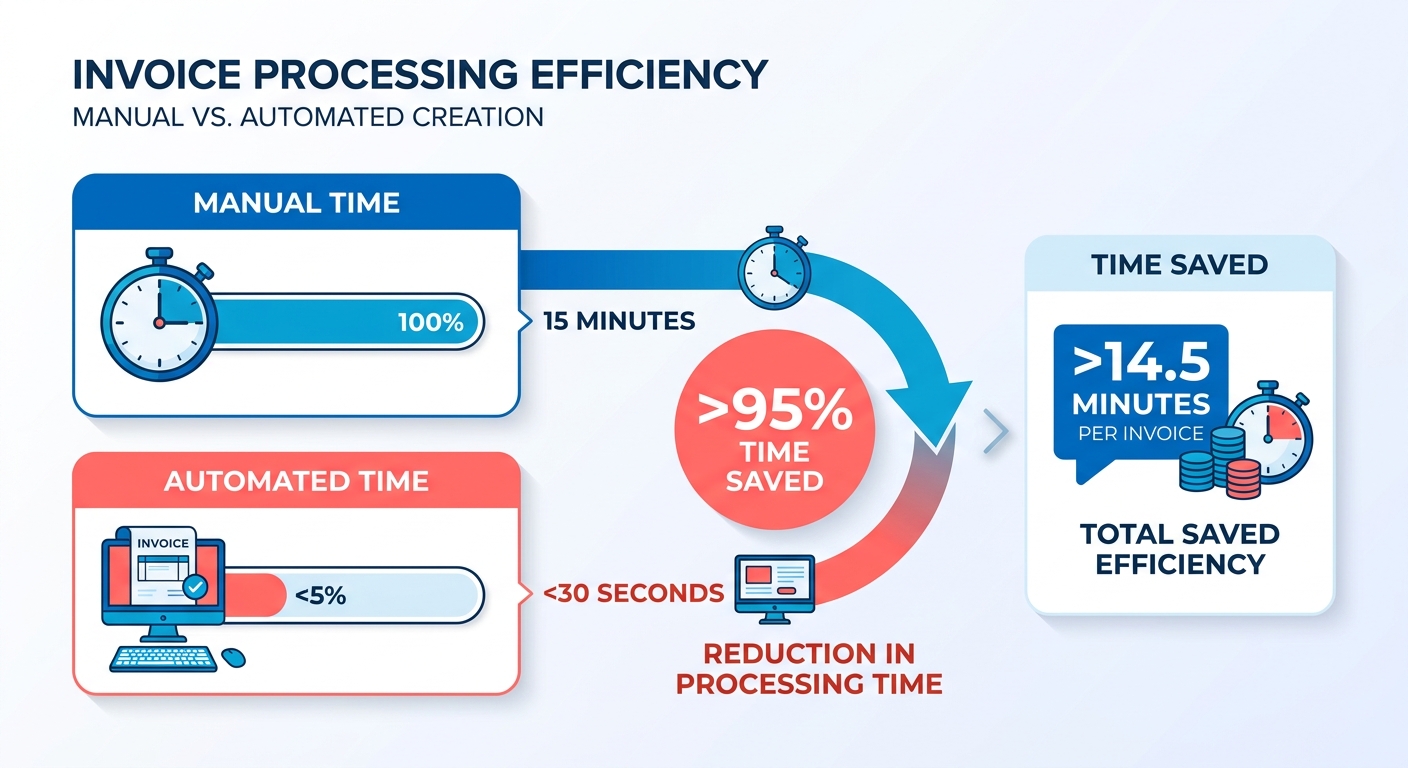
How automated invoice generation cuts DSO
Automation removes the human queue between a billing event and a sent invoice. When a subscription renews or a usage threshold trips, the invoice generates, validates, and delivers without anyone touching it. That real-time trigger closes the lag between billing and the customer’s inbox.
Accuracy matters as much as speed here. A wrong tax rate or a missing PO number gives your customer a reason to sit on the bill. Every dispute at this stage adds days you never recover.
The levers that move the needle:
- Templated smart invoices that pull live subscription data, so line items match what the customer actually consumed.
- Dynamic tax rules that apply the right jurisdiction automatically, instead of relying on someone’s memory.
- Multi-currency support for global books, so you invoice in the customer’s currency and skip conversion disputes.
- Auto-attachment of PO numbers for customers who require them, which kills a common AP-side rejection.
Which delivery channel gets you paid fastest
Delivery channel changes payment speed more than most teams expect. A branded invoice sent through the right channel lands in front of the person who can approve it. The wrong channel means your invoice waits in a spam folder while your DSO climbs.
Here’s how the main channels stack up in our experience:
Email: Fastest to set up, but fragile. Bounces and spam filters silently swallow invoices. Customer portal: The customer logs in, sees the invoice, and pays in one place. Strong for recurring relationships. API push: Sends invoice data straight into the customer’s AP system. Near-zero friction for enterprise buyers. EDI: Best for large customers who mandate it. Higher setup cost, but it removes manual entry on both sides.
We lean toward portal plus API for SaaS books. Email alone leaves too much to chance.
What your Handoff-1 checklist should include
Nail these before you call this handoff automated. Each one protects against a specific failure that inflates DSO.
- Validation rules that block an invoice from sending if a required field is missing or a total looks wrong.
- A complete audit trail on every invoice, so disputes get resolved with facts instead of guesswork.
- Customer-preferred delivery settings stored per account, so each invoice goes out the way that customer actually pays.
After deployment, watch three numbers: invoice-to-send time, error rate, and first-payment-day ratio. If invoice-to-send is measured in seconds and your error rate is falling, this handoff is doing its job. If not, the lag shows up in your DSO next month.
Handoff 2 – Capturing and validating payments in real time
The second handoff is where cash actually hits your account. Payment capture is the moment a customer’s money moves, and how fast you record and verify that transaction feeds straight into your DSO. Legacy gateways can leave that data sitting for up to 48 hours before it reaches your ledger. That gap is dead weight in any accounts receivable automation setup.
Here’s the split we watch closely. Batch-based gateways report settlements on a delay, so your AR team learns about a payment a day or two after the customer clicked pay. Webhook-driven capture fires the moment the transaction clears and pushes the event to your system in seconds. Real-time capture is the difference between reacting to yesterday’s cash and knowing your position right now.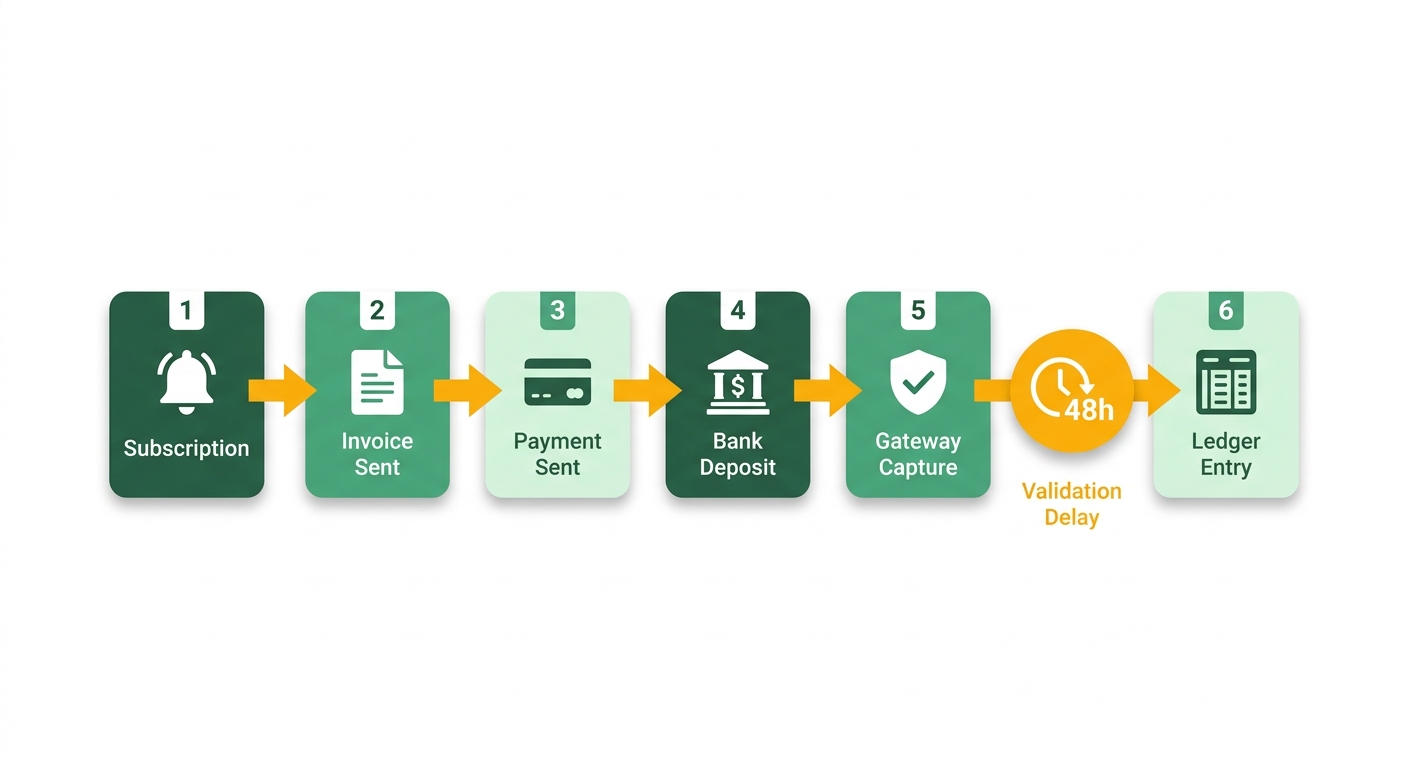
How to capture payments in real time
Real-time capture means your system receives payment events through webhooks the instant they occur, not on a scheduled sync. You subscribe to your payment processor’s event stream, ingest each notification, and update the receivable immediately. Done right, capture latency drops from hours to under five minutes.
Blixo supports this kind of workflow with automated bank account syncing and AutoPay, so payments can be recorded and reconciled without waiting for the next business day. The faster reconciliation starts, the sooner you see the impact on your position.
- Subscribe to payment-gateway webhooks so every charge, refund, and dispute pushes to your system in real time rather than waiting for a batch report.
- Build idempotent processing so a duplicate webhook never double-records the same payment. Processors retry, and your ledger has to stay clean.
- Add error-retry logic with backoff so a dropped event gets recovered instead of silently lost between systems.
What validation steps protect cash integrity
Capturing fast means nothing if the payment is wrong. Validation confirms the money that arrived matches the invoice you expect before it flows downstream. Skip these checks and you push bad data into cash application, which stalls the very handoff we care about most.
Real-time capture should feed straight into an automated verification workflow. That way incoming transaction data is ready for reconciliation the moment it lands, and your team reviews anomalies right away instead of waiting for end-of-month statements.
Every captured payment should clear four gates before it counts as applied.
- Amount match: confirm the captured value equals the invoice total so partial or overpayments get flagged, not auto-applied.
- Currency check: verify the settlement currency matches the invoice currency, since a mismatch corrupts your reconciliation the moment it lands.
- Payment method compliance: check the method against your rules, whether that’s a tokenized card, ACH-instant, or an integrated processor event.
- Fraud screening: route anything anomalous to manual review before it touches the ledger.
Which metrics tell you real-time capture is working
Keep an eye on three signals. Capture latency is the time from payment to recorded event; aim for minutes, not hours. Validation failure rate shows how often payments fail your four gates, which surfaces integration problems early. And the percentage of payments captured within 5 minutes is your clearest signal that the webhook pipeline is doing its job.
Watch these weekly. When capture latency creeps up, your DSO follows within days.
Handoff 3 – AI-driven cash application and matching
The third handoff is where most SaaS teams bleed days without noticing. Cash has landed, the invoice is open, but nobody has connected the two yet. That gap between “payment received” and “payment applied” is the quiet killer in accounts receivable automation, and it’s the one AI actually fixes well.
Manual cash application runs $15 to $30 per transaction, per AFR research. That’s not just labor cost. It’s the time your team spends squinting at bank deposits, hunting for reference numbers, and guessing which customer sent an unlabeled wire. Every minute of that lookup is a day drifting onto your DSO.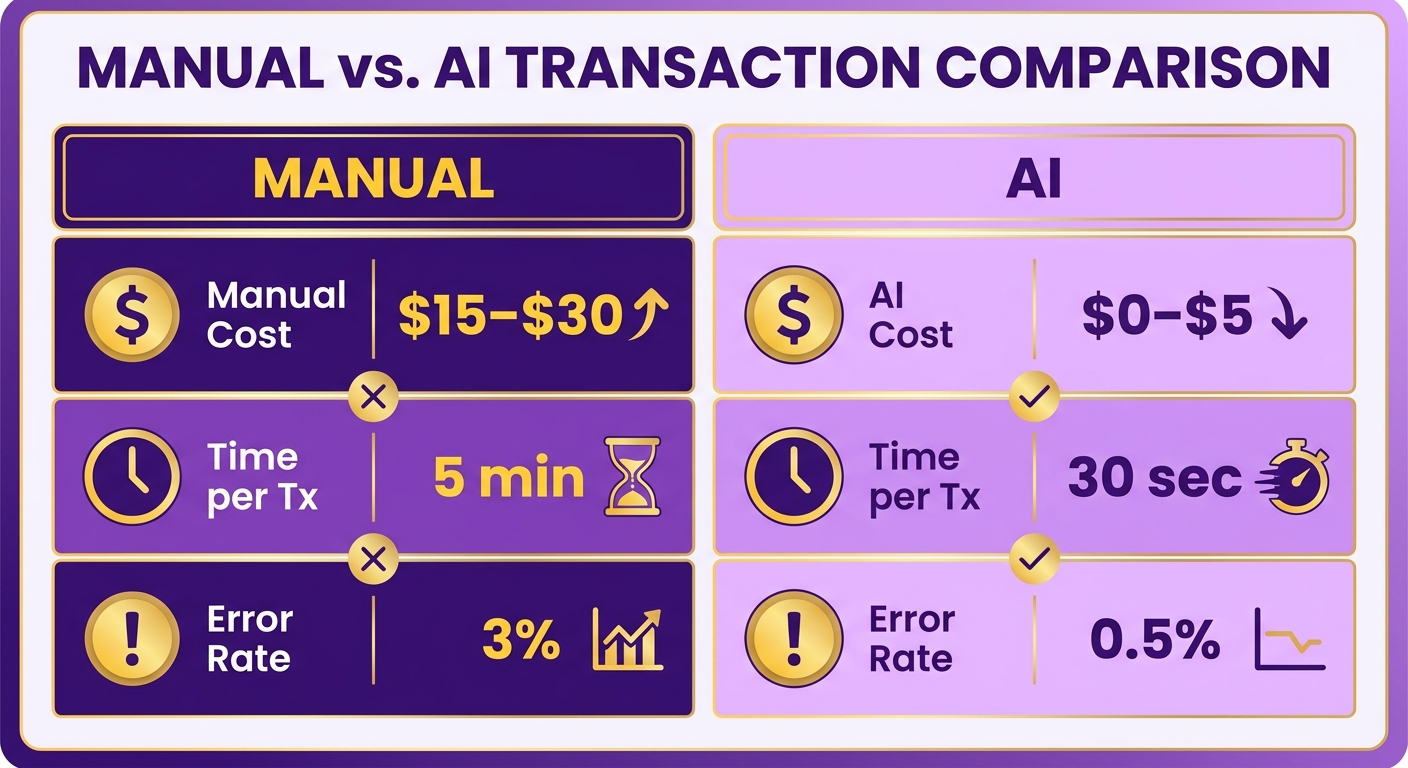
How AI matches payments to open invoices
AI reads a payment the way an experienced clerk would, only faster and at scale. It pulls invoice reference numbers, payment amounts, customer metadata, and historical payment patterns, then scores the most likely match. The result is auto-application without a human touching most transactions.
Rule-based matching tops out around 85% accuracy. It works fine when a customer pays one invoice in full with a clean reference. It falls apart on partial payments, consolidated payments, and typo’d remittance data. AI-enhanced matching pushes accuracy higher because it learns from every correction your team makes.
The better systems get there by weighing several signals at once. Reading contextual metadata alongside payment amounts lets them resolve the discrepancies that stop traditional workflows cold, minor spelling variations or split payments, without a human stepping in.
What happens to payments that don’t match
Exceptions get routed, not lost. Blixo provides an approval workflow so payments that need review land in front of your team. Your collectors see the payment and can manually edit or apply it, and as they do, the system learns from each correction.
Static systems flag exceptions and abandon them. A collaborative workflow lets your team resolve anomalies fast, with the underlying system adapting to those decisions so the next cycle runs cleaner.
Which metrics prove the handoff is working
Watch three numbers on your dashboard. Match rate tells you what percentage auto-applies. Exception volume shows how much still needs a human. Time-to-resolve measures how long stragglers sit before they’re cleared.
This handoff pays off directly. Blixo’s AR analytics track DSO and collections efficiency, so you can see the impact of higher match rates on how quickly cash gets applied. Tighten your matching and reconciliation, and you speed up cash flow from this handoff alone.
- Confirm AI pulls all four data sources (reference number, amount, customer metadata, historical patterns) so matching isn’t relying on a single fragile signal.
- Set an auto-application confidence threshold so high-confidence matches clear without review and only genuine ambiguity reaches a human.
- Build an exception queue that ranks suggested matches instead of dumping raw unmatched cash on your team.
- Feed every manual correction back into the model so accuracy compounds and your exception volume shrinks each month.
- Monitor match rate, exception volume, and time-to-resolve weekly to catch a stalling handoff before it inflates your DSO.
Handoff 4 – Automating collections, dunning, and customer communication
The fourth handoff starts the moment a payment goes late. Cash didn’t land, the invoice sits open, and now someone has to chase it. This is where accounts receivable automation either recovers the money quietly or lets it rot into a write-off. Chasing an overdue invoice by hand costs around $75 per account once you count staff time, follow-ups, and the phone calls nobody wants to make.
Here’s the tie back to our core problem. Slow cash application means your team often doesn’t even know an invoice is overdue until days after the fact. Automate collections properly and you close that blind spot. The system flags the miss the instant it happens and starts working the account before a human notices.
How automated dunning schedules cut overdue rates
Rule-based dunning fires reminders on a fixed cadence tied to the due date, so no invoice slips through because a person forgot. You set the triggers once. The system handles the rest across every channel your customer actually reads.
Multi-channel outreach matters because a single email gets buried. We pair email, SMS, phone calls, and letters so the reminder reaches the account through whatever they check. Custom dunning lets you tailor each cadence, and our Retention AI works to prevent delinquent churn instead of blasting good accounts with a debt-collector script.
- Set rule-based dunning triggers off the invoice due date so no overdue account waits on a human to notice
- Route reminders across email, SMS, phone, and letters to reach customers where they read
- Use custom dunning to give a paying-in-full customer a lighter touch than a chronic late-payer
- Match cadence to account status rather than sending identical text to every debtor
What dynamic escalation paths look like
Escalation is the ladder from friendly nudge to formal action, triggered automatically as an invoice ages. A first reminder stays gentle. If it goes unpaid, the next step offers a payment plan. Keep ignoring it and the path routes to a legal notice, all without manual handoffs.
Our Collections AI does the heavy lifting here. It works the easy accounts with warm reminders, gives your collectors intelligent tools and task management to head off delinquencies, and reserves formal notice for the true holdouts. Aging reports keep every stage visible so you know exactly where each account sits.
- Define escalation stages: friendly reminder → payment-plan offer → legal notice, each triggered by aging thresholds
- Offer payment plans automatically before escalating to legal, since a plan often recovers cash faster than a lawsuit
- Track collection rate per dunning stage so you know which step actually recovers money
How to stay compliant while automating outreach
Compliance is non-negotiable once you’re contacting customers at scale. Every message needs a logged trail, a clean opt-out path, and a route into dispute resolution. Skip this and automation turns a cash-flow win into legal exposure.
We keep an audit trail and event log on every touch for compliance and data integrity, honor opt-outs the instant they land, and use invoice/bill chat to talk through disputes instead of firing off a payment demand. You can dig deeper into cadence design on the Blixo dunning blog.
- Keep a compliance audit trail of every collection message for audit and dispute defense
- Honor opt-out requests automatically the moment a customer submits one
- Route disputed invoices to a resolution workflow, not the standard dunning ladder
- Monitor overdue-invoice aging and average days to recover as your headline KPIs
Nail this handoff and the recovered cash flows straight into application without a lag, keeping your DSO honest.
Handoff 5 – Reconciliation and reporting for an honest DSO
The final handoff moves applied payments into your general ledger and turns them into the DSO number your finance team actually reports. This is where accounts receivable automation either gives you a clean, current view of cash or leaves you reporting numbers that are already stale. Reconcile fast, and DSO becomes something you track daily instead of guessing at monthly.
Manual reconciliation runs a 2 to 3% error rate. That sounds small until you realize each mismatch corrupts your cash visibility. When a payment is applied to the wrong GL account, your reported receivables drift from reality, and any DSO figure built on that data is fiction. The lag between cash landing and hitting the balance sheet is the last place days hide in your order-to-cash cycle.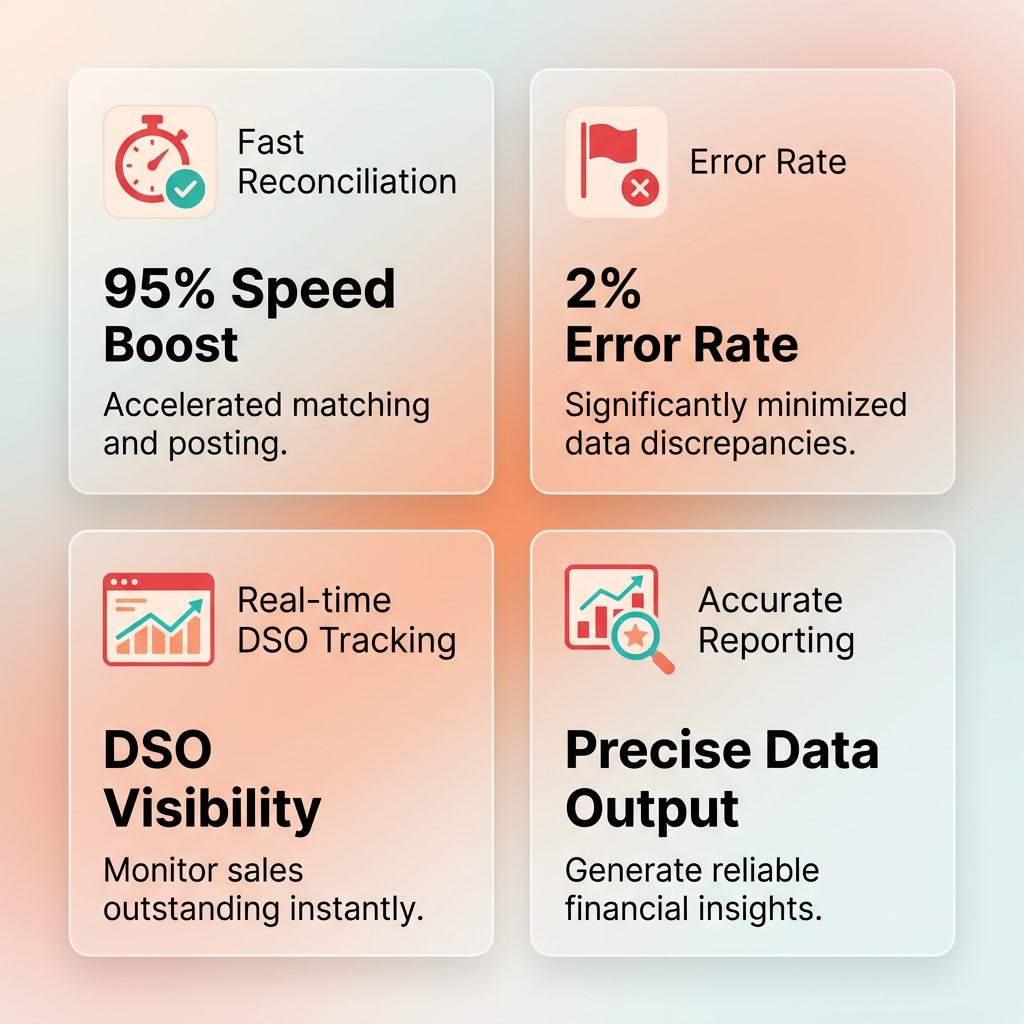
How automated cash application speeds up DSO reporting
Automated reconciliation bridges the gap between payment receipt and ledger posting. It updates your financial records as transactions clear, which kills the end-of-month scramble and keeps your balance sheet showing real-time cash.
That creates one unified ledger view. When your bank feeds and accounting records sync continuously, outstanding balances update instantly, heading off the compounding errors that usually delay financial reporting.
The payoff is faster, more current DSO tracking. You stop waiting for a monthly close to learn where your cash sits. Finance makes decisions on today’s numbers, not last month’s.
What your reconciliation checklist should cover
These items keep your ledger current, your audit trail clean, and your DSO reporting honest.
- Use automated ledger posting to direct applied payments to the correct accounts without manual data entry.
- Lean on automatic reconciliation to keep the gap between cash receipt and financial reporting tight.
- Use a single reconciliation dashboard as your source of truth, so nobody reconciles the same period twice in separate spreadsheets.
- Set up a structured review process for exceptions so data precision holds.
- Review match rates to catch unapplied or misapplied entries before they distort your receivables balance.
Which metrics prove your reconciliation is working
Watch three indicators to confirm your ledger stays in sync: reconciliation latency, unmatched transaction count, and reporting frequency. Latency near zero means cash hits your records almost instantly. A shrinking unmatched count means fewer entries stall in limbo. Rising reporting frequency means you’ve earned the right to track DSO daily.
For SaaS teams, this handoff also carries compliance weight. A full historical record of every ledger adjustment gives you a clear path for internal controls and external audits. Auditors want to trace a payment from bank to ledger, and bank and ERP integrations plus automatic reconciliation help build that trail as they work.
- Run periodic rule audits to catch mapping rules that drift out of date as your product and pricing change.
- Schedule integration health checks so a broken bank or gateway feed gets caught before it silently stalls reconciliation.
- Prefer API-based data pulls over file imports for cleaner, faster feeds that keep your DSO reporting current.
Skip heavy reconciliation automation only if you’re posting a handful of invoices a month by hand. Past that, the error rate alone justifies it.
Tying the five handoffs into one flow you can measure
Now you have five handoffs mapped. The work left is connecting them into one flow and proving the DSO impact with numbers. This is where accounts receivable automation stops being a pile of point fixes and becomes a system you can measure and tune every quarter.
Our advice: don’t automate all five at once. Automate one handoff, measure the DSO change, then move to the next. Sequential rollout gives you a clean read on what each step actually bought you. Blixo is built for exactly this kind of overhaul. Its intelligent matching engine, automated collections, and recurring invoicing let you tighten billing and payment flow one step at a time, freeing your team from manual work as you go.
How to find your worst handoff first
Score each of the five handoffs against three criteria: latency, error rate, and manual effort. The one scoring worst on all three is your first automation target. Fix the slowest, sloppiest, most hands-on step, and you free the most days from your DSO per dollar spent.
- Map every step between subscription event and cash on the balance sheet, noting who touches it and how long it sits.
- Time each handoff in real hours, not estimates, so you know where days actually hide.
- Flag any handoff with a high error rate; mismatched payments corrupt your DSO reporting downstream.
- Rank the five by combined latency, error, and manual-effort score, then automate the worst first.
Which KPIs prove the automation worked
Track four numbers after every automation phase: DSO, cash-application accuracy, collection rate, and staff hours saved. If DSO drops and hours fall together, the handoff paid off. If neither moves, you automated the wrong step or missed a dependency upstream.
Set thresholds for each KPI so a phase passes or fails on evidence, not opinion. A common benchmark: cash-application accuracy should clear 90% before you call a matching automation done, and collection rate should move within two billing cycles or the change didn’t stick. Log the delta per phase so a stalled KPI points you straight to the handoff that broke.
- Record baseline DSO before touching anything so every later reading has a reference point.
- Measure cash-application accuracy after Handoff 3 automation; matching errors here poison every KPI below it.
- Track collection rate monthly to confirm dunning changes recover cash instead of annoying customers.
- Log staff hours saved per handoff so you can prove ROI to finance without guesswork.
How to keep DSO improving after launch
Run a quarterly review of every automated handoff and retune the rules against fresh data. Cash-application matching rates drift as new customers and payment patterns show up. Retrain the models, adjust dunning cadences, and refresh your invoice logic each quarter to hold the gains.
The matching engine sharpens with each cycle, steadily cutting how often a human has to step in. Pair that with automating all five handoffs in sequence and reviewing results between each phase, and the lag closes for good by keeping the loop running. One dunning cadence that worked last quarter may need tightening this one.
- Schedule a fixed quarterly review of all five handoffs with DSO trend data in hand.
- Retrain matching models on recent payment data so accuracy climbs instead of decaying.
- Adjust dunning rules based on which cadences actually recovered cash last quarter.
- Watch for portal adoption; higher self-service use correlates with faster payment across the book.
Work this loop and DSO becomes a number you steer, not one you report after the fact.
Frequently Asked Questions
1. Which handoff should I automate first if I only have budget for one?
Start with invoice generation and delivery, the two low-difficulty handoffs. They run off subscription data you already hold, deliver fast payback, and build momentum for harder work. Automating delivery ensures invoices land directly in the right hands immediately, making it one of the fastest ways to accelerate payment cycles.
2. What DSO number should a SaaS company actually target?
SaaS organizations typically target shorter collection cycles than traditional physical-goods sectors. While manufacturing and heavy industries often tolerate longer payment terms, subscription-based businesses should aim to keep their collection cycles significantly tighter to maintain optimal working capital.
3. Why is cash application the hardest handoff to automate?
Why is cash application the hardest handoff to automate? This step involves reconciling unstructured data from external sources. Standard automation struggles with complex scenarios like split payments, missing invoice numbers, or consolidated remittances. Overcoming these challenges requires systems that can interpret context and learn from manual adjustments, rather than relying on rigid, static rules.
4. What happens if I automate cash application while my remittance data is still messy?
Attempting to automate matching with disorganized inputs leads to high error rates. If the underlying system processes incorrect or incomplete data, it will generate faulty matches, meaning your team will spend more time correcting errors downstream than they would have spent on manual processing from the start.
5. How is real-time payment capture different from what my current gateway does?
Traditional gateways process transactions in scheduled intervals, meaning your ledger remains unaware of successful payments until the next sync cycle. In contrast, event-driven capture utilizes instant notifications to update your records the moment a transaction is authorized, eliminating the typical multi-day information lag.
6. Which delivery channel gets invoices paid fastest?
Which delivery channel gets invoices paid fastest? For SaaS portfolios, integrated customer portals and direct API integrations yield the fastest results. These channels allow clients to view outstanding balances and complete transactions in a secure, centralized environment, avoiding the delivery failures and lack of visibility common with standard email attachments.
7. How do I prove AR automation actually cut my DSO?
Monitor your overall collection cycle duration alongside your recovery rates and matching precision. Keeping a close eye on matching accuracy is particularly important; if your automated matching system requires constant manual correction, the administrative burden simply shifts rather than being eliminated.
Ready to see how Blixo can help you close the gaps in your order-to-cash cycle? Book a demo today.