

Streamline Recurring ACH Payments for Reduced Costs
Key Takeaways
- The ACH network moved nearly 27 billion payments worth almost $62 trillion in a single recent year. The scale is not small.
- ACH fees stay under 1%, usually $0.20 to $1.50 flat per transaction. Roughly half what traditional methods cost.
- Cash application, matching payments to open invoices, is the real bottleneck. It quietly drains staff hours every week.
- Credit card fees eat 1.5% to 3.5% of every charge, which makes them a bad fit for recurring billing.
- One business cut transaction costs by 30% after moving recurring billing to ACH.
- Automated payment matching delivered 80% fewer payment declines on top of the cost savings ACH already brings.
- Done right, recurring ACH means predictable income, fewer failed payments, and far less reconciliation work.
Why streamlining recurring ACH actually matters
Recurring ACH moves trillions of dollars a year. And most businesses still drown in manual cash application. The network handles enormous volume without breaking a sweat, so moving the money isn’t the hard part. Matching incoming payments to the right invoices fast enough to keep your books clean? That’s the hard part.
Why cash application becomes the bottleneck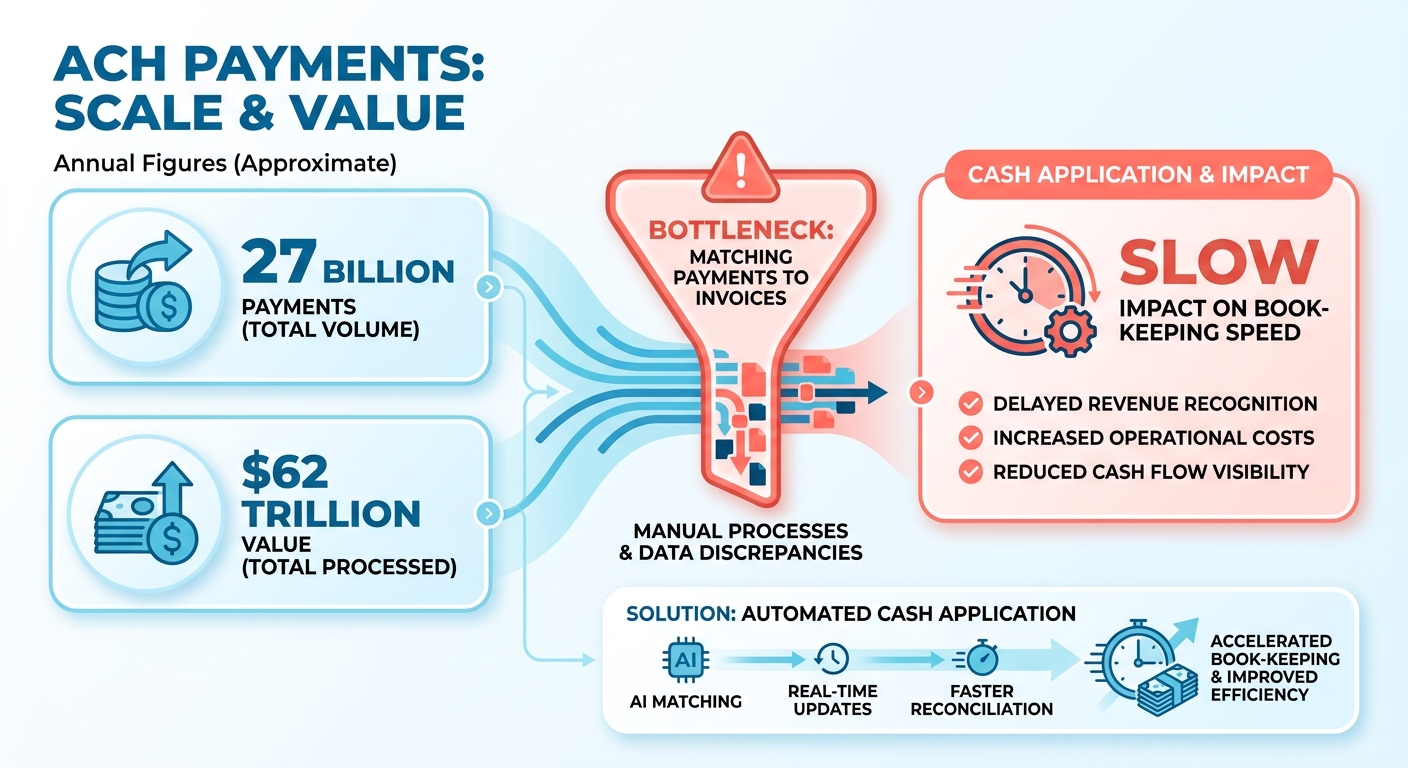
Cash application is the step where you tie a received payment to an open invoice. With recurring ACH, this is where staff lose hours every week reconciling by hand. Automating that match is what turns ACH from “cheaper” into “faster and cheaper.”
ACH already wins on cost. It skips the card networks, so processing fees are low flat rates instead of percentage-based interchange. Credit card fees scale with transaction size, which gets expensive fast on larger recurring invoices.
But low fees mean nothing if your team spends the savings chasing reconciliation errors. The real gain comes from cutting manual processing, so your staff stop being human spreadsheets.
The actual payoff
Streamlined recurring ACH stabilizes cash flow and cuts admin work at the same time. Predictable income, fewer failed payments, less time lost to reconciliation. Businesses that move recurring billing to ACH usually see overhead drop right away.
The reliability numbers back it up:
- Lower payment decline rates than credit cards
- Customers on recurring ACH are 86% more likely to pay on time
- ACH users are 14% less likely to switch vendors
ACH also sidesteps a quiet revenue killer: expired cards. Cards expire and need updates, which break recurring billing every cycle. Bank details don’t expire, so payments keep flowing without you chasing customers for new info. People rarely change their primary bank account, which keeps admin costs low.
Who gets the biggest win
SaaS and subscription businesses, easily. Recurring revenue depends on payments clearing on schedule, and ACH gives you an income stream you can actually forecast against. Any firm billing the same customers month after month belongs here.
This is also where the cash-application problem bites hardest. A SaaS company running hundreds of subscriptions can’t afford a person hand-reconciling each ACH batch. Automating recurring billing cuts failed payments and improves cash flow at once. For the deeper breakdown, see how recurring billing software improves SaaS operations.
Automation closes the loop. The right billing system fires payments on a set schedule, then matches each cleared transaction back to its invoice with no manual entry. That’s the part that slashes reconciliation time. Set the schedule once, and the system handles the matching every cycle. Your finance team stops reconciling and starts doing work that actually needs a human.
What ACH actually is for recurring billing
ACH (Automated Clearing House) is a U.S. network that moves money directly between bank accounts in batches, instead of card-by-card in real time. For recurring billing, you authorize a payment once and the system pulls the same amount on a set schedule. A direct, secure link between banks.
The piece that trips people up isn’t the transfer. It’s matching each batched payment back to the right invoice. That reconciliation step is where recurring ACH either saves you hours or quietly buries your team in spreadsheets.
The core pieces of an ACH payment
Every ACH transaction runs between two banks. The ODFI (Originating Depository Financial Institution) is the bank that starts the payment on your behalf. The RDFI (Receiving Depository Financial Institution) is the customer’s bank that accepts it. Both follow Nacha rules.
Two directions matter for billing. An ACH debit pulls money from your customer’s account. An ACH credit pushes money into one. Recurring billing almost always uses debits, triggered automatically on the schedule your customer approved upfront.
Because ACH settles in batches, payments land in groups rather than one at a time. Nacha now offers same-day windows with submission cutoffs at fixed times each business day, alongside the standard next-day track. That batching is what makes ACH cheap. It’s also why the matching work clusters up and overwhelms manual teams.
Why ACH wins for recurring billing
ACH beats cards on cost, reliability, and stickiness. With fewer intermediaries than card processing, transaction costs stay low and predictable regardless of invoice size. The reliability gap is just as wide.
A bank account outlives a credit card by years. Card issuers swap cards constantly for expiration, damage, or security breaches, but routing and account numbers stay constant. That longevity nearly eliminates involuntary churn from outdated payment credentials.
There’s a loyalty payoff too. Killing the friction of repeated manual payments keeps customers enrolled longer and cuts the support tickets that come from failed card charges. Fewer declines and fewer drop-offs mean fewer exceptions to reconcile later.
Setting up recurring ACH the right way
Start with clean authorization, end with automated matching. Capture the customer’s bank authorization during onboarding, so every future debit is pre-approved and dispute-resistant. Then connect that authorization to billing software that posts and reconciles on its own.
This is where a billing system earns its keep. When it attaches invoice metadata to each ACH debit and auto-applies the cash on settlement, your team stops hand-matching batch deposits. Manual reconciliation drops from hours to near zero.
If you run subscriptions, recurring billing software handles the scheduling and dunning, so payment retries and customer notifications fire automatically whenever a transaction needs attention.
Common pitfalls to avoid:
- Ignoring return and NSF fees. Failed debits carry charges and create reconciliation exceptions. Track them.
- Treating settlement as instant. ACH takes a few business days. Forecast cash with that lag in mind.
- Skipping account validation. Verify bank details at enrollment to cut returns before they happen.
- Reconciling by hand. The biggest mistake. Manual cash application is the exact bottleneck automation exists to kill.
Get authorization, validation, and auto-application right, and recurring ACH becomes both cheaper and dramatically faster to manage.
ACH vs. credit cards: where the money actually goes
ACH costs a fraction of credit cards, but the savings only stick if you automate the cash-application step behind them. Every card swipe carries an interchange fee, an assessment fee, and a processor markup stacked on top. ACH moves money straight between bank accounts, sidesteps the card networks entirely, and settles for a flat, predictable charge. The gap is real money on every recurring charge.
A cheaper rail means nothing if your team burns those savings back in manual reconciliation. That’s why the cost story and the automation story are the same story.
How much cheaper is ACH, really
ACH wins on raw fees and on failure rates. Card networks take a percentage of every dollar, so high-value invoices rack up fees that scale linearly with size. The same payment over ACH carries a flat fee no matter the amount, which makes it cheap for mid-to-large transactions.
Predictability matters too. Card rates float with tiers, qualification downgrades, and surcharges that shift month to month. A flat per-transaction ACH fee stays the same whether you bill $200 or $20,000. That consistency makes per-invoice margins easy to model.
| Factor | ACH | Credit Card |
|---|---|---|
| Fee structure | Flat per-transaction | Percentage of each sale |
| Settlement | ~one banking day | Faster, but pricier |
| Cost predictability | Stable month to month | Varies by tier and downgrade |
| Card expiration chasing | None | Frequent |
| Best fit | Recurring, high-value invoices | Instant, one-off approvals |
What businesses actually save
Real switches produce real numbers. A subscription enterprise cut its blended processing cost roughly in half after shifting recurring subscriptions off cards. Another benefit compounds quietly: ACH customers retain better, which protects the revenue you worked to win.
There’s a timing payoff too. Recurring ACH customers settle into a predictable payment cadence, so inflows line up with your monthly operating expenses and forecasting gets a lot more reliable.
But fee savings on paper don’t equal savings on your P&L. If staff still match each batched ACH deposit to invoices by hand, the labor cost cancels the rail discount. The win shows up only when matching is automated.
Where automation locks in the savings
Automation is the difference between “ACH is cheaper” and “ACH actually saved us money.” Recurring ACH already removes card-entry and expired-card work. The remaining bottleneck is cash application: tying each batched deposit to the right open invoice.
Modern subscription billing software that pairs a payment gateway with automated reconciliation closes that gap. Account validation runs upfront, payments post against invoices without spreadsheet juggling, and your team stops reconciling line by line.
Kill the per-sale card percentage, cut the decline-chasing labor, and drop the manual matching hours, and the per-invoice cost falls far below what a fee table alone shows. For B2B services, SaaS, and payment-plan models like tuition or healthcare billing, that combined effect is where recurring ACH pays for itself.
Reliability and predictability you can forecast against
Recurring ACH is predictable because it sets up a direct, authorized link between bank accounts that stays active until someone explicitly revokes it. You authorize the pull once, and the same amount moves on schedule. That reliability only pays off, though, when cash application keeps pace with the predictable inflow.
Why ACH is so reliable for recurring billing
ACH is reliable because bank accounts stay stable for long stretches. Credit cards get lost, stolen, or reissued on a routine schedule. Bank accounts are foundational financial assets. That’s why recurring ACH produces fewer interruptions and a steadier revenue stream.
The mechanics reinforce it. Bank accounts aren’t tied to physical plastic that can be misplaced or stolen, so they dodge the sudden security freezes that plague cards. The longer a payment credential stays active, the fewer mid-cycle failures break a billing relationship.
Fewer declines and predictable settlement mean fewer exceptions to chase. Every failed card payment is a manual reconciliation task waiting to happen. ACH shrinks that queue before it ever reaches your team.
How ACH improves cash flow and cuts workload
Recurring ACH improves cash flow by turning variable, decline-prone billing into a forecastable income stream. Same amounts, same days, and you can plan against them. That predictability is what stabilizes revenue forecasting for subscription and B2B businesses.
The admin win is just as real. Automating the pull frees staff from chasing failed charges and re-keying card numbers. Every manual exception a team avoids is time back for higher-value work. And customers who never touch their payment details again have one less reason to reconsider at renewal.
The bottleneck still hides here, though. A reliable rail delivers clean, on-time payments, but someone still has to match each batched deposit to the right open invoice. That matching step is where predictable inflows turn into spreadsheet hours if your tooling can’t keep up.
Best practices for predictable ACH
It comes down to capturing authorization early and automating the match. Collect bank authorization at onboarding, set a fixed schedule, and connect that schedule to software that reconciles deposits automatically. Done right, reliable payments become reliable books.
Start with clean enrollment. Capture authorization during signup or contract acceptance so the mandate is in place before the first cycle. That prevents the gaps that breed disputes later.
Then close the loop on cash application. Automated billing platforms handle the reconciliation behind recurring ACH, matching batched payments to open invoices so finance teams stop reconciling by hand. That’s the difference between a cheap rail and a fast one.
The common trap is treating reliability as automatic. ACH settles predictably, but the matching step doesn’t reconcile itself. Watch for return and NSF exceptions, build a routine to clear them fast, and let automation handle the high-volume matches so your team only touches the edge cases.
Is your business actually a fit for ACH?
Not every business should run recurring ACH. The best fit is a company with predictable, repeat billing: subscriptions, retainers, or large B2B invoices where the same customer pays you again and again. If your revenue is one-off and card-driven, the cash-application savings won’t show up. The whole payoff depends on volume that repeats.
Signals you’re a good fit
You’re a strong fit if you bill the same customers on a schedule and your team spends real hours matching payments to invoices. ACH rewards predictable cycles and cost-conscious operations. SaaS companies, agencies on retainer, and B2B sellers with large invoices see the clearest gains, because lower fees compound across every cycle.
Three signals tell you it’s worth it:
- Repeat customers: Long-term accounts give you a stable base for ongoing pre-authorized debits.
- Recurring or high-value invoices: ACH wins hardest on subscriptions and big B2B amounts where card percentages bite.
- A reconciliation backlog: If staff hand-match batched deposits to invoices, automating that step is where the time comes back.
ACH is the wrong call when you need instant approvals or same-day funding on every sale. Settlement runs 3 to 5 business days, and ACH debits can take 2 to 3 days to clear. If your model can’t wait, cards stay the better rail.
Measuring the payoff before you switch
Start with simple per-cycle math: compare your average card processing fees against a flat ACH fee. On a high-value retainer, the percentage-based card fee can climb to hundreds of dollars while the ACH fee stays a negligible flat rate. Multiply that difference by your monthly invoice count to size the raw fee opportunity.
Then run the second calculation, the one people skip: how many hours does cash application eat now? A cheaper rail with the same manual matching just moves the cost from fees to labor. The fit test isn’t only “will ACH save on processing.” It’s “can we automate the match so the savings actually land.”
What to check in an ACH provider
Judge a provider on three things: security and compliance, automation depth, and fit with your stack. ACH runs under Nacha rules, so your provider has to keep you compliant and validate accounts properly. Encryption and account validation are table stakes, not selling points.
Automation depth is where providers separate. The common pitfall is choosing on fee-per-transaction alone, then finding out the tool dumps a batch file on your team and walks away. Ask what happens after the money lands. Does it match payments to invoices automatically, or does someone do that by hand?
The other pitfall is integration. A provider that won’t connect to your accounting system or ERP forces double entry, which reintroduces the exact errors you switched to avoid. Confirm bank and ERP integrations before you commit.
For most recurring-billing businesses, the right provider is the one that closes the cash-application gap, not just the cheapest debit. That single criterion, more than rate, decides whether ACH frees your team or just relocates the busywork.
Frequently Asked Questions
1. Can customers dispute or reverse a recurring ACH payment after it clears?
Customers can dispute unauthorized ACH debits, but the window is tighter than cards. Under Nacha rules, consumers have 60 calendar days from the statement date to claim an unauthorized or incorrect debit. Properly captured authorization at onboarding makes disputes far harder to win, protecting your recurring revenue.
2. What happens when an ACH debit fails, and what does it cost?
Failed ACH debits return with a Nacha code, such as R01 for insufficient funds or R02 for a closed account. Your bank typically charges a return or NSF fee of $2 to $5 per item. Reattempt rules limit you to a set number of retries before requiring fresh authorization.
3. Is there a dollar limit on how much I can collect through recurring ACH?
ACH has no universal cap, but individual banks and processors set per-transaction and daily limits, often ranging from $25,000 to several million. High-value B2B invoices may need pre-arranged limit increases. Confirm both your originating bank’s ceiling and your provider’s policy before scheduling large recurring debits.
4. How do I handle a customer who switches bank accounts mid-subscription?
Capture updated bank details and a fresh authorization before the next billing cycle, then deactivate the old mandate. Providing a self-service customer portal allows clients to update their financial details securely at their convenience, which minimizes administrative overhead and prevents billing interruptions.
5. Is recurring ACH more secure than storing credit cards on file?
ACH reduces certain fraud exposure because bank account credentials don’t circulate through point-of-sale terminals like card numbers. However, ACH carries its own risks, requiring Nacha-mandated account validation and encryption. Both rails demand strong data protection, but ACH operates on a more direct bank-to-bank protocol that minimizes exposure to retail-level data breaches.
6. Can I use ACH for customers or vendors located outside the United States?
ACH is a domestic U.S. network and cannot process international transfers directly. For cross-border recurring payments, you need alternatives like wire transfers, SWIFT, or Global ACH services that bridge to local clearing systems. Foreign customers with U.S. bank accounts, however, can still pay through standard domestic ACH.
7. How long does it take to verify a customer’s bank account before the first debit?
Account validation methods vary in speed. Instant verification through bank login credentials confirms accounts in seconds, while traditional micro-deposit validation takes 1 to 3 business days as customers confirm small test amounts. Validating upfront prevents returns and reconciliation exceptions, making instant verification worth prioritizing for faster onboarding.