

Streamline Payments with Automated Invoice Scanning

Key Takeaways
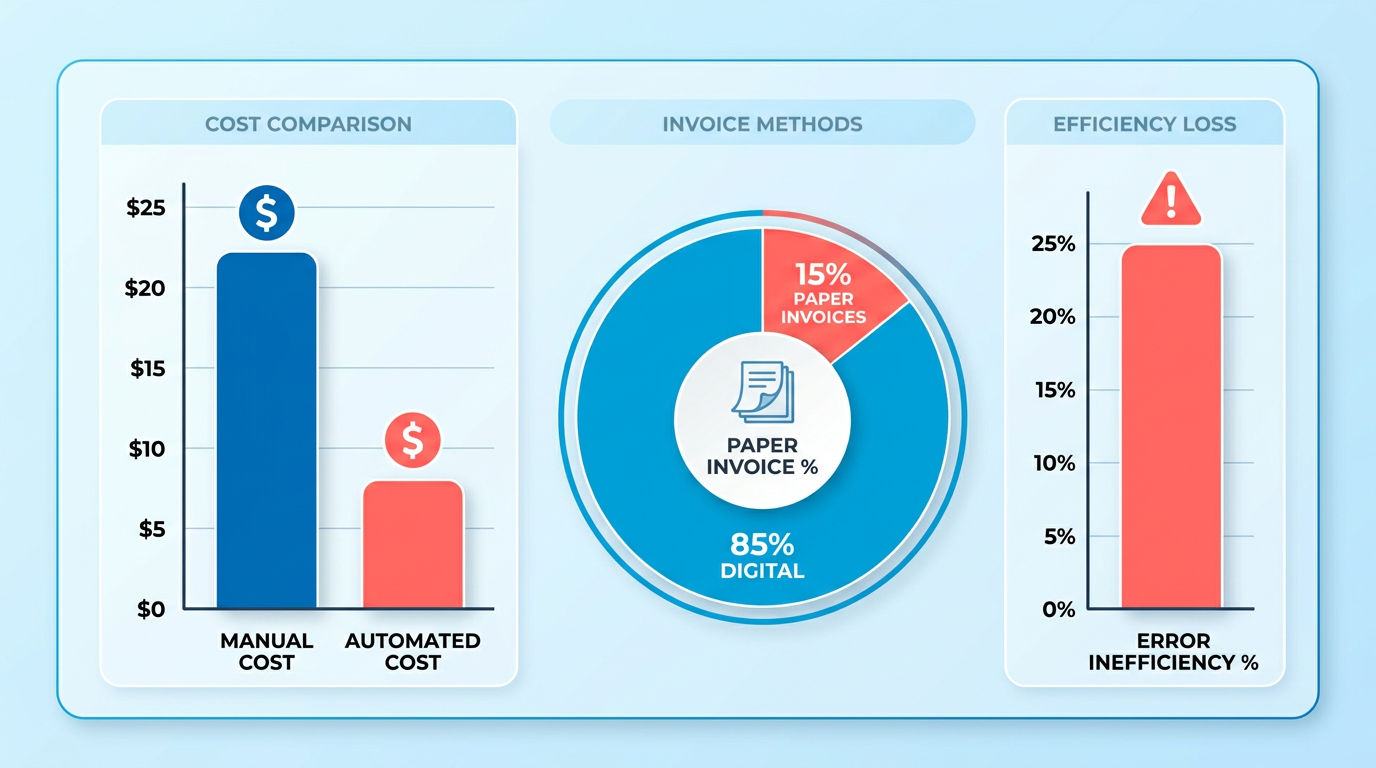
- Automated invoice scanning cuts processing costs from $22 to $8 per invoice.
- Manual errors cause 20-30% of operational inefficiencies, eliminated by automation.
- OCR/AI achieves 95% accuracy in extracting invoice data from first use.
- Businesses processing 5,000+ invoices monthly cut processing time by 80% with automation.
- Automated systems prevent $5M in potential fraud by detecting issues before approvals.
- Automation improves financial visibility by 95%, critical for cash flow management.
- 15% of companies still rely on excessive paper invoices, increasing manual processing costs.
Related Video
Watch: NetSuite’s Automated Invoice Processing Software by NetSuite
Why Automated Invoice Scanning Matters
Automated invoice scanning is a major advantage for businesses aiming to streamline payments and reduce operational friction. Manual invoice processing is riddled with inefficiencies: 15% of companies still manage excessive paper invoices, and the average cost to process a single invoice manually is $22**, compared to just **$8 with automation. Worse, 20-30% of operational inefficiencies in finance teams stem from manual errors, such as miscalculations or duplicate payments. By eliminating these issues, automation ensures faster approvals, fewer delays, and a 95% improvement in financial visibility-key metrics for maintaining healthy cash flow. As mentioned in the Understanding Automated Invoice Scanning section, this efficiency stems from technologies like OCR and AI that digitize and validate invoice data.
How Automation Solves Critical Pain Points
Manual data entry and lost invoices are two of the most costly challenges in accounts payable. Automated systems use OCR and AI to extract data from scanned documents, emails, or digital files with over 95% accuracy from the first invoice. For example, one business processing 5,000+ invoices monthly reduced processing time by 80% using AI-driven tools, avoiding $5M in potential fraud before approvals. These systems also auto-match invoices to purchase orders and contracts, reducing discrepancies by 90% and cutting costs by 50% in some cases.
Consider a real-world example: A mid-sized supplier previously spent 12 minutes per invoice on manual reviews, leading to 30% late payments and strained vendor relationships. After implementing automation, they slashed processing time to 2 minutes per invoice, achieving 100% on-time payments and $40,000 in annual savings**. These results aren’t outliers-businesses with high-volume invoice workflows (e.g., 1,000+ invoices weekly) see **2x faster processing** and **$1.6M in annual interest savings on average.
Who Benefits Most and Why
Businesses with high invoice volumes and complex workflows gain the most from automation. For instance, a healthcare provider handling 3,000 invoices monthly automated 90% of their AP process, saving 1,000+ hours annually and reducing errors from 12% to 1%. Similarly, a logistics company using AI-powered scanning eliminated 85% of manual reviews, redirecting staff to strategic tasks.
The impact extends beyond speed: automation reduces the risk of lost invoices by 98% and ensures compliance with tax and audit requirements. One company recovered $13M in discrepancies within six months by flagging duplicate payments and mismatched POs. These tools also integrate seamlessly with ERP systems, enabling real-time validation against contracts and budgets. As mentioned in the Implementing Automated Invoice Scanning section, such integration requires careful planning to align with existing AP workflows.
Real-World Success Without Name-Dropping
A retail chain struggling with $2M in annual errors** adopted automated scanning, cutting costs by **40%** and improving productivity by **75%**. Another business achieved **$1.6M in savings by automating interest calculations and payment scheduling. These outcomes align with industry data: 61% of companies report partial automation, but only those using AI-driven solutions see 95% ROI through reduced labor costs and error prevention.
By replacing manual workflows with intelligent systems, businesses enable scalable efficiency and reduce the risk of human error. Whether it’s preventing late fees, accelerating cash flow, or enhancing supplier partnerships, automated invoice scanning isn’t just a convenience-it’s a strategic necessity for modern finance teams. The data is clear: automation transforms AP from a bottleneck into a competitive advantage. For insights into tracking these improvements, refer to the Measuring ROI and KPIs for Automated Invoice Scanning section.
Understanding Automated Invoice Scanning
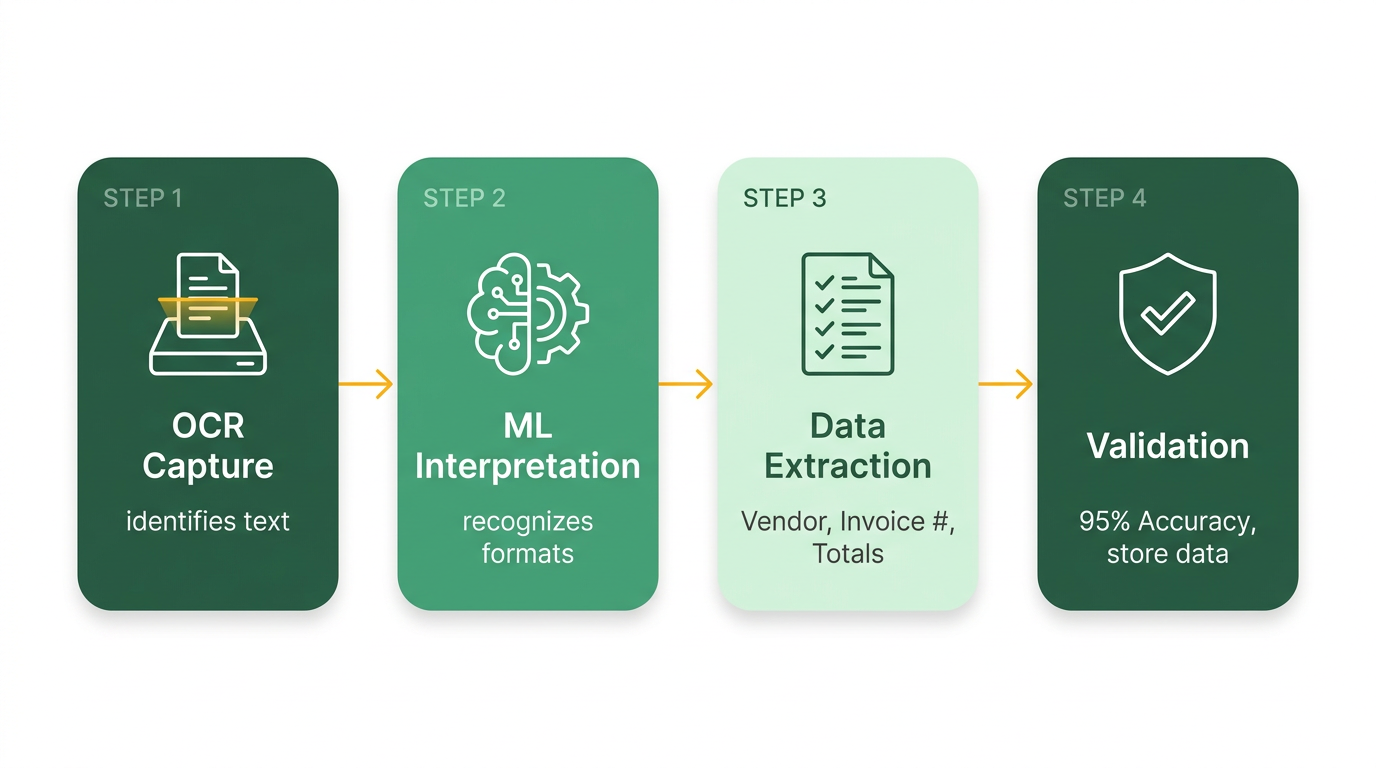
Automated invoice scanning uses AI and optical character recognition (OCR) to digitize and process invoices, eliminating manual data entry. This technology extracts key details like vendor names, invoice numbers, and line-item totals from scanned documents, digital files, or even handwritten notes. Building on concepts from the How Do OCR and Machine Learning Work Together section, OCR identifies text while machine learning adapts to formats, achieving 95% accuracy from the first invoice. By automating data extraction, businesses reduce human errors, speed up approvals, and integrate seamlessly with accounting systems.
How Do OCR and Machine Learning Work Together?
OCR technology scans invoices to identify text, while machine learning algorithms train systems to recognize patterns and adapt to new formats. For instance, Medius Capture uses OCR to extract data from PDFs, EDI, and scanned images, while AI adjusts to unique layouts without templates. As mentioned in the Understanding Automated Invoice Scanning section, this combination ensures accuracy even with handwritten fields or non-standard invoice designs.
What Integrations Support AP Workflows?
Automated invoice scanning connects to ERP systems like SAP, Oracle, and Microsoft Dynamics, streamlining approvals and payments. Rillion’s platform ties invoice scanning to payment automation, while Medius integrates with ERPs to enable 3-way PO matching. HighRadius emphasizes real-time validation against contracts and purchase orders to flag duplicates or discrepancies. One company using Ramp’s tools reduced AP processing time by 8 days, demonstrating the value discussed in the Understanding Automated Invoice Scanning section.
Real-World Impact of Automation
Case studies show measurable benefits: One company (Forenom) saved 1,000+ hours monthly using AI-driven invoice tools, while another (Chadwell Supply) transitioned to a touchless AP process. These examples align with the ROI metrics explored in the Measuring ROI and KPIs for Automated Invoice Scanning section, highlighting how automation reduces costs, accelerates cycles, and improves supplier relationships. By combining OCR, machine learning, and secure integrations, automated invoice scanning transforms AP workflows, as detailed in the Understanding Automated Invoice Scanning section.
Implementing Automated Invoice Scanning
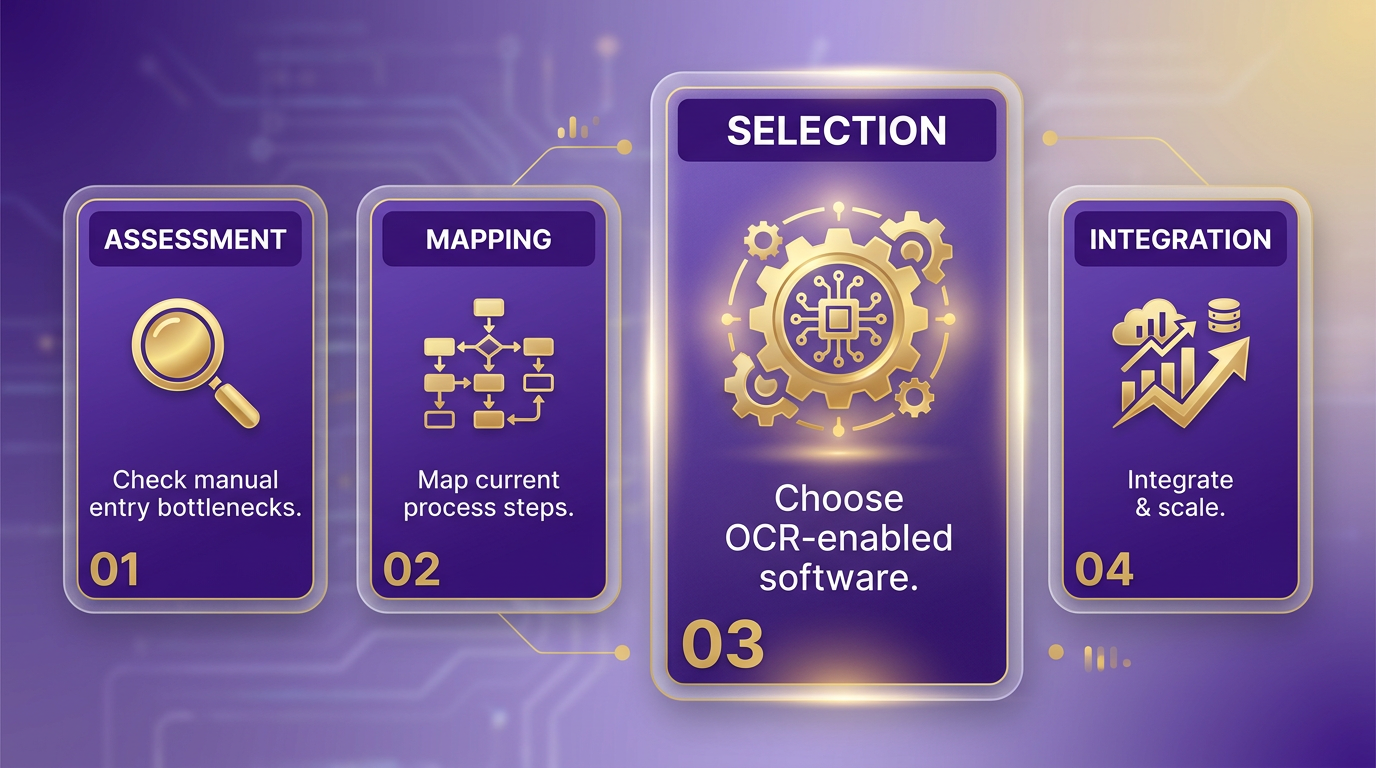
Implementing automated invoice scanning requires a structured approach to ensure seamless integration into your accounts payable (AP) workflow. Start by assessing your current invoice processing system to identify pain points, such as manual data entry bottlenecks or error-prone steps. Once you’ve mapped your existing process, select software that aligns with your business needs-prioritize solutions with optical character recognition (OCR) technology, integration capabilities, and scalability. As mentioned in the Understanding Automated Invoice Scanning section, OCR is critical for extracting invoice data accurately. For example, SaaS providers like Blixo offer transparent pricing and strong OCR tools that adapt to various invoice formats.
How Do You Configure Automated Invoice Scanning?
Begin by integrating the software with your accounting systems (e.g., ERP platforms) to ensure data flows automatically between systems. This eliminates manual re-entry and reduces errors. Configure the system to validate invoice data against predefined business rules, such as matching purchase orders or checking for duplicate invoices. A real-world example: One company reduced fraud risks by over $5M through automated validation and approval workflows.
Next, train your team to use the software effectively. Start with AP staff, who will handle exceptions and oversee automated workflows, then extend training to end-users who submit invoices. Use hands-on workshops and create step-by-step guides to address common tasks like uploading invoices or resolving discrepancies. For instance, The Second City improved efficiency by 8 days after staff mastered their new system’s OCR features.
What Change Management Strategies Work Best?
Transitioning from manual to automated processes can face resistance, so communication is key. Involve stakeholders early to address concerns and highlight benefits like faster payments and reduced errors. For example, Cheshire Constabulary’s finance team emphasized how automation freed staff for strategic tasks, easing adoption.
Develop a phased rollout plan to minimize disruption. Start with a pilot group, such as a single department, to test the system and gather feedback. Use this feedback to refine workflows before a full deployment. Blixo’s approach, for instance, includes onboarding support to tailor the software to your specific invoice formats and approval rules.
How Do You Test and Validate the System?
Before full implementation, conduct end-to-end testing with sample invoices to verify accuracy. Test edge cases, such as handwritten notes or non-standard layouts, to ensure the OCR technology adapts. Ramp, a financial management provider, reported 95% accuracy after rigorous testing, catching errors like mismatched vendor details.
Monitor the system post-deployment using analytics dashboards. Track metrics like processing time, error rates, and user adoption. As outlined in the Measuring ROI and KPIs for Automated Invoice Scanning section, these metrics help quantify success. One company using Blixo’s solution found a 95% improvement in financial visibility within three months by analyzing these metrics.
Common Pitfalls to Avoid
Underestimating training needs is a frequent misstep. Even the best software fails if users can’t manage it. Another pitfall is skipping integration testing-failing to connect the system with your ERP may reintroduce manual steps. Avoid generic providers who don’t offer customization; Blixo’s tailored workflows, for example, ensure alignment with your unique processes.
By prioritizing user training, phased rollouts, and rigorous testing, businesses can avoid these pitfalls. A healthcare provider using Blixo automated 90% of its invoices within six months, saving $40,000 annually. The key is balancing technology with human oversight to create a system that’s both efficient and adaptable.
For further insights, explore how Old Dominion streamlined payments through automation or how Medius recommends aligning invoice workflows with supplier needs. These examples reinforce the value of structured implementation and continuous improvement.
Evaluating Automated Invoice Scanning Software
OCR technology is essential for converting scanned documents into machine-readable text, while machine learning improves accuracy over time by recognizing patterns in invoice layouts. For deeper insights into how OCR functions, refer to the Understanding Automated Invoice Scanning section.
Cost considerations extend beyond upfront fees. Many providers use a subscription model, charging a fixed monthly or annual fee, while others bill per invoice processed. A pay-as-you-go approach suits businesses with fluctuating volumes, but hidden costs-like extra fees for support or integration-can add up. As highlighted in the Why Automated Invoice Scanning Matters section, reducing manual processing inefficiencies directly impacts cost savings.
Businesses using automated solutions report 2–5x faster processing and $40,000+ annual savings. These results align with industry benchmarks discussed in the Measuring ROI and KPIs for Automated Invoice Scanning section, which emphasizes tracking metrics like error reduction and time savings to evaluate success.
Measuring ROI and KPIs for Automated Invoice Scanning
To measure the ROI and KPIs of automated invoice scanning, focus on quantifiable outcomes like cost savings, processing speed, and error reduction. Start by tracking cost savings from reduced manual labor, which sources show can cut invoice processing costs by 50% compared to $22 per invoice manually, as detailed in the **Why Automated Invoice Scanning Matters** section. For example, one company saved $40,000 annually by automating workflows. Next, evaluate processing speed, as automated systems process invoices 2.4 times faster than legacy tools. HighRadius reports 95% accuracy in data extraction, directly reducing the time spent on corrections. Finally, measure error reduction-automated systems eliminate 80-90% of human errors, building on the OCR technology concepts from the Understanding Automated Invoice Scanning section, which can cost businesses 20-30% in operational inefficiencies.
What Metrics Define a Successful ROI?
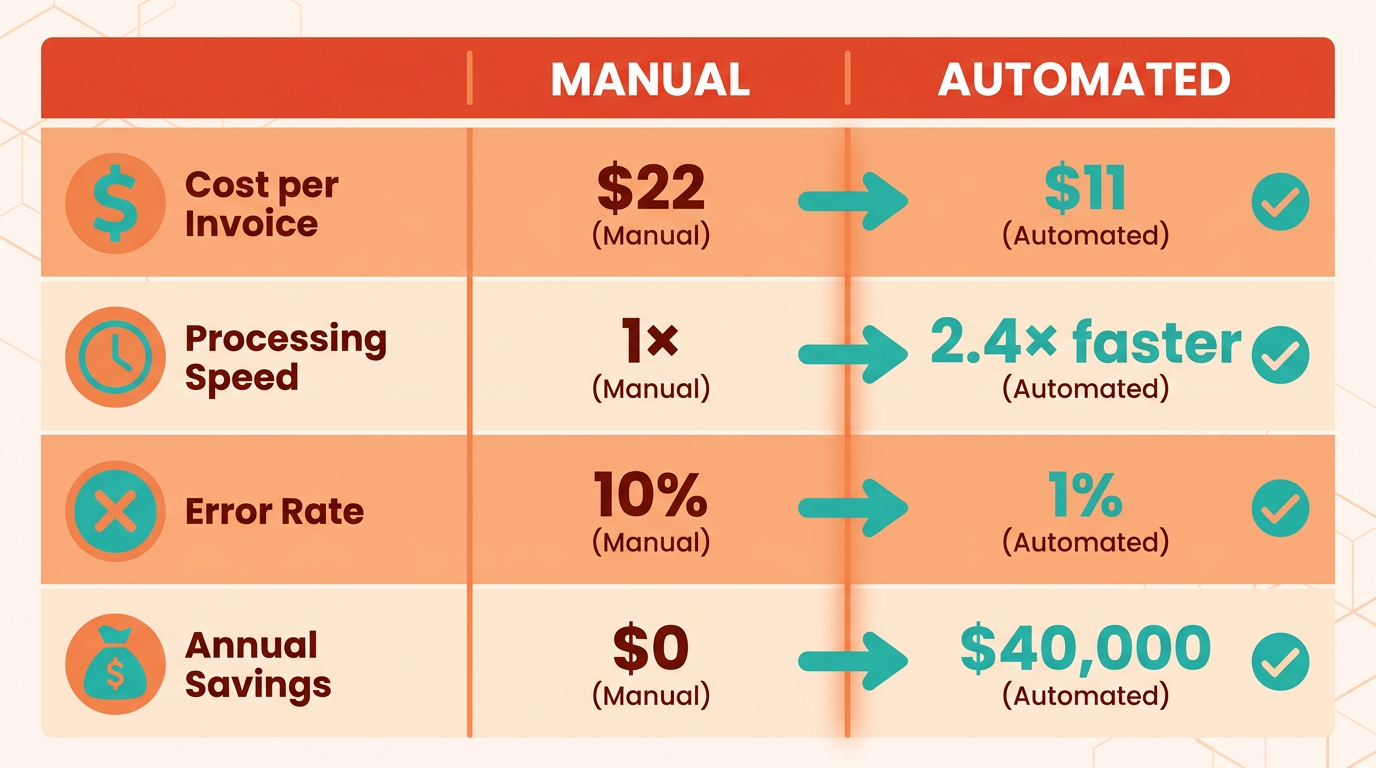
ROI for automated invoice scanning hinges on three core metrics: time saved, cost reduction, and accuracy improvements. Time savings translate to productivity gains; for instance, AvidXchange’s software reduces processing time from 12 minutes to 2 minutes per invoice. Cost reductions stem from lower labor costs and fewer errors-HighRadius users cut invoice processing costs by 50%. Accuracy improvements are critical: Ramp’s OCR technology achieves 95% financial visibility, using the AI and OCR principles outlined in the Understanding Automated Invoice Scanning section, minimizing disputes and rework. Combine these metrics to calculate ROI using the formula: (Cost Savings + Productivity Gains) / Implementation Cost × 100. If automation saves $50,000 annually and costs $20,000 to implement, the ROI is 150%.
How Do KPIs Reflect Operational Efficiency?
Key performance indicators (KPIs) like cash flow improvement, error rate, and approval cycle time reveal the impact of automation. Cash flow improves when invoices are processed faster-Ramp users report 8-day efficiency gains, accelerating payments and supplier relationships. Error rates drop significantly: Medius’ AI-driven systems reduce mistakes by validating data against purchase orders, while Xtracta’s OCR cuts manual reviews by 90%. Approval cycle time shortens with automated routing, as seen in a case where The Second City cut processing time by 8 days. Track these KPIs monthly to assess trends and identify bottlenecks.
What Best Practices Optimize Workflow Tracking?
To track metrics effectively, integrate automated systems with ERP platforms for real-time data, building on the implementation strategies from the Implementing Automated Invoice Scanning section. Blixo, for example, offers dashboards that highlight processing speed and error rates, enabling continuous optimization. Regular audits ensure workflows align with business rules-Medius recommends validating 10% of invoices monthly to maintain accuracy. Use historical data to benchmark improvements: one company reduced fraud losses by $5M annually after deploying automation. Finally, use AI to refine workflows-HighRadius’ AI agents require less than 10% oversight, adapting to new invoice formats without manual intervention. By aligning metrics with strategic goals, businesses can maximize ROI while minimizing risks.
Common Misconceptions and Best Practices
Many businesses believe automated invoice scanning is insecure or prone to errors. However, modern systems use optical character recognition (OCR) and AI validation to achieve accuracy rates exceeding 94% in enterprise environments. As mentioned in the Understanding Automated Invoice Scanning section, this technology extracts key details like vendor names and invoice numbers by using AI and OCR.
Start by integrating systems with existing accounts payable (AP) workflows. Building on concepts from the Implementing Automated Invoice Scanning section, this involves assessing current invoice processing systems to ensure compatibility. Use AI-powered OCR to extract data from invoices, then validate against purchase orders and contracts.
Choose software that supports custom business rules for coding and validation. As outlined in the Evaluating Automated Invoice Scanning Software section, OCR technology is essential for converting scanned invoices into structured data. For example, Blixo allows users to define rules for invoice types, vendor categories, and payment terms. This ensures consistency and reduces errors.
By addressing misconceptions and following these best practices, companies can transform their AP processes, reducing costs and improving supplier satisfaction.
Frequently Asked Questions
1. How much does automated invoice scanning reduce processing costs?
Automated invoice scanning cuts processing costs from $22 to $8 per invoice, saving $14 per invoice by eliminating manual labor and errors. This reduces operational expenses significantly for high-volume businesses.
2. What error reduction benefits does automation provide?
Automation eliminates 20-30% of operational inefficiencies caused by manual errors, such as miscalculations or duplicate payments, ensuring accurate and consistent invoice processing from the first use.
3. How quickly do businesses see processing time improvements?
Companies processing 5,000+ invoices monthly reduce processing time by 80% within months of implementing automated systems, thanks to OCR/AI technologies that extract and validate data instantly.
4. What fraud prevention capabilities do automated systems offer?
Automated invoice systems detect and prevent $5 million in potential fraud annually by flagging discrepancies, validating data against contracts, and blocking suspicious transactions before approvals.
5. How does automation improve financial visibility?
Automation enhances financial visibility by 95%, providing real-time tracking of invoices, payments, and cash flow, which is critical for budgeting, forecasting, and maintaining operational liquidity.
6. Are there benefits for small businesses with fewer invoices?
Yes, even small businesses benefit by reducing manual processing costs and errors. For example, OCR/AI achieves 95% accuracy immediately, cutting time spent on data entry and improving payment accuracy.
7. What tools are recommended for automated invoice processing?
NetSuite’s Automated Invoice Processing Software is a popular solution, using OCR and AI to digitize invoices, match them to purchase orders, and streamline approvals, as demonstrated in their YouTube video.