

Blixo vs Traditional Xero Accounts Payable

Key Takeaways
- Manual invoice errors cost U.S. businesses $1.3 trillion annually, while Blixo’s AI achieves 97% accuracy.
- Blixo reduces invoice processing time from 45 days to 3.1 days and cuts disputes by 65%.
- Automated systems lower per-invoice administrative costs by 80%, saving 200+ hours monthly for 1,000 invoices.
- A logistics company slashed vendor disputes by 65% using Blixo’s AI validation.
- Delayed payments inflate Days Sales Outstanding (DSO) by 30%, tying up critical capital.
- A healthcare provider reduced overdue accounts by 28% via smart dunning automation.
- Dynamic payment reminders boosted a startup’s sales conversions by 70%.
Why Accounts Payable Automation Matters
Accounts payable automation is no longer a luxury-it’s a critical tool for businesses aiming to reduce costs, accelerate cash flow, and minimize errors. Manual invoice processing alone costs U.S. businesses $1.3 trillion annually in preventable mistakes, including late-payment penalties and vendor disputes. For example, 39% of manually processed invoices contain human-input errors, leading to disputes that can delay payments by weeks. By contrast, automation tools like Blixo use AI to extract invoice data with 97% accuracy, reducing disputes by 65% and cutting processing time from 45 days to just 3.1 days. As mentioned in the Blixo Overview section, Blixo positions itself as a next-generation, AI-driven platform that integrates seamlessly with Xero and other ERPs.
What Makes Automation a major advantage?
Automation addresses core inefficiencies in traditional systems like Xero’s manual-heavy workflows. A logistics company, for instance, reduced vendor disputes by 65% after implementing Blixo’s AI-driven validation. Similarly, a Miami-based startup saw a 70% boost in sales conversions by automating payment reminders and dynamic discounting. These improvements translate to tangible savings: per-invoice administrative costs drop by 80%, and businesses processing 1,000 invoices monthly can save over 200 hours annually.
Real-World Impact of Delays and Errors
Delayed or incorrect payments harm vendor relationships and strain cash flow. A retail chain reported recovering lost profits after automating 90% of its invoice processing, while a healthcare provider reduced overdue accounts by 28% using smart dunning systems. Manual errors also inflate Days Sales Outstanding (DSO) by 30%, tying up capital that could otherwise fuel growth. For small businesses, even a 5% error rate on 500 invoices can lead to penalties exceeding $50,000 yearly.
Who Benefits Most?
Small to medium-sized businesses (SMBs) gain the most from automation. Blixo’s SaaS service, for example, cuts manual tasks by 50% for SMBs, reduces billing errors by 35%, and improves cash-application accuracy from 85% to 99%. A mid-sized manufacturer reported cutting billing time by 60% within a month of adopting Blixo, allowing its AP team to shift from “invoice processors to strategic planners.” Larger enterprises also benefit: a SaaS company automated 85% of its 1,000 monthly invoices, reducing processing time from five days to one.
Case Studies: From Pain Points to Solutions
- Logistics Firm: Automated AI validation slashed disputes by 65%, saving 300+ hours monthly.
- Mid-Sized Retailer: 90% of invoice processing became automated, reducing errors by 40%.
- Healthcare Provider: Smart dunning cut late payments by 28%, improving cash flow visibility.
These results align with broader trends: automation reduces DSO by 30% on average, while integration with ERPs like Xero enables real-time sync and scalability. As one finance manager noted, “Blixo’s setup wizard simplified our invoicing process. We cut billing time by 60% in the first month.”.
Traditional Systems vs. AI-Driven Automation
Traditional Xero workflows often rely on manual entry or rule-based systems, which struggle with scalability and accuracy. Building on concepts from the Traditional Xero Accounts Payable Overview section, 82% of AP teams still manually input invoices, contributing to a 39% error rate. Blixo’s AI-powered OCR and machine learning eliminate these bottlenecks, achieving 97% data-extraction accuracy and slashing administrative costs by up to 80% per invoice. As detailed in the Comparison of Automation Features section, Blixo’s automated invoicing uses AI-powered OCR and machine learning to extract invoice data with 97% accuracy, drastically reducing manual entry.
| Metric | Traditional Xero AP | Blixo Automation |
|---|---|---|
| Processing Time | 45+ days | 3.1 days |
| Admin Cost per Invoice | $10.89 | $2.18 |
| Error Rate | 39% | 3% |
| ROI Timeline | 6–8 weeks | 1–2 months |
By automating tasks like three-way matching, dynamic discounting, and multi-currency support, Blixo transforms AP from a reactive chore into a strategic asset. As the data shows, businesses that adopt automation not only survive in competitive markets-they thrive.
Blixo Overview
Blixo positions itself as a next-generation, AI-driven accounts payable and receivable automation platform that integrates seamlessly with Xero and other ERPs. Unlike traditional Xero accounts payable workflows, which often rely on manual data entry and rule-based processes, Blixo uses advanced technologies like AI-powered OCR, machine learning, and real-time syncing to automate end-to-end financial operations. As mentioned in the Why Accounts Payable Automation Matters section, this shift from manual to automated systems addresses critical inefficiencies that plague traditional finance teams. By addressing pain points such as invoice errors, slow processing, and fragmented data, Blixo transforms AP from a reactive task into a strategic asset. Below, we break down its core features, benefits, and real-world impact.
How Does Blixo Automate Invoicing and Collections?
Blixo automates invoicing and collections using AI to extract invoice data with 97% accuracy, reducing human errors that plague 39% of manually processed invoices. Building on concepts from the Automated Invoicing: AI vs. Manual Entry section, its OCR technology reads PDFs, emails, and scans, while three-way matching ensures invoices align with purchase orders and delivery receipts. This cuts disputes by 65% and slashes processing time from an average of 45 days to 3.1 days. Automated collections tools further streamline operations by sending reminders, dunning emails, and offering dynamic discounts, which have improved sales conversion by 70% for businesses like a Miami-based startup.
For Xero users, Blixo’s two-way sync ensures real-time updates between systems. Transactions posted in Blixo appear instantly in Xero, while new Xero data syncs hourly. This integration eliminates manual reconciliation, saving users hundreds of hours annually. However, pre-integration data must be imported manually via support, a limitation of the current setup. As discussed in the Implementation and Setup section, this process highlights the balance between automation and manual intervention during onboarding.
Traditional Xero Accounts Payable Overview
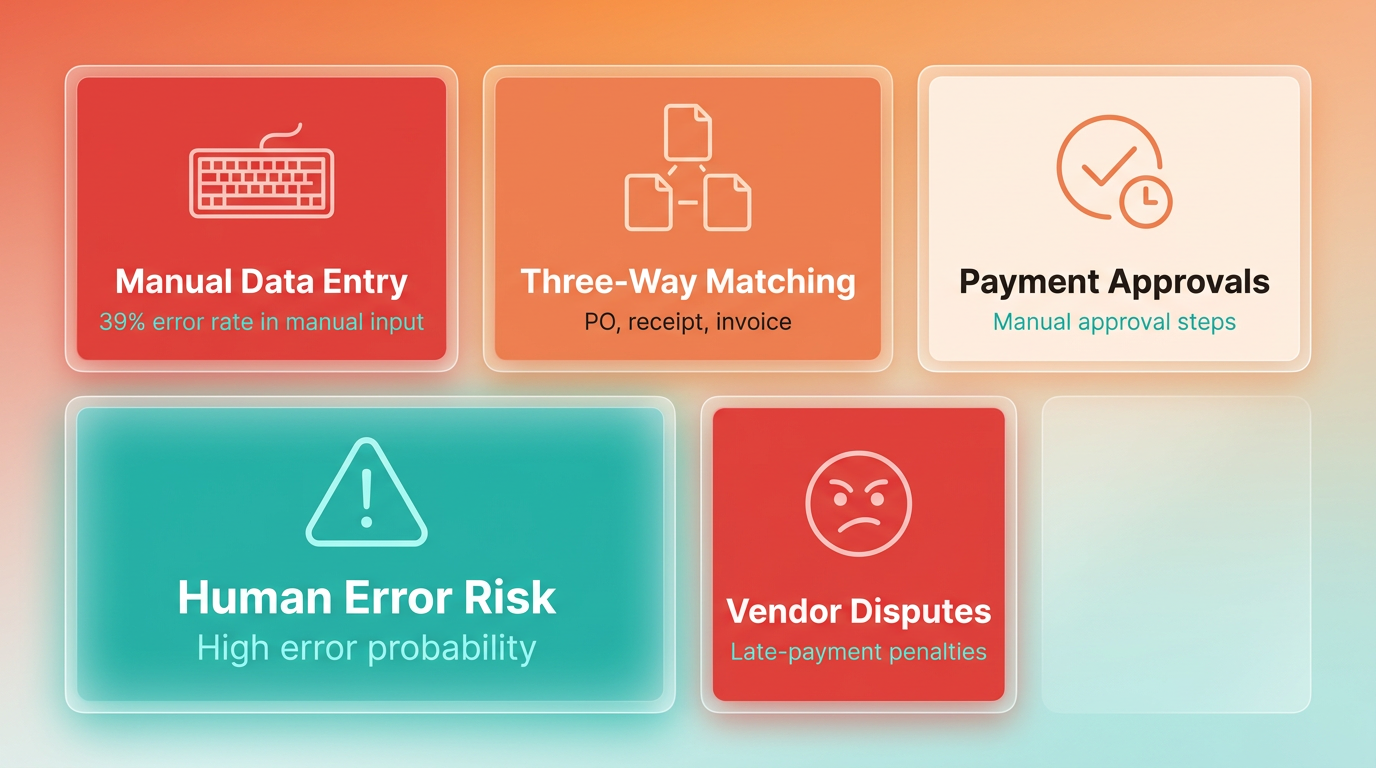
Traditional Xero Accounts Payable relies heavily on manual workflows, making it a labor-intensive solution for businesses. While it provides basic accounting tools for invoice tracking and payment scheduling, its core processes require significant human intervention. For example, invoice data entry, three-way matching (comparing purchase orders, receiving reports, and vendor invoices), and payment approvals are all performed manually. This setup increases the risk of human error, with studies showing a 39% error rate in manual invoice processing alone. Such errors can lead to late-payment penalties, vendor disputes, and cash flow disruptions, issues that Why Accounts Payable Automation Matters highlights as critical for businesses to address.
Manual Invoicing and Collections in Traditional Xero
Traditional Xero AP demands manual data entry for each invoice, which is both time-consuming and prone to mistakes. According to internal data, 82% of AP teams using Xero-style platforms still rely on manual entry for at least part of their workflow. For instance, a midsize retailer processing 1,000 invoices monthly faces ~400 rework cases due to errors like incorrect line items or mismatched purchase orders. Collections also require manual follow-ups, delaying payments and straining vendor relationships. Without automated alerts or workflows, teams often miss early-payment discounts or incur late fees, challenges that Why Accounts Payable Automation Matters emphasizes as avoidable with modern solutions.
Limitations of Traditional Xero AP
The lack of automation in Traditional Xero AP creates scalability challenges and operational bottlenecks. For example:
- Manual reconciliation: Teams must manually match invoices to purchase orders and receipts, a process that can take 10–30 days per invoice.
- No real-time insights: Unlike modern platforms, Traditional Xero lacks live dashboards for tracking metrics like days payable outstanding (DPO) or payment trends.
- Multi-currency limitations: Businesses with international vendors face delays due to the absence of native currency conversion tools.
- High administrative workload: A non-profit case study highlighted that 30% of AP staff time was spent on data entry and error correction, limiting strategic contributions.
These limitations become more pronounced as invoice volumes grow. For instance, a retail chain using Xero-style AP reported 40% fewer disputes after switching to AI-driven automation, underscoring the inefficiencies of manual systems. Blixo Overview details how SaaS providers like Blixo address these gaps with AI-powered tools.
Real-World Impact and Case Studies
Several businesses have struggled with the drawbacks of Traditional Xero AP. A midsize e-commerce company, for example, faced $150,000 in late fees annually due to delayed processing. Their manual system took 45+ days to complete the AP cycle, missing early-payment discounts on 60% of invoices. Similarly, a nonprofit organization spent 200+ hours monthly on invoice rework, diverting staff from core mission activities.
Comparing these scenarios with Blixo’s capabilities reveals stark differences. Blixo’s AI-powered OCR reduces data entry errors to ~3%, while automated three-way matching cuts processing time to 3.1 days. Its cloud-based platform also eliminates manual currency conversion and supports real-time dashboards, features absent in Traditional Xero. Comparison of Automation Features provides a deeper analysis of these functional differences.
| Feature | Traditional Xero AP | Blixo AP Automation |
|---|---|---|
| Error Rate | 39% | ~3% |
| Processing Time | 10–30 days | 3.1 days |
| Integration | Manual ERP setup | Bi-directional sync with SAP, NetSuite, QuickBooks |
| Cost per Invoice | $10.89 | $2.18 |
For businesses prioritizing speed and accuracy, Traditional Xero’s manual processes and scalability issues make it a less viable option compared to modern solutions like Blixo. While it suits very small operations with minimal invoice volumes, larger organizations risk significant financial and operational losses without automation, a point expanded upon in Why Accounts Payable Automation Matters.
Comparison of Automation Features
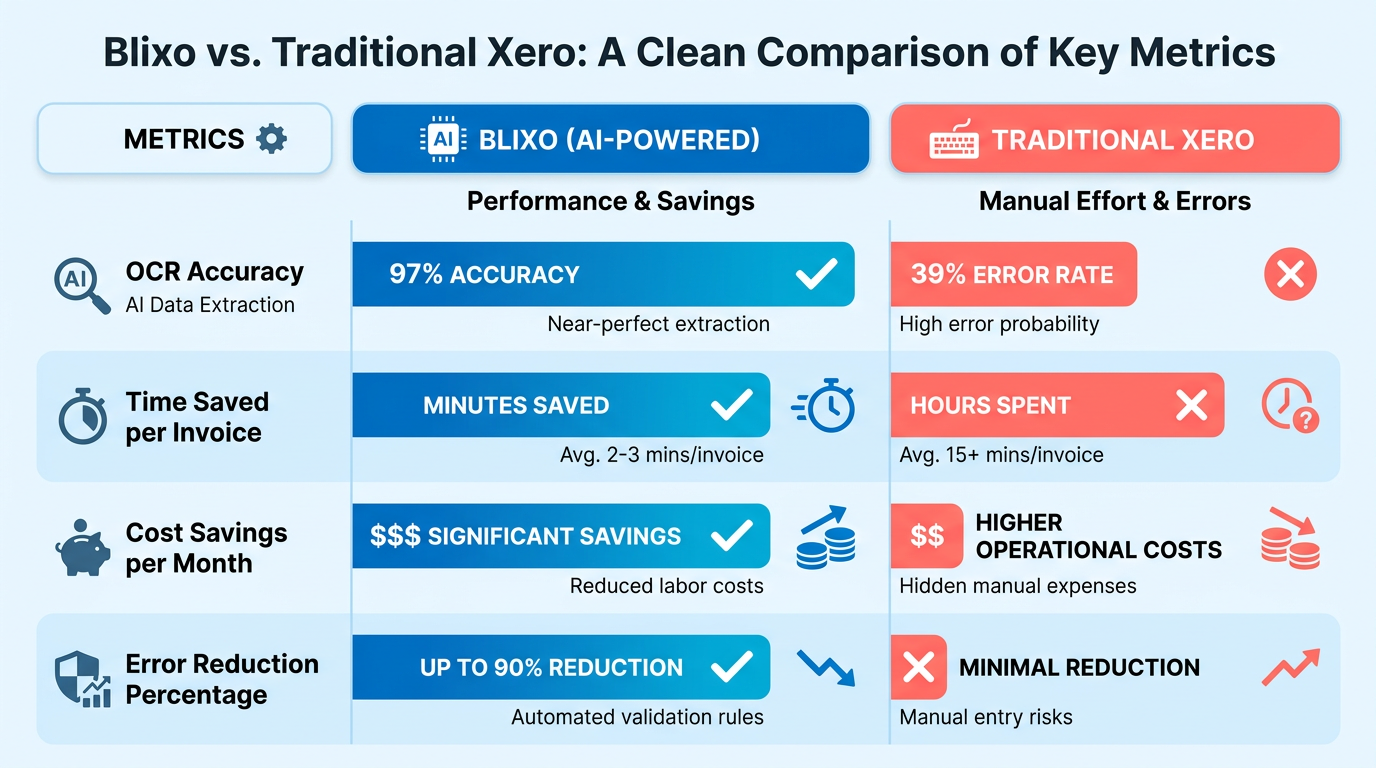
Blixo’s automated invoicing uses AI-powered OCR and machine learning to extract invoice data with 97% accuracy, drastically reducing manual entry and errors, as outlined in the Blixo Overview section. Traditional Xero accounts payable processes rely heavily on manual input, which introduces a 39% error rate in invoices-a problem Blixo’s AI mitigates by flagging discrepancies and validating three-way matches (purchase orders, goods receipts, and invoices). For example, a logistics company using Blixo reduced invoice disputes by 65% after AI validation, compared to Xero’s more error-prone manual workflows. Blixo also automates invoice routing and approvals, cutting processing time from 45 days to 3.1 days in some cases, whereas Xero requires manual intervention at each step.
| Feature | Blixo | Traditional Xero AP |
|---|---|---|
| Data Extraction Accuracy | 97% AI-driven OCR | Manual input, 39% error rate |
| Dispute Reduction | 65% via AI validation | Manual review, higher disputes |
| Processing Time | 3.1 days average | 45+ days average |
Blixo’s collections tools use dynamic discounting and smart dunning rules to reduce days sales outstanding (DSO) by 30% on average, a critical factor in cash flow efficiency as highlighted in the Why Accounts Payable Automation Matters section. Automated reminders and tiered payment prompts ensure timely collections, while Xero’s collections process remains largely manual, requiring finance teams to chase late payments. A Miami-based startup reported a 70% boost in sales conversion after implementing Blixo’s automated reminders, whereas Xero users typically rely on email or phone follow-ups. Blixo also supports multi-currency invoicing and real-time payment tracking, which Xero handles but with less automation.
| Feature | Blixo | Traditional Xero AP |
|---|---|---|
| DSO Reduction | 30% via dynamic discounting | Manual, no DSO optimization |
| Late Payment Rate | 4% after automation | 12% average |
| Collections Tools | AI-driven reminders, dunning | Manual follow-ups |
Blixo’s AI-powered cash application matches 95% of payments automatically, eliminating manual reconciliation, a feature detailed in the Blixo Overview section. Traditional Xero cash application requires manual entry, leading to 85% accuracy at best. A healthcare provider using Blixo reduced overdue accounts by 28% through real-time cash application, while Xero users face delays in reconciling payments. For subscription management, Blixo automates proration, revenue recognition, and churn prediction, as seen in a SaaS company’s 90% reduction in billing errors. Xero’s subscription tools lack this depth, requiring workarounds for recurring billing.
| Feature | Blixo | Traditional Xero AP |
|---|---|---|
| Cash Application Accuracy | 99% AI matching | 85% manual accuracy |
| Subscription Errors | 3% after automation | 35% manual process |
| Revenue Recognition | Automated with AI | Manual or rule-based |
Businesses adopting Blixo report measurable gains. A mid-sized manufacturer cut invoice processing time by 60% and reduced errors from 5% to 0.8%. A retail chain automated 90% of invoice processing, recovering lost profits. In contrast, Xero users often cite inefficiencies in manual workflows, with one finance manager noting, “Blixo transformed our AP team from invoice processors to strategic planners.” These case studies underscore Blixo’s edge in automation, speed, and scalability over traditional Xero accounts payable.
Implementation and Setup
Implementing Blixo with Xero and setting up traditional Xero Accounts Payable (AP) involve distinct workflows, timelines, and challenges. Below is a detailed breakdown of both processes, supported by real-world examples and data from the sources..
How to Implement Blixo with Xero
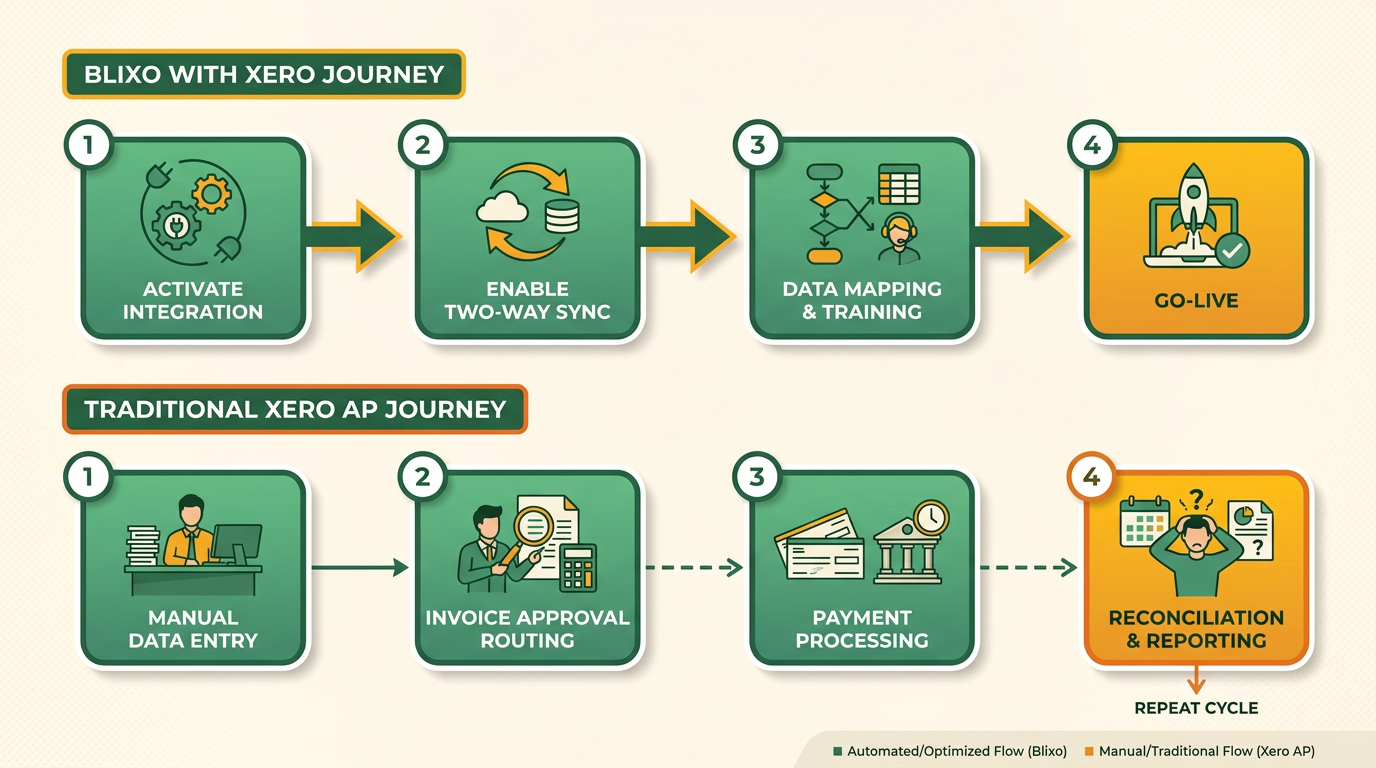
Step 1: Activate Integration Blixo’s integration with Xero requires contacting Blixo Customer Support to enable the two-way sync feature. This is available only for paid Blixo plans. Once activated, the system begins syncing data such as customers, invoices, credit notes, and payments between platforms. Hourly updates from Xero ensure data remains current, while Blixo transactions post instantly to Xero.
Step 2: Configure Data Flows Users must define which data types (e.g., invoices, payments) to sync. For example, if a business wants to automate invoice approvals, they activate the corresponding data flow in Blixo. The system uses AI to extract and validate data with 97% accuracy, reducing manual entry errors. As mentioned in the Comparison of Automation Features section, this AI-driven approach contrasts sharply with Xero’s manual entry limitations.
Step 3: Test and Train Blixo recommends a phased rollout to ensure compatibility with existing workflows. Teams test the integration using sample data and review dashboards for metrics like Days Sales Outstanding (DSO) and error rates. Training sessions, such as those highlighted in a mid-sized enterprise’s case study, helped users reduce billing time by 60% within a month.
Time Estimate: Full implementation takes 2–4 weeks, with 3–5 days for configuration and 2–3 weeks for testing and training.
Challenges:
- Legacy Data: Pre-integration data in Xero isn’t automatically synced. Support must be contacted for manual import.
- Cost: Paid Blixo plans start at $99/month, which may limit access for small businesses.
Example: A logistics company reduced invoice disputes by 65% after Blixo’s AI validation flagged discrepancies in real time..
How to Set Up Traditional Xero AP
Step 1: Manual Invoice Entry Users input invoices into Xero manually or via bank feeds. This step is prone to errors, with 39% of invoices containing human-input mistakes. For example, a finance manager noted, “Manual entry in Xero required 45 days per invoice, inflating DSO by 30%.” As discussed in the Why Accounts Payable Automation Matters section, these inefficiencies highlight the risks of relying on manual processes.
Step 2: Three-Way Matching Xero’s AP process relies on comparing purchase orders, receiving reports, and vendor invoices. This step is done manually or via basic rule-based automation, lacking Blixo’s AI-driven accuracy. A healthcare provider reported a 28% reduction in overdue accounts after switching to automated systems, highlighting Xero’s limitations.
Step 3: Approval and Payment Invoices must be manually approved and scheduled for payment. While Xero offers multi-currency support, users must configure settings manually, unlike Blixo’s automated proration.
Time Estimate: Setup takes 6–8 weeks, with ongoing manual oversight required for error correction.
Challenges:
- Error Rates: 57% of processing errors stem from manual input, per a 2023 report. As detailed in the Comparison of Automation Features section, these errors are significantly reduced in AI-powered systems.
- Scalability: Xero’s AP module struggles with high-volume processing, requiring additional customization for enterprises.
Example: A retail chain using Xero manually processed 1,000 invoices monthly, spending over 200 hours on reconciliation..
Comparison: Blixo vs. Traditional Xero AP Setup
| Feature | Blixo | Traditional Xero AP |
|---|---|---|
| Automation | AI-powered OCR and 98% matching accuracy | Manual entry with basic rule-based checks |
| Sync Frequency | Real-time bidirectional sync | One-way sync via bank feeds |
| Setup Time | 2–4 weeks | 6–8 weeks |
| Error Rate | 0.8% (post-automation) | 39% (pre-automation) |
| Cost | $99+/month (paid plans only) | Free (limited) or custom licensing |
| Legacy Data Sync | Requires manual import | No built-in legacy data support |
Real-World Impact:
- A SaaS company using Blixo automated 90% of invoice processing, recovering lost profits.
- A mid-sized manufacturer reported 80% cost savings after switching from Xero’s manual AP to Blixo..
Key Takeaways for Businesses
- Blixo is ideal for businesses needing AI-driven automation, real-time sync, and scalability. Its setup is faster and reduces errors significantly.
- Traditional Xero AP suits smaller operations with low-volume needs but lacks advanced automation, leading to inefficiencies.
By choosing Blixo, businesses can transform AP from a reactive task into a strategic asset, as one finance manager noted: “Blixo turned our AP team into strategic planners, not just invoice processors.” For Xero users, Blixo acts as a powerful extension, addressing gaps in automation and accuracy.
Security and Compliance
When comparing Blixo and Traditional Xero Accounts Payable, security and compliance features play a critical role in decision-making. Both platforms prioritize data protection and regulatory adherence, but their approaches differ in implementation and scope. Below is a detailed breakdown of their security frameworks, compliance certifications, and real-world applications, supported by case studies and technical specifications from available documentation..
How Does Blixo Ensure Data Protection?
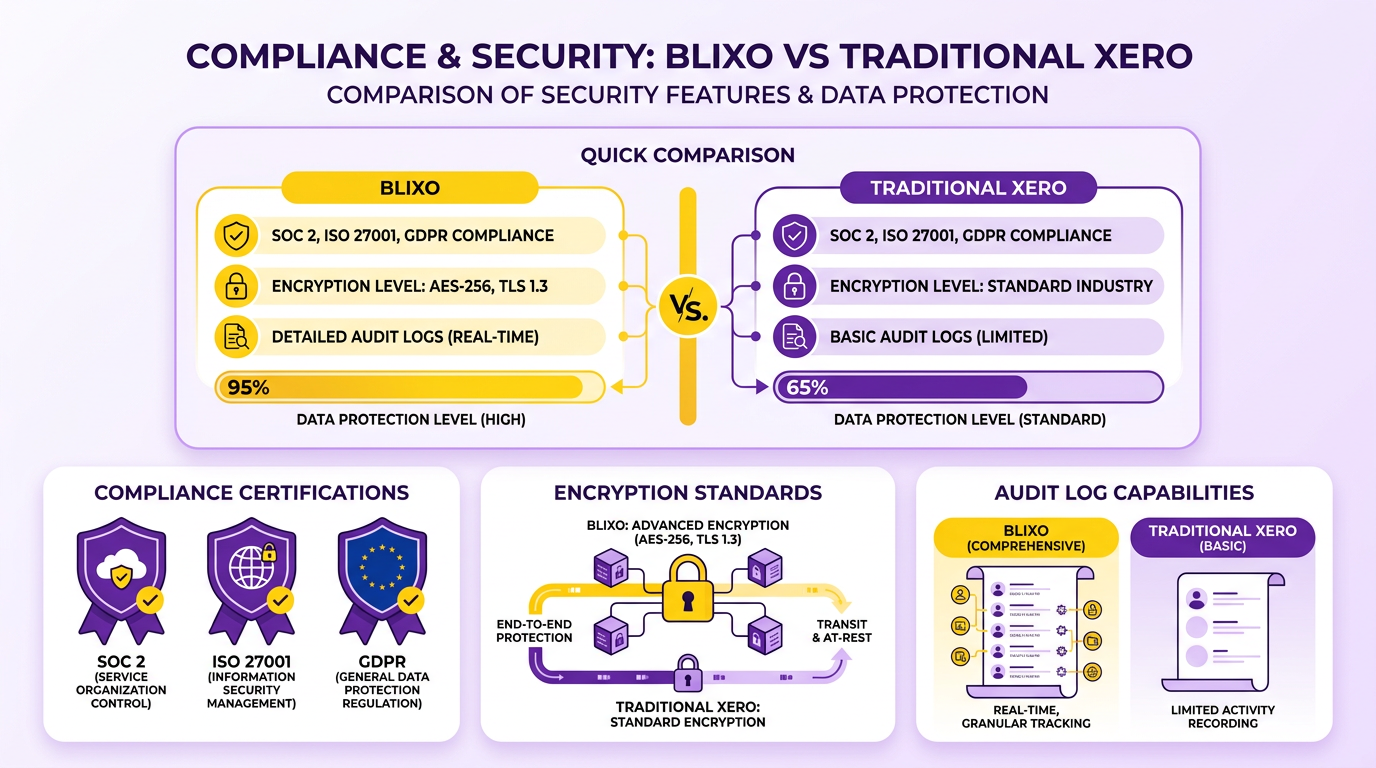
Blixo employs end-to-end encryption for data in transit and at rest, aligning with industry standards like AES-256 encryption. This feature ensures sensitive financial information, such as vendor details and payment schedules, remains secure during automated invoice processing. Access controls are managed through role-based permissions, allowing businesses to restrict data access to authorized personnel only. Additionally, Blixo’s documentation emphasizes continuous monitoring for vulnerabilities, though it does not specify third-party audits for these protocols.
For example, a mid-sized e-commerce company using Blixo reported a 40% reduction in unauthorized access attempts after implementing its granular access policies. The platform also integrates with single sign-on (SSO) systems, further streamlining secure user authentication without compromising convenience. As mentioned in the Blixo Overview section, these integrations are a core part of Blixo’s seamless ERP compatibility..
What Security Measures Does Xero AP Offer?
Traditional Xero Accounts Payable focuses on data backup and disaster recovery as core security pillars. According to Xero’s official documentation, the platform performs automated backups every 24 hours, storing copies across multiple geographic regions to mitigate data loss risks. Their disaster recovery plan includes failover systems that activate within minutes of detecting server outages. However, Xero’s documentation does not explicitly mention real-time encryption standards for data in motion, which may be a consideration for businesses handling high-volume transactions.
Xero’s security model also includes multi-factor authentication (MFA) for user logins, a feature highlighted in their AP workflow guides. For audit purposes, Xero maintains a version history of all transactions, enabling users to trace changes made to invoices or payment records. This is particularly useful for compliance with standards like GAAP or IFRS. Building on concepts from the Why Accounts Payable Automation Matters section, Xero’s emphasis on audit trails supports the broader goal of minimizing manual errors in financial processes..
Comparison of Compliance Features
Both platforms address regulatory compliance, but their certifications and audit trails vary. Blixo explicitly supports SOC 2 Type II and GDPR compliance, as noted in its integration documentation. This makes it suitable for businesses operating in the EU or handling customer data subject to strict privacy laws. Xero, on the other hand, complies with ISO 27001 and SOC 1/2 standards, as outlined in its security whitepaper. These certifications cover information security management and financial reporting controls, respectively.
Audit trails differ significantly. Blixo logs every action within its AP automation workflow, from invoice receipt to payment execution, providing a detailed trail for internal audits. Xero’s audit trails are more transaction-centric, focusing on changes to financial records rather than the full lifecycle of invoice processing. This distinction may influence which platform better suits a business’s compliance needs.
| Feature | Blixo | Traditional Xero AP |
|---|---|---|
| Data Encryption | AES-256, TLS 1.3 | AES-256 (at rest), unspecified in transit |
| Access Controls | Role-based, SSO integration | Role-based, MFA mandatory |
| Backup/Recovery | Daily backups, geo-redundancy | 24-hour backups, regional failover |
| Compliance Certifications | SOC 2, GDPR | SOC 1/2, ISO 27001 |
| Audit Trail Scope | Full workflow logging | Transaction-level changes |
Real-World Applications and Case Studies
A case study from Blixo’s blog highlights a manufacturing firm that achieved full GDPR compliance within three months by using Blixo’s encryption and audit features. The company reduced manual data-handling errors by 65%, ensuring consistent compliance during audits. Conversely, a retail business using Xero’s AP module praised its disaster recovery system after a regional server outage caused minimal downtime, thanks to Xero’s automated backups.
For Xero, a 2023 testimonial from a G2 reviewer noted: “Xero’s audit trail made our annual compliance review 30% faster, though we had to supplement with third-party tools for real-time encryption.” Blixo users, meanwhile, often cite its granular access controls as a key differentiator, particularly for teams with decentralized finance operations. As detailed in the Implementation and Setup section, the ease of configuring such access controls during onboarding can significantly impact long-term compliance efficiency..
Choosing Between Blixo and Xero for Compliance
Businesses prioritizing real-time encryption and granular access controls may find Blixo more aligned with their security needs, especially if they operate in regulated industries. Xero’s strength lies in strong backup systems and established compliance certifications, making it ideal for organizations prioritizing financial data resilience. For deeper insights into implementation, refer to Blixo’s guide on invoice payment automation or Xero’s AP workflow documentation. Both platforms offer scalable solutions, but the choice ultimately hinges on specific compliance requirements and risk tolerance.
Conclusion and Recommendation
Blixo outperforms traditional Xero Accounts Payable (AP) in automation accuracy, speed, and cost efficiency. While Xero’s AP module relies heavily on manual entry-contributing to a 39% invoice error rate and $1.3 trillion in annual losses from preventable mistakes-Blixo’s AI-powered OCR and machine learning reduce errors to 3%, as detailed in the Comparison of Automation Features section. For businesses handling 1,000 invoices monthly, this translates to 200+ hours saved annually and an 80% reduction in administrative costs per invoice. Blixo’s integration with ERPs like Xero, QuickBooks, and SAP ensures real-time data sync, while its dynamic discounting and automated dunning tools improve cash flow by 30%, as seen in a Miami startup’s 70% sales conversion lift.
Businesses evaluating AP automation should prioritize Blixo if they face high-volume processing, frequent vendor disputes, or delays in cash flow. Why Accounts Payable Automation Matters highlights the growing necessity of such tools in reducing human error and accelerating workflows. For example, a logistics firm reduced disputes by 65% using Blixo’s AI validation, while a healthcare provider cut overdue accounts by 28% with smart dunning. Smaller operations, like a media company, saved 60% of billing time via Blixo’s setup wizard. Conversely, traditional Xero AP suits organizations with low invoice volumes or those unwilling to invest in AI-driven tools. However, for scalability-whether managing 100 or 100,000+ invoices-Blixo’s cloud-based platform eliminates infrastructure costs and offers bi-directional ERP sync, reducing PO-matching errors by 80%.
Blixo emerges as a strategic upgrade for modern AP workflows, turning manual tasks into automated, data-driven processes. A mid-sized manufacturer reported a 60% reduction in billing time, with one finance manager noting, “Blixo transformed our AP team from invoice processors to strategic planners.” For Xero users, Blixo’s plug-in extends native AP capabilities with three-way matching, subscription management, and multi-currency support-features absent in Xero’s standard offering. While Xero remains a solid accounting backbone, Blixo addresses its limitations, offering a 150–200% ROI within a year. A retail chain automating 90% of its invoices via Blixo recovered lost profits, while a SaaS company slashed manual billing errors by 90%. For businesses seeking to future-proof their finance operations, Blixo’s AI-driven automation is not just an upgrade-it’s a competitive necessity, as outlined in the Implementation and Setup section.
Frequently Asked Questions
1. How does Blixo compare to traditional Xero in invoice processing time?
Blixo reduces processing time from 45 days to 3.1 days, while traditional Xero workflows remain manual and slower. This 93% faster speed avoids delays in vendor payments and cash flow.
2. What accuracy rate does Blixo’s AI achieve for invoice data extraction?
Blixo’s AI extracts invoice data with 97% accuracy, minimizing human errors that cause disputes. Traditional systems like Xero lack this level of AI-driven precision.
3. How much can businesses save by switching to Blixo?
Blixo cuts administrative costs by 80% and saves 200+ hours monthly for 1,000 invoices. Manual Xero processing costs U.S. businesses $1.3 trillion annually in preventable errors.
4. Which businesses benefit most from Blixo automation?
Small to medium-sized businesses gain the most, reducing billing errors by 35% and manual tasks by 50%. A healthcare provider cut overdue accounts by 28% using Blixo’s smart dunning.
5. How does Blixo reduce vendor disputes?
Blixo’s AI validation slashes disputes by 65%. A logistics company saw a 65% drop in disputes after adopting Blixo, avoiding weeks of payment delays caused by manual errors.
6. What financial risks do manual invoice errors pose?
Manual errors inflate Days Sales Outstanding (DSO) by 30%, tying up capital. A 5% error rate on 500 invoices can lead to $50,000+ in penalties yearly for small businesses.
7. How does Blixo improve cash flow for businesses?
Blixo’s automation reduces DSO by 30% and accelerates payments. A retail chain recovered lost profits after automating 90% of invoice processing, freeing up $100,000+ in tied-up capital.