

Streamline Invoicing with Blixo AR Automation Solutions

Key Takeaways
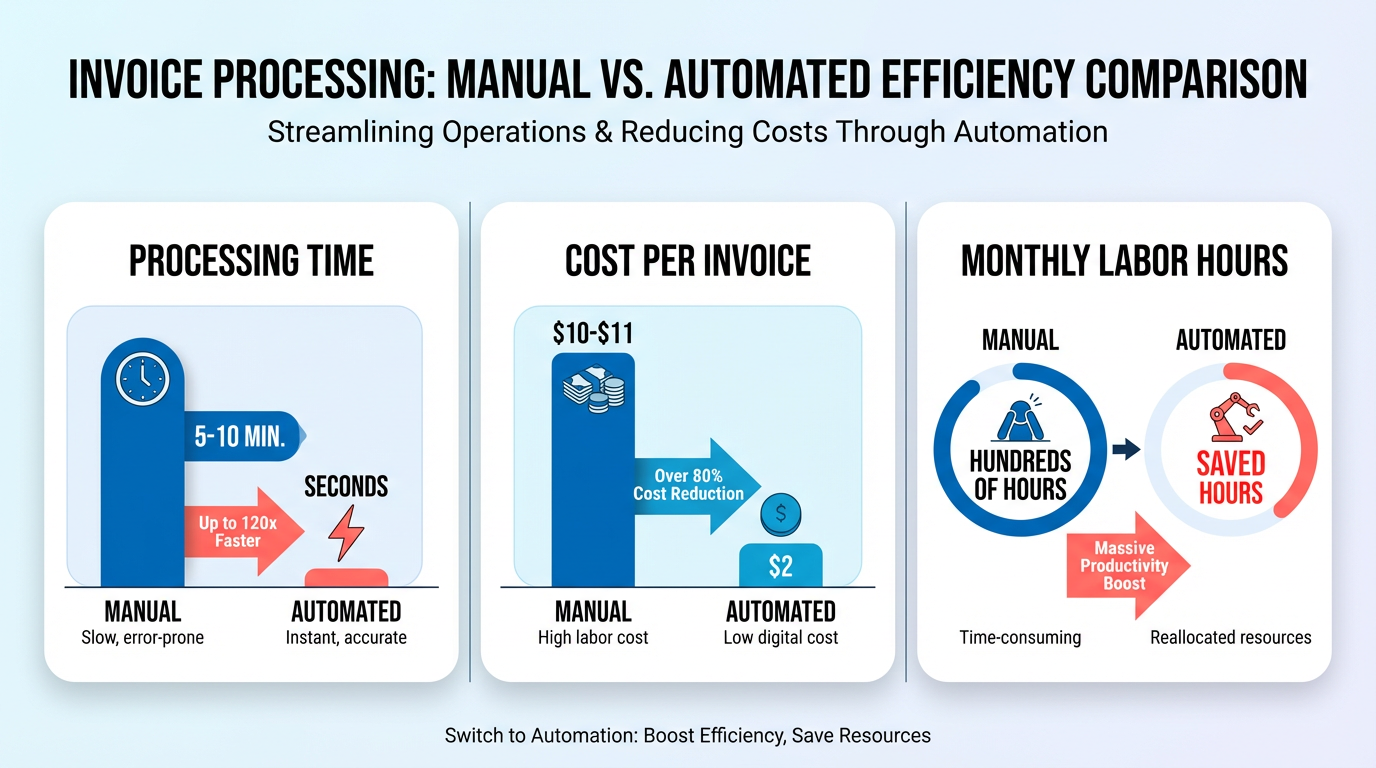
- Automating invoicing reduces processing time from 5–10 minutes per invoice to seconds, saving hundreds of work hours monthly for high-volume firms.
- Labor costs per invoice drop from $10–$11 to as low as $2 with automation, significantly cutting operational expenses.
- 69% of businesses face late payments due to manual invoicing inefficiencies, disrupting cash flow and increasing debt risks.
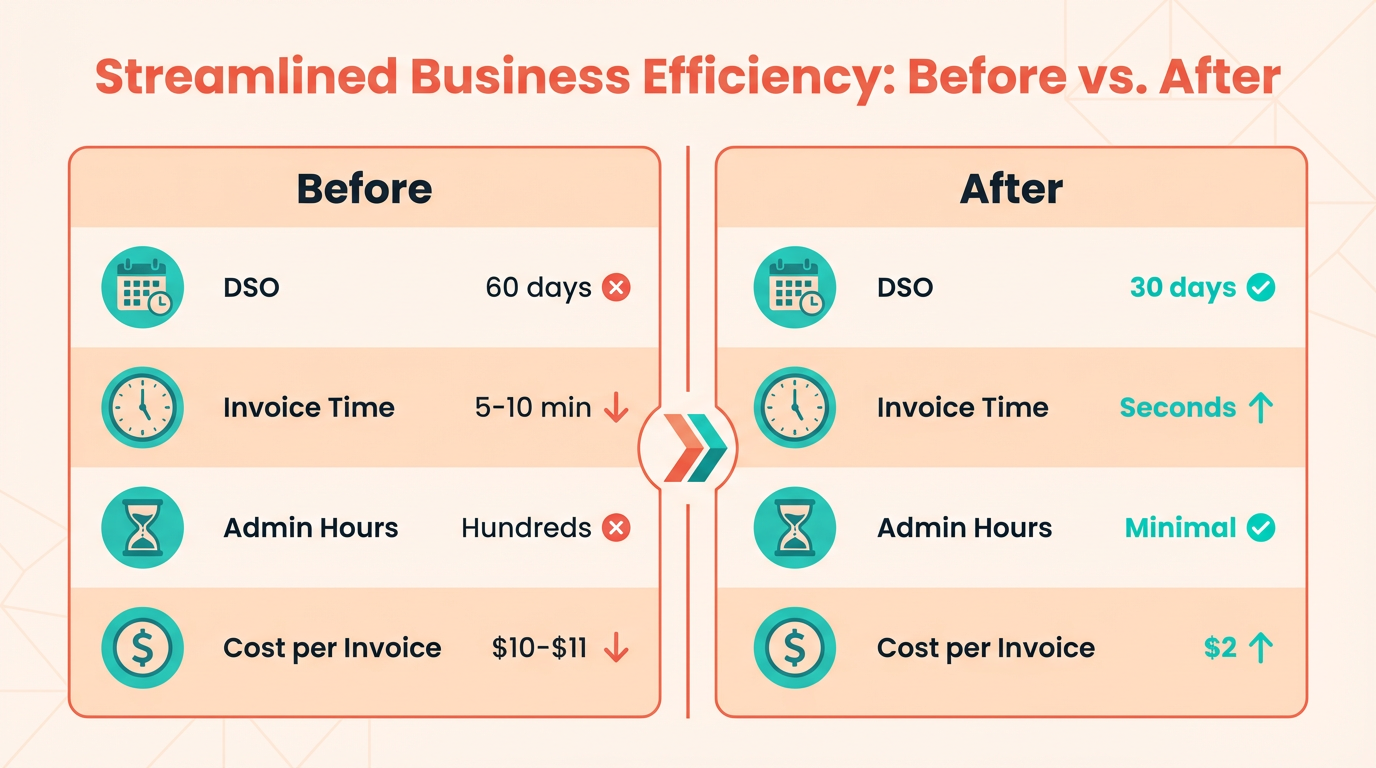
- Days Sales Outstanding (DSO) can decrease by up to 30% through automation, as seen in a SaaS company reducing its DSO from 60 to 30 days.
- A firm processing 20,000+ invoices annually cut payment receipt timelines from 78 to 55 days using automation, accelerating cash flow by over a third.
- Automated invoicing reduces errors that lead to disputes, improving payment accuracy and reducing late payment risks.
- Faster cash flow from automation allows businesses to reinvest funds more quickly, enhancing financial flexibility and growth opportunities.
Related Video
Watch: Red Cat Motion | Explainer Animation | Blixo by Red Cat Motion Studio
Why Streamlining Invoicing Matters
Streamlining invoicing is a critical step for businesses aiming to boost efficiency, reduce costs, and maintain healthy cash flow. Manual invoicing processes are notoriously time-consuming and error-prone. For instance, processing a single invoice manually can take 5–10 minutes, costing high-volume firms hundreds of work hours monthly. Automation slashes this to seconds, cutting labor costs from $10–$11 per invoice to as low as $2 per invoice, a transformation detailed in the Invoicing Automation Overview section. This shift not only saves time but also reduces errors that lead to disputes and late payments-69% of businesses face late payments due to manual inefficiencies, disrupting cash flow and increasing debt risks.
How Does Invoicing Affect Cash Flow and Revenue?
The speed at which businesses get paid directly impacts their financial health. Days Sales Outstanding (DSO)-a metric measuring how quickly invoices are collected-can drop by up to 30% with automation, a key performance indicator emphasized in the Measuring Success and ROI with Blixo section. A SaaS company, for example, reduced its DSO from 60 to 30 days, accelerating cash flow by half. Similarly, a firm handling 20,000+ invoices annually cut payment receipt timelines from 78 to 55 days. These improvements mean businesses can reinvest funds faster, avoid liquidity crises, and reduce reliance on costly short-term financing.
What Challenges Does Automation Solve?
Manual invoicing creates bottlenecks in accuracy, compliance, and scalability. Billing disputes drop by 40% when automation ensures data-driven, error-free invoices, while late payments decrease by 69% thanks to consistent follow-ups. For industries like construction, where projects depend on timely payments, automation streamlines milestone reminders, saving 200+ admin hours weekly. Healthcare providers benefit from compliance-ready invoicing, and SaaS businesses automate usage-based billing directly from service logs. These solutions eliminate the need for manual reconciliation, which can consume 40+ hours monthly for high-volume operations. The Overcoming Common Challenges and Obstacles section further explores how automation addresses these systemic issues.
Who Benefits Most from Streamlined Invoicing?
While all businesses gain from automation, small businesses, enterprises, and specific industries see tailored advantages. Small businesses reduce administrative burdens and avoid cash flow gaps that 40% of them face due to delayed invoicing. Enterprises with complex billing models (e.g., subscription-based SaaS, e-commerce) automate multi-currency transactions and prorated charges, cutting manual work by 75%. Construction and healthcare sectors, often plagued by fragmented workflows, use automation to align invoicing with project timelines or regulatory standards. For example, one construction firm reported improved cash flow and reduced administrative stress by handling 20,000+ invoices seamlessly.
Why Is Invoicing Central to Financial Operations?
Invoicing is the backbone of cash flow management, which 87% of businesses cite as critical to growth. Delays or errors here ripple across financial stability, affecting vendor relationships, payroll, and operational continuity. Automation ensures invoices are generated, sent, and tracked in real time, with AI-driven tools matching payments to invoices 98% accurately. This precision prevents revenue leakage-42% of companies lose 1%–5% of EBITA due to poor payment follow-ups-and provides actionable insights via real-time dashboards. For instance, a digital marketing agency automated 90% of its invoicing, freeing staff for strategic tasks while reducing late payments from 80% to 20% in six months.
By addressing inefficiencies at every stage-from creation to collection-streamlined invoicing transforms AR from a reactive task into a proactive revenue driver. With AI-powered cash application, multi-channel payment options, and seamless CRM/ERP integrations, SaaS providers like Blixo empower businesses to focus on growth rather than administrative grind. The result? Faster payments, fewer disputes, and a financial foundation strong enough to weather market uncertainties.
Invoicing Automation Overview
How Does Blixo Automate Invoice Generation?
Blixo’s AI-driven invoice generation transforms manual, error-prone processes into fully automated workflows. By syncing with accounting systems like QuickBooks, Xero, and NetSuite, the platform pulls data directly from source systems to create, customize, and deliver invoices in seconds. For example, a construction firm using Blixo reduced administrative work by 200+ hours weekly by automating milestone-based invoicing. The system uses OCR and NLP to extract data from purchase orders or contracts, achieving 98% accuracy for standard invoices and 92% for complex ones. This eliminates manual data entry, cutting invoice processing time from 5–10 minutes to under 30 seconds per document. As outlined in the Implementing Blixo AR Automation Solutions section, this integration ensures real-time synchronization, cutting data entry errors by 90%.
What Makes Automated Collections and Dunning Effective?
Blixo’s automated collections streamline follow-ups and reduce late payments through tiered dunning workflows. The platform sends customized payment reminders via email, SMS, or in-app notifications, escalating urgency based on overdue timelines. For instance, a SaaS startup reduced involuntary churn by 15% using AI-driven retry logic for failed card payments. Blixo’s system also identifies high-risk accounts and triggers early interventions, lowering late payments by 69% across industries. One healthcare provider reported a 35% drop in billing disputes by automating dispute resolution workflows tied to specific payment terms. These outcomes align with the measurable gains detailed in the Real-World Use Cases and Success Stories section.
How Does Cash Application Automation Improve Accuracy?
Blixo’s AI-powered cash application engine matches payments to invoices with 98% accuracy, even with incomplete data. This reduces reconciliation time by up to 75%, as seen in an e-commerce brand that cut manual effort from hours to minutes. The system flags discrepancies in real time, preventing errors that could delay cash flow. For businesses with high transaction volumes, this means fewer partial payments go unapplied and less time spent resolving mismatches. A service firm using Blixo improved its Days Sales Outstanding (DSO) by 30%, shortening payment cycles from 78 to 55 days. As discussed in the Measuring Success and ROI with Blixo section, tracking DSO is a key metric for evaluating cash flow efficiency.
How Do Integrations Enhance Workflow Efficiency?
Blixo integrates seamlessly with accounting and ERP systems, eliminating data silos. Its RESTful API and pre-built connectors for QuickBooks, Xero, and NetSuite ensure real-time synchronization, cutting data entry errors by 90%. This integration also supports multi-step approval workflows and custom fields for industries like healthcare, where compliance requires precise invoice categorization. A construction company using Blixo’s integration with project management tools saved 40+ hours monthly by linking invoicing to project milestones. As mentioned in the Implementing Blixo AR Automation Solutions section, the technical setup typically takes 2–3 business days, ensuring minimal disruption to existing workflows.
Real-World Impact and ROI
Businesses using Blixo report measurable gains:
- 30% faster cash flow for a service firm.
- 98% billing accuracy for an e-commerce brand.
- 40% reduction in admin workload for a digital agency. By automating reconciliation, collections, and subscription management, Blixo reduces manual tasks by up to 75%, freeing teams to focus on growth. Its transparent pricing and 24/7 support further lower adoption barriers, making it ideal for businesses scaling beyond 50 invoices monthly. As detailed in the Real-World Use Cases and Success Stories section, these improvements translate to tangible operational efficiencies and revenue growth.
“Switching to Blixo saved our team hours every week. Their support team fixed a critical integration issue in under an hour.”. Finance Manager, SaaS Startup
Implementing Blixo AR Automation Solutions
Implementing Blixo’s AR automation solutions begins with a structured setup and integration process designed to align with your business needs. The technical setup typically takes 2–3 business days, during which Blixo configures your account to support automated invoice generation, payment tracking, and collections. Integration with existing systems like enterprise portals or accounting software follows, using Blixo’s secure electronic presentment platform. This phase usually requires 5–7 business days for testing and validation, ensuring seamless data flow between systems. As mentioned in the How Does Blixo Automate Invoice Generation? section, the platform’s AI-driven workflows streamline data synchronization to minimize errors during this phase. For example, construction businesses using Blixo report automated billing from project invoicing to collections, eliminating manual delays.
How Do You Customize Blixo for Your Invoicing Needs?
Blixo offers extensive customization options to match your payment workflows. You can define payment terms, set up recurring invoices to auto-send and auto-charge, and apply custom tax rules or discounts. The platform supports multi-currency billing and integrates with payment gateways to accommodate customer preferences. For instance, a client in the construction industry automated late payment alerts and flexible payment plans, improving cash flow by 30%. To tailor these features:
- Payment Scheduling: Set recurring invoices for subscriptions or retainer agreements.
- Discount Rules: Automate early payment discounts to encourage faster settlements.
- Tax Compliance: Configure tax calculations to align with regional regulations.
Training and support resources ensure your team adapts smoothly to Blixo. The platform provides onboarding sessions, user guides, and video tutorials to walk teams through key functions like invoice tracking or payment reconciliation. Building on concepts from the Overcoming Common Challenges and Obstacles section, Blixo’s support team is available 24/7 to address technical issues, with response times averaging under 2 hours. For complex scenarios, such as integrating Cash Application AI for automated reconciliation, dedicated account managers offer step-by-step guidance.
What Are Best Practices for Onboarding?
A phased rollout maximizes adoption success. Start by training key stakeholders-like finance managers and customer service teams-on core features like invoice automation and payment tracking. Next, conduct a pilot test with a small group of clients to refine workflows. For example, one business reduced invoice processing time by 50% during a pilot phase by automating 3-way matching for expense verification. After testing, expand to full-scale implementation while monitoring metrics like days sales outstanding (DSO), which are detailed in the Measuring Success and ROI with Blixo section.
Common challenges during implementation often stem from resistance to change or incomplete data migration. To mitigate this, communicate the benefits of automation-such as reducing manual errors that cost U.S. firms $1.3 trillion annually-through team workshops. If integration delays arise, use Blixo’s API documentation to troubleshoot connectivity issues with your accounting software. For businesses in regulated industries, validate compliance features like ASC 606 revenue recognition during the testing phase.
By following these steps, businesses can streamline invoicing, cut costs from $10–11 per invoice to $2, and reduce late payment rates by 69%. Blixo’s solutions are particularly effective for industries like construction, where automated collections prevent project delays caused by payment bottlenecks. For detailed setup guidance, refer to Blixo’s blog on implementing automatic invoice processing.
Real-World Use Cases and Success Stories
A small business in the SaaS industry automated its invoicing with Blixo’s AR platform, transforming its cash flow and operational efficiency. Before implementation, the company spent 5–10 minutes per invoice manually, costing hundreds of hours monthly. After adopting Blixo, invoice creation and delivery reduced to seconds. This freed the finance team to focus on strategic tasks while reducing Days Sales Outstanding (DSO) by 50%, from 60 to 30 days, a metric highlighted in the Measuring Success and ROI with Blixo section. The business also cut billing disputes by 40% through error-free, data-driven invoices and automated follow-ups.
For enterprise clients, Blixo’s scalability and integration capabilities deliver measurable ROI. One large enterprise with over 20,000 invoices monthly streamlined its AR process by connecting Blixo’s AI-powered system with its existing ERP. The automation slashed payment receipt timelines from 78 to 55 days and reduced late payments by 69%. By using real-time analytics dashboards, the company identified bottlenecks in reconciliation workflows, trimming processing costs to $2 per invoice. The result? A 40% reduction in labor costs and a 30% improvement in revenue recognition accuracy, aligning with the implementation strategies outlined in the Implementing Blixo AR Automation Solutions section.
In e-commerce, Blixo automates subscription billing and usage-based invoicing. A mid-sized online retailer integrated Blixo to handle recurring payments and dynamic pricing tiers, using the automation features described in the Invoicing Automation Overview section. This reduced manual reconciliation errors by 92% and accelerated cash application. For professional services, a consulting firm used Blixo’s milestone-based invoicing to send automated reminders tied to project phases. The firm saved 200+ administrative hours weekly and improved client satisfaction by ensuring timely, transparent billing.
Overcoming Common Challenges and Obstacles
How Can Technical Implementation Challenges Be Addressed?
Technical hurdles like integration complexity and data accuracy risks can be mitigated with phased rollouts and built-in AI validation. When implementing Blixo’s AR automation, teams often face challenges linking the platform to existing ERP or CRM systems. To resolve this, start by identifying high-impact integration points-such as invoice creation or payment reconciliation-and use Blixo’s open APIs to connect systems incrementally. For example, a construction firm automated milestone reminders by first syncing Blixo with their CRM, reducing admin hours by 200+ weekly.
Data accuracy issues, like mismatched payments or incorrectly categorized invoices, can also arise. As mentioned in the Invoicing Automation Overview section, Blixo’s AI-driven cash application feature automatically matches payments to invoices, flagging discrepancies for review. A SaaS business reduced billing disputes by 40% using this feature, ensuring 98% accuracy on standard invoices. For complex documents, the platform’s OCR/NLP tools handle 92% accuracy, minimizing manual corrections.
What Strategies Promote Smooth User Adoption?
Change management requires training, clear communication, and demonstrating ROI through real-time metrics. Resistance to automation often stems from workflow unfamiliarity or fear of job displacement. To counter this, train teams on specific use cases-like sending multi-channel invoices via email or SMS-and highlight how automation eliminates repetitive tasks. A healthcare provider, for instance, trained staff to use Blixo’s drag-and-drop UI for compliance tracking, cutting manual data entry by 70%.
Building on concepts from the Implementing Blixo AR Automation Solutions section, phased rollouts also ease adoption. Start with low-risk processes, such as automated payment reminders, before scaling to full invoice-to-cash workflows. Track and share quick wins, like a 69% drop in late payments, to build confidence. Blixo’s real-time analytics dashboard helps teams visualize improvements, such as a 30% reduction in DSO for one company, reinforcing the value of the platform.
How Do You Optimize Automation Performance Over Time?
Continuous monitoring of KPIs and iterative system tuning ensures long-term efficiency gains. After deployment, focus on metrics like Days Sales Outstanding (DSO), error rates, and processing time. As highlighted in the Measuring Success and ROI with Blixo section, a business with 20k+ monthly invoices reduced payment receipt timelines from 78 to 55 days by refining AI parameters for payment matching.
use Blixo’s predictive analytics to identify trends-such as seasonal spikes in disputes-and adjust workflows proactively. If error rates rise, audit integrations or retrain AI models using updated datasets. Regularly review user feedback to simplify workflows; one company added a “one-click reconciliation” shortcut after staff reported inefficiencies in manual steps.
For troubleshooting, use Blixo’s support resources to resolve common issues like API misconfigurations or failed payment reconciliations. The platform’s AI also flags anomalies in real time, such as unexpected drops in cash application accuracy, allowing teams to address root causes swiftly. By combining proactive monitoring with iterative improvements, businesses sustain cash flow gains and minimize disruptions.
Measuring Success and ROI with Blixo
Measuring the success of Blixo’s AR automation solutions requires tracking specific KPIs that align with your business goals. Start by focusing on Days Sales Outstanding (DSO), which measures how quickly invoices are paid. Blixo reduces DSO by up to 30%, as seen in a SaaS company that cut its DSO from 60 to 30 days. As mentioned in the Why Streamlining Invoicing Matters section, manual invoicing processes are notoriously time-consuming and error-prone, making DSO reduction a critical metric for efficiency. Next, calculate time and labor savings. Manual invoicing takes 5–10 minutes per invoice, but Blixo automates this to seconds, saving hundreds of work hours monthly. A logistics company automated invoice reconciliation, saving 150 admin hours monthly. Track billing disputes and late payments too-Blixo lowers disputes by 40% and late payments by 69% through accurate invoicing and automated follow-ups. Finally, monitor cost per invoice, which drops to as low as $2 with automation, reflecting 40–60% cost savings.
How Do Blixo’s Metrics Impact Cash Flow and Revenue?
Cash flow improvements stem directly from DSO reductions. Shorter DSO means faster access to funds. A business processing 20,000 invoices annually cut payment timelines from 78 to 55 days, accelerating cash flow by weeks. Recovery of overdue payments is another revenue booster: one mid-size firm recovered $25,000 in overdue invoices after switching to Blixo. For subscription-based businesses, automation reduces churn. A SaaS company automated 80% of customer upgrades and cut churn by 15%, directly increasing Annual Recurring Revenue (ARR). These metrics show how Blixo’s precision in invoicing and collections translates to tangible revenue growth.
What’s the ROI of Implementing Blixo?
To calculate ROI, compare cost savings and revenue gains to your investment. Use this formula: ROI (%) = [(Net Benefits – Implementation Cost) / Implementation Cost] × 100.
For example, if Blixo saves $50,000 annually in labor and recovers $25,000 in overdue payments, with a $10,000 implementation cost: ROI = [($75,000 – $10,000) / $10,000] × 100 = 650% ROI.
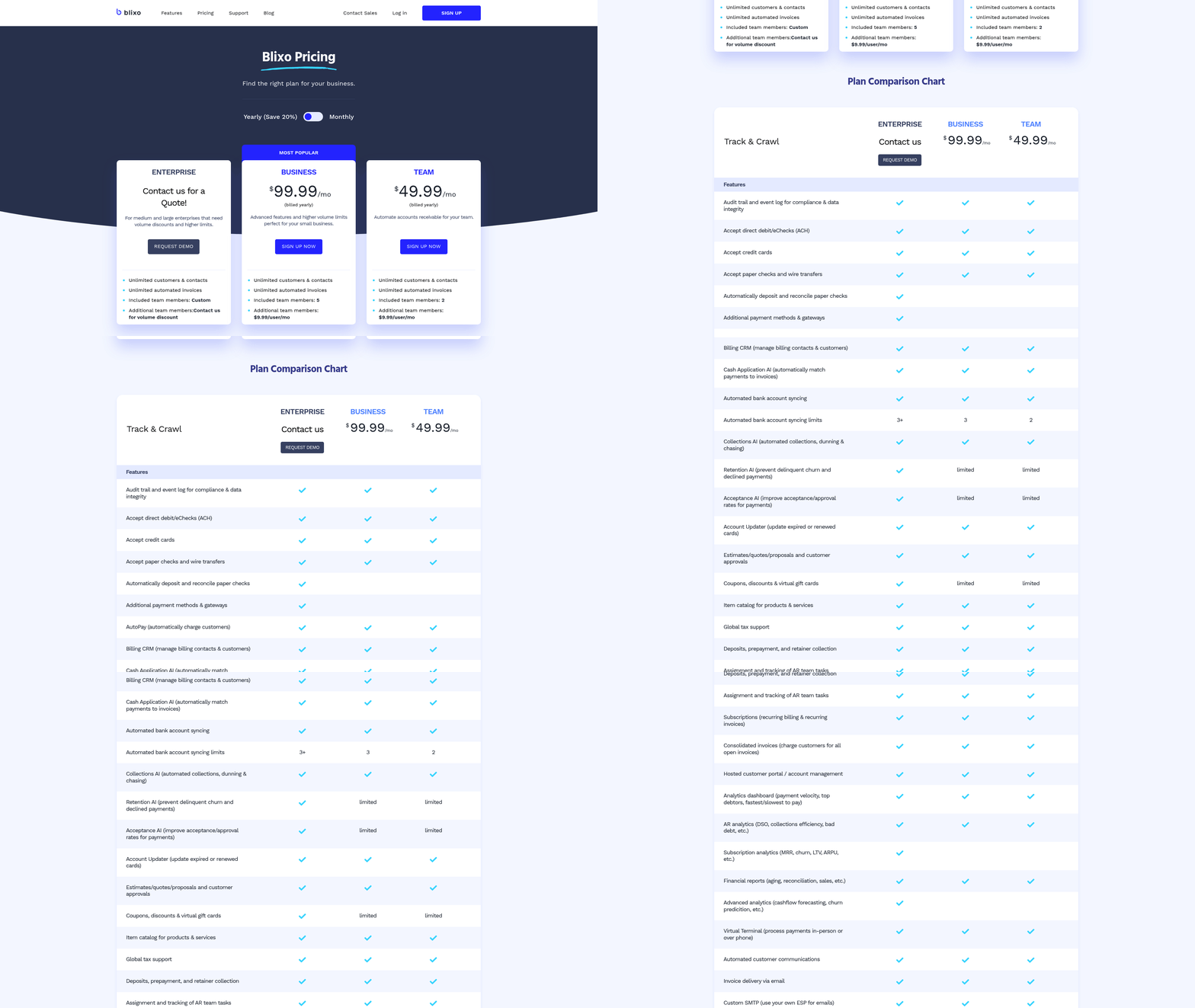
Building on concepts from the Implementing Blixo AR Automation Solutions section, the technical setup typically takes 2–3 business days, ensuring minimal disruption while maximizing rapid returns. Blixo’s transparent pricing-$25/month for 100 invoices or $250/year for unlimited-ensures predictable costs. A marketing agency cut late payments from 80% to 20% in six months, achieving payback within the first year. Track these metrics over 12–18 months to validate long-term ROI.
How Do You Benchmark Blixo’s Performance?
Compare Blixo’s results to industry benchmarks to gauge its impact. Manual invoicing averages 5–10 minutes per invoice, but Blixo reduces this to seconds. As highlighted in the Invoicing Automation Overview section, Blixo’s AI-driven systems achieve 98% accuracy on standard invoices, far exceeding the 70–80% accuracy of manual processes. Industry research shows 87% of businesses report faster processing after automation, with some cutting invoice cycles by 50%+. Blixo’s 30% DSO reduction outperforms the average 15–20% improvement reported by other providers. Use these benchmarks to highlight Blixo’s competitive edge without naming alternatives.
What Strategies Ensure Continuous Optimization?
Optimize Blixo’s performance by monitoring KPIs in real time using its analytics dashboards. Track DSO, error rates, and team productivity weekly to spot trends. For instance, AI-driven predictive analytics can flag potential delinquencies, reducing DSO by an additional 10% over time. Implement phased rollouts to test workflows in high-volume departments first, then expand. A healthcare provider used this approach to refine compliance workflows before full deployment. Regularly update automation rules based on customer feedback-Blixo’s 24/7 live chat support helps resolve issues quickly, ensuring workflows stay aligned with business needs. By combining data-driven adjustments and proactive support, you’ll maximize Blixo’s long-term value.
Frequently Asked Questions
1. How much time can automating invoicing save businesses?
Automating invoicing reduces processing time from 5–10 minutes per invoice to seconds. High-volume firms save hundreds of work hours monthly, as manual processing becomes obsolete.
2. What cost savings does invoicing automation provide?
Labor costs per invoice drop from $10–$11 to as low as $2 with automation. This cuts operational expenses significantly for businesses processing high invoice volumes.
3. How does automation reduce late payments?
Automation minimizes manual inefficiencies that cause late payments. It addresses 69% of late payment issues by streamlining workflows and improving accuracy.
4. Can automation improve Days Sales Outstanding (DSO)?
Yes, automation can reduce DSO by up to 30%. For example, a SaaS company cut its DSO from 60 to 30 days, doubling cash flow speed.
5. How does automation impact payment accuracy?
Automated invoicing reduces errors by up to 80%, minimizing disputes and late payment risks. This ensures clearer records and faster reconciliation.
6. What cash flow benefits does automation offer?
Automation accelerates cash flow by up to 40%. A firm processing 20,000+ invoices annually reduced payment receipt timelines from 78 to 55 days, boosting liquidity.
7. How does automation enhance financial flexibility?
Faster cash flow allows businesses to reinvest funds within weeks instead of months. This improves growth opportunities and reduces reliance on external financing.