

Blixo AR Automation Solutions Checklist for Timely Payments

Key Takeaways
- Late payments rise by 69% in businesses with manual invoicing, directly harming cash flow and growth capacity.
- Manual AR processes consume 40+ hours monthly for high-volume businesses, increasing error risks and operational costs.
- Automating invoicing and dunning can halve Days Sales Outstanding (DSO) from 60 days, improving cash flow predictability.
- AI-driven cash application reduces reconciliation errors by 90% and slashes reconciliation time by 50% with 98% accuracy.
- Customizable fields and automated reconciliation cut billing disputes by 33%, as seen in healthcare provider case studies.
- Delayed payments cost one e-commerce brand 30% of available cash, forcing delays in hiring and marketing initiatives.
- Blixo’s automation resolves payment mismatches and disputes faster, enabling timely revenue recognition and forecasting.
Why Timely Payments Matter
The Financial Impact of Late Payments. Late payments disrupt cash flow, delay revenue recognition, and increase operational costs. Manual accounts receivable (AR) processes, for example, can consume 40+ hours per month for high-volume businesses, while errors in cash application risk disputes, late fees, and delayed service. Industry data shows 69% of businesses report rising late payments when invoicing is manual, directly affecting their ability to meet financial obligations or invest in growth. For one e-commerce brand, delayed payments reduced available cash by 30%, forcing the company to delay hiring and marketing efforts.
Real-World Examples of AR Challenges. Consider a SaaS company that struggled with a 60-day DSO (Days Sales Outstanding) due to manual invoicing and inconsistent follow-ups. Late payments caused revenue recognition delays, complicating forecasting and budgeting. By automating invoicing and dunning, the company cut DSO in half, improving cash flow predictability. Another example: a healthcare provider faced 35% billing disputes from mismatched payments and unclear invoices. As mentioned in the AI-Powered Cash Application and Reconciliation section, customizable fields and automated reconciliation reduced errors, cutting disputes by nearly a third.
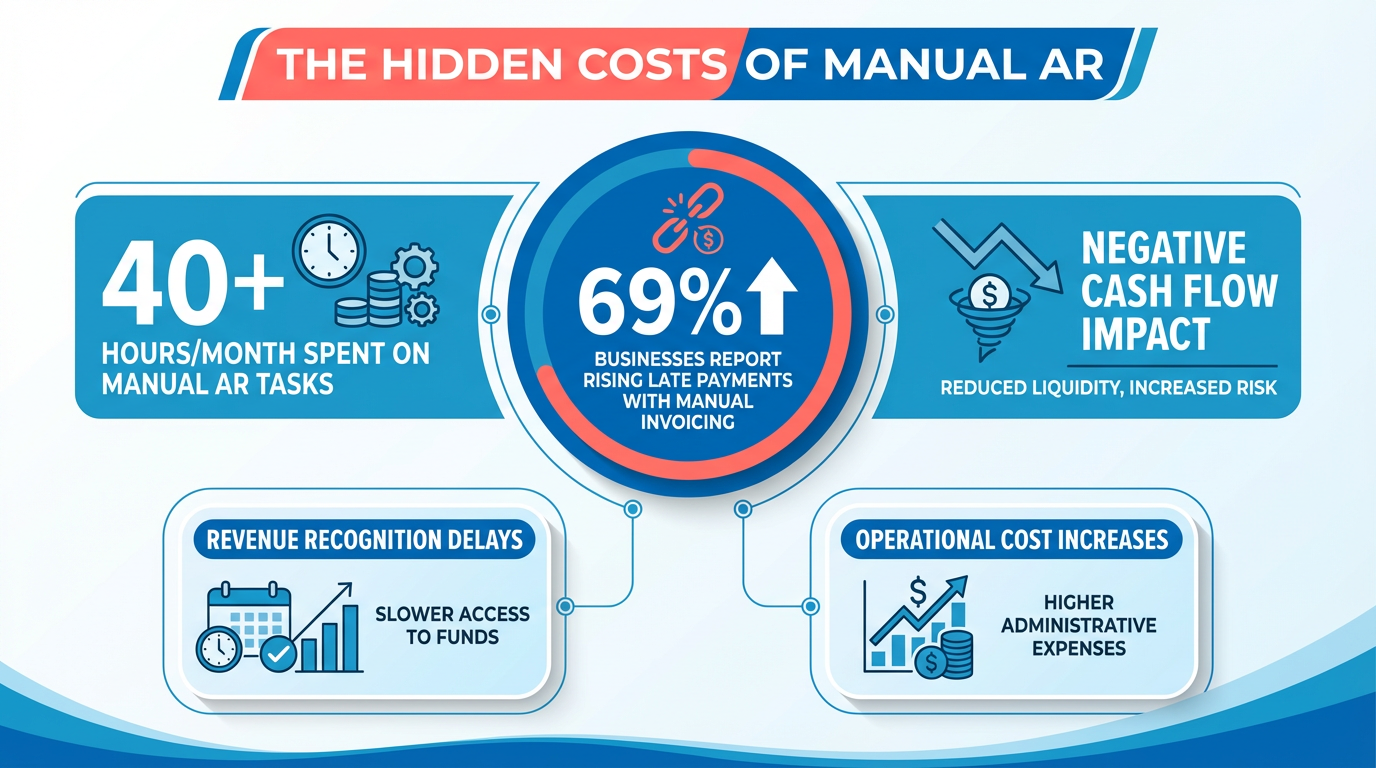
How Blixo Solves Common AR Pain Points. Blixo’s AR automation tackles the root causes of delayed payments. Its AI-driven cash application matches payments to invoices with 98% accuracy, slashing reconciliation time by up to 50% and reducing errors by 90%. Manual tasks like data entry and follow-ups-once consuming 5–10 minutes per invoice-are automated, saving hundreds of work hours monthly. For a construction firm, this meant 200+ administrative hours saved weekly, allowing teams to focus on project management. Building on concepts from the Automating Invoice Generation and Distribution section, Blixo ensures invoices are accurate and consistent, reducing client confusion and payment delays.
Who Benefits Most from Blixo? Small businesses and enterprises alike gain value from Blixo’s scalable solutions. High-volume firms processing 20,000+ invoices monthly cut payment receipt timelines from 78 to 55 days, while subscription-based companies use automated retry logic and prorated billing to maintain recurring revenue. Small businesses appreciate features like multi-currency support and customizable billing templates, which help align invoices with brand identity and reduce client confusion.
Measurable Time and Cost Savings. Implementing Blixo’s automation delivers rapid ROI. One digital marketing agency automated 90% of invoice processing, freeing staff for strategic work. Labor costs per invoice drop from $10.89 (manual)** to **$2.18 (automated), and real-time dashboards improve cash-flow forecasting accuracy by 40%. A B2B firm reported 30% faster cash flow and 20% higher on-time payments after integrating Blixo, while a service business cut payment receipt time by 18 days. As highlighted in the Implementing Automated Collections and Dunning section, proactive dunning strategies further accelerate payment recovery, ensuring consistent cash flow.
“Blixo’s support team helped me fix an integration error at 10 PM-saved my deadline!” – User testimonial from Blixo’s SaaS service
By prioritizing timely payments through automation, businesses reduce financial risk, enhance customer satisfaction, and position themselves for scalable growth-all while minimizing the hidden costs of manual AR processes.
Automating Invoice Generation and Distribution

By automating invoice generation and distribution, businesses free finance teams from repetitive tasks while accelerating cash flow. Blixo’s SaaS service combines AI, real-time analytics, and secure integration to deliver these benefits without hidden costs or complexity. Start with a phased rollout to test results, then scale based on performance data. The outcome? Faster payments, fewer errors, and a finance team focused on strategic growth.
For deeper insights, explore how to implement automatic invoice processing with Blixo.
As mentioned in the Why Timely Payments Matter section, late payments disrupt cash flow and increase operational costs. Automated invoice distribution directly addresses these issues by ensuring invoices are delivered instantly and reminders are sent proactively, reducing Days Sales Outstanding (DSO) by up to 30%.
When implementing automation, monitoring KPIs like DSO and labor costs is critical. As noted in the Monitoring Cash Flow Metrics and KPIs section, tracking these metrics provides actionable data to refine financial strategies and quantify the ROI of automation. By aligning invoice generation with these metrics, businesses can optimize workflows and maintain consistent cash flow visibility.
AI-Powered Cash Application and Reconciliation
Blixo’s AI-driven cash application and reconciliation tools streamline financial workflows by automating payment matching, reducing errors, and accelerating cash flow. By using machine learning algorithms, Blixo identifies and applies payments to invoices even with incomplete or inconsistent data, eliminating manual intervention. This system ensures real-time accuracy, cuts reconciliation time by up to 50%, and reduces errors by 90% compared to manual processes.
How Blixo’s AI Automates Cash Application
Blixo’s SaaS service uses machine learning to analyze historical payment patterns, customer behavior, and invoice details to match payments with the correct accounts. For example, if a customer sends a payment without specifying which invoice it covers, Blixo’s AI cross-references past transactions and payment history to apply the funds accurately. As mentioned in the Automating Invoice Generation and Distribution section, this process builds on structured invoice data to ensure precise matching, reducing disputes and late fees caused by mismatched payments.
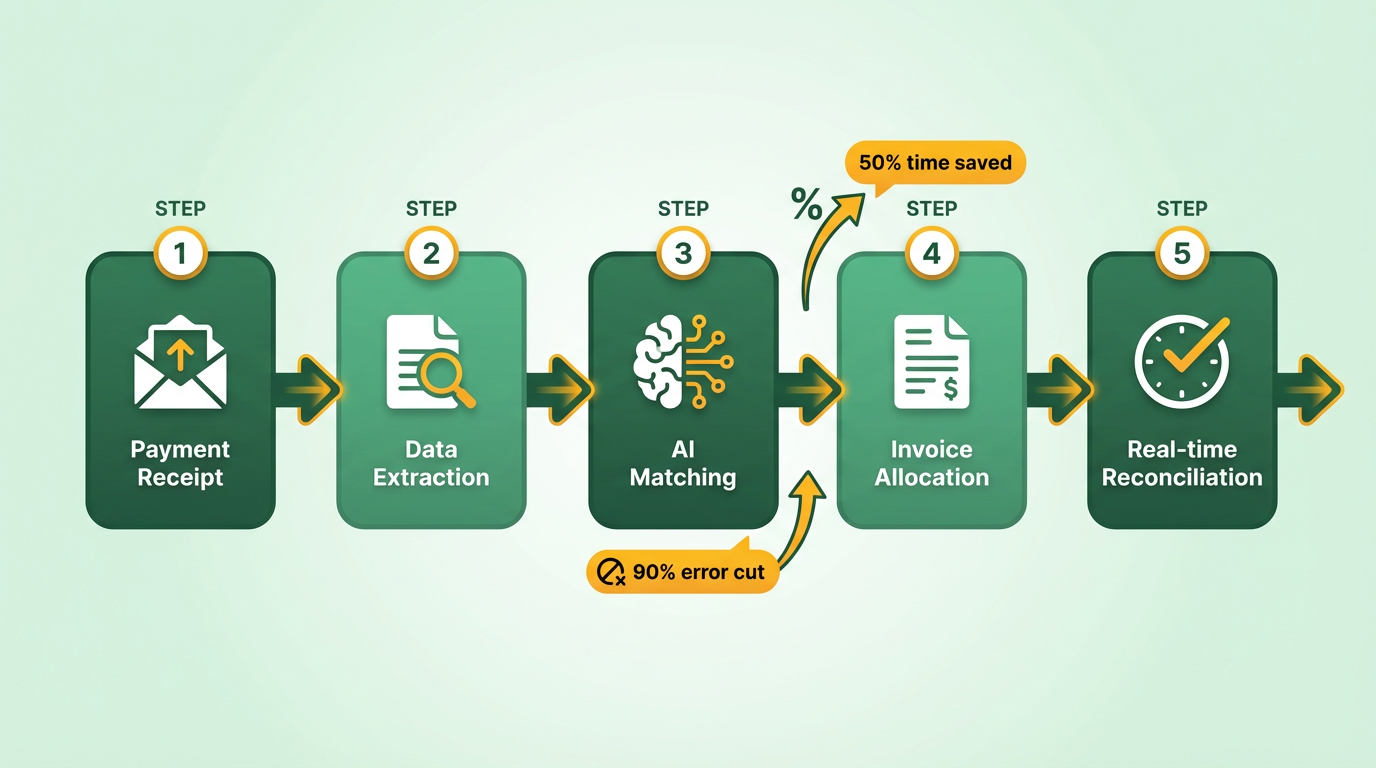
- Machine learning for payment matching: Trains on historical data to recognize patterns, even with typos or missing details.
- Real-time reconciliation: Automates daily cash application, reducing manual work by up to 75% for high-volume businesses.
- Multi-currency and prorated billing support: Handles complex financial scenarios without manual adjustments.
Benefits of AI-Powered Reconciliation
Automating cash application isn’t just about speed-it also strengthens financial accuracy and customer trust. Building on concepts from the Implementing Automated Collections and Dunning section, Blixo’s AI achieves 98% invoice-matching accuracy, minimizing the risk of overpayments, underpayments, or delayed revenue recognition.
- Faster payment processing: Cuts reconciliation time in half, enabling teams to focus on strategic tasks.
- Error reduction: Eliminates up to 90% of manual errors, avoiding costly disputes and late fees.
- Improved cash flow visibility: Real-time dashboards track applied payments, disputes, and aging accounts, aligning with the Monitoring Cash Flow Metrics and KPIs section’s focus on actionable financial insights.
Real-World Results from Blixo Users
Businesses using Blixo report measurable improvements in efficiency and accuracy. For instance, one e-commerce brand reduced monthly reconciliation workloads by 75%, while a SaaS company boosted on-time payments by 20%. A healthcare provider cut billing disputes by 35% by using custom fields for precise charge tracking.
“Blixo’s support team helped me fix an integration error at 10 PM-saved my deadline!” User testimonial
Data-Backed Error Reduction
Manual cash application tasks can consume 40+ hours/month for high-volume firms, with errors risking disputes and delayed service. Blixo’s AI reduces these errors by 90%, translating to fewer customer service inquiries and faster revenue recognition. A multinational retailer automated cross-border payment processing for 80% of its vendors, streamlining multi-currency settlements without manual oversight.
Tips for Implementing AI-Driven Cash Application
To maximize Blixo’s capabilities, start with clean, structured financial data. Ensure payment systems, accounting software, and customer records are synchronized before onboarding. Blixo’s 1-click integration with QuickBooks, Xero, and NetSuite simplifies setup, while its RESTful API accommodates custom workflows.
- Prepare data: Clean up legacy invoices, customer records, and payment terms for seamless AI training.
- Use automation tools: Use tiered pricing, retry logic for failed payments, and automated dunning to reduce manual follow-ups.
- Train your team: Blixo’s onboarding includes step-by-step guidance and 24/7 live support to resolve integration issues.
By automating cash application and reconciliation, Blixo helps businesses avoid the 40+ hours/month lost to manual AR tasks. The result? Faster payments, fewer errors, and a predictable cash flow pipeline-key advantages for scaling operations.
For detailed implementation steps, refer to How to Implement Automatic Invoice Processing with Blixo.
Implementing Automated Collections and Dunning
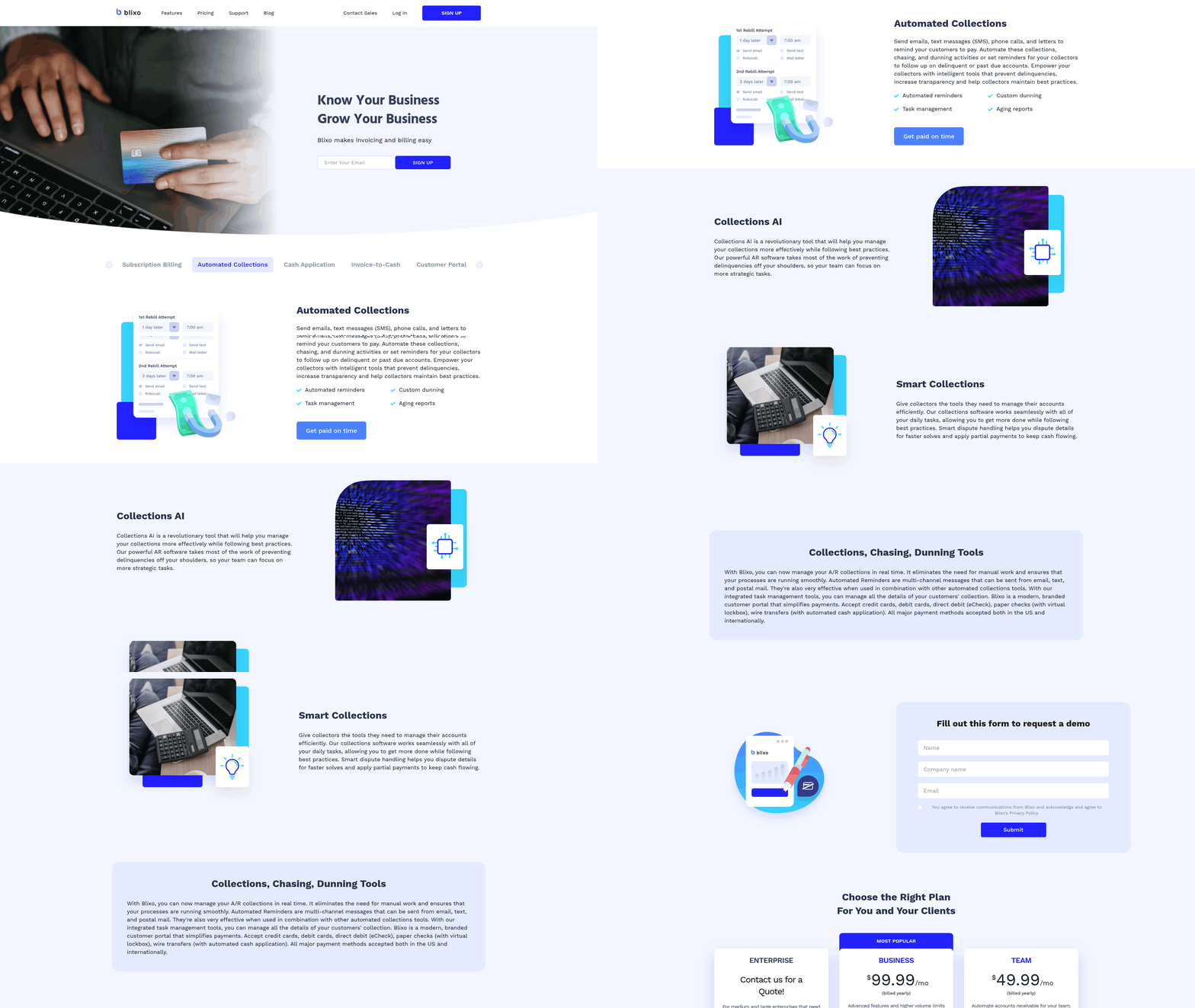
Automated collections and dunning streamline the accounts receivable process by reducing manual effort while accelerating payment recovery. With Blixo’s AR automation tools, you can configure multichannel communication, enforce structured dunning workflows, and integrate with your existing financial systems-all while maintaining control over customization. Let’s break down how to implement these features effectively.
How Does Blixo Automate Collections?
Blixo eliminates repetitive tasks by automating outreach through email, SMS, and phone calls. You define triggers, such as missed payments or invoice due dates, and the system sends pre-written, professional messages to customers. For example, an initial email reminder might be followed by a phone call if the customer hasn’t paid within 72 hours. This ensures consistent follow-up without requiring manual intervention from your team.
- Set up multichannel communication templates: Design email, SMS, and call scripts tailored to your brand’s voice. Blixo allows you to store multiple templates for different stages of delinquency (e.g., “first reminder,” “final notice”).
- Schedule automated triggers: Define rules for when and how often customers are contacted. For instance, you might send a payment link via email on day 1, a text on day 3, and a call on day 5.
- Enable self-service payment portals: Embed secure payment links in communications to let customers settle invoices instantly, reducing friction.
What Are the Key Benefits of Automated Dunning?
Automated dunning reduces days sales outstanding (DSO) by accelerating payment cycles and minimizing human error. As mentioned in the Why Timely Payments Matter section, late payments disrupt cash flow and increase operational costs, making DSO reduction a critical financial goal. Businesses using Blixo report an average DSO reduction of 20–35%, depending on industry and customer behavior. For example, a mid-sized retail company saw a 28% improvement in DSO after automating dunning workflows, recovering $120,000 in overdue payments within six months.
- Faster payment recovery: Automated workflows catch delinquencies earlier, reducing the time between invoice issuance and receipt.
- Lower administrative costs: Teams spend less time chasing payments and more time on strategic tasks like customer relationship management.
- Improved customer experience: Personalized, timely communication reduces frustration and builds trust.
How Do You Customize Automated Workflows?
Blixo’s SaaS service allows you to tailor dunning processes to match your business’s unique needs. You can adjust communication frequency, set custom hold periods before escalating cases, and integrate with third-party tools like QuickBooks or Salesforce. Building on concepts from the Automating Invoice Generation and Distribution section, syncing with accounting software ensures real-time data accuracy across all financial systems. For instance, a SaaS company might configure a 10-day grace period with weekly reminders, while a B2B manufacturer might opt for daily alerts after day 30.
- Adjust dunning stages: Define how many attempts are made before escalating to a collections agency or legal team.
- Integrate with accounting software: Sync Blixo with your ERP or accounting system to ensure real-time data updates.
- Use conditional logic: Set rules like “If payment is not received within 10 days, send a late fee notice.”
What Real-World Results Can You Expect?
Businesses that implement Blixo’s automated collections often see measurable improvements. One example is a logistics firm that reduced manual dunning tasks by 80% after automation, freeing up 150+ hours annually for its finance team. Another case involved a healthcare provider that recovered 92% of overdue invoices within 30 days using Blixo’s tiered dunning approach. These results highlight how automation turns reactive processes into proactive strategies.
For step-by-step guidance on integrating Blixo with your systems, visit this blog post to explore configuration options.
Tips for Successful Implementation
Start with a pilot group of accounts to test workflows before full rollout. Monitor metrics like payment recovery rates and customer response times to refine templates and rules. As outlined in the Monitoring Cash Flow Metrics and KPIs section, tracking these indicators provides actionable insights to optimize performance. Train your team to handle escalated cases manually, ensuring a seamless handoff when automation reaches its limits. Regularly audit communication logs to maintain compliance with data privacy laws like GDPR or CCPA.
By combining automation with strategic oversight, you can transform accounts receivable from a bottleneck into a revenue accelerator.
Monitoring Cash Flow Metrics and KPIs
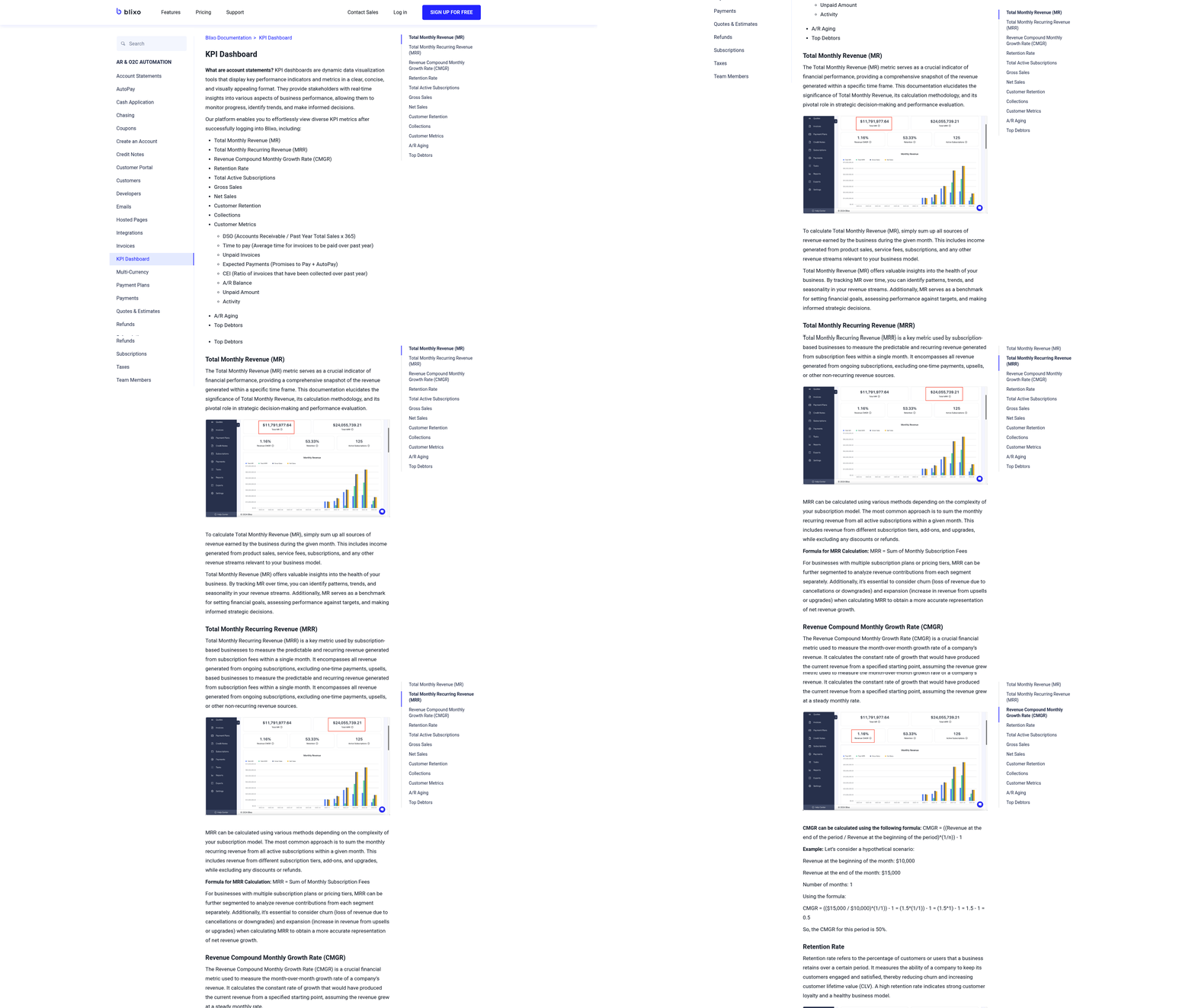
Monitoring cash flow metrics and KPIs is essential for maintaining financial health, and Blixo’s AR automation solutions streamline this process with real-time insights and actionable data. By automating invoice tracking, payment reminders, and reconciliation, Blixo helps businesses reduce manual tasks and focus on strategic decisions. Let’s break down how to implement and benefit from cash flow monitoring with Blixo.
How Does Blixo Provide Real-Time Cash Flow Insights?
Blixo’s SaaS service offers centralized dashboards that track critical metrics like Days Sales Outstanding (DSO), payment aging reports, and cash flow forecasts. These tools update automatically as transactions occur, ensuring businesses always have the latest data. For example, a DSO report highlights how quickly invoices are paid, while aging reports flag overdue accounts. This visibility allows teams to identify bottlenecks and act swiftly. As mentioned in the Automating Invoice Generation and Distribution section, accurate and timely invoice creation directly impacts DSO, making automation a key factor in improving this metric.
- Set up real-time dashboards to monitor DSO, cash flow gaps, and payment trends
- Enable automated alerts for late payments or unusual activity
- Integrate with accounting software to eliminate manual data entry
What Benefits Can Businesses Expect?
Monitoring cash flow metrics with Blixo reduces administrative burdens by up to 40% and accelerates payment recovery. For instance, one service-based business reduced its average DSO from 45 to 28 days within six months by automating reminders and prioritizing high-risk accounts. Another example: a manufacturing firm cut manual reconciliation tasks by 50% using Blixo’s auto-matching features. Building on concepts from the AI-Powered Cash Application and Reconciliation section, these auto-matching capabilities reduce errors and free up resources for higher-value tasks.
The average improvement across Blixo users includes:
- 20–30% faster payment collection
- 15–25% reduction in administrative hours
- 90% accuracy in cash flow forecasts
How to Implement Effective Cash Flow Monitoring
Customization is key to aligning Blixo’s tools with your business needs. Start by selecting KPIs that matter most-such as customer payment patterns or invoice volume-and configure dashboards to highlight those metrics. For businesses using legacy systems, Blixo’s API integration ensures seamless data flow without overhauling existing workflows.
- Customize KPI thresholds to match your industry benchmarks
- Train teams on Blixo’s analytics tools to maximize adoption. As highlighted in the Best Practices for Staff Training and Adoption section, structured onboarding ensures teams can use these tools effectively.
- Schedule weekly reviews of cash flow reports to stay proactive
For deeper guidance, explore how to implement automatic invoice processing with Blixo and learn about automating invoicing workflows.
Why Prioritize Cash Flow KPIs?
Ignoring cash flow metrics can lead to liquidity crises, even for profitable businesses. Blixo’s automation not only tracks metrics but also predicts potential shortfalls using historical data. For example, a retail company avoided a $200,000 cash shortage by identifying delayed payments early through Blixo’s forecasting model.
By embedding monitoring into daily operations, businesses gain resilience and agility. Start with one metric, like DSO, and expand to others as confidence grows. The goal isn’t just to track numbers but to turn them into decisions that drive growth.
Best Practices for Staff Training and Adoption
Effective training ensures staff can use Blixo’s AR automation tools to streamline workflows. Start with structured onboarding that combines online resources, hands-on practice, and direct support. Blixo provides guided tutorials, video walkthroughs, and a dedicated support team to address technical questions.
- Assign trainees to the Blixo Learning Hub: This platform includes step-by-step guides and scenario-based modules to teach features like automated invoicing and payment tracking, as detailed in the Automating Invoice Generation and Distribution section.
- Schedule live training sessions: Host workshops to demonstrate tools like the automated billing system, ensuring staff can troubleshoot common issues.
- Create a peer support network: Encourage experienced users to mentor new staff, reducing reliance on external help.
What Benefits Does Staff Adoption Bring?
Adopting Blixo’s tools reduces manual work and accelerates payment cycles. For example, a mid-sized manufacturing company trained its finance team using Blixo’s resources and cut invoice processing time by 40%. Faster adoption leads to measurable results: businesses using Blixo’s automation report 25% faster payment recovery and 30% less time spent on administrative tasks compared to manual processes, aligning with the efficiency gains described in the AI-Powered Cash Application and Reconciliation section.
One company, after implementing Blixo’s AR platform, automated 80% of its invoicing workflows. This eliminated errors in payment terms and late fees, improving cash flow predictability. For more on automating invoicing, see Automate Invoicing with AR Automation Platforms - Blixo Blog.
How Do You Ensure Smooth Adoption?
Change management and clear communication are critical. Start by explaining how Blixo’s tools simplify tasks like invoice tracking and reduce late payments, as outlined in the Why Timely Payments Matter section. Address resistance by highlighting time savings and career development opportunities.
- Map a phased rollout plan: Train core teams first, then expand to wider departments after feedback.
- Share success metrics: Regularly update staff on how automation improves payment accuracy and reduces delays.
- Offer ongoing support: Assign a Blixo account manager to answer questions and provide updates on new features.
By combining structured training, real-world examples, and proactive communication, teams can adopt Blixo’s AR automation solutions efficiently. For step-by-step guidance on implementing automatic invoice processing, refer to How to Implement Automatic Invoice Processing with Blixo.
Frequently Asked Questions
1. How does AR automation reduce late payments?
AR automation reduces late payments by automating invoicing and dunning processes, cutting Days Sales Outstanding (DSO) in half. Manual processes contribute to 69% higher late payments, while automation ensures timely reminders and accurate billing, improving cash flow predictability.
2. What benefits does AI-driven cash application provide?
AI-driven cash application matches payments to invoices with 98% accuracy, reducing reconciliation errors by 90% and cutting reconciliation time by 50%. This minimizes disputes and ensures faster revenue recognition for businesses.
3. Can automation lower Days Sales Outstanding (DSO)?
Yes, automation can halve DSO from 60 days by streamlining invoicing, dunning, and payment tracking. A SaaS company reduced its DSO to 30 days using automation, enhancing cash flow predictability and operational efficiency.
4. How do customizable fields reduce billing disputes?
Customizable fields and automated reconciliation cut billing disputes by 33% by eliminating payment mismatches and unclear invoices. Healthcare providers saw significant reductions in disputes using these features, improving customer satisfaction.
5. What manual tasks does Blixo automate?
Blixo automates data entry, invoice follow-ups, and payment reconciliation, saving 5–10 minutes per invoice. This reduces manual work by 40+ hours monthly for high-volume businesses and minimizes human errors.
6. How does automation affect reconciliation time?
Automation slashes reconciliation time by 50% while achieving 98% accuracy. Manual reconciliation is error-prone and time-consuming, but AI-driven systems resolve payment mismatches faster, enabling timely financial reporting.
7. What financial impact do late payments have?
Late payments can reduce available cash by 30%, as seen in an e-commerce case study. This forces delayed hiring, marketing, and growth initiatives, directly harming a company’s ability to invest in expansion or operational improvements.