

Streamline Accounts Receivable Payment Automation with Blixo
Related Video
Watch: Blixo Lifetime Deal $79 - Subscription Billing & Accounts Receivable Automation | Blixo Review by The SaaS Deals
Key Takeaways
- Manual accounts receivable processes cause 57% of processing errors, costing 200+ hours annually per 1,000 invoices.
- 82% of AP teams rely on manual data entry, which introduces human errors in 39% of invoices and delays payments.
- Manual workflows raise administrative costs by 30% and increase missed payment risks by 35%.
- Blixo’s automation reduces payment processing time by 50% for manufacturing firms, accelerating cash flow.
- AI-driven tools like Blixo cut reconciliation disputes by 65% in logistics through accurate validation systems.
- Automation typically lowers Days Sales Outstanding (DSO) by 30% and improves collection efficiency by 30%.
- Law firms using Blixo’s Cash Application Tool achieve 30% cash flow improvements via faster, error-free reconciliations.
Why Automating Accounts Receivable Matters
Manual accounts receivable processes are costly and error-prone, with 82% of AP teams still relying on manual data entry. This leads to 57% of processing errors, costing businesses over 200 hours annually per 1,000 invoices. Manual workflows also increase administrative costs by 30% and raise the risk of missed payments by 35%, directly impacting cash flow. These inefficiencies highlight the urgent need for automation in AR management. As mentioned in the What Industry Data Reveals About Manual AR Processes section, these issues are compounded by human-input errors in 39% of invoices, further delaying payments and inflating operational costs.
Automation transforms accounts receivable by cutting costs, accelerating cash flow, and reducing errors. For instance:
- A manufacturing company reduced payment processing time by 50% after implementing Blixo’s payment automation, building on concepts from the Streamlining Invoicing Workflows with Blixo section.
- A law firm improved its cash flow by 30% using Blixo’s Cash Application Tool, which aligns with the Automating Cash Application and Reconciliation with Blixo section’s emphasis on AI-driven accuracy.
- A logistics firm slashed reconciliation disputes by 65% with Blixo’s AI-driven validation system.
These results align with broader industry gains: automation typically reduces Days Sales Outstanding (DSO) by 30% and boosts collection efficiency by the same margin. Businesses with high-volume recurring billing or subscription models see the most dramatic improvements, with some reporting 70% faster payment cycles.
Streamlining Invoicing Workflows with Blixo
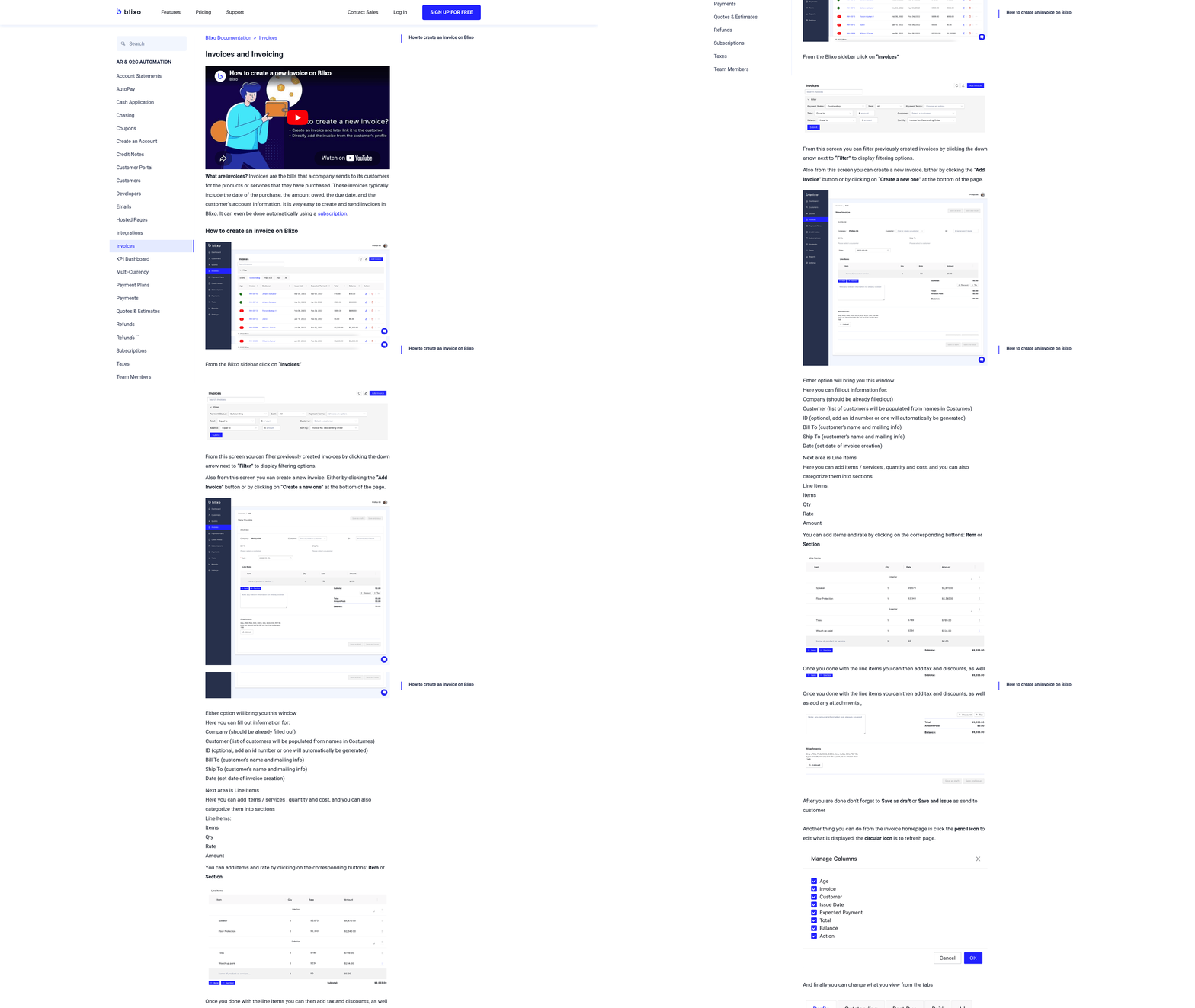
The mid-sized manufacturing company and law firm success stories highlighted in this section align with the broader case studies detailed in the Real-World Examples section, which explores how diverse industries benefit from Blixo’s automation. The 20% annual reduction in exceptions due to machine learning further supports the long-term efficiency gains emphasized in the Measuring ROI section, where metrics like cost savings and cash flow acceleration are quantified. When configuring smart invoicing and payment gateways, businesses should reference the Implementing Blixo section for a structured approach to integration and testing workflows. Avoiding pitfalls like skipping integration testing reinforces the step-by-step implementation guidance in the Implementing Blixo section, ensuring seamless adoption. The 30% cost savings and faster collections mentioned here are elaborated in the Measuring ROI section, which provides frameworks for tracking financial outcomes.
Automating Cash Application and Reconciliation with Blixo
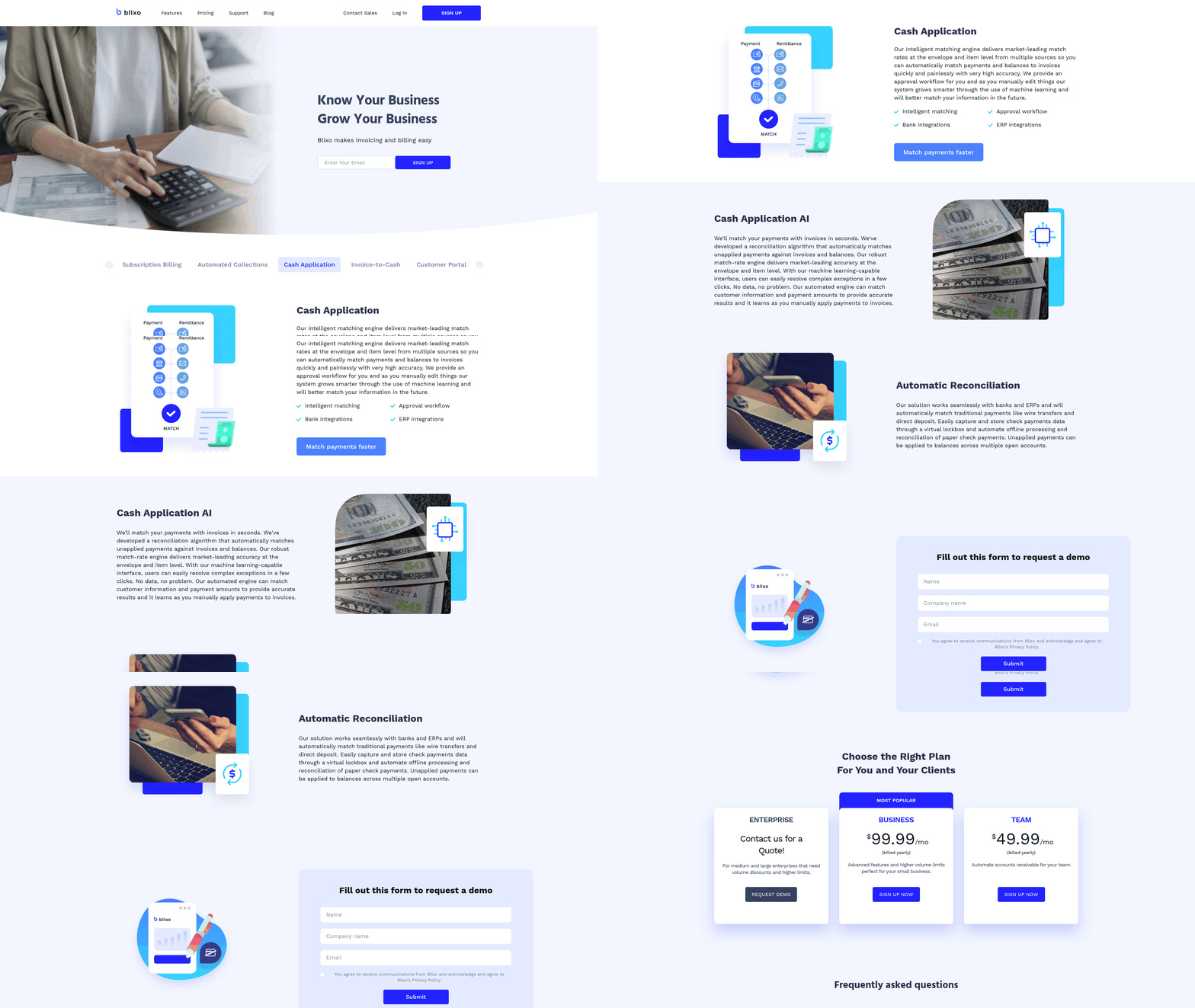
Automating cash application and reconciliation with Blixo transforms accounts receivable processes from error-prone manual tasks into streamlined, data-driven workflows. By using AI-powered matching, machine learning, and seamless integrations, Blixo reduces reconciliation time by up to 70% and improves payment accuracy to near-perfect levels. Below is a structured guide to understanding, implementing, and optimizing these features..
How Blixo Automates Cash Application and Reconciliation
Blixo’s cash application tool uses intelligent matching to automatically link payments to invoices, eliminating manual data entry and reducing errors. Its machine learning engine learns from user corrections, improving accuracy by 20% annually. For example, a mid-sized manufacturing company reduced reconciliation time from weeks to hours, cutting costs by 50%. Key features include:
- AI-powered matching: Applies payments to invoices in seconds, even for complex scenarios like partial payments or multiple invoices.
- Bank and ERP integration: Syncs with banks and platforms like QuickBooks or SAP to automate data flow. Building on concepts from the Implementing Blixo: A Step-by-Step Guide section, this integration ensures real-time alignment across financial systems.
- Real-time reconciliation: Handles wire transfers, ACH, and credit card payments while flagging exceptions for review.
“Blixo’s matching engine transform AR by turning a tedious task into a predictive system.” – Financial Analyst.
Step-by-Step Setup for Cash Application Workflows
- Connect Bank Accounts: Link corporate bank accounts to Blixo’s SaaS service to enable automatic payment imports. This eliminates manual entry for incoming ACH, wire, or credit card transactions.
- Configure Matching Rules: Define rules for payment allocation (e.g., prioritize overpayments, apply credits to oldest invoices). Blixo’s Matching Rules tool allows customization based on payment type, customer history, or invoice size.
- Integrate with ERP Systems: Use pre-built connectors for QuickBooks, Xero, or NetSuite to sync payment data in real time. This ensures invoices and payments are always aligned across systems.
- Enable Machine Learning: Allow the system to refine its accuracy over time. For instance, if a payment is misapplied, Blixo adjusts its algorithm to avoid similar errors.
- Test and Deploy: Run scenarios in a sandbox environment to validate workflows before full deployment. A law firm reported 90% automation after a two-week test phase..
Best Practices for Optimization
- Regularly Review Exception Reports: Use Blixo’s dashboards to identify unmatched payments or discrepancies. Address these manually to train the AI further.
- use Partial Payment Rules: Set tolerances for underpayments (e.g., apply $50 to a $100 invoice with a 5% buffer). This reduces disputes and speeds up reconciliation.
- Automate Dunning and Reminders: Pair cash application with Blixo’s collections tools to send instant alerts for late or partial payments, improving on-time payment rates by 25%. As mentioned in the Why Automating Accounts Receivable Matters section, manual dunning processes are costly and inefficient, making automation a critical step.
- Audit and Refine: Monitor KPIs like Days Sales Outstanding (DSO) and error rates monthly. One healthcare provider reduced month-end closing time by 18% through iterative improvements..
Common Challenges and Solutions
Challenge 1: Complex Payment Scenarios
- Solution: Use Blixo’s Envelope-Level Matching to handle multi-invoice payments. For example, a logistics firm automated $500K monthly reconciliations with 98% accuracy.
Challenge 2: Integration Delays
- Solution: Blixo’s API and pre-built connectors simplify ERP onboarding. A retail chain integrated with SAP in three days, cutting processing errors by 70%.
Challenge 3: Initial Setup Overhead
- Solution: Follow Blixo’s guided onboarding to configure workflows. A startup reduced setup time from weeks to 48 hours using step-by-step templates..
Real-World Impact
Businesses using Blixo report measurable gains:
- A manufacturing company cut payment processing time by 70%, saving 200+ hours annually.
- A law firm improved cash flow by 30% through faster reconciliation.
- A global SaaS business automated 90% of its $2M monthly inflows, reducing manual reviews from 20 hours to 2.
As detailed in the Real-World Examples: Businesses That Have Accelerated Cash Flow with Blixo section, these outcomes highlight Blixo’s ability to scale efficiency across industries. By automating cash application and reconciliation, Blixo not only reduces administrative burdens but also accelerates cash flow, allowing finance teams to focus on strategic growth. Start with a 30-day free trial to test these workflows and scale as needed.
Implementing Blixo: A Step-by-Step Guide
Implementing Blixo’s accounts receivable automation requires careful preparation and a structured approach to ensure seamless integration and optimal performance. Below is a step-by-step guide to help you manage the process, from initial setup to post-implementation optimization..
Pre-Implementation Checklist: Preparing for Blixo
Before configuring Blixo, ensure your team completes the following tasks to set a solid foundation:
- Audit Existing Processes: Map your current invoicing, payment, and collections workflows to identify inefficiencies. For example, if manual data entry causes 57% of processing errors (as seen in generic provider case studies), prioritize automation for high-error areas. As mentioned in the Why Automating Accounts Receivable Matters section, manual processes cost businesses over 200… annually in lost productivity.
- Cleanse Data: Consolidate customer contact details, payment preferences, and historical transaction records. Blixo’s intelligent matching engine performs best with accurate, up-to-date data.
- Budget and Plan: Review Blixo’s pricing tiers-starting at $49.99/month for the Team plan-to align with your team size and automation needs.
- Secure Stakeholder Buy-In: Involve finance, IT, and customer service teams early to address concerns and set expectations..
Step-by-Step Guide to Setting Up Blixo
1. Create Your Blixo Account
Sign up for a Blixo plan and complete the onboarding wizard. The platform’s web-based interface requires no software installation, ensuring quick access.
2. Configure Payment Methods
Add accepted payment types (ACH, credit/debit cards, direct debit) via the Settings → Payments dashboard. For instance, integrating Stripe as the preferred payment processor allows customers to pay via major credit cards instantly.
3. Integrate with Accounting Systems
Link Blixo to your accounting or ERP software (QuickBooks, Xero, SAP, etc.) using API documentation provided in the Integrations section. This step ensures real-time synchronization of invoices, payments, and financial reports.
4. Customize Invoicing Templates
Design professional invoice templates with your branding. Blixo supports recurring invoices and auto-billing for subscriptions, reducing manual effort by up to 30% (per internal benchmarks). Building on concepts from the Streamlining Invoicing Workflows with Blixo section, these templates streamline end-to-end billing cycles.
5. Set Up Automated Collections
Enable AI-driven collections by configuring reminder schedules (email, SMS, phone) and dunning workflows. For example, a law firm using Blixo reported a 25% increase in timely payments by automating follow-ups..
Best Practices for Integration
- Use API Webhooks: For custom ERP integrations (e.g., Oracle, SAP), use Blixo’s API to trigger actions like invoice creation or payment updates.
- Test Match Rules: Before going live, validate Blixo’s cash application rules to ensure payments map correctly to invoices. The platform’s machine learning improves accuracy over time by learning from manual edits.
- Train Your Team: Use Blixo’s intuitive customer portal for training sessions. The self-serve interface lets users manage payments and subscriptions without IT intervention..
Common Challenges and Solutions
| Challenge | Solution |
|---|---|
| Payment method conflicts | Verify gateway configurations in Settings → Payment Gateways and test transactions in a sandbox environment. |
| Data mismatch during integration | Use Blixo’s reconciliation tool to manually correct mismatches while the AI refines its matching logic. |
| User resistance | Share success stories, like the manufacturing company that reduced payment processing time by 50%, as detailed in the Real-World Examples: Businesses That Have Accelerated Cash Flow with Blixo section. |
Post-Implementation Checklist
After deployment, verify the system’s performance:
- Test End-to-End Workflows: Simulate invoice creation, payment processing, and reconciliation to catch errors.
- Monitor Performance Metrics: Track reductions in manual hours (e.g., one business saved 200+ hours annually) and error rates using Blixo’s analytics dashboard.
- Optimize Automation Rules: Adjust collections frequency or payment method preferences based on user feedback.
- Schedule Periodic Audits: Revisit integrations and data accuracy quarterly to maintain efficiency.. By following this structured approach, businesses can enable Blixo’s full potential, transforming accounts receivable from a manual burden into a streamlined, error-resistant process. The result? Faster payments, improved cash flow, and a focus on strategic growth over administrative tasks.
Measuring ROI: Cost Savings and Cash Flow Improvement with Blixo
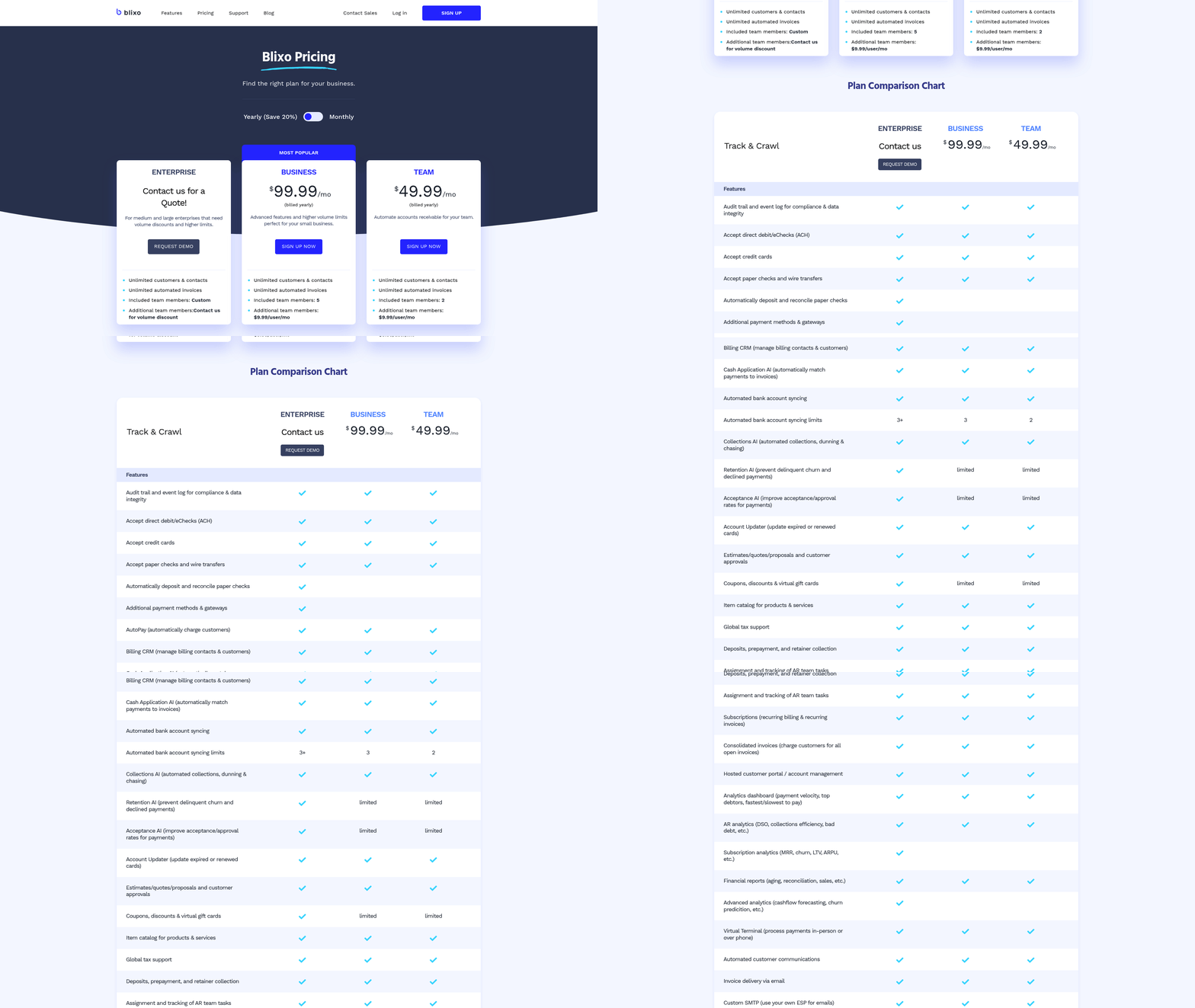
Measuring the return on investment (ROI) of Blixo’s accounts receivable automation requires a focus on tangible financial outcomes like cost savings, cash flow acceleration, and operational efficiency. By tracking key performance indicators (KPIs) and analyzing real-world results, businesses can quantify the impact of automation on their bottom line.
What KPIs Should You Track to Measure ROI with Blixo?
To evaluate ROI, start with metrics directly tied to cost savings and cash flow. Days Sales Outstanding (DSO) measures how quickly invoices are paid, while error rates and processing time highlight efficiency gains. For example, companies using Blixo report a 30% reduction in DSO and a 94% faster invoice processing time (down from 45 days to 3.1 days). Administrative cost savings of 30% and reconciliation dispute reductions of 35% are common outcomes. As mentioned in the Why Automating Accounts Receivable Matters section, manual processes often contribute to high error rates-Blixo’s automation directly addresses these challenges.
Cost per invoice is another critical metric. Manual processing averages $10.89 per invoice, but Blixo automates tasks like data entry and matching, reducing this to $2.18. This translates to significant savings for businesses handling high volumes. Building on concepts from the Automating Cash Application and Reconciliation with Blixo section, AI-powered matching further cuts reconciliation disputes by improving accuracy and reducing manual intervention.
How Do Real Businesses Measure ROI with Blixo?
Case studies illustrate the financial impact of Blixo. A logistics company reduced vendor disputes by 65% using AI-driven validation, as detailed in the Streamlining Invoicing Workflows with Blixo section. A law firm boosted cash flow by 25% through automated invoicing and collections. Another example: a healthcare provider cut month-end reconciliation time by 18% by integrating Blixo’s intelligent matching engine.
Small businesses also benefit. One company saved 200+ hours annually by automating 1,000 monthly invoice reconciliations. For startups, dynamic discounting and automated reminders led to a 70% increase in sales conversion, accelerating cash inflows.
Step-by-Step Guide to Calculating ROI with Blixo
- Map Baseline Metrics: Track current DSO, error rates, processing time, and administrative costs. For example, if your DSO is 60 days and error rate is 39%, these become your starting points.
- Implement Automation: Configure Blixo’s tools like smart invoicing, recurring billing, and cash application. ERP integration (QuickBooks, Xero, etc.) ensures seamless data flow.
- Track Post-Implementation KPIs: After 1–2 months, compare new metrics to your baseline. A reduction in DSO to 45 days and error rates to 5% signals success.
- Calculate Cost Savings: Use the formula: $$ \text{Savings} = (\text{Old Cost per Invoice} - \text{New Cost}) \times \text{Volume}. $$ For 1,000 invoices monthly, this becomes: $$ (10.89 - 2.18) \times 1,000 = \$8,710 \text{ monthly savings}. $$
- Assess Cash Flow Gains: Faster collections mean earlier access to funds. A 30% DSO reduction could free up $500,000 in working capital for a mid-sized business.
Best Practices for Maximizing ROI
- use Machine Learning: Blixo’s matching engine improves by 20% annually as it learns from corrections. Regularly refine rules to boost accuracy.
- Optimize Collections: Deploy automated dunning workflows and self-service portals. One electronics distributor achieved 76% automation, cutting payment cycles by 40%.
- Monitor Weekly: Use dashboards to track late payments or exceptions. Weekly reviews help spot trends and adjust strategies.
What Challenges Might You Face?
Initial setup complexity is common, but Blixo’s implementation roadmap (e.g., sandbox testing, phased rollouts) minimizes disruption. Resistance to change can be addressed with role-based training and super-users to champion the tool.
By focusing on DSO, error rates, and cost per invoice, businesses using Blixo consistently achieve measurable financial gains. Pairing automation with continuous monitoring ensures long-term efficiency and cash flow stability.
Real-World Examples: Businesses That Have Accelerated Cash Flow with Blixo
Businesses across industries have use Blixo’s accounts receivable automation to accelerate cash flow, reduce manual tasks, and improve customer satisfaction. Below are real-world examples and insights from organizations that have transformed their financial operations using Blixo’s tools..
How Blixo Transformed Cash Flow for a Medium-Sized Enterprise
As highlighted in the Why Automating Accounts Receivable Matters section, manual accounts receivable processes are costly and error-prone. A medium-sized enterprise struggling with late payments implemented Blixo’s automated collections tools. Within months, the company reported a 30% reduction in overdue accounts by using scheduled email, SMS, and phone reminders. The platform’s Collections AI streamlined follow-ups, allowing staff to focus on strategic tasks instead of chasing payments. Another business in professional services saw a 25% improvement in cash flow after integrating Blixo’s invoicing and subscription billing features. Automated payment retries and dunning workflows eliminated manual reconciliation, saving over 20 hours per month in administrative work.
“Blixo’s automated collections tools empower businesses to maintain best practices and increase transparency in their accounts receivable processes.” – Industry Expert.
Streamlining Subscription Management for Service-Based Businesses
A service-based company managing recurring client payments adopted Blixo’s subscription billing module. The platform’s intelligent matching engine, similar to the features described in the Streamlining Invoicing Workflows with Blixo section, reduced cash application errors by 90%, ensuring payments were correctly allocated to invoices without manual intervention. A founder noted, “Setting up recurring billing was straightforward, and clients appreciate the flexibility to update payment methods in our self-service portal.” Another business in the wellness industry automated invoicing for monthly retainers, cutting invoice processing time from hours to minutes. By integrating Blixo with QuickBooks, they achieved real-time financial reporting and reduced reconciliation delays.
“Blixo is the ultimate solution for invoicing and payment management, allowing me to focus on my art without chasing payments.” – Vincent Mann, Founder of Globetown Media.
Cost Savings and Operational Efficiency Gains
A law firm using Blixo’s automated cash application feature saved $12,000 annually in labor costs by eliminating manual data entry. The platform’s AI-driven matching system, detailed in the Automating Cash Application and Reconciliation with Blixo section, processed 95% of payments accurately, reducing disputes and accelerating deposit timelines. Meanwhile, a retail brand with 500+ monthly invoices reduced administrative workload by 40% using Blixo’s customizable dunning processes. Automated payment reminders and late fee calculations improved client compliance, resulting in 50% fewer payment disputes.
“The integration of AI in collections is a major advantage for businesses looking to streamline their operations.” – Financial Analyst.
Common Themes Among Successful Implementations
Businesses that achieved the most success with Blixo shared key strategies:
- Prioritize automation for high-volume tasks like recurring billing and collections to reduce repetitive work.
- use built-in integrations with accounting systems (QuickBooks, Xero, SAP) for seamless financial reporting.
- Customize communication templates to align with brand voice while maintaining professional urgency in payment reminders.
By focusing on these practices, companies improved efficiency, minimized errors, and strengthened customer relationships through consistent, transparent billing experiences.
Frequently Asked Questions
1. How does automating accounts receivable reduce errors?
Automating AR reduces errors by replacing manual data entry, which causes 39% of invoice errors. Blixo’s AI validation system cuts reconciliation disputes by 65% in logistics by ensuring accurate, real-time validation of payments and invoices.
2. Which industries benefit most from AR automation?
Manufacturing, logistics, and law firms see significant gains. Manufacturing firms cut payment processing time by 50%, logistics firms reduce disputes by 65%, and law firms improve cash flow by 30% using Blixo.
3. How much time does Blixo save in payment processing?
Blixo reduces payment processing time by 50% for manufacturing firms, saving over 200 hours annually per 1,000 invoices by eliminating manual workflows and accelerating cash flow.
4. What cost savings come from AR automation?
Automation lowers administrative costs by 30% and reduces missed payment risks by 35%. Blixo’s system also decreases Days Sales Outstanding (DSO) by 30%, improving overall collection efficiency.
5. How does Blixo improve cash flow for law firms?
Blixo’s Cash Application Tool helps law firms achieve 30% faster cash flow by automating error-free reconciliations, reducing delays, and ensuring timely payment processing for high-volume billing needs.
6. Can automation handle high-volume recurring billing?
Yes, businesses with subscription models see 70% faster payment cycles using automation. Blixo streamlines recurring billing, reducing manual work and ensuring consistent, error-free invoicing for large volumes.