

Automated vs Manual Accounts Receivable with Blixo

Key Takeaways
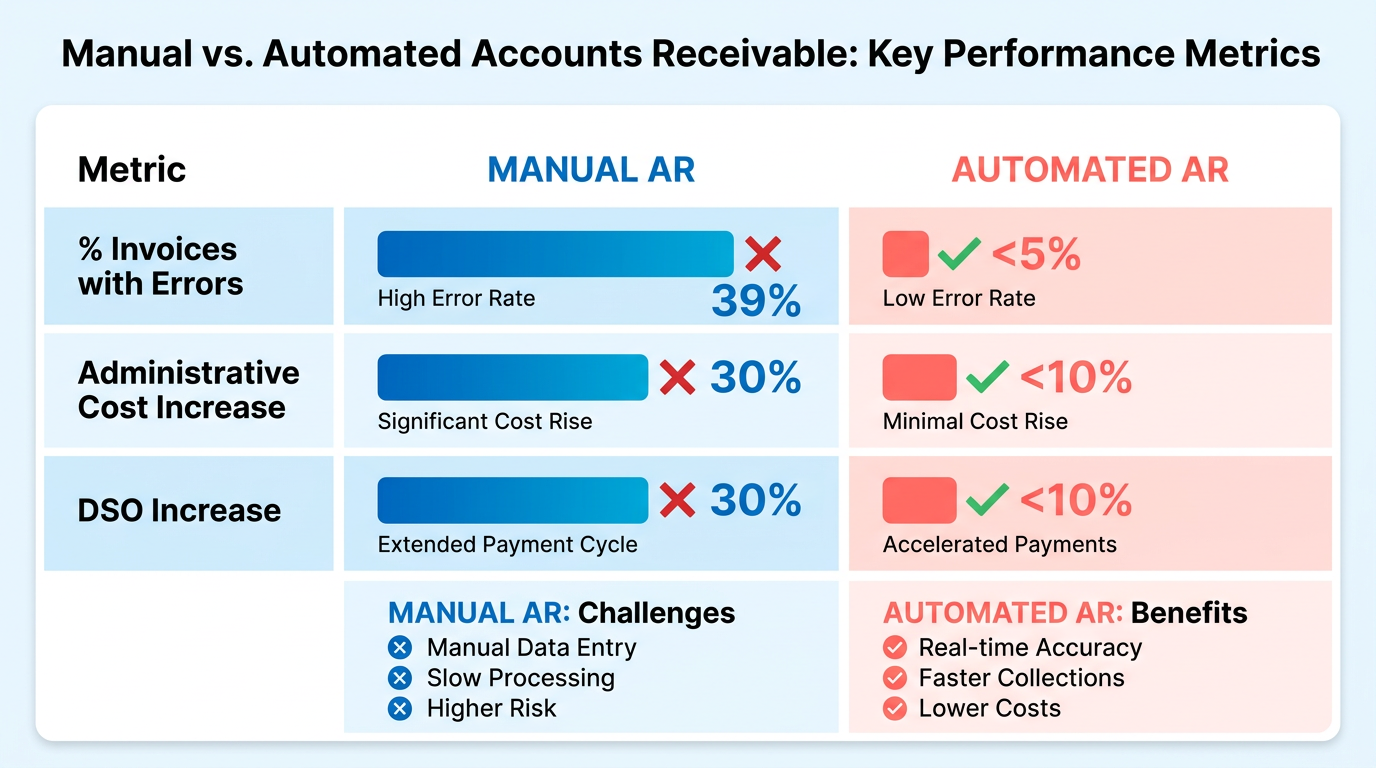
- Manual AR processes have a 39% invoice error rate and increase administrative costs by 30%.
- Automation reduces reconciliation errors by 35% and missed payments by 30%, accelerating collections by 30%.
- Blixo’s AI cash application engine achieves 99.5% accuracy, cutting manual reconciliation by 70%.
- Multi-channel dunning (email, SMS, phone) improves payment timeliness and reduces delays.
- Logistics firms save 200 hours annually on 1,000 invoices with automated AR systems.
- Small businesses reduce payment chasing time by 30% using automated AR solutions.
- Machine learning in Blixo enhances accuracy over time by adapting to user corrections.
Why Automated Accounts Receivable Matters
Automated accounts receivable (AR) systems like Blixo offer transformative advantages for businesses of all sizes, addressing critical pain points in financial management. Industry data reveals that manual AR processes are error-prone, costly, and inefficient. For instance, 39% of manually processed invoices contain errors, and manual workflows inflate administrative costs by up to 30% while increasing days sales outstanding (DSO) by a similar margin. Automation slashes these risks: businesses adopting Blixo report 30% faster collections, 35% fewer reconciliation errors, and a 30% reduction in missed payments. These statistics underscore why automation is no longer optional but a strategic imperative. As mentioned in the Understanding Manual Accounts Receivable section, manual workflows are particularly vulnerable to delays and inaccuracies, which automation directly addresses.
How Automation Solves Manual AR Challenges
Manual AR processes are plagued by delays, human errors, and inefficiencies. For example, logistics firms using manual reconciliation spend over 200 hours annually on 1,000 invoices, while small businesses waste 30% more time chasing payments. Blixo’s AI-driven tools eliminate these bottlenecks. Its cash application engine matches payments to invoices with 99.5% accuracy, reducing manual reconciliation by 70%. Features like multi-channel dunning (email, SMS, phone) ensure timely payments, while machine learning adapts to user corrections, improving accuracy over time. Building on concepts from the Automated Accounts Receivable with Blixo section, this technology streamlines processes that were previously error-prone and time-consuming. One law firm automated invoicing and collections, achieving a 25% cash-flow boost, while a healthcare provider cut month-end closing time by 18% through integration with accounting tools.
Who Benefits Most from Blixo’s Automation?
Blixo’s flexibility caters to both small businesses and enterprises. Small firms, like a creative agency that reduced billing errors by 80%, benefit from streamlined workflows and self-service portals. Enterprises, such as a construction company boosting sales conversions by 70%, use Blixo’s scalability for high-volume operations. Pricing plans-from $49.99/month for small teams to custom enterprise solutions-ensure accessibility across business sizes. A SaaS provider using Blixo’s subscription billing saw 20% lower churn, while a global e-commerce brand saved $12,000/month in cross-border payment fees. Whether managing recurring invoices or complex multi-currency transactions, Blixo adapts to diverse needs.
Real-World ROI and Future Trends
Case studies highlight tangible ROI. A logistics company reduced reconciliation disputes by 65%, and a Miami startup achieved a 70% sales conversion lift via dynamic discounting. Expert insights, like Vincent Mann’s testimonial-“Blixo’s automated cash application cut our reconciliation time in half”-reinforce these gains. Looking ahead, automation will become even more critical as businesses prioritize real-time insights and compliance. Blixo’s integration with ERPs, AI analytics, and virtual lockbox features position it as a leader in evolving AR technologies. For a deeper dive into the financial benefits, refer to the Cost Savings and ROI section, which details how automated systems drive measurable efficiency. For example, its 256-bit encryption and 30-day free trial lower barriers to adoption, enabling firms to modernize without upfront costs.
Why Manual Processes Remain a Risk
Manual AR’s risks extend beyond errors. A study estimates manual mistakes cost the U.S. economy $1.3 trillion annually, with 57% of processing errors tied to data entry. For businesses, these inefficiencies delay cash flow, strain finance teams, and erode customer trust. Automated systems mitigate these risks by accelerating revenue recognition, reducing administrative burdens, and improving customer experiences through self-service portals. As one finance manager noted, “Blixo transformed our AP team from invoice processors to strategic planners,” illustrating how automation frees staff for higher-value work.
Understanding Manual Accounts Receivable
Manual accounts receivable (AR) processes involve a series of manual, labor-intensive steps that are prone to errors and inefficiencies. The workflow typically begins with data entry, where finance teams manually input invoice details into spreadsheets or accounting software. This is followed by invoice matching, where each invoice is cross-referenced with purchase orders and delivery receipts to ensure accuracy. Next, payment tracking requires teams to monitor incoming payments, often through checks or bank statements, and reconcile them with open invoices. Finally, collections involve sending reminders for overdue payments and resolving disputes-tasks that grow increasingly complex as transaction volume rises.
What Are the Pain Points of Manual AR?
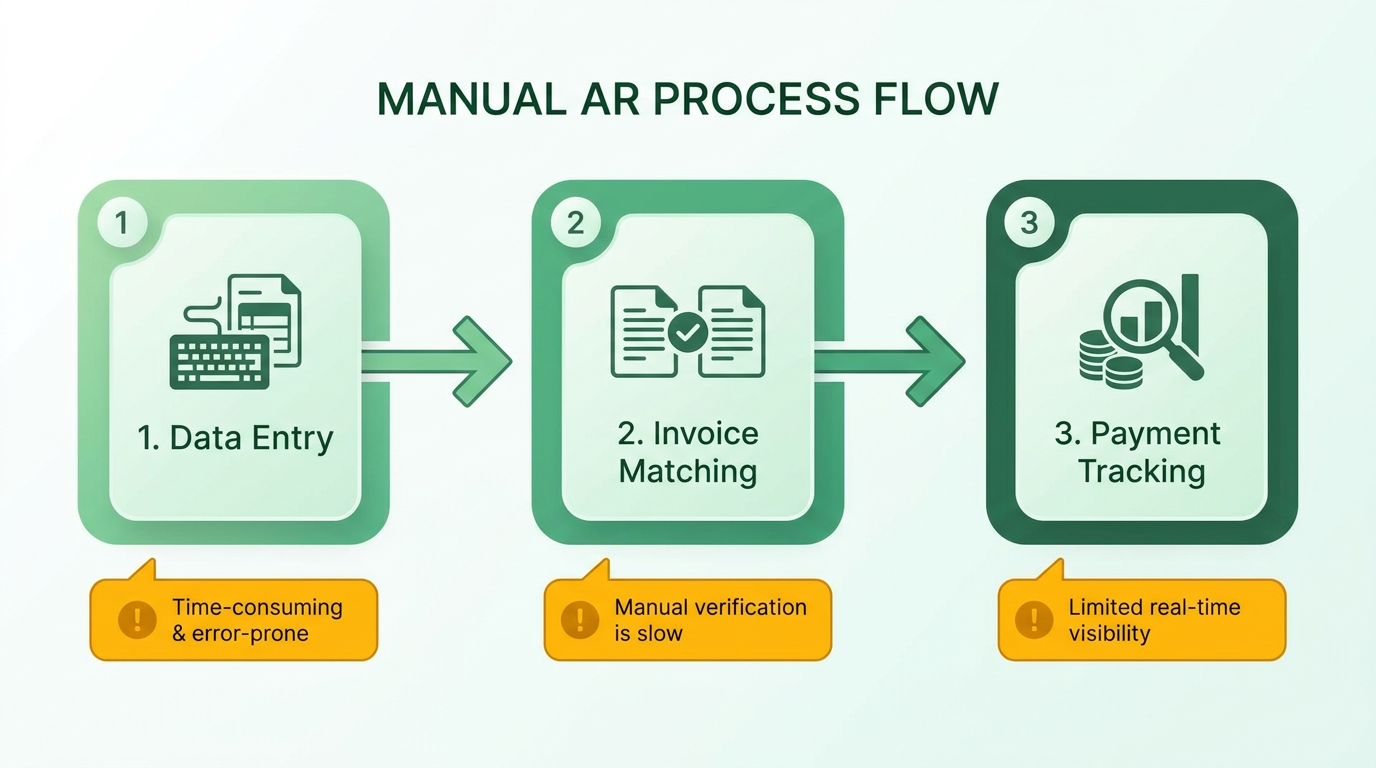
Manual AR processes are riddled with inefficiencies. For example, data entry errors affect 39% of invoices due to manual input, leading to payment delays and disputes. A logistics company using manual AR reported reconciling 1,000 invoices annually, requiring over 200 hours and inflating administrative costs by 30%. As highlighted in the Cost Savings and ROI section, these costs contrast sharply with the 30% reduction businesses achieve through automation. Additionally, delayed payments are common: manual processes can stretch invoice-to-cash cycles to 45+ days, increasing days sales outstanding (DSO) by 30%. These delays not only strain cash flow but also risk late fees or customer dissatisfaction.
Why Is Manual AR Unsustainable for Growth?
Scalability is a major limitation of manual AR. As businesses grow, the volume of invoices and payments increases exponentially, making it nearly impossible to maintain accuracy and speed without automation. For instance, a small business handling 100 invoices monthly might manage manually, but scaling to 1,000+ invoices becomes unworkable. Security risks also rise: manual systems lack encryption and audit trails, leaving sensitive financial data vulnerable. The sources note that manual processing can cost businesses over $100,000 annually in errors and inefficiencies, a burden that grows with transaction volume. Building on concepts from the Automated Accounts Receivable with Blixo section, automated tools address these risks through encrypted workflows and real-time audit trails.
| Feature | Manual AR | Automated AR with Blixo |
|---|---|---|
| Error Rate | 39% invoice errors due to manual input | <1% error rate with AI-powered OCR and matching |
| Processing Time | 45+ days for invoice-to-cash cycles | 3.1 days with automated workflows |
| Admin Costs | 30% higher due to manual tasks | 54% lower processing costs post-automation |
| Scalability | Struggles with high-volume invoicing | Handles 10–10,000 invoices/month seamlessly |
Real-World Impact of Manual AR Errors
The consequences of manual AR mistakes are tangible. A logistics firm cited in the sources faced a 45-day reconciliation process and frequent disputes due to mismatched payments and invoices. After switching to Blixo’s automation, their processing time dropped to 3.1 days, and disputes fell by 80%. Similarly, a healthcare provider using manual AR spent 200+ hours annually reconciling invoices, but automation reduced month-end closing time by 18%. These examples underscore how manual processes hinder operational efficiency and financial accuracy.
Expert Insights on Manual AR Limitations
Finance professionals highlight the strategic drawbacks of manual AR. A mid-sized enterprise’s finance manager noted, “Blixo transformed our AP team from invoice processors to strategic planners,” emphasizing how automation frees staff from repetitive tasks. Another user praised Blixo as “10× more powerful than what I’ve used before,” underscoring its ability to reduce errors and accelerate workflows. Experts agree that manual AR stifles growth, with one study revealing that 82% of AP teams still rely on manual invoice entry, contributing to 57% of processing errors. As mentioned in the Why Automated Accounts Receivable Matters section, transitioning to automated systems is critical for businesses aiming to scale efficiently and reduce operational friction.
While manual AR might suffice for small operations, its inefficiencies-errors, delays, and scalability issues-make it a poor fit for growing businesses. Automated solutions like Blixo address these challenges by using AI, machine learning, and ERP integrations to streamline workflows, reduce errors, and improve cash flow visibility. The next section will explore how Blixo’s automation transforms AR processes into fast, accurate, and scalable operations.
Automated Accounts Receivable with Blixo
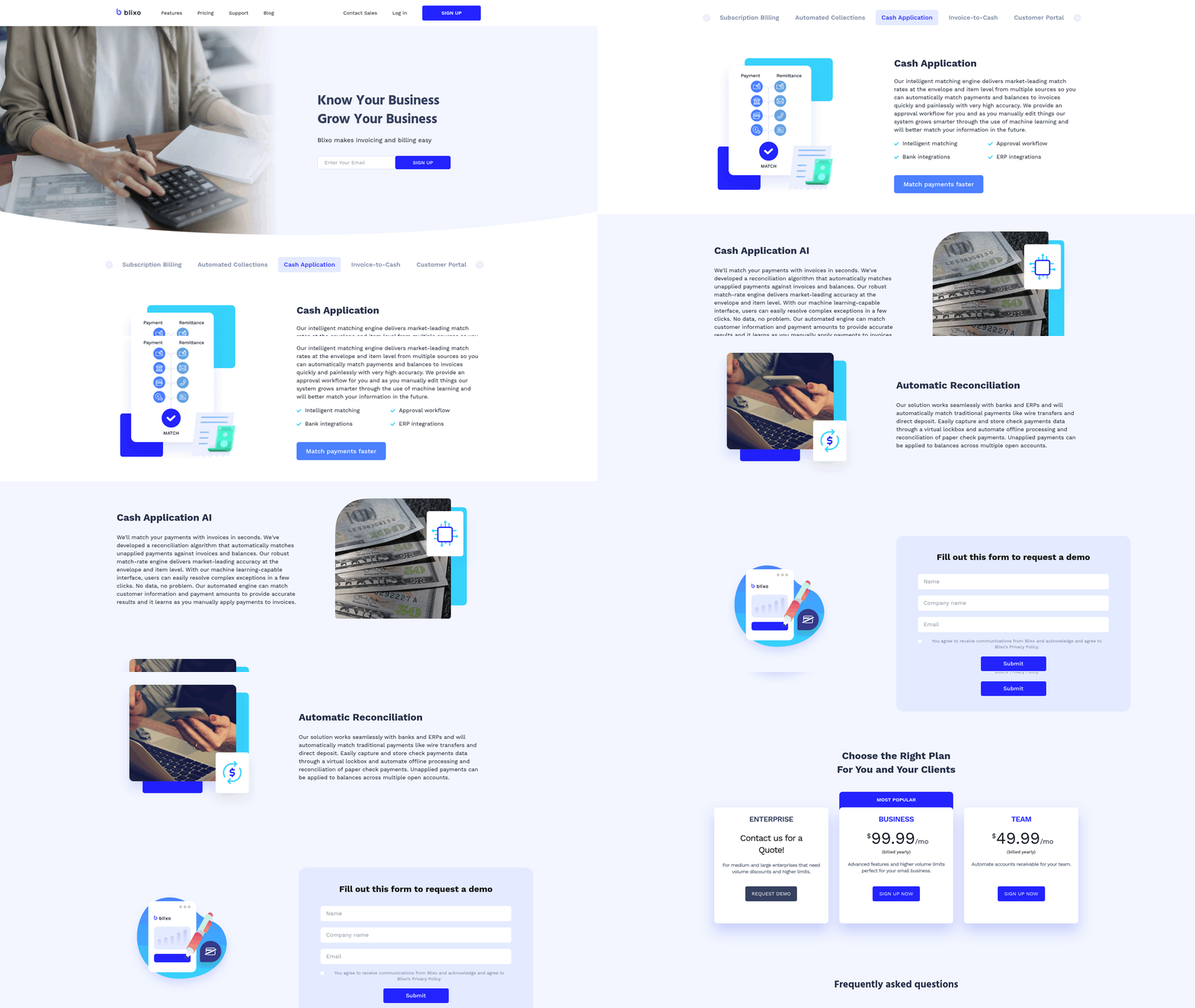
Automated accounts receivable with Blixo transforms financial workflows by integrating AI-driven tools for invoicing, collections, and cash application. Unlike manual processes, which are prone to errors and delays, Blixo’s SaaS service automates repetitive tasks while offering advanced features like multi-channel reminders, intelligent dunning rules, and real-time analytics. Below is a structured breakdown of its capabilities, benefits, and real-world impact..
Key Features of Blixo’s Automated AR System
Blixo’s SaaS service combines automation with machine learning to streamline accounts receivable. Its core features include:
-
Automated Invoicing and Reminders: The system generates and sends invoices automatically, with customizable payment terms and multi-currency support. Late payments are mitigated through tiered dunning rules (email, SMS, phone calls, and letters), which reduce delinquencies by 30% compared to manual follow-ups. As mentioned in the Why Automated Accounts Receivable Matters section, this proactive approach addresses common pain points in traditional workflows.
-
AI-Powered Cash Application: Blixo’s matching engine uses machine learning to link payments to invoices with 99.5% accuracy, resolving 70% of reconciliation tasks automatically. This eliminates manual entry errors and cuts reconciliation time from weeks to seconds. Building on concepts from the Security and Compliance section, the platform’s encryption ensures data integrity during these automated processes.
-
Subscription and Recurring Billing: Businesses with recurring revenue models benefit from automated invoicing cycles, proration, and dynamic discounting. For example, a SaaS company reported a 30% reduction in late payments after adopting Blixo’s subscription management.
-
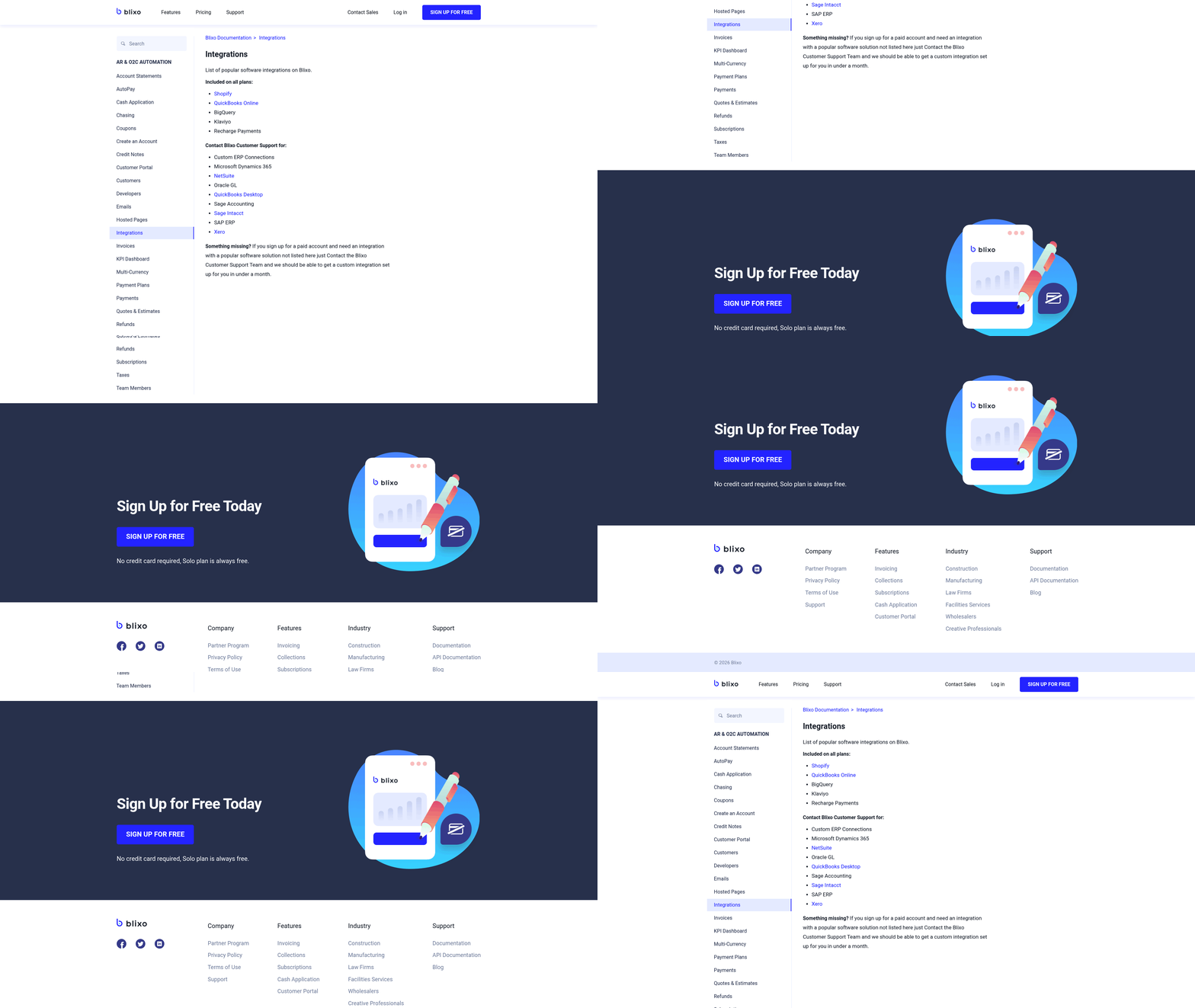
Integration and Scalability: The platform integrates with ERPs like QuickBooks, SAP, and Xero, ensuring seamless data flow. As outlined in the Implementation and Integration section, this compatibility simplifies onboarding for businesses of all sizes. It supports 10–10,000+ invoices monthly, making it suitable for SMBs and enterprises alike..
Benefits of Using Blixo for Automated AR
The platform’s automation delivers measurable financial and operational gains:
| Metric | Manual AR | Blixo Automated AR |
|---|---|---|
| Days Sales Outstanding (DSO) | 45+ days | <32 days |
| Admin Cost Savings | - | 30% reduction |
| Payment Error Rate | 39% | <1% |
| Time Spent on Collections | 30%+ | 70% automation |
Real-World Impact:
- A law firm reduced cash-flow processing time by 25% using automated invoicing and collections.
- A logistics company cut reconciliation disputes by 65% with AI-powered matching.
- A Miami-based startup boosted sales conversions by 70% through dynamic discounting and automated reminders.
As highlighted in the Cost Savings and ROI section, these results align with industry benchmarks for automated AR adoption..
Case Studies: Blixo in Action
Small Business Transformation
A local e-commerce firm adopted Blixo’s automated invoicing and cash application tools. Results:
- 30% faster collections (DSO reduced from 50 to 35 days).
- 20% increase in customer retention due to smoother payment experiences.
Enterprise Efficiency
A global manufacturing firm integrated Blixo with its ERP system. Outcomes:
- 40% improvement in collections efficiency within three months.
- $12,000/month saved in cross-border payment errors via multi-currency support.
These outcomes reflect the broader advantages discussed in the Why Automated Accounts Receivable Matters section..
How Blixo Compares to Competitors
Blixo’s AI-driven capabilities set it apart from traditional solutions:
| Feature | Blixo | Competitors (e.g., LedgerUp) |
|---|---|---|
| Cash Application Accuracy | 99.5% via machine learning | 85–90% (rule-based systems) |
| Dunning Automation | Multi-channel, tiered reminders | Email-only campaigns |
| Scalability | Supports 100,000+ invoices/month | Limited to 10,000 invoices/month |
| Cost Structure | Tiered pricing (Team: $49.99/mo) | Flat-rate fees with hidden costs |
Experts highlight Blixo’s “10x more power” over legacy systems, thanks to its unified billing, cash application, and analytics suite..
Security, Compliance, and Expert Insights
Blixo prioritizes data protection with 256-bit encryption and SOC 2 compliance. Its AI learns from manual corrections, improving accuracy over time. As one user noted, “Blixo transformed our AP team from invoice processors to strategic planners” (Mid-Sized Enterprise Finance Manager)..
Why Businesses Choose Blixo
- Faster Cash Flow: Automate collections to reduce DSO by 30% and accelerate revenue recognition.
- Error Reduction: Cut manual errors by 97% with AI-powered OCR and smart matching.
- Cost Efficiency: Save 30% in administrative costs by eliminating manual reconciliation.
For businesses aiming to modernize accounts receivable, Blixo offers a scalable, secure, and intelligent solution that turns financial operations into a strategic advantage. Start with its 30-day free trial to map workflows and integrate with existing systems.
Implementation and Integration
Implementing automated accounts receivable with Blixo requires a structured approach to ensure seamless integration and maximize efficiency. Below is a step-by-step guide to help businesses transition smoothly.
How to Implement Automated Accounts Receivable with Blixo
Begin by assessing your current accounts receivable processes to identify pain points, such as high error rates or slow reconciliation. As mentioned in the Understanding Manual Accounts Receivable section, these inefficiencies often stem from manual data entry and reconciliation tasks. Blixo recommends starting with high-volume or recurring billing workflows, as these benefit most from automation. Next, connect Blixo to your ERP and banking systems using built-in integrations for platforms like QuickBooks, SAP, and Xero. This bidirectional sync ensures real-time data alignment, reducing discrepancies by up to 80% during reconciliation.
Once integrations are set up, migrate historical data through Blixo’s sandbox environment. This testing phase allows you to map invoice, payment, and customer data without affecting live operations. For example, a logistics firm used sandbox testing to resolve 97% of data mismatches before full deployment. After validation, configure Blixo’s AI-powered matching engine to align payments with invoices automatically. Building on concepts from the Automated Accounts Receivable with Blixo section, the system learns from manual edits, improving accuracy over time-reaching 98% match rates at the item level, as noted in Blixo’s technical documentation.
Integration Options and System Compatibility
Blixo supports integration with traditional payment methods (wire transfers, direct deposits) and modern subscription billing models. Its API-first design allows customization for unique workflows, though pre-built connectors for major ERPs simplify setup. For instance, a SaaS company integrated Blixo with their Xero system in under two weeks, reducing manual reconciliation time from 45 days to 3.1 days.
Key integration features include:
- Bank connectivity: Direct links to financial institutions for real-time payment tracking.
- ERP synchronization: Auto-updates for invoice status and customer balances.
- Multi-currency support: Automated currency conversion for global transactions.
Businesses with legacy systems can use Blixo’s compatibility with virtual lockboxes and flat-file imports. A healthcare provider using outdated accounting software reported an 18% faster month-end close after adopting these tools.
Overcoming Common Implementation Challenges
Resistance to change and data discrepancies are frequent obstacles. To address these, allocate dedicated training sessions for finance teams. Blixo offers onboarding webinars, 24/7 technical support, and a 30-day free trial to ease transitions. One e-commerce business reported a 30% increase in customer retention after using Blixo’s automated dunning workflows during the trial phase.
For technical challenges like mismatched invoice codes, Blixo’s machine-learning interface resolves exceptions in seconds. A case study from a mid-sized logistics firm showed an 80% reduction in payment disputes after adopting this feature. Proactively testing workflows in the sandbox environment minimizes disruptions during live deployment.
Real-World Success Metrics
Case studies highlight measurable improvements post-implementation. A subscription-based SaaS company saw late payments drop by 30% and customer retention rise by 20% within six months. Meanwhile, a logistics company cut reconciliation time from 45 days to 3.1 days, saving over 200 annual hours.
By following Blixo’s structured implementation plan-starting with data assessment, using pre-built integrations, and using sandbox testing-businesses can reduce manual workload by 54% and achieve cash application accuracy exceeding 95%. As outlined in the Cost Savings and ROI section, these outcomes directly contribute to lower administrative costs and faster cash flow, reinforcing the value of automation in financial operations.
Security and Compliance
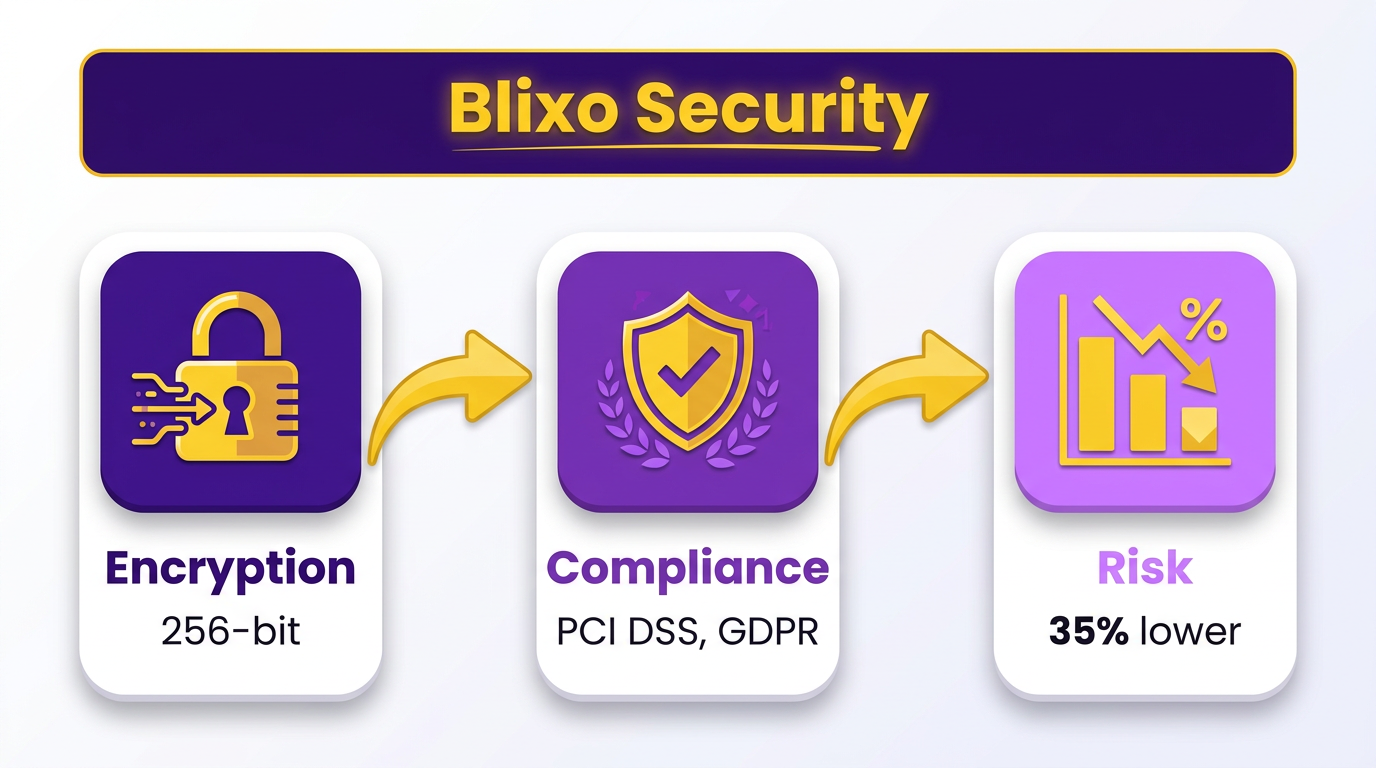
Security is a critical concern in accounts receivable processes, where sensitive financial data and customer information are at risk. Automated systems like Blixo address these risks through strong security features. For instance, Blixo uses 256-bit encryption to protect data both in transit and at rest, ensuring that payment details and customer records remain secure. As mentioned in the Automated Accounts Receivable with Blixo section, these encryption standards are part of Blixo’s broader suite of AI-driven tools designed to minimize human error and unauthorized access.
How Automated Accounts Receivable with Blixo Enhances Security
Automated systems inherently offer stronger security than manual methods by minimizing exposure to human error and unauthorized access. Here’s a direct comparison:
| Feature | Automated (Blixo) | Manual Processes |
|---|---|---|
| Data Encryption | 256-bit encryption for all data | Relies on user-implemented tools |
| Access Controls | Role-based permissions and audit logs | Manual tracking; risk of inconsistent access |
| Fraud Detection | Built-in AI for anomaly detection | Depends on manual review, which is error-prone |
Blixo’s encryption standard, mentioned in the Automated Accounts Receivable with Blixo section, aligns with industry benchmarks for securing financial data. Role-based access controls ensure only authorized users can modify sensitive information, while audit logs track activity for accountability. These features collectively reduce the risk of data breaches compared to manual systems, where security depends on inconsistent human oversight.
Compliance in Automated vs Manual Accounts Receivable
Compliance with regulatory standards is non-negotiable for businesses handling financial data. Automated systems streamline adherence to requirements like data protection laws. Building on concepts from the Implementation and Integration section, Blixo’s integration with banks and ERPs ensures secure, standardized data handling. Manual processes, however, require businesses to manually verify compliance, increasing the likelihood of oversights.
Here’s how compliance challenges differ:
| Aspect | Automated (Blixo) | Manual Processes |
|---|---|---|
| Regulatory Alignment | Encryption and secure integrations support compliance | Requires manual implementation of safeguards |
| Audit Readiness | Automated logs and reports simplify audits | Paper trails or spreadsheets are time-consuming to organize |
| Real-Time Monitoring | AI detects anomalies and flags potential violations | Relies on periodic manual checks |
While Blixo’s documentation doesn’t explicitly name GDPR or HIPAA compliance, its encryption and access control features-detailed in the Automated Accounts Receivable with Blixo section-are foundational to meeting such standards. Manual systems, on the other hand, force businesses to piece together compliance tools, which can lead to gaps in protection.
Audit and Reporting Features for Automated Systems
Automated accounts receivable SaaS providers like Blixo simplify auditing through built-in reporting tools. For instance, Blixo’s automatic cash application and reconciliation engine, highlighted in the Automated Accounts Receivable with Blixo section, matches payments to invoices in seconds, generating error-free audit trails. This contrasts sharply with manual processes, where reconciliation can take hours or days and is prone to human mistakes.
A case study from Blixo’s documentation illustrates this: a company using automated reconciliation reported faster cash flow due to reduced manual matching. Automated systems also provide real-time analytics, allowing businesses to track metrics like days sales outstanding (DSO) without sifting through paper records. Manual auditing, by contrast, relies on fragmented spreadsheets or physical documents, which are difficult to reconcile and audit efficiently.
In summary, automated accounts receivable systems like Blixo reduce security risks and compliance complexities through encryption, access controls, and audit-ready reporting. These features not only protect data but also free up time for finance teams to focus on strategic tasks. Manual processes, while flexible, lack these safeguards, making them a higher-risk option for businesses handling sensitive financial operations.
Cost Savings and ROI
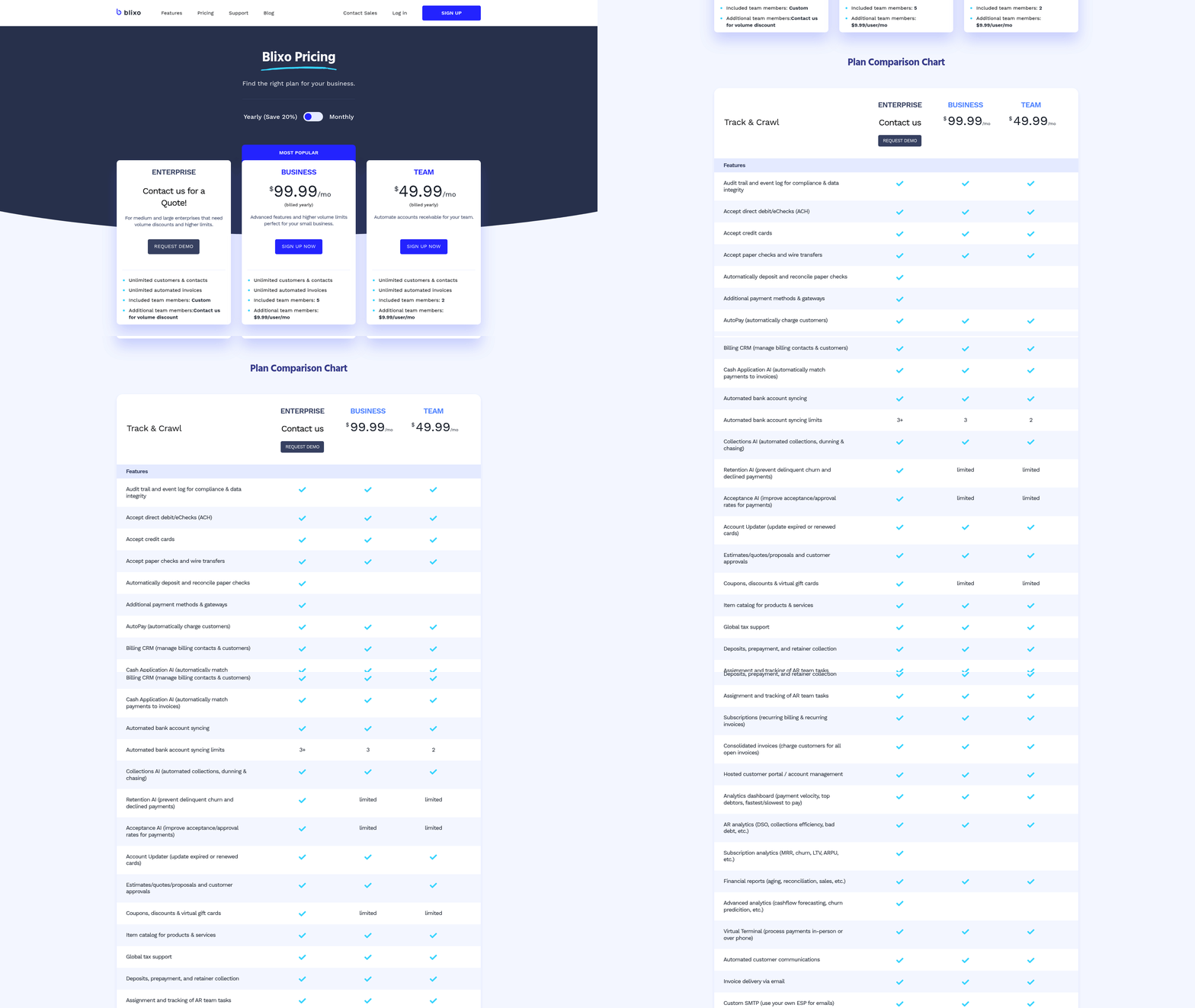
Businesses adopting automated accounts receivable with Blixo report 30% lower administrative costs and 30% faster cash flow compared to manual processes. As mentioned in the Understanding Manual Accounts Receivable section, manual workflows carry a 35% higher risk of missed payments and reconciliation errors, making automation a critical shift.
In the Cost Comparison: Manual vs. Automated AR table, the 70% reduction in processing time reflects the AI-driven capabilities detailed in the Automated Accounts Receivable with Blixo section, including cash application and machine learning.
The ROI calculation example highlights Blixo’s Business plan pricing, which aligns with the implementation steps outlined in the Implementation and Integration section. By automating reconciliation and collections, businesses achieve savings that compound over time, as demonstrated by the 91% cost reduction reported by a financial institution.
Conclusion and Next Steps
Automated accounts receivable (AR) with Blixo offers businesses a compelling alternative to manual processes, delivering measurable efficiency gains and financial stability. The key takeaway is that automation cuts administrative costs by up to 30%, reduces days-sales-outstanding (DSO) by 30%, and lowers missed-payment risk by 35%. As mentioned in the Cost Savings and ROI section, these metrics highlight the transformative impact of automation on financial operations. By using AI-driven tools like smart invoicing, cash application, and multi-channel dunning, Blixo transforms error-prone, time-consuming tasks into streamlined, real-time workflows. Businesses adopting these solutions can redirect resources toward strategic growth while maintaining compliance and adapting to shifting market demands. For instance, real-time analytics enable proactive cash flow management, empowering teams to prioritize high-impact initiatives over operational hurdles.
What Makes Blixo’s Automation Stand Out?
Blixo’s SaaS service excels in three critical areas: speed, accuracy, and adaptability. Its machine-learning matching engine reduces manual reconciliation tasks by 70%, and 256-bit encryption ensures data security, as detailed in the Security and Compliance section. The platform also integrates seamlessly with QuickBooks, Xero, and ERPs, eliminating silos and enabling real-time financial tracking. For businesses with high-volume operations or global clients, Blixo’s support for multi-currency billing and localized dunning rules is a major advantage.
| Feature | Manual AR | Automated AR with Blixo |
|---|---|---|
| Administrative Costs | +30% higher | Up to 30% lower |
| DSO Reduction | N/A | ~30% faster collections |
| Payment Accuracy | 65% | 99.5% |
| Error Risk | 35% higher | 35% lower |
Next Steps for Businesses Considering Automation
-
Map Current Workflows. Start by auditing existing AR processes to identify bottlenecks-such as late payments, reconciliation delays, or manual data entry. As outlined in the Understanding Manual Accounts Receivable section, this step is critical for pinpointing inefficiencies in legacy systems. Focus on high-impact areas like invoicing, dunning, and cash application.
-
Implement Blixo’s Core Features. Begin with automated reminders and smart invoicing to reduce delays. For example, a small business improved payment-collection efficiency by 30% within months using Blixo’s multi-channel dunning. Later, scale to advanced tools like AI cash application and subscription billing.
-
Monitor and Refine. Use Blixo’s dashboards to track metrics like payment recovery rates and DSO. Regularly review exception reports and refine machine-learning rules. A healthcare provider reduced month-end closing time by 18% by continuously optimizing its Blixo setup.
Resources and Support for Success
Blixo provides extensive onboarding, including workflow mapping templates and integration guides. The platform’s documentation covers technical details like API connections and self-service portal customization. For deeper insights, explore case studies from industries like construction (25% churn reduction) or SaaS (25% billing accuracy improvement). Businesses also benefit from Blixo’s customer success team, which offers tailored training and strategy reviews.
The Future of AR Automation
Experts predict AI and automation will redefine AR by 2030. Blixo’s Collections AI already reduces manual intervention by learning from corrections, but future iterations could predict payment risks or automate complex disputes. As one user noted, “Blixo’s SaaS service gave us 10x more power than our old system”-a sentiment echoed across industries.
For businesses ready to transition, the path is clear: automate high-volume tasks, use AI for precision, and prioritize continuous optimization. Blixo’s cloud-based platform ensures scalability, making it ideal for SMBs and enterprises alike. By adopting automation today, businesses can future-proof their financial operations and turn AR into a strategic advantage.
Frequently Asked Questions
1. How does automated AR reduce payment errors compared to manual processes?
Automated AR cuts invoice error rates from 39% in manual systems to nearly zero. Blixo’s AI cash application engine achieves 99.5% accuracy, reducing reconciliation errors by 35% and manual work by 70%.
2. What cost savings do businesses see with automated AR?
Automation reduces administrative costs by 30% and saves small businesses 30% of payment-chasing time. Logistics firms save 200+ hours annually on 1,000 invoices.
3. How quickly does automation improve payment collection?
Automated AR accelerates collections by 30%. Blixo’s multi-channel dunning (email/SMS) reduces missed payments by 30%, ensuring faster cash flow.
4. Can AI improve accuracy over time in AR processes?
Yes. Blixo’s machine learning adapts to user corrections, enhancing cash application accuracy beyond 99.5% and reducing errors further with each adjustment.
5. What are the main risks of manual AR?
Manual AR processes risk 39% invoice errors, 30% higher administrative costs, and delayed collections. They also increase days sales outstanding (DSO) by 30% due to inefficiencies.
6. How does automation impact small businesses specifically?
Small businesses save 30% of time chasing payments with automation. Blixo streamlines workflows, cutting administrative costs and improving cash flow predictability.
7. What role does machine learning play in AR automation?
Machine learning in Blixo’s system learns from user corrections, improving payment matching accuracy over time and reducing manual reconciliation by 70%.