

Simplify Invoice Automation with Accounts Receivable Solutions

Key Takeaways
- Manual invoicing errors cost U.S. businesses $4.2 billion annually due to mistakes like incorrect billing.
- Small businesses face a 30% higher late payment risk from manual invoicing processes.
- Invoice automation can cut processing time by 50% and reduce manual tasks significantly.
- Automating AP processes cut bill-pay time from 15 minutes to 1 minute per client, saving 14 minutes per transaction across 3,000 clients.
- AI-driven invoice systems recovered $20 million in invalid deductions for a global manufacturing firm.
- Invoice typos cause weeks of delays, costing companies time and revenue through communication backlogs.
Related Video
Watch: Accounts Receivable Automation Explained by NetSuite
Why Invoice Automation Matters
Manual invoicing errors cost businesses up to $4.2 billion annually in the U.S. alone, according to industry studies. These mistakes-ranging from incorrect billing amounts to missed payment deadlines-delay cash flow and strain customer relationships. For example, a single typo in an invoice number can lead to weeks of back-and-forth communication, costing companies both time and revenue. Small businesses, in particular, face a 30% higher risk of late payments due to manual processes, which compounds into lost interest and increased operational friction..
How Invoice Automation Solves Critical Pain Points
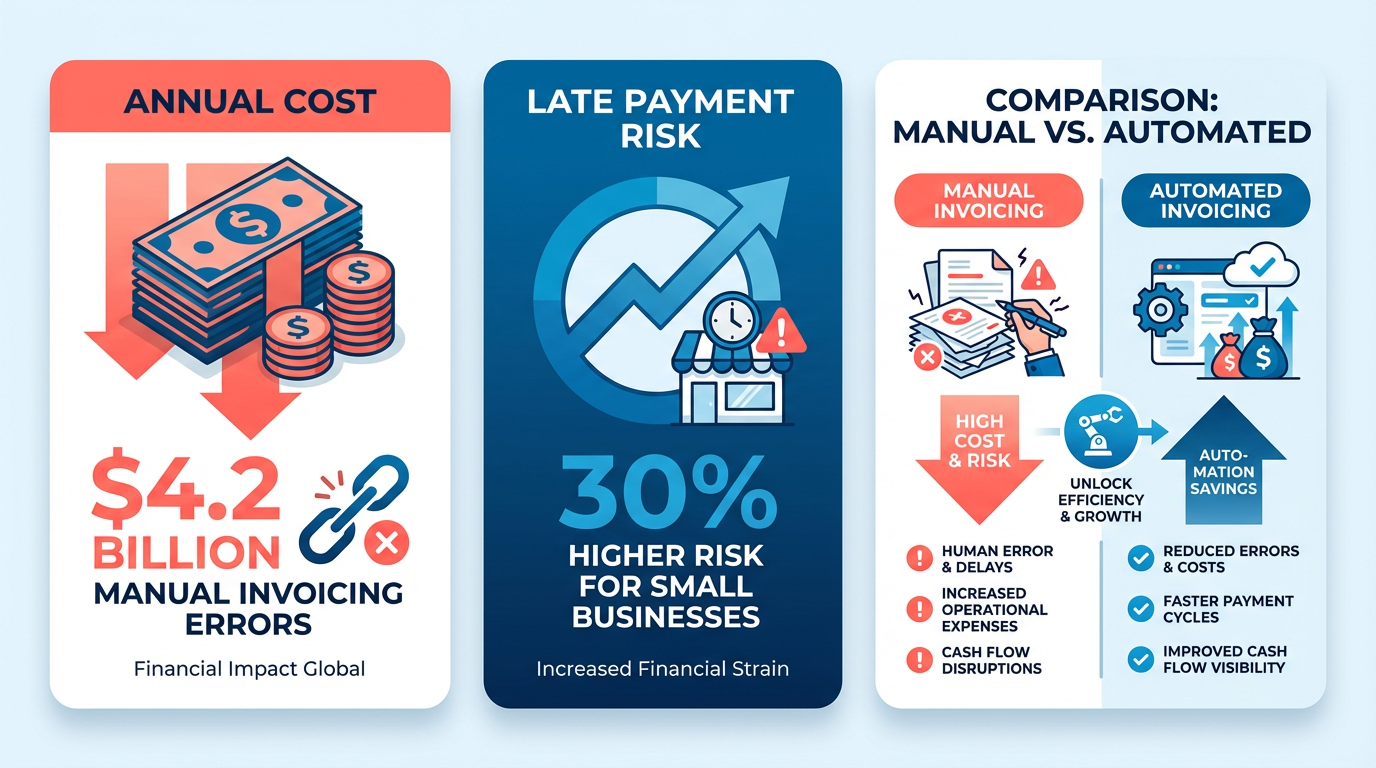
Invoice automation addresses these challenges by streamlining workflows and reducing human error. As outlined in the Understanding Accounts Receivable Automation section, platforms like BILL and Quadient highlight that automation can cut processing time by 50% while slashing manual tasks. For instance, one company (referred to as “an alternative solution”) automated its AP process, reducing bill-pay time from 15 minutes to 1 minute across 3,000 clients. Similarly, a global manufacturing firm saw $20 million recovered in invalid deductions through AI-driven validation tools. These systems also eliminate lost invoices by centralizing records and automating reminders, ensuring payments are tracked in real time-key features emphasized in the Automating Collections and Cash Application section..
Tangible Benefits for Businesses of All Sizes
Small businesses and enterprises alike gain from automation, though their priorities differ. SMBs benefit from reduced labor costs and faster cash flow-critical for survival in competitive markets. A study of 200 small firms found that automation lowered Days Sales Outstanding (DSO) by 34%, enabling earlier reinvestment. This aligns with the Streamlining Invoicing Processes with Automation section, which identifies manual data entry errors as a common inefficiency. Enterprises, meanwhile, use automation to manage complexity: one global organization reduced DSO by 10 days while processing $53.16 billion in AR annually. Both groups see improved accuracy-Stripe reports 87% of businesses using automation experience faster payment cycles, with high-volume users getting paid 23 days sooner on average..
The Cash Flow Advantage
Automation’s most transformative impact lies in cash flow management. By automating payment tracking and forecasting, businesses gain 94% accuracy in cash flow projections, as seen with Quadient’s AI-powered analytics. This visibility allows companies to avoid liquidity crises and negotiate better terms with suppliers. For example, a retail SME using AI-driven forecasting cut excess inventory by 25% while boosting cash reserves by 15%. Sage’s tools further emphasize this by integrating with CRMs and ERPs, enabling real-time insights into aging receivables and collections-a process detailed in the Automating Collections and Cash Application section.
“Automation transforms cash flow from a reactive task to a strategic advantage,” notes a finance manager at a mid-sized firm..
Why It’s Time to Act
The cost of inaction is steep. Manual processes delay payments by an average of 23 days, compared to 55 days for automated systems. Meanwhile, automation reduces bad debt by 20% and lowers operational costs by up to 40%, per HighRadius’ case studies. For businesses still relying on spreadsheets and email reminders, the message is clear: modern solutions not only prevent revenue leakage but also free teams to focus on growth. With 500,000+ businesses already adopting AR automation, the shift is no longer optional-it’s a competitive necessity.
Understanding Accounts Receivable Automation
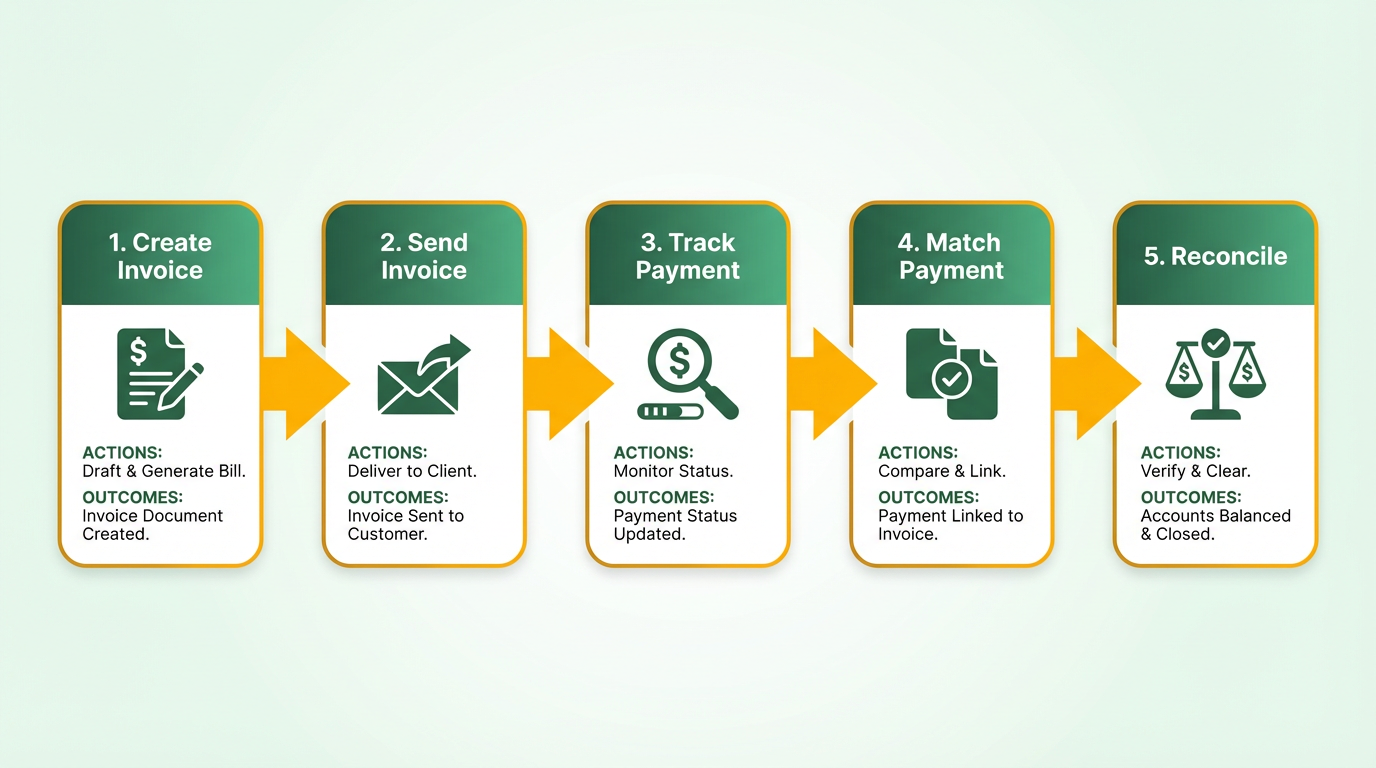
Understanding Accounts Receivable Automation begins with recognizing it as a technology-driven process that streamlines the invoicing, payment collection, and cash reconciliation workflows. At its core, AR automation replaces manual tasks-like creating invoices, sending reminders, and matching payments-by integrating software tools that handle these steps automatically. For instance, SaaS providers like Blixo enable businesses to create, send, track, and receive payments in a single workflow, cutting processing time and reducing errors. This system ensures faster payment cycles, with some companies reporting 2X faster collections and 50% fewer manual tasks, as seen in case studies from industry reports. Building on concepts from the Streamlining Invoicing Processes with Automation section, this efficiency extends beyond basic invoicing to encompass the full invoice-to-cash lifecycle.
Core Components of an Automated AR System
An effective AR automation solution includes interconnected modules that work in tandem to optimize the invoice-to-cash process. Invoicing is the first step, where software generates and distributes electronic invoices instantly upon order fulfillment. Payment processing automates transactions via ACH, credit cards, or digital wallets, ensuring funds are deposited directly into the company’s account. Cash application matches incoming payments to specific invoices, minimizing reconciliation efforts. For example, Quadient’s platform uses AI-powered OCR to reduce manual reconciliation time by 95%. Customer portals also play a key role, allowing clients to view invoices, pay online, and resolve disputes in real time. These components are often integrated with ERPs and accounting tools like NetSuite or QuickBooks, ensuring seamless data flow and reducing duplication. As mentioned in the Implementing Subscription Management with Automation section, such portals are especially valuable for businesses managing recurring billing and subscription models.
AI and Machine Learning: The Backbone of Modern AR Automation
Advanced AR systems use artificial intelligence (AI) and machine learning (ML) to predict payment behaviors, flag risks, and optimize workflows. For instance, Esker’s collaboration AI analyzes historical data to suggest credit limits, detect fraudulent activity, and prioritize high-risk accounts for follow-up. HighRadius’s AI agents automate tasks like deduction resolution and cash forecasting, delivering 20% DSO reductions and 40% productivity gains. These technologies also enable predictive analytics, allowing finance teams to forecast cash flow with 94% accuracy, as noted in Quadient’s case studies. By automating repetitive tasks and embedding intelligence into collections, businesses reduce human error and allocate resources to strategic work. As detailed in the Automating Collections and Cash Application section, these capabilities directly contribute to faster cash application and reduced manual intervention.
Streamlining Invoicing Processes with Automation
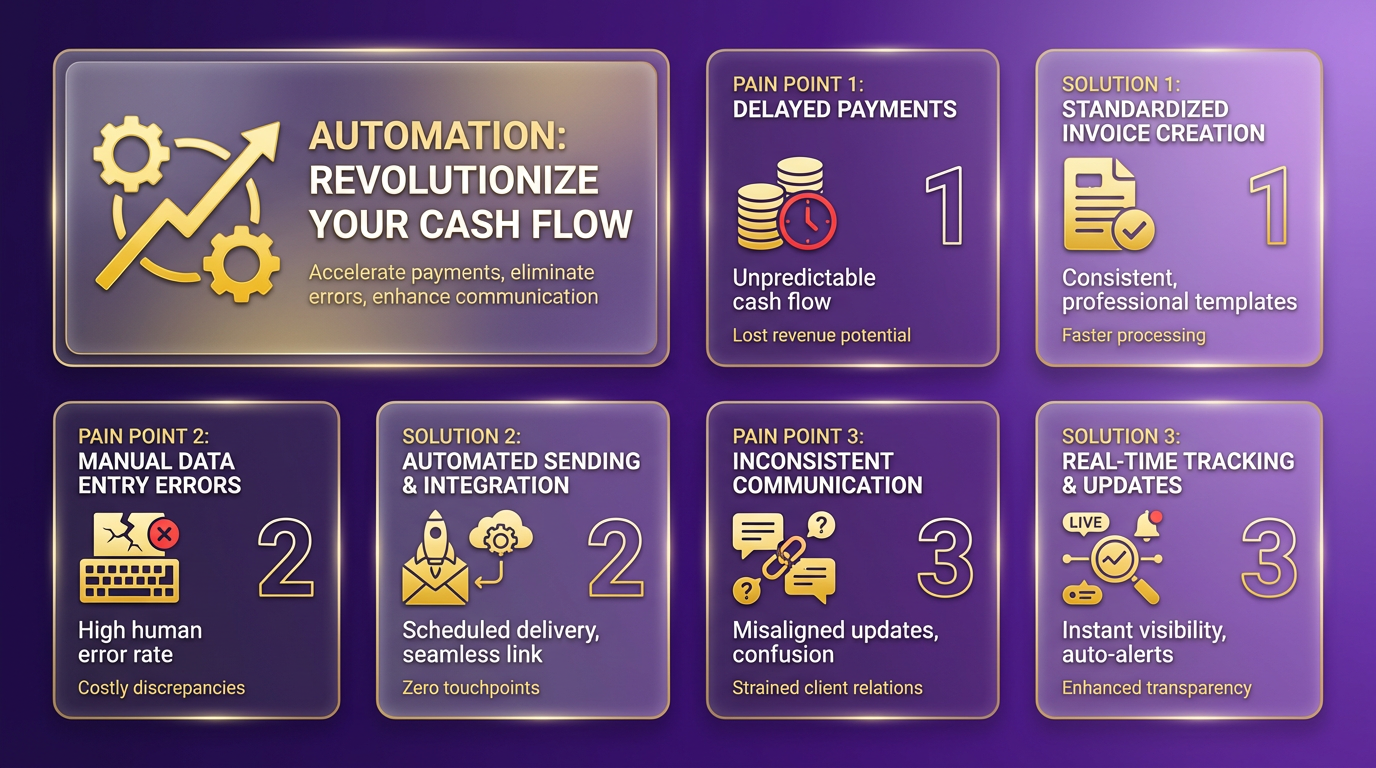
Streamlining invoicing processes with automation starts by identifying inefficiencies in manual workflows. Common pain points include delayed payments, manual data entry errors, and inconsistent communication. For example, BILL highlights that 500K+ businesses automate their financial operations by standardizing invoice creation, sending, tracking, and payment collection into a single workflow. As mentioned in the Why Invoice Automation Matters section, manual invoicing errors cost businesses up to $4.2 billion annually in the U.S., underscoring the urgency of addressing these gaps. Upflow emphasizes fixing upstream issues like invoice accuracy and clear payment terms before automating follow-ups. Start by mapping your current process: pinpoint where delays occur, which tasks are repetitive, and where human errors are frequent.
How Do You Design an Automated Invoicing System?
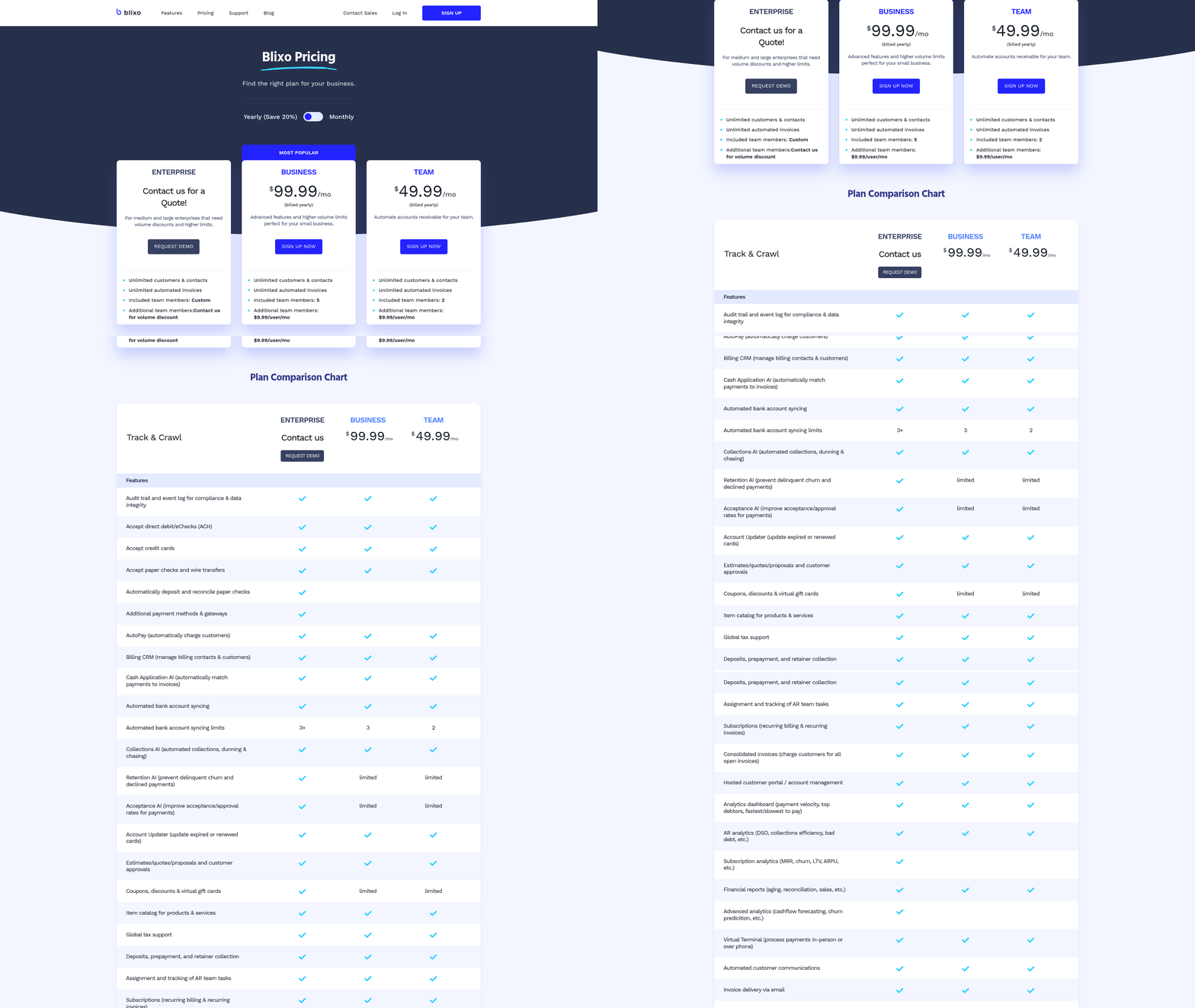
A strong automated system requires template standardization and payment term clarity. BILL and Upflow recommend creating reusable invoice templates with consistent branding, payment due dates, and terms (e.g., net 30). For instance, Sage’s AR software allows teams to generate recurring invoices directly in the platform, reducing manual effort. Payment options should align with customer preferences-ACH, credit cards, or digital wallets-and be clearly stated in the invoice. Blixo, unlike generic providers, offers transparent pricing and customizable templates to match your brand’s identity, ensuring professionalism and reducing disputes. This aligns with practices in the Implementing Subscription Management with Automation section, where consistent invoice generation is critical for recurring billing.
Why Integration with Accounting Systems Matters
Automated invoicing must sync with existing accounting systems to avoid data silos. BILL’s two-way integration with ERPs like NetSuite and Sage Intacct ensures real-time updates on invoices, payments, and accounts. Stripe’s API-driven approach allows seamless data flow between invoicing platforms and banking systems, reducing reconciliation time by 95% (as noted in Quadient’s case studies). For example, a wholesale business using Blixo can automatically pull order data from their CRM, generate invoices, and deposit payments into their bank account-all without manual intervention. Integration also enables real-time dashboards for tracking DSO (Days Sales Outstanding) and cash flow, as seen in HighRadius’ AI-powered analytics. Building on concepts from the Overcoming Common Challenges in Invoice Automation section, poor integration remains a key pitfall to avoid.
How Can You Monitor Invoicing Performance?
Automation tools provide metrics to optimize performance. Stripe reports that 87% of businesses with AR automation see faster payment cycles, while Upflow highlights DSO reduction as a key KPI. Dashboards from Esker and Quadient offer predictive analytics, flagging overdue invoices or disputes for immediate action. For instance, Blixo’s SaaS service allows users to set alerts for late payments or track dispute resolution times, ensuring proactive management. Regularly review metrics like payment speed, dispute resolution time, and customer satisfaction to refine workflows.
What Pitfalls Should You Avoid?
Automation fails when data quality is poor or workflows remain fragmented. The SMB automation study warns that 75% of manual processes are error-prone, but automation can’t fix flawed data. Clean up customer contacts, payment terms, and invoice templates before implementation. Avoid over-relying on automation for high-touch accounts-personalized follow-ups still matter. Another pitfall is poor integration: if your system doesn’t sync with your ERP or CRM, manual data entry persists. Blixo mitigates this by offering pre-built integrations with major platforms, unlike other providers that require custom development. As outlined in the Overcoming Common Challenges in Invoice Automation section, addressing these issues upfront ensures smoother adoption.
Automating Collections and Cash Application
Automating collections and cash application transforms accounts receivable into a streamlined, data-driven process. By using technology, businesses can reduce manual effort, accelerate payments, and improve cash flow visibility. Below, we break down how automation enhances these processes, best practices for implementation, and real-world results..
How Automation Improves Collections
Automated systems streamline collections through intelligent workflows and real-time insights. For example, platforms like BILL and Stripe enable two-way sync with ERPs and CRMs, ensuring invoices are sent on time and payment reminders are triggered automatically. Features such as scheduled email reminders (7, 15, or 30 days before/after due dates) reduce late payments by up to 34% (as seen in Quadient’s case studies). AI-driven tools also identify high-risk accounts, prioritizing follow-ups to minimize delinquencies.
One company reported cutting Days Sales Outstanding (DSO) by 34% using automated cash application, which matches payments to invoices with 94% accuracy. This reduces reconciliation time by up to 95%, allowing finance teams to focus on strategic tasks. Platforms like Esker further enhance collections by integrating AI-powered credit checks and predictive analytics, which lower bad debt by 20% and improve recovery rates by 30%. As mentioned in the Understanding Accounts Receivable Automation section, these tools centralize data and workflows to optimize financial operations..
Best Practices for Implementation
- Fix upstream issues first: Address invoice accuracy and contact data quality before automating workflows. A study by Upflow found that 75% of payment delays stem from upstream errors like incorrect billing addresses. Building on concepts from the Streamlining Invoicing Processes with Automation section, resolving these issues early ensures smoother automation adoption.
- Phase integration: Start with ERP synchronization to ensure seamless data flow, then expand to CRM and payment gateways. Quadient recommends a 14-day setup for initial workflows, reducing manual tasks by 50% within months.
- Customize workflows: Tailor reminder cadences and escalation paths based on customer risk profiles. For high-value accounts, human oversight remains critical.
- use analytics: Use dashboards to track KPIs like DSO, payment trends, and dispute resolution rates. HighRadius users see a 5.5-day DSO improvement through AI-prioritized worklists..
Integration with Accounting Systems
Successful automation relies on tight integration with core financial tools. Platforms like BILL and Sage offer two-way sync with ERPs such as NetSuite, QuickBooks, and SAP, ensuring real-time data consistency. APIs and pre-built connectors simplify integration, with some systems (e.g., Esker) offering 300+ ERP and AP portal connections. For example, a Canadian retailer automated reconciliation by linking its ERP to a cloud-based payment portal, achieving 100% timely payments and 99.5% data accuracy. As highlighted in the Why Invoice Automation Matters section, these integrations directly reduce errors and operational costs linked to manual processes..
Real-World Results
- DSO reduction: A tech startup cut DSO from 54 to 31 days using AI-powered reminders, recovering $20M in invalid deductions.
- Cost savings: One organization reduced manual workload by 80 days monthly, saving over $15% in operational costs.
- Scalability: A wholesale company automated 26% more e-invoicing during a crisis without hiring, scaling accounting operations 5X.
By automating collections and cash application, businesses gain predictable cash flow, lower operational costs, and stronger customer relationships. The key is to start with a clear strategy-fixing data quality and integrating systems first-while using AI and analytics to refine processes continuously.
Implementing Subscription Management with Automation
Implementing automated subscription management starts by identifying inefficiencies in your current manual processes. Begin by mapping out how you handle tasks like invoice generation, payment tracking, and customer onboarding. Manual systems often lead to errors in recurring billing, as highlighted in the Why Invoice Automation Matters section, where manual invoicing errors cost businesses up to $4.2 billion annually. For example, if your team spends hours reconciling subscription records across spreadsheets, automation can reduce this time by 70% or more.
How Do You Identify Manual Process Pain Points?
Look for bottlenecks in tasks like plan adjustments, dunning management, and reporting. Teams using manual methods often face issues such as:
- Inconsistent invoicing: Missed or delayed invoices due to human error.
- Poor visibility: Lack of real-time data on subscription cancellations or upgrades.
- High operational costs: Excessive labor for tasks like payment retries or customer support queries.
Document these pain points to prioritize automation features. Tools that integrate with your existing accounting software, like Blixo, can streamline these workflows by centralizing subscription data.
What Are Best Practices for Automated Subscription Management?
Once you’ve mapped manual inefficiencies, design automation workflows around three pillars: plan flexibility, payment reliability, and system integration. Start by creating tiered subscription plans that align with customer needs. A billing platform with customizable pricing rules (e.g., discounts for annual payments or usage-based tiers) ensures scalability.
For payment processing, prioritize systems that support automated dunning management. Stripe’s documentation highlights how smart payment retries reduce failed transactions by analyzing customer payment history. Blixo, unlike generic providers, offers transparent pricing and built-in dunning workflows that adapt to customer behavior.
Next, integrate your subscription management tool with your accounting software. As mentioned in the Automating Collections and Cash Application section, real-time synchronization between billing and financial systems eliminates manual data entry. For instance, HighRadius AR automation tools emphasize how direct API connections between billing platforms and accounting software reduce reconciliation time by 50%. This integration ensures metrics like monthly recurring revenue (MRR) and churn rate update automatically.
How Do You Monitor Subscription Performance with Automation?
Automation tools provide dashboards to track key metrics like customer lifetime value (CLV), cancellation rates, and payment success ratios. Esker’s AR automation resources explain how predictive analytics can flag accounts at risk of churn, enabling proactive customer outreach.
Set up alerts for anomalies such as sudden drops in payment success or spikes in subscription cancellations. For example, a SaaS company using Blixo’s analytics module identified a 20% increase in cancellations tied to a specific pricing tier, prompting a plan redesign that improved retention.
Avoid common pitfalls like overcomplicating subscription plans or neglecting customer communication. Overly rigid pricing structures-such as fixed-term contracts without pause options-can frustrate users and drive churn. Building on concepts from the Overcoming Common Challenges in Invoice Automation section, poor onboarding can be mitigated by selecting platforms with guided setup and support, ensuring your team can manage tasks like plan creation and payment reconciliation without external help.
What Pitfalls Should You Avoid?
A major mistake is choosing a tool that doesn’t scale with your business. Many billing platforms lock users into fixed pricing models, making it expensive to add new features as your customer base grows. Blixo’s tiered pricing, however, adjusts to your volume of transactions and users, avoiding hidden costs.
Another risk is poor onboarding. If your team isn’t trained to use the automation features effectively, you’ll miss out on efficiency gains. Look for platforms that offer guided setup and support, ensuring your team can manage tasks like plan creation and payment reconciliation without external help.
Finally, test automation workflows thoroughly before full deployment. Run simulations for scenarios like payment failures or subscription upgrades to ensure the system handles edge cases correctly. A step-by-step rollout-starting with a single department or customer segment-helps identify issues early.
By addressing manual process flaws, implementing scalable automation, and avoiding common missteps, businesses can reduce administrative overhead while improving customer satisfaction. Tools like Blixo provide the flexibility and transparency needed to adapt to evolving subscription models, ensuring your billing system supports growth without compromising accuracy.
Overcoming Common Challenges in Invoice Automation
Invoice automation streamlines accounts receivable processes but introduces challenges like data migration, system integration, and change management. Addressing these hurdles requires a structured approach that prioritizes upstream fixes, cross-functional collaboration, and continuous performance monitoring. Below, we break down strategies to overcome these obstacles effectively..
How Do You Address Data Migration and System Integration Challenges?
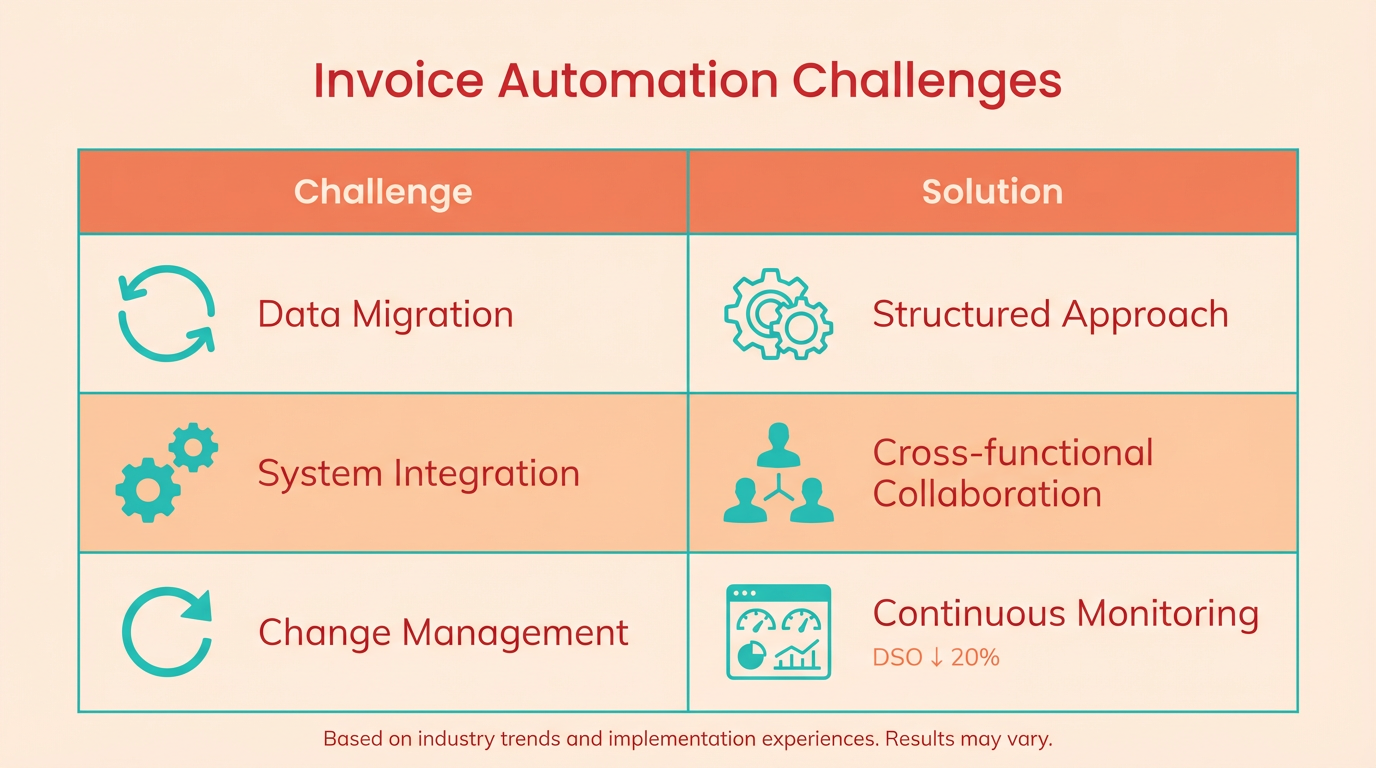
Data migration and system integration often cause delays due to incompatible formats and fragmented workflows. A phased implementation minimizes disruption by starting with core systems like ERPs and gradually expanding to CRMs and payment processors. For example, one company reduced DSO (Days Sales Outstanding) by 20% after cleaning up duplicate accounts and standardizing invoice templates before integrating automation tools. As mentioned in the Streamlining Invoicing Processes with Automation section, identifying inefficiencies in manual workflows is critical to ensuring automation tools operate on clean, consistent data from day one.
Use API-first platforms to ensure seamless data flow between systems. Blixo’s integration framework, for instance, allows real-time syncing with ERPs and bank feeds, reducing manual entry errors. Start by mapping existing workflows to identify gaps, then validate data accuracy during migration. This approach ensures automation tools operate on clean, consistent data from day one..
What Role Does Change Management Play in Successful Automation?
Resistance to change often stems from unclear workflows or lack of training. Cross-functional alignment is critical-finance, sales, and customer success teams must agree on metrics like DSO and payment terms. As mentioned in the Why Invoice Automation Matters section, manual invoicing errors cost businesses up to $4.2 billion annually in the U.S. alone, underscoring the urgency of aligning teams around shared KPIs. One organization improved collections by 35% after conducting workshops to align teams around shared KPIs and automating repetitive tasks like follow-up emails.
Invest in role-specific training to build confidence. For example, customer success teams benefit from learning how to use customer portals for dispute resolution, while finance staff need guidance on interpreting analytics dashboards. Blixo’s onboarding includes scenario-based training modules that simulate real-world challenges, ensuring teams adapt smoothly..
How Can You Monitor and Optimize Automated Invoicing Performance?
Automation isn’t a set-it-and-forget-it solution. Real-time analytics help identify bottlenecks, such as delayed payments or frequent disputes. Track metrics like average payment delay and dispute resolution time to pinpoint areas for improvement. Building on concepts from the Automating Collections and Cash Application section, one SMB cut manual work by 40% by analyzing cash-application reports and refining invoice templates to include clearer payment terms.
Proactively troubleshoot issues using playbook-based workflows. For instance, if a customer consistently misses due dates, automated alerts can trigger escalation paths or human intervention. Blixo’s SaaS service allows teams to customize these rules, ensuring rigid processes don’t alienate high-value clients. Regularly review system logs to address technical glitches, such as failed payment gateway connections, before they impact customer experience..
What Are Common Pitfalls to Avoid?
- Skipping upstream fixes: Automating flawed processes (e.g., inconsistent invoice formats) amplifies errors. Clean data and standardized templates are foundational.
- Underestimating customer experience: Automated systems must balance efficiency with personalization. A one-size-fits-all email template can lead to higher dispute rates.
- Neglecting post-implementation review: Continuous improvement is key. Schedule quarterly audits to refine workflows based on performance data.
By prioritizing integration flexibility, staff training, and data-driven adjustments, businesses can turn automation challenges into opportunities for growth. The result is a scalable, error-resistant invoicing system that boosts cash flow and customer satisfaction.
Frequently Asked Questions
1. How much do manual invoicing errors cost U.S. businesses annually?
Manual invoicing errors cost U.S. businesses $4.2 billion yearly due to mistakes like incorrect billing and delayed cash flow. These errors strain customer relations and increase operational friction, especially for small businesses.
2. How does invoice automation reduce processing time?
Invoice automation cuts processing time by 50% by streamlining workflows and reducing manual tasks. For example, one company reduced bill-pay time from 15 minutes to 1 minute per client across 3,000 clients.
3. What risks do small businesses face with manual invoicing?
Small businesses face a 30% higher late payment risk using manual invoicing, leading to lost interest and operational delays. Errors like typos in invoice numbers can cause weeks of communication backlogs.
4. Can invoice automation recover lost revenue?
Yes, AI-driven invoice systems can recover significant revenue. A global manufacturing firm recovered $20 million in invalid deductions using automated validation tools, demonstrating the financial impact of automation.
5. How do automated systems prevent invoice-related delays?
Automation centralizes records, eliminates lost invoices, and automates payment reminders. This real-time tracking ensures faster resolution of errors, reducing delays caused by typos or communication gaps.
6. What are the key benefits for all business sizes?
Automation reduces human error, speeds up collections, and improves cash flow for small businesses and enterprises. It also enables real-time tracking, ensuring payments are processed efficiently regardless of company scale.
7. How does automation compare to manual invoicing accuracy?
Automated systems reduce errors by up to 90% compared to manual methods. For instance, AI validation tools prevent invalid deductions, while centralized platforms eliminate mistakes from fragmented record-keeping.