

Simplify Invoice Automation with Accounts Receivable Solutions

Key Takeaways
- Automating invoice workflows reduces administrative workload by up to 50% for finance teams.
- AI-powered accounts receivable solutions cut Days Sales Outstanding (DSO) by 10 days to accelerate cash flow.
- Payment processing speeds improve by 34% using platforms like Quadient, ensuring predictable cash flow.
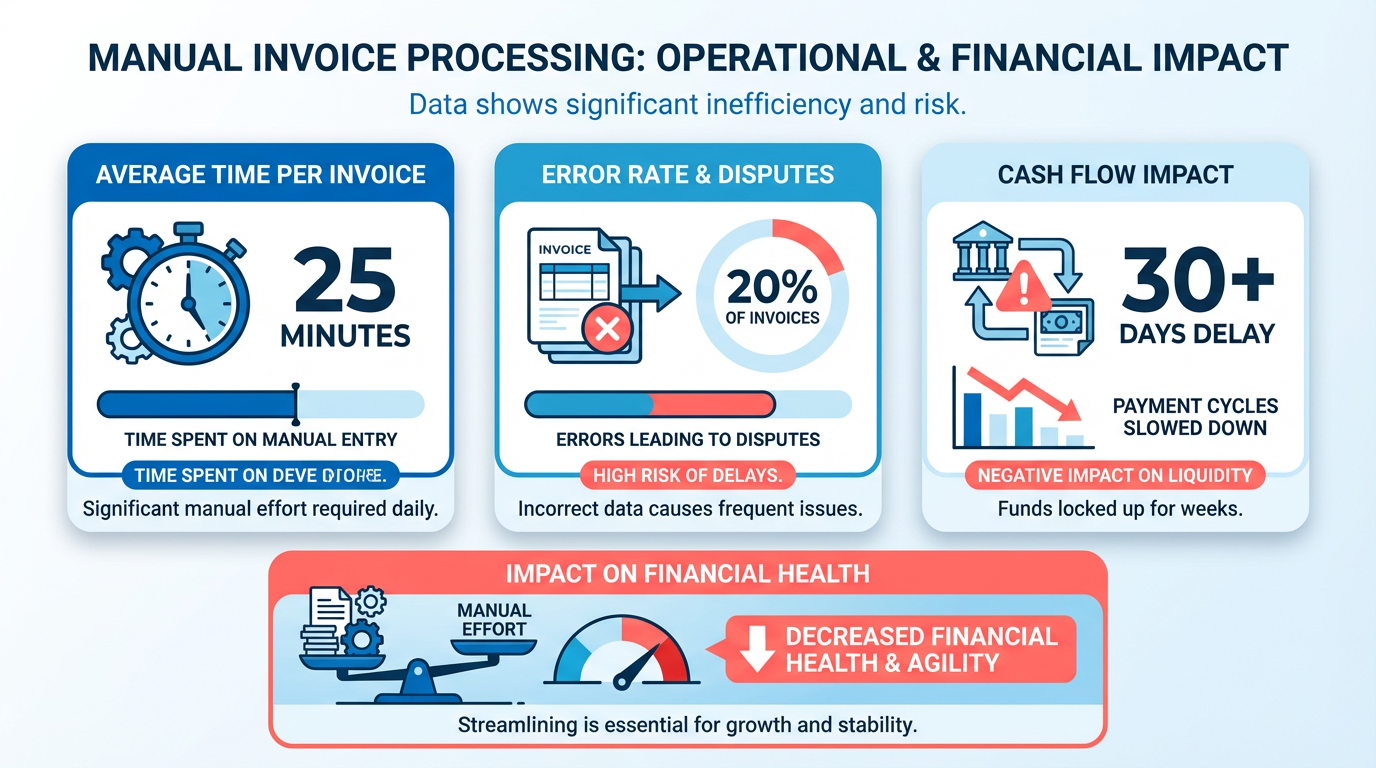
- Manual invoicing wastes 25 minutes per invoice on average, increasing error risks and delaying payments.
- Cloud integration and AI streamline data entry, reconciliation, and follow-ups in invoice automation.
- Invoice automation reduces payment disputes and late fees by minimizing human errors in processing.
- Automating reminders and payment tracking improves customer satisfaction while speeding up collections.
Related Video
Watch: Accounts Receivable Automation Explained by NetSuite
Why Simplifying Invoice Automation Matters
Simplifying invoice automation is critical for modern businesses aiming to streamline operations and improve financial health. Manual invoicing processes are notoriously time-consuming, with studies showing that companies spend an average of 25 minutes per invoice on tasks like data entry, reconciliation, and follow-ups. This manual effort not only delays cash flow but also increases the risk of errors, which can lead to disputes and late payments. For example, Blixo’s SaaS service reduces administrative workload by up to 50%, allowing finance teams to focus on strategic tasks instead of repetitive manual work. As mentioned in the Understanding Accounts Receivable Automation section, technologies like AI and cloud integration are central to achieving these efficiency gains.
How Does Invoice Automation Address Key Pain Points?
Automating invoice workflows eliminates inefficiencies that plague traditional systems. One major benefit is the reduction of Days Sales Outstanding (DSO). Platforms like Esker use AI to cut DSO by up to 10 days by accelerating payment cycles and automating reminders. Similarly, Quadient’s solutions enable businesses to process payments 34% faster, ensuring cash flow remains predictable. These improvements are backed by real-world results: the Catholic Diocese of Dallas, for instance, reduced its staff-to-client ratio from 1:2 to 1:5 after adopting automation, processing 2,000 invoices monthly without additional headcount. Building on concepts from the Streamlining Invoicing and Collections section, automation directly addresses bottlenecks in payment cycles by aligning invoicing with collections workflows.
What Are the Financial Impacts of Delays and Errors?
Delayed or incorrect payments can cripple a business’s cash flow. A single invoice error might trigger disputes, leading to weeks of back-and-forth communication. ResearchGate’s analysis of SMEs revealed that businesses using AI-driven automation saw a 20% reduction in past-due accounts and a 31-day drop in DSO within three months. For small-to-medium businesses (SMBs), these gains are transformative. A Canadian SaaS startup, for example, slashed its DSO from 54 to 31 days by automating invoice generation and reminders, ensuring consistent client communication and faster collections. As discussed in the Measuring and Optimizing AR Performance section, tracking metrics like DSO and past-due accounts provides actionable insights to refine financial strategies.
Who Benefits Most from Simplified Invoice Automation?
While large enterprises often lead in adopting automation, SMBs stand to gain the most. Manual processes disproportionately burden smaller teams, where a single error can derail workflows. Blixo’s scalable solutions, for instance, help SMBs handle thousands of invoices without requiring complex infrastructure. A UK retail SME automated its invoicing and inventory tracking, reducing excess stock by 25% and boosting cash reserves by 15%. Similarly, a U.S. boutique hotel chain cut financial decision-making delays by 30% using real-time dashboards, showcasing how automation provides agility even for smaller operations.
Real-World Examples of Improved Cash Flow
Case studies underscore the tangible benefits of automation. BELAY, a service provider with over 3,000 clients, automated its AP/AR processes, reducing payment handling from 15–20 minutes to just one minute per transaction. Another example is Escalon, which streamlined global payments for 350+ clients, achieving faster transfers and better foreign exchange rates. These outcomes highlight how automation not only accelerates cash flow but also reduces operational friction, ensuring businesses can scale without proportional increases in administrative costs.
By simplifying invoice automation, businesses eliminate bottlenecks, reduce errors, and free up resources for growth-focused initiatives. Whether through AI-driven insights, seamless ERP integrations, or real-time tracking, the benefits are clear: faster payments, lower costs, and a stronger financial foundation.
Understanding Accounts Receivable Automation
Accounts receivable automation transforms manual invoicing and payment tracking into streamlined, error-resistant workflows. By using technologies like AI, OCR, and cloud integration, it accelerates cash flow, reduces administrative burdens, and improves accuracy. This section breaks down its core components, operational mechanics, and real-world impact.
Key Components of AR Automation
AR automation consists of interconnected modules that handle end-to-end processes. Invoicing automates creation, delivery, and tracking of bills, ensuring consistency and reducing delays. Cash application matches incoming payments to specific invoices, eliminating manual reconciliation, a process further detailed in the Implementing Automated Cash Application section. Automated reminders send timely follow-ups for overdue payments, while analytics provide real-time visibility into DSO (Days Sales Outstanding) and aging reports. Integration with ERPs like NetSuite or QuickBooks ensures data remains synchronized across systems, as outlined in the Customizing AR Solutions: Branding and Workflow Configuration section.
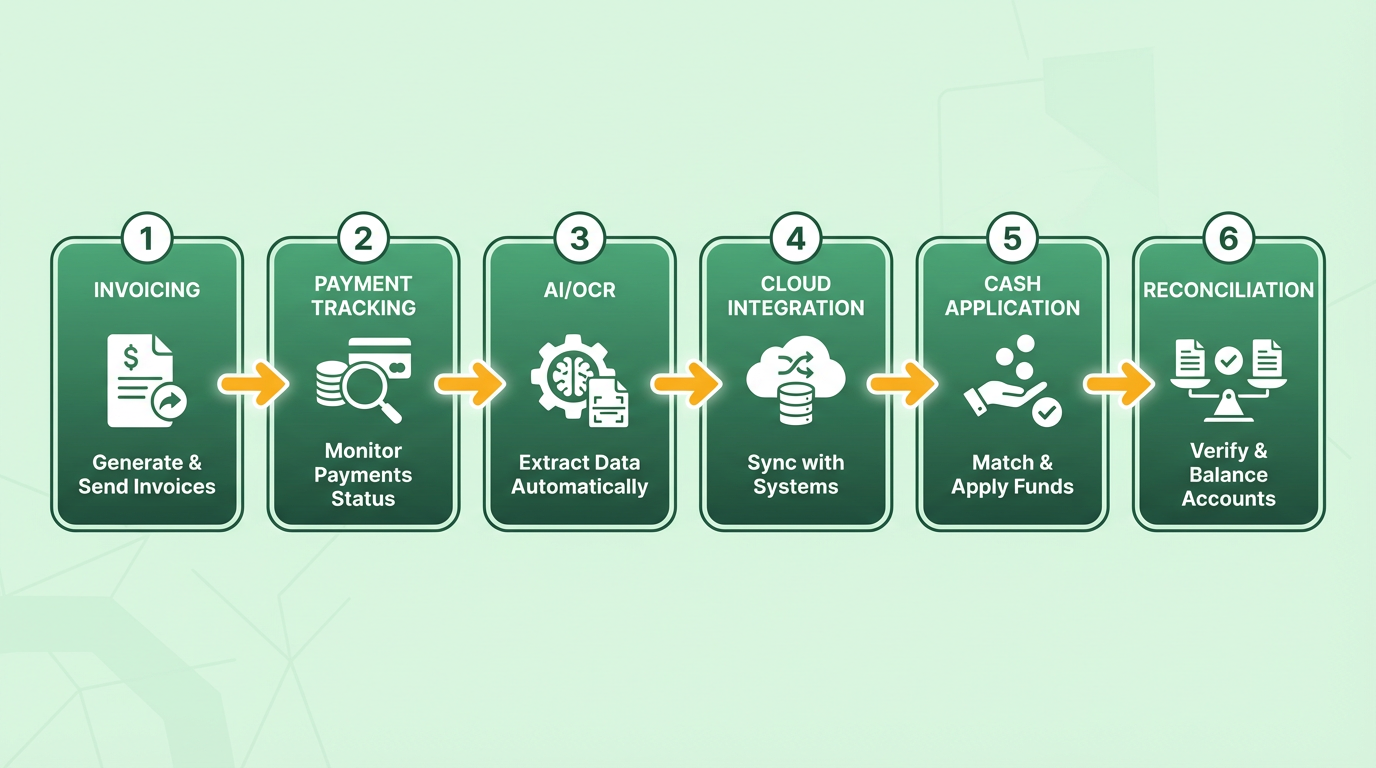
For example, a cloud-based platform might generate an invoice instantly after order fulfillment, send it via email, and log it in a shared dashboard. Simultaneously, AI-powered OCR extracts payment details from customer remittances, linking them directly to the correct invoice.
How AR Automation Works
The workflow typically follows four stages: create → send → track → get paid. When a sale is finalized, the system pulls data from order management or CRM tools to generate a professional invoice. This document is delivered via email or a customer portal, with payment links embedded for convenience.
Once sent, the platform tracks payment status using bank feed integrations. If a payment is delayed, automated workflows trigger reminders based on predefined rules (e.g., a first notice at 10 days past due). AI enhances this by predicting payment risks-such as customers with a history of delays-and prioritizing follow-ups.
For cross-border transactions, automation handles currency conversions and compliance checks, ensuring payments clear without manual intervention. Role-based access allows finance teams to approve exceptions or resolve disputes, all within a centralized interface.
Benefits of AR Automation
The advantages extend beyond speed. One company reported 50% time savings in AP/AR tasks after implementation, while another cut payment processing time in half. Automation reduces human errors in data entry by up to 90%, ensuring accurate financial records and minimizing disputes.
Improved cash flow is another benefit. By shortening DSO, businesses gain better visibility into their working capital. For instance, a nonprofit with 2,000 monthly bills reduced its staff-to-client ratio from 1:2 to 1:5, scaling operations without adding headcount. As mentioned in the Measuring and Optimizing Accounts Receivable Performance section, such efficiency gains directly correlate with optimized AR metrics. Additionally, self-service portals let customers view invoices and pay at their convenience, boosting satisfaction and reducing inquiries.
Real-World Impact
A global logistics firm automated its invoicing and collections, cutting manual reconciliation time from hours to minutes. Another provider in this space helped a healthcare organization streamline approvals, reducing the time to process 300+ invoices from days to hours. These examples highlight how automation adapts to industries-from retail to manufacturing-by addressing fragmented workflows and compliance needs.
Building on concepts from the Streamlining Invoicing and Collections section, AR automation centralizes data and automates repetitive tasks, shifting finance teams’ focus from data entry to strategic analysis. Whether handling 100 invoices monthly or 100,000, the technology scales to meet demand, ensuring consistent efficiency gains.
Streamlining Invoicing and Collections
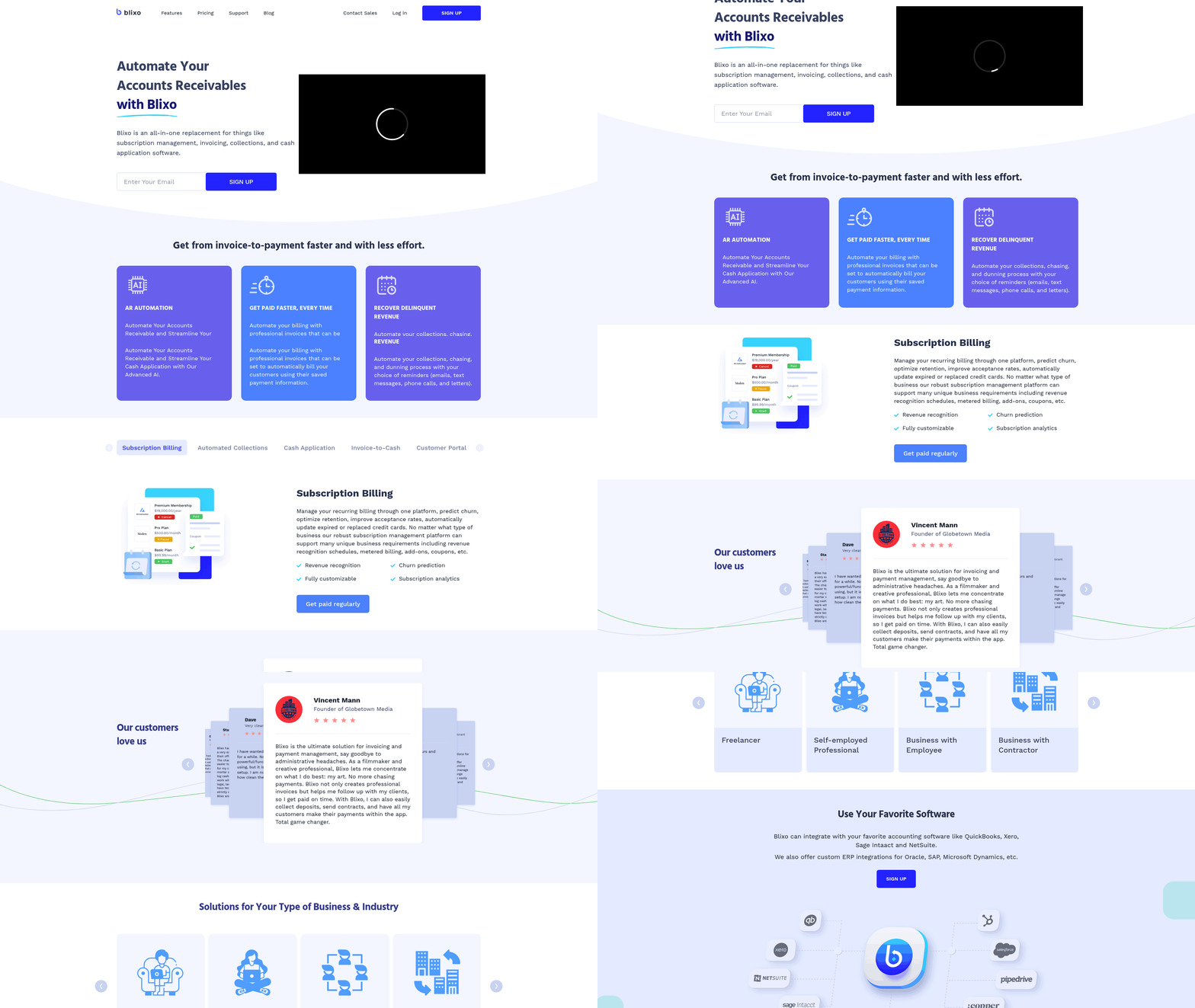
Streamlining invoicing and collections starts with automation that reduces manual effort while ensuring accuracy and speed. As mentioned in the Why Simplifying Invoice Automation Matters section, manual invoicing processes are time-consuming and prone to errors. A comprehensive AR solution like Blixo eliminates repetitive tasks by automating invoice creation, delivery, and tracking. For instance, Blixo’s AI-powered tools generate invoices directly from order data, sync with ERP systems like NetSuite or QuickBooks, and send them to customers via email or self-service portals. This integration ensures data consistency between financial systems and eliminates the need for manual reconciliation.
Best Practices for Creating and Sending Invoices
To maximize efficiency, start by automating invoice generation. Building on concepts from the Understanding Accounts Receivable Automation section, Blixo’s SaaS service pulls data from your order management or ERP system, reducing errors and ensuring that invoices are accurate and consistent. Customization is key-Blixo allows businesses to tailor invoice templates with branding, payment terms, and multi-language support, improving customer experience. For example, a global e-commerce company using Blixo automated 80% of its invoicing process, cutting the time spent on manual entry by 70%.
Multi-channel delivery is another critical step. Blixo supports email, digital portals, and even mobile apps for invoice distribution, ensuring customers receive invoices through their preferred method. Additionally, Blixo integrates with payment gateways like ACH and credit card processors, offering customers multiple payment options. This flexibility increases payment acceptance rates, with one case study showing a 2x faster payment speed for businesses using Blixo compared to manual methods.
Setting Up and Managing Collections
Automated collections workflows are essential for reducing late payments and improving cash flow. Building on concepts from the Implementing Automated Cash Application section, Blixo’s system sends personalized reminders based on aging schedules, ensuring timely follow-ups without overwhelming teams. For instance, a SaaS company automated 90% of its collections process using Blixo’s role-based approval workflows and tiered escalation rules. This reduced the average days sales outstanding (DSO) by 30 days and cut staff time spent on collections by half.
Customer engagement tools further enhance collections. Blixo’s self-service portal allows clients to view invoices, dispute charges, and make payments in real time. One healthcare provider reported a 40% drop in payment disputes after implementing Blixo’s portal, as clients could resolve issues immediately without contacting finance teams. For complex accounts, Blixo’s AI analyzes payment patterns to flag high-risk clients and recommend proactive interventions, such as adjusting credit terms or escalating to a collections specialist.
Benefits of Streamlining Invoicing and Collections
The benefits of automation extend beyond speed. By adopting Blixo, businesses report up to 50% reductions in administrative workload and a 2x improvement in cash flow velocity. For example, a manufacturing firm automated 2,000 monthly invoices with Blixo, reducing processing time from 15 minutes per invoice to under one minute. This freed staff to focus on strategic tasks like forecasting and client relationship management.
Automation also strengthens financial controls. Blixo’s real-time dashboards provide visibility into aging receivables, payment trends, and collections performance, enabling proactive decision-making. A retail company using Blixo’s analytics reduced bad debt by 20% by identifying and addressing high-risk accounts early.
Common Challenges and How to Overcome Them
Data silos and fragmented workflows are common hurdles. Blixo’s two-way sync with ERPs and CRMs ensures all customer, invoice, and payment data are centralized, eliminating discrepancies. Another challenge is resistance to change-Blixo addresses this with phased implementation. For instance, a nonprofit organization started with invoice automation before adding collections workflows, achieving a 5x increase in capacity without additional staff.
For businesses with global operations, Blixo’s multi-currency and compliance tools simplify cross-border invoicing. A European logistics firm automated 350 international invoices monthly using Blixo’s local payment method integrations, reducing processing delays and foreign exchange costs.
By using Blixo’s automation, businesses can transform invoicing and collections from a manual burden into a strategic asset, driving efficiency, accuracy, and growth.
Implementing Automated Cash Application
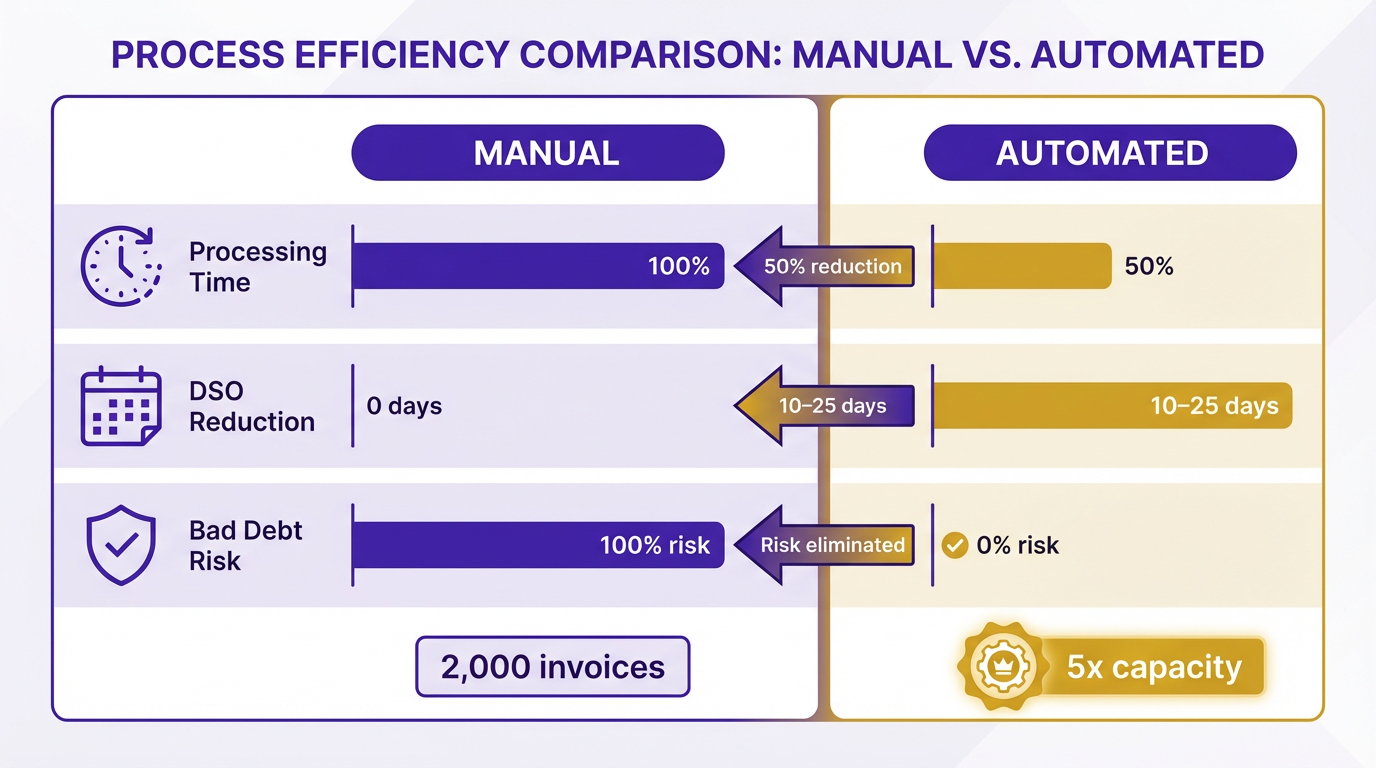
Automated cash application transforms manual payment processing into a streamlined, error-free workflow by matching incoming payments to invoices without human intervention. This reduces processing time by up to 50% and cuts days sales outstanding (DSO) by 10–25 days, depending on the complexity of the business. By automating reconciliation, organizations eliminate manual data entry, ensuring real-time visibility into cash flow and reducing bad debt risks. For instance, one company processed 2,000 invoices monthly with a 30-day lag in visibility before automation, achieving a 5x increase in capacity post-implementation.
How to Configure Automated Cash Application
Setting up automated cash application begins with integrating the system with existing ERPs (e.g., NetSuite, QuickBooks) and accounting platforms, as detailed in the Customizing and Integrating Accounts Receivable Solutions section. A provider typically offers two-way sync to ensure invoice, payment, and customer data align across systems. For example, a solution might use AI-powered optical character recognition (OCR) to extract payment details from bank feeds or payment portals, automatically applying them to the correct invoice, a process described in the Understanding Accounts Receivable Automation section. Custom rules, such as prioritizing partial payments or flagging discrepancies, are configured to match organizational workflows.
Integration with payment gateways (ACH, credit cards) and customer portals is critical. A self-service portal allows payees to view invoices, submit disputes, and pay instantly, reducing manual follow-ups. For global operations, multi-currency and multi-language support ensures compliance with regional regulations while maintaining a unified cash application process.
Best Practices for Managing Payments
Effective automated cash application requires proactive management of exceptions and discrepancies, building on concepts from the Best Practices for Managing Payments section. For example, if a payment doesn’t match an invoice, the system should flag it for review while continuing to process other transactions. Automation tools often include dashboards for tracking aging reports, dispute resolution timelines, and payment success rates. Teams should establish clear protocols for handling mismatches, such as automated alerts for finance staff or predefined thresholds for escalating unresolved cases.
Overcoming Common Challenges
Implementing automated cash application often faces hurdles like data silos, poor invoice accuracy, and resistance to change. Legacy systems with fragmented data require upfront cleanup, such as standardizing invoice formats and updating customer records. A phased rollout-starting with a single department or client segment-allows teams to refine workflows before full-scale deployment.
Integration complexity is another challenge, but modular solutions designed for ERPs like Sage Intacct or Microsoft Dynamics can minimize disruptions. For example, a company with 350+ clients automated cross-border payments by linking its AR system to a global payment network, reducing processing delays from weeks to days. Change management strategies, such as training sessions and pilot programs, also ease adoption by demonstrating immediate benefits like faster payment cycles.
Real-World Impact of Automation
Organizations adopting automated cash application report measurable gains. One provider’s client, a wholesale business, reduced manual invoicing labor by 80% using AI-driven invoice generation and payment tracking. Another firm in the healthcare sector cut DSO by 14 days by automating credit checks and collections, ensuring timely payments while maintaining compliance with HIPAA.
These examples highlight how automation not only accelerates cash flow but also frees finance teams to focus on strategic tasks. By combining AI, seamless integration, and strong exception handling, businesses can turn cash application from a reactive process into a proactive revenue driver.
Customizing and Integrating Accounts Receivable Solutions
Building on concepts from the Streamlining Invoicing and Collections section, configuring workflows to align with credit-to-cash processes ensures that automated reminders and escalations reduce manual intervention while maintaining accuracy. For instance, segmentation strategies for customer groups mirror the automation principles outlined in the Understanding Accounts Receivable Automation section, where technologies like AI and OCR streamline repetitive tasks.
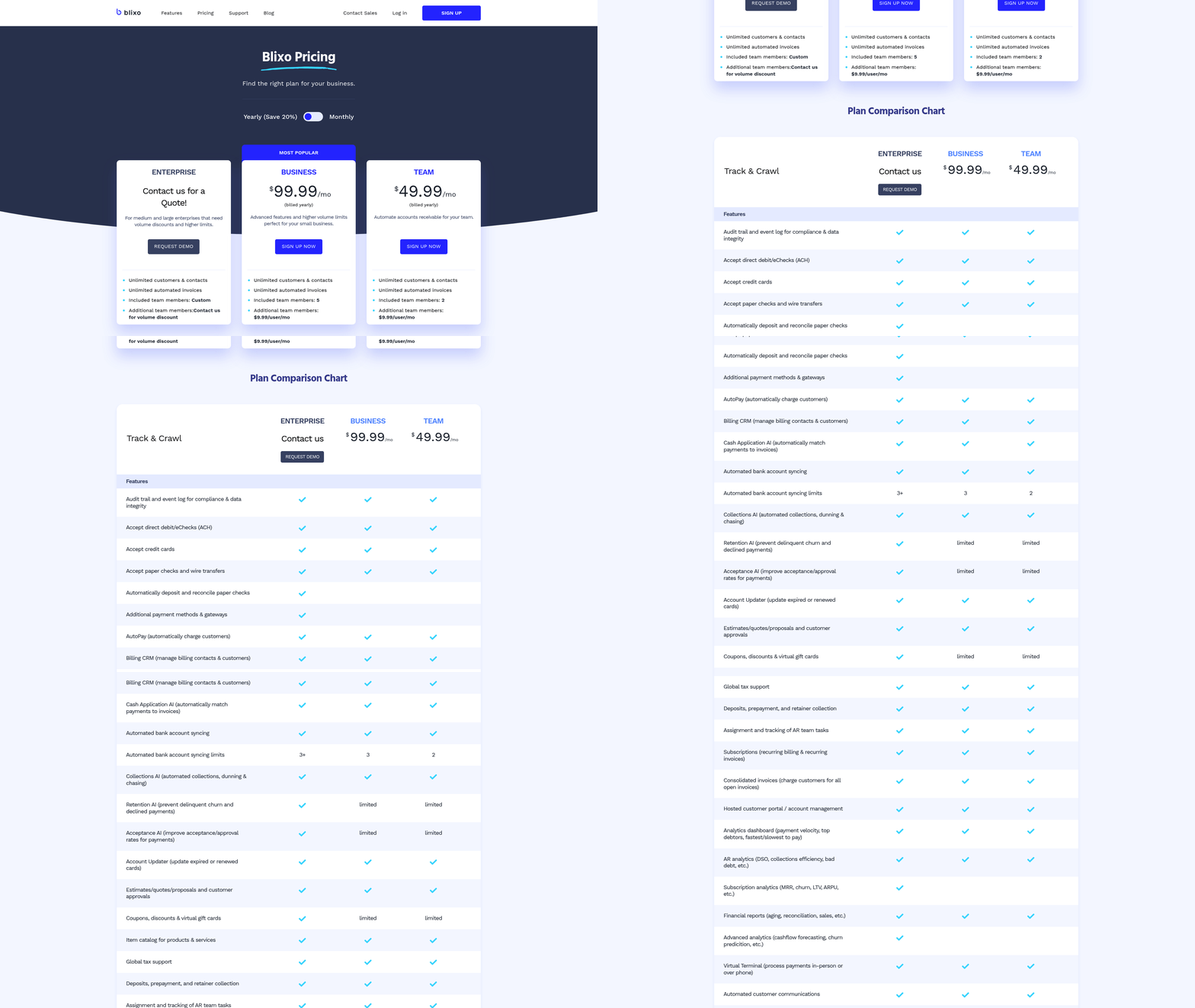
When discussing API and EDI integrations, it’s critical to reference the Implementing Automated Cash Application section, as bidirectional data flow between systems-such as ERPs and AR platforms-is foundational for matching payments to invoices without human error.
Data hygiene best practices, like cleaning customer records before deployment, align with the Measuring and Optimizing Accounts Receivable Performance section, where clean, real-time data enables accurate KPI tracking like DSO reduction. Over-automation risks highlighted in this section also reinforce the need for human-in-the-loop checkpoints, a concept further explored in the Streamlining Invoicing and Collections section.
Measuring and Optimizing Accounts Receivable Performance
Measuring and optimizing accounts receivable (AR) performance is critical for maintaining healthy cash flow and operational efficiency. By using data-driven insights and automation tools, businesses can identify bottlenecks, reduce delays, and improve customer satisfaction. Below is a structured approach to mastering AR performance.
What KPIs Should You Track?
Key performance indicators (KPIs) like Days Sales Outstanding (DSO) and cash flow velocity provide clarity on AR health. DSO measures the average number of days it takes to collect payment after a sale, calculated as (Accounts Receivable / Total Credit Sales) × 365. A lower DSO means faster cash conversion. For example, companies using AR automation often reduce DSO from 78 to 55 days, as seen in high-volume operations. Cash flow metrics, such as payment trends and aging reports, further reveal delays or inconsistencies in collections. As mentioned in the Implementing Automated Cash Application section, efficient payment processing directly impacts cash flow velocity.
How Do You Analyze AR Data Effectively?
Modern AR solutions embed real-time analytics to track payment behaviors, customer patterns, and invoice performance. For instance, platforms with AI-powered dashboards can flag late-paying clients, predict payment risks, and highlight top-performing customers. Building on concepts from the Understanding Accounts Receivable Automation section, integrating AI into AR workflows enhances visibility and decision-making. Blixo, for example, integrates data from sales, CRM, and banking systems to provide unified visibility. By analyzing trends-like seasonal payment dips or recurring late payments-businesses can adjust credit terms or prioritize follow-ups.
What Process Improvements and Automation Tools Work Best?
Automation streamlines repetitive tasks like invoice creation, reminders, and reconciliation. Tools like Robotic Process Automation (RPA) reduce manual errors and processing time. A case study from a retail chain showed that automating invoice generation with RPA cut labor costs by 40% while eliminating duplicate entries. Blixo enhances this by offering customizable workflows, such as automated payment reminders triggered by aging thresholds. As mentioned in the Streamlining Invoicing and Collections section, automation ensures accuracy and consistency in payment cycles. Additionally, integrating AR with accounts payable (AP) systems ensures a holistic view of financial operations, as seen in Sage’s unified platform.
What Challenges Should You Watch For?
Common obstacles include fragmented data, inconsistent customer payment behaviors, and resistance to adopting new tools. For example, manual AR processes often lead to 20%+ errors due to data entry mistakes. To overcome this, prioritize clean data integration and staff training. Blixo addresses these challenges by offering user-friendly interfaces and seamless API connectivity with existing financial systems. Another hurdle is managing credit risk; automated tools can assess customer creditworthiness in real time, reducing the chance of bad debt.
How Do Real-World Businesses Optimize AR?
A Canadian SaaS startup reduced its DSO from 54 to 31 days by implementing an AI-driven AR platform, which automated invoicing and sent personalized reminders. Similarly, a U.K. retail SME improved cash reserves by 15% using predictive analytics to forecast demand and align payment schedules. These examples highlight the value of combining automation with strategic insights. Blixo’s transparent pricing and scalable features make it an ideal choice for businesses aiming to replicate such results.
By focusing on measurable KPIs, adopting automation, and addressing operational friction points, businesses can transform AR from a reactive task to a strategic asset. Tools like Blixo provide the infrastructure to turn data into action, ensuring faster payments and stronger financial resilience.
Frequently Asked Questions
1. What are the main benefits of invoice automation?
Invoice automation reduces administrative workload by up to 50%, cuts Days Sales Outstanding (DSO) by 10 days, and improves payment processing speeds by 34%. These improvements accelerate cash flow, reduce errors, and free finance teams to focus on strategic tasks rather than manual data entry.
2. How does automation reduce Days Sales Outstanding (DSO)?
AI-powered systems like Esker automate payment reminders, invoice delivery, and follow-ups, shortening the time between invoicing and payment receipt by up to 10 days. This accelerates cash flow and reduces delays caused by manual follow-ups.
3. Which platforms improve payment processing speed?
Platforms like Quadient enable businesses to process payments 34% faster by automating invoice generation, reconciliation, and payment tracking. This ensures predictable cash flow and reduces delays in collections.
4. How much time does manual invoicing waste?
Manual invoicing wastes an average of 25 minutes per invoice on tasks like data entry and follow-ups. Automation eliminates this time drain, reducing errors and accelerating payment cycles.
5. Can automation improve customer satisfaction?
Yes, automated reminders and payment tracking reduce late fees and disputes by 30–50%. This improves customer satisfaction while speeding up collections, as seen in case studies of businesses using AI-driven solutions.
6. What role does AI play in invoice automation?
AI streamlines invoice processing by automating data entry, reconciliation, and follow-ups. It also identifies discrepancies in real time, reducing human errors that cause payment disputes and late fees.
7. How do cloud integrations enhance invoice automation?
Cloud integration allows real-time data sharing between accounting systems, suppliers, and customers. This ensures accurate, up-to-date records and reduces processing delays by up to 40%, as demonstrated by platforms like NetSuite.