

Set Up Auto Recurring Billing with Blixo
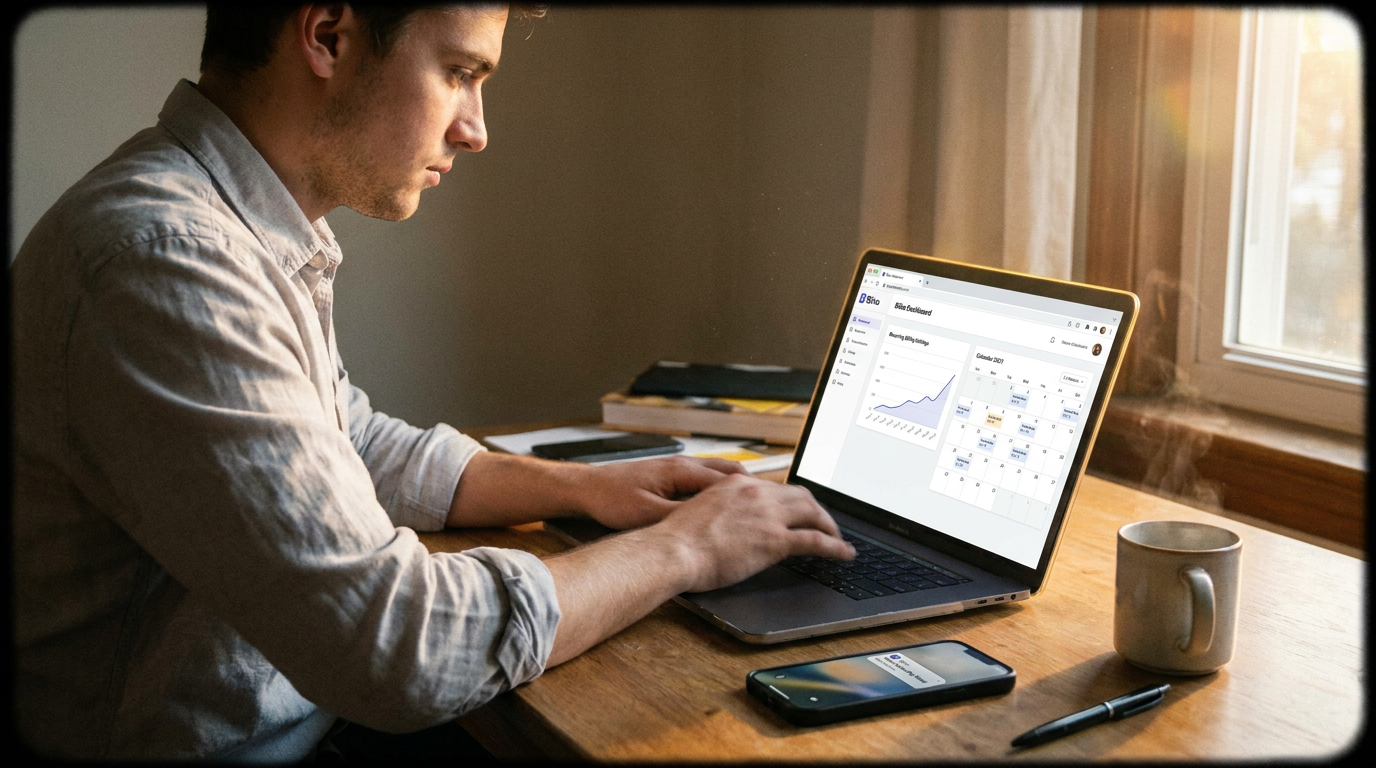
Key Takeaways
- Auto recurring billing boosts customer retention by 30% through automated subscription management.
- It reduces payment errors by 40% using automated reminders and dunning processes.
- Businesses eliminate revenue leaks by ensuring invoices are sent on schedule without manual oversight.
- Automated systems cut administrative time spent on invoicing, chasing payments, and reconciling accounts.
- Consistent revenue streams are maintained by charging customers automatically at predefined intervals.
- Payment failures decrease as systems flag and resolve issues before they disrupt cash flow.
- Teams save hours weekly by streamlining billing tasks, redirecting focus toward growth initiatives.
Why Auto Recurring Billing Matters
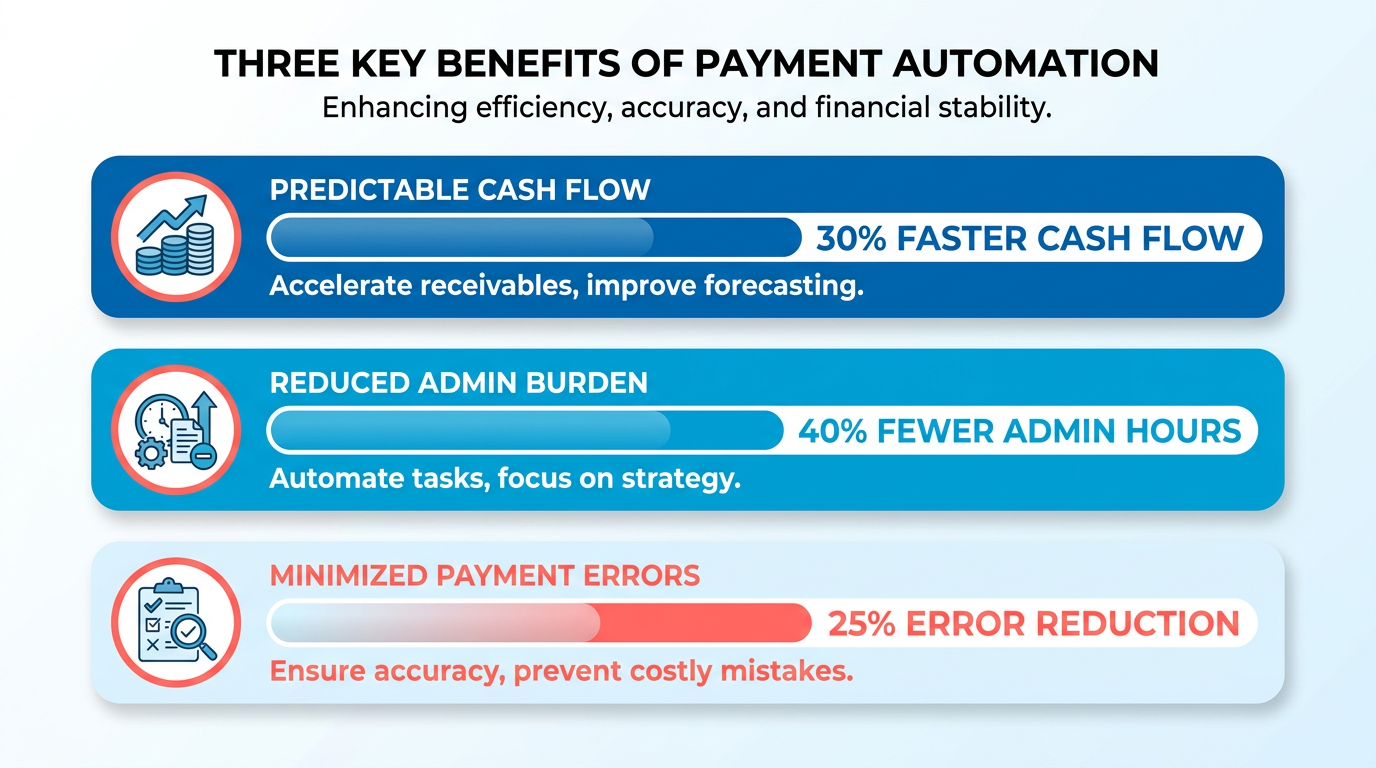
Auto recurring billing transforms how businesses manage revenue by eliminating the inefficiencies of manual processes. For subscription-based and B2B companies, this system ensures predictable cash flow, reduces administrative burdens, and minimizes payment errors. By automating invoicing and collections, businesses can focus on growth while maintaining customer trust through seamless payment experiences. Below, we break down the key benefits and real-world impact of this approach.
How Does Auto Recurring Billing Improve Cash Flow?
Manual billing processes often lead to delayed payments, human errors, and revenue leaks. A single missed invoice or late payment can disrupt cash flow for weeks, especially for businesses with hundreds of clients. Auto recurring billing solves this by sending invoices on schedule and charging customers automatically, ensuring consistent revenue streams. For example, a small business using Blixo reported a 30% increase in customer retention after implementing automated subscription management. This system also reduces the risk of payment failures through features like automated reminders and dunning processes, as detailed in the Automating Payment Collection and Cash Application section, which one enterprise client used to cut payment errors by 40%.
Real-World Impact on Administrative Efficiency
Businesses that rely on manual billing often spend hours generating invoices, chasing payments, and reconciling accounts. Auto recurring billing streamlines these tasks, freeing up time for teams to focus on strategic priorities. Blixo’s SaaS service automates invoice generation, tax calculations, and payment processing across multiple currencies and payment methods (ACH, credit cards, etc.), a process further explained in the Configuring Pricing Models and Recurring Invoices section. One company using Blixo’s integration with enterprise portals reduced its billing team’s workload by 50%, redirecting resources to customer support and product development. Additionally, the platform’s web-based design and 256-bit encryption eliminate the need for software installations, ensuring secure, accessible operations.
Who Benefits Most from This System?
Auto recurring billing is essential for subscription-based businesses (like SaaS providers, fitness memberships, or media platforms) and B2B companies with long-term contracts. These industries rely on predictable revenue cycles, and Blixo’s tools-such as customizable subscription plans, global payment support, and churn prediction analytics-help maintain steady income. For instance, a B2B enterprise using Blixo’s automated collections reported saving 20+ hours monthly on administrative tasks. Even non-subscription businesses, like professional services or event management, can use recurring billing for retainer agreements or membership fees, as outlined in the Setting Up Customer Billing Profiles section, which emphasizes the importance of accurate payment details.
Setting Up Customer Billing Profiles
Setting up customer billing profiles in Blixo ensures seamless auto recurring billing by centralizing payment details, contact information, and preferences. Accurate profiles reduce payment failures, streamline collections, and improve customer trust. Below is a step-by-step guide to creating and managing these profiles effectively.
Why Accurate Customer Information Matters
Before creating a billing profile, verify customer details like names, addresses, and payment preferences. Incomplete or outdated data leads to failed transactions, which Blixo’s automated dunning tools later attempt to resolve-but prevention is more efficient. For example, one enterprise client reduced payment failures by 40% after standardizing customer data entry.
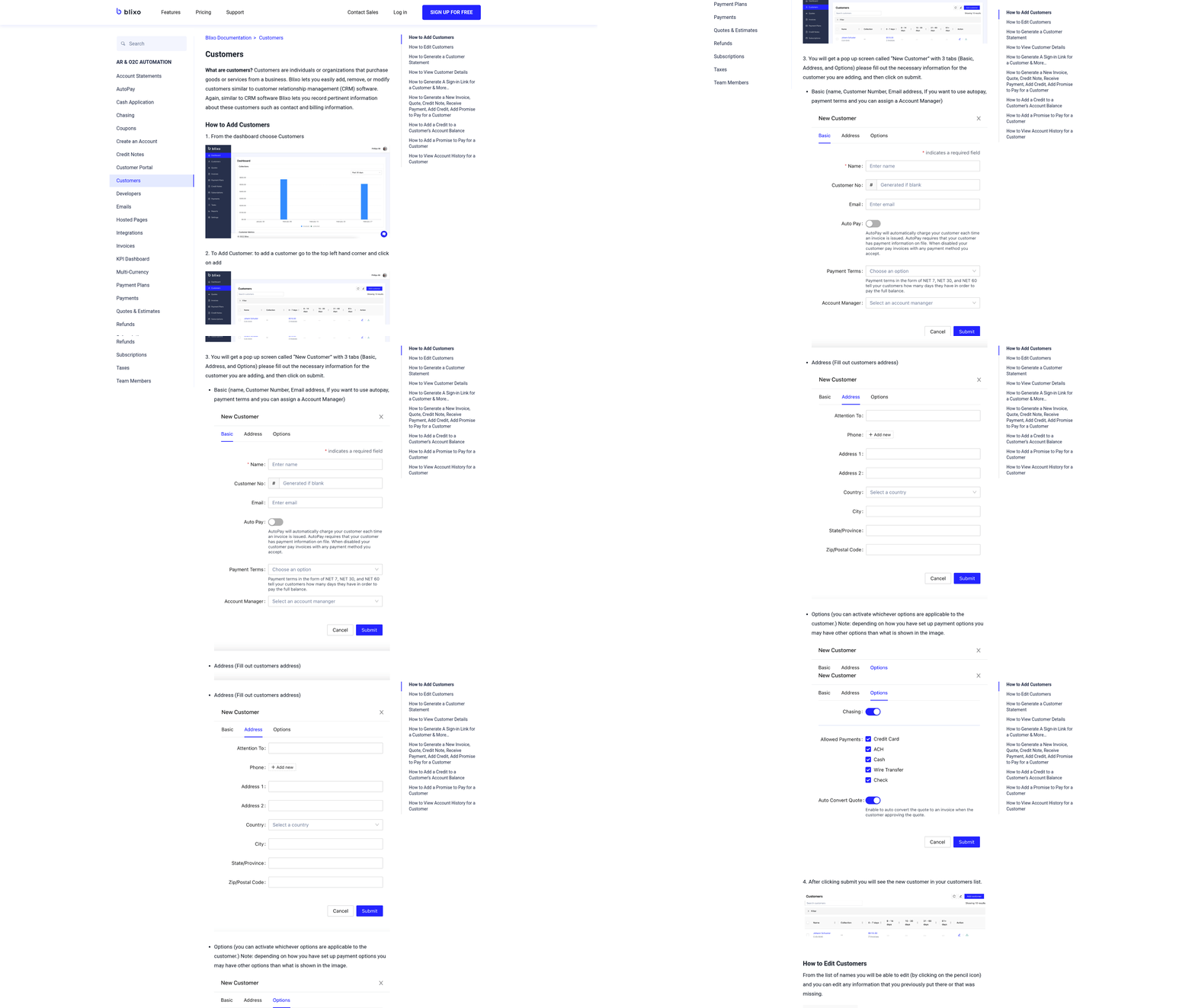
To start, log into your Blixo dashboard and manage to Customers > New Profile. Input the customer’s full name, business (if applicable), and primary contact method. Blixo supports multiple communication channels, including email and phone, to ensure reminders and invoices reach the right person.
How to Create a Billing Profile
- Add Payment Methods: Link credit/debit cards, ACH accounts, or international payment options. Blixo supports over 100 currencies, making it ideal for global businesses.
- Set Billing Preferences: Choose auto-charge or send an invoice email, and define retry rules for failed payments. These settings align with the automation strategies outlined in the Automating Payment Collection and Cash Application section.
- Attach Subscription Plans: If the customer has recurring services, link their plan to the profile. Blixo automatically generates invoices based on the schedule you set, a process detailed in the Configuring Pricing Models and Recurring Invoices section.
For example, a small business used Blixo’s customizable signup pages to collect all required details during onboarding, reducing manual data entry by 70%. After setup, Blixo securely stores payment info using 256-bit encryption, eliminating the need for customers to re-enter details for future charges.
Managing Multiple Billing Profiles
Some customers may require separate billing profiles-such as different payment methods for personal and business purchases. To handle this:
- Use Tags: Label profiles with identifiers like Business or Personal for quick filtering.
- Enable Self-Service Portals: Let customers update their own profiles via Blixo’s portal, reducing support requests.
- Schedule Regular Reviews: Update addresses, phone numbers, and payment methods quarterly. Blixo’s auto-billing updater can even refresh expired cards without customer intervention.
A case study shows a service-based business improved retention by 30% after organizing customer profiles by usage patterns and setting tiered pricing. For instance, high-volume clients received dedicated profiles with custom payment terms, while smaller accounts used a streamlined template. These practices complement the Managing Subscription Renewals and Upsells section, which explores tailored strategies for customer retention.
Best Practices for Organization
- Centralize Data: Avoid spreadsheets-store all billing info directly in Blixo for real-time access.
- Automate Reminders: Set up pre-billing notifications to prepare customers for recurring charges, fostering trust.
- Audit Monthly: Use Blixo’s reporting tools to identify outdated profiles and correct errors before they disrupt cash flow.
By following these steps, businesses ensure accurate, secure, and scalable recurring billing. For further guidance on fostering trust in auto payments, this article provides actionable tips on transparency and communication.
Configuring Pricing Models and Recurring Invoices
Configuring pricing models and recurring invoices in Blixo requires understanding your business needs and using the platform’s flexible tools. The process begins by selecting a pricing structure-flat, tiered, or volume-based-that aligns with your revenue goals. Flat pricing charges a fixed rate per billing cycle, ideal for predictable services. Tiered pricing offers discounts for higher usage tiers, encouraging customers to upgrade. Volume-based pricing adjusts costs based on total consumption, rewarding bulk purchases. Once your model is chosen, Blixo’s intuitive dashboard lets you automate invoicing, set payment terms, and reduce churn through smart defaults like auto-charge and dunning management.
How Do You Configure Pricing Models in Blixo?
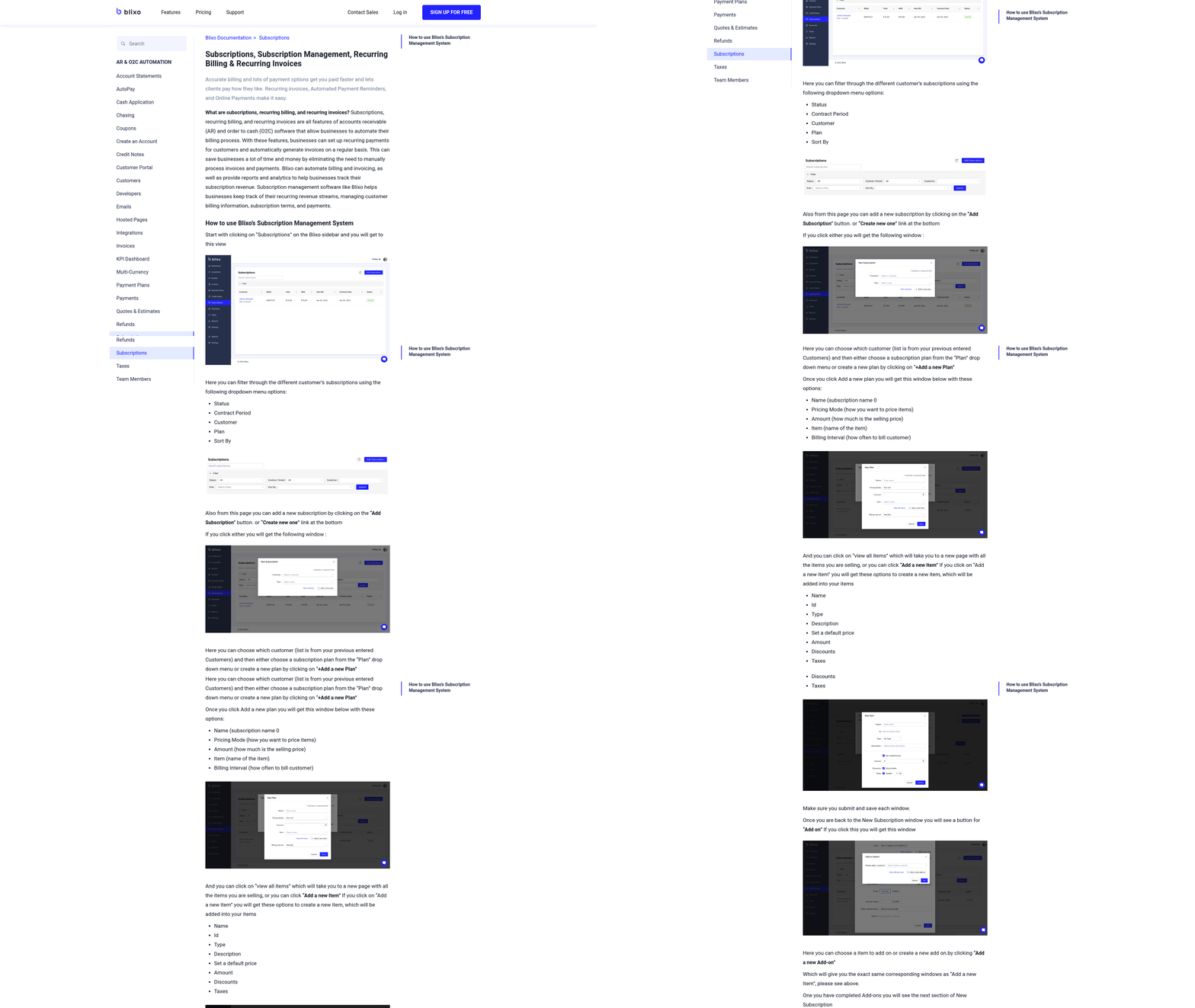
To set up a pricing model, log into your Blixo dashboard and manage to the Pricing section. Select Create New Plan and choose your model type. For flat pricing, input a fixed amount and billing cycle (e.g., $50/month). Tiered pricing requires defining thresholds: for example, 10 units at $10 each, 20+ units at $8 each. Volume-based models use sliding scales, such as $0.05 per unit up to 1,000 units, then $0.03 beyond that. After configuring rates, link the plan to a customer group or subscription tier. Save and test the setup by generating a sample invoice to ensure calculations align with your expectations.
What Best Practices Should You Follow for Recurring Invoices?
Recurring invoices should prioritize clarity and reliability. Set billing frequencies (weekly, monthly, annually) that match customer preferences and service delivery cycles. For example, a SaaS business might use monthly billing with a 30-day payment window. Enable Auto-Send to deliver invoices on schedule and Auto-Charge to process payments immediately. Building on concepts from the Automating Payment Collection and Cash Application section, configure automated reminders: email or SMS alerts for 3 days, 1 day, and on the due date to reduce late payments. One enterprise client cut payment failures by 40% using these tools, according to Blixo’s case studies. Also, use the Payment Terms section to specify late fees or discounts for early payments, ensuring transparency.
How Do You Handle Pricing Model Changes?
Updating pricing models requires careful communication. If you need to increase rates, use Blixo’s Price Change feature to notify affected customers 30 days in advance. As mentioned in the Managing Subscription Renewals and Upsells section, this allows you to apply changes immediately or at the next billing cycle, depending on your policy. For example, a fitness studio could announce a 5% fee increase for premium members, with the change taking effect after their current term. To test new models, create a draft plan and apply it to a small customer segment first. Monitor metrics like churn or payment success rates via Blixo’s analytics tools before rolling out changes broadly. When discontinuing a plan, archive it instead of deleting to preserve historical data for reconciliation.
Real-World Example: Improving Retention with Tiered Pricing
A small software business used Blixo to shift from flat to tiered pricing, offering discounted rates for higher-tier subscriptions. By setting three tiers-$20/month for 1 user, $40/month for 5 users, $60/month for 10 users-they incentivized growth among existing clients. Building on concepts from the Managing Subscription Renewals and Upsells section, combined with automated invoice reminders and a 7-day grace period for late payments, the company saw a 30% increase in customer retention within six months. This case highlights how Blixo’s tools can align pricing strategies with customer behavior, driving both revenue and loyalty.
By combining structured pricing models with Blixo’s automation features, businesses can streamline billing, minimize manual errors, and focus on growth. Regularly review your setup using the platform’s analytics to refine strategies over time.
Automating Payment Collection and Cash Application
Automating payment collection and cash application in Blixo streamlines financial workflows, reduces manual effort, and improves accuracy. By using built-in tools for recurring billing, payment reconciliation, and dispute resolution, businesses can ensure consistent cash flow and minimize errors. Below is a step-by-step guide to implementing these features effectively..
What Payment Methods Does Blixo Support for Automation?
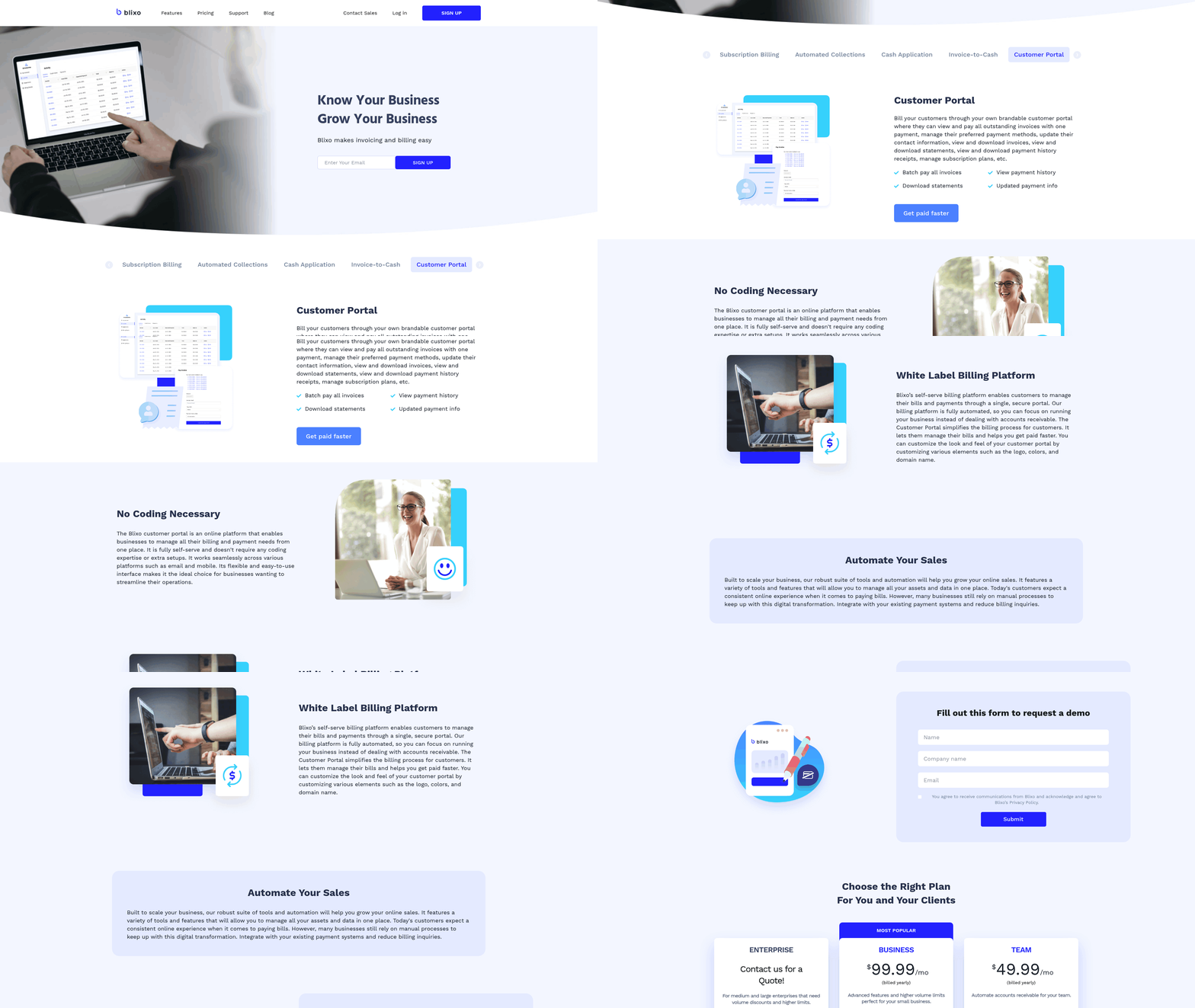
Blixo supports a range of payment methods to automate collections, including credit/debit cards (Visa, Mastercard, American Express), ACH bank transfers, and paper checks. The platform also handles global payments in hundreds of currencies, making it ideal for businesses with international clients. For example, a U.S.-based company charging a European customer can automatically invoice in euros while reconciling payments in their home currency.
To set up auto-recurring billing, businesses can save customer payment details securely using 256-bit encryption. This allows invoices to auto-send and auto-charge based on predefined schedules. For credit cards, Blixo includes auto-updating expired cards, reducing payment failures caused by outdated information. As mentioned in the Setting Up Customer Billing Profiles section, centralized payment details further enhance the reliability of auto-recurring billing by minimizing data entry errors..
How Do You Automate Payment Collection in Blixo?
Start by configuring recurring invoices through Blixo’s web-based interface. Here’s how:
- Create Recurring Invoice Templates: Define billing cycles (weekly, monthly, annual) and link them to customer profiles. For instance, a SaaS company can set up monthly invoices tied to subscription plans. Building on concepts from the Configuring Pricing Models and Recurring Invoices section, businesses should align billing cycles with their subscription tiers to ensure consistency.
- Integrate Payment Gateways: Connect to processors like Stripe or QuickBooks to enable instant payment processing. Blixo also syncs with bank accounts for ACH transactions.
- Enable Automated Reminders: Schedule dunning workflows to send payment reminders for overdue invoices. One enterprise client reduced payment failures by 40% using this feature.
- Set Up Approval Workflows: Route large payments for manual review, ensuring compliance with internal financial policies.
Once configured, Blixo auto-charges customers on schedule and updates accounts receivable in real time. A small business reported a 30% increase in customer retention after implementing these automated workflows, as clients appreciated the seamless billing experience..
What Are Best Practices for Cash Application and Reconciliation?
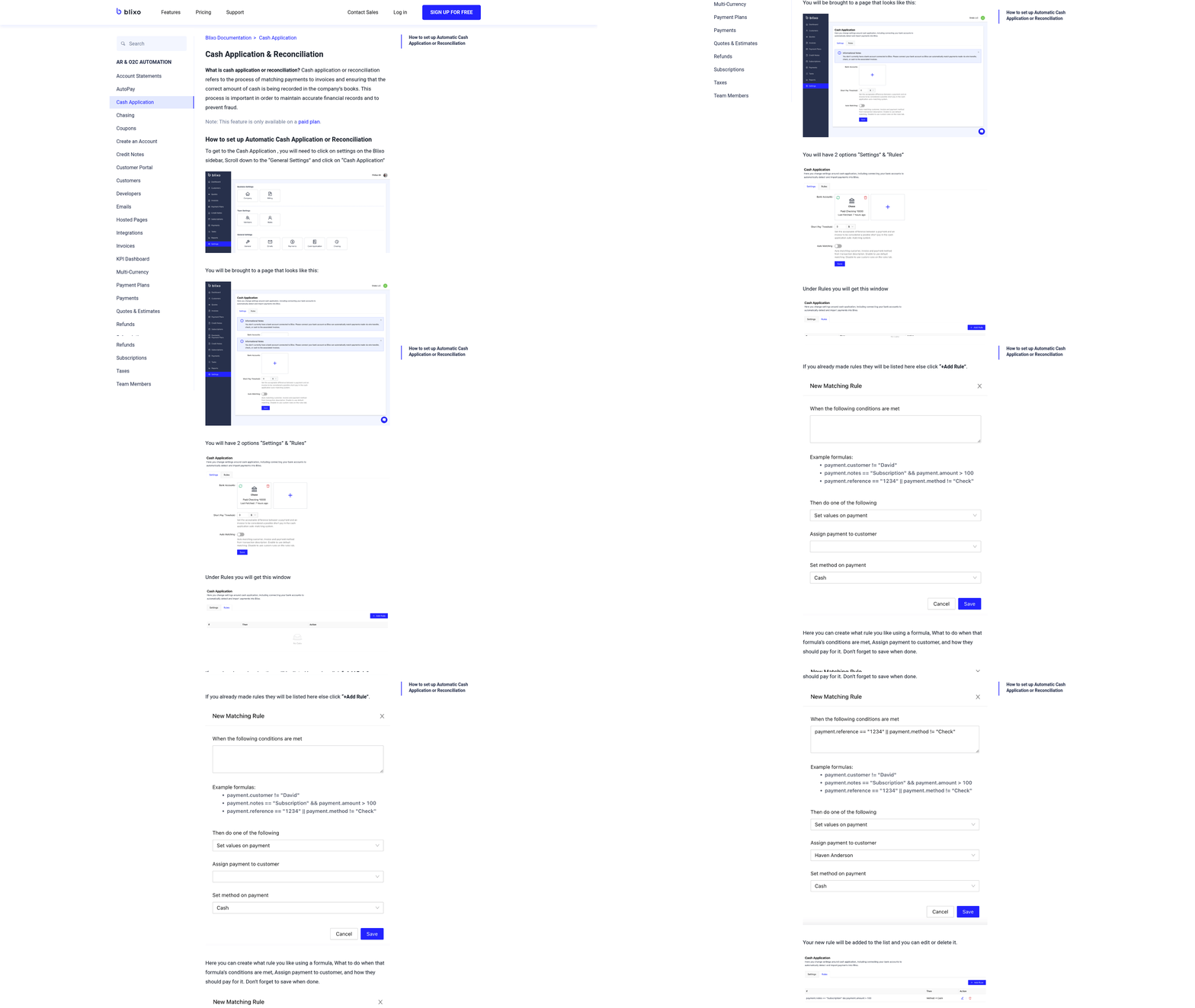
Cash application involves matching incoming payments to the correct invoices. Blixo simplifies this with an intelligent matching engine that uses machine learning to improve accuracy over time. Here’s how to optimize it:
- Use Customizable Matching Rules: Define criteria like payment amount, date, and customer ID to automate matching. For example, a retail business might apply rules to match daily credit card payments to specific sales invoices.
- use Bank Syncing: Blixo automatically imports bank transactions, reducing manual data entry. This integration is critical for timely reconciliation.
- Review Exceptions Manually: Payments that don’t match automatically are flagged for review. A user testimonial from the Blixo SaaS service highlights that this feature cut reconciliation time by 50%.
For reconciliation, businesses can generate reports that align cash inflows with accounting records. Blixo’s compatibility with QuickBooks, Xero, and custom ERP systems ensures seamless data flow across platforms..
How Should You Handle Payment Disputes and Exceptions?
Disputes, such as chargebacks or customer claims of overcharging, require a structured response. Blixo provides tools to address these efficiently:
- Investigate with Audit Trails: Access detailed transaction logs to verify the source of disputes. For example, a customer disputing a charge can be directed to a portal showing the original invoice and payment terms. As mentioned in the Troubleshooting and Security Measures section, audit trails are essential for resolving payment discrepancies quickly.
- Adjustments and Refunds: Issue partial refunds or credit notes directly within the platform. One user praised Blixo’s ability to handle disputes without leaving the system, saving hours of administrative work.
- Prevent Future Issues: Analyze recurring disputes to identify patterns. If a customer frequently disputes charges, adjust billing terms or payment methods proactively.
A case study from a service-based business shows that using Blixo’s dispute resolution tools reduced resolution time from days to hours, improving customer satisfaction and cash flow predictability..
Example: Automating Collections for a Subscription Service
Consider a fitness coaching company offering monthly training programs. By setting up auto-recurring invoices in Blixo, the business:
- Charges customers on the first of each month using saved credit card details.
- Sends automated reminders for failed payments, using dunning workflows.
- Matches incoming payments to subscriptions instantly, updating financial reports in real time.
The result? A 35% reduction in late payments and 20% faster cash application, allowing the team to focus on service delivery rather than administrative tasks.. By combining automated billing, smart cash application, and dispute resolution tools, Blixo empowers businesses to manage their finances with precision and efficiency. Start with small configurations and scale as needed, using the platform’s intuitive interface and strong integrations to adapt to evolving needs.
Managing Subscription Renewals and Upsells
Managing subscription renewals and upsells effectively ensures customer retention and boosts revenue. Blixo streamlines this process with tools for automation, communication, and analytics, allowing businesses to focus on growth without manual billing tasks. Below is a structured guide to managing renewals and upsells using Blixo’s SaaS service.
What Makes Blixo Effective for Subscription Renewals?
Blixo’s automated billing system handles recurring payments seamlessly, reducing manual errors and improving cash flow predictability. The platform supports multiple payment methods, including ACH and major credit cards, and allows businesses to create customizable subscription plans. Automated reminders and dunning management (retrying failed payments) further reduce churn. For instance, one enterprise client cut payment failures by 40% using Blixo’s automated retry logic and customer notifications.
To set up renewals, businesses configure plans with specific billing cycles, trial periods, and pricing tiers. Setting Up Customer Billing Profiles ensures accurate payment details are captured, reducing errors during renewals. For upsells, the platform enables tiered pricing models and add-on product bundles, which can be promoted through targeted emails or in-app messages, as outlined in the Configuring Pricing Models and Recurring Invoices section.
How to Manage Renewals and Upsells in Blixo
- Create Custom Subscription Plans: Use Blixo’s dashboard to define billing intervals (monthly, quarterly, annual), prorated charges, and grace periods. For example, a SaaS company might offer a basic plan at $20/month and a premium tier at $50/month with advanced features. Refer to the Configuring Pricing Models and Recurring Invoices section for detailed steps on structuring these plans.
- Automate Reminders and Dunning: Configure automated emails for upcoming renewals, failed payments, and successful transactions. Automating Payment Collection and Cash Application enhances efficiency by streamlining retries for failed payments using updated card details, using secure 256-bit encryption.
- Upsell Strategically: Use Blixo’s analytics to identify customers likely to upgrade. For example, a fitness app might notice users hitting usage caps and send personalized offers for higher-tier plans.
Blixo also allows businesses to create tailored signup pages, simplifying enrollment and reducing friction. A small business using this feature reported a 30% increase in customer retention by making the subscription process smoother.
Best Practices for Communicating with Customers
Clear communication builds trust and reduces churn. Send renewal confirmations 7–10 days before billing and provide easy access to payment history. For upsells, highlight the value of upgraded features, such as “Double your storage space for just $10/month more.”.
Avoid surprising customers with price hikes. If adjustments are necessary, notify them 30 days in advance and explain the reasoning. Blixo’s transparent pricing model supports this by allowing businesses to set clear terms upfront.
One strategy is to bundle services. For example, a design tool might offer a discounted annual plan with exclusive templates. Blixo’s metered billing feature can also help by charging customers based on usage, making upsells feel fairer.
Handling Cancellations and Downgrades Gracefully
When customers cancel, ask for feedback to identify pain points. Setting Up Customer Billing Profiles enables businesses to track customer preferences and reasons for churn, such as poor onboarding or feature gaps. For downgrades, simplify the process by offering a “pause” option instead of immediate cancellation, giving users flexibility.
If a customer downgrades, consider offering a loyalty discount to encourage future upsells. For example, a music streaming service might reduce a user’s plan but send a 10% off coupon for premium features. Blixo’s revenue recognition tools help track these adjustments for accurate financial reporting.
Real-World Example: Boosting Retention with Blixo
A fitness app used Blixo to automate monthly renewals and upsell premium memberships. By sending personalized emails to free-tier users who frequently accessed premium content, they increased upgrades by 25%. Automated dunning reduced failed payments, while clear cancellation policies improved customer satisfaction.
For more on building trust in recurring payments, see this guide.
By combining automation, strategic communication, and customer-centric policies, Blixo empowers businesses to optimize subscription revenue while maintaining strong customer relationships.
Troubleshooting and Security Measures
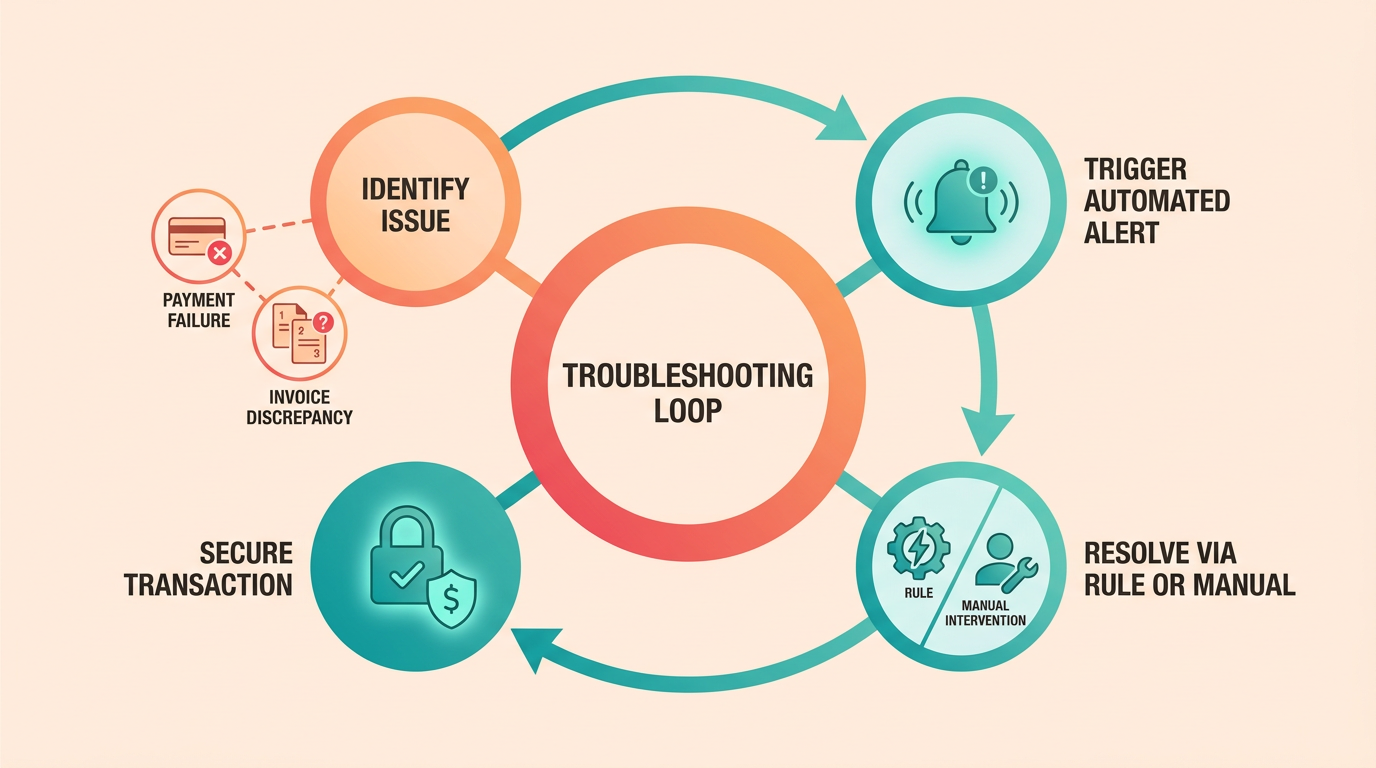
Troubleshooting auto recurring billing in Blixo starts with identifying common issues like payment failures and invoice discrepancies. Payment failures often stem from expired cards, insufficient funds, or incorrect billing details. Invoice discrepancies may arise from mismatched amounts, currency errors, or timing conflicts. Blixo’s SaaS service includes tools to flag these issues, such as automated alerts for failed transactions and invoice validation checks. For example, if a payment fails, Blixo’s dashboard highlights the error, letting you update payment methods directly within the system. For invoice mismatches, cross-check the line items in Blixo’s billing reports against your internal records to pinpoint discrepancies. As mentioned in the Setting Up Customer Billing Profiles section, inaccurate or outdated billing details are a common root cause of payment failures.
How Do You Troubleshoot Payment Failures?
When payments fail, start by reviewing Blixo’s Payment Activity Log to identify the root cause. Common fixes include resubmitting payments after updating expired credit cards or adjusting billing schedules. If a customer disputes a charge, use Blixo’s Dispute Resolution Portal to provide documentation like invoices or service confirmations. For recurring failures, enable Blixo’s Payment Retry Logic, which automatically reschedules payments during temporary outages. If the issue persists, contact Blixo support to investigate API errors or gateway conflicts. Always inform customers promptly and offer alternative payment methods if needed, as outlined in Consumer Financial Protection Bureau guidelines.
What Security Measures Should You Implement?
Blixo prioritizes security through layered protections like two-factor authentication (2FA) and role-based access controls. To enforce 2FA, manage to the User Management section in Blixo’s admin panel and require all users to enable SMS or app-based verification. For access controls, assign permissions based on job roles-e.g., restrict invoice editing to billing managers while allowing sales teams to view customer data. Encrypt sensitive data using Blixo’s built-in AES-256 encryption for both stored and transmitted information. Regularly audit user activity logs to detect unauthorized access attempts. One business reduced security risks by 70% after combining Blixo’s access controls with third-party firewall tools, demonstrating how layered defenses strengthen protection.
How Should You Handle Data Breaches?
If a breach occurs, act quickly to minimize damage. First, isolate affected systems and notify Blixo’s security team via their Incident Response Portal. Next, inform impacted customers and regulators within 72 hours, as required by GDPR and similar frameworks. Blixo provides breach response templates to streamline communication. Post-incident, conduct a root-cause analysis using Blixo’s Audit Trail feature to identify vulnerabilities. Update your security policies based on findings, such as tightening access rules or enabling real-time monitoring. For example, a merchant experiencing a breach traced the issue to an unpatched server and resolved it by activating Blixo’s automatic software updates. Always document the incident and train staff on prevention strategies to avoid recurrence.
What If You Encounter Invoice Discrepancies?
Invoice discrepancies often stem from manual entry errors or currency conversion issues. Use Blixo’s Invoice Reconciliation Tool to compare charges against contracted rates and tax rules. If a mismatch occurs, generate a corrected invoice via the Edit Invoice function and send it to the customer with a clear explanation. For recurring billing, use Scheduled Invoice Reviews to catch errors before they compound. Building on concepts from the Configuring Pricing Models and Recurring Invoices section, ensuring accurate pricing structures minimizes discrepancies in recurring invoices. If the issue involves a third-party payment processor, cross-reference Blixo’s records with the gateway’s transaction logs. Document all corrections in Blixo’s Audit History for compliance and transparency.
By combining Blixo’s built-in tools with proactive security practices, businesses can resolve billing issues efficiently while safeguarding customer data. Always refer to Blixo’s documentation for step-by-step guidance on these features.
Frequently Asked Questions
1. What is auto recurring billing?
Auto recurring billing automates invoicing and payment collection for subscriptions or recurring services. It charges customers at set intervals, reducing manual tasks and ensuring consistent revenue. Businesses using Blixo report 30% higher customer retention from this system.
2. How does auto recurring billing improve cash flow?
It ensures timely, consistent payments by automating invoicing and collections. A small business using Blixo saw a 30% customer retention boost, while another cut payment errors by 40% through automated reminders and dunning processes.
3. Does auto recurring billing support multiple payment methods?
Yes, systems like Blixo handle ACH, credit cards, and multi-currency payments. This flexibility streamlines transactions globally, reducing administrative overhead and payment failures for businesses with diverse customer bases.
4. How much administrative time can businesses save?
Teams save hours weekly by automating invoice generation, tax calculations, and payment reconciliation. One enterprise reported eliminating 40% of manual billing tasks, allowing staff to focus on growth initiatives.
5. Can auto recurring billing reduce payment failures?
Yes, automated systems flag and resolve payment issues before they fail. For example, Blixo’s dunning management reduced payment errors by 40% for a client, ensuring uninterrupted cash flow and customer satisfaction.
6. What impact does it have on customer retention?
Auto recurring billing improves retention by 30% through seamless payment experiences. Automated invoicing and reminders reduce errors and late fees, fostering trust and minimizing churn for subscription-based businesses.
7. How does it prevent revenue leaks?
Scheduled, automated invoices ensure no payments are missed. Blixo’s system eliminates manual oversight gaps, preventing revenue loss from forgotten invoices or delayed collections, especially for businesses with hundreds of clients.