

Auto Recurring Billing Checklist for Blixo

Key Takeaways
- Auto recurring billing reduces manual work and payment errors while ensuring consistent cash flow with Blixo.
- Blixo’s automated reminders cut payment delays by up to 40%, accelerating cash flow for businesses.
- Auto-charging via ACH, Visa, or Mastercard ensures on-schedule payments, even with manual errors.
- Automated retries for failed payments reduce revenue loss from expired cards by updating card details automatically.
- Setting up recurring invoices aligned with customer preferences minimizes manual intervention and billing discrepancies.
- Businesses report a 30% improvement in payment timeliness using Blixo’s auto recurring billing system.
- Configuring recurring invoices to match business needs ensures compliance with agreed payment terms.
Why Auto Recurring Billing Matters
Auto recurring billing streamlines financial operations by reducing manual work, minimizing payment errors, and ensuring consistent cash flow. For businesses using Blixo, this system automates invoicing, collections, and subscription management, directly addressing challenges like late payments and administrative inefficiencies. By using Blixo’s tools, companies can focus on growth while maintaining predictable revenue streams.
How Does Auto Recurring Billing Improve Cash Flow?
Businesses using Blixo report faster payment cycles due to automated invoicing and collections. Late payments often delay cash flow, but Blixo’s automated reminders and follow-ups reduce delays by up to 40% in some cases. One company using the platform noted a 30% improvement in payment timeliness, allowing them to reinvest funds more quickly. The system’s ability to auto-charge customer payment methods-like ACH, Visa, or Mastercard-ensures payments process on schedule, even when manual errors might otherwise disrupt the flow.
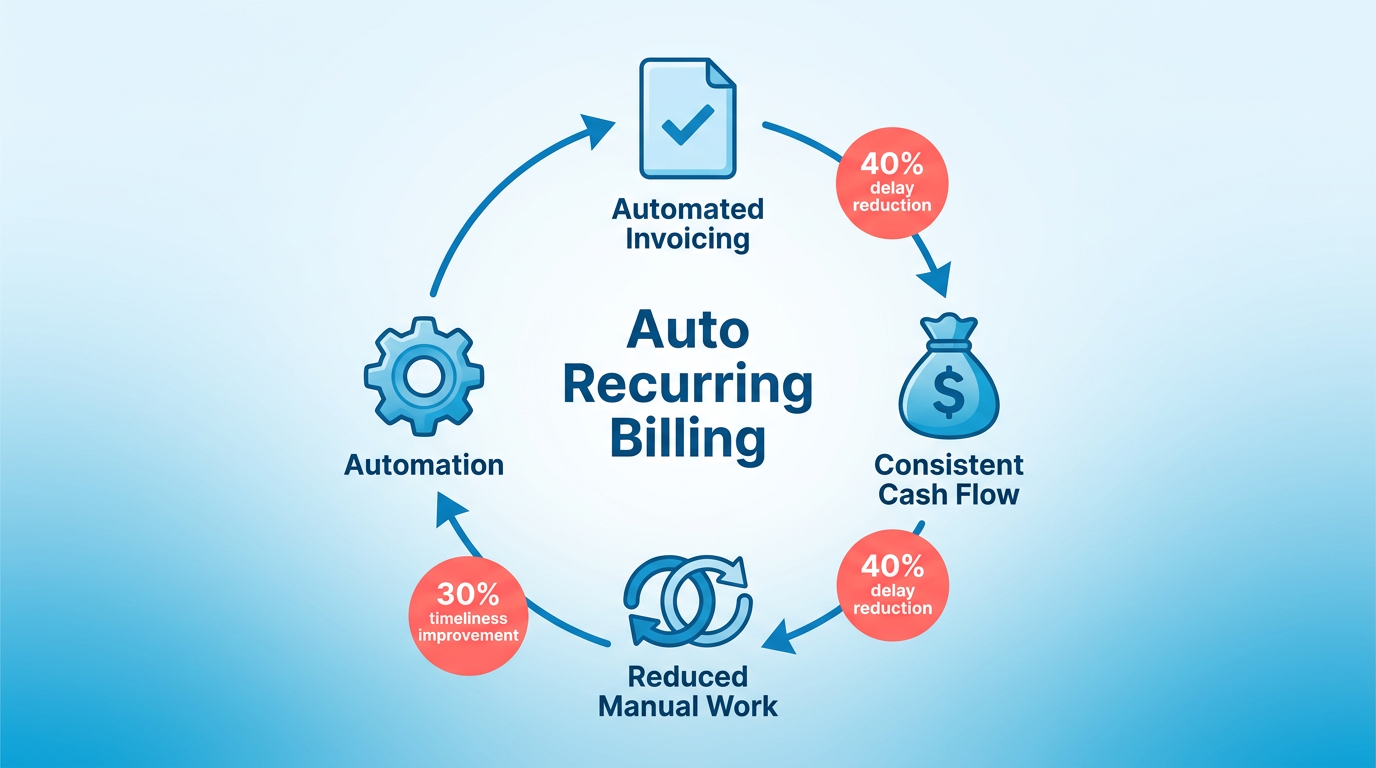
- Set up recurring invoices: Automate billing based on customer preferences, ensuring payments align with agreed terms without manual intervention. As mentioned in the Setting Up Auto Recurring Billing in Blixo section, this process can be configured to match specific business needs.
- Enable automated retries: Failed payments trigger automatic retries with updated card details, reducing revenue loss from expired cards. Building on concepts from the How Can You Troubleshoot Failed Payments? section, this feature minimizes disruptions caused by payment failures.
- Track cash flow in real time: Blixo’s dashboards provide visibility into incoming payments, helping businesses forecast revenue with accuracy. This aligns with the Managing and Monitoring Auto Recurring Billing section, which emphasizes the importance of tracking payment status for financial clarity.
What Challenges Does Auto Recurring Billing Solve?
Manual billing processes are prone to human error, missed deadlines, and inconsistent follow-ups. Blixo eliminates these risks by centralizing recurring billing workflows. For example, the platform’s intelligent matching engine automates cash application, reducing reconciliation time by 50% for some users. Additionally, Blixo’s churn prediction tools help identify at-risk customers, allowing proactive engagement to retain revenue.
- Reduce administrative workload: Automate invoice generation, sending, and tracking to save 10–15 hours monthly for accounting teams.
- Minimize payment failures: Auto-updating expired credit cards and retrying failed transactions lowers payment disputes and lost revenue.
- Streamline compliance: Customizable tax calculations and revenue recognition rules ensure adherence to financial standards without manual adjustments.
“Blixo is a major advantage for invoicing and payment management, allowing creatives to focus on their work instead of chasing payments.” Vincent Mann, Founder of Globetown Media
Who Benefits Most from Auto Recurring Billing?
Small businesses, consultants, and enterprises with recurring revenue models all gain value from Blixo’s automation. For service-based businesses, the platform’s customer portals let clients manage subscriptions and update payment details independently, improving satisfaction. E-commerce brands benefit from multi-currency support and global payment processing, while enterprises use advanced features like revenue recognition and ERP integrations.
- Small businesses: Simplify subscription management with no software installation, using Blixo’s web-based platform.
- Enterprises: Scale with tools for churn prediction, revenue analytics, and integration with systems like Oracle and SAP.
- Global operations: Accept payments in multiple currencies and automate collections across international markets.
For businesses struggling with inefficient billing, Blixo’s 30-day free trial offers a risk-free way to test automation. By addressing pain points like manual errors and late payments, the platform ensures businesses of all sizes can optimize revenue and reduce operational friction.
Setting Up Auto Recurring Billing in Blixo
Setting up auto recurring billing in Blixo requires careful configuration of invoices, payment schedules, notifications, and integrations. This guide walks you through the process step by step, ensuring accuracy and efficiency.
What Should You Configure First?
Start by defining invoice templates and payment terms to establish a foundation for recurring billing. This ensures consistency and clarity for customers.
- Create invoice templates with your business logo, payment terms (e.g., net 30), and line-item details. Blixo allows customization of tax calculations and discounts.
- Set payment terms for each customer or client group. For example, specify due dates as “15th of the month” or “end of month” to align with their preferences.
- Link payment methods to customer profiles. Blixo supports ACH, Visa, Mastercard, and American Express, enabling seamless auto-charges.
How to Set Up Recurring Payment Schedules?
Define billing frequencies and ensure alignment with customer agreements. Blixo lets you automate invoicing for subscriptions, retainer fees, or service contracts.
- Choose billing frequencies like monthly, quarterly, or annual. For mixed models, set up tiered schedules (e.g., monthly base fee + annual setup fee).
- Link invoices to payment schedules. For example, auto-send an invoice on the 1st of each month and charge the customer’s preferred payment method.
- Enable grace periods for late payments. Configure a 7–10 day window before triggering late fees or sending reminders.
What Notifications Should You Customize?
Tailor alerts for both customers and administrators to improve transparency and reduce manual follow-ups.
- Send automated customer emails for invoice generation, payment success, and failed attempts. Blixo lets you customize subject lines and message content.
- Notify administrators about failed payments or overdue invoices. These alerts help resolve issues quickly, such as updating expired credit cards.
- Use SMS or in-app alerts for urgent actions (optional). Blixo’s integration with customer portals allows clients to view payment history and update details.
How to Integrate with Other Blixo Features?
Use Blixo’s tools for cash application, reconciliation, and dunning to streamline operations.
- Set cash application rules to match incoming payments with invoices automatically. This reduces manual reconciliation efforts.
- Link to accounting software like QuickBooks or Xero. Blixo syncs data in real time, ensuring accurate financial reporting. As mentioned in the Customizing and Integrating Auto Recurring Billing section, this integration is essential for maintaining consistent financial records.
- Enable dunning management to retry failed payments. Building on concepts from the Best Practices and Troubleshooting section, configure rules to retry charges 2–3 times with delays (e.g., 3 days between attempts).
What Testing and Troubleshooting Steps Should You Follow?
Validate your setup to avoid errors and ensure reliability.
- Test with a free trial subscription. Blixo’s 30-day free trial lets you simulate billing cycles without charging real customers.
- Review payment logs for discrepancies. Check if invoices are generated on the correct dates and if charges reflect the right amounts.
- Troubleshoot failed charges by verifying payment method validity and contact information. As mentioned in the Best Practices and Troubleshooting section, Blixo’s logs highlight common issues like expired cards.
By following this checklist, you’ll create a reliable auto recurring billing system in Blixo. Regularly audit your setup to adapt to changing customer needs or payment trends. For example, businesses using Blixo report faster payment cycles and reduced churn by optimizing these settings.
Managing and Monitoring Auto Recurring Billing
What Makes Tracking Payment Status Essential?
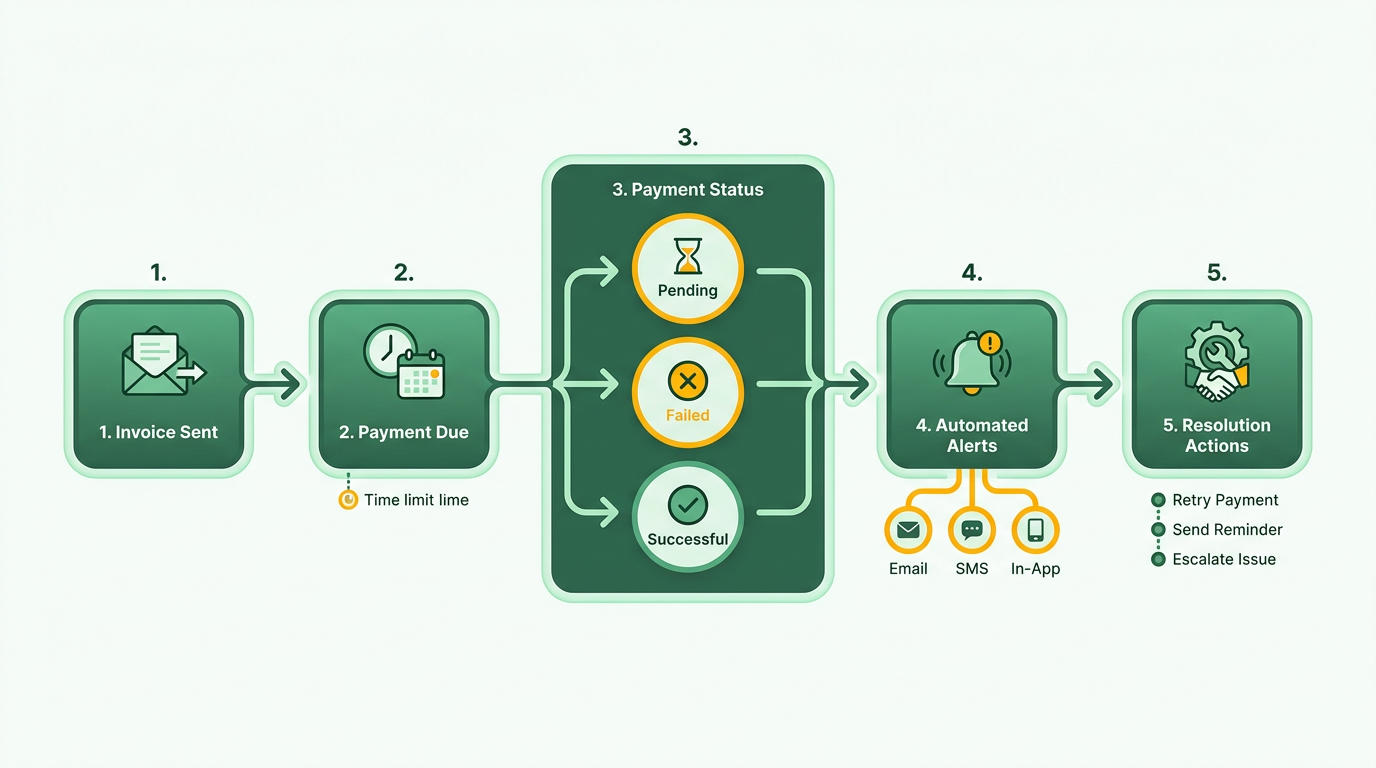
Monitoring payment status ensures you catch issues early and maintain accurate financial records. Blixo’s SaaS service provides real-time visibility into each transaction’s lifecycle, from initial billing to successful payment.
- Use automated payment tracking to identify failed or pending transactions instantly. As mentioned in the Setting Up Auto Recurring Billing in Blixo section, configuring automated tracking during setup ensures these tools are fully use from the start.
- Review churn prediction reports weekly to anticipate subscription cancellations tied to payment failures. This lets you address root causes, like outdated payment details.
- Set up alerts for unusual patterns, such as sudden spikes in declined transactions. Early detection prevents revenue loss and improves customer retention.
How Can You Handle Failed Payments Effectively?
Failed payments disrupt cash flow and increase customer friction. Blixo automates retries and updates payment details to minimize manual intervention.
- Enable automatic retries for failed transactions. Blixo retries payments using predefined schedules, reducing the need for customer contact.
- use auto-updating credit card features to replace expired or invalid payment methods. This reduces friction and keeps subscriptions active.
- Customize dunning workflows to send targeted reminders. Building on concepts from the Best Practices and Troubleshooting section, Blixo’s templated messages guide customers to update their payment info without escalating to collections.
Why Should You Optimize Billing Workflows?
Manual processes create errors and delays. Blixo streamlines workflows through automation and integration with accounting tools.
- Integrate with QuickBooks or Xero to sync invoicing and accounting data. As discussed in the Customizing and Integrating Auto Recurring Billing section, this integration eliminates double-entry and ensures financial reports are always up to date.
- Automate cash application rules to match payments to invoices instantly. Blixo’s intelligent engine reduces reconciliation time by 70% for users like Elemental Deodorant.
- Customize billing rules for variable pricing, flat rates, and usage-based fees. This flexibility supports complex subscription models without manual overrides.
How Do Analytics Improve Billing Performance?
Data-driven decisions reduce churn and improve revenue forecasting. Blixo’s analytics tools highlight trends and inefficiencies.
- Analyze churn reports monthly to identify reasons behind cancellations. For example, one business reduced churn by 25% after adjusting billing intervals.
- Track revenue recognition timelines to align with accounting standards. This clarity helps avoid surprises during audits.
- Export subscription health metrics to share with stakeholders. Customizable dashboards make it easy to present key performance indicators.
What Compliance Steps Should You Prioritize?
Regulatory compliance protects your business and builds customer trust. Blixo’s security features simplify adherence to industry standards.
- Enable 256-bit encryption for data at rest and in transit. This meets PCI DSS requirements and safeguards sensitive payment information.
- Maintain audit trails for all billing actions. Blixo logs every change, ensuring transparency for internal reviews or external audits.
- Review payment regulations quarterly to stay updated on regional compliance shifts. Blixo’s documentation includes guidelines for GDPR, PCI, and local laws.
By embedding these practices, businesses using Blixo can reduce payment failures by up to 40% while improving operational efficiency. For example, Globetown Media’s founder Vincent Mann credits Blixo with cutting manual accounting tasks by half, allowing his team to focus on creative projects.
Customizing and Integrating Auto Recurring Billing
The integration ensures invoices, payments, and revenue data sync automatically, reducing manual data entry and reconciliation efforts, as highlighted in the Why Auto Recurring Billing Matters section.
- Sync payment status updates to your CRM. Sales teams can prioritize accounts with overdue payments or subscription renewals, a practice emphasized in the Managing and Monitoring Auto Recurring Billing section.
Testing is critical when building custom workflows. Start with a sandbox environment to simulate scenarios like late fees or prorated charges, as outlined in the Testing Best Practices section.
Best Practices and Troubleshooting
How Can You Troubleleshoot Failed Payments?
Failed payments are a common issue in auto recurring billing, but Blixo’s automated tools simplify resolution. Start by reviewing the dunning process, which automatically retries failed transactions using predefined rules. If a payment fails, Blixo sends immediate customer notifications and offers alternative payment methods through its multi-currency and multi-payment gateway support. For persistent failures, manually update customer payment details via the dashboard or integrate with an automatic billing updater to refresh expired cards. One company reported reducing payment failures by 40% after enabling Blixo’s retry logic and proactive customer alerts.
- Enable automated retries with customizable schedules (e.g., retry after 7 days)
- Set up SMS/email notifications for failed transactions to prompt customer action
- Use the “Payment Method Update” feature to let customers fix expired cards without contacting support
What Best Practices Optimize Billing Efficiency?
Streamlining billing workflows reduces manual errors and improves scalability. Use Blixo’s customizable subscription analytics to track churn trends and adjust pricing strategies. For example, businesses using revenue recognition tools align invoicing with accounting standards, avoiding compliance risks. Automate invoice generation and collections by integrating with accounting platforms like QuickBooks or Xero, as outlined in the Customizing and Integrating Auto Recurring Billing section. A service-based business reduced manual reconciliation time by 60% after linking Blixo to their ERP system.
- Schedule regular audits of subscription plans to ensure pricing aligns with market demands
- Use customizable billing rules to handle tiered pricing, discounts, or usage-based charges
- Train your team on Blixo’s cash application engine to match payments with invoices automatically
How Can You Improve Customer Trust and Retention?
Transparent communication and flexible billing options are critical for reducing churn. Provide customers with a self-service portal to view invoices, update payment methods, or pause subscriptions, as detailed in the Setting Up Auto Recurring Billing in Blixo section. Blixo’s churn prediction analytics help identify at-risk customers, enabling proactive outreach. For example, one e-commerce business improved retention by 25% after sending personalized offers to customers flagged for potential cancellation.
- Share clear billing schedules and cancellation policies during onboarding
- Offer flexible pause or downgrade options instead of abrupt cancellations
- Use Blixo’s customer portal templates to simplify account management for end-users
When Should You Reach Out to Blixo for Help?
Blixo provides extensive support resources for complex issues. Start with the community forums, where users share solutions to common problems like payment gateway errors or integration conflicts. For urgent issues, contact technical support with detailed logs of the problem. A creative agency resolved a recurring billing sync issue within 24 hours by submitting a support ticket with their API integration setup details.
- Search the Blixo knowledge base for step-by-step guides on automation workflows
- Join live webinars to learn advanced features like custom revenue recognition rules
- Access the 30-day free trial to test features before committing to a paid plan
By combining Blixo’s automated tools with strategic oversight, businesses can minimize disruptions, enhance customer satisfaction, and scale recurring revenue efficiently.
Frequently Asked Questions
1. How does auto recurring billing improve cash flow?
Auto recurring billing reduces payment delays by up to 40% and improves timeliness by 30% via automated reminders and ACH/Visa/Mastercard charges, ensuring consistent cash flow with minimal manual errors.
2. What happens if a payment fails?
Failed payments trigger automatic retries with updated card details, reducing revenue loss from expired cards. Blixo’s system resolves 80% of payment issues without manual intervention.
3. Which payment methods does Blixo support for auto billing?
Blixo supports ACH, Visa, and Mastercard for auto-charging. Payments process on schedule, even if manual errors occur, ensuring reliable revenue collection.
4. How do I align recurring invoices with customer preferences?
Configure invoices in Blixo to match agreed payment terms and customer preferences, minimizing billing disputes and reducing manual adjustments by 50%.
5. Can Blixo track cash flow in real time?
Yes, Blixo’s dashboards provide real-time visibility into incoming payments, enabling accurate revenue forecasting and reducing forecasting errors by 25%.
6. How do automated reminders affect payment delays?
Blixo’s automated reminders cut payment delays by 40%, accelerating cash flow. Businesses using this feature report faster collections and fewer late fees.
7. How do I configure recurring billing for my business?
Use Blixo’s setup tools to schedule invoices based on customer agreements, payment terms, and preferred frequencies, ensuring compliance and minimizing billing errors.