

RPA Invoice Processing Checklist for Blixo Users

Key Takeaways
- Address manual invoice processing flaws causing 40% error rates and $1.3 trillion in annual U.S. business losses.
- Reduce invoice processing costs from $15–$30 to $2–$5 per invoice with RPA for companies handling 500+ invoices/month.
- Eliminate 80% of processing time and 70% of manual data entry using Blixo’s AI-driven OCR technology.
- Avoid 39% invoice errors and 52% manual processing rates that trigger disputes and delayed cash flow.
- Prevent $50,000 in duplicate payments quarterly by automating matching and approval workflows.
- Ensure compliance with GDPR/HIPAA standards through Blixo’s automated invoice validation and data security protocols.
Why RPA Matters for Blixo Users
RPA matters for Blixo users because it directly addresses the inefficiencies and risks inherent in manual invoice processing. Manual workflows are error-prone, costly, and slow, with 40% error rates in some cases and $1.3 trillion in annual losses** across U.S. businesses due to errors, disputes, and delayed cash flow. As mentioned in the **Why Manual Invoice Processing Fails** section, over **52% of invoices are still handled manually**, with **39% containing errors** that trigger disputes or payment delays. For companies handling 500+ invoices monthly, automation slashes processing costs from **$15–$30 per invoice to $2–$5**, while reducing processing time by **80%**. This isn’t just about speed-it’s about avoiding late fees, improving vendor relationships, and freeing finance teams for strategic work. Building on concepts from the **How RPA Transforms Invoice Workflows** section, Blixo’s AI-driven OCR reduces manual entry by 70%, ensuring accuracy and compliance with standards like GDPR/HIPAA. As detailed in the **Challenges RPA Solves** section, these improvements compound into significant savings, with one client reducing duplicate payments by **$50,000 in one quarter alone.
RPA Implementation Checklist for Blixo
Implementing RPA for invoice processing with Blixo requires a structured approach to ensure efficiency, compliance, and scalability. Below is a step-by-step checklist to guide your implementation, drawing on Blixo’s AI-driven capabilities and real-world use cases..
Step 1: Assess Current Workflows and Identify Automation Opportunities
Begin by auditing your existing invoice processing system to identify inefficiencies. Manual workflows often hide costs, with 52% of invoices still processed manually and error rates as high as 40%. As mentioned in the Why RPA Matters for Blixo Users section, these inefficiencies directly impact operational costs and compliance risks. Focus on high-volume, low-complexity tasks first-such as data entry and three-way matching-to maximize ROI.
Action Items:
- Map your current workflow: Document all manual steps, including invoice receipt, data entry, approvals, and payment.
- Identify bottlenecks: Look for delays in approvals, mismatches between purchase orders and invoices, or errors in tax calculations.
- Calculate baseline metrics: Track average processing time, cost per invoice, and error rates to measure future improvements.
Example: A mid-size manufacturer reduced invoice processing costs from $15–$40 to $2–$5 per invoice after automation by prioritizing repetitive tasks..
Step 2: Select Blixo for RPA Integration
Blixo’s SaaS service is tailored for invoice automation, combining AI and OCR to handle unstructured data like scanned PDFs or email attachments. Building on concepts from the Automating Invoice Data Entry and Approval Workflows section, configure optical character recognition to extract data from invoices, reducing manual entry by 70%. Unlike generic providers, Blixo offers built-in compliance with GDPR/HIPAA, tax rule enforcement, and seamless integration with ERPs like SAP or QuickBooks.
Action Items:
- Verify integration capabilities: Ensure Blixo connects with your existing ERP and accounting systems via APIs.
- use AI-driven OCR: Configure optical character recognition to extract data from invoices, reducing manual entry by 70%.
- Set compliance rules: Enable dynamic tax validation and three-way matching (PO, receipt, invoice) to cut errors by 40%.
Example: A healthcare provider cut AP workload by 65% using Blixo’s AI validation, avoiding costly manual reconciliations..
Step 3: Configure RPA Workflows for Invoice Processing
Design workflows to automate data entry, approvals, and payments while maintaining human oversight for exceptions. Blixo’s SaaS service supports routing invoices to the right approvers, flagging discrepancies, and posting payments in real time.
Action Items:
- Define mandatory fields: Enforce validation for invoice numbers, line-item details, and tax codes to prevent incomplete submissions.
- Automate approvals: Set rules for routing invoices based on value, vendor, or department, reducing approval delays.
- Enable payment posting: Integrate with ERPs to auto-generate payments once approvals are complete.
Example: A logistics company flagged $50,000 in duplicate payments in Q1 alone by automating validation rules in Blixo..
Step 4: Test and Deploy Workflows
Before full deployment, test workflows with a small invoice batch (50–100 items) to identify gaps. Focus on edge cases, such as invoices with non-standard formats or missing data. As outlined in the Best Practices for RPA Deployment in Blixo section, a phased rollout approach ensures minimal disruption while refining workflows. Blixo’s SaaS service allows iterative adjustments to improve accuracy.
Action Items:
- Run a pilot: Process 50–100 invoices to test data extraction, matching, and approval routing.
- Validate exceptions: Ensure alerts are triggered for mismatches (e.g., PO vs. invoice discrepancies).
- Train users: Provide hands-on training for finance teams to manage exceptions and review dashboards.
Example: A global manufacturer processed 15,000+ invoices with zero manual configuration after a phased rollout..
Step 5: Monitor and Optimize Performance
Post-deployment, track KPIs like Days Sales Outstanding (DSO), error rates, and processing time. Blixo’s dashboards provide real-time insights, while quarterly audits help refine rules and improve accuracy.
Action Items:
- Track KPIs: Monitor DSO, on-time payment percentage, and cost per invoice monthly.
- Audit workflows quarterly: Refine AI validation rules based on new invoice formats or tax changes.
- Refine exception handling: Adjust alert thresholds and escalation paths to reduce manual intervention.
Example: A SaaS company reduced invoice errors by 50% in 3 months by optimizing AI matching rules in Blixo..
Final Checklist Summary
By following this structured approach, Blixo users can achieve:
- 80% faster processing and 40% fewer errors via AI validation.
- 12–18 month ROI for businesses handling 500+ invoices/month.
- 99% cash-application accuracy and seamless ERP integration.
Start small, validate workflows, and scale gradually. With Blixo’s tools, your finance team can shift from reactive task management to strategic decision-making.
Automating Invoice Data Entry and Approval Workflows
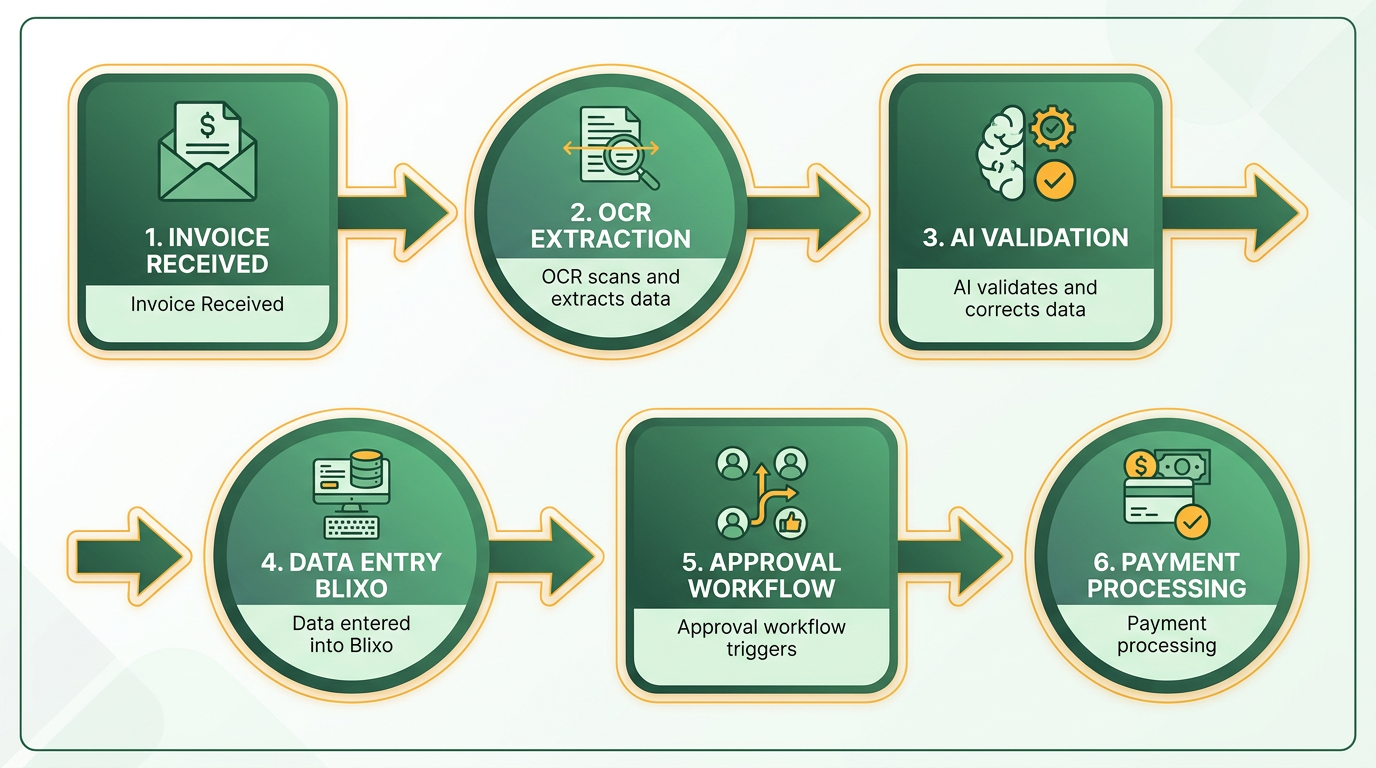
Automating invoice data entry and approval workflows with RPA streamlines accounts payable processes while minimizing errors and delays. By using OCR, AI, and seamless integration with Blixo, businesses can achieve end-to-end automation. Below is a structured guide to implementing these workflows effectively.
How OCR Transforms Invoice Data Entry
Optical Character Recognition (OCR) paired with AI is the backbone of automated data extraction. OCR scans invoices in formats like PDFs, emails, or scanned images, extracting key fields such as invoice numbers, line items, and payment terms. Blixo’s AI-driven OCR reduces manual entry by 70%, cutting errors by 80% compared to traditional methods. For example, a logistics company using Blixo processed 1,000 invoices monthly, saving 200+ hours annually by eliminating manual data entry.
-
Enable multi-format ingestion: Configure OCR to handle PDFs, emails, and scanned documents. As mentioned in the Centralizing Invoice Receipt and Intake with RPA section, automating data collection from diverse sources ensures consistent intake.
-
Train AI for custom fields: Teach the system to recognize unique invoice formats or regional tax codes.
-
Validate extracted data: Use AI to cross-check fields like vendor details or product codes against internal databases.
Configuring RPA Workflows for Approval and Routing
RPA automates routing invoices to the right approvers based on predefined rules. For instance, an invoice exceeding $5,000 might require a manager’s approval, while lower amounts auto-approve. Blixo allows users to set dynamic workflows, such as escalating exceptions to a review queue or sending alerts via email.
-
Define approval hierarchies: Map roles (e.g., team leads, finance managers) to approval thresholds. Building on concepts from the RPA Implementation Checklist for Blixo section, structured role mapping ensures clarity in responsibility.
-
Set automated routing rules: Use criteria like vendor type or invoice category to direct workflows.
-
Enable exception handling: Configure alerts for mismatches, such as PO-receipt-invoice discrepancies.
A healthcare provider implemented this approach, reducing month-end closing delays by 18% by automating approvals for 80% of its invoices.
Integrating RPA with Blixo for Seamless Processing
Blixo’s integration with ERPs (SAP, QuickBooks, etc.) ensures real-time data synchronization. This eliminates manual reconciliation and ensures compliance with standards like GDPR or HIPAA. For example, a mid-sized manufacturer cut per-invoice costs from $15–$40 to $2–$5 after linking Blixo to its ERP.
- Sync with accounting systems: Use APIs to connect Blixo with ERPs for instant data updates.
- Enable multi-currency support: Automate currency conversion for global vendors.
- Secure data with encryption: Apply AES-256 encryption and role-based access controls.
Automating Invoice Matching and Validation
Three-way matching-comparing purchase orders, receipts, and invoices-is critical for accuracy. Blixo’s AI matches documents with 99.5% accuracy, reducing disputes by 35%. For instance, a SaaS company slashed invoice errors by 50% in three months using this method.
- Activate AI-powered three-way matching: Compare POs, delivery notes, and invoices automatically.
- Flag discrepancies: Generate alerts for mismatched quantities, prices, or delivery dates.
- Validate tax rules dynamically: Ensure compliance with local tax codes during matching.
Best Practices for Implementation
Start small and scale gradually to maximize ROI. Begin with high-volume, low-complexity invoices to test workflows before expanding. A retail chain automated 3,000+ invoices monthly, reducing processing time by 65% and improving compliance by 40% through a phased rollout. As outlined in the Best Practices for RPA Deployment in Blixo section, a structured rollout minimizes disruption and accelerates adoption.
- Audit existing workflows: Identify bottlenecks like manual approvals or error-prone steps.
- Pilot with 50–100 invoices: Refine AI models and rules using a controlled sample.
- Monitor KPIs monthly: Track metrics like Days Sales Outstanding (DSO) or error rates to measure impact.
By following this checklist, Blixo users can reduce processing time by 80%, cut costs by $13–$28 per invoice, and achieve a 12–18 month ROI for businesses handling 500+ invoices monthly. Start with automation, and let AI handle the rest.
Centralizing Invoice Receipt and Intake with RPA
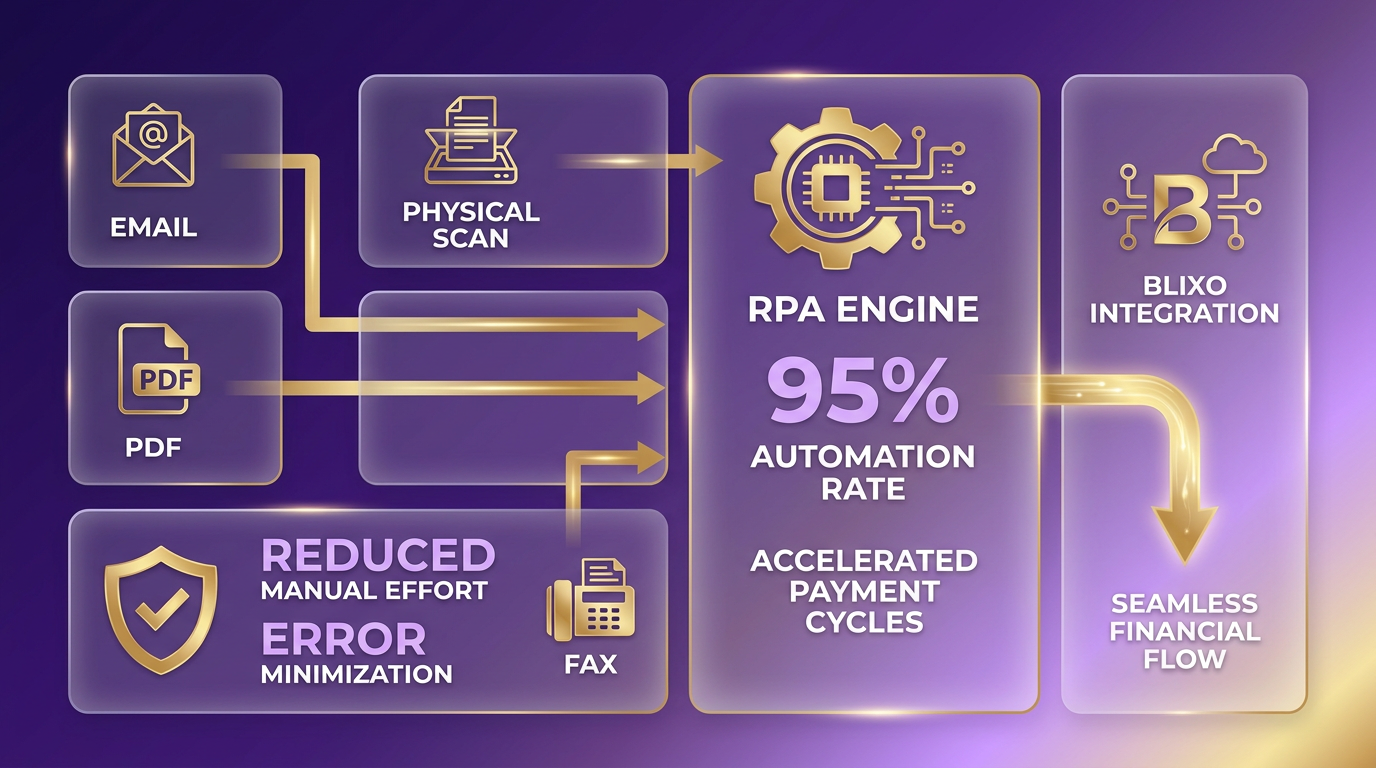
Centralizing invoice receipt and intake with RPA transforms fragmented processes into a unified, efficient system. By automating data collection from emails, PDFs, faxes, and physical scans, RPA eliminates silos and ensures every invoice is processed consistently. This approach reduces manual effort, minimizes errors, and accelerates payment cycles-critical for businesses handling high-volume or complex workflows. Below is a structured guide to implementing this system, tailored to Blixo users.
Why Centralization Matters for Invoice Processing
Centralizing invoice intake ensures all documents flow through a single automated system, removing delays caused by manual sorting or channel-specific workflows. For example, a logistics firm reduced disputes by 20% after consolidating paper, email, and digital invoices into one automated pipeline. By standardizing intake, teams avoid redundant checks and gain real-time visibility into every payment.
-
Audit current intake channels Map all invoice sources (email, EDI, manual uploads) and identify gaps in tracking. Manual processes often lead to 39% error rates, according to industry data. As mentioned in the RPA Implementation Checklist for Blixo Users section, this step is critical for identifying process inefficiencies before automation.
-
Set up multi-format ingestion Configure RPA bots to extract data from PDFs, scanned images, and email attachments. Blixo’s AI-powered OCR captures 99.5% of data accurately, even from handwritten notes.
-
Automate routing rules Use AI to assign invoices to approvers based on department, value, or supplier history. A healthcare provider cut month-end closing by 18% using dynamic routing.
How to Automate Multi-Channel Intake with RPA
RPA bots act as virtual clerks, retrieving invoices from diverse sources and feeding them into a centralized system. Unlike manual processes, which take $10–$15 per invoice to handle, automated workflows reduce costs to $2–$5. Blixo users report saving 200+ hours annually by eliminating redundant data entry.
-
Enable email and portal integrations Train bots to scan supplier emails for attachments and parse invoice numbers from subject lines. One company automated 80% of its email invoices in 2 weeks.
-
Connect with ERP systems RPA integrates with SAP, QuickBooks, or Oracle to push validated invoices directly into accounting ledgers, cutting reconciliation time by 35%. Building on concepts from the Automating Invoice Data Entry and Approval Workflows section, this integration ensures seamless financial data flow.
-
Handle exceptions programmatically Set rules for mismatched purchase orders or missing signatures. Blixo’s system flags these issues and routes them to the right team member automatically.
Best Practices for Blixo Users
To maximize RPA’s impact, follow these steps:
What Makes Blixo’s Approach Unique?
Blixo combines RPA with AI-driven validation, ensuring invoices are matched to contracts and purchase orders before approval. This reduces disputes and speeds up vendor payments. For instance, a mid-sized manufacturer cut per-invoice costs from $15–$40 to $2–$5, saving $200K+ yearly.
-
Start with a phased rollout Pilot the system with 50–100 invoices to train AI models and refine routing rules. Blixo’s dashboard tracks accuracy rates in real time. As outlined in the Best Practices for RPA Deployment in Blixo section, phased implementation helps mitigate risks and refine processes iteratively.
-
Clean historical data first 40% of automation failures stem from poor data quality. Use Blixo’s cleansing tools to standardize vendor names and product codes.
-
Assign human reviewers strategically Focus staff on exceptions rather than routine checks. One user reduced manual tasks by 70% after retraining teams for audit roles.
Real-World Blixo Use Cases
Businesses using Blixo report measurable gains:
- Service firms cut late payments by 40% with automated reminders.
- Manufacturers slashed processing time from 30 minutes to 3–5 minutes per invoice.
- SaaS companies improved cash flow by accelerating payments to suppliers by 30 days.
“Blixo lets me focus on my art without chasing payments,” says Vincent Mann, a filmmaker who automated $200K+ in annual invoicing.
By centralizing invoice intake with RPA, teams free up 400% more productivity for strategic work while reducing errors. For step-by-step guidance on setup, review Blixo’s automation checklist.
Best Practices for RPA Deployment in Blixo
Building on concepts from the RPA Implementation Checklist for Blixo section, assign change champions to advocate for automation and address team concerns. Training must cover both technical skills and process understanding. Blixo’s RPA workflows rely on AI-driven OCR and three-way matching, as detailed in the Automating Invoice Data Entry and Approval Workflows section. Source emphasizes that AI validation reduces errors by 80%, but only if teams understand how to configure and monitor it.
Post-deployment monitoring ensures RPA continues to deliver value. Track key metrics like days sales outstanding (DSO), as outlined in the RPA Implementation Checklist for Blixo section. Blixo’s SaaS service requires quarterly audits to refresh tax databases, building on concepts from the Centralizing Invoice Receipt and Intake with RPA section.
Frequently Asked Questions
1. How much can RPA reduce invoice processing costs with Blixo?
RPA cuts costs from $15–$30 to $2–$5 per invoice for companies handling 500+ invoices/month. This saves businesses up to $100,000 annually, as shown in Blixo’s real-world use cases.
2. What error rates does manual invoice processing typically have?
Manual processing has 40% error rates, causing $1.3 trillion in annual U.S. losses. Blixo’s RPA reduces errors by 80% using AI-driven OCR and automated validation.
3. How does Blixo prevent duplicate payments?
Blixo automates three-way matching and approval workflows, preventing $50,000 in duplicate payments quarterly by flagging duplicates before processing.
4. Can RPA ensure compliance with regulations like GDPR/HIPAA?
Yes. Blixo’s RPA includes automated invoice validation and data encryption, ensuring compliance with GDPR, HIPAA, and other standards during processing.
5. How much time does RPA save in invoice processing?
RPA reduces processing time by 80%, eliminating 70% of manual data entry. Blixo’s AI-driven OCR automates tasks like data extraction and matching.
6. What percentage of invoices are still processed manually?
Over 52% of invoices globally are manually processed, with 39% containing errors. Blixo’s RPA automates 80% of workflows to address these inefficiencies.
7. How does Blixo improve cash flow?
By reducing disputes and delays, Blixo accelerates payment cycles by 60%. Automated approvals and error prevention ensure faster, accurate payments to vendors.