

Automate Invoice Processing with RPA and Blixo

Key Takeaways
- Automating invoice processing cuts error rates from 2–5% to 95%+ accuracy using RPA and platforms like Blixo.
- RPA reduces AP processing costs by 80%, slashing $10+ per invoice labor expenses in high-cost departments.
- A leading manufacturer saved 1,000+ staff-hours monthly by reducing invoice turnaround from days to hours via RPA.
- Automation eliminates 60%+ of AP costs by streamlining repetitive tasks like data entry, matching, and approvals.
- Businesses handling 48,000+ annual invoices benefit most from RPA’s 24/7 scalability and fatigue-free operations.
- Timely payments enabled by automation prevent late fees and strengthen supplier relationships, as seen in a 70% processing time reduction.
- RPA bots consistently validate and extract invoice data, avoiding human errors that cause compliance risks and delays.
Why Automate Invoice Processing Matters
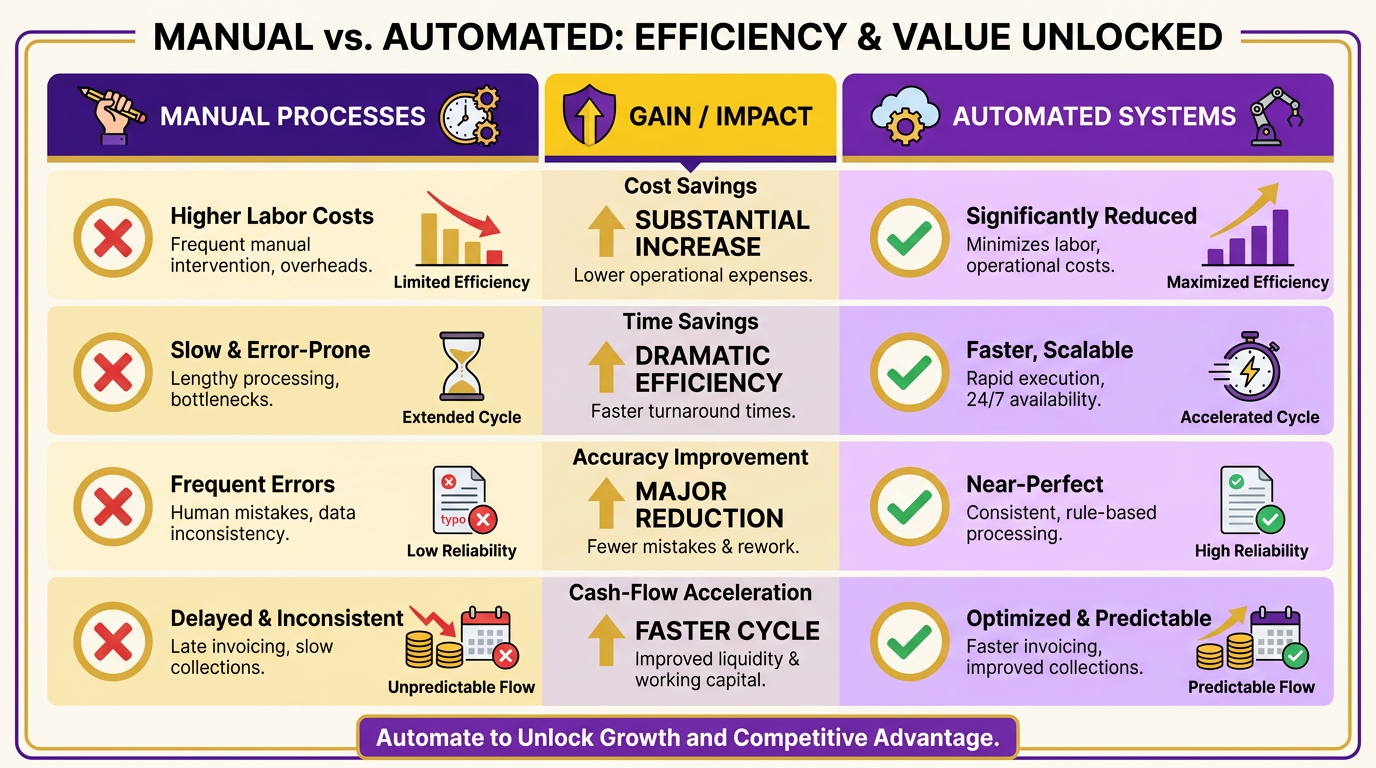
Automating invoice processing with RPA and platforms like Blixo transforms financial operations by cutting costs, reducing errors, and accelerating workflows. Manual processes are error-prone-industry data shows 2–5% error rates in manual invoice handling-and inefficient, with $10+ per invoice in high-cost departments. Automation slashes these costs by 80% while boosting accuracy to 95%+. Below, we break down why this shift matters for businesses of all sizes.
How Does Manual Invoice Processing Harm Businesses?
Manual workflows create bottlenecks, delays, and compliance risks. For example, a leading manufacturer reduced invoice turnaround time from days to hours using RPA, saving over 1,000 staff-hours monthly. Delays in payments-often caused by manual verification-can strain supplier relationships and trigger late fees. One company saved 70% on processing time, ensuring timely payments and avoiding penalties.
What Challenges Does Automation Solve?
Automation addresses three core issues:
- Error reduction: RPA minimizes human mistakes by automating data entry and validation. A case study shows 95% accuracy after implementation. As mentioned in the How RPA Works in Invoice Processing section, RPA bots extract and validate data consistently, eliminating common human errors.
- Cost savings: Labor accounts for 60%+ of AP costs. Automating repetitive tasks like invoice matching and approvals cuts these expenses drastically.
- Scalability: Businesses handling 48,000+ annual invoices benefit most. RPA bots work 24/7, handling high volumes without fatigue or delays.
For example, GLT International automated its AP department, achieving 95% straight-through processing. Another provider in this space reports 100% faster cycle times for invoice approvals, freeing staff for strategic work.
Who Benefits Most from Invoice Automation?
Businesses with high invoice volumes or complex supplier networks gain the greatest value. Consider:
- Auto parts retailers: One company automated invoice scanning and coding, reducing manual effort by 70%.
- Manufacturers: A firm automated purchase order matching, accelerating market deliveries by weeks.
- Retailers: RPA integration with ERP systems cut data entry errors by 90%, improving audit trails.
Smaller teams also benefit. A CFO managing 1,000+ monthly invoices automated approval routing, cutting processing time from 3–5 hours to 10 minutes per invoice.
Real-World Results with RPA and Blixo
Businesses using Blixo report measurable gains:
- 90% faster processing: One provider automated PDF invoice extraction, reducing manual data entry to zero.
- Zero manual errors: AI-driven validation ensures 99.9% accuracy in invoice matching. As detailed in the Blixo’s Role in Automating Invoice Processing section, this technology use machine learning to handle complex invoice formats and exceptions.
- ROI within 6–12 months: Automating approval workflows cut labor costs by 50% for a mid-sized business.
Unlike generic providers, Blixo offers transparent pricing and seamless ERP integration. For businesses handling thousands of invoices monthly, this means fewer delays, fewer errors, and a finance team empowered to focus on value-driven tasks like cost analysis and supplier negotiations.
By automating invoice processing, organizations enable efficiency, compliance, and scalability-key drivers for growth in competitive markets. Whether you’re managing a small AP team or a global supply chain, RPA and Blixo provide a framework to turn invoice workflows from a cost center into a strategic advantage.
How RPA Works in Invoice Processing
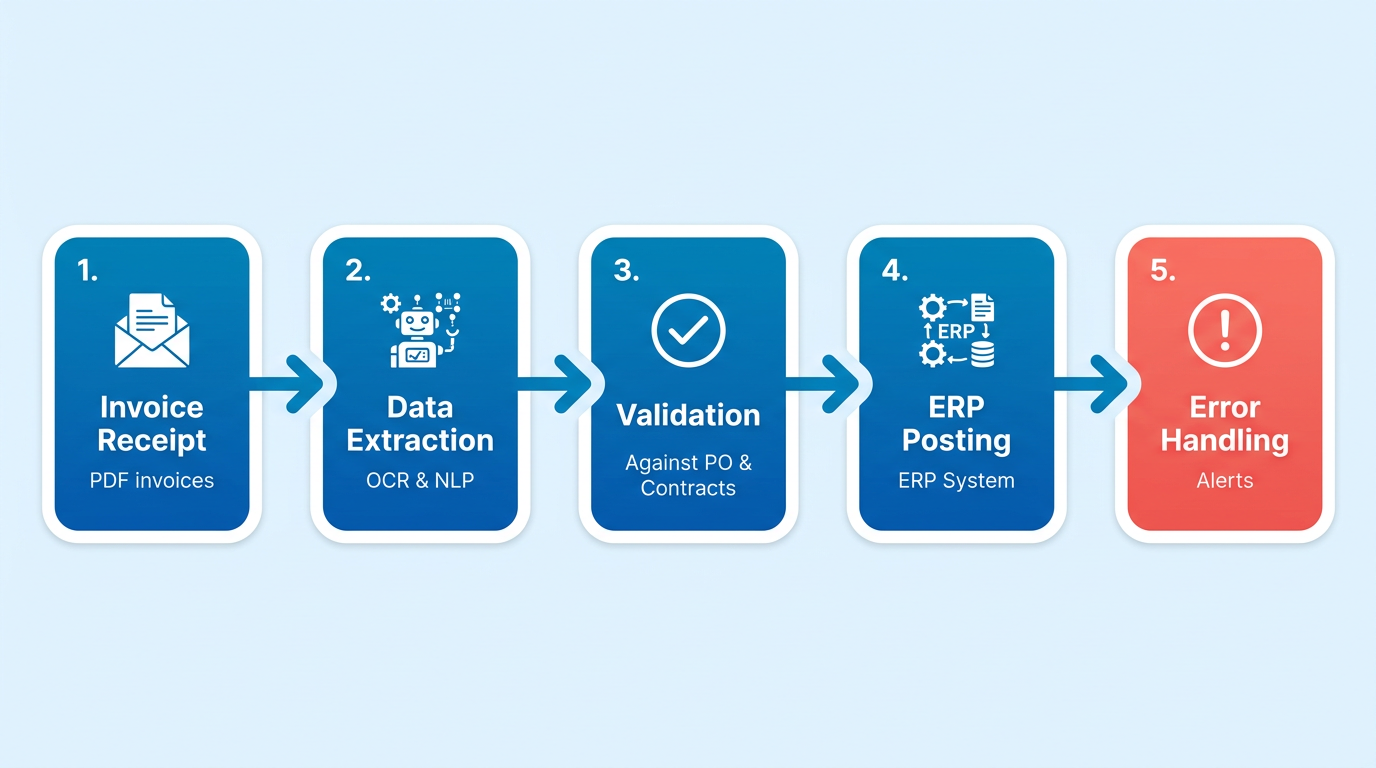
Robotic Process Automation (RPA) streamlines invoice processing by mimicking human actions to automate repetitive tasks. RPA bots extract data from invoices, validate it against purchase orders and contracts, and post entries into ERP systems-all while reducing errors and processing time. This technology integrates with existing software, enabling seamless automation without overhauling legacy systems. Below, we break down how RPA operates in this workflow.
How RPA Architecture Supports Invoice Processing
RPA systems rely on three core components: bots, control centers, and development studios. Bots perform tasks like scanning folders for PDF invoices, extracting data using OCR and NLP, and updating ERP systems. Control centers monitor bot performance and ensure compliance with security protocols. Development studios allow teams to design workflows, such as matching invoice amounts to purchase orders, as outlined in the Implementing RPA and Blixo for Invoice Automation section. For example, a bot might parse vendor codes, invoice dates, and line-item totals from a PDF, then cross-check these against a company’s procurement database. This architecture ensures automation is both scalable and adaptable to evolving processes.
How RPA Bots Handle Invoice Data and Systems
When processing invoices, RPA bots follow a structured sequence: retrieval, extraction, validation, and posting. First, they monitor designated folders or email inboxes for incoming invoices. Next, OCR and AI tools extract structured data like vendor names and amounts, while NLP interprets unstructured fields such as handwritten notes, using AI-powered techniques described in the Blixo’s Role in Automating Invoice Processing section. For instance, a bot might identify discrepancies between invoice quantities and purchase orders, flagging them for review. Finally, validated data is posted to accounting systems like SAP or QuickBooks. One company reduced invoice processing time from 3–5 hours to 5–10 minutes using this method, achieving a 95% accuracy rate.
Benefits and Challenges of RPA in Invoice Processing
RPA delivers speed, accuracy, and cost savings. By automating data entry, it cuts processing errors from 2–5% in manual workflows to near zero. A manufacturer saved 1,000 staff-hours monthly by automating invoice matching, while another company reduced AP costs by 80% through 24/7 bot operations. However, challenges exist. Integrating RPA with legacy systems requires careful configuration, and bots may struggle with unstructured documents like scanned faxes. Advanced solutions like Blixo, as detailed in the Blixo’s Role in Automating Invoice Processing section, address these issues by combining RPA with AI, enabling bots to handle complex invoices and adapt to format variations.
Real-World Applications of RPA in Invoice Workflows
RPA excels in tasks like three-way matching, where invoices are cross-referenced with purchase orders and goods receipts. For example, a bot can verify that a $500 invoice for office supplies matches a $500 purchase order and a $500 delivery confirmation. Another use case is supplier payment automation, where bots calculate payment terms, apply discounts, and schedule transfers. In one scenario, an auto parts retailer automated 80% of its invoice approvals, reducing manual labor by 33%. These examples highlight how RPA transforms invoice processing from a bottleneck into a streamlined, error-free operation.
By automating repetitive tasks and integrating with existing systems, RPA empowers finance teams to focus on strategic work while ensuring compliance and efficiency. Whether through Blixo’s transparent workflows or generic automation platforms, the technology adapts to diverse business needs, making invoice processing faster and more reliable.
Blixo’s Role in Automating Invoice Processing
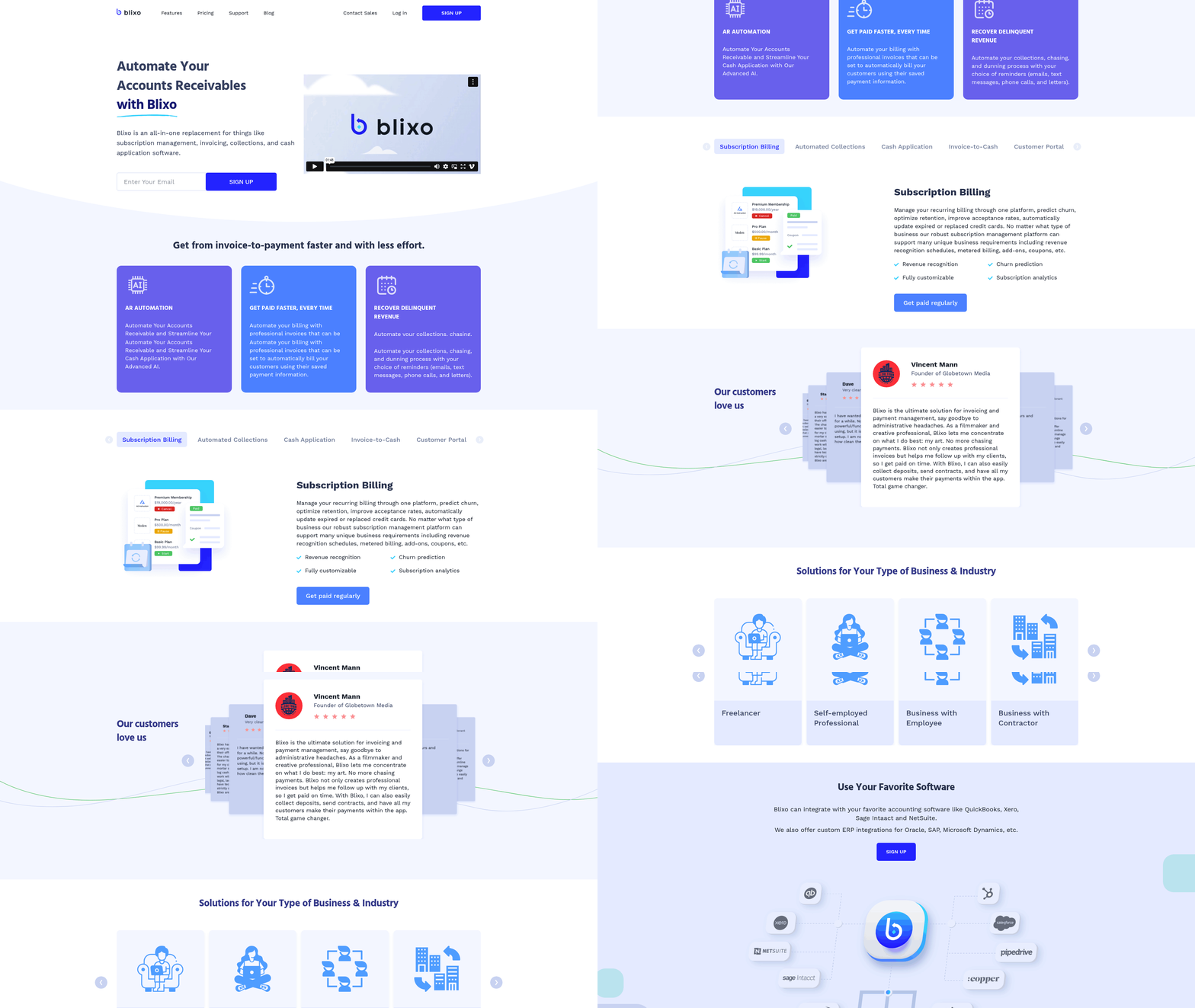
Blixo’s SaaS service transforms invoice processing by combining AI-powered automation with seamless integration into RPA workflows. As mentioned in the How RPA Works in Invoice Processing section, RPA bots extract information from invoices-whether PDFs, emails, or paper documents-while Blixo’s AI analyzes the data for accuracy and context. At its core, the system uses machine learning to handle tasks like data extraction, payment matching, and exception resolution, reducing manual effort and accelerating financial operations. Building on concepts from the Why Automate Invoice Processing Matters section, Blixo’s AI-powered cash application dynamically learns from historical transactions to improve accuracy over time. For example, it can automatically match incoming payments to the correct invoices, even when payment details are incomplete or inconsistent. This capability alone cuts invoice processing time from hours to minutes, with one business reporting a 95% reduction in manual reconciliation tasks.
How Does Blixo Integrate With RPA for Invoice Automation?
Blixo’s integration with RPA technology acts as a bridge between unstructured invoice data and enterprise financial systems. RPA bots extract information from invoices-whether PDFs, emails, or paper documents-while Blixo’s AI analyzes the data for accuracy and context. For instance, if an invoice lacks a purchase order number, the system flags it for review instead of halting the entire process. This hybrid approach ensures 98%+ automation rates in high-volume environments, such as accounts payable departments handling thousands of invoices monthly. Building on concepts from the Implementing RPA and Blixo for Invoice Automation section, teams can shift focus to strategic work, such as budget forecasting or supplier negotiations, by automating repetitive tasks like data entry and validation.
What Automation Capabilities Does Blixo Offer?
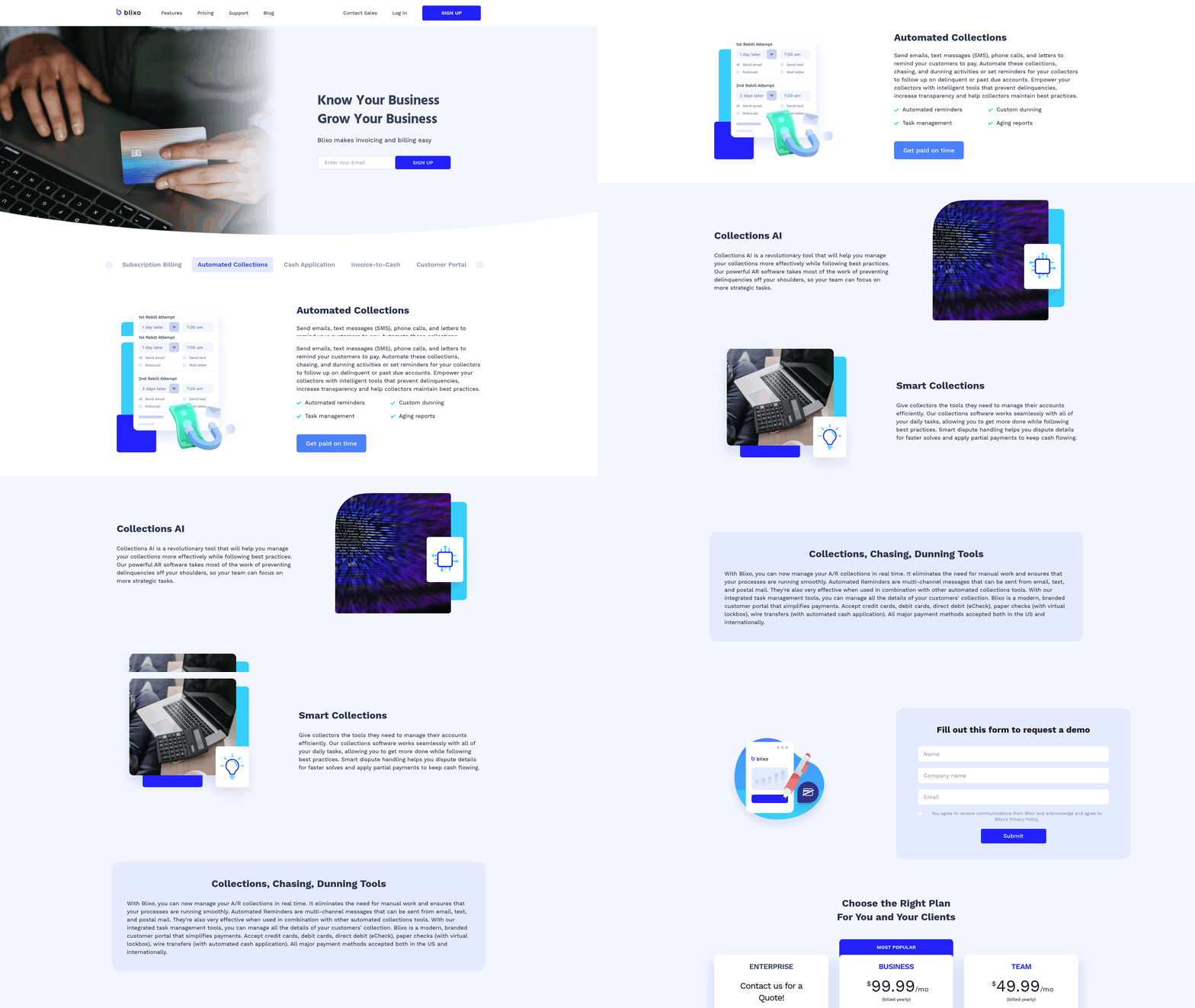
Blixo streamlines recurring workflows like subscription billing and recurring invoice generation, which are critical for SaaS businesses or companies with long-term contracts. The platform schedules invoices based on predefined rules, sends reminders for late payments, and adjusts charges dynamically (e.g., prorated billing for service cancellations). A generic provider might require IT teams to manually code these workflows, but Blixo’s no-code interface lets finance teams configure rules in minutes. For example, a business with monthly software subscriptions can set up automated invoicing tied to contract terms, ensuring consistent revenue recognition and reducing billing errors by 80%.
What Business Outcomes Have Companies Achieved?
As mentioned in the Measuring ROI and Success with RPA and Blixo section, these results align with industry benchmarks: businesses using similar automation report 60–70% savings in labor costs and 30% faster payment cycles. The combination of Blixo and RPA delivers measurable operational improvements. One company automated its accounts payable process, cutting invoice processing time from 3–5 hours to 5–10 minutes per invoice, while reducing errors from 4% to 0.2%. Another organization improved cash flow visibility by automating payment tracking, enabling faster decision-making during audits. For teams struggling with fragmented systems or high error rates, Blixo’s focused automation creates a foundation for scalable financial operations without overhauling existing infrastructure.
For step-by-step guidance on implementing invoice automation, explore practical strategies from industry experts.
Implementing RPA and Blixo for Invoice Automation
To implement RPA and Blixo for invoice automation, start by mapping your current invoice processing workflow to identify inefficiencies. Manual tasks like data entry, invoice verification, and reconciliation often consume significant time and introduce errors. For example, manual invoice processing has a 2–5% error rate, while automation reduces this to near-zero. Define clear KPIs such as processing time, accuracy, and cost per invoice to measure success. This foundation ensures your automation strategy aligns with business goals, as emphasized in the Why Automate Invoice Processing Matters section.
How Do You Prepare for RPA and Blixo Integration?
Begin by auditing your existing systems and identifying integration points. Blixo requires compatibility with enterprise systems like ERP (e.g., SAP) and accounting software, as detailed in the Blixo’s Role in Automating Invoice Processing section. Technical requirements include a stable IT infrastructure, access to invoice data (PDFs, emails, or paper documents), and a dedicated team for workflow configuration. Cloud-based deployments benefit from APIs for seamless data transfer, while on-premise setups may need local servers. For example, RPA bots can monitor a folder for PDF invoices, extract data like vendor codes and invoice dates, and populate ERP systems automatically, mirroring processes outlined in the How RPA Works in Invoice Processing section.
What Are Key Implementation Scenarios?
Cloud-based deployments suit businesses needing scalability and remote access. Blixo’s cloud integration allows real-time data synchronization, ensuring teams process invoices anywhere. On-premise setups, meanwhile, offer greater control for organizations with strict data security policies. For instance, a company receiving 48,000+ invoices annually could deploy RPA bots to scan, categorize, and route physical invoices to the correct departments. Hybrid models combine both, using cloud AI for data extraction and on-premise servers for sensitive financial records.
How Do You Test and Validate Automation Workflows?
Testing ensures accuracy before full deployment. Start with a small batch of test invoices to validate data extraction and workflow logic. Blixo’s system uses AI and OCR to handle unstructured data, but manual verification of 10–15% of processed invoices helps catch edge cases. Monitor metrics like processing speed (reduced from 3–5 hours to 5–10 minutes per invoice) and error rates (targeting 95%+ accuracy). Iteratively refine bots based on feedback, such as adjusting OCR models for handwritten fields or improving exception-handling rules.
What Post-Implementation Strategies Ensure Long-Term Success?
After deployment, track KPIs like cost savings and user adoption rates. Blixo’s dashboards provide visibility into invoice volumes, bottlenecks, and compliance metrics. Schedule quarterly reviews to update bots with new invoice formats or regulatory changes. For example, if a supplier switches from PDF to email invoices, adjust the bot’s email parser accordingly. Encourage finance teams to report anomalies, creating a feedback loop for continuous improvement. Regularly benchmark performance against pre-automation metrics to quantify ROI, as outlined in the Measuring ROI and Success with RPA and Blixo section.
By following these steps, businesses can reduce invoice processing costs by 33% and achieve 89% straight-through processing. Blixo’s flexibility in cloud and on-premise setups ensures alignment with organizational needs, while rigorous testing and maintenance sustain efficiency gains over time.
Measuring ROI and Success with RPA and Blixo
Measuring the return on investment (ROI) and success of automating invoice processing with RPA and Blixo requires a structured approach that balances quantitative metrics and qualitative improvements. By tracking key performance indicators (KPIs), calculating cost savings, and implementing ongoing evaluation practices, businesses can ensure their automation strategies deliver measurable value. Here’s how to evaluate success effectively.
What Are the Key Performance Indicators for Measuring Automation Success?
Start by defining clear KPIs tailored to your invoice processing workflows. Common metrics include:
- Productivity Gains: Measure time saved by comparing manual processing (3–5 hours per invoice) to automated workflows (5–10 minutes per invoice). The time reclaimed allows teams to focus on strategic initiatives like supplier negotiations or financial forecasting, enhancing overall operational efficiency.
- Error Reduction: Track accuracy improvements. Manual invoice processing typically has 2–5% error rates, while automation achieves 95%+ accuracy. GLT International, for instance, reached 95% accuracy with RPA implementation.
- Cost Savings: Calculate labor cost reductions. Since manual invoice processing costs $10 per invoice on average, automation can cut this to $2, yielding an 80% savings. Blixo’s AI-powered bots eliminate 100% of manual data entry, directly reducing labor expenses. As mentioned in the Blixo’s Role in Automating Invoice Processing section, the system uses machine learning to handle tasks like data extraction and validation with high precision.
- Straight-Through Processing (STP) Rate: This measures the percentage of invoices processed without human intervention. RPA can achieve 89%+ STP, streamlining workflows and accelerating payment cycles.
How Do You Calculate ROI and Cost Savings from Automation?
ROI calculations should focus on both hard savings (reduced labor costs) and soft benefits (improved compliance, faster processing). Here’s a step-by-step approach:
- Quantify Baseline Costs: Calculate annual manual processing costs, including labor ($60% of total AP costs), error correction, and delays.
- Estimate Automation Savings: For example, if automation reduces manual labor by 33%, multiply your current AP costs by 0.33. A company with $120,000 in annual AP costs could save $39,600.
- Factor in Implementation Costs: Blixo’s transparent pricing model ensures predictable expenses, avoiding hidden fees common with other providers. Building on concepts from the Implementing RPA and Blixo for Invoice Automation section, successful implementation requires mapping existing workflows to identify inefficiencies before deployment.
- Calculate ROI: Use the formula (Savings – Implementation Costs) / Implementation Costs. If a business saves $50,000 annually and spends $20,000 on automation, ROI = ($50,000 – $20,000) / $20,000 = 150%.
Real-world results highlight automation’s impact: One organization using Blixo cut invoice processing costs by 70% within six months, achieving full ROI in under a year.
What Are Best Practices for Ongoing Monitoring and Evaluation?
Automation success requires continuous evaluation. Follow these practices:
- Set Baselines Early: Establish pre-automation benchmarks for processing time, error rates, and costs to compare post-implementation results.
- Use Analytics Dashboards: Blixo’s SaaS service provides real-time metrics on STP rates, error trends, and cost savings, enabling proactive adjustments. As outlined in the Blixo’s Role in Automating Invoice Processing section, these dashboards integrate seamlessly with existing systems for comprehensive oversight.
- Conduct Regular Audits: Review automated workflows quarterly to identify bottlenecks. For example, if STP drops below 85%, investigate data quality issues or process variability.
- Incorporate Feedback Loops: Engage finance teams to report exceptions or usability concerns. Blixo’s AI learns from user feedback, refining accuracy over time.
Common pitfalls to avoid include underestimating implementation time or ignoring process variability. For instance, invoices with non-standard formats may require additional configuration. Blixo’s NLP and computer vision tools adapt to diverse document types, minimizing disruptions.
By aligning KPIs with business goals and using Blixo’s scalable automation, companies can transform invoice processing into a streamlined, cost-effective operation. Continuous monitoring ensures long-term value, turning automation from a strategic investment into a competitive advantage.
Future Trends and Innovations in Invoice Automation
The future of invoice automation will be shaped by advancements in AI, machine learning (ML), and RPA integration, enabling businesses to process invoices with unprecedented speed and precision. As these technologies evolve, SaaS providers like Blixo will lead the shift toward smarter, self-optimizing systems that reduce manual effort and minimize errors. Below, we break down key trends, challenges, and predictions for the next phase of innovation in this space..
How Will AI and Machine Learning Transform Invoice Automation?
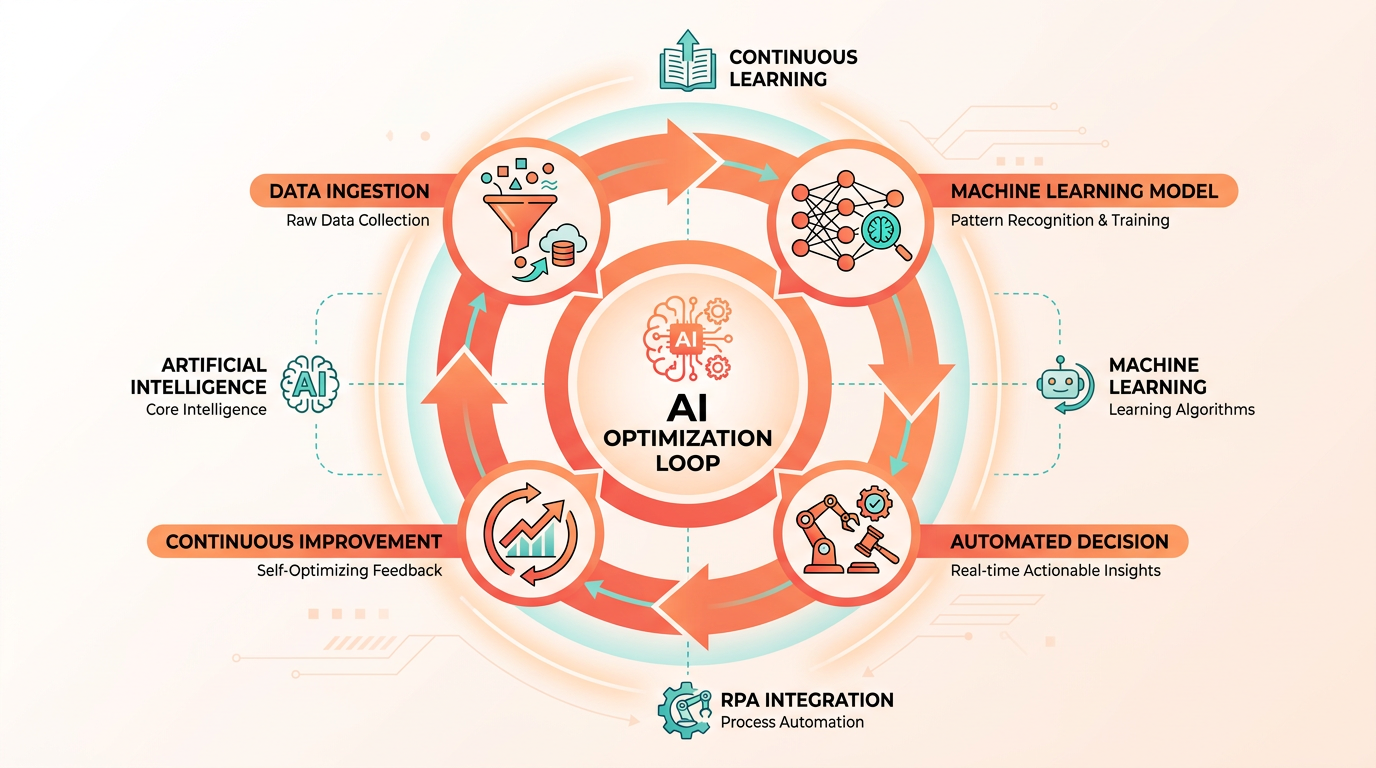
AI and ML will drive real-time decision-making and predictive accuracy in invoice processing. These technologies allow systems to learn from historical data, improving their ability to categorize, extract, and validate invoice details automatically. As mentioned in the Blixo’s Role in Automating Invoice Processing section, Blixo’s AI-driven models can recognize patterns in unstructured data-like handwritten notes or non-standard formats-reducing the need for human intervention.
One major benefit is enhanced anomaly detection. ML algorithms can flag inconsistencies, such as mismatched purchase orders or duplicate invoices, faster than human reviewers. This reduces processing time and cuts down on costly errors. A company using Blixo’s AI tools reported a 70% reduction in manual follow-ups after implementation, demonstrating how automation scales with data volume..
What Challenges Do Businesses Face When Adopting New Invoice Automation Tech?
Integration complexity and data privacy concerns remain significant hurdles. Even the most advanced AI systems require seamless compatibility with existing ERP, accounting, and procurement platforms. As outlined in the Implementing RPA and Blixo for Invoice Automation section, businesses must map their workflows to identify integration points, ensuring minimal disruption to operations. Unlike generic providers, Blixo offers pre-built integrations that simplify this process.
Another challenge is the initial training phase for AI models. These systems need high-quality, labeled data to function effectively. Businesses must invest time in curating datasets or risk lower accuracy. Additionally, security remains a priority-sensitive financial data must be encrypted and access-controlled. Blixo addresses this with end-to-end encryption and compliance certifications, giving users confidence in data protection..
What Innovations Can We Expect in the Next 3–5 Years?
Hyper-automation and predictive analytics will redefine invoice processing standards. Building on concepts from the How RPA Works in Invoice Processing section, future systems will combine RPA with AI to handle not just data extraction, but also approval routing, fraud detection, and supplier negotiation insights. For instance, Blixo is already developing features that predict payment delays based on historical vendor behavior, helping finance teams act proactively.
Another trend is the rise of embedded automation. Invoice processing tools will integrate directly into procurement platforms, eliminating the need for separate software. This “automation-as-a-service” model will lower entry barriers for small businesses. Industry leaders predict that by 2027, over 60% of invoice workflows will be fully automated, up from 28% today..
How Can Companies Prepare for These Changes?
Invest in scalable platforms and employee upskilling. Businesses should prioritize solutions like Blixo that offer modular features, allowing them to adopt new capabilities incrementally. Training teams to work alongside AI tools-rather than replacing them-will maximize ROI. For example, finance staff can focus on strategic tasks while automation handles routine data entry.
Staying ahead also means embracing continuous improvement. Regularly updating AI models with new data ensures systems adapt to evolving invoice formats and regulatory requirements. A case study from a mid-sized manufacturer showed that updating their automation tools quarterly reduced exceptions by 40%, proving the value of iterative enhancements.. By using AI, ML, and RPA, invoice automation is moving toward a future where finance teams spend less time on clerical work and more on strategic planning. SaaS providers like Blixo are not just keeping pace with these trends-they’re setting the standard for what’s possible. For practical steps on implementation, explore how to automate invoice processing in 8 practical steps.
Frequently Asked Questions
1. What are the main benefits of automating invoice processing?
Automating invoice processing with RPA reduces error rates to 95%+ accuracy, cuts AP costs by 80%, and accelerates processing from days to hours. A manufacturer saved 1,000+ staff-hours monthly and avoided late fees by implementing automation.
2. How much can automation reduce accounts payable costs?
Automation slashes AP costs by 60%+ by automating data entry, matching, and approvals. For example, high-cost departments save $10+ per invoice, and businesses with 48,000+ annual invoices see the most significant savings.
3. How does RPA improve invoice processing accuracy?
RPA bots consistently validate and extract invoice data, eliminating human errors that cause compliance risks or delays. A case study shows 95%+ accuracy after automation, compared to 2–5% in manual processes.
4. Which businesses benefit most from invoice automation?
Companies handling 48,000+ annual invoices benefit most. RPA’s 24/7 scalability and fatigue-free operations make it ideal for high-volume workflows, as seen in a provider achieving 100% faster approval cycle times.
5. How quickly can automation reduce invoice processing time?
Automation can cut processing time by 70% or more. One company reduced invoice turnaround from days to hours, enabling timely payments and avoiding late fees while improving supplier relationships.
6. Can automation prevent late payment penalties?
Yes. By accelerating invoice validation and approvals, automation ensures timely payments. For example, a business saved 70% processing time, avoiding penalties and strengthening supplier trust.
7. How does RPA handle high-volume invoice workflows?
RPA bots work 24/7 without fatigue, handling thousands of invoices daily. A leading manufacturer scaled operations seamlessly, processing 48,000+ invoices annually with consistent accuracy and no delays.