

Optimizing Revenue Automation with Integrated Invoice to Cash Reporting Tools

Key Takeaways
- Automated invoice-to-cash reporting catches cash-flow bottlenecks as they form, so you can collect before a slow payer drifts into churn.
- Coca-Cola Bottlers recovered $33.4 million in 34 days, well inside a typical 90-day invoicing cycle.
- Automated cash-application matching hits over 90% accuracy, replacing the manual matching that eats staff time and stalls reconciliation.
- AI-driven collections cut bad-debt exposure by roughly 20% versus ad-hoc reminders and inconsistent follow-up.
- Failed payments often clear on retry within 24 to 48 hours. Automation catches that window. Manual chasing usually misses it.
- Automation moves your team off data entry, matching, and chasing, and onto exceptions and the signals that predict late payment.
- Invoices generate straight from CRM and usage data, killing the hand-keying that manual processes demand.
The Short Version
Automating invoice-to-cash cuts errors, speeds up payments, and shows you in real time where cash gets stuck. The win most guides skip: invoice-to-cash reporting tools with revenue automation integration let you spot cash-flow bottlenecks as they form, so you collect before churn spikes. Here’s a quick read on the effort versus the payoff.
Manual vs Automated: What Actually Changes?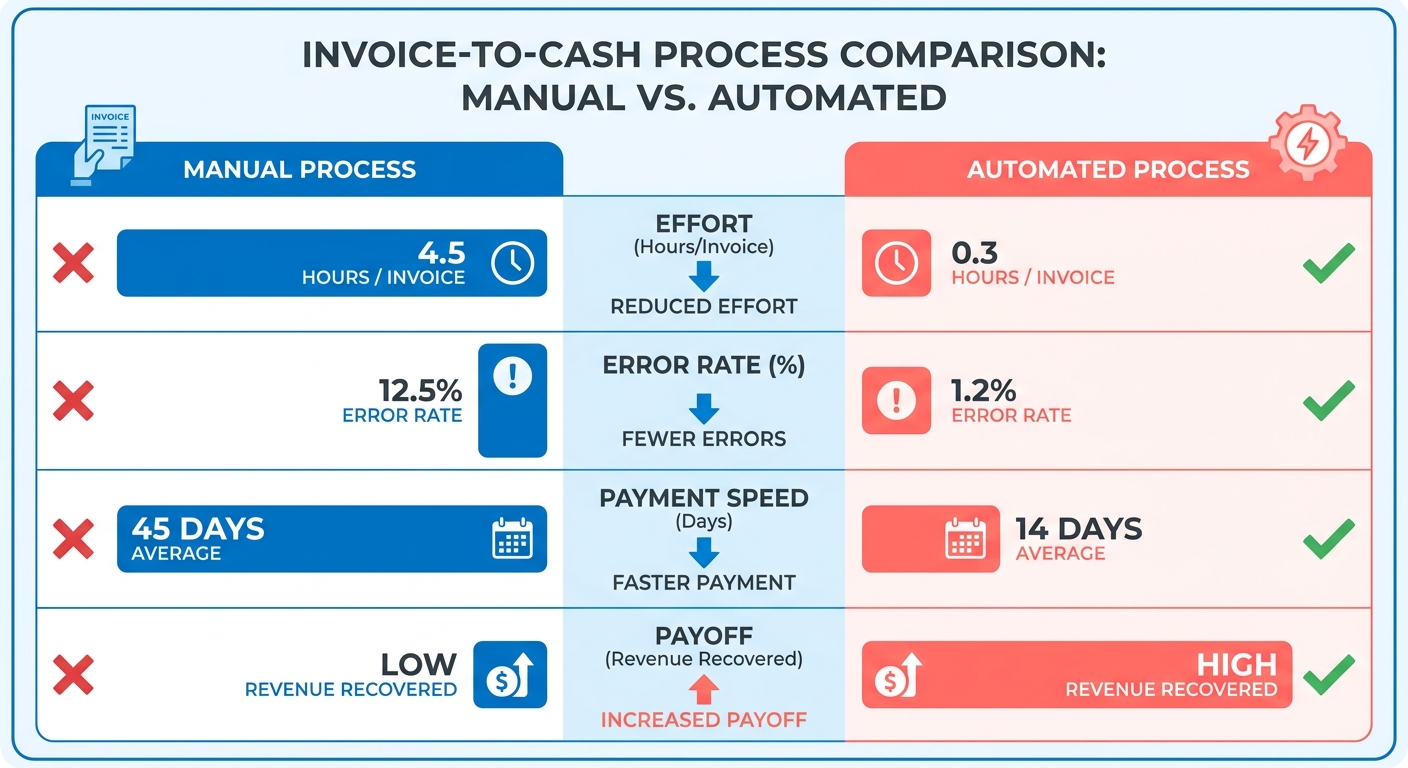
It comes down to where your team spends its hours. Manual work buries people in admin. Automation pushes the focus toward cash-flow analysis and untangling the billing disputes that actually need a human.
| Factor | Manual Process | Automated Process |
|---|---|---|
| Invoice generation | Hand-keyed from contracts | Generated directly from contract and usage systems |
| Cash application | Manual matching, error-prone | Algorithmic matching minimizes manual intervention |
| Collections | Ad-hoc reminders | Automated reminders across email, SMS, calls |
| Cash-flow visibility | Delayed, stale reports | Real-time bottleneck detection |
| Revenue recognition | Manual reconciliation | Automated RevRec schedules |
| Bad debt | Higher exposure | Predictive collections minimize write-offs |
One detail worth flagging: temporary payment failures. Automated systems schedule immediate, intelligent retries to capture funds on their own. Manual processes tend to delay follow-up by days, and days are what turn a card decline into a write-off.
What Results Can You Expect?
Published deployments show the ceiling. Major beverage distributors have sharply compressed their cash-recovery cycles. One equipment maker saved $1.3 million a year in interest. Another reported a 75% jump in revenue-recognition productivity.
These come from firms that pulled collections, remittance matching, and reporting into one flow. The pattern holds: tighter integration between stages shrinks the cash conversion cycle. Colleen Zdrojewski, VP of Financial Services at one of these companies, cited a $2.5M drop in costs even as volume and productivity climbed.
For SaaS teams, the reporting layer matters most. When your invoice-to-cash data feeds a live dashboard, you see which accounts are drifting past due before they cancel. That early signal is where proactive collections beat reactive ones.
How Much Effort Is Implementation?
Effort scales with how many of the six invoice-to-cash stages you automate: generation, delivery, collection, cash application, AR management, and revenue recognition. You can phase it in.
Difficulty by stage:
- Stages 1–2 (generation and delivery). Low. Needs clean contract data from your CRM and validated pricing rules.
- Stages 3–4 (collection and cash application). Medium. Matching logic leans on payment amount, remittance reference, and customer history.
- Stage 5 (AR management). Medium. This is where reporting turns into bottleneck detection.
- Stage 6 (revenue recognition). Higher. Skip it and you get accurate AR but manual RevRec reconciliation.
The common trap is stopping short of full integration. Leave the final accounting step manual and your receivables look clean while ledger reconciliation stays a bottleneck. A unified view needs the whole cycle connected.
Data quality is the real gate. Automation doesn’t remove human judgment. It moves that judgment onto exceptions and decisions, where it earns its keep.
Why Integrated Reporting Beats Chasing Invoices by Hand
Manual invoicing quietly drains revenue you already earned. When invoices get hand-keyed and cash gets matched by eye, payments slip, disputes pile up, and your Days Sales Outstanding (DSO) climbs. That lag is where SaaS revenue leaks. Invoice-to-cash reporting tools with revenue automation integration close the gap by showing you exactly where money is stuck, in real time, so you act before a slow payer becomes a churned account.
The numbers back this up. Research on B2B payments found 87% of small and mid-sized businesses are paid late, and 50% spend over seven hours a week chasing overdue invoices. Another 48% lose invoice payments entirely, and 71% run disconnected invoicing and accounting systems that force manual rework. Integrated reporting kills that disconnect by pulling billing, collections, and cash application into one view.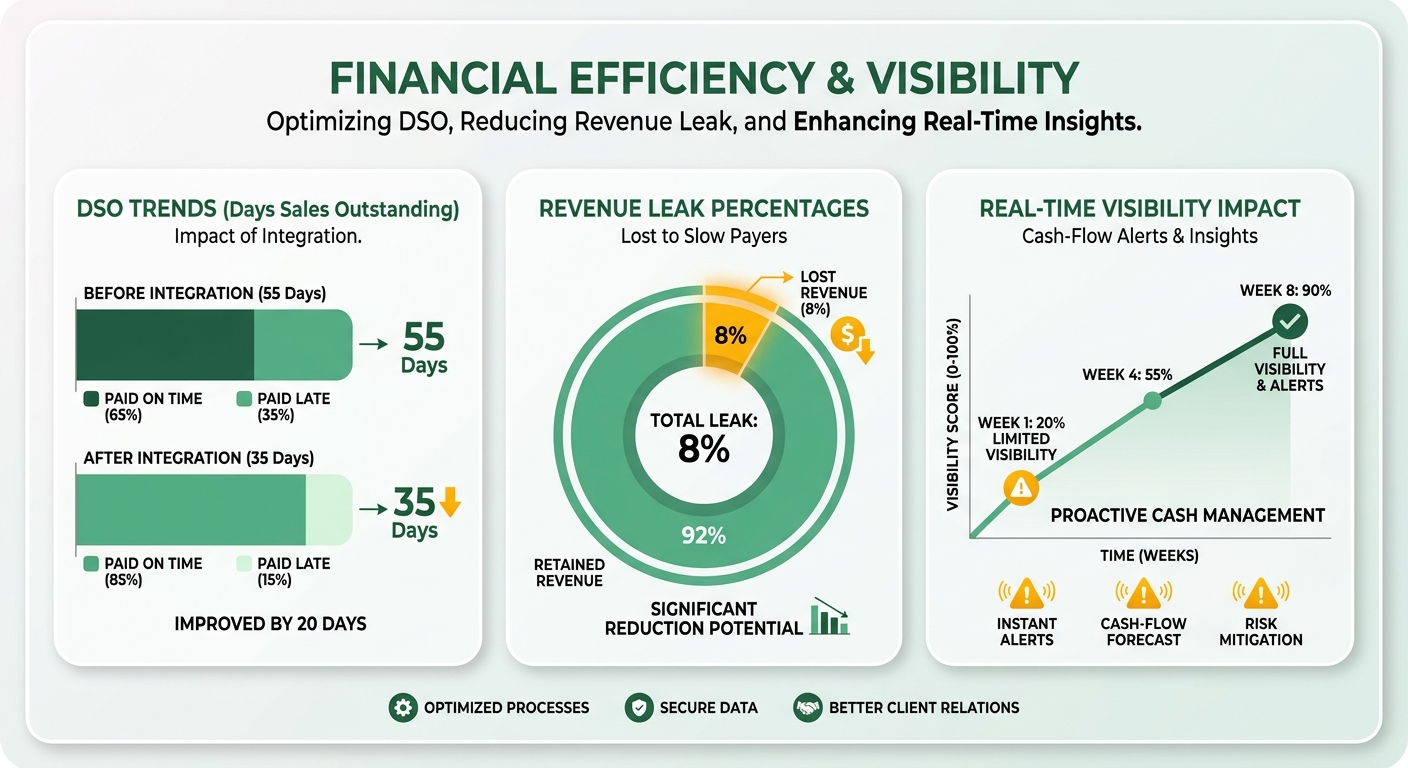
What Bottlenecks Does This Actually Catch?
Integrated reporting pinpoints the exact stage where cash stalls: unsent invoices, failed payments, unmatched remittances, aging disputes. Instead of finding out at month-end, you watch the blockage form and route it to the right person while the account is still healthy.
This matters most for SaaS, because a stuck payment often signals a shaky renewal. A failed charge isn’t just an admin task. It’s an early churn warning. Intelligent systems re-attempt transactions during optimal windows, securing revenue before customer service ever gets involved.
Kill the manual spreadsheet reconciliation and your finance team gets its time back for analysis, spotting payment trends and sharpening cash-flow forecasts instead of grinding through matching.
Who Gets the Biggest Payoff?
Finance teams and founders feel it first. Finance teams stop drowning in data entry and start working exceptions. Founders get a live read on working capital instead of a stale month-end report. Both gain the ability to forecast cash and step in before a bottleneck spikes DSO.
The results are real. A multinational manufacturer cut DSO by 25% using automated invoice generation and AI-powered collection reminders. A software company that connected billing and collections shortened dispute resolution from three weeks to under five days. Firms that centralize remittance data typically recover a meaningful share of short-paid invoices that would otherwise be written off.
AI-driven collections also predict payment behavior and prioritize the right accounts. That’s proactive collections: chasing the accounts most likely to slip, not blasting everyone the same reminder.
Which KPIs Prove It’s Working?
Four metrics: DSO, invoice accuracy rate, collection effectiveness, and cash application accuracy. Watch them weekly, not quarterly. A rising DSO paired with a cluster of failed payments in one customer segment is your churn signal.
Connect billing to collections to revenue recognition, and these KPIs stop being lagging scorecards. They become live dashboards. That shift is the whole point. The key benefits of automated revenue management go deeper, but the core idea holds: see the bottleneck early, collect early, protect the revenue you already booked.
What Integrated Invoice-to-Cash Reporting Actually Is
Integrated invoice-to-cash reporting connects every stage of your receivables into one live view, from the moment you issue an invoice to the day cash lands. Instead of stitching data across separate billing, payment, and accounting tools, you see the whole cycle in one place. For SaaS teams, that means spotting a cash-flow bottleneck the day it forms, not weeks later when a slow payer has already drifted toward churn.
This is where revenue automation integration earns its keep. When invoicing, cash application, and reconciliation data flow into one system, the numbers stop lying to you. A stalled payment surfaces as a signal, not a surprise at month-end close. You collect proactively, before a billing dispute quietly becomes a cancellation.
The Core Components
A fully integrated cycle moves every phase of receivables, from initial billing to final ledger entry, into the next without a manual handoff. That continuous loop keeps information consistent across your financial systems.
Three components do the heavy lifting:
- Invoicing: Billing details built from verified contract terms and actual usage. Accuracy here prevents downstream disputes and billing errors.
- Cash application: Incoming payments matched to open balances by algorithm, with machine learning handling the messy cases like consolidated payments or missing reference numbers.
- Reconciliation: The platform updates the general ledger automatically, speeding the close and keeping you compliant.
That last one matters more than most teams admit. Manual cash application is the number one source of audit risk in accounts receivable, and spreadsheets carry a documented error rate around 94%. Pull that work into an integrated flow and those risks to your financial statements shrink fast.
Why Integration Beats Point Tools
Integration turns scattered receivables data into a real-time cash-flow signal. Disconnected systems force manual rework and hide where money is stuck. A connected flow shows you DSO, invoice accuracy, and collection effectiveness as they move, so you act on a problem the same day it appears.
The payoff shows up in operational load. Teams running disconnected tools spend a large chunk of the month reconciling mismatched records by hand, and studies peg manual receivables processing at roughly $10 per invoice versus a fraction of that under automation. A connected quote-to-cash flow also cuts billing disputes, since invoices generate from validated source data instead of re-keyed entries. Fewer disputes, fewer stalled payments, a cleaner aged-receivables report.
For a SaaS business, faster application and cleaner reconciliation free your team to work exceptions instead of chasing paper. That lets you read payment-behavior signals early and step in before a slow account churns.
AI-powered cash application is the piece that makes this proactive instead of reactive. It predicts late payments, suggests collection strategies, and clears the edge cases a rules engine can’t decide alone. Pair it with real-time invoice status tracking and you get the early-warning system most invoice-to-cash guides skip entirely. You see the bottleneck. You collect. You keep the customer.
How the End-to-End Workflow Runs
The end-to-end workflow moves an invoice from creation to final ledger entry without a manual break. When those stages share one data flow, every handoff becomes a live signal. You see a stalled payment the day it happens, not at month-end close.
That real-time visibility is what separates a connected workflow from a patchwork of tools. For SaaS teams, the payoff is early warning. A slow payer flagged at stage three gives collections days to act before the account drifts toward churn. Manual processes bury that signal until it’s too late.
The Six Stages
The full cycle runs through six phases, and each needs to be automated to avoid a bottleneck. Skip one and you create a manual handoff that slows the whole cycle and hides cash-flow problems.
- Invoice generation: Billing details built from verified contract terms and actual usage. Accuracy here prevents downstream disputes.
- Invoice delivery: Invoices sent through each customer’s preferred channel, so nothing rots in an inbox nobody checks.
- Payment collection: Reminders and retries, so a card decline or expired payment method doesn’t silently age into a write-off.
- Cash application: Payments matched to open invoices using amount, remittance reference, and payment history.
- AR management: Disputes, deductions, and aging tracked so overdue accounts surface fast.
- Revenue recognition: Earned revenue recorded accurately once cash lands.
The common gap: teams automate the front end and leave the final accounting steps manual. Receivables look clean while ledger reconciliation stays a bottleneck, breaking the cash-flow signal at the last mile.
How Automated Cash Application Works
Automated cash application matches incoming payments to open invoices with a rules-based engine, plus AI for the edge cases rules can’t decide. It handles exact, partial, and many-to-one matches, then routes ambiguous items like multi-invoice remittances to a person.
This matters because manual matching is wide open to human error. Unapplied payments are cash you’ve technically received but can’t see in your reporting, which distorts your bottleneck analysis and delays every downstream decision.
The bigger the payment volume, the worse it compounds. A team applying thousands of transactions a month by hand can lose full days to matching alone. Time that never gets spent chasing the accounts most likely to churn.
What Full Automation Buys You
Speed, cost, and accuracy at once. One B2B services company cut its collection cycle from 62 days to 41 after connecting billing, collections, and cash application into a single flow. A software firm cut close time by 40% after linking cash application to billing and banking.
For a SaaS finance team, faster closes and cleaner cash application feed straight into better bottleneck detection. When your numbers stop lagging reality, you collect proactively instead of reacting to a month-end surprise.
Automation doesn’t remove human judgment. It shifts your team toward the work that needs one: resolving complex disputes and reading payment trends.
Rolling It Out Without the Project Stalling
Implementing integrated invoice-to-cash reporting is less about the software and more about the data feeding it. Start by mapping how your billing, payment, and accounting systems currently exchange information, because disconnected systems are where most projects stall. Get that data flow clean first, and the reporting layer surfaces bottlenecks the way it should.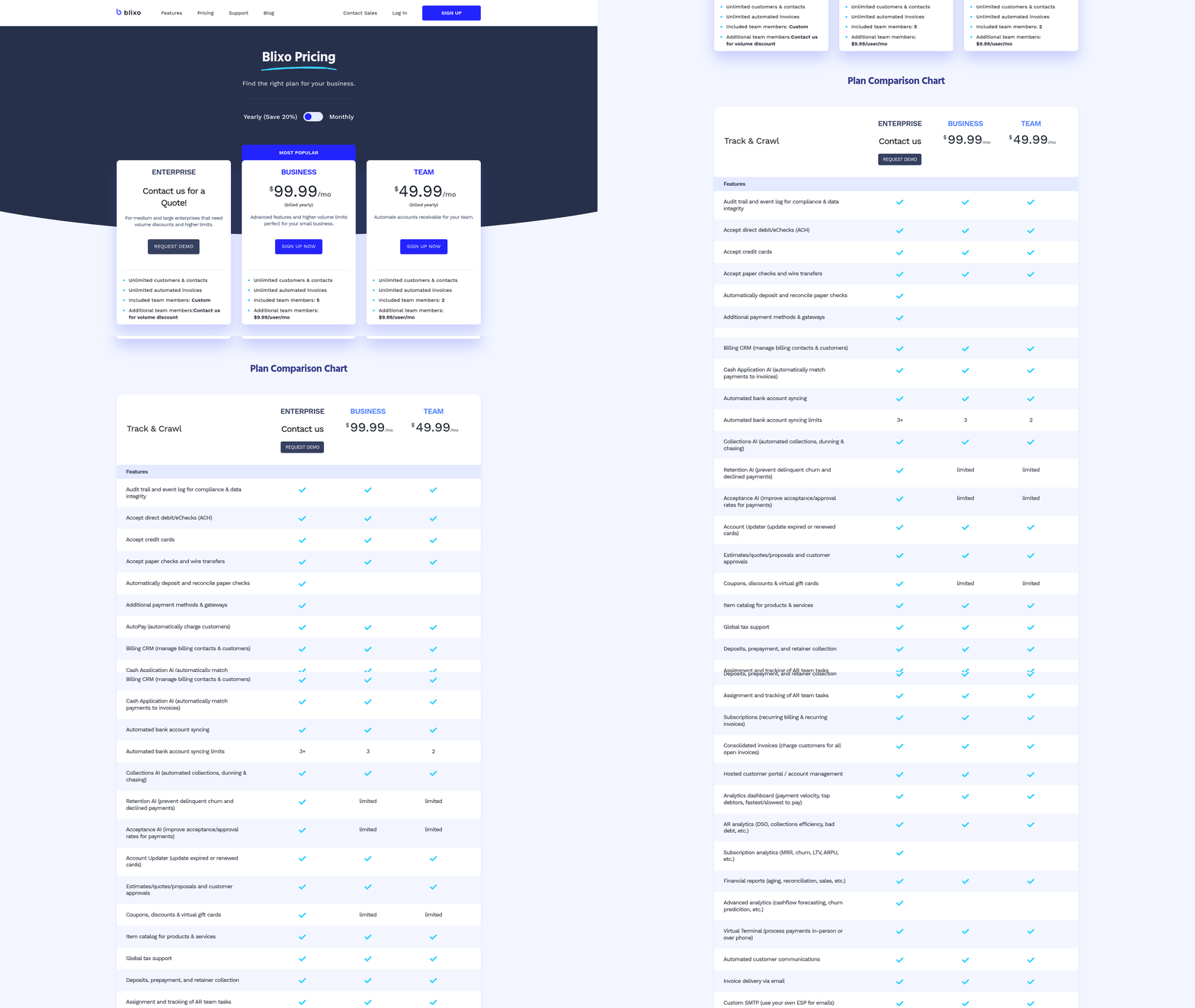
The goal is a single live view that flags a slow payer within days, not at month-end. That early signal is what lets SaaS teams collect before a billing dispute drifts into churn. Below are the practices, pitfalls, and platform criteria that make it deliver.
Best Practices for a Smooth Rollout
Treat this as a change-management project, not a software install. Assess your current process, fix data quality at the source, and give your AR team a reason to trust the new system before you flip the switch.
Phase your automation across the whole lifecycle. Stopping short of full integration reintroduces the exact lag you were trying to kill, because the final ledger updates sit disconnected from the automated workflow.
Prepare your team for a shift in responsibilities. Once matching runs automatically, human judgment moves to the complex edge cases. A short parallel run, old and new processes side by side for one billing cycle, gives the team confidence the numbers reconcile before you cut over.
What Challenges to Plan For
Data integration and system compatibility are the two that sink most rollouts. When invoicing and accounting run on separate systems, your first job is closing those gaps so the reporting view is accurate. A rules-based matching engine that handles exact, partial, and many-to-one matches removes manual reconciliation errors while feeding your reporting clean data.
Clean contract and usage data matters just as much. Invoice generation depends on validated pricing rules and accurate CRM records. Garbage in one stage corrupts the reporting downstream, so validate before you scale.
What to Look For in a Platform’s Fit
Look for customizable workflows and strong API integration. Customizable workflows let you route exceptions and payment reminders to match how your team already works. API integration keeps billing, cash application, and accounting data in one flow, which is what powers real-time bottleneck detection.
The payoff shows up in operational metrics. Teams that connect collection reminders to live AR data typically shorten dispute resolution, since the flag reaches a collector while the invoice is still fresh. Others report fewer month-end reconciliation hours once close and cash application share a single ledger, freeing analysts for forecasting instead of matching.
What to Weigh When Choosing
Prioritize scalability, security, and integration depth. A cloud-based platform gives you real-time data access and room to grow without re-platforming later.
Check three things before you commit:
- Integration breadth: Does it connect to your ERP, payment gateways, and bank file formats out of the box?
- Security and audit trails: Detailed audit trails help you meet regulatory requirements and shrink your audit-defense surface.
- Scalability: Can it handle your invoice volume as you grow, with event-based data flows for easier setup?
Pick a platform that covers the full cycle end to end. Partial coverage leaves manual gaps, and those gaps are exactly where cash-flow signals go dark.
Measuring Success and Tightening the Loop
You can’t improve what you don’t measure. The right KPIs turn your invoice-to-cash reporting into a feedback loop that catches bottlenecks before they cost you a customer. Track a handful of metrics well, and you move from reacting at month-end to acting the day a payment stalls.
That shift is the whole point of the integration. When billing, payment, and collections data live in one view, the numbers tell you where cash is stuck and which accounts are drifting toward churn. Here are the metrics that matter and how to build the loop around them.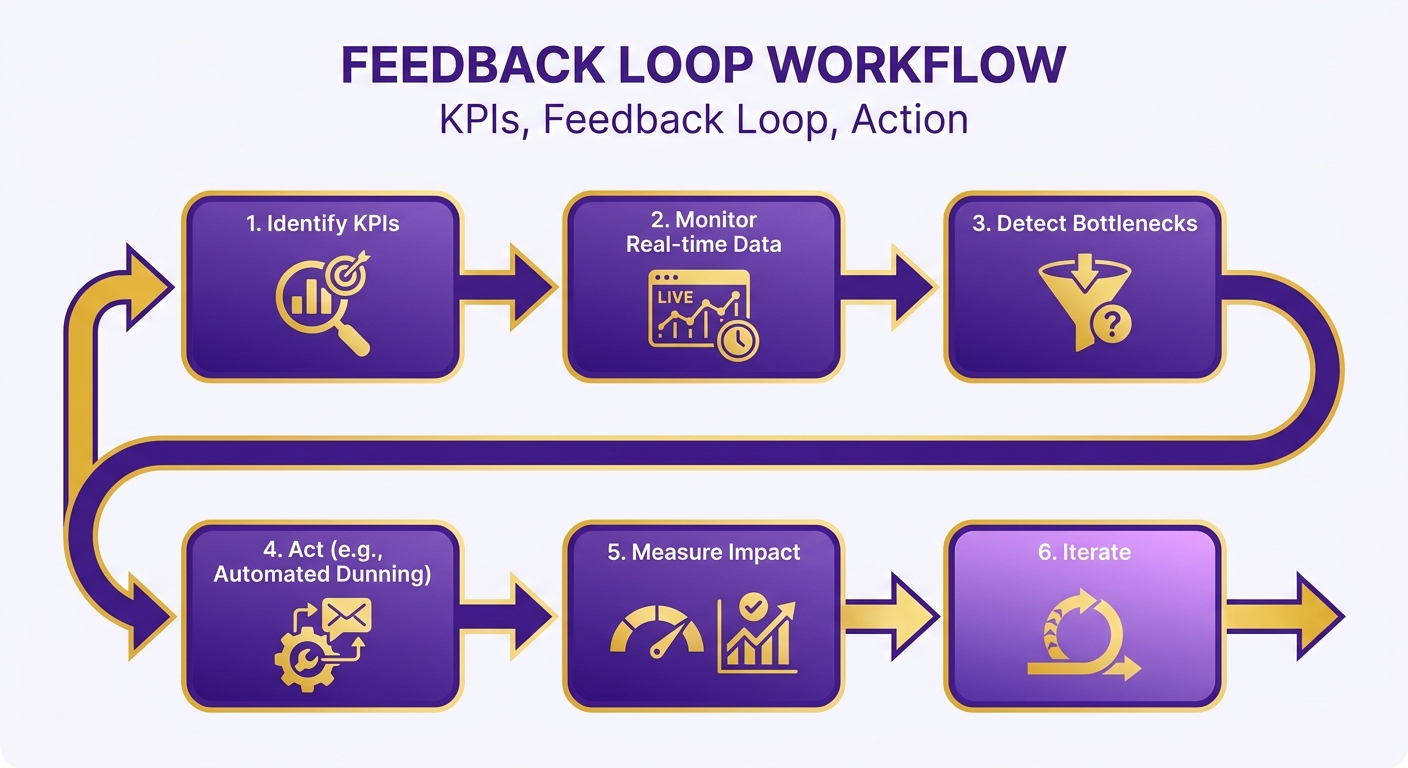
The KPIs That Actually Measure Success
Days Sales Outstanding (DSO) is your headline metric. It tells you how long cash sits uncollected after you invoice. Automation lowers DSO by cutting the manual touchpoints that slow collections, which frees up working capital you already earned.
Track these alongside it:
- Cash application rate: Share of payments matched to invoices automatically. High rate means fewer people chasing mismatches.
- Percentage of overdue invoices: Your early-warning signal. A rising figure flags at-risk accounts before they churn.
- Collection effectiveness: How much of what’s owed you actually collect within a period.
- Dispute resolution time: How fast billing disputes close, since a slow dispute quietly ages into a write-off.
For SaaS teams, watch overdue invoices by customer segment. A cluster of late payers in one cohort often signals a product or billing issue worth fixing before churn spikes.
Building the Improvement Loop
The loop is simple: review your KPIs on a fixed cadence, spot the pattern behind a stalled metric, and adjust before the next cycle. Real-time reporting makes it possible, because you see the signal as it forms.
Start with a weekly review of overdue accounts and DSO trends. When a number moves the wrong way, trace it back. Is a specific customer always late? Is one invoice type triggering disputes? That root-cause habit is what separates teams that plateau from teams that keep shaving days off DSO.
AI and machine learning sharpen the loop further. Predictive analytics flag which invoices are likely to pay late, so collections work the highest-risk accounts first. 78% of CFOs who invested in AI for accounts receivable reported a positive return, which tells you the payoff is real, not theoretical.
Real-time dashboards feed the cycle by surfacing the exact stage where cash gets stuck. When reporting connects the whole cycle in one view, a slow payer becomes an actionable task instead of a surprise.
What Trips Teams Up
The biggest trap is measuring against dirty data. Disconnected systems force manual rework, and reports built on mismatched records lie to you. Fix the data flow first, or your KPIs mislead every review.
The second trap is tracking too much. Pick four or five metrics tied to cash and churn, then act on them. A dashboard nobody reads improves nothing. Consistent review of a few numbers beats a sprawling report you skim once a quarter.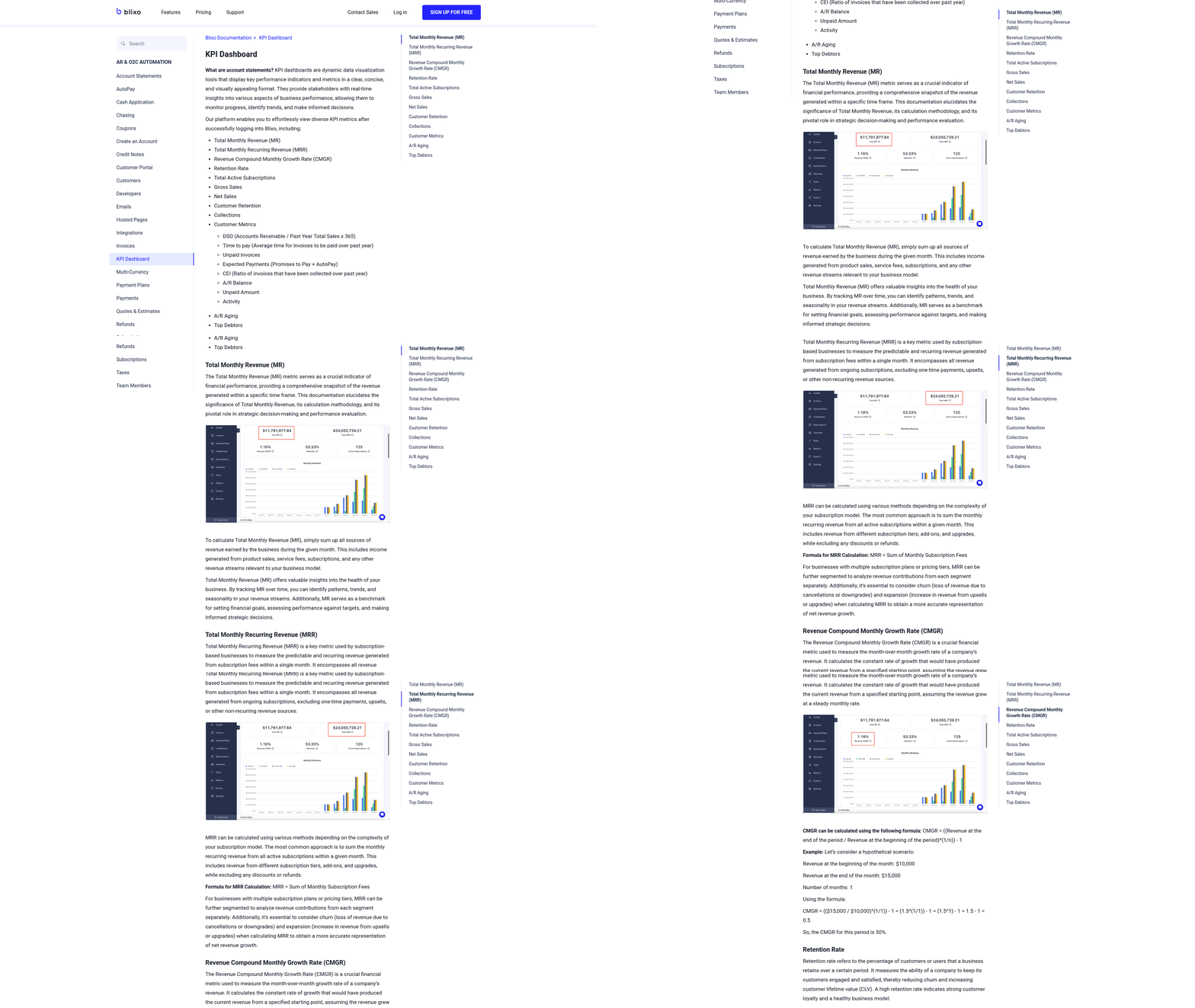
Frequently Asked Questions
1. How does automated invoice-to-cash reporting handle sales tax and multi-currency transactions?
Automated systems apply validated pricing rules during invoice generation, calculating tax and currency conversions automatically. This removes manual entry errors that corrupt downstream stages. Because reconciliation ties matched payments back to your ledger, cross-currency and tax discrepancies surface as exceptions rather than hidden month-end surprises.
2. What team size or invoice volume justifies switching from manual to automated processing?
Teams applying thousands of transactions monthly gain the clearest payoff, as manual matching costs scale significantly compared to automated processing. Even smaller SaaS teams benefit when they run disconnected systems, as unlinked invoicing and accounting tools frequently force manual reconciliation and administrative rework.
3. Can I automate only part of the invoice-to-cash cycle?
You can phase automation, but leaving the final accounting steps manual is a common pitfall. Automating only the front end of the cycle leaves you with clean receivables but a delayed ledger close, reintroducing the operational lag you meant to remove. For a single source of truth, aim to automate the entire cycle end-to-end.
4. What happens to my finance team’s roles after automation?
Staff shift from repetitive administrative tasks toward strategic analysis and resolving complex billing disputes. Automation handles routine matching, but human judgment remains essential for ambiguous cases like consolidated payments and cash forecasting. Teams typically cut manual reconciliation time significantly.
5. How do I know if my data is clean enough for automation to work?
Data quality is critical, since bad inputs at invoice generation affect every downstream stage. Validate contract records and pricing rules before scaling. Run the old and new processes in parallel for one billing cycle to confirm the numbers reconcile before you fully cut over.
6. What security and compliance features should an invoice-to-cash platform include?
Prioritize detailed audit trails, which help meet regulatory requirements and simplify compliance audits. This matters because manual cash application is a significant source of audit risk in accounts receivable when managed via spreadsheets. Platforms like Blixo also offer API integration keeping data in one auditable flow.
7. How quickly can automation recover a payment that fails on first attempt?
Automated systems can schedule immediate, intelligent retries to capture funds that fail on the first attempt, securing revenue without manual intervention. For SaaS teams, a failed charge also serves as an early indicator of potential account issues, letting you intervene before a customer cancels their subscription.