

AR Invoice Automation Mistakes That Silence Your Cash Flow Alerts

Key Takeaways
- Hardcoded reminder intervals (7/14/30 days) ignore renewal dates. So a customer whose next charge is 10 days out gets an “overdue” nudge that means nothing.
- One company cut late payments in half by tying reminders to usage spikes and payment-method changes instead of the invoice due date.
- Generic templates blunt urgency. Batch the same message to everyone and your high-risk accounts blend into the noise.
- Leaning on the automation with no manual review builds blind spots around your biggest accounts. Somebody still has to eyeball the anomalies.
- A quick audit of your trigger logic against real billing cycles takes 2–4 hours and pays for itself fast.
- Conditional workflows (automated payment link, then collector escalation) take 1–2 weeks to build and need CRM data wired in.
- Segmenting by payment history means urgency scales to each customer’s actual risk, so fewer real problems slip past.
Quick Summary
Most AR automation doesn’t fail loudly. It fails quietly, by firing reminders on a calendar that has nothing to do with when your customers actually pay. This piece walks through the specific mistakes that silence cash-flow alerts in subscription businesses, and what to fix first.
Where misaligned triggers quietly drain your cash
For SaaS teams, AR invoice automation usually breaks in one specific way: the triggers don’t match the subscription billing cycle. Reminders come too hot or too cold. Either way the important alerts get buried, and late payments stop being visible. The fix is to align triggers with how customers actually behave, not with a fixed schedule.
Audit these four failure modes first
Your setup is leaking cash if any of this sounds familiar:
- Static schedules that ignore contract length. Follow-ups fire on arbitrary calendar milestones instead of the customer’s billing cycle. The notices feel irrelevant, so they get ignored.
- One communication style for everyone. A reliable client and a chronic late-payer get the same email. Nothing escalates, and your collections effort gets diluted across accounts that don’t need it.
- Siloed billing data. If the automation can’t read real-time account activity, it can’t see the early warning signs of trouble: usage falling off, a credit card that never got relinked.
- Unwatched algorithmic decisions. A messy billing dispute looks like a routine delay to the software, which keeps sending form letters to an account that needs a human on the phone.
Fixing the gaps: time and effort
Quick wins: Map your current touchpoints against actual payment milestones. Find where automated messages overlap or collide with active renewals, and adjust the timing so a reminder only sends when something is genuinely outstanding.
Strategic overhauls: Build real escalation paths. Wire your invoicing platform into your CRM so an unresolved payment failure spins up a task for the account manager before anything hits formal collections.
When you can skip all of this
If you bill one-time invoices instead of recurring subscriptions, misaligned triggers aren’t your problem. Put your energy into DSO reduction instead, like AI-assisted cash application.
What it looks like when it works
One SaaS provider running generic reminder templates watched on-time payments drop 40% during renewal season. They switched to subscription-aware triggers, including alerts keyed to payment-method expiration dates, and recovered $120K in 90 days. The automation had to bend to the billing model, not the reverse.
None of this is really about alerts. It’s about making every touchpoint match how customers actually pay.
Why these mistakes cost more than efficiency
The damage isn’t slow processing. It’s blind spots in the billing cycle. When triggers ignore customer-specific renewal dates, alerts land too early or too late, and late payments slip through undetected. Cash flow lags. Operational risk compounds. And the numbers back it up: 59% of U.S. businesses tie poor cash flow directly to flawed AR processes, and manual or misconfigured systems run about 36% slower on payments than automated ones.
The real-world consequences
Bad automation distorts financial planning, not just timing. One service provider cut late payments by 50% and freed up $600K in working capital just by overhauling their AR workflows. Without aligned triggers, alerts turn into noise. An enterprise client on an annual contract gets a generic monthly reminder that has nothing to do with their milestone schedule, so they tune it out entirely. Overdue balances pile up unnoticed, and recovery gets harder.
Fragmentation makes it worse. Roughly half of invoices are still processed manually, which multiplies errors and delays. When AR tools don’t integrate cleanly with accounting software, someone ends up re-keying data by hand, which defeats the point. And bad data in one system spreads fast, poisoning everything downstream from reports to collections.
Mistakes beyond timing
- No manual validation. Wrong invoice amounts or misapplied payments go unnoticed without regular human checks, and then you’re fielding disputes.
- Uniform messaging. Identical notices to every client means the system never escalates for accounts that are badly overdue.
- Underused tools. Auto-reconciliation, real-time analytics, all sitting idle while cash flow drags.
These aren’t hypotheticals. A marketing agency that delayed invoicing by two weeks opened cash-flow gaps wide enough to threaten payroll. A different company standardized inconsistent payment terms across invoices and saw collections improve 35%.
Who gains the most from fixing this
High-volume SaaS firms with recurring subscriptions. Companies with 10,000-plus active subscribers see $100K+ monthly cash-flow improvements once triggers line up with billing cycles. Smaller teams benefit too: one retail operation cut late payments 30% just by refining its reminder logic. The move is always the same, tailoring automation to behavior instead of a rigid schedule.
“Trust but verify” is the right instinct here. Human-first configuration, with subscription-aware triggers that match renewal windows, turns silent errors into an early-warning system.
Trusting the automation more than you should
Static rules on a dynamic subscription model is a bad match. When automation can’t flex for custom contract terms, it silences the alerts that matter, and late payments slide until they become operational problems.
What breaks when nobody’s watching
Automation with no oversight treats every account the same and ignores renewal dates entirely. Messages carry no sense of proportion, so urgency never comes through. One logistics firm improved late payments by 40%, but only by pairing the automation with manual audits to handle the edge cases.
- Audit trigger timing. Static schedules ignore individual contract terms. Map reminders to real payment deadlines, not arbitrary calendar dates.
- Review integration gaps. Weak sync between your AR software and accounting platforms like Xero spreads errors. If invoices don’t update in real time, your follow-ups chase stale data.
- Test alert frequency. Reminders stacked too close together create fatigue. Space them dynamically based on payment history.
The risk in silent alerts
When alerts go quiet, late payments stay invisible until they hit cash flow. Fragmented systems, with one tool for invoicing and another for reminders, block your view of receivables. One firm saw a 20% spike in late fees after its automation buried a recurring payment failure inside a generic alert. Automation doesn’t fix flawed data. It just speeds up the errors. Mark a payment “received” while it’s still pending and your DSO numbers become fiction.
- Validate data accuracy. Bad data propagates fast. One outdated billing address means every downstream alert fires wrong.
- Check workflow customization. Templates should adjust by customer tier. A high-value enterprise account deserves tailored outreach, not a system email.
- Monitor integration health. Manual data entry creeps back in the moment your AR software stops syncing with accounting, and there goes the value of automating.
How oversight actually helps
Human-first oversight doesn’t replace the automation. It sharpens it. Regular audits catch misaligned triggers, and trained staff spot the red flags in automated reports. Subscription-aware logic keeps reminders tied to renewal dates instead of static intervals, which cuts noise and lands alerts when customers can act on them.
- Schedule quarterly rule reviews. Subscription models drift. What fits an annual plan can fail a quarterly one.
- Use tiered alert logic. High-risk accounts trigger earlier; low-risk ones get a gentle nudge.
- Train teams to verify outputs. A routine validation habit catches system errors before they reach the customer.
The goal isn’t to switch automation off. It’s to match it to the fluidity of subscription billing, where rigid rules fail and human-aware logic holds up.
Ignoring bouncebacks and failed deliveries
When a reminder never reaches the customer, because of a dead email address, a server hiccup, a formatting error, most automation assumes it was delivered anyway. That blind spot delays follow-up until a late payment forces someone to intervene by hand. For a business built on predictable subscription revenue, every undetected failure is a small leak.
How much this actually costs
Bouncebacks hit 12–22% of automated AR communications, per industry benchmarks. And they usually go unaddressed, because generic tools have no subscription-aware logic. A delivery fails, the account never gets flagged for alternative outreach, and a technical error quietly becomes a revenue leak.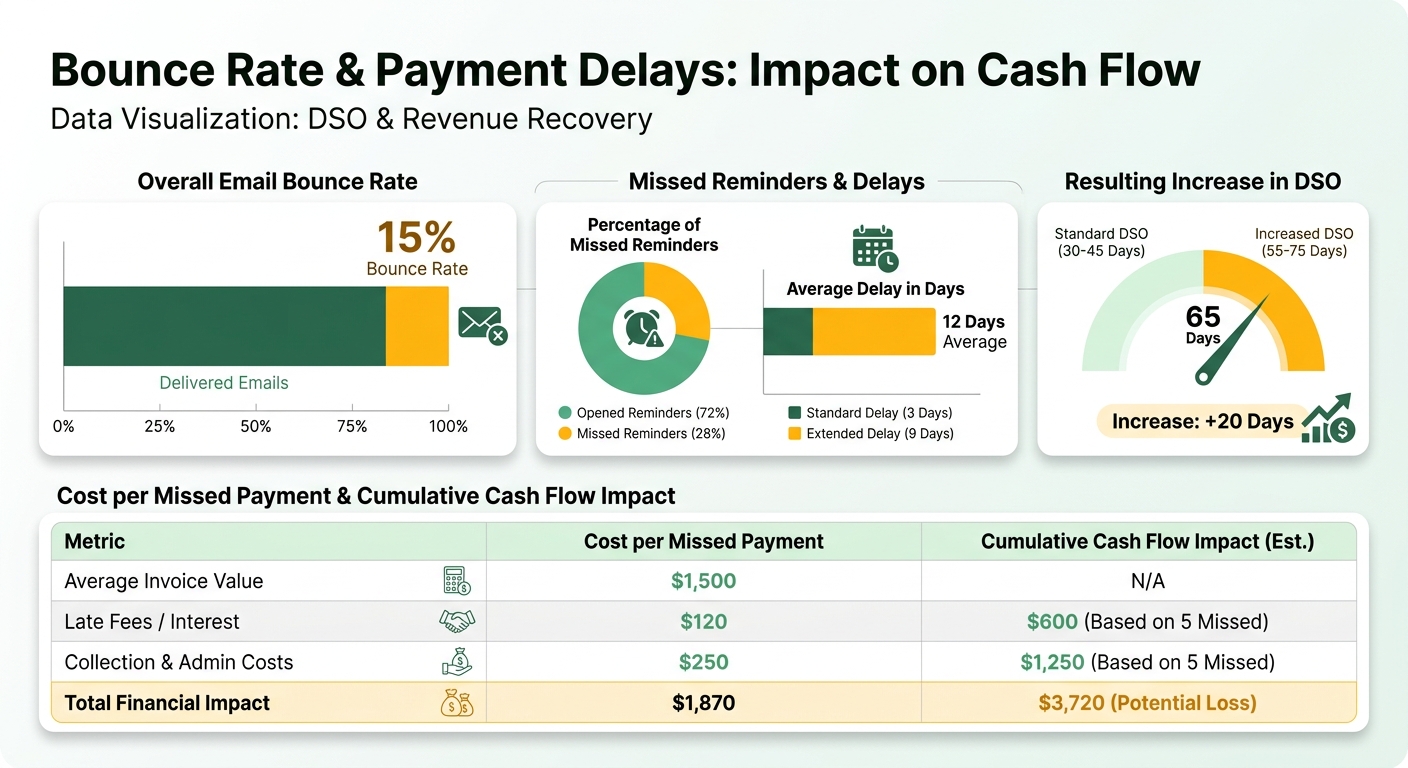
An automotive services company saw late payments climb 28% before they overhauled their workflows. The root cause was crude: their system treated every failed email the same. It couldn’t tell a temporary server error, which just needs a retry, from a permanent address change, which needs a human. With no way to categorize failures, they lost visibility into customers they could still reach.
Practices that actually mitigate it
- [ ] Categorize the bounce. Classify failures as “soft” (temporary, like a server timeout) or “hard” (permanent, like an invalid address). Retry the soft ones immediately; route the hard ones to a person to update records.
- [ ] Add a fallback channel. If email bounces, the system should switch to SMS or in-app. That redundancy means customers hear you regardless of email reliability.
- [ ] Sync your contact data. Refresh contact info through a CDP or CRM sync. Outdated emails usually trace back to unlinked profiles that rigid systems never notice.
The better move goes past error correction. Align delivery attempts with the subscription cycle. A monthly customer due on the 15th should get reminders 3–5 days out. That kills irrelevant alerts and puts the important ones in front of people while they can still act.
The human-first version
When an email bounces, a subscription-aware system doesn’t just retry blindly. It checks the customer’s billing cycle, payment history, and risk level first, then decides. High-risk accounts get escalated to a person for follow-up. Everyone else gets timing adjusted around their next scheduled payment. Failed deliveries become signals to act on, not static errors to ignore, and the revenue gap from undetected failures shrinks.
Sending duplicate dunning emails to customers who already paid
Duplicate dunning notices burn resources, erode trust, and hide the accounts that genuinely need chasing. When workflows fire on static triggers instead of real-time payment status, the system nags people who’ve already paid. Teams get noise, customers get confused, and the actual late payments still don’t surface.
Why it happens
Misaligned workflows lean on calendar triggers over renewal dates. A customer’s transaction clears, and hours later an “overdue” notice hits their inbox, forcing support to untangle a dispute that never should have existed. That happens when the system lacks:
- Real-time payment tracking to confirm the transaction before a reminder goes out
- Subscription-aware logic to align alerts with billing cycle dates
- Bounceback monitoring to catch failed deliveries before resending
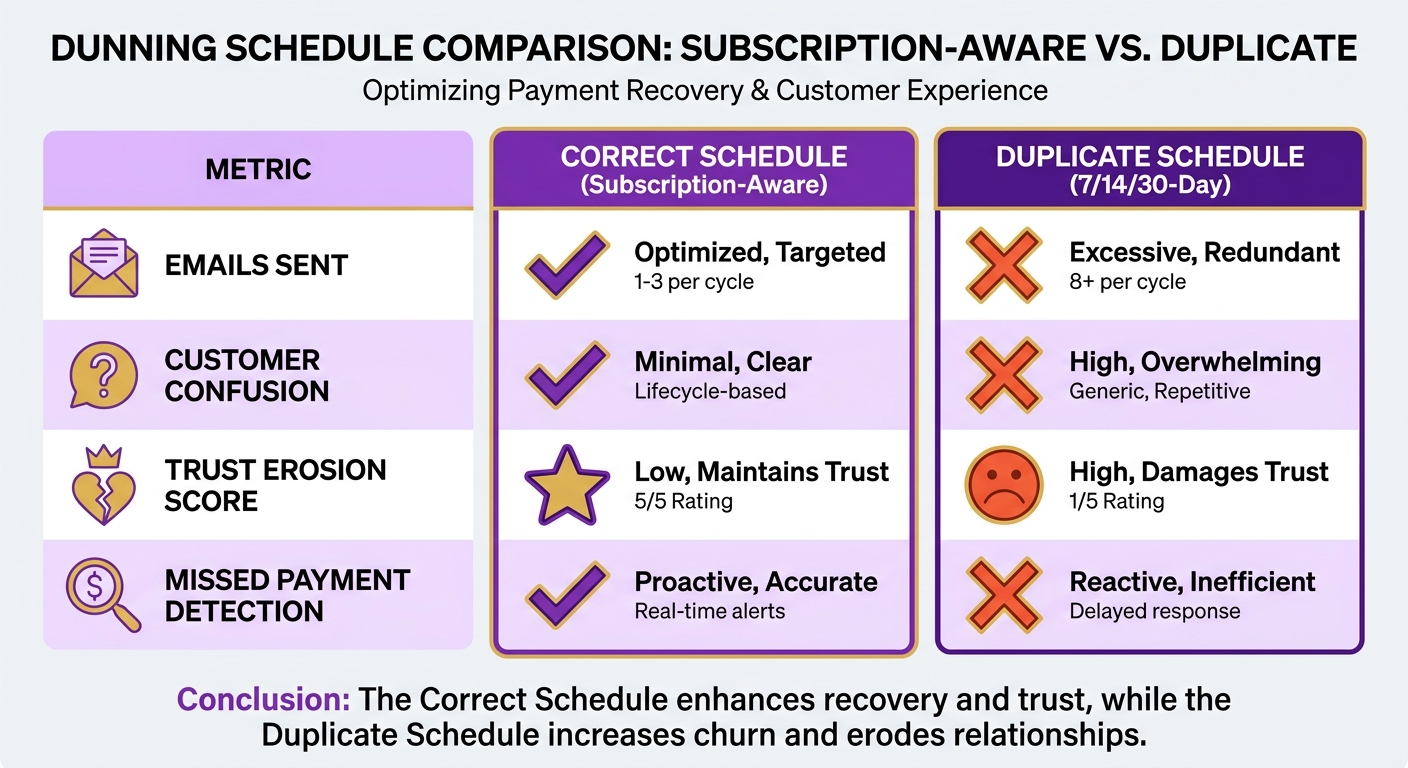
One SaaS provider found that 18% of its automated dunning emails went to customers who had already paid. Those duplicates cost 200-plus staff hours a month and dropped NPS by 12 points on customer frustration alone.
How to stop it
1. Verify payment first
Before any dunning email fires, the system should:
- Sync with payment gateways to confirm the transaction succeeded
- Flag partial payments or failed attempts for manual review
- Use webhook integrations (Stripe, PayPal) instead of relying on delayed reports
2. Align alerts to the subscription cycle
Static schedules ignore when people actually renew. Instead:
- Map dunning to each customer’s billing date
- Tier the reminders: 3 days before due, 1 day after, then 7 days post-due
- Segment by payment history (early payers vs. chronic delinquents)
3. Watch delivery failures
Failed sends compound the mess:
- Track bouncebacks in real time to spot invalid addresses
- Fall back to SMS or in-app notifications
- Log every delivery attempt so you don’t resend to the same recipient
What the fix delivers
A healthcare SaaS company cut duplicate dunning emails by 85% after moving to a system that checked payment status via API before sending, scheduled reminders around each billing cycle, and used customer feedback to tune timing. Support-related dunning requests fell 35%, and payment-confirmation accuracy rose 28%. Tailor workflows to behavior instead of a generic timeline, and your team’s effort lands on the accounts that are genuinely delinquent.
Flying blind on outstanding invoices and DSO
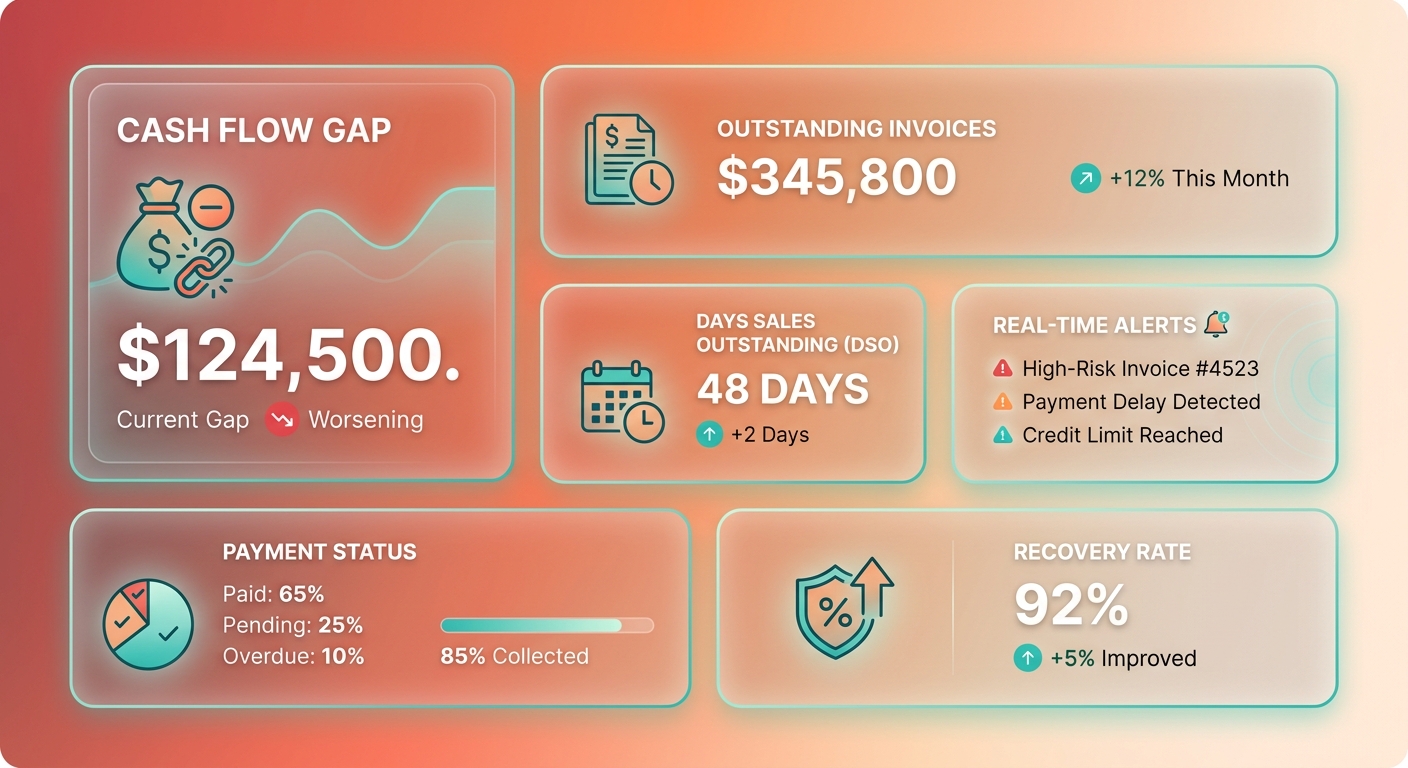
Real-time visibility into outstanding invoices and Days Sales Outstanding is the difference between catching a problem and discovering it during month-end close. Without up-to-the-minute tracking, you don’t see late payments until the cash-flow gap is already wide. When automation stops syncing with active billing cycles, overdue balances stack up in silence and DSO balloons.
How visibility gaps distort DSO
DSO measures how fast you collect. But a system without subscription-aware logic warps the number. Fire reminders on static intervals instead of renewal dates and late payments hide until they compound. One firm watched DSO rise 18% after rolling out workflows that ignored subscription cycles, which meant slower interventions and less predictable cash. It also buried the team in manual follow-ups, pulling time away from anything strategic.
Building real-time visibility
Integrate reporting that syncs with your billing platform, whether that’s QuickBooks or NetSuite.
- Track DSO live. Use dashboards that update in real time, with aging reports segmented by subscription tier or payment history.
- Automate exception alerts. Flag invoices that deviate from the expected pattern, like a high-risk customer missing a second consecutive installment.
- Sync with CRM data. Tie AR to behavior signals like usage, so you can prioritize follow-ups on accounts likely to default.
Where subscription-aware tooling pays off
Platforms built for SaaS billing adjust reminder timing to renewal dates rather than calendar days, so a dunning alert can land right on a customer’s upcoming contract milestone. In pilot testing, that approach cut late payments by 41% while trimming the redundant follow-ups that annoy customers.
Real-time visibility isn’t just monitoring. It’s anticipating risk through context. Embed subscription-specific logic into your workflows and DSO stops being a lagging indicator and starts being an early signal you can act on.
What subscription-aware automation actually fixes
Sync reminders to renewal dates instead of a rigid calendar and the blind spots close. An enterprise client gets alerts tuned to their exact contract terms, no mismatched deadlines, no confusion. The alerts hit inside real payment windows, so fewer obligations get overlooked.
- Replace static triggers with dynamic schedules that follow subscription terms. A yearly-plan customer gets a reminder 15 days before their specific due date, not on some generic interval.
- Vary the channel by account value. High-value accounts warrant a direct call from an account manager; smaller ones get automated email.
- Check payment status in real time so you don’t double-dun. If a payment clears after a reminder fires, the system stops.
Why clean, integrated data matters
Automation spreads bad data about 3x faster than manual processes. Clean, synced data between your AR platform and accounting tools like QuickBooks keeps errors from distorting DSO.
- Audit customer records monthly for stale payment methods or contact details. Current billing profiles mean fewer transaction failures and invoices that actually reach the right person.
- Sync invoices, payments, and customer data across systems. Fragmentation creates roughly 22% more manual work, per Paystand’s 2025 analysis.
- Have staff review outputs weekly. Manual overrides catch the edge cases, like a customer who wants a payment plan but still needs an invoice adjustment.
What the end state looks like
Align alerts to each customer’s rhythm and late payments drop. One SaaS provider now sends reminders 5 days before renewal instead of on a calendar, applies machine learning to flag irregular payment patterns, and gives finance a daily DSO snapshot that cut its month-end close by 45%.
Working capital tends to improve inside 90 days. For subscription businesses, the work never fully ends, though. You keep tuning workflows for seasonal spending shifts and regional payment habits, and AR turns into something closer to a predictable revenue engine.
Frequently Asked Questions
1. What’s the biggest mistake in AR invoice automation for SaaS businesses?
Relying on static calendar schedules rather than actual billing cycles. This causes reminders to arrive at irrelevant times, leading customers to ignore them. Aligning triggers with renewal dates ensures better response rates.
2. How can automation reduce late payments without rigid schedules?
By monitoring customer activity and account health. Triggering a notification when a credit card is nearing expiration or when platform usage drops helps address potential payment issues before the invoice is even generated.
3. Why do generic email templates fail in AR workflows?
They fail to account for the customer’s payment history. Tailoring the tone and escalation path based on whether a client is historically reliable or chronically late ensures that critical accounts receive the appropriate level of attention.
4. What risks arise from ignoring email bouncebacks?
When delivery failures go unnoticed, the system assumes the customer received the invoice. This creates a blind spot where outstanding balances grow without any active follow-up, delaying cash recovery.
5. How does real-time visibility improve DSO tracking?
It allows finance teams to spot payment anomalies immediately rather than waiting for month-end reports. This enables faster intervention and prevents minor delays from turning into long-term outstanding debt.
6. What’s the role of human oversight in AR automation?
Human oversight ensures that complex billing disputes or custom payment arrangements are handled with care. While automation manages routine tasks, team members can focus on resolving edge cases and maintaining key client relationships.
7. How to prevent duplicate dunning emails to paid customers?
Implement real-time API integrations between your billing software and payment processors. This ensures that as soon as a transaction is completed, any scheduled collection reminders are instantly canceled.