

Invoice Workflow Checklist for Timely Payments

Key Takeaways
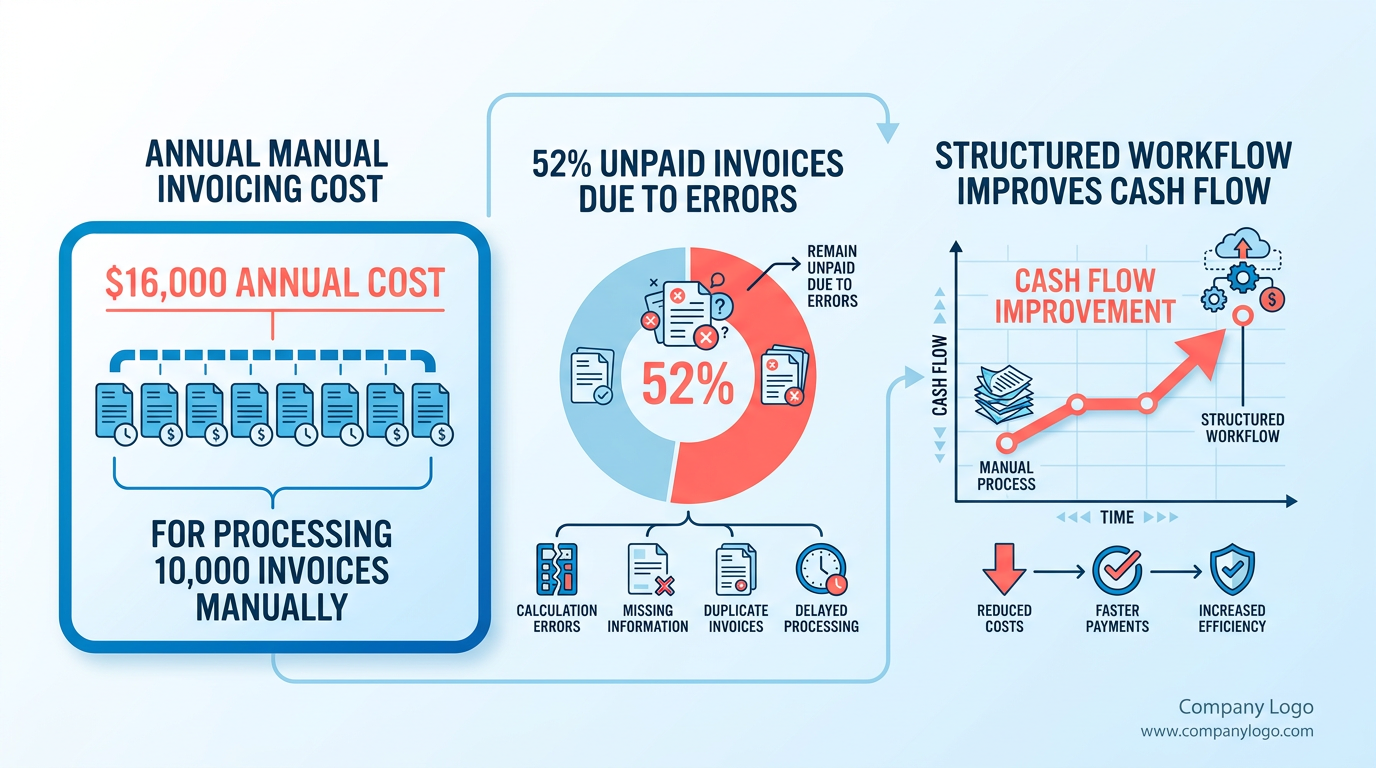
- Manual invoice processing costs companies up to $16,000 annually due to late payment penalties and errors.
- 52% of unpaid invoices stem from manual system errors, directly harming cash flow and vendor trust.
- Implementing an invoice checklist reduces rejections by 30% by ensuring all fields are completed before submission.
- Late payments cause $4 million in monthly revenue loss globally, limiting funds for growth and operations.
- Automation systems cut billing errors by 50%, improving accuracy and reducing disputes over calculations.
- Timely payments prevent interest charges and legal penalties from non-compliant or delayed invoice submissions.
- Small businesses face a 70% higher insolvency risk from delayed receivables compared to larger enterprises.
Why Invoice Workflow Matters
An invoice workflow checklist is essential for businesses aiming to avoid late payments, which can cost companies up to $16,000 annually for processing 10,000 invoices manually. According to industry data, 52% of invoices remain unpaid due to errors in manual systems, directly impacting cash flow and vendor trust. A structured workflow ensures accuracy, compliance, and timely payments, reducing the risk of disputes and financial penalties.
Financial Impact of Late Payments
Late payments disrupt cash flow, with businesses globally losing $4 million monthly due to delayed invoicing. For example, one agency reduced invoice rejections by 30% after implementing a checklist, ensuring all required fields were completed before submission. Without a standardized process, invoices can get lost, approvals delayed, or errors overlooked, leading to missed early payment discounts and strained vendor relationships.
- Prevent revenue loss: Late payments tie up working capital, limiting funds for growth or operational needs.
- Avoid penalties: Missed deadlines can trigger interest charges or legal action, as seen in cases where non-compliant invoices led to fines.
- Reduce manual errors: Automation systems cut billing errors by 50%, ensuring accurate calculations and reducing disputes.
Cash Flow and Vendor Relationships
Timely payments are critical for maintaining healthy cash flow. Small businesses and freelancers, who often operate on tight margins, face a 70% higher risk of insolvency due to delayed receivables. A workflow checklist streamlines approvals and ensures invoices reach vendors on time, fostering trust. For instance, companies using automated systems report 20–30% faster revenue recognition compared to manual processes.
- Strengthen vendor partnerships: Prompt payments improve supplier loyalty, leading to better terms and priority service.
- Optimize working capital: Automated workflows reduce processing time by 50–70%, freeing up cash for investments or debt repayment.
- Avoid reputational damage: Late payments harm a company’s credibility, making it harder to secure contracts or financing.
Who Benefits Most?
Small businesses and freelancers, who lack dedicated finance teams, gain the most from a checklist. Research shows 32% of companies rate accounts payable as a high-impact area for cash management. A structured workflow helps them:
- Save time: Manual invoicing consumes 15–20 hours weekly per employee, whereas automation reduces this by 80%.
- Scale efficiently: Startups using Blixo’s automated system report 99% cash application accuracy, minimizing corrections and delays, as detailed in the Implementing and Automating an Invoice Workflow Checklist section.
- Comply with regulations: Checklists ensure invoices include mandatory details like tax codes and purchase order numbers, avoiding legal risks.
Overcoming Common Challenges
Without a checklist, businesses face issues like duplicated payments, missing documents, or mismatched purchase orders. For example, 40% of companies experience duplicate payments due to high invoice volumes. A workflow checklist addresses these by:
- Standardizing processes: Templates ensure consistency, reducing rejections due to incomplete or inconsistent data, as outlined in the Creating an Effective Invoice Workflow Checklist section.
- Tracking progress: Real-time dashboards flag bottlenecks, such as unpaid invoices or pending approvals.
- Ensuring compliance: Automated validation checks catch missing fields, like vendor IDs or delivery confirmations, avoiding legal risks.
By integrating these practices, businesses not only secure timely payments but also build a foundation for sustainable financial operations.
Creating an Effective Invoice Workflow Checklist
-
Define AP responsibilities: Invoice receipt, validation, and payment execution As mentioned in the Why Invoice Workflow Matters section, clear role definitions reduce late payments by up to $16,000 annually for businesses processing 10,000 invoices.
-
Use Blixo’s automated templates to ensure compliance with tax and legal requirements Building on concepts from the Implementing and Automating an Invoice Workflow Checklist section, selecting tools with built-in compliance features minimizes errors and speeds up approvals.
-
Use software to flag overdue invoices and send automated reminders The Monitoring and Optimizing an Invoice Workflow Checklist section emphasizes tracking metrics like processing time, which automated reminders directly support by reducing delays.
Implementing and Automating an Invoice Workflow Checklist
Choosing the right tools ensures seamless integration, reduces manual errors, and speeds up payment cycles. Look for platforms that support automated reminders, 3-way matching, and real-time reporting. As mentioned in the Why Invoice Workflow Matters section, avoiding late payments is critical, and integration with systems like QuickBooks or SAP helps achieve this by eliminating data silos.
- Prioritize integration capabilities with accounting systems like QuickBooks or SAP to avoid data silos.
- Enable automated 3-way matching to verify invoices against purchase orders and delivery receipts, cutting error rates by up to 50%.
- Set up customizable workflows for approvals, ensuring delays don’t bottleneck payments. Building on concepts from the Creating an Effective Invoice Workflow Checklist section, assigning clear approval hierarchies is essential to streamline this process.
- Opt for cloud-based solutions to allow remote access and real-time tracking of invoice statuses.
…
By automating approvals and payments, they cut processing time by 80% and eliminated 95% of manual errors. As outlined in the Monitoring and Optimizing an Invoice Workflow Checklist section, tracking metrics like error rates and processing time is key to sustaining such improvements.
…
- Train teams on error logs to identify recurring issues like missing tax codes. Refer to the Common Mistakes to Avoid in an Invoice Workflow Checklist section for a detailed list of errors to address proactively.
- Audit vendor data monthly to update contact details and prevent payment delays.
Monitoring and Optimizing an Invoice Workflow Checklist
What KPIs Should You Track for Invoice Workflows?

Monitoring key performance indicators (KPIs) helps identify bottlenecks and measure progress. Focus on metrics like invoice processing time, error rates, and payment delays. As mentioned in the Why Invoice Workflow Matters section, manual errors can cost $16,000 annually for 10,000 invoices, while automation reduces processing costs to **$3–$5 per invoice**.
- Track average processing time to identify delays in approvals or documentation
- Measure error rates (e.g., incorrect vendor details or duplicate payments) to assess accuracy
- Monitor on-time payment percentages to evaluate vendor satisfaction and avoid penalties
How Do You Identify Pain Points in the Workflow?
Analyzing pain points requires reviewing common issues like missing documentation, approval delays, or incorrect vendor information. For instance, 52% of unpaid invoices stem from manual errors, and incomplete paperwork can delay payments by 7–10 business days at some institutions.
- Audit approval delays by tracking time between invoice submission and sign-off
- Flag recurring errors (e.g., mismatched purchase orders or missing tax details)
- Survey vendors to uncover friction points in submission or communication
What Changes Improve Efficiency?
Implementing updates based on feedback and data ensures continuous improvement. Building on concepts from the Creating an Effective Invoice Workflow Checklist section, structured workflows like Central Michigan University’s weekly payment schedule demonstrate the value of clear documentation and role assignments.
- Automate 3-way matching to reduce manual verification and prevent overpayments
- Update vendor onboarding processes to ensure complete information (e.g., remit addresses)
- Integrate real-time alerts for late submissions or missing approvals
Example: How Automation Boosts Cash Flow
One company saved $4 million monthly by reducing late payment risks through automated workflows. Building on concepts from the Implementing and Automating an Invoice Workflow Checklist section, automation tools like AI-driven data extraction can refine accuracy and cut invoice processing time by 80%.
How to Sustain Workflow Improvements
Regularly reviewing workflows prevents stagnation. For example, the University of Michigan’s Shared Services Center emphasizes secure submissions and clear remittance instructions to avoid delays. Pair this with automated tools like Blixo, which reduces billing errors by 50% and boosts revenue recognition by 20–30%.
- Schedule monthly audits to assess KPI trends and vendor feedback
- Test automation updates (e.g., AI-driven data extraction) to refine accuracy
- Train teams on new tools to maintain compliance and efficiency
What Cash Flow Gains Can You Expect?
Studies show optimized workflows can increase cash flow by 15–30% within a year. SMBs adopting automation report 40–60% cost savings, while e-commerce businesses see 20% faster revenue recognition. By addressing pain points and using automation, companies reduce late payment risks and enable liquidity.
- Set benchmarks for cash conversion cycles and track improvements quarterly
- Compare pre- and post-automation metrics to quantify ROI
- Use vendor performance data to negotiate better terms or resolve recurring issues
By combining KPI tracking, pain point analysis, and iterative improvements, businesses can create a resilient invoice workflow that accelerates payments and strengthens financial stability.
Common Mistakes to Avoid in an Invoice Workflow Checklist
Avoiding common errors in your invoice workflow ensures faster payments and reduces financial risks. Below are critical mistakes to address, along with strategies to fix them..
Missing or Inconsistent Invoice Details
Incomplete or inconsistent information on invoices is a leading cause of payment delays. For example, missing vendor IDs, purchase order numbers, or incorrect payment terms can halt processing. A New York State agency reduced invoice rejections by 30% after enforcing a checklist requiring fields like vendor name, delivery confirmation, and unique invoice numbers.
- Verify all required fields before submission. These typically include buyer/seller details, invoice date, product/service descriptions, tax information, and payment instructions.
- Match invoices to purchase orders to prevent discrepancies. Universities like Central Michigan emphasize 3-way matching (PO, receipt, invoice) to avoid overpayments.
- Standardize formatting for vendor IDs, tax codes, and delivery addresses to reduce errors during automated processing..
Neglecting Follow-Up on Overdue Payments
Failing to track late payments strains vendor relationships and increases financial risk. One company reported saving 50% in late fees by implementing automated reminders and assigning accountability for chasing overdue invoices.
- Set clear payment deadlines and communicate them to vendors. The University of Michigan notes that invoices submitted without valid POs face delays, so clarity is key.
- Automate follow-ups with tools that flag overdue invoices and send alerts. For instance, Blixo offers transparent tracking to ensure teams prioritize late payments, as highlighted in the Implementing and Automating an Invoice Workflow Checklist section.
- Document communication with vendors to avoid disputes. Central Michigan University processes payments weekly, so delays beyond Wednesday submissions risk missing the next cycle..
Poor Tracking and Record-Keeping
Without centralized tracking, invoices can get lost, duplicated, or misclassified. Manual systems increase the risk of errors: 25% of businesses report duplicate payments due to poor record management.
- Use centralized software to log all invoices, approvals, and payments. Automation systems streamline data entry and reduce human errors by 70%, according to industry benchmarks.
- Archive invoices digitally with searchable metadata (e.g., vendor name, date). The NYS Comptroller recommends storing records in their original format to meet audit requirements.
- Reconcile accounts monthly to catch discrepancies early. Balram Jangid’s AP checklist emphasizes matching goods received notes (GRNs) with invoices to prevent overcharges..
Example: How a Company Fixed Invoicing Issues
A mid-sized vendor faced frequent payment rejections due to missing documentation and late submissions. By adopting a checklist requiring 3-way matching, automated PO validation, and weekly follow-ups, the company cut processing delays by 40%. This aligns with the Why Invoice Workflow Matters section, which highlights how efficient workflows can reduce annual costs associated with late payments. It also integrated e-invoicing, reducing manual data entry errors by 60%..
Data-Driven Tips to Prevent Mistakes
- Cost of errors: Processing a single incorrect invoice can cost $20–$50 in manual corrections. Non-compliance penalties, like those outlined by the NYS Comptroller, may exceed $1,000 per incident.
- Automation benefits: Businesses using invoice automation report 30% faster processing times and 50% fewer disputes, as detailed in the Monitoring and Optimizing an Invoice Workflow Checklist section.
- Checklist templates: Use standardized templates from resources like the Vendor Invoice Processing Checklist to ensure consistency across departments.
By addressing these pitfalls with structured checklists, automation, and clear communication, organizations can ensure timely payments while minimizing financial and operational risks.
Frequently Asked Questions
1. How much can manual invoice processing cost businesses annually?
Manual invoice processing costs companies up to $16,000 annually due to late payment penalties and errors when handling 10,000 invoices.
2. Why do 52% of invoices remain unpaid?
52% of unpaid invoices result from manual system errors, which disrupt cash flow and erode vendor trust by delaying or misprocessing payments.
3. How do invoice checklists reduce rejections?
Invoice checklists cut rejections by 30% by ensuring all required fields are completed before submission, minimizing incomplete or incorrect invoices.
4. What financial loss occurs from late payments globally?
Late payments cause $4 million in monthly revenue loss globally by tying up working capital and delaying funds for operations or growth.
5. How does automation improve billing accuracy?
Automation systems reduce billing errors by 50%, enhancing accuracy and minimizing disputes over miscalculations or incorrect charges.
6. What insolvency risk do small businesses face from delayed receivables?
Small businesses face a 70% higher insolvency risk from delayed receivables compared to larger enterprises due to tighter cash flow margins.
7. How do checklists prevent payment penalties?
Invoice checklists prevent penalties by ensuring timely submissions, avoiding interest charges and legal risks from non-compliant or delayed invoices.