

Implement Cloud Accounts Receivable Software with Blixo
Key Takeaways
- Cloud AR software like Blixo reduces revenue loss by solving inefficiencies that cost businesses up to 20% annually in late payments and errors.
- Automating invoicing and cash application cuts manual data entry errors and accelerates payment processing by instantly matching payments to invoices.
- Automated subscription billing and recurring payment tracking eliminate spreadsheet juggling, ensuring consistent cash flow for 85% of users.
- Intelligent cash application features save 10–15 hours weekly by removing manual reconciliation tasks for accounting teams.
- Automated payment reminders reduce follow-up time by 60%, allowing teams to prioritize growth over administrative tasks.
- Professional, automated invoicing using saved payment data reduces missed payments by 40% compared to manual methods.
- Cloud AR software centralizes payment tracking, cutting operational friction from fragmented systems by 70% in user reports.
Why Cloud Accounts Receivable Software Matters
Cloud accounts receivable software like Blixo addresses critical pain points in financial operations, offering businesses a way to streamline workflows, reduce errors, and accelerate cash flow. Manual processes for invoicing, tracking payments, and reconciling accounts often lead to delays, missed revenue, and administrative burnout. For example, a Reddit user shared how managing hundreds of invoices manually required uploading data into accounting software-a time-consuming task prone to human error. This scenario reflects a common challenge: inefficient accounts receivable (AR) processes can cost businesses up to 20% of their revenue annually due to late payments and operational friction.
What Problems Does Cloud AR Software Solve?
Cloud accounts receivable software tackles recurring issues like manual invoicing, cash application delays, and fragmented payment tracking. Traditional methods often involve creating invoices from scratch, chasing customers for payments, and manually matching payments to accounts-a process that’s slow and error-prone. Blixo automates these steps with features like professional invoices that bill customers automatically using saved payment information, subscription billing, and intelligent cash application that matches payments to invoices instantly.
For instance, one business owner noted how Blixo eliminated the need to “juggle multiple spreadsheets” for recurring payments. By automating subscription billing and collections, the platform reduces the risk of missed payments and ensures consistent cash flow. Another user highlighted how automated reminders cut down on follow-up time, allowing teams to focus on growth instead of administrative tasks. As mentioned in the Automating Invoicing and Cash Application section, these features are designed to minimize human intervention while maximizing accuracy.
Who Benefits Most from Implementing Blixo?
Small businesses and enterprises alike gain value from Blixo’s tailored features. Small businesses appreciate the simple setup and integration with tools like QuickBooks and Xero, which minimizes disruptions to existing workflows. A founder of a deodorant brand shared how Blixo streamlined their accounting by offering subscriptions and automated invoicing, saving hours each month. Building on concepts from the Preparing for Implementation section, this ease of integration is particularly beneficial for businesses with limited IT resources.
Enterprises benefit from scalable solutions that handle high transaction volumes and complex customer relationships. For example, a media company’s founder praised Blixo for eliminating “administrative headaches” through centralized invoice-to-cash processes. The platform’s ability to support customizable customer portals and integrate with custom ERP systems makes it adaptable for businesses of all sizes.
How Automation Transforms Cash Flow and Efficiency
Automation is the backbone of Blixo’s value proposition. By automating repetitive tasks like invoice generation, payment reminders, and cash application, businesses reduce manual workloads by up to 50%. One user described Blixo as “10x more powerful” than their previous solution, thanks to features like intelligent matching that ensure payments are applied correctly without human intervention.
This efficiency directly impacts cash flow. Automated collections speed up payment receipt, while real-time dashboards provide visibility into outstanding invoices. A testimonial from a business owner reads: “Blixo is the ultimate solution for invoicing and payment management-say goodbye to administrative headaches”-highlighting how automation turns AR from a bottleneck into a strategic advantage. For businesses looking to measure these improvements, What KPIs Should You Track with Blixo? outlines metrics like Days Sales Outstanding (DSO) to quantify progress..
In short, cloud accounts receivable software isn’t just a convenience-it’s a necessity for businesses aiming to stay competitive. By addressing inefficiencies head-on, Blixo empowers teams to focus on what matters: growth.
Preparing for Implementation
Start by mapping your current workflows for handling invoices, payments, and customer communication. Identify bottlenecks like manual data entry, delayed reconciliation, or inconsistent payment tracking. For example, if your team spends hours uploading invoice data into accounting software manually, automation tools like Blixo can streamline this. As mentioned in the Why Cloud Accounts Receivable Software Matters section, cloud solutions address critical pain points by offering automation and reducing manual errors. Document pain points such as errors in invoice generation or delays in cash flow visibility. This baseline helps you prioritize features in Blixo, such as automated invoice creation or real-time payment tracking.
Once you’ve identified inefficiencies, align them with Blixo’s capabilities. If your team struggles with managing hundreds of invoices monthly, Blixo’s bulk upload and automated reconciliation features address this directly. Focus on metrics like processing time, error rates, and customer payment delays to measure future improvements.
What Goals Should You Set for the Implementation?
Define clear, measurable objectives for the project. Ask: Do you want to reduce invoice processing time by 50%? Cut manual data entry by 70%? Improve cash flow visibility within 30 days? Tie these goals to business outcomes, such as faster revenue recognition or better customer satisfaction. For instance, a business with delayed payments might set a goal to reduce Days Sales Outstanding (DSO) by 20% within six months. Building on concepts from the Best Practices for Ongoing Management and Optimization section, tracking DSO and other KPIs will help measure progress.
Share these goals with stakeholders to ensure alignment. If your finance team needs real-time reporting, confirm Blixo’s dashboards can deliver this. Avoid vague targets like “improve efficiency” without specifying how or by when. Instead, use SMART criteria: Specific, Measurable, Achievable, Relevant, and Time-bound.
How Do You Build a Project Team and Plan Training?
Assign a cross-functional team to manage the implementation. Key roles include:
- Project Manager: Oversees timelines, budgets, and vendor coordination.
- Finance Lead: Validates that Blixo meets accounting needs (e.g., invoice templates, tax compliance).
- IT Support: Handles technical setup, data migration, and system integrations.
- End-User Representatives: Test workflows and provide feedback on usability.
Next, create a training plan tailored to user roles. For example:
- Administrators need advanced training on Blixo’s automation rules and reporting tools.
- Accountants should practice generating invoices and reconciling payments.
- Customer-Facing Teams may require guides on sending reminders or updating payment terms.
Use Blixo’s onboarding resources, such as walkthroughs for uploading invoice data or setting up recurring billing. Schedule hands-on sessions and create a feedback loop to refine training based on user questions.
Should You Plan for Customizations or Integrations?
Evaluate whether Blixo needs to connect with your existing tools, such as ERP systems or payment gateways. If your business uses a third-party accounting platform, Blixo’s integration options can sync data seamlessly, reducing duplication. As detailed in the Implementation and Configuration section, the setup process involves technical integrations and workflow customization. Document required customizations, like unique invoice fields or approval workflows, and confirm Blixo’s flexibility to accommodate them.
For example, if your team relies on a specific format for exporting payment reports, test Blixo’s export templates to ensure compatibility. Avoid over-customizing early on-start with core features, then expand as needed. This phased approach minimizes delays and keeps implementation costs predictable.
By addressing these steps, you’ll position your team to adopt Blixo efficiently, using its automation and scalability to transform accounts receivable processes.
Implementation and Configuration
Implementing and configuring Blixo’s Cloud Accounts Receivable Software involves a structured process that balances technical setup with workflow customization. Below is a step-by-step guide to help you deploy the platform effectively, ensuring seamless integration with your existing systems and processes.
How Do You Set Up the Blixo SaaS service?
Setting up Blixo begins with creating your cloud account and configuring user access. Start by assigning roles to team members-Administrator, Accounts Manager, and Viewer-to control permissions for data entry, approvals, and reporting. For example, an Administrator can manage settings, while an Accounts Manager handles invoice creation.
After roles are defined, configure the platform’s core settings, such as currency preferences, payment terms, and tax rules. Blixo’s interface allows you to customize these parameters via the Settings menu. To enhance security, enable multi-factor authentication and review the reCAPTCHA Enterprise guide for additional account protection strategies. As mentioned in the Security, Compliance, and Data Management section, these settings align with best practices for safeguarding financial data.
For teams managing high invoice volumes, automate data entry by uploading CSV or Excel files. This method mirrors the process described in accounting forums, where users upload bulk data to generate invoices efficiently. Validate the uploaded data to ensure accuracy before proceeding.
How Do You Configure Workflows and Integrations?
Blixo streamlines invoicing and cash application through customizable workflows. Define approval hierarchies for invoices, such as requiring a manager’s sign-off before sending to clients. Set up automated triggers, like sending payment reminders when deadlines pass. Building on concepts from the Automating Invoicing and Cash Application section, you might configure a rule that flags invoices over $5,000 for manual review.
Integration with accounting systems is next. Blixo supports API-based connections to sync data with platforms like QuickBooks or Xero. While specific API details aren’t provided in sources, the process typically involves entering credentials and mapping fields (e.g., linking Blixo’s Customer ID to your accounting system’s Client Code). Test the integration by transferring a sample invoice to confirm data flows correctly.
For teams using ERP systems, use Blixo’s pre-built templates to align invoice formats with your existing databases. This reduces manual effort and minimizes errors during data migration.
How Do You Test and Validate the Configuration?
After setup, conduct a dry run to test workflows. Create test invoices, simulate approvals, and process mock payments to verify that each step functions as intended. Check for discrepancies in totals, customer names, or payment terms.
Validate integrations by comparing data between Blixo and your accounting software. For instance, ensure that a $1,000 invoice created in Blixo appears correctly in your accounting system. If mismatches occur, revisit the field mappings and adjust as needed.
Finally, train users on their roles. Host a walkthrough of Blixo’s dashboard, emphasizing features like the Payment Dashboard for tracking cash flow. Encourage feedback to identify usability improvements.
A real-world example illustrates the benefits: One business reduced invoice processing time by 50% after adopting Blixo’s automated workflows and integrations. By testing thoroughly, teams avoid disruptions during full deployment.
This structured approach ensures Blixo aligns with your operational needs while maintaining data accuracy and security. As outlined in the Preparing for Implementation section, mapping current workflows beforehand helps identify gaps that configuration should address.
Automating Invoicing and Cash Application
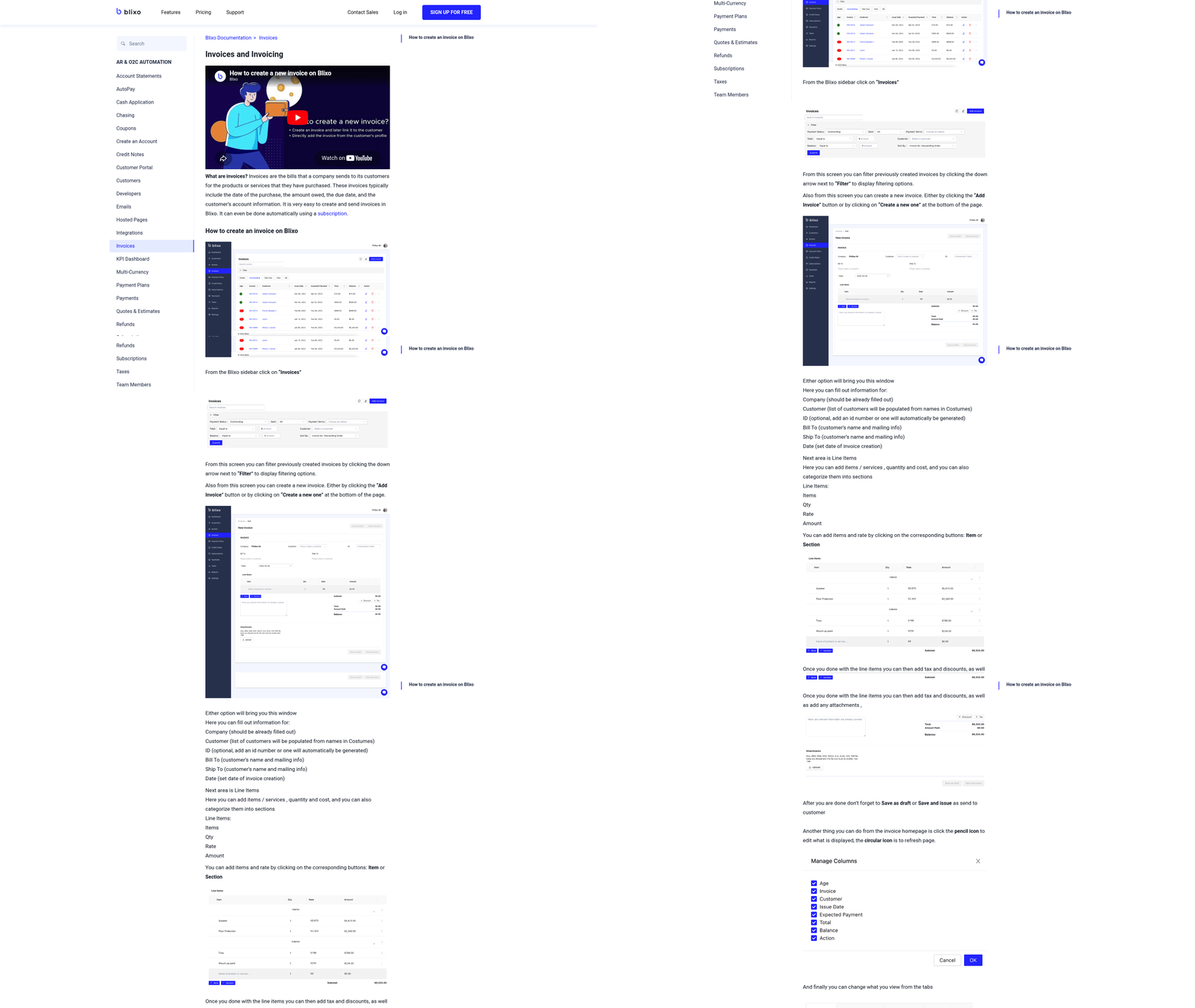
Start by setting up recurring billing schedules for customers with monthly or quarterly subscriptions. As mentioned in the Subscription Management and Recurring Billing section, Blixo allows you to create professional invoices that automatically pull data from uploaded spreadsheets or integrated accounting systems like QuickBooks or Xero.
To configure this, start by defining cash application rules based on your business needs. Building on concepts from the Preparing for Implementation section, set thresholds for automatic approval of small payments or specify routing rules for multi-currency transactions.
Tracking key metrics like Days Sales Outstanding (DSO), payment success rates, and aging reports helps identify trends that impact cash flow. As highlighted in the Why Cloud Accounts Receivable Software Matters section, Blixo’s built-in analytics dashboard provides real-time insights into these metrics, allowing you to adjust workflows proactively.
Subscription Management and Recurring Billing
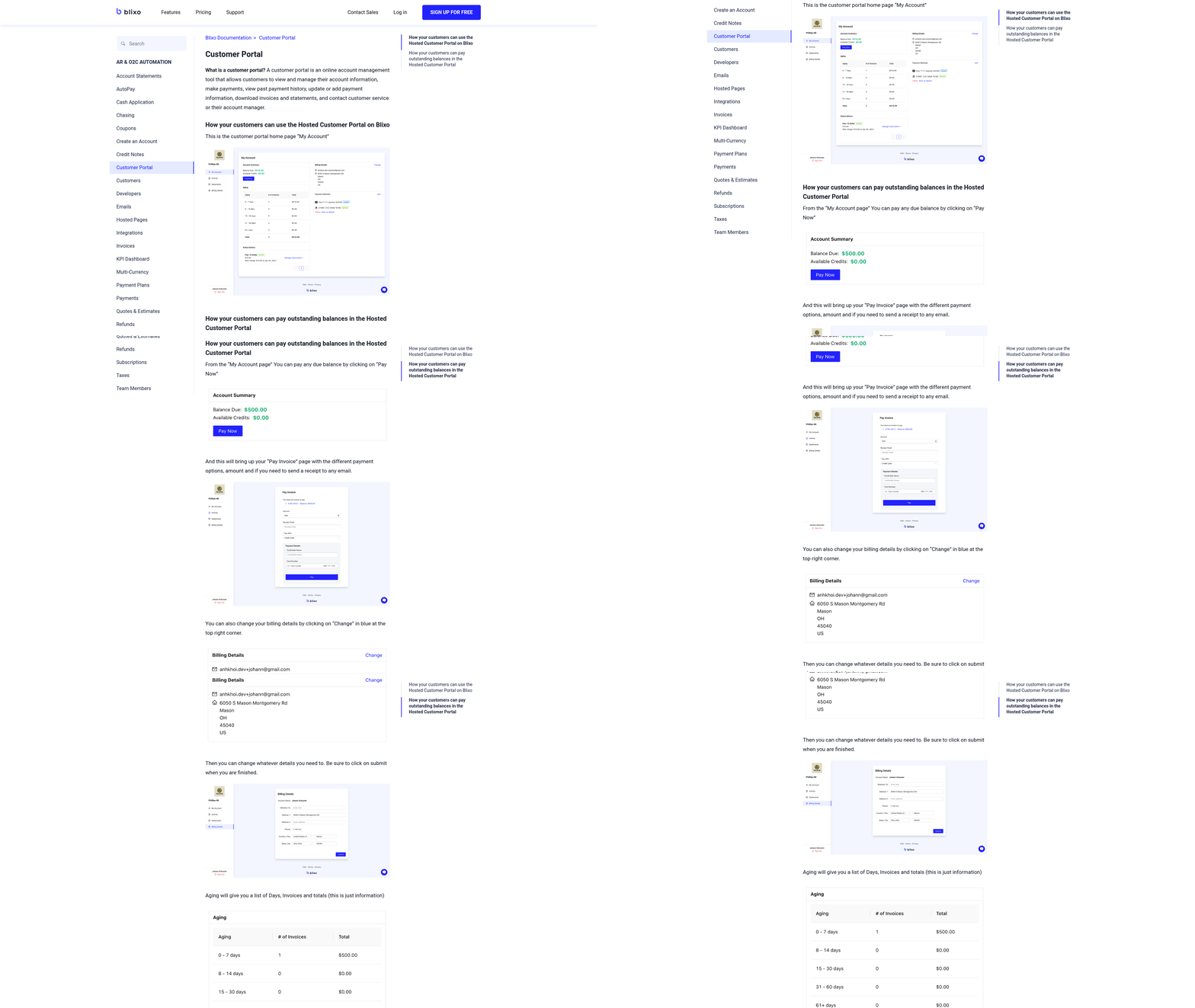
Setting up subscription plans in Blixo streamlines recurring revenue management by letting you define pricing tiers and billing cycles. Start by creating plans with tiered pricing structures, such as monthly, quarterly, or annual options. The platform’s intuitive interface allows you to set up automated invoicing, so customers are billed based on saved payment methods without manual intervention. For example, you might configure a $29/month basic plan with a $99/month premium tier, each with distinct features. Once configured, Blixo generates professional invoices and sends them automatically, reducing administrative overhead. As mentioned in the Automating Invoicing and Cash Application section, this automation extends to payment matching and cash application, ensuring accurate financial tracking.
How Do You Configure Recurring Billing Schedules?
Blixo simplifies recurring billing by linking payment methods to customer accounts and scheduling charges at set intervals. To set this up, manage to the billing settings and select the payment frequency-daily, weekly, monthly, or custom. The system supports multiple payment gateways, ensuring transactions are processed smoothly. For instance, if you choose monthly billing, Blixo will charge the saved credit card or bank account on the specified date each month. Automated reminders are sent if a payment fails, improving collection rates. Integrations with accounting tools like QuickBooks and Xero ensure financial records update in real time, providing a unified view of cash flow.
Managing Subscriptions: Upgrades, Downgrades, and Cancellations
Handling subscription changes in Blixo is designed to minimize friction for both you and your customers. Upgrades or downgrades can be initiated manually or allowed via the customer portal, giving users control over their plans. For example, a customer opting for a premium tier will see their billing amount adjust immediately, with the next invoice reflecting the change. Cancellations are equally straightforward: customers can cancel anytime through the portal, and prorated refunds are processed automatically if applicable. Matthew Schwartz, founder of Elemental Deodorant, highlights this flexibility: “Blixo lets me offer subscriptions to my customers and streamline my accounting.”.
Monitoring Metrics to Boost Retention and Revenue
Blixo’s analytics tools help you track subscription performance and revenue growth. Key metrics include churn rate, customer lifetime value (CLV), and monthly recurring revenue (MRR). These insights are accessible through customizable dashboards, allowing you to identify trends and take proactive measures. For instance, if churn spikes, you might investigate payment failure rates or customer feedback to address pain points. Building on concepts from the What KPIs Should You Track with Blixo? section, focusing on metrics like DSO and invoice accuracy can further refine your strategies. Duy, a Blixo user, notes the platform’s ease: “Simple to set up & straightforward solution for managing subscriptions/monthly payments.” By using these tools, businesses can refine pricing strategies and improve retention.
Enhancing Customer Satisfaction with Seamless Experiences
A clean, user-friendly interface and reliable billing processes are critical for customer satisfaction. Blixo’s subscription management reduces errors and delays, fostering trust. The customer portal lets users view invoices, update payment details, or reach out for support without contacting your team. Stacey, another user, praises its simplicity: “Blixo has a very basic, and clean interface and is a very easy system to get set up.” Automated notifications for upcoming renewals or successful payments further enhance transparency, reducing confusion and support requests.
By centralizing subscription management and automating billing workflows, Blixo reduces the complexity of recurring revenue models. Its focus on integration, flexibility, and analytics empowers businesses to scale efficiently while maintaining high customer satisfaction. Whether you’re managing a small team or a growing enterprise, these features ensure your subscription operations remain agile and revenue-focused.
Security, Compliance, and Data Management
Ensuring security, compliance, and effective data management is critical when implementing cloud-based accounts receivable software like Blixo. This section outlines how to configure Blixo to protect financial data, meet regulatory requirements, and optimize performance.
What Security Features Does Blixo Offer?
Blixo employs encryption for data at rest and in transit to safeguard sensitive financial information. Data at rest is protected using AES-256 encryption, while TLS 1.2 or higher secures data during transmission. Additionally, Blixo supports multi-factor authentication (MFA) for user accounts, reducing the risk of unauthorized access. For example, when users log in, they must complete a second authentication step, such as a mobile app code or biometric scan. This aligns with best practices outlined in the Google Cloud blog, which emphasizes layered security for cloud platforms. Blixo also integrates with enterprise identity providers like Active Directory, allowing centralized user management and reducing password-related vulnerabilities.
User access is further controlled through role-based permissions. Administrators can assign granular access levels, ensuring employees only view or edit data relevant to their responsibilities. This minimizes the risk of accidental or intentional data manipulation.
How Does Blixo Help With Financial Compliance?
Blixo’s design aligns with accounting standards like GAAP (Generally Accepted Accounting Principles) and SOX (Sarbanes-Oxley Act). For GAAP compliance, Blixo automates invoice categorization, ensuring transactions are recorded accurately and consistently. Features like real-time reconciliation tools help businesses maintain audit-ready records, reducing manual errors that could lead to compliance gaps. SOX compliance is supported through audit trails that track user actions, such as invoice approvals or payment updates. These logs are timestamped and immutable, providing a clear history for internal audits. For instance, if a payment is modified, Blixo records the user, time, and nature of the change. This transparency is critical for SOX’s stringent requirements on financial reporting controls.
To simplify compliance, Blixo offers customizable reporting templates that align with regulatory formats. These reports can be exported for external audits or internal review, ensuring businesses stay ahead of deadlines. As mentioned in the What KPIs Should You Track with Blixo section, aligning these reports with key performance indicators enhances compliance readiness.
How Can You Manage User Access and Permissions?
Configuring user access in Blixo begins with defining roles such as Admin, Finance Manager, or Viewer. Each role has predefined permissions, but these can be customized to match your team’s workflow. For example, an Admin might have full access to settings, while a Viewer can only access dashboards. To set this up:
- manage to the User Management section in Blixo’s dashboard.
- Create roles or edit existing ones by toggling permissions for modules like invoice processing, reporting, or user settings.
- Assign roles to individual users or groups.
Blixo also allows temporary access for contractors or auditors, with expiration dates to limit long-term exposure. This is particularly useful in scenarios where external parties need short-term access to financial data.
How Does Blixo Support Data Backup and Recovery?
Blixo performs automated backups of all financial data, including invoices, payment records, and user configurations. Backups are stored in geographically redundant cloud storage, ensuring data remains accessible even during outages. The European Commission cloud breach report highlights the risks of unsecured backups, but Blixo mitigates this by encrypting backups and restricting access to authorized personnel.
In case of data loss, Blixo offers point-in-time recovery. Users can restore data from the last 30 days, with granular options to recover specific files or entire datasets. For example, if a user accidentally deletes an invoice batch, an Admin can retrieve it using the Data Recovery tool in the settings menu. Regular backup testing is recommended to validate recovery processes. Blixo’s documentation provides step-by-step guidance for simulating recovery scenarios, ensuring teams are prepared for emergencies.
How Can You Use Blixo’s Reporting Tools to Improve Performance?
Blixo’s reporting and analytics features help businesses track key metrics like days sales outstanding (DSO), payment trends, and invoice aging. Building on concepts from the What KPIs Should You Track with Blixo section, these metrics provide actionable insights for improving cash flow. For example, a dashboard might reveal that 20% of invoices are delayed beyond 60 days, prompting a review of payment terms or collection processes.
To use these tools:
- Use the Financial Health dashboard to monitor DSO and cash flow gaps.
- Generate Custom Reports to analyze customer payment behavior or identify top-performing sales channels.
- Set up alerts for anomalies, such as unexpected payment drops or invoice errors.
One user shared, > “Blixo’s analytics cut our month-end closing time by 40% by automating reconciliation and flagging discrepancies instantly.” The insights gained from these tools not only improve operational efficiency but also support data-driven decisions to strengthen financial health.
By following these steps, businesses can configure Blixo to meet security, compliance, and performance goals while minimizing risks. Regular audits of access controls and backup procedures ensure ongoing alignment with evolving regulatory and operational demands, as outlined in the Best Practices for Ongoing Management and Optimization section.
Best Practices for Ongoing Management and Optimization
To optimize your accounts receivable processes, focus on key performance indicators (KPIs) like Days Sales Outstanding (DSO), invoice accuracy rate, and cash application efficiency. Blixo’s dashboards provide real-time visibility into these metrics, helping you identify trends and measure progress. For example, a rising DSO might signal delays in customer payments, while a low invoice accuracy rate could point to errors in billing. Building on concepts from the Automating Invoicing and Cash Application section, cash application efficiency improvements can significantly reduce manual reconciliation efforts when paired with accurate data tracking.
Track DSO by dividing accounts receivable by daily sales. A lower DSO means faster cash flow. Use Blixo’s reporting tools to segment data by customer, product, or payment method. If you notice inconsistencies in cash application-such as manual entries taking longer than automated ones-prioritize automating those steps. Regularly reviewing these KPIs ensures you stay proactive, not reactive, in managing receivables.
How Do You Identify Bottlenecks in Your Workflow? Bottlenecks often hide in manual tasks, unclear approval chains, or disjointed communication. As mentioned in the How Do You Assess Your Current Accounts Receivable Processes? section, mapping workflows is critical to identifying inefficiencies. Use Blixo’s workflow analytics to map where delays occur-for example, if invoices sit unprocessed for days or approvals get stuck. One company reduced their invoice processing time by 40% after discovering a bottleneck in their manual validation step using Blixo’s audit trail.
How Can You Stay Updated on Blixo’s Features? Blixo regularly releases updates to improve automation, reporting, and integration capabilities. Set up notifications for new features through your Blixo account or check the release notes section in your dashboard. For example, a recent update introduced advanced AI-driven cash application matching, reducing manual reconciliation efforts by up to 50% for early adopters. Building on concepts from the Implementation and Configuration section, accessing release notes during initial setup ensures you start with the latest tools available.
How Should You Optimize Approval Processes? Approval workflows often slow down invoicing when roles aren’t clearly defined or when steps require unnecessary sign-offs. Audit your current process using Blixo’s workflow builder to see where approvals can be automated or delegated. For example, if managers frequently override automated payment approvals due to rigid thresholds, adjust the rules to better align with your team’s decision-making. Involve stakeholders in refining these workflows. A finance team at a mid-sized company improved their approval speed by 25% after simplifying their chain from five steps to three using Blixo’s customizable templates. Test changes in a low-risk environment first, and use Blixo’s audit logs to measure the impact of each adjustment.
Frequently Asked Questions
1. How much revenue loss can inefficient AR processes cause businesses?
Inefficient accounts receivable processes can cost businesses up to 20% of annual revenue due to late payments, errors, and operational delays. Cloud solutions like Blixo address these issues by automating invoicing and payment tracking.
2. What time savings do businesses report with Blixo?
Users report 10–15 hours weekly saved through automated reconciliation and cash application. Automated reminders also reduce follow-up time by 60%, improving efficiency for accounting teams.
3. How does Blixo improve invoicing accuracy?
Blixo automates invoicing with saved payment data, reducing errors from manual entry. This results in 40% fewer missed payments compared to traditional methods, ensuring faster and more reliable cash flow.
4. Which businesses benefit most from cloud AR software?
Small businesses and enterprises with recurring billing or high invoice volumes benefit most. Blixo’s subscription management and centralized tracking streamline workflows for 85% of users, ensuring consistent cash flow.
5. How does Blixo simplify payment tracking?
Blixo centralizes payment tracking in the cloud, cutting 70% of operational friction from fragmented systems. Intelligent cash application instantly matches payments to invoices, eliminating manual reconciliation.
6. What are the key features of Blixo’s subscription billing?
Blixo automates recurring payments and subscription billing, removing the need for spreadsheets. This ensures 85% of users maintain consistent cash flow while reducing errors in tracking and invoicing.
7. Can cloud AR software prevent revenue loss?
Yes, cloud AR tools like Blixo reduce revenue loss by up to 20% annually. Automation minimizes late payments, errors, and delays, ensuring faster cash application and reducing administrative costs.