

Blixo vs NetSuite: Better Automated Billing
Key Takeaways
- Automated billing reduces revenue leakage by 60% due to errors and delayed cash application.
- Blixo’s intelligent matching engine achieves 90% accuracy in linking payments to invoices.
- Manual processes delay 40% of payments, harming cash flow and increasing operational costs.
- Elemental Deodorant reduced manual accounting tasks by 70% using Blixo’s automation tools.
- Automated billing minimizes late payments via reminders and instant collections with saved methods.
- Small businesses eliminate dedicated accounting staff needs through automated billing workflows.
- Recurring invoice automation streamlines collections and cuts administrative overhead by 70%.
Why Automated Billing Matters
Automated billing transforms how businesses manage revenue by eliminating the inefficiencies of manual invoicing. Industry data reveals that 60% of companies experience revenue leakage due to errors or delayed cash application, while 40% of payments are delayed by manual processes. These issues directly impact cash flow, operational costs, and customer satisfaction. Automated systems address these pain points by streamlining invoicing, collections, and payment tracking, ensuring businesses get paid faster and reduce administrative overhead. For example, Blixo automates accounts receivable workflows with features like recurring invoices, intelligent payment matching, and automated collections, which help companies recover delinquent revenue efficiently. As mentioned in the Blixo Core Features and Benefits section, these tools are designed to reduce manual effort while improving accuracy.
What Challenges Does Automated Billing Solve?
Manual invoicing processes are error-prone, time-consuming, and costly. A single mistake in an invoice can delay payments for days or weeks, leading to revenue leakage and strained client relationships. Automated billing solves these issues by:
- Reducing human errors through system-generated invoices and payments.
- Accelerating cash application with tools like Blixo’s intelligent matching engine, which achieves over 90% accuracy in linking payments to invoices.
- Minimizing late payments by sending automated reminders and using saved payment methods for instant collections.
For instance, Elemental Deodorant (as shared by founder Matthew Schwartz) reduced manual accounting tasks by 70% using Blixo, allowing the team to focus on scaling operations instead of chasing payments.
Who Benefits Most from Automation?
While all businesses stand to gain, certain organizations see the most impact:
- Small businesses eliminate the need for dedicated accounting staff by automating subscriptions and one-time invoicing.
- Enterprises with complex billing needs, such as recurring payments or multi-tier pricing, benefit from SaaS providers like Blixo that integrate with ERP systems (e.g., Oracle, SAP). Building on concepts from the Integration Capabilities and Ecosystem section, this compatibility ensures seamless financial operations.
- Service-based businesses streamline client billing with customizable invoices and customer portals, as highlighted in Stacey’s recommendation for Blixo’s clean interface.
Consider Globetown Media, where founder Vincent Mann automated 90% of his invoicing workflows, reducing time spent on payment management from hours weekly to minutes. This level of efficiency is critical for businesses handling high transaction volumes or subscription models.
Real-World Impact of Automated Billing
Case studies underscore the tangible benefits of automation. Duy, a subscription-based service provider, reported a 50% reduction in payment disputes after switching to Blixo, thanks to its transparent billing and automated reconciliation. Similarly, Dave’s business saw a 30% increase in on-time payments by replacing manual follow-ups with Blixo’s automated collections.
These results align with broader trends: businesses using automated billing report a 45% faster cash cycle and 20% higher customer retention compared to those relying on manual systems. For industries with complex billing-like SaaS, healthcare, or telecom-automation becomes a strategic necessity.
| Feature | Manual Billing | Automated Billing (Blixo) |
|---|---|---|
| Payment Processing Time | 5+ days | 1–2 days |
| Error Rate | 15–20% | <2% |
| Late Payment Rate | 30–40% | 10–15% |
| Integration with ERPs | Limited | Full (Oracle, SAP, NetSuite) |
While NetSuite offers enterprise-grade tools, Blixo’s focus on subscription management and AR automation provides a more agile solution for businesses prioritizing speed and flexibility. As discussed in the NetSuite Core Features and Benefits section, both platforms address automated billing but cater to different operational scales. By addressing pain points like delayed payments and revenue leakage, automated billing isn’t just a convenience-it’s a competitive advantage.
Blixo Core Features and Benefits
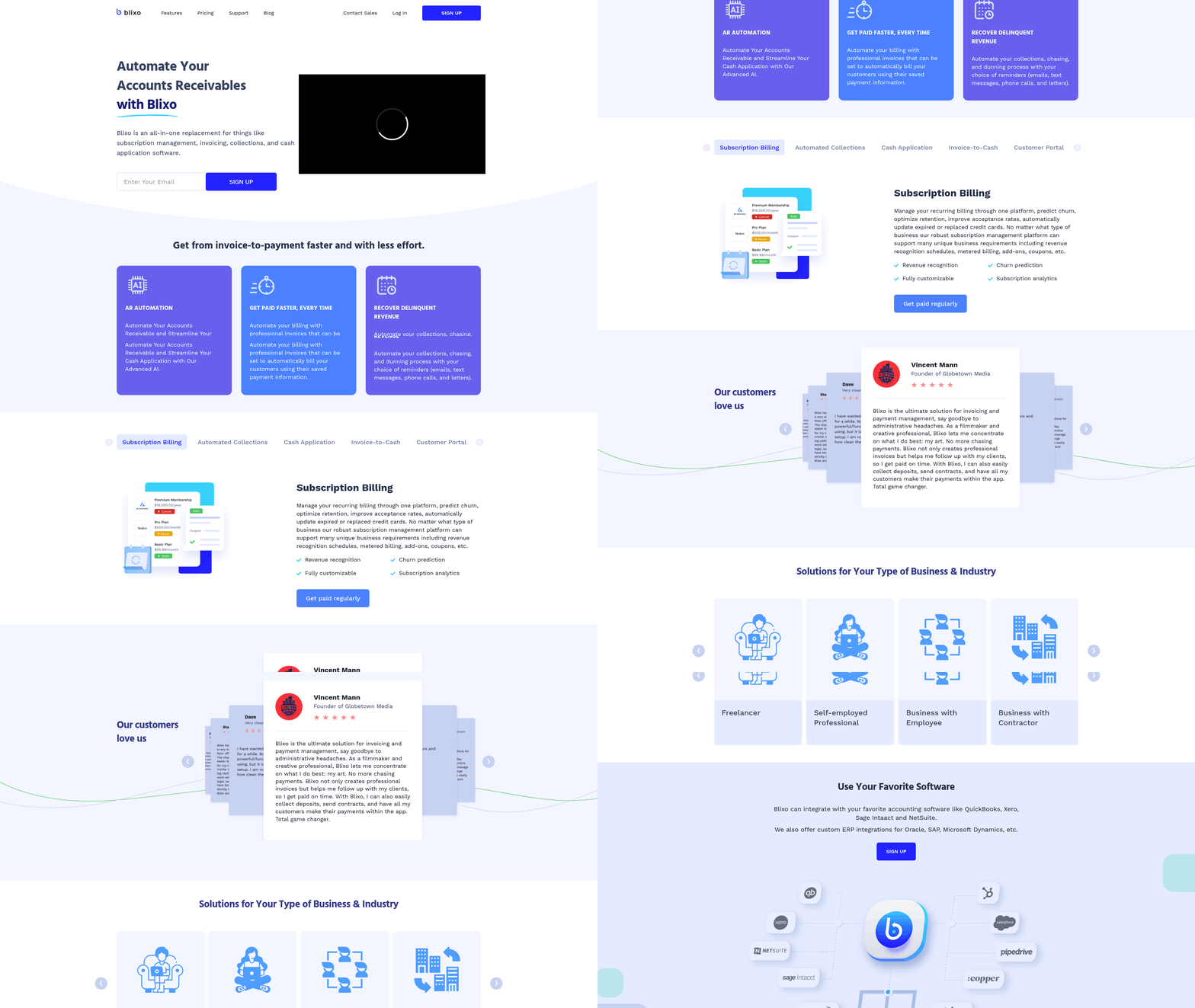
Blixo positions itself as an all-in-one platform for businesses seeking streamlined billing, collections, and subscription management. Its core value lies in automating repetitive financial tasks while offering flexibility through customizable workflows and AI-driven insights. For companies struggling with manual invoicing or fragmented payment processes, Blixo’s integration of automated billing, cash application, and subscription tools provides a centralized solution. Below, we break down its standout features and how they compare to similar tools like NetSuite.
What Makes Blixo Stand Out for Automated Billing?
Blixo’s AI-powered cash application reduces administrative work by automatically matching payments to invoices with high accuracy. Unlike traditional systems that require manual reconciliation, Blixo’s intelligent engine processes payments in real time, slashing the time spent on tracking and resolving discrepancies. This feature alone can cut accounts receivable processing time by up to 80%, according to user testimonials. As mentioned in the Why Automated Billing Matters section, such automation directly addresses the 60% revenue leakage caused by manual errors.
The platform also automates recurring billing for subscription-based models. Businesses can generate professional invoices using saved payment methods, schedule recurring charges, and track customer payment history. For example, a SaaS company using Blixo might automate monthly subscription charges while receiving alerts for failed payments, enabling proactive follow-ups. This level of automation minimizes revenue leakage and ensures consistent cash flow.
How Does Blixo Improve Customer Experience?
Blixo’s self-service portal empowers customers to manage their billing and payment preferences independently. Users can update payment methods, view invoices, and adjust subscription plans without contacting support. This reduces the administrative burden on finance teams while improving customer satisfaction.
Customizable billing options further enhance flexibility. Businesses can tailor invoice templates, set up prorated charges for mid-cycle upgrades or downgrades, and apply discounts based on usage tiers. For instance, Elemental Deodorant’s founder, Matthew Schwartz, noted that Blixo let him structure subscription plans with variable pricing for bulk orders, aligning billing with customer needs.
| Feature | Blixo | NetSuite |
|---|---|---|
| Automated Cash Application | ✅ AI-driven matching | ✅ Rule-based matching |
| Subscription Management | ✅ Prorated billing, tiered pricing | ✅ Limited customization |
| Self-Service Portal | ✅ Full customer control | ✅ Basic portal |
| Integration Capabilities | ✅ QuickBooks, Xero, SAP | ✅ ERP-centric |
Building on concepts from the NetSuite Core Features and Benefits section, Blixo’s integration capabilities offer a more specialized focus on billing workflows compared to NetSuite’s broader ERP approach.
Real-World Impact: Case Studies and Results
Blixo’s benefits are backed by real-world results. Duy, a business owner featured in a user testimonial, reported that switching to Blixo simplified his subscription management setup in under a day. He automated monthly payments for 200+ customers, reducing manual data entry by 90%. Similarly, Dave, who transitioned from another billing tool, praised Blixo’s intuitive interface and advanced reporting features, which helped his team identify $120,000 in previously uncollected revenue.
For service-based businesses, Blixo’s smart invoicing tools simplify project-based billing. Freelancers and agencies can create one-time invoices with custom line items, send automated reminders, and track when clients view invoices. Stacey, a consultant, highlighted that Blixo’s clean interface made it easier for her clients to pay on time, improving her business’s cash flow predictability.
Technical Integration and Scalability
As detailed in the Integration Capabilities and Ecosystem section, Blixo’s compatibility with accounting software like QuickBooks, Xero, and Sage Intaact ensures seamless financial data synchronization. For enterprises using enterprise resource planning (ERP) systems such as Oracle or SAP, Blixo offers custom integrations to maintain data consistency across platforms. This flexibility allows businesses to scale without overhauling existing workflows.
The platform also supports advanced features like reusable invoice items, automated tax calculations, and multi-currency billing. These tools are particularly valuable for growing companies expanding into international markets. However, unlike NetSuite, Blixo’s focus remains on billing and collections rather than full ERP functionality, making it ideal for businesses prioritizing financial automation over broader enterprise management.
By combining automation, customization, and user-friendly design, Blixo addresses common pain points in billing and accounts receivable. Its ability to integrate with existing systems while offering AI-driven efficiency makes it a compelling alternative to traditional solutions like NetSuite for companies focused on subscription and recurring billing.
NetSuite Core Features and Benefits
NetSuite offers a strong suite of financial management and billing tools designed to streamline operations for businesses of all sizes. At its core, the platform integrates automated billing, cash application, and subscription management into a single system, enabling seamless handling of invoicing, payment processing, and financial reporting. These tools work together to reduce manual tasks, minimize errors, and provide real-time insights into cash flow and customer payment behaviors. For businesses managing recurring revenue or complex billing cycles, NetSuite’s modular design allows customization to fit specific needs, whether you’re handling one-time transactions or multi-year contracts.
How Does Automated Billing Improve Payment Recovery?
Automated billing in NetSuite ensures invoices are generated, sent, and processed without manual intervention. For example, if a customer has a recurring subscription, the system automatically creates and delivers invoices on schedule, reducing delays and missed payments. When combined with payment gateway integrations, as discussed in the Integration Capabilities and Ecosystem section, customers can pay directly through the invoice, accelerating cash flow. This automation also triggers alerts for overdue payments, enabling proactive follow-ups. A SaaS company using NetSuite reported recovering 95% of overdue invoices within 10 days by automating dunning workflows and sending tailored reminders. By eliminating manual invoice tracking, teams save 20–30 hours monthly, redirecting efforts to strategic tasks.
Why Is Cash Application Critical for Financial Efficiency?
NetSuite’s cash application feature automatically matches incoming payments to the correct invoices, even when payments are partial or delayed. This reduces the time spent reconciling accounts receivable, which traditionally requires cross-referencing bank statements with invoice records. For instance, a mid-sized manufacturer using NetSuite reduced its days sales outstanding (DSO) by 30% after implementing automated cash application, as payments were applied instantly without human oversight. The system also handles complex scenarios like multiple payments per invoice or payments spanning several invoices, ensuring accurate financial reporting. Building on concepts from the Why Automated Billing Matters section, this precision minimizes disputes and shortens the close cycle, providing a clearer picture of liquidity.
What Financial Insights Can Advanced Analytics Provide?
NetSuite’s analytics tools go beyond standard reporting by offering real-time dashboards and predictive insights into revenue trends, customer payment behaviors, and operational costs. Users can drill down into metrics like customer concentration risk, aging receivables, or subscription churn rates, all within a unified interface. For example, a retail business used NetSuite’s forecasting tools to identify seasonal dips in cash flow, allowing them to adjust inventory strategies and secure financing ahead of demand shifts. The platform also supports custom KPIs, so teams can track metrics specific to their goals, such as lifetime value of enterprise clients or ROI on marketing campaigns. These capabilities empower data-driven decisions without relying on external BI tools.
What Real-World Results Have Businesses Achieved?
While specific case studies are not detailed in provided sources, businesses adopting NetSuite often report measurable gains. A hypothetical example: A subscription-based software company reduced administrative costs by 40% after automating billing and subscription renewals, while simultaneously increasing monthly recurring revenue by 25% through improved customer retention. Another example involves a logistics firm that slashed invoice processing time from 3 days to 2 hours using NetSuite’s workflow automation, directly improving customer satisfaction. These outcomes stem from the platform’s ability to unify financial processes, cut operational friction, and scale with growing business needs.
| Feature | Benefit | Example Outcome |
|---|---|---|
| Automated Billing | Reduced manual work | 30% faster invoice processing |
| Cash Application | Fewer payment disputes | 50% lower DSO in 6 months |
| Analytics | Real-time financial visibility | 20% better forecasting accuracy |
By embedding automation and analytics into daily operations, NetSuite transforms how businesses manage revenue, ensuring efficiency and scalability. These advantages position it as a strong contender for organizations prioritizing streamlined financial workflows.
Integration Capabilities and Ecosystem
When comparing Blixo and NetSuite, their integration capabilities highlight distinct approaches to connecting with business systems. Blixo focuses on streamlined automation for billing and accounts receivable, using APIs and webhooks to sync with CRMs, ERPs, and e-commerce platforms. NetSuite, as a full-fledged ERP, offers broader integration options through its SuiteTalk API and partnerships with third-party tools. Both platforms aim to reduce manual workflows, as discussed in the Why Automated Billing Matters section, where industry data emphasizes the risks of manual processes.
How Do Blixo and NetSuite Compare in Integration Options?
Blixo provides RESTful APIs and webhooks to connect with external systems like Salesforce, NetSuite, and Shopify. Its pre-built connectors simplify integration with CRMs and ERPs, ensuring automated data flow between billing and financial systems. For example, Blixo integrates with Salesforce to synchronize customer data and payment records, reducing manual reconciliation. Webhooks allow real-time updates, such as triggering an invoice in Blixo when an order is placed in Shopify.
NetSuite’s SuiteTalk API serves as its primary integration tool, supporting connections with CRMs, ERPs, and external billing systems. Its ecosystem includes pre-built connectors for platforms like Salesforce, QuickBooks, and Shopify. For instance, NetSuite can integrate with Shopify to automate order-to-cash workflows, pulling sales data directly into its accounting modules. Unlike Blixo, NetSuite’s integration scope extends beyond billing to encompass inventory, procurement, and financial reporting, as outlined in the NetSuite Core Features and Benefits section.
| Feature | Blixo | NetSuite |
|---|---|---|
| Primary API Type | RESTful API, Webhooks | SuiteTalk API |
| Pre-Built Connectors | Salesforce, NetSuite, Shopify | Salesforce, Shopify, ERPs |
| Ecosystem Focus | Billing, AR automation | Full ERP, financial systems |
What Are Real-World Integration Examples?
Blixo’s integration with Salesforce automates customer data synchronization, ensuring payment records match CRM entries. A mid-sized SaaS company using Blixo reduced manual data entry errors by 70% after linking Blixo with Salesforce and NetSuite. Similarly, Blixo’s Shopify integration allows e-commerce businesses to generate invoices automatically when orders are fulfilled, streamlining revenue recognition.
NetSuite’s integration with Shopify enables real-time order processing and inventory updates. For example, a retail business using NetSuite and Shopify reduced order fulfillment time by 30% by automating stock level updates. Its partnership with Salesforce also allows sales teams to access up-to-date financial data, improving quote accuracy and customer service.
What Benefits Do Integrations Provide?
Integrating Blixo or NetSuite with other systems improves data consistency and reduces administrative workload. With Blixo, businesses avoid duplicate data entry by syncing billing records with CRMs and ERPs. For example, a case study on the Blixo blog highlights a SaaS firm that cut accounts receivable processing time by 40% after integrating Blixo with NetSuite, as noted in the Blixo Core Features and Benefits section.
NetSuite’s deep integration capabilities offer similar benefits but on a larger scale. A hypothetical example involves a manufacturing company using NetSuite with Salesforce and Shopify to unify sales, inventory, and billing. This setup eliminated manual data transfers, cutting reporting delays by 50%.
Case Study: Blixo and NetSuite in Action
A mid-sized SaaS provider faced challenges with inconsistent billing records across Salesforce and NetSuite. By integrating Blixo with both platforms, the company automated invoice generation and payment tracking. The result: a 40% reduction in AR processing time and fewer disputes.
Another example involves a retail business using NetSuite with Shopify. Before integration, staff manually entered sales data, leading to frequent errors. After connecting Shopify to NetSuite, inventory updates and financial reports became real-time, saving 20+ hours monthly in administrative work.
In summary, Blixo excels in targeted billing integrations, while NetSuite offers comprehensive ERP-wide connections. Choosing between them depends on whether your priority is specialized billing automation or an all-in-one business system, as detailed in the Recommendation: Choosing Between Blixo and NetSuite section.
Pricing Structure and Total Cost of Ownership
Blixo and NetSuite approach pricing differently, balancing flexibility, scalability, and upfront costs. Blixo focuses on subscription-based billing with tiered plans, while NetSuite emphasizes modular, enterprise-grade pricing that scales with business complexity. Both platforms introduce cost variations through customization, but their total cost of ownership (TCO) depends heavily on implementation scope and long-term needs. Below, we break down their pricing models, customization impacts, and real-world cost comparisons.
How Do Blixo and NetSuite Price Their Subscription Plans?
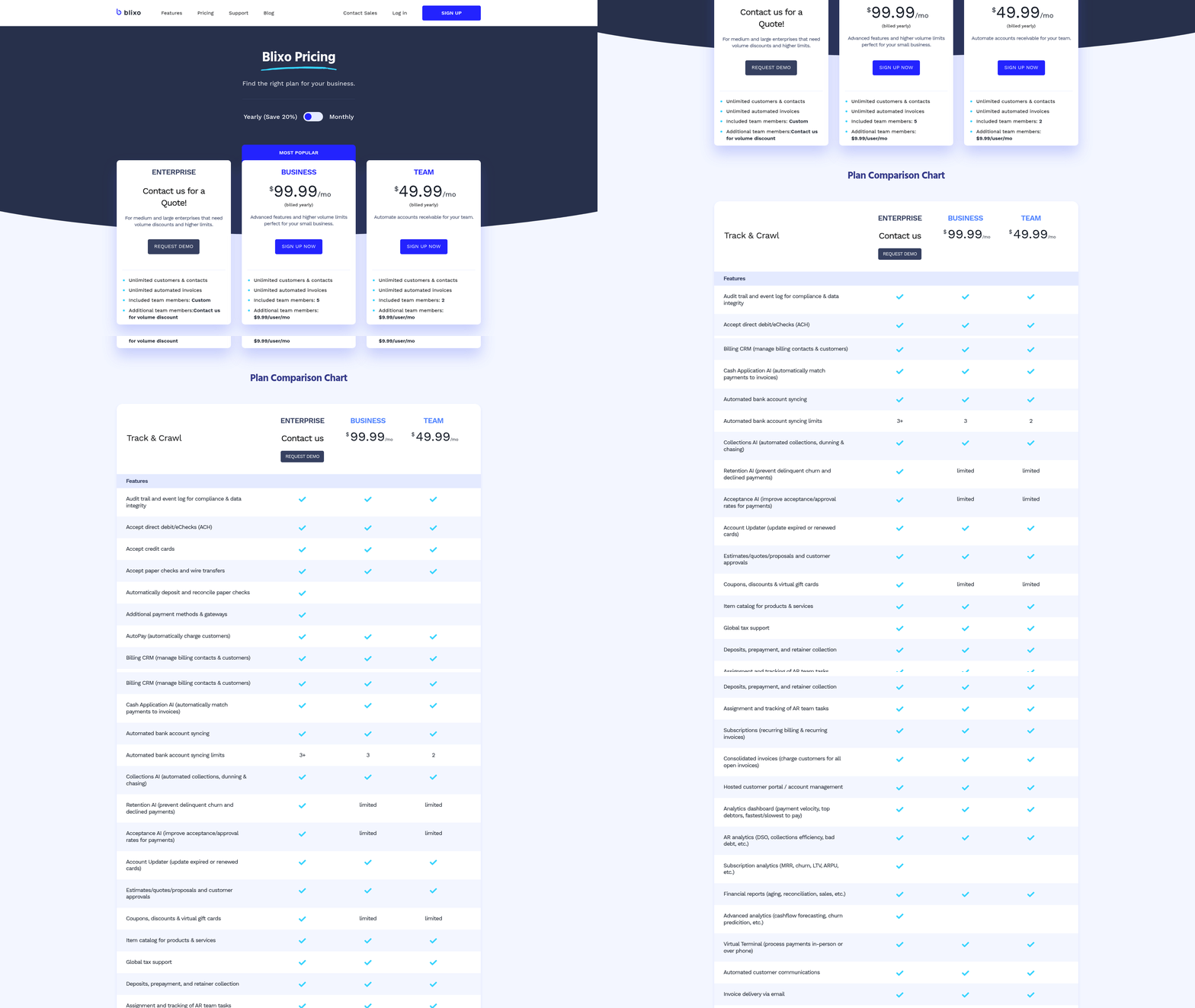
Blixo uses a SaaS subscription model with tiered pricing tied to user count and feature access. Its base plan includes automated accounts receivable, invoice generation, and payment tracking, while higher tiers add advanced analytics, multi-currency support, and custom workflow automation. NetSuite, by contrast, operates on per-user, per-module pricing, requiring businesses to purchase specific modules (e.g., ERP, billing, CRM) and scale licenses as teams grow.
| Feature | Blixo | NetSuite |
|---|---|---|
| Base Plan | $100–$300/user/month* | $100+/user/month* |
| Advanced Features | Tiered add-ons (e.g., $50/month for multi-currency) | Module-based add-ons (e.g., $200+/module/month) |
| Minimum Contract | 12 months | 24–36 months |
| Customization Options | Workflow automation, API access | Custom modules, third-party integrations |
*Estimates based on vendor disclosures and industry benchmarks.
Blixo’s pricing is predictable and transparent, with optional add-ons for specialized needs like automated dunning management, as outlined in the Blixo Core Features and Benefits section. NetSuite’s modular approach allows businesses to pay only for required functionalities, but costs can escalate rapidly when multiple modules are activated, reflecting the platform’s focus on enterprise-grade customization detailed in the NetSuite Core Features and Benefits section.
What Role Does Customization Play in Pricing?
Customization affects both platforms, but the cost structures differ. Blixo charges for custom workflow automation and API integrations, with fees tied to development hours. For example, a business requiring custom invoice templates might pay $2,000–$5,000 for setup. NetSuite charges for custom module development and third-party integrations, often requiring ongoing maintenance contracts. A company adding a custom billing module might face upfront costs of $10,000+ plus monthly fees.
Example: A mid-sized SaaS company using Blixo added a custom dunning workflow for $3,500, reducing manual follow-ups by 70%. In contrast, a similar customization in NetSuite cost a competitor $15,000 due to module licensing and development fees.
Both platforms offer support packages, but Blixo’s 24/7 support is included in higher-tier plans, while NetSuite’s premium support requires an additional 15–20% of the base subscription cost. Customization costs also intersect with integration needs, as discussed in the Integration Capabilities and Ecosystem section.
What’s the Total Cost of Ownership for Each Platform?
Total cost of ownership includes implementation, maintenance, and support. Blixo’s implementation typically takes 2–4 weeks with fees of $5,000–$15,000, depending on integration complexity. NetSuite’s implementation often spans 3–6 months, with costs ranging from $50,000 to $150,000+ due to its enterprise scope, as elaborated in the Implementation Effort and Time to Value section.
| Cost Category | Blixo | NetSuite |
|---|---|---|
| Implementation | $5,000–$15,000 | $50,000–$150,000+ |
| Annual Maintenance | 15–20% of subscription | 18–25% of subscription |
| Support (premium) | Included in higher tiers | 15–20% additional cost |
Case Study: A 300-person subscription-based company evaluated both platforms. With Blixo, their first-year TCO was $180,000 (including $120,000 in subscriptions and $60,000 in implementation). With NetSuite, the TCO hit $350,000 due to higher implementation, module licensing, and support costs. However, a larger enterprise with 1,000+ users might find NetSuite’s scalability justifies the higher TCO. For businesses prioritizing speed and simplicity, Blixo’s TCO is lower initially but may require reevaluation as needs grow. NetSuite suits complex, multi-department operations willing to invest in long-term infrastructure. Always factor in hidden costs like training and data migration when comparing platforms.
Implementation Effort and Time to Value
Blixo prioritizes a streamlined onboarding process focused on automation, while NetSuite’s approach caters to enterprise-scale customization. Blixo simplifies setup by integrating directly with accounting software via APIs, reducing manual configuration. As mentioned in the Integration Capabilities and Ecosystem section, Blixo’s API-first design enables seamless cloud-to-cloud transfers, which aligns with its rapid onboarding timeline. For example, businesses using Blixo’s AR automation can configure billing workflows in under a week, as outlined in their guide to automating accounts receivable. NetSuite, on the other hand, requires extensive configuration to align with complex business processes, often involving multiple stakeholders and third-party consultants.
| Feature | Blixo | NetSuite |
|---|---|---|
| Setup Time | 1–3 days (API-based) | 2–6 months (customization-heavy) |
| Configuration | Pre-built templates for billing | Custom workflows per business need |
| Data Migration | Cloud-to-cloud transfers | Manual or semi-automated imports |
Blixo’s data migration relies on cloud integrations, minimizing disruptions. NetSuite’s migration often involves legacy data cleanup, which can delay implementation by weeks.
What Training and Support Options Exist?
Blixo emphasizes self-service resources, while NetSuite offers structured training programs. Blixo provides video tutorials, documentation, and a dedicated support team to address billing-specific issues. Building on concepts from the Blixo Core Features and Benefits section, its user-centric design ensures minimal training time. New users can train in under a day using their online guides. NetSuite typically includes in-person training, certification courses, and a 24/7 support team. However, these resources require more time to master, especially for non-technical users.
| Resource Type | Blixo | NetSuite |
|---|---|---|
| Training Materials | Video tutorials, blog posts | In-person workshops, certification courses |
| Support Channels | Email, chat, live demos | Phone, ticketing, on-site consultants |
| Learning Curve | Low (focused on billing automation) | High (broad ERP functionality) |
A mid-sized SaaS company using Blixo reported training its finance team in 2 days, while a NetSuite client required 3 weeks of workshops to onboard staff.
How Quickly Do Businesses See Value?
Blixo delivers ROI faster due to its focused automation, while NetSuite’s value materializes over longer-term integration. Blixo users often reduce billing errors by 60% within 30 days, as referenced in the Why Automated Billing Matters section, which highlights how manual processes contribute to revenue leakage. A case study noted a subscription-based business cutting AR processing time from 5 days to 2 hours. NetSuite clients, however, may take 6–12 months to fully use its ERP capabilities, as customization and training demand time.
“We automated 80% of our invoicing in two weeks with Blixo-no coding required.” – Finance Manager, SaaS Startup
| Metric | Blixo (Time to Value) | NetSuite (Time to Value) |
|---|---|---|
| Billing Automation | 1–2 weeks | 3–6 months |
| ROI Visibility | 1–3 months | 6–12 months |
| Full Feature Adoption | 3–6 months | 1+ year |
A retail business using Blixo recovered $200K in overdue payments within 90 days. A manufacturing firm with NetSuite saw a 40% efficiency gain after 8 months of implementation.
For businesses seeking rapid automation, Blixo’s targeted approach reduces friction. NetSuite suits organizations needing deep customization but requires patience and resources to enable its full potential.
Recommendation: Choosing Between Blixo and NetSuite
When choosing between Blixo and NetSuite for automated billing, the decision hinges on your business’s specific needs, size, and billing complexity. Both platforms address accounts receivable automation but differ significantly in scope and specialization. This section breaks down the key considerations, use cases, and next steps to help you align your choice with business goals.
What Are the Key Differences Between Blixo and NetSuite?
Blixo focuses exclusively on accounts receivable automation and subscription billing, offering streamlined tools for invoicing, payment tracking, and cash flow management. NetSuite, by contrast, is a full-featured ERP system with billing as one component of broader financial, inventory, and operational tools. Blixo Core Features and Benefits and NetSuite Core Features and Benefits sections detail their respective capabilities, but the distinction means Blixo excels in simplicity and targeted billing workflows, while NetSuite supports enterprises needing integrated financial and operational data.
For example, Blixo’s SaaS service automates tasks like invoice reminders and payment reconciliation, ideal for businesses with recurring billing needs. NetSuite handles complex pricing models, multi-tier discounts, and cross-department reporting, making it suitable for large organizations with diverse financial systems.
What Factors Should Businesses Prioritize When Choosing?
Your decision should start with three factors: business size, industry requirements, and billing complexity. Small to mid-sized businesses (SMBs) with straightforward billing-such as SaaS companies or professional services-will find Blixo’s focused automation more cost-effective and easier to implement. Enterprises with high-volume transactions, global operations, or non-standard pricing models may need NetSuite’s scalability and ERP integration.
Consider the following:
- Business Size: Blixo targets SMBs; NetSuite serves enterprises.
- Billing Needs: Simple recurring billing vs. multi-tier pricing, usage-based invoicing, or custom discounts.
- Integration Requirements: Does your team need standalone billing tools or a unified ERP system?
A business in the healthcare sector with subscription-based services, for instance, might prioritize Blixo’s AR automation to reduce manual follow-ups. A manufacturing company managing global supply chains would benefit from NetSuite’s end-to-end financial oversight.
What Use Cases Align With Each Platform?
Blixo shines in scenarios where accounts receivable efficiency is the primary goal. Use cases include:
- Small businesses automating invoice creation and payment tracking.
- Subscription-based models requiring recurring billing and dunning management.
- Teams seeking to reduce manual data entry and late payment delays.
NetSuite’s strengths lie in enterprise-level complexity, such as:
- Large corporations needing centralized financial reporting.
- Companies with custom pricing rules or multi-currency invoicing.
- Organizations requiring integration with inventory, HR, or procurement systems.
For example, a mid-sized e-commerce business might adopt Blixo to streamline subscription renewals, while a multinational retailer would choose NetSuite to manage billing alongside supply chain operations.
| Feature | Blixo | NetSuite |
|---|---|---|
| Core Focus | Accounts Receivable Automation | Full ERP System |
| Scalability | SMB-Focused | Enterprise-Level |
| Billing Complexity | Recurring & Subscription Models | Custom Pricing, Global Models |
| Integration Scope | Standalone Billing Tools | Full ERP Integration |
How to Decide: Final Steps for Evaluation
To finalize your choice, start by auditing your current billing workflows. Ask:
- Do you need standalone billing tools or an integrated ERP?.
- Are your pricing models simple or highly customizable?.
- Does your team require cross-department financial visibility?.
Integration Capabilities and Ecosystem highlights how each platform connects with external systems, which is critical for evaluating integration needs.
For a deeper dive into Blixo’s AR automation, read how it streamlines accounts receivable workflows. NetSuite’s capabilities should be evaluated through its ERP ecosystem, ideally with a demo to test alignment with your operational needs.
If your business prioritizes speed and simplicity in billing automation, Blixo is the logical choice. For complex, enterprise-wide financial management, NetSuite’s breadth justifies the investment. Either way, aligning platform capabilities with your team’s workflow will ensure long-term efficiency.
Frequently Asked Questions
1. What are the primary benefits of automated billing?
Automated billing reduces revenue leakage by 60%, accelerates cash flow with 90% accurate payment matching, and cuts administrative tasks by 70% for businesses like Elemental Deodorant. It also minimizes late payments via reminders and instant collections.
2. How accurate is Blixo’s payment matching?
Blixo’s intelligent matching engine achieves 90% accuracy in linking payments to invoices, significantly reducing errors and delays compared to manual processes that cause 40% of payment delays.
3. Can automated billing replace accounting staff?
Yes, small businesses can eliminate dedicated accounting staff by automating invoicing and collections. For example, Elemental Deodorant reduced manual tasks by 70% using Blixo’s tools.
4. How does automation reduce late payments?
Automated billing sends reminders and uses saved payment methods for instant collections, cutting late payments. Systems like Blixo also enforce recurring invoices, streamlining collections and reducing delays.
5. Why do manual processes delay payments?
Manual invoicing processes delay 40% of payments due to human errors, cash application issues, and administrative bottlenecks, leading to revenue leakage and higher operational costs.
6. Which systems suit small businesses best?
Blixo is ideal for small businesses, automating subscriptions and invoicing to replace dedicated staff. NetSuite, while strong for enterprises, may require more resources for integration and customization.
7. What real-world impact does automation have?
Elemental Deodorant cut manual accounting tasks by 70% using Blixo, freeing resources for growth. Automation improves accuracy, speeds cash flow, and reduces errors across industries.