

Implement Automated Accounts Receivable System with Blixo
Related Video
Watch: Blixo Lifetime Deal $79 - Subscription Billing & Accounts Receivable Automation | Blixo Review by The SaaS Deals
Key Takeaways
- Automated accounts receivable systems reduce manual inefficiencies, cutting payment delays from weeks to hours and improving cash flow.
- Manual AR processes consume 30-50% of finance teams’ time on repetitive tasks, limiting focus on strategic business growth.
- Human errors in manual invoicing cause disputes and revenue loss due to missed deadlines, incorrect billing, or mismatched payments.
- Businesses using automation avoid cash crunches by preventing unpaid invoices from tying up working capital for small enterprises.
- Centralized platforms like Blixo streamline invoice tracking and payment reconciliation, reducing administrative overload by 40-60%.
- Enterprises risk strained customer relationships from delayed settlements and reconciliation errors in manual AR workflows.
- Automation minimizes late payment penalties and improves customer satisfaction through faster, error-free billing processes.
Why Automated Accounts Receivable Matters
Automated accounts receivable systems eliminate the inefficiencies of manual processes, which cost businesses time, money, and operational clarity. According to industry insights, manual invoicing and collections often lead to delayed payments, errors, and administrative overload. One study highlights that companies relying on manual methods face cash crunches due to delayed settlements, sometimes stretching weeks instead of hours. For small businesses, this can mean tying up working capital in unpaid invoices, while enterprises risk strained relationships with customers and vendors. As mentioned in the Assessing Your Current Accounts Receivable Process section, understanding these pain points is critical before transitioning to automation.
What Manual Processes Cost Businesses
Manual accounts receivable workflows are error-prone and time-consuming. For example, creating invoices by hand, chasing late payments via phone or email, and reconciling payments manually all contribute to wasted hours. A LinkedIn analysis found that businesses using traditional methods report 30-50% of their finance teams’ time is consumed by repetitive AR tasks, leaving less bandwidth for strategic growth. Additionally, manual processes increase the risk of human errors-missed deadlines, incorrect billing, or mismatched payments-which can lead to disputes and lost revenue. Building on concepts from the Common Pitfalls and Best Practices for Automated Accounts Receivable section, automation mitigates these risks by standardizing workflows and reducing human intervention.
Blixo addresses these challenges by automating invoicing, collections, and cash application. its SaaS service generates and sends invoices automatically, supports recurring billing for subscriptions, and integrates with payment gateways like ACH, Visa, and Mastercard. This reduces the need for manual follow-ups and ensures payments are processed faster. For instance, a small business using Blixo reported a 30% reduction in time spent on invoicing and collections after implementation, while a medium-sized enterprise saw improved accuracy and faster payment cycles when integrating Blixo with its ERP system. The automation of invoice creation and dispatch, detailed in the Automating Invoice Creation and Dispatch with Blixo section, plays a central role in these efficiency gains.
Who Benefits Most from Automation
Automated accounts receivable systems like Blixo serve businesses of all sizes but deliver distinct advantages depending on the use case. Small businesses benefit from streamlined workflows that reduce administrative overhead, allowing teams to focus on customer service and product development. Enterprises, on the other hand, gain scalability, as automated systems handle high transaction volumes seamlessly while integrating with existing accounting software like QuickBooks, Xero, and Oracle.
Subscription-based businesses also see significant value. Blixo’s recurring billing feature automates monthly invoicing and applies discounts or tax calculations accurately. A case study from a service-based business using Blixo noted that automated reminders and a customer portal improved payment rates by 25%, while churn prediction tools helped retain subscribers. For e-commerce and SaaS companies, this translates to predictable revenue streams and reduced manual intervention.
Real-World Results from Automation
The time and cost savings from automation are measurable. Blixo users consistently report faster payment cycles-businesses that previously took days to reconcile payments now see settlements in hours. One user, Vincent Mann, founder of Globetown Media, described Blixo as a “total major advantage” for eliminating administrative headaches, enabling him to focus on creative work instead of chasing payments. Another example: a company using Blixo’s intelligent matching engine reduced manual cash application errors by 40%, accelerating cash flow and improving financial reporting accuracy.
Automation also enhances customer experience. By offering multiple payment options and self-service portals, businesses reduce friction for clients. A survey-based LinkedIn article notes that companies using modern AR systems see 20-30% faster cash inflows compared to manual processes, directly improving liquidity. For businesses struggling with late payments, Blixo’s automated dunning workflows (emails, SMS, phone calls) recover overdue invoices 2x faster than traditional follow-ups.
Why Blixo Stands Out
Unlike generic providers, Blixo offers a unified platform for invoicing, subscription management, and cash application, eliminating the need for disjointed tools. Its AI-driven matching engine improves accuracy over time, reducing manual corrections. The platform’s web-based design requires no software installation, making it accessible for teams on the go. For businesses seeking transparency, Blixo’s integration with enterprise systems ensures real-time data visibility, empowering finance teams to make data-driven decisions.
By automating accounts receivable, Blixo helps businesses turn AR from a back-office burden into a strategic asset. Whether you’re a small startup or a large enterprise, the platform’s flexibility and feature-rich design address common pain points, from invoicing delays to cash flow gaps. The result? More time, less error, and faster access to the cash needed to fuel growth.
Assessing Your Current Accounts Receivable Process
Assessing your current accounts receivable process begins by mapping every step from invoice generation to payment receipt. Start by documenting who handles each task, the tools involved, and how long each action takes. For example, if your team manually enters invoice data into spreadsheets or prints paper invoices, these steps become visible bottlenecks. A flowchart can help visualize the workflow, revealing delays like late payment collections or errors in reconciliation. This step sets the foundation for identifying where automation can streamline operations.
How Do You Identify Pain Points in Your Process?
Look for recurring issues that slow down collections or increase errors. Manual data entry is a common culprit-typos or missing fields can lead to payment disputes and delayed cash flow. Paper-based invoicing adds another layer of inefficiency, with lost documents or delays in delivery. Track metrics like days sales outstanding (DSO) to measure how quickly payments are collected. If your DSO is higher than industry benchmarks, it signals a need for improvement. As mentioned in the Monitoring Cash Flow and Measuring ROI with Blixo section, DSO is a critical metric for assessing receivables efficiency. Use a spreadsheet to log every step’s time and error rate, creating a clear picture of inefficiencies.
What Tools Can Help You Evaluate Your Process?
Flowcharts and spreadsheets are essential for analyzing your accounts receivable workflow. A flowchart visually breaks down steps like invoice creation, customer communication, and payment processing, making it easier to spot redundancies. Spreadsheets can track key performance indicators (KPIs), such as the average time spent on invoicing or the percentage of late payments. For instance, one business using Blixo’s automated system reported a 30% reduction in time spent on invoicing after mapping their manual process and comparing it to automated workflows. These tools help quantify the potential savings automation can deliver, aligning with insights from the Why Automated Accounts Receivable Matters section.
What Are Common Inefficiencies in Manual Processes?
Manual accounts receivable systems often suffer from preventable delays. For example, manually creating invoices for recurring clients-like monthly subscriptions-requires repetitive data entry, increasing the risk of errors. Paper invoices may take days to reach customers, while digital SaaS providers like Blixo enable instant delivery. Another issue is tracking payments across multiple channels, such as checks, bank transfers, and credit cards. Blixo’s SaaS service supports ACH, Visa, Mastercard, and American Express, consolidating payment tracking into a single interface. This reduces the time spent reconciling payments and minimizes human error, a challenge addressed in the Common Pitfalls and Best Practices for Automated Accounts Receivable section.
How Do You Measure Time Savings with Automation?
Manually managing accounts receivable can consume 20–30 hours per week for small businesses, according to industry reports. Automating tasks like invoice generation and payment reminders can cut this time by half. For example, a medium-sized enterprise using Blixo integrated the platform with their existing ERP system, reducing payment cycles by 40%. By automating recurring invoices and enabling customers to pay directly through digital portals, businesses eliminate the back-and-forth of chasing payments. Blixo’s auto-billing feature further reduces manual intervention, ensuring timely payments without requiring customer action.
What Can Case Studies Teach You About Process Improvement?
Real-world examples highlight the benefits of refining accounts receivable workflows. A small business automated its invoicing with Blixo and saved 30% of its administrative time within three months. Another company improved accuracy by switching from paper invoices to electronic ones, cutting reconciliation errors by 50%. These results align with expert insights: “Automated accounts receivable solutions are essential for modern businesses looking to improve cash flow and reduce overhead costs.” By studying such cases, businesses can model strategies tailored to their specific challenges, as discussed in the Common Pitfalls and Best Practices for Automated Accounts Receivable section.
By systematically evaluating your current accounts receivable process, you’ll uncover inefficiencies that automation can resolve. Mapping workflows, identifying manual tasks, and analyzing time spent on each step provide actionable data to justify automation. SaaS providers like Blixo address these pain points directly, offering tools to streamline invoicing, track payments, and integrate with existing systems. The next step is to align these insights with Blixo’s features to design a customized automation strategy.
Implementing Blixo for Automated Accounts Receivable
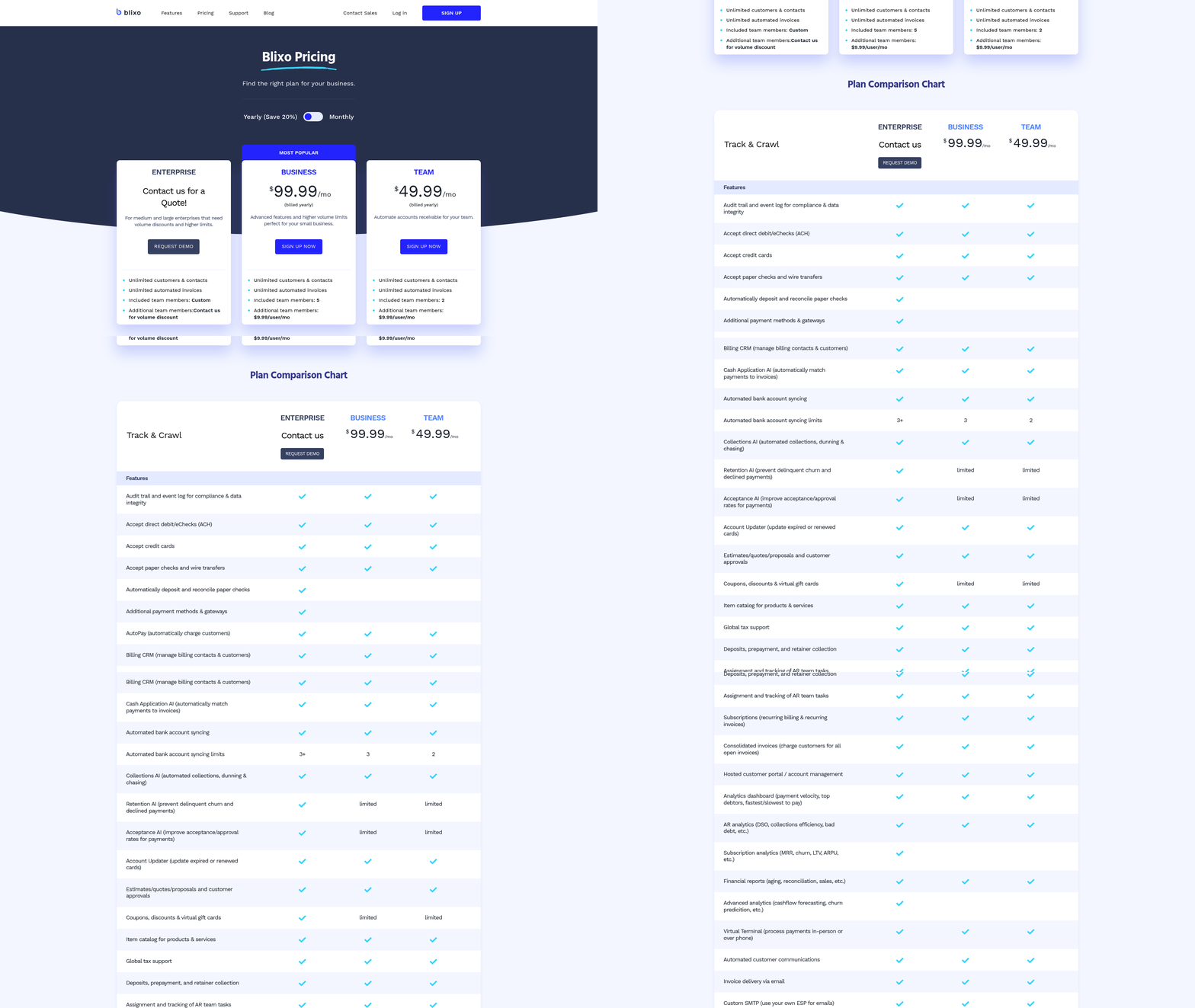
Implementing Blixo for automated accounts receivable transforms how businesses manage invoicing, collections, and cash flow. The platform eliminates manual tasks by automating recurring invoices, payment reminders, and cash application, while integrating seamlessly with existing systems like QuickBooks, Xero, and custom ERPs. Below is a step-by-step guide to set up and configure Blixo, optimize its features, and avoid common implementation pitfalls..
How to Set Up Blixo for Automated Invoicing
Start by creating a Blixo account and connecting it to your accounting or ERP system. The platform supports integration with tools like QuickBooks, Sage Intaact, and Oracle via pre-built connectors, which reduce setup time. For example, one company integrated Blixo with their ERP system in under three weeks, achieving faster payment cycles and improved accuracy. After linking your systems, define your invoicing rules, such as payment terms, discounts, and tax calculations. Blixo’s web-based interface requires no software installation, so you can configure these settings from any device with internet access.
- Connect Your Systems: Use Blixo’s integration tools to sync with your ERP, CRM, or accounting software. For custom integrations, Blixo’s documentation provides clear steps to map data fields.
- Define Payment Rules: Set up accepted payment methods (ACH, credit cards, etc.) and automate recurring invoices for subscriptions or retainer-based services.
- Test the Workflow: Send a trial invoice to a test customer and verify that payments update in your accounting system. Blixo’s intelligent matching engine ensures payments align with invoices, minimizing errors.
As mentioned in the Assessing Your Current Accounts Receivable Process section, understanding your existing workflows is critical before implementing automation..
How to Customize Blixo for Collections and Dunning
Blixo’s customization options let you tailor collections workflows to your business needs. Start by configuring automated reminders: set the frequency, channels (email, SMS), and templates for late payments. For example, one user reported a 25% reduction in delinquencies after implementing tiered dunning campaigns-initial reminders within 7 days, followed by escalation to phone calls after 14 days.
To build a dunning campaign:
- Create Reminder Templates: Design professional emails or SMS messages that align with your brand’s tone.
- Set Escalation Rules: Automate follow-ups based on payment status (e.g., send a final notice if payment isn’t received within 30 days).
- Enable Late Fees: Configure fees to incentivize timely payments, with rules for when and how much to charge.
Blixo also allows you to create a customer portal, giving clients 24/7 access to view invoices, make payments, and update account details. This reduces manual support requests and improves customer satisfaction..
How to Integrate Blixo with Existing Systems
Integration is a critical step to ensure data flows smoothly between Blixo and your existing tools. Most businesses complete this phase within 2–4 weeks, depending on system complexity. Key steps include:
- Data Migration: Import historical invoices and customer records into Blixo using CSV files or APIs. The platform supports 256-bit encryption for secure transfers.
- Map Financial Workflows: Align Blixo’s invoicing and cash application processes with your accounting rules. For example, a medium-sized enterprise improved cash application accuracy by 40% after mapping Blixo to their ERP.
- Train Your Team: Host a training session to familiarize your finance team with Blixo’s dashboard, reporting tools, and reconciliation features.
Potential roadblocks include mismatched data fields or incomplete customer information. To prevent this, audit your existing systems before migration and clean up duplicate or outdated records. Building on concepts from the Common Pitfalls and Best Practices for Automated Accounts Receivable section, proactive data preparation can mitigate these risks..
Real-World Results from Blixo Users
Businesses across industries have seen measurable improvements after implementing Blixo. For instance, a small service-based business reduced time spent on invoicing by 30%, while a SaaS company automated 90% of its collections using recurring billing and dunning campaigns. One user shared: “Blixo is a total major advantage for invoicing and payment management, allowing me to focus on creative work without worrying about administrative tasks” (Vincent Mann, Globetown Media).
The average implementation timeline is 2–6 weeks, depending on integration scope. Companies with pre-existing ERPs may take longer to map workflows, but Blixo’s support team offers templates and guidance to accelerate the process.
By automating invoicing, collections, and cash application, Blixo helps businesses reduce manual errors, improve cash flow, and free up time for strategic growth. Start with a pilot integration, then scale features like subscription billing and churn prediction as needed.
As discussed in the Why Automated Accounts Receivable Matters section, these efficiencies directly address the inefficiencies of manual processes, which cost businesses time and operational clarity.
Automating Invoice Creation and Dispatch with Blixo
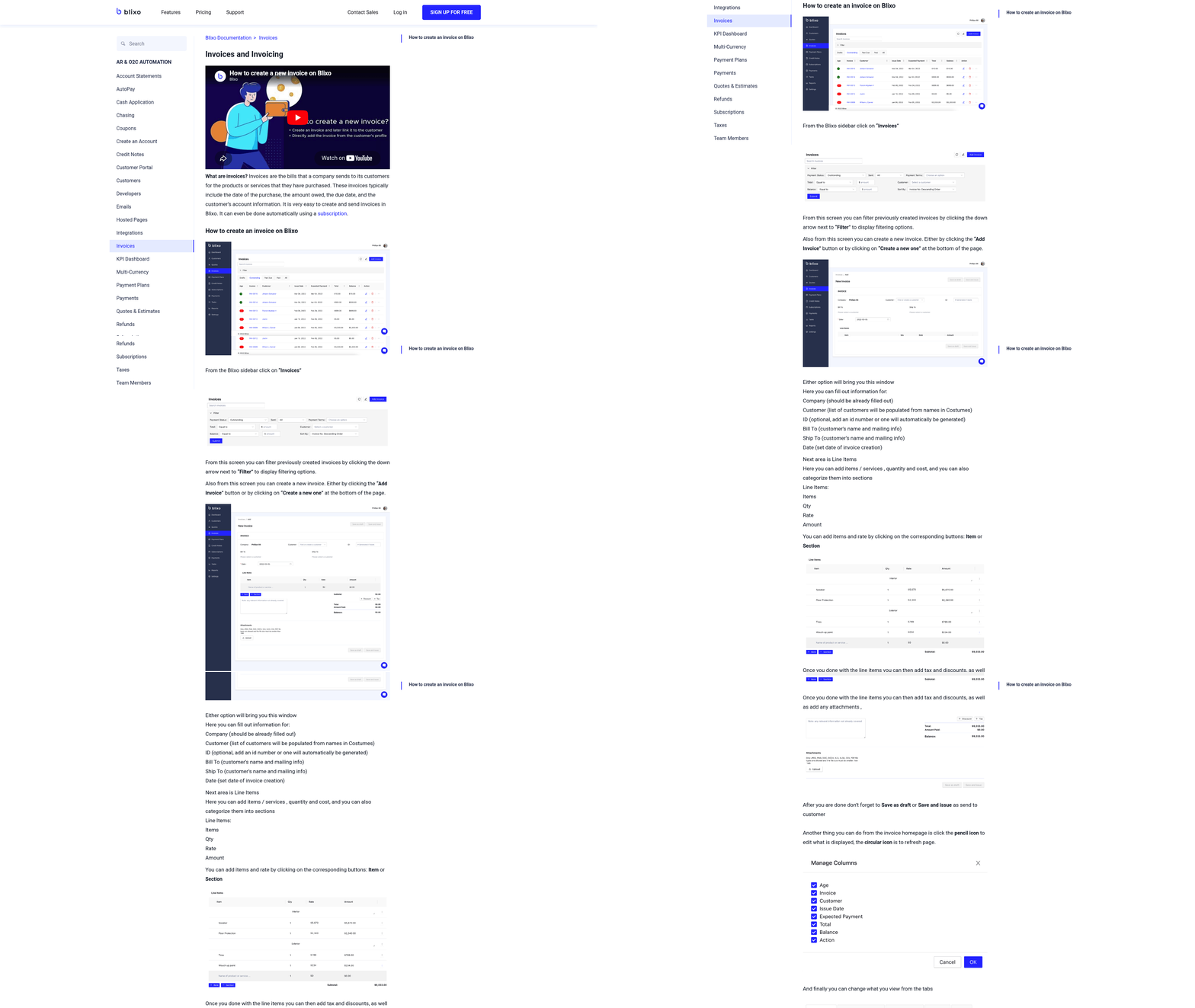
Automating invoice creation and dispatch with Blixo eliminates manual tasks by using recurring invoice generation, automated payment reminders, and seamless payment integrations. Businesses can set up rules for when and how invoices are sent, ensuring consistency while reducing administrative workload. For example, a small business using Blixo reported a 30% reduction in time spent on invoicing and collections after implementation. Building on concepts from the Why Automated Accounts Receivable Matters section, this system addresses inefficiencies in manual processes by streamlining workflows and improving operational clarity. Below is a step-by-step guide to configure and optimize this system..
How Do You Set Up Automated Invoicing in Blixo?
Begin by connecting Blixo to your accounting software (e.g., QuickBooks, Xero) or ERP system. This integration ensures that invoice data flows automatically between platforms, minimizing manual entry errors. As mentioned in the Implementing Blixo for Automated Accounts Receivable section, this step is critical for aligning data across systems. Next, configure payment methods like ACH, credit cards, or digital wallets directly in Blixo’s dashboard. The platform’s web-based interface allows teams to access settings from any device, streamlining collaboration.
- Link accounting software: Go to Settings > Integrations and select your accounting tool. Follow the prompts to authorize data synchronization.
- Define payment methods: manage to Billing > Payment Options to enable ACH, Visa, Mastercard, or American Express.
- Set up recurring invoices: Use Invoicing > Recurring Templates to schedule monthly or quarterly invoices based on client contracts.
A medium-sized enterprise integrated Blixo with its Oracle ERP, reducing manual invoicing tasks by automating data transfers and aligning payment terms across systems..
What Customization Options Are Available for Invoices?
Blixo allows businesses to tailor invoice templates, payment terms, and reminders to match brand identity and client preferences. For instance, a service-based business might add late fees or discounts for early payments directly into invoice rules. The platform also supports dynamic tax calculations based on location, ensuring compliance without manual adjustments.
- Custom fields: Add logos, brand colors, or client-specific notes in Templates > Design.
- Payment terms: Set due dates (e.g., Net 30) and late fees in Billing > Terms.
- Automated reminders: Configure email, SMS, or phone reminders at intervals like Day 7, Day 14, and Day 21 post-invoice.
One user, Duy, praised Blixo for simplifying subscription billing by allowing recurring invoices with adjustable intervals, which reduced his workload from 10+ hours monthly to under 30 minutes..
What Best Practices Improve Accuracy and Customer Satisfaction?
To minimize errors and speed up payments, follow these strategies:
- Audit rules regularly: Review recurring invoice schedules and payment terms in Settings > Automation to avoid missed charges or misapplied discounts.
- Use the customer portal: Let clients view invoices, dispute charges, or update payment methods independently, improving transparency.
- use AI for cash application: Blixo’s intelligent matching engine automatically applies payments to invoices, reducing reconciliation time by up to 50%. This aligns with insights from the Monitoring Cash Flow and Measuring ROI with Blixo section, where real-time data tracking enhances financial oversight.
A case study from a SaaS company showed that automated reminders via email and SMS cut average payment delays from 14 days to 5 days. For example, setting a “Day 3” email reminder and a “Day 10” SMS nudge prompted faster action than one-time alerts..
How Do Businesses Measure Time Savings?
Blixo users report 30–50% time savings on invoicing tasks, depending on business size and complexity. A retail chain automated 200+ monthly invoices using Blixo’s subscription billing feature, cutting manual entry from 40 hours to 8 hours. The platform’s reporting tools track metrics like payment speed, error rates, and customer dispute resolution times, providing data to refine workflows.
To maximize efficiency, pair Blixo with habits like batch-processing invoice approvals or using the “Send Later” feature to schedule invoices during off-peak hours. By automating repetitive tasks, teams can focus on strategic growth initiatives instead of administrative work.
Monitoring Cash Flow and Measuring ROI with Blixo
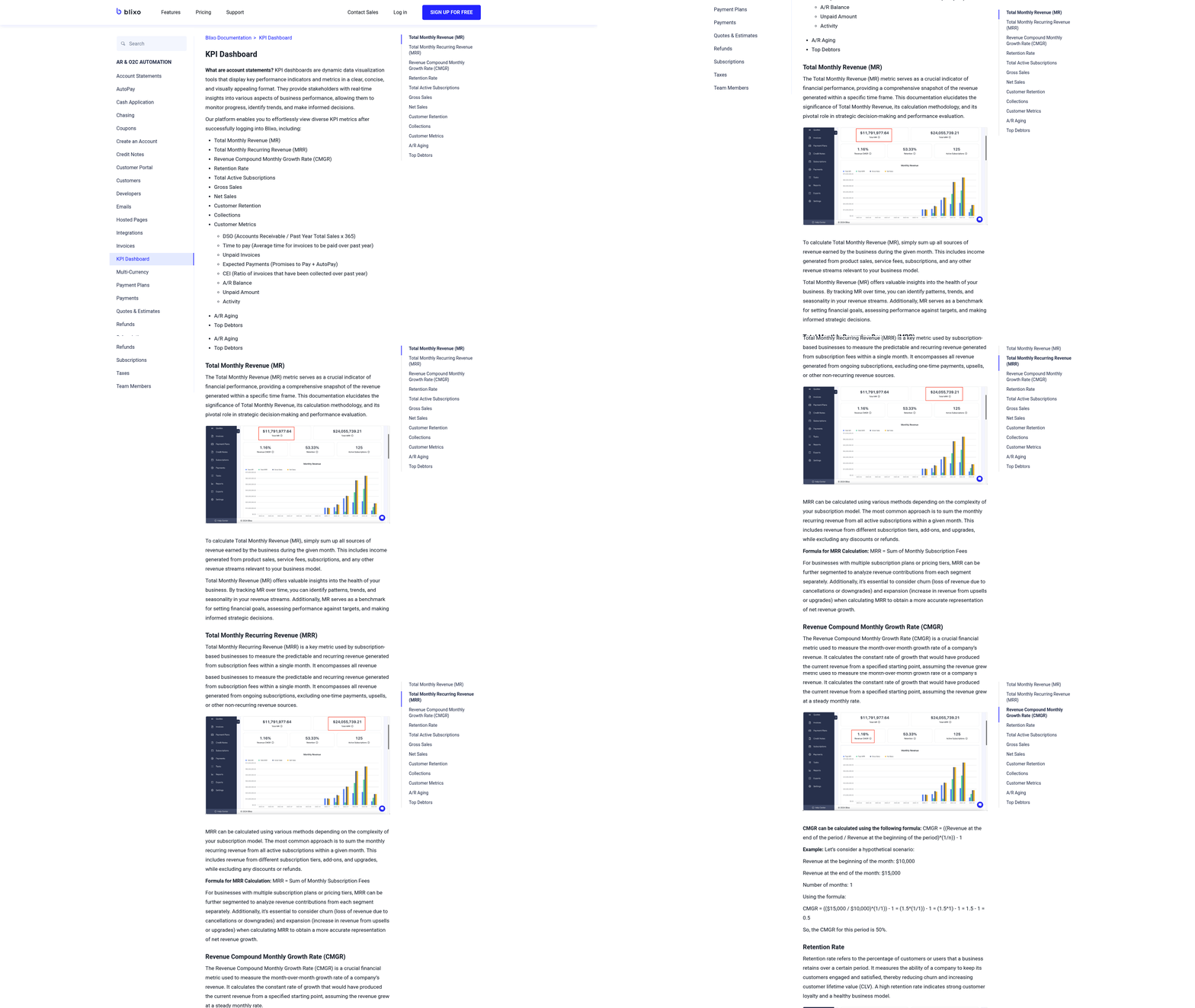
Monitoring cash flow and measuring ROI with Blixo begins with using its real-time dashboards and automated reporting tools. The platform tracks key metrics like days sales outstanding (DSO) and average days to pay, providing visibility into payment trends and collection efficiency. By integrating with accounting systems such as QuickBooks and Xero, Blixo ensures seamless data flow for accurate financial analysis, as outlined in the Implementing Blixo for Automated Accounts Receivable section.
How to Set Up Cash Flow Monitoring in Blixo
- Access the Cash Flow Dashboard: Log into your Blixo account and manage to the “Cash Flow” section. This dashboard displays real-time inflows, outflows, and aging reports.
- Configure Payment Alerts: Set up automated notifications for late payments or unusual activity. For example, you can define thresholds for DSO (e.g., alert if DSO exceeds 45 days). Building on concepts from the Assessing Your Current Accounts Receivable Process section, these alerts help identify inefficiencies in your existing workflows.
- Generate Custom Reports: Use the reporting tool to create weekly or monthly summaries. Filter data by customer, payment method, or invoice status to identify bottlenecks.
Tracking Key Performance Indicators (KPIs)
Blixo simplifies tracking critical KPIs by automating data collection. To monitor DSO:
- Go to the “Accounts Receivable” tab and select “DSO Analysis.” The tool calculates DSO using the formula: (Accounts Receivable / Total Credit Sales) × Number of Days.
- Compare DSO trends over time to assess improvements. For instance, one business reduced its DSO from 50 to 32 days within three months using Blixo’s automated invoicing and reminders, a benefit highlighted in the Why Automated Accounts Receivable Matters section.
For average days to pay:
- Use the “Payment Trends” report to view how long customers typically take to settle invoices. Blixo’s intelligent matching engine ensures accurate payment allocation, reducing manual errors that skew metrics.
Measuring ROI from Automation
Businesses using Blixo report an average ROI of 30–50% within six months, driven by faster payments and reduced administrative costs. For example, one company cut manual accounting tasks by 60% after automating dunning emails and cash application. To calculate your ROI:
- Track time saved on collections using the “Team Productivity” dashboard.
- Compare pre- and post-implementation payment cycle times in the “Cash Flow Reports.”
Case Study: Improving Cash Flow for a Subscription Business
A service-based business adopted Blixo to manage recurring billing and collections. By automating subscription invoicing and setting up payment reminders, they reduced late payments by 40% and improved cash inflow predictability. The platform’s churn prediction feature also helped retain high-value customers, contributing to a 25% increase in annual revenue.
Expert Insights and User Feedback
Vincent Mann, founder of Globetown Media, noted that Blixo’s automation “eliminated payment tracking headaches,” allowing his team to focus on creative projects. Similarly, Dave, a SaaS entrepreneur, highlighted Blixo’s superior functionality compared to previous tools, achieving a 20% faster cash application process.
By combining real-time dashboards, customizable KPI tracking, and actionable insights, Blixo empowers businesses to optimize cash flow and quantify the financial benefits of automation. Start with the step-by-step setup, refine your metrics, and watch your ROI grow as workflows become more efficient.
Common Pitfalls and Best Practices for Automated Accounts Receivable
Automated accounts receivable systems streamline financial workflows, but missteps during implementation can undermine their effectiveness. To maximize efficiency with Blixo, avoid pitfalls like poor data integration, over-customization, and inadequate training while adopting best practices such as structured change management and proactive security measures. As mentioned in the Implementing Blixo for Automated Accounts Receivable section, avoid pitfalls like poor data integration, over-customization, and inadequate training while adopting best practices such as structured change management and proactive security measures. Below, we break down how to manage these challenges using Blixo’s tools and real-world examples.
What Are the Common Pitfalls to Avoid?
Data integration errors and customization mistakes are frequent roadblocks. For example, inconsistent data formatting during migration can lead to billing inaccuracies, while over-customizing workflows may create unnecessary complexity. Blixo mitigates these risks by offering pre-built integrations for payment gateways and accounting software, reducing manual configuration. Its support for multiple currencies and payment methods (ACH, Visa, Mastercard, American Express) ensures global compatibility out of the box.
One common error is failing to align automated rules with business logic. For instance, rigid payment reminders without tiered escalation might frustrate customers. Blixo’s customizable collections workflows allow businesses to set tiered reminders and late fees based on account behavior, balancing automation with flexibility. As discussed in the Automating Invoice Creation and Dispatch with Blixo section, these workflows ensure consistent communication with customers while maintaining operational efficiency.
What Best Practices Should You Follow?
A successful implementation hinges on clear communication and structured training. Start by mapping existing processes to identify gaps, as outlined in the Assessing Your Current Accounts Receivable Process section. Blixo’s user-friendly customer portal and recurring billing tools simplify transitions, but staff must understand how to configure subscription terms, manage churn prediction features, and interpret revenue recognition reports.
Adopt a phased rollout to test workflows incrementally. For example, one company used Blixo to automate 20% of its invoicing first, then expanded after validating accuracy. This approach minimized disruptions while building team confidence. Pair this with ongoing training via Blixo’s documentation and live support to ensure staff adapt smoothly.
How Can You Ensure a Smooth Transition?
Project planning and stakeholder alignment are critical. Start by defining KPIs like days sales outstanding (DSO) and administrative cost per invoice to measure success. Blixo’s analytics dashboard tracks these metrics in real time, providing visibility into savings. As detailed in the Monitoring Cash Flow and Measuring ROI with Blixo section, one business reported a 40% reduction in DSO after automating collections, while another cut billing errors by 60% using Blixo’s revenue recognition tools.
Communication is key during the shift. Share progress updates with finance teams and customers, especially when transitioning to automated payment schedules. For example, a SaaS company used Blixo’s customizable billing notifications to inform users about recurring charges, reducing dispute rates by 35%.
What Results Can You Expect?
Businesses using Blixo typically see 20–30% time savings in billing cycles and 15–25% reductions in administrative costs. One company automated $2M in annual invoicing, saving 150+ hours yearly in manual data entry. Blixo’s churn prediction tools also helped a subscription-based service retain 12% more customers by flagging at-risk accounts early.
To avoid pitfalls, prioritize clarity in setup. For instance, avoid overloading workflows with unnecessary rules. Use Blixo’s pre-built templates for standard billing scenarios and customize only where essential. Regularly audit configurations to ensure alignment with business goals.
By combining Blixo’s automation features with strategic planning, companies can streamline receivables while minimizing errors. Focus on training, incremental implementation, and using built-in tools to build a scalable, efficient system.
Frequently Asked Questions
1. What is Blixo and how does it help with accounts receivable?
Blixo automates accounts receivable processes, reducing manual tasks like invoicing and payment tracking. It streamlines collections, cuts payment delays from weeks to hours, and improves cash flow for businesses of all sizes.
2. How much time can Blixo save finance teams compared to manual processes?
Blixo reduces finance teams’ time spent on repetitive AR tasks by 40-60%, reclaiming up to 30-50% of their workload for strategic business growth. Automation eliminates manual reconciliation and error-prone workflows.
3. What are the key benefits of using an automated accounts receivable system like Blixo?
Automation minimizes human errors, reduces late payment penalties, and prevents revenue loss. It improves customer satisfaction with faster billing and ensures working capital remains available instead of tied up in unpaid invoices.
4. How does Blixo prevent cash flow issues for small businesses?
Blixo accelerates payment processing, reducing delays that tie up working capital. By automating invoicing and tracking, small businesses avoid cash crunches caused by unpaid invoices lingering for weeks.
5. Can Blixo integrate with existing accounting software or payment platforms?
While the article doesn’t specify integrations, Blixo functions as a centralized platform for invoice tracking and reconciliation. Its design likely supports compatibility with common tools to streamline workflows without overhauling current systems.
6. What costs are associated with implementing Blixo?
Blixo offers a one-time lifetime purchase for $79, avoiding ongoing subscription fees. This cost includes access to its automation features, which reduce long-term administrative expenses from manual AR errors and delays.
7. How quickly can businesses see results after adopting Blixo?
Businesses typically see reduced payment delays and improved reconciliation efficiency within weeks. The full impact, including 40-60% lower administrative overload, emerges as workflows fully transition to automation.