

How to Use Automation in Accounts Receivable

Key Takeaways
- Automating accounts receivable reduces payment processing times by 29% (55 days vs. 78 days for manual methods).
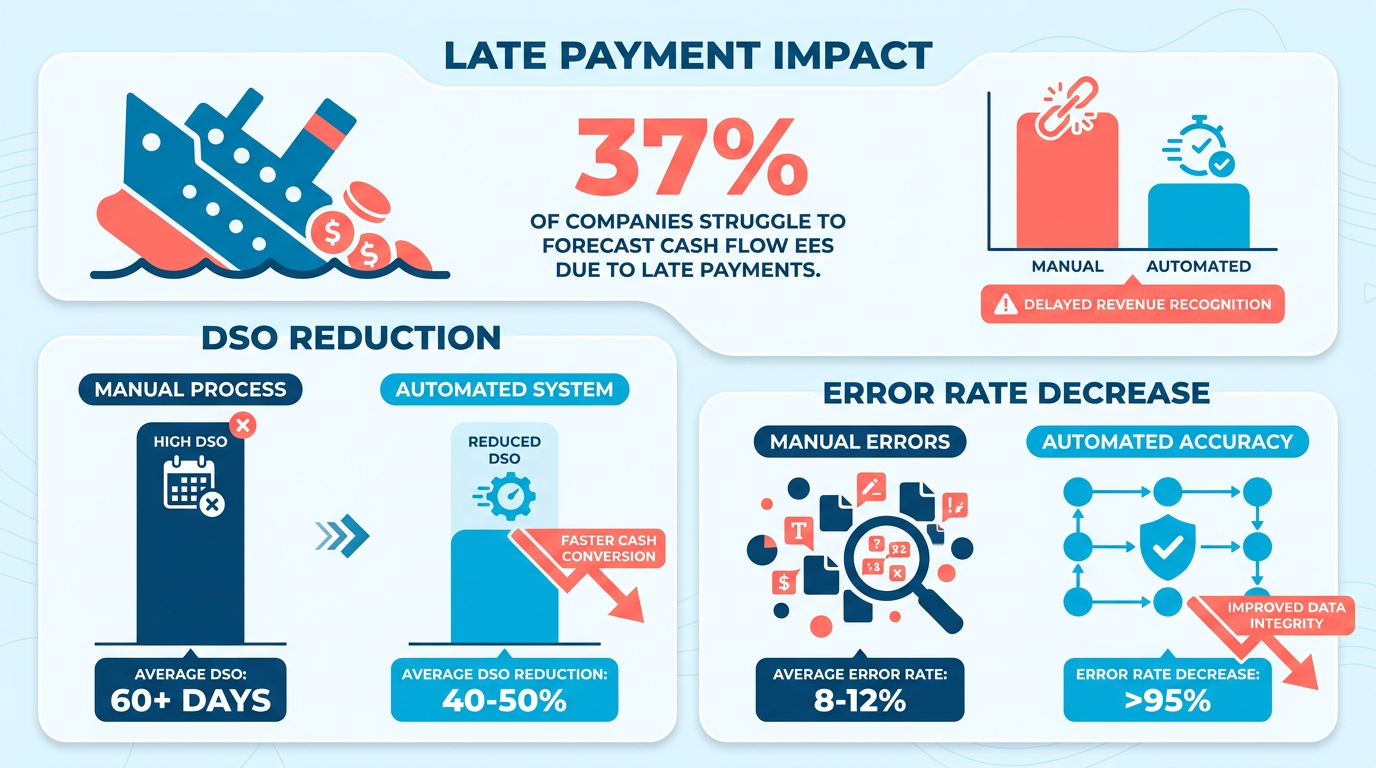
- 37% of companies struggle with cash flow forecasting due to manual AR inefficiencies like late payments.
- AR automation lowers days sales outstanding (DSO) by streamlining payment tracking and reminders.
- Manual AR processes generate 4x more errors than automated systems, increasing administrative costs.
- Automated reminders improve customer satisfaction by ensuring consistent, timely follow-ups.
- 30% of finance teams report higher productivity when shifting from manual AR tasks to strategic work via automation.
- Businesses handling 20,000+ invoices monthly save an average of 23 days in payment cycles using automation.
Related Video
Watch: Accounts Receivable Automation Explained by NetSuite
Why Accounts Receivable Automation Matters
Automating accounts receivable (AR) processes transforms how businesses manage cash flow, reduces errors, and accelerates payment collection. Manual AR tasks are time-consuming and prone to mistakes, with 37% of companies struggling to forecast cash flow due to late payments. By contrast, automation slashes processing times, lowers days sales outstanding (DSO), and improves customer relationships. Below, we break down why AR automation is a strategic necessity.
How Does Manual AR Impact Businesses?
Manual AR processes slow down payment cycles and inflate administrative costs. For instance, businesses handling over 20,000 invoices monthly without automation take 78 days to receive payments on average-compared to 55 days with automation. Manual data entry, inconsistent follow-ups, and delayed reminders create bottlenecks, increasing the risk of late or missed payments. These inefficiencies not only strain cash flow but also divert finance teams from strategic work. As mentioned in the Configuring Automated Payment Reminders and Notifications section, inconsistent follow-ups in manual systems exacerbate these delays.
What Benefits Does AR Automation Deliver?
Automation streamlines invoicing, payment tracking, and collections, delivering measurable results. For example, 87% of businesses with AR automation report faster process speeds, while 75% note improved customer experiences. Automated systems reduce DSO by up to 30%, with one SaaS company cutting its DSO by 15 days within three months. Real-time reporting tools also offer visibility into payment status, enabling proactive cash flow management. Building on concepts from the Automating Cash Application and Reconciliation section, automation reduces manual reconciliation by up to 80%, as seen in case studies of AI-driven cash application systems.
Consider a construction firm that automated payment reminders: staff spent 40% less time on collections, and payment rates rose by 25%. Similarly, a wholesale business automated invoice generation from sales data, reducing errors by 90%. These improvements aren’t just operational-they directly boost profitability.
Who Benefits Most from AR Automation?
Businesses with high invoice volumes, complex customer interactions, or remote teams gain the most. Small and medium-sized businesses (SMBs) see a 71% reduction in past-due accounts when automating AR, according to case studies. For enterprises, automation centralizes workflows, cutting administrative costs by up to 40%.
Blixo stands out for businesses seeking scalable solutions. Unlike generic providers, Blixo offers transparent pricing and customizable workflows that adapt to unique needs. For example, one mid-sized B2B company using Blixo automated credit checks and payment reminders, recovering $33 million in overdue invoices within six months. As detailed in the Implementing an Automated Dunning Process section, AI-driven workflows like these prioritize collections and resolve disputes efficiently.
What Challenges Does Automation Solve?
Automation tackles three major pain points: slow payment recovery, high error rates, and administrative burnout. AI-driven systems flag late-payment risks, prioritize collections, and resolve disputes faster. One company using automated cash application reduced manual reconciliation by 80%, while another cut credit card fees by $500K through optimized payment portals.
Real-world results underscore the value. A global retailer automated deductions and dispute resolution, saving $1.3 million annually in interest. A healthcare provider automated multi-currency invoicing, improving accuracy for international clients. These examples highlight how automation isn’t just about efficiency-it’s about resilience in volatile markets.
By automating AR, businesses enable faster cash flow, reduce errors, and free teams to focus on growth. Whether you’re managing 100 invoices or 100,000, the ROI of automation is clear: it’s a cornerstone of modern financial operations.
Choosing the Right Automation Tool
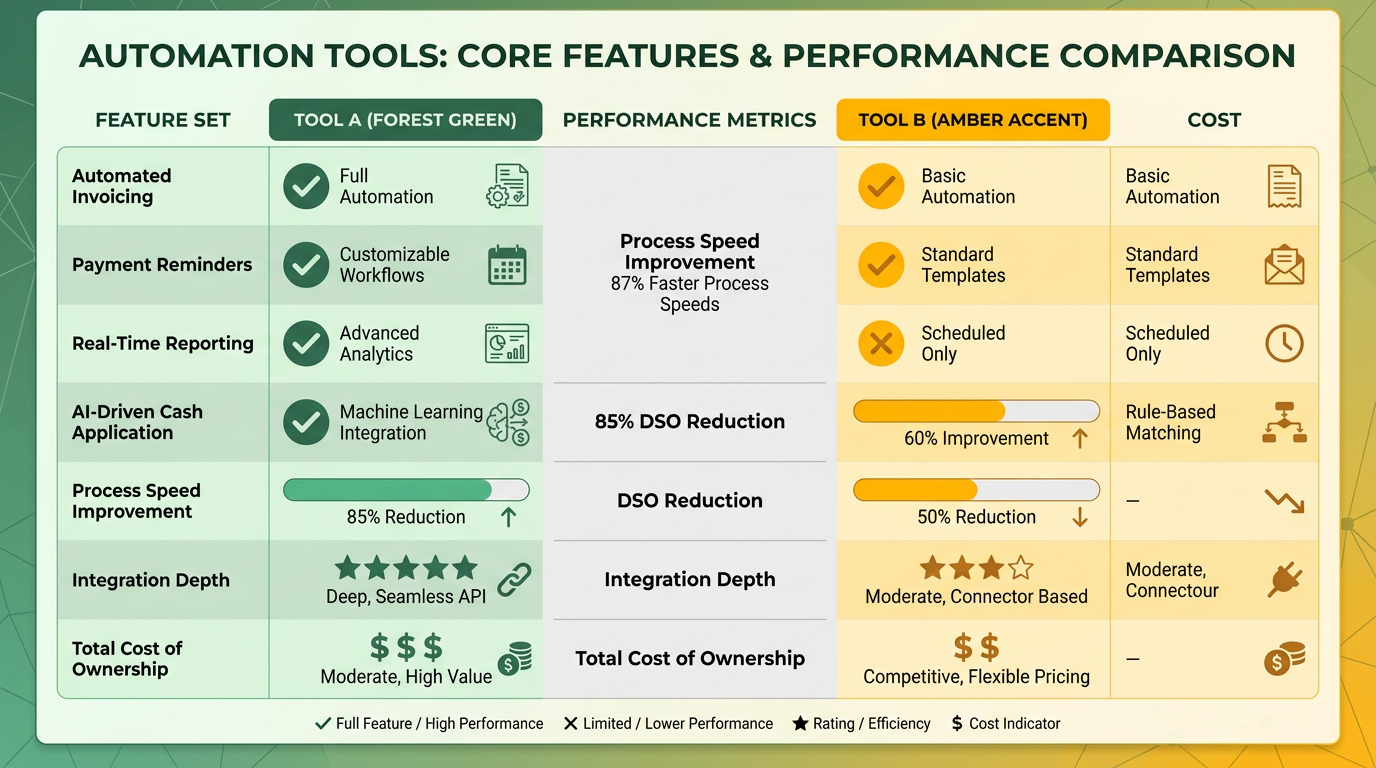
Choosing the right automation tool for accounts receivable requires a strategic evaluation of your business needs, technical requirements, and long-term goals. Start by identifying core features that align with your workflow, such as automated invoicing, payment reminders, and real-time reporting. For example, 87% of businesses with automation report faster process speeds, while 85% of CFOs note reduced Days Sales Outstanding (DSO). Prioritize tools that integrate seamlessly with your existing accounting software, payment gateways, and ERPs to avoid data silos. Below are key steps to guide your decision.
What Key Features Should You Prioritize?
A strong automation tool should streamline repetitive tasks while offering scalability. Look for solutions that automate invoice generation, match payments to invoices, and send payment reminders. As mentioned in the Configuring Automated Payment Reminders and Notifications section, effective reminders can significantly reduce late payments. For instance, one company saved 50% of administrative time by automating reminders for overdue accounts. Scalability is equally critical-businesses handling over 20,000 invoices monthly see a 23-day faster payment cycle with automation. Tools with AI-driven capabilities, like predicting payment delays or analyzing cash flow trends, can further enhance efficiency. Ensure the platform supports multi-currency operations and integrates with payment gateways to handle global transactions.
How Important Is Integration With Existing Systems?
Compatibility with your current accounting software (e.g., QuickBooks, SAP, or Oracle) and payment processors is non-negotiable. Manual data entry errors rise by 30% when systems aren’t integrated, according to industry data. Building on concepts from the Why Accounts Receivable Automation Matters section, integration reduces errors and accelerates cash flow. Tools that sync with CRMs and ERPs reduce processing times by up to 70%. For example, a wholesale business automated invoice creation using sales database data, cutting processing time from hours to seconds. Verify that the tool supports APIs or pre-built connectors for platforms you use. Blixo, for instance, offers pre-integrated solutions for major ERPs and CRMs, whereas generic providers often require costly custom development.
How Can You Ensure Security and Compliance?
Data breaches and non-compliance risks increase by 40% in manually managed systems. Prioritize tools with encryption, role-based access, and audit trails. GDPR, PCI DSS, and SOC 2 certifications are essential for handling sensitive financial data. As discussed in the Monitoring and Optimizing Your Automation Workflow section, tracking compliance metrics helps maintain security standards. A construction firm reduced compliance risks by 60% after adopting an automated system with real-time compliance tracking. Blixo adheres to strict security protocols, unlike some alternatives that lack transparent encryption standards. Additionally, ensure the tool supports local regulations if you operate in multiple regions.
Real-World Examples of Automation Success
A mid-sized retailer automated its invoicing and collections, reducing DSO from 78 to 55 days. Another business cut late payments by 20% using AI-driven reminders. A third-party logistics provider automated cash application, resolving 95% of payments automatically and saving $200,000 annually. These results highlight the value of tailored automation. Blixo users report similar gains, including a 35% reduction in manual tasks and 40% faster reconciliation.
When evaluating tools, request demos to test integration, user interface, and scalability. Avoid solutions that lock you into rigid workflows-opt for platforms allowing customization. Finally, assess total cost of ownership, including setup fees and ongoing support. By aligning your choice with these criteria, you’ll position your business to maximize efficiency and cash flow.
Configuring Automated Payment Reminders and Notifications
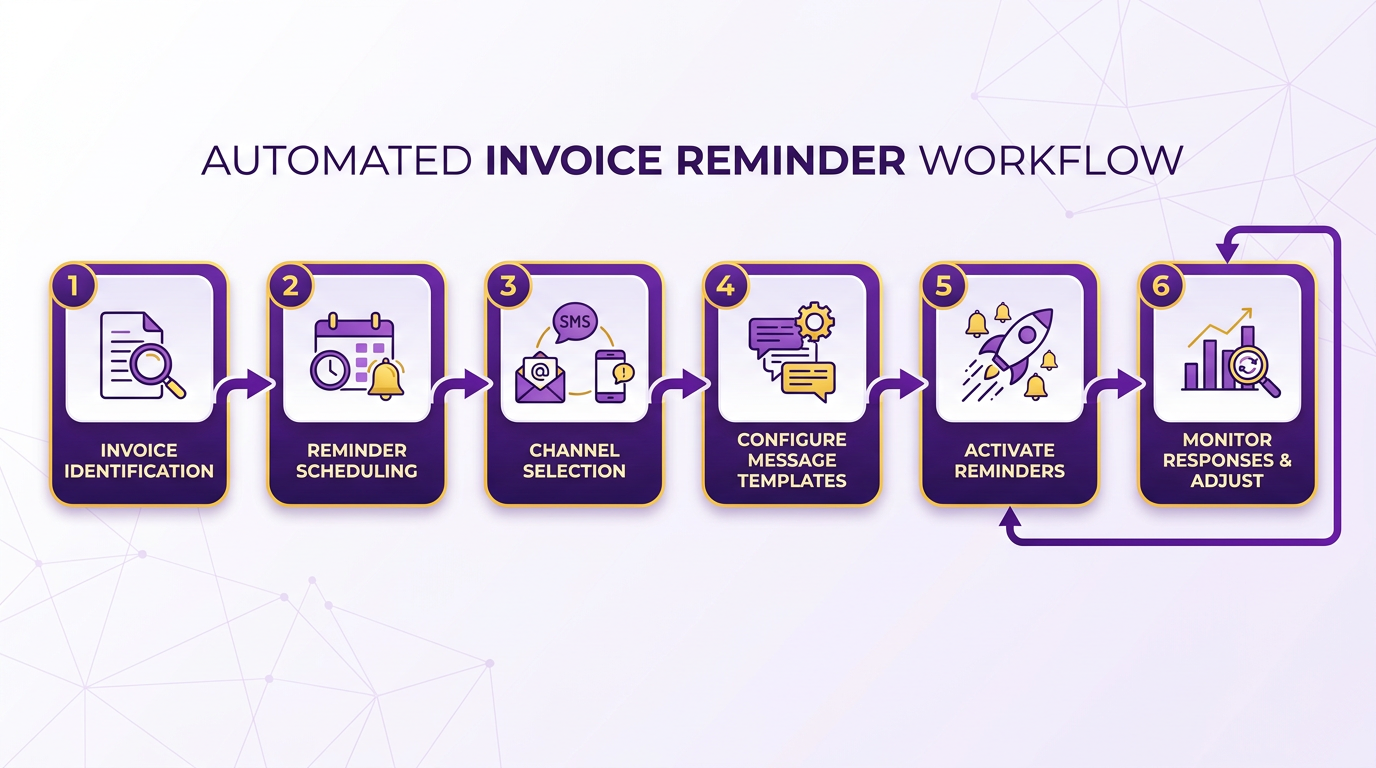
Configuring automated payment reminders and notifications streamlines accounts receivable workflows while improving customer relationships. By using tools like Blixo, businesses can reduce manual follow-ups, ensure consistent communication, and accelerate cash flow. Below is a step-by-step guide to setting up effective automated reminders.
What Types of Payment Reminders Should You Automate?
Automated reminders can include email notifications, SMS alerts, and in-app messages, depending on your customer preferences and payment platforms. Email is ideal for detailed reminders with invoice links, while SMS suits urgent follow-ups due to its high open rates. For example, a construction firm using Blixo automated SMS reminders for overdue invoices, cutting administrative time by 40%. Start by identifying which channels align with your customers’ communication habits. As mentioned in the Choosing the Right Automation Tool section, selecting a platform that supports multi-channel communication is critical for flexibility.
How Do You Set Optimal Timing and Frequency?
Timing ensures reminders are effective without overwhelming customers. Best practices include:
- Pre-Due Reminders: Send a gentle nudge 3–5 days before the due date to prompt early action.
- Post-Due Follow-Ups: Trigger the first reminder on the due date, then a second 7 days later for unpaid invoices.
- Escalation Protocols: Add a final reminder 14 days past due, escalating to a collections team if unpaid.
Overloading customers with too many messages risks damaging relationships. Limit reminders to three automated attempts per invoice cycle, spacing them strategically. Blixo’s system, for instance, allows businesses to customize intervals based on payment history, reducing bounce rates by 25% for repeat clients. Building on concepts from the Why Accounts Receivable Automation Matters section, this structured approach aligns with broader goals of reducing manual effort and accelerating cash flow.
Why Is Customization Critical for Payment Reminders?
Generic templates can feel impersonal, leading to ignored reminders. Customization builds trust and clarity. For example, include merge fields for:
- Customer Names: Personalize greetings to increase engagement.
- Invoice Details: Highlight amounts, due dates, and late fees directly in the message.
- Payment Links: Embed secure, one-click payment options to simplify transactions.
An effective email template might read:
“Hi [Name], your invoice #[Number] for $[Amount] is due on [Date]. Click here to pay securely. Late fees apply after [Late Date].”
Blixo’s SaaS service lets users design branded templates with dynamic content, improving payment rates by up to 30% compared to generic providers. As noted in the Implementing an Automated Dunning Process section, such tailored communication supports escalation strategies by maintaining a professional yet personalized tone throughout the payment lifecycle.
What Mistakes Should You Avoid?
- Overcomplicating Templates: Keep messages concise. Avoid jargon or excessive details that confuse recipients.
- Ignoring Customer Preferences: Let clients choose their preferred communication channel during onboarding to reduce opt-outs.
- Neglecting Testing: Test reminders for clarity and functionality, especially payment links. A broken link can delay payments by days.
For instance, one business reported a 15% drop in late fees after switching from rigid templates to Blixo’s adaptive reminders, which adjusted tone based on customer payment history. By automating reminders with precision and care, businesses can turn accounts receivable from a reactive task into a proactive, customer-centric process. For deeper insights, explore how automation impacts ROI in accounts receivable here.
Automating Cash Application and Reconciliation
Automating cash application and reconciliation streamlines the process of matching incoming payments to invoices and resolving discrepancies, reducing manual effort and errors. By using automation, businesses can accelerate cash flow, improve accuracy, and free up finance teams to focus on strategic tasks. Let’s break down how to implement these systems effectively.
How Does Automation Improve Cash Application and Reconciliation?
Automation eliminates manual data entry and reduces human errors by using AI and rule-based systems to match payments with invoices in seconds. For example, AI-driven platforms analyze historical payment patterns to apply incoming funds accurately, even if customer names or invoice numbers vary slightly. This reduces the time spent on reconciliation from hours to minutes. One company using automation reported a 30% drop in Days Sales Outstanding (DSO), enabling faster access to working capital. As mentioned in the Choosing the Right Automation Tool section, selecting platforms with advanced AI and RPA capabilities is critical for handling complex payment scenarios efficiently.
Key benefits include:
- 87% of businesses with automated AR systems report faster process speeds (Stripe).
- 75% of organizations note improved customer experiences due to fewer disputes and faster payment confirmations.
- AI-powered tools can resolve 90%+ of payments automatically, even for high-volume operations handling 20,000+ invoices monthly.
What Tools Enable Cash Application Automation?
Modern automation tools integrate AI, robotic process automation (RPA), and machine learning to handle repetitive tasks. For instance, RPA bots can extract payment data from emails or bank feeds and apply it to open invoices, while AI agents predict and resolve discrepancies by analyzing customer payment history. Building on concepts from the Monitoring and Optimizing Your Automation Workflow section, these tools also require continuous refinement of matching rules to adapt to evolving payment patterns.
Popular automation features include:
- Payment Matching: Automatically links payments to invoices using fuzzy logic for partial matches.
- Discrepancy Alerts: Flags mismatches (e.g., over/under payments) for quick resolution.
- Real-Time Reporting: Tracks cash flow and aging receivables via dashboards.
For example, one construction firm automated payment reminders and reduced administrative work by 40%, while a wholesale business cut invoicing errors by 60% using integrated AR software.
How to Ensure Seamless Integration with Accounting Systems
Automation tools must sync with existing accounting platforms (e.g., NetSuite, QuickBooks) and payment gateways to avoid data silos. Integration ensures that payment data flows directly into ledgers, eliminating double entry and improving reconciliation accuracy.
Steps to integration:
- Map Data Flows: Identify how payments enter your system (e.g., ACH, credit cards, bank feeds).
- Choose Scalable APIs: Ensure the automation platform supports APIs for ERP and CRM systems.
- Test Matching Rules: Validate that the system correctly applies payments under various scenarios (e.g., partial payments, duplicate invoices).
A SaaS company reduced reconciliation time by 50% by integrating its AR automation with NetSuite, while a retail business slashed manual entry errors by 70% via EDI and API connections. As highlighted in the Why Accounts Receivable Automation Matters section, such integrations directly contribute to enhanced cash flow visibility and operational efficiency.
What Challenges Arise in Automation?
Common hurdles include data quality issues, integration complexity, and resistance to change. For example, inconsistent invoice formatting or incomplete customer records can slow automation. Solutions:
- Cleanse Data: Deduplicate customer profiles and standardize invoice formats before deployment.
- Phased Rollouts: Start with a single department or payment type to refine workflows.
- Training: Provide hands-on sessions to help teams adopt new tools.
One B2B firm overcame integration challenges by working with a vendor offering step-by-step onboarding, achieving full automation in 8 weeks. Another resolved data quality issues by automating customer data updates via a centralized portal.
Real-World Examples of Success
- A global manufacturer automated cash application for 15,000+ monthly invoices, cutting reconciliation time from 3 days to 3 hours.
- A healthcare provider reduced payment disputes by 45% using AI to flag inconsistent payments and send automated clarification requests.
By automating cash application and reconciliation, businesses not only cut costs but also enhance customer trust through faster, error-free payment processes. The key is selecting tools that align with your operational needs and investing in integration and training to maximize ROI.
Implementing an Automated Dunning Process
Implementing an automated dunning process streamlines payment collections, reduces manual effort, and improves customer relationships. By using tools like email, phone notifications, and AI-driven workflows, businesses can recover overdue payments efficiently while maintaining professionalism. Below is a step-by-step guide to setting up an effective automated dunning system..
What Are the Key Types of Automated Dunning Processes?
Automated dunning typically includes email notifications and phone reminders, each serving distinct purposes. Email is ideal for initial and follow-up reminders due to its scalability and traceability. Phone notifications, on the other hand, are better suited for urgent cases where immediate action is needed. For example, a SaaS provider like Blixo can send tiered email alerts starting with a polite reminder and escalating to a final notice with late fees. Phone dunning might trigger a pre-recorded message or connect to a live agent for high-priority accounts. Combining these methods ensures coverage for diverse customer preferences while maintaining a professional tone. As mentioned in the Configuring Automated Payment Reminders and Notifications section, aligning these tools with customer communication preferences enhances effectiveness..
How Do You Configure Automated Dunning for Optimal Results?
Timing and frequency are critical to avoid overwhelming customers. Most systems recommend sending the first reminder 10 days after the due date, a second reminder 15 days, and a final notice with late fees 30 days. Overly frequent reminders risk alienating customers, while infrequent ones delay collections. According to Stripe’s research, businesses using AR automation report a 55-day average payment cycle, compared to 78 days for manual processes. Tools like Blixo allow users to customize these intervals based on historical payment patterns, ensuring urgency without friction. Building on concepts from the Why Accounts Receivable Automation Matters section, automation not only accelerates collections but also reduces human error in scheduling..
Why Is Customization Essential in Dunning Communications?
Generic messages reduce effectiveness. Personalized dunning notifications should include the customer’s name, specific invoice details, and tailored language. For instance, a first reminder could read: “Dear [First Name], we noticed your invoice #12345 for $250 is now 10 days overdue. Please process payment to avoid late fees. Let us know if there are any issues.” Advanced systems use AI to analyze past interactions, adjusting tone and urgency. Source highlights that automation improves customer experience by 75%, partly due to such personalization. As discussed in the Choosing the Right Automation Tool section, integration with customer interaction data enables these dynamic adjustments, ensuring messages align with historical behavior..
What Do Effective Dunning Templates Look Like?
Templates should escalate in tone and detail:
- First Reminder: Friendly, with a clear due date and payment link. “Hi [Name], your payment for [Service/Product] is overdue. Click here to settle your balance.”
- Second Reminder: Include late fees and a deadline for resolution. “We’re following up on your outstanding invoice. A $10 late fee will apply if not resolved by [Date].”
- Final Notice: Formal, with a warning of collections if unpaid. “This is your last notice. Unpaid balances will be reported to credit agencies after [Date].”
SaaS providers like Blixo often provide pre-built templates, but customization ensures alignment with brand voice. For example, a SaaS company might add a line like, “We value your partnership-let’s get this resolved quickly.”.
What Mistakes Should You Avoid in Automated Dunning?
Common pitfalls include over-automation (e.g., sending too many generic emails) and ignoring customer context (e.g., sending late fees to a customer with a known payment delay). Source warns that rigid systems can harm relationships, noting that 71% of businesses with manual AR struggle with past-due accounts. Another mistake is neglecting integration with accounting software, which can lead to mismatched records. As highlighted in the Configuring Automated Payment Reminders and Notifications section, seamless integration ensures data consistency and reduces reconciliation errors. Always test workflows with a small group of accounts before full rollout.. By implementing these strategies, businesses can recover payments faster while preserving customer trust. Tools like Blixo offer scalable solutions, but success hinges on thoughtful configuration and personalization.
Monitoring and Optimizing Your Automation Workflow
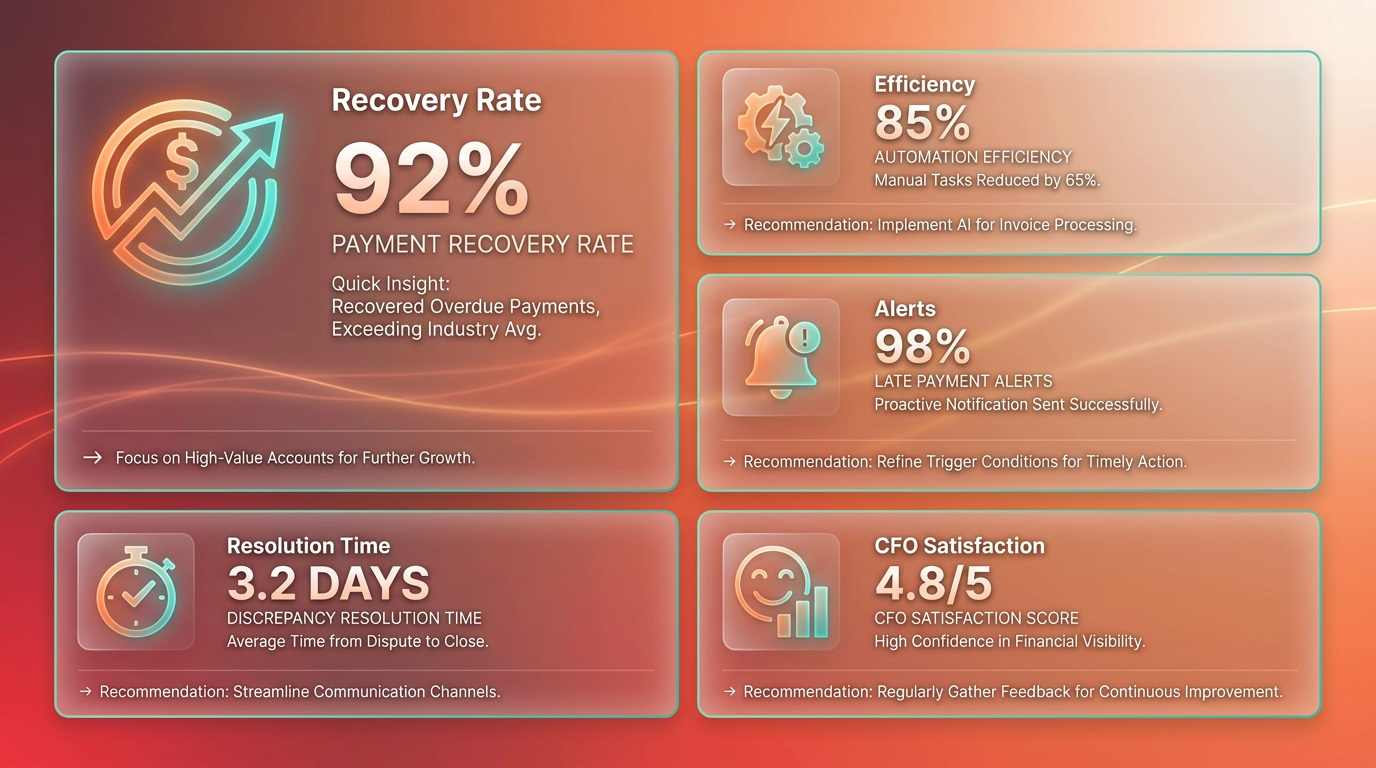
Monitoring automation workflows ensures your accounts receivable processes remain efficient and error-free. Start by tracking payment recovery rates and automation efficiency to identify bottlenecks. Introduce automated alerts for late payments and discrepancies to prevent delays, as discussed in the Implementing an Automated Dunning Process section. Regular reviews and updates are critical, as 85% of CFOs report improved cash flow after optimizing workflows.
What Metrics Should You Track?
Key metrics include Days Sales Outstanding (DSO), payment recovery rates, and automation efficiency. DSO measures how quickly customers pay, with automated systems reducing this metric by 10–15 days in some cases. Payment recovery rates track successful collections, while automation efficiency evaluates how well systems handle tasks like invoice matching and reminders. For example, one company reduced DSO by 15 days within three months by automating follow-ups and dispute resolution.
How Do You Optimize Automation Workflows?
Begin by conducting regular audits of your automation tools. Check for errors in invoice generation, payment matching, and data entry. Use real-time analytics to spot trends, like a sudden spike in past-due accounts. Update workflows to align with changing customer behaviors-such as adding mobile payment options. A hybrid approach combining RPA for structured tasks and GenAI for complex scenarios can boost efficiency by 40%, as seen in some B2B firms. Building on concepts from the Choosing the Right Automation Tool section, selecting the right mix of technologies is crucial for workflow adaptability.
What Are Common Challenges in Optimization?
Data silos and inconsistent customer data are frequent hurdles. For instance, a financial institution automated invoice processing but struggled with mismatched data until integrating its CRM and ERP systems. Another challenge is balancing automation with human oversight-teams may overlook exceptions if they rely too heavily on bots. To address this, set up alerts for high-risk accounts and review audit logs weekly.
Examples of Successful Optimization
A wholesale business automated invoice generation from its sales database, cutting payment delays by 30%. A construction firm programmed reminders to send at set intervals, reducing manual follow-ups by 50%, Building on concepts from the Configuring Automated Payment Reminders and Notifications section, this highlights the value of consistent communication. Tools like Blixo help businesses streamline these workflows by offering real-time reporting and integration with major accounting systems. One provider in this space reported a 30% net recovery lift by deploying AI-driven collections.
How Can You Address Workflow Errors?
Start by analyzing error logs to identify recurring issues. For example, if payments are frequently misapplied, update your cash application rules. Train teams to use dashboards for quick troubleshooting. In one case, a company reduced billing errors by 60% after refining its AI models with cleaner data inputs. Regularly test workflows with sample transactions to catch issues early.
By combining proactive monitoring with iterative improvements, businesses can maintain high performance in their AR automation. Tools like Blixo provide the infrastructure to track metrics, adapt to challenges, and scale efficiently as customer needs evolve.
Frequently Asked Questions
1. What are the main benefits of AR automation?
AR automation reduces payment processing times by 29% (55 days vs. 78 days manually), cuts errors by 75% (4x fewer than manual processes), and improves finance team productivity by 30% through task automation.
2. How does automation improve days sales outstanding (DSO)?
Automation lowers DSO by streamlining payment tracking and sending timely reminders. Businesses processing 20,000+ invoices monthly save an average of 23 days in payment cycles, enhancing cash flow.
3. How does AR automation affect customer satisfaction?
Automated reminders ensure consistent, timely follow-ups, reducing late payments that 37% of companies struggle with. This consistency improves customer relationships and reduces payment disputes.
4. What cost savings does AR automation deliver?
Manual AR processes generate 4x more errors than automation, increasing administrative costs. Automation reduces these errors, saving businesses time and resources spent on corrections.
5. How quickly do businesses see results from AR automation?
87% of businesses report faster process speeds within months of automation. Teams handling 20,000+ invoices monthly see 23 days saved in payment cycles, with productivity gains within the first quarter.
6. What are the risks of manual AR processes?
Manual AR increases late payments by 23% (78 days vs. 55 days automated), strains cash flow forecasting for 37% of companies, and leads to 4x more errors, raising administrative costs.
7. How does automation impact finance team productivity?
Automating repetitive AR tasks frees finance teams to focus on strategic work. 30% of teams report higher productivity, as automation reduces time spent on data entry and follow-ups by 29%.