

ERP vs Automated Invoice Processing with Blixo

Key Takeaways
- Manual invoice processing causes 39% of invoices to have errors, with 57% of errors stemming from data entry alone.
- Businesses handling 1,000 monthly invoices face $180,000–$480,000 annual costs due to manual processing.
- Automated invoice processing reduces manual intervention, accelerates workflows, and integrates with ERP systems.
- ERP systems require automation augmentation to achieve full operational efficiency.
- Labor costs account for 60–80% of total expenses in manual invoicing processes.
- Automating invoice processing can significantly cut administrative costs and payment delays.
- Errors from manual invoicing delay payments, strain vendor relationships, and increase administrative costs.
Related Video
Watch: 7 Ways to Automate AR Workflow Processes to Get Paid Faster by ERP VAR
Why Automated Invoice Processing Matters
Automated invoice processing is a critical upgrade for modern businesses, offering measurable benefits in efficiency, accuracy, and financial health. Manual systems are inherently error-prone, with 39% of invoices containing errors due to manual processing and 57% of errors stemming from data entry alone. These mistakes delay payments, strain vendor relationships, and inflate administrative costs. Automation addresses these issues by reducing manual intervention, accelerating workflows, and integrating seamlessly with existing ERP systems to enhance their functionality. Below, we explore why this shift is essential for businesses of all sizes. As mentioned in the ERP Systems: An Overview section, ERP systems form the backbone of many financial operations but require augmentation for full efficiency.
What Are the Financial and Operational Costs of Manual Invoicing?
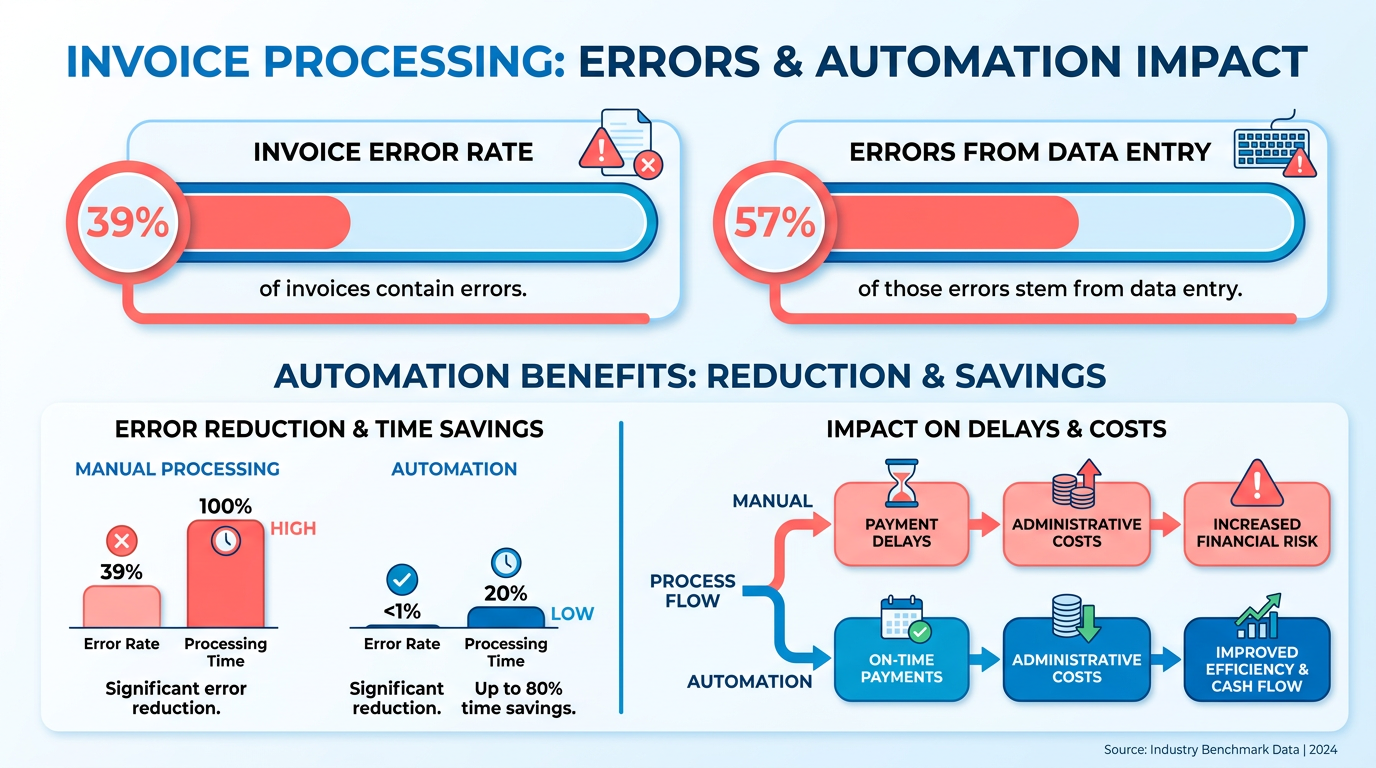
Manual invoice processing is a costly bottleneck. At an average of $15–$40 per invoice, businesses handling 1,000 invoices monthly face annual expenses of $180,000 to $480,000. Labor accounts for 60–80% of these costs, as teams spend hours on data entry, reconciliation, and error corrections. For example, a logistics firm reported 200+ hours saved annually after automating, while a manufacturer cut payment-related losses from $250,000 to $15,000 within months. The table below highlights key contrasts:
| Metric | Manual Processing | Automated Processing |
|---|---|---|
| Cost per invoice | $15–$40 | $3–$5 |
| Error rate | 1.6% (≈$16,000/year for 10k invoices) | ≤0.3% |
| Time per invoice | 15 minutes | 1–3 minutes |
| Missed-payment risk | 35% higher | 35% reduction |
| Labor hours (1,000/mo) | 158 hours/year | 600 hours/year (80% savings) |
These savings are amplified for high-volume operations. A small business using Blixo saw a 30% reduction in processing time, while a medium enterprise integrated with ERP systems achieved a 25% cash flow boost in the first quarter, as detailed in the Benefits of Integrating Automated Invoice Processing with ERP Systems section.
How Does Automation Solve Common Invoicing Challenges?
Automation tackles three major pain points: errors, delays, and scalability. Manual data entry introduces inaccuracies that trigger disputes and late fees. Blixo’s AI-powered OCR (97% accuracy) and matching engine resolve 98% of payments automatically, slashing reconciliation disputes by 35%, a feature expanded upon in the Automated Invoice Processing with Blixo: An Overview section. For example, a healthcare provider reduced month-end reconciliation time by 18%, while a retail chain cut processing delays by 80% using AI validation tools.
Scalability is another hurdle. Manual systems struggle with high-volume workflows, but automation handles 10 to 10,000 invoices/month without bottlenecks. A media company using Blixo reduced billing time by 60%, and a logistics firm slashed processing cycles from 45 days to 3.1 days. These gains are critical for subscription-based models, where recurring invoicing and dynamic discounting require precision. Blixo’s SaaS service supports multi-currency payments and real-time tracking, ensuring compliance with global standards.
Who Benefits Most from Automated Invoice Processing?
While automation is valuable for all businesses, high-volume processors and subscription-based models see the fastest ROI. Small businesses save on labor costs and avoid late fees, while enterprises benefit from ERP integration that reduces reconciliation time by 40%. For instance, a SaaS provider improved billing accuracy by 25%, and a law firm boosted cash flow by 25% through dynamic discounting.
Automation also enhances customer satisfaction. By enabling on-demand payment portals and real-time dispute resolution, businesses improve vendor relationships and reduce payment delays. A finance manager noted, “Blixo transformed our AP team from invoice processors to strategic planners”-highlighting how automation frees staff for high-value tasks.
Why ERP Alone Isn’t Enough
While ERPs manage general ledger posting, they lack advanced automation features like AI-driven OCR, multi-currency support, or touchless payment execution. Specialist tools like Blixo fill these gaps, offering end-to-end workflows that ERPs cannot replicate. For businesses processing >200 invoices/month, combining ERP with automation reduces transaction costs by 40% and approval times from 8.6 days to 2.1 days, as discussed in the Comparison of ERP and Automated Invoice Processing with Blixo section. This hybrid approach ensures financial data integrity while optimizing operational agility.
Conclusion
Automated invoice processing isn’t just a convenience-it’s a strategic imperative. By reducing errors, accelerating cash flow, and scaling effortlessly, SaaS providers like Blixo deliver 30–35% cost savings and 25–30% faster collections. As one industry analyst notes, “Integrating automation with ERP systems leads to greater efficiency and reduced operational costs”. For businesses seeking to future-proof their financial operations, automation is the clear path forward.
ERP Systems: An Overview
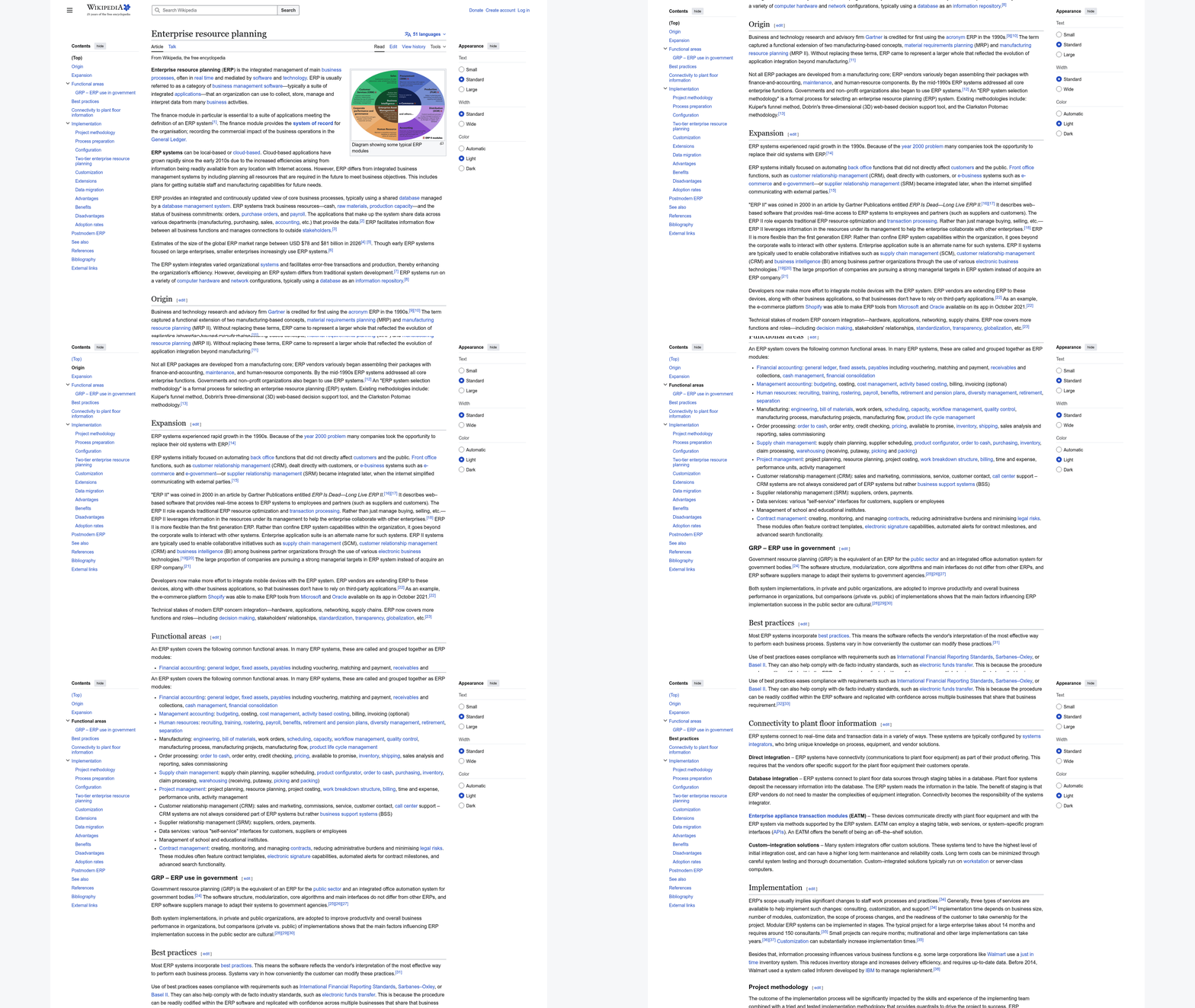
ERP systems are integrated software platforms designed to streamline and unify core business processes across departments. Originating from Material Requirements Planning (MRP) systems in the 1970s, ERPs evolved to manage not just manufacturing but also finance, human resources, and supply chain operations. Modern ERPs act as centralized hubs, connecting data and workflows to reduce silos and improve decision-making. However, their design prioritizes broad functionality, which can lead to compromises in specialized areas like accounts payable (AP).
A typical ERP includes modules for accounting, procurement, inventory, HR, and supply chain management. The accounting and finance module, for example, handles general ledger entries, financial reporting, and basic AP functions. Yet, ERP AP modules often stop at record-keeping and ledger posting. They lack advanced capabilities like automated invoice capture, data extraction, and multi-step approval routing. This limitation becomes critical for businesses processing over 200 invoices monthly, where manual entry increases errors and delays. Specialist AP tools, in contrast, use AI and OCR to extract data with 95-99% accuracy, reducing average approval times from 8.6 days to 2.1 days. As mentioned in the Automated Invoice Processing with Blixo section, these tools address gaps in ERP functionality through targeted automation.
ERP systems offer centralized data management, process automation, and cross-departmental visibility. They reduce redundant data entry and ensure consistency across teams. However, implementation costs can be prohibitive, with ERP solutions often requiring extensive customization and IT resources. The average cost per invoice for ERP-based AP modules is $9.40, compared to $2.78 for dedicated automation platforms. Additionally, ERPs struggle with scalability in high-volume environments. Companies handling 200+ invoices monthly often find their ERP’s AP module insufficient, leading to bottlenecks in payment execution and workflow inefficiencies.
ERP systems integrate with external tools via APIs or file-based methods to enhance functionality. For instance, specialist AP automation platforms sync approved invoices directly to ERP systems, maintaining financial records while offloading workflow tasks. These integrations allow ERPs to act as the source of truth for financial data while automation tools manage invoice processing. Building on concepts from the Benefits of Integrating Automated Invoice Processing with ERP Systems section, such integrations reduce transaction costs by up to 40%, according to industry reports. A case study involving Nimbello demonstrates this collaboration: the platform integrates seamlessly with ERPs like Infor SyteLine, enabling tailored AP workflows without overhauling the entire ERP system.
| Feature | ERP AP Modules | Specialist AP Tools |
|---|---|---|
| Invoice Capture | Manual entry only | AI/OCR-driven extraction |
| Approval Routing | Basic, manual workflows | Automated, multi-level |
| Cost per Invoice | $9.40 | $2.78 |
| Accuracy | Manual input (prone to error) | 95-99% accuracy |
| Approval Time | Up to 8.6 days | Reduced to 2.1 days |
This table highlights the efficiency gap between ERP AP modules and specialist tools. As detailed in the Comparison of ERP and Automated Invoice Processing with Blixo section, while ERPs provide foundational financial management, their limitations in automation and scalability make them less effective for high-volume invoice processing. Companies often combine both systems, using ERPs for record-keeping and specialists for workflow optimization.
Case studies illustrate the benefits of ERP-integrated automation. One platform processes over 2 million invoices monthly with 97-100% purchase order match rates by pairing an ERP with a specialist tool. Another achieves 85% no-touch processing within six months, showcasing the speed and accuracy of AI-driven solutions. These examples underscore the value of using ERPs and automation tools together-where the ERP maintains financial integrity and the specialist tool accelerates invoice workflows. For businesses handling large invoice volumes, this hybrid approach reduces costs, minimizes delays, and ensures compliance.
In summary, ERP systems remain essential for managing core business functions, but their AP modules often fall short in automation and efficiency. The next section will explore how SaaS providers like Blixo address these gaps, offering a modern solution for invoice processing that complements or enhances traditional ERP systems.
Automated Invoice Processing with Blixo: An Overview
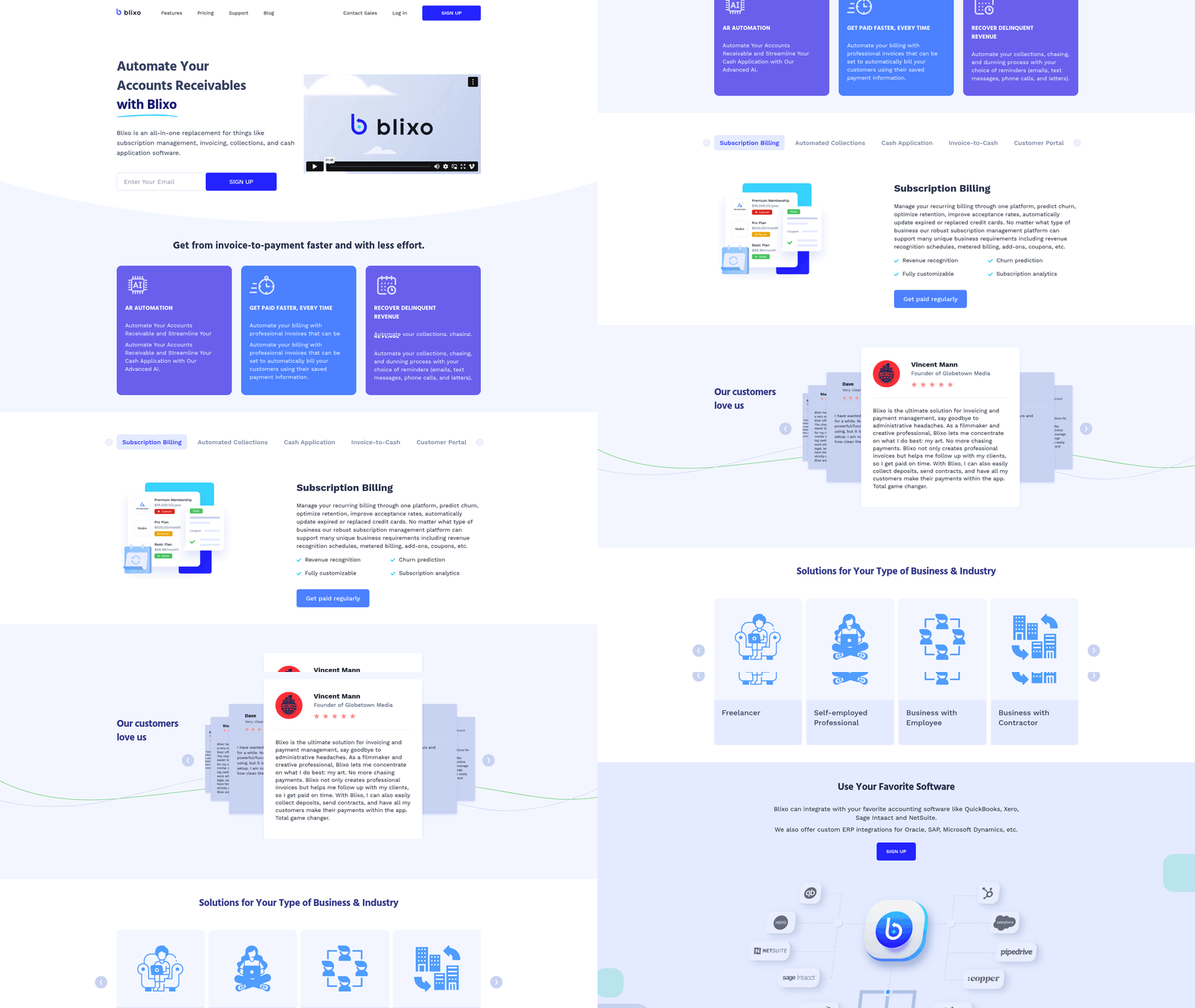
As discussed in the ERP Systems: An Overview section, traditional ERP systems often rely on fragmented workflows, but Blixo centralizes invoice processing into a unified platform, reducing manual effort and accelerating cash flow. Its capabilities include automated data extraction, intelligent matching, and dynamic customer portals, making it a compelling alternative for companies seeking efficiency and scalability.
What Makes Blixo’s Automated Invoice Processing Unique?
Blixo distinguishes itself through three core innovations: AI-powered optical character recognition (OCR), intelligent matching engines, and customizable customer portals. The platform’s OCR technology extracts invoice data from PDFs, scans, and images with 97% accuracy, minimizing errors that typically arise from manual data entry. As mentioned in the Why Automated Invoice Processing Matters section, manual systems are inherently error-prone, with …. Meanwhile, its matching engine uses machine learning to link payments to invoices, resolving 98% of payments automatically and reducing reconciliation disputes by 35%. For businesses handling high-volume transactions, such as subscription-based models, these features cut processing time by up to 90% and lower administrative costs by 30%.
Integration and Scalability: Bridging ERP Gaps.
One of Blixo’s standout advantages is its bidirectional integration with ERP systems like SAP, QuickBooks, and NetSuite. Unlike ERPs that often require complex, time-consuming customizations, Blixo’s API-driven architecture ensures seamless data flow, eliminating silos and improving visibility into financial workflows. By linking directly to banks and ERPs, Blixo reduces Days Sales Outstanding (DSO) from over 60 days to under 45 days, ensuring faster cash flow for businesses. Building on concepts from the Benefits of Integrating Automated Invoice Processing with ERP Systems section, this integration accelerates cash application, which is critical for maintaining liquidity and operational efficiency.
Comparison of ERP and Automated Invoice Processing with Blixo
Features and Functionalities
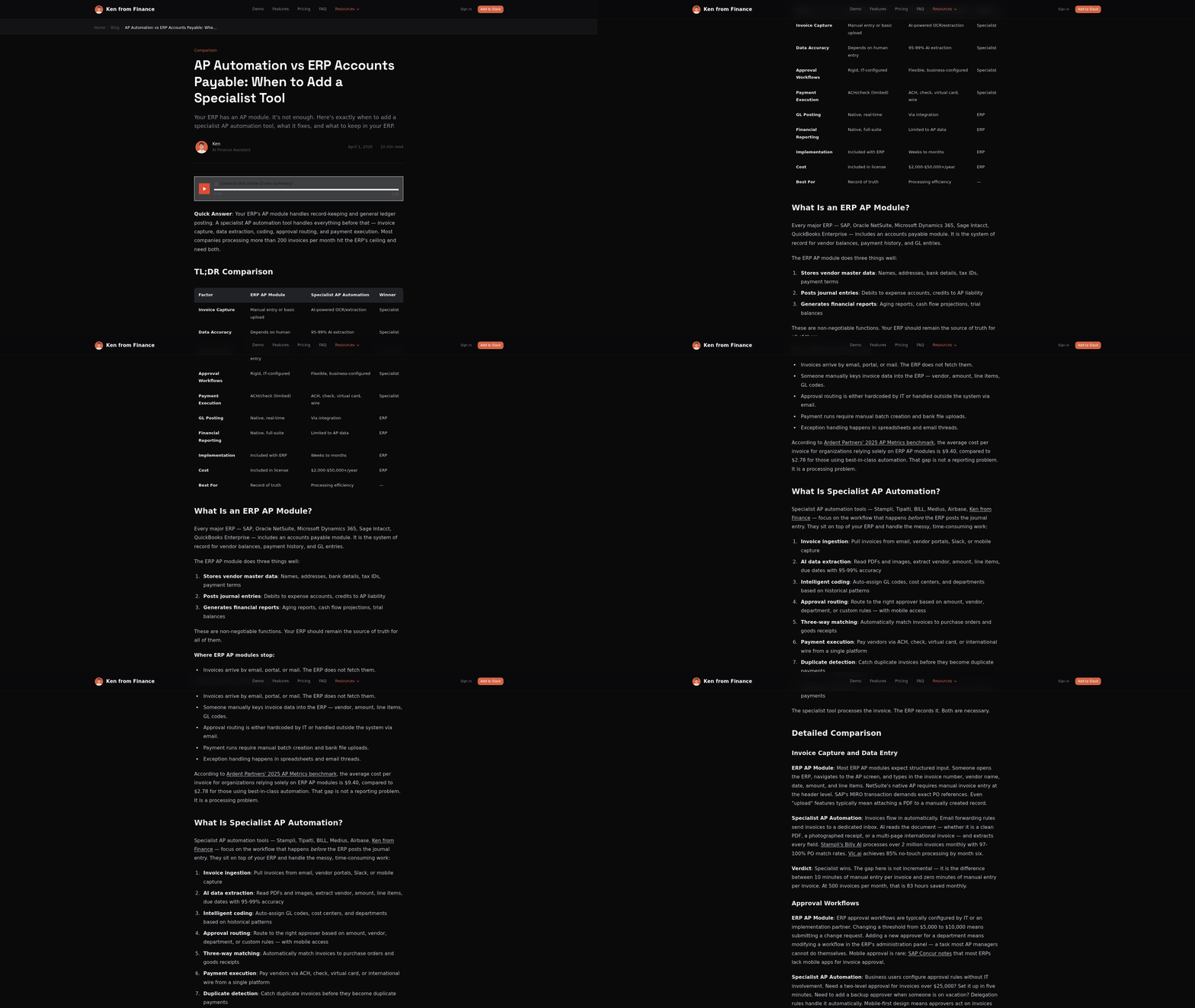
ERP systems provide a broad range of business functions, including finance, procurement, and supply chain management. However, their invoice processing capabilities are often limited to basic data entry and reconciliation, lacking advanced automation features. As mentioned in the ERP Systems: An Overview section, these systems were designed for holistic business management rather than specialized invoice workflows. In contrast, Blixo’s automated invoice processing use AI-powered optical character recognition (OCR), machine learning, and intelligent matching engines to handle complex workflows. For example, Blixo’s SaaS service achieves 97% accuracy in data extraction and 98% automatic payment matching, significantly reducing manual intervention and errors.
A key differentiator is Blixo’s approval workflows, which allow businesses to customize rules for invoice validation, exception handling, and multi-level approvals. ERP systems typically require manual configuration for similar processes, which can be time-consuming. Additionally, Blixo supports multi-currency transactions and dynamic discounting, enabling businesses to optimize cash flow. ERPs often require third-party integrations for these features, increasing complexity and cost.
Costs and Pricing
ERP systems are notorious for their high upfront and ongoing costs. Implementation typically involves expensive licensing fees, integration with existing software, and extensive customization. Building on concepts from the Why Automated Invoice Processing Matters section, the industry data highlights that the average cost per invoice in ERP-based accounts payable (AP) modules is $9.40**, compared to **$2.78 when using specialized automation tools like Blixo. Blixo offers a subscription-based pricing model, with the Team plan at $49.99/month** and the **Business plan at $99.99/month, providing unlimited invoices and customer contacts.
Beyond direct costs, ERP systems also incur hidden expenses, such as training, maintenance, and software upgrades. A case study from a logistics company revealed that ERP integration added $10,000–$50,000 to implementation costs. Blixo, on the other hand, eliminates these overheads with a cloud-based platform requiring no software installation. Its pay-as-you-go model makes it more scalable and cost-effective for businesses processing high volumes of invoices.
Implementation Time and Scalability
ERP implementations are notoriously slow, often taking 6–12 months to complete due to complex customization and data migration. Blixo’s automated invoice processing can be deployed in weeks, with a step-by-step setup wizard guiding users through integration with existing ERP systems. The platform supports bidirectional synchronization with major ERPs like SAP, QuickBooks, and Oracle, ensuring seamless data flow without disrupting existing workflows.
Scalability is another critical factor. ERP systems require significant effort to adapt to growing invoice volumes, often involving additional licensing and infrastructure investments. Blixo’s SaaS service is designed for rapid scaling, handling 10 to 10,000 invoices per month without performance degradation. A retail chain using Blixo streamlined seasonal inventory invoicing, reducing peak-period delays by 50%, while a nonprofit organization automated vendor payments across multiple regions, cutting administrative hours by 40%. These examples illustrate Blixo’s adaptability to diverse operational needs without the rigid constraints of ERP systems.
| Feature | ERP Systems | Blixo Automated Invoice Processing |
|---|---|---|
| Accuracy | Relies on manual entry (57% errors from data entry) | AI-powered OCR and matching engine (97% accuracy) |
| Cost per Invoice | $9.40 (industry average) | $2.78–$5 (Blixo Team/Business plans) |
| Implementation Time | 6–12 months | 2–4 weeks |
| Scalability | Requires additional licensing and customization | Scales automatically from 10 to 10,000 invoices/month |
| Integration | Limited to built-in modules; third-party tools needed for advanced features | Native integrations with major ERPs and payment gateways |
Security and Compliance
Both ERP systems and Blixo prioritize data security, but their approaches differ. ERP systems typically rely on enterprise-grade encryption and role-based access controls, which are effective but may lag in adapting to evolving threats. Blixo enhances security with 256-bit encryption, PCI DSS Level 1 certification, and PSD2 compliance, ensuring strong protection for financial transactions.
Compliance is another area where Blixo excels. As detailed in the Automated Invoice Processing with Blixo: An Overview section, its automated workflows include real-time audit trails, fraud detection algorithms, and regulatory reporting tools, aligning with standards like ASC 606 and IFRS 15. ERPs often require manual compliance checks, increasing the risk of errors. A law firm using Blixo reported a 40% reduction in overdue invoices due to automated reminders, demonstrating how automation improves adherence to payment terms and compliance benchmarks.
Real-World Impact
Businesses adopting Blixo have reported tangible improvements in efficiency and cash flow. A manufacturing company improved compliance tracking by 25% and reduced reconciliation delays by 62% through automated reporting. A tech startup slashed annual invoicing costs by $32,000 by automating vendor payments and eliminating late fees. These outcomes highlight Blixo’s ability to deliver measurable ROI, whereas ERP systems often struggle to match such rapid results without extensive customization.
In summary, while ERP systems offer broad functionality, Blixo’s AI-driven automation provides superior accuracy, cost efficiency, and scalability for invoice processing. Businesses prioritizing speed, compliance, and adaptability will find Blixo’s solution a more agile and cost-effective alternative to traditional ERP systems.
Benefits of Integrating Automated Invoice Processing with ERP Systems
Integrating automated invoice processing with ERP systems transforms financial operations by combining the structured data management of ERPs with the speed and precision of automation. Building on concepts from the Comparison of ERP and Automated Invoice Processing with Blixo section, this integration delivers measurable improvements in cash flow, operational efficiency, and risk reduction. Below, we break down the key benefits, supported by real-world data and case studies.
Improved Cash Flow and Reduced Days Sales Outstanding (DSO)
A critical advantage of automated invoice processing is its ability to accelerate cash flow. Traditional ERP systems often handle invoicing and accounts receivable (AR) as siloed functions, leading to delays in payment collection. Automated solutions like Blixo address this by shortening the time between invoice generation and receipt of payment. For example, a logistics company using Blixo reduced its DSO from 60+ days to under 45 days within months by automating cash application and reconciliation processes. Another case study from a manufacturer showed a 96% reduction in payment-related losses, dropping from $250,000 to $15,000 annually after automation.
| Metric | Manual ERP Processing | Blixo Automation |
|---|---|---|
| Average DSO | 60+ days | <45 days |
| Payment error rate | 1.6% per invoice | ≤0.3% per invoice |
| Reconciliation time | 15–20 minutes per invoice | 1–3 minutes per invoice |
These improvements stem from features like AI-powered cash application, which matches payments to invoices in real time, as detailed in the Automated Invoice Processing with Blixo: An Overview section, and automated reminders, which reduce missed payments by 25% on average.
Reduced Errors and Improved Compliance
Manual invoice processing is inherently error-prone. As highlighted in the Why Automated Invoice Processing Matters section, 39% of invoices contain errors due to manual input, with 57% traced to data entry mistakes. Automated systems mitigate this risk through AI-driven OCR (97% accuracy) and machine learning algorithms that adapt to evolving invoice formats, as outlined in the Automated Invoice Processing with Blixo: An Overview section. A multinational retailer using Blixo’s validation tools reduced invoice rejections by 70% and cut manual review hours by 50% annually.
| Error Reduction | Manual ERP | Blixo Automation |
|---|---|---|
| Invoice errors | 39% | ≤0.3% |
| Reconciliation disputes | 35% risk | 35% reduction |
| Manual correction hours | 200+/year | 20–30/year |
These reductions not only lower correction costs but also enhance compliance. Automated systems flag discrepancies in real time, ensuring adherence to standards like ASC 606 and IFRS 15. A financial services firm avoided $120,000 in regulatory penalties by embedding compliance checks directly into their automated workflows.
Challenges and Limitations of Implementing Automated Invoice Processing
Implementing automated invoice processing systems, whether through traditional ERP solutions (as discussed in the ERP Systems: An Overview section) or SaaS providers like Blixo (described in the Automated Invoice Processing with Blixo: An Overview section), presents unique challenges. These challenges span technical, financial, and operational domains, requiring businesses to weigh trade-offs carefully. Below, we break down the key limitations and how they differ between ERP and Blixo..
What Are the Technical Integration and Compatibility Challenges?
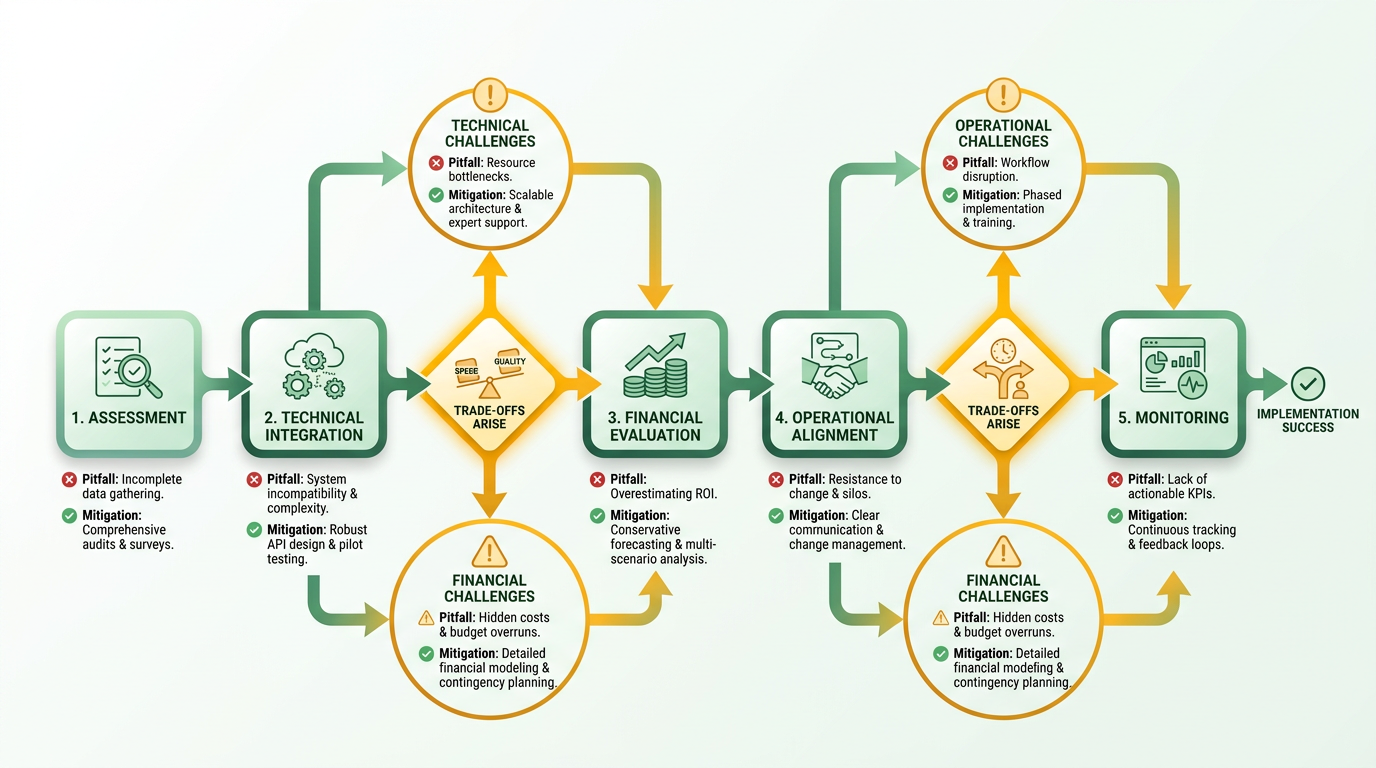
ERP systems often struggle with integrating legacy infrastructure and third-party tools. Their broad functionality requires extensive customization, which delays rollouts and increases costs. For example, ERP solutions may fail to adapt to niche payment methods or outdated accounting software, creating friction in invoice workflows. Blixo, being web-based, avoids software installation and integrates with common payment methods like ACH and credit cards, but it still faces compatibility hurdles when businesses rely on non-standard financial systems. Unlike ERP, Blixo’s modular design reduces integration complexity, though it may not support every legacy tool out-of-the-box..
How Do Cost and Resource Constraints Limit Implementation?
ERP systems demand high upfront investment, with implementation costs often exceeding $100,000 and ongoing maintenance fees. These costs escalate further when businesses need additional modules or scalability. **Blixo**, in contrast, uses a subscription model starting at $49.99/month (billed yearly), making it more accessible for small to mid-sized businesses. However, scaling Blixo’s usage-such as adding team members or advanced features-still requires budgeting for higher-tier plans. For instance, the Business plan at $99.99/month supports unlimited invoices but caps team access at five members. While Blixo reduces upfront costs, long-term expenses can accumulate for growing teams, mirroring ERP’s financial trade-offs..
What Risks Exist Around Security, Compliance, and Scalability?
Security and compliance risks vary significantly between ERP and Blixo. ERP systems may inherit vulnerabilities from outdated code or insufficiently patched modules, increasing exposure to data breaches. Blixo mitigates this with certifications like PSD2 and PCI DSS Level 1 compliance (as detailed in the Automated Invoice Processing with Blixo: An Overview section), ensuring secure transaction handling. However, businesses using Blixo must still manage access controls and train staff to avoid human errors.
Scalability also poses challenges. ERP systems often require costly custom coding to adapt to new invoice volumes or business rules, whereas Blixo’s cloud-based architecture allows seamless scaling. For example, a law firm using Blixo reduced overdue invoices by 40% without system overhauls. Yet, Blixo’s flexibility has limits-custom workflows beyond its pre-built features may demand third-party integrations, adding complexity. Change management further complicates adoption: ERP systems demand extensive employee training, while Blixo’s intuitive interface lowers the learning curve, though teams still need time to adjust..
Comparison: ERP vs. Blixo in Key Areas
| Feature | ERP Systems | Blixo |
|---|---|---|
| Integration Complexity | High (custom coding for legacy systems) | Low (web-based, pre-built payment methods) |
| Cost Structure | High upfront and maintenance fees | Predictable subscription pricing |
| Security Compliance | Varies; depends on vendor and updates | PSD2 and PCI DSS certified |
| Scalability | Limited without costly upgrades | Cloud-based; supports growing teams easily |
| Training Requirements | Extensive for full functionality | Minimal due to user-friendly design |
Key Takeaways
- ERP systems face integration delays, high costs, and scalability bottlenecks, making them less agile for businesses needing rapid adjustments.
- Blixo offers cost predictability and faster deployment but may require additional tools for highly customized workflows.
- Security and compliance depend heavily on platform design: Blixo’s certifications provide clear advantages, while ERP systems demand rigorous audits to mitigate risks.
Businesses must evaluate these trade-offs against their specific needs. For example, a small firm with limited IT resources might prioritize Blixo’s ease of use, while a large enterprise with legacy systems may find ERP’s rigidity a necessary evil. Ultimately, the choice hinges on balancing cost, flexibility, and long-term growth goals.
Best Practices for Implementing Automated Invoice Processing
Implementing automated invoice processing requires a strategic approach that balances technical integration with operational needs. Whether using ERP systems or specialized SaaS providers like Blixo, success depends on aligning tools with business goals and maintaining flexibility for future growth. As mentioned in the ERP Systems: An Overview section, ERP systems originated from Material Requirements Planning (MRP) systems and have evolved to handle diverse business processes, but their invoice processing capabilities often fall short compared to modern automation solutions.
Define Clear Business Requirements
Start by mapping your current invoice processing workflow to identify inefficiencies, bottlenecks, and compliance risks. For example, if manual data entry causes frequent errors, prioritize automation with AI-powered OCR (optical character recognition) to reduce mistakes. Blixo’s system, for instance, achieves 97% accuracy in data extraction, resolving 98% of payments automatically through its intelligent matching engine. ERP systems, in contrast, often rely on manual entry, leading to higher error rates and administrative costs, as highlighted in the Comparison of ERP and Automated Invoice Processing with Blixo: Features and Functionalities section.
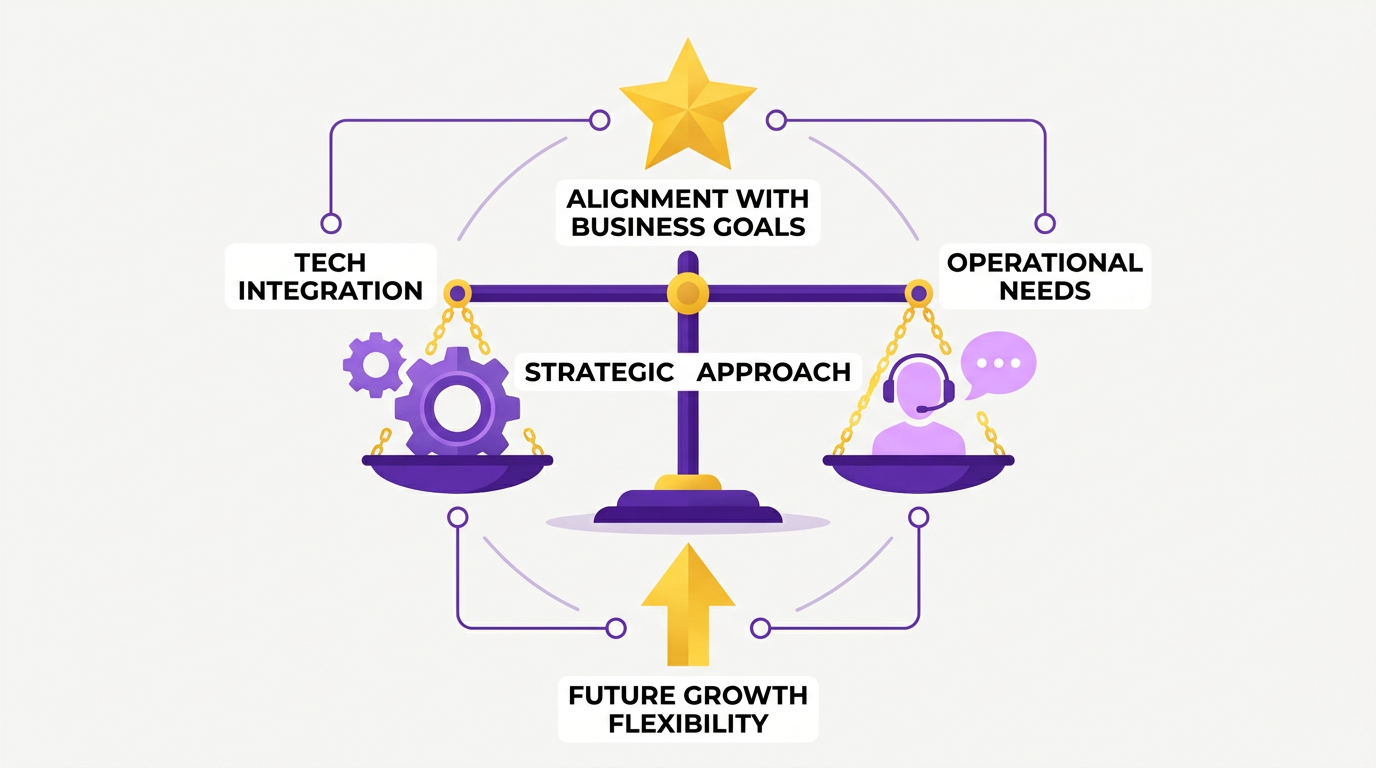
Define specific objectives such as reducing Days Sales Outstanding (DSO), cutting processing time, or supporting multi-currency transactions. A logistics firm using Blixo reported a 30% drop in DSO after automation, while a healthcare provider resolved 18% more disputes by streamlining workflows. These benchmarks help set realistic targets during implementation.
Compare ERP and Automation Tools
Evaluate whether your ERP’s built-in invoice processing suffices or if a specialized tool like Blixo is necessary. ERP systems excel at general ledger posting and record-keeping, but they often lack advanced features like AI-driven cash application or dynamic discounting, as discussed in the Comparison of ERP and Automated Invoice Processing with Blixo: Features and Functionalities section. For companies processing over 200 invoices monthly, standalone platforms typically outperform ERPs in speed and accuracy.
| Feature | ERP Systems | Blixo’s Automation |
|---|---|---|
| Data Extraction | Manual entry, $9.40/invoice | AI-powered OCR, $2.78/invoice |
| Payment Matching | Requires manual intervention | 98% automated resolution |
| Multi-Currency Support | Limited | Native support, 20% faster processing |
| Integration | Limited to internal systems | Syncs with banks, ERPs, and payment gateways |
Blixo’s seamless integration with ERPs like SAP or NetSuite ensures data consistency while adding capabilities such as real-time cash flow tracking and automated collections, as noted in the Benefits of Integrating Automated Invoice Processing with ERP Systems section. This hybrid approach is ideal for businesses seeking to enhance-not replace-their existing infrastructure.
Plan for Scalability and Training
A structured implementation plan should include timelines, budgets, and user training. Blixo’s web-based platform requires no software installation, allowing teams to adopt it quickly. Begin with a pilot project, such as automating invoices from a single vendor, before scaling to the entire organization.
Allocate resources for user training to ensure teams understand features like approval workflows or dynamic discounting. A law firm, for example, reduced overdue invoices by 40% after staff learned to use automated reminders. ERP systems, however, often demand extensive customization and IT involvement, delaying deployment.
Post-implementation, monitor key performance indicators (KPIs) like error rates, DSO, and administrative costs. Blixo’s dashboards provide real-time insights, helping teams refine rules and improve accuracy over time. A finance manager noted a 60% drop in billing time within the first month of using Blixo, highlighting the value of continuous optimization.
By combining ERP stability with Blixo’s automation, businesses can achieve a balance of control and efficiency. The result is a streamlined invoice process that reduces costs, accelerates cash flow, and minimizes errors-critical advantages in competitive markets.
Frequently Asked Questions
1. What are the main benefits of automated invoice processing?
Automated invoice processing reduces errors by 39% and saves $180,000–$480,000 annually for businesses with 1,000 invoices. It accelerates workflows, minimizes manual labor, and integrates seamlessly with ERP systems like Blixo to enhance efficiency.
2. How much does manual invoice processing cost businesses annually?
Manual processing costs $180,000–$480,000 yearly for 1,000 invoices. Labor accounts for 60–80% of costs due to data entry, reconciliation, and error correction, with automation reducing these expenses significantly.
3. How does automation reduce errors in invoicing?
Automation eliminates 57% of errors caused by manual data entry. It ensures 97–99% accuracy by automating data capture, validation, and reconciliation, reducing payment delays and vendor relationship strain.
4. Can automated systems integrate with ERP software?
Yes, automated invoice solutions like Blixo integrate directly with ERP systems. This collaboration reduces manual intervention, accelerates workflows, and ensures real-time data synchronization for full operational efficiency.
5. What time savings does automation provide?
Automation saves 200+ hours annually for teams. For example, a logistics firm reduced manual hours from 250 to 50 per month, while a manufacturer cut payment-related losses from $250,000 to $15,000 within months.
6. Why do businesses choose automation over ERP alone?
ERP systems require automation to address 60–80% labor costs in invoicing. Automation fills gaps in ERP by reducing errors, accelerating processing, and cutting administrative costs beyond what ERP can achieve independently.
7. How do errors in manual invoicing impact operations?
Manual errors delay 39% of invoices, causing payment delays, vendor disputes, and $15–$40 per invoice administrative costs. Automation reduces these issues, ensuring timely payments and stronger vendor relationships.