

Automation Checklist for Accounts Receivable Efficiency

Key Takeaways
- Adopt automation to reduce manual AR inefficiencies impacting 80% of finance leaders seeking RPA integration.
- Address $4 million monthly losses in mid-sized companies due to unpaid invoices and delayed collections.
- Target 50% of U.S. B2B invoices paid late by automating workflows to accelerate cash flow and forecasting accuracy.
- Streamline AR processes to resolve 77% of teams’ struggles with delayed collections and reconciliation errors.
- Align automation goals with specific pain points like invoice errors and fragmented workflows to boost operational speed.
- Reduce manual processing errors by automating invoice handling, cutting costs tied to reconciliation tasks.
- Improve liquidity by targeting late payment trends and optimizing customer payment tracking through automation.
Related Video
Watch: Maxyfi - Accounts Receivable Automation Software by Maxyfi Debt Collection Software
Why Automation Matters in Accounts Receivable
Automation transforms accounts receivable (AR) by addressing inefficiencies that plague manual processes, offering measurable improvements in cash flow, accuracy, and operational speed. Below, we break down the critical reasons automation matters, supported by industry data and real-world outcomes..
What Industry Stats Reveal About Manual AR Inefficiencies
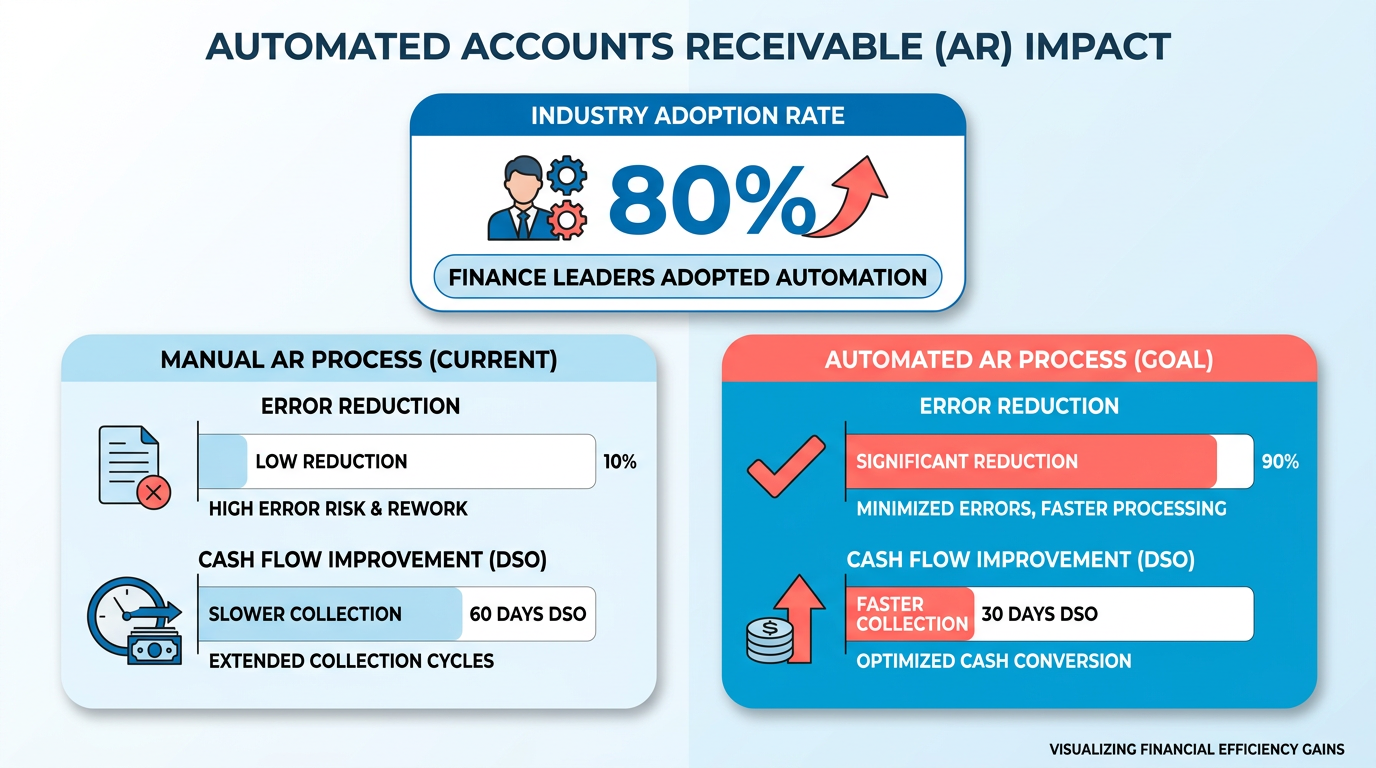
Manual AR processes are error-prone and costly. 80% of finance leaders have already adopted or plan to adopt robotic process automation (RPA) to streamline operations, highlighting growing demand for efficiency. Meanwhile, 77% of AR teams struggle with delayed collections, and mid-sized companies typically lose $4 million monthly to unpaid invoices. These issues stem from fragmented workflows: invoice processing errors, delayed customer payments, and disjointed reconciliation tasks. For example, 50% of B2B invoices in the U.S. are paid late, directly impacting liquidity and forecasting accuracy. As outlined in the Defining Automation Objectives for Accounts Receivable section, addressing these inefficiencies begins with aligning automation goals to specific pain points like these..
How Automation Transforms Cash Flow and Operational Efficiency
Automation reduces days sales outstanding (DSO) and accelerates collections through data-driven workflows. A construction company, for instance, improved 90% of customer payments to timely by switching to digital invoicing and automated reminders. Similarly, RPC reduced past-due invoices by 70% after implementing AR automation. These systems streamline processes like invoice delivery, payment tracking, and dispute resolution, cutting 76% of processing costs and speeding up tasks by 81% compared to manual methods. Building on concepts from the Creating a Feature Checklist for AR Automation Software section, AI-powered tools reduce human errors in data entry by up to 95%, ensuring compliance and minimizing disputes..
Who Benefits Most from AR Automation
Businesses with high invoice volumes-like mid-sized and enterprise organizations-see the most significant ROI. A mid-sized company processing $100 million in annual revenue** can save **$350,000 annually by reducing late fees and improving collections. Automation also benefits industries with complex payment schedules, such as construction or healthcare, where multiple payment methods and dispute resolution workflows are common. For example, a global logistics firm using cloud-based automation tools reduced DSO by 10 days and cut operational costs by 40%. Smaller businesses with limited staff also benefit: Sharp Canada eliminated 200+ monthly calls to customers by implementing a self-service payment portal, saving 8–10 hours per month. As detailed in the Implementing and Monitoring AR Automation section, scalability is critical for these systems to integrate with ERPs and support global operations seamlessly..
Key Challenges Solved by Automation
Automation tackles recurring pain points, including:
- Late payments: Predictive analytics flag overdue invoices earlier, improving collection rates.
- Human error: Automated data validation reduces manual mistakes in invoicing and reconciliation.
- Scalability: Systems integrate with ERPs and support multi-currency transactions, easing global operations.
- Customer experience: Self-service portals and electronic payments improve satisfaction, reducing disputes.
By addressing these issues, automation turns AR from a cost center into a strategic lever for growth. Businesses that adopt it gain agility, reduce risk, and position themselves to meet evolving customer expectations.
Defining Automation Objectives for Accounts Receivable
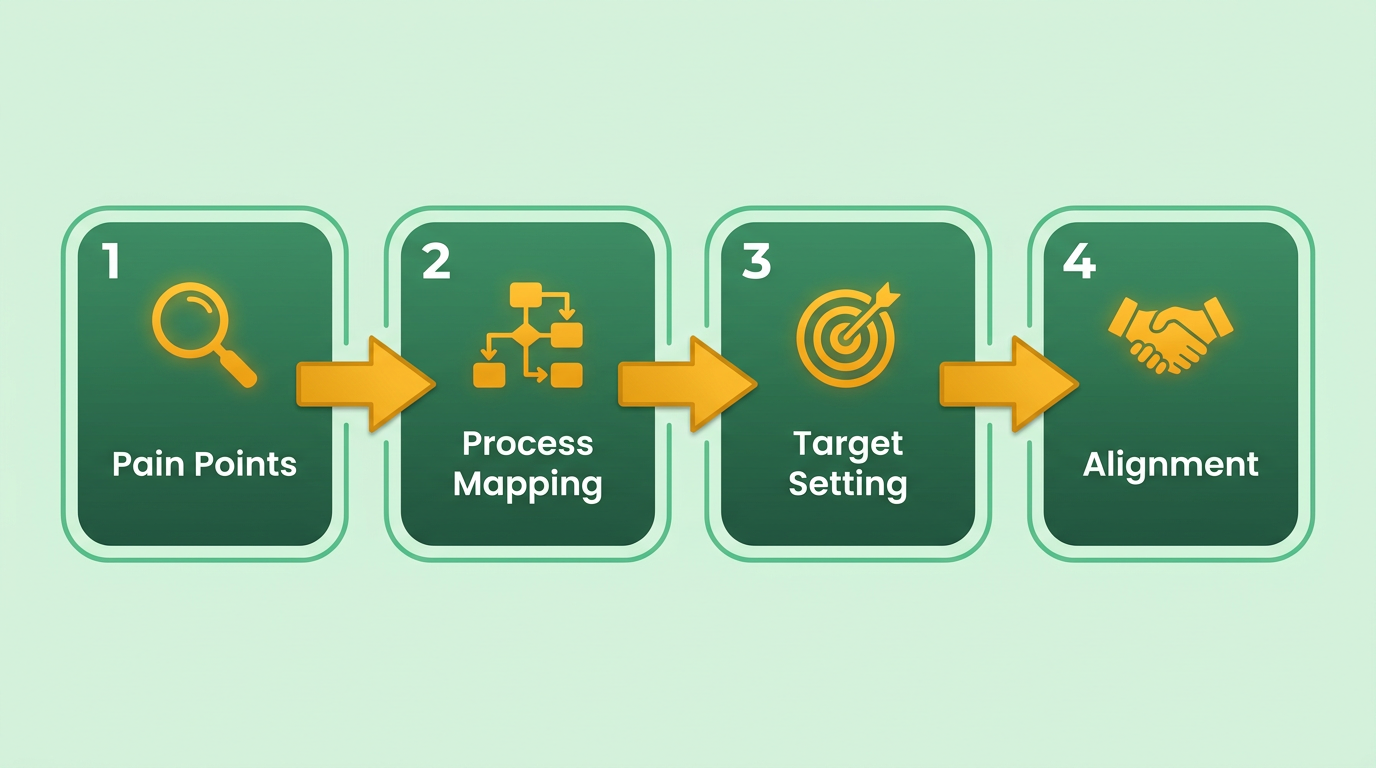
Defining clear automation objectives is the foundation of a successful accounts receivable (AR) transformation. Without a precise roadmap, automation efforts risk misalignment with business goals or failing to address core inefficiencies. Start by identifying pain points in your current workflow, mapping manual processes, and setting measurable targets to ensure automation delivers tangible results. As mentioned in the Why Automation Matters in Accounts Receivable section, addressing these inefficiencies directly impacts cash flow, accuracy, and operational speed.
What Pain Points Should You Target in AR Workflows?
Begin by auditing your AR processes to uncover bottlenecks and recurring issues. Common pain points include manual data entry, delayed invoice processing, high error rates, and inefficient dispute resolution. For example, 80% of finance leaders have adopted or plan to adopt automation tools like robotic process automation (RPA) to address these challenges.
- Pinpoint manual tasks such as invoice data entry, payment reconciliation, or follow-up emails. Manual workflows are prone to errors and slow processing.
- Identify delays in customer payments or internal approvals. Late payments directly impact days sales outstanding (DSO) and liquidity.
- Assess error-prone steps, such as mismatched invoices or incorrect payment allocations. Automation can reduce human errors by up to 76%.
How Do You Map Current AR Workflows?
Document every step of your AR process to understand where automation can add value. Start with the invoice lifecycle: creation, delivery, payment receipt, reconciliation, and dispute resolution. Mapping workflows reveals redundancies and opportunities for streamlining. Building on concepts from the Creating a Feature Checklist for AR Automation Software section, highlight integration gaps between systems, such as disconnected accounting software and payment platforms. Blixo’s solutions, for instance, prioritize seamless integration with major ERPs like SAP and Oracle.
- Break down the invoice-to-cash process. For example, AR workflows typically include invoice generation, customer payment, cash application, and reconciliation.
- Highlight manual interventions. If teams manually match payments to invoices, automation tools can automate this matching and reduce processing time by 81%.
- Evaluate integration gaps. Disconnected systems between accounting software and payment platforms create inefficiencies.
What Objectives Should You Set for AR Automation?
Automation goals must be specific, measurable, and tied to business outcomes. For example, reducing DSO by 10% or cutting manual data entry by 70% provides clear benchmarks. Avoid vague objectives like “improve efficiency” without quantifiable targets.
- Set DSO reduction targets. A 10–20% decrease in DSO improves cash flow and working capital. One company reduced DSO by 34 days using AI-driven collections tools.
- Define cost savings goals. Automating invoice processing can cut costs by 76%, as seen in case studies where teams replaced manual workflows with RPA bots.
- Establish error reduction metrics. Aim to lower error rates in payment processing by 50% through automated validation rules and AI-powered data entry.
Which KPIs Should You Track for Success?
Key performance indicators (KPIs) ensure automation initiatives stay on track. Choose metrics that align with your business priorities, such as cash flow stability, customer satisfaction, or compliance. As outlined in the Establishing a Continuous Improvement Checklist for AR Automation section, regularly reviewing these KPIs helps maintain alignment with evolving business needs.
- Monitor DSO trends. Track changes in days sales outstanding weekly to measure progress toward liquidity goals.
- Measure payment accuracy. Track the percentage of correctly applied payments to assess automation’s impact on reconciliation.
- Evaluate team productivity. Time saved on manual tasks (e.g., 20 hours weekly) can be reallocated to strategic work like credit risk analysis.
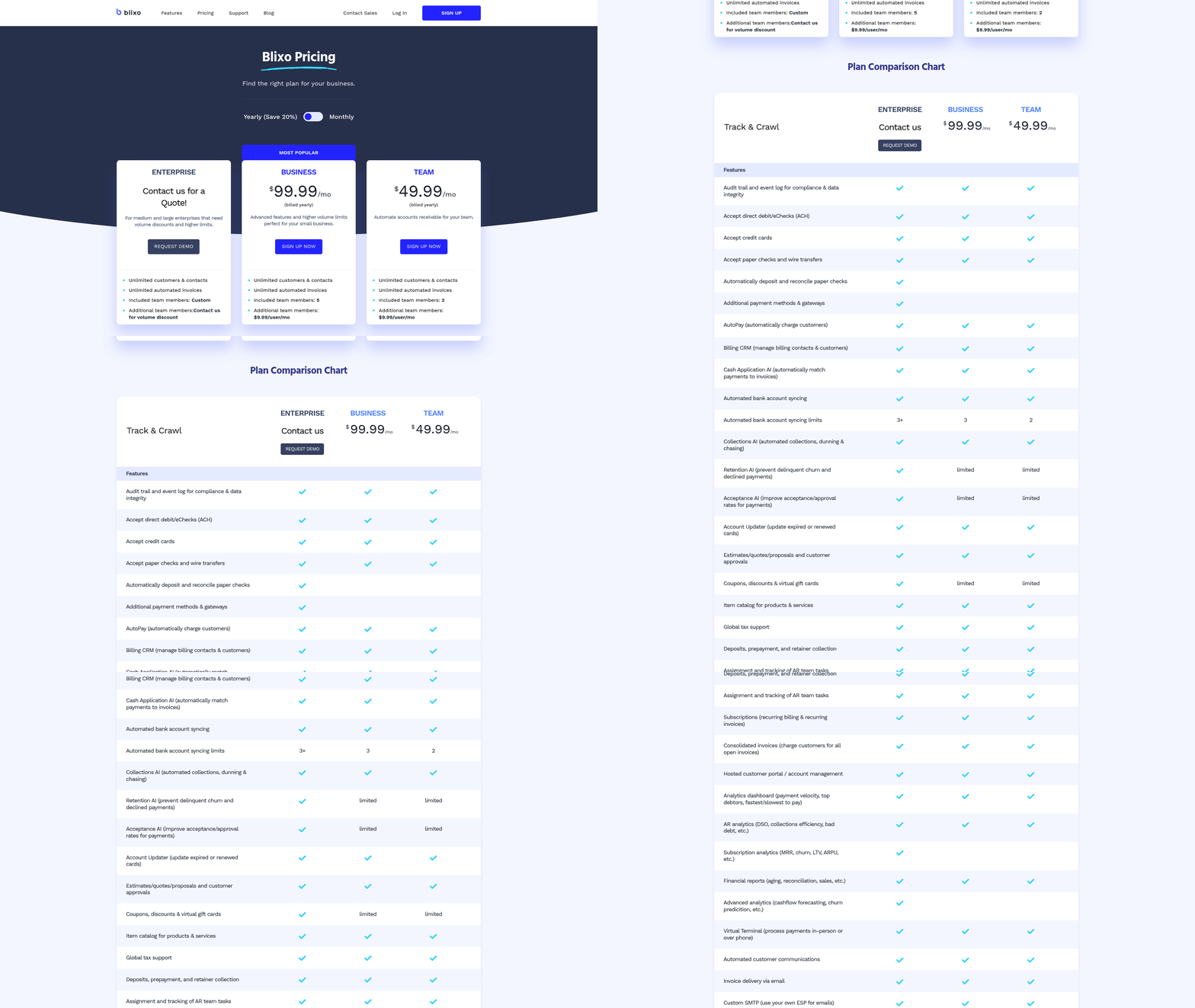
By aligning automation goals with these pain points, workflows, and KPIs, finance teams can ensure their AR systems evolve from reactive to proactive. Blixo’s approach, for example, emphasizes transparent pricing and scalable automation, ensuring businesses avoid hidden costs that other providers may include. The next step is selecting tools that address these objectives-keeping your checklist focused on measurable outcomes.
Creating a Feature Checklist for AR Automation Software
Core Automation Features to Prioritize
Automated workflows reduce manual tasks and accelerate collections. Start by evaluating tools that streamline invoicing, payment tracking, and cash application. These features directly impact cash flow and operational efficiency.
- Automated invoicing eliminates manual data entry, reducing errors and speeding up delivery. For example, one construction company achieved 90% on-time payments by switching to digital invoicing. As mentioned in the Defining Automation Objectives for Accounts Receivable section, aligning these tools with specific business goals ensures measurable outcomes.
- Payment reminders with customizable schedules improve collections. A healthcare provider reclaimed 75% of cash application time by automating follow-ups.
- AI-driven cash application matches payments to invoices automatically, even for complex scenarios. Systems using machine learning can handle exceptions up to 40% faster than manual processes.
- Self-service portals let customers pay, dispute, or update invoices anytime. Sharp Canada reduced monthly calls by 200+ using a digital platform.
Security and Compliance Essentials
Data protection and regulatory compliance are non-negotiable. Look for tools with strong encryption and audit trails to safeguard sensitive financial information.
- End-to-end encryption secures data during transmission and storage. This is critical for industries handling PCI-DSS or GDPR-sensitive information. Building on concepts from the Why Automation Matters in Accounts Receivable section, compliance reduces legal risks and builds customer trust.
- Role-based access controls ensure only authorized users can modify or view financial data. One finance team reduced unauthorized access attempts by 80% after implementing this.
- Audit logs track all user actions for compliance and troubleshooting. These logs are essential for meeting SOX or IFRS requirements.
- Real-time fraud detection flags suspicious transactions automatically. Unlike generic providers, Blixo offers transparent pricing for advanced fraud tools.
Integration and Scalability Considerations
Seamless integration with existing systems ensures long-term value. Prioritize solutions that adapt to your workflow and scale with your business.
- ERP compatibility with platforms like SAP, Oracle, or Microsoft Dynamics. Over 70% of businesses report faster DSO improvements with integrated systems, as outlined in the Implementing and Monitoring AR Automation section.
- API access for custom workflows or third-party apps. A midsize company cut reconciliation time by 50% using custom API integrations.
- Multi-currency and multi-language support for global operations. This is vital for businesses with international customers or suppliers.
- Cloud-based architecture enables remote access and real-time updates. Cloud solutions typically reduce IT overhead by 30% compared to on-premise systems.
Bonus: Advanced Features for Competitive Edge
Beyond basics, look for tools that use AI for predictive analytics and automation. These features future-proof your AR strategy.
- Predictive analytics for forecasting payment risks. AI models can identify late-paying clients up to 34 days in advance.
- Automated dispute resolution reduces manual back-and-forth. One logistics firm lowered dispute resolution time by 60% using AI-driven workflows.
- Customizable dashboards provide real-time visibility into DSO, aging reports, and cash flow. CFOs using these tools report 20% faster decision-making.
By using this checklist, you ensure your AR automation solution addresses immediate pain points while supporting long-term growth. Prioritize tools that align with your compliance needs, integration capabilities, and scalability goals.
Implementing and Monitoring AR Automation
Planning an Implementation Roadmap for AR Automation
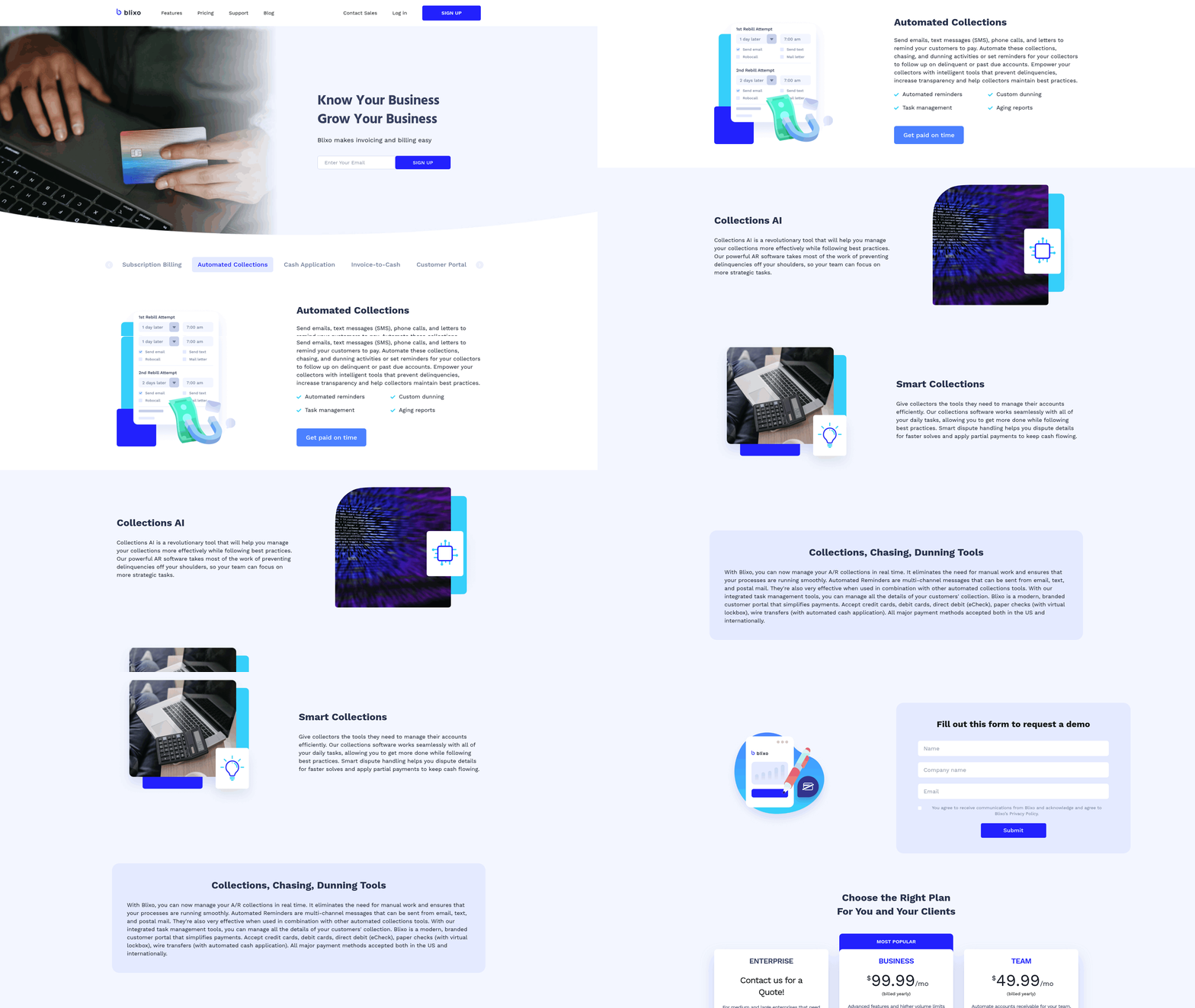
A structured implementation plan ensures AR automation aligns with business goals. Start by mapping existing workflows to identify bottlenecks, such as manual invoice processing or delayed collections. Research solutions that integrate with your ERP systems and support features like automated matching, real-time dashboards, and AI-driven analytics. For example, SaaS providers like Blixo offer scalable tools tailored to reduce Days Sales Outstanding (DSO) and improve payment visibility.
- Audit current AR processes to pinpoint inefficiencies like late payments or high error rates.
- Define automation goals (e.g., reducing DSO by 10 days or cutting manual tasks by 50%) as outlined in the Defining Automation Objectives for Accounts Receivable section.
- Select a solution with strong integration capabilities and real-time reporting in line with the Core Automation Features to Prioritize section.
- Train teams on automation tools to ensure smooth adoption and reduce resistance.
Setting Up Real-Time Payment Tracking and Visibility
Real-time tracking minimizes delays and improves cash-flow management. Implement a centralized dashboard that displays payment statuses, aging reports, and DSO metrics. Enable self-service portals for customers to view invoices and make payments instantly. For instance, Blixo’s SaaS service allows businesses to track payments across multiple channels and send automated reminders, reducing manual follow-ups.
- Integrate real-time dashboards to monitor outstanding invoices and payment trends.
- Enable customer self-service for instant invoice access and online payments.
- Automate payment reminders to reduce late payments and disputes.
- Use alerts for exceptions like mismatched payments or overdue invoices.
Monitoring KPIs and Establishing Continuous Improvement
Track key metrics to measure automation success and identify areas for refinement. Focus on DSO, collection efficiency (e.g., percentage of invoices collected on time), and error rates. For example, a healthcare provider improved cash application speed by 75% using automation, freeing staff for strategic tasks. Regularly review performance data to update workflows and adjust automation rules.
- Monitor DSO to ensure automation shortens the time between invoice delivery and payment.
- Track collection efficiency by measuring on-time payment rates and dispute resolution times.
- Audit error rates to verify automation reduces mistakes in invoicing and reconciliation.
- Conduct quarterly reviews to refine workflows as detailed in the Establishing a Continuous Improvement Checklist for AR Automation section.
Establishing a Feedback Loop for Automation Optimization
Continuous improvement requires input from teams and customers. Survey finance staff to identify usability issues and gather suggestions for new features. For instance, one company reduced past-due invoices by 70% after adjusting its automation rules based on customer feedback. Use this data to update workflows, enhance reporting, and expand automation to new AR processes.
- Collect user feedback from finance teams and customers on automation performance.
- Update automation rules based on KPI gaps or changing business needs.
- Expand automation to areas like credit management or deductions as workflows mature.
- Benchmark against industry standards to ensure metrics like DSO stay competitive.
By combining a phased implementation plan, real-time visibility, and iterative improvements, businesses can maximize AR automation’s impact on efficiency and cash flow.
Training Staff and Managing Change for AR Automation
How to Communicate AR Automation Benefits
Clear communication builds buy-in and aligns teams around shared goals. Start by explaining how automation reduces manual data entry, speeds up invoice processing, and cuts errors.
- Host a kickoff meeting to outline AR automation’s role in improving cash flow and reducing late fees, as outlined in the Implementing and Monitoring AR Automation section
- Share case studies showing teams saving 20–30 hours weekly through automation (adapted from industry benchmarks)
- Use Blixo’s transparent reporting features to demonstrate real-time progress toward efficiency targets, as emphasized in the Defining Automation Objectives for Accounts Receivable section.
What Training and Support Should Staff Receive?
Proper training ensures smooth adoption and minimizes disruptions. Tailor sessions to roles, from AR clerks to managers.
- Conduct hands-on workshops for invoice processing workflows, emphasizing drag-and-drop interfaces and AI-driven data extraction
- Create role-specific guides (e.g., “How to reconcile disputes using automation tools”) aligned with the goals described in the Defining Automation Objectives for Accounts Receivable section
- Assign a dedicated support contact for troubleshooting during the first 90 days
“The platform’s intuitive design made training faster than expected.” – Accounts Payable Manager.
What Steps Make a Strong Change Management Plan?
A structured plan reduces friction and ensures long-term success. Include feedback loops to adapt to challenges.
- Start with a pilot program: Automate 30% of invoices first to test workflows and gather feedback, a strategy detailed in the Implementing and Monitoring AR Automation section
- Set weekly check-ins to track adoption rates and resolve bottlenecks
- Recognize early adopters with shoutouts or small rewards to encourage participation
By pairing structured training with open communication, teams can transition smoothly to AR automation while maximizing its efficiency gains.
Establishing a Continuous Improvement Checklist for AR Automation
- Map current workflows to visualize bottlenecks in invoicing, payment processing, or dispute resolution. Manual steps like data entry or reconciliation are prime candidates for automation. As mentioned in the Defining Automation Objectives for Accounts Receivable section, aligning these workflows with strategic goals ensures long-term efficiency.
- Audit integration points between AR systems and other platforms (e.g., CRM, ERP). Disconnected systems, as noted in SAP Taulia’s analysis, create errors and delay cash flow visibility. Building on concepts from the Creating a Feature Checklist for AR Automation Software section, prioritizing integration capabilities reduces operational friction.
- Test automation coverage by simulating scenarios like late payments or invoice disputes. For example, if your system fails to auto-match payments to invoices, this signals a gap in workflow design. As highlighted in the Implementing and Monitoring AR Automation section, iterative testing ensures alignment with technical and business requirements.
Frequently Asked Questions
1. What are the main benefits of accounts receivable automation?
Automation reduces manual errors, accelerates cash flow, and cuts costs by addressing 77% of teams’ struggles with delayed collections and reconciliation errors. It also lowers monthly losses from unpaid invoices, which can reach $4 million for mid-sized companies.
2. How much money can companies lose from manual AR processes?
Mid-sized businesses typically lose $4 million monthly due to unpaid invoices and delayed collections. Manual workflows also contribute to 50% of U.S. B2B invoices being paid late, directly harming liquidity.
3. Why do 50% of U.S. B2B invoices get paid late?
Fragmented workflows and manual processing delays cause 50% of U.S. B2B invoices to be paid late. Automation streamlines workflows and improves payment tracking, reducing delays and accelerating cash flow.
4. How does automation address reconciliation errors?
Automating invoice handling cuts reconciliation errors by 77%, resolving struggles with manual data entry and fragmented systems. Solutions like Maxyfi’s software streamline tracking and improve accuracy.
5. What’s the first step in implementing AR automation?
Align automation goals with specific pain points, such as invoice errors or delayed collections. 80% of finance leaders prioritize RPA integration to target inefficiencies directly.
6. Can automation improve forecasting accuracy?
Yes, automating AR workflows reduces late payments and accelerates cash flow, improving forecasting accuracy. This addresses 50% of U.S. B2B late payment trends and enhances financial planning.
7. How does automation reduce days sales outstanding (DSO)?
Automation streamlines collections and reduces manual delays, cutting DSO by accelerating invoice processing. This directly lowers the time between sales and cash receipt, improving liquidity.