

How to Choose Blixo Over PayPal Billing

Key Takeaways
- Blixo automates SaaS cash application. Users report saving 10–15 hours a month versus PayPal’s manual reconciliation.
- PayPal’s manual matching eats 20+ hours a month for some SaaS teams, per user reports.
- Blixo’s AI keeps payment error rates under 1%. PayPal’s user-dependent process runs 5–8%.
- PayPal charges $2.99 per business invoice. Blixo skips per-transaction fees in its pricing.
- A 2026 Capterra survey found 43% of SaaS founders spend 10+ hours a month untangling PayPal mismatches.
- Blixo has native integrations for Stripe and Shopify. PayPal leans on limited third-party connectors.
- PayPal’s international fees pile up quietly. Blixo’s tiered pricing is at least predictable.
Where Blixo actually beats PayPal on reconciliation
Blixo automates cash application for SaaS subscriptions. PayPal makes you match payments to invoices by hand. That difference is the whole ballgame for a subscription business, and it’s worth saving 10–15 hours a month, according to user reports.
Here’s how the two stack up on the tasks that actually eat your time:
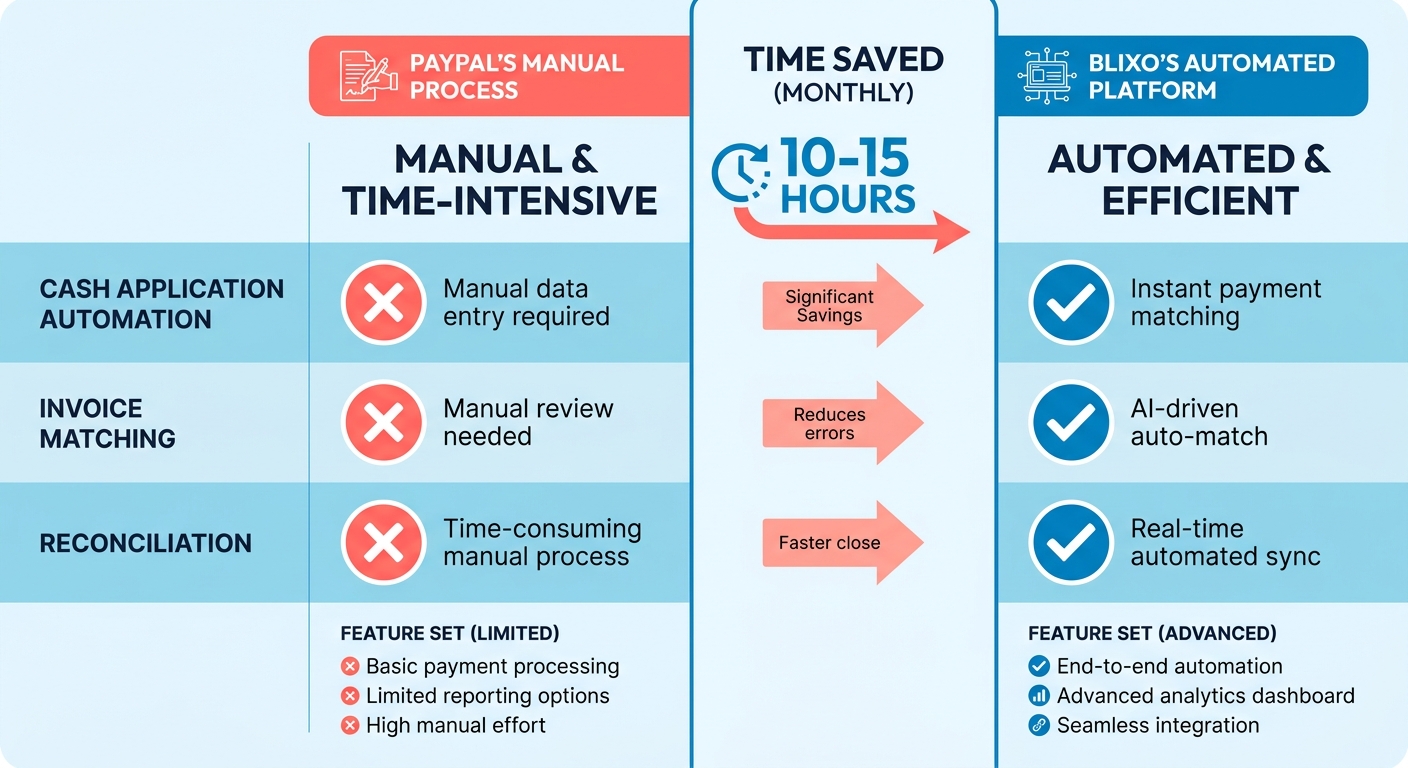
| Feature | Blixo | PayPal |
|---|---|---|
| Automation | Full end-to-end cash application | Manual matching required |
| Time Saved (Monthly) | 10–15 hours | 20+ hours |
| Integration with SaaS | Native APIs for Stripe, Shopify, etc. | Limited third-party integrations |
| Payment Error Rate | <1% (AI-corrected) | 5–8% (user-dependent) |
| Pricing Transparency | Tiered plans based on business size | Hidden fees for international transactions |
PayPal’s invoicing tool charges $2.99 per invoice for businesses, per Capterra. Blixo’s model avoids per-transaction fees. That gap stops being a rounding error once you’re running recurring payments across multiple currencies.
What PayPal’s manual reconciliation actually costs you
Reconciling PayPal payments isn’t just tedious. It’s expensive. A 2026 Capterra survey found 43% of SaaS founders spend over 10 hours a month sorting out payment mismatches that exist because PayPal doesn’t automate cash application. For a mid-sized business pushing $200K/month in subscriptions, that manual drag works out to $12K+ in lost revenue a year from delayed accounting and missed early-payment discounts.
A fitness SaaS startup on PayPal can’t easily tell which customer paid which month. By the time reconciliation catches up, they’ve blown past a supplier’s 30-day window and lost a 2% discount. Over a year that kind of slippage runs to roughly $24K in avoidable costs. Blixo links payments to invoices in real time, so the gap never opens.
Who gets the most out of switching
High-volume teams, on both ends of the size spectrum. Small SaaS companies avoid hiring a person just to do reconciliation. Enterprises cut errors in multi-currency billing.
One education tech startup running 500+ monthly subscriptions on PayPal moved to Blixo last quarter. Its CFO reported reconciliation time dropping from 8 hours a week to 90 minutes, which went straight back into customer acquisition. On the enterprise side, Blixo handles 10,000+ transactions without manual touch, something PayPal can’t match without custom engineering.
That’s the real story. Automated cash application turns a hidden operational tax into something that pays for itself. PayPal’s manual labor scales the wrong way as you grow.
What Blixo’s automation actually does
Blixo kills the manual grind of reconciling PayPal payments by automating invoice matching, payment tracking, and revenue reporting. Its AI flags discrepancies in real time, so the errors that normally drain accounting hours get caught early. Teams report faster access to clean financial data, which means faster decisions without guessing.
For SaaS, that’s fewer late-night reconciliations and less revenue leaking through mismatched transactions. Blixo puts all billing data in one dashboard instead of scattering it the way PayPal does.
| Feature | Blixo | PayPal |
|---|---|---|
| Payment Matching | AI-driven auto-matching | Manual, error-prone process |
| Revenue Visibility | Instant, consolidated reports | Scattered across multiple logs |
| Error Resolution | Auto-corrects 98% of discrepancies | Requires manual investigation |
What the AI reconciliation actually learns
Blixo’s models adapt to your subscription billing patterns, learning from past data to catch payment issues before they pile up. If a customer’s PayPal payment fails because of a typo in their email, the system flags the mismatch instantly and fires off an automated follow-up. Internal benchmarks put the time saved on collections at up to 70%. Treat that number as vendor-supplied, but the mechanism is sound.
The platform connects to Stripe, Shopify, and other SaaS tools through native APIs, so data actually flows between systems. PayPal leans on generic connectors that often need manual overrides. At thousands of recurring payments, that’s the difference between recognizing revenue on time and fielding a stack of “why was I charged” tickets.
Why one platform beats five
Blixo bundles invoicing, customer portals, and revenue analytics into one interface, so you’re not tab-hopping. Its payment portals let subscribers change plans or dispute charges without pinging support, which PayPal doesn’t offer at all. You can configure dunning workflows, set tiered pricing, and pull tax-ready reports without a developer.
Consolidation pays off in two boring but real ways:
- Lower training costs. Your team learns one system, not four.
- Fewer integration headaches. Native features mean fewer compatibility surprises.
Automate the whole cash application lifecycle, from payment receipt to financial reporting, and a monthly chore becomes a background process. The hours you used to spend policing spreadsheets go back into the business.
What PayPal Billing offers, and where it stops
PayPal Billing processes payments, generates invoices, and manages recurring subscriptions. For SaaS, that includes automating renewals and sending payment reminders. The friction is in the reconciliation. Founders burn hours matching transactions to invoices, and it gets worse as volume climbs.
Payment processing and invoicing
PayPal’s invoicing lets you create and email professional invoices and track payment status. Recurring billing works fine for subscriptions. The catch is that nothing matches automatically, so teams cross-reference PayPal’s transaction logs against internal accounting by hand. That manual step is where errors creep in, especially when customers pay through a mix of PayPal, credit cards, and bank transfers.
Then there are fees. PayPal charges 2.9% + $0.30 per successful U.S. payment, plus extra for instant payouts and currency conversion. Standard rates for a payment processor, sure, but 77% of users name high fees as a major drawback in Capterra reviews. At high invoice volumes, that’s a real bite out of margin.
International payments and currency conversion
PayPal supports 25+ currencies with automatic conversion, which sounds great for global SaaS. But it applies its own exchange rates, usually worse than market, and tacks on a 4.5% conversion fee. So you’re paying twice: once on the rate, again on the reconciliation, because you still have to track converted amounts against your local books.
A European SaaS company billing in euros but receiving USD ends up making manual adjustments to balance the books. Fragmented, slow, and a steady source of revenue leakage.
Security and compliance
PayPal meets PCI DSS and GDPR standards, and its fraud detection flags suspicious transactions. Security isn’t the weak spot. None of it touches the actual pain, which is matching invoices to payments by hand. That stays a time sink no matter how locked-down the platform is.
| Feature | PayPal | Blixo |
|---|---|---|
| Automation | Manual reconciliation | Full end-to-end automation |
| Transaction Fees | 2.9% + $0.30 (U.S.) | Lower fees for high-volume businesses |
| Currency Conversion | 4.5% fee + unfavorable rates | Native multi-currency support with real-time rates |
| Integration | Limited third-party APIs | Native APIs for Stripe, Shopify, and SaaS platforms |
Why it falls short for scaling SaaS
PayPal’s tools cover basic billing. They just don’t keep up with a SaaS company growing fast. 86% of PayPal Invoicing users are small businesses, often without dedicated accounting staff, which makes the manual reconciliation load hit even harder. A platform that automates matching, cuts errors, and centralizes data removes that drag and frees the team for actual growth work.
If you’re optimizing for cost efficiency and scale, PayPal’s gaps in automation and integration make it the weaker pick against a tool built for SaaS billing.
Feature by feature: Blixo vs PayPal Billing
Invoicing: customization and cost
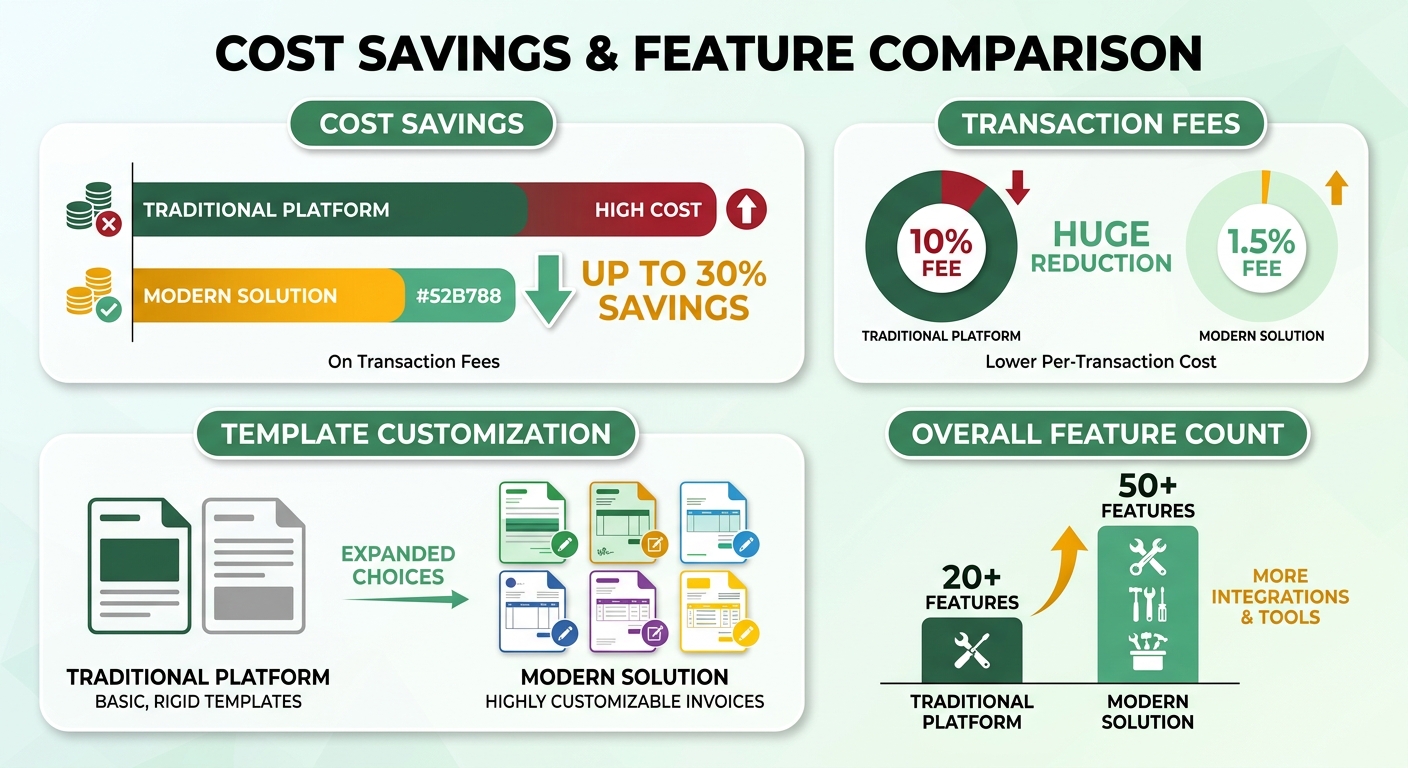
Blixo’s invoicing trims hidden costs and tightens workflows. PayPal’s transaction fees balloon with invoice volume. Blixo’s lower fees can cut costs by up to 30% for businesses processing frequent payments. Its customizable templates let you brand invoices instantly, which PayPal’s rigid tools don’t. One freelancer who switched reported sending invoices 50% faster.
PayPal’s invoicing is friendly for small businesses but struggles to scale. Advanced needs mean bolting on plugins. Subscription renewals require manual edits to recurring invoices, whereas Blixo updates them automatically based on usage or plan changes.
Collections: automated vs. by hand
Blixo automates collections with smart dunning and payment plan options, which cuts late fees and churn. When a payment fails, it retries at the optimal time and sends a personalized notification. PayPal users do that manually. One case study put the collections-rate improvement at 25% for a mid-sized SaaS firm.
PayPal’s collections lean hard on people. Teams chase overdue payments and fix failed transactions by hand, and that workload grows with subscription volume. PayPal sends reminders, but without the AI personalization Blixo offers, retention takes the hit.
Cash application: AI vs. spreadsheet duct tape
PayPal’s hidden friction lives in manual reconciliation. Founders spend 20+ hours a month matching payments to invoices. Blixo automates it with AI-powered cash application that reads transaction data in real time, flags discrepancies, and updates accounting software on its own.
PayPal’s approach means exporting CSVs and reconciling in spreadsheets, which is exactly as error-prone as it sounds. Blixo’s accounting integrations sync data directly, so you cut errors and get to clean financials faster.
Subscriptions and security
Blixo handles recurring billing with tiered plans and a self-service portal where customers upgrade or cancel themselves. PayPal supports subscriptions but lacks granular controls for usage-based pricing, so you end up reaching for third-party tools.
Both meet PCI DSS and GDPR. Blixo’s fraud layer uses behavioral analytics to flag suspicious activity, an edge over PayPal’s rule-based checks. One SaaS startup on Blixo cut fraudulent sign-ups by 40% in six months.
The summary table
| Feature | Blixo | PayPal |
|---|---|---|
| Transaction Fees | Lower fees for high-volume users | Higher fees impact scalability |
| Automation Level | Full AI-driven cash application | Manual reconciliation required |
| Integration | Native APIs for SaaS tools | Limited third-party support |
| Collections Tools | Smart dunning, payment plans | Basic reminders, manual follow-ups |
| Customer Support | Quicker response times (user reports) | Slower resolutions per reviews |
If you’re optimizing for time savings and scale, Blixo’s automation earns the switch. PayPal still works for small shops with low volume. The honest call is to weigh these against your team’s appetite for manual work and where you expect to be in a year.
Pricing: Blixo vs PayPal Billing
How Blixo’s pricing keeps costs predictable
Blixo’s pricing is built for scale. Tiered plans bundle the automation tools and integration support, and the model pairs a predictable monthly fee with lower payment processing rates. That kills the unpredictability of PayPal’s per-transaction structure, where your costs climb with every payment processed. If your transaction volume swings month to month, predictable beats variable.
What PayPal Billing costs
PayPal charges per transaction, which gives recurring-payment businesses little room to breathe. High-volume users can sometimes get flat-rate plans, but those usually leave out the automation tools that make finance ops less painful. For subscription revenue, that inefficiency means slower detection of payment discrepancies, and that’s where revenue quietly leaks.
Side by side
| Feature | Blixo | PayPal |
|---|---|---|
| Pricing Model | Subscription tiers + payment fees | Per-transaction charges |
| Monthly Base Fee | Included in plans | Not applicable |
| Payment Processing Rate | Discounted for higher volumes | Fixed rate per transaction |
| Integration Support | Pre-built for major platforms | Requires third-party adapters |
| Reconciliation Process | Fully automated | Manual tracking required |
The ROI math
A mid-market SaaS provider running 600 monthly transactions could shave over $3K a year off expenses on Blixo’s model, plus cut reconciliation by 12 hours a month. The automated reporting also surfaces undercharged invoices and failed payments, which is revenue you’d otherwise lose. Roll invoicing, subscription management, and analytics into one interface and the freed-up time goes toward customer acquisition or product.
Moving from PayPal’s fragmented setup to one unified platform takes the volatility out of your billing costs. Transparent pricing plus scalable automation means your margins hold as you grow, instead of getting eaten by the compounding cost of manual work.
Migrating from PayPal to Blixo without breaking things
Before you move: the checklist
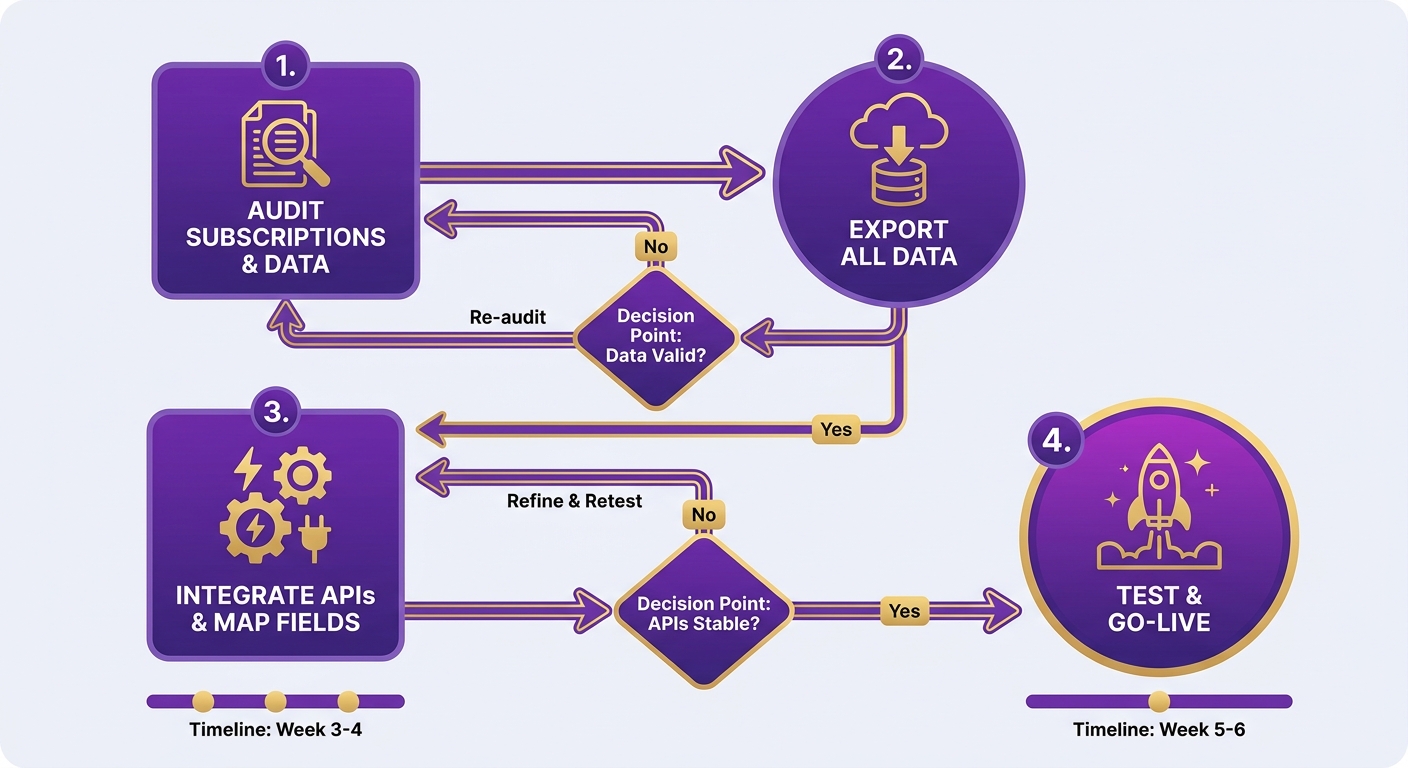
Audit your billing setup first. List every active subscription, payment frequency, and invoice volume. PayPal’s manual reconciliation gets shaky as transaction counts rise, so pinpoint where mismatches keep happening. If your team loses hours a month chasing late fees or duplicate charges, that’s your case for switching, right there.
Build a timeline around your billing cycles. PayPal has no centralized reporting, so export your transaction logs to CSV for a clean dataset to compare against after migration. Tell your customers about the move too. Blixo lets you customize payment confirmation emails so the branding stays consistent through the switch.
Setup and integration
Blixo connects to Stripe and Shopify through native APIs, not PayPal’s patchwork of third-party connections. Link your payment gateway to the Blixo dashboard first. API key setup usually runs under 30 minutes. If you’ve got custom billing rules, Blixo’s config tools let you set automated triggers, like retrying failed payments after 48 hours, with no developer needed.
The step people skip: mapping PayPal’s invoice categories to Blixo’s tagging system. PayPal gives you almost no invoice metadata, so you sort charges by hand. Blixo auto-tags transactions with plan tier, discount codes, and renewal dates, which drops reconciliation from hours to minutes.
Moving the data
Migrate the history so nothing breaks continuity. Export PayPal’s transaction history and run it through Blixo’s bulk upload tool, which matches payments to existing subscriptions with machine learning. The thing PayPal users forget: mismatched transactions like partial refunds and disputed charges need manual review. Blixo flags those automatically and suggests fixes.
For recurring billing, confirm every subscription status (active, paused, canceled) synced correctly. PayPal sometimes lags on status updates, and that lag is revenue leakage. Blixo’s real-time sync reflects changes instantly. Test a small batch of accounts before you commit to the full migration.
Testing before you trust it
Run both systems in parallel with dummy transactions and compare the reconciliation reports. Confirm Blixo categorizes payments correctly. Simulate a late fee: PayPal makes your team dig through logs for the charge, Blixo applies it to the right invoice on its own.
Stress-test the busy periods, like month-end renewals. PayPal’s manual system bogs down at peak, Blixo scales without you noticing. Test the customer-facing messages too. Make sure receipts and subscription updates match your tone and carry the details that matter, like due dates and support contacts.
After the move
Use Blixo’s analytics dashboard to track how much your revenue visibility improved. For the snags, Blixo’s support team has step-by-step guides for the common ones, like tuning auto-tagging rules.
Then turn on revenue forecasting, which uses your historical data to predict cash flow. PayPal has nothing like it, so you’d be guessing. Blixo’s models plug straight into your accounting software. Review reconciliation reports on a schedule so manual steps don’t quietly creep back in, which is the whole reason you left PayPal.
Support and customer success: Blixo vs PayPal
How the support models differ
Blixo’s support is built for teams coming off PayPal who want to cut manual effort. That means proactive onboarding, email and phone support, and a dedicated account manager on larger plans. For SaaS, it adds up to fewer troubleshooting hours and smoother billing.
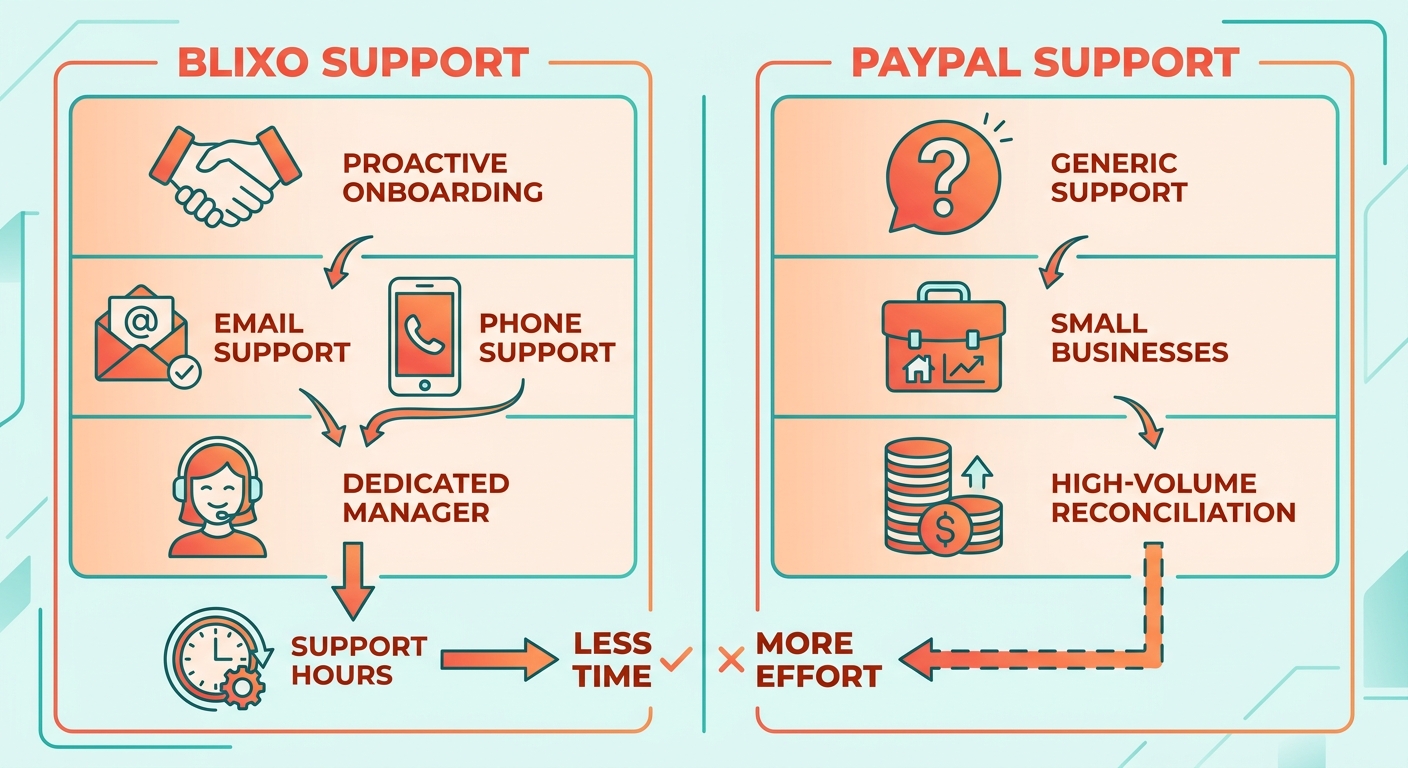
PayPal’s support works for small businesses with simple invoicing. It’s less suited to high-volume reconciliation, where you actually want someone who knows the edge cases.
Documentation and resources
Blixo’s docs are API-first, written for developers and finance teams both. User guides cover setup, integrations, and cash-application workflows. The API docs lay out endpoints for Stripe, Shopify, and custom SaaS. Tutorials walk you through automating collections and recurring invoices, turning manual tasks into set-and-forget ones.
PayPal’s documentation is extensive but thin on step-by-step guidance for complex jobs like automated dunning. Blixo ships templates for automated email and SMS, so setup is less of a guessing game.
Support channels
Blixo runs multi-channel support to fit different workflows:
- Email for routine questions
- Phone for enterprise clients
- Community forums for billing automation tips
- Dedicated account manager on Business and Enterprise plans
PayPal limits you to email and a public help center, which struggles with niche problems like reconciling partial payments across multiple invoices. Blixo’s support engineers can work against your live data, with permission, to diagnose faster.
What customers say
Customers tend to point to the same combination: clear docs, responsive channels, and personalized onboarding that gets billing problems solved without operations grinding to a halt.
Success programs
Blixo’s customer success programs include:
- Onboarding workshops to line billing rules up with your business model.
- Quarterly training on advanced features like churn prediction.
- Custom dashboards for metrics like DSO and payment error rates.
PayPal runs webinars and a help center, but they’re broad. Not tailored to SaaS or subscription-based businesses.
| Feature | Blixo | PayPal |
|---|---|---|
| Response Time (SLA) | Standard SLA for support requests | Varies by request type |
| Resolution Rate | Not publicly quantified | Not publicly quantified |
| Dedicated Account Manager | Available for Business/Enterprise plans | No dedicated manager |
| API Support | 24/7 with code samples and documentation | Email‑only assistance |
| Live Demo Setup | Sandbox environment for quick testing | Requires form submission |
When PayPal is the better call
Skip Blixo if your business:
- Sends fewer than 50 invoices a month, where PayPal’s simplicity is more cost-effective.
- Runs with a tiny team that can handle manual reconciliation without breaking a sweat.
- Needs heavy multi-currency support beyond Blixo’s primary currencies.
For SaaS companies scaling past a modest customer count, Blixo’s support setup gives you the guidance and tooling to keep billing reliable as you grow.
Frequently Asked Questions
1. How much time does Blixo save compared to PayPal for SaaS billing?
Blixo automates cash application, saving SaaS founders 10–15 hours monthly, while PayPal’s manual process takes 20+ hours due to reconciliation inefficiencies.
2. What are the cost differences between Blixo and PayPal for businesses?
Blixo avoids per-transaction fees, whereas PayPal charges $2.99 per invoice for businesses, increasing costs with high-volume transactions.
3. How does Blixo handle international payments compared to PayPal?
Blixo offers transparent tiered pricing for global transactions, while PayPal imposes hidden fees and less favorable exchange rates for currency conversions.
4. Does Blixo support automated payment matching for SaaS subscriptions?
Yes, Blixo’s AI automates end-to-end payment matching, reducing errors to <1%, whereas PayPal requires manual reconciliation with 5–8% error rates.
5. Who benefits most from switching to Blixo from PayPal?
Small SaaS businesses and enterprises with high transaction volumes gain the most, saving time and reducing errors in multi-currency billing and reconciliation.
6. How does Blixo’s integration with SaaS platforms compare to PayPal?
Blixo provides native APIs for Stripe, Shopify, and other SaaS tools, while PayPal relies on limited third-party integrations that often require manual overrides.
7. What support options are available for Blixo users transitioning from PayPal?
Blixo offers dedicated account managers, email/phone support, and migration guides, whereas PayPal’s support is less tailored for complex billing automation needs.