

Get Paid on Time with Recurring Payment Setup

Key Takeaways
- The global recurring payments market hit $130 billion in 2022 and is projected to more than double to $268 billion by 2033.
- Fixed subscription billing is the easiest to run. The charge is identical every cycle, so setup and reconciliation stay simple.
- Usage-based metered billing is the opposite. High setup effort, painful reconciliation, because charges vary per customer every period.
- A tennis club grew membership 25% after moving members onto direct debit.
- Monthly billing is still the default, but weekly, quarterly, and annual cycles each fit different business models.
- Direct debit and ACH become low-reconciliation options once customer mandates are properly authorized.
The short version
Recurring payments turn unpredictable invoicing into a steady, automated revenue stream. Set them up right and you stop chasing late payments. What follows breaks down what each system costs you in time, where the hard parts hide, and how automation kills the manual reconciliation that drains small finance teams.
As subscription models spread across industries, businesses are picking billing cycles from weekly to annual to match how customers actually want to pay and to smooth out cash flow.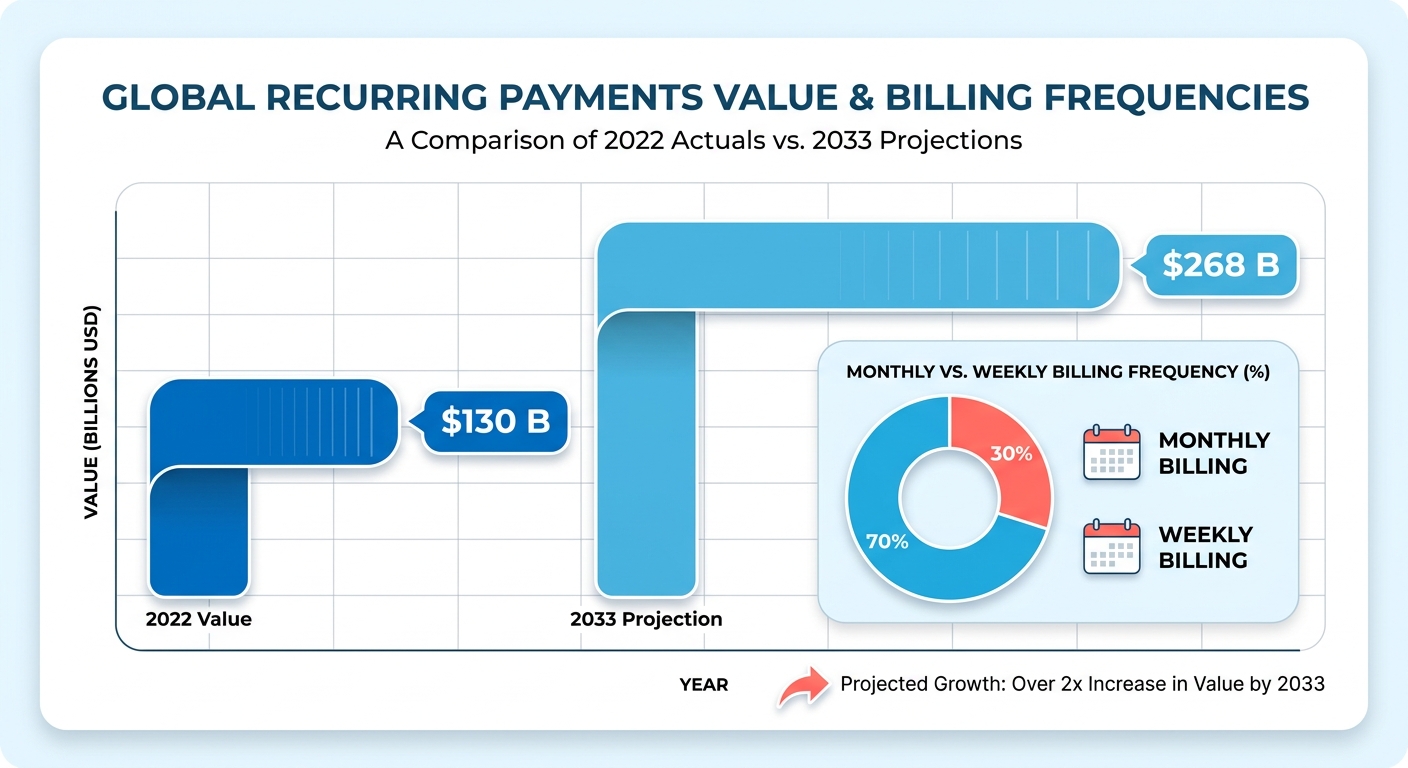
Which recurring payment system fits your business?
The right system depends on your billing model: fixed subscriptions, usage-based metering, or variable charges. Each handles payment methods, churn, and reconciliation differently. Here’s how the main approaches compare.
| System Type | Best For | Setup Effort | Reconciliation Difficulty |
|---|---|---|---|
| Fixed subscription billing | Streaming, SaaS, memberships | Low | Low. Same amount each cycle |
| Usage-based / metered | Cloud services, API products | High | High. Variable per customer |
| Invoice-based recurring | Agencies, B2B services | Medium | Medium. Needs payment matching |
| Direct debit / ACH | Utilities, gyms, clubs | Medium | Low once mandates are set |
A fixed model is the path of least resistance. The transaction value never changes, so finance teams can automate ledger updates without verifying variable usage or chasing down unexpected invoice adjustments before they post.
How long does setup take, and what’s actually hard?
Setup runs from an afternoon for a single subscription tier to several weeks for usage-based billing with custom rules. The hard parts are rarely the payment form. They’re failed-payment recovery, payment matching, and reconciliation.
Start by defining your subscription options. Pick your tiers, frequencies, and payment methods. Credit card, ACH, SEPA, and direct debit each carry different setup steps and compliance requirements. Your processor has to be PCI DSS compliant and support automated retries.
The difficulty spikes in two places. Dunning is the bigger one. Involuntary churn from failed payments accounts for a large share of total subscriber loss at most SaaS businesses. Smart dunning retries failed charges based on why they failed, recovering revenue you’d otherwise write off.
Cash application is the second. Matching incoming payments to the right invoices by hand eats hours and breeds errors. This is the reconciliation headache that keeps small businesses chasing late payments long after the money has already landed.
What separates a smooth setup from a painful one?
Automated cash application. That’s the dividing line. When payments match to invoices instantly and accurately, recurring billing turns into clean revenue capture instead of a weekly reconciliation chore.
The systems that work share a few traits:
- Automated billing that charges saved payment methods on schedule, cutting manual work
- Intelligent matching that reconciles payments to invoices without spreadsheet hunting
- Dunning that handles card updates and customer notifications gracefully
- Customer controls so subscribers update cards and manage plans themselves
One WooCommerce user warned on Reddit about a recurring-payment plugin throwing “PayPal Pending Orders, Stripe Webhook Failures” with no refund. Picking a system with reliable matching and retry logic up front saves you from exactly that.
Get these four right and you stop reconciling by hand. Payments land, match themselves, and post as reconciled revenue the moment they clear.
Why recurring payments are worth the setup
Recurring payments convert unpredictable, one-off invoicing into a steady stream you can plan around. You stop sending reminders. You stop wondering whether this month’s cash covers payroll. The charge fires on schedule and the money lands without anyone touching a spreadsheet.
That last part is where most small finance teams get stuck. Collecting the charge is easy. Matching it back to the right invoice, customer, and ledger entry is what eats hours. Automated cash application closes the gap by reconciling each payment the instant it clears, so revenue posts cleanly instead of sitting in a “to-be-matched” pile.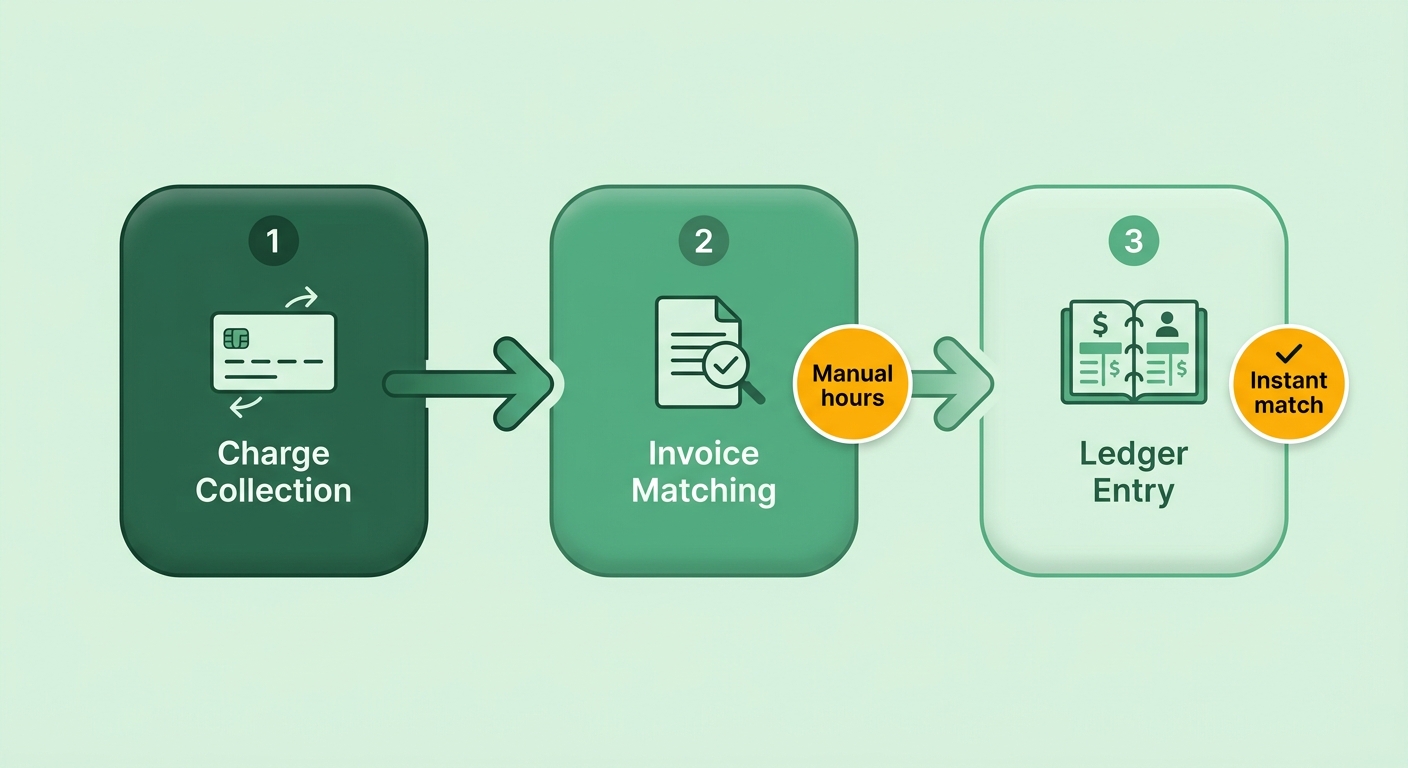
Who actually benefits most
SaaS and subscription businesses see the biggest gains, because the whole model depends on collecting the same charge from the same customers month after month. The global SaaS industry has grown 500% over the past seven years, and recurring billing is the engine underneath it.
The benefit reaches well past software, though. Membership businesses, utility-style services, and product subscriptions all run on predictable cycles. A regional landscaping company that moved seasonal clients onto scheduled monthly plans cut its average collection time from 42 days to under a week. A subscription-box brand scaled to roughly $60,000 in monthly recurring revenue by replacing one-off purchases with a standing plan.
What automation actually solves
The real problem is the overhead of payment failures. When cards expire or transactions decline, manual tracking often misses it in time. The result: service interruptions and lost revenue from customers who never meant to cancel.
Automated systems schedule intelligent retries and prompt people to update their details. Once the payment recovers, the system updates the ledger immediately, so your records reflect the current cash position without anyone touching them.
Manual setups suffer from sync gaps. When the payment gateway and the accounting platform don’t talk to each other cleanly, a transaction can clear on the gateway while staying unrecorded in the ledger. That mismatch turns into a tedious manual audit later.
Why this hits cash flow so directly
Predictable billing only helps if the money gets recognized the moment it arrives. Processing costs for recurring payments run from about 2.6% plus 30 cents to 3.5% plus 15 cents per transaction, so you want every cent that clears matched and counted, not lost to reconciliation drift.
When each charge applies itself to the correct account automatically, you cut the accounting errors that come from manual entry. Your finance team stops chasing unmatched payments. They spend their hours on forecasting and growth instead of detective work. That steady, accurate cash position is the whole point of going recurring.
Setting up a recurring payment system
Setup is four moves: pick your billing frequency, build your subscription tiers, connect a compliant payment gateway, and test the whole flow before you charge a real customer. Each step shapes how clean your revenue capture stays once payments start firing. Get the foundation right and reconciliation stops being a chore.
Choosing the right billing frequency
Match your billing schedule to how customers actually use the product and cash flow stays steady. Shorter cycles give you more frequent liquidity. Longer cycles secure commitment upfront. Which cadence supports your operational costs is the question to answer first.
Fixed services like software access or digital memberships do well on regular, predictable intervals. Streaming and media lean this way because the cycle keeps the entry price low enough to encourage continuous subscription without budget strain.
Annual billing locks in commitment and reduces churn, but it asks more from the customer upfront. Quarterly splits the difference. And if your charges vary by usage, you need a system built for variable amounts, because standard recurring payments only work when the amount stays the same each period.
Building plans and pricing tiers
Define your subscription options before you touch any payment setup. Map each tier, what it includes, and the price. That’s the structure your billing system charges against.
Treat pricing as an experiment. Yoav Shapira, Director of Engineering at Meta, argues that pricing strategy should be tested and optimized, not set once and forgotten. Build tiers you can adjust without rebuilding the whole system.
A two-tier split works for most small businesses: a fixed plan for larger accounts at $299/month** and a pay-as-you-go option for smaller teams at **$15/user/month. Trial periods help too. They let customers test the product before billing starts, which lowers the barrier to signing up.
Integrating and testing the gateway
Connect a PCI DSS-compliant payment gateway, then run test transactions before going live. Your gateway has to support automated payment retries and dunning. Those two features are what protect revenue when cards fail.
Failed payments are a constant operational drag. Secure tokenization protects cardholder data, keeps you compliant, and lets the system safely store credentials for the next billing cycle.
Connecting your gateway to an automated ledger means successful transactions get recorded immediately. Platforms like Blixo sync transaction data straight into your invoicing software, so you’re not manually matching individual bank deposits against open accounts.
Test the full flow before launch. Offer multiple payment methods. Credit cards, ACH bank debit, and digital wallets all cut friction and improve retention.
Telling customers what they’re signing up for
Tell customers exactly what they’ll be charged, when, and how to cancel. Clear billing terms build trust and reduce churn. Vague or hidden terms do the opposite.
Send a confirmation when a subscription starts, and a notice before each renewal. Make cancellation simple. The easier management is, the fewer disputes and chargebacks you face. Honesty about terms is the cheapest retention tool you have.
Managing customer payment methods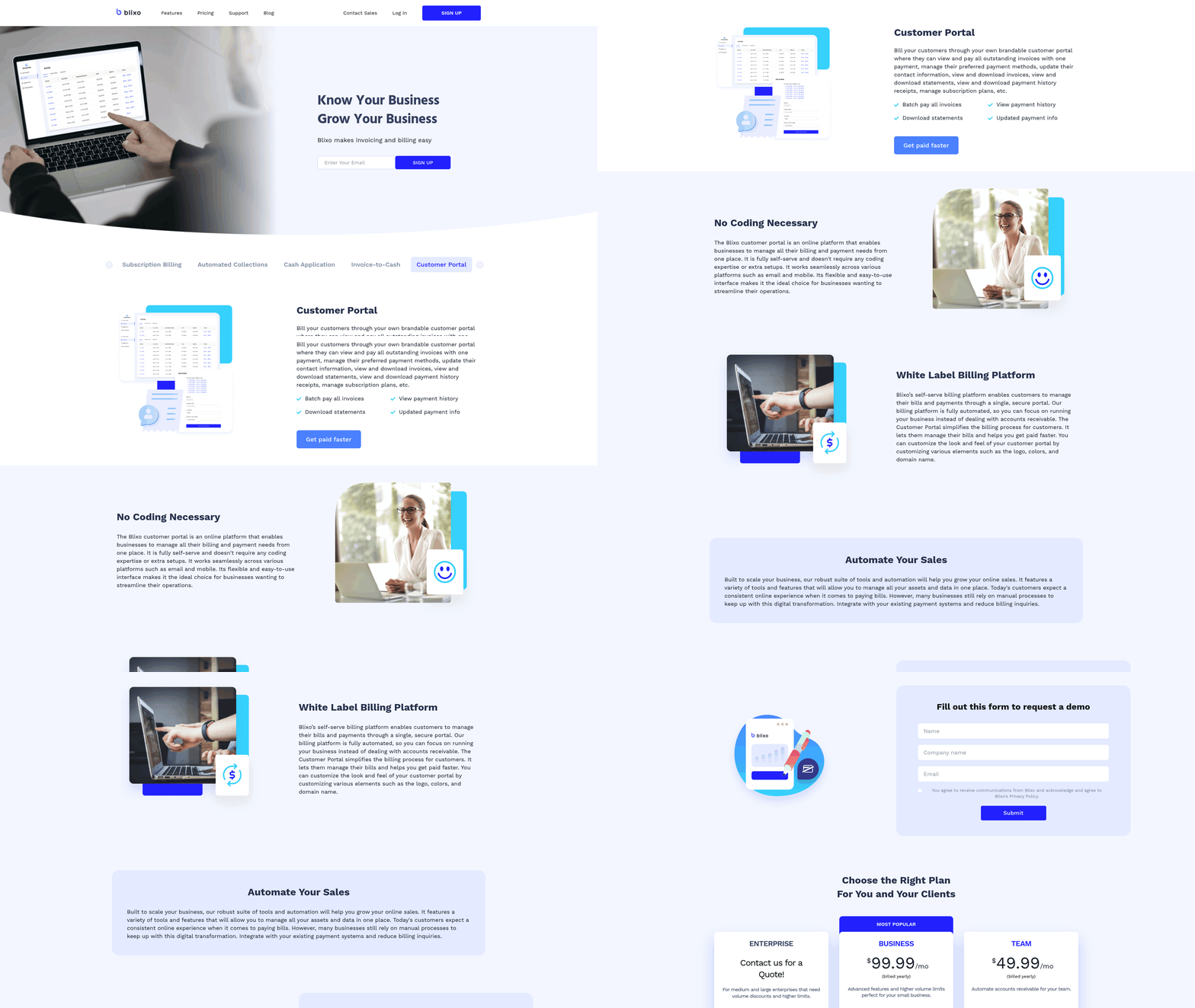
Failed payments are the silent revenue leak in any recurring billing setup. A card expired, a bank flagged the charge, funds ran short. Managing payment methods well is how you stop the leak before it drains your books.
Handling failed transactions and retry logic
Smart retry logic schedules charges around banking patterns and specific decline codes. A temporary network error can be retried almost immediately. A credit-limit issue needs a strategic delay to give the approval a better shot.
A blunt retry system hammers the same card every day and burns goodwill. A reason-based one waits for payday on a funds issue, or pauses entirely when the card needs replacing. Pair retries with an automatic card updater that refreshes expired or reissued card numbers behind the scenes, and a lot of failures resolve without the customer lifting a finger.
When webhook integrations fail, the disconnect between the payment processor and your database can mark active subscriptions as unpaid. Solid API communication keeps those sync errors from cutting off customer access.
Communicating payment issues to customers
Tell customers early, clearly, and with a one-click fix. When a card is about to expire or a charge fails, a short, specific message beats silence every time. A confused customer is a cancelled customer.
Give them a self-service portal to update card details, switch from a credit card to ACH bank debit, or change their billing date. The fewer steps between “your payment failed” and “fixed,” the more you recover. Tokenized storage keeps that data secure and PCI DSS compliant, so customers update once and stay updated.
Why automated cash application closes the loop
Linking your recovery workflows directly to the accounting ledger means saved accounts update the moment a transaction succeeds. That immediate sync prevents double-billing and keeps reporting accurate.
Matching algorithms handle the messy cases too: a customer paying multiple outstanding invoices with a single lump sum, or transaction fees deducted before deposit. Resolving those automatically keeps the ledger clean without manual journal entries.
The payoff is real. Your finance team stops chasing declines and reconciling spreadsheets, and starts trusting that the number on the dashboard is the number in the bank.
Four things worth setting up: reason-based retries, automatic card updating, a self-service portal for customers, and cash application wired directly into your accounting ledger. Each one removes a manual touch. Together they turn payment failures from a chase into a non-event.
Frequently Asked Questions
1. What’s the difference between voluntary and involuntary churn in recurring billing?
Voluntary churn happens when customers deliberately cancel a subscription. Involuntary churn occurs when a payment silently fails from an expired card or insufficient funds, and nobody catches it. The customer never intended to leave. Automated recovery systems target involuntary churn by updating card details and scheduling smart retries to keep the subscription active.
2. Is direct debit better than credit card billing for recurring payments?
Direct debit is highly effective for long-term relationships because bank accounts do not expire like credit cards, leading to lower failure rates. Credit cards offer faster setup and broader acceptance but require more active management to handle expirations. Offering multiple options reduces friction and improves customer retention.
3. What happens to recurring billing if my charge amount changes each period?
When billing amounts fluctuate, you must implement a system capable of calculating metered usage or handling dynamic invoicing. This setup requires integrating consumption tracking with your billing engine so that the correct amount is calculated and authorized before each payment cycle runs.
4. How much do recurring payment processing fees actually cost?
Processing costs for recurring payments range from roughly 2.6% plus 30 cents to 3.5% plus 15 cents per transaction. Because these fees apply to every charge, keeping administrative overhead low is essential. Integrating your payment processor directly with your ledger prevents manual errors from compounding these transaction costs.
5. Should I offer a free trial period before billing starts?
Trial periods lower the barrier to signing up by letting customers test your product before billing kicks in. They pair well with clear communication: send a confirmation when the subscription starts and a notice before each renewal. This transparency reduces disputes, chargebacks, and early cancellations.
6. What is an automatic card updater and why does it matter?
An automatic card updater refreshes expired or reissued card numbers behind the scenes, so many payment failures resolve without the customer doing anything. This service coordinates with major card networks to obtain new expiration dates and card numbers, maintaining uninterrupted service and secure data storage.
7. How does automated cash application handle partial or out-of-order payments?
Automated systems use advanced matching rules to compare incoming transaction metadata against outstanding invoices. Even when a payment amount does not match an invoice perfectly due to fees or partial payments, the system can flag the closest match for quick approval, keeping your ledger synchronized.