

A Comprehensive Guide to Recurring ACH Payments with Blixo

Key Takeaways
- Recurring ACH runs as low as 30 cents a transaction. Credit cards run closer to $2.50.
- ACH decline rates sit below 2%. Card declines clear 10%, and every one of them chips at revenue you thought was locked in.
- Bill 500 customers $100 a month on cards and declines can quietly cost you $7,500. ACH erases most of that.
- One firm cut transaction fees by 30% just by moving recurring billing off cards and onto ACH.
- The hard part of recurring ACH isn’t the pull. It’s what comes after: matching batch payments to invoices and chasing the ones that fail.
- ACH settles in batches over 3 to 5 business days, whether the charge is recurring or one-time.
- Recurring ACH fits subscriptions, retainers, and monthly invoices. One-time ACH fits deposits and ad-hoc bills.
Quick Summary
Recurring ACH pulls money straight from a customer’s bank account on a set schedule, at a fraction of card cost. Most guides stop there. The part they skip is what happens after the money clears: tying that batch deposit back to the right invoice, reconciling it, and following up on the pulls that bounce. That’s where the actual work lives, and it’s the stage Blixo’s cash application and collections are built to handle end to end.
Recurring vs one-time ACH, in plain terms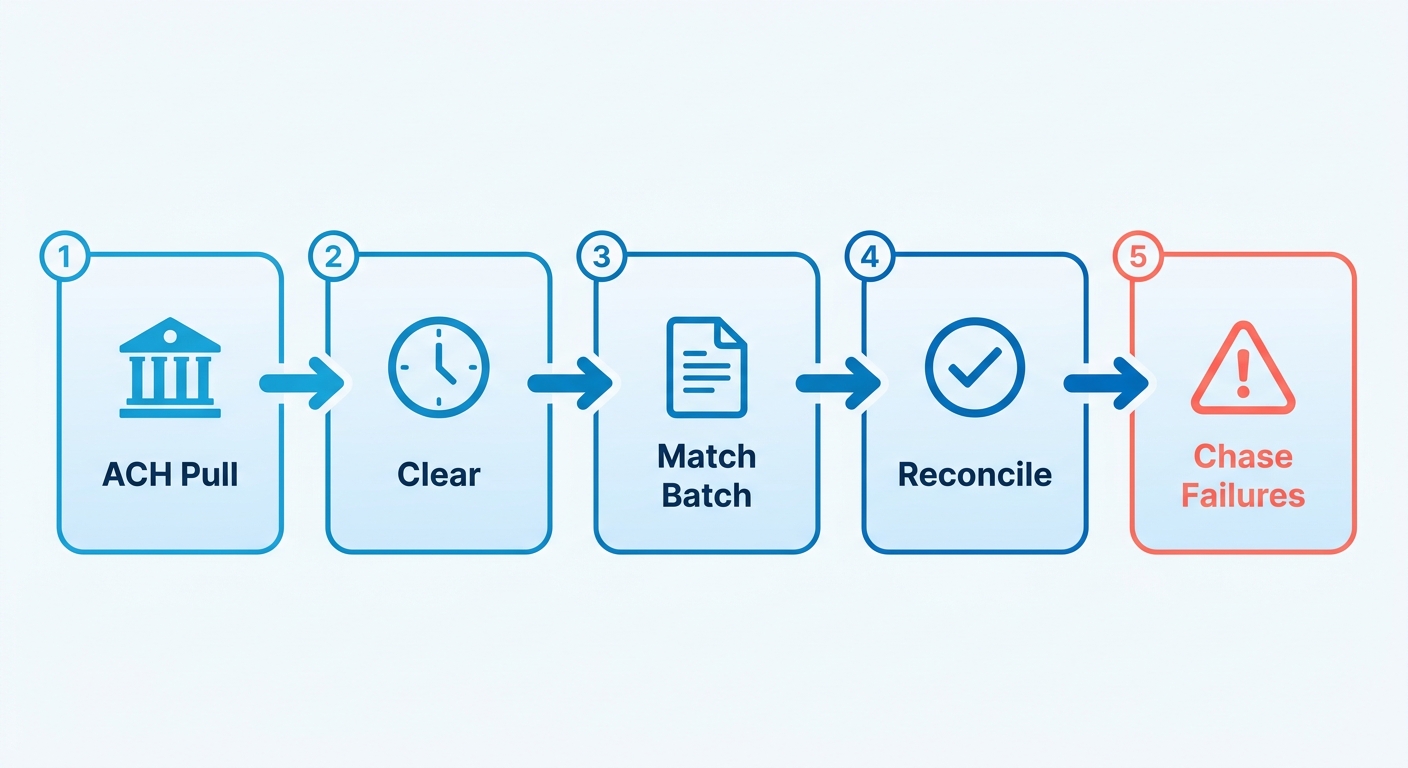
One-time ACH is a single pull. Recurring ACH is an automatic schedule. Recurring earns its keep when you bill the same customers over and over. The savings compound. So does the reconciliation load, if you’re doing it by hand.
| Factor | Recurring ACH | One-Time ACH |
|---|---|---|
| Schedule | Automatic, on a fixed cadence | Manual, single transaction |
| Best for | Subscriptions, retainers, monthly invoices | Deposits, ad-hoc bills |
| Cost per transaction | As low as 30 cents vs ~$2.50 on cards | Same low per-transaction cost |
| Decline rate | Below 2% (cards exceed 10%) | Below 2% |
| Processing time | 3 to 5 business days, in batches | 3 to 5 business days |
| Cash application | Repeatable, automatable | One-off matching |
The cost case is straightforward. Move recurring billing off card networks and you protect monthly revenue from two leaks at once: involuntary churn and processing overhead.
How long does setup take?
Setup is low difficulty. Building the schedule barely takes any effort. Wiring the reconciliation behind it, so you’re not matching deposits by hand every week, is the real job.
- Authorization collection: Quick. Customers approve once through a digital agreement.
- Recurring schedule creation: Quick. Set the cadence and the saved payment method, then auto-bill runs on its own.
- Cash application setup: This is where teams stall if they do it manually. An intelligent matching engine ties each ACH deposit back to its invoice automatically, and it learns from your corrections.
- Failed-payment handling: Automated dunning retries declines and flags them, so a bounced pull doesn’t quietly turn into a write-off.
Bank transfers settle in batches, not in real time, so payments rarely line up one-to-one with invoices. That structural delay is exactly why manual reconciliation falls apart once volume climbs.
Who actually bills this way?
Any business with predictable, repeat billing. Service firms get the most out of the stability.
- Agencies and consultancies on monthly retainers collect steady income without re-invoicing by hand.
- SaaS and subscription brands auto-charge saved bank accounts and cut decline-driven churn.
- Professional services like law and accounting firms reduce late payments and stop chasing the same clients every month.
Businesses on this model tend to report lower outstanding receivables and steadier cash flow. The common thread isn’t only cheaper fees. It’s losing the manual reconciliation step that eats your team’s hours after the money lands.
What recurring ACH actually fixes
Recurring ACH solves two problems together. It cuts payment costs, and it stabilizes the cash you can actually plan around. But the savings only hold if you can match every cleared payment to its invoice without burning hours. That second half is where most businesses still bleed time.
How much do businesses really save?
ACH costs far less than cards, and the gap widens as invoices get bigger. Card fees scale with the amount, so a large charge gets taxed harder every cycle. ACH fees are flat, often a fixed cents-per-transaction rate that doesn’t budge whether you pull $50 or $5,000. On high-value recurring charges, that flat rate is where the margin hides.
Scale it up and the effect grows. A business running thousands of charges a month watches those flat fees compound into retained revenue, while card surcharges eat the same volume from the other side.
The volume trend tracks the same logic. ACH Network payment volume rose 7.4% in a recent third quarter, and Same Day ACH jumped 67.5%. Most ACH volume now settles in one business day or less. More businesses are picking this rail because the math works.
Where ACH steadies cash flow and keeps customers
Predictable billing is the real payoff. Pull the same customers on a set schedule and revenue stops being a monthly guess. Reliable cash flow lets you plan for growth instead of chasing this cycle’s receivables.
Retention improves too. Customers on recurring ACH are 14% less likely to leave their vendor and 86% more likely to pay on time. Expired cards are a leading cause of involuntary churn, and bank account details don’t expire the way card numbers do. That alone shields a chunk of your subscription base.
Who gets the most out of it? Anyone with repeat billing:
- SaaS and subscription companies holding a steady revenue stream
- Property managers collecting rent on the first of every month
- Utility providers cutting late payments and lifting satisfaction
- Gyms and membership services automating low-to-medium-value charges
If you bill the same accounts month after month, ACH belongs in your stack. If you only run one-off transactions, the recurring setup is overkill.
Why cash application is the real bottleneck
Here’s the part most guides leave out: everything that happens after the charge clears. Generating a recurring invoice is trivial. Matching the payment back to it is where finance teams lose hours. ACH arrives in batches, so a single deposit might cover dozens of invoices with no breakdown attached.
Manual entry makes it worse. Roughly 1 in 8 invoices carry a keying mistake, and that delays payment by two weeks or more. Every manual touch is another chance for cash to land unmatched.
The flip side shows up fast when you automate the stage. A utility provider cut late payments by 50% after moving to automated recurring billing. A two-person finance team doubled their account volume without adding headcount once they stopped reconciling by hand.
Automated cash application matches each batch payment to the right invoice, flags failures, and triggers collections without anyone opening a spreadsheet. The savings from ACH are easy to claim on paper. Keeping them means closing the reconciliation gap that opens the moment the payment clears.
Where recurring ACH gets hard
The toughest parts of recurring ACH show up after the payment runs, not before. Setup is the easy stretch. Matching cleared batches to invoices, handling returns, and staying inside NACHA rules are where the hours pile up. Here’s where businesses lose time and how to plug the gaps.
Why reconciliation breaks down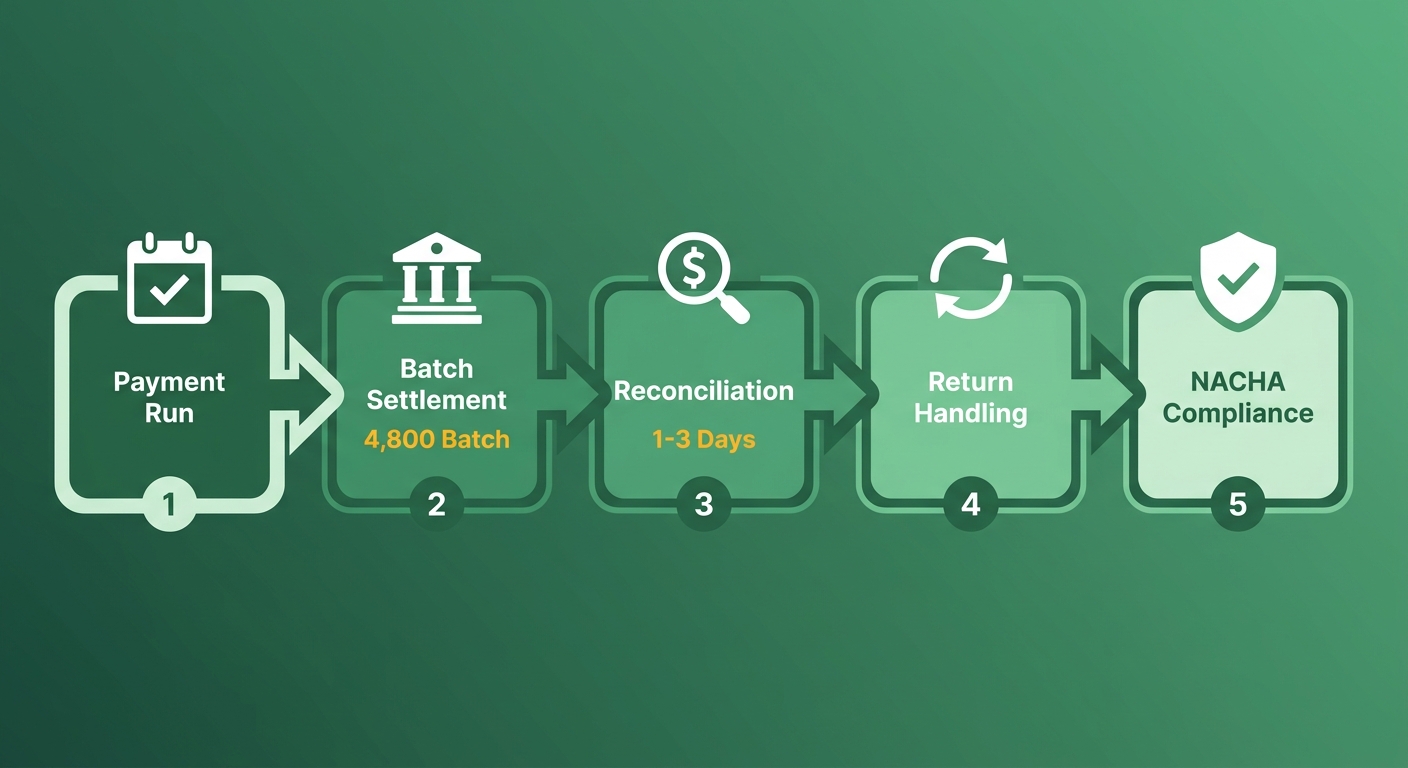
Reconciliation breaks because ACH settles in batches, not one payment at a time. A single deposit might cover dozens of invoices. Your bank shows one lump sum, and you’re left guessing who paid what. Settlement runs 1 to 3 business days, and that timing gap makes manual matching even messier.
When a $4,800 batch lands, someone has to split it back across the right open invoices. Do that by hand across hundreds of customers and errors creep in quickly.
Automated cash application matches each cleared payment to its invoice the moment funds settle. No spreadsheet, no guesswork. The reconciliation that used to eat an afternoon runs in the background.
Handling failed payments and returns
Failed payments are rare with ACH, but they still need a system. Returns arrive with specific codes you have to read right. An R01 means insufficient funds and is worth retrying. An R02 or R03 signals a closed or invalid account, and no retry will fix that. NACHA also caps retries on a returned debit at two attempts after the original, so blind retrying can push you out of compliance.
Timing is the trap. A return can post days after the original pull. If your collections process isn’t watching for it, a “paid” invoice quietly goes unpaid and nobody notices until month-end.
Automated collections close that loop. When a payment returns, the invoice flips back to open, a dunning sequence starts, and a retry gets scheduled. The system reads the return code first, so it retries the recoverable failures and flags the dead accounts for follow-up. No manual chase.
The NACHA rules you can’t skip
NACHA governs the ACH network in the U.S., and recurring debits carry specific authorization requirements. You need documented consent, including the customer’s bank account details and the payment schedule, before you pull a single dollar. Skip it and you’re exposed to disputes and penalties.
The core rules come down to a few practices:
- Written authorization: Capture and store explicit consent for each recurring schedule.
- Clear schedule disclosure: Tell customers the amount and timing of each debit.
- Easy revocation: Give customers a simple way to cancel future payments.
- Secure data handling: Protect routing and account numbers throughout.
Built-in safeguards keep you compliant without a legal team on call. Digital authorization records store themselves, schedules get disclosed at signup, and account data stays encrypted. Compliance stops being a checklist and becomes part of the workflow.
Where integration and communication trip people up
Integration fails when your payment data doesn’t sync with your accounting system. A Reddit user in r/waveapps described losing the ability to let customers agree to automatic ACH payments at all. When tools don’t talk, customers get stuck and revenue stalls.
Communication is the other gap. Customers need timely notices when a charge runs or fails. Automated invoicing and dunning handle both, so your team stops answering “did my payment go through?” one email at a time.
How automated dunning closes the loop
Automated dunning is the system that chases failed and late payments for you, sending reminders and retrying charges on a schedule. Paired with recurring ACH, it closes the loop most businesses leave open. When an ACH payment returns or a customer slips past due, the software follows up on its own.
This is the collections half of the post-ACH stage. Generating the invoice was easy. Recovering the payment that didn’t clear is where cash flow gets won or lost.
How dunning works with recurring ACH
When a recurring ACH charge fails or returns, dunning kicks in right away. It flags the unpaid invoice, schedules a retry, and notifies the customer through a set sequence of reminders. No spreadsheet, no manual follow-up list, no accounts slipping through.
The numbers back it up. Businesses using automated dunning recover an average of 22% more revenue from failed payments within the first 30 days, based on internal Blixo user data, and cut manual touchpoints by up to 70%. One SaaS company running weekly ACH billing dropped its days sales outstanding from 38 days to 19 after adding automated retry sequences with escalating reminders. That’s cash hitting the bank two weeks sooner.
Setting it up, step by step
You can configure a full dunning sequence in well under an hour, then leave it running. The setup links your payment retries to your reminder cadence so both fire automatically.
- Connect your recurring ACH billing. Link the schedule that pulls funds so the system sees every charge and its result.
- Set retry rules for returns. Decide how many times to re-attempt a failed pull and how many days to wait between tries, with bank settlement windows in mind.
- Build the reminder cadence. Map your email touchpoints. A first nudge on the failure, a firmer note a few days later, a final notice before escalation.
- Match recovered payments back to invoices. AI cash application takes 2 to 4 hours to set up and sharpens its matching over time, so reconciliation stays clean as recovery happens.
Why this stabilizes cash flow
Automated collections steady your cash flow by shrinking the gap between a missed payment and a recovered one. Every day an unpaid ACH return sits untouched is a day that cash isn’t in your account. Automation closes that window.
The time savings add up. One cleaning business saved 8 to 10 hours a month by automating billing and follow-ups. That’s how small admin teams scale, managing far larger customer portfolios without drowning in manual work.
You keep full control over the customer experience, too. Tune reminder timing, message tone, retry counts, and escalation thresholds to match how your customers actually behave. A low-value subscription might tolerate three gentle retries. A high-value account might warrant a phone call after the first failure.
Joining recovery and reconciliation is the operational gap most billing setups leave open. The invoice goes out, the ACH pulls, and then the chasing and matching run on their own. That’s how predictable cash flow gets built.
Frequently Asked Questions
1. Can a customer change their bank account on a recurring ACH schedule without canceling it?
Customers can update bank details on an active recurring schedule, but NACHA requires fresh documented authorization for the new account. The schedule itself continues uninterrupted once the new account and routing numbers are captured and stored. This avoids the involuntary churn that expired credit cards commonly trigger.
2. What is the maximum dollar amount you can pull through a recurring ACH transaction?
ACH has no universal hard cap, but Same Day ACH carries a per-transaction limit set by NACHA, currently $1 million. Standard ACH debits face limits set by your originating bank or processor. High-value recurring charges benefit most from ACH’s flat fee versus percentage-based card costs.
3. How does ACH compare to wire transfers for recurring billing?
ACH suits recurring billing far better than wires. ACH costs a nominal flat fee per transaction and automates on a schedule, while wires cost $15 to $50 each and require manual initiation. Wires settle same-day but aren’t built for repeat, scheduled pulls across many customers.
4. What happens if a customer disputes a recurring ACH charge they authorized?
Customers can dispute unauthorized ACH debits, typically within 60 days for consumer accounts. This is why maintaining clear, verifiable records of customer consent is critical. Having accessible proof of the agreed-upon payment terms protects you in disputes and simplifies compliance tracking. Blixo retains these authorization records automatically, so proof of consent stays available without manual tracking.
5. Can recurring ACH handle variable billing amounts that change each cycle?
Recurring ACH supports variable amounts, making it suitable for usage-based or metered billing where charges differ monthly. NACHA requires you disclose the amount and timing before each debit when amounts vary. This works well for utilities and SaaS companies billing on consumption rather than flat subscriptions.
6. How quickly should you retry a failed ACH payment after a return?
Space retries based on the return code and typical bank processing times, often waiting a few days between attempts to allow funds to clear. Strict network regulations limit the number of times you can re-attempt a failed debit, making it essential to target recoverable insufficient-funds returns rather than retrying closed-account codes.
7. Does recurring ACH work for customers outside the United States?
ACH is a domestic payment rail, meaning it only processes transactions between bank accounts based in the United States. International recurring payments require alternative networks like SEPA in Europe or cross-border processors. For U.S.-based recurring billing, ACH remains the lowest-cost option, with exceptionally low transaction failure rates compared to traditional card payments.