

How to Automate Accounts Receivable with Blixo

Key Takeaways
- Automating AR reduces invoice errors by 39% and cuts payment delays by 45 days.
- Manual AR processes cost small businesses over 200 hours annually in lost productivity.
- Automated AR systems lower DSO by 30% and reduce missed payments by 35%.
- A law firm boosted cash-flow efficiency by 25% using Blixo’s invoicing and collections.
- Miami-based startups saw a 70% sales conversion jump via Blixo’s dynamic discounting.
- Blixo’s subscription analytics helped a company reduce churn by 15%.
- AR automation cuts administrative costs by 30% compared to manual methods.
Related Video
Watch: Blixo Lifetime Deal $79 - Subscription Billing & Accounts Receivable Automation | Blixo Review by The SaaS Deals
Why Automating Accounts Receivable Matters
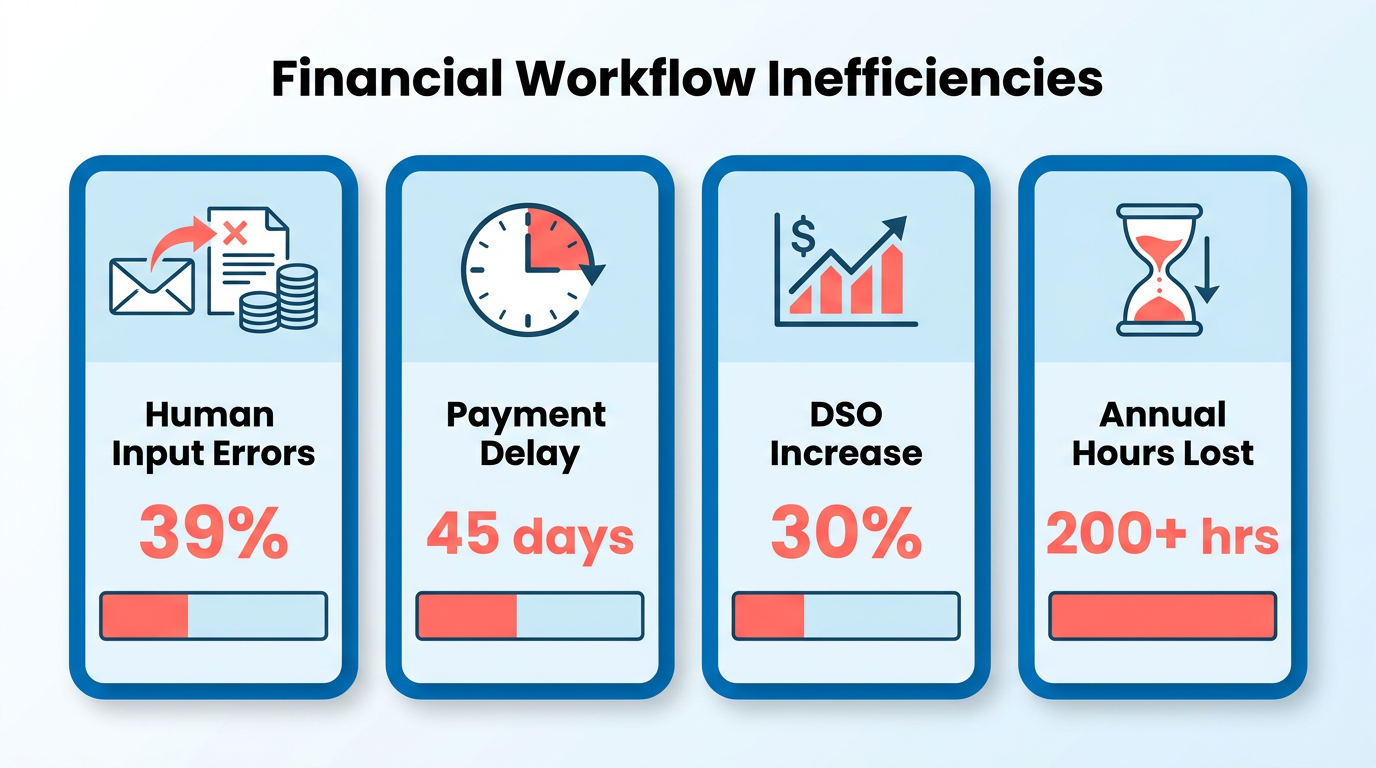
Automating accounts receivable isn’t just about saving time-it’s about transforming how businesses manage cash flow, reduce errors, and build stronger customer relationships. Manual AR processes are slow, error-prone, and costly. Industry data shows 39% of invoices contain human-input errors, and manual workflows delay payments by an average of 45 days, inflating Days Sales Outstanding (DSO) by 30%. For small businesses, this inefficiency costs 200+ hours annually in lost productivity. The stakes are high: manual systems risk 35% higher missed payments and 30% higher administrative costs compared to automated solutions.
Real-World Impact of Automation
Automation cuts through these challenges with measurable results. A law firm using Blixo automated invoicing and collections, boosting cash-flow efficiency by 25%. As mentioned in the Understanding Blixo’s Accounts Receivable Automation section, Blixo’s SaaS service streamlines invoicing, collections, and subscription management into a single system, enabling outcomes like a Miami-based startup’s 70% jump in sales conversion through dynamic discounting and automated reminders. For enterprises, the benefits scale: one company reduced churn by 15% using Blixo’s subscription analytics. These outcomes aren’t isolated. Across industries, automation reduces DSO by 30%, cuts reconciliation disputes by 35%, and slashes administrative costs by 30%.
Who Benefits Most?
Small businesses gain 30% faster payment collection, while enterprises handle high-volume invoicing with AI-driven accuracy. Subscription-based models, like SaaS or e-commerce, thrive on Blixo’s recurring billing tools, which reduce manual tasks by 70%. Even healthcare providers report 18% faster month-end closes through ERP integration. The platform’s self-service portals further empower customers, reducing DSO by 30% by letting clients pay on their own schedules.
Beyond Efficiency: Strategic Advantages
Automation isn’t just about speed-it’s about strategic growth. Blixo’s AI-powered cash application matches payments to invoices with 99.5% accuracy, learning from corrections to improve over time. Features like multi-channel dunning (emails, SMS, phone calls) cut payment delays by 30% for SMBs, while machine learning reduces reconciliation errors by 20% for logistics firms. Building on concepts from the Optimizing Accounts Receivable with Blixo section, these tools free finance teams to focus on strategic tasks, not administrative grind.
For example, a construction firm automated project invoicing and saw a 70% boost in payment conversion. A healthcare provider digitized check processing via Blixo’s virtual lockbox, reducing manual entry time by 35%. These wins aren’t accidental-they’re the result of workflows designed to align with business goals, from reducing bad debt to accelerating revenue recognition.
The bottom line? Manual AR is a relic. With automation, businesses enable 30% faster cash flow, 50% fewer errors, and a 25% lift in customer satisfaction. As outlined in the Implementing Blixo for Accounts Receivable Automation section, Blixo’s integration with systems like QuickBooks and Xero ensures seamless data flow, while its no-code portal gives clients instant payment access. For any business, from startups to enterprises, automation isn’t optional-it’s the foundation of financial resilience.
Understanding Blixo’s Accounts Receivable Automation
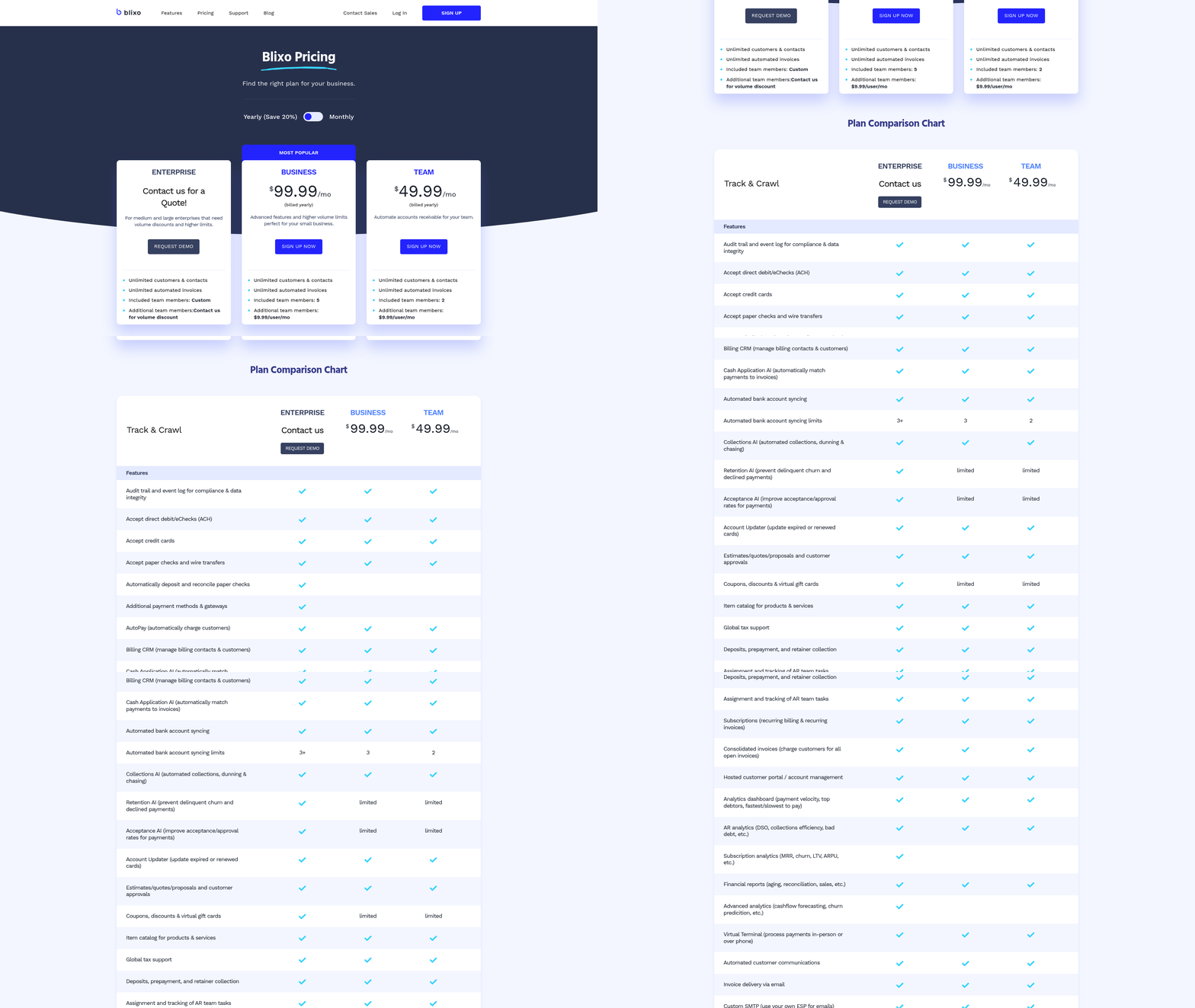
Blixo’s accounts receivable automation platform streamlines invoicing, collections, cash application, and subscription management into a single, unified system. By using AI and machine learning, it reduces manual work, accelerates cash flow, and minimizes errors. Below, we break down how Blixo’s features address key pain points in accounts receivable workflows..
How Does Blixo’s AI Improve Payment Matching?
Blixo’s intelligent matching engine uses machine learning to automate cash application with 99%+ accuracy, significantly cutting reconciliation time. As mentioned in the Why Automating Accounts Receivable Matters section, reducing manual reconciliation is central to improving cash flow efficiency. The system learns from manual corrections, improving over time to resolve exceptions faster. For example, a logistics firm reported a 20% drop in reconciliation disputes after adopting Blixo. This AI-driven approach ensures payments are matched to invoices in seconds, reducing delays and manual intervention.
The platform also handles traditional payments like wire transfers and direct deposits, while its virtual lockbox digitizes check payments. This eliminates manual data entry, saving businesses 200+ hours annually for those processing 1,000 invoices monthly. By automating these tasks, Blixo slashes administrative costs by up to 30% and reduces Days Sales Outstanding (DSO) by 30%, accelerating cash flow..
What Customization Options Does Blixo Offer?
Blixo allows businesses to tailor their billing and customer experience. Users can design customizable dunning processes, including automated reminders sent via email, SMS, phone calls, or letters. A small business saw a 30% DSO reduction after redesigning its customer portal to align with its branding, giving clients direct access to invoices and payment options.
The platform also supports recurring billing with proration, auto-billing, and dynamic discounting. For subscription-based models, Blixo offers tiered pricing plans and usage-based invoicing, ensuring flexibility for SaaS, e-commerce, and professional services. As detailed in the Implementing Blixo for Accounts Receivable Automation section, these customizations are configured during onboarding to align with business needs. Matthew Schwartz, founder of Elemental Deodorant, praised Blixo for simplifying his subscription management and accounting workflows..
How Does Blixo Integrate with Accounting Systems?
Blixo integrates seamlessly with accounting software like QuickBooks, Xero, and NetSuite, as well as custom ERP systems. This bidirectional sync ensures real-time financial data visibility, reducing reconciliation errors by 50% and speeding up month-end closing. A healthcare provider using Blixo reported an 18% faster month-end close, while a retail chain automated 90% of its invoice processing, recovering lost profits.
The integration also supports multi-currency invoicing and 256-bit encryption, ensuring data security and compliance with standards like GDPR and SOC 2. Building on concepts from the Optimizing Accounts Receivable with Blixo section, this unified view of financial operations enables businesses to track metrics like DSO and billing accuracy across regions..
What Security Measures Protect Sensitive Data?
Security is central to Blixo’s design. The platform uses 256-bit encryption to safeguard customer and financial data, with role-based access controls and audit trails to prevent unauthorized activity. Automated compliance checks flag suspicious transactions, reducing fraud risks. For businesses handling sensitive information-like healthcare providers or legal firms-this ensures adherence to regulations like HIPAA.
A Miami-based startup highlighted how Blixo’s security features, combined with its automated collections, boosted sales conversion by 70%. By combining strong encryption with streamlined workflows, Blixo protects data while enhancing operational efficiency..
Real-World Impact: Case Studies and ROI
Businesses using Blixo report measurable gains. A law firm automated its invoicing, achieving a 25% cash-flow efficiency lift, while a mid-sized manufacturer cut processing time from 7 days to 24 hours. Building on concepts from the Measuring Success with Blixo section, subscription analytics reduced churn by 15%, and a SaaS company slashed billing errors by 90% within three months.
Financially, automation delivers ROI within 1–2 months, with users saving 54% on processing costs and reducing administrative overhead by 80% per invoice. These results underscore Blixo’s value for businesses seeking to transform accounts receivable from a reactive task into a strategic advantage.
Implementing Blixo for Accounts Receivable Automation
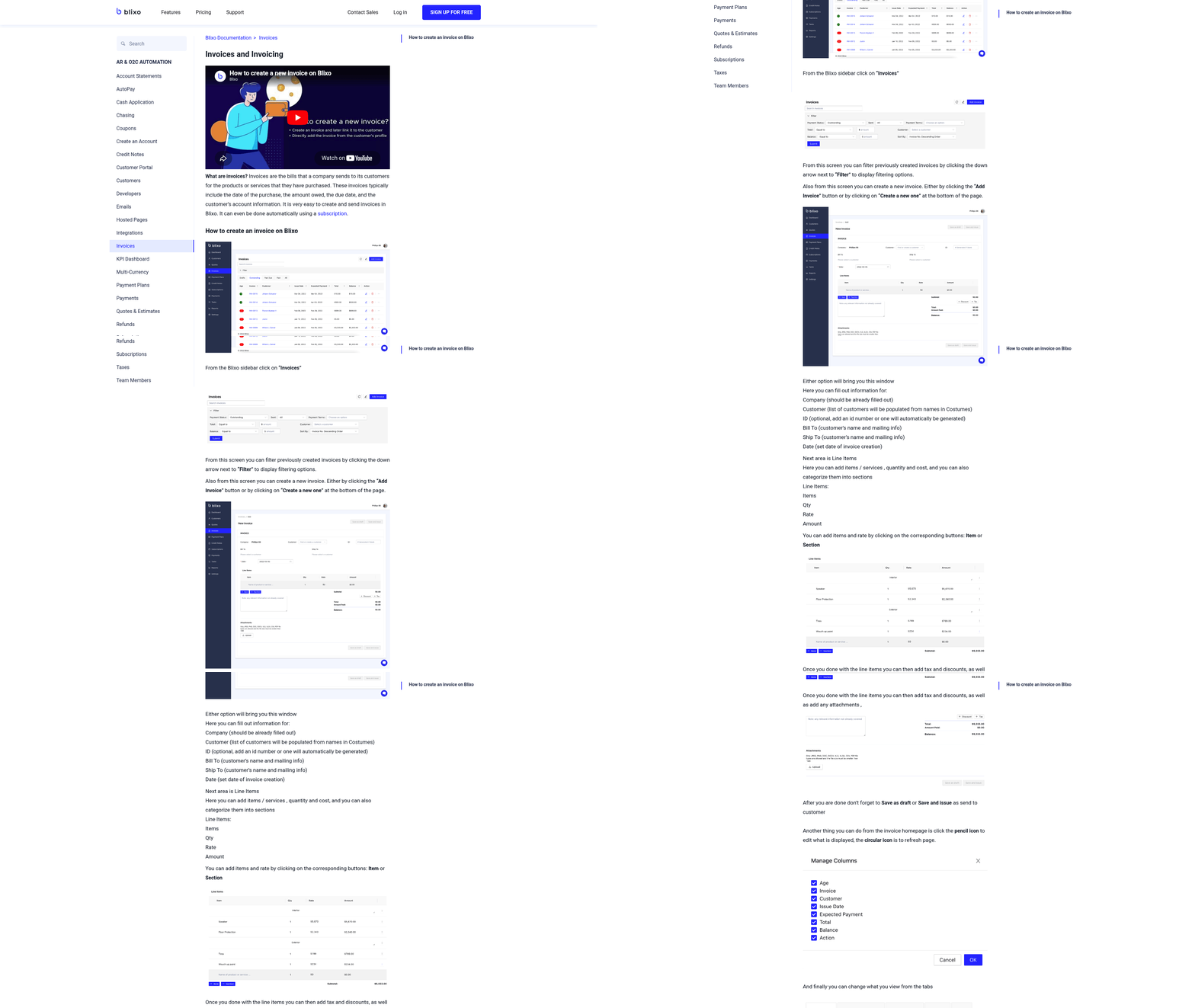
Implementing Blixo for Accounts Receivable Automation requires a structured approach to ensure seamless integration and maximum efficiency. Below is a step-by-step guide to help businesses adopt Blixo’s SaaS service effectively, using its AI-driven tools and automation capabilities..
Step 1: Pre-Implementation Checklist
Before deploying Blixo, assess your current accounts receivable (AR) workflows to identify inefficiencies and automation opportunities. Start by documenting manual processes, such as invoice creation, payment tracking, and collections. For example, a law firm in a Blixo case study reduced billing cycle time by 50% after mapping its workflows and pinpointing bottlenecks like delayed payment reminders.
Key tasks during this phase include:
- Audit existing systems: Identify pain points, such as high error rates in manual data entry or slow collections.
- Define goals: Set measurable targets, like reducing Days Sales Outstanding (DSO) by 30% or cutting late payments by 25%. As mentioned in the Why Automating Accounts Receivable Matters section, optimizing DSO directly impacts cash flow and operational efficiency.
- Secure stakeholder buy-in: Involve finance teams and executives to align on priorities, such as improving cash flow or reducing administrative costs..
Step 2: Setting Up Blixo
Blixo’s setup involves configuring user accounts, customizing workflows, and integrating with existing systems like QuickBooks or Xero. Begin by creating role-based access for finance teams-e.g., admins, collectors, and accountants-to ensure data security and streamline responsibilities.
Next, configure workflows to automate repetitive tasks:
- Customize invoicing: Set up recurring billing for subscriptions or one-time invoices for service-based businesses.
- Enable multi-channel collections: Use Blixo’s automated reminders via email, SMS, or phone calls. A manufacturing firm reported a 30% reduction in overdue accounts within three months by implementing tiered dunning workflows.
- Integrate with accounting software: Blixo’s API connects seamlessly with ERP systems, enabling real-time data synchronization and reducing reconciliation errors by up to 80%. Building on concepts from the Understanding Blixo’s Accounts Receivable Automation section, these integrations centralize financial operations..
Step 3: Migrating Data
Migrating historical data from legacy systems to Blixo is critical for continuity. Start by exporting invoices, customer records, and payment histories in CSV format. Blixo supports bulk imports, allowing businesses to transition thousands of records without manual entry.
For example, a payment processor migrated 500+ clients in a week using Blixo’s CSV import feature. During migration:
- Validate data accuracy: Cross-check customer details and payment terms to avoid mismatches.
- Test with a subset: Run a pilot migration to ensure compatibility and resolve exceptions before full deployment..
Step 4: Training and Support
Equip your team with the skills to maximize Blixo’s features through training sessions. Focus on key areas like:
- Customer portal management: Teach users to update payment methods or view invoice statuses on Blixo’s self-service portal, which boosted customer satisfaction by 40% for one business.
- Collections workflows: Train collectors to use AI-driven insights, such as prioritizing high-risk accounts based on payment history.
Blixo provides on-demand support, including a knowledge base and live assistance, to address technical issues. A small business owner noted, “Blixo’s support team helped us resolve a payment matching issue within hours, minimizing revenue delays.”.
Step 5: Best Practices for Optimization
Post-implementation, refine Blixo’s settings to enhance performance:
- use AI for cash application: Blixo’s intelligent matching engine achieves 99.5% accuracy in linking payments to invoices, reducing manual reconciliation time by 70% for a SaaS company.
- Monitor dashboards: Track metrics like DSO, payment success rates, and error logs in real time to identify trends. As discussed in the Measuring Success with Blixo section, consistent tracking of these metrics ensures long-term AR improvements.
- Iterate workflows: Adjust dunning rules or payment reminders based on performance data. For instance, a retail chain improved on-time payments by 25% after shortening reminder intervals..
Real-World Impact
Businesses using Blixo report measurable gains:
- 30–70% faster processing: A construction firm automated project invoicing, converting estimates to invoices in seconds.
- Cost savings: Manual AR errors cost companies an average of $500 per mistake; Blixo’s automation cuts these errors by 80%.
- Scalability: From 10 to 10,000 invoices/month, Blixo adapts to growing needs without compromising accuracy.
By following this structured implementation plan, organizations can transform their AR processes, reduce administrative burdens, and enable faster cash flow with Blixo’s automation.
Optimizing Accounts Receivable with Blixo
How to Use Blixo’s Analytics for AR Insights
Blixo’s analytics and reporting tools provide real-time visibility into accounts receivable performance, helping businesses identify trends and optimize workflows. The platform’s dashboards track key metrics like days sales outstanding (DSO), payment success rates, and reconciliation accuracy. As mentioned in the Measuring Success with Blixo section, these metrics are critical for evaluating automation effectiveness. For example, a law firm reduced DSO by 25% after automating invoicing and collections, while a healthcare provider cut month-end close time by 18% using real-time data. Machine learning models adapt annually to refine predictions and flag exceptions, ensuring continuous improvement.
How to Identify and Address Bottlenecks
Mapping workflows is critical to pinpoint inefficiencies in accounts receivable. Blixo’s SaaS service highlights manual tasks like invoice entry or payment matching, which can delay cash flow. Building on concepts from the Implementing Blixo for Accounts Receivable Automation section, streamlining these workflows requires a structured approach to integration. A logistics firm reduced reconciliation disputes by 20% using Blixo’s intelligent matching engine, which learns from manual corrections to improve accuracy. Similarly, a small business slashed DSO by 30% by redesigning its customer portal for easier payments. By analyzing these workflows, businesses can automate high-impact areas, such as recurring billing or dunning reminders, to reduce delays.
How to Automate Workflows and Approvals
Automating repetitive tasks minimizes errors and accelerates collections. Blixo allows businesses to configure multi-channel dunning workflows (email, SMS, phone) and set automated approval chains for invoices. As mentioned in the Why Automating Accounts Receivable Matters section, automation enhances compliance and reduces exceptions. A manufacturing firm enhanced compliance by streamlining approval hierarchies, reducing exceptions by 40%. Additionally, Blixo’s intelligent matching engine achieves 99.5% accuracy in linking payments to invoices, cutting reconciliation time by up to 70%. These workflows eliminate manual follow-ups, freeing finance teams to focus on strategic tasks.
How to Customize Blixo for Business Needs
Blixo’s flexibility ensures workflows align with unique business requirements. Users can create custom templates for invoices, configure dunning rules, and integrate with systems like QuickBooks or Xero. A subscription-based business improved payment recovery by 30% using tailored dunning messages and recurring billing rules. The platform also supports multi-currency transactions and virtual lockbox features to digitize check payments, as seen in a retail chain’s 90% automation of invoice processing.
How the Customer Portal Boosts Payment Rates
Blixo’s self-service portal empowers clients to view invoices, update payment methods, and make instant payments, increasing on-time collections. A service-based business saw 30% faster payments after branding the portal to match its corporate identity. Features like payment plans and real-time tracking improve customer satisfaction, reducing disputes by 65% in one logistics case study. By giving clients control over their transactions, businesses can lower DSO and strengthen relationships.
How to Monitor and Optimize Continuously
Regularly reviewing performance metrics ensures sustained efficiency. Blixo’s dashboards track DSO, error rates, and cash flow trends, enabling data-driven adjustments. A SaaS company reduced churn by 15% by refining its subscription analytics and retry logic. Users should audit workflows annually to align with growth, using Blixo’s machine learning to adapt to new payment patterns. With these tools, businesses can achieve measurable ROI, including 15–30% cost savings in the first year.
By integrating these strategies, companies can transform accounts receivable from a reactive process into a proactive cash flow driver, using Blixo’s AI-driven capabilities to scale efficiently.
Measuring Success with Blixo
Measuring the success of accounts receivable automation with Blixo requires a structured approach to tracking key metrics, benchmarking performance, and using built-in analytics tools. By focusing on quantifiable outcomes, businesses can refine their strategies and maximize the platform’s potential.
Key Performance Indicators (KPIs) for AR Automation
Key performance indicators provide a clear picture of how Blixo’s automation impacts your financial operations. Start by tracking:
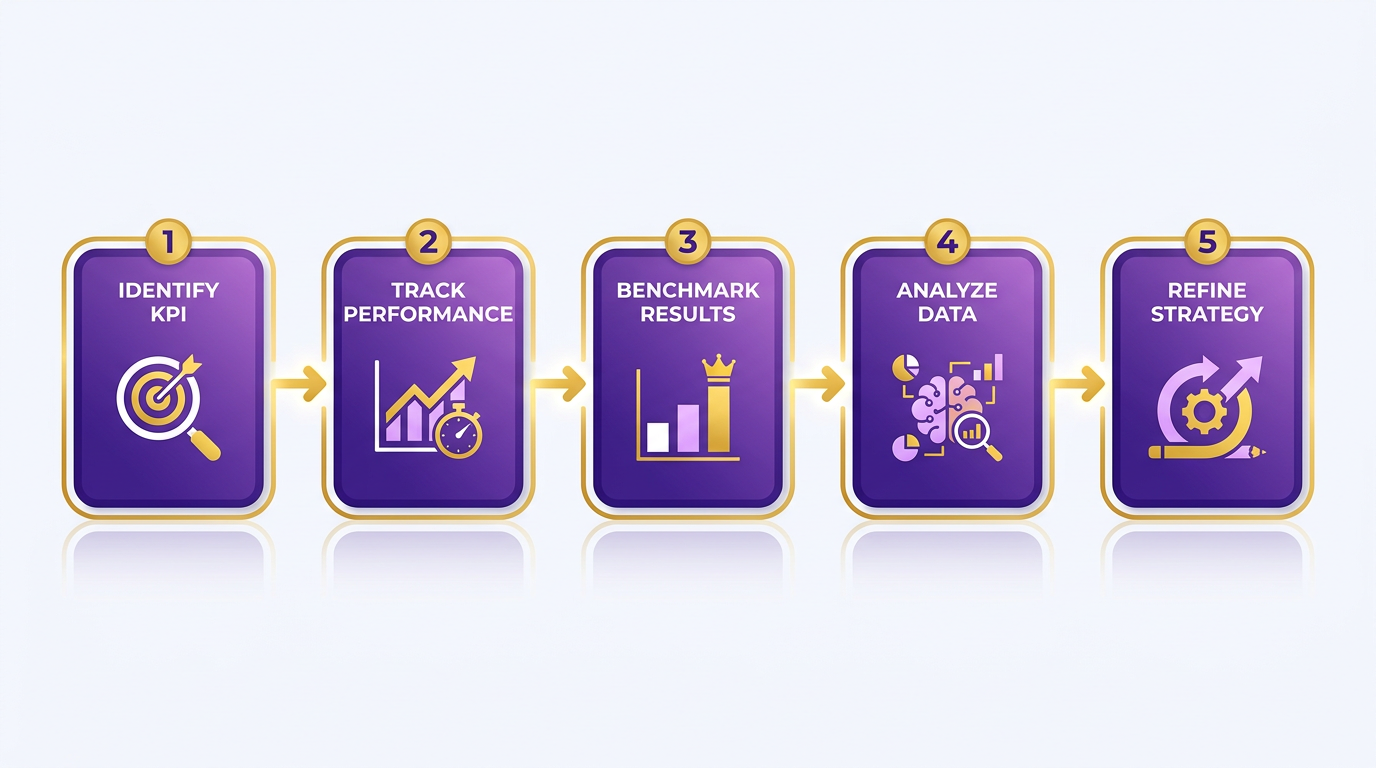
- Days Sales Outstanding (DSO): Measure the average number of days it takes to collect receivables. Blixo reduces DSO by up to 30%, as seen in case studies where businesses cut DSO from 60+ days to under 45 days, as explained in the Understanding Blixo’s Accounts Receivable Automation section.
- Admin Cost Savings: Manual AR processes consume up to 30% more administrative time than automated systems. Blixo automates invoicing, collections, and reconciliation, saving 30% in administrative costs annually.
- Payment Success Rate: Automated reminders and dunning workflows boost on-time payments by 25–30%, reducing late fees and disputes.
- Reconciliation Accuracy: Blixo’s AI-driven cash application matches payments to invoices with 99.5% accuracy, slashing manual reconciliation time by 70%.
- Customer Satisfaction: Self-service portals and instant payment options improve client satisfaction by 40%, as reported by users like a law firm that reduced billing disputes by 25%.
These KPIs should be monitored regularly to assess progress and identify inefficiencies.
Benchmarking Against Industry Standards
To evaluate Blixo’s impact, compare your results to industry benchmarks. For example:
- DSO: Manual systems typically have DSOs of 60+ days. Blixo users achieve sub-45-day DSOs, aligning with best practices for high-performing teams, as highlighted in the Why Automating Accounts Receivable Matters section.
- Error Rates: Manual AR processes carry a 35% higher risk of missed payments and reconciliation errors. Blixo’s automation reduces this risk by 35%, as demonstrated by a logistics firm that cut disputes by 65%.
- Cost Efficiency: Manual invoicing costs $1.3 trillion annually in U.S. business losses due to errors. Blixo’s AI reduces administrative costs per invoice by 80%, delivering measurable ROI.
By benchmarking against these standards, businesses can validate their automation strategy and identify areas for improvement.
Using Blixo’s Analytics to Track Progress
Blixo’s SaaS service includes real-time dashboards and machine-learning models to monitor performance:
- Real-Time Dashboards: Track metrics like payment success rates, DSO trends, and reconciliation accuracy. For instance, a healthcare provider cut month-end close time by 18% using these tools.
- Machine Learning Optimization: Blixo’s intelligent matching engine improves over time, learning from manual corrections to enhance accuracy. One SaaS company reported a 50% reduction in billing errors within three months, as detailed in the Optimizing Accounts Receivable with Blixo section.
- ROI Calculation: Measure returns by comparing cost savings from automation. A Miami-based startup saved 70% in sales conversion costs using dynamic discounting, while an enterprise reduced churn by 15%.
Use these tools to refine workflows and align automation with business goals.
Calculating ROI and Payback Period
Automating AR with Blixo often delivers 15–30% ROI in the first year, depending on volume. For example:
- A law firm with $1 million in annual revenue saved **$50,000** in administrative costs and boosted cash flow efficiency by 25%.
- A small business saw $200,000+ in annual savings by reducing 1,000+ manual reconciliation hours.
To calculate payback period, divide the implementation cost by monthly savings. If Blixo saves $5,000/month in admin costs, the payback period is under two months, as reported by early adopters.
Continuous Monitoring and Optimization
Automation is not a “set-it-and-forget-it” solution. Regularly audit workflows to ensure Blixo’s machine-learning models stay effective. For example:
- Adjust Dunning Rules: A construction firm improved collections by tweaking reminder timing, boosting project invoicing conversion by 70%.
- Refine Portals: Customizing self-service portals reduced DSO by 30% for a small business by improving client payment visibility.
By combining continuous monitoring with Blixo’s adaptive analytics, businesses can maintain optimal performance and scale efficiently.
In summary, success with Blixo hinges on tracking KPIs, benchmarking against industry averages, and using the platform’s analytics to refine strategies. The result is faster payments, lower costs, and a stronger cash flow foundation.
Common Challenges and Solutions
Implementing Blixo for accounts receivable automation can streamline financial workflows, but challenges like integration complexity and user resistance often arise. Below, we break down common pain points and actionable strategies to overcome them, ensuring a smooth transition to automated processes.
What Are Common Integration Challenges and How Can You Solve Them?
Integrating Blixo with existing banking systems or ERPs can seem daunting, especially for teams unfamiliar with API setups. The key to success lies in using Blixo’s pre-built connectors and documentation. For example, the platform’s reconciliation algorithm automatically matches unapplied payments against invoices, reducing manual intervention. If technical hurdles persist, Blixo’s support team offers step-by-step guidance for configuring bank feeds and ERP syncs. As mentioned in the Implementing Blixo for Accounts Receivable Automation section, a structured approach to integration minimizes disruptions and ensures alignment with business workflows.
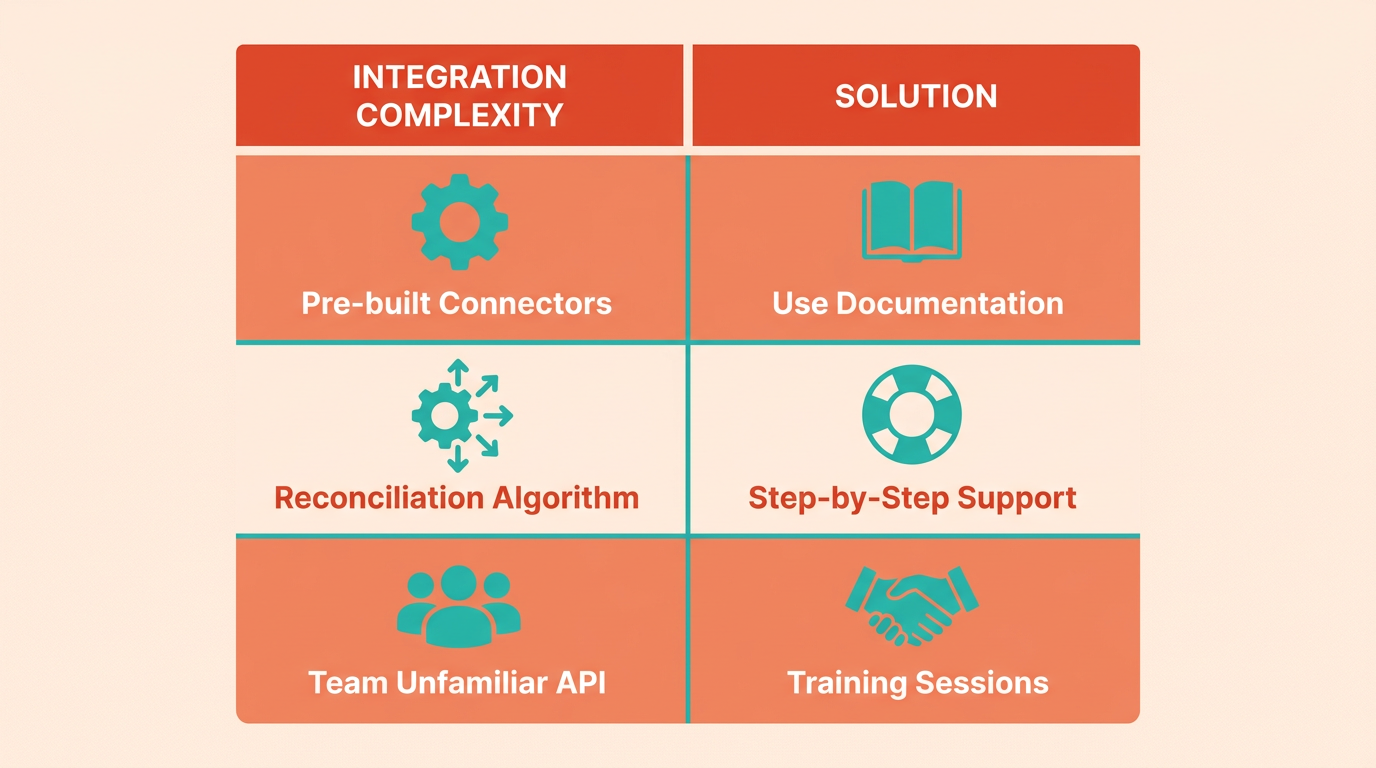
A law firm successfully automated invoicing by aligning Blixo with their accounting software. They reduced manual reconciliation time by 50% within months, proving that seamless integrations are achievable with proper setup. To avoid delays, prioritize mapping payment data fields early in implementation and test workflows with sample transactions before full deployment.
How Do You Address User Resistance to Automation?
Change management is critical when shifting from manual AR processes to automation. Teams may resist adopting new tools due to fear of complexity or distrust in automated systems. To counter this, start with hands-on training sessions that highlight Blixo’s intelligent matching engine, which resolves 80-90% of payments automatically. Demonstrating real-time results-like resolving complex exceptions in seconds-builds confidence in the system. Building on concepts from the Why Automating Accounts Receivable Matters section, emphasizing the long-term benefits of automation helps teams see its value beyond short-term disruptions.
Create a “superuser” network within your finance team to act as Blixo advocates. These users can share quick wins, such as the 30% reduction in overdue invoices one business achieved after implementing automated collections. Pair this with bite-sized tutorials and FAQs to reduce friction during onboarding.
What Technical Issues Should You Watch For and How to Fix Them?
Occasional mismatches in payments, especially with non-standard transactions like wire transfers, can occur. Blixo’s machine learning capabilities improve match accuracy over time, but manual review remains essential for edge cases. For instance, if a payment doesn’t auto-apply, use the “resolve exception” tool to adjust invoice links directly in the dashboard. Building on concepts from the Understanding Blixo’s Accounts Receivable Automation section, familiarity with the platform’s core features enables faster troubleshooting of technical issues.
If integrations stall, verify API credentials and ensure bank feeds are correctly configured. Blixo’s documentation provides troubleshooting steps for common errors, such as mismatched currency codes or delayed payment updates. For urgent issues, reach out to Blixo’s support team via their 24/7 chat feature or community forums, where users share solutions for similar roadblocks.
How Can You Maximize Long-Term Efficiency with Blixo?
To avoid stagnation, revisit Blixo’s configuration quarterly to refine rules for cash application and collections. For example, adjusting dunning thresholds based on historical payment trends can reduce overdue invoices further. Use built-in analytics to track metrics like match rates and resolution times, identifying areas for optimization.
Stay updated on Blixo’s feature releases, such as enhancements to the cash application engine, which now handles more payment types with higher accuracy. Engaging with the platform’s community resources-like webinars and case studies-can also uncover best practices from other users.
By addressing integration roadblocks, fostering user buy-in, and adopting proactive maintenance habits, businesses can enable Blixo’s full potential for faster, error-free accounts receivable automation.
Frequently Asked Questions
1. How much time can AR automation save small businesses annually?
AR automation saves small businesses over 200 hours annually by reducing manual tasks like invoicing and follow-ups. Automated systems eliminate errors and speed up payment cycles, directly cutting administrative workloads.
2. What cost savings does AR automation provide compared to manual methods?
Automating AR reduces administrative costs by 30% and lowers DSO by 30%, minimizing late fees and missed payments. Blixo users also report 35% fewer reconciliation disputes due to streamlined workflows.
3. How does Blixo improve cash flow efficiency for businesses?
Blixo boosts cash flow by automating invoicing and collections. A law firm using it saw a 25% efficiency increase, while dynamic discounting features helped Miami startups raise sales conversions by 70%.
4. What industries benefit most from AR automation?
Small businesses, legal firms, and subscription-based companies gain the most. Blixo’s tools reduce churn by 15% for SaaS companies and cut payment delays by 45 days across industries.
5. How does Blixo reduce invoice errors?
Blixo’s automation cuts invoice errors by 39% through standardized templates and real-time validation. This eliminates manual data entry mistakes, ensuring accurate billing for recurring and one-time invoices.
6. What features make Blixo effective for AR automation?
Blixo combines invoicing, collections, subscription analytics, and dynamic discounting. Its analytics reduced churn by 15% for one company, while automated reminders cut payment delays by 45 days.
7. How does dynamic discounting work in Blixo?
Blixo’s dynamic discounting offers customers early payment incentives, boosting sales conversions by 70% for Miami startups. It automates discount terms and tracks payments to optimize cash flow and reduce DSO.