

Automation Checklist for Blixo Accounts Receivable

Key Takeaways
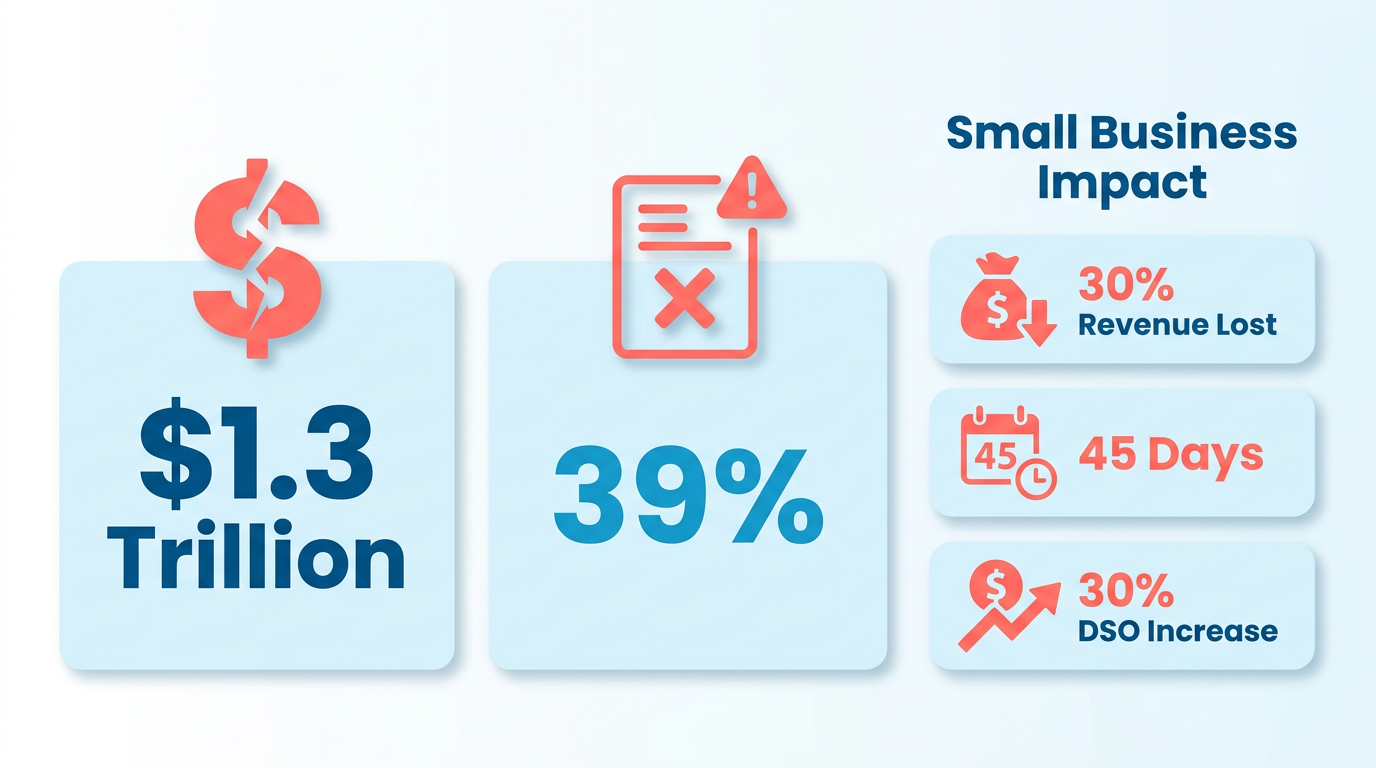
- Manual AR processes cost U.S. businesses $1.3 trillion annually due to preventable invoicing errors and inefficiencies.
- 39% of invoices contain human-input errors, leading to reconciliation disputes and delayed cash flow.
- Small businesses lose 30% of revenue from inefficient collections, with single invoices taking up to 45 days to process.
- Automation reduces administrative costs by 30% through AI-driven workflows for data entry and follow-ups.
- Manual systems face 35% higher missed-payment risk compared to automated multi-channel reminder solutions.
- Inefficient AR processes increase Days Sales Outstanding (DSO) by 30% due to prolonged invoice processing.
- Foundational preparation, as outlined in pre-automation checklists, is critical to maximize efficiency gains from automation.
Related Video
Watch: Blixo Lifetime Deal $79 - Subscription Billing & Accounts Receivable Automation | Blixo Review by The SaaS Deals
Why Automation Matters for Accounts Receivable
The Cost of Manual Accounts Receivable Processes
Manual accounts receivable (AR) processes are a significant drain on productivity, accuracy, and cash flow. Industry data reveals that U.S. businesses lose $1.3 trillion annually due to preventable errors in manual invoicing and collections. These errors include missed payments, reconciliation disputes, and delayed cash flow, with 39% of invoices containing human-input mistakes. For small businesses, the stakes are even higher: 30% of revenue is lost due to inefficient collections, and processing time for a single invoice can stretch to 45 days, increasing Days Sales Outstanding (DSO) by 30%.
- Administrative costs drop by 30% with automation, as repetitive tasks like data entry and follow-ups shift from finance teams to AI-driven workflows. As mentioned in the Pre-Automation Checklist section, foundational preparation ensures teams maximize these efficiency gains.
- Missed-payment risk rises by 35% in manual systems, compared to automated solutions that send multi-channel reminders and enforce payment terms.
- 30% of small businesses report revenue losses tied to slow or inconsistent collections, while enterprises face compliance risks from manual reconciliation errors..
Key Challenges Solved by Automation
Automation transforms AR by addressing bottlenecks that manual processes can’t scale. For example, Blixo’s AI-powered cash application matches payments to invoices with 99.5% accuracy, slashing reconciliation disputes by 35%-a process detailed in the Cash Application and Reconciliation Automation section. Automated workflows also reduce DSO by 30% on average, accelerating cash flow for businesses of all sizes.
- 70% reduction in manual invoicing tasks via recurring billing and auto-generated statements, freeing teams to focus on strategic work.
- 25% improvement in cash-flow visibility through real-time dashboards and predictive analytics, helping finance teams forecast revenue with confidence.
- 20% fewer reconciliation disputes thanks to machine-learning algorithms that identify payment mismatches instantly, even for complex subscription models.
Real-world results highlight these benefits:
- A law firm automated invoicing and collections, achieving a 25% cash-flow efficiency boost.
- A logistics company cut reconciliation disputes by 20% after integrating Blixo’s intelligent matching engine.
- A healthcare provider reduced month-end closing time by 18% using automated ERP syncs..
Who Benefits Most from AR Automation?
Automation isn’t just for enterprises-businesses of all sizes gain measurable advantages. Small and medium-sized businesses (SMBs) see 30% faster payment collection and 25% lower administrative costs, while enterprises benefit from scalable tools that handle global multi-currency transactions and subscription analytics.
- Small businesses save 200+ hours per year by automating 1,000 monthly invoices, redirecting time to growth initiatives.
- Enterprises reduce customer churn by 15% using Blixo’s subscription analytics to identify at-risk accounts and adjust payment plans.
- Global operations avoid regional delays with multi-language support and automated tax calculations, ensuring compliance across borders.
Testimonials from users underscore these wins:
“Blixo is the ultimate solution for invoicing and payment management-say goodbye to administrative headaches.” – Vincent Mann, Founder of Globetown Media “Blixo is 10x more powerful than what I’ve used before.” – Dave, Small-Business Owner.
Measurable ROI from Blixo’s Automation
The financial impact of automation is clear. Businesses using Blixo report 30% lower DSO, 30% reduced administrative costs, and 25% faster cash-flow turnover. For example:
-
A construction firm increased invoicing conversion by 70% using dynamic discounting and automated reminders.
-
A SaaS company cut billing errors by 50% in three months with AI-driven validation.
-
A retail chain automated 90% of its invoice processing, cutting month-end reconciliation time by 18%.
-
Time savings: Automating 1,000 monthly invoices saves 200+ hours annually for SMBs.
-
Cost savings: Admin costs per invoice drop by 80%, with $200,000+ annual savings for high-volume users.
-
Customer satisfaction: Self-service portals boost on-time payments by 40%, improving retention and reducing dunning efforts. Building on concepts from the Collections and Dunning Automation section, multi-channel reminders and payment flexibility drive these results.
By automating AR with Blixo, businesses eliminate the risks of manual errors, enable trapped cash, and turn finance teams into strategic assets. The result? A leaner, data-driven process that fuels growth and operational excellence. The Post-Automation Review and Optimization section outlines how to sustain these gains through continuous performance monitoring..
Pre-Automation Checklist
Before automating accounts receivable with Blixo, businesses must complete foundational tasks to ensure a smooth transition. This checklist organizes critical preparation steps into three categories: evaluating current processes, configuring Blixo’s tools, and validating workflows.
How Do You Evaluate Your Current AR Process?
Understanding existing inefficiencies is the first step toward automation success. Start by mapping your current accounts receivable workflow to identify manual tasks, delays, or recurring errors. For example, if your team spends hours chasing late payments manually, Blixo’s automated collections can reduce this effort by 70% or more. As mentioned in the Collections and Dunning Automation section, Blixo’s multi-channel reminders are designed to address these pain points directly.
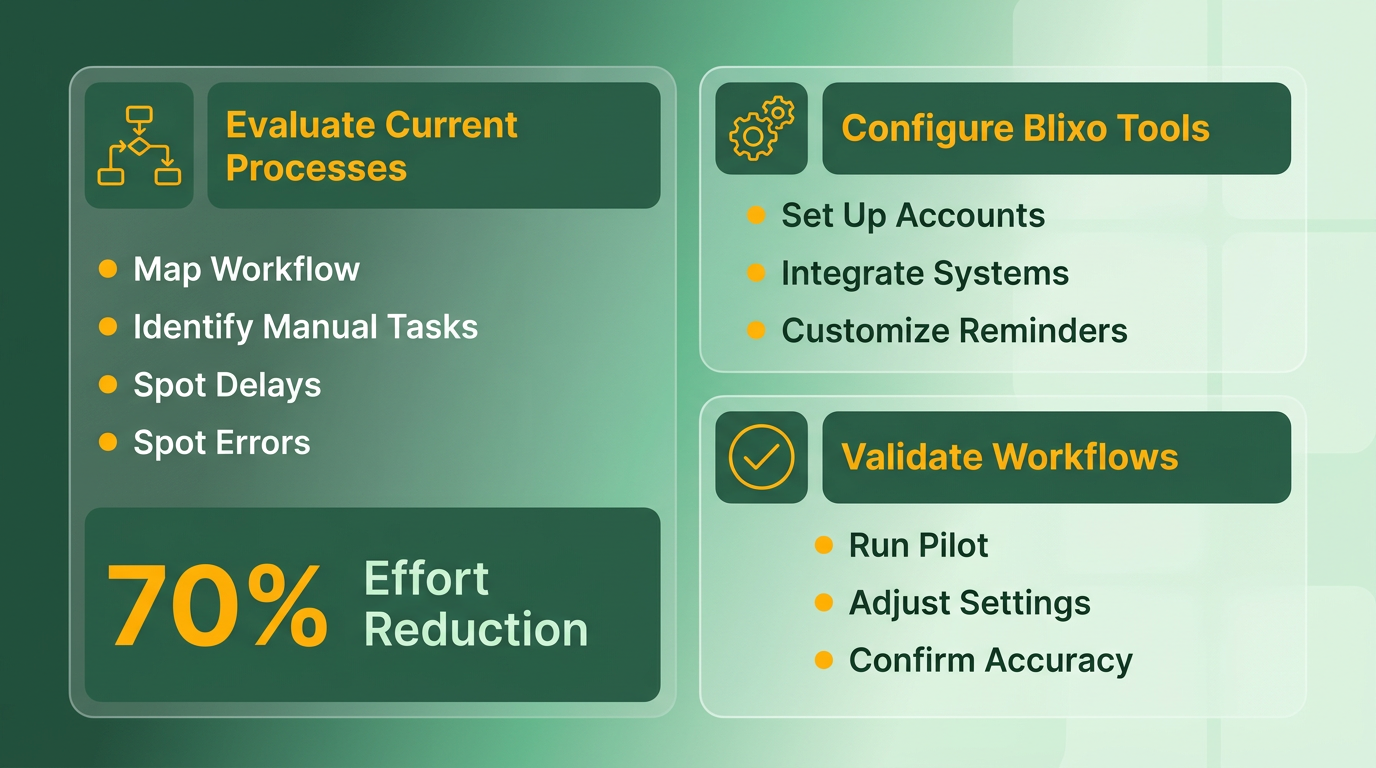
- Document your AR process: Note steps from invoicing to payment collection, including communication methods and tools used.
- Identify bottlenecks: Look for delays in payment processing, missed reminders, or reconciliation errors.
- Set automation goals: Define what outcomes you want, like faster collections or reduced manual data entry.
Blixo’s automated tools, such as Collections AI, are designed to replace repetitive tasks like chasing delinquent payments. By pinpointing these areas first, you’ll align automation efforts with measurable business goals.
What Setup Tasks Prepare Blixo for Automation?
Blixo’s web-based platform requires minimal technical setup, but careful configuration ensures it aligns with your business needs. Start by creating your account using the 30-day free trial (available on paid plans).
- Choose a pricing plan: The Business plan ($99.99/month, billed yearly) supports up to 5 team members.
- Configure payment methods: Enable credit cards, direct debit, or other methods supported by Blixo. Building on concepts from the Invoicing and Payment Automation section, recurring billing and multi-currency support streamline global transactions.
- Import customer and invoice data: Use CSV files or APIs to upload existing records. Ensure data is clean and formatted correctly to avoid errors.
Blixo supports multi-currency transactions and 256-bit encryption for security, making it ideal for global businesses. During setup, also define payment terms (e.g., net 30) and configure automated reminders for late payments.
How Do You Test Automation Workflows?
Testing ensures Blixo’s automation works as intended before full deployment. Use the free trial to simulate scenarios like late payments or failed transactions.
- Set up test workflows: Create sample invoices and simulate automated reminders via email or SMS.
- Validate reconciliation tools: Check if Blixo’s cash application feature matches payments to invoices correctly. Refer to the Cash Application and Reconciliation Automation section for details on the 99.5% accuracy rate of this process.
- Train your team: Run dry runs for tasks like generating reports or accessing Collections AI.
Blixo’s automated dunning workflows reduce manual follow-ups by sending reminders across multiple channels. For example, one business reported a 40% drop in delinquencies after implementing these tools.
By completing this checklist, you’ll position your team to use Blixo’s automation capabilities fully. The next step is to monitor performance and refine workflows for optimal results.
Invoicing and Payment Automation
What Makes Automated Invoicing Essential?
Automating invoicing eliminates manual errors, speeds up cash flow, and ensures consistent billing. Blixo’s SaaS service supports recurring invoices, real-time tracking, and integration with enterprise systems, reducing administrative burdens. As outlined in the Pre-Automation Checklist section, proper preparation ensures smooth integration with systems like Oracle or SAP.
- Set up automated invoice templates Create reusable invoice templates for common services or products. This saves time and ensures consistency, especially for businesses with high-volume transactions.
- Enable recurring billing for subscriptions Configure automated billing cycles for SaaS, memberships, or service contracts. Blixo handles prorated charges and subscription renewals without manual intervention.
- Track invoice status and delivery Monitor when invoices are viewed or paid using Blixo’s tracking features. Real-time updates reduce follow-up efforts and improve collections.
- Integrate with enterprise systems Connect Blixo to ERP platforms like Oracle or SAP for seamless invoice delivery and data synchronization. Building on concepts from the Cash Application and Reconciliation Automation section, this integration streamlines financial workflows..
How to Configure Payment Gateways and Methods
Accepting multiple payment methods ensures customer convenience and reduces failed transactions. Blixo supports ACH, credit cards, and integrations with Stripe and QuickBooks.
- Enable supported payment gateways Activate ACH, Visa, Mastercard, and American Express for diverse payment options. This flexibility caters to both domestic and international clients.
- Set up multi-currency support Allow transactions in multiple currencies to simplify global billing. Blixo automatically handles currency conversions using real-time exchange rates.
- Link accounting software Sync with QuickBooks, Xero, or NetSuite to automate financial record-keeping. This integration eliminates manual data entry and ensures accurate reconciliation, as detailed in the Cash Application and Reconciliation Automation section..
Why Recurring Billing Reduces Administrative Work
Subscription management automates revenue streams while minimizing oversight. Blixo handles plan customization, renewal dates, and customer updates effortlessly.
- Define subscription billing plans Create tiered pricing models or usage-based billing for services like SaaS or e-commerce. Blixo supports metered billing for variable charges.
- Automate renewal and dunning workflows Schedule automatic renewals and set up dunning rules to retry failed payments. This reduces late fees and ensures continuous revenue, as outlined in the Collections and Dunning Automation section.
- Allow self-service updates Let customers modify subscriptions or payment methods via Blixo’s portal. Self-service options improve satisfaction and reduce support requests..
How Automated Reminders Improve Payment Timeliness
Late payments disrupt cash flow, but Blixo’s reminders and notifications keep collections on track.
- Schedule payment reminders Set up automated email or SMS alerts for upcoming due dates. Timely nudges increase on-time payments by 40% (as seen in a marketing agency case study).
- Customize dunning messages Tailor late payment notifications to align with your brand’s tone. Clear communication reduces disputes and accelerates settlements.
- Enable real-time notifications Get instant alerts for late payments or disputes via email or in-app alerts. Proactive monitoring helps resolve issues before they escalate, as emphasized in the Collections and Dunning Automation section..
Why Payment Tracking and Reconciliation Matter
Accurate reconciliation ensures financial clarity and reduces errors. Blixo’s intelligent matching engine streamlines this process.
- Use AI-powered cash application Blixo’s 99.5% accurate matching engine automatically reconciles payments to invoices, even for complex subscriptions. This builds on workflows described in the Cash Application and Reconciliation Automation section.
- Generate audit trails Maintain detailed logs of all transactions for compliance and dispute resolution. Audit trails also help identify patterns in payment failures.
- Monitor DSO (Days Sales Outstanding) Track how quickly invoices are paid to identify bottlenecks. Blixo’s dashboards show metrics like DSO, helping you optimize collections, as discussed in the Post-Automation Review and Optimization section..
Real-World Impact of Blixo Automation
Businesses using Blixo report significant savings. A logistics company reduced vendor disputes by 65%, while a SaaS startup cut billing errors by 50% in three months. Vincent Mann, founder of Globetown Media, calls Blixo a “major advantage” for eliminating administrative headaches.
By automating invoicing and payments, you free finance teams to focus on strategic growth rather than manual tasks. Start with templates and payment gateways, then scale into subscriptions and reconciliation for full efficiency.
Collections and Dunning Automation
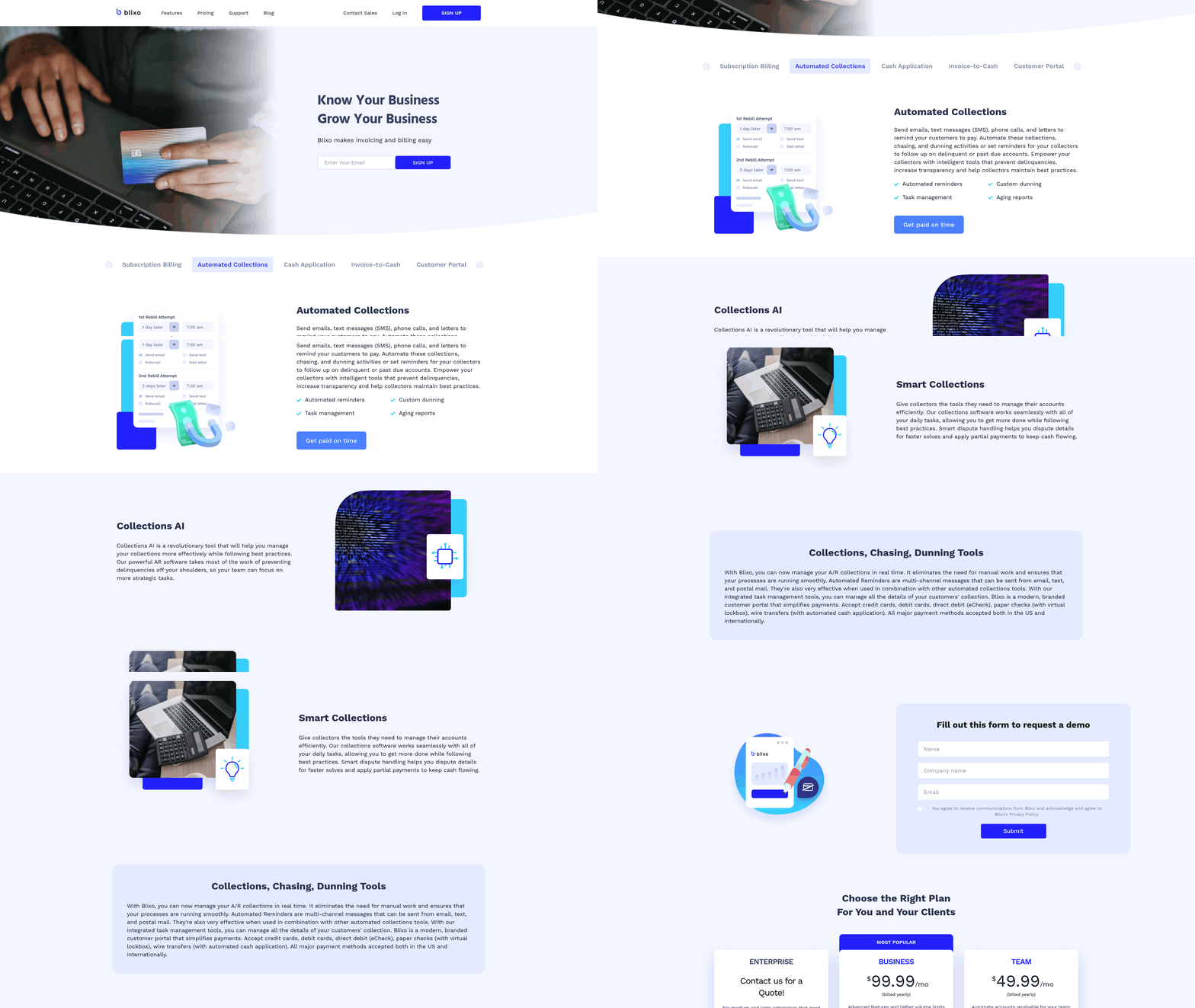
Configuring Automated Collections Workflows. Automating collections reduces manual effort by streamlining reminders, payment processing, and follow-ups. Blixo’s SaaS service supports multi-channel communication (email, SMS, phone, and postal mail) to ensure customers receive timely notices.
-
Enable multi-channel reminders: Set up automated notifications across email, SMS, and phone to increase payment visibility. For example, a small business reported a 50% rise in on-time payments after implementing Blixo’s reminder system. As mentioned in the Pre-Automation Checklist section, aligning communication preferences early ensures smoother workflow adoption.
-
Customize payment methods: Configure support for credit/debit cards, direct debit, and wire transfers. Blixo handles international transactions and major currencies, reducing friction for global customers.
-
use Collections AI: Deploy Blixo’s AI to prioritize high-risk accounts and suggest optimal communication strategies. One company saw a 30% drop in overdue accounts within three months using this tool. Building on concepts from the Invoicing and Payment Automation section, integrating flexible payment options enhances AI-driven strategy effectiveness.. Tracking and Analyzing Collections Performance Measuring key metrics helps refine strategies and identify bottlenecks. Blixo provides dashboards for real-time insights.
-
Monitor delinquency rates: Track overdue accounts by age (30, 60, 90+ days) to prioritize high-risk cases. As detailed in the Post-Automation Review and Optimization section, regular performance reviews enable continuous workflow improvements.
-
Analyze payment success rates: Identify which channels (email vs. SMS) yield the fastest responses. One business found SMS had a 35% higher open rate than email.
-
Review cash flow trends: Use built-in reports to correlate collections efforts with revenue growth. A SaaS company improved cash flow by 25% after optimizing dunning schedules.. Integrating with External Collections Agencies For severe delinquencies, Blixo enables seamless handoffs to third-party agencies while maintaining data control.
-
Set automation thresholds: Define when accounts should be exported to external agencies (e.g., 90+ days overdue).
-
Export customer data securely: Use 256-bit encryption to share client details with agencies. Blixo’s web-based platform ensures no software installation is needed for integration.
-
Track agency performance: Measure recovery rates and response times to evaluate agency effectiveness. By automating these steps, businesses save 35% on administrative costs and reduce errors by 50%, according to user feedback. Start with a 30-day free trial to test workflows before full deployment.
Cash Application and Reconciliation Automation
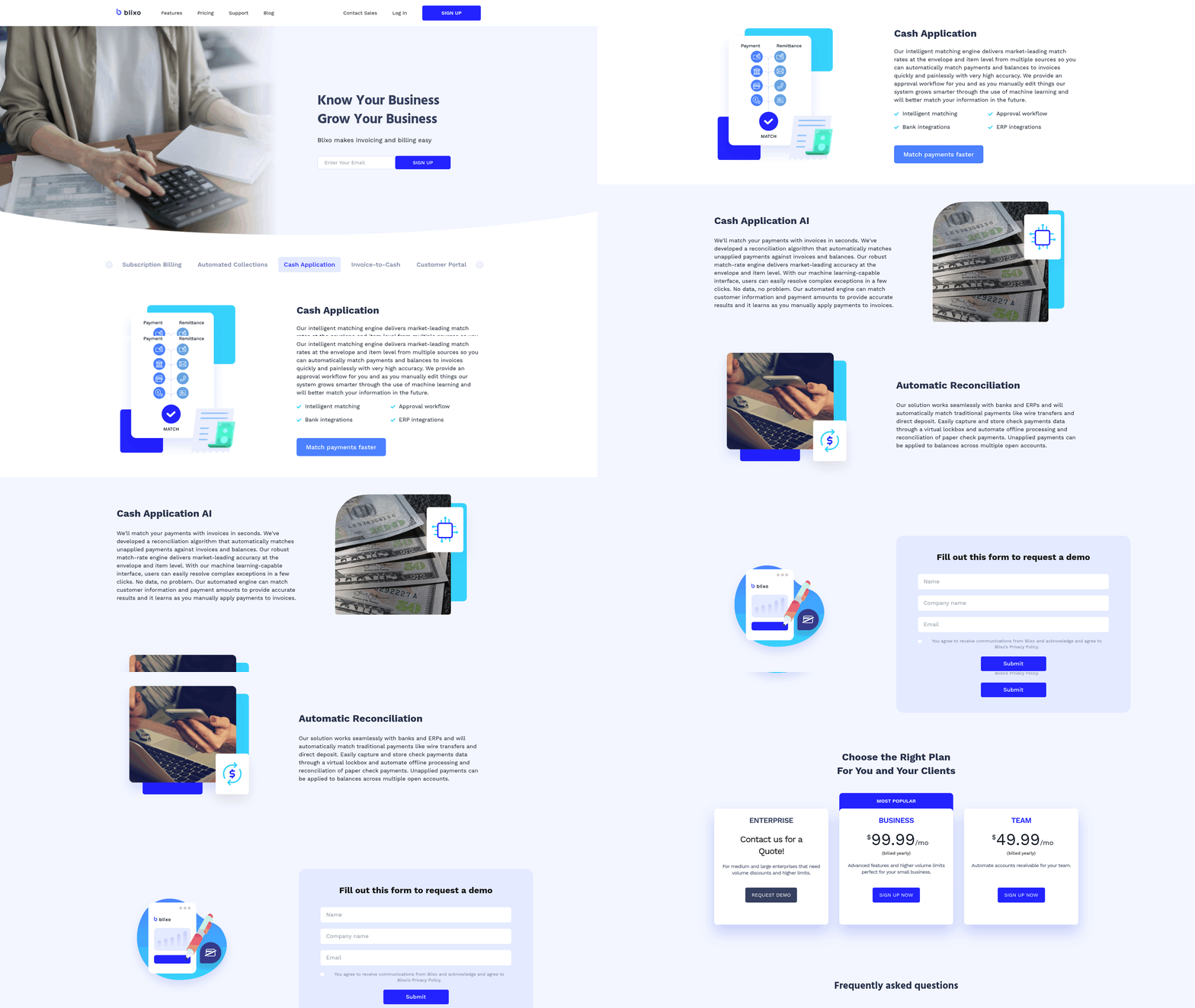
- Connect bank accounts and ERP systems via pre-built integrations to automate data flow. As mentioned in the Pre-Automation Checklist section, this foundational step ensures data consistency before full automation.
A media company cut billing errors by 50% in six months by setting strict item-level rules for recurring subscription payments. Building on concepts from the Invoicing and Payment Automation section, Blixo’s engine also learns from manual overrides, improving accuracy over time.
One business reported a 40% drop in late payments after implementing automated alerts for unmatched transactions. This aligns with insights from the Why Automation Matters for Accounts Receivable section, where manual processes are shown to delay cash flow and increase errors.
- Track match accuracy weekly to identify patterns in exceptions (e.g., recurring payment method issues). For deeper analysis, refer to the Post-Automation Review and Optimization section on refining workflows based on performance metrics.
Post-Automation Review and Optimization
How Do You Monitor Automation Performance?
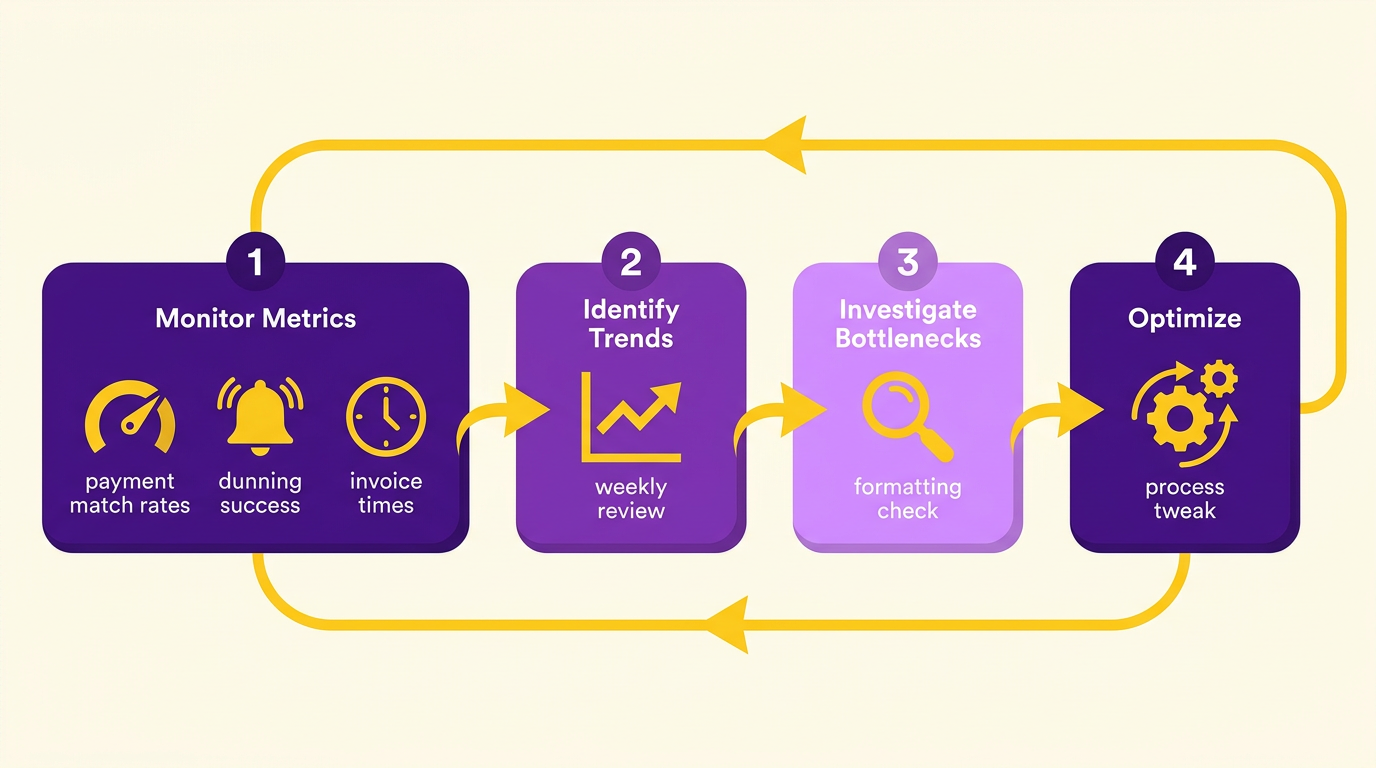
Tracking automation performance ensures your accounts receivable processes stay efficient. Blixo’s analytics tools let you monitor metrics like payment match rates, dunning success rates, and invoice processing times. For example, the platform’s cash application engine achieves market-leading match rates by using machine learning to adapt to user inputs. Review these metrics weekly to identify trends or bottlenecks. If match rates drop, investigate whether payment data formatting needs adjustment. For dunning, track how often automated reminders lead to successful collections versus manual intervention. As mentioned in the Cash Application and Reconciliation Automation section, accurate matching is critical to reducing reconciliation time and improving cash flow visibility.
- Review match rates and payment accuracy: Blixo’s cash application engine matches payments to invoices in seconds, reducing manual reconciliation time. A sudden dip in accuracy may signal configuration issues.
- Analyze dunning success rates: Automated collections work best when configured with tiered reminders. Adjust timing or messaging if failure rates rise.
- Audit processing times: Slow invoice-to-cash cycles could indicate bottlenecks in integrations with banks or ERP systems.
What If Errors or Exceptions Occur?
Even advanced automation tools encounter exceptions. Blixo’s approval workflow lets finance teams manually edit mismatches while teaching the system to improve over time. For example, if a payment is flagged as unmatchable, a user can assign it to an invoice and save the correction. The machine learning model then references this input for future matches. Building on concepts from the Pre-Automation Checklist section, proactive configuration of exception-handling workflows ensures smoother resolution of recurring issues.
- Address unmatchable payments: Use Blixo’s manual override feature to resolve mismatches and train the system.
- Track recurring exceptions: Frequent errors in specific payment types (e.g., international transactions) may require rule adjustments or currency-specific workflows.
- Review dunning exceptions: If automated collections fail repeatedly, investigate whether payment method updates or customer communication gaps are to blame.
How Do You Optimize Workflows for Growth?
As your business scales, automation settings must evolve with it. Blixo’s web-based platform supports seamless scaling by adding users, currencies, or payment methods without software installation. For example, teams can configure custom billing cycles or revenue recognition rules to align with new market demands. The Invoicing and Payment Automation section details how expanding payment options like ACH or SEPA reduces failures for global customers.
- Adjust workflow configurations: Test different dunning schedules or payment reminder intervals to see what improves customer compliance.
- Expand payment options: Add new currencies or methods (e.g., ACH, SEPA) to reduce payment failures for global customers.
- use analytics for scaling: Use Blixo’s retention insights to predict churn and adjust collections strategies before invoices become overdue.
How Do You Ensure Long-Term Efficiency?
Automation isn’t a set-it-and-forget-it solution. Regularly refine workflows using Blixo’s analytics dashboard and stay updated on feature improvements. For instance, the platform’s 30-day free trial lets teams test new configurations risk-free. Schedule quarterly reviews to assess whether automation aligns with business goals.
- Conduct quarterly audits: Compare current performance metrics to baseline data to identify areas for improvement.
- Test new features: Use the free trial period to experiment with tools like advanced revenue recognition rules.
- Train teams on updates: Blixo frequently enhances its machine learning models-ensure users know how to use new capabilities.
By combining proactive monitoring, error resolution, and iterative improvements, businesses can maintain efficient accounts receivable automation with Blixo. For deeper insights, explore Blixo’s billing automation blog.
Frequently Asked Questions
1. How much do manual AR processes cost U.S. businesses annually?
Manual AR processes cost U.S. businesses $1.3 trillion yearly due to invoicing errors, reconciliation disputes, and delayed cash flow, with 39% of invoices containing human-input mistakes.
2. What revenue loss do small businesses face from inefficient collections?
Small businesses lose 30% of revenue due to inefficient collections, with invoice processing taking up to 45 days and increasing Days Sales Outstanding (DSO) by 30%.
3. How does AR automation reduce administrative costs?
Automation cuts administrative costs by 30% through AI-driven workflows for data entry, follow-ups, and multi-channel payment reminders, as seen with tools like Blixo.
4. Why is pre-automation preparation critical for AR efficiency?
Foundational preparation ensures businesses maximize automation benefits by addressing system gaps, improving data accuracy, and aligning workflows before implementation.
5. What risks do manual AR systems face compared to automated ones?
Manual systems have a 35% higher missed-payment risk and 30% slower DSO than automated solutions, which enforce payment terms and send proactive reminders.
6. How does automation improve Days Sales Outstanding (DSO)?
Automation reduces DSO by 30% by accelerating invoice processing, streamlining collections, and minimizing delays caused by manual reconciliation errors.
7. What role does automation play in reducing invoice errors?
Automation eliminates 39% of human-input errors in invoices by automating data entry and validation, reducing disputes and speeding up reconciliation.