

How a Live CRM Demo Can Close Deals Fast

Key Takeaways
- A live CRM demo closes finance deals faster because the CFO watches their own cash flow move through a real dashboard, in real time.
- In-person product demonstrations can lift sales by as much as 177% on the day they happen.
- Online demo viewers convert at 64%, and 41% of shoppers who watch a live demonstration go on to buy.
- Gong’s research found top sales performers beat quota by 120% by solving problems instead of listing features.
- Finance buyers care about one question: where is the cash and when does it land. Live dashboards answer that on the spot.
- A live demo filtering 90-day aging data in seconds beats a slide that only describes the same thing.
- Demos built on the buyer’s own data, not a generic sandbox, produce the strongest conversion effect for finance software.
Related Video
Watch: HubSpot Sales Hub CRM Demo by Luke Marthinusen
Why a live demo beats a slide deck for finance buyers
A live CRM demo closes deals faster because it lets a finance leader watch their own cash flow move through a real dashboard. When a CFO sees their actual balance sheet and pending transactions update in front of them, the abstract pitch becomes concrete. That immediacy is exactly what generic demo advice misses when it talks to finance teams.
The numbers back it up. High-fidelity product presentations sharply increase immediate purchase intent, and online viewers convert at unusually high rates. For finance software, the effect holds best when buyers see their own data, not a sandbox.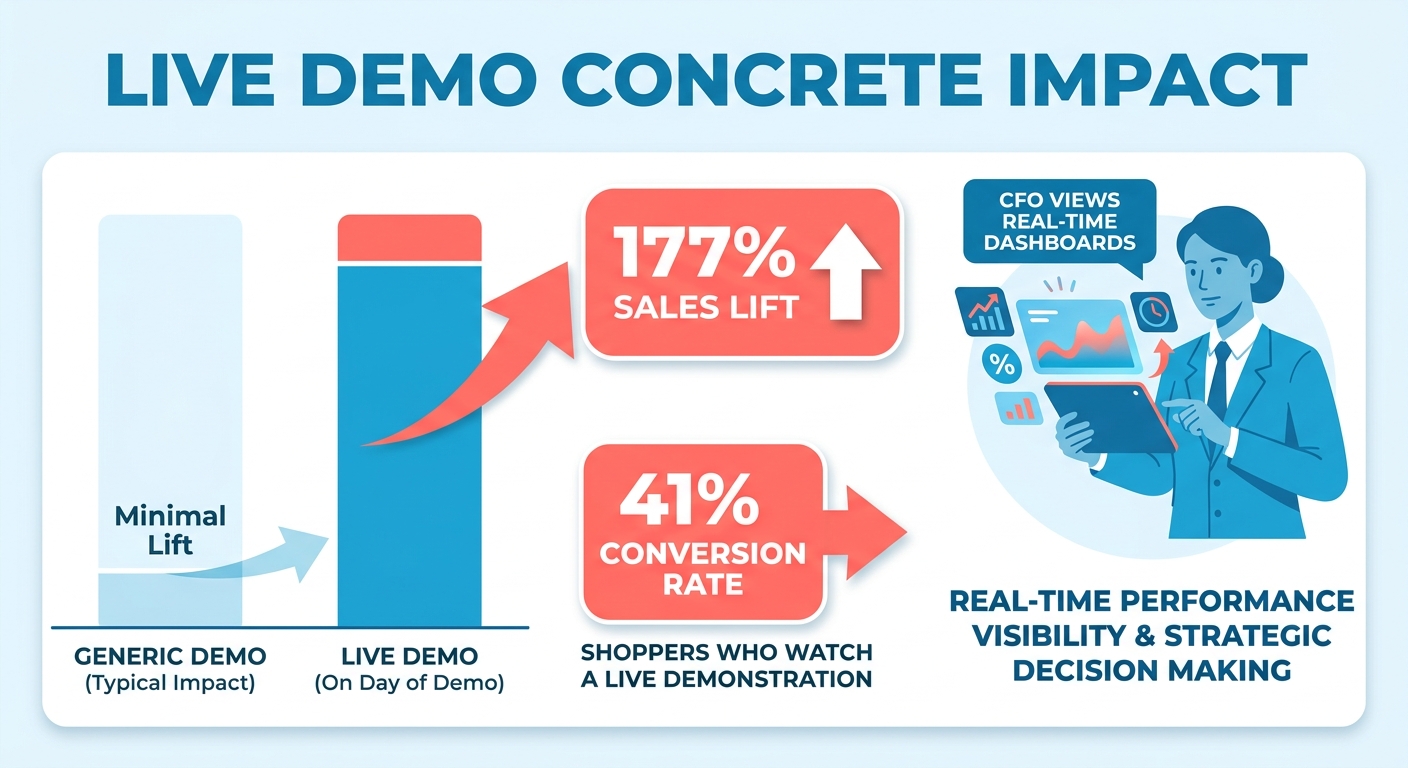
Why live demos move finance deals faster
Live demos shorten the cycle by handling objections in the moment and proving ROI on the spot. Industry research shows top performers win by focusing less on features and more on solving problems. For finance buyers, the problem is always the same: where is the cash, and when does it land?
Show a live cash-flow dashboard and you answer that instantly. A finance leader can ask to see outstanding receivables from last quarter and watch the filter apply in seconds. A static slide describes that capability. A live demo proves it.
Trust matters too. 59% of business buyers say sales reps don’t take the time to understand them, and 86% prefer to buy from companies that get their goals. Running the demo on the prospect’s own collection workflow signals you did the homework.
What makes a process-first demo more persuasive
A process-first demo walks the buyer through each step of a workflow instead of just showing the result. Research by Ringler, Sirianni, Peck, and Gustafsson (2024) found process demos produce stronger cognitive flow and higher purchase intent than outcome-only demos, with effect sizes up to d = 0.55.
For a finance audience, that means showing how an automated collection workflow runs, step by step. Walk them through the trigger, the reminder sequence, the escalation, and the reconciliation. Don’t just flash a “collections improved” chart.
The same study found buyers don’t mind longer demos when the steps are clear. A three-minute walkthrough beat a shorter outcome clip because the detail pulled viewers into the process. So skip the temptation to compress. The steps are what build conviction.
One more detail from that research: keep the demo private. One-on-one viewing outperformed group settings because social pressure breaks the buyer’s focus. For high-value finance deals, that argues for tight, dedicated sessions over crowded webinars.
Who gets the most out of a live CRM demo
Finance leaders and the sales teams selling to them. CFOs and controllers get to test compliance and reporting against their real numbers before signing. Sales teams get faster closes and fewer deals stuck in evaluation.
| Demo Format | Best For | Personalization | Buyer Interaction | Prep Effort | Conversion Strength |
|---|---|---|---|---|---|
| Live cash-flow dashboard | High-value finance deals | Uses prospect’s own data | Real-time Q&A | High (2-4 hrs) | Strongest |
| Live screen-share walkthrough | Mid-market finance teams | Tailored workflows | Live feedback | Medium (1-2 hrs) | Strong |
| Pre-recorded demo | Early-stage leads | Generic | None | Low (once) | Moderate |
| Interactive self-serve | Self-educating buyers | Limited | Async | Medium | Moderate |
| Group webinar | Broad awareness | Generic | Limited | Medium | Weaker for finance |
For finance buyers, a live demo on their own collection data closes deals that slides and recordings leave stuck.
How to prepare so the demo actually lands
Preparation decides whether your demo works. The data is blunt: 80% of sales demos land in the mediocre middle, only 10% are genuinely great, and 10% fail outright. For a finance audience, the difference comes down to one thing: showing real-world utility instead of a generic sandbox.
Budget the time. A solid rule is 10 hours of prep for one hour of demo. That sounds steep until you remember a CFO can spot a canned pitch in seconds.
Know who’s in the room and how the call ends
Define the audience and the end state before you open the software. Map the people first. A finance demo often pulls in a CFO, a controller, and an AP or AR lead, and each one weighs a different risk. The average B2B buying group now runs to 6 to 10 stakeholders, so a demo that speaks to one seat tends to stall once the room debates it later.
Then pin down the objective. Know exactly how the call ends. Are you booking a pilot, sending a proposal, or scheduling a follow-up? Walking in without a defined next step is the fastest way to lose momentum, and successful demos spend 12.7% more time discussing next steps than failed ones.
For a finance buyer, frame the objective around proof. You want the CFO to see how easily their ledger reconciles and how fast they can generate audit-ready reports, then agree on a concrete action while the value is fresh.
Build the script around their pain, not your features
Start with a problem slide, then map the story around the prospect’s pain. Stories beat click-paths because B2B buyers absorb narratives 73% faster than feature walkthroughs. Sell the outcome each feature delivers, not the feature.
Storyboard the flow like a finance workflow. Open on the pain: manual collections, slow reconciliation, an unclear cash position. Then show the live dashboard answering each one. Cut every feature that doesn’t solve their problem.
Here’s a simple storyboard you can adapt:
- Problem slide: “Your team chases overdue invoices by hand and can’t see cash position until month-end.”
- Live dashboard: Pull up real-time receivables and outstanding balances using their data, not a demo set.
- Automated workflow: Trigger a collection reminder live, then show the audit trail for compliance.
- Outcome: “This is your cash flow, updating as payments clear.” Tie it to ROI.
- Next step: Schedule the pilot before the call ends.
Use the prospect’s name throughout, and reference earlier conversation points to keep it personal.
Rehearse until the transitions disappear
Run the demo until the delivery is smooth and the transitions feel natural. Drill your IF-THEN responses so common objections, like budget or compliance, get a concise answer instead of a fumble. The more you say off the cuff, the more likely you say something off-track.
Visual collaboration tools sharpen engagement. A flowchart showing how funds move through the prospect’s own system makes abstract value concrete for a finance team. Live screen sharing invites real-time feedback, so the demo becomes a conversation instead of a monologue.
Test the setup too. Display only relevant content and use a headset to dodge audio glitches. A clean, rehearsed run lets the dashboard do the convincing.
Running the demo: show, don’t lecture
Running a live CRM demo for finance leaders means moving them through a real dashboard, not narrating a feature tour. Open with the problem, run the numbers live, end with a scheduled next step. That structure converts faster than any deck.
The biggest mistake is treating the demo like a lecture. The goal isn’t to educate or entertain. It’s to help a CFO decide while watching their actual financial pipeline update in front of them.
Use interactive features to keep finance leaders engaged
Pull up the prospect’s own data. Using their real numbers during a live demo makes the value relevant instead of abstract, and live screen sharing turns the session into collaboration. For finance teams, that means loading their actual receivables and watching an automated collection workflow fire.
Pause often. Let the CFO and controller talk among themselves. Frame each feature around the problem it solves before you show it, and the demo stays tight. Drop everything that doesn’t touch their cash position.
Ask the benchmarking question: “How does this compare to how you handle collections today?” That single prompt surfaces the gap between manual follow-ups and an automated dashboard. Then use each person’s name and reference what they shared earlier. People notice when you remember the details.
Why storytelling beats a feature list
Stories move finance deals because numbers alone don’t stick. People recall narrative details far better than isolated figures, so wrap your DSO improvement in a before-and-after arc. Make the customer the hero. Show how their team goes from chasing late payers to watching a real-time dashboard flag every overdue invoice and trigger the reminder automatically.
The cognitive-flow research backs this structure. Guiding prospects through sequential steps builds a deeper sense of operational reality than presenting a finished dashboard. And minimizing distractions matters: a tight, dedicated session keeps external social dynamics from breaking the buyer’s concentration, so the CFO stays absorbed in the cash-flow story.
Sell the outcome, not the feature. “Your DSO drops” lands harder than “the system supports custom dunning rules.”
How to handle objections without getting defensive
Tackle objections with curiosity, not defensiveness. When a finance leader raises budget or compliance, treat it as a cue to show the audit trail and the ROI math live, not a wall to argue past. A concern said out loud is a buying signal. Silence is the harder problem to read.
Watch for these common failure points:
- Technical glitches: Display only relevant content and use a headset to avoid connectivity hiccups mid-demo.
- Weak storytelling: Never feature-dump. If a screen doesn’t advance the cash-flow narrative, cut it.
- No engagement: Get every stakeholder talking early. Silence means you’ve lost the room.
- Ignored concerns: Address compliance and ROI questions in the moment, on screen.
Close while you’re still on the call. Verbal commitments made during the session hold far better than ones you chase afterward, so schedule the pilot before you hang up. Then follow up with a short summary of what their dashboard showed.
Post-demo follow-up: turning interest into commitment
The hours after a live demo decide the deal. A CFO who just watched their actual financial workflows automate in real time is engaged right now, not next week. Follow up the same day, summarize what they saw, and confirm the next step before momentum fades.
The data on timing is blunt. 36% of revenue team members name no-show prospects as a top challenge, and the same lag kills post-demo follow-up. Don’t let the conversation cool.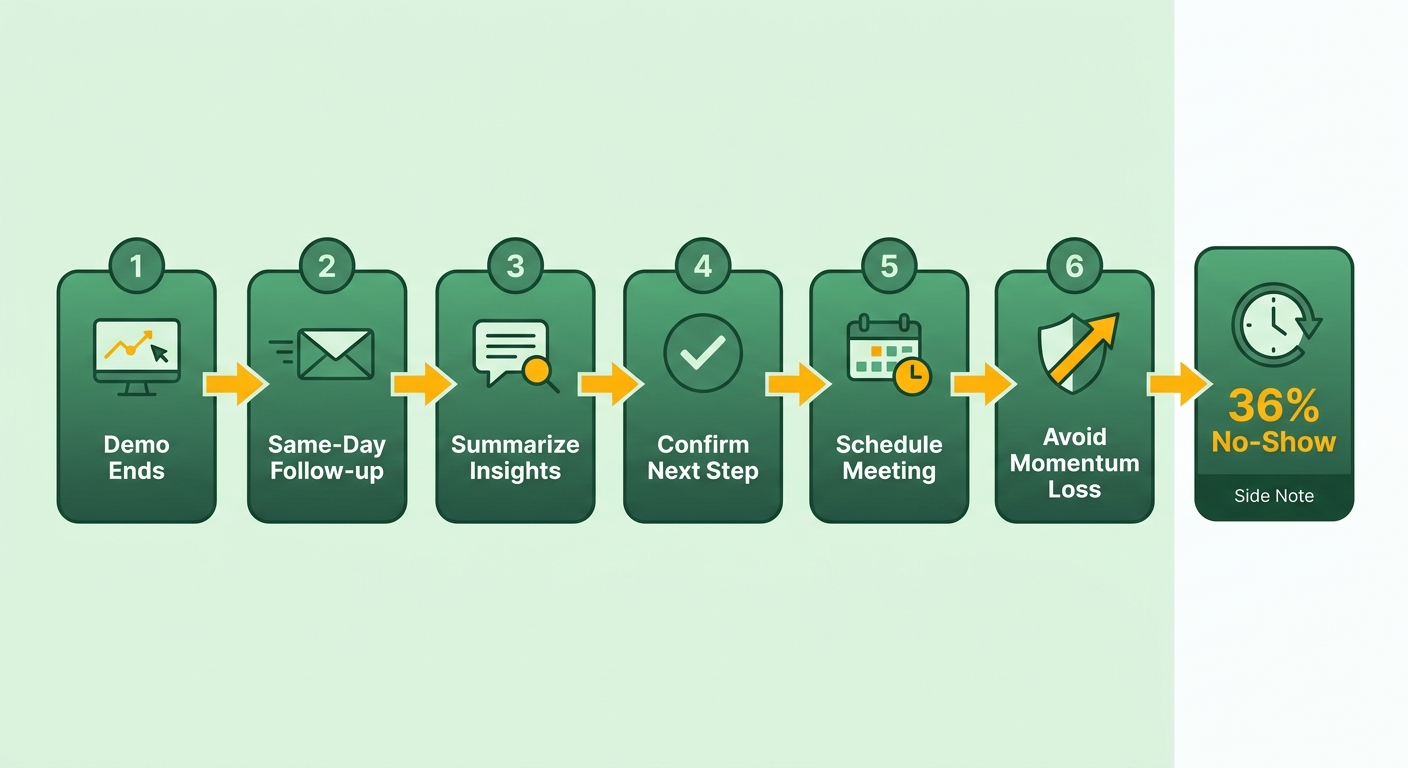
Build on the momentum before it cools
Schedule the next step while you’re still on the call, then reinforce it within hours. Kadence, commenting on Chris Orlob’s demo playbook, put it plainly: “Calendarizing next steps while on the phone vs following up after can be crucial in keeping momentum within your deals.” Lock the pilot or proposal date before you hang up.
Your follow-up should mirror what the finance leader actually reacted to. If their eyes lit up when the dashboard flagged a past-due account in real time, lead the recap with that moment: “Earlier you shared that manual follow-ups were eating your team’s week.”
Then send helpful resources, not a generic brochure. A personalized video that re-runs the cash-flow view they saw keeps the ROI concrete. One retail client cited in the Loom guide saved 40% of their time and improved forecasting accuracy by 20% in three months after tightening their demo-to-follow-up flow.
Answer the objections still hanging in the air
Tackle leftover concerns with empathy and curiosity, not a hard pitch. Finance leaders rarely object to the dashboard itself. They object to migration risk, compliance, and whether the numbers stay accurate after go-live.
Sally Baldauf, Global VP of Presales at Gong, framed the whole job around this: “The key to a successful demo is to first understand the outcome that the client is trying to achieve, their goals, pain points, metrics of success.” Your follow-up should answer the specific compliance or reconciliation worry they raised, using their own data if you can.
Ask about the operational gap between their current systems and yours. That surfaces the real blocker and lets you write a response the CFO can forward to their team.
The KPIs that tell you the demo worked
Track deal velocity, revenue growth, and engagement to know if your demos actually work. Attendance, no-show rate, and feedback scores tell you whether prospects show up and stay engaged. Deal velocity and win rate tell you whether the demo moved money.
The scheduling layer matters more than most teams admit. 69% of revenue teams find booking meetings the hardest part of inbound sales. One company fixed it by adding booking links to nurture emails so leads could self-schedule. Another saw 70% of qualified leads book demos straight from the website after routing was added.
Then read the gaps. If attendance is high but velocity is low, your follow-up is leaking deals. If engagement drops mid-demo, you’re feature-dumping instead of showing live cash flow. Use the metrics to cut what doesn’t land and double down on the dashboard moments that close finance buyers.
Frequently Asked Questions
1. How long should a live CRM demo last for a finance audience?
Keep the core walkthrough highly focused, leaving ample time for interactive questions. Finance buyers appreciate seeing the logical progression of a workflow rather than a rushed summary, as clear operational steps build far more conviction than a high-level overview.
2. What should I do if the prospect won’t share their real financial data before the demo?
When prospects hesitate to share live data, request anonymized or partial datasets, like aging buckets without client names. Many finance leaders relax once you sign an NDA or use a secure sandbox seeded with their formatting. Even a few real invoice categories outperform a fully generic demo set for conversion.
3. How many people should attend a live CRM demo?
Limit live finance demos to a small group, ideally one to four core decision-makers like the CFO, controller, and AR lead. Keeping the session intimate prevents external distractions and allows for a highly focused, collaborative discussion tailored to their specific operational goals.
4. What technical setup prevents a live demo from failing?
Reliable demo setups require a wired internet connection, clear audio hardware, and a clutter-free desktop environment. Close background apps and notifications. Pre-load the prospect’s data before the call starts, and have a recorded backup ready in case live systems lag mid-session.
5. How quickly should I follow up after a live CRM demo?
Follow up the same day, ideally within a few hours while the buyer remains warm. Send a recap referencing the specific dashboard moment that engaged them, plus the confirmed next-step date. Delays let momentum cool, and lag is a leading cause of stalled post-demo deals across revenue teams.
6. What’s the difference between a process-first demo and an outcome demo?
A process-first demo guides the prospect through the sequential execution of a task, whereas an outcome demo simply displays the final result. Showing the actual mechanics of how a system operates builds deeper trust and understanding, as buyers can visualize how the software integrates into their daily routines.
7. How do I measure whether my CRM demos are actually working?
Monitor pipeline progression and conversion rates alongside meeting attendance and engagement metrics. If prospects attend but deals stall, your post-demo follow-up may need refinement. If attention drops during the presentation, it suggests the content is too feature-heavy rather than focused on solving immediate business problems.