

ERP Invoice Processing Checklist for Blixo Users

Key Takeaways
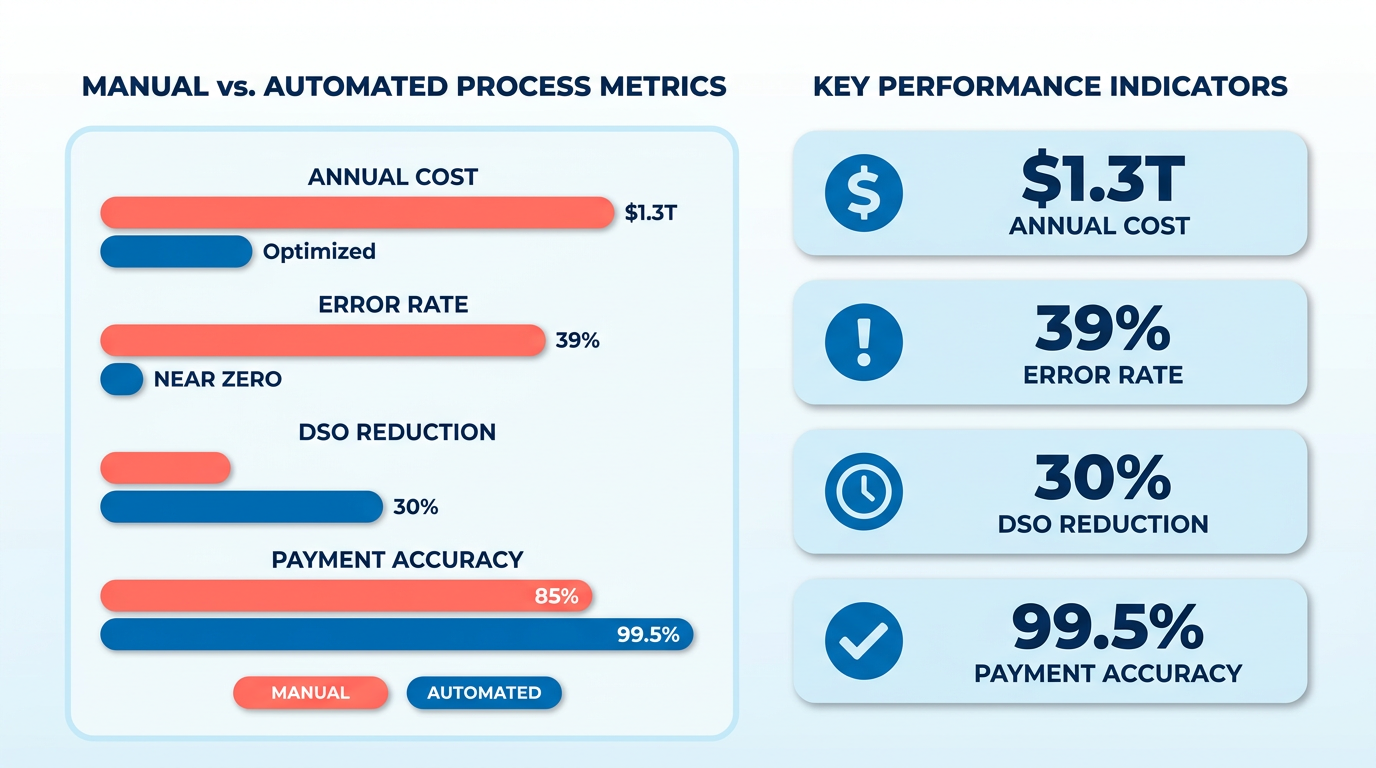
- Manual invoice processing costs U.S. businesses $1.3 trillion annually due to errors, disputes, and delayed cash flow.
- Automated ERP systems reduce administrative costs by 30% and cut Days Sales Outstanding (DSO) by 30%.
- 39% of invoices contain errors, costing small businesses an estimated 30% of revenue in annual losses.
- ERP automation achieves 99.5% payment-matching accuracy, minimizing disputes and accelerating payments.
- A logistics firm reduced invoice disputes by 20% using Blixo’s automated processing workflows.
- 80% of businesses face payment delays from manual errors, increasing DSO by 30% and straining cash flow.
- Every 1% error rate in invoice processing costs $15–$40 per invoice, totaling hundreds of thousands in annual losses for mid-sized firms.
Why ERP Invoice Processing Matters
ERP invoice processing isn’t just a back-office task-it’s a strategic lever that directly impacts a business’s financial health and operational agility. Manual systems cost U.S. businesses $1.3 trillion annually from errors, disputes, and delayed cash flow, while 39% of invoices contain errors that small businesses estimate cost them 30% of revenue. With automated ERP systems like Blixo, companies cut administrative costs by 30%, reduce Days Sales Outstanding (DSO) by 30%, and achieve 99.5% payment-matching accuracy. These improvements aren’t just numbers-they translate to real-world outcomes like faster payments, stronger supplier relationships, and the ability to focus on growth. As mentioned in the Optimizing ERP Invoice Processing for Scalability and Growth section, tracking metrics like DSO is critical for maintaining efficiency as businesses expand.
What Financial Risks Does Poor Invoice Processing Create?
Inefficient invoice processing creates a domino effect of financial risks. For example, 80% of businesses face payment delays due to manual errors, which increases DSO by 30%. Small businesses, in particular, struggle: delays in collections can force them to dip into working capital or forgo growth opportunities. A logistics firm in Blixo’s case studies reduced disputes by 20% using automated processing, while healthcare providers cut month-end closing time by 18%. Without automation, errors compound-every 1% error rate in processing costs $15–40 per invoice, a burden that adds up to hundreds of thousands in annual losses for mid-sized firms. Building on concepts from the Setting Up Blixo for ERP Invoice Processing section, automating workflows is essential to avoid these compounding costs.
How Does Automation Solve These Challenges?
Automation tackles the root causes of inefficiency. Blixo’s system uses optical character recognition (OCR) and machine learning to extract invoice data with 99.5% accuracy, slashing reconciliation disputes by 35%. This eliminates 70% of manual data entry, saving small businesses 200+ hours yearly when automating 1,000 invoices. For enterprises, the impact is even steeper: one manufacturing company reduced invoice processing costs from $15–40 per invoice to $2–5, saving over $200,000 annually. Real-time processing also accelerates vendor payments, improving relationships and reducing the risk of late fees.
Who Benefits Most from Blixo’s Capabilities?
Blixo’s SaaS service is tailored for businesses that prioritize speed and accuracy. Small businesses gain hours back for core operations-filmmaker Vincent Mann calls it a “major advantage” for managing payments without chasing them. Mid-sized companies benefit from scalable automation, as seen in a logistics firm that cut processing time by 40%. Enterprises using Blixo see operational efficiency gains, like a manufacturer reducing manual tasks by 70%. Industries with high invoice volumes-such as healthcare and logistics-see the most dramatic improvements, with healthcare providers cutting month-end closing time by 18% and logistics firms reducing disputes by 20%. As outlined in the Best Practices for ERP Invoice Processing with Blixo section, customizing workflows to fit industry-specific needs further enhances these outcomes.
By addressing these pain points, Blixo’s ERP invoice processing isn’t just a tool-it’s a competitive edge. For businesses struggling with the $1.3 trillion manual processing cost or the 30% DSO drag, automation turns invoice processing from a bottleneck into a catalyst for growth.
Setting Up Blixo for ERP Invoice Processing
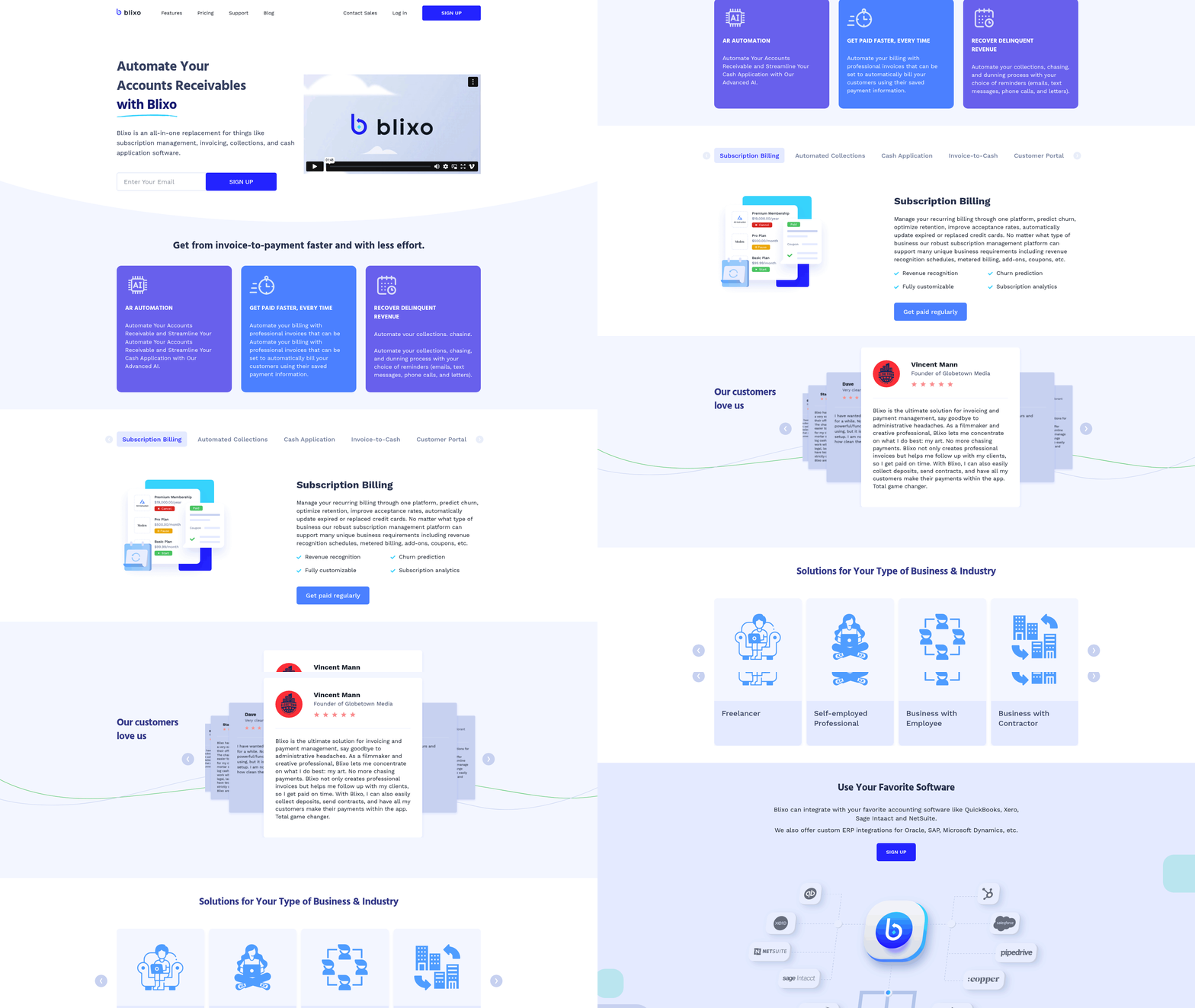
Setting up Blixo for ERP invoice processing requires careful planning to ensure seamless automation and integration. Below is a structured checklist to guide you through the setup process, starting with compatibility checks and ending with workflow customization.
What System Requirements and Compatibility Should You Check?
Before integrating Blixo, verify your system’s compatibility with the platform. Blixo works with major ERP systems like QuickBooks, Xero, Oracle, SAP, and NetSuite, ensuring real-time data synchronization. Confirm your current ERP version supports API integrations, as Blixo relies on secure, bidirectional data flow. Additionally, ensure your team has admin-level access to configure settings and grant permissions.
- Verify ERP compatibility: Confirm your ERP is listed among Blixo’s supported systems.
- Check API access: Ensure your ERP allows API integrations for data exchange.
- Review security protocols: Confirm your ERP meets Blixo’s 256-bit encryption and compliance standards.
What Steps Are Involved in the Setup Process?
A step-by-step approach ensures a smooth transition to automated invoice processing. Start by mapping your current workflow to identify bottlenecks, then configure Blixo’s AI tools to address them.
- Assess your workflow: Audit manual tasks like data entry and reconciliation to prioritize automation.
- Enable OCR and AI extraction: Train Blixo’s AI to recognize invoice formats (PDFs, scans, emails) and extract data with 99.5% accuracy.
- Set validation rules: Define thresholds for invoice matching, such as three-way matching (invoice, PO, receiving report) to reduce errors by 80%.
- Configure exception handling: Automate alerts for discrepancies, ensuring your team resolves issues without halting workflows.
After setup, test the integration with a small batch of invoices to catch configuration errors. As mentioned in the Troubleshooting Common Issues in ERP Invoice Processing section, identifying these errors early can prevent larger issues down the line. Blixo’s 30-day free trial allows you to pilot workflows risk-free before full deployment.
How Do You Customize Blixo for Your Workflow?
Tailoring Blixo to your business needs ensures maximum efficiency. Building on concepts from the Best Practices for ERP Invoice Processing with Blixo section, use the platform’s modular settings to align with industry-specific requirements or team preferences.
- Adjust AI matching sensitivity: Fine-tune how strictly Blixo matches invoice data to POs and receipts.
- Customize approval hierarchies: Set role-based permissions for invoice approvals, reducing delays.
- Integrate with accounting tools: Sync Blixo with your ERP’s ledger for real-time financial reporting.
For example, a logistics firm reduced disputes by 20% after configuring Blixo to flag mismatched delivery dates automatically. Similarly, a manufacturer cut processing time by 40% using custom validation rules for bulk purchases.
What Integration Options Are Available?
Blixo’s integration capabilities extend beyond ERPs to include payment gateways and document storage systems. Use the following checklist to maximize connectivity:
- Link payment processors: Automate payments and receipts to reduce Days Sales Outstanding (DSO) by 30%.
- Sync with cloud storage: Connect Google Drive or Dropbox for centralized invoice archives.
- Enable audit trails: Generate compliance-ready logs for every transaction and user action.
A healthcare provider, for instance, achieved 18% faster month-end closures by integrating Blixo with their ERP and cloud storage, streamlining audits and reducing manual reconciliation.
Final Checks and Best Practices
Once configured, monitor key performance indicators like invoice processing time and error rates. Aim for 98%+ payment-matching accuracy and <2% error rates. Regularly review Blixo’s analytics dashboard to identify optimization opportunities. As outlined in the Optimizing ERP Invoice Processing for Scalability and Growth section, tracking these metrics is essential for adapting to business growth. Train your team on exception handling and maintain a feedback loop to refine workflows.
“Our subscription management and accounting are seamless with Blixo-no more manual reconciliation.” – Matthew Schwartz, founder of Elemental Deodorant
By following this checklist, you’ll transform invoice processing from a time-consuming task to a streamlined, error-resistant system. Start your setup today to enable cost savings and operational efficiency.
Best Practices for ERP Invoice Processing with Blixo
By mapping your current process, you align with the structured setup guidance in the Setting Up Blixo for ERP Invoice Processing section. When configuring dynamic approvers, refer to the Troubleshooting Common Issues in ERP Invoice Processing section for strategies to resolve routing conflicts. Tracking metrics like DSO ties directly to the Optimizing ERP Invoice Processing for Scalability and Growth section, which emphasizes performance-driven scaling.
Troubleshooting Common Issues in ERP Invoice Processing
ERP invoice processing errors often stem from manual data entry, integration mismatches, and incomplete validation. Addressing these issues starts with identifying their root causes.
- Data extraction errors: Optical character recognition (OCR) misreads handwritten fields or low-quality scans. Source data shows 39% of invoices contain manual errors, often due to mismatched formats. Building on concepts from the Best Practices for ERP Invoice Processing with Blixo section, customizing OCR training datasets can reduce misreads.
- Three-way matching discrepancies: Mismatches between invoices, purchase orders (POs), and receiving reports delay approvals. Blixo’s AI reduces these by 80%, but misconfigured rules can still trigger false mismatches. As mentioned in the Setting Up Blixo for ERP Invoice Processing section, precise rule configuration during setup is critical.
- Integration sync failures: ERP systems like QuickBooks or SAP may reject invoices if Blixo’s sync settings lack proper API permissions.
- Compliance gaps: Missing 256-bit encryption or audit trails risks data breaches, though Blixo’s compliance tools mitigate this risk.
“Blixo lets me focus on my art without chasing payments,” says Vincent Mann, a filmmaker who reduced invoice disputes by 20% after adopting its AI workflows..
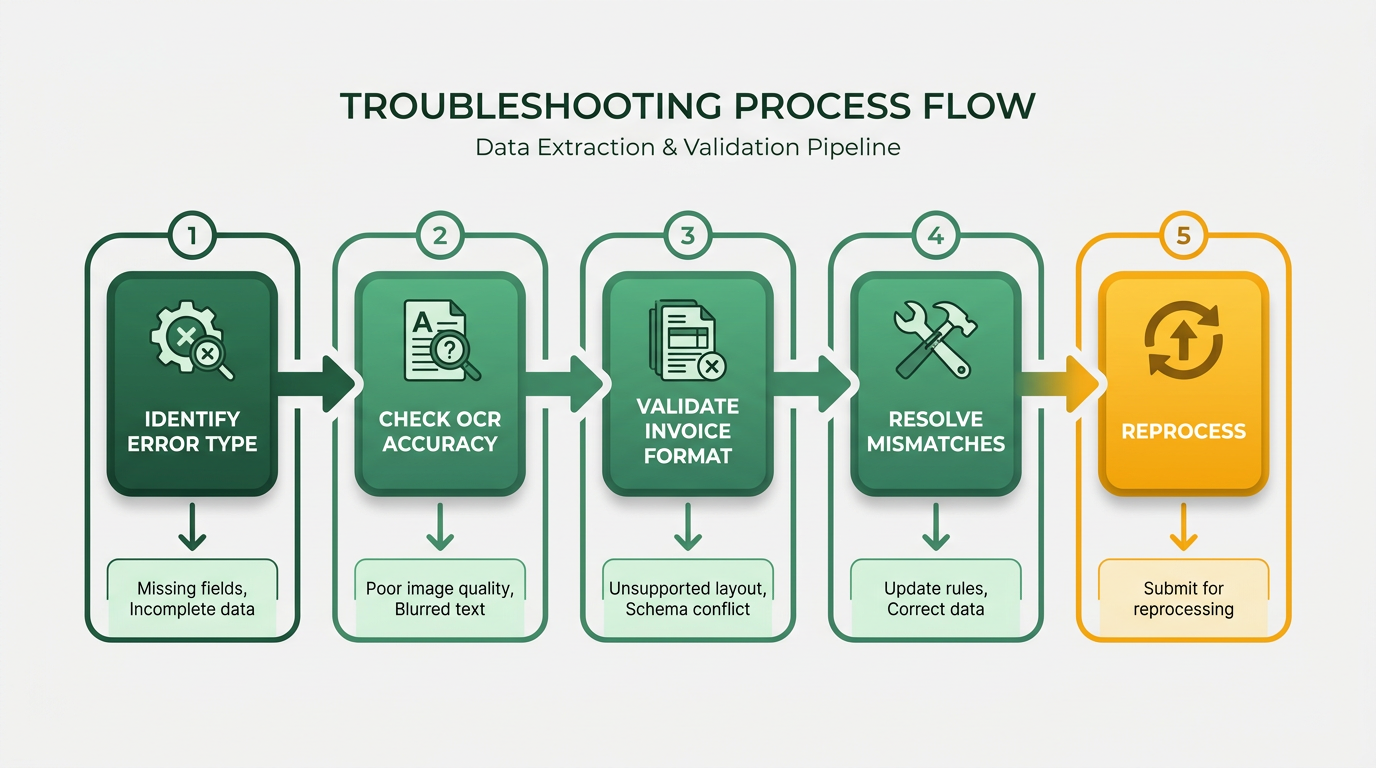
How Do You Troubleshoot ERP Invoice Errors Step-by-Step?
Systematic troubleshooting minimizes downtime and ensures accuracy. Prioritize these actions based on error frequency.
- Identify the error type.
- Check OCR logs for misread fields (e.g., vendor names, amounts).
- Review three-way matching rules to confirm PO numbers align.
- Validate OCR accuracy.
- Rescan low-quality documents or retrain Blixo’s AI on unique invoice formats. As mentioned in the Setting Up Blixo for ERP Invoice Processing section, initial OCR training should include diverse invoice samples.
- Use the OCR QA checklist to verify field mapping before batch processing.
- Review matching logic.
- Adjust tolerance thresholds for price variances (e.g., ±5%). Building on concepts from the Best Practices for ERP Invoice Processing with Blixo section, aligning thresholds with procurement policies improves accuracy.
- Audit exceptions manually flagged by the system to avoid false rejections.
- Check integration logs.
- Confirm ERP system credentials are up to date in Blixo’s settings.
- Test syncs during off-peak hours to isolate network-related issues.
- Handle exceptions efficiently.
- Assign a team member to resolve flagged invoices within 24 hours.
- Use Blixo’s exception dashboard to track resolution times and recurring patterns..
What Tools and Resources Help Resolve ERP Invoice Issues?
Use built-in tools and external guidance to streamline troubleshooting.
- OCR + AI engine: Reduces manual entry by 70% and adapts to new invoice layouts over time.
- Three-way matching automation: Cuts errors by 80% when configured with precise PO-receipt-invoice rules.
- ERP integration toolkit: Pre-built connectors for QuickBooks, Xero, and SAP ensure real-time sync.
- Audit and compliance suite: Generates reports for audits and confirms data encryption standards.
For deeper insights, refer to Gennai’s invoice automation checklist for general best practices or Red Brick Labs’ OCR QA guide for validation strategies..
How Can You Prevent ERP Invoice Errors Long-Term?
Proactive measures reduce recurring issues and improve processing efficiency.
- Train staff on Blixo workflows: Role-specific training ensures teams use exception tools and validation rules correctly.
- Monitor KPIs monthly: Track invoice processing time, error rates (<2% target), and Days Sales Outstanding (DSO) reductions. As mentioned in the Optimizing ERP Invoice Processing for Scalability and Growth section, aligning KPIs with business objectives ensures scalability.
- Audit integrations quarterly: Test API connections and update encryption protocols to match ERP system changes.
- Implement feedback loops: Collect user suggestions to refine AI rules and automate edge cases.
A mid-sized manufacturer saved $200K annually by combining these strategies with Blixo’s 30-day trial for iterative testing. Start with small batches to identify gaps before full-scale deployment.
“Our subscription management and accounting are seamless with Blixo-no more manual reconciliation,” notes Matthew Schwartz, founder of Elemental Deodorant, after cutting processing time by 70%.
By combining these strategies, Blixo users can transform invoice processing from a costly bottleneck into a reliable revenue driver.
Optimizing ERP Invoice Processing for Scalability and Growth
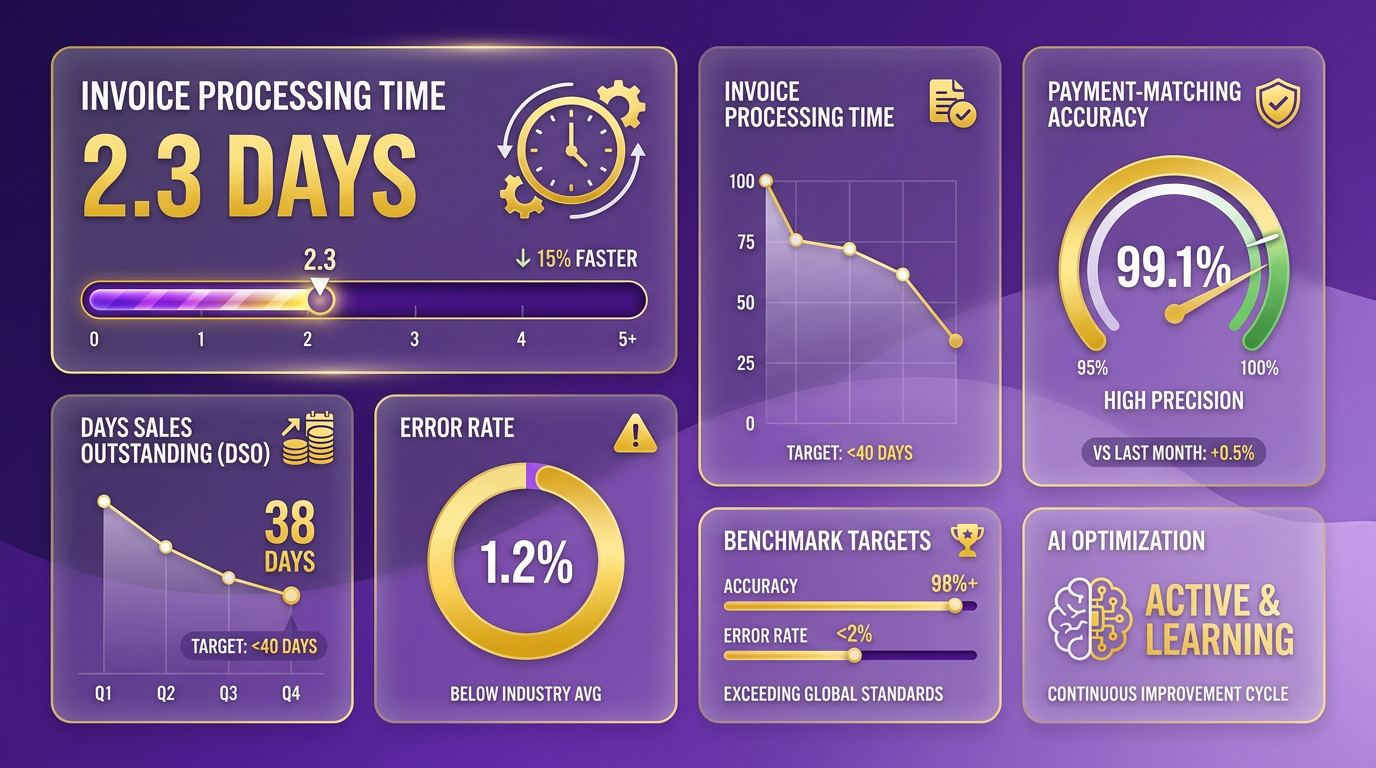
Tracking performance metrics ensures your ERP invoice processing system keeps up with growing demands. Start by identifying key KPIs like invoice processing time, payment-matching accuracy, and Days Sales Outstanding (DSO). As mentioned in the Why ERP Invoice Processing Matters section, manual systems cost U.S. businesses $1.3 trillion annually, making performance tracking critical. Blixo’s analytics tools let you set benchmarks-aim for 98%+ accuracy and <2% error rates.
- Track processing time Measure how long it takes to process invoices from receipt to approval. Blixo’s OCR and AI automation reduce manual entry by 70%, enabling teams to handle 50% more invoices without additional staff. Building on concepts from the Best Practices for ERP Invoice Processing with Blixo section, automating capture and validation rules minimizes delays.
-
Monitor payment-matching accuracy Blixo’s three-way matching (invoice, PO, receiving) cuts errors by 80%, achieving 99.5% accuracy. Track mismatches to refine rules.
-
Review DSO trends Companies using Blixo cut DSO by 30% on average. For example, a mid-sized manufacturer reduced DSO from 45 to 28 days, accelerating cash flow.
How to Optimize Workflow Efficiency
Streamline repetitive tasks to scale operations without increasing overhead. Focus on automation and validation rules to minimize human intervention.
-
Automate invoice capture Use Blixo’s OCR to extract data from PDFs, emails, and scans. This eliminates 70% of manual entry, enabling teams to process 50% more invoices without additional staff.
-
Set validation rules Configure Blixo to flag discrepancies automatically. For instance, a logistics firm reduced disputes by 20% using custom rules for invoice-PO mismatches.
-
Use AI for exception handling Train Blixo’s AI to resolve common issues like missing documents. A different healthcare organization reduced invoice approval time by 25% using this feature.
Ensuring Scalability for Growing Businesses
As your business expands, your invoice processing system must adapt to higher volumes and complex workflows.
-
Test integration scalability Blixo integrates with ERP systems like QuickBooks and SAP. Ensure real-time sync handles increased data loads-256-bit encryption keeps security intact during scaling.
-
Train teams on Blixo’s advanced features A 30-day trial helps teams master exception handling and analytics, as outlined in the Setting Up Blixo for ERP Invoice Processing section. Matthew Schwartz, founder of Elemental Deodorant, credits Blixo’s training for seamless subscription management.
-
Audit workflows quarterly Review KPIs like error rates and DSO to spot bottlenecks. A mid-sized manufacturer saved $200,000/year by optimizing workflows after quarterly audits.
Integrating with Business Systems for Growth
Seamless integration with ERP, accounting, and procurement tools ensures data consistency and reduces errors.
-
Sync with accounting software Blixo connects to Xero, Oracle, and NetSuite for real-time financial updates. This eliminated manual reconciliation for one company, improving accuracy.
-
Enable procurement system links Tie purchase orders and receiving reports directly to invoices. Three-way matching ensures PO numbers, invoice totals, and delivery confirmations align.
-
Maintain compliance and security Regularly audit Blixo’s encryption and compliance logs. The platform meets audit standards, giving businesses confidence during scale-ups.
Real-World Impact of Optimization
Businesses using Blixo report measurable gains. A logistics firm cut disputes by 20%, while a healthcare provider improved approval efficiency by 25%. By combining performance monitoring, workflow automation, and strategic integrations, companies reduce costs by 30% and accelerate payments.
“Blixo lets me focus on my art without chasing payments,” says filmmaker Vincent Mann. His business processed 500+ invoices/month with zero manual errors after adopting Blixo’s touchless workflow.
By prioritizing these strategies, Blixo users position themselves to handle growth without sacrificing accuracy or speed. Regularly revisiting KPIs and adopting new automation features ensures long-term efficiency.
Conclusion and Next Steps
By streamlining invoice processing with Blixo’s touchless automation, businesses achieve measurable savings, faster payments, and fewer errors. Manual processing costs U.S. businesses $1.3 trillion annually, but Blixo’s AI-driven workflows cut administrative costs by 30% and reduce Days Sales Outstanding (DSO) by 30% as detailed in the Why ERP Invoice Processing Matters section. With 99.5% payment-matching accuracy, companies avoid 35% fewer disputes while saving hundreds of hours yearly. Now that you’ve reviewed the checklist, take actionable next steps to implement and optimize your system.
What Core Benefits Should You Prioritize?
Touchless invoice processing eliminates bottlenecks caused by manual data entry and reconciliation. Automation enhances scalability, enabling businesses to handle increased invoice volumes without proportional staff growth-a critical advantage during seasonal peaks or expansion phases, as discussed in the Optimizing ERP Invoice Processing for Scalability and Growth section. For example, a mid-sized manufacturing firm slashed invoice costs from $15–$40 per invoice to $2–$5, saving over $200,000 yearly. The logistics and healthcare case studies show tangible improvements: 20% fewer disputes and 18% faster month-end closures. These gains translate directly to better cash flow and vendor relationships.
“Blixo is a major advantage for invoicing and payment management, letting me focus on my art without chasing payments.” – Vincent Mann, Filmmaker
How Should You Implement Blixo’s Features?
Adopt a phased rollout to maximize ROI while minimizing disruption. Begin by configuring user roles and permissions to align with your finance team’s structure. Next, integrate Blixo with your ERP systems using its API, ensuring OCR and machine learning tools map correctly to existing workflows, as outlined in the Setting Up Blixo for ERP Invoice Processing section. Test the system with a small invoice volume (100–500 transactions) to validate accuracy and flag edge cases. Train teams on reviewing AI-generated matches and resolving exceptions. Finally, monitor KPIs like error rates and processing speed monthly to refine configurations. A 30-day pilot period is ideal for identifying gaps before full deployment.
- Configure user roles and permissions in Blixo’s admin console
- Integrate with ERP systems using API connectors
- Run a 30-day pilot with 100–500 test invoices
- Train finance teams on AI workflow reviews
- Measure DSO, error rates, and cost savings weekly
Where Can You Find Further Guidance?
Use Blixo’s built-in documentation and support team for technical setup questions. For deeper insights into invoice automation best practices, explore The Ultimate Invoice Automation Checklist (50+ Items) and How to Build an Invoice OCR QA Checklist. These resources complement Blixo’s approach by covering universal automation principles. Additionally, Blixo’s team offers industry-specific guides to help sectors like healthcare, manufacturing, and logistics tailor workflows to their compliance and scalability needs.
What’s Next for Blixo’s Capabilities?
Blixo continues refining its AI models to improve OCR accuracy for handwritten fields and multilingual documents. Upcoming updates will expand predictive analytics tools to forecast payment delays and flag high-risk vendors. The platform also plans to integrate blockchain-based audit trails for industries requiring immutable transaction records. By 2025, Blixo aims to reduce manual invoice processing to under 5% across all client accounts, maintaining its 99.5% payment-matching accuracy standard. Stay updated by subscribing to the Blixo Blog for release notes and case studies.
Frequently Asked Questions
1. What are the annual costs of manual invoice processing in the U.S.?
Manual invoice processing costs U.S. businesses $1.3 trillion annually due to errors, disputes, and delayed cash flow. Small businesses lose an estimated 30% of revenue from invoice errors alone.
2. How does ERP automation reduce invoice processing errors?
ERP automation achieves 99.5% payment-matching accuracy, minimizing disputes. It reduces errors by eliminating manual data entry and enforcing standardized workflows.
3. What financial risks arise from poor invoice processing?
Poor processing increases Days Sales Outstanding (DSO) by 30%, delays payments for 80% of businesses, and costs small businesses 30% of annual revenue from errors.
4. How much can ERP automation save mid-sized firms?
ERP automation saves mid-sized firms $15–$40 per invoice, avoiding hundreds of thousands in annual losses. It also reduces administrative costs by 30% and DSO by 30%.
5. What benefits do businesses see from Blixo’s automation?
Businesses using Blixo’s automated workflows reduce invoice disputes by 20% and cut month-end closing time by 18%, improving cash flow and supplier relationships.
6. How does automation improve Days Sales Outstanding (DSO)?
ERP automation reduces DSO by 30% by accelerating payment matching and reducing delays. A logistics firm using Blixo achieved this improvement through automated workflows.
7. What steps are needed to optimize ERP invoice processing?
Track DSO metrics, automate workflows, and enforce accuracy standards. Blixo users should focus on error prevention and supplier communication for scalable efficiency.