

ERP Systems for AR: Where Invoicing Ends and Reconciliation Begins

In short:
- Payments and remittance details usually arrive separately. Cash comes by ACH, check, or SEPA debit. The explanation comes by email, EDI, or an AP portal.
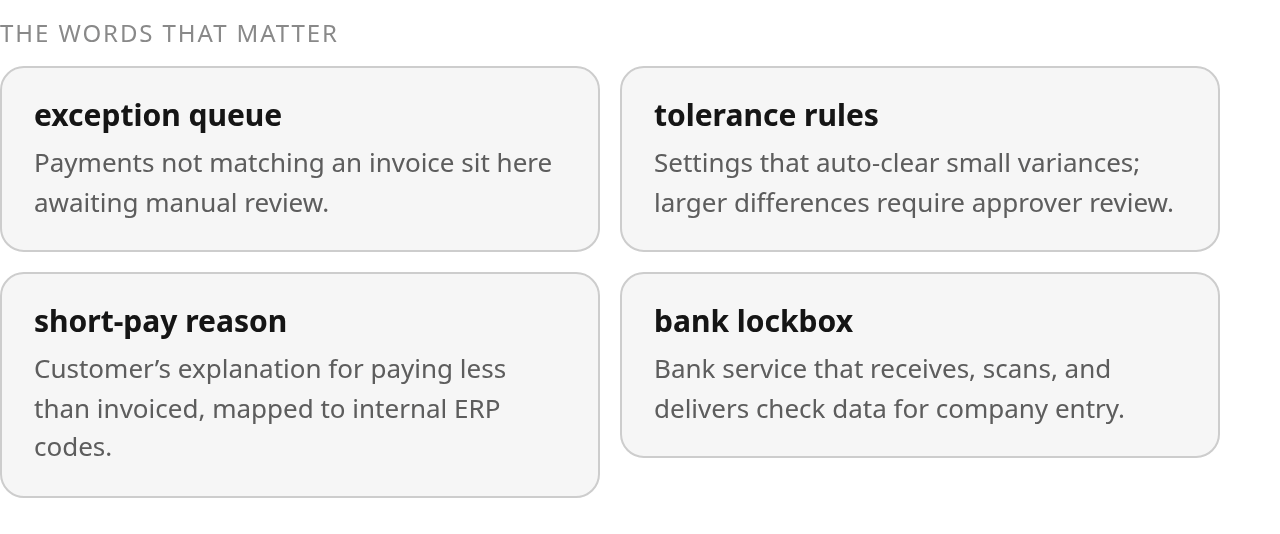
- Short-pays, rounding differences, unapplied cash, and payments that need someone to read the remittance all land in an exception queue that waits on a person.
- Bank lockbox teams often key check data by hand and charge for it. Your cash application staff then verify those same entries against scanned images.
- Subscription autopay often arrives without an invoice reference, so systems post it at the account level and unapplied cash keeps growing.
- Mature tolerance setups often combine a percentage limit with a dollar cap. Accepted variances above tolerance still need a manual write-off, with the approver and timestamp recorded.
- Unified ERP modules remove duplicate entry for invoices, credit memos, and aging. Teams still map each customer’s short-pay reasons to internal codes by hand.
- Spreadsheet matching is still common among small and midsized businesses. It has no version control, no role-based access, and no log of who matched which payment.
Where AR automation actually breaks: the billing-to-cash handoff
My advice is simple: if you want to automate accounts receivable without blind spots, spend your first effort on matching rules and the exception queue, not invoicing features.
The riskiest moment in your AR cycle is the handoff, when an invoice leaves billing and a payment has to find it. Invoicing is the easy part. Your system created the invoice, so it knows everything about it. Payment is a stranger.
Payment and remittance rarely travel together. The cash shows up in your bank, and the note saying what it’s for shows up somewhere else, days apart in some cases. Your team has to reunite them before any match can happen.
Lockbox shows how manual this step still is. Published materials describe bank lockbox teams keying check data by hand and charging fees tied to that entry. Then your cash app team checks those keyed entries against the scanned check and remittance images and fixes what’s wrong. You pay for the same data twice: once to the bank and once in staff hours.
Where do payments fall out of the flow?
Any payment that doesn’t match an invoice exactly drops into an exception queue. The usual causes are unapplied cash with no clear invoice, short-pays, rounding differences, and payments someone can only place by reading the remittance. None clears itself.
Recurring billing adds its own failure mode. Autopay often arrives without an invoice reference. Systems then post payments with thin remittance data at the account level instead of against specific invoices, and for a subscription business that becomes a steady drip into unapplied cash. The customer paid. Your aging report can’t tell which invoice they paid.
Fix this on the invoicing side. Every recurring charge needs an invoice reference that travels with payment.
How do tolerance rules automate accounts receivable matching?
Tolerance rules decide which small variances clear on their own and which go to a reviewer. Start tight: a small fixed dollar amount or a small percentage of invoice value. Loosen it only after your controller signs off. Pairing a percentage limit with a dollar cap means a rounding difference on a small invoice clears, while a large short-pay always reaches a person.
Anything an approver accepts above tolerance still needs a manual write-off entry, with the approver and timestamp recorded. That record is your audit trail.
Writing the rules is configuration work. Getting clean, reunited payment and remittance data to those rules is integration work, and that’s where implementations stall. Test intake against your actual bank files in a live demo. For how this work differs from your ERP’s job, see this breakdown of why ERP systems run GL and inventory while AR automation owns invoice-to-cash.
What legacy ERP AR modules get wrong
A legacy ERP AR module handles the data your company creates well. It struggles with the data your customers send. If you plan to automate accounts receivable on top of one, put your effort into intake, not into the module.
Vendor materials for unified ERP argue that putting AR next to sales and the general ledger removes duplicate data entry. That’s true for invoices, credit memos, and aging, because those start inside the system. Bank files, emailed remittances, and short-pay reasons start outside it. Reviewed documentation from cash application providers describes teams manually mapping each customer’s short-pay reason to the company’s own ERP reason codes. One customer writes “promo deduction,” another writes “PD-04,” and someone translates both. Unifying modules doesn’t change that step.
Why does the spreadsheet become the real system of record?
When the ERP can’t absorb outside data, matching moves to a spreadsheet. Published ERP guides note that many small and midsized businesses still run invoices, payments, and collections through spreadsheets and manual processes, and manual matching is error-prone. A column sorted without its neighbors, a stale customer master, or a bank file in a new format can each misapply cash without anyone noticing until close.
Audit exposure is the bigger problem. When your auditor asks how one payment got split across three invoices, you need the rule that fired, the approver, and the timestamp. A row that says “see email” won’t satisfy that request.
Where should you automate accounts receivable first?
Start where the data comes in. Public materials describe rule setup as the relatively simple part of cash application. Delivering clean data to those rules is harder. Blixo’s public materials describe an intelligent matching engine that pulls from multiple sources through bank and ERP integrations, adds an approval workflow, and learns from manual edits. Verify how that performs against your own bank files.
SaaS and subscription teams face a second layer. If you bill outside the ERP, invoice data has to translate into the ERP before any remittance arrives. That gives reconciliation two separate places to break.
Ask every vendor to walk through both handoffs using your own bank file. And if your volume is low and most payments carry clean invoice references, skip the ERP replacement and fix intake first.
Judging any end-to-end AR platform, Blixo included
A single platform that runs from invoice to reconciled ledger is only worth buying if you can watch one messy payment travel the whole path. Ask for that walkthrough before you sign, including Blixo.
With separate tools, each application reports success on its own step, and your team handles the gaps between them by hand. A single flow closes those gaps only if the invoice, the payment, and the ledger entry share one record.
The demo has to break something
A clean auto-match proves little. Every vendor rehearses that case. Bring three of your own cases instead:
- a short-paid invoice
- a remittance that arrived a day after the cash
- a payment that must be divided across multiple open items
Watch what the system does with each one, and check these points live:
- Tolerance rules: You should be able to set a write-off threshold by amount or percentage. Ask who approves anything above it.
- Confidence scoring: If the matching uses AI, the screen should show why it suggested a match and how confident it is. Ask whether it learns from your corrections.
- Audit trail: Every auto-applied payment should record which rule or user applied it.
- Ledger posting: Find out whether reconciliation updates the general ledger right away or through a scheduled sync.
Missing documentation isn’t a missing feature
Public materials rarely spell out confidence thresholds or the full list of bank, processor, and ERP connectors. Absence of evidence isn’t absence of the feature. A capability you can’t find in the docs may still exist, so put the question on the demo agenda. Get the connector list in writing, and confirm it supports your bank’s file format and your ERP version.
Independent reviews comparing ease of use against ERP AR modules are thin. A reference call with a company that matches your size and billing model tells you more than any review site.
You may not need a single platform at all. If your invoice volume is low and remittances arrive clean, your ERP’s built-in matching may be enough. The switch pays off when your exception queue, not your invoice count, keeps your team late at month-end.
Your next move: a gated pilot and savings you can defend
Pilot automated matching against a measured baseline, start with tight tolerances, and count only savings you can trace to removed manual work. If you need to defend the result to your controller, leave DSO promises out of the business case. They need evidence a pilot won’t produce.
Reviewed implementation accounts describe automated cash application as a configuration project. The same accounts flag bank connectivity, data readiness, and complex payment scenarios as the places teams needed a playbook. Budget pilot time around data intake, not rule writing.
Four stages, each with a gate
-
Process review. Map every channel where payments and remittances arrive, and note who matches each one today. Record four baseline numbers: unapplied cash balance, exception-queue volume, manual corrections per period, and the count and value of variances your team clears by hand. Without them, you have nothing to measure the pilot against.
-
Control design. Set role-based access so the people who match payments can’t also approve write-offs. Require an audit trail that logs the rule that fired, the approver, and the timestamp for every match, and confirm during evaluation that it exists.
-
Pilot. Auto-clear with the tightest tolerances your team is comfortable with, so only small, obvious variances skip review. Route everything else through an approval step. Blixo’s public materials describe an approval workflow for matched payments, which should be verified in a live demo. Loosen thresholds only after the controller has reviewed what the tight ones cleared.
-
Rollout. Retire the reconciliation spreadsheet in phases, one payment channel at a time. Keep the controller’s sign-off as the gate between channels.
Savings you can trace to removed manual work
Start with the manual entry you remove. Count how many payments your team keys or matches by hand each month, estimate the time each takes, and multiply by your loaded staff cost. Add any per-item fees your bank charges for remittance keying, using the rates on your own statements. That gives you a monthly figure you can defend, before you count the time spent correcting those entries.
Treat that figure as a floor. The larger return usually shows up in a shorter exception queue and in an audit trail that answers questions without a reconstruction exercise.
If you process only a handful of payments a month and your remittances arrive clean, this staged rollout is more structure than you need. A simple tolerance rule and a monthly review will do.
Common Questions
Does moving AR into a unified ERP eliminate manual cash application work?
Not entirely. The remaining effort is concentrated in external inputs: interpreting customer remittance formats, resolving missing references, and deciding whether a deduction reflects a valid dispute or an accounting adjustment. Those decisions still need defined ownership even when invoices and ledger records share an ERP.
Why does unapplied cash keep growing for subscription businesses?
The underlying risk is not limited to payment collection. Billing data must also reach the ERP in a form that reconciliation can use. When subscription billing and accounting operate in separate systems, teams should test that transfer as carefully as the bank connection.
What should happen when an approver accepts a variance above the tolerance threshold?
The approval should be visible alongside the resulting accounting treatment. During a review, confirm that the workflow distinguishes an accepted commercial deduction from an unresolved exception and that the resulting ledger entry can be traced back to the original payment.
Can Blixo’s matching engine handle my bank’s file format?
Blixo’s public materials describe an intelligent matching engine that pulls from multiple sources through bank and ERP integrations, but they don’t list every connector or file format. Get the connector list in writing and confirm your bank’s file format and ERP version during a live demonstration.
Why shouldn’t you lead an AR automation ROI case with DSO improvement?
DSO can move for reasons unrelated to cash application, including billing timing, customer mix, and collection activity. A cleaner business case starts with work the project directly removes: manual handling, correction effort, reconciliation backlog, and bank processing charges. That evidence is easier for a controller to validate than a broad promise about receivables timing.