

ERP Accounts Receivable Modules Miss Remittance Matching: Bolt On AR Automation

Quick Answers
- ERP cash‑application tools often use invoice‑number matching. This fails with short‑pays or bundled invoices.
- Some AR teams see lower overdue receivables and faster capital release after AI‑driven automation, but results vary.
- Providers and finance teams report higher match rates with automated tools, though performance depends on remittance complexity.
- Automating follow‑up on tail accounts can turn neglected balances into recurring cash recovery.
- Manual remittance capture forces analysts to key data from emails and lockbox files, delaying posting and clouding forecasts.
In short
ERP cash application works when remittance data is clean and predictable. Real payments often include deductions, consolidated deposits, portal downloads, and scanned documents. Basic matching rules cannot handle these exceptions. A bolt‑on AR automation layer becomes worthwhile when exceptions consume analyst time, slow posting, and blur forecasts.
What the Numbers Say About ERP‑Only Cash Application
ERP‑only cash application handles simple receipts well but struggles with fragmented payment data from banks, emails, lockboxes, and portals. The issue is not missing cash; finance cannot confidently apply it without extra investigation.
Public materials and vendor surveys suggest manual or ERP‑only workflows often have higher DSO than dedicated AR automation. Even a small shift in collection timing can lock large amounts of idle cash. Surveys also show companies adopting AR automation expect faster processes and measurable DSO improvement within a year.
Performance Benchmarks: Manual vs. Bolt‑On AR Automation
| Metric | ERP‑Only / Manual | AI Agent‑Driven AR Platform |
|---|---|---|
| Cash application match rate | Limited to invoice‑number matching; exceptions vary | Depends on configuration and remittance quality; some claim higher rates |
| Exception rate | Varies by remittance complexity | Varies; platforms aim to reduce exception queues |
| Posting lag | Multi‑day manual keying | Same‑day or next‑day with automation |
| Average DSO | Varies by industry and portfolio | Reductions claimed but vary by baseline |
| Implementation timeline | Varies by platform and ERP setup | API connections take days to weeks; full go‑live depends on scope |
| Portfolio coverage | Top accounts prioritized; tail often ignored | Can include long‑tail customers |
Customer examples illustrate value. One distributor used AI‑driven automation to improve overdue receivables, release capital, and expand analyst capacity across many branches. Another company applied automation to low‑touch accounts, turning neglected aging balances into recurring cash recovery.
When a Bolt‑On Tool Makes Sense (and When It Doesn’t)
Skip the bolt‑on if payment patterns are simple: one remittance per invoice, few deductions, and a native ERP match rate that already covers most cases. Integration effort may outweigh gains.
Consider a dedicated AR automation platform when payment research becomes a regular workload. Look for recurring deduction disputes, portal‑based document retrieval, and analysts spending significant time chasing data. Some finance teams have mailroom staff scanning paper checks and remittance documents daily. Moving this workflow to an automated system with bank‑feed integration and intelligent remittance capture removes the scanning bottleneck.
Base ROI on your own exception queue, not vendor averages. Before signing, test how the platform handles your actual payment files, deduction formats, customer references, and ERP posting rules. Benchmarks are useful, but the proof is handling your messy daily remittance data.
Why Remittance Matching Matters
Remittance matching links incoming payments to the correct invoices, balances, and line items. Many mid‑market AR projects succeed or stall at this step. When payment context lives outside the ERP, cash sits in the bank while accounting cannot post it accurately.
Exceptions hold up posting, distort aging reports, and weaken cash forecasts. This happens when customers submit payment information through channels that do not sync cleanly with the ERP, forcing finance to retrieve and reconcile supporting detail.
Manual remittance capture creates a permanent productivity ceiling
The problem is not invoice count alone; it is the variety of customer communication methods. One receipt may contain several open items and a dispute note. Another may arrive before the supporting file appears in another channel. Each mismatch forces analysts into research mode.
This manual burden scales poorly. Unresolved receipts delay posting and pull skilled AR staff from higher‑value work such as dispute resolution and collection strategy. Automation shifts the team from clerical reconstruction to judgment‑based decisions.
Short‑pays and deductions expose the limits of invoice‑number matching
Short‑pays and deductions create mismatched amounts despite recognizable references. Freight deductions, trade claims, and unexpected discounts require validation and coding before full application.
Without automation, analysts locate backup documentation, map deductions to reason codes, and route disputes. High‑value invoices cannot be written off without scrutiny, yet manual workflows often lack visibility to rank recovery work by value or likelihood. This leads to margin leakage and wasted time.
Common Gaps in ERP Accounts‑Receivable Modules
Mid‑market ERPs were not built as remittance‑intelligence engines. They support core accounting, invoice records, and posting logic, but rely on clean references and structured inputs. Mixed‑channel payments or incomplete details leave the ERP waiting for human interpretation.
Manual entry stretches posting timelines across billing cycles, causing DSO drift because cash is not recognized against open items. Subscription billing adds complexity: usage overages, tiered seats, and prorations require line‑level context that basic rules miss.
When Basic Matching Fails
Basic matching fails when a payment does not map neatly to a single open receivable. A bulk wire may cover multiple subsidiaries. A customer may accept some line items and dispute others. A paper check may arrive with scanned remittance documents. The ERP can store the final posting but cannot infer allocation on its own.
Some AI‑driven AR automation platforms capture line‑item remittance from multiple channels and prepare postings back to the ERP. In certain organizations, automation removes manual entry, allowing the same team to handle higher payment volumes; results depend on remittance complexity and configuration.
Bolt‑On AR Automation: How It Closes the Gaps
When native AR cannot interpret payment behavior, finance leaders face two options: add manual capacity or add a specialized automation layer. Bolt‑on AR platforms close the gap through four capabilities: remittance capture, intelligent matching, exception routing, and ERP sync.
Remittance Capture Across Every Channel
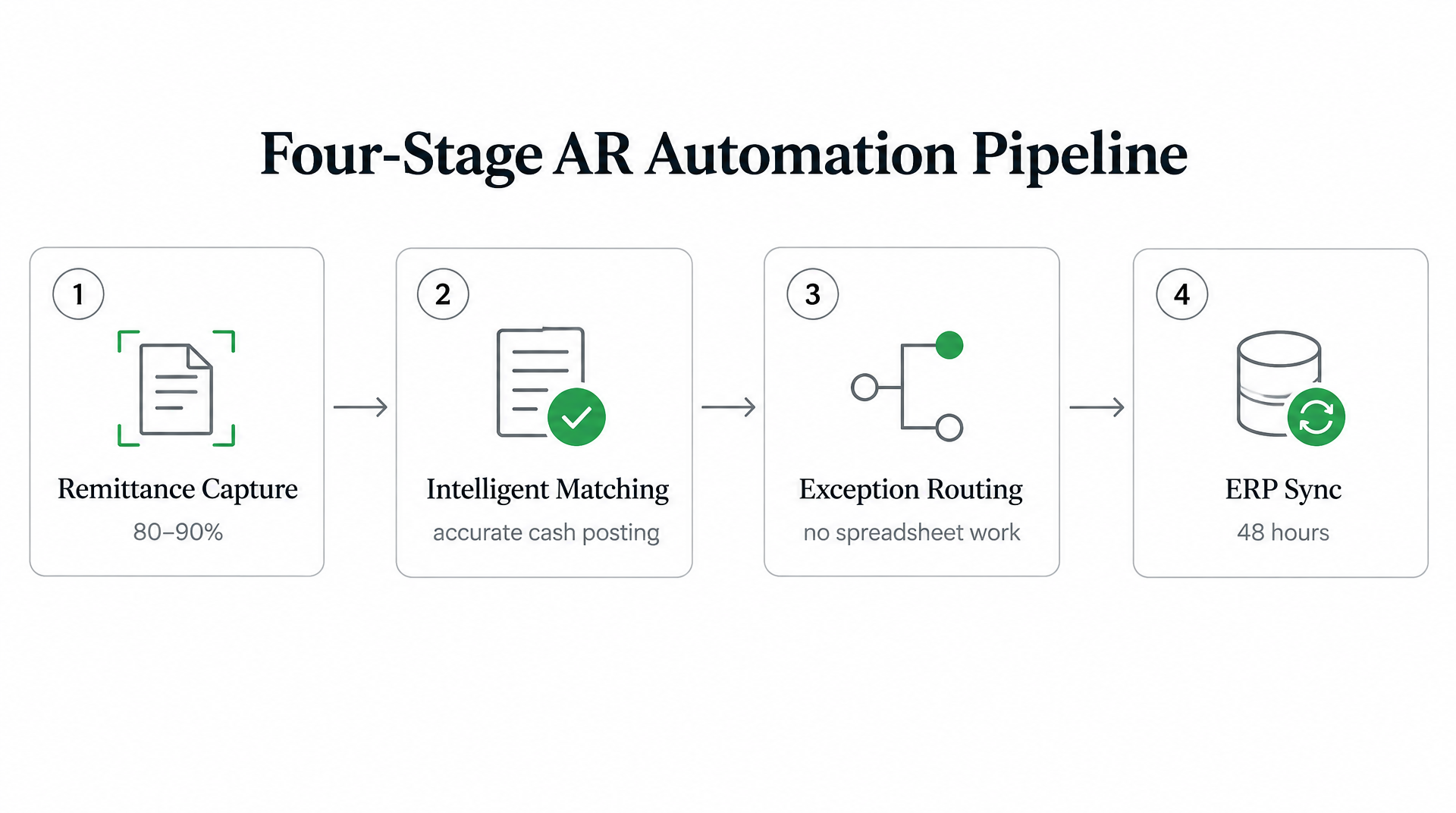
Bolt‑on platforms pull remittance data from email, EDI files, lockbox scans, and other sources without manual retrieval. The result is faster receipt visibility, cleaner daily cash application, and fewer handoffs between banking data and accounting. Teams report shorter posting cycles, though the extent depends on data quality and customer behavior.
Intelligent Matching and Exception Handling
After capture, the matching engine compares payment references, invoice data, customer behavior, and deduction detail to recommend accurate application. Exceptions still occur but arrive with supporting context, allowing analysts to decide quickly.
Platforms sync matched payments to the ERP via APIs, updating aging reports, DSO dashboards, and cash‑flow forecasts. Some finance teams note shorter close cycles after bi‑directional ERP sync, with cleaner aging data revealing hidden collection opportunities.
Integration & Rollout Blueprint
A successful rollout starts with the most friction‑prone data sources: bank feeds, lockbox output, AR inboxes, customer remittance files, and ERP open‑invoice data. The goal is not to replace the ERP but to give it cleaner, structured payment instructions.
Begin by mapping current exception categories: missing remittance, partial payments, deductions, unapplied cash, portal‑only remittance, and reference issues. This test set prevents the rollout from being judged only on clean transactions.
Next, confirm how the platform will sync with your ERP. Validate posting rules, reason codes, write‑off thresholds, user permissions, and audit trails before expanding automation. A small pilot using real payment data is more useful than a generic demo because it exposes actual customer behaviors.
Finally, define ownership for exceptions automation cannot resolve. The best implementations accept that some receipts require manual touch, but they make those exceptions clearer, faster to route, and easier to measure.
Building the ROI Case Your CFO Will Actually Sign
CFOs want three numbers: DSO reduction, working‑capital release, and cost‑to‑collect improvement. Start with baseline ERP data: current DSO, exception volume, unapplied cash, and staff time spent researching payments. Translate improvements into dollars by showing how faster posting reduces borrowing needs, improves forecasts, and boosts collector productivity.
When finance leaders discuss AR automation, framing remittance matching as trapped working capital resonates. Every unresolved payment is cash the business cannot fully use in reporting or collections. Many mid‑market leaders view AR automation as a working‑capital lever because it releases cash sooner through better process control.
Build the business case by comparing expected benefits—labor hours saved, cash‑flow improvement, reduced borrowing costs, and cleaner aging data—against software and implementation expenses. Present current pain, quantified baseline, proposed workflow, projected KPI lift, rollout plan, and payback assumptions. CFOs gain confidence when a pilot proves strong auto‑match performance on real transactions and shows that exceptions receive better context.
Quick Questions, Straight Answers
1. What happens to payments when my ERP can’t auto‑match the remittance data?
They stay unresolved until the AR team identifies the correct application. This requires researching documents, confirming intent, and allocating cash before updating the ERP.
2. How do I know if my company’s remittance complexity justifies bolt‑on AR automation?
Look at exception volume and repeatability. If the same problems appear weekly and consume analyst time, a bolt‑on deserves evaluation. If most receipts post cleanly, the case is weaker.
3. Why do short‑pays break invoice‑number matching even when the customer references the correct invoice?
The reference alone does not explain the amount variance. Finance still needs to know whether the difference is a valid deduction, discount, dispute, or collectible underpayment.
4. Can AR automation handle subscription billing with variable line items like usage overages?
Yes, if the platform captures and interprets line‑level remittance detail. This is essential for recurring invoices with usage changes, seat adjustments, or prorated charges.
5. What prevents a company from just hiring more analysts instead of automating remittance capture?
Hiring adds capacity but does not fix scattered payment information. Each new analyst still spends time collecting, keying, and reconciling data that automation can capture more consistently.