

Connect Cloud Accounting to AI Chasing and Collect Past-Due Invoices Sooner

Key Takeaways
- US small businesses are owed an average of $17,500 in unpaid invoices, and recovery odds drop 60% once an invoice passes 90 days overdue.
- Connecting cloud accounting to AI chasing syncs invoice, payment, and customer data automatically. No more manual exports or stale spreadsheets.
- Teams running AI in accounts receivable usually cut DSO by 10% to 30% within six months.
- Linking QuickBooks Online data to an AI collections agent can pull payments in 5 to 15 days faster.
- AI chasing sorts accounts by aging bucket and goes after the highest-risk invoices first, instead of chasing everyone with equal urgency.
- A failed SaaS renewal signals possible churn, which is why a personalized follow-up beats a cold, generic dunning email.
- The AI reads each account and responds like a person would, tailoring reminders instead of firing identical messages at everyone.
Why connecting cloud accounting to AI chasing matters
Late payments quietly bleed the businesses that can least afford it. US small businesses are owed an average of $17,500 in unpaid invoices, and once an invoice crosses 90 days overdue, the odds of ever collecting drop by 60%. Route your QuickBooks Online recurring payments into an AI chasing system, and those aging invoices stop slipping through the cracks.
For subscription SaaS, the problem is sharper. A failed renewal isn’t just a missed payment. It’s a customer edging toward the door. Cold, generic reminders make it worse. Connect your cloud accounting data to AI-powered chasing and the outcome changes: instead of firing the same dunning email at everyone, the system reads each account and responds like a person would.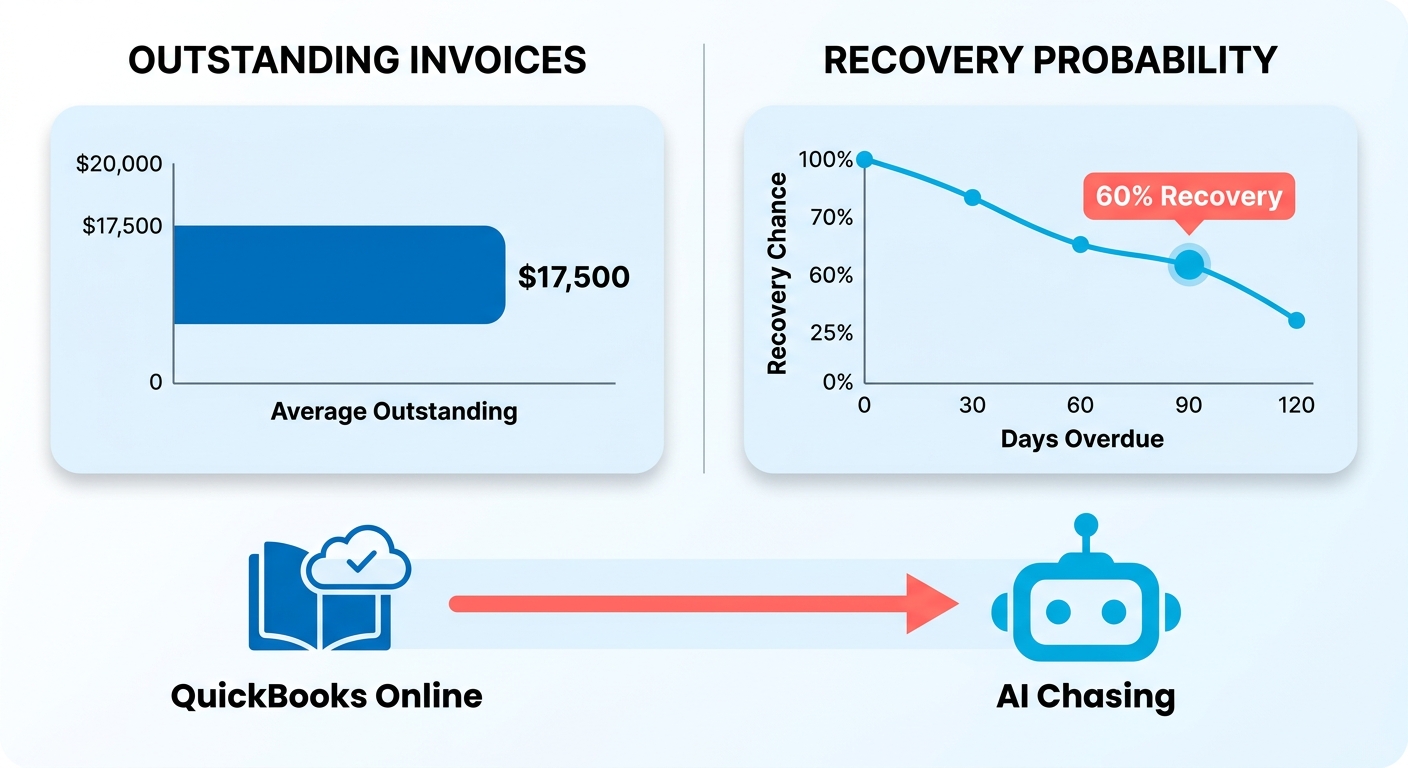
What connecting cloud accounting to AI chasing actually does
Your invoice, payment, and customer data sync automatically, so an AI collections agent always knows who owes what and when. That kills the manual exports and the stale spreadsheets.
Once connected, the AI tracks which invoices are past due and triggers follow-up on its own. It groups accounts by aging bucket. It knows the difference between “due soon” and “very late.” And it goes after the accounts most at risk first, instead of chasing everyone with the same urgency.
The payoff shows up in the numbers. Teams deploying AI in accounts receivable typically see a 10% to 30% drop in DSO within six months. Some collect 5 to 15 days faster than with manual methods. One AI payments agent got businesses paid 4 days faster on average just by sending reminders.
Who gets the most out of AI collections
Any business carrying past-due invoices benefits, but subscription SaaS companies gain the most. Their revenue lives on recurring billing, and a single failed charge can kick off a churn spiral. AI chasing turns each of those moments into a conversation instead of a threat.
Small businesses feel the relief right away. They rarely have a dedicated collections team, so automating reminders stops owners from spending their evenings writing follow-up emails.
Enterprises win on scale. AI-driven worklist prioritization helped one large consumer goods company cut DSO by 28% and save over 1,000 hours a year. A mid-size service company cut manual payment-application time by 90% after moving onto an AI platform.
AI chasing vs. cold reminders
| Capability | Manual Reminders | Basic Automation | AI-Powered Chasing |
|---|---|---|---|
| Personalization | None | Templated | Tailored per customer |
| Risk prediction | No | No | Flags late payers early |
| Aging prioritization | Manual | Rule-based | Behavior-based |
| Cloud accounting sync | Copy-paste | Partial | Real-time |
| Churn impact | High | Moderate | Reduced |
| Setup effort | Low | Medium | Medium |
Setup difficulty lands at moderate. You connect your cloud accounting system, set your payment terms, and let the AI learn from payment behavior. Once the workflows run themselves, maintenance is low.
The real difference is tone. AI reads customer engagement patterns and sends personalized reminders that sound like they came from someone who actually knows the account. That keeps the relationship intact while the invoice gets paid. For SaaS teams, protecting the relationship is protecting the recurring revenue.
Still weighing the move to connected systems? This breakdown of cloud accounting covers why the synced-data foundation matters before you bolt AI on top.
Finding past-due invoices in your cloud accounting system
Past-due invoices hide in plain sight. Your cloud accounting system already logs every unpaid balance, but raw data doesn’t chase itself. Before an AI chatbot can turn a cold reminder into a real conversation, it needs clean, sorted, prioritized invoice data. That starts with how you configure the system holding your recurring payments and one-off invoices.
The goal is to surface the accounts that matter most, in the right order, so your AI layer knows who to talk to first. Skip this step and even the smartest chatbot chases the wrong customer with the wrong tone.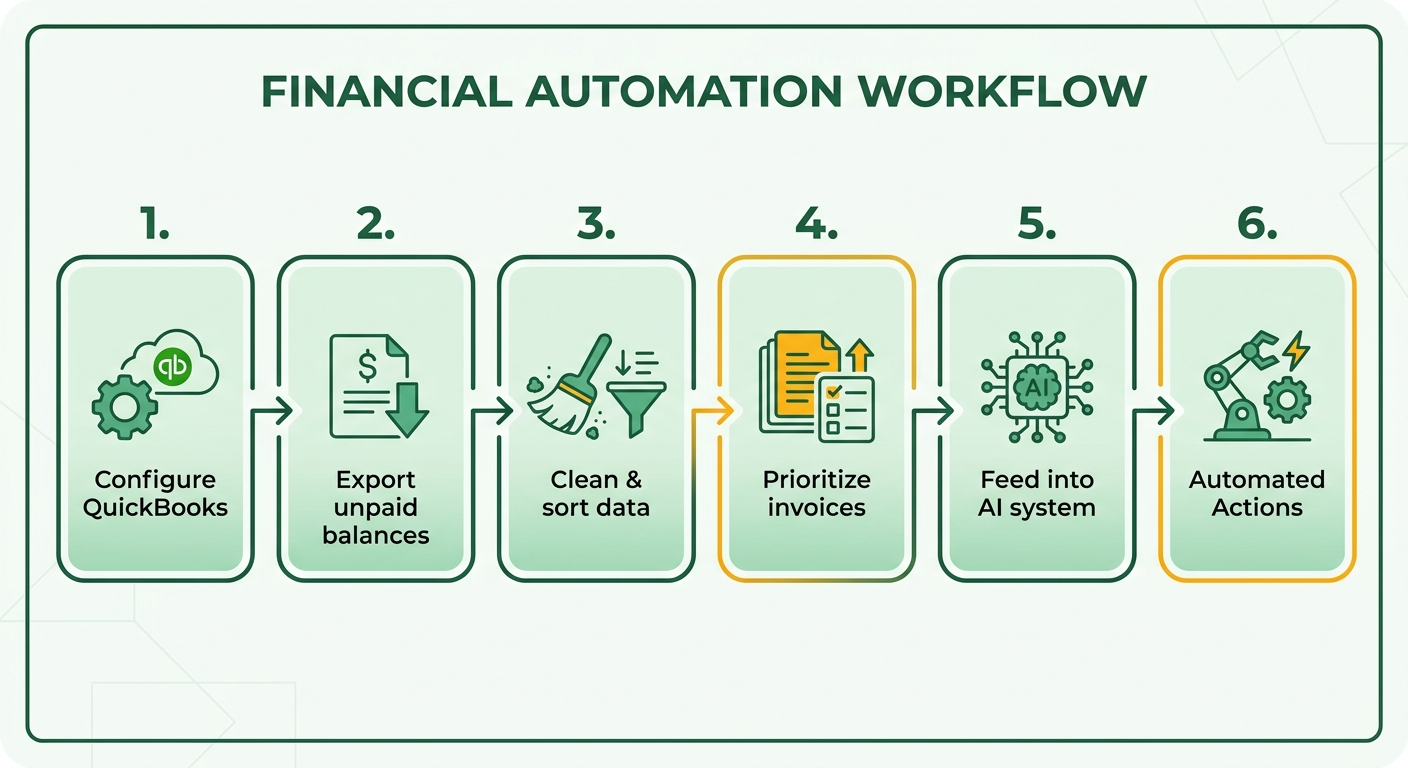
Setting up tracking for recurring payments and overdue invoices
Aging buckets are the foundation. Group every open invoice into four windows: 0-30 days, 31-60 days, 61-90 days, and beyond 90 days. It mirrors how finance teams triage overdue accounts, and it gives your AI a clear risk gradient to work from.
For subscription SaaS, a failed renewal usually lands in the freshest bucket. That’s your best shot. Configure your accounting system to flag failed recurring charges the moment they bounce, not weeks later. Early visibility is what separates a friendly nudge from a churn event.
Set custom fields for customer lifetime value and renewal date. When your chatbot pulls that context, it can talk to a long-term subscriber differently than a first-month trial.
Which filters and alerts actually surface high-priority accounts
Filter by days overdue first, then by balance size and account value. Teams that focus on their most overdue accounts recover more, so let your filters push those to the top. A $4,000 balance at 75 days should outrank a $200 balance at 15 days.
Set automated alerts to trigger follow-up without manual checking. AR automation tools track which invoices slip past due and fire the next step on their own. This is the handoff point where your data pipeline meets AI chasing.
Layer in risk scoring based on payment behavior. Customers who always pay late need a different cadence than reliable ones who just missed a card update. Feed that signal to your chatbot so it adjusts its opening line.
Getting your invoices organized before AI chasing
Clean data beats clever prompts. Reconcile payments continuously so your AI never chases an invoice that already cleared. Nothing torches a subscriber relationship faster than a demand for money they already paid.
Keep a structured follow-up tempo. Assign each aging bucket its own outreach rhythm, then let the AI personalize the actual message inside that schedule. The structure keeps invoices visible until they’re resolved; the AI keeps the tone human.
One result worth noting: a global manufacturing company used AI-driven, risk-based collection to cut Days Sales Outstanding by over 10 days and drop overdue accounts by 25%. That came from prioritizing the right invoices first, not from sending more reminders.
Once your buckets, filters, and risk scores are live, your accounting system stops being a passive ledger. It becomes the sorted, prioritized feed an AI chatbot needs to reach the right subscriber with the right conversation, before a missed payment becomes a lost customer.
Prioritizing overdue accounts with AI analytics
Sorting overdue accounts by hand wastes time on the wrong customers. AI analytics fixes that by scoring every open invoice for payment likelihood, then telling your chatbot who to talk to first. Feed your accounting records into the scoring engine and it reads payment history, invoice age, and behavior patterns to rank accounts in real time.
This matters most for subscription SaaS. A failed renewal from a loyal, long-paying customer needs a different touch than a chronic late payer. AI prioritization catches that difference. It hands your transaction data to a chatbot that opens warm, specific conversations instead of blasting identical dunning notes at everyone.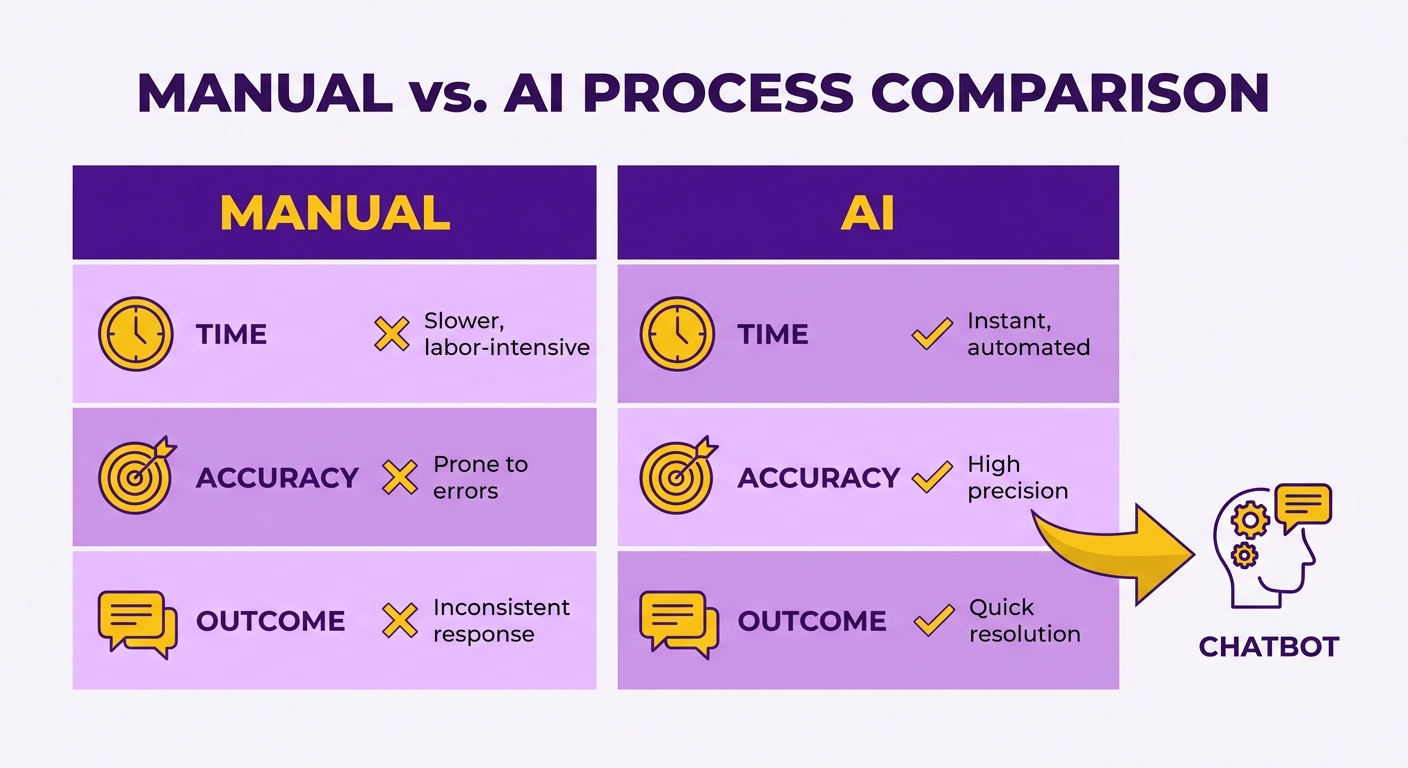
How machine learning predicts who’ll actually pay
Machine learning scores each invoice on the odds it gets paid, using payment history, invoice age, and customer patterns to rank collection priority. The models pull signals a human collector can’t process at scale. One finance expert put it plainly:
“AI connects semantic dots between customer behavior, payment patterns, and historical data-what collectors can’t do.” - Aravind Gopalan
That semantic reading is what feeds a smarter chatbot. It knows a customer who always pays on day 32 doesn’t need a stern warning on day 31. It knows which accounts are drifting toward real risk. The scoring engine weighs dozens of variables at once: seasonal payment dips, invoice size relative to a customer’s usual spend, even how fast past disputes got resolved. A collector eyeballing a spreadsheet catches maybe three of those. The model catches all of them and re-ranks the queue the moment new data lands.
That depth changes which accounts rise to the top. Two invoices at the same dollar amount and the same age can carry wildly different risk once the model factors in behavior. Prioritizing by that blended score, instead of by age alone, sends your chatbot after the accounts most likely to slip before they actually do.
Wiring AI analytics into cloud accounting
Feed clean, unified invoice data into the AI layer and let it score accounts continuously. The engine reads that feed in real time, updating priority as payments land or renewals fail.
Real-time cash application is what keeps scores accurate. AI-powered cash application resolves missing payments in minutes that would otherwise eat hours of spreadsheet work. When a payment matches automatically, the chatbot stops chasing that customer instantly. No awkward “you still owe us” note to someone who already paid.
That accuracy protects the relationship. Nothing pushes a subscriber toward churn faster than getting dunned for an invoice they’ve already settled. Continuous scoring closes that gap. One company brought payment processing in-house with AI-driven automation and saved $2.5M in financial services costs while hitting a 98% auto-apply rate.
Why prioritization cuts churn
Prioritization isn’t only about collecting faster. It decides the tone your chatbot uses. A high-value account flagged as low-risk gets a gentle nudge. A pattern-breaking late payer gets firmer, earlier outreach.
Match the conversation to the risk score and you stop treating good customers like deadbeats. Segmenting this way keeps your best subscribers out of aggressive collection flows entirely. Studies of subscription businesses put the cost of acquiring a replacement customer at roughly five times the cost of retaining one, so every good account you don’t alienate protects real margin. Your team gets to focus on disputes and relationships instead of manual triage.
For SaaS, the payoff is retention. When a renewal fails, the chatbot opens a real conversation shaped by that customer’s history. Cold reminder becomes warm check-in. The account gets recovered without feeling hunted.
Automating AI-powered email reminders and templates
Cold reminder emails fail because they treat every customer the same. AI-powered templates fix that by pulling account details, payment history, and tone into each message automatically. Feed your accounting data into these templates and the system writes a follow-up that sounds like a person, not a form letter.
This matters for subscription SaaS. A failed-renewal reminder that reads like a warm check-in keeps the relationship intact. One that reads like a threat pushes a customer toward canceling. The AI builds each message around who the customer is and what they owe.
Setting up AI-powered email templates
Start with a base message for each aging stage, then let the AI fill in the customer-specific details before it sends. You build the skeleton once. The system personalizes every send.
Create separate templates for each stage: due soon, due now, overdue, and very late. Each needs a different tone. A “due soon” nudge stays friendly. A “very late” message gets firmer without turning hostile.
The AI reads the account data and adjusts. It slots in the customer name, invoice number, amount, and days overdue. It picks tone based on payment history, too. A loyal long-payer who missed one renewal gets a softer note than a chronic late payer. Keep the goal in mind:
“The goal is collection, not confrontation.” - QuickBooks Guide
How AI reminders handle the follow-up
The AI sends scheduled follow-ups on a set cadence so no overdue invoice slips through. You define the tempo once. The system chases every account until the balance clears.
Set a schedule tied to aging buckets. The chatbot fires the first reminder as payment comes due, then escalates the tone at 30, 60, and 90 days. Each message stays personalized, so the customer never feels blasted with the same note twice.
Timing drives response rates. Reminders sent on a weekday morning see roughly 20% higher open rates than those sent late on a Friday. The AI schedules each send for the window when a given customer historically opens and acts, instead of firing at random.
Personalizing templates without sounding like a robot
Tie every message to real account behavior, offer clear payment options, and flag late fees before you apply them. Vague, generic reminders get ignored. Specific ones get paid.
Reference the exact invoice and give the customer an easy way to pay right from the email. State any late fee upfront so it never feels like an ambush. Late fees run 1.5% to 3% per month, and your contract should spell that out before the first reminder goes out.
Take a professional services firm managing hundreds of monthly retainers. Their AI reminder system flags failed payments, sorts them by risk, and sends each client a tailored follow-up. High-value accounts get a personal check-in. Chronic late payers get a firmer schedule. The finance team stops manually chasing and reviews only the accounts that actually need a human.
That’s the payoff. Personalized, automated reminders recover cash sooner and keep subscription customers from drifting toward churn.
Tracking and scaling collections with AI dashboards
A dashboard turns your collections effort into something you can actually watch and improve. It pulls live numbers from your AI chasing system into one view: how many accounts replied, how fast payments landed, how much cash came in. Feed your financial records into it and every renewal and overdue invoice becomes a data point you can track and act on.
For subscription SaaS, this is where scaling gets real. You’re not guessing whether a warmer chatbot tone reduces churn. You see it. The dashboard shows which conversations recovered a failing renewal and which accounts still slipped away, so you can adjust the AI’s approach before more customers cancel.
Which metrics to track first
Payment recovery rate and Days Sales Outstanding (DSO) are your two anchors. Recovery rate tells you what share of overdue balances the chatbot actually collected. DSO tells you how long, on average, cash sits unpaid after a sale.
Watch these weekly, not quarterly, so you catch a stalling metric early. A single week of rising DSO can signal a broken payment link or a message that’s landing wrong, before it snowballs into a bigger cash gap.
Beyond those two, track:
- Response rate: The share of chased accounts that reply. AI reminder cadence has driven 24% higher collection response rates.
- First-contact resolution: The share of overdue accounts settled after a single chatbot exchange. This tells you whether your opening message does the heavy lifting or leaves customers stuck.
- Staff time saved: Hours freed from manual chasing. Reported gains reach 70% less staff time on follow-ups.
Turning dashboard insights into strategy
Read the dashboard for patterns, then change how the chatbot talks. If loyal customers with a failed renewal respond better to a soft check-in than a payment demand, the data proves it. Adjust the AI’s tone for that segment and re-run.
Prioritization is where insights pay off most. Sort your open balances by size and age, and let the dashboard surface the accounts where a nudge recovers the most cash fastest. One AR team found that focusing the chatbot on the top 20% of overdue balances by value cleared more than half their outstanding total in a single billing cycle. That’s the logic your dashboard applies: work the highest-impact accounts first.
Risk scoring feeds the loop. Categorize customers by payment behavior, then let the dashboard flag which segments are drifting toward churn. Accounts that skip two consecutive renewal reminders warrant a different track than a one-time late payer.
Scaling without adding headcount
The point of a dashboard is scale. You grow the subscriber base without growing the collections team. One reported outcome: 100% of AI users saw AR scale without added staff, and three in four watched DSO drop by six or more days.
Keep a human on the numbers that matter. Let the AI handle volume and cadence. You review the dashboard, spot the churn-risk segments, and refine the conversation. That balance is what keeps chasing from feeling cold as you grow.
Still moving to connected systems? The case for cloud accounting at small businesses is what makes this kind of live tracking possible in the first place.
Compliance and legal safeguards in AI collections
When your AI chatbot chases customers, it handles personal and financial data at every step. That comes with legal obligations you can’t ignore. The same customer data that powers warm, personalized reminders also falls under privacy laws like GDPR in Europe and the CCPA in California. Get compliance right and your automation stays an asset. Get it wrong and a single reminder becomes a liability.
This matters more for subscription SaaS than most billing setups. You store payment methods, contact details, and behavioral patterns to keep recurring payments flowing. That standing data is exactly what regulators scrutinize. So the goal is simple: chase past-due invoices in a way that’s transparent, fair, and defensible.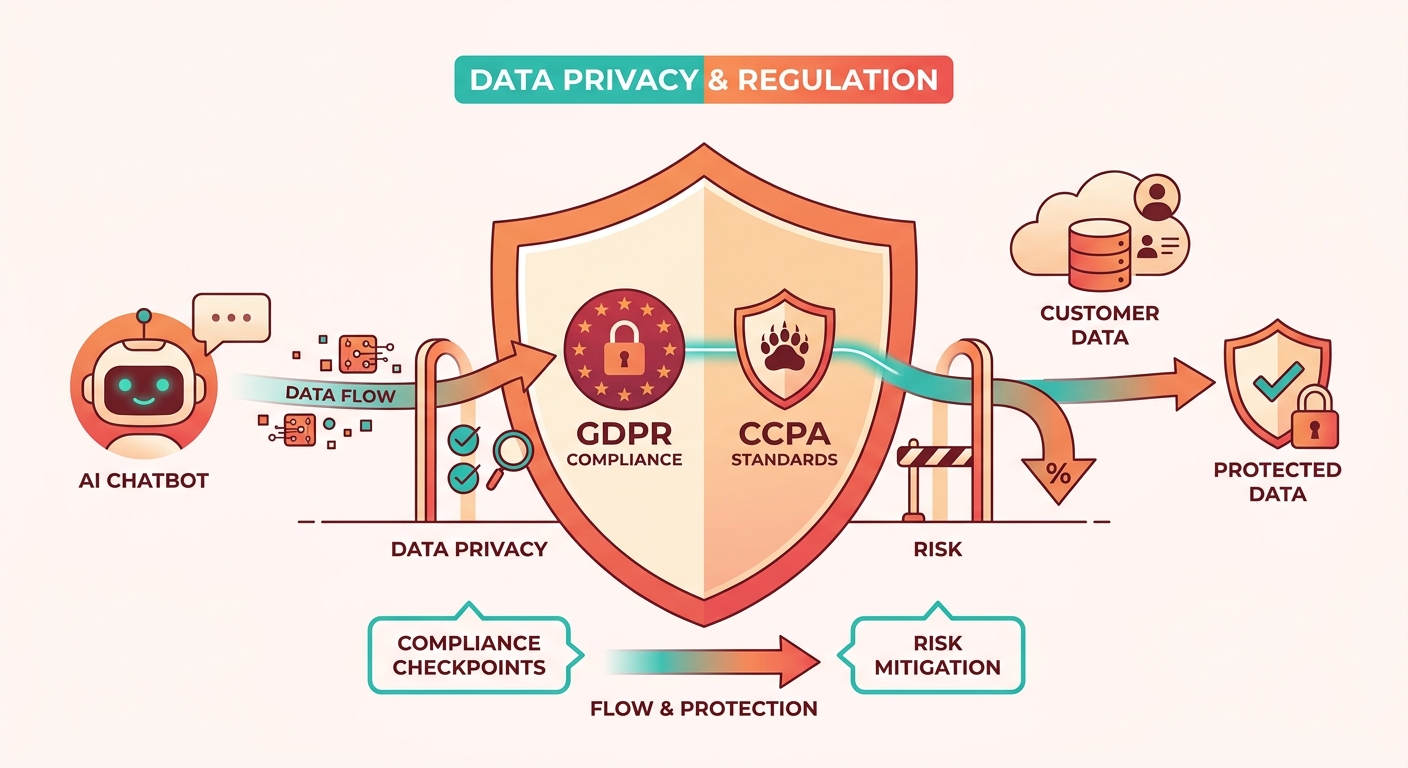
Which laws apply to AI-powered collections
Data privacy laws govern how you collect, store, and use customer information in automated chasing. GDPR applies if you bill anyone in the EU. CCPA applies to many California customers. Both give people the right to know what data you hold and to request its deletion.
Beyond privacy, debt collection has its own rules. In the US, fair collection standards limit how and when you can contact people about money they owe. In the UK, late-payment law sets the terms: overdue commercial invoices accrue interest at 8% plus the Bank of England base rate, currently 4.25%, and businesses can claim compensation from £40 to £100 depending on the amount owed. Your AI messages should reflect those entitlements accurately, not overstate them.
Keeping AI chasing compliant
Compliance comes down to three habits: minimize the data you feed the system, log every automated action, and give the customer a clear human off-ramp. Store only what you need to chase the invoice. Keep an audit trail of every reminder the chatbot sends. And make it easy for a person to reach a real person.
Transparency is where AI chasing earns trust instead of complaints. Tell customers when an automated system is contacting them. When your chatbot reads payment history to soften its tone, that personalization should never feel like surveillance. A reminder that says “we noticed your renewal didn’t go through” builds goodwill. One that recites intimate account details does the opposite.
Fairness matters just as much. An AI that scores accounts must not chase one customer harder based on biased patterns. Review your prioritization logic. Make sure a loyal, long-paying subscriber and a first-time late payer both get the same baseline respect, even if the timing differs.
What fair AI chasing looks like in practice
Take a digital agency whose monthly retainer payment fails for a client who’s paid on time for two years. A compliant AI setup pauses before blasting a dunning notice. It sends a warm, plainly-labeled automated check-in, offers a self-service portal to update the card, and flags the account for human follow-up if the silence continues.
That approach recovers the payment without risking the relationship. And it holds up if a regulator asks how you handled the data. Once an invoice crosses 90 days overdue, the odds of recovery drop sharply, so compliant speed beats aggressive chasing every time. Build the guardrails in early, and your AI stays both effective and defensible.
Frequently Asked Questions
1. How long does it take to connect QuickBooks Online to an AI collections agent?
Setup difficulty sits at moderate, typically taking a few hours to a day. You connect your cloud accounting system, set payment terms, and let the AI learn from payment behavior. Ongoing maintenance is low once automated workflows run independently, requiring only occasional review rather than daily manual intervention.
2. Will AI chasing work if I use a cloud accounting platform other than QuickBooks Online?
Most AI collections agents integrate with major cloud accounting systems beyond QuickBooks Online, including Xero and NetSuite. The core requirement is clean, unified invoice data that syncs in real time. Any platform that logs invoices, payments, and customer records can feed the AI scoring engine effectively.
3. Can AI collections accidentally chase a customer who already paid?
Real-time cash application prevents this. AI-powered systems match incoming payments automatically, resolving in minutes what once took hours of spreadsheet reconciliation. When a payment matches, the chatbot stops chasing that customer instantly. One company reached a 98% auto-apply rate, protecting relationships from awkward “you still owe us” errors.
4. What happens if a customer disputes an invoice during AI chasing?
Compliant AI setups flag disputed accounts for human follow-up rather than escalating automatically. The system should offer a clear off-ramp to reach a real person. Since past dispute resolution speed is one signal the model tracks, disputes are routed out of automated dunning flows toward your finance team.
5. How much can late fees legally add to an overdue invoice?
Late fees typically run 1.5% to 3% per month and must be stated in your contract before the first reminder. In the UK, overdue commercial invoices accrue 8% plus the Bank of England base rate, currently 4.25%, with compensation claims ranging from £40 to £100 depending on the amount owed.
6. Does AI chasing require me to hire additional collections staff?
AI chasing scales collections without adding headcount. Reported outcomes show 100% of AI users grew accounts receivable volume without new staff, and reported gains reach 70% less time spent on manual follow-ups. A human stays in the loop to review dashboards and refine tone for churn-risk segments.
7. When is the best time to send automated payment reminders?
Weekday mornings generate roughly 20% higher open rates than reminders sent late on a Friday. AI systems schedule each send for the specific window when a given customer historically opens and acts, rather than firing at random. This behavior-based timing improves response rates beyond fixed-schedule automation.