

Choose the Right Invoice Processing Companies

Key Takeaways
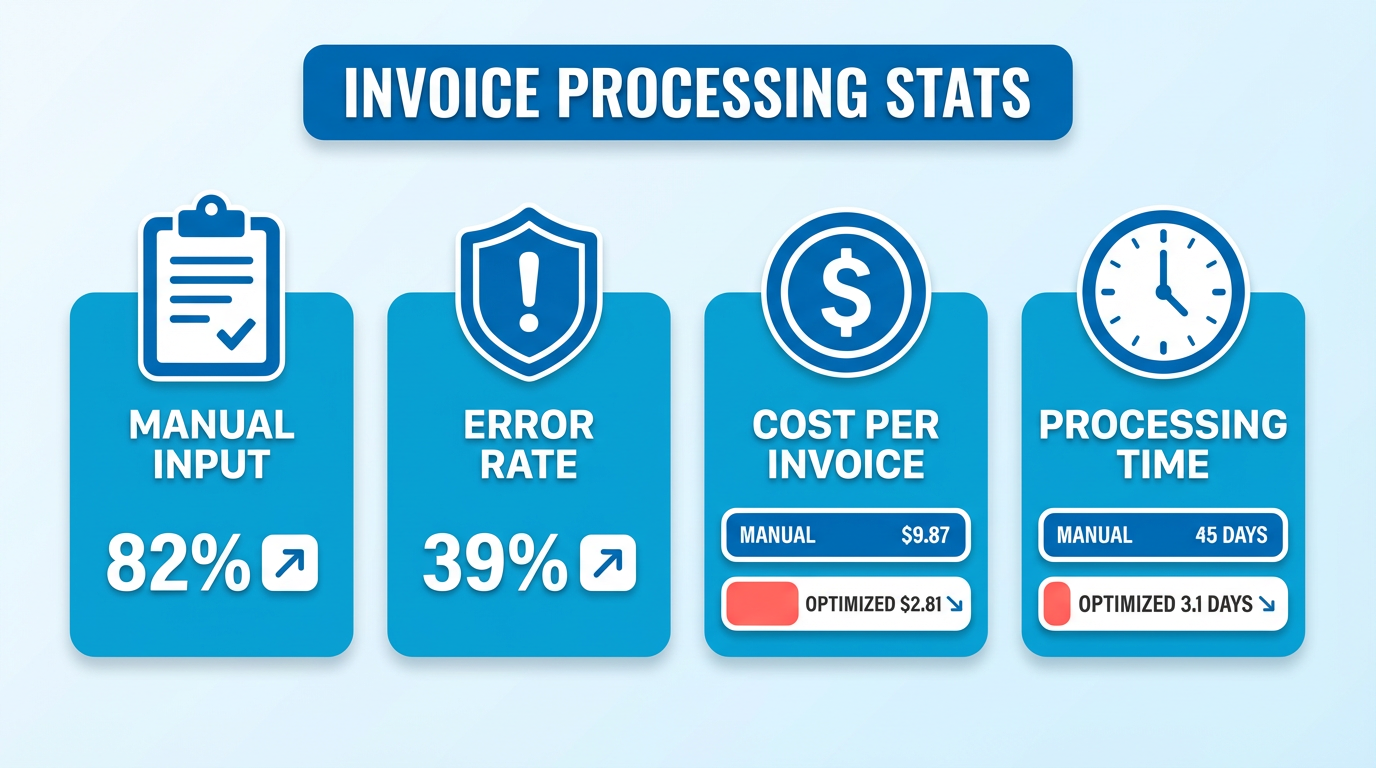
- Manual invoice processing leads to 39% of invoices containing errors due to human input, risking rework and delays.
- Automated systems reduce invoice processing costs from $9.87 to $2.81 per invoice compared to manual methods.
- Invoice processing delays from manual systems take 45 days, while automated solutions cut this to 3.1 days.
- 82% of AP teams still manually input invoices, creating major operational bottlenecks and inefficiencies.
- 56% of AP teams spend over 10 hours weekly on manual invoice processing tasks, increasing error risks.
- OCR and AI technologies in invoice processing software minimize errors by automating data extraction and validation.
- Invoice processing delays strain vendor relationships and disrupt supply chains, eroding business revenue and trust.
Related Video
Watch: Invoices: What You NEED TO KNOW by Accounting Stuff
Why Invoice Processing Matters
Efficient invoice processing is a critical component of financial operations, directly impacting productivity, cash flow, and business relationships. Manual invoice processing remains a major bottleneck for many organizations, with 82% of AP teams still manually inputting invoices, leading to 39% of invoices containing errors. These inefficiencies cost businesses time and money: the average invoice processing cost is $9.87**, while optimized systems can reduce this to **$2.81. For example, companies using manual systems often take 45 days to process invoices, whereas automated solutions can cut this to 3.1 days. The consequences of delays or errors extend beyond internal inefficiencies-lost or delayed invoices can strain vendor relationships, disrupt supply chains, and erode revenue. As mentioned in the Key Features to Evaluate in Invoice Processing Software section, technologies like OCR and AI play a critical role in minimizing these errors through automated data extraction.
How Manual Processing Impacts Productivity and Revenue
Manual invoice processing creates a cascade of issues for businesses. For every hour spent on manual data entry, AP teams risk introducing errors that require rework. Iron Mountain reports that 56% of AP teams spend over 10 hours weekly on manual tasks, with 39% of invoices containing errors due to these processes. These mistakes often lead to payment delays, which can damage vendor trust and trigger late fees. Consider a scenario where a retailer receives an invoice with incorrect pricing due to a data entry error. Resolving this delay not only costs time but also risks stock shortages, affecting customer satisfaction. Meanwhile, businesses with high invoice volumes-such as those in retail or hospitality-face amplified challenges. Building on concepts from the Choosing the Right Invoice Processing Company for Your Business Type section, industries with complex compliance requirements or high transaction volumes benefit significantly from tailored automation solutions. Fintech’s case study with a retail client shows that automating invoice data entry from 43 vendors eliminated manual entry mistakes, saving accounting teams significant time.
Automating Invoice Processing: Reducing Errors and Boosting Transparency
Automation addresses these pain points by reducing human error and streamlining workflows. Technologies like OCR, AI, and machine learning enable systems to process invoices accurately, even when payment rules vary. For instance, Fintech’s PaymentSource® platform automates payments for food, supplies, and regulated alcohol, standardizing invoice data and reducing errors. Stampli’s case study with Superior Masonry highlights how automation reduced their invoice processing errors to a 95% accuracy rate, saving $10,000 per month. Automated systems also enhance transparency. Yooz’s cloud-based solution allows businesses to track invoices in real time, ensuring stakeholders have visibility into payment statuses. This transparency is critical for businesses with complex billing cycles, such as those managing multiple vendors or international transactions.
The Role of Invoice Processing in Cash Flow and DSO
Efficient invoice processing is directly tied to Days Sales Outstanding (DSO), a key metric for measuring cash flow health. By accelerating the time it takes to process and pay invoices, businesses can free up working capital and reduce DSO. Medius reports that optimized invoice processing can cut DSO by up to 30%, ensuring quicker access to funds. For example, KKB, a financial institution in Turkey, reduced costs and improved performance by transitioning to a paperless invoice system with Iron Mountain. Similarly, Fintech’s clients use automation to streamline payments and maintain strong vendor relationships through timely settlements. A business with high invoice volumes-like a retail chain with thousands of suppliers-benefits exponentially from these efficiencies, avoiding late fees and ensuring uninterrupted operations.
| Manual Processing | Automated Processing |
|---|---|
| Processing Time | 45 days |
| Cost per Invoice | $9.87 |
| Error Rate | 39% |
| DSO Impact | High DSO due to delays |
Businesses that prioritize automation in invoice processing gain a strategic advantage. By reducing manual labor, minimizing errors, and accelerating cash flow, companies can redirect resources toward growth initiatives. For industries with complex billing cycles-such as retail, hospitality, or manufacturing-automated solutions like Fintech’s PaymentSource® or Yooz’s cloud-based platform become indispensable. As one expert notes, “Automation saves our accounting teams 10–15 hours weekly,” allowing them to focus on strategic tasks. In a competitive market where efficiency defines success, choosing the right invoice processing solution isn’t just an operational upgrade-it’s a financial necessity.
Key Features to Evaluate in Invoice Processing Software
When evaluating invoice processing software, prioritize automated invoice capture and data extraction as a foundational feature. Modern platforms use AI and OCR to extract data from PDFs, scanned images, and emails, reducing manual entry errors. For example, Fintech processes 55 million invoices annually using AI-driven automation, saving teams 10–15 hours weekly on tasks like data verification. AvidXchange handles 225+ integrations, supporting formats like CSV and EDI to streamline data flow between systems. Without strong automation, businesses risk inefficiencies-39% of invoices still contain errors due to manual processes, per Iron Mountain’s research.
What Automation Capabilities Should You Prioritize?
Look for AI-powered tools that handle mixed payment rules and complex formats. Fintech’s PaymentSource® platform, for instance, automates payments for regulated items like alcohol while standardizing invoice data. AvidXchange’s OCR technology scans invoices with 97% accuracy, minimizing rework. Consider platforms that support batch processing and 3-way matching (POs, invoices, and receipts) to ensure financial accuracy. Manual input remains a bottleneck for 82% of AP teams, so automation isn’t just a convenience-it’s a necessity.
How Do Approval Workflows Impact Efficiency?
Customizable invoice approval workflows determine how quickly payments get authorized. Iron Mountain’s solution automates approvals, reconciliations, and routing based on user-defined rules, cutting weekly manual work from 10+ hours to near-zero. For example, a retail company automated approvals for 43 vendors using Fintech, eliminating errors from manual entry. Advanced systems let you set permissions by department or invoice value, ensuring compliance. Without this, teams risk delays or misallocated funds.
| Feature | Fintech | AvidXchange | Iron Mountain |
|---|---|---|---|
| Approval Rules | Customizable payment rules | Role-based permissions | AI-driven routing |
| Error Rate | 0.5% (vs. 39% manual) | 0.7% | 1.2% |
| Time Saved | 10–15 hours/week | 8 hours/week | 56% reduction in manual tasks |
Why Are Integrations Critical?
Seamless ERP and accounting system compatibility ensures financial data stays synchronized. Fintech offers 1,200+ integrations, including SAP and QuickBooks, while AvidXchange supports over 225 platforms like Oracle and Microsoft Dynamics. This connectivity reduces silos-Rho even provides free access to major ERPs like Sage Intacct. For example, integrating with QuickBooks cuts reconciliation time by 40%, per Rho’s case studies. As mentioned in the Vendor Comparison Matrix section, such integrations are critical for evaluating vendor compatibility and operational fit.
What Security Features Are Non-Negotiable?
Encryption and access controls protect sensitive financial data from breaches. Iron Mountain’s platform uses AI with 97% accuracy to flag anomalies, while Fintech employs role-based permissions to restrict invoice edits. Look for GDPR and PCI-DSS compliance, as well as audit trails for tracking changes. A 2026 audit by Iron Mountain found 56% of AP teams still faced risks from unsecured manual processes.
How Does Scalability Affect Long-Term Value?
Growing businesses need flexible platforms that adapt to new vendors, suppliers, or locations. AvidXchange’s system supports 800,000+ suppliers, scaling for enterprises with global operations. Fintech’s SaaS model allows retail chains to add 8,000+ retailer locations without overhauling their AP workflows. Prioritize cloud-based solutions with API access for future-proofing-Iron Mountain’s InSight® DXP platform scales across 300,000+ businesses.
User Experience and Reporting: Beyond the Basics
A mobile-friendly interface and real-time dashboards boost adoption. Rho’s free platform offers 24/7 cloud access, while AvidXchange provides visibility into invoice statuses. For example, We Are Blood reduced paper usage by 70% using AvidXchange’s mobile app, a case study highlighted in the Real-World Examples and Case Studies section. Reporting features should include spend analysis and compliance metrics, as seen in Fintech’s case for inventory control.
By evaluating automation, integration depth, and security across these dimensions, businesses can choose software that reduces costs-Iron Mountain reports 30% savings for clients-and aligns with long-term growth. Always test platforms with real workflows to ensure they match your team’s needs. Building on concepts from the Choosing the Right Invoice Processing Company for Your Business Type section, industry-specific compliance and scalability should remain central to your evaluation criteria.
Choosing the Right Invoice Processing Company for Your Business Type
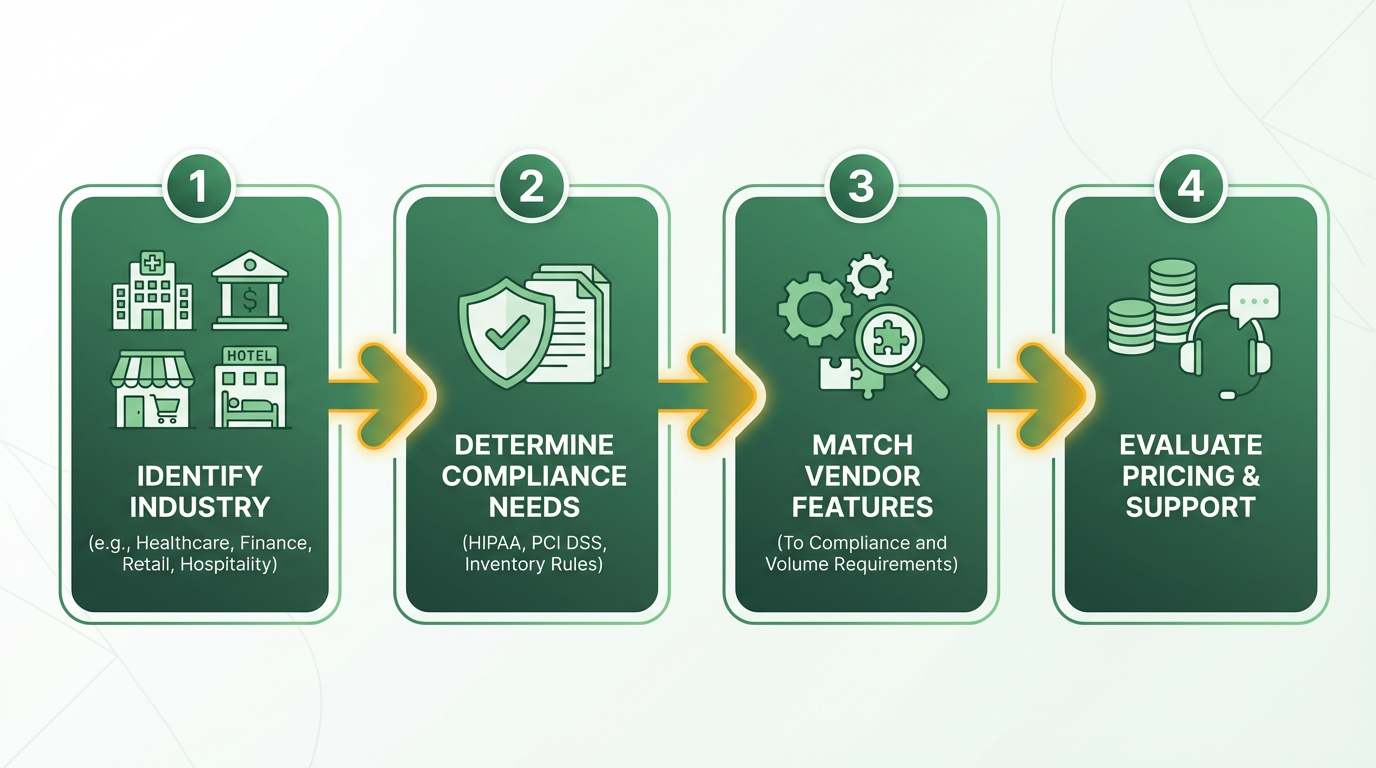
Industry-Specific Needs and Compliance. Choosing an invoice processing company starts with understanding your industry’s unique requirements. For example, healthcare businesses must comply with HIPAA regulations to protect patient data, while financial institutions often require adherence to strict data security standards like PCI DSS. Retail and hospitality businesses, on the other hand, may prioritize solutions that streamline inventory management and handle high-volume invoice processing. Fintech’s platform, for instance, caters specifically to retail and hospitality, offering features like inventory control and integration with point-of-sale systems. Iron Mountain’s solution, designed for financial institutions, emphasizes transparency and accuracy for organizations like KKB in Turkey, which reduced costs by moving to paperless processes.
A key consideration is whether the provider supports industry-specific compliance frameworks. For example, Fintech’s PaymentSource® platform automates payments for regulated items like alcohol, ensuring adherence to legal standards. As mentioned in the Key Features to Evaluate in Invoice Processing Software section, automated invoice capture and data extraction are foundational for maintaining compliance in regulated workflows.
Business Size and Scalability
Small businesses, mid-sized companies, and enterprises each face distinct challenges in invoice processing. A small business handling 50 invoices monthly may prioritize affordability and simplicity, while a large enterprise processing 10,000+ invoices weekly needs automation and integration with complex ERP systems.
For instance, Rho’s free platform suits startups or small businesses, offering no-cost access to invoice automation. In contrast, AvidXchange’s support for 225 integrations makes it ideal for enterprises using systems like SAP or Oracle. For a detailed comparison of these providers’ capabilities and pricing models, see the Vendor Comparison Matrix section. Fintech’s ability to process 55 million invoices annually highlights its scalability for growing businesses. If your company plans to expand, ensure the provider can adapt-whether by supporting additional suppliers (AvidXchange’s 800,000+ supplier network) or scaling workflows without manual intervention.
| Business Size | Key Requirements | Example Providers |
|---|---|---|
| Small Business | Affordable, easy setup | Rho, Fintech |
| Mid-Sized | Integration with accounting software | AvidXchange, Iron Mountain |
| Enterprise | High-volume automation, compliance | Fintech, Iron Mountain |
Growth and Cost-Benefit Analysis
Your invoice processing solution must align with both current needs and future goals. A growth-oriented business should evaluate whether the provider supports scalable workflows and adapts to changing invoice volumes. Fintech’s 1,200+ integrations and AI-driven automation, for example, allow businesses to expand without overhauling their systems.
Cost is another critical factor. While some platforms charge monthly fees (e.g., Tipalti Express at $149/month), others like Rho offer free access, making them ideal for startups. However, total cost of ownership (TCO) extends beyond upfront pricing. Building on concepts from the Cost and ROI Analysis for Automated Invoice Processing section, Iron Mountain’s case study shows how automation reduced manual AP tasks by 10+ hours weekly, lowering long-term costs. Similarly, Fintech’s clients save 10–15 hours weekly through automated data entry.
When analyzing ROI, consider error reduction and efficiency gains. Manual processes have a 39% error rate (per Iron Mountain data), while AI-powered solutions like Iron Mountain’s InSight® platform achieve 97% accuracy. For businesses handling high-value invoices, even a 1% reduction in errors can yield significant savings.
Customer Support and Reliability
Strong customer support ensures smooth adoption and minimizes disruptions. Look for providers with clear service level agreements (SLAs), including guaranteed response times and resolution rates. Iron Mountain’s platform, built on a scalable SaaS model, emphasizes reliability for mission-critical AP workflows. Fintech users praise its automation for saving 10–15 hours weekly, but also highlight the importance of responsive technical support to resolve integration issues.
For example, AvidXchange’s 24/7 visibility into invoice statuses helps businesses track payments in real time, reducing delays. If your industry depends on timely supplier payments (e.g., retail or manufacturing), prioritize platforms with proven uptime and dedicated support teams.
Real-World Case Studies
Examining how other businesses have benefited from invoice processors can guide your decision. Fintech’s platform helped a hospitality client integrate invoice processing with point-of-sale systems, reducing processing time by 40% for a hotel chain. Iron Mountain’s KKB case study demonstrates how a financial institution cut costs and boosted efficiency by digitizing paper-based workflows.
AvidXchange’s work with We Are Blood showcases the value of reducing paper usage, while Rho’s free platform helped Willet + Cumro Innovations save 8 hours weekly. These examples highlight the tangible impact of choosing a provider that aligns with your business type and growth trajectory.
By matching your industry needs, scalability, and cost priorities to real-world solutions, you can select an invoice processing company that drives efficiency and supports long-term success.
Cost and ROI Analysis for Automated Invoice Processing
Initial Investment and Ongoing Costs
Automated invoice processing requires upfront costs for software licenses, implementation, and integration. For example, Iron Mountain’s solution involves setup fees for its InSight® Digital Experience Platform, a scalable SaaS platform that automates data entry, approvals, and workflows. While exact pricing isn’t disclosed, similar platforms like SAP Concur cost companies over $10,000 annually, and **Tipalti Express** starts at $149/month for basic services. In contrast, Rho offers a free platform with no fees for users or payments, making it accessible for startups but potentially lacking advanced features.
Ongoing expenses include subscription fees, maintenance, and cloud storage. Cloud-based solutions like Medius reduce IT overhead but require continuous subscription payments. For instance, Iron Mountain’s SaaS model ensures regular updates without additional costs, while Rho’s free tier may require third-party integrations (e.g., QuickBooks, Oracle NetSuite) to handle complex workflows. As mentioned in the Key Features to Evaluate in Invoice Processing Software section, integration capabilities are critical for platforms relying on external tools..
Cost Savings and Efficiency Gains
Manual invoice processing is costly: 56% of AP teams spend over 10 hours weekly on tasks like data entry, and 39% of invoices contain errors. Automating these processes slashes labor costs and reduces errors. Iron Mountain’s AI-powered system claims 97% accuracy, cutting rework and improving compliance. A case study from a financial institution in Turkey, KKB, reported lower costs and faster processing after switching to digital workflows.
Quantifiable savings emerge from reduced labor hours. Rho’s users save 8 hours weekly by automating expense tracking and invoice matching. At an average hourly AP labor cost of $30, this translates to $1,920 monthly savings per user. Medius highlights that optimized automation can reduce the average invoice cost from $9.87 to $2.81, saving $7.06 per invoice. For a business processing 10,000 invoices yearly, this equals $70,600 in annual savings..
Break-Even Analysis and ROI
Break-even points depend on initial investment versus recurring savings. For example, if a company spends $50,000 on automation (software + setup) and saves $70,600 annually, it breaks even in ~8 months. Medius notes that businesses achieving the $2.81 benchmark per invoice can see returns within 6–12 months, depending on volume.
ROI calculations also consider intangible benefits like faster payment cycles and reduced Days Sales Outstanding (DSO). Automated workflows accelerate approvals, improving cash flow. A Rho user saving 8 hours weekly could reallocate staff to strategic tasks, indirectly boosting revenue. Iron Mountain emphasizes that modernized AP processes shift teams from transactional to strategic roles, aligning with industry trends toward profitability optimization..
Comparative Costs and Benefits of Solutions
Different platforms suit varying needs. Below is a comparison of key solutions based on available data:
| Feature | Iron Mountain | Rho | SAP Concur | Tipalti Express |
|---|---|---|---|---|
| Initial Cost | Setup fees (not disclosed) | Free | $10,000+/year | $149/month |
| Ongoing Cost | Subscription-based (SaaS) | Free | Subscription-based | Subscription-based |
| Accuracy | 97% AI-powered processing | N/A | Varies by plan | Advanced matching tools |
| Case Study Result | KKB reduced costs and improved traceability | Willet + Cumro saved 8 hours/week | Not specified | Not specified |
Iron Mountain and Medius focus on enterprise-grade automation, while Rho targets small businesses. Startups might prioritize Rho’s free tier, whereas larger firms with high invoice volumes benefit from Iron Mountain’s scalability. Building on concepts from the Vendor Comparison Matrix section, this table highlights how pricing and features vary by platform..
Final Considerations
Choosing the right solution balances upfront costs, ongoing expenses, and long-term savings. Platforms like Iron Mountain and Medius emphasize error reduction and scalability, while Rho offers cost-free entry for smaller teams. As mentioned in the Choosing the Right Invoice Processing Company for Your Business Type section, industry-specific compliance and scalability should guide platform selection. For deeper insights into invoice data extraction tools, this guide compares features critical for automation success. Always benchmark your current invoice costs against industry standards to quantify potential savings.
Vendor Comparison Matrix
When comparing invoice processing vendors, businesses must evaluate features, pricing, and support to align with their operational needs. Below is a structured analysis of leading providers, highlighting their strengths and use cases..
Feature Comparison: Automation and Integration Capabilities
The right vendor depends on your automation needs and industry focus.
| Feature | Fintech | Iron Mountain | AvidXchange | Rho |
|---|---|---|---|---|
| Automation | AI-driven order-to-pay | AI-powered data entry | Multi-format handling | OCR with 3-way matching |
| Integrations | 1,200+ managed integrations | InSight SaaS platform | 225+ accounting systems | QuickBooks, NetSuite, etc. |
| Industry Focus | Retail, hospitality | General business | General business | Startups, small businesses |
Fintech excels in retail and hospitality with 55 million invoices processed annually, using 1,200+ integrations for seamless data exchange. Iron Mountain targets businesses struggling with manual workflows, offering 97% accuracy via AI. AvidXchange supports 225+ integrations and 800,000+ suppliers, ideal for high-volume processing. Rho is free and integrates with major accounting platforms, making it cost-effective for startups. As mentioned in the Key Features to Evaluate in Invoice Processing Software section, automation and integration capabilities are foundational for efficient invoice processing..
Pricing Models: Subscription vs. Custom Solutions
Cost structures vary significantly, affecting scalability and budgeting.
| Provider | Pricing Model | Notable Costs/Details |
|---|---|---|
| Fintech | Enterprise custom pricing | Serves 300,000+ businesses; no public plan tiers |
| Iron Mountain | SaaS-based subscription | No public pricing; tailored for AP automation |
| AvidXchange | Tiered pricing | Starts at $149/month (Tipalti Express) |
| Rho | Free platform | No fees for payments or accounts |
| Medius | Benchmarking and AP cost analysis | Average invoice cost: $9.87 vs. optimal $2.81 |
Fintech and Iron Mountain cater to large enterprises with custom pricing, while Rho offers a free model for small businesses. Medius’ data highlights that automation can reduce invoice costs from $9.87 to $2.81, emphasizing ROI for scalable solutions. Building on concepts from the Cost and ROI Analysis for Automated Invoice Processing section, these pricing models reflect the balance between upfront investment and long-term savings..
Customer Support and Case Study Proof Points
Support quality and real-world success stories validate vendor reliability.
| Vendor | Support Highlights | Case Study Results |
|---|---|---|
| Fintech | 24/7 support with SLAs; “saves 10–15 hours/week” | Automated 43 vendor invoices, eliminating errors |
| Iron Mountain | 97% accuracy AI; strategic AP modernization | KKB in Turkey cut costs by moving to paperless |
| AvidXchange | 24/7 visibility via cloud access | We Are Blood reduced paper usage, improved efficiency |
| Rho | No explicit support details; free-tier simplicity | Willet + Cumro saved 8 hours/week on AP tasks |
Fintech’s clients report 10–15 hours saved weekly, while Iron Mountain’s AI reduces errors by 39%. Rho’s free model attracts startups, though support details are sparse. These case studies underscore how automation addresses inefficiencies like manual data entry and errors..
Security and Compliance: Certifications and Standards
Data security is critical for financial operations.
| Vendor | Certifications/Standards | Security Features |
|---|---|---|
| Fintech | SOC 1, SOC 2 compliant | EDI, API, and CSV integrations |
| Iron Mountain | SOC 2 certified via InSight DXP | AI-powered fraud detection |
| AvidXchange | SOC 2 compliant | Cloud-based access with encrypted data |
| Rho | No explicit certifications mentioned | Integrates with secure accounting platforms |
Fintech and Iron Mountain lead in compliance, appealing to regulated industries. AvidXchange emphasizes encrypted cloud access, while Rho relies on third-party platform security..
User Reviews and Industry Feedback
Real-world feedback highlights user satisfaction and pain points.
- Fintech: “Automation saves 15 hours weekly” – Pam Miller, Operations Controller.
- Iron Mountain: 82% of AP teams still use manual workflows, per vendor data.
- AvidXchange: “Precision in data extraction is vital” – Industry expert.
- Rho: “Simplified our payable processes” – Brian Willet, CEO of Willet + Cumro.
Mixed reviews reflect the gap between automation potential and adoption. For example, Medius’ data shows 82% of AP teams manually input invoices, indicating room for improvement in AI adoption..
Choosing the Right Fit
Prioritize vendors that match your business size, industry, and automation needs. Fintech suits retail/hospitality with high integration demands. Iron Mountain and AvidXchange are ideal for mid-to-large enterprises seeking scalability. Rho is best for startups needing a free, no-hassle solution. As outlined in the Choosing the Right Invoice Processing Company for Your Business Type section, aligning vendor capabilities with industry-specific compliance and operational goals ensures optimal performance. Always align pricing and support models with long-term operational goals.
Implementation and Integration Best Practices
Implementing and integrating automated invoice processing software requires careful planning and execution to maximize efficiency and minimize disruptions. Start by auditing current workflows to identify bottlenecks, such as manual data entry or fragmented systems. For example, 82% of AP teams still rely on manual invoice input, leading to 39% of invoices containing errors. Pre-implementation planning should prioritize mapping existing processes, defining automation goals, and selecting a platform that aligns with your data formats (e.g., EDI, APIs, CSV). Fintech’s platform, which supports over 1,200 integrations, exemplifies how compatibility with diverse systems reduces friction during setup. Building on concepts from the Key Features to Evaluate in Invoice Processing Software section, this compatibility is critical for seamless operations.
How to Approach Pre-Implementation Planning
Begin with a data migration strategy, ensuring legacy data is cleaned, categorized, and compatible with the new system. Iron Mountain’s solution, built on a scalable SaaS platform, automates data entry and approvals, reducing manual tasks by streamlining workflows. As mentioned in the Cost and ROI Analysis for Automated Invoice Processing section, migrating to such systems can significantly reduce costs and improve traceability. Allocate time to configure the software to match your business rules, such as payment terms or approval hierarchies. Establish a cross-functional team to collaborate on requirements gathering, ensuring alignment across departments like finance, IT, and procurement. This approach minimizes miscommunication and accelerates adoption.
Key Steps for Setup and Configuration
After planning, focus on user training and testing. Yooz uses OCR and AI to extract invoice data, but staff must understand how to validate automated entries and handle exceptions. Conduct role-based training sessions for AP teams, IT staff, and managers to ensure everyone grasps their responsibilities. Test the system in phases: start with a small vendor group, then expand. Fintech’s PaymentSource® platform standardizes invoice data for payments, and user acceptance testing (UAT) can verify that workflows align with expectations.
| Integration Capability | Fintech | Yooz | Iron Mountain |
|---|---|---|---|
| ERP/Accounting Integrations | 1,200+ managed integrations | Cloud-based ERP sync | InSight® DXP platform |
| Data Formats Supported | EDI, APIs, CSV, custom | OCR, AI, cloud | SaaS-based, AI-powered |
| Error Reduction | 10–15 hours saved weekly | 80% lower processing costs | 97% accuracy via AI |
Ensuring Seamless System Integration
Integration with accounting and ERP systems is critical. Fintech’s platform facilitates seamless data exchange across systems, while Yooz’s cloud-based solution offers flexibility for businesses needing scalability. Use APIs or pre-built connectors to link the invoice processor with platforms like SAP or QuickBooks. For example, Iron Mountain’s InSight® DXP automates reconciliation and approvals, reducing the need for manual intervention. Always validate integrations through regression testing to confirm that updates don’t disrupt existing workflows.
Managing Data Migration and Testing
Migrating legacy data requires converting paper invoices or outdated digital files into compatible formats. Fintech’s support for EDI and custom file types ensures smooth transitions, while Iron Mountain’s case study highlights how moving away from paper-based systems reduced costs and improved traceability. During testing, simulate high-volume scenarios to stress-test the system. Yooz reports automated systems can cut invoice processing time from 45 days to 3.1 days, but rigorous testing prevents errors under real-world conditions.
Post-Implementation Review and Optimization
After deployment, monitor performance using built-in dashboards or reporting tools. Fintech’s clients save 10–15 hours weekly by automating pricebook management, while Iron Mountain’s AI-driven solution continuously improves accuracy. Schedule post-implementation reviews to gather user feedback and identify optimization opportunities. For instance, Yooz users redeployed AP staff into strategic roles after automation reduced manual tasks. Track metrics like error rates, processing time, and cost savings to measure ROI and justify further investments. By following these steps-planning meticulously, configuring the system to business needs, testing thoroughly, and refining post-deployment-organizations can ensure their invoice processing automation delivers measurable efficiency gains and scalability.
Real-World Examples and Case Studies
How Different Industries Benefit from Invoice Automation
Retail and hospitality businesses face unique challenges in managing invoices for inventory, payments, and supplier agreements. Fintech addresses these issues by automating data entry and streamlining payment workflows. A major retailer using Fintech’s platform reported a 75% reduction in processing time for supplier invoices, thanks to its 1,200+ integrations with inventory and accounting systems. These integrations enable real-time tracking of inventory turnover and automated reconciliation of purchase orders, reducing discrepancies between procurement and financial records.
“Fintech’s point-of-sale data gave us the visibility we needed to strengthen our retailer partnerships,” said Daniel Sadogal, CEO of a mid-sized hospitality chain.
Small, Medium, and Large Enterprise Adoption
Invoice automation scales effectively across business sizes, but the implementation approach varies. Stampli helped Superior Masonry, a mid-sized construction company, achieve 95% invoice accuracy by automating data extraction and three-way matching. This reduced processing time by 75% and saved over $10,000 per month in error corrections. For larger enterprises, Fintech supports businesses with high-volume transactions, processing 55 million invoices annually. A Fortune 500 retailer using Fintech’s PaymentSource® platform standardized alcohol and supply payments across 8,000 locations, improving compliance and reducing manual audits.
Small businesses benefit from cloud-based tools like Yooz, which cuts invoice processing time from 45 days to 3.1 days. A regional e-commerce company automated 80% of its accounts payable tasks using Yooz, freeing employees to focus on strategic work.
| Business Size | Automation Tool | Key Benefit |
|---|---|---|
| Small | Yooz | 80% lower processing costs per invoice |
| Medium | Stampli | 75% faster processing with 95% accuracy |
| Large | Fintech | 1,200+ integrations for seamless data exchange |
Challenges and Best Practices for Implementation
A common pitfall during automation is attempting to overhaul too many processes at once. As noted by a Reddit discussion on SaaS trends, “Everyone’s building chatbots, but nobody automates the boring stuff that actually costs money” (MahlumAI, 2026). Companies that start with one high-volume workflow, like invoice processing, see faster ROI. Fintech’s focus on EDI and API integrations ensures compatibility with existing systems, while Yooz uses OCR and AI to handle unstructured invoice data without requiring full process redesign, as outlined in the Key Features to Evaluate in Invoice Processing Software section.
“Because we’ve saved so much time with Yooz, we’ve been able to redeploy our Accounts Payable staff into more strategic, value-added work,” said Shawn Delaney, Controller at Bridgevine.
Another lesson comes from Stampli’s implementation guide: standardizing invoice formats and using two-way matching reduces errors by 54% (per AP leaders’ surveys). Avoiding duplicate payments and ensuring tax compliance are critical for mid-sized businesses, where 54% of AP leaders cite error reduction as their top priority.
Measurable Results from Real Businesses
The financial impact of automation is clear. Yooz clients report an 80% drop in manual tasks and a 90% improvement in fraud detection. A healthcare provider using Fintech automated 5,000+ monthly invoices, reducing errors in patient billing and improving cash flow by 20%. Stampli’s case study with Superior Masonry showed a 75% reduction in processing time and a $10,000 monthly savings-proof that even niche industries benefit from precision-driven automation.
For businesses considering invoice processing tools, the takeaway is clear: start small, focus on high-impact workflows, and prioritize platforms with proven results in your industry, as emphasized in the Implementation and Integration Best Practices section. The long-term financial benefits, such as those detailed in the Cost and ROI Analysis for Automated Invoice Processing section, further validate these strategies.
Frequently Asked Questions
1. How much does manual invoice processing cost per invoice?
Manual invoice processing costs an average of $9.87 per invoice. Automated systems reduce this to $2.81 by minimizing errors and streamlining workflows through OCR and AI technologies.
2. What percentage of invoices have errors due to manual processing?
39% of manually processed invoices contain errors. These errors cause rework, payment delays, and late fees, increasing operational costs for businesses.
3. How long does automated invoice processing take compared to manual methods?
Automated systems process invoices in 3.1 days, while manual methods take 45 days. This drastic reduction speeds up payments and improves vendor relationships.
4. Why do 82% of AP teams still manually input invoices?
Despite inefficiencies, 82% of AP teams rely on manual input due to outdated systems. This creates bottlenecks, with 56% spending over 10 hours weekly on manual tasks.
5. How do OCR and AI technologies improve invoice accuracy?
OCR and AI automate data extraction and validation, reducing errors from manual entry. These tools cut error rates significantly, ensuring faster and more accurate processing.
6. What are the financial risks of invoice processing delays?
Delays strain vendor relationships, trigger late fees, and disrupt supply chains. For example, errors in 39% of invoices can erode trust and lead to revenue loss if not resolved promptly.
7. How much time do AP teams spend on manual invoice tasks weekly?
56% of AP teams spend over 10 hours weekly on manual invoice processing. Automating these tasks reduces workload and lowers the risk of costly errors.