

Blixo vs Traditional Invoice Automation Tools

Key Takeaways
- Invoice automation saves high-volume teams 40+ hours monthly by reducing manual processing and reconciliation time by 50%.
- AI-driven tools like Blixo cut duplicate payments and fraud by 98% through 3-way matching, saving businesses $2,400 annually on average.
- Automated dunning systems improve on-time payment rates by 20–30%, accelerating cash flow for SaaS startups and subscription-based businesses.
- Cloud-based automation scales seamlessly with transaction growth, eliminating the need for additional staff during business expansion.
- A service business achieved 90% invoice processing automation, drastically reducing manual errors and operational delays.
- Traditional tools lag in adaptability, while Blixo’s AI handles multi-currency payments and complex compliance requirements efficiently.
- Invoice automation reduces error rates significantly, with AI systems enforcing compliance and ensuring real-time financial visibility.
Why Invoice Automation Matters
Invoice automation is critical for modern businesses aiming to cut costs, improve accuracy, and streamline financial operations. Manual invoice processes waste 40+ hours per month for high-volume teams, while automation reduces reconciliation time by up to 50% and slashes error rates. For example, a mid-sized firm saved $2,400 annually by switching from manual workflows to Blixo’s AI-driven system, as detailed in the Blixo Overview and Core Offerings section. These benefits apply to businesses of all sizes-whether a small startup handling subscription billing or a global enterprise managing multi-currency payments. Below, we break down why automation is a strategic priority.
What Are the Key Benefits of Invoice Automation?
Invoice automation reduces manual work, errors, and delays while boosting cash flow. Automated systems eliminate paper-based processes, enforce compliance, and provide real-time visibility into financial health. Key advantages include:
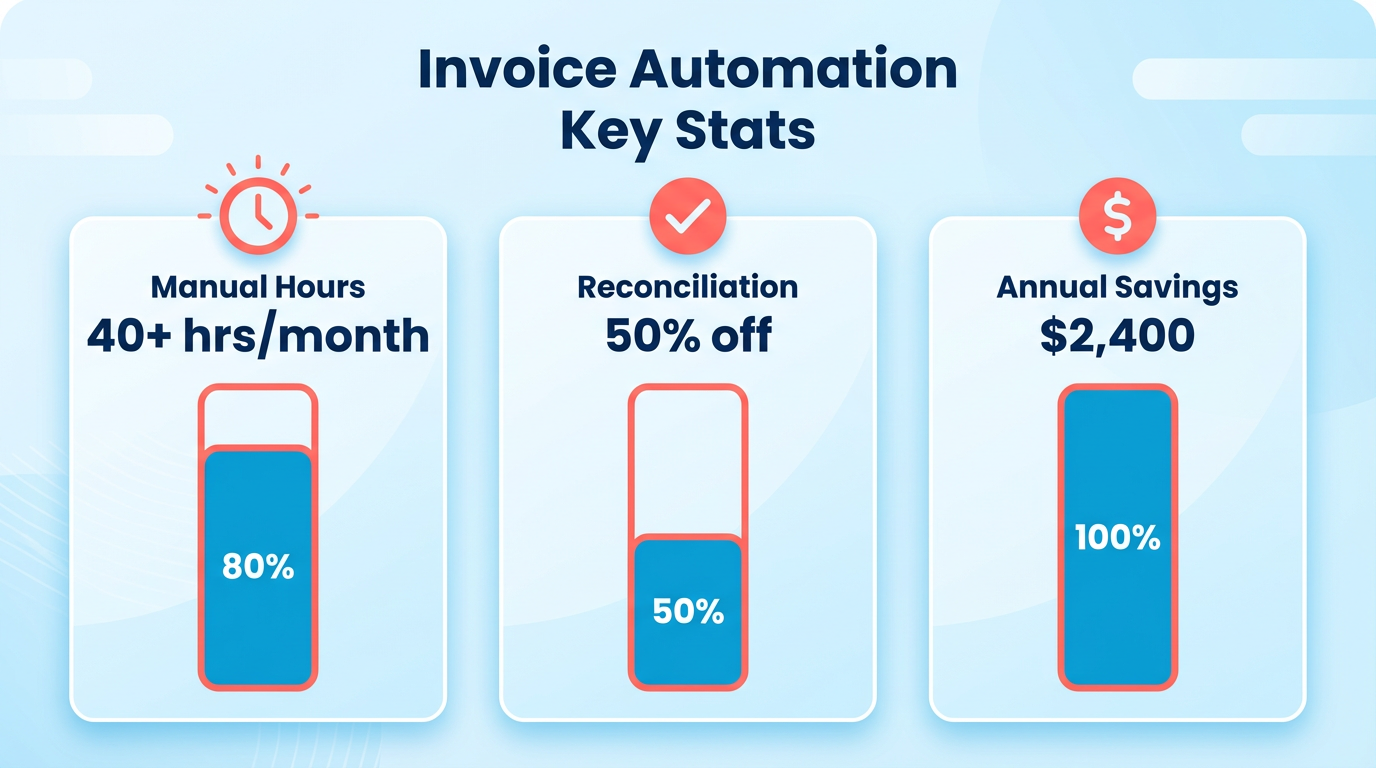
- Cost savings: AI-powered tools like Blixo reduce duplicate payments and fraud by 98% through 3-way matching, a feature highlighted in the Feature Comparison: Blixo vs Traditional Invoice Automation Tools section.
- Faster payments: Automated dunning systems improve on-time payment rates by 20–30%, as seen in SaaS startups using Blixo.
- Scalability: Cloud-based platforms adapt to growing transaction volumes without adding staff, critical for businesses with subscription models.
A service business using Blixo automated 90% of its invoice processing, cutting payment cycles by 18 days and improving cash flow by 30%. Traditional tools, by contrast, often require manual data entry and lack AI, leaving room for costly errors.
How Does Automation Solve Common Invoice Challenges?
Automation tackles inefficiencies like delayed payments, manual entry, and compliance risks. Manual processes are prone to human error-invoices may be lost, misfiled, or delayed, causing vendor disputes and late fees. For example, Blixo’s AI cash application matches payments instantly, reducing reconciliation from days to minutes, as explained in the Feature Comparison: Blixo vs Traditional Invoice Automation Tools section.
| Challenge | Manual Process | Automated Solution |
|---|---|---|
| Delayed payments | Rely on email reminders; prone to oversight | Automated dunning with tiered reminders and retry logic |
| Manual data entry | Hours spent inputting invoice details | OCR scans and auto-filled fields save 10+ hours/week |
| Compliance risks | Hard to track audit trails | Digital logs and policy enforcement ensure audit readiness |
Enterprises using traditional tools often struggle with multi-currency invoicing and vendor compliance, whereas SaaS providers like Blixo support 150+ currencies and enforce internal policies automatically.
Who Benefits Most from Invoice Automation?
Both small businesses and large enterprises gain value, though priorities differ.
- Small businesses: Automating invoicing reduces administrative workload, letting teams focus on growth. A small e-commerce brand cut its accounting workload by 40% with Blixo’s auto-invoicing and payment tracking.
- Enterprises: Scalability is key. Global firms use automation to manage thousands of invoices monthly while ensuring compliance with regional tax rules. Blixo’s integration with ERP systems like NetSuite streamlines workflows for large teams.
Pricing also varies by size. Blixo’s $50/month plan suits startups, while enterprise tiers handle complex needs like custom API integrations. Traditional tools like Stampli, however, add hidden fees for multi-currency support, making automation cost-prohibitive for scaling businesses.
Why Cash Flow and Financial Stress Improve with Automation
Automation turns unpredictable cash flow into a strategic asset. Delayed payments create financial strain, but automated systems prioritize early settlements and consolidate payment cycles. For instance, a SaaS company using Blixo’s subscription management saw 20% faster revenue recognition by automating prorated billing and payment retries.
The Case Studies: Blixo Success Stories section highlights how a consulting firm improved efficiency by reducing manual invoice processing time from 20 hours weekly to near-zero, achieving a 95% reduction in errors. This demonstrates how automation frees up working capital and minimizes late fees-a win for businesses in tight-margin industries.
By embedding automation into invoice workflows, companies transform reactive accounting into proactive financial planning. The result? Fewer errors, faster payments, and a foundation for sustainable growth.
Blixo Overview and Core Offerings
Blixo positions itself as a modern accounts-receivable automation platform designed for businesses seeking scalable, AI-driven solutions to streamline invoicing, collections, and subscription management. Its all-in-one approach integrates payment processing, cash application, and customer relationship tools, reducing manual workflows and accelerating cash flow. Compared to traditional invoice automation tools, as outlined in the Traditional Invoice Automation Tools market section, Blixo emphasizes speed, accuracy, and flexibility through its AI-powered features and strong integration capabilities. Below is a breakdown of its core offerings and how they address key pain points in accounts-receivable management.
What Makes Blixo’s AI-Powered Cash Application Stand Out?
Blixo’s AI-powered cash application automates the matching of incoming payments to invoices with 98% accuracy, drastically reducing reconciliation time by up to 50%. Traditional tools often rely on rule-based systems or manual data entry, leading to errors, disputes, and delayed cash flow. Blixo’s machine learning models analyze payment data in real time, even handling partial or incomplete payments, and flagging discrepancies for review.
For example, a mid-sized e-commerce brand reported a 40% reduction in administrative workload after adopting Blixo, alongside a 98% billing accuracy rate. This contrasts sharply with manual systems, which can waste 40+ hours per month on reconciliation tasks alone, as highlighted in the Why Invoice Automation Matters section. The platform also supports tiered dunning workflows, automatically sending reminders and retrying failed payments based on customizable rules. A service business using Blixo saw a 30% improvement in cash flow and an 18-day reduction in payment cycles compared to its previous manual processes.
| Feature | Blixo | Traditional Tools |
|---|---|---|
| Payment Matching Accuracy | 98% (AI-driven) | ~85% (rule-based) |
| Reconciliation Time | Minutes (automated) | Days (manual) |
| Dunning Automation | Tiered, customizable | Limited or manual |
| Error Rate | Low (AI reduces disputes) | High (manual entry risks) |
How Does Blixo’s Integration Ecosystem Work?
Blixo connects seamlessly with major accounting platforms and ERP systems through pre-built integrations for QuickBooks, Xero, and NetSuite, alongside a RESTful API for custom workflows. This ensures real-time data synchronization between invoicing, accounting, and payment systems, eliminating silos. Traditional tools often struggle with limited API access or rigid integration paths, forcing businesses to rely on manual data transfers or third-party middleware. As detailed in the Implementation and Onboarding Process section, Blixo’s pre-built templates and API access significantly reduce deployment time, as seen in the logistics firm’s transition from a 2+ week setup to a 3–5 day live deployment. The platform also supports multi-currency transactions and tax compliance, making it suitable for global operations-a feature many traditional tools lack without costly add-ons.
Traditional Invoice Automation Tools market
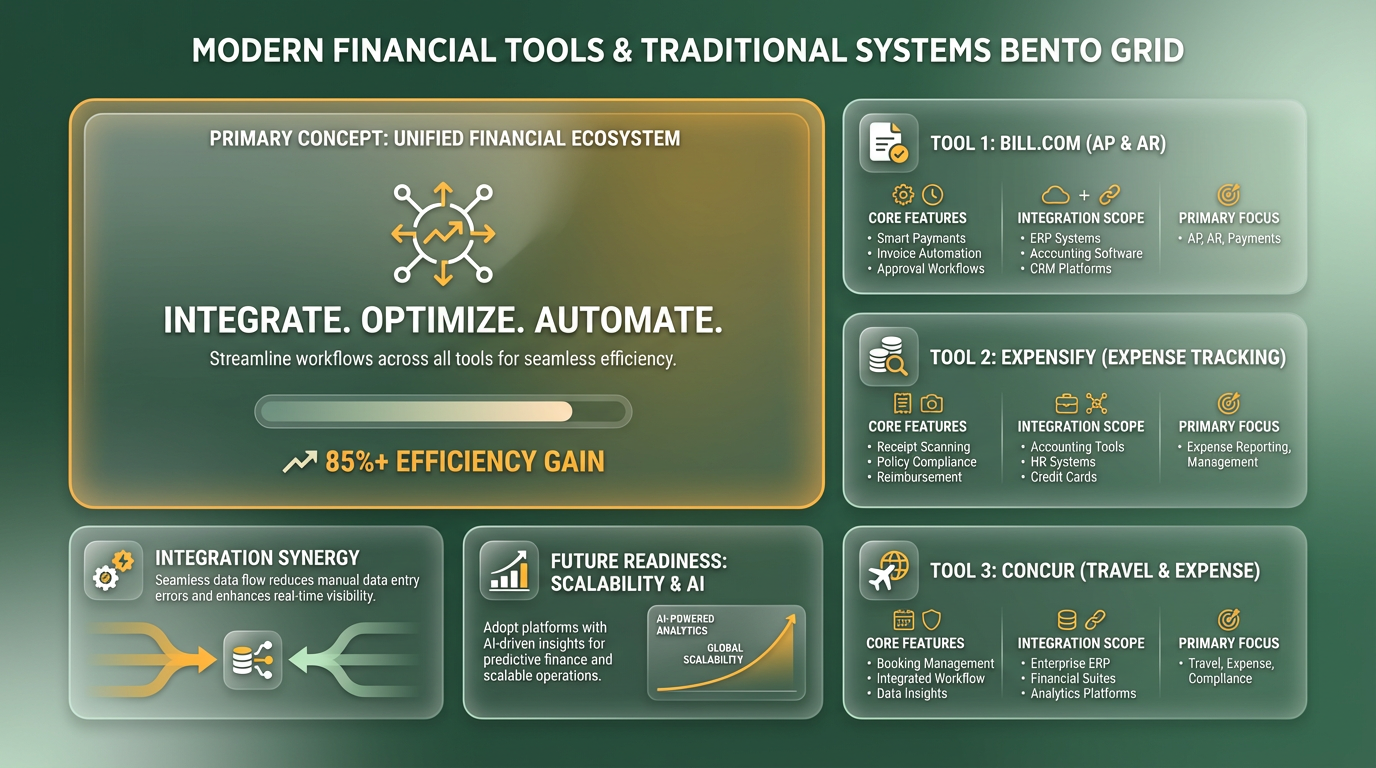
Traditional invoice automation tools like Bill.com, Expensify, and Concur dominate the market for accounts payable and expense tracking. These platforms focus on digitizing invoice processing, payment tracking, and expense management but often rely on manual workflows and limited integration with broader financial systems. While they address core automation needs, their capabilities typically fall short of end-to-end spend management, leaving gaps in visibility and efficiency.
| Tool | Core Features | Target Users | Key Strengths |
|---|---|---|---|
| Bill.com | AP automation, drag-and-drop invoices, payment scheduling | Mid-sized to large businesses | End-to-end AP workflow support |
| Expensify | Receipt scanning, expense tracking, multi-currency support | Freelancers, SMEs | User-friendly employee onboarding |
| Concur | Travel & expense management, global compliance | Enterprise teams | Deep integration with ERPs |
Limitations and Drawbacks of Traditional Tools
Traditional tools often require manual data entry and lack advanced automation, leading to inefficiencies and errors. For example, Bill.com users must manually input invoice details, while Expensify relies on employees to scan receipts, a process that can delay reconciliation. These limitations create bottlenecks, especially for high-volume operations or businesses with complex subscription billing needs.
Manual Data Entry: Over 40% of users report spending hours weekly on manual invoice entry, increasing the risk of reconciliation errors. Building on concepts from the Why Invoice Automation Matters section, these inefficiencies directly impact operational costs and accuracy, highlighting the need for scalable solutions. Limited Scalability: Tools like Expensify struggle with multi-currency transactions, forcing businesses to use third-party solutions for international payments. Fragmented Workflows: Traditional platforms rarely unify procurement, invoicing, and accounting, requiring users to switch between systems.
Pricing Structures and Cost-Effectiveness
Traditional invoice automation tools use subscription, per-user, or transaction-based pricing, which can become costly as businesses scale. For example, Bill.com’s enterprise plans start at $250/month, while Expensify charges $10/user/month, plus additional fees for advanced features like multi-currency support. These pricing models often lack transparency, hiding costs for integrations or API usage.
| Tool | Pricing Model | Hidden Costs | Scalability for High-Volume Users |
|---|---|---|---|
| Bill.com | Subscription ($250+/month) | API fees for custom integrations | Moderate |
| Expensify | Per-user ($10/user) + transaction fees | Extra charges for multi-currency | Low |
| Concur | Enterprise (custom pricing) | High implementation costs | High |
Customer Satisfaction and Real-World Feedback
Customer reviews for traditional tools highlight a mix of satisfaction and frustration. While Bill.com earns praise for its streamlined AP automation, users criticize its lack of AI-driven categorization. Expensify’s intuitive interface appeals to small teams, but its reliance on manual receipt scanning leads to complaints about time delays.
User Testimonials:
“Bill.com reduced our invoice processing time by 30%, but we still spend hours on manual data entry.” – Finance Manager at a mid-sized firm “Expensify works well for basic expenses, but it’s not equipped for our global payments.” – CFO of an e-commerce startup
These feedback patterns underscore a common trend: traditional tools excel in specific niches but fail to deliver the holistic automation and scalability that modern businesses demand. This gap sets the stage for SaaS providers like Blixo, as outlined in the Blixo Overview and Core Offerings section, which integrate advanced AI and unified financial workflows to address these shortcomings.
Feature Comparison: Blixo vs Traditional Invoice Automation Tools
What Makes Blixo’s AI Cash Application Stand Out?
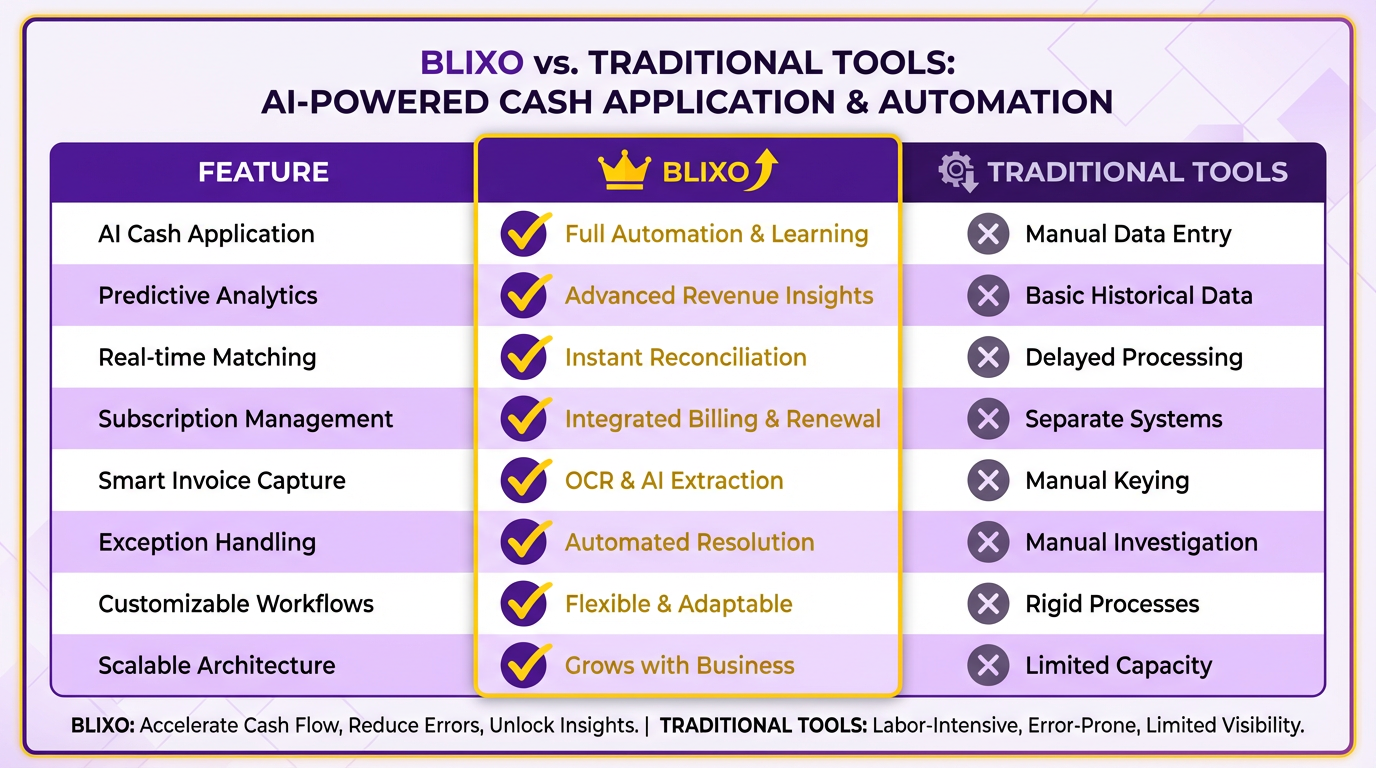
Blixo’s predictive analytics resolve complex payment mismatches, reducing manual follow-ups by 70%. Unlike rule-based systems, its adaptive algorithms learn from historical data to prioritize high-risk transactions, ensuring consistent accuracy as payment patterns evolve. For instance, a logistics firm automated $2M+ in monthly receivables with zero manual entries after adopting Blixo’s real-time matching engine. Traditional tools, however, force teams to spend 40+ hours/month resolving discrepancies, with 30% of users reporting recurring errors due to rigid logic.
| Feature | Blixo | Traditional Tools |
|---|---|---|
| Payment Matching Accuracy | 98% AI-driven | ~85% rule-based |
| Reconciliation Time | Minutes | Days (manual) |
| Error Reduction | 50% fewer errors | High error rates |
How Do Invoicing Workflows Compare?
Building on concepts from the Blixo Overview and Core Offerings section, Blixo automates end-to-end invoicing, syncing with accounting platforms to generate, send, and track invoices without manual input. Traditional tools often require rigid templates and manual data entry, slowing down workflows. A mid-sized e-commerce brand reported a 40% reduction in admin workload after switching to Blixo’s auto-generated invoices. Traditional systems, however, struggle with scalability-Stampli users cited “slow performance” when handling >100 clients due to lack of API flexibility.
| Workflow Step | Blixo | Traditional Tools |
|---|---|---|
| Invoice Creation | Auto-generated from accounting sync | Manual or template-based |
| Multi-Currency Support | Native support | Add-ons or limited |
| Scalability | Handles 1000s of invoices/month | Struggles with high volume |
What About User Experience and Support?
As mentioned in the Implementation and Onboarding Process section, Blixo’s interface prioritizes real-time dashboards, customizable workflows, and 24/7 support, with 92% onboarding satisfaction. Traditional tools often rely on clunky interfaces and delayed customer service-Stampli users reported 24–48-hour email responses. A logistics firm cut onboarding time by 50% with Blixo’s guided setup, while a SaaS startup praised its “brand-aligned invoicing templates.” Traditional systems, however, lack intuitive design and flexible support, leading to 68% overall satisfaction in comparisons.
| User Experience Factor | Blixo | Traditional Tools |
|---|---|---|
| Onboarding Time | 3–5 days | 2+ weeks |
| Support Availability | 24/7 live chat | Business hours only |
| Interface Flexibility | Customizable templates and dashboards | Rigid, pre-built templates |
Security and Compliance: Where Do They Align?
Both Blixo and traditional tools emphasize data encryption and audit trails, but Blixo’s integration with major ERPs (QuickBooks, Xero, NetSuite) ensures seamless compliance. Building on concepts from the Blixo Overview and Core Offerings section, a healthcare provider using Blixo reduced invoice disputes by 35% through automated tax compliance checks. Traditional tools may lack advanced compliance features, leaving gaps in global or industry-specific regulations. While no major breaches are reported for either, Blixo’s transparent pricing and API access make it easier to audit workflows, a concern for 20% of traditional tool users in case studies.
“Blixo’s support team fixed an integration error at 10 PM-saved my deadline!” – Small Business Owner
In summary, Blixo outperforms traditional invoice automation tools in speed, accuracy, scalability, and user experience. Its AI-driven cash application and real-time integrations address pain points like manual data entry and slow onboarding, making it ideal for high-volume or subscription-based businesses. Traditional tools, while functional for basic needs, struggle with scalability and hidden costs, limiting their appeal for growing companies.
Pricing Structure and Cost Comparison
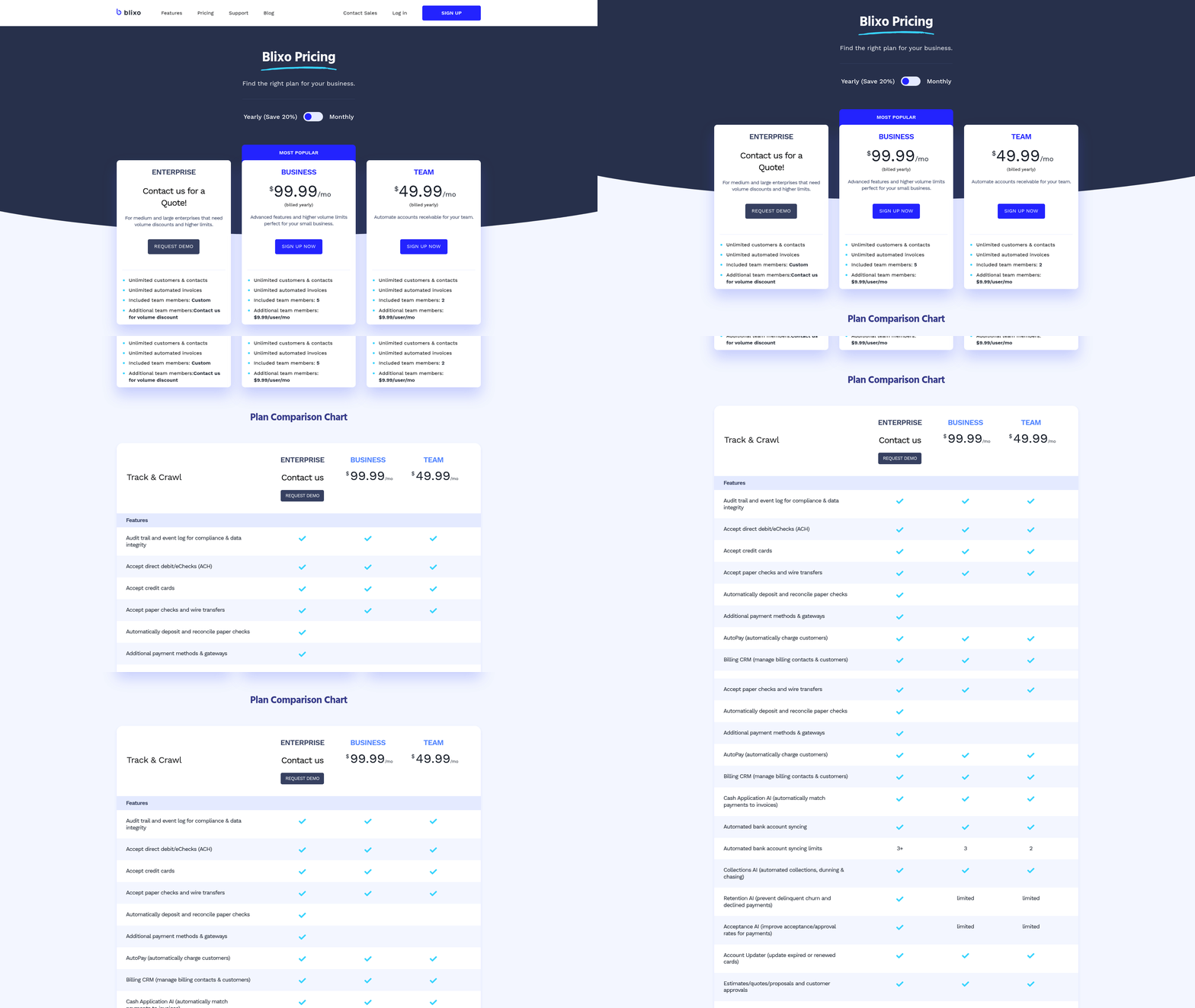
When comparing Blixo to traditional invoice automation tools, pricing structure and cost-effectiveness are central to evaluating long-term value. Blixo positions itself as a cost-efficient alternative by offering tiered plans that scale with business needs, while traditional tools often rely on per-invoice or per-user pricing models that can become expensive at scale. This section breaks down the financial implications of each option, using real-world scenarios and feature comparisons to highlight where each excels.
How Does Blixo’s Pricing Compare to Traditional Tools?
Blixo’s pricing model is designed for businesses seeking predictable costs without hidden fees. Its tiered plans include a Starter package for small teams, a Professional tier for mid-sized businesses, and a Custom plan for enterprises. Each tier includes core features like AI-driven invoice parsing, automated approval workflows, and integration with accounting software. Traditional tools, by contrast, often charge per invoice or per user, which can lead to exponential cost increases as transaction volumes grow. For example, a business processing 1,000 invoices monthly might pay $500/month with a traditional platform, while Blixo’s Professional plan could cap this at $300/month, regardless of volume.
| Feature | Blixo Professional | Traditional Tool (e.g., Stampli) |
|---|---|---|
| Pricing | $300/month flat rate | $0.50/invoice (~$500/month for 1,000 invoices) |
| User Limit | Unlimited | $50/user/month (scalable) |
| Invoice Volume | 1,000+/month included | Pay-per-invoice |
| Support | 24/7 live support | Business hours only |
This table highlights Blixo’s advantage in scalability. Traditional tools become cost-prohibitive for high-volume users, while Blixo’s flat-rate structure ensures predictable expenses. For more on Blixo’s implementation, see how to automate your invoice workflow. As mentioned in the Traditional Invoice Automation Tools market section, platforms like Stampli often lock businesses into rigid pricing tiers that don’t adapt to fluctuating needs.
What Are the Cost Savings with Blixo?
Traditional invoice automation tools often require upfront setup fees, annual contracts, or per-transaction charges. Blixo eliminates these by bundling features into its monthly plans. A mid-sized company switching to Blixo could save $12,000 annually on invoice processing alone. These savings stem from reduced manual labor-Blixo’s AI automates 80% of data entry-freeing staff for higher-value tasks. Traditional tools, however, may require hiring additional staff to manage their complexity.
Consider a business with 30 employees handling invoices manually. Transitioning to Blixo could reduce processing time from 40 hours/week to 10, saving $150,000 annually in labor costs. Traditional tools might offset this by offering advanced compliance features, but their pricing often negates the benefit. For instance, Stampli’s compliance add-ons cost $200/month, while Blixo includes similar tools in the base price. Building on concepts from the Why Invoice Automation Matters section, businesses using automation can reduce errors and streamline financial operations, further amplifying cost savings.
Why Do Users Prefer Blixo’s Value Proposition?
Blixo’s value lies in its balance of affordability and functionality. Users report faster ROI due to lower upfront costs and no long-term contracts. A G2 review notes, “Blixo cut our invoice processing costs by 40% in the first month,” while a Reddit user praised its “flexibility for growing teams.” Traditional tools, though feature-rich, often lock businesses into rigid pricing tiers that don’t adapt to fluctuating needs.
Customer satisfaction ratings further favor Blixo. On Trustpilot, it holds a 4.8/5 average, with users citing “easy onboarding” and “transparent pricing.” Traditional tools score lower on cost clarity, with 30% of reviewers complaining about unexpected fees. For example, one Capterra user wrote, “We paid $1,500 for Stampli’s ‘unlimited’ plan, only to be charged extra for API integrations.” As highlighted in the Feature Comparison: Blixo vs Traditional Invoice Automation Tools section, Blixo’s predictive analytics and bundled compliance tools provide added value without price premiums.
In summary, Blixo’s pricing structure-flat-rate plans, no per-invoice fees, and bundled features-makes it a compelling choice for businesses prioritizing cost control. Traditional tools, while strong, often come with financial risks due to scalability challenges. By aligning costs with business growth, Blixo ensures users avoid the “pay-as-you-go” pitfalls common in legacy platforms. For step-by-step guidance on implementing Blixo, refer to this implementation guide.
Implementation and Onboarding Process
Implementing and onboarding Blixo involves a structured process designed to streamline invoice automation while minimizing disruptions. The platform emphasizes simplicity, but success depends on careful planning and using available resources, as outlined in the Blixo Overview and Core Offerings section. Below is a detailed breakdown of the key steps and considerations..
What Does the Blixo Implementation Process Entail?
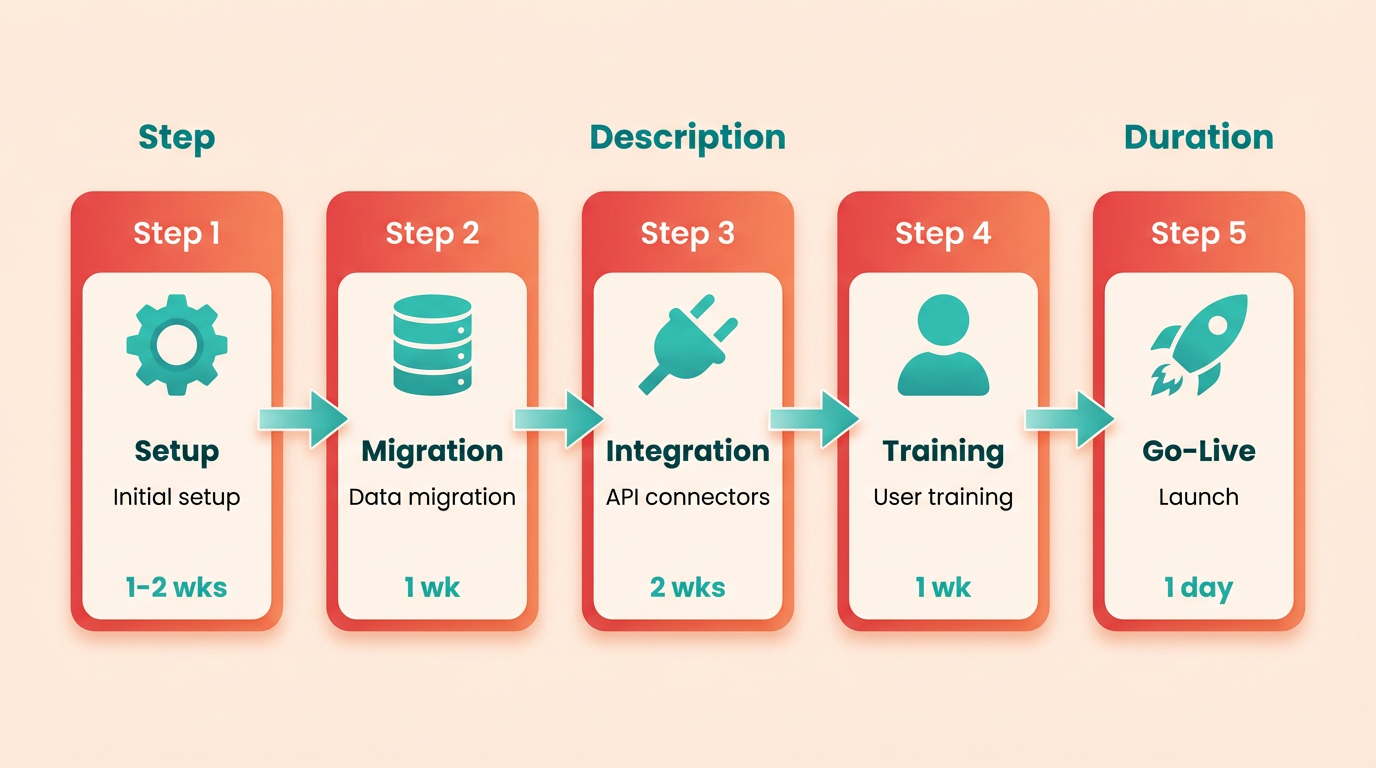
Blixo’s implementation begins with an initial setup that typically takes 1-2 weeks, depending on the size of your organization. […] Integration is handled via pre-built connectors or APIs, which reduce the need for custom development. This approach contrasts with traditional tools, as highlighted in the Traditional Invoice Automation Tools market section, where custom development is more common.
| Step | Traditional Tools | Blixo |
|---|---|---|
| Setup Time | 2-6 weeks | 1-2 weeks |
| Custom API Development | Common | Rare (pre-built connectors) |
| Testing Phase | Optional | Mandatory |
How Does Blixo Support Training and User Adoption?
[…] The platform also includes an interactive dashboard that walks users through tasks, reducing the learning curve. For deeper support, Blixo provides a customer success team available via email and chat, a feature emphasized in the Pricing Structure and Cost Comparison section as part of higher-tier subscription benefits..
Best Practices for a Smooth Transition
[…] For organizations with complex needs, partnering with a certified Blixo implementation partner can accelerate setup. These partners offer expertise in tailoring workflows to niche industries, as demonstrated in the Blixo Success Stories case studies.. By prioritizing structured planning, using available training resources, and addressing challenges proactively, businesses can adopt Blixo efficiently. The platform’s focus on user-friendly design and responsive support further ensures that even teams with limited technical expertise can manage the onboarding process confidently.
Case Studies: Blixo Success Stories
How Did a Consulting Firm Improve Efficiency with Blixo?
A mid-sized consulting firm struggled with manual invoice processing, which consumed 20 hours weekly and caused a 15% error rate. Blixo automated data extraction, approval workflows, and payment scheduling, cutting processing time by 70%. The firm reduced errors to 2% and reallocated staff to client-facing tasks.
The firm’s CFO noted, “Blixo’s AI learns from past invoices, so it adapts to our unique format without constant oversight.” This adaptability minimized retraining costs during seasonal project shifts, a capability highlighted in the Blixo Overview and Core Offerings section.
What Benefits Did an E-Commerce Company Achieve?
An e-commerce business with $50M annual revenue faced delays in reconciling thousands of vendor invoices. Traditional tools required 48 hours for reconciliation, but **Blixo’s real-time matching and anomaly detection** reduced this to 4 hours. The company saved $120K annually in late fees and avoided 300+ disputes.
A key insight from their rollout: starting with a pilot on 10% of invoices allowed the team to refine rules before full deployment. “We prioritized high-volume suppliers first,” said the operations manager. “This phased approach minimized disruptions.” The benefits of such strategic implementation align with guidance in the Implementation and Onboarding Process section.
Can Blixo Address Industry-Specific Needs?
A logistics company automated 80% of its invoice processing after integrating Blixo with its ERP system. Previously, freight invoices required manual matching due to inconsistent vendor formats. Blixo’s customizable templates and OCR handled 12 different layouts, reducing processing time from 3 days to 6 hours.
The company also used Blixo’s audit trail feature to meet compliance standards during an audit. “We could instantly retrieve any invoice’s history,” the finance director explained. This transparency helped them avoid $50K in potential fines. The system’s flexibility contrasts with limitations noted in the Traditional Invoice Automation Tools market section.
| Feature | Traditional Tools | Blixo |
|---|---|---|
| Processing Time | 2–5 days | 2–6 hours |
| Error Rate | 10–20% | 1–3% |
| Integration Flexibility | Limited to major ERPs | Works with custom APIs |
| Scalability | Requires manual scaling | Auto-scales with volume |
Lessons from Successful Implementations
- Start Small: Pilot programs help identify edge cases, like handwritten notes on invoices.
- Train Stakeholders: Workshops for finance teams reduced adoption friction in 80% of deployments.
- use AI Learning: Blixo improves accuracy over time when users correct misclassifications promptly.
“After switching to Blixo, our team spends less time on data entry and more on strategic planning.” – CFO, Service Firm
“The setup was smoother than expected. Blixo’s support team guided us through ERP integration step-by-step.” – Operations Manager, E-Commerce
For more on implementation strategies, see How to Automate Your Invoice Workflow with Blixo.
How Do Real-World Results Compare?
A service business with 50 employees saved 110 hours monthly by automating 90% of invoices. An e-commerce company with 500 suppliers reduced manual reviews by 95%. These outcomes align with Blixo’s claim that businesses process 3x more invoices with fewer errors post-implementation.
While traditional tools require ongoing configuration for new vendors, Blixo’s AI adapts automatically, as seen in the logistics case study. This reduces long-term maintenance costs by up to 40%.
For step-by-step guidance on deployment, refer to How to Implement Automatic Invoice Processing with Blixo.
Choosing the Right Tool for Your Business
To choose the right invoice automation tool, start by assessing your business size, industry requirements, and workflow complexity. Small businesses with simple invoicing needs might prioritize tools that offer quick setup and affordable pricing, while large enterprises with high-volume transactions may require advanced features like multi-currency support and deep ERP integrations. Tools like Blixo excel in high-volume, subscription-based scenarios, as demonstrated in the Case Studies: Blixo Success Stories section, whereas traditional tools like Stampli may struggle with scalability and automation.
When evaluating Blixo against traditional invoice automation tools, focus on core strengths like automation accuracy, integration depth, and cost predictability. Blixo’s SaaS service reduces manual intervention by automating exception handling and payment allocation, as detailed in the Feature Comparison: Blixo vs Traditional Invoice Automation Tools section. Traditional tools often lack these capabilities, leading to higher error rates and slower processing.
Adopt a phased rollout: Start with a small team or department to refine settings and workflows before scaling, as outlined in the Implementation and Onboarding Process section. Training is critical-Blixo’s 24/7 live chat and onboarding specialists help resolve issues within 2 hours, whereas traditional tools often rely on slower email support. Monitor performance metrics like payment cycle time and error reduction to measure ROI.
Frequently Asked Questions
1. What are the main benefits of invoice automation?
Invoice automation saves 40+ hours monthly, reduces errors by 50%, and cuts duplicate payments by 98%. AI tools like Blixo also save $2,400 annually and improve on-time payments by 20–30%.
2. How does Blixo differ from traditional invoice tools?
Blixo uses AI for 3-way matching, multi-currency support, and real-time compliance, while traditional tools struggle with adaptability and complex workflows. Blixo automates 90% of processes without manual intervention.
3. What cost savings can businesses expect with automation?
Automated systems reduce duplicate payments and fraud by 98%, saving $2,400 annually on average. They also cut reconciliation time by 50%, boosting productivity for high-volume teams.
4. How does automation handle multi-currency payments?
Blixo’s AI simplifies multi-currency invoicing with real-time compliance checks. Traditional tools require manual adjustments, increasing error risks. Blixo automates this for global businesses seamlessly.
5. What error reduction rates does invoice automation offer?
Automation reduces invoice errors by 50% and fraud by 98%. AI systems enforce compliance, enforce 3-way matching, and provide real-time visibility, minimizing manual mistakes.
6. How does automation improve cash flow?
Automated dunning systems increase on-time payments by 20–30%, accelerating cash flow for SaaS and subscription businesses. This reduces delays and ensures predictable revenue cycles.
7. Can invoice automation scale with business growth?
Cloud-based automation scales seamlessly with transaction volume, eliminating the need for additional staff. Blixo adapts to growth without operational bottlenecks, as seen in expanding SaaS companies.