

Choose the Best AR Automation Software for Your Business

Key Takeaways
- Automating AR processes is critical to avoid inefficiencies that cost time, money, and competitive advantage.
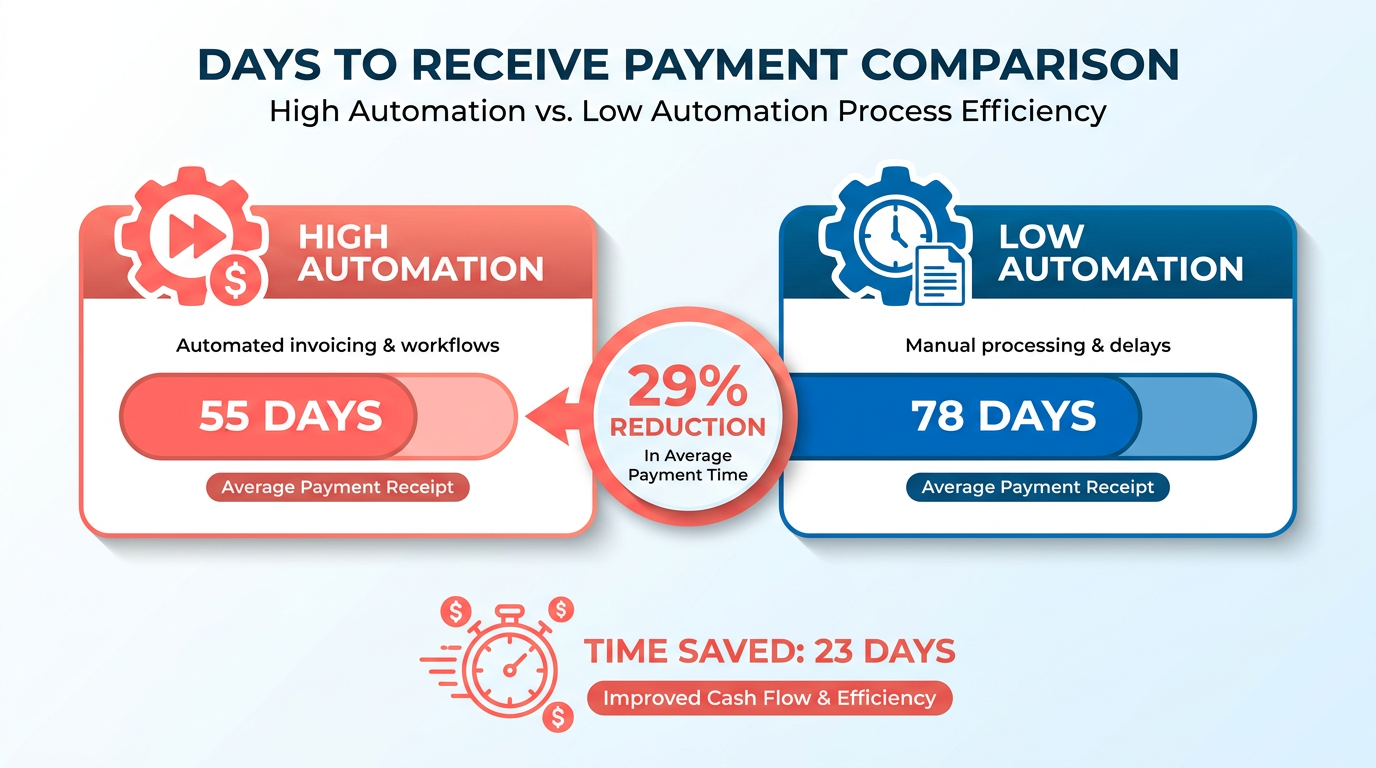
- Companies with AR automation receive payments in 55 days versus 78 days for those with minimal automation (Stripe).
- 85% of CFOs reported reduced days sales outstanding (DSO) after automating AR workflows (NetSuite).
- Sage Intacct users cut close time by 79% and achieve 250% ROI by eliminating manual AR tasks.
- 75% of automated businesses see fewer errors compared to manual systems (Stripe).
- Manual AR processes waste hours on repetitive tasks like invoice creation and reconciliation.
- Automated systems reduce cash flow bottlenecks caused by delayed payments and disjointed workflows.
Related Video
Watch: What is AR automation software? by Billtrust
Why AR Automation Matters
Automating accounts receivable (AR) processes is no longer optional-it’s a strategic necessity. Businesses that rely on manual AR workflows face inefficiencies that cost time, money, and competitive edge. For example, companies handling over 20,000 invoices monthly using automation receive payments in 55 days, compared to 78 days for those with minimal automation, according to Stripe. Manual errors, delayed payments, and disjointed systems create bottlenecks that hurt cash flow and profitability. AR automation solves these issues by accelerating collections, reducing days sales outstanding (DSO), and streamlining operations, as detailed in the Understanding AR Automation Software section. Below, we break down why this shift is critical.
How Manual AR Processes Waste Time and Money
Manual AR workflows are riddled with inefficiencies. A 2023 study by NetSuite found 85% of CFOs reported reduced DSO after automating AR processes. Without automation, teams spend hours on repetitive tasks like invoice creation, follow-ups, and reconciliation. Sage Intacct customers, for instance, achieve a 79% reduction in close time and 250% ROI by eliminating manual work, aligning with the Pricing Models and ROI Analysis section’s emphasis on cost-benefit trade-offs. Worse, manual systems increase the risk of errors: Stripe notes 75% of businesses using automation see fewer payment mistakes. These inefficiencies translate to real costs-manual AR teams often waste 20–30% of their time on avoidable tasks, time that could be redirected to strategic growth initiatives.
Real-World Impact of Delayed Payments
Late payments don’t just delay cash flow-they strain relationships and operations. HighRadius reports businesses using AI-driven automation reduce past-due accounts by 20%, a feature highlighted in the Essential Features to Look For section. Consider a wholesale business: manual invoicing might take weeks to resolve, but automation generates accurate invoices instantly, ensuring faster payments. In healthcare, delayed reimbursements can jeopardize compliance with regulations like HIPAA, as noted in Stripe’s case studies. For manufacturers, even a 10-day DSO reduction (as seen with Esker’s clients) can free up millions in working capital. These examples highlight how automation turns delayed payments from a liability into a controlled, optimized process.
Who Gains the Most From AR Automation
While all businesses benefit from automation, certain industries and team sizes see disproportionate gains. Small-to-medium businesses (SMBs), for instance, reduce DSO by up to 10 days with tools like NetSuite, which automates invoice generation and reminders. Global enterprises thrive on features like multi-currency support (HighRadius handles 135+ currencies) and integration with ERP systems (Esker connects to 70+ ERPs). Retailers, healthcare providers, and manufacturers also gain unique advantages:
- Retail: Automated invoicing for bulk orders accelerates payments (Stripe case study).
- Healthcare: Compliance and audit trails simplify with tools like Stripe Invoicing.
- Manufacturing: AI-driven cash application software (Billtrust) reduces manual reconciliation by 865 hours annually.
Teams handling high invoice volumes (e.g., Billtrust processes $1 trillion yearly) or complex workflows (multi-site operations) also find automation indispensable. As one CFO explains, “Automation lets us focus on growth, not chasing payments”-a sentiment echoed by users across industries.
| Feature | AR Automation Benefits | Manual Process Drawbacks |
|---|---|---|
| DSO Reduction | Up to 10 days (Esker) | 20–30% higher DSO |
| Error Rates | 90%+ remittance accuracy (HighRadius) | 5–10% error rate |
| Time Saved | 50% fewer late payments (Upflow) | 20–30% of team time wasted |
| Integration | Syncs with ERPs, CRMs (Sage, Esker) | Siloed systems, manual data entry |
By addressing these pain points, AR automation becomes a catalyst for operational efficiency and financial resilience. The next step is choosing software that aligns with your specific needs-a decision we’ll explore in the Evaluating and Comparing AR Software Solutions section.
Understanding AR Automation Software
AR automation software streamlines the accounts receivable (AR) process by digitizing and automating tasks like invoicing, payment tracking, and cash application. This technology reduces manual effort, accelerates cash flow, and minimizes errors. At its core, AR automation ensures businesses get paid faster while improving customer experiences through seamless interactions. For example, platforms like Versapay and HighRadius use AI to automate payment matching and reconciliation, cutting days sales outstanding (DSO) by up to 10 days. As mentioned in the Why AR Automation Matters section, automating these processes is no longer optional but a strategic necessity for modern businesses.
Key Features of AR Automation Software
AR automation tools offer a suite of features designed to optimize the invoice-to-cash cycle. Invoicing and billing capabilities allow businesses to generate and send invoices automatically, often integrated with CRM or ERP systems. Cash application features match incoming payments to invoices instantly, reducing manual reconciliation. For instance, Esker’s AI-driven cash application handles over €107 billion in transactions annually with 99% automation rates. Collections management tools send automated reminders and track overdue invoices, improving recovery rates.
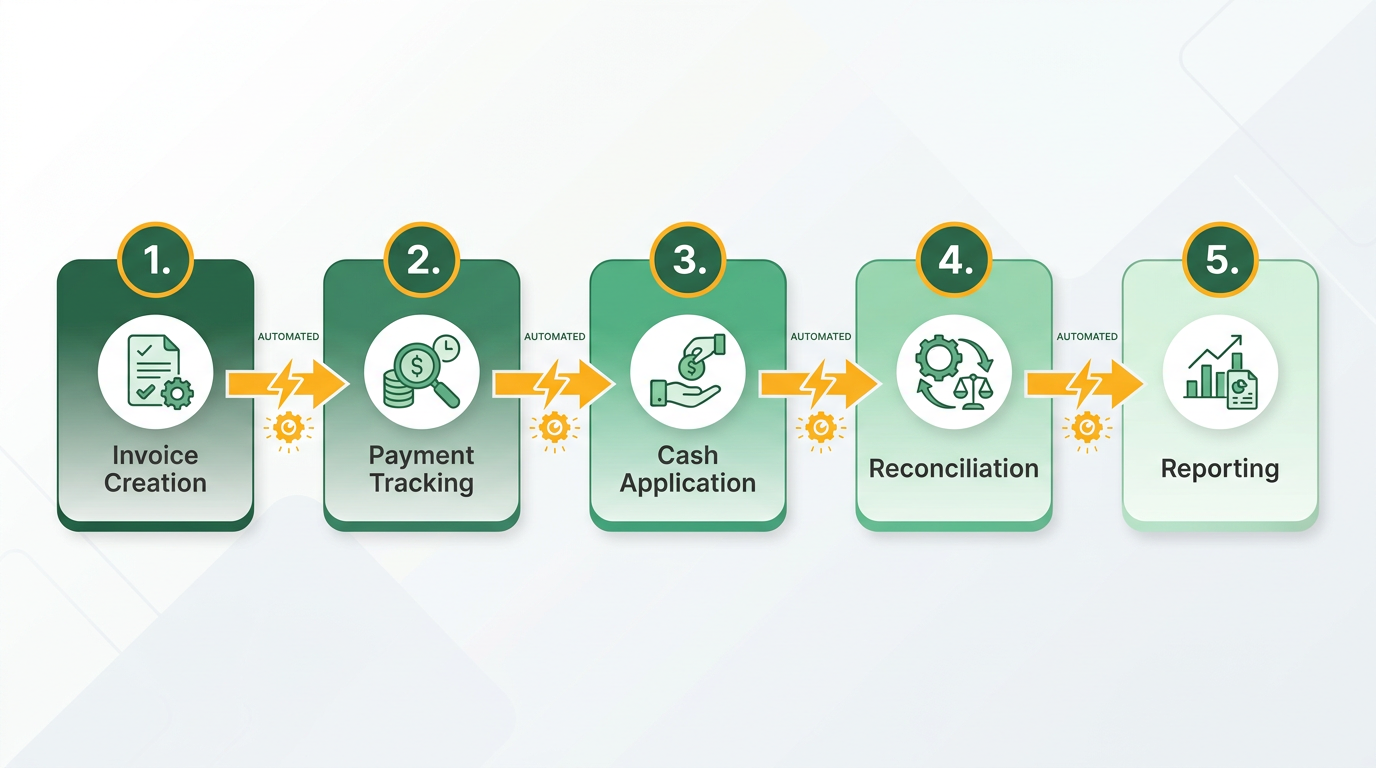
Integration with existing systems is another cornerstone. Most AR platforms connect with ERPs like Oracle NetSuite, SAP, and Microsoft Dynamics 365, ensuring data flows seamlessly across financial workflows. Cloud-based solutions, such as Stripe Invoicing, further enhance flexibility by enabling real-time access and collaboration. This integration reduces silos and ensures teams can monitor AR performance from a unified dashboard. Building on concepts from the Essential Features to Look For section, prioritizing integration capabilities and scalability is critical when selecting AR software.
Why Cloud-Based AR Automation Matters
Cloud-based AR software offers scalability and accessibility, making it ideal for businesses of all sizes. Unlike on-premise solutions, cloud platforms require no heavy infrastructure and provide automatic updates. According to Stripe, 87% of businesses using AR automation report faster processes, while 75% note improved customer experiences. For example, Sage’s cloud AR tools integrate with Salesforce, allowing controllers like David Novak to streamline invoicing and reduce close times by 79%.
How AR Automation Reduces Costs and Boosts Efficiency
Manual AR processes are error-prone and time-consuming. Automating tasks like invoice generation, payment tracking, and reconciliation cuts operational costs significantly. For example, Trek improved collections efficiency by 30% using Esker’s tools, demonstrating tangible reductions in operational delays. HighRadius, for instance, claims its AI-powered tools reduce past-due accounts by 20% and boost team productivity by 40%.
| Feature | Manual Process | Automated Process |
|---|---|---|
| Invoicing Time | 5–10 days per invoice | 1–2 hours automated |
| Payment Reconciliation | 8–12 hours weekly | 15 minutes daily |
| Error Rates | 15–20% due to manual input | <2% with AI matching |
Real-World Impact: Case Studies
AR automation’s benefits are evident in real-world applications. Trek improved collections efficiency by 30% using Esker’s tools, while American Greetings achieved zero bad debt for four years with HighRadius. For SMBs, automation is equally transformative. A 2014 Aberdeen Group survey found that businesses with automated AR saw 71% fewer past-due invoices and 80% faster payment clearing. As highlighted in the Success Stories and Best Practices section, these case studies underscore the broader industry impact of AR automation.
Choosing the Right AR Automation Software
To select the best solution, focus on integration capabilities, scalability, and AI-driven features. Ensure the software supports multi-currency operations and connects with your existing ERP or accounting systems. Look for tools with customizable workflows, like Serrala’s AI-powered credit scoring, and real-time analytics for proactive decision-making.
Essential Features to Look For
When evaluating AR automation software, prioritize features that streamline workflows, enhance accuracy, and provide actionable insights. The most effective platforms combine automation with flexibility to adapt to your business’s unique needs. Below are the essential features to focus on, supported by real-world data and user experiences.
What Makes Automated Invoicing and Payment Reminders Effective?
Automated invoicing reduces manual errors and accelerates payment cycles. For example, Versapay reports a 25% faster payment rate and 30% fewer overdue invoices by automating invoice delivery and payment reminders. Sage claims businesses can get paid 2X faster by reducing processing time, while HighRadius uses AI to cut past-due accounts by 20%. These tools also support multi-currency transactions and integrate with CRMs like Salesforce, ensuring seamless communication across teams.
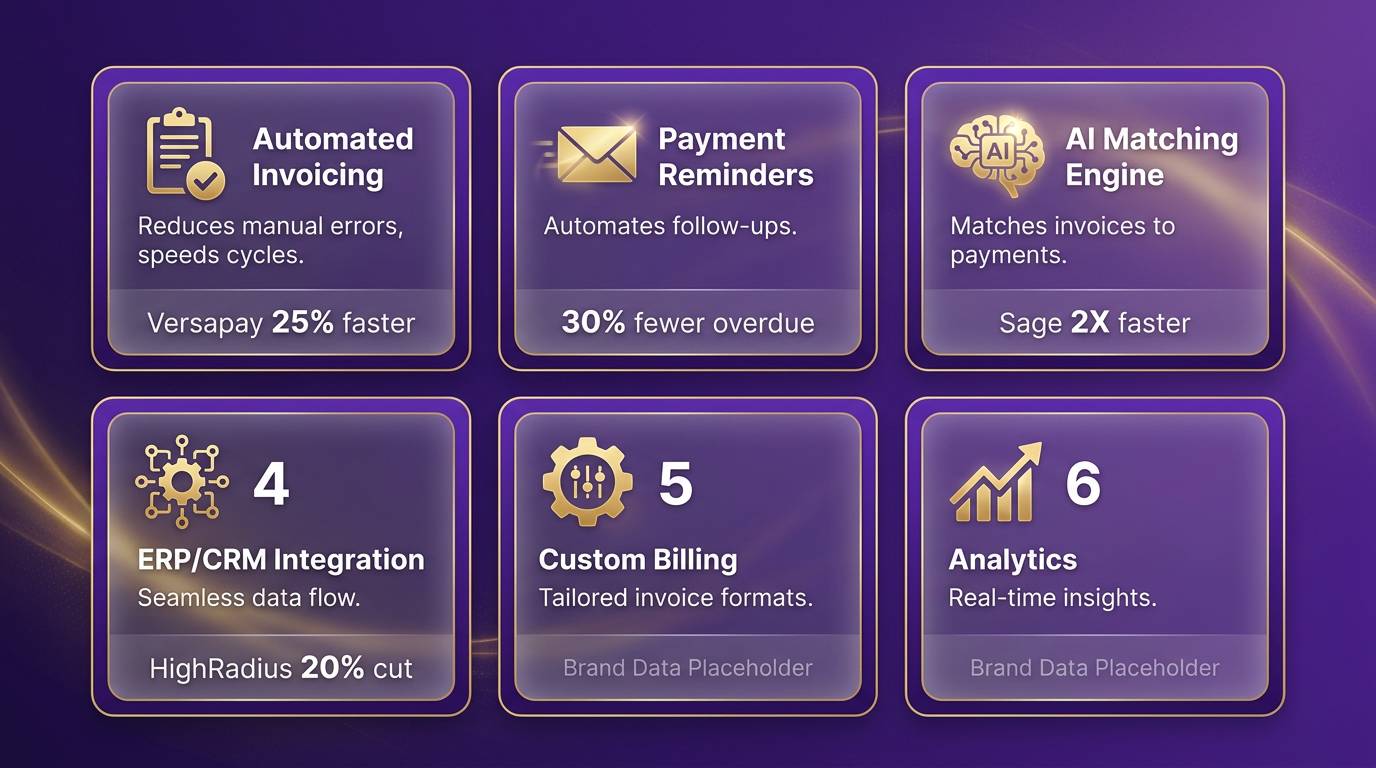
A key benefit is scalability: Upflow allows setup in 5 minutes, making it ideal for growing businesses. Automated reminders, such as those in Billtrust, reduce late payments by 50%, improving cash flow predictability. As highlighted in the Why AR Automation Matters section, manual invoicing processes often lead to delays, strained customer relationships, and inefficiencies in tracking payments.
Why Is Cash Application and Reconciliation Important?
Cash application refers to matching incoming payments to the correct invoices. Platforms like HighRadius use AI-powered OCR to capture remittance data with over 90% accuracy, while Serrala automates cash application at up to 99% efficiency. This minimizes manual reconciliation, which can consume hundreds of hours annually. For instance, a medical equipment manufacturer using Billtrust increased automated match rates from 45% to 90%, saving 865 hours of manual work.
Esker’s AI-driven cash application reduces DSO by up to 10 days, and Versapay claims 50% less time managing receivables. Building on concepts from the Understanding AR Automation Software section, real-time visibility into cash flow helps finance teams identify discrepancies quickly. Without strong cash application features, businesses risk delayed revenue recognition and errors in financial reporting.
How Do Reporting and Analytics Improve Decision-Making?
Real-time reporting and analytics are critical for tracking KPIs like DSO, aging invoices, and payment trends. NetSuite highlights that 85% of CFOs saw reduced DSO after implementing AR automation, while Esker offers customizable dashboards with metrics like collections efficiency and customer payment behavior. HighRadius further enhances this with predictive analytics, helping teams prioritize high-risk accounts.
As discussed in the Evaluating and Comparing AR Software Solutions section, real-time reporting is a critical factor in selecting AR software. For example, Trek used Esker’s analytics to optimize collections workflows, while American Greetings achieved zero bad debt through paperless credit reviews. These insights enable proactive adjustments-such as tightening credit terms for slow-paying clients or offering early-payment discounts. Without analytics, businesses rely on outdated spreadsheets, missing opportunities to refine AR strategies.
What Security and Compliance Features Should You Prioritize?
Data security is non-negotiable. Billtrust and Versapay integrate with over 40 ERP systems and banks, ensuring secure data flow. HighRadius supports 135 currencies and 200 payment methods, complying with global financial regulations. Encryption, audit trails, and role-based access controls are standard in platforms like Sage and Esker, which handle billions in transactions annually.
Compliance with standards like GDPR and PCI-DSS is also crucial. Serrala includes AI-powered credit scoring to mitigate risk, while Billtrust’s $1 trillion annual transaction volume underscores its strong security protocols. A single breach can lead to financial penalties and reputational damage, making these features essential for regulated industries like healthcare or finance.
Why Should You Focus on Customization and Scalability?
Your AR software must adapt to your workflows. Sage integrates with Salesforce and POS systems, while Esker supports over 70 ERPs, including Oracle and SAP. Upflow’s 5-minute setup is ideal for SMBs, whereas HighRadius caters to enterprises with global operations.
Scalability ensures the software grows with your business. Versapay’s customer portal allows clients to manage accounts 24/7, reducing finance team workload. Billtrust’s 24-year track record in AR innovation demonstrates its ability to evolve with market needs. Without customization, rigid systems may fail to meet unique requirements, such as handling complex deductions or multi-entity credit management.
| Feature | Key Providers | Notable Benefits |
|---|---|---|
| Automated Invoicing | Versapay, Sage | 25–50% faster payments, fewer delays |
| Cash Application | HighRadius, Serrala | 90–99% automation, real-time matching |
| Analytics | Esker, NetSuite | DSO tracking, predictive insights |
| Security | Billtrust, Versapay | ERP integrations, encryption |
| Scalability | Sage, Upflow | 5-minute setup, multi-currency support |
By aligning these features with your business size, industry, and financial goals, you can choose AR automation software that drives efficiency and long-term growth.
Evaluating and Comparing AR Software Solutions
To compare AR automation software effectively, start by defining clear evaluation criteria. Focus on pricing models, customer support quality, integration capabilities, and scalability. As mentioned in the Pricing Models and ROI Analysis section, pricing may vary by user count, transaction volume, or feature tiers, as seen in solutions like Versapay (flat-rate vs. per-invoice pricing) or HighRadius (enterprise-tiered models). Customer support should include 24/7 availability, response times, and training resources-key for resolving urgent issues like payment reconciliation. Integration with existing systems (e.g., ERP, CRM) is critical: Esker supports 70+ ERP platforms, while Billtrust offers 40+ connectors. Scalability ensures the software grows with your business, from SMBs using Upflow’s 5-minute setup to enterprises using HighRadius’s global payment processing.
What Features Should You Compare?
Next, evaluate core features like invoice automation, cash application, and collections management. Building on concepts from the Essential Features to Look For section, a comparison table highlights differences:
| Feature | Versapay | HighRadius | Esker | Upflow |
|---|---|---|---|---|
| AI Automation | AI-driven cash application | 90%+ remittance accuracy | AI for credit scoring | Automated payment matching |
| Integration | NetSuite, Sage Intacct | 20+ AP portals | 70+ ERP systems | QuickBooks, Xero |
| DSO Reduction | 25% faster payments | 10% DSO reduction | 10-day DSO cut | 50% fewer late payments |
| Customer Portal | 24/7 self-service portal | Real-time collections dashboards | Multi-language support | Real-time status tracking |
Advanced features like AI-powered OCR (HighRadius) or multi-currency support (Esker) address specific needs. For instance, Serrala’s 99% cash application automation suits businesses with high transaction volumes, while Billtrust’s 1,000+ connectors optimize global operations.
How to Assess Vendor Reputation and Reliability
Vendor reputation affects long-term success. As emphasized in the Why AR Automation Matters section, industry recognition, customer testimonials, and proven outcomes are critical. HighRadius and Esker are named Gartner leaders, reflecting their market maturity. Case studies add social proof:
- Esker: Reduced DSO by 10 days for Trek, handling €107B annually.
- Billtrust: Helped Kinepolis lower overdue invoices by 71% via automated collections.
- Versapay: Achieved 30% fewer past-due invoices for clients using its customer portal.
Vendor reliability also includes implementation timelines. SMBs may prefer Upflow’s 5-minute setup, while enterprises might allocate weeks for solutions like TreviPay. Expert opinions reinforce these choices: David Novak at Cornerstone Information Systems praised Sage Intacct’s Salesforce integration, streamlining invoicing workflows. By combining structured evaluation criteria, feature comparisons, and vendor credibility, businesses can align AR automation tools with their operational goals. Prioritize solutions that reduce manual work (e.g., 50% time savings with Versapay) and demonstrate measurable ROI, such as Sage Intacct’s 250% average return.
Implementation and Rollout Planning
Implementing and rolling out AR automation software requires strategic planning to ensure seamless adoption and maximize benefits like reduced DSO and improved cash flow. Start by addressing change management and training needs, as employee resistance can hinder even the most advanced systems. As mentioned in the Why AR Automation Matters section, businesses with manual AR workflows often face inefficiencies that automation can resolve, making strategic adoption critical. According to a 2023 study cited by NetSuite, 85% of CFOs who automated over half of their AR processes saw a drop in DSO, but this success often depends on how teams adapt to the new workflow.
How Can Businesses Ensure Smooth Adoption?
Change management begins with involving stakeholders early. NetSuite recommends consulting finance teams, IT departments, and customer service representatives to tailor automation workflows to their specific tasks. For example, automated invoice generation and payment reminders (a feature highlighted in both NetSuite and Serrala) should align with existing policies to avoid confusion. Scott Beaver, a senior product marketing manager, emphasizes that automation frees teams to focus on higher-value tasks, but this shift requires clear communication about role changes.
A phased rollout can ease the transition. Start with a pilot group-say, a single department or location-to test the software’s integration with existing systems like ERPs or CRMs. Building on concepts from the Understanding AR Automation Software section, AR automation streamlines tasks like payment tracking, but integration with third-party tools (e.g., credit insurers) requires careful validation. Serrala’s solutions, for instance, integrate with third-party credit insurers and real-time analytics tools, which should be tested alongside your current infrastructure. Regular feedback loops during this phase help identify friction points, such as manual overrides needed for complex payment cases.
What Training and Support Are Critical?
Training must address both technical skills and behavioral shifts. NetSuite’s technical details note that AR automation includes real-time reporting dashboards, a feature that requires staff to understand data interpretation. As outlined in the Essential Features to Look For section, platforms with AI-powered tools like cash application matching (as seen in Serrala’s case study with Madelaine Chocolate Company) demand specialized training to optimize their benefits. A layered training approach works best:
- Role-specific workshops: Finance staff need deep dives into invoice generation and reconciliation, while customer service teams may focus on handling exceptions or bad debt.
- Ongoing support: Both NetSuite and Serrala recommend assigning internal champions-employees who act as first-line support during the early rollout.
- Documentation: Provide step-by-step guides for common tasks, such as reviewing automated payment matches or adjusting credit scoring thresholds in Serrala’s AI system.
How to Handle Data Migration and Integration?
Seamless data flow is critical. NetSuite highlights that AR automation integrates with existing accounting systems, but this requires careful migration planning. For example, historical invoices, customer payment histories, and credit terms must be transferred without disrupting daily operations. Serrala’s technical specs emphasize AI-powered payment matching across all formats, which demands clean, standardized data upfront.
Use a test migration before full deployment. Transfer a subset of data-perhaps a month’s worth of transactions-and verify that automated processes like real-time reporting and cash application work as intended. NetSuite’s conclusion warns of potential costs from manual reconciliation if data is poorly migrated, so allocate time to clean up duplicates or inconsistent fields beforehand.
Why Testing and Quality Assurance Matter
Testing should mirror real-world scenarios. For example, simulate late payments to check if automated reminders trigger correctly, or test Serrala’s AI credit scoring with sample customer profiles to ensure it aligns with your risk policies. NetSuite’s case study on real-time reporting benefits shows that even minor integration errors can delay insights, so QA teams must validate data synchronization between AR software and ERPs.
A phased testing approach minimizes risks:
- Unit testing: Validate individual features like invoice generation or payment matching.
- Integration testing: Confirm that AR software interacts smoothly with systems like Sage or Upflow (as referenced in other sources).
- User acceptance testing (UAT): Let end-users perform tasks to uncover usability issues, such as confusing dashboard layouts.
Key Considerations for Success
| Feature | NetSuite’s Approach | Serrala’s Approach |
|---|---|---|
| Integration | Connects with accounting systems for seamless data flow | AI-powered integration with ERP, CRM, and credit insurers |
| Training | Role-specific workshops and internal champions | Hands-on training for AI features like cash application |
| Testing | Focus on real-time reporting accuracy | High automation rates (up to 99%) require rigorous validation |
By aligning change management strategies with tailored training and strong testing, businesses can avoid common pitfalls like employee resistance or data migration errors. Both NetSuite and Serrala’s case studies demonstrate that meticulous planning-not just software features-determines whether AR automation delivers promised efficiencies.
Pricing Models and ROI Analysis
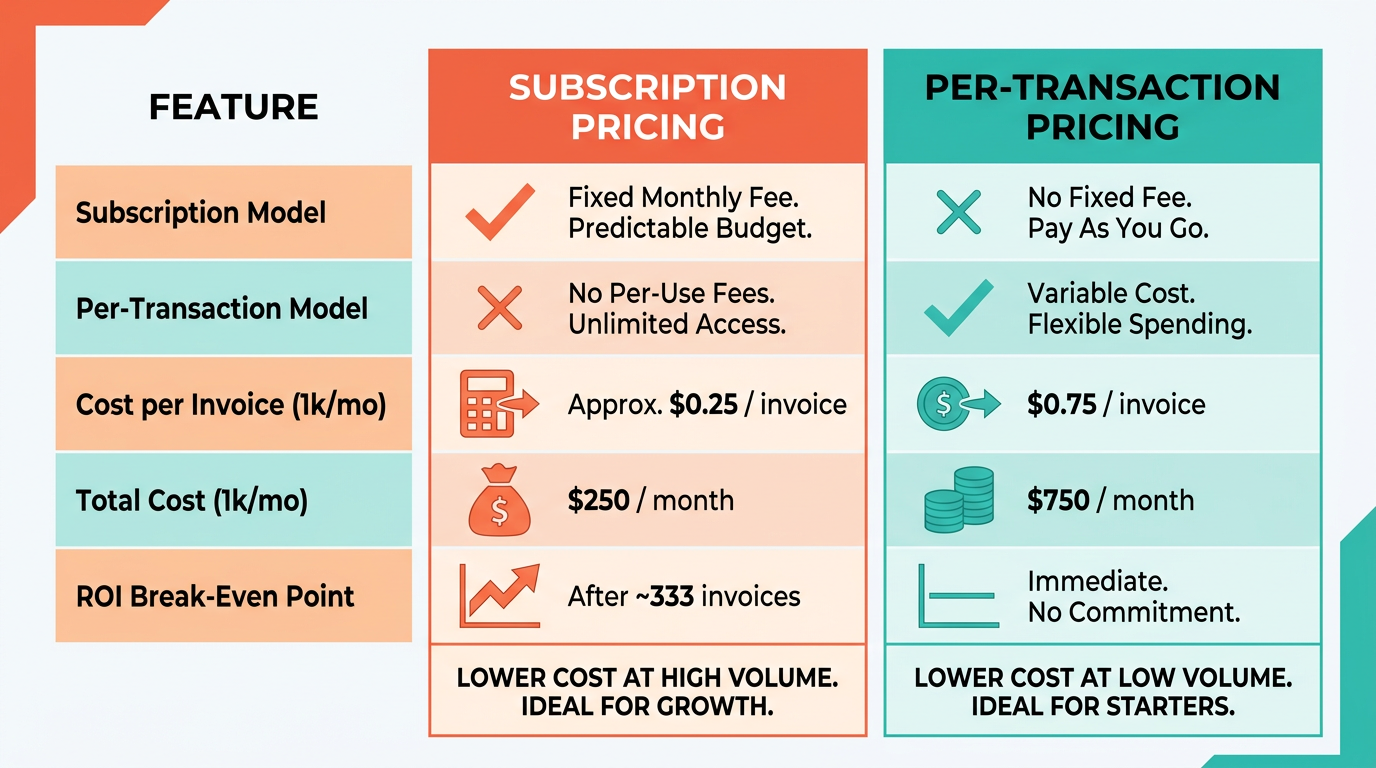
AR automation software typically follows two primary pricing models: subscription-based and per-transaction. Subscription models charge a fixed monthly or annual fee, often tiered based on features or user count. Per-transaction models bill for each invoice processed or task automated, making them scalable for businesses with fluctuating volumes.
Subscription-based pricing is ideal for organizations with predictable workflows, offering cost stability. HighRadius, for example, uses a subscription model that integrates AI-driven features like credit risk assessment, which can reduce Days Sales Outstanding (DSO) by 10%-a concept explored in depth in the Understanding AR Automation Software section. Per-transaction pricing suits businesses with variable transaction volumes, such as seasonal retailers. NetSuite highlights this model’s flexibility, noting that automated invoice generation and payment reminders can reduce manual processing costs.
| Pricing Model | Key Features | Best For |
|---|---|---|
| Subscription-Based | Fixed monthly/annual fee, tiered plans | Predictable transaction volumes, long-term use |
| Per-Transaction | Pay-per-invoice/task, scalable costs | Variable volumes, short-term automation needs |
Cost-benefit analysis for AR automation involves weighing upfront costs against savings in labor, error reduction, and cash flow improvements. Subscription models require higher initial investment but offer predictable expenses. HighRadius claims its software increases net recovery rates by 30% and boosts AR team productivity by 40%, translating to faster cash flow-key metrics emphasized in the Why AR Automation Matters section. Per-transaction models avoid upfront costs but may lead to unpredictable expenses as transaction volumes grow.
For example, a mid-sized company with $10M in annual revenue might spend $150K annually on a subscription model. If automation reduces DSO by 5 days (valued at $83K annually), the ROI becomes positive within 1.5 years. NetSuite’s case studies show 85% of CFOs reported DSO reductions after automation, validating long-term benefits.
| Factor | Subscription Model | Per-Transaction Model |
|---|---|---|
| Initial Cost | High (e.g., $150K/year) | Low (e.g., $5-10 per transaction) |
| Scalability | Fixed cost at scale | Costs rise with transaction volume |
| Labor Savings | 40% productivity gain | 20-30% reduction in manual tasks |
| Error Reduction | 90%+ remittance accuracy | 85%+ invoice processing accuracy |
Calculating ROI for AR automation requires quantifying savings in labor, DSO reduction, and bad debt prevention. HighRadius cites a 20% reduction in past-due accounts and a 30% increase in net recovery rates. Using these metrics, a company with $50M in annual revenue could save $1.2M annually by reducing DSO from 45 to 36 days. Break-even analysis helps determine when automation costs offset savings, a framework detailed in the Evaluating and Comparing AR Software Solutions section. For a $200K subscription fee, a 10% DSO improvement (worth $1.8M annually) would break even in 1.1 months.
ROI Formula: (Net Benefits – Cost) / Cost Example: If automation saves $300K annually and costs $100K, ROI = (300K – 100K) / 100K = 200%.
Real-world examples from case studies highlight tangible outcomes. American Greetings achieved zero bad debt for four years using HighRadius, while Ebsco reduced DSO by 5.5 days. These results underscore the importance of aligning pricing models with business size and transaction complexity.
When evaluating AR automation, prioritize pricing models that match your transaction volume and operational goals. Subscription models suit businesses seeking stability, while per-transaction models offer flexibility. Always calculate break-even points using industry-specific metrics like DSO and net recovery rates. HighRadius and NetSuite both demonstrate measurable ROI through automation, but their effectiveness depends on how well their features align with your workflow.
Success Stories and Best Practices
Real-world examples of AR automation software in action highlight its transformative impact on cash flow and operational efficiency. Companies like Brightstar, American Greetings, and Ebsco have demonstrated measurable results through AI-driven solutions. For instance, Brightstar recovered $20 million in invalid deductions using HighRadius’s automation, while American Greetings maintained zero bad debt for four years by digitizing credit reviews. These cases underscore how automation reduces manual errors and accelerates collections. Below, a comparison table summarizes key performance metrics from leading implementations:
| Company | DSO Reduction | Recovery Rate Increase | Key Automation Feature |
|---|---|---|---|
| Brightstar | 10% | 30% | AI-powered deduction resolution |
| American Greetings | N/A | 100% | Paperless credit review workflows |
| Ebsco | 5.5 days | N/A | AI-based worklist prioritization |
| Industry Benchmark | 20% | 30% | Global payment method support |
Real-World Success Stories
HighRadius’s AI-driven platform has enabled businesses to cut days sales outstanding (DSO) by up to 20% and boost productivity by 40%. American Greetings, for example, uses its integration with 35+ credit agencies to automate risk assessments, achieving 100% paperless credit reviews. This aligns with Understanding AR Automation Software, which explains how integration with external systems enhances automation capabilities. Meanwhile, Ebsco’s use of AI-powered OCR improved remittance capture accuracy to 90%, streamlining payment matching. Brightstar’s success in recovering $20 million in deductions showcases how targeted automation can resolve complex disputes quickly.
Best Practices for Implementation
Tailoring AR automation to business needs requires strategic planning. Start by aligning software capabilities with your operational complexity. HighRadius recommends choosing solutions that integrate seamlessly with existing ERP systems, as manual data entry remains a major cost driver. This mirrors Essential Features to Look For, which emphasizes integration compatibility as a key selection criterion. NetSuite emphasizes the value of real-time reporting, which allows teams to identify bottlenecks and adjust workflows dynamically. For small businesses, the SMB automation paper advises conducting a systems analysis to avoid overpaying for unnecessary features. Key steps include:
- Assess Integration Needs: Prioritize platforms that connect with your current accounting software (e.g., SAP, Oracle).
- Train Teams on AI Tools: HighRadius’s AI features require staff to adapt to predictive analytics and automated prioritization.
- Start Small: Pilot automation on a single process, like invoice generation, before scaling to full AR workflows.
Lessons from Failed Implementations
Not all AR automation efforts succeed. Many SMBs struggle with high upfront costs and resistance to change. One common pitfall is selecting software that lacks flexibility-forcing businesses to alter processes instead of the other way around. A 2014 Aberdeen Group study found companies that failed to customize automation tools saw 39% higher manual processing costs. Pricing Models and ROI Analysis provides further context on how cost structures influence implementation outcomes. To avoid this, ensure your software supports e-invoicing and multilingual payment methods, as Tyagi’s research shows best-in-class firms are 189.5% more likely to adopt these capabilities. Industry benchmarks further clarify expectations. The SMB automation paper notes that manual AP/AR processes cost $20 per invoice, whereas automation reduces this to $2.00. HighRadius’s 90%+ remittance capture accuracy also outperforms the 70% average seen in manual systems. By adopting these best practices and learning from real-world examples, businesses can avoid costly mistakes and maximize ROI from AR automation.
Conclusion and Recommendations
Summary of Key Findings
Choosing the right AR automation software depends on your business size, operational complexity, and financial goals. The top solutions-Sage Intacct, Esker, HighRadius, Billtrust, and TreviPay-share common strengths: reducing Days Sales Outstanding (DSO), streamlining invoicing, and integrating with ERP/CRM systems. For example, Sage customers report a 79% reduction in financial close time, while Esker processes $107 billion annually, cutting DSO by up to 10 days. HighRadius uses AI to boost productivity by 40% and net recovery rates by 30%, as highlighted in the Why AR Automation Matters section.
Recommendations for Evaluation and Implementation
To select the best software, prioritize features that align with your workflows:
- Integration Capabilities: Ensure the solution connects seamlessly with your existing ERP, CRM, or accounting systems (e.g., Sage integrates with Salesforce, while Esker supports 70+ ERPs).
- Automation Depth: Look for AI-driven tools to automate invoicing, collections, and cash application. Billtrust’s AI-powered OCR captures 90%+ remittance data, and HighRadius uses predictive analytics to prioritize high-risk accounts. Building on concepts from the Essential Features to Look For section, these capabilities should align with your operational needs.
- Scalability: Small businesses may prefer solutions like Zoho Books, while enterprises should evaluate platforms like TreviPay or HighRadius for global payment support (135+ currencies).
A comparison table highlights key differentiators:
| Feature | Sage Intacct | Esker | HighRadius | Billtrust |
|---|---|---|---|---|
| DSO Reduction | 2X faster payments | Up to 10 days | 10% average | $1 trillion/year volume |
| AI/Analytics | Automated reminders | AI-driven dashboards | Predictive analytics | Real-time cash flow tools |
| Integration | Salesforce, POS systems | 70+ ERP systems | 20+ AP portals | 40+ ERP/bank connectors |
| Case Study Result | 250% ROI for customers | 72 million invoices/year | $20M deductions recovery | 90%+ payment match rate |
Before implementation, conduct a pilot test to evaluate system compatibility and user adoption. For example, Trek improved collections by adopting Esker, while Kinepolis reduced overdue invoices via Billtrust’s automated workflows.
Future Outlook and Trends
AR automation will continue evolving with AI and machine learning. By 2026, expect:
- Predictive Analytics: Tools will forecast payment risks and optimize credit limits, as seen in HighRadius’s 30% recovery rate improvements.
- Blockchain Payments: Secure, real-time settlements will reduce fraud and manual reconciliation.
- Embedded Automation: AR platforms will integrate with order management systems, enabling end-to-end order-to-cash workflows.
Experts stress the importance of adapting to these trends. As one Gartner analyst notes, “AI isn’t just a necessity for competitive cash flow management.”.
Final Thoughts and Recommendations
Your AR automation strategy should balance immediate needs with long-term scalability. Start by assessing DSO, payment volume, and integration requirements. For instance, if your business handles multi-currency transactions, prioritize platforms like Billtrust or HighRadius. If collaboration between finance and sales teams is a priority, Esker’s centralized dashboards may offer value.
Final Recommendations:
- Match Software to Business Size: SMBs may benefit from Zoho Books or BILL, while enterprises should consider TreviPay or HighRadius for funded payment models.
- Use AI for Efficiency: Solutions like HighRadius and Billtrust reduce manual work by automating deductions management and payment matching. As outlined in the Evaluating and Comparing AR Software Solutions section, evaluating AI capabilities is critical.
- Prioritize User Training: Tools are only effective if teams adopt them. NetSuite’s case studies show 85% of CFOs see DSO improvements after full automation.
By focusing on these principles, businesses can enable faster cash flow, reduce bad debt, and position themselves to adapt to evolving financial technologies.
Frequently Asked Questions
1. How does AR automation speed up payment receipt?
AR automation reduces payment times from 78 to 55 days by streamlining invoicing, reminders, and reconciliation. Stripe reports this accelerates cash flow for businesses handling over 20,000 invoices monthly.
2. What impact does automation have on days sales outstanding (DSO)?
85% of CFOs saw reduced DSO after automation, per NetSuite. Faster invoice processing and collections directly lower the time outstanding, improving liquidity.
3. What ROI can businesses expect from AR automation?
Sage Intacct users achieved 250% ROI by cutting close time by 79%. Automation eliminates manual tasks, boosting efficiency and reducing operational costs significantly.
4. How do automated systems reduce errors in AR processes?
75% of automated businesses report fewer errors compared to manual systems (Stripe). Automation minimizes human input, ensuring accuracy in invoicing and reconciliation.
5. What time savings does AR automation provide?
Manual AR teams waste 20–30% of their time on repetitive tasks. Automation frees this time for strategic work, as seen in Sage Intacct’s 79% faster financial close times.
6. Why is AR automation critical for cash flow?
Automation prevents cash flow bottlenecks by accelerating collections and reducing delays. Stripe notes faster payment cycles improve liquidity and reduce late-payment risks.
7. How do manual AR processes harm profitability?
Manual workflows cost 20–30% of teams’ time on redundant tasks like invoice creation. Errors and delays raise operational costs, directly cutting into profit margins.