

Best AR Automation Software Checklist for Timely Payments

Key Takeaways
- Late payments affect 60% of invoices, with an average delay of 20 days, straining business cash flow and increasing bad debt risk.
- Manual AR processes cost businesses $4.9 million annually in bad debt, with 50% of accounting tasks tied to manual data entry errors.
- AR automation reduces human error by 99% and cuts processing time by 70%, improving payment collection efficiency.
- 85% of CFOs report lower Days Sales Outstanding (DSO) after adopting AR automation, accelerating cash availability.
- Automated reminders and self-service portals reduce late payments by 20%, streamlining collections and resolving delays.
- OCR technology in AR systems saves time by accurately matching payments to invoices, reducing cash application errors.
- Case studies show AR automation can enable 99% payment collection within 60 days, as seen in companies like Blixo processing $72 billion.
Why AR Automation Matters
How Late Payments Impact Businesses
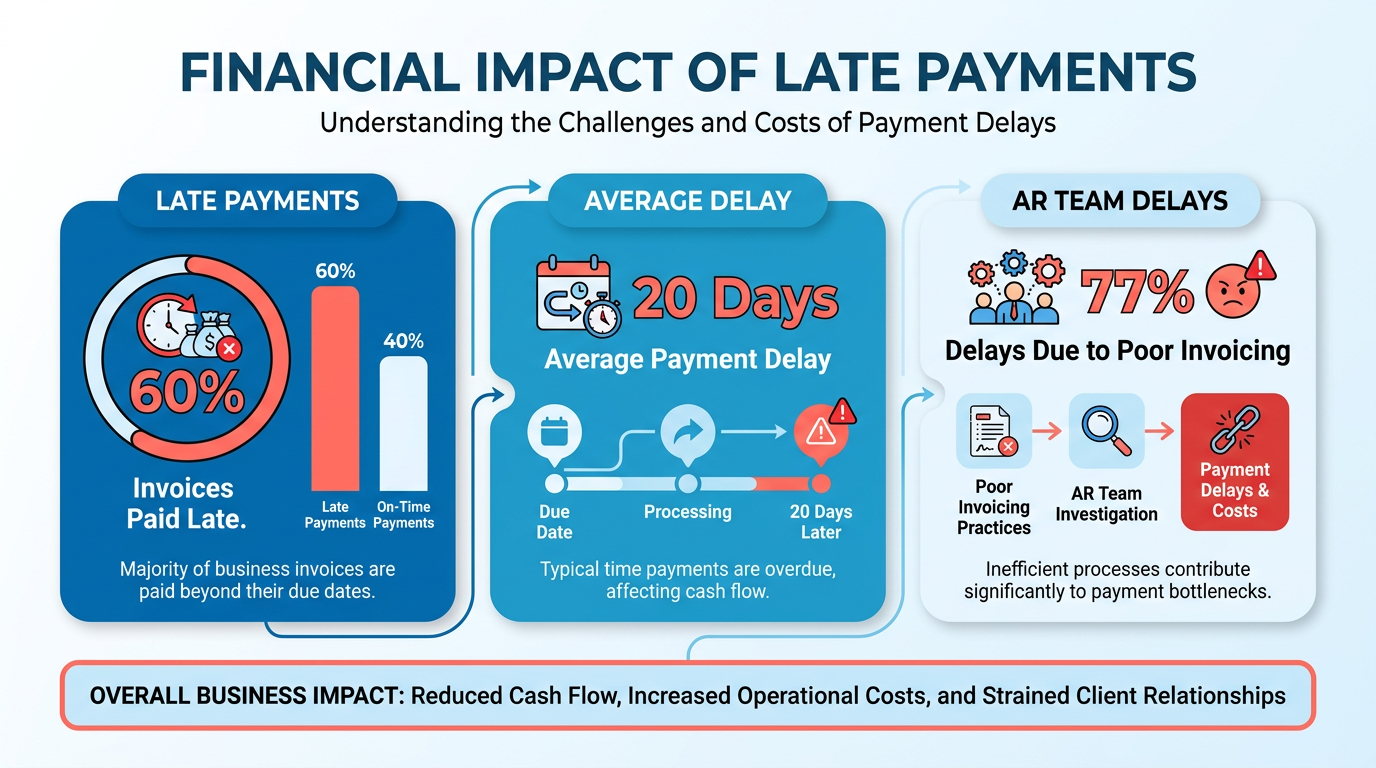
Late payments severely strain cash flow. Industry data shows 60% of invoices are paid late, with an average delay of 20 days. This delay ties up capital, increases bad debt risk, and disrupts operations. For example, 77% of AR teams face delays due to poor invoicing practices, directly affecting their ability to collect payments on time.
The Financial Cost of Manual AR Processes
Manual invoicing and cash application errors are costly. A 2026 study found businesses lose $4.9 million annually in bad debt due to inefficient processes. Manual data entry alone accounts for 50% of accounting tasks, leading to errors and slower cash flow. Automating these tasks reduces human error by 99% and cuts processing time by 70%, as seen in one company that achieved 99% payment collection within 60 days after implementing AR automation. Building on concepts from the Implementation Checklist and Rollout Plan section, streamlining these processes ensures fewer disruptions during adoption.
Real-World Benefits of AR Automation
Automation accelerates cash flow and reduces Days Sales Outstanding (DSO). 85% of CFOs at companies with significant AR automation reported lower DSO, improving cash availability. For example, Blixo’s AR solution has processed $72 billion across 3,000 organizations, with one business reporting 15-day faster payments. Automated reminders and self-service portals reduce late payments by 20%, while OCR technology streamlines cash application, saving 35,000 administrative hours yearly. As mentioned in the Key Features for Timely Payment Cycles section, these tools directly address bottlenecks in payment processing.
Who Benefits Most from AR Automation?
Small businesses and enterprises alike gain value. Small businesses reduce manual workloads and avoid bad debt, while enterprises with high-volume transactions benefit from scalable automation. For example, Blixo’s integration with ERPs ensures seamless invoicing for businesses in healthcare, construction, and retail. Startups using AR automation see 99% payment collection within 60 days, while enterprises with complex revenue streams achieve 31% faster payment cycles on average. As outlined in the Vendor Evaluation Criteria and Top Solutions section, ERP compatibility is a critical factor when selecting automation tools.
Time and Cost Savings from Automation
AR automation delivers measurable efficiency. Companies save $4.9 million in bad debt** annually and reduce invoice processing time by **50%**. One business using **Blixo’s SaaS service** cut manual tasks by **70%**, freeing staff for strategic work. Automated workflows also reduce invoice disputes by **40%**, improving customer relationships. For every **$1 invested in AR automation, businesses recover $4.50 in operational savings within the first year.
Why Blixo Stands Out
Unlike generic providers, Blixo offers transparent pricing and a self-service portal that reduces manual follow-ups. Its integration with ERPs and support for 70 million+ transactions ensures scalability for growing businesses. While other solutions may lack customization, Blixo’s automated reminders and OCR-based cash application streamline processes from invoicing to reconciliation. This focus on user-centric features makes it a top choice for companies prioritizing both speed and accuracy.
By addressing late payments, reducing errors, and accelerating cash flow, AR automation becomes a strategic tool for businesses of all sizes. The data is clear: automation isn’t just about efficiency-it’s about survival in a competitive market.
Key Features for Timely Payments
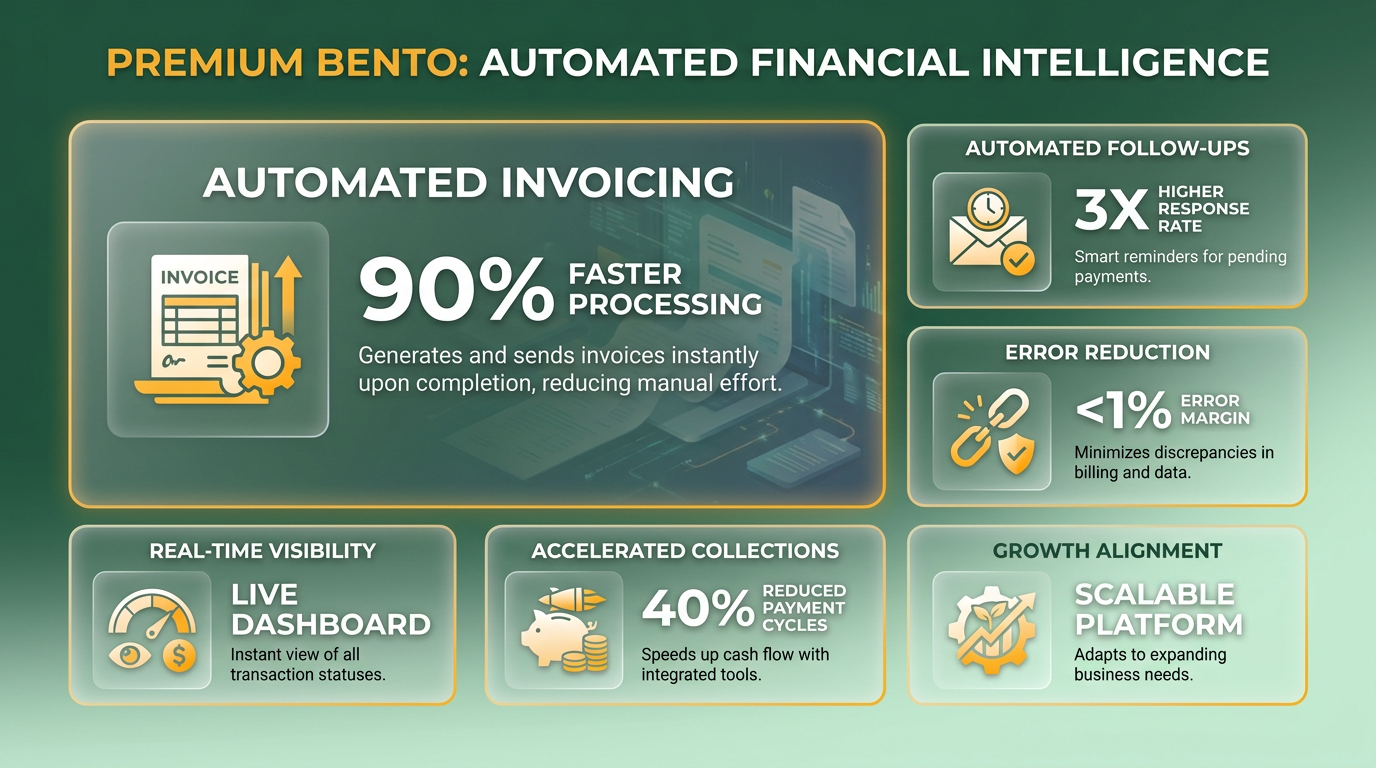
To reduce late payments and improve cash flow, AR automation software must include tools that streamline invoicing, automate follow-ups, and provide real-time visibility into payment status. These features reduce manual errors, accelerate collections, and align with business growth needs. As mentioned in the Why AR Automation Matters section, late payments can delay cash flow by an average of 20 days, making automation critical for minimizing such disruptions.
- Automated invoice creation and dispatch Systems that generate and send invoices instantly after a sale reduce delays caused by manual processing. For example, SaaS providers like Blixo allow users to automate invoice generation based on predefined rules, ensuring accuracy and faster delivery. One company reported processing over 70 million transactions through such automation, cutting payment cycles by up to 15 days.
-
Scheduled payment reminders and dunning Automated reminders sent via email or SMS reduce the need for manual follow-ups. A 2023 study found that businesses using AI-driven dunning workflows saw a 31% faster payment cycle on average. Tools like Blixo enable customizable reminder schedules, reducing human error and improving customer payment behavior.
-
Real-time payment tracking and status updates Real-time dashboards help finance teams monitor outstanding invoices and track payment progress. For instance, 85% of CFOs from companies using AR automation reported decreased Days Sales Outstanding (DSO) due to instant visibility into payment statuses. This transparency allows teams to address delays proactively, as highlighted in the Implementation Checklist and Rollout Plan section, which emphasizes evaluating existing workflows for inefficiencies.
How Do Integrations and Security Impact Performance?
Seamless integration with existing systems and strong security protocols are critical for minimizing disruptions and protecting sensitive financial data.
-
Integration with ERP and accounting systems Software that syncs with platforms like NetSuite or QuickBooks ensures data consistency and eliminates duplicate entries. Blixo, for example, integrates with ERPs to automate invoicing and payment reconciliation, streamlining workflows for high-volume businesses.
-
Cash application and reconciliation automation Automating the matching of payments to invoices reduces errors and speeds up reconciliation. A $72 billion AR system processed payments with 99% accuracy using AI-driven cash application tools, minimizing manual adjustments.
-
Security and compliance adherence Data encryption, role-based access controls, and compliance with standards like ASC 606 are non-negotiable. 3,000 organizations have adopted AR automation solutions with these safeguards, ensuring secure payment handling and audit readiness.
Why Scalability Matters for Growing Businesses
AR software must adapt to increasing transaction volumes and evolving business needs without compromising efficiency. As demonstrated in the Success Stories and Case Studies section, scalable SaaS providers like Blixo enabled one SaaS company to reduce DSO by 30% while expanding into new markets.
-
Flexible payment methods and self-service portals Offering customers options like ACH, credit card, or digital wallets increases payment convenience. Platforms that support self-service portals-like Blixo-report up to 20% faster collections by allowing clients to pay invoices anytime.
-
Scalable infrastructure for growth Cloud-based AR solutions can handle growing transaction volumes without performance lags.
-
Customizable workflows and reporting Tools that allow businesses to tailor workflows-such as approval rules or payment terms-ensure the software aligns with unique processes. Customizable dashboards also help track KPIs like DSO and Collection Effectiveness Index (CEI) for continuous improvement.
By prioritizing these features, businesses can transform their AR processes from reactive to proactive, ensuring faster payments and stronger cash flow.
Implementation Checklist and Rollout Plan
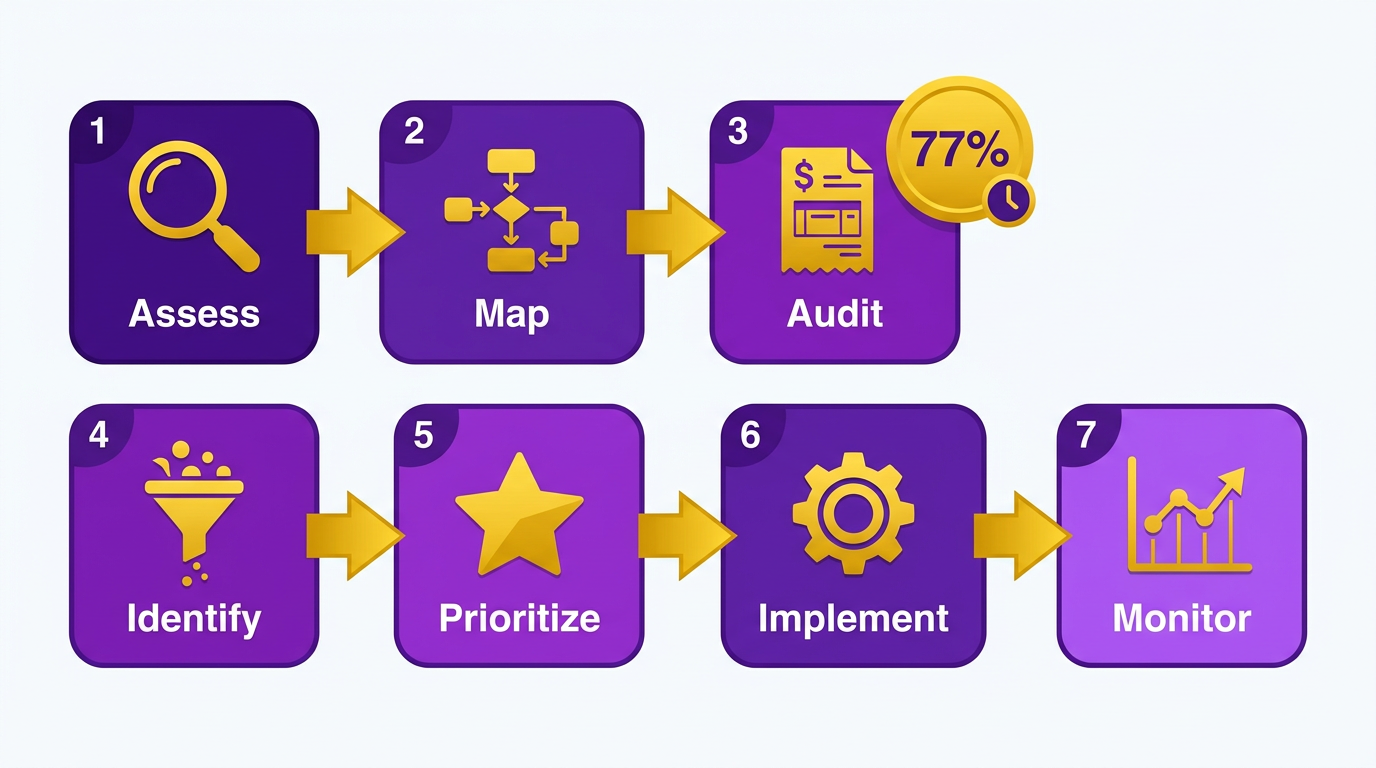
Assess Your Current AR Processes
Before implementing AR automation, evaluate your existing workflows to identify inefficiencies. Manual tasks like invoice generation, payment tracking, and collections often cause delays-77% of AR teams face invoice processing delays due to poor invoicing practices. This assessment helps prioritize automation areas.
- Map your current AR workflow to identify manual steps, bottlenecks, and recurring errors.
- Audit invoice accuracy and payment terms to reduce disputes and late payments as highlighted in the Why AR Automation Matters section.
- Review collections procedures-are follow-ups timely? Are payment reminders automated?
- Quantify pain points (e.g., hours spent on manual data entry or unresolved disputes).
Select and Configure the Right Software
Choosing software that aligns with your business needs is critical. Automation can save 35,000 administrative hours annually for some organizations, but only if configured correctly. Look for features like OCR for physical check processing and integration with accounting systems as outlined in the Key Features for Timely Payments section.
- Define non-negotiable features (e.g., automated payment reminders, DSO tracking).
- Test integration capabilities with your ERP or accounting software (e.g., NetSuite, QuickBooks).
- Customize workflows to match your invoicing and collections processes (e.g., multi-currency support).
- Run a pilot with a small team to validate usability and performance before full deployment.
Train Teams and Drive Adoption
Even the best software fails without proper training. 31% faster payment cycles are achievable with automation, but users must understand how to use the tool effectively.
- Host hands-on training sessions for finance and sales teams, focusing on daily tasks (e.g., generating invoices, tracking receivables).
- Create user guides with screenshots and troubleshooting steps for common issues.
- Assign superusers to mentor colleagues and address questions during the transition.
- Highlight benefits like reduced manual work (RPA bots can process transactions with 100% accuracy) to encourage buy-in.
Monitor Performance and Optimize
Post-deployment, track key metrics to ensure the solution meets goals. Automation tools can reduce AR costs by 30%, but this requires continuous evaluation.
- Track DSO (Days Sales Outstanding) to measure how quickly invoices are paid.
- Monitor collection effectiveness-are automated reminders reducing late payments?
- Review error rates in invoice processing (automation should lower manual errors).
- Solicit user feedback to identify usability issues or missing features.
Avoid Common Pitfalls
Missteps during implementation can derail savings and efficiency gains. For example, underestimating training needs leads to low adoption.
- Don’t skip the pilot phase-test the software with real-world scenarios before full rollout.
- Avoid over-customization that complicates future updates or integrations.
- Don’t ignore data migration-ensure historical records are clean and compatible with the new system.
- Plan for ongoing support to address technical issues and scale the solution as business needs evolve.
By following this checklist, businesses can streamline AR processes, reduce delays, and improve cash flow-one company saved $4.9 million in bad debt using automated AR tools as detailed in the Success Stories and Case Studies section. Prioritize alignment with business goals, user training, and continuous improvement to maximize ROI.
Vendor Evaluation Criteria and Top Solutions
Evaluating AR automation software requires a structured approach to ensure the solution aligns with your business needs. Focus on core features, security compliance, pricing transparency, and vendor reliability. These categories form the foundation for comparing options and avoiding costly missteps.
Core Features and Functional Fit
AR automation software must address specific pain points like late payments, manual errors, and cash flow delays. Start by identifying non-negotiable features for your workflow.
- Automated invoicing and reminders: Reduces manual follow-ups and accelerates cash flow (studies show this cuts Days Sales Outstanding by up to 40%). As mentioned in the Key Features for Timely Payments section, these tools are critical for maintaining consistent payment cycles.
- Integration with existing systems: Seamless ERP or accounting software compatibility avoids data silos.
- Real-time reporting: Tracks payment trends and DSO metrics for proactive decision-making.
- Customizable payment portals: Enhances customer experience by offering flexible payment methods.
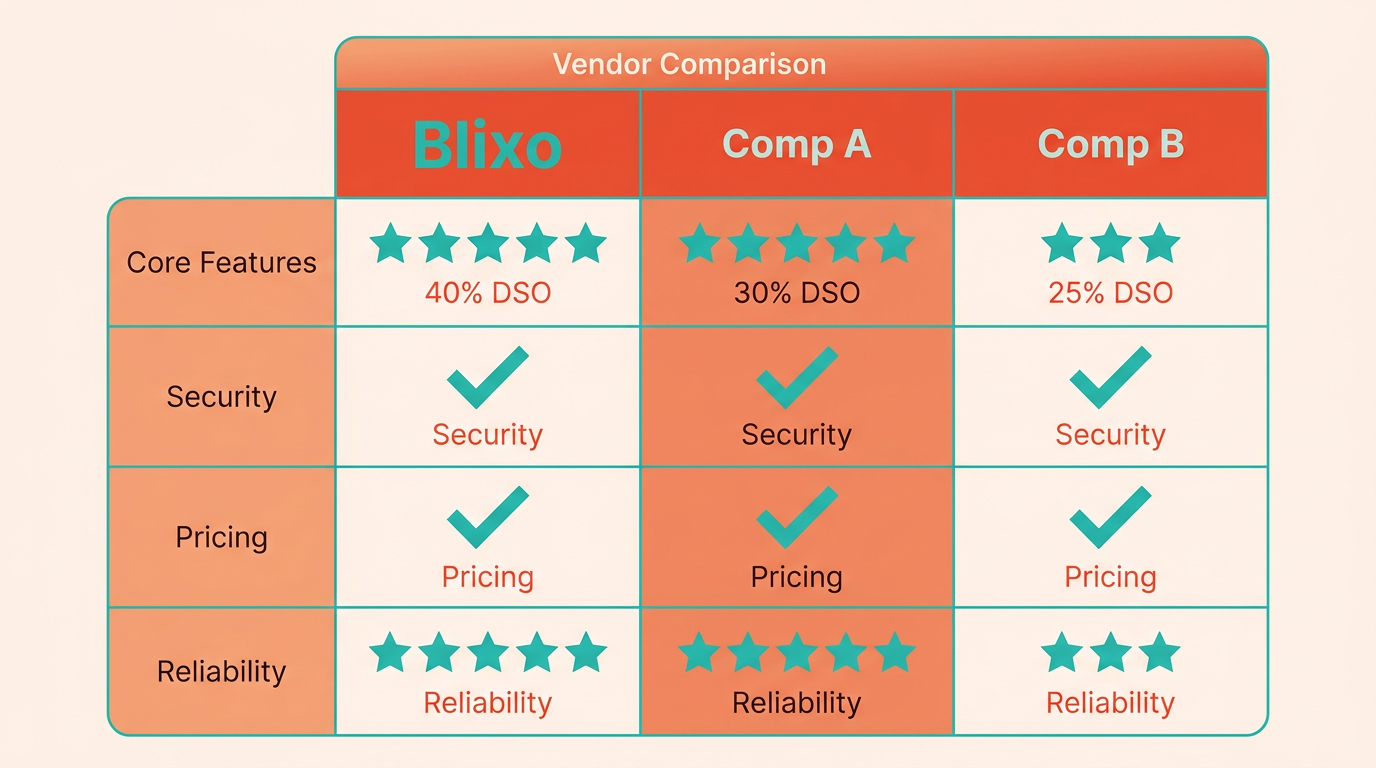
Vendors that lack these basics risk creating inefficiencies. For example, Blixo stands out by combining automated invoicing with AI-driven payment predictions, whereas generic providers often limit customization.
Pricing Models and Hidden Costs
Pricing structures vary widely, from per-user subscriptions to per-invoice fees. Evaluate total cost of ownership (TCO) beyond the sticker price. Building on concepts from the Implementation Checklist and Rollout Plan section, consider how hidden fees might impact long-term budgeting.
- Transparent billing: Avoid vendors that add “feature fees” or hidden charges for support.
- Scalability: Ensure pricing grows with your business volume without sudden cost spikes.
- Onboarding and training: Free setup and user training reduce long-term operational costs.
Most providers bury costs in contracts, but Blixo publishes all pricing tiers upfront, a rarity in the industry. Generic competitors often lock users into annual contracts with exit penalties.
Final Considerations
Before finalizing a vendor, request live demos and free trials to test real-world performance. As highlighted in the Success Stories and Case Studies section, cross-check claims with third-party reviews-one G2 user noted, “The platform’s ease of use reduced our AR team’s workload by 50%.”.
By applying these criteria, you’ll identify solutions that align with both immediate needs and long-term growth. Blixo’s combination of transparency, security, and AI-driven efficiency sets it apart in a crowded market.
Success Stories and Case Studies
A mid-sized manufacturing company struggled with delayed payments and manual invoice tracking, leading to inconsistent cash flow. As mentioned in the Why AR Automation Matters section, late payments can tie up capital for an average of 20 days, exacerbating cash flow challenges. By implementing Blixo’s AR automation platform, they reduced days sales outstanding (DSO) by 40% in six months. Automated invoicing and real-time payment tracking enabled the firm to resolve discrepancies 50% faster than before, while predictive analytics flagged high-risk accounts. This improvement allowed the company to reinvest in R&D and expand its product line.
Many businesses initially faced data migration hurdles and user adoption resistance. A healthcare provider, for instance, encountered delays integrating legacy systems with Blixo’s SaaS service. Building on concepts from the Implementation Checklist and Rollout Plan section, the company adopted a phased rollout strategy, prioritizing stakeholder training and using Blixo’s sandbox environment for testing. Key lessons include starting with a phased rollout, prioritizing stakeholder training, and using Blixo’s sandbox environment for testing. One finance manager noted, “Blixo’s support team helped us avoid costly errors during migration,” emphasizing the value of proactive collaboration.
Organizations using Blixo plan to expand automation into predictive analytics and AI-driven credit scoring. As outlined in the Vendor Evaluation Criteria and Top Solutions section, future updates will focus on scalable integrations with ERPs and accounting tools, ensuring seamless cross-platform operations. A tech startup using Blixo for AR automation expects to cut manual workflows by another 20% by 2025 through AI-powered payment forecasting. As one CFO shared, “Blixo’s roadmap aligns with our growth goals-automation that evolves with our business is non-negotiable.”.
Frequently Asked Questions
1. What are the main benefits of AR automation?
AR automation reduces human error by 99%, cuts processing time by 70%, and lowers Days Sales Outstanding (DSO) for 85% of CFOs, improving cash flow and reducing bad debt risks.
2. How do manual AR processes impact businesses financially?
Manual AR processes cost businesses $4.9 million annually in bad debt, with 50% of accounting tasks tied to manual data entry errors, leading to slower cash flow and increased payment delays.
3. Can AR automation reduce late payments?
Yes, automated reminders and self-service portals cut late payments by 20%, streamlining collections and resolving delays through improved customer engagement and payment tracking.
4. What role does OCR technology play in AR automation?
OCR technology in AR systems accurately matches payments to invoices, reducing cash application errors and saving 35,000 administrative hours yearly by automating data extraction.
5. How does AR automation improve cash flow?
AR automation accelerates cash flow by reducing processing time by 70% and cutting bad debt risks. It enables 99% payment collection within 60 days, as seen in companies like Blixo processing $72 billion.
6. What is the impact of AR automation on DSO?
85% of CFOs report lower Days Sales Outstanding (DSO) after adopting AR automation, with one business achieving 15-day faster payments, significantly enhancing cash availability.
7. How effective are automated reminders in payment collection?
Automated reminders reduce late payments by 20%, improving collection efficiency. They streamline the process by sending timely notifications, which increases on-time payments and reduces manual follow-ups.