

AR Automation Companies Checklist for Efficient Cash Flow

Key Takeaways
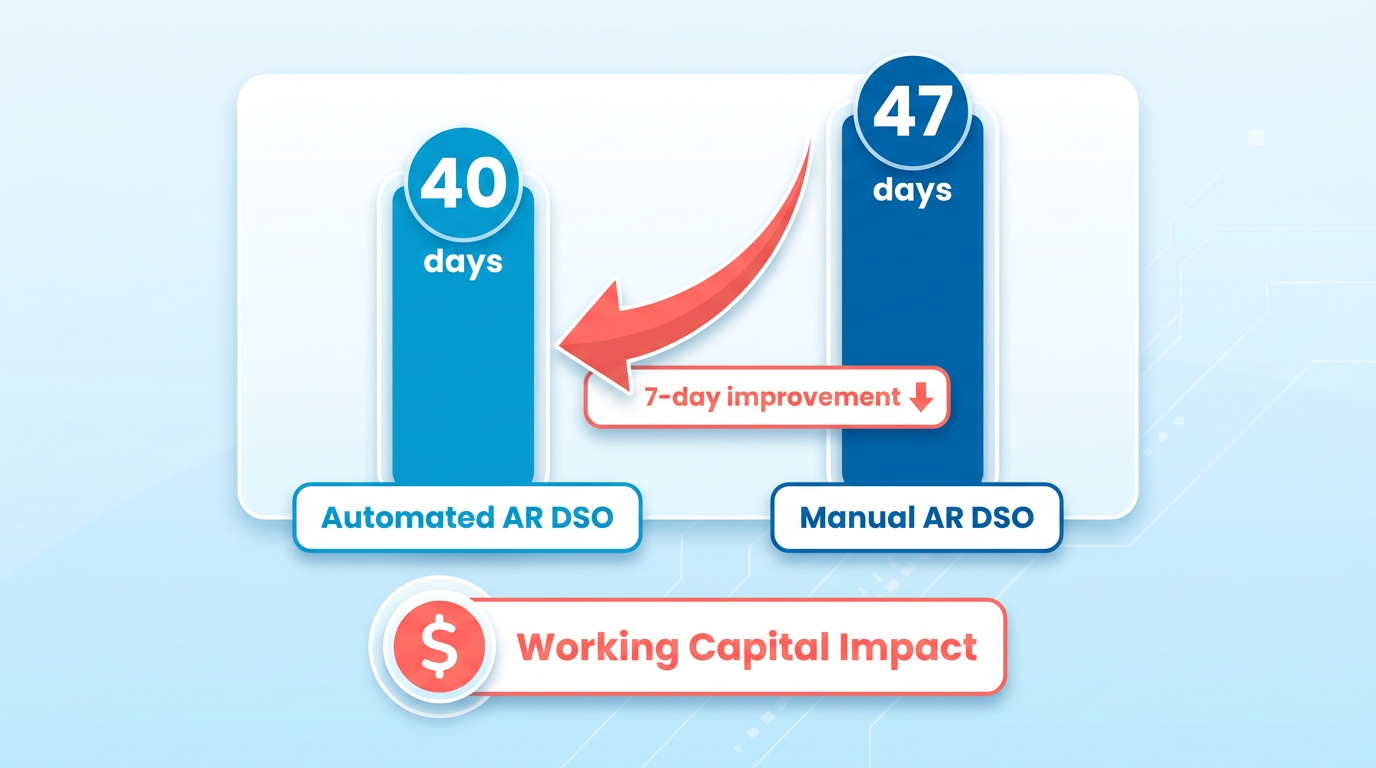
- AR automation reduces Days Sales Outstanding (DSO) by 7 days on average compared to manual systems.
- Automated systems cut manual AR errors by up to 70%, improving financial accuracy and reducing revenue leakage.
- AI-powered reminders and payment portals can cut invoice processing time by 50%, accelerating collections.
- 80% of companies struggle with manual AR processes, leading to delays and revenue loss.
- Automating credit applications and invoicing can lower DSO by 25% within six months, as seen in real-world examples.
- A mid-sized firm reduced time spent on receivables by 50% using AR automation, boosting operational efficiency.
- Automated payment matching and invoicing eliminate 50% of processing delays, ensuring faster cash flow predictability.
Why AR Automation Matters for Cash Flow
AR automation directly impacts cash flow by reducing delays, errors, and manual workloads that drain financial efficiency. Industry data shows businesses with automated AR processes achieve an average Days Sales Outstanding (DSO) of 40 days, compared to 47 days for manual systems. This 7-day gap translates to faster access to working capital, which is critical for operational stability. As mentioned in the Checklist for Efficient Cash Flow Management with AR Automation section, automating invoicing and payment reminders directly contributes to such improvements. For example, one company slashed its DSO by 25% within six months after automating credit applications and invoicing, proving that streamlined workflows accelerate payments.
How AR Automation Reduces Cash Flow Bottlenecks
Manual invoicing and cash application errors cost businesses time and revenue. Nearly 80% of companies struggle with manual AR processes, leading to revenue leakage and delayed collections. Automated systems eliminate these pain points by:
- Minimizing human errors: Automated invoice creation and payment matching reduce mistakes by up to 70%, according to industry studies.
- Speeding up collections: AI-powered reminders and payment portals cut processing time by 50%, as seen in platforms that unify invoicing, collections, and analytics.
For instance, a mid-sized firm reduced time spent on receivables by 50% using automation, freeing staff to focus on strategic tasks. These efficiencies directly improve cash flow predictability, ensuring businesses can meet obligations without reliance on external financing.
Real-World Impact on Small and Enterprise Businesses
Small businesses and enterprises alike benefit, but the scale of impact varies. Small companies often struggle with cash flow gaps-32% cite it as their biggest operational challenge-while enterprises face complexity in managing high-volume transactions.
A retail SME in the UK used AI-driven AR tools to cut excess inventory costs by 25% and boost cash reserves by 15%. Meanwhile, a manufacturing firm automated credit checks and reduced DSO from 54 to 31 days, avoiding a cash crisis during a client payment delay. These examples highlight how automation adapts to business size, offering tailored solutions for liquidity needs.
Larger organizations also see transformative results. One enterprise reduced past-due invoices by 30% using a unified AR platform, accelerating payments and reducing bad debt risk. These outcomes underscore that AR automation isn’t just a necessity for businesses aiming to thrive in competitive markets.
Why Blixo Stands Out in AR Automation
Unlike generic providers, Blixo offers transparent pricing and AI-driven analytics that adapt to evolving business needs. Its SaaS service integrates with ERPs and payment gateways, ensuring seamless data flow and real-time visibility into cash positions. Building on concepts from the Criteria for Selecting AR Automation Software section, Blixo’s scalable workflows ensure businesses of all sizes maintain liquidity. For example, Blixo’s automated cash application feature matches payments to invoices instantly, reducing reconciliation time by 80%. By prioritizing user-friendly dashboards and scalable workflows, Blixo helps businesses of all sizes enable liquidity faster. Whether you’re a small startup or a global enterprise, the result is the same: improved DSO, reduced operational costs, and a stronger financial foundation.
Key Components of an AR Automation Checklist
What Security Items Should You Check?
Security and compliance must be non-negotiable in any AR automation checklist. Sensitive financial data requires strong safeguards, including encryption, access controls, and regulatory compliance. PCI-Level 1 compliance ensures secure payment transactions, while GDPR or HIPAA alignment protects data privacy. A real-time audit trail also helps track user actions, reducing fraud risks. Building on concepts from the Why AR Automation Matters for Cash Flow section, these security measures prevent operational disruptions caused by breaches or compliance failures.
- Enable end-to-end encryption for data in transit and at rest
- Verify PCI-DSS or ISO 27001 compliance for payment processing
- Implement role-based access controls to limit data visibility
- Use multi-factor authentication for user logins
For example, one company saved 50% in processing time after adopting a solution with automated reconciliation and real-time tracking. These tools also help meet legal requirements, avoiding fines from noncompliance..
What Features Improve Cash Flow Efficiency?
Efficient cash flow depends on streamlining invoicing, collections, and reporting. Automated invoicing reduces errors and accelerates payments, while smart payment reminders cut late fees. Real-time dashboards offer instant visibility into receivables, helping teams prioritize collections. As mentioned in the Checklist for Efficient Cash Flow Management with AR Automation section, automating these workflows directly correlates with improved DSO metrics.
- Automate invoice generation and delivery via email or portals
- Set up tiered payment reminders (e.g., 3-day, 7-day, 14-day intervals)
- Use AI to match payments with invoices and flag discrepancies
- Enable self-service portals for customers to view statements and make payments
A generic provider’s case study showed that real-time tracking reduced Days Sales Outstanding (DSO) by 20%. These features ensure faster cash collection and fewer manual interventions..
How Do Custom Workflows Enhance Flexibility?
Customizable workflows allow businesses to adapt AR processes to their unique needs. Whether handling one-time invoices, recurring subscriptions, or multi-currency transactions, flexibility ensures smoother operations. Integration with ERPs like SAP or Microsoft Dynamics eliminates data silos, enabling seamless financial reporting. As mentioned in the Criteria for Selecting AR Automation Software section, scalability and ERP compatibility are critical for long-term adaptability.
- Design workflows for late fees, partial payments, and disputes
- Integrate with ERPs such as Sage, Oracle, or Acumatica for unified data
- Support multiple payment methods (ACH, credit cards, digital wallets)
- Allow customization for industries like healthcare, SaaS, or manufacturing
For example, a construction firm used AR automation to bridge cash gaps between project milestones. Without tailored workflows, businesses risk operational delays or customer dissatisfaction..
Why Prioritize Scalability and User Experience?
A scalable AR solution grows with your business, handling increasing transaction volumes without performance drops. User-friendly interfaces reduce training time, while mobile access ensures teams can manage payments on the go. Transparent pricing models prevent hidden costs, a critical factor for long-term budgeting. Building on concepts from the Implementation Best Practices for AR Automation section, aligning software capabilities with business growth objectives ensures cost-effective scaling.
- Test system performance under high-volume scenarios
- Opt for intuitive dashboards with drag-and-drop customization
- Ensure mobile compatibility for on-the-go access
- Choose providers with 24/7 support for troubleshooting
Unlike generic providers, Blixo offers transparent pricing and a modular design, letting businesses pick features as needed. This approach avoids overpaying for unused tools while maintaining agility..
What Metrics Should You Track for Success?
Measuring AR automation’s impact requires tracking key performance indicators (KPIs). Focus on DSO, error rates, and customer satisfaction to gauge efficiency improvements. As mentioned in the Common Challenges and Mitigation Strategies for AR Automation section, fragmented metrics often hinder progress, making centralized reporting essential.
- Monitor DSO changes monthly to assess collection speed
- Track invoice accuracy rates (target: 99% or higher)
- Survey customers on payment experience (e.g., ease of portal use)
- Compare automation costs versus manual processing expenses
One organization reduced DSO from 45 to 28 days by adopting real-time reporting. These metrics provide actionable insights, helping refine strategies for maximum ROI.
Criteria for Selecting AR Automation Software
What Makes Scalability and Flexibility Critical?
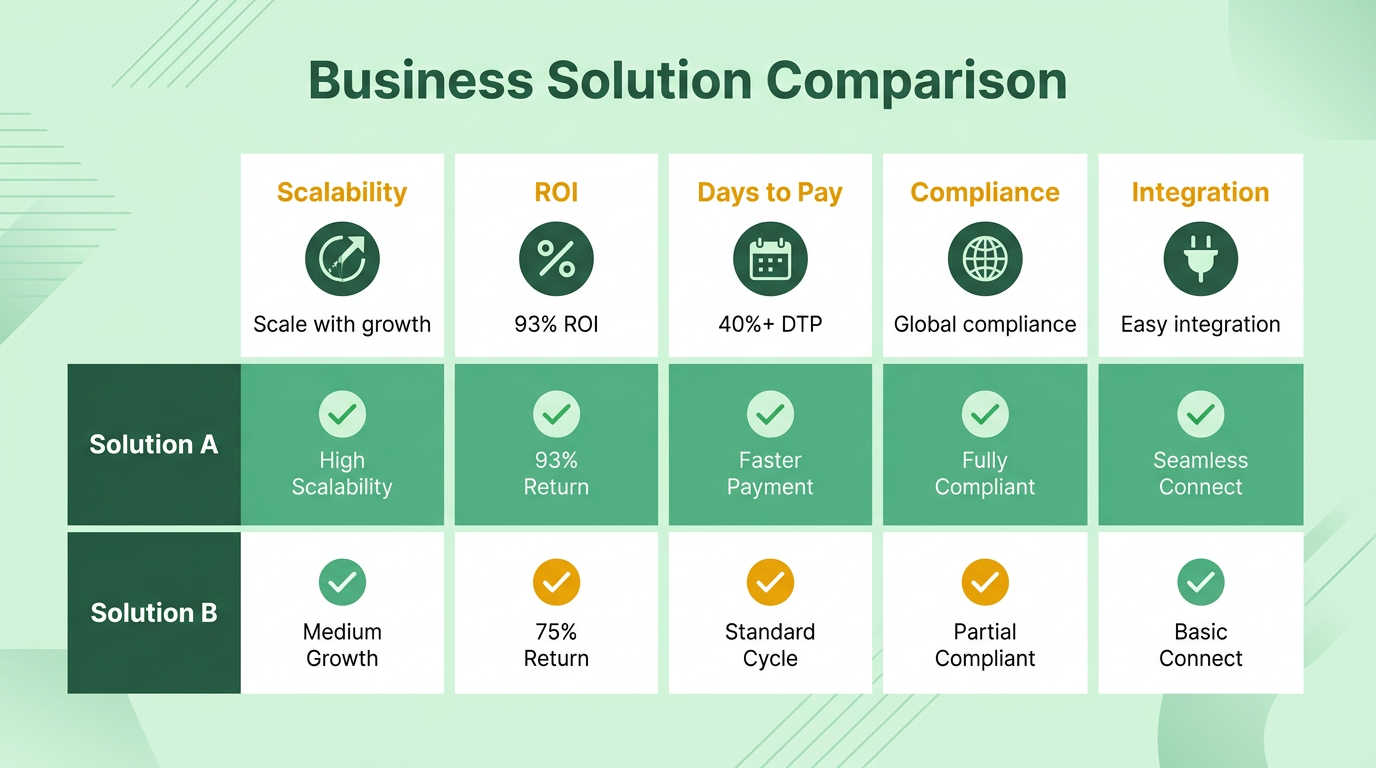
AR automation software must grow with your business. Systems that lack scalability risk slowing operations as transaction volumes rise. For example, 93% of companies in a Billtrust study confirmed their AR automation delivered expected ROI, with 40%+ reduction in Days to Pay (DTP). Look for platforms that handle increasing invoice volumes without performance drops.
- Choose software that scales with your team size, revenue growth, and geographic expansion
- Verify the ability to support multi-currency transactions and global compliance (as detailed in the Key Components of an AR Automation Checklist section)
- Ensure the system adapts to new payment methods (e.g., digital wallets, ACH).
How Important Is Ease of Integration?
55% of businesses struggle to integrate AR systems with existing tools, per AR automation research. A seamless setup reduces downtime and prevents data silos. Platforms that connect with ERPs like SAP or Microsoft Dynamics streamline workflows from invoicing to cash application (Building on concepts from the Common Challenges and Mitigation Strategies for AR Automation section on integration hurdles).
- Confirm compatibility with your current ERP, accounting, and CRM systems
- Opt for pre-built APIs or connectors to avoid custom coding
- Request a demo to test integration speed and data accuracy.
What Security Features Should You Demand?
Financial data breaches cost businesses an average of $4.45 million, according to IBM. AR automation software must include encryption, role-based access, and audit trails. A Billtrust study found 100% of users satisfied with security protocols, including real-time fraud detection (As outlined in the Key Components of an AR Automation Checklist section on security standards).
- Look for GDPR, SOC 2, and PCI DSS compliance certifications
- Enable multi-factor authentication and end-to-end encryption
- Audit logs for tracking user activity and payment changes.
What Metrics Define a Strong ROI?
93% of finance leaders in a Billtrust study reported measurable ROI from AR automation, including 25% faster payments and 30% fewer past-due invoices. Track metrics like Days Sales Outstanding (DSO), error rates, and labor cost savings (Referenced in the Checklist for Efficient Cash Flow Management with AR Automation section on DSO tracking).
- Calculate DSO before and after automation to measure cash flow improvements
- Compare manual vs. automated processing costs per invoice
- Monitor reductions in late fees and bad debt expenses
Implementation Best Practices for AR Automation
Planning and Assessment
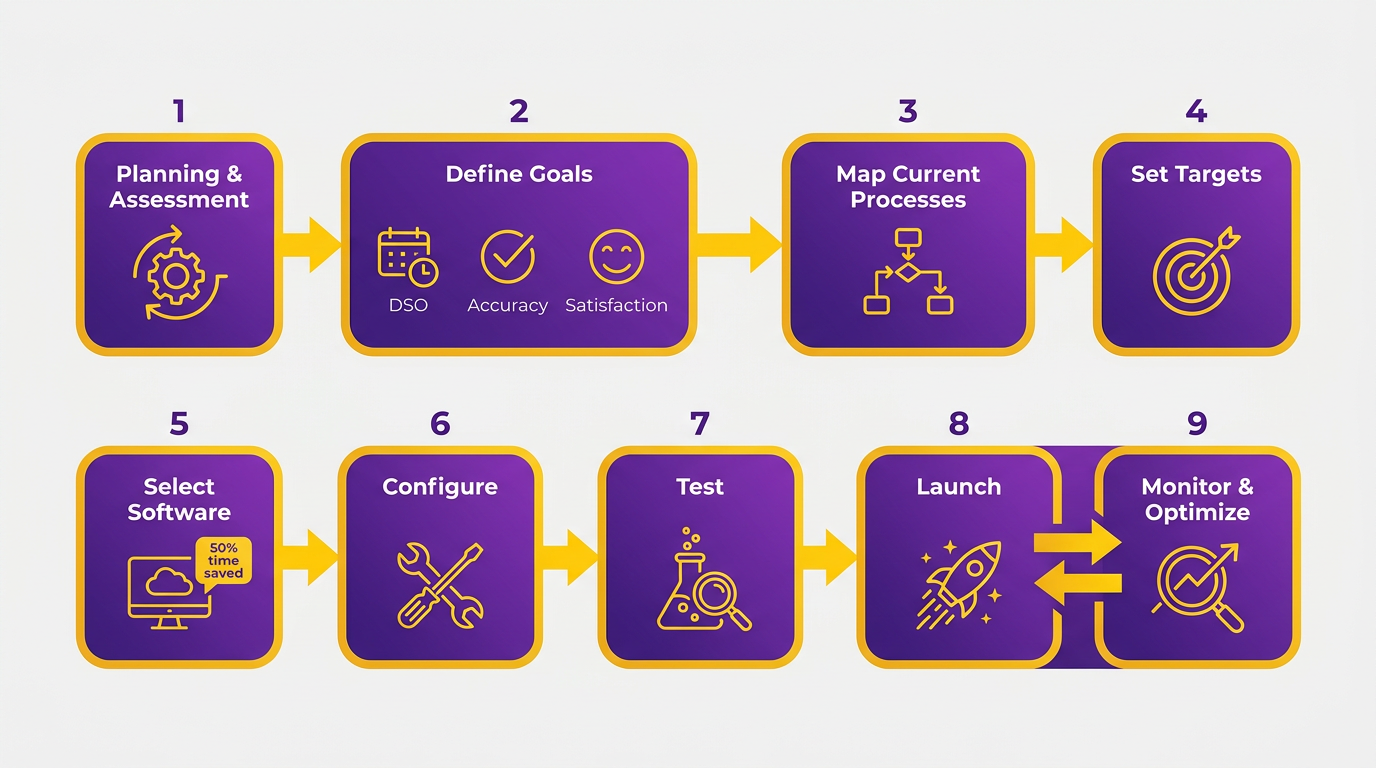
Before implementing AR automation, businesses must align their goals with their financial strategies and evaluate existing processes. Clear objectives help identify which areas of the accounts receivable (AR) cycle need the most improvement. As mentioned in the Why AR Automation Matters for Cash Flow section, aligning AR automation with cash flow goals is critical for reducing delays and improving efficiency. Start by defining measurable targets like reducing Days Sales Outstanding (DSO), improving payment accuracy, or increasing customer satisfaction.
- Define clear goals: Focus on outcomes such as faster cash flow, reduced manual errors, or improved reconciliation. For example, one company saved 50% on processing time by automating invoice validation.
- Audit current AR workflows: Map out manual steps like invoice approvals, payment tracking, and dispute resolution. Look for bottlenecks, such as delayed customer payments or redundant data entry. Tools like workflow diagrams can help visualize inefficiencies.
- Assess integration needs: Ensure the AR automation solution connects with your ERP system to avoid data duplication. Building on concepts from the Criteria for Selecting AR Automation Software section, seamless integration with ERP-generated invoices is essential for scalability and flexibility in growing businesses.
Implementation and Training
Once goals are set, businesses must design workflows that align with their operations and train teams to use the new system effectively. Customizing payment options and automating repetitive tasks can enhance user adoption and customer satisfaction. As outlined in the Checklist for Efficient Cash Flow Management with AR Automation section, tailoring payment processes to include diverse methods like ACH and digital wallets directly supports on-time payment rates.
- Customize workflows: Tailor payment processes to support methods like ACH, credit/debit cards, and digital wallets. For instance, a tech startup reduced its DSO from 54 to 31 days by automating invoice delivery and payment reminders.
- Train staff thoroughly: Provide hands-on training for teams handling invoice processing, customer support, and reporting. One provider’s clients noted a 25% productivity boost after staff learned to use automated reconciliation features.
- Test with real-world scenarios: Run pilot programs to identify gaps in workflows. For example, test how the system handles late payments or disputes to refine rules before full deployment.
Monitoring and Improvement
After deployment, continuous evaluation ensures the AR automation system meets its goals. Regularly analyzing performance metrics and refining workflows helps maintain efficiency and adapt to changing business needs.
- Track key metrics: Monitor DSO, Days Payable Outstanding (DPO), and payment error rates. Unlike generic providers, Blixo offers transparent pricing, making it easier to align costs with performance benchmarks.
- use reporting tools: Use dashboards to identify trends, such as recurring payment delays or high-dispute customers. One provider’s reporting features helped a retail business cut inventory costs by 25%.
- Refine processes iteratively: Update workflows based on feedback from users and customers. For example, adding multilingual support in payment portals reduced disputes for a global company by 30%.
By following these steps, businesses can implement AR automation that streamlines operations, reduces costs, and improves cash flow visibility. Regularly revisiting goals and adapting to new challenges ensures long-term success in financial management.
Common Challenges and Mitigation Strategies for AR Automation
As mentioned in the Implementation Best Practices for AR Automation section, phased implementation reduces risk by testing integrations in controlled stages. Start with core modules like invoicing before expanding to credit management.
Building on concepts from the Criteria for Selecting AR Automation Software section, Blixo’s transparent pricing aligns with the need for scalability and flexibility in growing businesses. Unlike generic providers, Blixo offers transparent pricing for updates, ensuring long-term cost predictability.
As outlined in the Checklist for Efficient Cash Flow Management with AR Automation section, setting up alerts for unusual customer behavior ensures timely interventions. One health services SME in Australia reduced discretionary spending by 18% by fixing automation errors in expense tracking.
Checklist for Efficient Cash Flow Management with AR Automation
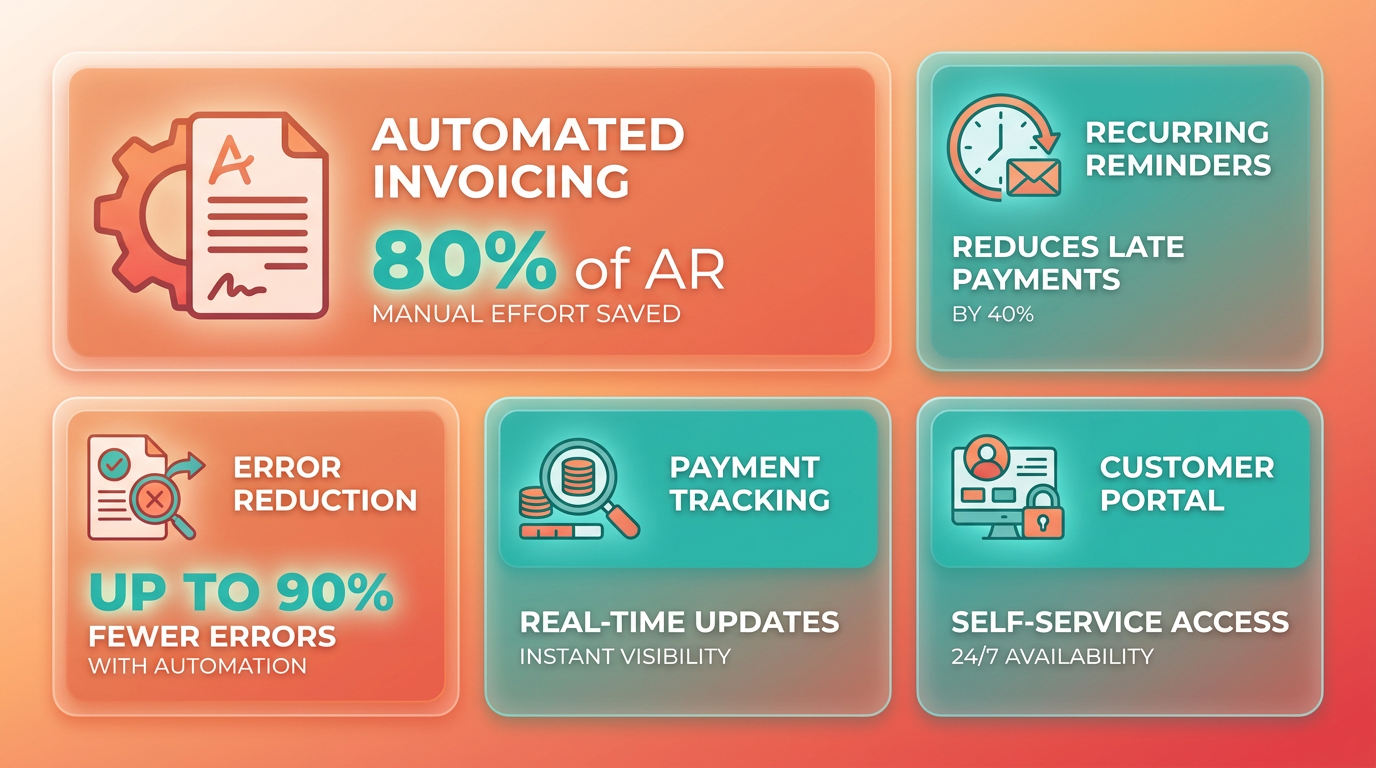
Automated invoicing reduces manual errors and administrative workload, ensuring timely, accurate billing. Payment reminders further improve on-time payments by maintaining consistent customer communication.
- Implement automated invoicing to eliminate manual data entry. Nearly 80% of businesses struggle with manual AR processes, and automation can cut errors by up to 90% (source ).
- Schedule recurring payment reminders via email or SMS. Studies show automated reminders improve on-time payment rates by 20% (source ).
Streamline Cash Application and Reconciliation
Automating cash application ensures payments are matched to invoices instantly, while reconciliation tools reduce manual audits. This minimizes revenue leakage and accelerates cash availability.
- Use AI-driven cash application to auto-match payments with invoices. Over 90% of users report improved risk management through automation (source ).
- use reconciliation tools for real-time visibility. Machine learning algorithms can reduce reconciliation time by 50% (source ).
Enable Real-Time Payment Tracking and Reporting
Real-time tracking provides instant insights into cash flow, while detailed reporting helps identify bottlenecks. This visibility reduces Days Sales Outstanding (DSO) and strengthens financial planning.
- Monitor payments in real time via centralized dashboards. Real-time tracking can cut DSO by up to 30% (source ). As mentioned in the Why AR Automation Matters for Cash Flow section, reducing DSO is critical for maintaining liquidity.
- Generate weekly cash flow reports to track metrics like Days Payable Outstanding (DPO). 93% of businesses using automation meet ROI expectations (source ).
Customize Billing and Payment Workflows
Tailoring workflows to business needs ensures flexibility, while supporting multiple payment methods improves customer satisfaction and reduces delays.
- Configure workflows for complex billing scenarios. For example, 89% of SMBs prioritize improving DSO as a financial health goal (source ).
- Offer flexible payment options (credit/debit, ACH, digital wallets). Automated delivery of invoices in preferred formats increases acceptance rates (source ).
Integrate with Existing Accounting and ERP Systems
Seamless integration with ERP systems like SAP or NetSuite ensures data consistency and eliminates redundant tasks. This is critical for maintaining accurate financial records.
- Ensure compatibility with ERP platforms. 55% of companies face integration challenges, but 95% of users report increased efficiency once connected (source ). Building on concepts from the Implementation Best Practices section, aligning integration goals with financial strategies is essential.
- Automate data synchronization between billing and accounting software. This reduces duplicate data entry and ensures real-time updates (source ).
Continuously Monitor and Optimize Performance
Regular evaluation of AR automation performance identifies inefficiencies and ensures long-term effectiveness. Adjust strategies based on analytics to maintain optimal cash flow.
- Review KPIs monthly (e.g., DSO, payment processing time). Companies that optimize workflows see a 40%+ reduction in Days to Pay (source ).
- Adjust automation settings quarterly based on customer feedback and performance trends. AI-driven analytics can predict payment behaviors and refine collection strategies (source ).
Final Checks
- Train finance teams on AR automation tools to maximize adoption.
- Test workflows with small-scale pilots before full deployment to identify gaps.
- Audit compliance with PCI standards for secure payment processing (source ). As outlined in the What Security Items Should You Check? section, compliance is non-negotiable for protecting sensitive data.
Frequently Asked Questions
1. How much does AR automation reduce Days Sales Outstanding (DSO)?
AR automation lowers DSO by 7 days on average compared to manual systems. Real-world examples show some companies cut DSO by 25% within six months through automated invoicing and credit applications.
2. What percentage of manual AR errors can automation eliminate?
Automated systems reduce manual AR errors by up to 70%, improving financial accuracy and preventing revenue leakage from processing mistakes.
3. How quickly can AI-powered reminders speed up invoice processing?
AI-powered reminders and payment portals cut invoice processing time by 50%, accelerating collections and reducing delays in cash flow.
4. What real-world efficiency gains do companies see with AR automation?
A mid-sized firm reduced time spent on receivables by 50% using AR automation, boosting operational efficiency and freeing staff for strategic tasks.
5. Can AR automation help small businesses as effectively as enterprises?
Yes, both small businesses and enterprises benefit, but impacts vary. Small businesses gain efficiency, while enterprises see larger-scale improvements in cash flow predictability.
6. How does automated payment matching improve cash flow?
Automated payment matching eliminates 50% of processing delays, ensuring faster cash flow predictability by aligning payments with invoices without manual intervention.
7. What’s the revenue leakage risk of manual AR processes?
Eighty percent of companies struggle with manual AR processes, leading to revenue loss and delays. Automation mitigates this by streamlining collections and reducing errors.